Modern organizations face challenges managing employee transitions.
To address this, Workwize has launched its new auto-offboarding feature, part of a more extensive automation suite set to roll out in 2025.
This innovative feature simplifies asset retrieval during employee offboarding, offering IT and HR teams a seamless and automated solution.
What Is Auto-Offboarding?
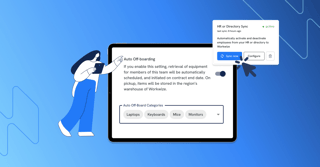
Auto-offboarding automates asset retrieval when employees leave the organization or return items for replacement or upgrades.
Workwize integrates directly with your HRIS system, automatically detecting employee departures and triggering the offboarding process. This eliminates manual effort, reduces errors, and ensures no assets are overlooked.
Companies can:
- Offboard all assets assigned to an employee.
- Select specific items to be offboarded based on organizational needs.
This flexibility caters to various scenarios, including:
- Employee exits: When an employee leaves the organization, the system automatically initiates the retrieval process for assets such as laptops or phones.
- Item replacement or repair: Damaged, outdated, or end-of-life assets can be selectively offboarded and replaced with minimal manual intervention
Why Auto-Offboarding Matters
When an employee leaves your organization, the offboarding process sets off a chain reaction. If done manually, it can become a tangle of spreadsheets, missed emails, and last-minute chases, costing time, money, and peace of mind.
Here’s what often happens with manual offboarding:
- Lead Times Stretch On: IT teams spend days—sometimes weeks—tracking down devices, revoking software access, and closing accounts.
- Spreadsheet Chaos: Tracking asset ownership across multiple spreadsheets increases the risk of errors and oversights.
- Unreturned or Lost Equipment: Devices gather dust on desks or disappear entirely, leading to financial loss and security risks.
- Hidden Costs Build Up: The time spent chasing assets or manually updating systems adds up, pulling your team away from higher-value tasks.
Automating offboarding tackles these challenges head-on:
- Reduces lead times by triggering workflows automatically, ensuring no step is missed and everything happens on schedule.
- Eliminates spreadsheet dependence with real-time updates across systems, removing the risk of manual errors.
- Secures asset retrieval by tracking every device, closing every account, and ensuring nothing slips through the cracks.
- Cuts hidden costs by freeing up IT and HR teams to focus on strategic goals, not administrative clean-up.
- Improves compliance by ensuring every step meets security and regulatory standards effortlessly.
When offboarding runs on automation, it’s no longer a bottleneck—it’s a streamlined, reliable process that saves time, reduces errors, and keeps your organization secure.
How Does Workwize's Auto-Offboarding Work?
Auto-Offboarding in Workwize is designed to be simple:
- Integrate Your HRIS: Connect Workwize with your HR system to sync employee data, including contract start and end dates.
- Enable Auto-Offboarding: Activate and configure the feature to manage specific asset categories like laptops or other equipment.
- Sit Back and Relax: Workwize automatically detects employee departures, schedules asset retrieval, updates statuses in real-time, and keeps you informed through clear, easy-to-read reports.
There are no manual follow-ups or missed assets—zero-touch, zero hassle—just smooth, reliable offboarding every time.
What’s Next for Workwize?
The auto-offboarding feature is just the beginning. Over the next year, Workwize plans to introduce additional automation capabilities, including auto-restocking and auto-deploying features, to create a fully automated asset management experience. These advancements will streamline IT and HR workflows, making it easier for organizations to manage their assets throughout their lifecycle.
Ready to take the hassle out of employee transitions?
Offboarding employees doesn’t have to be a hassle—or a drain on your time and resources.
Workwize’s auto-offboarding feature makes transitions seamless, secure, and stress-free. It integrates effortlessly with HR tools, automates asset retrieval, and ensures nothing slips through the cracks. Save time, reduce errors, and improve efficiency—all while keeping your IT processes smooth and reliable.
With Workwize, you can turn offboarding into an effortless experience. Ready to take the next step? Discover the auto-offboarding feature today and see the difference for yourself.





.png?width=64&height=64&name=Group%202147261402%20(5).png)
.png?width=1230&height=692&name=Vector%20(13).png)

.png?width=258&height=318&name=g10%20(5).png)







.svg)
.svg)
.svg)
.svg)