




.svg)
.svg)

.svg)


.svg)





.svg)
.png?width=500&height=424&name=Style-1---V1-(1).png)

.png?width=1230&height=692&name=Vector%20(13).png)
The global average cost of a data breach is around $5 million, according to IBM. And if you’re not wiping your assets (before reassignment or during decommissioning) following the proper data erasure standards, you’re risking a data breach.
In this article, we discuss what data erasure is, its importance, and list the most relevant data erasure standards you must follow during ITAD. This will not only help you stay compliant during audits but also protect your organization against breaches.
TL;DR:
- Data erasure must be secure and permanent—deletion or formatting alone isn’t sufficient for modern IT assets.
- The latest international standards (NIST SP 800-88, DoD 5220.22-M, IEEE 2883) define how to wipe HDDs, SSDs, and more, tailored to technology and risk.
- Secure erasure ensures compliance with strict regulations, prevents breaches, and enables device reuse while minimizing e-waste.
- Techniques like overwriting, cryptographic erase, degaussing, and physical destruction address different device types and goals.
- The right erasure method depends on device type, data sensitivity, and compliance needs—one size does not fit all.

What is Data Erasure?
Data erasure is the process of securely and permanently removing data from a storage device so that it cannot be recovered by any means.
It involves the use of software to overwrite every bit of the device’s storage with new data, often random patterns or zeros. This process makes the original information unreadable, even if you use advanced forensic tools for data recovery.
People often confuse data erasure with other incomplete data sanitization methods. However, these methods aren’t proven to render the data on storage devices unrecoverable:
- Data Deletion
- Reformating
- Data Wiping
- File Shredding
Why is Data Erasure Important?
Here’s why data erasure is important (specifically in the IT industry):
- Operational Efficiency & Resource Optimization: Proper data sanitization enables companies to redeploy, resell, or recycle IT assets reliably. This reduces unnecessary hardware replacements, lowers costs, and simplifies logistics, especially in remote or distributed environments.
- Data Security & Breach Prevention: The entire purpose of data erasure is to render the storage device unrecoverable to threat agents. This protects organizations from potential data breaches.
- Regulatory Compliance: Data protection laws and standards (such as GDPR, HIPAA, and NIST) often require data to be irreversibly destroyed when devices are decommissioned, resold, or reused. And secure erasure helps you comply with these laws and standards.
- Environmental Sustainability: Data erasure, unlike physical destruction, does not render the device useless. This reduces electronic waste and supports circular business models.

What Are Data Erasure Standards (and Why They Matter)
Data erasure standards are guidelines that define how to securely and consistently wipe data from storage media.
In the IT world, these standards are a big deal. They dictate things like:
- How many passes of overwriting to do
- What patterns of data to use (zeros, ones, random bits, etc.)
- Whether to use device-specific commands
- How to verify the erasure
Data Erasure standards matter for several key reasons, including:
- Effectiveness: Standards are usually developed by expert agencies that’ve tested the method against data recovery techniques. Therefore, following a proven standard ensures that the data erasure method actually works and there are no loopholes.
- Consistency: When you follow the same standards for similar types of devices across your organization, you can expect consistent results.
- Compliance and Audits: Several data protection laws require you to effectively sanitize data for compliance. If you follow a data erasure standard that is widely accepted in the industry, you can present the relevant reports during audits and remain compliant.
- Evolving Technologies: The technology behind storage devices keeps changing (HDDs, SSDs, NVMe, cloud storage, etc.). This means older erasure methods may not be suitable today.
Data erasure standards take these technological advancements into account and adapt to these changes to ensure effectiveness.
Now that you know the importance of data erasure standards, let’s learn about some of the most relevant data standards in the IT industry (for IT asset disposal or ITAD).

What are Some Common Methods of Data Erasure?
Some data-wiping methods have become the industry standard for their reliability and effectiveness. Here are the most trusted techniques:

Overwriting
This method involves replacing existing data with random patterns to make it irrecoverable. Overwriting can be used for both HDDs and SSDs. And it’s generally of two types:
- Single-pass overwriting: In this method, the data is replaced with zeros, ones, or random patterns, just once. While efficient, single-pass overwriting may not be effective for highly sensitive information.
- Multi-pass overwriting: This involves replacing the data with random patterns, multiple times, even up to 35, as per the Gutmann method. Multi-pass overwriting is more time-consuming but offers a higher level of security.
While multi-pass overwrite looks more promising, several Reddit users believe it’s an overkill and one pass is good enough:

Source: Reddit
Degaussing (Magnetic erasure)
Degaussing involves the use of a powerful magnetic field to impact the drive’s magnetic structure and delete all data. While this method is fast and effective for erasing magnetic storage devices, degaussing renders the device unusable.
Also, because SSDs and flash devices store data electrically, not magnetically, degaussing has no effect and may just damage the drive.
Cryptographic Erasure
This method permanently deletes encryption keys for encrypted data. Once the key is deleted, there’s no way you can recover the encrypted data. Cryptographic erasure is fast, scalable, and ideal for SSDs and cloud environments.
Physical Destruction
This one’s pretty self-explanatory. It involves physically (permanently) damaging the storage device, using methods like shredding or incineration.
Several users on Reddit find physical destruction as an effective method of data erasure for SSDs:
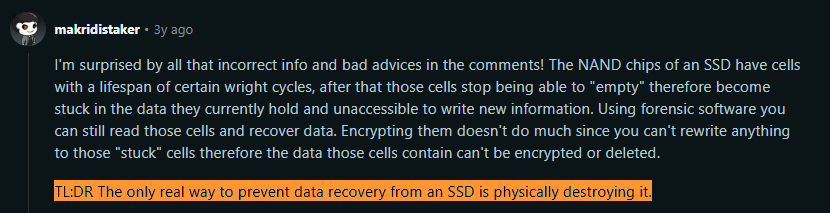
Source: Reddit
While extremely effective, physical destruction renders the device useless, which is not environmentally sustainable.
Key Data Erasure Standards in 2025
Here are some data erasure standards relevant to the IT industry:
|
Standard |
Overwrite Passes* |
Core Description |
Typical Media |
|
1-pass (Clear), firmware/crypto erase (Purge) |
Three methods: Clear (logical overwrite), Purge (firmware/crypto erase), Destroy (physical) |
HDDs, SSDs, USB, mobile, tapes, enterprise |
|
|
DoD 5220.22-M/ECE |
3-pass (or 7-pass extended) |
Deprecated but still used for HDDs; multiple patterns (0s, 1s, random) |
HDDs, legacy |
|
0–1 pass (plus firmware commands) |
Global, modern standard for Clear, Purge, Destruct; explicit for SSDs/NVMe |
SSDs, NVMe, encrypted/high-assurance storage |
*Overwrite passes is the number of times the data on the drive is overwritten during data erasure. The more the overwrite passes, the more difficult it becomes to recover the data.
Choosing the Right Standard Based on Asset Type and Risk
Here’s a table to help you choose the most secure data erasure standard or method based on the device type and data sensitivity:
|
Device Type |
Data Sensitivity |
Recommended Standard & Method |
Notes |
|
Spinning HDDs |
Low/Medium |
NIST SP 800-88 Clear or HMG IS5 (Lower): 1-pass overwrite + verify |
One verified pass is sufficient for most use cases. |
|
Spinning HDDs |
High |
NIST SP 800-88 Purge (e.g., secure erase, degauss) |
Multiple passes only if the policy demands. Combine with physical destruction if required. |
|
SSDs/Flash Storage |
All |
NIST SP 800-88 Purge or IEEE 2883 Purge: Secure erase/firmware erase/crypto-erase |
Do NOT rely on overwrite alone. Use device-specific erase commands; destroy if failed. |
|
Encrypted SSDs/Flash |
All |
Cryptographic Erase (delete encryption key), verify |
Fast, highly effective if drive is encrypted. |
|
Mobile Devices (Phones/Tablets) |
All |
Enable encryption → Factory reset (crypto-erase); verify via MDM |
Treat like SSD. Use MDM or ITAD tools for extra assurance. Destroy if highly sensitive. |
|
Servers/Enterprise Storage |
All |
NIST SP 800-88 Clear (internal reuse), Purge (if leaving premises) |
Wipe drives and config storage. For cloud: rely on provider NIST-aligned processes. |
|
High-Risk/Regulated Data |
All |
Layered: Full erasure (NIST/IEEE) + Physical destruction (shredding/degauss) |
For classified/top secret, combine methods. Device not reusable after destruction. |
|
USB Drives/SD Cards |
All |
NIST Purge/IEEE 2883 (secure/firmware erase); destroy if unsupported |
Treat like SSDs; use secure erase if possible, shred if not. |
|
Optical Media (CDs/DVDs) |
All |
Physical destruction (shred/pulverize) |
Overwriting not possible; destroy media. |
|
Tapes |
All |
Overwrite or degauss per NIST if reusable; destroy if not |
Use tape-specific tools; follow organizational policy. |
Workwize’s Role in Enforcing Data Erasure Workflows
Workwize is a global IT hardware management solution that automates your entire IT asset management lifecycle from procurement to safe recovery and certified data erasure.
With Workwize, you can automatically:
- Compare and manage multiple vendors.
- Procure (buy or rent) IT equipment or furniture
- Deploy them globally in a ready-to-use state
- Manage IT assets remotely via MDM
- Retrieve and securely wipe assets (with certification)
- Dispose of end-of-life devices
Because Workwize lets you manage your assets from procurement to disposal and securely wipe data, you don’t have to outsource data erasure to a different tool. End-to-end asset management and certified data erasure within the same tool.
Want to see how Workwize handles data erasure and simplifies asset management? Book a free demo now.


Mayank Wadhwa

Establish a single source of truth for every IT asset across the globe.
.png?width=258&height=318&name=g10%20(5).png)
More related resources to help you stop firefighting hardware operations.

![Cybersecurity Audit Checklist for Remote Work [2026 Updated]](https://www.goworkwize.com/hs-fs/hubfs/Cybersecurity%20Audit%20Checklist%20.png?width=360&height=200&name=Cybersecurity%20Audit%20Checklist%20.png)

Get monthly insights into how other IT leaders are improving their ops.



.png?width=2880&height=1232&name=Group%202147262874%20(1).png)
Stop coordinating
hardware like it's 2012.
.svg)
.svg)
.svg)
.svg)
.svg)