




.svg)
.svg)

.svg)


.svg)





.svg)
.png?width=500&height=424&name=Style-1---V1-(1).png)

.png?width=1230&height=692&name=Vector%20(13).png)
The Traditional IT Hardware Procurement Process
Here’s how the traditional IT hardware procurement process works:
1. Assessing the asset needs of your organization
The process typically starts with gathering input from multiple teams. HR shares hiring plans, department heads raise device requests, IT reviews existing inventory, and finance sets budget constraints.
Based on this, IT teams estimate how many laptops, servers, or peripherals are required, often factoring in replacement cycles and upcoming projects.
While this process may look structured, it’s largely manual and thus error-prone. Teams usually fail to clearly define requirements or wait until the last minute, which causes delays.
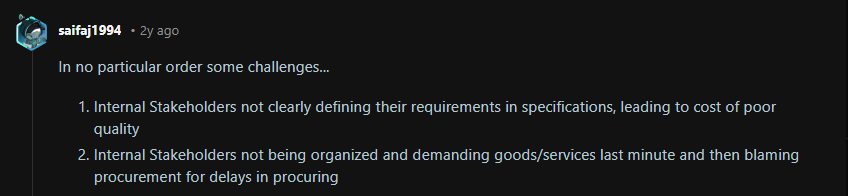
You won’t believe it, but in this post about procurement challenges, the first two challenges are about internal stakeholders (departments) not sharing specifications or demanding goods at the last minute:
Source: Reddit
2. Planning the budget
After documenting the needs, the procurement teams start to align them with the budget. And this step involves a lot of back-and-forth between finance and operations.
For instance, if procurement estimates they need $200,000, but the budget allows $120,000, they need to either prioritize the hardware or ask for a budget increase. And both these processes require time and long email threads.
At this stage, it makes sense to compare leasing vs buying IT equipment and identify which model makes the most financial sense.
3. Finding the best vendor
After defining the needs and securing budget approval, the next step is finding the right vendor to procure the assets.
But finding the best vendor is tough. Teams have to manually compare vendors based on their reputation, product specifications, warranty options, pricing, reliability, and after-sales support.
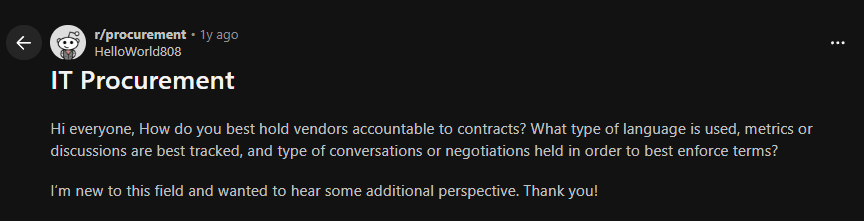
Even then, there’s no guarantee they’ll deliver equipment on time or honor the terms. It is not surprising that many teams turn to forums like Reddit, looking for ways to hold vendors accountable when things go wrong.
Source: Reddit
Once you shortlist vendors, the next step is to send out RFQs or RFPs. At this point, it is tempting to go with the lowest quote. But that is often where problems begin.
The cheapest option is not always the most reliable, especially when you are operating across multiple countries
Imagine you’re looking for a vendor to procure and deploy assets across 10+ countries. Manually comparing your options could seriously go wrong, since the local pricing, import duties, and stock availability can vary widely at a global scale.
4. Placing the orders and shipping
Once the vendor is selected, procurement teams generate purchase orders, confirm payment schedules, and document all agreements.
That is only half the job. The next challenge is logistics. Who handles shipping?
If the vendor does not, the procurement team will have to book a shipment through an international courier and pray it reaches the new hires on time.
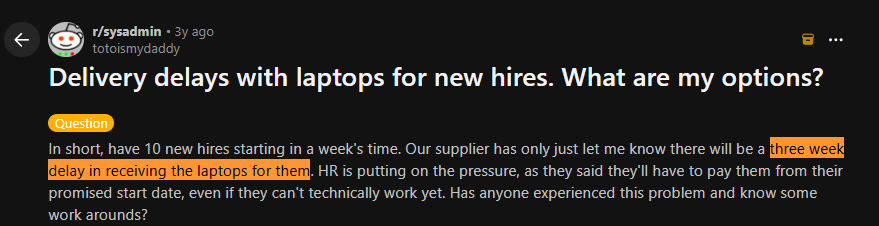
Unfortunately, supplier delays are extremely common. Here’s a system admin on Reddit whose supplier messed up at the last moment and said the laptops would be delayed by 3 weeks:
Source: Reddit
That’s exactly why companies switch to hardware procurement automation platforms like Workwize.
Workwize operates through a network of pre-vetted suppliers and local warehouses across the globe, allowing teams to source assets closer to the end user. This reduces supplier-side risk and helps minimize delivery delays caused by long or complex cross-border shipping routes.

Challenges With Traditional IT Hardware Procurement
Here is why you must replace traditional IT hardware procurement with automated workflows:
- Complexity in vendor management: With each supplier offering different pricing structures, delivery timelines, and contract terms, vendor management is an inherently complex process.
Procurement teams have to reach out to the vendors via email and calls, and compare everything manually. And this results in a time-intensive process that increases the risk of errors and slows decision-making.
- Lack of HRIS Integration: Without integrating the HRIS with procurement, you’re essentially creating departmental silos.
As a result, the HR department must manually inform IT about the new hire’s asset requirements. And even the slightest delay on the HR’s end could result in delayed deliveries and poor onboarding.
- The entire process takes too much time: Someone requests hardware. That request is first approved by the manager, then by finance, followed by IT. The IT department then loops in the vendor.
And by the time the asset reaches the employee, they’re already midway through their onboarding process with borrowed gear.
- Lack of transparency and tracking: In traditional procurement, there’s no real-time visibility into what’s ordered, shipped, or delivered. This happens because tracking is scattered across emails, spreadsheets, and multiple departments.
This lack of centralized tracking leads to delayed deliveries, misplaced assets, and wasted IT spend. According to Block64, up to 45% of IT leaders admit to wasting 10% of their budgets on hardware and cloud infrastructure.
- Risk of non-compliance: Because traditional procurement relies on manual tracking, organizations struggle to maintain consistent chain-of-custody records across the asset lifecycle.
This leads to gaps in audit trails, where organizations can’t prove who had a device or whether it was securely handled during audits, leading to non-compliance.
- Manual procurement equals wasted productivity: The IT department isn’t meant to manually coordinate vendors, book couriers, and track shipments. But manual procurement workflows force them to do so, resulting in lost productivity.
- Maverick spending: When procurement processes are slow, teams often take matters into their own hands and purchase equipment outside of IT’s control. These purchases may not align with company standards or actual needs, which creates waste and inconsistency.
Over time, this creates a measurable dent in cost savings. A Maverick Spending Report revealed companies lose 10-20% of their savings to this kind of off-process buying.
Here’s a real-life account on Reddit. This manager ordered three MacBooks and billed them to IT, only to realize that their internal applications ran only on Windows. Two of those devices instantly became unusable.
 Source: Reddit
What Is Hardware Procurement Automation?
Hardware procurement automation is the process of using software to manage and streamline how companies purchase, deploy, track, and recover IT equipment across the entire lifecycle.
When you automate hardware procurement, everything from comparing vendors to the procurement team being notified of a new hire to ordering equipment and obtaining approvals happens through predefined workflows and minimal manual intervention.
Note. Hardware procurement automation and IT asset management are two related but distinct concepts. One talks about automating a part of the asset lifecycle, and the other is about managing assets across the lifecycle from procurement, deployment, to repairs, retrievals, and disposals.

Traditional IT hardware procurement vs automated hardware procurement: At a glance comparison
Here’s a brief comparison between traditional and automated IT procurement across multiple aspects to help you understand the benefits of automation:
|
Aspect |
Traditional Hardware Procurement |
Automated Hardware Procurement |
|
Speed |
Longer lead times due to manual approvals, coordination, and processing |
Faster turnaround with standardized workflows and automated approvals |
|
Vendor selection |
Requires manual research, outreach, and comparison across vendors |
Centralized vendor access with standardized comparison of pricing, terms, and availability |
|
Error reduction |
Higher risk of errors due to manual data entry and fragmented processes |
Reduced errors through automated validation and standardized workflows |
|
Cost efficiency |
Higher operational costs due to inefficiencies, rework, and poor visibility |
Improved cost control through better data visibility and optimized decision-making |
|
Data management |
Data is spread across emails, spreadsheets, and systems, making tracking difficult |
Centralized system with real-time visibility into orders, inventory, and spend |
|
Negotiation |
Requires manual back-and-forth communication with each vendor |
Standardized terms and pre-negotiated agreements reduce repetitive negotiation effort |
|
Scalability |
Becomes resource-intensive as volume and geographic spread increase |
Scales efficiently across teams, locations, and larger asset volumes |
|
Compliance & audit |
Relies on manual tracking and documentation for audits |
Built-in policy enforcement and automated audit trails |
|
Supplier relationship management |
Dependent on individual relationships and manual follow-ups |
Structured, data-driven vendor performance tracking and management |
|
Monitoring & reporting |
Periodic reporting with manual data consolidation |
Real-time dashboards with automated reporting and insights |
Benefits of Automating IT Hardware Procurement
By using technology to automate IT hardware procurement, you can experience the following benefits:
Faster procurement cycles
In traditional hardware procurement, a simple order has to go through a long chain of manual approvals, causing delays and frustration.
With the right tools, you can pre-approve a monthly budget and specific devices, enabling users to instantly order the equipment they need.
For devices that require approval, you can create workflows that notify the relevant stakeholders as soon as the order is placed. This improves the speed of the procurement cycle and ensures timely delivery.
Even this Reddit user mentions faster procurement cycles as the top benefit of automated hardware procurement:

Source: Reddit
Improves accuracy and reduces errors
With manual hardware procurement, multiple things could go wrong. Maybe the HR forgets to inform IT about the new hire on time, or the procurement team enters the wrong delivery address, or you end up ordering 100 instead of 10 laptops.
All these errors drop to near zero when you automate hardware procurement. Automated workflows notify the concerned teams, verify the employee’s delivery address, and send orders with unusual quantities for approval to prevent issues. Even research shows that automation enhances data accuracy and reduces manual errors by 25%.
Enhances visibility and control over your hardware
Automation helps you centralize all the data in one place. These centralized dashboards answer all your questions, including but not limited to:
- How many devices do you have?
- How are your suppliers performing?
- How many were ordered last week or last month
- Which department ordered what?
- What is the status of the ordered devices?
- Are the orders aligned with your budget?
It essentially gives you more visibility into your procurement process, enabling more informed decisions like deciding what to order and identifying overspending, etc.
Ticks all your compliance boxes
Automation helps you bake procurement policies into the purchase workflows. This forces the users to follow the designated workflow and prevents them from bypassing budget limits or ordering from unauthorized vendors.
The same Reddit thread we used in the “faster procurement cycle” section also mentions procurement tools that centralize intake and automate routing based on policies, which improves compliance:

Every step, every hand-off during procurement is recorded, which forms the basis of proof of custody records, essential for compliance.
Also, procurement automation tools automatically choose vendors that comply with the local and global regulations or sustainability metrics. This helps you align vendors with your organization’s goals and stay compliant.
Helps you allocate resources better
Previously, HR had to manually inform IT/Procurement about the new hire. And procurement had to find the right vendor, manually compare quotes, obtain approvals, place orders, and track devices, which ate up a lot of their time.
When all this is automated with IT hardware procurement automation tools, your high-value resources save a lot of time. 74% automation users say automation boosts productivity and helps get work done faster, according to Salesforce.
That time can instead be invested in boosting cybersecurity, forming better IT policies, or optimizing existing operations.
Vendor management becomes easier
Managing vendors in traditional procurement is often inefficient because communication and tracking happen across emails, spreadsheets, and multiple disconnected systems.
However, when you automate procurement processes like purchase orders and updates, supplier collaboration improves, as this Reddit user confirms:

Source: Reddit
Plus, you can juggle multiple vendors easily:

Source: Reddit
Scales with your business
If you’re onboarding a few employees every month, you can somehow manage hardware procurement manually. But when your business expands, onboarding jumps to 10-20 a month, and that too, across 5 countries, manual systems break.
That’s the real advantage of procurement automation. Whether you’re procuring assets for 10 or 100 employees, within the same country or across 5 different ones, hardware procurement automation never breaks.
Significant cost savings
When you automate procurement, you save costs in many ways, both directly and indirectly.
For instance, automated procurement tools give you a centralized view of all your vendors and determine which vendor is offering the best ROI. This seemingly simple decision can save thousands of dollars in the long run.
Every hour your team spends on redundant or manual tasks translates to lost money for your company.
Research shows that processing a single purchase order manually can cost up to $500+, largely due to time spent on data entry, approvals, and vendor coordination. Multiply that across hundreds of orders, and the cost quickly adds up.
In contrast, automated systems significantly reduce both processing time and cost, often by as much as 60–80%, by eliminating manual work and improving efficiency.
Promotes sustainability
Partnering with procurement automation platforms like Workwize directly promotes sustainability by reducing your overall carbon footprint.
Say you procure assets from Workwize to have them delivered to your new remote hires or office location across 4 countries. Now, Workwize won’t send assets across countries as it would neither be affordable nor environmentally friendly.
What Workwize will do is use its network of local vendors and warehouses to source and deliver assets in the target countries. This minimizes international travel and distance, directly reducing the shipping costs and carbon footprints.
And that’s not all! Workwize partners only with vendors that comply with local and global sustainability regulations, further promoting sustainability.
AI-powered spend analytics
AI-powered spend analytics in automated hardware procurement provides visibility into vendor pricing, purchasing patterns, and asset usage.
By analyzing this data, organizations can identify overpayment, eliminate duplicate purchases, and standardize sourcing decisions. This leads to better cost control and more efficient use of IT budgets.
For example, if different teams are buying the same laptop model at $2,000, $2,500, and $3,200 from different vendors, the system flags this inconsistency and recommends the most cost-effective supplier.
At the same time, it may detect that 15 similar devices are already unused in inventory. And the company can redeploy them instead of purchasing new ones.
How to Implement Hardware Procurement Automation
While the actual process may vary from company to company, here are the fundamental steps for implementing hardware procurement automation at your company:
1. Audit your current process: Identify inefficiencies, delays, and manual touchpoints across your existing procurement workflow.2. Define requirements: Outline what you need from automation, including approval workflows, vendor coordination, integrations, and lifecycle visibility.
3. Select a platform: The next step is choosing an automation platform that can support the workflow end-to-end. That’s exactly what Workwize was designed to do.
Workwize is a global ITAM platform that automates your entire IT asset lifecycle from procurement, and deployment to retrieval and disposal; end-to-end automated workflows.
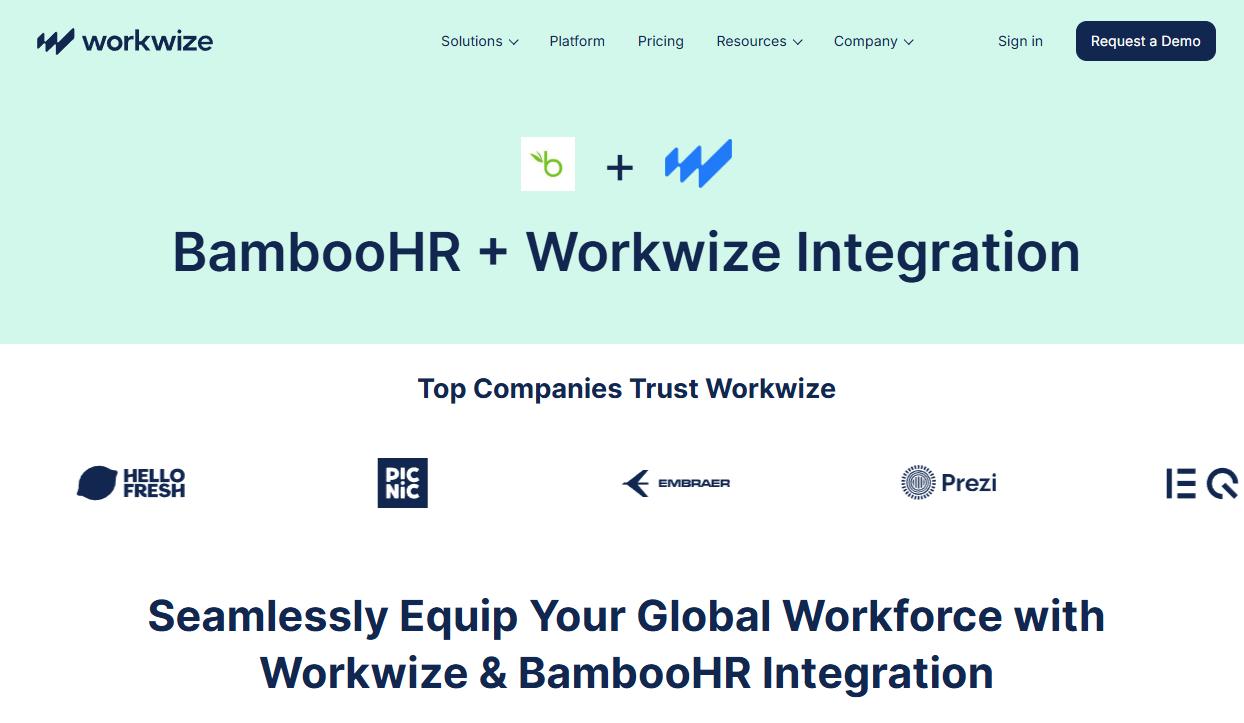
4. Integrate Workwize with your HRIS: You need to connect your HRIS platform, like BambooHR with Workwize to trigger the zero-touch onboarding workflow.
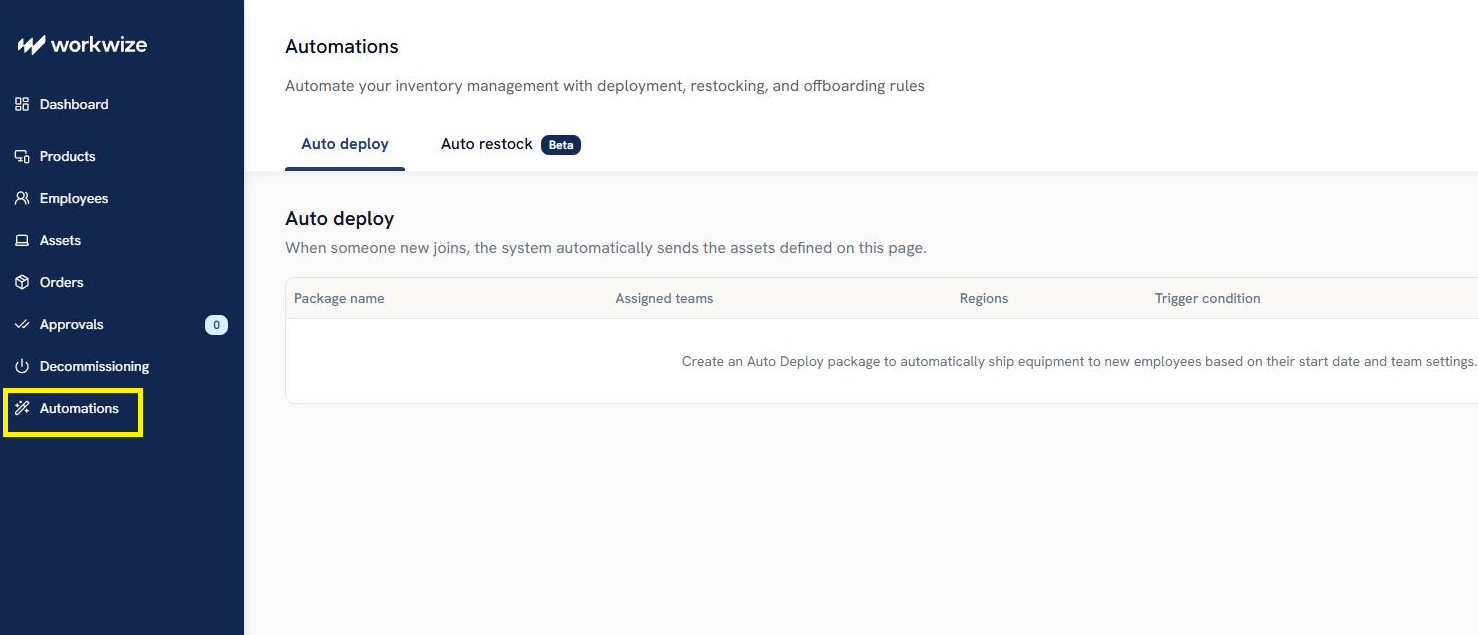
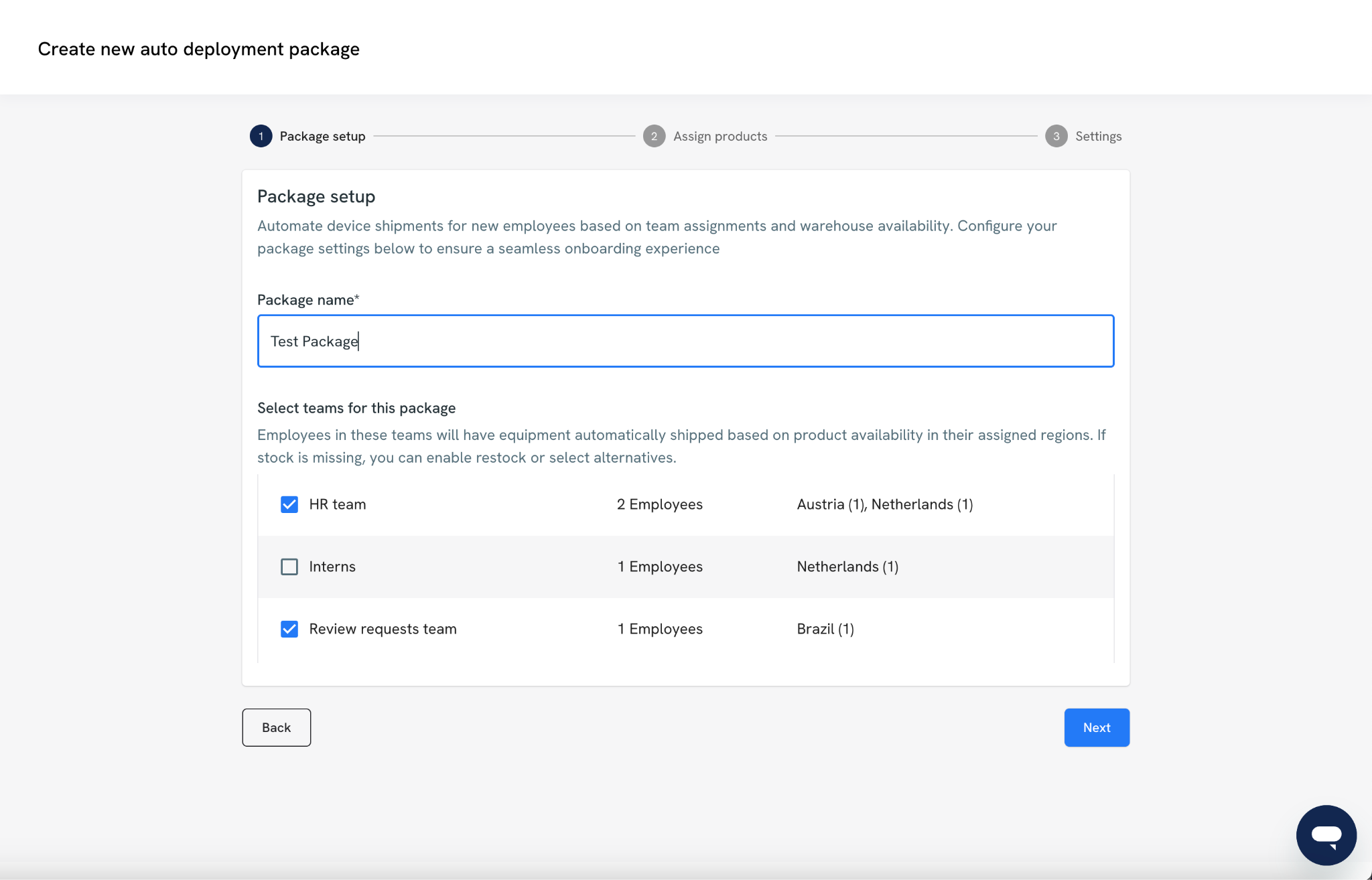
You’ll first need to define the deployment package, which is a reusable configuration for provisioning equipment to specific Teams.
- Name your package: Give it a clear, descriptive name.
- Assign teams: Choose which teams will receive this deployment kit.
Only teams that don’t already have a deployment kit assigned can be selected.
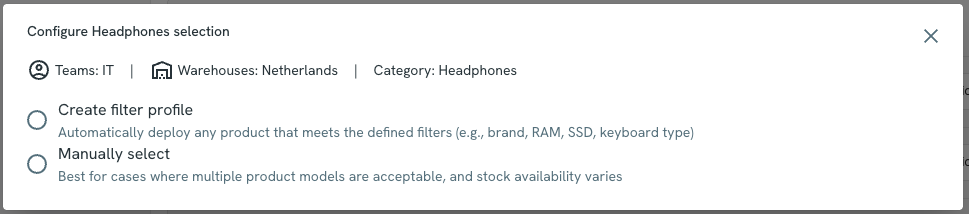
Option A: Manual Selection
You hand-pick specific SKUs for each product category.
For example:
- 1 Laptop: MacBook Pro 14”
- 1 Monitor: Dell 27” UHD
- 1 Keyboard: Logitech MX Keys
Option B: Filter Profile (Smart Selection)
Use attribute-based filters to let the system automatically choose matching products.
Examples:
- Brand = Apple
- RAM ≥ 16GB
- Screen Size = 13–15”
The system will pick one product per category that fits the criteria.
Important Note:
- Only one item per category is shipped.
- All selected or matched products must be in stock and available in all target countries for the assigned teams.
7. Choose the configuration settings: Configure rules for category exclusions, shipping timelines, and order approvals to ensure seamless equipment deployment:
a. Category-Based Exclusion: When enabled, Auto-Deploy checks the employee’s existing assets.
If they already have an item in a certain category (e.g., monitor), that category is excluded from the deployment to avoid sending duplicates.
b. Shipping Rules: It lets you set how early the equipment should arrive before the employee's start date.Here’s how it works:
- The system finds the product with the longest shipping lead time.
- It then subtracts that time plus your buffer days from the employee’s start date.
- This ensures the equipment arrives on time.
d. Fallback Product Handling: By default, if there is no stock for a category selection when the time comes, that product will not be sent to the employee.
If this option is selected, the system uses AI to determine a suitable alternative that matches at least 70% of the attributes of the original selection. Please note that this option might ship a different brand to the employee.
e. Approval Settings: Before orders are finalized, you can control how they are approved:- Auto-Approve: Orders are placed immediately without manual intervention.
- Review-Requests: Orders require the team manager's sign-off before processing.
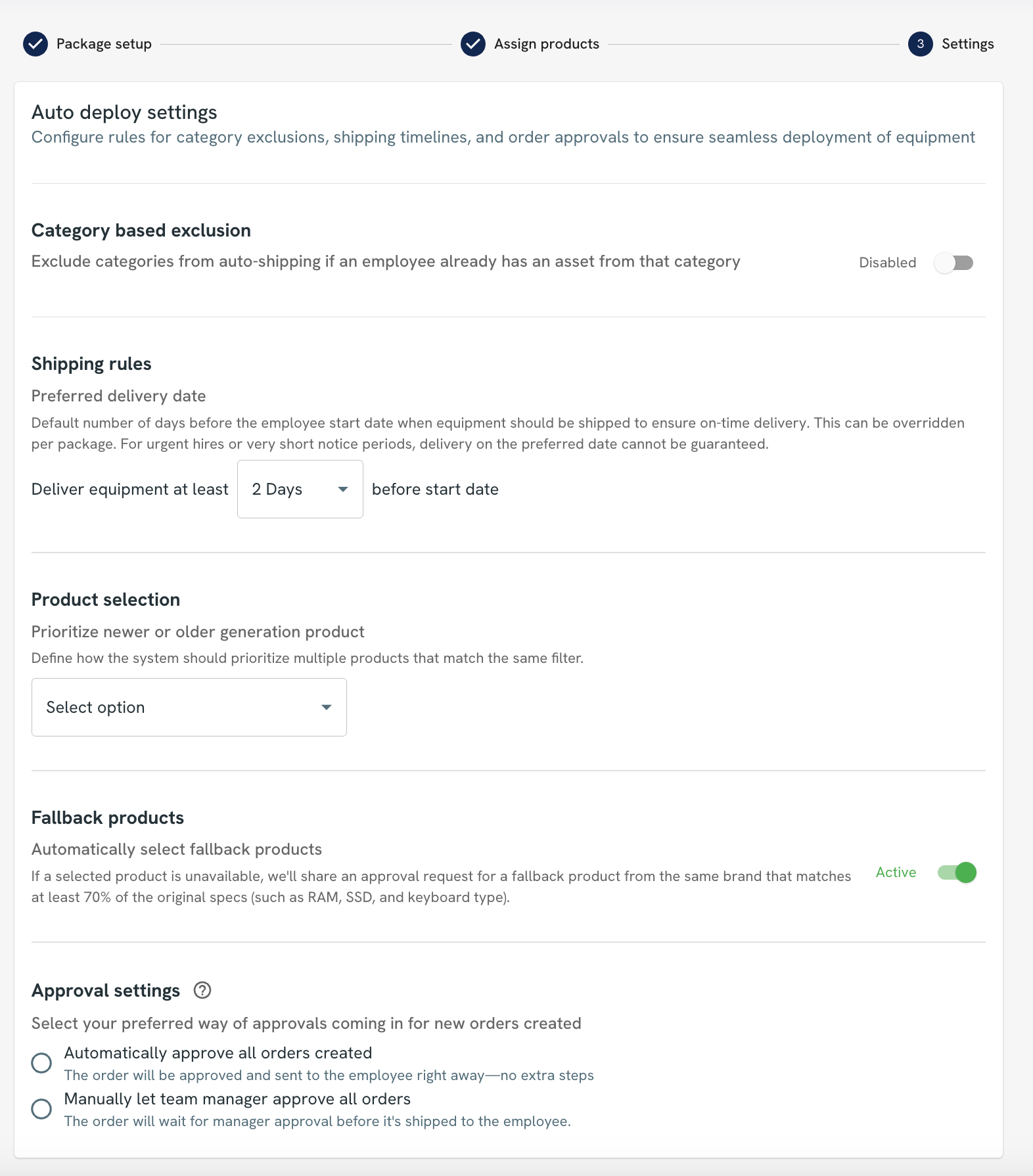
This auto-deploy automation ensures your employees receive their IT equipment before their start date, without having to place manual orders.

Hardware Procurement Automation: Key Metrics to Track
Implementing hardware procurement automation isn’t enough. You need to track KPIs to determine if you’re headed in the right direction or progressing backwards:
|
KPI |
What it measures |
Formula |
|
Procurement cycle time |
Time taken from request to delivery of hardware |
Delivery date − Request date |
|
Error rate |
% of incorrect or mismatched orders |
(Incorrect orders ÷ Total orders) × 100 |
|
On-time delivery rate |
% of orders delivered within agreed timelines |
(On-time deliveries ÷ Total deliveries) × 100 |
|
Cost savings per order |
Savings achieved per order after automation |
(Baseline cost − Current cost) ÷ Total orders |
|
Vendor compliance rate |
% of vendor deliveries meeting agreed terms (SLAs, specs, pricing) |
(Compliant deliveries ÷ Total deliveries) × 100 |
|
Time-to-productivity for new hires |
Time taken for employees to become fully operational after receiving the hardware |
Productive date − Start date |
|
Spend under management |
% of total spend processed through approved procurement systems |
(Managed spend ÷ Total spend) × 100 |
|
Asset utilization rate |
% of procured hardware actively in use |
(Active assets ÷ Total assets) × 100 |
|
Procurement cost per order |
Operational cost to process each purchase order |
Total procurement cost ÷ Total POs |
Best Practices for Hardware Procurement Automation
These best practices are based on the hands-on experience of system admins and IT managers on Reddit. So, you’ll find practical insights only, and not that generic stuff.
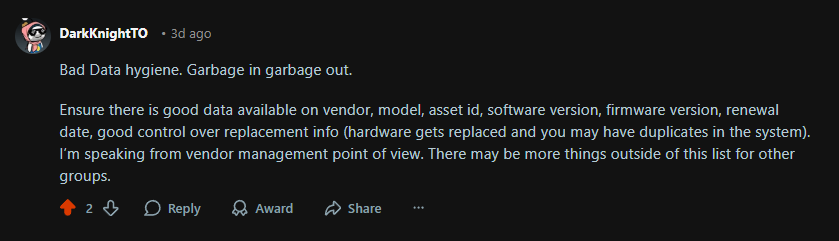
1. Clean your data before you automate
Automation works only if the underlying data is accurate. If vendor names, device models, asset IDs, or replacement records are inconsistent, the system will only scale those errors.
For example, if a replaced laptop is not marked correctly, you could end up with duplicate assets in the system or reorder hardware you already have. Even this Reddit user stresses the importance of data hygiene regarding hardware procurement automation:
2. Engage key stakeholders
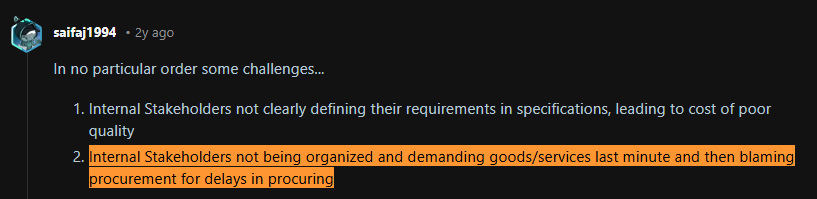
Align IT, HR, finance, and procurement early to prevent miscommunication, incorrect hardware orders during onboarding, and last-minute requests. Don’t forget this best practice, since stakeholders making last-minute requests is a serious problem, as this Reddit user confirms:
Source: Reddit
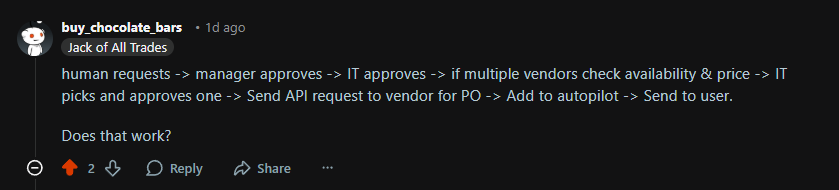
3. Define your request-to-approval-to-fulfillment
Automation works best when the procurement process is already clearly mapped.
If a request reaches the vendor before manager or IT approval, the company could end up ordering the wrong device, exceeding budget, or buying equipment that does not match the employee’s role.
Therefore, define who submits the request, who approves it, when IT steps in, and how the order moves to the vendor.
Here’s a sample workflow a user shared on Reddit about a post we created on hardware procurement automation best practices:
Source: Reddit
4. Keep a buffer stock, but do not overdo it
Even an automated procurement process needs a small inventory buffer to handle edge cases like
- Urgent new hires
- Device failures
- Replacements without delays.
If every laptop is procured only after a request is raised, one damaged device or last-minute joiner can leave an employee without equipment on day one. And you’d never want that, right?
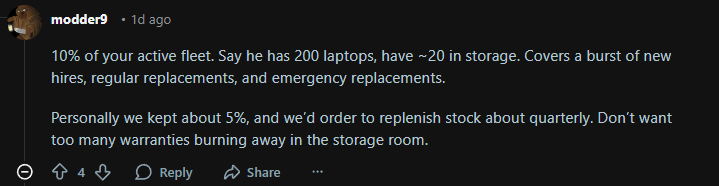
A practical rule is to keep roughly 5% to 10% of your active device fleet in reserve, depending on hiring volume and replacement frequency.
For instance, this Reddit explains how having a buffer stock helps cover a burst of new hires and emergency replacements:
Source: Reddit
5. Plan hardware refresh cycles proactively
Waiting until the very last minute to replace your IT equipment isn’t a smart move.
For instance, Microsoft ended support for Windows 10 on October 14, 2025.
Teams that planned refreshes in advance could identify affected devices, phase replacements over time, and align budgets early.
Teams that did not were more likely to face rushed purchases, security exposure, and compatibility problems.
Use asset age, warranty status, performance trends, and software support requirements to predict when devices need replacement. Doing so:
- Prevents performance issues
- Reduces security risk
- Avoids last-minute emergency purchases when older devices can no longer support required systems or updates.
How Workwize Automates Procurement and Beyond
Automating hardware procurement removes the manual bottlenecks that slow teams down.
Instead of chasing approvals, coordinating vendors via email, and tracking orders in spreadsheets, you can manage everything through structured workflows with greater speed, visibility, and control.
And Workwize helps you achieve exactly that.
With Workwize, you can trigger procurement automatically the moment a new hire is added to your HRIS. Hardware requests are routed through approvals, fulfilled by pre-vetted global vendors, and delivered on time across 100+ countries.
But that's not all.
Being a global IT hardware management platform, Workwize automates the entire asset lifecycle, including procurement, deployment, repairs, replacements, retrievals, reassignment, recycling, reselling, and disposals, across 100+ countries.
After procurement, Workwize preconfigures the devices for you and deploys them to your employees, ready to use across 100+ countries. You can even automate repairs and deliver loaners to your employees globally.
And when employees are about to leave, Workwize automatically triggers offboarding, retrieves assets, and reassigns, recycles, resells, or disposes of them based on your preferences.
In a nutshell, Workwize automates the entire asset journey from hiring to termination. Want to see how Workwize automates the asset lifecycle? Book a demo now.


Mayank Wadhwa

Establish a single source of truth for every IT asset across the globe.
.png?width=258&height=318&name=g10%20(5).png)
More related resources to help you stop firefighting hardware operations.


Get monthly insights into how other IT leaders are improving their ops.



.png?width=2880&height=1232&name=Group%202147262874%20(1).png)
Stop coordinating
hardware like it's 2012.
.svg)
.svg)
.svg)
.svg)
.svg)