




.svg)
.svg)

.svg)


.svg)





.svg)
.png?width=500&height=424&name=Style-1---V1-(1).png)

.png?width=1230&height=692&name=Vector%20(13).png)
What is IT Asset Management?
IT asset management (ITAM) involves the end-to-end tracking and management of IT assets (both hardware and digital) throughout the asset lifecycle from procurement, deployment, and repair to retrieval, disposal, and reassignment.
The core purpose of ITAM is:
- To ensure all IT assets (tangible, like computers, servers and non-tangible like software) are utilized efficiently and effectively throughout the lifecycle.
- And fix issues like wasted IT spend, non-compliance, asset loss during offboarding, poor asset visibility, shadow IT, delayed onboarding, and more.
ITAM solutions combine financial, contractual, and inventory data to help you make strategic decisions involving your IT assets throughout the asset lifecycle.
Let’s now learn how IT asset management benefits your organization in more depth.
What are the Benefits of IT Asset Management?
At its core, IT Asset Management creates reliable, real-time visibility across your entire asset lifecycle.
And this visibility becomes the foundation for every other outcome IT leaders care about: cost control, compliance readiness, security enforcement, and operational efficiency.
Here’s how those benefits play out in practice:
- Single source of truth and better visibility: With an effective ITAM process in place, you get a single source of truth for all your assets. You can instantly view what assets you have, where they are, who they’re assigned to and what state they’re in.
A single source of truth means efficient, accurate and faster asset tracking, as you don’t have to rely on multiple spreadsheets, department records, or different tools for asset data.
- Reduced SaaS waste and licensing overspend: Organizations use 371 SaaS apps on average. And according to Nextthink, almost 50% of SaaS licenses remain unused, which translates to a loss of millions of dollars each month.
However, with ITAM, you can view what SaaS apps you have, which apps are being utilized and which are sitting idle. Based on this data, you can reclaim SaaS licenses and avoid buying new tools, resulting in reduced costs and optimized SaaS usage.
- Maximizes hardware asset usage and minimizes waste: ITAM helps you track your IT assets (like laptops or computers) across the lifecycle from procurement, deployment, and repair to eventual retirement.
You can securely retrieve assets from employees leaving your organization and reassign the same to new hires without having to order new assets. If you didn’t have the visibility, you might’ve ordered new assets, creating a dent in your company’s revenue.
- Compliance: Any organization using software must be ready for compliance audits by software providers.
But because you have a refined ITAM process, you can automatically monitor all software installed on computers and ensure they comply with the relevant license agreements.
This protects your organization from hefty fines that software companies might impose due to non-compliance.
- Forecasting future purchases: With ITAM, you can track lifecycle data, depreciation schedules, warranty timelines, and device health insights.
This data helps you predict hardware refresh cycles months in advance instead of responding to breakdowns.
As a result, there are fewer emergency purchases, optimized renewals, better vendor negotiations, and more predictable CapEx and OpEx planning.
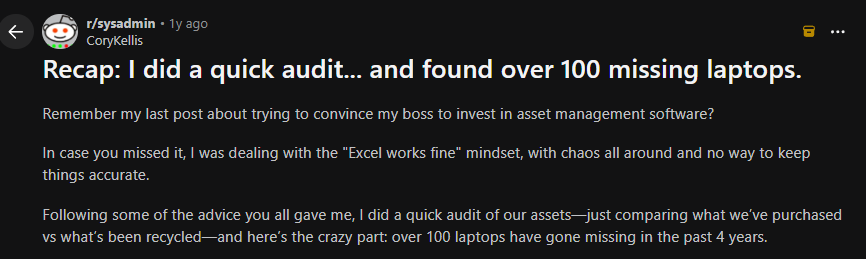
- Reduced risk of data breaches: Without a well-laid-out IT assets management process, you’ll likely lose devices during retrievals. And you won’t even know until you perform an audit or the device is exploited by a threat actor.
This Reddit user, who used spreadsheets for asset tracking, discovered they lost 100 laptops over 4 years after performing a quick audit.
Source: Reddit
And if a hacker exploits your devices and misuses the sensitive data, get ready to pay millions. We’re not even kidding. Advocate Health paid $5.5 million for losing data originating from a single stolen laptop.
With a mature ITAM process in place, you can track every asset throughout its lifecycle. Offboarding triggers retrieval and status updates, and unmanaged devices are identified quickly.
This reduces the likelihood of lost hardware turning into regulatory fines, reputational damage, or large-scale breach events

4 Risks You May Face Without IT Asset Management
Without an effective IT asset management process in place, your organization is prone to the following risks:
- Assets get lost or “ghost assets” increase: Without reliable IT asset inventory data, you might end up paying for hardware or software you think you own, but can't actually locate or account for.
For instance, an IT manager gets a request to order 20 laptops. They see several assets marked as in-use (ghost assets) but without clear ownership records.
Now, they can either check all the records manually (due to the lack of a single source of truth) and slow down the business or order new ones. And the latter makes more sense, leading to unnecessary spending.
That pattern adds up. A recent survey of 600 IT and operations professionals across multi-location organizations found that companies waste up to 25% of IT spend on ghost or unaccounted-for assets.
- Onboarding and offboarding become a nightmare: Without coordinated asset tracking, IT teams struggle to deliver assets on time (delayed onboarding) or retrieve them (lost assets equal lost revenue and increased risk of data breaches) when an employee leaves.
- Security blind spots and compliance exposure: Without an accurate and up-to-date asset list, you’ll soon have unknown assets that fall outside update cycles and regulatory scope. This makes them an easy entry point for breaches.
- Productivity loss for your IT team: If your IT team is busy tracking assets manually or chasing ownership or paper trails, you’ll see a sharp decline in productivity.
And productivity loss directly translates to lost revenue. According to PositiveResults, manual tasks that could be automated cost companies $2.62 million annually.
Here’s the complete list of IT asset management challenges: 10 IT Asset Management Challenges [2026 Updated]

Best Practices for ITAM
There’s no single, universally accepted playbook for IT hardware asset management. And that’s okay.
Most ITAM best practices aren’t born in frameworks or standards documents; they’re shaped by real-world failures, audits gone wrong, lost devices, and security incidents teams never want to repeat.
The practices below are drawn from lived experience—insights shared by IT practitioners in communities like Reddit, along with guidance from industry experts who manage IT assets every day.
1. Don’t Trust Auto Discovery Tools Blindly
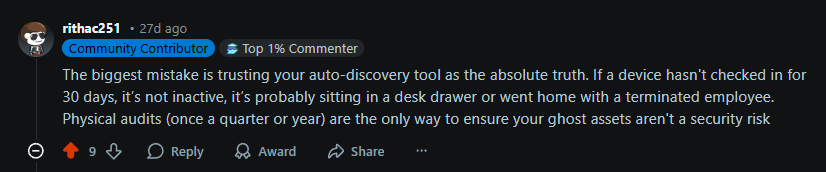
Auto-discovery or network-discovery tools are effective, but you shouldn’t consider them as the only source of truth.
If you rely on auto discovery tools, you might think if a device hasn’t checked in for a few weeks, it’s inactive. But as one IT professional on Reddit pointed out, that assumption can be misleading:
Source: Reddit
An inactive device could mean a lot of things. Maybe the device is locked in a drawer or with a terminated employee.
What should you do then?
Ideally, you should treat auto-discovery tools as one signal, not the source of truth.
To apply this in practice:
- Cross-check discovery data with procurement records, HRIS, and MDM systems.
- Flag devices that haven’t checked in for 30–45 days for investigation.
- Run quarterly physical audits for high-value assets like laptops and servers.
- Create a workflow where offboarding automatically triggers asset verification.
2. Create a centralized asset inventory (single source of truth)
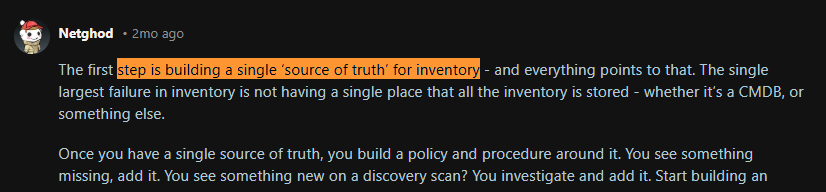
Without one reliable inventory, ITAM data becomes fragmented across spreadsheets, ITSM tickets, procurement tools, and HR records. This often leads to ghost assets, failed audits, and unnecessary purchases.
IT practitioners consistently highlight this issue. As one Reddit user explained, the first step to maintaining accurate inventory is creating a single source of truth where every asset record ultimately lives.
Source: Reddit
A single source of truth gives you accurate, real-time visibility into what you own, where it is, who has it, and its lifecycle status.
In practice, this means every tool (discovery scans, procurement systems, and service desk records) feeds back into that central inventory.
How to achieve it:
- Use one system of record (usually the ITAM platform or CMDB) and treat every other tool (MDM, EDR, procurement, HRIS) as a data source and not the database.
- Standardize asset identifiers (asset tag/serial) and enforce unique IDs to prevent duplicates.
- Define mandatory fields for every asset: owner, location, status, lifecycle stage, purchase date, warranty/end-of-life, cost center, and last-seen date.
- Create controlled lifecycle states (in stock, assigned, in repair, in transit, pending retrieval, lost, and disposed) and lock down who can change them.
- Integrate key systems (procurement/AP, HRIS, ITSM, MDM/EDR, IdP/SSO) so records update automatically when hires, terminations, purchases, and device check-ins happen.
- Run recurring reconciliation (monthly/quarterly) to match inventory vs finance/procurement records and flag mismatches for investigation.
3. Integrate ITAM with ITSM Practices
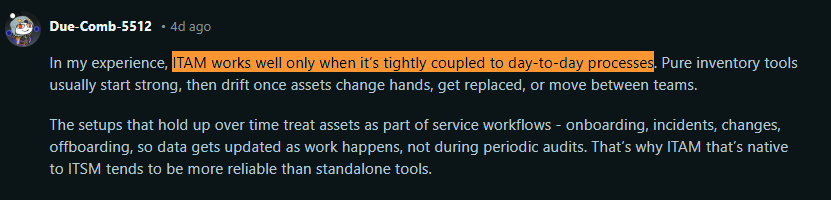
IT Asset Management reaches its true potential when coupled with other ITSM services. Alone, it’s just asset data. But within ITSM workflows, that data becomes the foundation for operational and lifecycle decisions.
Even this IT expert on Reddit says, setups that treat assets as a part of service workflows tend to hold up over time:
Source: Reddit
Here’s what you can do to implement this best practice:
- Link assets to service tickets: Every incident, request, or change should reference the affected asset
- Sync your asset inventory with the CMDB: Your ITAM system should automatically feed asset data into the configuration management database (CMDB).
- Trigger lifecycle actions through service workflows: Employee onboarding, role changes, and offboarding should automatically initiate asset actions inside ITAM.
- Use change management to track asset modifications: Any upgrade, replacement, or configuration change should pass through change management workflows.
- Connect incident trends to asset decisions: When service desks repeatedly see issues with a specific device model or software version, that data should inform procurement and lifecycle planning.
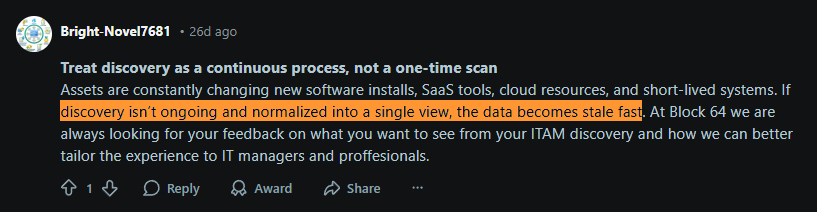
A network discovery scan reflects a moment in time. In enterprise environments, assets change constantly; devices are reassigned, SaaS tools are adopted, and cloud resources are spun up or shut down.
Without ongoing network scans, the data will become stale fast, as pointed out by this IT manager:
Source: Reddit
Ongoing visibility reduces data drift, keeps inventory aligned with reality, and prevents surprises during audits or security reviews.
Here’s what you can do:
- Schedule automated scans daily or weekly instead of running manual scans.
- Integrate discovery tools with CMDB or ITAM platforms to keep records updated.
- Monitor new SaaS apps via SSO logs or identity providers.
- Set alerts for unknown devices or unauthorized assets appearing on the network.
Here are some of the best IT asset discovery tools: Top 13 IT Asset Discovery Tools in 2026
5. Prioritize high-risk, high-impact assets
Focus your ITAM efforts on compute assets like laptops, desktops, servers, VMs, and core software, as they:
- Store data
- Run operating systems
- Require patching and access control
- Fall under the security and compliance scope
And you can track low-risk peripherals like monitors, docks, and keyboards lightly or financially, since they don’t pose any cyber risk. They’re all about financial value.
To implement this best practice, just create these tiers or modify them based on your needs:
Tier 1: High Risk
- Laptops
- Servers
- Virtual machines
- Core SaaS tools
- Developer machines
Tier 2: Medium Risk
- Workstations
- Shared devices
- Department equipment
Tier 3: Low Risk
- Monitors
- Keyboards
- Docking stations
- Accessories
By categorizing assets under these tiers, you can ensure that the high value assets get all the attention they deserve. Everything else is secondary.
6. Standardize end-to-end asset lifecycle
Without standardized asset lifecycle processes, assets may enter the environment without control.
For instance, different departments may order duplicate hardware without confirming with the IT department. Or you might end up replacing assets more quickly because of a lack of a repair/maintenance schedule.
No wonder Oleg Danyliuk, CEO at Duanex (a software development company), says every organization must have standardized processes for all assets across request > approval > purchase > maintenance > retirement. That’s what you should do too.
This ensures every asset follows the same controlled path. No ad-hoc buying, no informal handovers, no forgotten retirements.
To standardize asset lifecycle, you must define a clear lifecycle like this:
Request → Approval → Procurement → Deployment → Monitoring → Repair → Retrieval → Redeployment → Disposal
Then enforce it through systems:
- ITSM for requests
- Procurement tools for purchasing
- ITAM/CMDB for tracking
- MDM for monitoring
- Logistics platform for retrieval and redeployment
7. Make sure you can remotely control your assets
Oleg also mentions that there has to be some kind of remote control to ensure your assets have the right security tools (antivirus) installed. And that’s valuable advice.
With companies going international and hiring remote employees, you need remote control of all your assets. This not only ensures you have the right security apps installed, but also lets you remotely wipe or lock devices if stolen/lost.
To implement remote control:
- Enroll all corporate devices into MDM or endpoint management (Intune, Jamf, Kandji, etc.).
- Enforce security baselines automatically.
- Enable remote lock and wipe capabilities.
- Block devices that fall out of compliance.
Pro Tip: Don’t allow network access to the devices that are not enrolled.

8. Support ITAM processes with the right tools
Another IT asset management best practice is to use the right software for asset management, since manual execution is error-prone and not scalable.
- Discovery & visibility: Discovery, MDM, or EDR tools identify active devices and keep the asset estate current.
- System of record & governance: ITAM / CMDB platforms maintain ownership, status, lifecycle state, and audit history.
- Onboarding & offboarding workflows: ITSM and HRIS integrations trigger asset assignment and retrieval events automatically.
- Physical execution: IT Logistics and device lifecycle platforms like Workwize handle physical aspects of shipping, retrieval, redeployment, and compliant disposal—where most ITAM breakdowns happen.
- Security & compliance enforcement: Endpoint security and access tools ensure only known, compliant assets remain active.
Together, these tools ensure ITAM processes remain accurate, enforceable, and scalable.
9. Procure with lifecycle, security, and resale in mind
Asset management starts at procurement, not deployment.
Standardize device models based on role requirements and not ad-hoc requests. Choose devices that support remote manageability, zero-touch enrollment, and BIOS-level security, from day one.
Also, when negotiating the pricing, go beyond the sticker price. Factors like warranty terms, SLAs, buyback agreements, and residual value matter.
Make sure there’s an exit strategy in place even before the asset enters your environment. If you can’t securely wipe, retrieve, and resell a device efficiently, your lifecycle isn’t complete.
10. Always listen to your service desk agent
Service desk agents interact with your IT assets and employees more than anyone else in the organization. They see recurring device failures, software issues, onboarding delays, and policy gaps long before they appear in reports.
That explains why this IT expert mentions “listening to your service desk agent” as a universal IT asset management best practice

Source: Reddit
Here’s what you can do:
- Make it a practice to review ticket trends
- Include service desk input in procurement discussions
- Create feedback loops between support, ITAM, and leadership.
Organizations that do this catch issues earlier and make far better IT decisions.

Best IT Asset Management Tools at a Glance
Here are some hand-picked vendors for IT asset lifecycle management solutions with their key strengths, pricing, ratings, and their ideal use case:
|
Tool |
Key Features |
Best For |
Pricing |
Ratings |
|
Workwize |
End-to-end physical asset lifecycle (procurement, deployment, retrieval, disposal), global logistics, HRIS/MDM integrations |
Enterprises with distributed & international teams that need to operationalize ITAM |
Custom enterprise pricing |
|
|
ServiceNow ITAM |
Deep HAM + SAM, CMDB-centric governance, enterprise workflows, reporting |
Large enterprises already running ServiceNow ITSM |
Custom enterprise pricing |
Capterra: N/A |
|
Flexera One ITAM |
Industry-leading license normalization, strong SAM + HAM, audit defense |
Enterprises with complex software licensing (Oracle, IBM, SAP, Microsoft) |
Custom pricing |
Capterra: N/A |
|
ManageEngine AssetExplorer |
Quick deployment, basic HAM/SAM, on-prem option |
Mid-market orgs needing affordable asset tracking |
Tiered pricing |
Capterra: N/A |
|
Ivanti Neurons for ITAM |
CMDB-driven ITAM bundled with ITSM, automation |
Enterprises standardizing on Ivanti ITSM |
Custom pricing |
|
|
Device42 |
Deep infrastructure discovery, dependency mapping, CMDB accuracy |
Infrastructure-heavy enterprises needing visibility & impact analysis |
Custom pricing |
|
|
Freshservice ITAM |
Strong discovery via Device42, lifecycle automation, ITSM integration |
Fast-growing companies using Freshservice ITSM |
Tiered subscription |
No reviews specifically for its ITAM module |
How to Select the Best IT Asset Management Software in 2026
While researching, I talked to a few IT experts to understand what enterprises look for when comparing ITAM solutions. Here are those factors, plus a few more, to help you make the right choice:
- Scalability across thousands (or millions) of assets: The platform must remain efficient as asset counts grow into the tens of thousands or more, without degrading search, reporting, or reconciliation accuracy.
- Role-based access control (RBAC): Enterprises need granular control over who can view, edit, approve, or audit assets across teams, regions, and business units.
- Integration with CMDB / ITSM: ITAM cannot operate in isolation; it must integrate tightly with CMDBs, service catalogs, incidents, changes, and requests to support real operational workflows.
- Audit trails: Every asset change (status, ownership, and configuration) must be logged with timestamps and users to satisfy compliance, security, and financial audits.
- Software license optimization: The tool must reconcile entitlements against actual usage to reduce over-licensing risk and defend against vendor audits.
- Support for hybrid environments: Enterprises rarely operate in a single environment. ITAM must handle on-prem, cloud assets, virtual, and SaaS assets consistently.
- Flexible data model / configurable schema: Large enterprises won’t adapt their operating model to a tool; the tool must adapt to complex, custom asset types, relationships, and processes.
- Wide range of imports and a strong API: Enterprises always have niche systems; robust APIs and flexible import mechanisms are essential to integrate with custom or legacy tooling.
- Enterprise-grade support: Large organizations expect predictable SLAs, knowledgeable support engineers, and the ability to escalate issues quickly.
- Market-proven platforms: Tools like ServiceNow are often evaluated first because they’ve proven they can scale, adapt, and survive enterprise complexity.

Discover How Workwize Streamlines IT Asset Management
Most ITAM platforms help you handle the digital aspect of asset management.
The physical side, which involves shipping, retrieval, repairs, and redeployment, is where gaps appear.
Without the right logistics strategy, a new hire in another country might not receive their laptop on time. A terminated employee may hold onto a company device for weeks. Or hardware might sit unused in one region while another team orders new stock.
Workwize closes this gap. It acts as the execution layer behind IT Asset Management, ensuring procurement, deployment, retrieval, redeployment, and disposal occur in a controlled and auditable way across 100+ locations.
With Workwize companies can:
- Trigger procurement automatically when HR systems register new hires
- Ship pre-configured devices directly to employees globally
- Integrate MDM for enforcement and remote control
- Coordinate repairs and replacements without operational chaos
- Securely retrieve devices during offboarding with certified data erasure
- Redeploy or dispose of hardware in alignment with ITAM policies
- Resell devices to retrieve the residual value
By handling logistics end-to-end, Workwize makes ITAM best practices enforceable in the real world, especially for distributed and international teams.
And if you’re wondering whether Workwize drives results, HighLevel uses Workwize to automate and streamline asset lifecycle processes, saving an impressive $1.4 million annually.
You can too. All you’ve got to do is click this button to book a free demo with Workwize.


Mayank Wadhwa

Establish a single source of truth for every IT asset across the globe.
.png?width=258&height=318&name=g10%20(5).png)
More related resources to help you stop firefighting hardware operations.


Get monthly insights into how other IT leaders are improving their ops.



.png?width=2880&height=1232&name=Group%202147262874%20(1).png)
Stop coordinating
hardware like it's 2012.
.svg)
.svg)
.svg)
.svg)
.svg)