




.svg)
.svg)

.svg)


.svg)





.svg)
.png?width=500&height=424&name=Style-1---V1-(1).png)

.png?width=1230&height=692&name=Vector%20(13).png)
Most organizations spend millions on IT hardware each year without a standardized procurement process. Meanwhile, supply chain disruptions or poor vendor selection make hardware procurement reactive, scrambling, and overpaying.
Add to that the fact that total cost of ownership figures look nothing like the original budget once support, maintenance, and disposal are factored in.
All of this makes hardware procurement deceptively hard.
The consequences are predictable: wasted IT spend is estimated at 20–30% even among organizations with advanced asset management practices. Then, poor hardware procurement decisions can also delay employee start dates and increase organizational risk.
That’s IT hardware procurement needs to be strategic.
This IT Hardware Procurement: Importance, Benefits, & Best Practices is a practical, end-to-end framework for IT leaders just these hardware procurement challenges.
Here, I walk you through every stage of the procurement process—requirements scoping, vendor evaluation, contract negotiation, order management, and refresh planning—to turn hardware buying from a recurring headache into a repeatable, controlled discipline.
If you're responsible for hardware decisions at scale, this guide is built for you.

What is IT Hardware Procurement?
IT hardware procurement is the process of acquiring the physical components needed to support an organization's IT infrastructure. This includes computers, servers, networking equipment, printers, and other peripherals. The goal is to obtain high-quality hardware that meets the organization's needs at the best possible or lowest price.
Effective IT hardware procurement involves careful planning, research, and negotiation. It requires a deep understanding of the organization's current and future technology requirements, as well as knowledge of the latest hardware offerings and market trends.
The Various Methods of IT Hardware Procurement
Buying IT hardware is challenging because it involves not just deciding which equipment to purchase but also finding the best deals and vendors.
For most large organizations, it is simply not possible to follow a linear, simple procurement process. That’s why most organizations separate hardware procurement into distinct types and categories.
1. Procurement by equipment type
Different types of hardware demand different buying strategies and buying cycles. For instance, you cannot buy end-user laptops the same way you buy power grid equipment. One needs to be refreshed every few years, while the other has to work reliably for years, maybe even decades.
That’s why a procurement strategy based on the type of equipment covers devices by type, such as:
- Standard end-user devices: These cover the high-volume items your employees use daily, such as laptops and desktop monitors. The priority here is standardization. Instead of letting 500 employees each pick a different laptop, you procure three or four approved models. This makes it much easier for your IT team to keep spare parts on hand and manage the standard 3-to-4-year refresh cycle.
- Mobile and edge hardware: Procuring smartphones, tablets, or field devices is trickier than buying laptops. Because these devices travel everywhere, they are easily lost or take a lot of abuse. Procurement for mobile hardware often also includes cellular data plans and built-in Mobile Device Management (MDM) software to enable remote tracking or device erasure if a device is lost. Protective cases might also be a consideration.
- Data center and infrastructure: This includes servers, data storage arrays and heavy-duty power supplies. This type of procurement requires months of planning and often entails significant costs.
- Networking equipment: Involves purchasing equipment to run your intranet and internet reliably – routers, firewalls, WiFi access points, switches, and so on. Procurement here is very focused on security and bandwidth. You would want to buy equipment that can handle the organization’s network traffic not just now, but also four years from now, when your business grows.
- Peripherals and accessories: Things like keyboards and webcams are cheap but almost always in high demand. That’s why many companies handle this through self-service procurement portals, where employees can order pre-approved accessories on their own.
2. Procurement by financial strategy
Another way companies source hardware is based on how it's financed. Modern companies do not always pay the full cost in cash upfront. They opt for one of these methods:
- Outright purchase (capital spending): This is the traditional way to buy—you pay for the hardware in full and own it forever. This is great for infrastructure or long-lasting servers, but you need a lot of cash available right away.
- Hardware leasing: Instead of buying 1000 workstations, you might rent them from a vendor for three years. When the lease is up, you return the old laptops and get brand-new ones. Leasing helps you keep your cash free for other projects and ensures employees are never stuck using outdated, slow computers.
- Device-as-a-Service (DaaS): A rapidly growing trend, DaaS is like a subscription service for your work computers. Usually, you pay a single monthly fee per employee that covers the workstation, all the required software, security tracking, and even technical support. If the workstation breaks, the vendor will fix or replace it. This takes a massive workload off your internal IT team.
3. Procurement by organizational strategy
How a company organizes its hardware purchasing process is just as important as what it buys. A clear procurement structure improves consistency and efficiency across all physical assets, including laptops, servers, networking equipment, and peripherals.
Most organizations follow one of a few main models. Ad hoc procurement means buying hardware reactively, only when something breaks, like replacing a server rack after it fails. It's expensive and disruptive. Strategic procurement takes the opposite approach: forecasting hardware needs for the full year and negotiating bulk discounts with suppliers in advance.
Organizations must also decide who controls purchasing. In a centralized model, one IT department buys all hardware, keeping security tight and budgets visible. In a decentralized model, individual departments like Marketing or Sales manage their own hardware budgets, gaining flexibility but risking compatibility issues and fragmented spending.

The Importance of IT Hardware Procurement
When a company procures equipment, it is really making a business decision about cost and risk. That’s why good IT hardware procurement helps leaders balance three things at the same time:
- getting reliable equipment on time,
- paying a fair total cost (not just the lowest sticker price), and
- avoiding disruptions later.
These three things also decide, to a large extent, the performance of your company. So it’s clear why you should be treated as a core business function. The points below show how better procurement improves daily operations and creates measurable financial value.
- IT procurement controls a big part of spending: External spending, including the process of buying assets, often makes up 50% to 80% of a company’s expenditure. That means better hardware buying decisions can strongly affect total business costs, not just the IT budget.
- Has direct strategic value: In McKinsey’s 2025 analysis of 340,000+ transformation initiatives (representing $200+ billion in value), procurement accounted for more than 20% of total financial impact in transformation programs. If it accounts for more than 20% of the transformation value, improving how you buy IT hardware can make a major difference to overall business results.
- Strong procurement improves the odds of company-wide success: When procurement hits its savings target, a company is nearly twice as likely to hit its overall business savings target. This shows that procurement helps the whole organization perform better.
- Improves security in your organization: Hardware procurement shapes whether you choose trusted suppliers and avoid risky products. These decisions also affect security, since weaknesses in vendors or components can create serious downstream problems. That is why NIST treats supply chain risk management as a core part of cybersecurity. Better procurement decisions upfront reduce the risk of costly disruptions and financial losses.
- Helps reduce risk in a volatile world: The World Economic Forum reported in 2026 that 74% of business leaders view resilience investments as a driver of growth. Smarter hardware procurement supports resilience through better supplier choices and better timing.
Digressing a bit, but most companies are now rethinking where and how they buy, build, and deliver products because supply chain disruption has become a normal part of business. The WEF describes this as a period of “structural volatility,” which means leaders must plan for ongoing uncertainty.
That is why IT hardware procurement is now a strategic business function. If your organization is not taking procurement seriously, you are likely already falling behind competitors that are improving cost control and resilience.
The Hidden Challenges of IT Hardware Procurement (And How to Solve Them)
No matter how refined your internal processes are, external variables and internal corporate behaviors will constantly test your procurement strategy. If you fail to anticipate recurring issues that arise in most procurement processes, you will face budget overruns and significant security liabilities.
Here are the most common challenges you will face, and what you need to do to overturn them:
1. Inflation and budget constraints mess with procurement plans
Hardware prices are always rising due to material shortages and inflation, but your annual IT budget likely remains the same. The recent meteoric price hike in DRAM modules is the perfect example of this.
That’s why you should never passively accept a vendor's annual price hike. Instead, demand written justification and always leverage quotes from competing manufacturers to force a negotiation. As Joann Rosenberger, VP Analyst at Gartner, advises IT leaders:
"If you don't ask, you don't get. Get the CIO involved and tell the vendor that either your CIO or CFO is requiring in writing a statement that you are implementing the price increase to all customers worldwide.”
Using a dedicated IT procurement and lifecycle management solution is a great way to help you save some money. Workwize is a global IT procurement and lifecycle management platform that helps companies equip, manage, and retrieve employee devices, all from one centralized dashboard.
Workwize gives procurement teams real-time visibility into exactly what devices they own, where they are, and which can be reused. This prevents them from spending money on hardware they don't actually need. It also consolidates purchasing across the organization, making it easier to negotiate volume discounts and eliminate the kind of uncoordinated, decentralized buying that quietly inflates IT costs.
2. The logistics of remote employee offboarding are too complicated
Getting hardware to a new remote hire on day one is harder than it sounds. Coordinating device provisioning and enrollment across different regions means new employees often wait days or weeks for their equipment. That delay kills productivity before they've even started.
Offboarding is just as painful. If you rely on a departing employee to find a box, print a label, and drive to a shipping center, you may end up losing that asset almost entirely. Managing returns from dozens of countries only makes it worse.
Workwize handles both ends of this problem from a single platform.
New hires receive pre-configured, enrollment-ready devices shipped directly to their door before day one. When an employee leaves, Workwize sends a prepaid return box straight to them, making retrieval completely hands-off. Meanwhile, IT teams get full visibility into every device at every stage, with no manual chasing required.
3. AI-driven hardware obsolescence is becoming a problem
The sudden explosion in AI adoption has changed computing requirements overnight. Every company is suddenly becoming AI-first, for better or worse.
And hardware, too, is becoming more AI-forward. This is most evident in how Neural Processing Units (NPUs) in computers and smartphones have become almost as important as CPU speed and memory. That means standard laptops bought just two years ago lack the NPUs required to run modern local AI workloads efficiently.
For your power users and developers, shift away from capital purchasing and move toward a DaaS leasing model. This allows you to upgrade hardware every 18 to 24 months without taking a massive depreciation loss. Regarding this, NVIDIA CEO Jensen Huang points out:
"AI requires a whole reinvention of computing – full-stack rethinking – from chips, to systems, algorithms, tools, the ecosystem.”
4. It’s not easy to combat hardware “scope creep”
Hardware scope creep happens when there's no structured system controlling what employees can request in the first place. According to Flexera, IT asset managers estimate that one-third or more of their IT budget is currently wasted and unchecked hardware request from employees are a direct contributor to that figure.
You can address this with strict, persona-based hardware catalogs and VP-level approval for any deviations from your standard equipment baseline.
As we've already said, keep your IT offerings intentionally narrow. Limited hardware choices control your costs and noticeably simplify your IT support environment.
Workwize enforces this discipline at the point of request. IT teams can build role-based device catalogs directly in the platform, so when an employee requests hardware, they only see the options pre-approved for their role, not the full market of available devices.
5. The integrity of your hardware’s supply chain is hard to verify
When you buy hardware, you also inherit the manufacturer's security posture. This means compromised firmware and counterfeit components can arrive right out of the box. Counterfeit devices are common in hardware supply chains and typically contain a wide array of vulnerabilities, often before the organization receiving them has any idea.
A zero-trust deployment model is the right response. Never trust the factory default operating system. Flash the BIOS and completely reset every device before it connects to your corporate network. Cryptographer and security expert Bruce Schneier summarizes the risk:
"All of our computerized systems are deeply international, and we have no choice but to trust the companies and governments that touch those systems…We can’t trust anyone, yet we have no choice but to trust everyone.”
Again, Workwize limits procurement to a vetted set of vendor relationships managed within the platform. This reduces the risk of tampered hardware entering your fleet. Every device is also pre-configured and MDM-enrolled before it reaches the employee, so your zero-trust baseline is applied before the device ever touches your network.
The IT Hardware Procurement Process Explained
The very beginnings of procurement lie in executive alignment, believe it or not.
Yes, your IT team might set the technical requirements, but leadership decides budgets, risk tolerance, and timelines. Procurement can easily become a fragmented, departmentally conflicting process without the C-suite's green light.
Once leadership and operational teams are on the same page, the foundation of procurement has been set. Now you begin with procurement itself, starting with a scrutiny of your hardware needs.
Step 1: Carry out a comprehensive assessment of your hardware needs and figure out what problem new hardware is supposed to solve
Your procurement process must begin with a rigorous needs assessment that defines the business problem your new hardware is intended to solve. At this stage, don’t focus on brands or models. Focus on requirements — what the hardware must do, who will use it, where it will run and how long it should last.
To do this, you must first identify the main reason you’re buying hardware. Most needs fall into three buckets:
- expansion (you are onboarding new employees or opening new facilities),
- modernization (you need to upgrade outdated systems to support new software requirements), or
- break-fix replacements (you are addressing hardware failures).
Your primary reason dictates the urgency, scale, and budget of your procurement process.
Next, link hardware to different user groups (but only to a moderate extent). That’s because with homogeneous purchasing, power users get slowed down, and everyone else gets equipment that’s more expensive than they need. On the contrary, the more variation you offer, the more you have to manage.
So, standardize as much as possible. Here’s a Redditor describing their hardware standardization strategy.
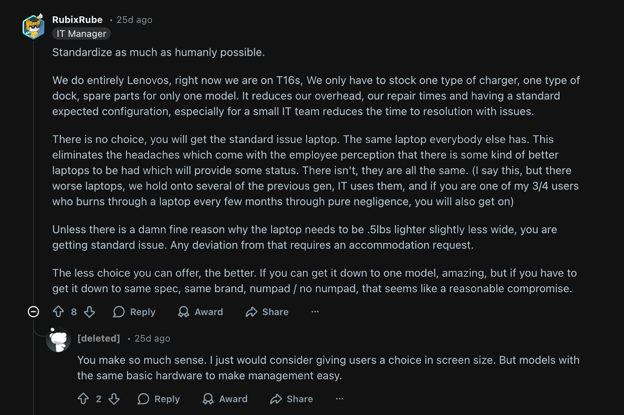
Via Reddit
Then, look at shared infrastructure, if applicable (servers, storage, networking). Estimate the load you must support over the hardware’s life (often 3 to 5 years). That means planning for growth and setting targets like storage capacity and network bandwidth.
Finally, collect input from
- Department leads, to learn about upcoming projects and software plans
- End users, to understand what is slowing them down today
- Finance teams to figure out budget limits and whether you’ll buy (CapEx) or lease (OpEx)
If your organization already uses Workwize, this step gets significantly easier. Workwize gives IT teams a live, filterable view of the entire fleet broken down by department, location, device type, and user.
That means instead of manually surveying department leads about what they have, you can pull that data directly from the platform. You can see which teams are overequipped, which are underserved, and where aging hardware is concentrated, all before a single conversation with a vendor.
Step 2: Do a corner-to-corner review of your existing IT stack
Once your business reason for buying hardware becomes clear, you need a clear picture of what you already have. Many procurement mistakes happen when teams shop in a vacuum. The result is usually one of three problems: the new hardware doesn’t work well with existing systems, it creates extra work for IT, or you end up buying things you already have sitting unused.
The goal of this step is to set a baseline that details what equipment you own today and what can be reused or upgraded to meet the needs you identified in the first step.
Start with an inventory and health check. For each device category, capture the basics like age, key specs, warranty status and where it is used. Doing this manually in spreadsheets is possible, but it becomes taxing fast.
Workwize replaces that spreadsheet entirely.
Its centralized dashboard maintains a continuously updated record of every asset in your organization. You can identify devices that are sitting idle, flagged for repair, or nearing end of life in minutes rather than days. This visibility directly prevents overspending.
You may find that some teams only need a RAM upgrade or a device reassignment rather than brand-new machines, and Workwize's redeployment workflows let you act on that immediately by routing existing inventory to new users before a purchase order is ever raised.
Hardware also has to fit into your current environment, so compatibility checks are important. For endpoints, new devices have to work smoothly with your operating system image and security stack. For servers and networking tools, physical and facility fit, such as rack space and cooling limits, must match.
Beyond what you're buying, you also need a plan for what you're replacing.
Some hardware can be redeployed internally, some traded in, and some must be securely wiped and recycled to meet e-waste and data protection rules. This is where having a platform like Workwize already in place pays off again. It's built-in retrieval and disposal workflows mean retirement doesn't become a separate, manual problem to solve at the end of the lifecycle.
We cover that process in full in Step 9.
Step 3: Research the hardware market to understand trends and do a cost analysis
Step 3: Research the hardware market to understand trends and do a cost analysis
Once you know what you need and what you already have, the next step is to determine what the market can actually offer you and what it will cost your organization.
Start by building a short list of viable options in each hardware category you need: standard laptops, high-performance workstations, servers, and networking gear. The goal is to create a focused comparison of credible options that meet the requirements you defined in Step 1.
While doing this, pay attention to where each product sits in its release cycle.
Hardware manufacturers refresh their lineups on predictable schedules, and buying a large batch of devices right before a new generation launches means you immediately own last-generation equipment. You don't need to time the market perfectly, but you should know whether the products you're evaluating are early-, mid-, or late-cycle before committing.
This dilemma of keeping hardware new and ‘fresh’ reminds me of a Tim Cook zinger:
"Inventory is fundamentally evil. You kind of want to manage it like you're in the dairy business. If it gets past its freshness date, you have a problem."
Once you have a credible shortlist, move to a Total Cost of Ownership (TCO) analysis. The purchase price is only a fraction of what the hardware actually costs your organization.
A complete TCO calculation must include:
- Deployment labor, the hours your team spends configuring and shipping devices
- Ongoing support and warranty costs over the device's lifespan
- Power consumption, which is especially significant for data center hardware
- Any software licensing tied to the device
- Residual value aka what the hardware is worth at trade-in or resale
This is also a good point to decide where you'll actually source the hardware.
You have three main options.
Buying directly from Original Equipment Manufacturers (OEMs) typically gives you the lowest unit price on large orders, but requires your team to handle configuration and logistics.
Value-Added Resellers (VARs) cost slightly more per unit but bundle pre-imaging, warehousing, and support into the purchase. Managed Service Providers (MSPs) go further still, managing the full procurement and lifecycle on your behalf.
Dell actually did quite a detailed study on the relationship between TCO and procurement decisions, and the figures are quite useful:
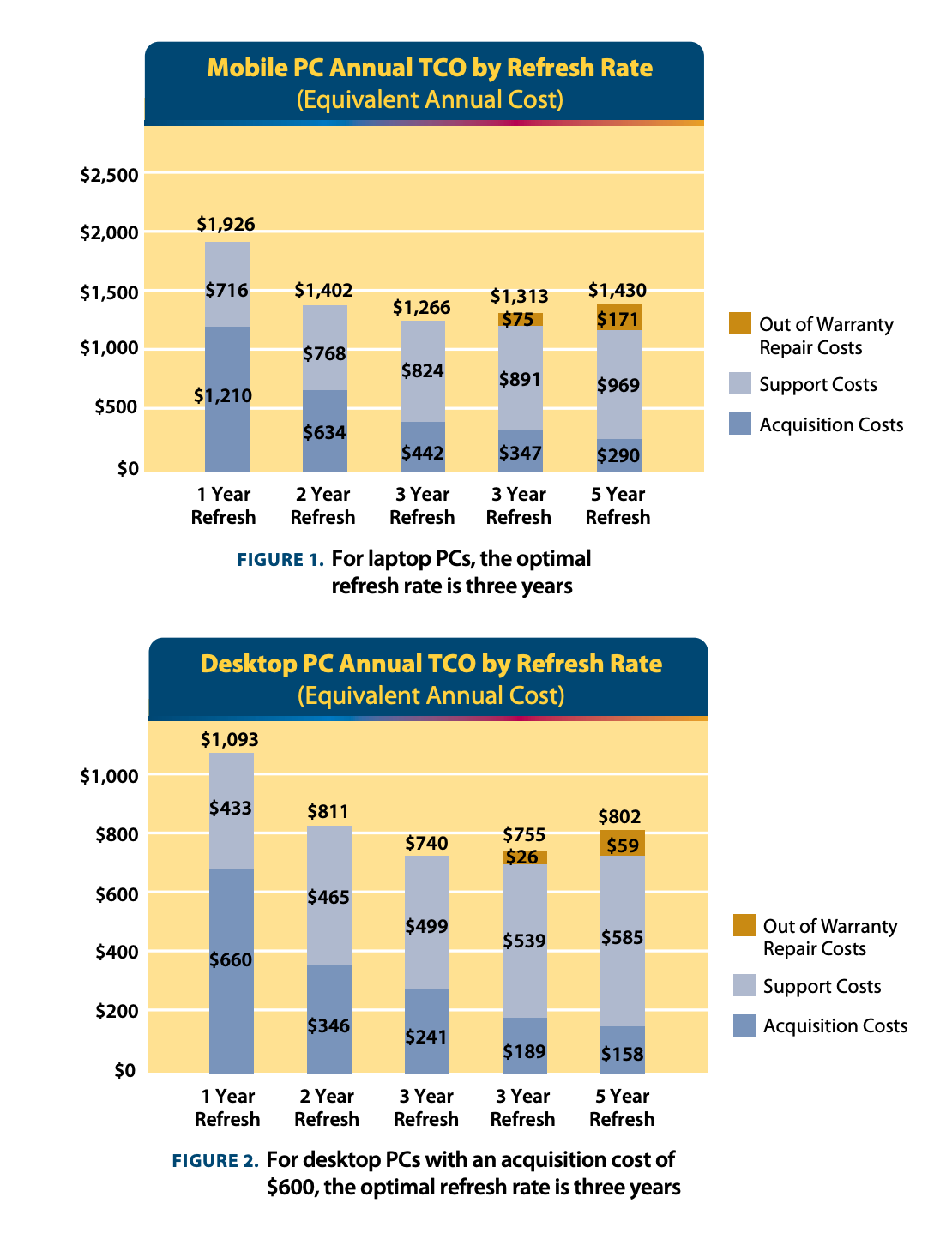
Via Dell
If you're running procurement through Workwize, this decision is less binary. Workwize is vendor-agnostic, meaning you can bring your preferred vendors — whether OEM, VAR, or otherwise — directly onto the platform.
All ordering and fulfillment then flow through a single system, making your TCO analysis more accurate over time because you're working from real historical data on support costs, repair frequency, and replacement rates rather than vendor-supplied projections.
Once your shortlist and cost analysis are in place, the next step is to put your requirements into a formal procurement document and send it to vetted vendors.
Step 4: Draft an RFP or RFQ based on your expectations and needs, and send that to vetted vendors
After your market research, translate your requirements into a formal procurement document so you don't lose sight of your business goals and maintain clarity throughout the procurement process.
Depending on your needs, you will issue either a Request for Proposal (RFP) or a Request for Quotation (RFQ):
- If you have identified the exact hardware model and configuration you need, issue an RFQ to get the best price and delivery terms
- If you have defined your requirements but are open to different hardware solutions from various manufacturers, issue an RFP to let vendors propose the best fit
This document must be precise so that vendors provide responses you can easily compare. Do not allow vendors to submit quotes in their own formats. Use a standardized pricing template. This prevents vendors from hiding costs or bundling services in ways that obscure the true unit price of the hardware.
Ferris University has actually published some really good RFP and RFQ flowcharts that we even refer to from time to time
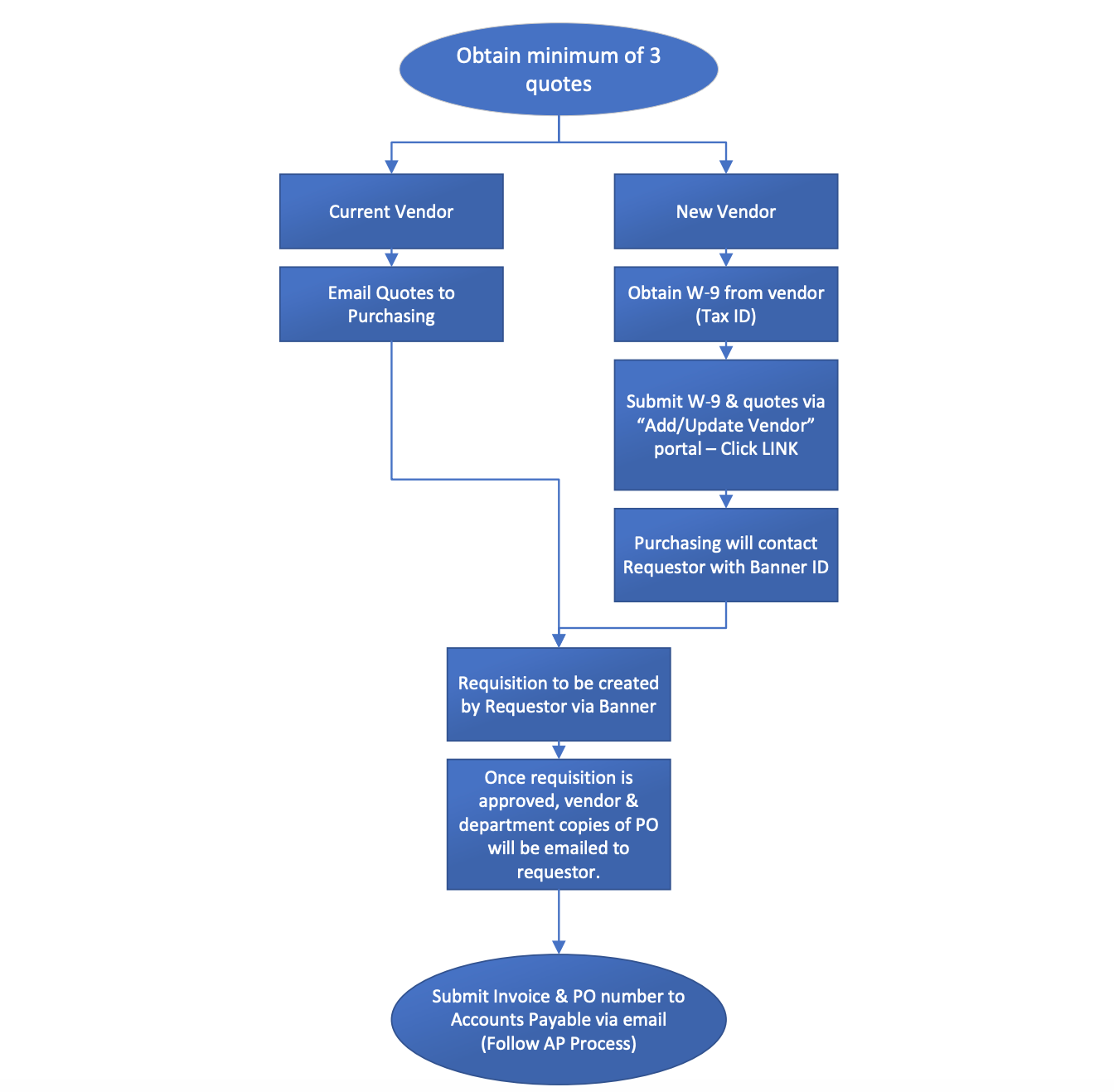
Via Ferris
You can access the full document here.
This document must be precise so that vendors provide responses you can easily compare. Do not allow vendors to submit quotes in their own formats. Use a standardized pricing template. This prevents vendors from hiding costs or bundling services in ways that obscure the true unit price of the hardware.
Your RFP or RFQ must explicitly detail the following:
- Exact technical specifications: List the minimum required processing power, memory, storage, and networking capabilities
- Volume and delivery logistics: Specify the exact number of units required and your delivery schedule. State whether you need the entire order shipped at once or drop-shipped to employees over a set period
- Value-added services: Clarify if you need the vendor to pre-image devices with your corporate operating system or provide BIOS-level configuration before shipping
- Service Level Agreements (SLAs): Define your expectations for hardware support and mandatory response times for critical hardware failures
We emphasize standardization so much because when you control the flow of information and the format of the responses, vendors are bound to compete on an apples-to-apples basis. This removes ambiguity and positions your organization for a highly objective evaluation phase.
If you're running procurement through Workwize, you'll want to confirm that shortlisted vendors can be onboarded to the platform.
Workwize allows you to bring your chosen vendors in, meaning all ordering, tracking, and fulfillment flow through one place rather than being scattered across vendor portals and email chains.
Step 5: Evaluate the prospective vendors on a standardized scoring system before choosing the vendor you’ll procure hardware from
Once the submission deadline passes, you enter the evaluation phase. The most common mistake IT leaders make here is defaulting to the lowest bidder. While cost matters, selecting on price alone routinely leads to inflated operational costs and serious deployment delays down the line.
To avoid this, evaluate all bids using a pre-established, weighted scoring system that takes into account
- Hardware pricing, but weighted against the TCO
- SLA commitments, including response times and escalation paths
- Technical compliance (does the proposal meet your documented requirements?)
- Value-added services, which include onboarding support, asset management, training, etc.
- Supply chain resilience also deserves attention in the current hardware landscape
On that last point, a vendor offering a steep discount is worthless if they're sitting on a six-month lead time due to component shortages. Demand guaranteed delivery dates and build financial penalties into the contract for missed logistical milestones.
And never skip reference checks. Focus specifically on the vendor's Return Merchandise Authorization (RMA) process (how they handle hardware failures in the field). When speaking to their references, ask
- How quickly does the vendor ship replacement parts after a failure is found?
- Do they push back on or delay warranty claims?
- Is technical support onshore or offshore, and what's their typical time to resolution?
Once your scoring system produces a shortlist of two vendors, you can start active negotiation and use their competing bids as leverage. Specifically, push for
- Extended payment terms
- Complimentary value-adds like asset tagging or configuration services
- Upgraded support tiers, such as next-business-day on-site coverage at the standard warranty rate
Because Workwize is vendor-agnostic and supports multiple vendor relationships simultaneously, you are not forced into a single supplier to make the platform work. You can bring two or three vendors onto Workwize and run split procurement across them, while maintaining unified visibility across all orders in one dashboard.
That flexibility gives your negotiation leverage real teeth, because vendors know you can diversify your spend without adding operational complexity on your end.
Only once these terms are confirmed in writing do you commit to a final partner.
Step 6: Run a Proof of Concept (PoC) with the vendor you select and test the hardware they provide in real-life usage scenarios
Never sign a large purchase order based solely on a spec sheet or a controlled sales demo. Before committing financially, demand a Proof of Concept where physical evaluation units tested against your actual environment. A PoC moves the hardware from theory to reality and directly de-risks your capital expenditure.
Structure your PoC in three sequential phases:
- Logical integration testing comes first. Request evaluation units of the exact hardware configurations you plan to purchase. Your engineering team should validate OS imaging and MDM enrollment. Don't ignore security stack compatibility — install your EDR agents and VPN clients and confirm that new hardware drivers don't conflict with your security protocol.
- Physical and stress testing comes next. Don't rely on manufacturer benchmarks; run your own. Do compute stress testing and battery testing for laptops. Rack the PoC units in your existing environment and verify that your Power Distribution Unit capacity can handle the power draw.
- User acceptance testing (UAT) is the final phase and the one most teams under-invest in. Technical validation alone isn't enough. Hand evaluation units to a select group of representative users from the departments that will actually use the hardware and gather structured feedback on real workloads. Qualitative feedback at this stage is cheap. Replacing hardware post-rollout because your workforce rejects it is not.
The point of a pilot group is not to find representative users. And for organizations with distributed or remote teams, finding representative users means your evaluation units need to travel to different cities, different countries, and different time zones. This is where the logistics of a PoC quietly become its biggest risk.
Getting devices to remote employees quickly and reliably is not a trivial coordination problem. Doing it through your vendor means depending on their fulfillment timelines and shipping infrastructure, which vary widely.
Doing it manually through internal IT means someone spends hours coordinating carriers, printing labels, tracking shipments across multiple portals, and following up with employees to confirm receipt.
Workwize is built specifically to eliminate this problem.
As an IT hardware logistics platform, Workwize handles the end-to-end movement of devices — shipping evaluation units directly to employees wherever they are, tracking every device in transit from a single dashboard, and initiating retrieval automatically once the UAT window closes.
This means your PoC stays on schedule and your team stays focused on evaluating the hardware rather than managing the logistics of getting it there and back.
Read this excerpt from a very insightful write-up on change implementation, on why you need ‘guinea pig’ pilot groups:
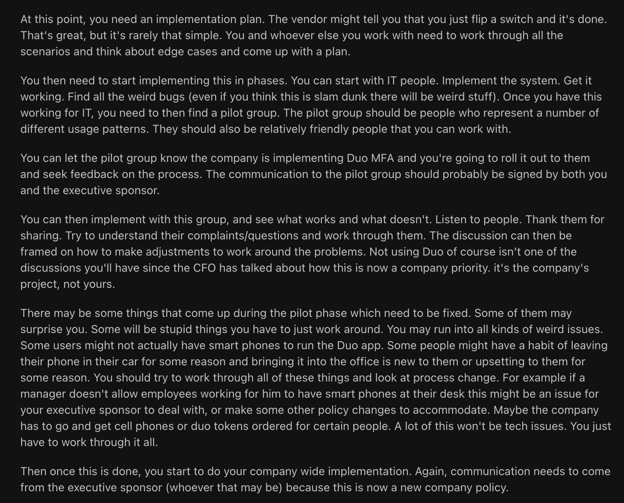
Via Reddit
Step 7: Set strong legal and financial safeguards and finalize the contract with the vendor
A successful PoC alone doesn't mean you're done negotiating. You must now finalize the terms.
This step establishes the legal and financial frameworks that will govern your hardware operations for the next three to five years. Weak contracts now mean your organization absorbs the cost of vendor failures later.
This is the unglamorous part of procurement, but also the part where minor contract terms can create very expensive outcomes, like in this Pluralsight case:
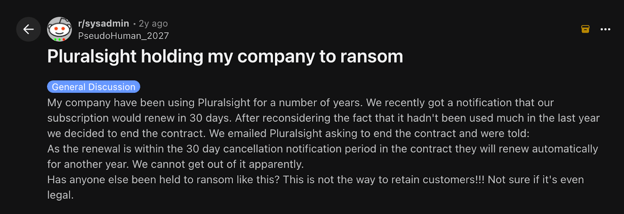
Via Reddit
Cases like these are why you must collaborate with your procurement and legal teams to finalize the Master Services Agreement (MSA) before finalizing the PO. This MSA is where the informal commitments made during the sales process are embedded in a binding legal text.
Finally, your final contract must explicitly cover
- Price locking via ‘blanket’ POs. If you're buying 1,000 laptops but deploying 200 per quarter, negotiate a blanket PO. This locks your unit price against market fluctuations while allowing you to pay only as inventory is released.
- Financial penalties for SLA breaches. If the vendor misses guaranteed delivery dates or support response windows, they should automatically forfeit a predetermined percentage of the contract value.
- Financing model. Decide whether this is a Capital Expenditure (CapEx) purchase or an Operational Expenditure (OpEx) model. Many IT leaders now use Device-as-a-Service (DaaS), where hardware is leased and deployment and support are bundled into a single predictable monthly per-user fee.
Once terms are signed, formally issue the PO and send it to your finance department for budget deduction.
Step 8: Deploy the hardware and make it ready for organizational use
Your logistical efficiency is put to the test when hardware arrives.
Manually unboxing and configuring hundreds of devices via USB drives is a waste of expensive engineering labor. Instead, you should aim to turn factory-state hardware into fully configured endpoints with minimal manual intervention.
Most IT professionals actually aim to automate as much of the deployment process as possible. A look at sysadmin threads on social media confirms that.
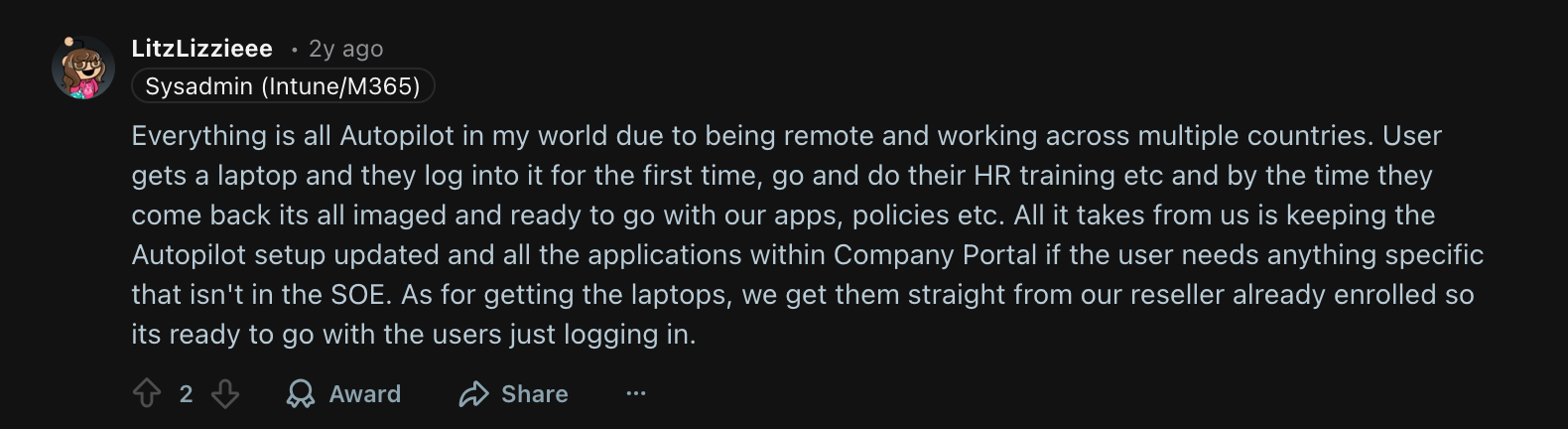
Via Reddit
When assets arrive physically, immediately
- Add physical asset tags (high-durability barcodes or RFID)
- Bind those tags to the device's digital serial number in your ITALM system
- Register the asset to a specific user and location
This creates an auditable record from day one.
For software provisioning, you need an automated deployment. However, the right way to deploy depends on your workforce distribution and where the hardware is going.
- Zero-touch provisioning (ZTP): Best for remote or distributed teams. The vendor ships sealed hardware directly to the employee. The moment they connect to Wi-Fi, the device automatically checks in with your MDM and installs the user's software package.
- Vendor pre-provisioning: This is best when ZTP isn't viable at scale, mostly when your network can't handle hundreds of devices simultaneously installing large software packages over the air. Your VAR images the devices at their warehouse before shipping and devices arrive essentially ready to use.
Internal staging: This is needed for sensitive data center hardware. Rather than deploying directly into production, your engineering team racks and configures the hardware in a controlled staging environment first. This is where you validate BIOS and UEFI firmware against your approved corporate baselines before the hardware ever touches the live network.
Speaking of zero-touch, this visual by Microsoft is really helpful to understand the zero-touch process:
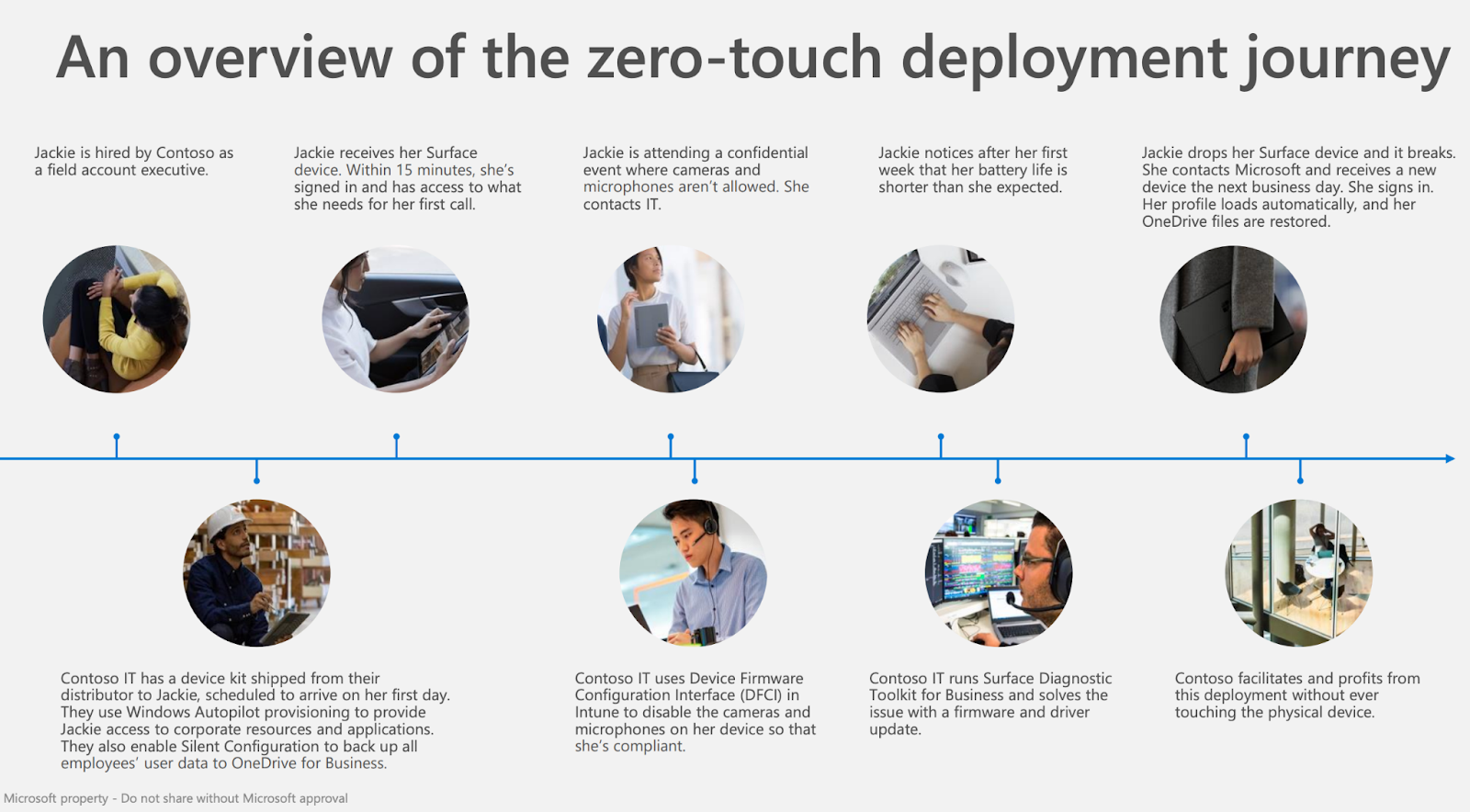
Via Microsoft
Workwize is purpose-built for the deployment challenges of distributed workforces. When a new hire is added to your HR system, Workwize can automatically trigger a device order for that employee. This involves selecting the right hardware profile for their role and shipping a pre-configured, enrollment-ready device directly to their location, anywhere in the world.
MDM enrollment happens automatically on first boot, so the device arrives ready to use on day one without IT ever touching it. Every shipment is tracked within Workwize, assets are automatically registered to the new user in the system, and the device's lifecycle clock starts from the moment of delivery.
For teams managing onboarding across multiple regions, this eliminates an enormous amount of manual coordination that would otherwise fall on IT.
At the end of this step, you have fully functional devices and your ITALM system marks the asset as ‘Deployed’ and officially starts its operational lifecycle clock.
Step 9: Manage hardware throughout its usable life to extract optimal performance and longevity, while also planning to retire hardware responsibly
Procurement doesn't end at deployment; it ends when the hardware is securely and legally disposed of. Neglecting the tail end of the hardware lifecycle exposes your organization to data breach risks and compliance violations, not to mention missed financial recovery.
Throughout the device's operational life, your ITALM platform should continuously monitor hardware health. If, for instance, a drive throws errors or a laptop battery drops below 50% capacity, automatically generate a helpdesk ticket for proactive warranty replacement before the user hits a failure.
When hardware reaches End of Life (EOL), you also need to run a formal retirement protocol, which does the following:
- Wipe or physically destroy storage media in compliance with your data security policy and applicable regulations (NIST 800-88 is the standard reference)
- Document the destruction with a Certificate of Data Destruction for your compliance records
- Recover residual value where possible — working assets can be resold, donated, or traded in; even failed hardware often has recyclable components
- Update your ITALM system to mark the asset as ‘Retired’ and close its lifecycle record
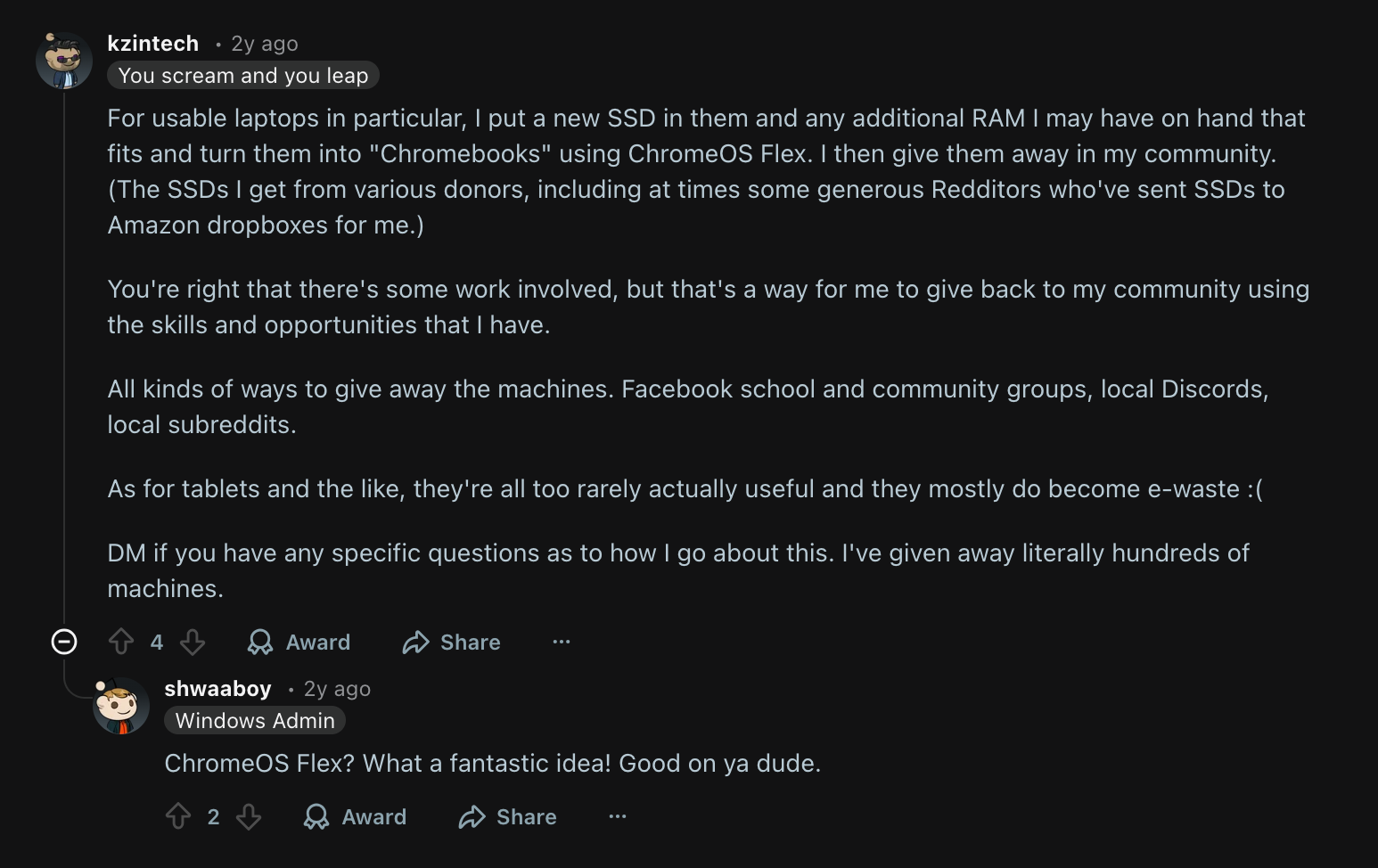
This Reddit thread has a lot of useful insights on how to recycle retired laptops for the greater good of the community:
Via Reddit
A hardware asset without a controlled retirement process is a liability. So do everything to execute it well.
IT Hardware Procurement Best Practices
Here are some other tips to ensure your IT procurement process is foolproof.
1. Align Hardware Procurement with Business Strategy and IT Planning
Procurement decisions should never happen in isolation. Before any purchase is made, IT and finance teams must have a shared view of current inventory, upcoming headcount changes, refresh cycles, and departmental roadmaps.
Organizations that align procurement with IT planning cycles report fewer emergency purchases. Proactive planning also gives procurement teams time to negotiate volume discounts and evaluate multiple vendors.
What to avoid: Avoid treating the annual plan as fixed. Business needs shift, and a rigid procurement plan becomes a liability. Also, don't exclude department heads from the planning process since uncoordinated purchasing by individual teams is one of the most common sources of budget waste.
2. Standardize Hardware Configurations Across the Organization
Define a core set of hardware specifications for each employee role or use case. Document these configurations and keep them up to date.
Standardization reduces support complexity, speeds up device setup, simplifies warranty management, and makes bulk purchasing significantly more cost-effective.
What to avoid: Avoid letting standards become so rigid that you need to ignore edge cases. Some roles genuinely need non-standard kit, and forcing them into an ill-fitting configuration incurs productivity losses that exceed the savings. Create a clear exceptions process so legitimate requests are handled efficiently without bypassing standards entirely.
3. Manage the Full Hardware Lifecycle, Not Just the Purchase
Hardware procurement doesn't end once the hardware is in the office.
It’s important to have a plan to manage it throughout its life. Define a clear lifecycle policy that covers deployment, maintenance schedules, refresh timelines, and end-of-life disposal.
Most enterprise laptops and desktops have a recommended refresh cycle of three to four years; letting devices age beyond this increases failure rates, security exposure, and support costs.
What to avoid: Don't overlook the end-of-life stage. Devices returned from departing employees that aren't properly tracked, wiped, and either redeployed or disposed of represent both a security risk and a hidden cost. Automate offboarding workflows with Workwize to ensure every departing employee's device is recovered and processed consistently.
4. Integrate Procurement Systems with Your ITSM Platform
Connect your procurement workflows directly into your IT Service Management platform so that hardware requests, approvals, purchase orders, and asset records flow through a single system.
When a ticket is raised for a new device, the ITSM platform should trigger the approval chain, notify procurement, and automatically register the asset upon delivery, without manual re-entry at each step. This end-to-end visibility reduces delays, eliminates data duplication, and gives IT and finance a shared, accurate source of truth.
What to avoid: A common mistake is integrating the tools technically without aligning the underlying processes. If procurement and IT still operate in separate silos with different approval chains, the integration will surface that dysfunction rather than fix it.
Establish shared KPIs and clear cross-functional ownership before going live. Also, avoid heavy customization early on. Start with standard workflows and refine based on actual use.
5. Explore Flexible Procurement Models
Outright hardware purchases aren't always the most cost-effective or strategically sound option. Evaluate alternative models that better match your organization's cash flow, growth pace, and technology refresh needs.
- Leasing or renting: converts large capital expenditures into predictable operational costs and makes it easier to upgrade devices at the end of a term rather than managing aging hardware.
- Hardware-as-a-Service (HaaS): bundles the device, support, and maintenance into a single monthly fee managed by a provider — shifting responsibility for repairs, replacements, and decommissioning off your IT team.
- Cloud-based solutions: can eliminate the need for certain on-premises hardware entirely for workloads that don't require local compute.
- BYOD policies can reduce device spend when implemented with clear security requirements, MDM enrollment, and defined support boundaries.
As Ivan Samoylov, Chief Technology Officer, Alloy Software writes,
Outsource services to specialized providers instead of trying to do everything in-house. Using cloud-based and subscription options not only helps you save money but also frees up your time to focus on improving expertise in areas more directly related to your business.
What to avoid: Flexible models aren't universally better — they require careful total cost analysis over the full term. A HaaS contract that looks affordable monthly can cost more over four years than an outright purchase. Model both scenarios with realistic refresh assumptions before committing.
Conclusion
Most organizations treat hardware procurement as a necessary inconvenience, something to get through so the real work can begin. That's exactly why it becomes a problem.
Every missed step in this process shows up somewhere. For instance, a new hire waiting a week for a laptop or a device with a factory image nobody verified, sitting on your network.
None of these are dramatic failures, but they quietly drain your budget, security, and your team's time.
The companies that get hardware procurement right have simply stopped treating procurement as an afterthought.
That's exactly what Workwize is built for. From vendor management and global device deployment to asset tracking and retrieval, it's the operational backbone that makes a procurement process like this one actually executable. It does this without the need for spreadsheets and the gaps that cost you more than you realize.
Schedule a Workwize demo now to see how we can help you with your IT hardware procurement.


Shashank Mishra

Establish a single source of truth for every IT asset across the globe.
.png?width=258&height=318&name=g10%20(5).png)
More related resources to help you stop firefighting hardware operations.



Get monthly insights into how other IT leaders are improving their ops.



.png?width=2880&height=1232&name=Group%202147262874%20(1).png)
Stop coordinating
hardware like it's 2012.
.svg)
.svg)
.svg)
.svg)
.svg)