




.svg)
.svg)

.svg)


.svg)





.svg)
.png?width=500&height=424&name=Style-1---V1-(1).png)
.png?width=1230&height=692&name=Vector%20(13).png)
-
IT asset inventory management is the practice of maintaining a reliable, up-to-date record of every asset your organization owns, showing where each asset is, who has it, and its current status
- A complete inventory covers hardware devices, software resources, such as apps, licenses, and subscriptions, cloud assets like virtual machines, leased cloud storage, and databases, security infrastructure like hardware tokens and encryption tools, and any asset that carries cost, risk, or compliance implications
- Inventory management must follow every IT asset throughout its lifecycle, from procurement and deployment to retrieval and disposal
- Building and maintaining an accurate inventory requires a structured process, clear ownership, and consistent data hygiene across every team that touches assets
- The most common challenges of managing an IT asset inventory, such as shadow IT, manual tracking, and offboarding gaps, are predictable, and the right processes can get ahead of them before they compound
- The right IT asset inventory software ties all of this together, giving teams real-time visibility and the automation needed to keep records accurate at scale
- Using a service like Workwize simplifies the IT asset inventory management process because it provides the expertise, software and mechanism to build, manage and automate your inventory. It also uses that automated system to handle your entire IT hardware lifecycle, from procurement to disposal.
Ask 43% of IT managers for full asset inventories, and you'll get one of two things: a spreadsheet that's weeks to months out of date or a long pause.
Look deeper, and you'll find more problems beneath the surface.
Problems like devices that go missing because no one tagged machines assigned to offboarded employees. Duplicated licenses, subscriptions that continue to renew on abandoned systems, and audits that turn into fire drills when untracked network endpoints are discovered.
The cost of these issues adds up. IBM estimates that poor data quality costs businesses an average of $12.9 million every year, and a WanAware survey found that IT teams lose 25% of their budgets to ghost assets.
IT asset inventory management is how you collect cold, hard facts about your assets in real time and prevent these issues.
This guide covers everything from what an IT asset inventory is, what to include in it, how to manage it, and which tools make it work at scale.

What is IT Asset Inventory Management?
IT asset inventory management is the set of activities and processes dedicated to tracking and keeping detailed records of an organization's IT asset inventory management. The inventory is an updated catalog of every hardware, software, and cloud asset an organization owns or uses.
The management process ensures that custodians, usually IT teams coordinating with procurement and HR, know how many assets they have, where they are, who is using them, and their current status or condition.
While IT asset inventory management is closely related to and even sounds like IT asset management, they are not the same. The former focuses on identifying, documenting, and tracking assets. The latter is the broader discipline that governs the lifecycle of every asset, from procurement to disposal.
However, they overlap because a solid inventory is often used to address specific IT asset management challenges and move devices from one lifecycle stage to another.
What Should Be Included in an IT Asset Inventory?
Every IT component an organization uses should be part of its inventory. As mentioned earlier, these components include hardware and software resources. Let's cover the asset classes and their subsets:
|
Asset Class |
What It Includes |
Common Subsets |
|
Hardware |
Physical IT equipment owned or leased by the organization |
Desktops, laptops, servers, monitors, printers, mobile devices, peripherals |
|
Software |
Installed or licensed software used to run, secure or support business operations |
Operating systems, productivity suites, security tools, development tools, firmware, etc. |
|
Network |
Infrastructure that connects and routes data across the organization |
Routers, switches, firewalls, VPNs, access points, load balancers, cabling, etc |
|
Cloud |
Virtual infrastructure and cloud-hosted resources |
Virtual machines, cloud storage, databases, containers, SaaS apps, and cloud networking resources |
|
Security |
Tools used to protect identities, endpoints, networks, and data |
Endpoint protection, MFA tools, IAM platforms, physical and software-based encryption tools, and SIEM systems |
Hardware is often the most elusive asset class to track. A device's trail may go cold between retrieval from an employee in Lisbon and reassignment to a team member in Madrid. IT teams can also lose track of out-of-commission workstations that sit forgotten in a London backroom waiting to be decommissioned.
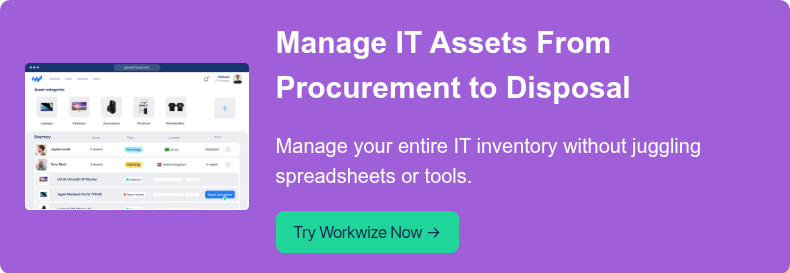
That's why using dedicated services like Workwize to manage your inventory keeps you at ease. The company provides a single pane of glass for inventory and hardware asset management to ensure you get real-time updates throughout each asset's lifecycle, from procurement to disposition.
Why IT Asset Inventory Management Is Important
IT asset inventory management matters because it gives IT teams the visibility they need to control costs, protect company and employee data, stay compliant, and support employees properly. Let's break down the reasons you need it:
IT Teams Get a Reliable Source of Truth
Without a well-managed, up-to-date, and accurate inventory, IT teams lose the ability to confidently determine which hardware is active or who's currently using it. They'll also lack visibility into which software is installed and on what device, which cloud resources are in use, or whether their current records still reflect reality.
That means making decisions with partial information. It also means not knowing when to decide or what decisions to make because they lack the data and mechanisms to alert them to changes that require attention.
An IT asset inventory management practice that leaves no resource untracked and integrates automated systems solves that issue by ensuring assets are always updated with real-time and accurate data. That way, IT teams have all the info they need to secure devices, avoid wasteful spending, support employees, and stay compliant.
Software and SaaS Waste Stay Under Control
Zylo’s 2025 SaaS Management Index found that organizations waste an average of $21 million annually on unused SaaS licenses, up 14.2% year over year.
This waste is largely due to organizations footing the renewal bills for licenses and leases that no one uses. And that happens because they lost track of who uses—or no longer uses—what and which devices no longer need those software packages or SaaS access.
Any team at the top of its IT asset inventory management game will have data that ties every device and user account in the organization with pending, active, and soon-to-be-renewed SaaS and software application access.
They'll also know which users and devices are active, which allows them to flag and address potential wasteful spending.
It Reduces Security Blind Spots
If IT does not know an asset exists, it cannot properly secure, patch, monitor, or retire it. That's why attackers see missing laptops, untracked applications, unmanaged cloud instances, and forgotten user accounts as appealing entry points for security breaches.
And the issue is more prevalent than you think.
The Cloud Security Alliance’s State of SaaS Security Report 2025 found that 55% of employees use SaaS without security’s involvement, while 57% of organizations report fragmented administration.
The cost of that exposure, according to IBM’s Cost of a Data Breach Report 2025, floats around $4.4 million per incident.
The Cybersecurity and Infrastructure Security Agency (CISA) agrees that you need better inventory management to reduce your attack surface area:
"...it is essential for operational technology (OT) owners and operators across all critical infrastructure sectors to create an OT asset inventory supplemented by an OT taxonomy. Using these tools helps owners and operators identify which assets in their environment should be secured and protected and structure their defenses accordingly to reduce the risk a cybersecurity incident poses to the organization’s mission and service continuity." - CISA
With competent inventory management, you can reduce those blind spots mentioned earlier and create the required inventory and classifications (taxonomy) as advised by CISA.
Organizations Can Strengthen Audit and Compliance Readiness
Gaps in IT asset records surface during audits, and by then, they're costly to address. It could require spending extra on last-minute logistics to track down and dispose of a device left behind by or still in the custody of an ex-employee.
And when that lost device leads to IT compliance breaches, companies cough up revenue-draining sums in fines and settlements. The SEC reported $8.2 billion in financial remedies in FY 2024, and European regulators issued about €1.2 billion in GDPR fines in 2025.
A well-implemented asset inventory management practice helps IT teams keep current, accessible, and defensible records across every asset and license. That means the evidence is already in place whenever an audit occurs.
Remote and Distributed Teams Get Better Support
Half of all full-time U.S. employees now hold remote-capable roles. Among them, 52% work hybrid and 26% work fully remote, according to Gallup. It means devices move between homes, offices, vendors, and countries to serve a significant portion of the workforce. Software also gets provisioned across teams that may never be in the same place.
With a system-level record and an asset inventory practice tuned for distributed workforces, IT teams can maintain visibility regardless of where an asset moves to or how long it stays in one place.
The IT Asset Lifecycle
IT assets move through specific stages from the moment they're acquired to the day they're retired. Inventory management is what keeps records accurate at every point along that journey.
Procurement
The lifecycle begins at the time of purchase or lease. Good inventory practices start here, too. It captures vendor details, specifications, and order information before the asset even arrives.
Deployment and Assignment
Once received and configured, the asset is assigned to a user, team, or function. Owner, location, serial number, warranty status, and deployment date all get logged and tied to that specific asset.
Use and Management
Active use is where inventory discipline gets tested. Reassignments happen, software changes, repairs get made, and every one of those events is a chance for records to drift from reality. Timely updates keep the inventory honest throughout the asset's working life.
Refresh or Redeployment
Not every aging asset needs replacing. Some get upgraded, reassigned or refreshed to extend their useful life. As devices move between users, teams or locations, the inventory records should move with them.
Disposal
When an asset needs to be transitioned out of the company's IT stack, it is retrieved from the user or its function, wiped, and disposed of in line with policy and compliance requirements. The final inventory update confirms the asset is no longer active and documents how it left the organization.

How to Build and Maintain An IT Asset Inventory
An IT asset inventory is not just about creating a list of devices and licenses. The real work is building a system that stays accurate as assets are purchased, assigned, moved, updated, reclaimed, and retired. That means combining clear inventory rules with processes that reflect how assets actually move through the business.
Define What Belongs in the Inventory
Start by deciding which asset classes the inventory should cover. For most organizations, that includes:
- Hardware,
- Software,
- Cloud resources,
- Network equipment and
- Key related details such as ownership, location, status, vendor, purchase date, warranty, and lifecycle stage.
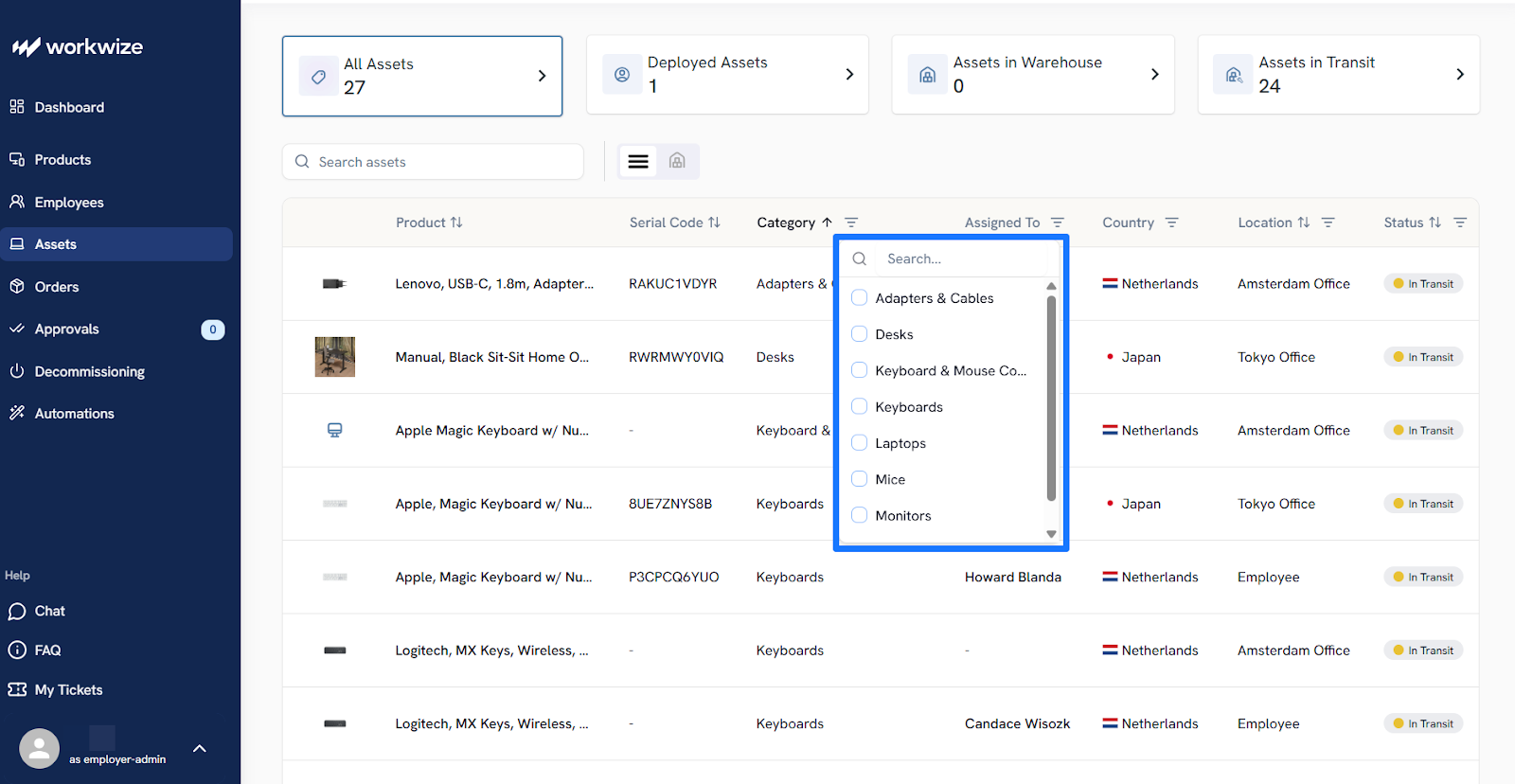
Your organization's makeup and IT stack will determine these classes. For example, it's easy for a remote SaaS IT team to lose track of devices deployed halfway around the world, to test cloud instances, and even to back up devices.
You can collaborate with other teams within your organization responsible for any aspect of the asset lifecycle, whether it's procurement or delivery, to request a complete list of all assets they interact with. IT asset discovery tools can also help you identify ghost devices you didn't know existed.
Standardize the Asset Data You Collect
Once you've gamed out the scope, define the fields every record should include.
Here's an easy outline you can work with:
- Hardware: Serial number, model, owner, location, warranty status, deployment date
- Software: Version, license type, assigned users, renewal dates
- Cloud resources: Service type, assigned team, cost center, provisioning date
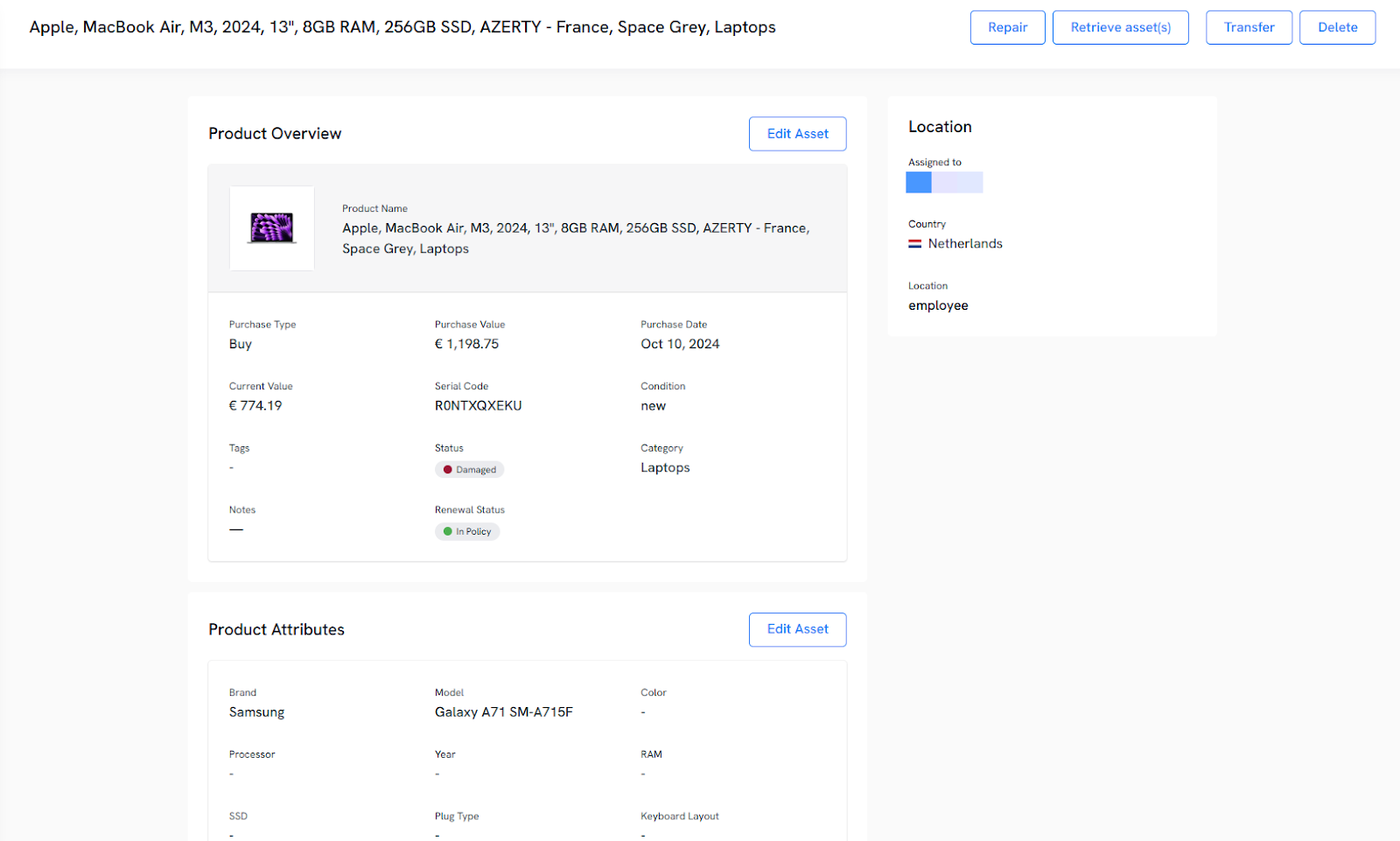
The goal is consistency. Inventory data is only useful when records are complete enough to support compliance, budgeting, and lifecycle decisions.
Choose a Central System of Record
An inventory cannot stay reliable if data lives in scattered spreadsheets, inboxes, procurement portals, and local team documents. Choose one system where asset records are created, updated, and maintained, and make it the source of truth for the organization.
That system should also support the way assets change over time. IT teams need to see when an asset was purchased, who it was assigned to, whether it has been reassigned, what software or services are tied to it, and when it is due for refresh or retirement.
Ideally, you should pick an application that integrates with the rest of your asset management workflows. More on this shortly.
Build Inventory Updates Into Every Lifecycle Stage
A good inventory is maintained through ongoing asset tracking and updates. That means every key lifecycle event, whether it's procurement or a recall, should trigger an update.
The best practice is to unify your inventory management with your IT lifecycle workflows. It involves using asset-tracking systems to ensure your inventory stays up to date with each asset's latest status.
However, many companies take the simple route of outsourcing to IT lifecycle management vendors like Workwize that handle and automate the asset's physical lifecycle (procurement, deployment, management, and disposition) as well as real-time inventory updates.
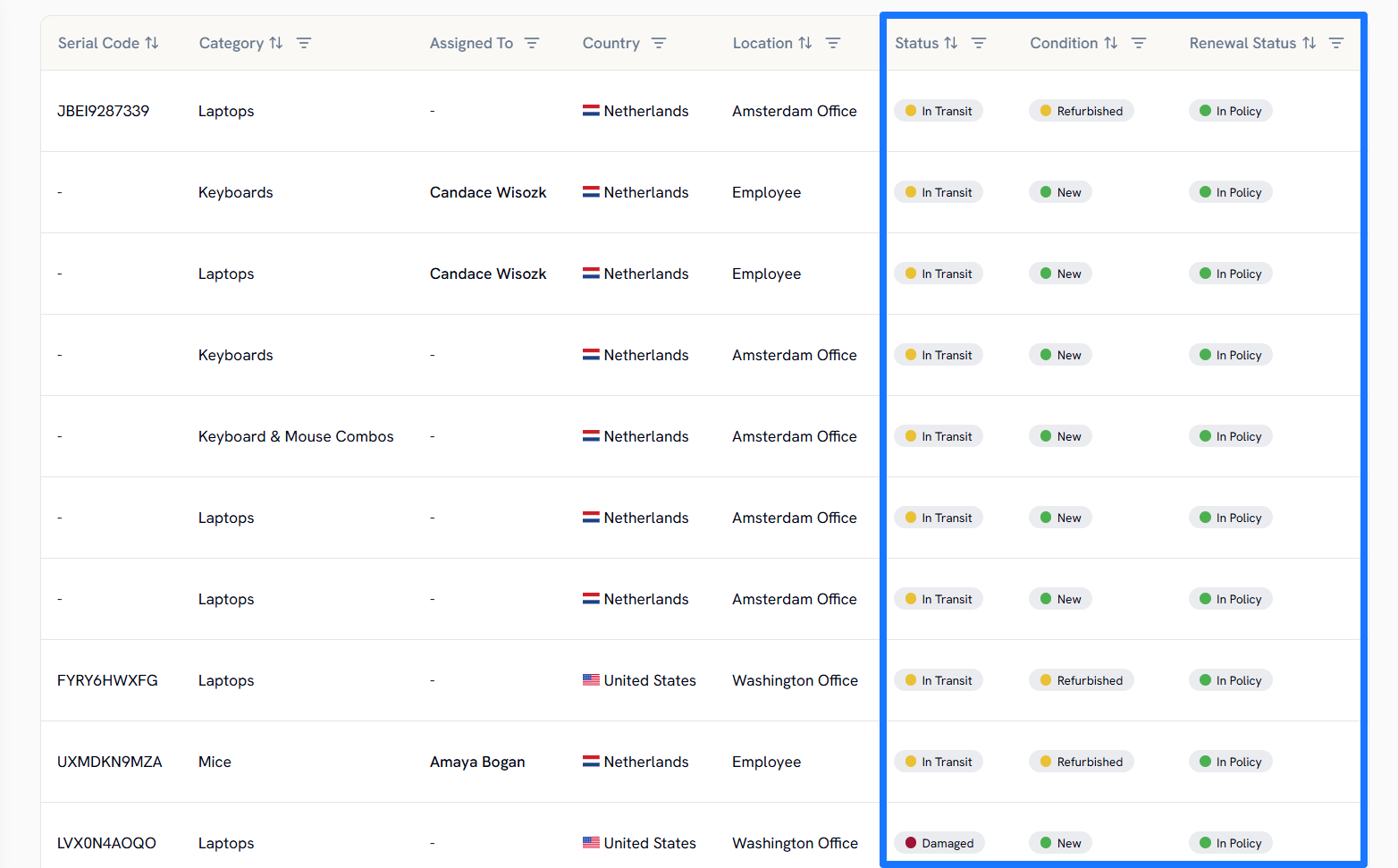
Assign Ownership for Inventory Accuracy
Even if multiple teams touch assets, responsibility should still be clear. IT may manage deployment and support; procurement may manage purchasing data; HR may trigger joiner and leaver (JML) workflows; and security may focus on compliance status.
But someone, a group, or a department must own the overall integrity of the inventory, and every IT asset lifecycle update must pass through them.
That single ownership ensures changes and updates are consistent and coherent, the team can avoid duplication, and every other person in the organization knows who to contact for clarifications and corrections regarding inventory data.
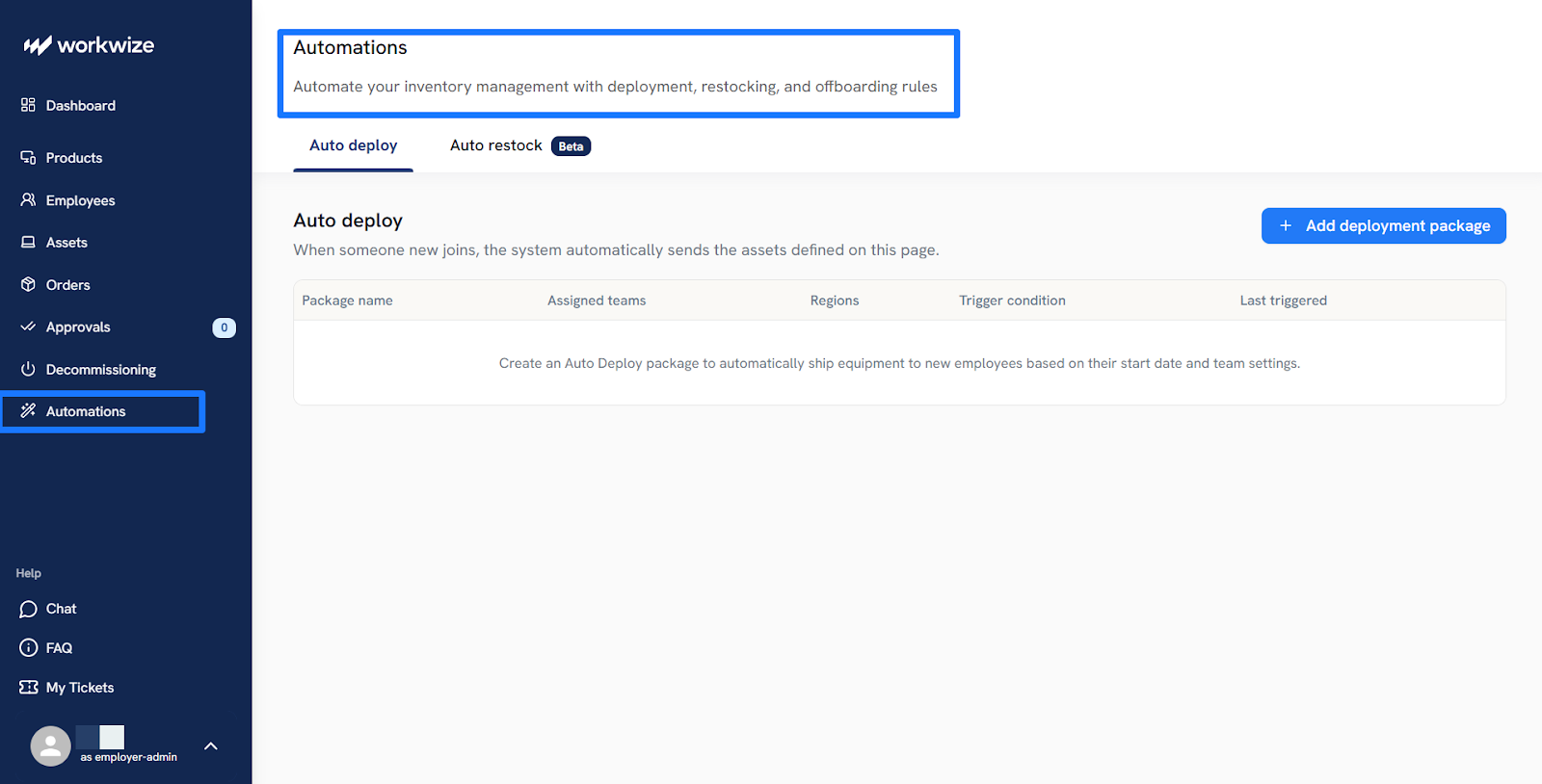
Automate the Process
The more inventory updates depend on someone remembering to log a change, the more likely records become incomplete, delayed, or inaccurate.
When you automate how your inventory receives updates, you'll keep records current and accurate instead of chasing data after the fact. To get there:
- Identify every point in your current asset lifecycle that relies on manual updates
- Connect your inventory management software to your asset management system and MDM platform for automatic device status updates
- Link your HRIS to trigger joiner, mover, and leaver workflows that show up in your inventory
If these steps feel too complicated because your IT stack involves a lot of moving parts and remote workers that need support, you can use a service provider instead. Companies like Workwize provide a complete asset lifecycle management framework that automatically feeds your inventory with every update, from procurement to asset disposal.
Reconcile Records Regularly
Even if you've automated your inventory management workflow, you still need to regularly review it. Inventory data against real-world signals, such as MDM records, procurement data, directory data, cloud admin consoles, and disposal logs, to catch mismatches early.
This matters because inventory errors usually come from small, missed changes that compound over time. Regular reconciliation helps teams catch duplicate records, inactive assets that still appear active, assets with no owner, and systems that should have been retired or reclaimed.
Set Rules for Exceptions and Edge Cases
Not every asset follows a neat path. Some devices are loaned temporarily. Some are shipped directly to remote employees under custom-to-order (CTO) arrangements. And some cloud resources are created quickly for short-term projects.
These edge cases need edge rules.
For example, loaned devices should carry a return date and trigger an automatic follow-up when that window closes, and CTO shipments should be logged as soon as the order is placed and assigned to the receiving employee before the device ships.
Without these specific rules, devices that spend any time outside your automated workflows will become the blind spots that weaken the inventory over time.
Common IT Asset Inventory Challenges
Keeping an IT asset inventory accurate sounds simple until assets start moving across teams, systems, and locations. Let's cover the challenges you'll likely face when maintaining your organization's inventory.
Scattered asset data
Inventory data often sits across spreadsheets, procurement platforms, MDM tools, HR systems, and SaaS admin consoles. That fragmentation makes it hard to maintain one reliable view of what the organization actually owns and uses. Teams may have data everywhere without having clarity anywhere.
Manual updates
Many inventories break down because updates depend on someone remembering to log a change. A device gets reassigned, a license is reclaimed, or a cloud resource is retired, but the record is not updated at the same time.
Remote and distributed environments
Assets are harder to track when they are spread across homes, offices, and countries rather than in a single central location. IT teams cannot rely on physical checks to confirm what exists and where it is.
This is where Workwize fits naturally because it helps global teams track hardware across deployment, reassignment, and retrieval.
Weak offboarding processes
Offboarding is a common failure point because devices, accessories, and assigned software applications are not always recovered or updated properly when employees, especially remote workers, leave.
Unclear ownership
Inventory quality drops quickly when no team clearly owns it. IT, HR, procurement, and security may all touch asset data, but without defined responsibility, gaps remain unresolved.
Asset changes that happen too fast
Hardware moves, software licenses are reassigned, and cloud resources can appear or disappear quickly. Without processes that capture those changes as they happen, the inventory becomes outdated faster than teams expect.

How to Choose an IT Asset Inventory Software
The right IT asset inventory software should cover all your asset types, handle the type of data you work with, and keep records accurate as assets move across users, locations, and lifecycle stages.
Here's a simple table to help you decide:
|
Criteria |
Why It Matters |
|
Hardware tracking |
Tracks physical devices from procurement to disposal, not just software licenses |
|
Automated discovery |
Surfaces assets on the network without manual input |
|
HRIS integration |
Triggers procurement and retrieval workflows automatically at onboarding and offboarding |
|
MDM integration |
Keeps device configuration and enrollment status in sync with the inventory |
|
Global coverage |
Supports distributed teams with multi-country procurement and retrieval |
|
Lifecycle management |
Manages assets from purchase through disposal in one place or integrates with other competent asset management software platforms |
|
Reporting and auditing |
Generates accurate records for compliance audits and budget planning |
|
Self-service portal |
Let employees request equipment, report issues, and manage their own assets |
How Workwize Streamlines Your IT Asset Management Process
IT asset inventory management works best when records stay accurate as assets move through the business. Teams that get it right spend less, move faster, and have fewer surprises during an audit.
The problem is that hardware inventory often breaks down first, especially when devices are spread across countries and managed manually.
That is where Workwize comes in clutch. The service helps companies manage hardware across the full asset lifecycle, from procurement to disposal, and automatically keeps inventories updated while doing so.
The platform integrates with HRIS systems and other environments so that events like onboarding and offboarding can trigger actions like procurement or asset retrieval, all of which will reflect in the company's inventory.
Those records update in real time, too, which means IT teams do not have to rely on manual data entry to keep the inventory accurate.
Interested in seeing how Workwize helps you automate your inventory? Sign up for a demo.

Establish a single source of truth for every IT asset across the globe.
.png?width=258&height=318&name=g10%20(5).png)
More related resources to help you stop firefighting hardware operations.


Get monthly insights into how other IT leaders are improving their ops.



.png?width=2880&height=1232&name=Group%202147262874%20(1).png)
Stop coordinating
hardware like it's 2012.
.svg)
.svg)
.svg)
.svg)
.svg)