




.svg)
.svg)

.svg)


.svg)





.svg)
.png?width=500&height=424&name=Style-1---V1-(1).png)

.png?width=1230&height=692&name=Vector%20(13).png)
What is IT Onboarding?
IT onboarding is the process of setting up the technical environment a new employee needs to start working in your organization effectively.
Typically, it involves the following:
- Provisioning and deploying hardware to employees
- Configuring software and creating user accounts
- Assigning access permissions
- Enrolling devices in management systems
- Delivering security training
IT onboarding is a subset of the broader employee onboarding program, but it is perhaps the most operationally critical part. Without functioning technology, a new hire won’t be able to even send an email or complete their first assignment.
The technology itself is the workplace in remote and hybrid work environments; nothing else matters if it is not ready.
Why IT Onboarding Actually Matters
Generic arguments about making a good first impression are easy to dismiss.
Even though it’s important, there’s much more at stake in the onboarding process. The case for IT onboarding is more nuanced and more urgent than that.
These are some of the reasons why IT onboarding deserves your serious attention:
Directly reduces support tickets on day one
A proper IT onboarding process eliminates most reactive troubleshooting during an employee's first week. When devices arrive pre-configured with the correct security policies and core applications, new hires have no reason to flood the helpdesk
Accelerates time to productivity
New hires usually operate at roughly 25% of their full productivity during the first 30 days. That means each day they spend waiting for access or hardware directly lengthens that ramp-up period. But when everything is ready on day one, your new employee can immediately begin learning their role.
Closes security gaps from the beginning
Misconfigured access permissions are one of the most common and preventable security risks in any organization.
A systematic IT onboarding process with role-based access controls and endpoint protection significantly reduces the chance of unmanaged devices and missed compliance requirements.
Improves employee retention
About 69% of employees are more likely to stay with a company for at least three years if they received a great onboarding experience. A smooth IT setup is a big part of what makes that experience feel great.
On the other hand, showing up to a non-functioning laptop and missing credentials is a sign of disorganization and sets a negative tone that is hard to reverse

Helps with regulatory compliance
In many industries, regulations such as GDPR and SOC 2 require organizations to strictly control who can access sensitive systems and data. A planned IT onboarding process helps ensure that access is granted based on role and is only approved through the right channels. This creates clean audit trails showing who approved access and when it was granted.
Lastly, a good IT onboarding process also signals that your organization is in control.
When new hires get readied devices and accounts without asking too many questions, they get the impression that they are in good hands.
Trevor Ewen, CEO of QBench, emphasizes this exact point in an interview he had a couple of years ago:
“There are always follow-up questions. You can answer the questions anew every time you hire someone, or you can have resources ready for them. This saves a lot of time but also gives employees a sense of confidence that you are running a scalable organization.”
Read More: Cost of onboarding a new employee
When Manual Onboarding Stops Scaling
The checklist above is essential—but only if you're executing it manually, one employee at a time. Here's the reality: if you're hiring 50 people across five countries simultaneously (or even just scaling rapidly across regions), a manual checklist becomes a bottleneck. IT teams end up playing catch-up instead of shipping equipment. You lose track of what's pending, devices arrive without MDM, and new hires don't get productive on day one. This is where zero-touch deployment comes inchanges the equation. Instead of manually stepping through every phase—ordering devices, configuring settings, enrolling in MDM, shipping to the right location—an automated device deployment system handles it all in parallel.
Why Do You Need a Dedicated IT Onboarding Checklist
Knowing that IT onboarding matters is one thing. Executing that in practice across every single hire, in every department, is not the same.
The typical IT onboarding process involves dozens of individual tasks spread across multiple teams.
For starters, hardware needs to be procured and shipped. Then, accounts need to be created in around a dozen systems with security policies assigned to every device (which themselves vary by role).
All of this needs to happen on or before the new hire's start date with your organization.
Without a checklist, this process depends entirely on memory and the availability of whoever is handling onboarding at that time. This can lead your team to miss tasks or create inconsistent onboarding experiences.
A checklist solves this by turning what we know into a repeatable process. It ensures that:
- Every new hire, regardless of role or location, goes through the same structured sequence
- Each task has clear ownership, so that nothing important is forgotten
- An audit trail is made for security and compliance reviews
The checklists we have prepared for you below are broken into 4 phases that mirror real IT onboarding in most organizations.
The IT Onboarding Checklist by Phase
All IT managers need a structured, phase-based checklist with concrete ownership for each task. That is what we have tried to replicate here: a checklist broken into pre-arrival, day-one, week-one, and month-one phases.
This checklist covers everything from hardware procurement to access provisioning. If you're handling any of this manually, you already know how easy it is for things to slip through the cracks. Especially when you're onboarding across multiple locations or time zones.

That's why we've included references to Workwize throughout the checklist(s) below.
Workwize is a global IT hardware lifecycle management platform that automates the physical side of onboarding. It helps with procurement, device configuration, MDM enrollment, shipping, and retrieval across 100+ countries, all of which are trackable from a single dashboard.
PS: We're not saying you definitely need to use Workwize. But when a task can be automated rather than tracked manually, we've flagged how Workwize handles it.
Phase 1: Pre-arrival (Acceptance of offer to day one)
This is arguably the most important phase of IT onboarding. Everything that can be done before the new hire joins should be done during this window. Your goal should be to have zero blockers on the first day.
|
Task |
Owner |
Remarks |
|
Collect IT requirements from hiring manager (hardware specs, software needs, access levels) |
IT or HR |
Role-specific needs vary widely. A developer needs different machines and tools from a salesperson. If you've built role-based profiles in Workwize, this step is already done. The platform maps each role to its required hardware automatically |
|
Order and procure hardware |
IT |
Start this as soon as the offer is accepted. Lead times for specific configurations can take one to two weeks. Workwize cuts this down significantly by procuring from local warehouses across 100+ countries, with delivery in 5–7 days |
|
Configure the device with security policies and core applications via MDM or imaging |
IT |
Use device imaging or zero-touch provisioning to ensure a standardized, secure setup every time. Workwize ships devices pre-configured and MDM-enrolled, so they arrive ready to use out of the box |
|
Create a business email account and configure the email client |
IT |
The email address is the anchor for most other account setups. Create this first |
|
Create accounts for collaboration tools (Slack, Microsoft Teams, Zoom, Google Workspace, etc.) |
IT |
Assign licenses based on the tools the team actually uses. Avoid blanket provisioning |
|
Set up role-specific software accounts, like for the CRM or the design tools |
IT or Manager |
Confirm exact tools and access levels with the hiring manager |
|
Assign role-based access permissions to shared drives and internal systems |
IT or Manager |
Follow the principle of least privilege. Grant only what is needed for the role |
|
Configure VPN access and test remote connectivity |
IT |
This is very important for remote and hybrid employees. Test before the start date, not on it |
|
Enroll the device in Mobile Device Management (MDM) or Unified Endpoint Management (UEM) |
IT |
This is mandatory for compliance. It also enables remote wipe and supports policy enforcement. Workwize integrates with Apple Business Manager, Microsoft Intune, and any other MDM providers, so enrollment happens automatically during provisioning |
|
Ship or stage hardware for delivery (remote hires) or set up workstation (on-site hires) |
IT |
For remote hires, ship early enough to arrive two to three business days before the start date. Workwize handles all shipping logistics from local warehouses, including tracking and delivery confirmation |
Phase 2: First working day of the new hire
The first day of a new employee's tenure should focus on orientation and confidence-building. The new hire should not encounter any access issues today if pre-arrival was done correctly.
|
Task |
Owner |
Remarks |
|
Distribute the hardware for on-site employees. Confirm delivery and setup for remote joiners |
IT |
Walk the employee through their equipment. Make sure peripherals and accessories are present and working. If you're using Workwize, delivery status and tracking are already visible in the dashboard, so IT can confirm arrival before the start date rather than scrambling on day one. |
|
Verify that all necessary accounts are active. Check the status of email, Slack or Teams, VPN, shared drives and role-specific tools |
IT |
Log in to each system with the new hire to confirm everything works. If any issues arise, fix them then and there |
|
Walk through IT security policies like acceptable use, data handling, password requirements, phishing awareness |
IT |
Keep this practical and short. Focus on what they need to know just today to avoid information overload. |
|
Enable and verify multi-factor authentication (MFA) on all critical accounts |
IT |
Do not skip this step, as MFA is one of the single most effective security controls available |
|
Complete a cybersecurity awareness training module |
IT |
This should be engaging and scenario-based. In most cases, it should be mandatory |
|
Provide IT support contact information and explain how to submit a support ticket |
IT |
Make sure they know who to call and how to submit a ticket. Inform them of expected response times as well |
|
Introduce the new hire to the IT team or their assigned IT contact |
IT or Manager |
A brief introduction builds rapport and makes the employee more comfortable asking for help later |
|
Confirm printer access and badge or key fob functionality |
IT |
Test these in person. A non-functioning ID on day one is a common and entirely preventable frustration |
Phase 3: First working week of the new hire
By the first week, the new hire should ideally settle within their new working environment. At this point, your job is to confirm that everything works in practice (not just in saying) and to catch anything that was missed during pre-arrival and day one.
|
Task |
Owner |
Remarks |
|
Check in with the new hire to identify any persistent tech issues |
IT |
Schedule an email or even a 10-minute call. Many issues only come up after a few days of actual use |
|
Confirm access to all team-specific tools and documentation |
IT or Manager |
For instance, your developers may need access to GitHub repos, and sales may need CRM dashboards |
|
Verify VPN stability and remote connectivity (for hybrid and remote employees) |
IT |
Test during a video call to check bandwidth and connection reliability |
|
Schedule role-specific software training (if needed) |
IT or Manager |
Not everyone needs training on every tool. Target this based on the complexity of the software and the employee’s experience |
|
Review initial software usage and identify any additional tools or licenses needed |
IT or Manager |
After a few days of working, the employee may realize they need an additional tool that was not on the initial list |
|
Confirm that the new hire has been added to all relevant distribution lists and channels |
IT or Manager |
This is important because missing a Slack channel or email list can mean missing important updates for weeks |
|
Address any hardware issues that arise |
IT |
For example, a monitor that flickers or a keyboard that is the wrong layout should be replaced immediately. Workwize provides employees with a self-service portal to flag such issues as soon as they arise. |
Phase 4: First working month of the new hire
Every new employee is expected to be fully operational from a tech standpoint by the end of the first month.
This final phase of IT onboarding focuses on auditing and collecting feedback to improve and refine the process for the next batch of joiners.
|
Task |
Owner |
Remarks |
|
Conduct a full access audit. Make sure that the employee has exactly the permissions they need, and no more |
IT |
Remove any temporary or provisional access that was granted during onboarding. Enforce least privilege |
|
Review device compliance. Confirm MDM enrollment, encryption status, antivirus updates, and OS patching |
IT |
This is especially important for BYOD environments. Non-compliant devices should be flagged immediately |
|
Collect IT onboarding feedback from the new hire |
IT or HR |
Ask specific questions like
|
|
Document any process gaps or issues encountered during onboarding |
IT |
Feed these back into the checklist for continuous improvement |
|
Confirm completion of all mandatory security and compliance training modules |
IT or HR |
Track completion centrally. Follow up on any incomplete items. |
|
Archive the completed onboarding checklist for audit and compliance records |
IT or HR |
Retain documentation that shows when access was granted and by whom. |
IT Onboarding Checklist by Role
Every role and position in an organization has fundamentally different IT needs. Treating them the same during onboarding is one of the most common and most wasteful mistakes you can make. Role-based provisioning, on the other hand, eliminates waste, reduces security risk and ensures each new hire gets what they need without excess.
The table below maps common equipment and access items to four typical roles and indicates which items are essential and which are optional.
|
Equipment or access |
Developer |
Sales |
Operations |
Customer Support |
|
High-performance laptop (16GB+ RAM, dedicated GPU) |
Essential |
Optional |
Optional |
Optional |
|
Standard business laptop |
Optional |
Essential |
Essential |
Essential |
|
Dual monitors |
Essential |
Optional |
Essential |
Essential |
|
Headset with a microphone |
Optional |
Essential |
Optional |
Essential |
|
Company-issued mobile phone |
Optional |
Essential |
Optional |
Optional |
|
IDE or code editor |
Essential |
Not needed |
Not needed |
Not needed |
|
Git repository access |
Essential |
Not needed |
Not needed |
Not needed |
|
CI/CD pipeline access |
Essential |
Not needed |
Not needed |
Not needed |
|
CRM access |
Not needed |
Essential |
Optional |
Essential |
|
ERP and supply chain tools |
Not needed |
Not needed |
Essential |
Not needed |
|
Helpdesk or ticketing system |
Optional |
Not needed |
Optional |
Essential |
|
Business intelligence and analytics tools |
Optional |
Optional |
Essential |
Optional |
|
Cloud platform access (AWS, Azure, GCP) |
Essential |
Not needed |
Optional |
Not needed |
|
VPN access |
Essential |
Essential |
Essential |
Essential |
|
Admin privileges on the device |
Essential |
Not needed |
Not needed |
Not needed |
|
Video conferencing tool |
Essential |
Essential |
Essential |
Essential |
|
Project management tool |
Essential |
Optional |
Essential |
Optional |
|
Design tools (Figma, Adobe Creative Suite) |
Optional |
Not needed |
Not needed |
Not needed |
Note: This table is just a reference point. You should customize it based on your tool stack and role requirements.
What to Put in Your IT Onboarding Checklist
The checklists and tables we just gave you were for the structure. But your needs or expectations might differ from those of a typical organization. In that case, you’d have to create a bespoke IT onboarding process and, naturally, custom checklists.
Here are the components that will help you build an IT-focused onboarding checklist for any organization.
Hardware setup
Many IT onboarding processes break down right during hardware provisioning. The problem is usually not the budget but the lead time and specificity. An intern working primarily in a CRM and a presentation tool has different hardware needs than an SWE running multiple virtual machines and compiling large codebases.
That is why you start by creating a standard hardware profile for each role category in your organization. At a minimum, define the following for each profile:
- Laptop or desktop specification
- Monitor type and size
- Peripherals like keyboard, mouse, headset, webcam, and docking station
- Mobile device (if applicable); company-issued phone or BYOD policy enrollment
Accessories for remote workers
Once you have defined these profiles, provisioning becomes a matter of matching the new hire to the right profile and kicking off procurement as soon as the offer letter is signed.
Moreover, if you work with distributed teams, zero-touch deployment is worth your consideration.
This approach lets you pre-configure laptops remotely through authorized suppliers. The device ships directly to the employee, and when they power it on, it automatically enrolls in your MDM system, installs required software, and applies your security policies. No IT staff needs to physically handle the device.
Software access
Software access is the area with the most variation across roles and, therefore, the most room for error. The main principle is to define access by role rather than by individual request. Every role in your organization should have a documented software access profile that lists:
- Core tools everyone uses (email, messaging, video conferencing, file storage)
- Department-specific tools (CRM for sales, IDE for developers, analytics platforms for data teams)
- Access levels within each tool (admin, editor, viewer, basic user)
- License type (full, limited, free tier)
When a new hire is onboarded, your team pulls the access profile for their role and provisions accordingly. This reduces over-provisioning and creates a clear audit trail.
Security protocols
Security is not a separate section of the IT onboarding process. It should be integrated into every step. But there are specific security-focused tasks that deserve their own attention. These are the ones you cannot ignore:
- Multi-factor authentication (MFA) must be enabled on all accounts, no exceptions. MFA remains one of the most effective defenses against credential-based attacks
- Endpoint protection should be installed and active on every device
- Full disk encryption should be enabled on all laptops and mobile devices.
- Role-based access control (RBAC) must be applied across all systems. The principle of least privilege should govern every access decision
- Cybersecurity awareness training should be completed on day one. It should cover phishing recognition, password hygiene, data handling, social engineering, and incident reporting procedures.
- The acceptable use policy should be signed and acknowledged by all new hires
- Data loss prevention (DLP) rules must be applied where applicable, particularly for roles that handle sensitive customer, financial, or health data
According to SHRM, the average cost per hire is approximately $4,100. That investment is completely lost when a new employee leaves within the first year due to a poor experience or when a security incident traces back to misconfigured access. Getting security right during onboarding protects both the employee and your organization.
Troubleshooting resources
Technical issues are inevitable for new hires. The question isn’t if they'll happen, but how quickly those issues get resolved. You have to make the following resources available from day one:
- IT helpdesk contact information, including phone number and ticketing system URL
- A self-service knowledge base or FAQ covering the most common issues. Workwize offers a self-service portal to address hardware issues.
- An assigned IT buddy or point of contact for the first two weeks, particularly for roles that use complex or specialized tools
- Escalation paths that clarify who to contact if the helpdesk cannot resolve an issue within a reasonable timeframe
- Hardware replacement policy: what to do if a device is defective or damaged
Network configuration
Network configuration includes everything the employee needs to connect securely to your company systems. For on-site employees, this typically means Wi-Fi access and wired Ethernet connections. For remote and hybrid employees, it includes VPN configuration, cloud application single sign-on (SSO), and potentially a home network assessment.
The items you have to address include:
- VPN client installation and configuration (with testing before day one for remote hires)
- SSO setup for cloud applications via an identity provider like Okta or Google Workspace
- Network segmentation to ensure the employee connects to the correct internal network segment for their role
- Guest network vs. corporate network distinction (particularly relevant for BYOD environments)
- Bandwidth and connectivity testing for remote employees who will be on video calls regularly
This is actually an area where a lot of organizations fall short. Aptitude Research found that 42% of companies don’t have a dedicated onboarding solution, and only 20% have fully automated the onboarding process.
Without automation, network configuration tasks like VPN setup and access provisioning are handled manually and inconsistently, which is exactly how new hires end up locked out of systems on day one.
A Quick IT Onboarding Checklist For You To Use
Need a headstart? Here’s a quick checklist you can adapt according to your specific IT department's needs.
How an IT Asset Lifecycle Management Solution (ITALM) Helps with Onboarding
If you don't already have an automated ITALM solution, provisioning is likely done at the discretion of individual managers and IT staff. Most of the time, that results in an inconsistent and error-prone process.
An ITALM solution centralizes the entire hardware and software lifecycle, from procurement to monitoring and recovery. Workwize, for example, is a global IT hardware lifecycle management platform that does exactly this. We let IT teams procure, deploy, manage, and retrieve devices across 100+ countries from a single dashboard.
- When a new hire is added to the system, Workwize automatically triggers device orders based on role profiles. It lets you procure and ship pre-configured, MDM-enrolled devices from local warehouses worldwide.
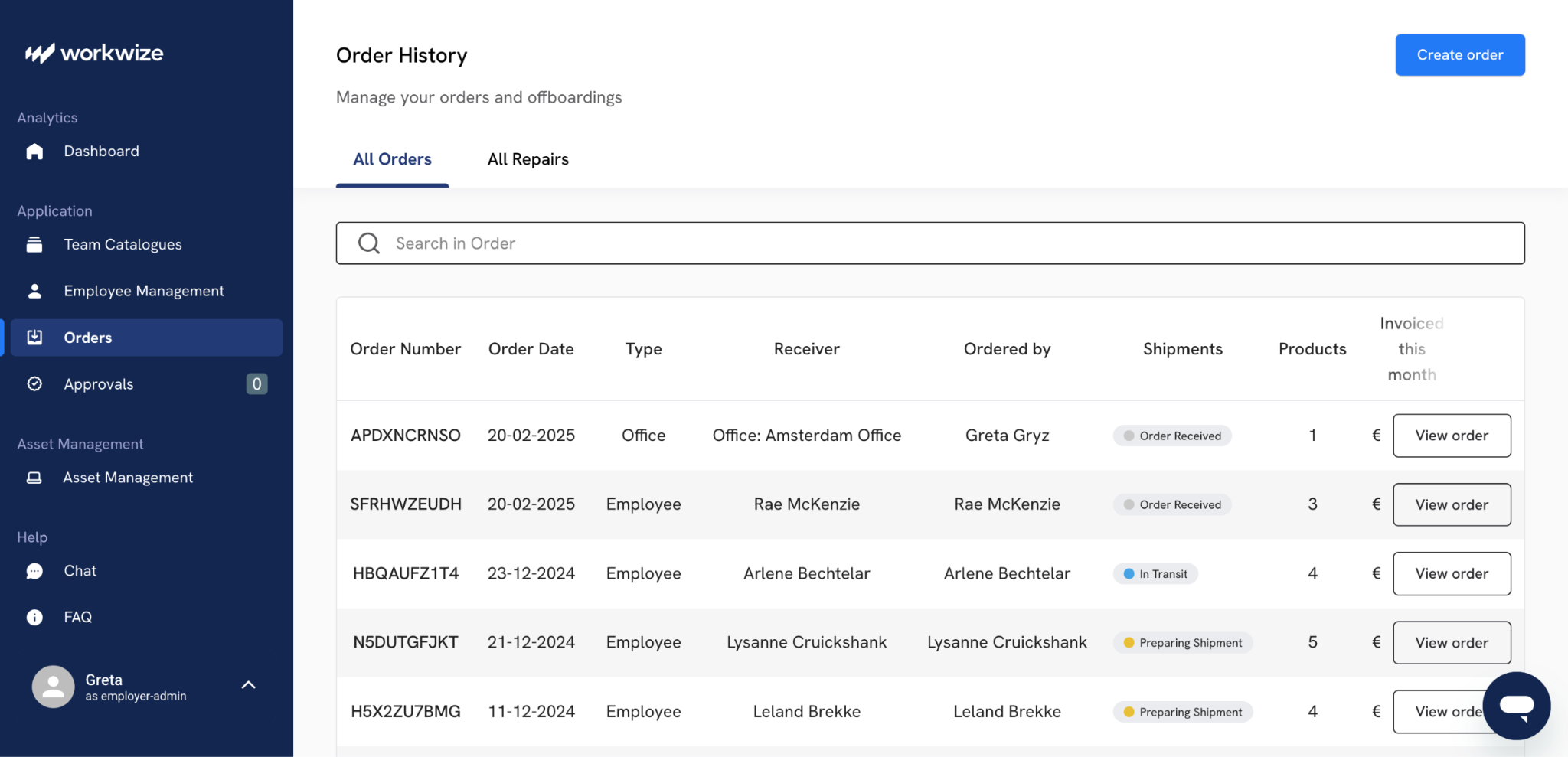
- It then manages and tracks the shipment and delivery of the device, which is critical for remote and hybrid joiners, with global deliveries typically completed in just 5–7 days.
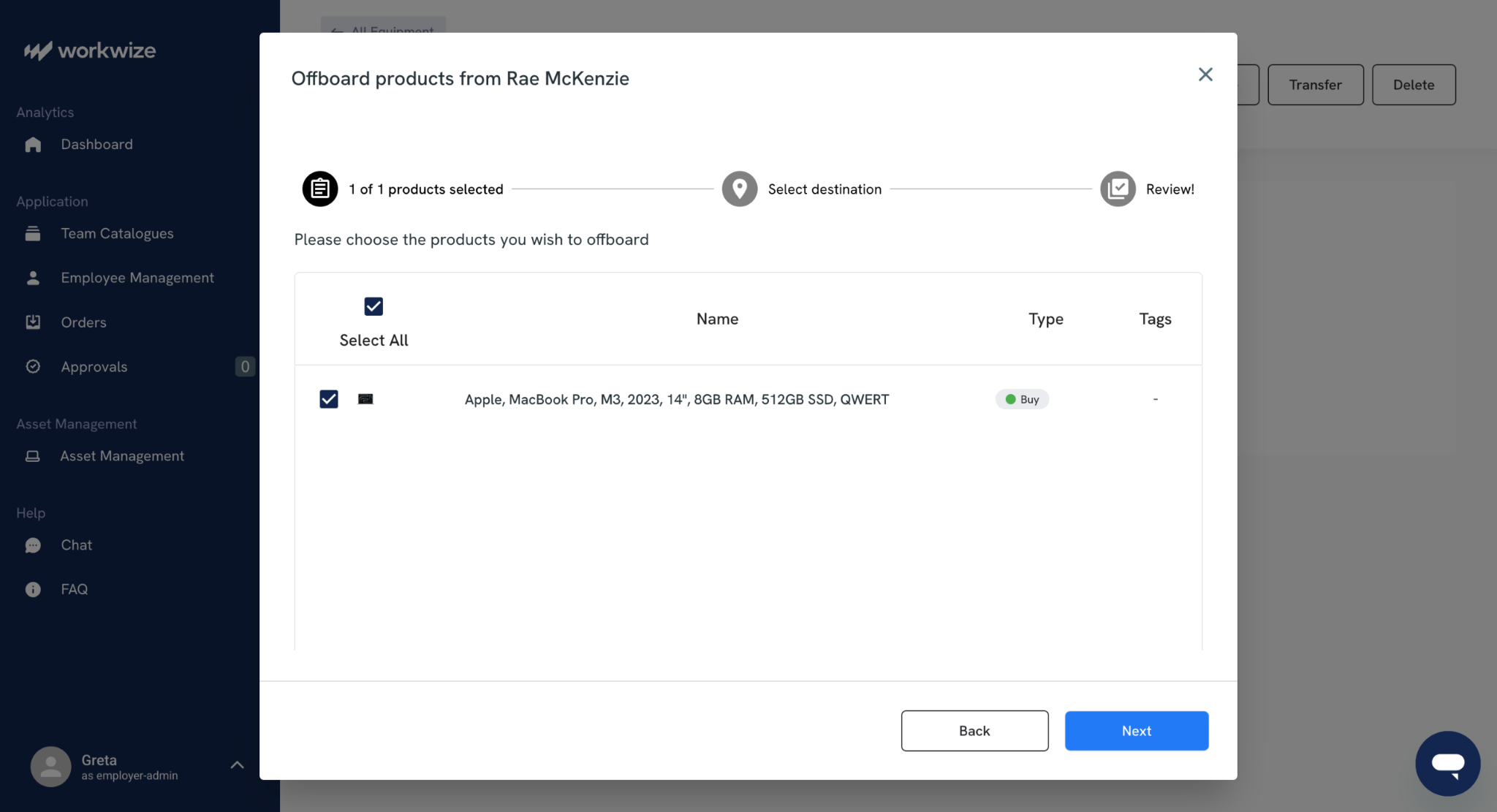
- The platform also confirms MDM enrollment and flags any device that has not been returned during offboarding, with zero-touch retrieval handling all communication, packaging, and logistics.
76% of companies believe that automation of this kind would vastly improve the new-hire experience, yet only 20% are automating onboarding. Madeline Laurano, founder of Aptitude Research, voices this concern:
“Less than 30% [of companies] are increasing their investment in onboarding solutions. Many of these companies are relying on traditional technology that does not support the future of work or the changing expectations of new hires. This disconnect between the importance of onboarding and the willingness to invest in solutions results in a process that is inconsistent and transactional.”
Companies using this kind of technology to support onboarding are three times more likely to improve first-year retention and two times more likely to improve new-hire engagement.
For your IT team specifically, a platform like Workwize removes all the manual coordination that causes most day-one failures.
Instead of relying on email chains, it pulls from predefined role profiles and handles provisioning automatically.
It also creates a documented audit trail for every asset. If your onboarding process still depends on someone remembering to order a laptop, an asset lifecycle management platform like Workwize is the fix.
But even with the perfect plan and the best tools, you have to know how to swerve through the potholes on the way.
Common IT Onboarding Mistakes to Avoid
“I truly believe that onboarding is an art. Each new employee brings with them the potential to achieve and succeed. To lose the energy of a new hire through poor onboarding is an opportunity lost.”
- Sarah Wetzel, Director of Human Resources (source)Poor onboarding has consequences. Organizations systematically underinvest in onboarding compared with recruiting, so onboarding becomes the place where hiring ROI evaporates. Even if you have systematic onboarding in place, it won't hold up if it's riddled with mistakes.
Below, we list some of the most common employee onboarding mistakes. They happen regularly, and each one has a measurable cost.
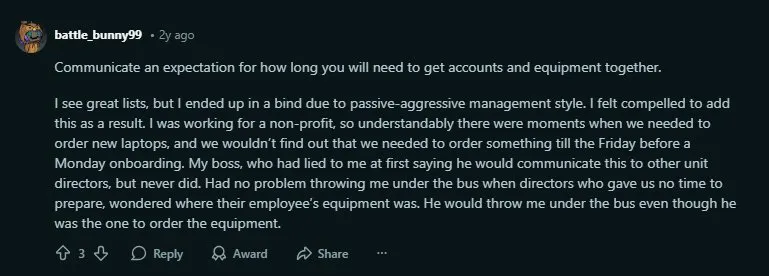
Not communicating equipment lead times to managers
When hiring managers do not tell IT about a new hire until days before the start date, there is no time to order, configure, or even ship equipment. The result is a new employee without a device to work with on day one.
Via Reddit
The fix is a clear SLA between IT and hiring managers – once an offer is accepted, IT should be notified immediately, with a documented minimum lead time for provisioning. If that lead time is two weeks, everyone needs to know and plan around it.
Over-provisioning access as a shortcut
Granting broad admin-level access to avoid delays in access requests is a security risk that compounds over time. It grossly violates the principle of least privilege and increases the potential damage if credentials are compromised.
Just take the time to define and assign correct permissions from day one.
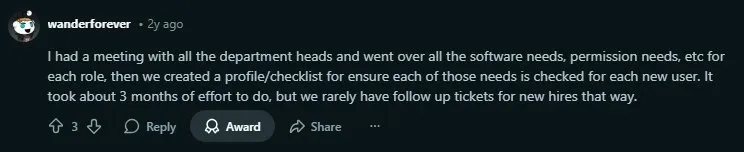
Skipping the upfront work of building role-based profiles
It takes effort to sit down with department heads and map out the exact assets and permissions each role requires. But organizations that do this work once and maintain it almost eliminate follow-up support tickets for new hires.
Via Reddit
Every onboarding becomes ad hoc without these profiles. The upfront effort of building role profiles pays for itself within the first few hiring cycles.
Failing to plan offboarding from the start
Onboarding and offboarding are two sides of the same coin. If you do not have a documented offboarding process that revokes access and recovers devices, you are accumulating risk with every hire.
Define the offboarding checklist at the same time you define the onboarding checklist. Many of the same systems and accounts provisioned during onboarding need to be deprovisioned when the employee leaves.
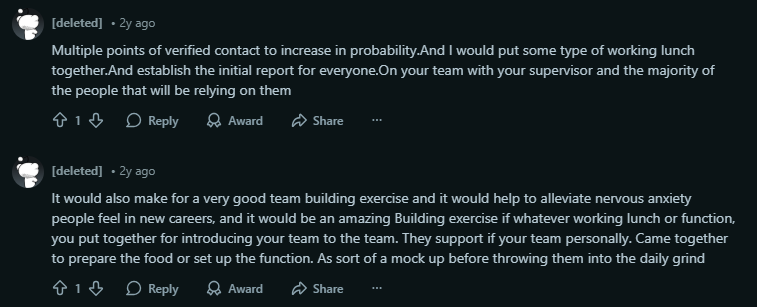
No points of contact and a robotic onboarding process
Many organizations have their onboarding processes so scheduled to the last minute that it starts to feel robotic and mechanical. In these cases, since everything is automated and designated, there remains no place for any human connection. It makes for a very unsettling first-day or first-week experience for new hires.
Via Reddit
Always find room for human connection. A simple lunch with the IT manager is more effective than you think.
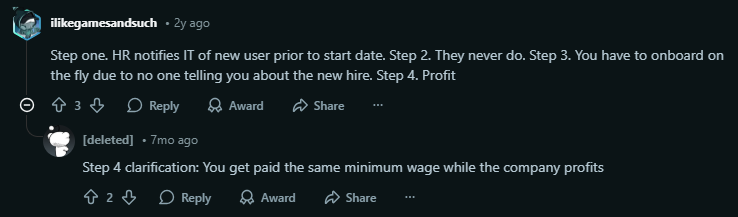
IT and HR working in silos
You cannot expect any assets or accounts to be ready on time when HR does not notify IT of a new hire until days before (or after) the start date. This is a common issue:
Via Reddit
The fix needs a process change, not a technology change. HR should notify IT the moment an offer is accepted, with a standardized form that includes the employee’s role, department, start date, and specific IT requirements.
Read more about how HR and IT can sync better to make employee onboarding simpler.

Automate Your IT Onboarding With Workwize
Manual IT onboarding doesn't scale.
It barely works when your team is in one office and one time zone, and it can completely fall apart when you're hiring across borders. The more distributed your workforce becomes, the more you rely on fragmented vendor relationships, inconsistent processes, and IT staff spending hours on logistics that should be automated.
That's the problem Workwize was built for.
We are a global IT hardware lifecycle management platform that lets your IT team procure, deploy, manage, and retrieve devices from a single dashboard, across 100+ countries.
Devices ship pre-configured and MDM-enrolled from local warehouses, reaching new hires in 5–7 days. When someone leaves, zero-touch retrieval handles the rest, including communication, packaging, shipping, certified data destruction, and redeployment.
The result is that your IT team spends minutes per employee instead of hours.
If your onboarding process still runs on email chains, spreadsheets, and good intentions, it's time to fix that.
Book a Workwize demo and see how it works for your team.

Shashank Mishra

Establish a single source of truth for every IT asset across the globe.
.png?width=258&height=318&name=g10%20(5).png)
More related resources to help you stop firefighting hardware operations.


Get monthly insights into how other IT leaders are improving their ops.



.png?width=2880&height=1232&name=Group%202147262874%20(1).png)
Stop coordinating
hardware like it's 2012.
.svg)
.svg)
.svg)
.svg)
.svg)