




.svg)
.svg)

.svg)


.svg)





.svg)
.png?width=500&height=424&name=Style-1---V1-(1).png)

.png?width=1230&height=692&name=Vector%20(13).png)
Why Creating a Strategy Is Necessary Before You Start an IT Department from Scratch?
Creating a strategy means you have a clear, written plan that ties your company’s goals to the systems, processes, people, and budget IT needs—what IT owns, what it won’t own, and what gets done first.
Let’s learn why creating a strategy is important for building an IT department:
-
Operational Downtime: Without a clear strategy, critical systems often get deployed without redundancy, monitoring, or failover planning. When a single server or cloud instance fails, the entire operation can go down for hours before anyone even notices.
According to EMA’s IT Outages 2024 report, unplanned downtime costs an average of $14,056 per minute—meaning a multi-hour outage can easily translate into millions in losses.
A strategic plan establishes reliability standards from day one, preventing avoidable failures.
- Data Breaches: Organizations that adopt tools or grant access on an ad-hoc basis often end up with inconsistent permissions, dormant accounts, and unmanaged SaaS sprawl. These gaps create easy entry points for attackers.
And according to IBM’s 2025 Cost of Data Breach Report, the average cost of a data breach is around $4.4 million. A massive monetary loss, which could have been prevented with an IAM strategy with MFA, least-privilege access, and automated offboarding.
- Employee Frustration and Productivity Loss: Lack of planning could leave employees with unstable Wi-Fi, slow support, and clunky manual processes.
These problems may seem simple on the surface, but even an unstable Wi-Fi can cause laggy calls, failed demos, and engineers struggling to push code.
A strategy would have included capacity planning, helpdesk SLAs, and onboarding processes to ensure stable connectivity and fast support.
- Budget Overruns and Wasted Resources: Departments might independently buy tools with no visibility, negotiation, or usage checks.
And this happens more often than you think. Zylo’s SaaS Management Index Report shows 53% of apps go unused, meaning half your SaaS spend could be pure waste.
A strategic, centralized procurement process with ITAM checks would prevent this and catch unused licenses early.
What are the Key Responsibilities of the IT Department?
While what an IT department does varies from company to company, their typical responsibilities include:
|
Responsibility Area |
What It Covers |
|
End-User Support and Service Delivery |
Manage helpdesk/ticketing, resolve hardware/software issues, handle onboarding/offboarding, and keep employees productive with minimal downtime. |
|
Infrastructure, Systems, and Connectivity |
Maintain networks (LAN/Wi-Fi), internet, VPN, servers, cloud infrastructure; configure hardware; ensure uptime, monitoring, backups, and failover. |
|
Identity, Access, and Security Management |
Enforce IAM, SSO, MFA, patching, endpoint protection, firewalls; monitor security alerts; run incident response; train users on security best practices. |
|
Applications, Data, and SaaS Management |
Oversee SaaS licenses, integrate tools, manage data storage/backups, avoid silos/tool sprawl, coordinate with software vendors, and ensure apps stay updated and compliant. |
|
Asset, Procurement, and Lifecycle Management |
Procure devices, provision laptops, track asset inventory, manage warranties/repairs, handle shipping/logistics, and ensure secure retrieval, erasure, and disposal at offboarding. |
How to Start an IT Department from Scratch: Step-by-Step
So, how do you actually build all those capabilities when you’re starting from zero? In this section, we’ll break down a step-by-step plan.
Let’s get started.
1. Understanding the Role and Scope of the IT Department
After analyzing multiple Reddit threads on starting an IT department from scratch, we found one common thing. Every expert wants you to define and understand the scope of your IT department.
This Reddit user’s first advice for someone starting an IT department from scratch is to set your perimeter:
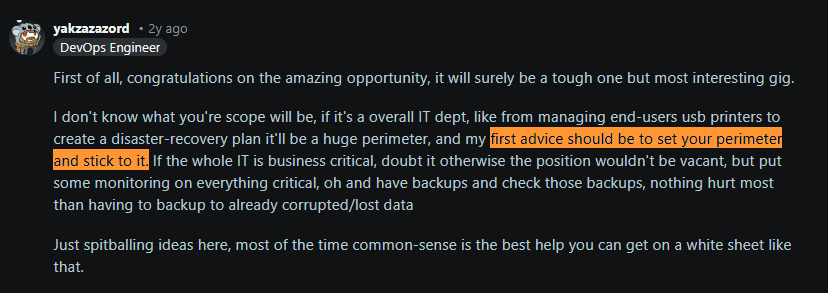
Source: Reddit
This phase is more about understanding what IT owns, what it influences, and what success looks like. Many new IT teams fall into the trap of being treated as a “computer repair unit.” But modern IT is far bigger than fixing laptops or resetting passwords. It’s a strategic function responsible for enabling the business, supporting growth, and reducing risk.
For instance, if your company’s goal is to expand into e-commerce, IT’s strategy might include setting up a scalable web platform and robust cybersecurity for online transactions.
The next critical step is understanding the core functions and roles your IT department will eventually need to cover.
Even if you're an IT team of one initially, you’ll be wearing all the hats. But it’s still useful to map out the key IT functions and the roles that cover them, so you can plan future hires, outsourcing needs, and workload distribution.
Here’s a quick look at typical IT roles and their primary responsibilities:
|
Role |
Responsibilities |
|
IT Support Specialist |
Front-line support for end users: resolve help desk tickets, fix software/hardware issues, assist with setups and training to keep employees productive. |
|
Systems Administrator |
Manages IT infrastructure: keeps servers, networks, and cloud services running smoothly; handles backups, updates, and system performance. |
|
Cybersecurity Specialist |
Protects the organization’s digital assets: monitors for threats, implements security tools (firewalls, EDR, etc.), and enforces security policies. |
|
IT Asset Manager |
Maintains inventory of all technology assets: tracks hardware and software lifecycles, warranties, and licenses; oversees procurement and disposal. |
|
IT Manager/Director |
Sets IT strategy and oversees projects: aligns IT initiatives with business goals, manages the IT team, and handles budgeting and high-level planning. |
2. Laying the Groundwork: Information Gathering and Assessment
Once your role and scope are defined, the next step is to gather a clear picture of the company’s current technology environment.
Here’s what you need to do:
Contact Any Existing IT Providers
If your company used an external IT support provider or Managed Service Provider (MSP) before you were hired, reach out to them immediately.
Request items such as network diagrams, system passwords, cloud account credentials, and support ticket history. At the very least, get a copy of their service level agreements (SLAs) and any key contract terms.
Inventory all IT Assets and Map the Network
Creating a detailed inventory of equipment, systems, and software is crucial. Even this Reddit user recommends inventorying everything from network and software to hardware:
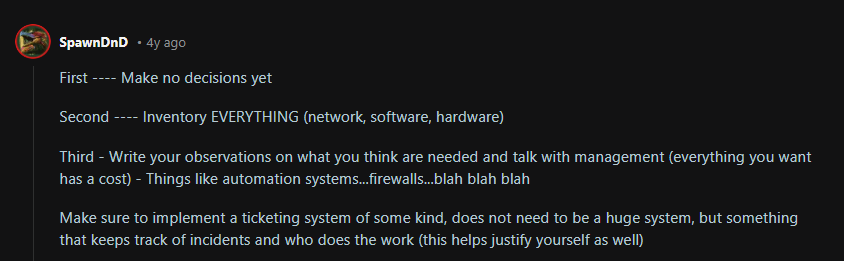
Source: Reddit
You can use a network scanning tool like Nmap that detects all devices (printers, routers, IoT devices, or forgotten servers) on the network. And use an MDM solution like Intune, Jamf, or Kandji to discover and inventory remote devices.
Once you have the list of devices ready, upload them (a CSV) to an IT asset management (ITAM) solution like Workwize, along with a set of key details.
Key details must include:
- Device type
- Who is it assigned to
- Location
- Device Status
- Serial Number
- Condition
- Renewal Status
Do the same for software and cloud services. List all subscriptions or licenses your company uses, check renewal dates, and usage.
While the process sounds complex and is manual (at this point), it's absolutely essential.
It will reveal weak spots (like overlapping tools or end-of-life devices) and help you prioritize what to upgrade or secure first.
Pro Tip: Make sure you document whatever gaps you find, so you know what needs your attention.
Assess Facilities and Environment:
Here are the types of facilities you must physically assess:
- Server Rooms or Network Closets
- Office Workspaces and Meeting Rooms
- Remote or Distributed Workforce Environments
- Warehouse, Retail, or Operational Sites (if applicable)
Walk through the server rooms or network closets in your organization. You must find answers to these questions:
1. Physical security:
- Are the doors locked?
- Who has keys or badge access?
2. Environmental factors:
- Do critical systems have UPS battery backups?
- Is there a generator for extended outages in a larger office?
- Does HVAC adequately cool server rooms to prevent overheating?
- Is it a spaghetti mess that could cause accidents?
Also, review conference rooms or shared spaces for IT requirements.
Evaluate Existing Software and Business Systems
Start by identifying critical business apps that different departments rely on.
For instance, the finance team’s accounting software, HR payroll system, and sales team’s CRM. You can verify a few things for each software:
- Are they running on supported versions (up-to-date and not end-of-life)?
- Are licenses or subscriptions current?
- Who manages renewals?
- Assess if you have the internal expertise to support each app. If not, you may need vendor support contacts or to line up training.
By auditing software and services early, you can catch unsupported systems or gaps before they cause trouble.

3. Designing the Organizational Structure and Staffing
As you map out the IT function, think about the people who will do the work.
In a small business, you might be a one-person army at first, but you should still define roles and responsibilities clearly. As the company grows or as budget allows, you'll either hire in-house or outsource certain roles.
Here’s what you can do:
Define Key IT Roles and Responsibilities: Based on the scope we discussed earlier, outline the essential roles that cover your IT responsibilities.
These often include:
- IT support/helpdesk specialist
- Systems/network administrator
- Security specialist
- Asset or IT operations coordinator
- IT manager or director to tie it all together
Create basic job descriptions for each role. This will help you identify any skill gaps and justify future hires.
You need to plan this early because IT skills are always in short supply. In fact, according to the International Data Corporation, 9 out of 10 companies will be impacted by an IT skills shortage in 2026.
- Centralized vs. Decentralized Structure: You have two options for how IT functions will interact with the rest of the organization:
- Centralized: Here, the IT department holds decision-making authority over all the company's tech. This offers more control and consistency (great for enforcing security), but can slow things down due to bureaucracy.
- Decentralized: In this Model, individual departments or locations have more autonomy in IT decisions (for example, a satellite office might handle its own tech purchases with minimal oversight). Decentralization can empower teams to act faster, but often at the cost of duplicated efforts or weaker security controls.
- Hiring and Onboarding Plan: If your company has the budget to hire staff or contractors, plan it carefully.
First, identify which role to fill first based on the company’s priority and your department’s capacity.
Usually, hiring a helpdesk/IT support technician is the first move. This person can take day-to-day tickets off your plate, freeing you (as IT manager) to work on higher-level projects.
However, if security is a huge concern or priority, a security engineer might be your first hire.
Onboarding New IT Staff: Create an onboarding checklist that includes:
-
Access to all systems they’ll manage
-
Documentation of current configurations, security policies to read
-
Introductions to key colleagues.
Always share your IT strategy and current project list with the new hires so they understand the context. And set the right expectations, from the start.
Pro Tip: Give the new hires access to what their role requires, not “god mode” on day one.
- Compensation and Retention: According to the U.S. Bureau of Labor Statistics, the median annual wage for computer and IT roles is $105,990. So, discuss with the HR and keep these numbers in mind when deciding compensation for your team.
In addition, invest in your team's skill development. For instance, encourage and fund certifications (such as AWS, Cisco, or security certifications) and give people time to attend IT workshops or conferences when possible.
4. Developing Processes, Policies, and Governance
With people in place (or at least identified), the next pillar of your IT department is the processes and policies that will guide operations. Think of this as building the rulebook and playbooks for how IT operates day-to-day.
- Create an IT Operations Plan: Create a high-level ITOps plan outlining how you will deliver services and manage infrastructure, while keeping the business’s priorities in mind. Here’s what you need to do:
- Start by assessing your current state by summarizing the major gaps or risks you found, then clearly identifying business needs and requirements (e.g., “enable secure remote access for all employees”)
- Next, Define your Service Management Processes. This includes deciding “how will requests be handled? What will your support hours and escalation paths be?
- Create a Technology Roadmap for major implementations or upgrades you’ll undertake.
- Plan for Risk by including a section on disaster recovery and backup strategy, as well as any major security initiatives required.
- Decide if you need additional staff or budget in the future to meet goals.
- Implement Incident and Request Management Processes: After you have a high-level plan ready, define how you’ll handle day-to-day work, including IT tickets, issues, and requests.
Here’s what you need to do:
- Set up a Ticketing System: The goal is to have a platform where users can log their problems.
- Ticket Categorization: Define how tickets are categorized (e.g., incident vs. service request) and how you’ll prioritize them.
- Establish Service Level Agreements (SLAs) or targets for response and resolution times for different priority levels.
- Decide on Escalation: If you can’t resolve an issue, how is it escalated? Perhaps to a senior IT person, or to an external vendor if it’s beyond your expertise.
Pro Tip: Document these procedures in a simple IT runbook or SOP (Standard Operating Procedure) so any new team members or backup support know the drill.
- Draft Policies and Standard Operating Procedures (SOPs): Here are some policies you’d want to create:
- Acceptable Use Policy that covers what employees can or can’t do with company technology (rules about installing software).
- Identity and Access Management policy that defines who approves new account creations? How often must passwords be changed?
- Asset Management Policy so that every device issued is tracked, and consider a form for users to sign when they receive expensive equipment.
- Data Security Policy, including data classification (public vs confidential data) and how sensitive data must be handled or encrypted.
- Incident Response Plan: A documented procedure for what IT (and management) should do in case of a major security incident or outage.
This might include a phone tree of external partners to call (lawyers, PR, cyber insurance), as well as steps such as isolating affected systems, preserving logs, etc.
When writing policies, you don’t have to start from scratch. Use industry frameworks such as NIST SP 800-53 or ISO 27001 for security controls, or review sample policies from similar organizations.
- Establish Documentation and Knowledge Management: Documentation could probably be the most boring part of IT, but it’s a lifesaver for efficiency. Here are the key documents to maintain:
- Network Diagrams: Showing how everything is connected
- Asset Inventory: Keep it updated as things change
- Admin Credentials: List them in a secure password manager (no sticky notes under keyboards!
- Vendor contacts: Who to call for ISP support, critical software support, etc.
Also, build a knowledge base for common issues. For instance, if a certain printer error keeps happening with a known fix, document that fix in a wiki or IT portal.
Modern IT service management (ITSM) tools (such as ServiceNow) often include a knowledge base where you can publish FAQ articles for end users and how-to articles for the IT team.
Not only does documentation improve consistency, but it also shortens troubleshooting time.
- Governance and Compliance: As your processes mature, create a simple IT governance practice. This means making a schedule to review and audit your IT Ops against policies and business goals.
For instance, you can hold a quarterly meeting with stakeholders to review IT performance and any compliance issues.
Here’s what else you need to do:
- Align your IT policies with regulatory requirements to ensure you don’t miss anything. For instance, if you have a GDPR obligation, you should have a process for handling data subject access requests and breach notifications.
- Conduct an IT audit or risk assessment to ensure all systems have up-to-date patches, that user access reviews are done (to remove stale accounts), and that backups are actually recoverable.
Regular compliance reviews are a proactive measure that helps you catch issues early and avoid costly incidents.
5. Building your technology foundation
This step is about choosing and implementing the technology tools that will support your operations.
- Select Core IT Management Tools: Ideally, you should prioritize two foundational platforms early on: an IT service management (ITSM) platform and an IT asset management (ITAM) platform. Here’s what these platforms are for:
- ITSM: While you might start with email or spreadsheets for tickets, moving to a real helpdesk tool will vastly improve organization and accountability.
It allows users to submit tickets through a portal, lets you assign and prioritize work, and provides metrics on support.
Here are some of the best ITSM tools out in the market for scaling tech support: Essential ITSM Tools for Scaling Tech Support in 2026
- ITAM: An IT asset management platform is your central inventory for tracking hardware and software assets. Remember that manual inventory you made? Migrate that into a proper ITAM tool like Workwize.
When you do, you’ll always know what you have, where it is, and when it needs updates or replacement.
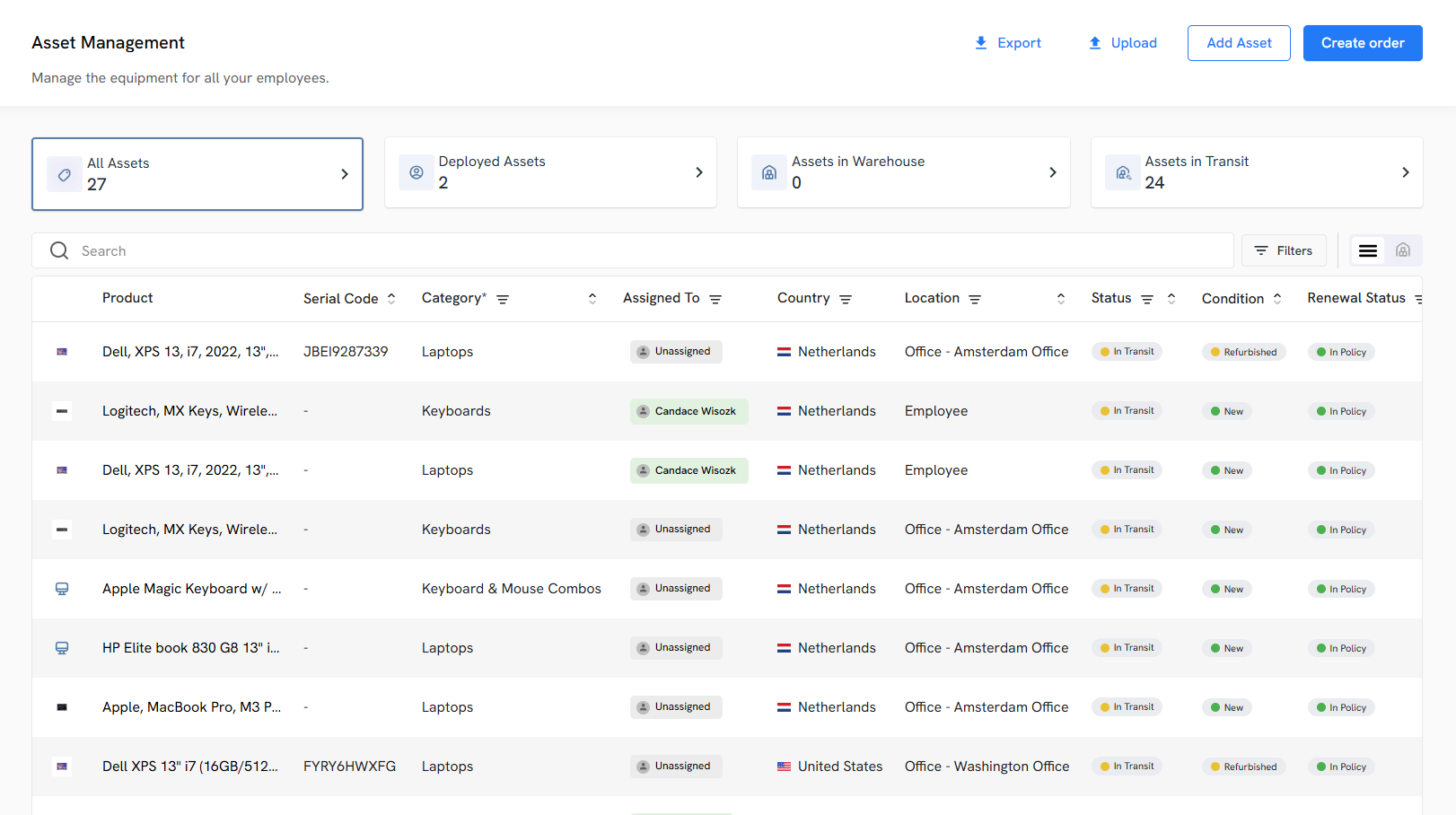
As an end-to-end IT asset lifecycle management platform, Workwize automates lifecycle processes, including procurement, deployment, tracking, retrieval, and disposal.
For instance, with a few clicks, you can automatically procure IT assets from verified vendors and ship them (pre-configured and ready to use) to your remote employees across 100+ locations, enabling zero-touch onboarding.
You can facilitate replacements and even automate retrievals, i.e., get your laptops back from your departing employees safely and perform certified data erasure, and prepare them for reassignment, resale, or disposal
Having these two systems in place establishes a single source of truth for your assets and a workflow for support.
In addition to ITAM and ITSM platforms, consider other tools to add on, like:
- Remote Monitoring and Management (RMM) tool for proactively monitoring device health. Examples: NinjaOne or ManageEngine Endpoint Central.
- Remote Access Tool for supporting users and servers from afar. Examples: TeamViewer, AnyDesk, or Chrome Remote Desktop
- Collaboration Platforms for your team’s documentation and project tracking. Examples: Confluence, Notion, or ClickUp
- Implement a Centralized CMDB: A Configuration Management Database (CMDB) stores information about the configuration items (CI) in your IT environment (hardware, software, virtual machines, network devices) and their relationships.
It’s like a master map of “what talks to what” in your tech stack, giving you complete visibility. For instance, if a server goes down, you can instantly see which apps or services depend on it via the CMDB.
This makes the troubleshooting process faster and change management smarter, because you know how your changes might affect other parts of the system.
To get started with a CMDB, populate it using your asset inventory and automated discovery tools. Many ITSM/ITOM platforms, like ServiceNow and Jira Service Management, include CMDB modules.
- Automate Repetitive Tasks: Automation improves efficiency and also reduces manual errors as you’d never hear a script or tool saying, “I forgot to run the weekly security checks.”
So, identify tasks that are tedious, repetitive, and rule-based, such as user account provisioning, software patch deployment, routine server starts, and backup jobs.
Using scripts or automation tools, you can either schedule the above tasks or trigger them by events, rather than manually.
For instance, you can use your remote monitoring and management (RMM) tool to push critical security patches to PCs each week automatically.
Or, you can connect Workwize to your HRIS platform (say BambooHR) and set up trigger-based onboarding and offboarding workflows. Whenever HR adds a new employee to the HRIS or updates someone's termination date, it automatically triggers procurement and retrieval, respectively.
Pro Tip: Start small by automating simple tasks. Always log and flag what the script or automation tool does when triggered before you let it run unmonitored.
Ensure Backups and Disaster Recovery: If a backup process is in place, verify that it covers all critical data and systems. If not, implement a backup solution immediately. You can follow the 3-2-1 backup rule, which says:
- Keep 3 copies of data (production + backups)
- On 2 different media and at least 1 offsite
Your backups should cover:
- Servers
- Important databases
- SaaS data, if applicable (e.g., backing up Office 365 email or files via a third-party tool).
Make sure your backups align with business needs. You need to ask your leadership, “What’s the acceptable downtime and data loss in worst-case scenarios?” and plan accordingly.
Also, develop a basic disaster recovery (DR) plan that covers a range of scenarios, from a single-server failure to a site-wide catastrophe. This plan should detail how to restore critical services and the order in which they should be restored.
Pro Tip: Once backups are in place, test your restores. A backup that can’t be restored is no backup at all. Practice restoring files and systems periodically to ensure your process works and to gauge how long it takes.
- Establish Security Controls from Day One: You should ideally bake security into every step of your IT, rather than treating it like an afterthought.
Here’s what you need to do:
- Start with Access Management: enforce the principle of least privilege for all user accounts (staff should have access only to what they truly need)
- Set up a Centralized Directory Service: Microsoft Active Directory or a cloud directory like Azure AD/Google Workspace can manage user identities uniformly.
- Use MFA: Use Multi-Factor Authentication (MFA) on any remote access and critical applications.
- Ensure Endpoint Security: Install reputable anti-malware/EDR on all PCs and servers.
- Use Built-in OS Security Features: Implement BitLocker or FileVault disk encryption on laptops, especially important for any devices that might leave the office.
- Set up a Patch Management Routine: Many RMM or OS management tools can automate update installations.
- Log and monitor your systems: Turn on logging for authentication events, network traffic (if possible), and critical system actions.
- Train your Users: Show examples of phishing emails, warn about suspicious links, and teach them not to reuse passwords.

6. Financial Planning and Vendor Management
Starting an IT department also means figuring out how to pay for everything and managing relationships with external vendors. Here’s how to handle the financial side of IT and get the most out of vendor partnerships.
Create a Realistic IT Budget: Strategically defining your IT budget helps you:
- Ensure Business Continuity and Avoid Unplanned Disruptions
- Control and Optimize Technology Costs
- Align IT investments with Business Goals and Growth Plans
- Plan Lifecycle Refreshes and Maintain Security Posture
- Support Scaling Workforce and Hybrid/global Operations
- Increase Accountability and Executive Trust in IT
To create a realistic IT budget:
- Take Stock & Align with Business Objectives
- Define Budget Buckets: Run, Grow & Transform
- Forecast Needs with Data
- Optimize Existing Spend (Cut Waste & Right-Size)
- Budget for Security and Risk
- Factor in People and Skills
- Address Sustainability and ESG
- Build Flexibility with Contingency Funds
- Communicate & Collaborate
- Monitor, Measure & Iterate
For more detailed tips on how to create an IT Budget, go through this blog: The 2026 IT Budgeting Guide: Benefits, Best Practices, and Mistakes to Avoid
In-House vs. Outsourcing (or both?): There’s no one-size-fits-all approach here. You must decide based on your company’s size, needs, and skills.For instance, outsourcing IT services to an MSP can be beneficial for small companies. In fact, according to research led by JumpCloud, 52% of IT professionals prefer MSPs because they're cost-effective.
-
Consider outsourcing commodity tasks or specialized areas. For example:
- Use a cloud provider for servers instead of running your own
- Hire an MSP for 24/7 network monitoring if you can’t staff round the clock
- Or outsourcing tier-1 helpdesk support to a call center.
Some SMBs outsource nearly all IT and just retain an internal coordinator. Others keep strategic roles in-house and outsource ancillary ones.
A co-managed IT approach can work well: maybe you handle client-facing support and business-specific systems, while an MSP handles backend infrastructure or advanced security management.
Vendor and Contract Management: If you’re leading the IT department, you’ll have to interact with multiple vendors for different services, including internet, cloud platforms, software subscriptions, consultants, and more.
And you must actively manage those relations to make better decisions. For starters, keep a vendor list in the database that includes:
- Points of Contact
- Contract Terms
- Renewal Dates
- Support procedures
A great practice is to tie these details into your CMDB or asset system. For instance, you can link each major asset or system to its vendor and note the support contract. This way, you’ll get a reminder whenever it’s time to renew the contract.
Pro Tip: Whenever a contract is up for renewal, try to secure a better rate or adjust the service level if your needs have evolved. That's because once you’ve renewed, you’re locked in with the vendor for a set period of time.
7. Communication, Training, and Change Management
Focus on communication and training to bring everyone along, and institute change management practices to minimize disruption as you improve the tech stack.
- Communicate Early and Often with Stakeholders: As you roll out new IT initiatives or policies, keep the lines of communication open. Start by introducing yourself/your team and the IT function to the whole company.
You can send a “welcome to your new IT department” email or a presentation that explains how users can get help and what improvements to expect.
It’s also important to communicate regularly with leadership. Give your boss and other executives brief updates on what IT is doing, especially highlighting wins and flagging upcoming needs (We're approaching capacity on our file server”).
This helps build trust and positions IT as a transparent, reliable partner rather than the mysterious folks behind the server room door.
- Manage User Expectations: When you’re implementing something new (maybe a new policy or a system, supplement it with clear instructions and a heads-up. This ensures the non-IT folks don’t feel in the dark.
- Establish Change Management for IT Changes: When setting up the IT department, you’ll likely make many changes: installing updates, replacing equipment, and changing configurations. Each change has the potential to disrupt the business if not handled carefully.
That’s why even in a small setting, a basic change management process is valuable. Don’t do anything fancy; just create a habit of planning, testing, approving, and communicating changes.
Pro Tip: Always have a rollback plan: know how to revert the change if it goes wrong (e.g., take backups or snapshots before major updates).
8. Monitoring, Metrics, and Continuous Improvement
Establishing key performance indicators (KPIs) and regular review processes will help you demonstrate IT’s value and identify areas for improvement over time.
Define Key Performance Indicators (KPIs): Decide on a handful of metrics that best reflect how IT is doing in supporting the business. Good KPIs cover different facets of IT service. Here’s what you can track:- Mean Time to Respond
- Mean Time to Resolution
- Volume of Incidents or Requests
- Service Availability
- User Satisfaction
- First Call Resolution Rate
- Adopt Monitoring and Alerting Tools: Use technology to watch your environment so you can be proactive. Set up monitoring for critical infrastructure.
For instance, a system that pings servers and network devices and alerts you if something is down or if resource usage is abnormal.
There are many SaaS and open-source monitoring tools you can use:
- Nagios
- Zabbix
- Datadog
Here are some other network monitoring tools you’d want to explore: 6 Best Network Troubleshooting Tools for IT Teams in 2026.
Regular Audits and Reviews: Schedule time (perhaps monthly or quarterly) to step back and review your IT operations. This could mean conducting a mini-audit against a checklist. Here’s what you can review:- Onboarding and Offboarding Procedures
- Access Rights
- Overall Security
- Backups
- Compliance Items
- Performance against KPIs
Iterate and Evolve
The first year is about building the foundation. But beyond that, you’ll be scaling, refining, and maybe completely re-architecting as the company expands or adopts new technologies. And that’s fine.
Continue to engage with business leadership on future plans. For instance, if the company is opening a new branch or launching a new product line, loop IT in early to plan the tech support needed.
Also, keep your eyes peeled for emerging technologies (like AI tools, IoT, whatever is relevant to your industry) and assess whether they could give your business an edge or streamline IT work.
Finally, build a culture in your IT team that isn't afraid to change what isn’t working well. That might mean replacing a tool that isn’t delivering or updating a policy that is too restrictive and driving workarounds.

Starting an IT Department from Scratch: A Clean Checklist with Timeline
Here’s an easy-to-follow checklist with a timeline to help you stay on track while building your IT department from scratch:
Phase 1: First 30 Days—Understand, Assess, Document
1. Understanding the Role and Scope of the IT Department (Week 1–2)- IT’s Strategic Importance
- Common Misconceptions
- Key Functions and Roles
- Don’t Skip the Strategy
2. Laying the Groundwork: Information Gathering and Assessment (Week 2–4)
- Contact Any Existing IT Providers
- Inventory all IT Assets and Map the Network
- Assess Facilities and Environment
- Evaluate Existing Software and Business Systems
- Quick Wins During Assessment
Phase 2: Days 30–60—Org Design + Basic Processes
1. Designing the Organizational Structure and Staffing (Month 2)- Define Key IT Roles and Responsibilities
- Centralized vs. Decentralized Structure
- Hiring and Onboarding Plan
- Onboarding New IT Staff
- Compensation and Retention
2. Developing Processes, Policies, and Governance (Month 2–3)
- Create an IT Operations Plan
- Implement Incident and Request Management Processes
- Draft Policies and Standard Operating Procedures (SOPs)
- Establish Documentation and Knowledge Management
- Governance and compliance
Phase 3: Days 60–120—Build the Tech Foundation
1. Building your technology foundation (Months 3–4–5)-
Select Core IT Management Tools
-
Implement a Centralized CMDB
-
Automate Repetitive Tasks
-
Ensure Backups and Disaster Recovery
-
Establish Security Controls from Day One
Phase 4: Days 120–180—Money, Vendors, and Structure
1. Financial Planning and Vendor Management (Months 4–6)- Create a Realistic IT Budget
- In-house vs. outsourcing (or both?)
- Vendor and Contract Management
Phase 5: Days 180–240—Make IT Visible & Predictable
1. Communication, Training, and Change Management (Months 6–8)- Communicate Early and Often with Stakeholders
- Manage User Expectations
- Establish Change Management for IT Changes
Phase 6: Days 240–365—Mature, Measure, Improve
1. Monitoring, Metrics, and Continuous Improvement (Months 8–12+)- Define Key Performance Indicators (KPIs)
- Adopt Monitoring and Alerting Tools
- Regular Audits and Reviews
- Iterate and Evolve
Short Summary
- Month 1: Understand the landscape, gather info, map everything.
- Months 2-3: Define roles, design processes, and create policies.
- Months 3-4: Implement core tools, security, backups, and automation.
- Months 4-6: Build budget, vendor structure, and outsourcing model.
- Months 6–8: Communicate, train, and standardize change control.
- Months 8–12: Track KPIs, audit regularly, refine and scale
Note. This timeline is just to help you implement the above process in an organized manner. You can always modify it as you like, based on your organization’s needs.

Key Best Practices
Here are some key best practices to ensure your IT department doesn’t miss out on things that matter:
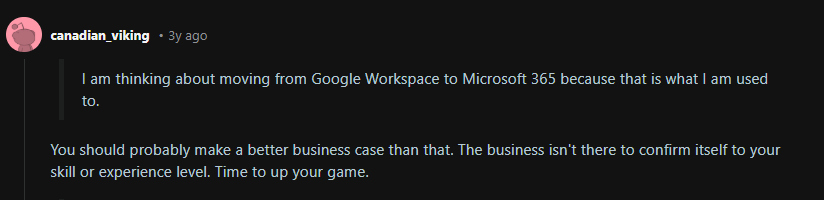
- Don’t Change Anything Because You Feel Like It: You might want to switch to a different network monitoring tool because you’re not familiar with the existing one.
But you can’t just force the entire organization to follow along based on your personal preferences. There has to be a strong reason behind every change you make.
Here’s a Reddit user calling out a person who’s thinking of moving from Google Workspace to Microsoft 365 just because they're more familiar with it:
Source: Reddit
- Align IT With Business Goals: Always tie your IT initiatives to the business's goals. If improving customer experience is a goal, focus IT efforts on uptime for customer-facing systems and empowering customer service reps with better tools.
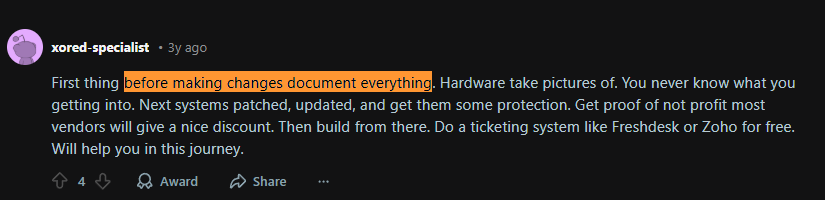
- Don’t Skimp on Documentation: Document configurations, decisions, and procedures as you go. This saves you from relying on memory and makes the department scalable.
Future you (and any teammates) will thank you when troubleshooting is 10x faster with a network diagram in hand.
In fact, multiple Reddit users talk in favor of documenting everything you do:

Source: Reddit
Here’s another Reddit user who recommends documenting before making any changes:
Source: Reddit
-
Security is Everyone’s Job: Create a culture where security is baked into daily operations. Enforce clear security policies and keep them up to date as new threats emerge.
Regularly train employees on security awareness so they become a line of defense, not a point of vulnerability. It only takes one phishing email clicked to wreak havoc, so ongoing vigilance is key.
- Invest in the Right Tools and Automate: A small IT team can punch above its weight by using good tools and automation:
- Use an IT asset management system to track everything and avoid asset sprawl or compliance issues.
- Use an ITSM/helpdesk to impose order on support chaos.
- Embrace automation for routine tasks.
This not only saves time and money but also reduces errors and frees up IT talent for more strategic work.
- Measure and Communicate IT’s Value: Track KPIs that matter (response times, uptime, satisfaction, etc.) and report them. This data proves IT’s effectiveness and can secure more support from leadership.
Similarly, communicate not just within IT but to all stakeholders. Explain changes, celebrate improvements, admit and learn from mistakes. Transparency builds trust.
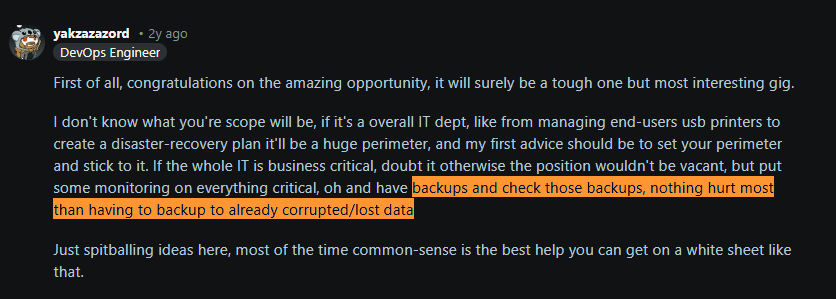
- Plan for Resilience and Continuity: Always have a plan B (and C). Implement solid backup and recovery processes and test them regularly.
Testing your backup is more important than you think, as nothing hurts more than having to back up to already corrupted/lost data, according to this Redditor:
Source: Reddit
- Keep Learning and Stay Current: Technology evolves fast. So, dedicate time to your team’s professional development.
Stay up to date via IT forums, Reddit threads, or tech news on trends like AI, cloud, and security.
- Build Partnerships, not just Tickets: Build relationships with your end users and departments. Understand their work and pain points, maybe even do brief rotations or shadowing.

Mayank Wadhwa

Establish a single source of truth for every IT asset across the globe.
.png?width=258&height=318&name=g10%20(5).png)
More related resources to help you stop firefighting hardware operations.

Get monthly insights into how other IT leaders are improving their ops.



.png?width=2880&height=1232&name=Group%202147262874%20(1).png)
Stop coordinating
hardware like it's 2012.
.svg)
.svg)
.svg)
.svg)
.svg)