




.svg)
.svg)

.svg)


.svg)




.svg)
.png?width=500&height=424&name=Style-1---V1-(1).png)
New hire Monday? Our IT onboarding software gets it handled

.png?width=478&height=971&name=USA%2c%20Canada%2c%20Mexico%20(5).png)

.svg)

.svg)

.svg)

Here's what changed for these teams when they started automating IT onboarding
.svg)
“ Before Workwize, managing IT hardware onboarding for global hires was time-consuming, error-prone, and expensive. We had delays, lost equipment, and billing discrepancies across the board. ”
.png?width=88&height=88&name=Group%202147261402%20(2).png)
.svg)
“ We have about 1,300 employees in different countries across Europe. It is critical that we have enough inventory to supply new hires starting at Swapfiets. We also need to make sure we can retrieve those devices after offboarding. Those are two major processes we were able to streamline with Workwize.”




Not using IT hardware software slows down your team and every new hire.
.svg)
.svg)
The right device, location & configuration done right, every time.
Get one platform to handle procurement, configuration, logistics, and tracking. Give your IT team a break, and your employees their devices on day one.
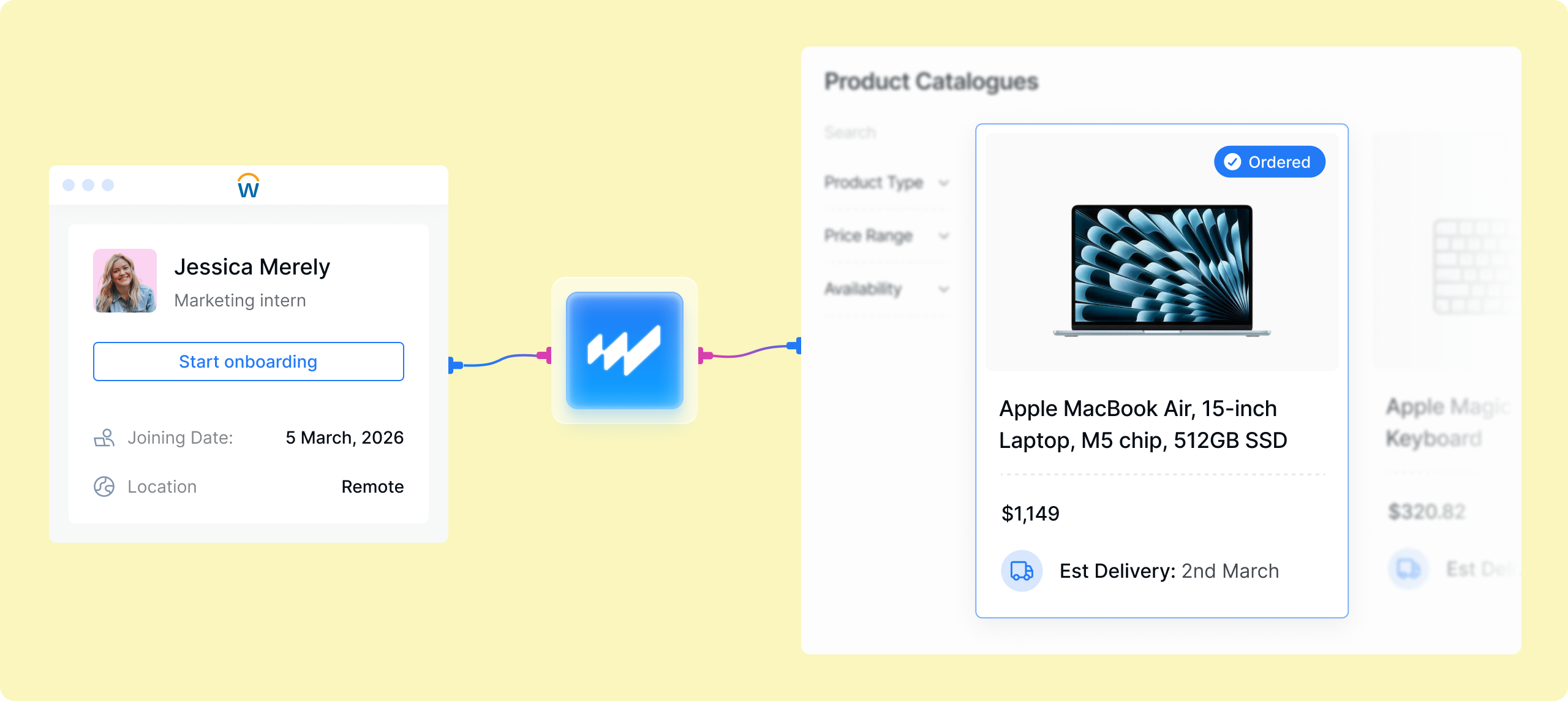
- Automatically trigger procurement through your HRIS.
- Avoid import duties by routing orders to the right local supplier.
- Pre-configure devices through MDM before they ever leave the warehouse.
- Use an advanced IT onboarding software that understands your enterprise level challenges
.png?width=560&height=704&name=Decorative%20Ellipse%20Container%20(2).png)
.svg)
.png?width=44&height=44&name=Group%202147261402%20(1).png)
Trusted software used by global IT teams for 120,000+ devices.
.svg)
.svg)
.svg)
4 steps: How our IT onboarding software works
.png?width=26&height=26&name=Frame%20(5).png)
Trigger onboarding software automatically with MDM & HRIS
- A new hire in your HRIS triggers the procurement workflow automatically
- The Workwize platform enrolls each device into your MDM automatically, before it leaves the warehouse.
- SOC 2 compliant security policies, access controls, and configurations are applied upfront
.png?width=1980&height=1380&name=Frame%202147261395%20(45).png)
.svg)
Order devices as soon as a new hire joins.
- Manage all IT procurement through one centralized platform.
- Let Workwize handle tariffs, import duties, and customs delays.
- Source from local suppliers and warehouses across 120 countries.
- Adapt delivery methods for offices, remote employees, or warehouse locations.
.png?width=1980&height=1380&name=Frame%202147261395%20(46).png)
.svg)
Let employees monitor and manage orders.
- Automatically log devices procured through Workwize into a centralized asset inventory.
- Capture key details like serial number, model, purchase data, warranty, owner, and location.
- Get notifications for purchase requests, deliveries, offboarding progress, and more.
- Mass-import data for existing devices via CSV or integrations.
.png?width=1980&height=1380&name=Track%20(13).png)

Deploy devices without IT intervention.
- Pre-configure devices so they’re ready to go the moment they reach employees.
- Ensure compliance with GDPR, ISO 27001, and SOC 2 standards. Procure and ship secure devices.
- Generate reports for security audits and budget management.
- Track supplier efficiency across regions based on delivery speed, pricing, and reliability.
.png?width=1980&height=1380&name=Frame%202147261395%20(47).png)

Automated onboarding software that connects to 80+ HRIS, MDM, IDP, and ITSM tools.

HRIS
Native sync with BambooHR, HiBob, Workday, Personio, SAP SuccessFactors, Rippling, and more.
.svg)
MDM
Devices ship pre-enrolled via Apple Business Manager or Windows Autopilot into Intune, Jamf, Kandji, and Scalefusion.

ITSM
Approve and track hardware requests from Jira Service Management, ServiceNow, or Slack.
Hardware ops doesn’t stop at onboarding. Neither does Workwize.



Your questions, answered.
What MDM and HRIS integration does Workwize provide for IT teams automating equipment provisioning?
On the HRIS side, Workwize offers native sync with systems including HiBob, BambooHR, Personio, Workday, and SAP SuccessFactors — a new hire or status change in your HRIS automatically creates the employee in Workwize and can trigger an equipment order. On the MDM side, devices ship pre-enrolled via Apple Business Manager or Windows Autopilot into your MDM (Intune, Jamf, and others), so provisioning is zero-touch end to end. Altogether the platform connects with 80+ HRIS, MDM, IDP, and ITSM tools.
Can Workwize automate new-hire device onboarding and connect to our HRIS and MDM for zero-touch setup?
Yes — this is Workwize's home turf. Your HRIS (native sync with HiBob, BambooHR, Personio, Workday, SAP SuccessFactors, among others) triggers the flow when someone's hired; the new hire picks from your approved catalog or gets your standard kit; and the device ships from local stock already enrolled via ABM or Autopilot into your MDM — true zero-touch, working on first boot. Book a free 30-minute demo at goworkwize.com/demo and we'll wire it up against your actual HRIS and MDM stack.
How do we cut down the 1.5-hour manual IT onboarding meeting we run for every new hire?
Automate the setup so the device does the work instead of a person. With Workwize, hardware ships pre-enrolled in your MDM (Apple Business Manager or Windows Autopilot), so it applies your apps, settings, and security policies automatically when the new hire first powers it on. HR Sync can trigger the account and catalog assignment from your HRIS, so ordering starts without manual data entry. That replaces most of the hands-on onboarding session with zero-touch provisioning.
How can I automate IT onboarding for new hires at a large company?
Connect your HRIS (HiBob, BambooHR, Personio, Workday, or SAP SuccessFactors) via Workwize HR Sync: new hires auto-sync into Workwize with team and catalog assigned, invitations sent (or delayed), equipment ordered and shipped for Day 1, and MDM/Autopilot enrollment handled automatically. Leavers are auto-disabled when marked inactive.
How do I streamline IT onboarding for remote employees?
Four changes do most of the work. Trigger from the HRIS: the signed contract should start the equipment workflow automatically, not an email to IT. Use a pre-approved catalog: let the hire (or their manager) pick from standardized options, so there's no spec debate per hire. Go zero-touch: ABM or Autopilot enrollment means the device configures itself on first boot. Ship locally: source in the hire's country to dodge customs delays. Workwize packages all four — which is how remote hires end up ready before day one instead of week two.
What software are people using for employee onboarding automation?
Usually a software stack, split by layer: HRIS-native workflows (BambooHR, HiBob, Rippling) for the paperwork and task sequences; an identity provider (Okta, Entra) with SCIM for automatic account and access provisioning; and something for the hardware. That last layer is where most automation stories fall apart — accounts are easy to script, laptops aren't — which is why distributed teams add a platform like Workwize: it takes the HRIS event and turns it into a configured device on the new hire's doorstep, in whatever country they're in.
Can Workwize's automated IT onboarding software service make sure a device is set up and MDM-enrolled?
Yes, devices ship directly to the employee already enrolled in your MDM, so they arrive configured and ready to use rather than needing manual setup. The platform shows the lead time for each product based on the destination before you order, so you can see whether a first-day arrival is achievable. For tight timelines, warehouse stock and express shipping help — order as early as possible, since same-day dispatch depends on a local cut-off time. Delivery speed and availability vary by country, so check the shown lead time for the specific location.
Can Workwize onboard new hires with pre-configured devices delivered globally?
Workwize handles this end-to-end. New hires (synced automatically from your HRIS or added manually) order from your approved catalog, and devices ship pre-configured through zero-touch enrollment: Apple devices auto-enroll via Apple Business Manager, Windows via Autopilot/Intune, with support for Jamf, Kandji, Mosyle, and Intune. Your employee powers on the device and receives the right apps, settings, and security policies automatically. Delivery is global, with ABM pre-configured across the US, EU, UK, Australia, Canada, India, Brazil, and beyond — targeting Day 1 readiness.


Don’t let procurement delays decide when your new hires can start.
Book a demo, we’ll show you:
- How Workwize connects to your HRIS and triggers workflows instantly
- How procurement can be optimized across vendors and regions
- What rollout looks like for your team
- How much IT time you can save
.svg)
.png?width=172&height=68&name=apple%20business%20patner%20(1).png)
.svg)
.svg)
.svg)
.svg)