




.svg)
.svg)

.svg)


.svg)




.svg)
.png?width=500&height=424&name=Style-1---V1-(1).png)


.png?width=1230&height=692&name=Vector%20(13).png)

First, What Do You Need an MSP For?
Gartner defines an MSP as a provider that “delivers services, such as network, application, infrastructure, and security, via ongoing and regular support and active administration on customers’ premises, in their MSP’s data center (hosting), or in a third-party data center.”
The consensus is that an MSP is a third-party company that remotely operates and administers your IT environment under a formal service-level agreement (SLA).
In practical terms, a modern MSP typically
- Monitors and manages core infrastructure: An MSP may monitor servers, networks, and user devices to catch issues early and keep systems stable.
- Runs the day-to-day IT operations: It can handle everyday IT tasks like patching, troubleshooting, user setup, and software updates.
- Delivers security and compliance controls: It may provide basic security and compliance support, such as backups, endpoint protection, or simple audits.
- Manages cloud and hybrid environments: It can help manage cloud or hybrid setups by assisting with provisioning, performance checks, and cost oversight.
The Hidden Costs of Working With a Bad MSP.
Here’s a list of all those things that could go wrong if you work with a bad MSP:
Reactive Instead of Proactive Service
A bad MSP often offers reactive service only after things break down. This slowly builds pressure on your IT teams.
It often starts with a growing pile of unresolved IT issues. Soon after, you may notice your internal teams working in constant reaction mode because new problems always seem to keep popping up.
Over time, the projects that could actually move the business forward can get pushed aside. That’s usually when you realise the MSP is holding you back, not helping you run.
I have seen this pattern many times, particularly during ransomware incidents.
Datto, a major player in the MSP space, has reported that average downtime from a ransomware attack costs around $126,000. This is enough to seriously hurt a small business that thought it was saving money on support.
People have different opinions on this, but one thing is clear — a bad MSP just firefights incidents and does not actually prevent them. Their primary goal is to serve you an invoice for their ‘service’.
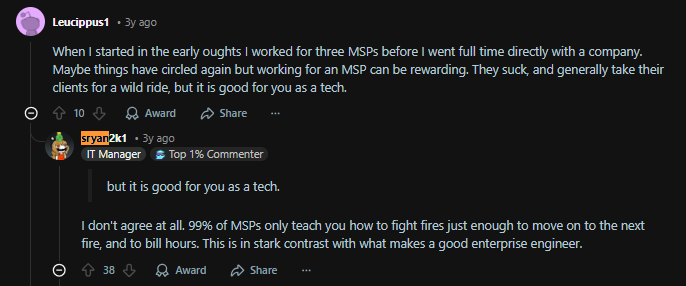
Via Reddit
Slow Response Times That Hurt Your Operations
Slow responses are another characteristic of a bad MSP.
Industry guidance for MSPs treats first response time as a core service metric because it shapes the entire customer experience.
When it’s the other way around, it spirals into worse situations, such as overworked, frustrated IT employees, missed deadlines, or lost deals.
On paper, a four or five-hour response time might look acceptable. However, in reality, that is half a working day for, say, a sales team that cannot access its CRM or a warehouse that cannot print dispatch labels.
Moreover, fewer than one in three clients describe themselves as ‘satisfied’. Moreover, almost half of those businesses had already switched providers within a year.
Poor Security Hygiene Increases Risk
Security is an area where a weak MSP can become a liability.
Many small businesses still assume that cybercriminals are only interested in large enterprises. But the numbers say otherwise.
ConnectWise research reported that more than half of SMBs had already experienced at least one cyberattack in 2024, and 78% feared that a serious incident could put them out of business entirely.
Shockingly, MSPs themselves have become high-value targets. Remember the Kaseya VSA ransomware incident, where a single vulnerability in a remote management tool used by MSPs rippled outward and affected up to around 1,500 downstream organizations that relied on those providers.
This is where a sloppy MSP becomes dangerous. It usually starts small: a delayed security patch here, a misconfigured setting there. Nothing that feels catastrophic in the moment. But every shortcut adds weight, and eventually those compromises stack up.
Before you know it, you’re dealing with unexpected downtime, compliance issues, reputational damage, or having to explain to customers why something that should have been prevented… wasn’t.
And that’s before you even get to the headache that comes with it. This includes the frantic calls, the confusion, the finger-pointing, and the sinking feeling that your MSP isn’t nearly as protective as you were led to believe.
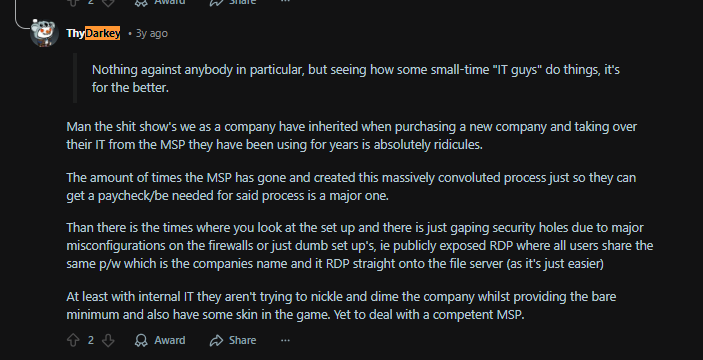
Via Reddit
Lack of Visibility and Unclear Reporting
Something I have noticed is that with bad MSPs, you either get reports that are too dense to be usable, or a bland monthly summary that usually says, “everything is fine,” while users keep complaining.
This is a huge issue because without clear reporting tied to business outcomes, leadership teams cannot see trends. Moreover, you do not know which systems are unstable, how often SLAs are breached, or whether recurring issues are getting root cause analysis or just quick fixes. That uncertainty is a cost in itself, because it makes planning impossible.
A good MSP, by contrast, shows you uptime, ticket trends, project progress, and risk in a format that a non-technical director can understand.
Surprise Invoices and Opaque Pricing
Onboarding with a cheaper MSP usually feels like a win at first.
This is until the change requests start, or after-hours work suddenly carries a premium. Every unexpected issue becomes a billable event.
Because downtime is so expensive, you often feel forced to approve the spend in the moment. For instance, server downtime can cost between roughly $301,000 and $400,000 per hour for many organizations. This means you don’t really have the luxury of pushing back when something breaks. You’re negotiating from a position of panic, not power.
Give it a year or two, those unplanned invoices can easily wipe out any savings from a lower advertised monthly rate. Transparent MSPs help you forecast spend, and the poor ones condition you to accept constant budget surprises.
Tool Sprawl and Unnecessary Vendors
Another high cost comes from tool sprawl. Some MSPs add on new platforms for monitoring, backup, security, remote access, and documentation without any consolidation plan. Each extra system brings
- Another subscription fee
- Another vendor relationship to manage
- More training and context switching for staff
- A larger attack surface if security is not tightly managed
In theory, these tools deliver value. In practice, I often see overlapping features, half-configured dashboards, and users who are not sure which portal to log into for which task. You pay more, yet the experience feels messier.
A thoughtful MSP curates and rationalizes the stack so that every tool earns its place. A careless one simply adds more logos to the slide deck.
Vendor Lock-In and Loss of Leverage
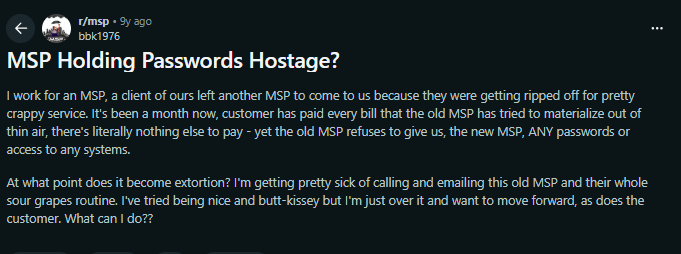
I have seen many MSPs structure things so that leaving them feels almost impossible. They control all admin accounts, keep key configurations out of your reach, or push you toward proprietary tools that only they know how to manage.
Sometimes, it even balloons to massive legal issues:
Via Reddit
On paper, you are a free customer. In practice, every discussion about changing scope or pricing is held against a background fear of movement. That loss of leverage shows up in renewal negotiations, delayed improvements, and a general sense that you have to accept whatever is offered.
True partnership means you can walk away if you need to. When an MSP makes that unreasonably hard, the hidden cost is paid in reduced choice and weaker terms.
Damage to Internal IT and Employee Morale
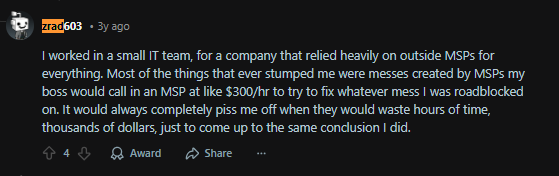
Finally, when an MSP underperforms, your own people absorb the frustration. Internal IT staff spend their time closing tickets, compensating for weak processes, and explaining to colleagues why a third party keeps dropping the ball. They burn out faster and become more likely to leave.
Non-technical teams get caught in the middle. They wait hours for updates, repeat the same information to different technicians, and learn to work around official systems with their own shadow tools. Productivity drops, and trust in both IT and leadership takes a hit.
Via Reddit
Over time, this creates a situation where people assume technology is always painful, so they stop suggesting improvements or new ideas. That loss of initiative is extremely expensive, even if it never appears on an invoice.
How to Identify If Your MSP is Underperforming
If any of the signs above feel uncomfortably familiar, you’re likely dealing with an MSP that’s holding you back.
To be doubly sure, it helps to look at a few simple signals that show up in almost every underperforming partnership:
 You operate in reactive mode: Issues only get attention after users complain or patching happens after an incident. Or perhaps, there is no clear schedule for maintenance or reviews. Response times feel slow in real life, even if SLAs look fine on paper: One of the biggest warning signs is that tickets sit for hours while teams cannot work. In many cases, people start bypassing the helpdesk completely because it feels faster to ask a colleague. Security feels vague: You often don’t know when systems were last patched or how fast you can actually recover after an incident. Reports do not prove very useful: You either get highly technical ones, or bland summaries that say everything is fine while keeping you in the dark.. Invoices surprise you: You see line items you never discussed, unexpected project work, or extra charges for things you assumed were included.
Internal IT feels burdened and overwhelmed: Your own team spends more time understanding the MSP, re-explaining problems, or manually fixing their mistakes than doing strategic work.How a Good MSP Complements Internal IT
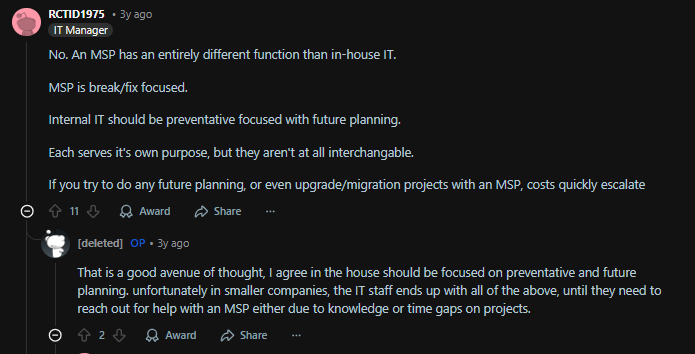
IT teams and MSPs don’t work in isolation; at least, they shouldn’t.
I have to talk about this demarcation because it’s harmful not to have clear boundaries between what your MSP is responsible for and what your internal IT department owns.
When those lines blur, things get messy fast.
Via Reddit
When an MSP is operating at its best, it does not replace your internal IT team; it makes them look brilliant. I usually describe it as a split between context and capacity.
Your in-house people know the business, the politics, the unwritten rules.
The MSP brings extra hands, deep specialization, and around-the-clock coverage.
Ideally, it looks a bit like what this Redditor describes:

Via Reddit
This kind of co-managed model energizes your IT team. That way, your people ehave room to think, experiment, and say yes to innovative projects.
Finally, How to Fix the Problem
Once you see that your MSP is underperforming, you have to take deliberate action at the earliest. Here is how I usually break it down with clients.
Step 1: Conduct a Full MSP Performance Audit
Before you can fix a bad MSP relationship, you need a clear, evidence-based view of how they’re actually performing.
Start by pulling the last 3–6 months of MSP activity. Look at:
- Ticket volumes, categories, and repeat issues
- Actual response and resolution times vs SLAs
- Uptime and outage history for key systems
- Hardware lifecycle stages
- Security basics like patching cadence, MFA, backups, and recovery tests
- User satisfaction (a short internal survey works wonders)
- Total cost including monthly fees, projects, add-ons, and emergency work
If you’re also using your MSP for hardware lifecycle management, make sure to look at how it handles these aspects.
A bad MSP often masks hardware inefficiencies behind generic metrics, so look for practical signals like:
- How many employees are waiting days for device repairs?
- How often do new hires receive devices late or receive the wrong configuration?
- How many offboarded employees still have company devices?
- How many devices are unaccounted for or sitting unused?
In your audit, if you find that your MSP performs well on helpdesk, security, and user support but drops the ball on hardware, shifting lifecycle management to Workwize is a practical move.
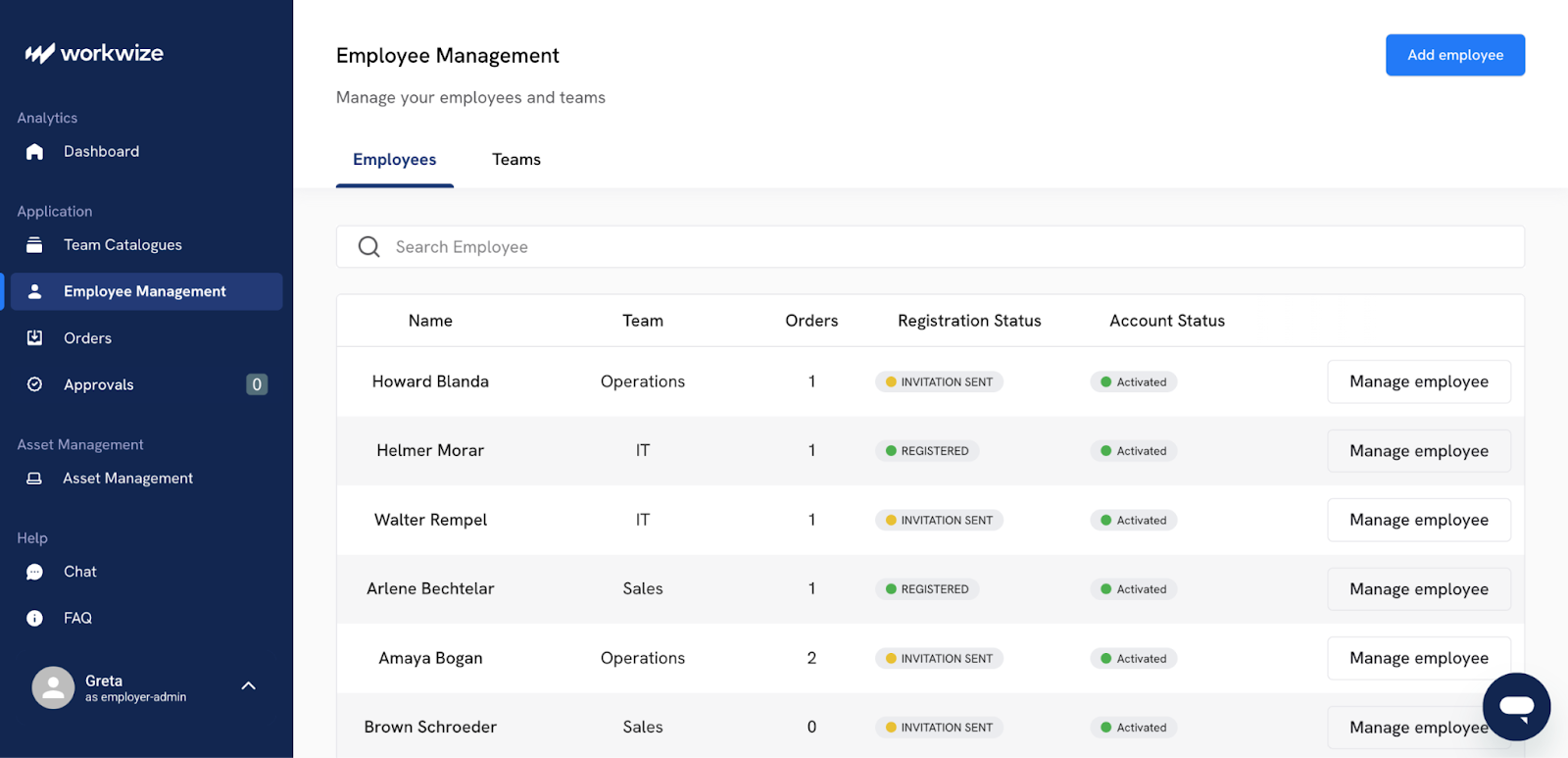
Workwize is explicitly built for procurement, assignment, deployment, repairs, refreshes, retrievals, and disposal of your IT equipment. Unlike a typical MSP setup, Workwize offers:
- Dedicated hardware logistics: Devices are sourced, shipped, repaired, and retrieved through a unified global workflow.
- Always-accurate inventory visibility: You know exactly where every device is, who uses it, and what condition it’s in.
- Real-time usage and lifecycle data: Track device age, utilization, and replacement needs without depending on MSP-generated spreadsheets.
- Reliable offboarding retrievals: Hardware actually comes back on time, not months later.
Once you have your audit findings ready, share them with leadership and, where appropriate, with the MSP. This sets the stage for either improvement or a clean exit.
Step 2: Simplify Your Internal Expectations and SLAs
A lot of MSP trouble comes from mismatched expectations. Before you change providers, fix your own side of the contract.
- Define what is business critical vs nice to have
- Set response and resolution targets that reflect reality for each category
- Clarify what is in scope (and what is not)
- Decide what good communication means: status updates, reports, review cadence
Then, when you get to the hardware lifecycle section of your SLAs, pause and evaluate whether it even makes sense to attach these responsibilities to your MSP.
Many MSPs treat hardware as a secondary responsibility, making it hard to set clear, realistic SLAs for procurement, shipping, repairs, retrievals, and disposal.
This is precisely where Workwize provides clarity.
If you shift hardware lifecycle management to Workwize, you can simplify your MSP SLAs. This is because Workwize offers:
- Predictable hardware workflows for procurement, repairs, refreshes, and returns
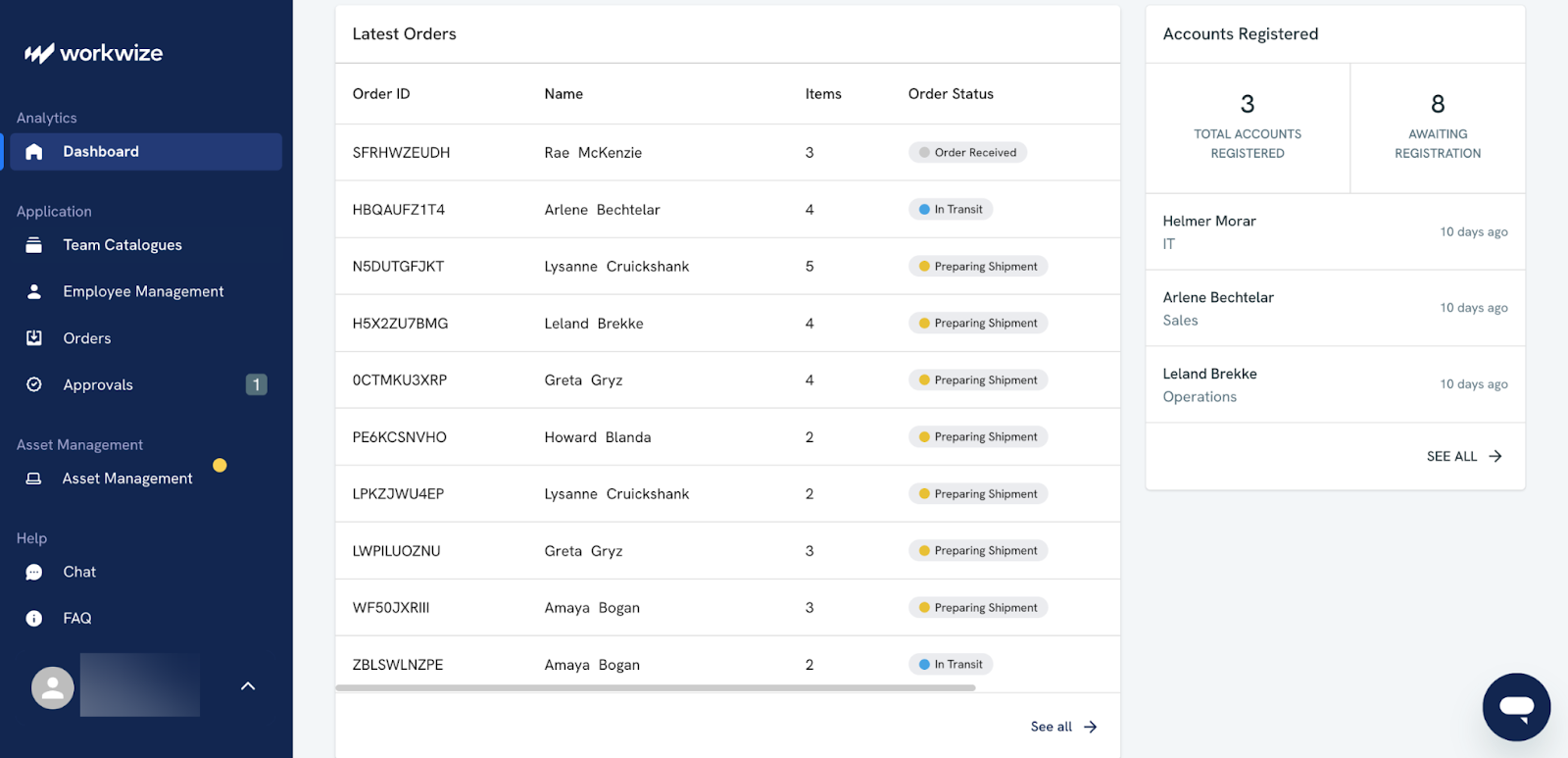
- Reliable delivery and retrieval timelines that aren’t dependent on MSP bandwidth
- Real-time visibility so you set SLAs based on factual turnaround times, not assumptions
Regardless of whether you use Workwize or stick with your MSP for hardware, the goal remains the same: create SLAs that are simple, measurable, and aligned with how your business actually operates.
Once expectations are clear, it becomes far easier to hold your MSP accountable.
If they consistently meet those expectations, there’s no need to replace them.
Step 3: Plug Gaps with Internal IT Improvements
Call us reasonable, but we don’t believe in firing an MSP for issues that actually stem from our own side.
Before you make a decision on your MSP, ask what you can strengthen internally. Even the best provider cannot fix weak ownership inside your own organisation.
Common internal gaps include
- No clear IT owner on the client side (everything defaults to “ask the MSP”)
- Poor asset and application inventory
- No internal process for incident triage and escalation
- Shadow IT everywhere because official channels feel slow
Tidy these up so your MSP has a transparent, consistent counterpart.
76% of SMBs lack the in-house skills to properly address security issues, which is one reason MSPs are under so much pressure. Strengthening your own basics makes the partnership more balanced.
When it comes to hardware, this is a good moment to be realistic about what your internal team can and can’t manage. If your MSP struggles with procurement delays, repair coordination, or retrieval logistics, you don’t necessarily need to hire more in-house staff or find a new MSP.
Workwize can handle your hardware efficiently. Workwize offers a singular platform to handle everything from IT procurement, deployment, and management to retrievals and disposal.
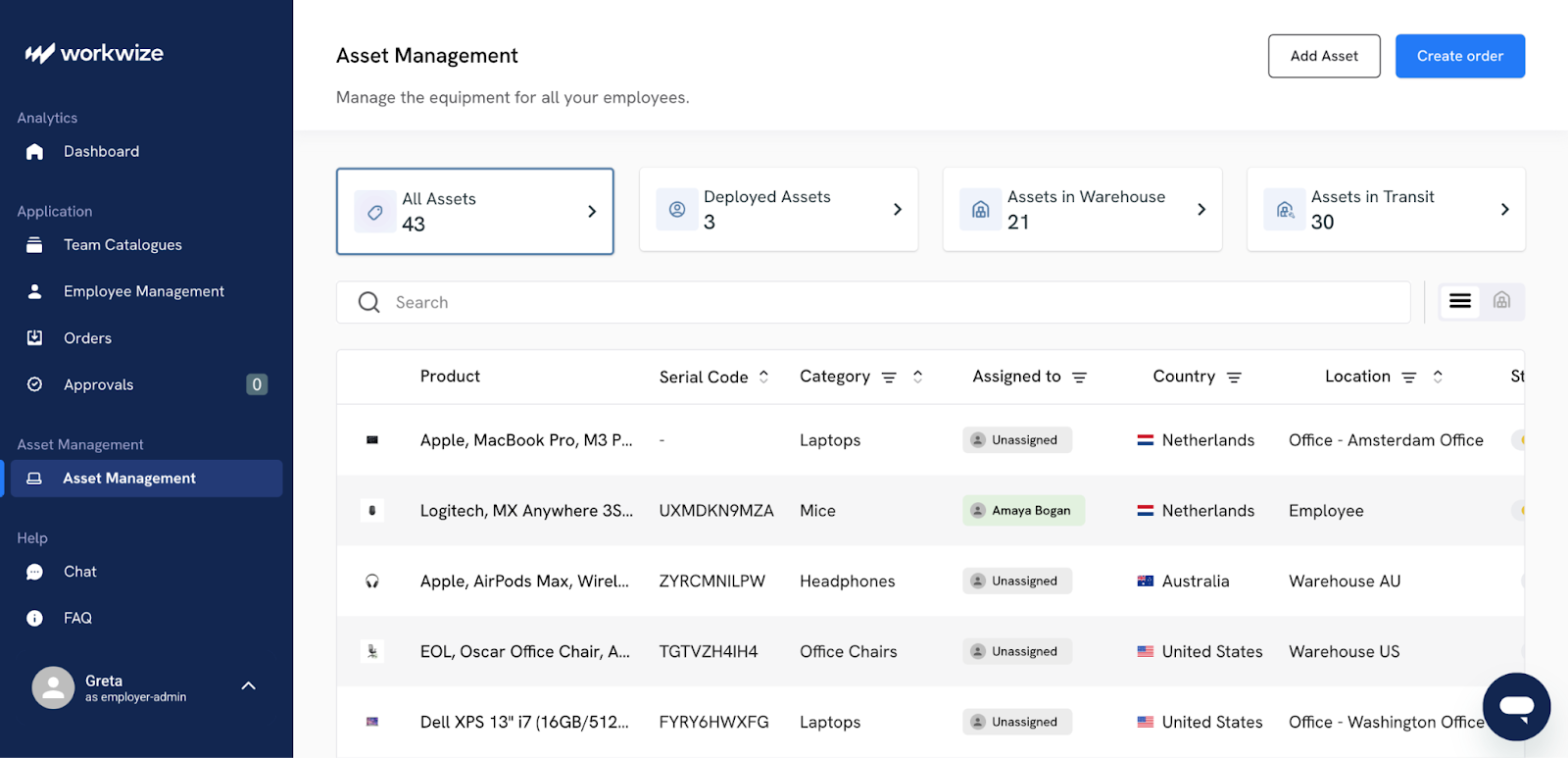
The best part is that it provides continuous visibility as hardware moves through each stage of the cycle and keeps you updated on delivery dates and turnaround times. This frees your internal teams from operational load while eliminating one of the most significant pain points that MSPs typically fumble with.
Sometimes, a few internal changes like these, like a designated IT hardware lifecycle platform, a simple runbook, or a better onboarding process for new apps, can have a significant effect on how effective your current MSP seems.
Step 4: Consider Switching MSPs If They Fail on Multiple Aspects
Finally, if your audit and internal fixes still show significant gaps, it might be time to switch your MSP.
Especially if several critical areas (support responsiveness, patching reliability, onboarding timelines, or ticket closure quality) continue to fall short despite your efforts, a fresh partnership may be the best option.
When you plan a switch, focus on
- Contractual exit terms, notice periods, and data ownership
- Admin access, licenses, and where services are registered (your org vs theirs)
- A handover checklist with passwords, diagrams, backups, monitoring, DNS, domains
- A freeze period on major changes during the transition
Moreover, look closely at the patterns you’ve uncovered. Were failures primarily operational? Cultural? Capacity-related?
Knowing why the MSP fell short helps you avoid repeating the same issues with the next provider.
When you do explore new MSPs, look for partners who excel in the areas where your current one struggled, whether that’s responsiveness, onboarding quality, patch discipline, or user support.
Step 5: Lastly, Build a Hybrid model (MSP + internal IT)
The most resilient setup I see is rarely MSP or internal IT operating alone. It is always hybrid model where each side delivers at peak performance
This is because an MSP alone often can’t deliver the speed, context, and on-the-ground understanding your business needs. At the same time, your internal team alone rarely has the scale, tooling, or 24/7 coverage an MSP provides.
A practical split often looks like this
- Internal IT
- Owns strategy, vendor decisions, and business relationships
- Keeps close to users and understands day-to-day realities
- Drives projects that need deep knowledge of your processes
- MSP
- Runs the 24/7 monitoring, patching, and backup operations
- Provides specialised skills for security, cloud, or complex migrations
- Scales capacity up and down when projects spike
But there’s one area that never fits cleanly into either bucket: hardware.
Hardware sits awkwardly between logistics, IT, MSP responsibilities, and HR workflows.
MSPs usually struggle here, and internal IT teams must handle multiple vendors, spreadsheets, and courier partners if they decide to administer it.
This is where Workwize fits naturally as the third leg of the hybrid model. Instead of forcing your internal team or MSP to run procurement, repairs, refreshes, and returns, Workwize handles the hardware lifecycle end to end—sourcing devices, tracking assignments, coordinating repairs, retrieving assets from leavers, and providing real-time visibility across your entire fleet
It removes the logistics burden from IT and can prevent MSPs from being stretched beyond their design.
In the end, a strong hybrid model looks like this:
- Internal IT owns strategy, quality control, and cross-department workflows.
- Your MSP owns scalable technical operations and support.
- Workwize owns hardware lifecycle management, so neither side has to.
Over time, this hybrid approach gives you flexibility. You can switch MSPs without losing internal knowledge or grow your internal team without sacrificing the operational muscle you have already built.

What a Good MSP Looks Like
The best MSP relationships I have seen are calm and capable extensions of the business. Problems still happen, of course, but they are smaller, shorter, and far less dramatic.
A lot of companies are trying to get to that place. JumpCloud found that around 76% of SMEs already work with an MSP and roughly two-thirds plan to increase their investment in the next year. That level of commitment only makes sense if the MSP relationship is genuinely adding value.
Here is what that kind of provider usually looks like in practice.
1. They Run Proactive Operations
Continuous monitoring and proactive maintenance are widely recognized as hallmarks of mature managed services, precisely because they shrink incidents before they hit users.
You see this in consistent but reassuring patterns
- Scheduled, communicated, and properly tested patch cycles
- Maintenance windows planned in advance, not announced on the day
- Fewer repeat tickets because root causes actually get fixed
2. Security is Deeply Ingrained in Operations
In 2025, cybersecurity sits right at the top of the SMB priority list. 57% of SMBs now name security as their number one concern, and 58% spent more on cybersecurity in 2024 than they had planned.
A good MSP is built to close that trust gap. You will notice:
- Multifactor authentication and basic hardening are treated as standard
- Clear backup and recovery plans, with restore tests
- Regular security reviews that talk about business risk
- Managed security services as part of the core offering
3. They Are Cloud Smart and Future-Ready
Strong MSPs have a clear point of view about the cloud. They understand which workloads belong in Microsoft 365, Google Workspace, or public cloud, and which should stay on premises for now.
Data from a 2025 State of the MSP Industry report shows that 59% of high-value MSPs have already migrated all client workloads, including file servers and databases, to the cloud. That tells you something about how serious providers think about resilience, scalability, and modern architectures.
In a good partnership, this shows up as
- Thoughtful roadmaps for reducing legacy dependence over time
- Honest trade-off conversations instead of pressure to move everything at once
- Consistent standards for identity, backup, and monitoring across cloud platforms
The result is more consistency, which makes everything easier to secure and support.
4. Communication and Reporting You Can Actually Trus
With a strong MSP, you never feel in the dark. When something breaks, you get fast acknowledgement and updates, and a realistic timeline. When things are okay, you still hear from them through reviews, dashboards, and simple reporting.
With a good provider, you see
- Uptime and downtime for key systems
- Ticket trends by type, department, and cause
- Security posture in a way that a non-technical director can understand
- Progress against an agreed roadmap, not a random list of tasks
This level of clarity matters because SMBs are willing to pay for the right relationship. Decision makers also expect providers to act as genuine experts and are prepared to increase spending for solutions and relationships they trust, rather than settle for a bare minimum service.
5. They Behave Like a Partner, Not a Gatekeeper
The best MSPs are not threatened by internal IT. They actively encourage a co-managed model where responsibilities are clear and collaboration is normal. That trend is already visible in the market.
While 76% of organizations work with MSPs, fewer are now outsourcing everything. Fully outsourced IT fell from 42% to 29% in one year, as more companies shifted to shared responsibility models.
In a good relationship, you see things like
- Shared tools and documentation
- Internal IT owns the strategy while the MSP runs the heavy operational pieces
- Joint project planning sessions
- Respect for your culture and business constraints
This feels very different from the locked-down setups where only the MSP holds admin access, and every small change requires a ticket and a delay.
Workwize Closes The Gaps Your MSP Can’t
A bad MSP makes its presence felt in your everyday IT operations.
When issues pile up across multiple areas—slow ticket handling, patching gaps, hardware delays, or poor communication—it becomes clear that the relationship is costing more than it’s delivering.
If you’ve already audited their performance and fixed internal gaps but still see the same patterns, that’s when switching MSPs becomes a reasonable next step.
And as you rethink your IT setup, remember that a stronger strategy doesn’t have to rely on the MSP alone.
Workwize can take over the hardware lifecycle, one of the critical areas most MSPs struggle with. giving you predictable procurement, repairs, and retrievals while your MSP and internal IT handle the rest. That frees your MSP and internal IT to focus on the work they’re actually built for.
It’s a simple but high-leverage shift that removes one of the biggest operational bottlenecks and builds a more resilient, hybrid IT model overall.
Book a demo now to see how Workwize can help your internal IT team and MSP do their best work.


Establish a single source of truth for every IT asset across the globe.
.png?width=258&height=318&name=g10%20(5).png)
More related resources to help you stop firefighting hardware operations.

%20(1)-1.png?width=360&height=200&name=Snipe%20IT%20Review%20(1)%20(1)-1.png)


Get monthly insights into how other IT leaders are improving their ops.



.png?width=2880&height=1232&name=Group%202147262874%20(1).png)
Stop coordinating
hardware like it's 2012.
.svg)
.png?width=172&height=68&name=apple%20business%20patner%20(1).png)
.svg)
.svg)
.svg)
.svg)