




.svg)
.svg)

.svg)


.svg)




.svg)
.png?width=500&height=424&name=Style-1---V1-(1).png)

.png?width=1230&height=692&name=Vector%20(13).png)
IT Procurement Best Practices: Expert Strategies That Actually Work in 2026
Poor IT procurement is a leaky tap. And in most organizations, nobody's checking the pipes
Because every time you place a new order without thorough checks, you risk wasting money.
IT professionals themselves admit that 43% of their budgets go toward redundant applications and 39% toward cloud resources that were overprovisioned from the start.
The financial waste is only half the problem. The risks of buying from vendors with weak security are even greater. A SecurityScorecard report found that at least 35.5% of breaches in 2024 started with a third-party compromise.
And inside your organization, the threat is just as real. Up to 52% of employees have downloaded apps not approved by official procurement teams. This action leaves critical systems vulnerable to unvetted software.
Budget leaks. Vendor breaches. Shadow IT. All three trace back to the same root cause: a weak, unstructured procurement process.
This is why it is critical to have a strong IT procurement strategy that protects your budget and your security posture.
In this guide, I’ve compiled a list of 16 IT procurement best practices that just about any organization can implement.

Why IT Procurement Best Practices Matter in 2026
IT procurement has always been a point of conflict in organizations because it must balance competing needs.
Employees seek reliable, timely delivery of assets, but leaders prioritize cost control.
Meanwhile, security teams would want highly secure systems, which might be too expensive for leaders. Complexity increases further when you have globally distributed teams, as you also have to consider worldwide logistics and manage regional vendors.
Here are all the issues that make IT procurement challenging.
Makes Stakeholder Co-ordination Easier
A single IT purchase touches engineering, security, finance and end users. Each department has different priorities. And this is why 55% of IT procurement teams struggle to define clear requirements, because getting five departments to agree is genuinely hard.
This represents a massive efficiency gap. Organizations that implement structured alignment processes with clear requirement frameworks, cross-functional review boards and stakeholder mapping can eliminate weeks of back-and-forth negotiation.
Moreover, best practices in stakeholder alignment prevent shadow IT. This helps avoid compliance and cost management problems that are far more expensive to fix than preventing them upfront.
Protects Your Budget
Vendor pricing models can be unnecessarily complex. For an informed purchase, you must factor in costs that never make the sales deck—integrations, maintenance and training. Combined, these can make the total cost of ownership look very different from the proposal.
When Broadcom acquired VMware, some customers saw price increases of up to 1,050%. That's an extreme example, but it revealed something important: other vendors took notice. As one Gartner analyst warned, the "VMware effect" is now influencing pricing strategies across the SaaS market.
Best practices in pricing analysis enable you to:
- Model true costs, including integrations, maintenance and training
- Identify pricing escalation clauses before signing multi-year contracts
- Build competitive leverage through market intelligence on comparable solutions
- Negotiate protection clauses against dramatic price hikes during renewals
Organizations without TCO frameworks decide based on incomplete information, discovering hidden costs only after contracts are signed, when it's too late to negotiate. The best procurement teams treat pricing analysis as a main strength that protects the organization's financial position year after year.
Global Procurement Frameworks Enable Seamless Expansion
Companies with mature global procurement frameworks can enter new markets quickly, compliantly and cost-effectively.
Every country has its own import tariffs, VAT rules, data privacy laws and warranty requirements. This creates several procurement hurdles, but it’s also predictable.
Organizations that build compliance frameworks, regional vendor relationships and logistics playbooks turn this complexity into a competitive advantage.
Best practices in global procurement deliver:
- Faster market entry when expanding to new regions
- Consistent employee experience regardless of location
- Proactive compliance rather than reactive crisis management
- Supply chain resilience against disruptions
Creates Sustainable Speed to Expand
The pressure to buy fast is constant, especially as your organization scales.
Per Netstock's 2024 Inventory Management Benchmark Report, excess stock now makes up 38% of SMBs' inventory, rising to 44% for organizations with 500+ employees. That's significant capital sitting idle in storage.
It's also a forecasting problem.
Per the Standish Group's 2020 CHAOS Report, only 31% of IT projects are completed successfully. 50% are "challenged", meaning they ran over time, over budget or delivered less than expected, while 19% failed outright.
But organizations that build strategic procurement capabilities achieve something better: they move fast and make excellent decisions. They accomplish this by investing in preparation rather than scrambling when needs arise.
For example, they use pre-approved vendor catalogs to let teams source routine equipment immediately without starting from scratch each time. Paired with accurate demand forecasting, it helps identify future needs early enough to procure thoughtfully rather than urgent.
As procurement expert Craig Blackburn wrote on LinkedIn,
“Procurement teams face a constant tension between speed and price.
Every organisation expects quick answers, a stable supply and controlled costs. Yet the decisions behind those expectations are more complex than they appear.”
I list some solid IT procurement strategies below. Even if you can implement 5 to 6 of them in your procurement plan, I am confident you will procure more quickly and more effectively.

IT Procurement Best Practices for Cost-Effective and Safe Purchases In 2026
Here’s a curated list of best practices to make global equipment procurement fast, secure and cost-effective.
1. During Vendor Selection, Build an Outcomes Scorecard and Ask Vendors to Prove it in a Pilot
It's easy to be swayed by polished demos and bold promises that vendors always offer.
The real test, however, is whether a vendor can show measurable outcomes in your specific environment before you commit.
That is why it is critical to adopt a clear, disciplined approach to vendor selection. You must choose a supplier that offers strong integrations and supports your organization as it scales.
Here’s how you can go about it:
Begin by jotting down your expected outcomes into a simple scorecard. Share them with your vendors and ask them to demonstrate how they can help you meet them.
For hardware, that could mean running a support simulation on demo assets to prove that the warranty and replacement process are legitimate. For software vendors, you could run a short pilot with your team.
Let’s suppose you’re selecting a vendor for laptop procurement. I recommend running a structured pilot before signing any contract. This pilot might involve 10 to 20 devices deployed to real employees or a representative test group. This is usually enough to surface real friction without over-committing resources.
During that pilot, define your outcomes upfront. These might include:
- How quickly devices arrive after an order is placed,
- How long it takes IT to configure and hand off a device to an end user and how the vendor handles a defective or incorrect unit and
- Whether security and endpoint controls meet your baseline requirements out of the box.
Attach a concrete benchmark to each. For example, 95% of devices delivered within three business days or replacement units are shipped within 24 hours of a reported fault.
The scoring should match what matters most. Security, reliable delivery times and return/replacement speed (RMA turnaround) should carry the most weight.
A vendor that refuses to offer a trial or ignores returns and replacements is sending you a warning sign. That’s usually a good reason to pivot to another vendor.
2. Evaluate Contract Terms Before You Negotiate Price
Contract negotiation is one of the most important parts of IT procurement. Only by thoroughly analyzing the contract can you assess risk and negotiate the best value for your organization.
But most organizations skip this evaluation entirely and suffer later. How to Contract’s Laura Frederick observes,
“Most companies are not set up to manage negotiated versions of the PO terms.
When someone in a company wants to issue a purchase order, they enter some basic data about the vendor, the item purchased, the price and other details into the company’s management system. The system then generates a purchase order with the company’s standard terms attached.
These management systems track that basic data and incorporate it into finance, planning and other systems. But these management systems typically are not set up to flag the changes to the PO terms.”
This is exactly why you need to analyze these things whether you’re purchasing software or hardware:
- Pricing models: Know how you will be charged (monthly or yearly subscription or a one-time payment) and what the license covers
- Service-level agreements (SLAs): SLAs outline the service standards the provider must meet, including uptime, support response and resolution timelines. Review these clauses closely before you negotiate the price.
- Contract duration: Contracts may run monthly, annually or on a custom term. Confirm the start and end dates and read the rules for renewals and cancellations.
- Data ownership: Data ownership clauses define who controls the data generated or handled by the software. The contract should limit how the vendor can use your data and explain how you can export and delete it.
For hardware procurement specifically, one contract detail worth checking early is whether the vendor locks you into their supplier catalog or lets you bring your own.
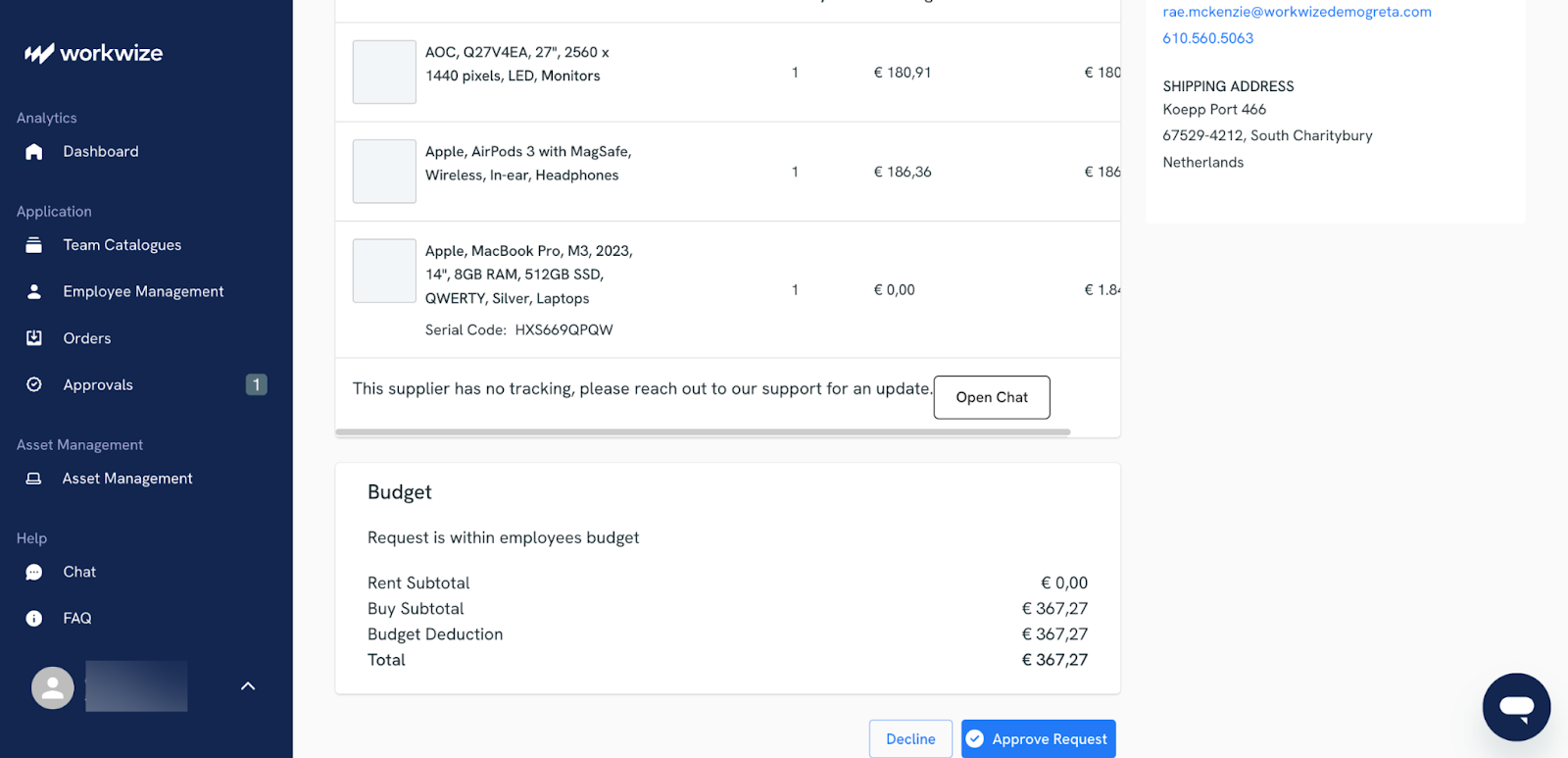
This directly affects your pricing leverage. Workwize, an IT asset lifecycle platform, for example, lets you buy or lease through our global supplier network, but also gives you the option to work with your existing vendors. This means you are not forced to abandon pricing you have already negotiated.
3. Write Renewal, Audit and Exit Terms in the Contract so you Never Get Trapped into Paying for Assets you Don’t Need
Most cases of IT overspending don’t arise from the procurement contract itself. Rather, they happen after the contract goes live.
For instance, asset auto-renewal rules can extend the contract or lock in outdated pricing. Audit clauses can also force your team to spend weeks pulling records.
Here’s how you can avoid such sticky situations:
- Build in formal notice windows for non-renewal. Contracts should require your organization to actively opt out of renewal before a set deadline. This deadline should give you enough time to evaluate alternatives. A reasonable standard is 90 days for SaaS subscriptions, 120 days for enterprise software platforms and 180 days for large hardware maintenance agreements.
- Attach a renewal schedule directly to the contract. This should be a documented list of every renewal date and any planned price changes. Both parties should sign off on it and the agreement should specify that if the vendor fails to provide timely notice per that schedule, the renewal is void.
- Set clear boundaries around audit rights. Permit vendors to conduct audits no more than once per calendar year, with at least 30 business days' written notice required beforehand. The scope of any audit should also be strictly limited to the products and licenses covered under your agreement, not to your broader IT environment.
Moreover, you need to ensure that the process of leaving the vendor, if and when it happens, is safe. The basics, like returning your data and helping you support the transition, should be documented right in the contract.
 4. Make Procurement Decisions Based on Usage and Impact Evidence
Many IT purchases start with a single, clear request (‘we need this tool’) but end with extra licenses and unexpected costs.
The fix is straightforward: require a brief evidence pack with every request. That way, every procurement decision is evaluated on the same basis and nothing gets waved through on instinct alone.
|
The evidence should be simple but impactful. For software, it can include current tool usage and what problem it solves that existing tools don’t. For hardware, it can be data on how the request affects the onboarding or support workload. |
Asking for the same information via this evidence pack also makes it easier to spot recurring issues, such as duplicate tools and teams that try to bypass your standards.
Further, such an approach improves stakeholder alignment. People argue less when the data is visible and it becomes easier to say yes quickly when the request is clearly justified.
This is what you can include in your procurement evidence pack:
- The problem and the users it impacts
- What you already have and why that isn’t enough.
- A simple usage plan that details who will use the new solution, how adoption will be tracked and so on
For hardware, building this evidence habit becomes much easier when your asset data lives in a single system.
If you are using a platform like Workwize, for instance, you can see exactly which devices are assigned to whom, which are sitting unused in a warehouse and which are due for replacement — all in real time from one dashboard.
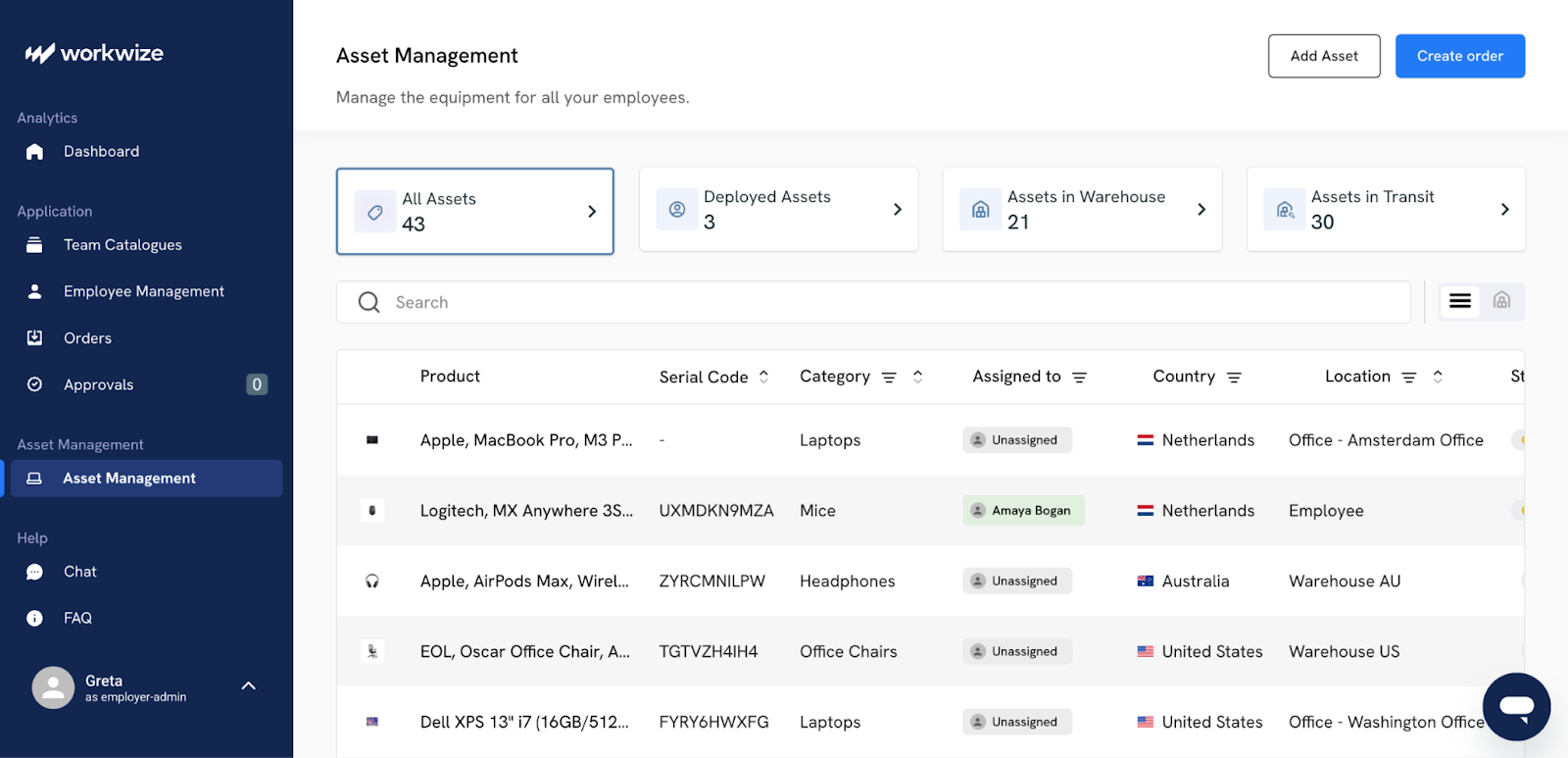
That means when a new hardware request comes in, you can quickly check whether you already have a refurbished device available before approving a new purchase request.
5. Align Stakeholders Early With a Single Intake Path, Then Enforce It Strictly
The most impactful work in the procurement process often happens before a stakeholder meeting.
On LinkedIn, Jake Vigneri also makes this point regarding stakeholder alignment. He says that it’s important to be prepared before a C-suite meeting. It helps you align stakeholders more effectively and bring everyone to the same page for faster procurement decisions.
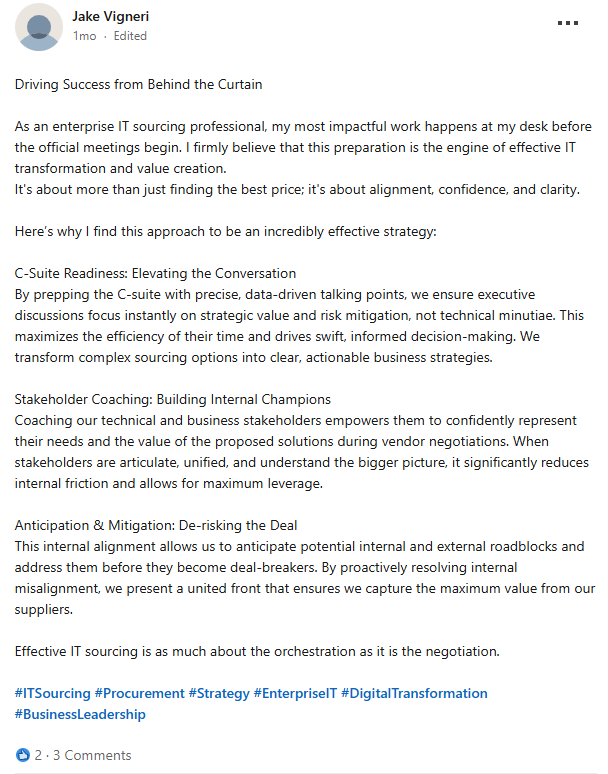
Via LinkedIn
Fortunately, stakeholder alignment is easier than it sounds when approached correctly.
- Start with one easy request form. It should automatically send people to the right route (SaaS, hardware, consulting, renewals and so on).
- Next, publish clear rules. Tell employees when they must involve procurement and what they’re allowed to buy on their own.
- Then, make decision-making obvious. Use a simple model like RACI (Responsible, Accountable, Consulted, Informed) or DACI (Driver, Approver, Contributor, Informed) so everyone knows who can request a purchase and who can approve it
- Finally, prevent “shadow buying” by making the right process the easiest one and stop purchases that skip it through finance or leadership approval
If stakeholders still bypass procurement, you can then escalate through leadership and finance controls.
Reddit users on r/procurement are blunt about this. For instance, Redditor AccomplishedWolf706 says you have to define when procurement must be involved, explain the business risk of bypassing procurement and enforce the policy.
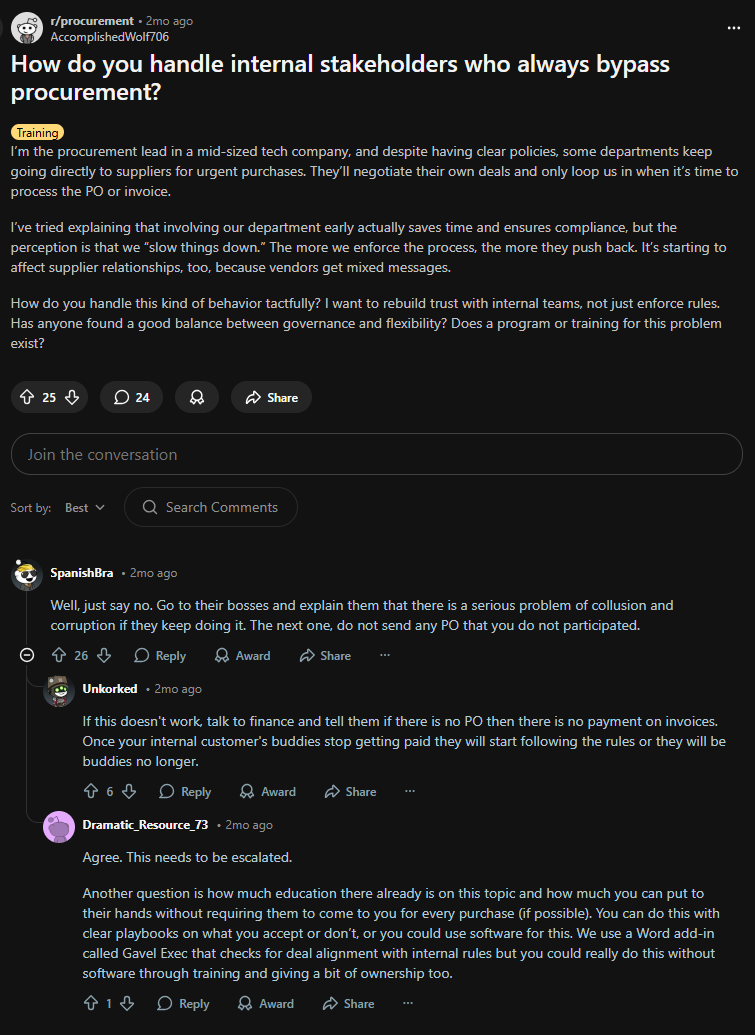
Via Reddit
6. Build a global procurement system with local flexibility
Global procurement is unavoidable for distributed teams. It helps you avoid predictable problems, such as different prices for the same tool or different contract terms across countries. Additionally, procuring globally can also help you avoid inconsistent security reviews and messy asset visibility.
But it’s difficult to build a robust global procurement system without requiring excessive human resources or financial resources.
Shipping hardware across borders often fails economically because of customs duties and import fees. That’s why many teams end up buying locally through resellers or MSPs, which is faster, but it can bring back the inconsistency problem.
The pain points of global IT management itself are global
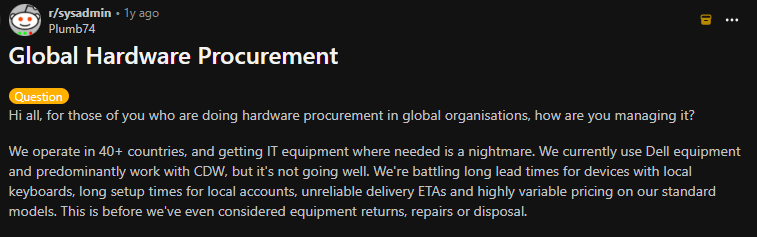
Via Reddit
A good approach is ‘global rules, local execution’, which many leaders call center-led procurement. In this model, the governance and data stay global, while regions can still operate quickly in their own markets.
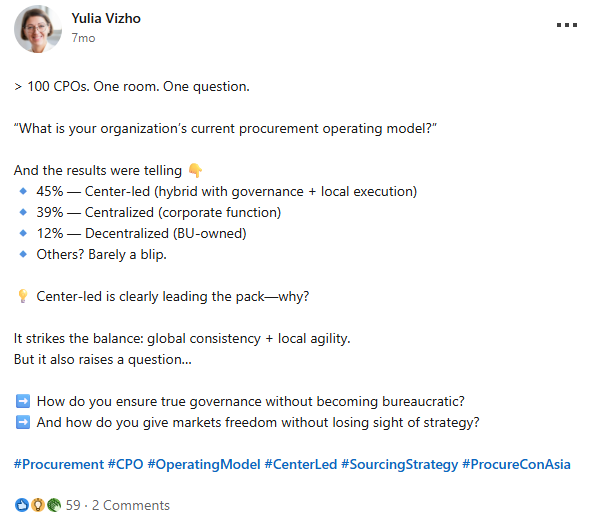
Via LinkedIn
This is how it works in practice:
- Global rules stay the same everywhere. These are your approved vendors, security checks, standard contracts, pricing rules and so on
- Local details, like catalogs, taxes, shipping options and warranty handling, stay localized
- A single global system tracks everything in one place, instead of spreading it across tools and emails
- That system keeps assets and renewals visible end-to-end
Global asset procurement solutions such as Workwize make this much easier, especially for laptops, phones and server equipment.
For instance, Workwize connects your procurement to a global supplier network and local warehouses in regions like the EU, US, UK, India, Australia, Brazil and Singapore. This means you can procure and ship devices across 100+ countries from a single dashboard.
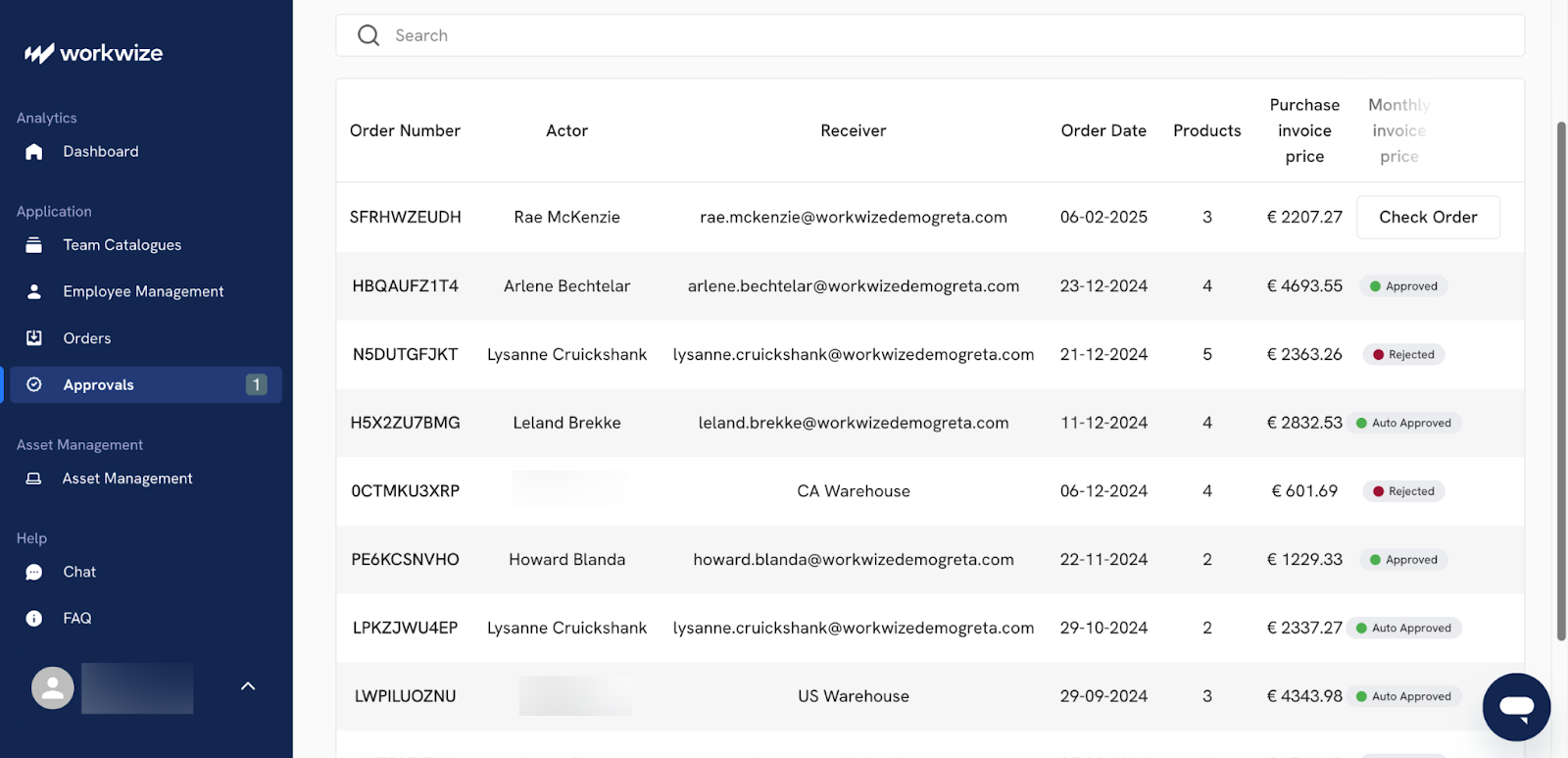
To put it concretely, instead of managing separate vendors and spreadsheets in each country, you get a single ordering experience globally, with local details like taxes, shipping and warranty handling handled behind the scenes.
The major benefits are consistent pricing, faster onboarding for new hires, better asset tracking and fewer security and compliance gaps. They also reduce ‘shadow buying’ that occurs when employees can’t get equipment quickly through the official channels.
7. Treat Software License Optimization Like an Asset Portfolio)
Speaking from experience, the best way to manage software licenses is to treat them as a portfolio of assets.
Without a connected system, you keep paying for licenses nobody uses and keep buying tools that don’t fit their IT setup. Your goal should be to connect contracts to actual usage so that spending matches reality.
To do that, we recommend running software license management as an IT asset management process with an owner and a schedule.
For large enterprises managing complex licenses, Flexera One is the most established option. It generates compliance reports you can use directly in vendor negotiations.
Organizations already running ServiceNow can add its SAM module to track licenses inside the platform the team uses daily. For SaaS-heavy environments, Zluri connects to your SSO and surfaces unused licenses within days
Here’s what else you should do to optimize the usage of licenses:
- Track software usage by monitoring active users, inactive users for 30 days, duplicate tools with the same business function, etc.
- Before renewal, reclaim unused licenses and transfer users to lower-cost tiers (if it doesn’t affect usability). Only after the counts are proven can you renew licenses for longer terms?
- Enforce certain rules in procurement and IT. Block new purchases unless the requester proves no available licenses exist, approve exceptions only with a business case and a time limit, then review exceptions every quarter

8. Run The Full Asset Management Lifecycle in One System Of Record, Then Automate The Handoffs with ITALM Tools
Asset management works best when everything lives in one place. Many teams think they manage the full lifecycle, but the work is spread across tools. You have purchase orders in one system, deployments in another and retirements buried in email threads. That isn’t lifecycle management.
A good lifecycle is one trackable process from request to disposal, held in a single IT procurement management tool rather than stitched across separate systems. Each change in status should show three things: who owns it, when it happened and why it changed.
Here is the kind of IT lifecycle you want to be concretized right in procurement:
- Approve procurement requests with a named cost owner
- Procure from an approved vendor catalog with standard SKUs and standard license metrics
- Tag assets as soon as you receive them, then verify serial numbers and warranty records
- Deploy with assignment to a person or a location, plus a configured baseline for each asset category
- Operate and manage assets with tickets, changes and patches tied back to the asset record
- Refresh or reclaim assets based on actual usage and health signals
- Retire assets with secure and certified data erasure processes and contract updates
A good asset management system connects hardware asset management, software asset management and the CMDB together. It discovers, organizes and tracks assets throughout their lifecycle.
Take Workwize as an example. It covers this lifecycle for your global hardware end-to-end. You can track your devices from procurement through deployment, management, retrieval and disposal, all within one platform.
Then, since it integrates with MDM tools such as Jamf, Intune and Apple Business Manager, your devices are automatically enrolled before they reach the employee. This means you don't have to manually configure each laptop before dispatch.
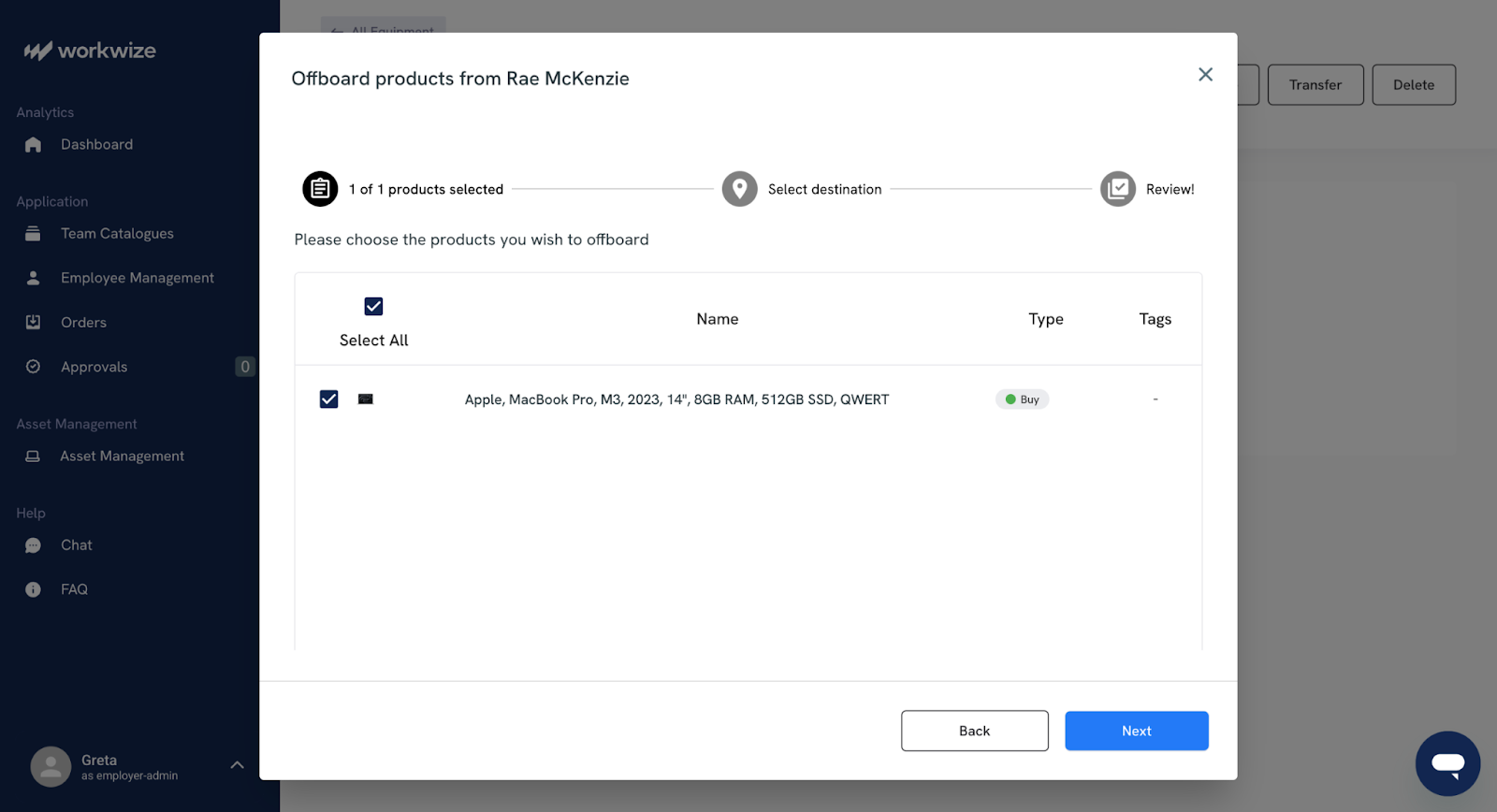
Asset status, location and assignment history remain visible in real time and the platform sends you automatic alerts for upcoming warranty expirations, repair needs and replacement windows.
9. Consider MSPs to Offload Device-Related Work
When your company supports many offices or remote employees, asset purchase orders increase in both frequency and complexity. For instance, your new hires might need devices fast while returns and repairs pile up. Then there’s shipping complexity when you run a hybrid model. It’s difficult managing all of it.
A good managed service provider (MSP) can take on the repeatable work like ordering, imaging, shipping, swaps and returns.
This gets even smoother with Device-as-a-Service models like Dell APEX PC as a Service, which bundles devices and lifecycle services into one predictable monthly subscription and covers deployment through retirement.
A study by IDC and Dell made the benefits quite clear:
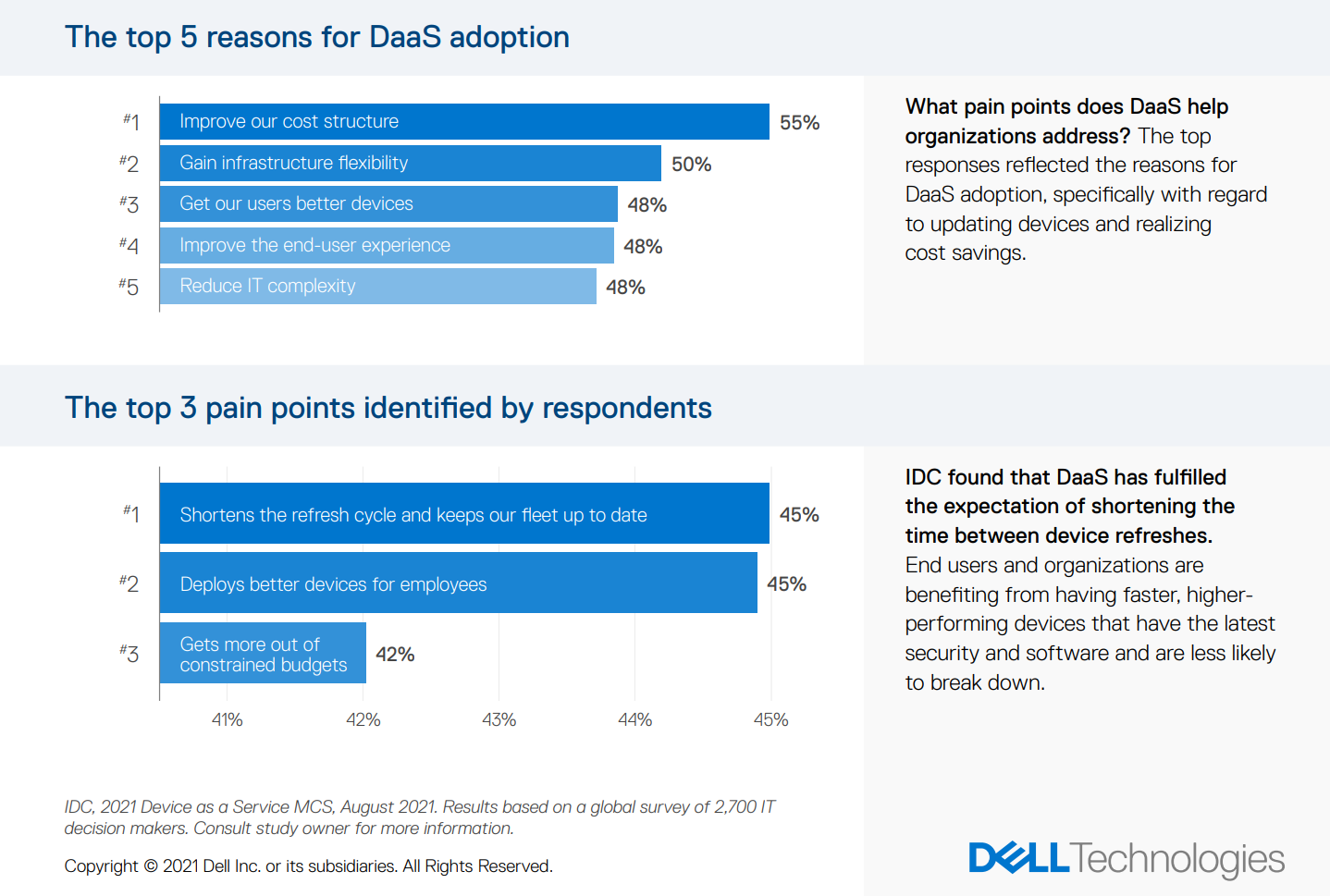
Via Dell
If you’re standardized on Microsoft Surface, partner-led Device-as-a-Service programs also exist that bundle devices and cloud services.
The best practice is to treat the MSP or DaaS provider as your ‘operations arm’ rather than your decision-maker. Your internal team should still own the rules, including approved models and security baselines.
- The MSP handles fulfillment–procurement, shipping, replacements and returns, with clear turnaround targets
- Your IT team is responsible for the approved device catalog, enrollment methods, patching rules and security controls
Keep in mind, however, that an MSP might not be a good fit for everyone. This setup usually pays off fastest when you have distributed teams, high churn or significant immediate buying pressure.
Workwize can make more sense over an MSP for most organizations.
Here’s why. On the fulfillment side, it handles procurement, shipping from local warehouses, replacements, retrieval and disposal across 100+ countries, much like you would expect from an MSP. But it also gives you centralized asset tracking and lifecycle visibility, so you don't have to sacrifice oversight for convenience.
In practice, that means your IT team still owns the approved device catalog, security baselines and enrollment method, while Workwize handles the logistics and keeps everything visible in one dashboard.
10. Build TCO Visibility Into Procurement Approvals
Your procurement approvals should consider the total cost, not just the lowest price. Because when you reward the cheapest upfront option, vendors and teams learn to hide later costs.
Instead, you can opt for the Total Cost of Ownership (TCO) model, which shows what you will pay over the full life of the purchase, including costs that fall on other budgets later.
Here is how to calculate the TCO at each step of the IT asset lifecycle and the aspects you need to consider
- Acquisition: the purchase price plus shipping, taxes, import duties, first licenses and any lease or financing costs
- Implementation: the work to set it up, like deployment, integrations, data migration and training time
- Run: ongoing costs like support, renewals, maintenance, hosting, device or endpoint management and energy use
- Risk: extra costs for security tools, compliance audits and the effort required if something goes wrong.
- Exit: costs to leave, like termination fees, data export, replacing the tool and disposal of devices.
I will let you in on a simple rule that helps enforce this model. Make sure no request gets approved without a one-page TCO sheet that lists who owns each cost and shows totals for Year 1 and Year 3.
Cloud and usage-based pricing need visibility, too. A showback approach helps by reporting costs to the right team or cost center so everyone can see what they are using. Chargebacks (billing teams directly) can come later if your finance policy supports it.
For hardware, Workwize can make several of these TCO line items visible without extra manual work. For example, your acquisition costs (purchase price, shipping, taxes) are captured at the procurement stage and because it handles logistics across 100+ countries from local warehouses, you also see the actual shipping and import costs upfront.
The platform also tracks repairs, replacements and warranty status, so you can see ongoing maintenance costs per device rather than burying them in disconnected support tickets. Finally, at the exit stage, Workwize handles retrieval, certified data erasure and disposal, meaning your retirement costs are documented, not estimated.
Having all these costs visible in one system makes it much easier to build that one-page TCO sheet because the data is already there, rather than scattered across vendor invoices and spreadsheets.
IT industry veteran Gil Gross, makes an important point about the psychology of cost accountability in IT procurement:
“Every company, in every department, still values a smaller bill. We talk about Chargeback and Showback as governance tools, but their real power is psychological. When a department becomes responsible for its own consumption and it hits its budget, the incentive to optimize becomes personal.”
11. Measure Supplier Performance, Then Tie It To The Budget And Future Scope
Track how well suppliers perform and use that information when deciding whether to expand the deal.
To make performance visible and negotiable, use simple reports that match what you’re buying.
For hardware suppliers, focus on delivery and product quality. Track things like
- On-time delivery each month (and by site)
- How many items arrive dead or fail early (within 30 or 90 days)
- How fast they replace broken items and whether spare parts are available
- Invoice accuracy and how quickly they fix billing mistakes
For software suppliers, keep a keen eye on reliability and service:
- Uptime and how often incidents happen (and how serious they are)
- Whether they meet SLA response and fix times
- Release quality (like rollbacks or the same bugs showing up again)
- Support quality (tickets reopened and how long it takes to escalate)
Then make the reports actually matter in two ways:
First, review performance regularly. You can conduct monthly check-ins with important vendors and quarterly reviews with the most critical ones. Every meeting should end with owners, deadlines and a fix-it plan.
Second, link performance to the contract. If they miss SLAs, credits should apply automatically. If their problems cause employee downtime, measure the impact and negotiate credits, compensation or discounts.
The point is to encourage them to improve their work and coordination with you by holding them accountable for everything they do.
For hardware again, Workwize makes it easier to keep tabs on performance. Because when you manage hardware procurement through a single platform, you can:
- Monitor delivery timelines
- Track repair and replacement turnaround,
- See the status of every shipment in real time from one dashboard.
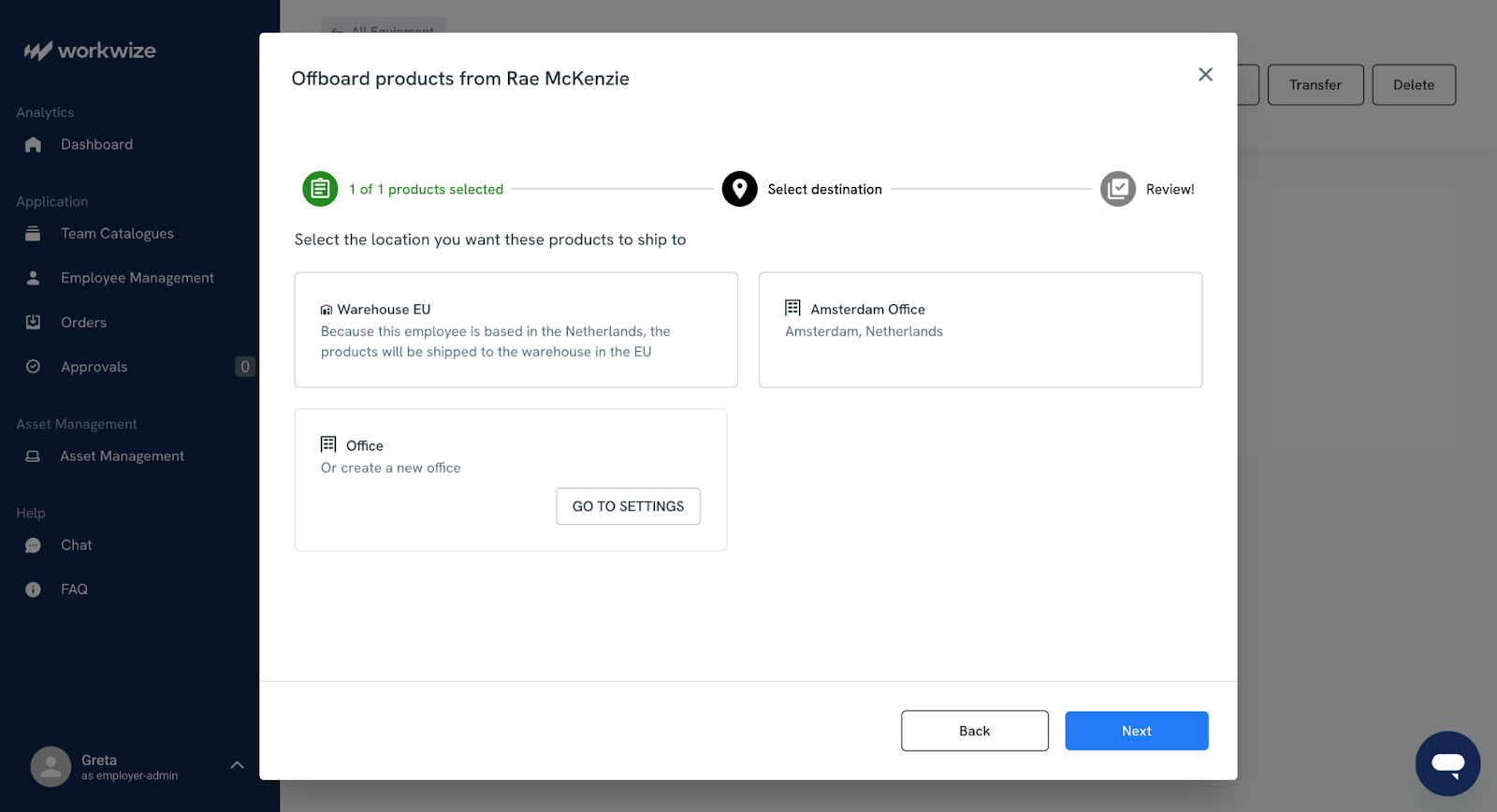
Instead of pulling reports from three different vendors and manually reconciling them, the data is already consolidated.
12. Turn security and compliance into procurement gates with evidence
I always advise teams to make security and compliance into firm ‘stop points’ in procurement: moments where you pause the process and ask for proof. During evaluation, the core question is simple: Will this vendor access our users, our data or our network and can they prove they can protect it?
An approach I find useful is to use gates that stop the deal until the supplier clears them:
Gate 1: Be clear about data access: Figure out what data the vendor will see and who can access it. If they can’t clearly explain how data moves through their system, the answer should be no.
Gate 2: Put security rules in the contract: Write the major security requirements into the agreement. Include breach notification timelines and rules for handling vulnerabilities. You should also solidify how they should return or delete your data when the contract ends
Gate 3: Ask for proof of operations: Request current audit or test results (like SOC reports) and check what they cover. If the report doesn’t include the product you’re buying, it’s not useful.
Gate 4: Plan for ongoing checks: Agree on how you’ll review their risk regularly (e.g., quarterly) and on what will happen in the event of a vendor-related incident.
The evidence I require scales with the size of the deal, but the core checklist stays consistent:
- Proof of security that matches the exact product and how you’ll use it
- An incident response plan with timelines and who does what
- A list of sub-processors (other companies) that can access your data, plus a mandate to notify you if that list changes
- Contract language that makes all of this enforceable, including what happens if they don’t meet the controls
The good news is that when you work with an ITALM provider like Workwize, much of this due diligence is already done for you. Workwize is ISO 27001-certified, GDPR-compliant and adheres to SOC 2 standards, with data encrypted at rest and in transit.
With Workwize, devices ship pre-enrolled in your MDM, so your security policies are enforced before the employee powers on the laptop. And when a device is retrieved at offboarding, Workwize can perform certified data erasure that meets GDPR and HIPAA standards. For asset disposition, you can request a certificate of destruction to maintain your audit trail.
13. Use AI and automation to remove manual labor
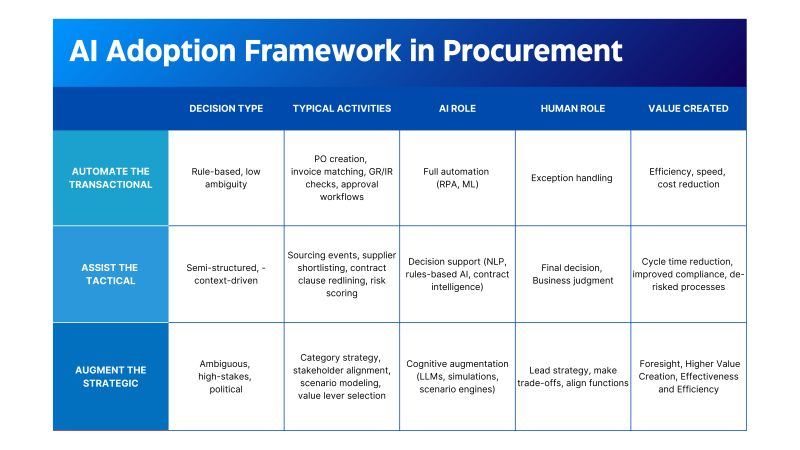
You should automate the boring parts aggressively, but never automate accountability. A tool can help you work more quickly, but a human still has to decide and take the risk.
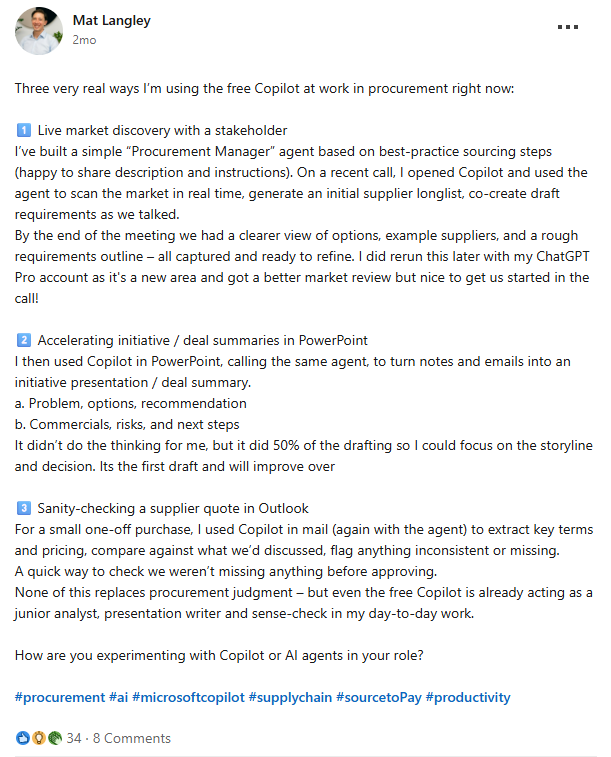
Many procurement teams are already doing this. Procurement expert Mat Langley has shared that he uses Microsoft Copilot during live conversations to scan the market and build a first list of suppliers and only then does he draft requirements in real time.
Via LinkedIn
But AI needs safety protections. If you don’t have rules and checks, LLMs can hallucinate and give you the wrong data. AI is great at tasks like finding savings and organizing data, but it should not decide which suppliers you keep when reliability and backup plans really matter.
Via Akirolabs
Start with AI tasks that are low-risk and easy to measure. These include
- Spend categorization
- First drafts of RFP questions
- Comparing supplier responses and
- Pulling key terms from contracts
Outside of AI, there is also significant value in automating the operational side of IT procurement — the repetitive logistics work that eats up your team's time.
Workwize recently launched an MCP (Model Context Protocol) integration that connects with AI tools like Claude and Zapier, allowing you to automate workflows like ordering a laptop for a new hire, checking delivery status or triggering a retrieval — all through simple prompts or no-code automations.
It’s also a good idea to add governance to your IT automation strategy. You can borrow the mindset from the NIST AI Risk Management Framework. It tells you to list your AI use cases, check the risks, document the controls and monitor over time.
Beyond that, the platform's core automation already handles things like auto-triggering offboarding retrievals when your HRIS flags an employee departure, sending return kits and follow-ups automatically and restocking warehouses when inventory runs low.
Most importantly, make a hard rule that AI never approves spending and never signs a contract. Humans own approvals, so humans should also own the risk.
And IT professionals just want tools that work in practice, not theory and they are skeptical until they see real outputs in spend categorization, RFP work and contract analysis.
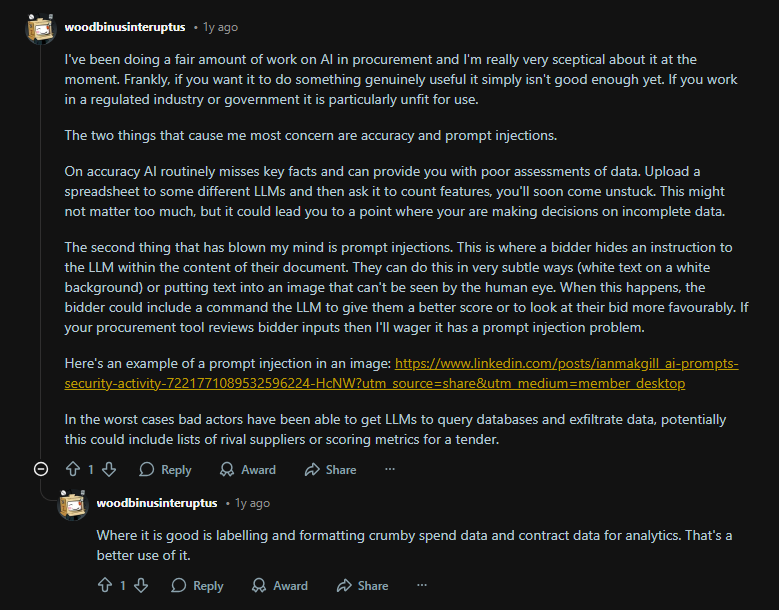
Via Reddit
Expect healthy skepticism. Many IT and procurement folks won’t trust AI until they see real results in areas like spend cleanup and contract review (people on Reddit are vocal about this). Treat that skepticism as a good thing; it keeps your process honest.
14. Build Procurement Risk Management Around Lifecycle Checkpoints, Evidence And Exit Plans
Procurement is complicated,and there are infinite things that can go wrong. Risk management is knowing what could go wrong and the steps you need to take if it happens.
And the easiest way to manage risk is to be cautious. For example, begin by following our list of best practices when finalizing a vendor. Learn to make smart choices quickly and keep enough visibility to respond when something changes.
On this, some good word of advice comes from Paul Valente, the co-founder of VISO Trust.
“What’s my CISO perspective on 'good' third-party risk management?
It’s being able to make fast, risk-based decisions at key points in the vendor lifecycle to reduce risk (i.e., selection, implementation, renewal/offboarding) and having the continuous visibility across third- and fourth-party populations needed to respond to events and take action in real time when bad things happen.”
Here is the procurement-specific way to put that advice to work:
- Set a risk framework, then map it to procurement steps: For this, you can rely on ISO 31000 principles to standardize how you identify and monitor risks across categories and suppliers. Then you could trace it to supplier relationships, as covered by ISO/IEC 27036, which focuses on security in supplier relationships across the lifecycle.
- Demand verifiable security evidence: For SaaS and hosted services, ask for SOC 2 or ISO 27001 certificates and penetration test summaries. For critical suppliers, integrate cybersecurity supply chain thinking using the concepts in NIST SP 800-161. Doing so handles vendor risk as part of supply chain risk management.
- Make risk controls contractual and enforceable: Put these into the contract with measurable obligations like breach notification windows and exit assistance
For hardware, continuous visibility into your assets is itself a risk-management control. If you do not know where a device is, who has it or whether it has been wiped, that is a risk you cannot manage.
With Workwize, you get real-time tracking of every device's status, location and assignment throughout its lifecycle, from the moment it is procured to the moment it is securely disposed of. This kind of continuous asset visibility is what makes it possible to respond to events and take action in real time when bad things happen.
Also, what do you do when the vendor relies on cloud infrastructure?
You assess the vendor, not the cloud provider, because the cloud is just where infrastructure runs and the vendor still owns patching, configuration, logging and monitoring.
Here’s a nice discussion that highlights that vendors remain responsible for what they host on the cloud.
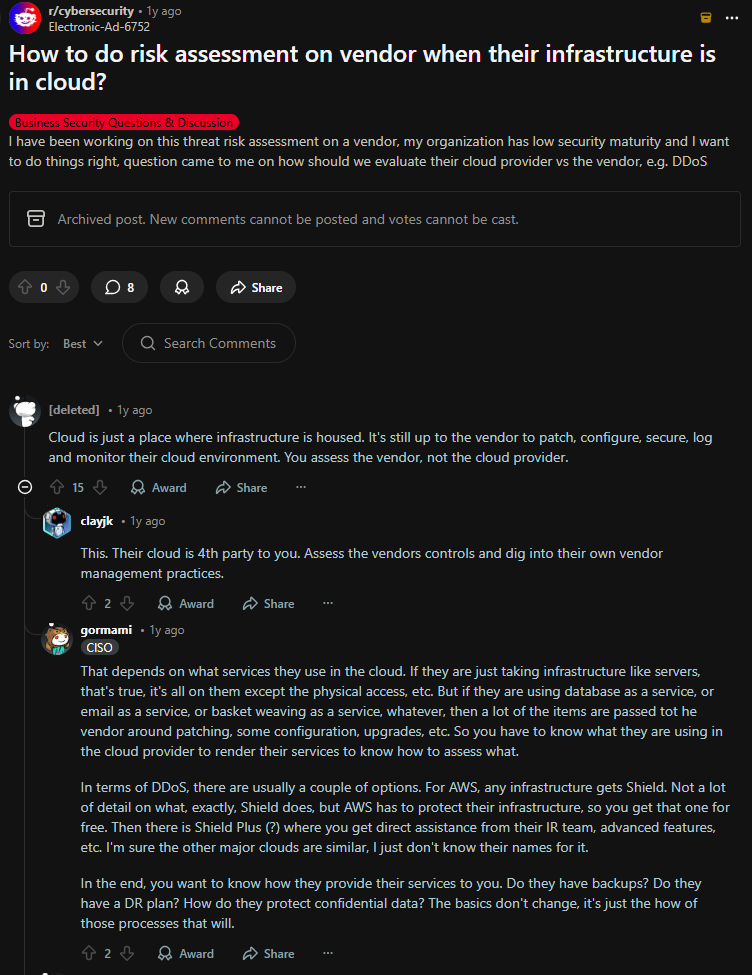
Via Reddit
15. Make Procurement Sustainable, Then Adopt That Mindset Into Every Buying Decision
Sustainable IT procurement places the environmental and social impact of your actions on the same level of importance as core requirements such as security and total cost.
The reasoning behind sustainability is actually easy.
- Devices emit a lot of emissions during manufacturing and shipping
- Cloud usage increases ongoing energy demand
- Poor end-of-life handling of assets creates waste and exposes assets to compliance risks.
And these are just a handful of reasons among hundreds.
To contextualize the need for sustainability, look at this breakdown of the carbon impact of IT assets, for just a year:
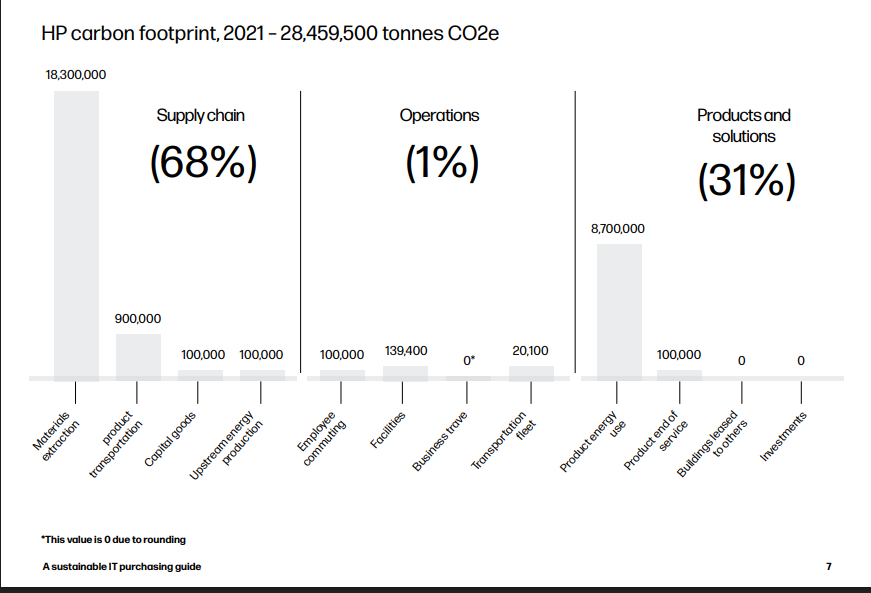
Via HP
From this, the negative environmental impact is quite clear. That’s why sustainable procurement has become so relevant. It lowers operational costs (by using energy-efficient devices and optimizing cloud usage), reduces supply chain and regulatory risk and strengthens your resilience (repairability and parts availability).
To nail sustainability, you have to make it measurable and enforceable.
- Define a small set of procurement standards that apply to every purchase category, then expand over time. For hardware, that might include energy efficiency and repairability and for software and cloud, it could include energy and carbon transparency and evidence of responsible operations.
- Make sure the TCO considers the energy consumption, repair and end-of-life costs.
Most IT carbon impact often sits upstream (manufacturing) and downstream (usage and disposal). So the biggest benefits usually come from:
- Buying fewer devices
- Keeping them longer
- Reusing and refurbishing
- Retiring responsible

Implement IT Procurement Best Practices With Workwize
The challenges covered in this article span both hardware and software procurement. The solutions look different for each one.
On the software side, strong contract negotiation, internal governance and SaaS management can help. That often requires dedicated attention from finance and IT leadership.
Hardware procurement is an even bigger problem entirely. It's physical, logistical and global. Here, you're dealing with suppliers across regions, customs and local tax obligations that vary by country. This can cause many hurdles in getting fully-configured devices to your employees, on time.
That's the problem Workwize solves.
Workwize centralizes hardware procurement, deployment, tracking, retrieval and disposal across 100+ countries into a single dashboard. Rather than juggling multiple regional vendors and managing inventory in spreadsheets, IT teams get:
- Automated global procurement: Orders route to local suppliers and warehouses, with devices pre-configured and MDM-enrolled before they reach the employee.
- Real-time inventory visibility: Stock levels, asset status and location are tracked automatically—so you're not over-ordering, under-stocking or losing track of what's deployed where.
- Built-in compliance: Customs logistics, tariffs and import/export regulations are handled within the platform. GDPR, ISO 27001 and SOC 2 compliance are supported out of the box.
- Offboarding and retrieval: When employees leave, Workwize coordinates global device collection, certified data erasure and redeployment or disposal—without your IT team managing the logistics manually.
Thus, for your hardware side, where the friction in procurement arises because of physical, cross-border and operationally intensive processes, Workwize removes the complexity that causes most of the problems described in this article.
If that's the part of procurement keeping your team up at night, it's worth a look.


Establish a single source of truth for every IT asset across the globe.
.png?width=258&height=318&name=g10%20(5).png)
More related resources to help you stop firefighting hardware operations.


Get monthly insights into how other IT leaders are improving their ops.



.png?width=2880&height=1232&name=Group%202147262874%20(1).png)
Stop coordinating
hardware like it's 2012.
.svg)
.png?width=172&height=68&name=apple%20business%20patner%20(1).png)
.svg)
.svg)
.svg)
.svg)