




.png?width=1230&height=692&name=Vector%20(13).png)
What is an Asset?
An asset is anything your business owns that holds economic value. In general usage, assets are split into some concrete categories:
- Fixed assets (also called tangible assets) are physical items with a useful life beyond one year, like vehicles and machinery.
- Current assets are short-term holdings you expect to use up or convert to cash within a year, like inventory and cash reserves.
- Intangible assets have no physical form but still carry value. These include patents and trademarks.
In the context of IT, you're mostly dealing with two categories.
- Hardware (fixed assets): Laptops, desktops, servers, networking equipment, monitors, mobile devices, printers, and peripherals. These are the assets that depreciate; they lose value over time through use and technological obsolescence.
- Software and licenses (intangible assets): These include operating systems, SaaS subscriptions and perpetual software licenses. These don't physically degrade, but they lose value as vendors release newer versions or as license terms expire. Software purchased off the shelf and used for more than one year is typically amortized, which is really just depreciation for intangible assets.
However, not everything in your IT closet depreciates. Consumables like printer cartridges or short-term leased hardware are current assets. They are expensed in the period you use them, not spread across years.
For now, we will focus on fixed IT assets, the hardware and long-term software your business capitalizes and depreciates over their useful life.
Importance of Depreciation in IT Asset Management
Knowing how quickly your IT assets depreciate is significant not only for calculating their scrap value.
In fact, tracking depreciation as part of your IT asset management strategy helps the accounting team calculate key metrics like the following:
- Calculating profit or loss: To determine profit or loss, all expenses and revenue streams must be calculated alike. If a company does not disclose depreciation costs, their assets will be overvalued, distorting the company's true economic value.
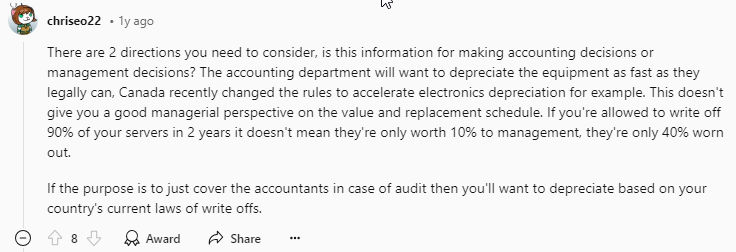
- Tax benefits: Depreciation reduces the gross tax payable. The overall value of assets is mitigated before taxable income is calculated, lowering the taxable amount. Since depreciation is recorded as a cost to the company, it is deducted from net revenue. As per Redditor chriseo22:
- Determining the actual cost of production: Each asset is depreciated as it is used. Thus, the actual cost of production is calculated only after adding the depreciated amount.
- Replacement of assets: Since depreciation costs are spent along with production, they are non-cash expenses. This amount is not paid in cash and is therefore used to replace assets after their useful lives.
- Affecting business value: As the assets lose value over time, not registering them can overestimate your revenue, which can set false expectations for financial future planning.
Factors to Consider in Depreciation
Before applying any depreciation method, IT teams need to account for the variables that shape how an asset loses value over time. These include the asset's expected useful life, its estimated residual value at the end of that life, and the rate at which it becomes obsolete relative to newer technology.
Getting these inputs right is what separates a depreciation schedule that reflects reality from one that creates problems during audits or budget planning.
1. Cost of the asset
Beyond the sticker price, the cost of an asset includes shipping, installation, configuration, and any setup costs needed to get the asset operational. If a $5,000 server costs $400 to rack and configure, it has a depreciable cost basis of $5,400.
2. Useful life
Depreciation also depends on the period for which an asset realistically serves your business. A laptop might last 3 to 5 years before it becomes too slow for productive use, while a well-maintained server can push 5 to 7 years.
Industry norms exist for estimating useful asset life, but your actual usage patterns matter more. A shorter useful life is more accurate if you're running demanding workloads that chew through hardware faster.
3. Salvage value (residual value)
Assets might be worth something at the end of its useful life. For most IT hardware, this number is low, sometimes zero. A five-year-old laptop might fetch $50 to $150 on a resale market. Servers with outdated specs often have negligible salvage value. Whatever figure you land on gets subtracted from the cost before you calculate depreciation.
4. Depreciation method
This is the formula you use to spread the cost. Different methods front-load or evenly distribute expenses, and your choice affects both your financial statements and tax obligations. We'll cover these in detail below.

Types of Methods to Calculate Depreciation
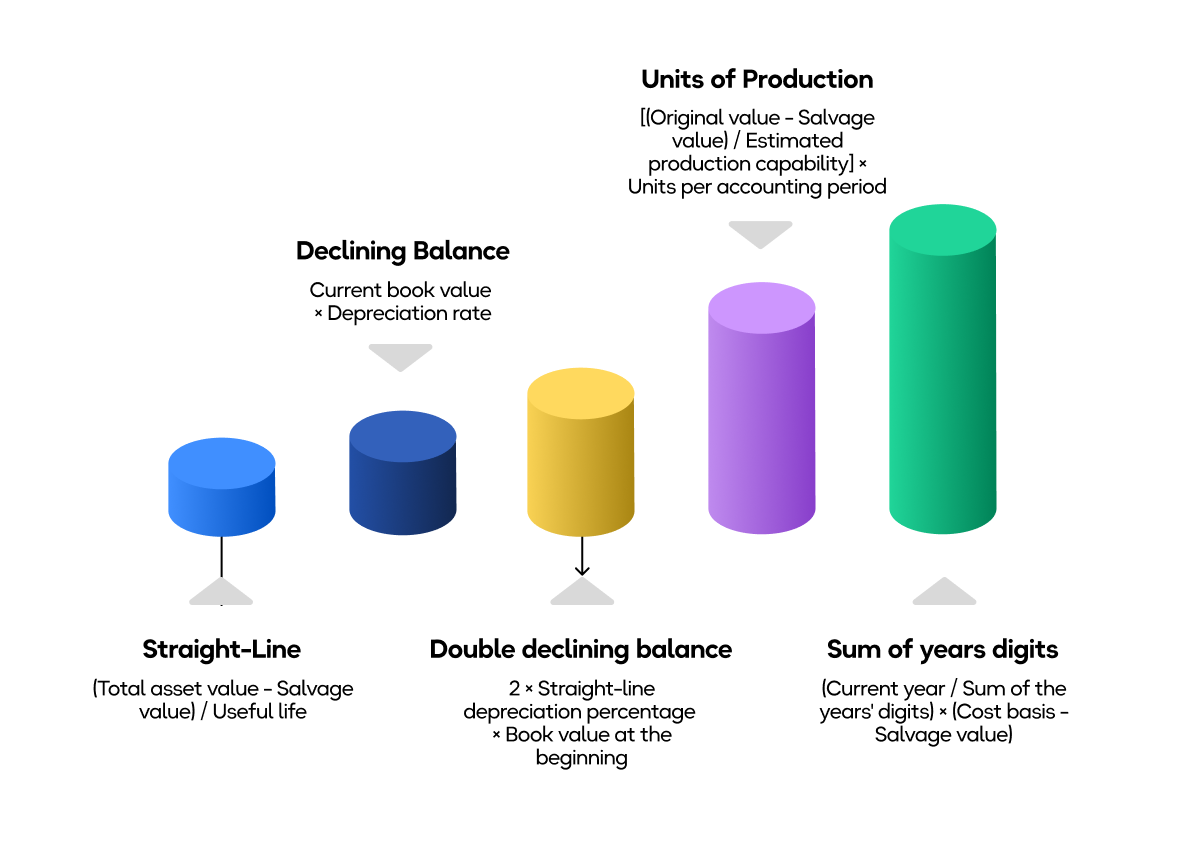
There are five main methods to calculate depreciation. Which one you use depends on the asset type and whether you're calculating for book or tax purposes.
Straight-line depreciation
This is the simplest and most widely used method. You take the depreciable cost (purchase price minus salvage value) and divide it evenly across the asset's useful life. This results in the same expense every year. It is predictable, easy to audit, and the default choice for most IT hardware on financial statements.
Formula: (Cost − Salvage value) ÷ useful life = Annual depreciation
Example: $1,200 Laptop, 4-year useful life, $0 salvage value
|
Year |
Depreciation expense |
Accumulated depreciation |
Book value |
|
1 |
$300 |
$300 |
$900 |
|
2 |
$300 |
$600 |
$600 |
|
3 |
$300 |
$900 |
$300 |
|
4 |
$300 |
$1,200 |
$0 |
Example: $5,000 Server, 5-year useful life, $500 salvage value
Depreciable base: $5,000 − $500 = $4,500
|
Year |
Depreciation expense |
Accumulated depreciation |
Book value |
|
1 |
$900 |
$900 |
$4,100 |
|
2 |
$900 |
$1,800 |
$3,200 |
|
3 |
$900 |
$2,700 |
$2,300 |
|
4 |
$900 |
$3,600 |
$1,400 |
|
5 |
$900 |
$4,500 |
$500 |
Declining Balance and Double Declining Balance
This is an accelerated method that front-loads depreciation. You apply a fixed percentage to the remaining book value each year, so early years carry a heavier expense. Double declining balance (DDB) uses twice the straight-line rate. This better reflects how certain IT assets , especially servers and high-performance hardware, lose value rapidly in their first couple of years.
Formula (DDB): Book Value at Beginning of Year x (2 ÷ useful life) = Annual depreciation
You stop depreciating once the book value hits salvage value.
Example: $5,000 Server, 5-year useful life, $500 salvage value
DDB rate: 2 ÷ 5 = 40%
|
Year |
Beginning book value |
Depreciation (40%) |
Accumulated depreciation |
Ending book value |
|
1 |
$5,000 |
$2,000 |
$2,000 |
$3,000 |
|
2 |
$3,000 |
$1,200 |
$3,200 |
$1,800 |
|
3 |
$1,800 |
$720 |
$3,920 |
$1,080 |
|
4 |
$1,080 |
$432 |
$4,352 |
$648 |
|
5 |
$648 |
$148 |
$4,500 |
$500 |
Note: Year 5 is capped at $148 to avoid going below the $500 salvage value
Pay attention to how 64% of the total depreciation ($3,200 out of $4,500) happens in just the first two years. For a server that realistically loses most of its productive value early on, this paints a more accurate financial picture than a straight-line depreciation would.
Example: $1,200 Laptop, 4-year useful life, $0 salvage value
DDB rate: 2 ÷ 4 = 50%
|
Year |
Beginning book value |
Depreciation (50%) |
Accumulated depreciation |
Ending book value |
|
1 |
$1,200 |
$600 |
$600 |
$600 |
|
2 |
$600 |
$300 |
$900 |
$300 |
|
3 |
$300 |
$150 |
$1,050 |
$150 |
|
4 |
$150 |
$150 |
$1,200 |
$0 |
Sum-of-the-Years'-Digits (SYD)
This is another accelerated method, but it is less aggressive than the double declining balance method. You create a fraction based on the remaining useful life and the sum of all years' digits, then multiply that by the depreciable base each year.
Formula: (Remaining useful life ÷ Sum of years' digits) x Depreciable base
For a 5-year life: sum of digits = 5 + 4 + 3 + 2 + 1 = 15
Example: $5,000 Server, 5-year useful life, $500 salvage value
|
Year |
Fraction |
Depreciation |
Accumulated Depreciation |
Book Value |
|
1 |
5/15 |
$1,500 |
$1,500 |
$3,500 |
|
2 |
4/15 |
$1,200 |
$2,700 |
$2,300 |
|
3 |
3/15 |
$900 |
$3,600 |
$1,400 |
|
4 |
2/15 |
$600 |
$4,200 |
$800 |
|
5 |
1/15 |
$300 |
$4,500 |
$500 |
SYD sits between straight-line and DDB in terms of how aggressively it loads expense into early years. It's less commonly used for IT assets than the other two, but can be a reasonable fit when you want acceleration without the sharp drop-off of DDB.

Units of Production
Instead of time, this method ties depreciation to actual usage. You calculate a per-unit cost and multiply by the units consumed each period. For IT, the unit might be print pages (printers), machine hours (servers), or production cycles.
Formula: (Cost − Salvage Value) ÷ Total Estimated Units x Units Used in Period
Example: $5,000 Server estimated at 20,000 operating hours and $500 salvage value
Per-hour depreciation: ($5,000 − $500) ÷ 20,000 = $0.225 per hour
If the server runs 5,500 hours in Year 1: $0.225 × 5,500 = $1,237.50 depreciation
This method makes the most sense when usage varies by a lot year to year. A print server that runs 8,000 hours one year and 3,000 the next should reflect that difference in its depreciation. For most standard IT equipment with steady usage, a straight-line depreciation model is simpler and produces nearly the same result.
MACRS (Modified Accelerated Cost Recovery System)
MACRS is the IRS-mandated system for tax depreciation in the U.S. It assigns fixed recovery periods and percentage tables. As covered above, IT equipment generally falls into the 5-year property class with 200% declining balance.
With 100% bonus depreciation now permanently restored under the OBBBA, many businesses will simply expense the entire cost in year one for tax purposes. MACRS still matters when you elect out of bonus depreciation or for assets acquired before January 20, 2025.
Example: $1,200 Laptop, 5-year MACRS (half-year convention, no bonus depreciation elected)
Using MACRS GDS percentage tables:
|
Year |
MACRS rate |
Depreciation |
Accumulated |
Book Value |
|
1 |
20.00% |
$240 |
$240 |
$960 |
|
2 |
32.00% |
$384 |
$624 |
$576 |
|
3 |
19.20% |
$230 |
$854 |
$346 |
|
4 |
11.52% |
$138 |
$992 |
$208 |
|
5 |
11.52% |
$138 |
$1,131 |
$69 |
|
6 |
5.76% |
$69 |
$1,200 |
$0 |
The 5-year recovery takes six calendar years because of the half-year convention. You only get half a year in Year 1 and the remaining half in Year 6. Also, notice that MACRS ignores salvage value; you depreciate the full cost.
US Tax Depreciation: MACRS and the 2025 Law Change
For tax purposes, U.S. businesses must use the Modified Accelerated Cost Recovery System (MACRS), even if they use a different method on their financial books.
MACRS assigns every asset a fixed recovery period that determines how quickly you can write it off. For IT:
- Computers and peripherals: 5 years (IRS Asset Class 00.12)
- Office furniture and fixtures: 7 years (Asset Class 00.11)
- Data handling equipment (copiers, calculators): 5 years (Asset Class 00.13)
By default, MACRS uses a 200% declining balance method that front-loads deductions, then switches to straight-line when that yields a bigger write-off. It also applies a "half-year convention," which means that you only claim half a year's depreciation in the first and last year, no matter when you actually started using the asset.

100% bonus depreciation is back permanently
The Tax Cuts and Jobs Act (TCJA) of 2017 let businesses deduct 100% of a qualifying asset's cost in the year it was placed in service. But that benefit was temporary; it dropped to 80% in 2023, 60% in 2024, 40% in 2025, and was headed to zero by 2027.
The One Big Beautiful Bill Act (OBBBA), signed on July 4, 2025, reversed that phase-out. 100% bonus depreciation is now permanent for qualified property acquired and placed in service after January 19, 2025. It covers tangible personal property with a MACRS recovery period of 20 years or less, which means virtually all IT hardware and off-the-shelf software qualify.
Basically, if you buy a $5,000 server in 2026 and put it to use, you can deduct all $5,000 on that year's federal return. You don’t need to spread it over five years.
However, there are a few things you need to be aware of:
- New and used assets both qualify, provided the asset wasn't previously used by your business and was purchased in an arm's-length transaction
- The acquisition date is what counts. Both the purchase and the placement in service must happen after January 19, 2025. If you signed a binding contract before January 20, 2025, the old phase-down rates apply, even if the equipment showed up months later
- You can opt out. If spreading deductions over multiple years suits your tax situation better, you can elect regular MACRS depreciation instead, or choose 40% bonus depreciation for the first tax year ending after January 19, 2025
Section 179 expensing
The OBBBA also doubled the Section 179 deduction limit from $1.25 million to $2.5 million, with a phase-out starting at $4 million. After 2026 inflation adjustments, those figures land at roughly $2.56 million and $4.09 million.
Section 179 and bonus depreciation overlap, but they work differently. Section 179 gives you more control; you choose which assets to expense and how much to deduct, but your deduction can't exceed your business income for the year (no creating a loss). Bonus depreciation is broader; it applies to entire asset classes at once and can generate a loss, but you don't get to cherry-pick individual assets.
The IRS requires you to apply Section 179 first, then bonus depreciation on any remaining eligible cost. Most tax advisors follow that sequence to maximize the benefit.
Federal rules are as favorable for equipment purchases as they've been in years for IT teams in 2026. But state conformity is uneven; many states don't follow federal bonus depreciation, so verify your state's rules before locking in a strategy.
IT Asset Depreciation Rate Table
This table covers typical useful life and common depreciation methods used for book (financial statement) purposes.
|
Asset type |
Typical useful life |
Common depreciation method |
|
Laptops |
3 to 5 years |
Straight-line |
|
Desktops |
3 to 5 years |
Straight-line |
|
Servers |
5 to 7 years |
Declining balance |
|
Mobile devices |
2 to 3 years |
Straight-line |
|
Networking equipment |
5 to 7 years |
Straight-line |
|
Monitors |
5 to 7 years |
Straight-line |
|
Peripherals |
3 to 5 years |
Straight-line |
|
Software licenses |
3 years |
Straight-line or amortization |
Servers use declining balance more often because they tend to lose value faster in the early years. Cloud migration, performance demands, and hardware refresh cycles all accelerate obsolescence.
Most other IT hardware depreciates at a steadier rate, which makes straight-line a better fit for financial reporting.
How to Track IT Asset Depreciation in Your Organization
Calculating depreciation might seem like straightforward math. However, tracking it accurately across dozens or hundreds of assets over multiple years, with people joining and leaving and equipment being shuffled around, is entirely different.
Here is how you measure depreciation at scale.
Spreadsheets
Spreadsheets are perfectly workable for small teams with a handful of assets. You build a sheet with purchase dates, costs, salvage values, and depreciation formulas.
The problem is everything around the math; somebody forgets to add a new purchase or an old laptop gets reassigned without anyone updating the sheet. Spreadsheets don't break because of bad formulas but because of human inconsistency.
Dedicated ITAM software
Tools like Snipe-IT, InvGate, or AssetExplorer offer structured databases, barcode scanning, automated calculations and audit trails. They're a major step up from spreadsheets because they enforce data entry discipline and tie depreciation to individual asset records.
The limitation is that most ITAM platforms handle tracking and accounting but don't involve themselves with the physical logistics (procurement, deployment, retrieval, disposal) where depreciation data actually originates.
Integrated lifecycle platforms
Most tracking failures follow the same pattern. A device gets reassigned and nobody logs it, a new hire receives equipment that never enters the system, or an asset reaches end-of-life but continues to show as active because no one recorded the disposal.
Over time, depreciation records start reflecting a version of your fleet that no longer exists, and the gap usually surfaces during an audit or a budget review when it's hardest to fix.
However, with dedicated IT Asset Lifecycle Management (ITALM) platforms, such as Workwize, tracking, procurement, deployment, and disposal are managed in one system. When an asset moves through its lifecycle, the depreciation record updates automatically.
What Data Should You Capture Per Asset?
Accurate depreciation tracking requires a minimum set of fields per asset. Missing even one creates a gap that compounds over time.
Here is what data you should collect:
|
Data field |
Why it matters |
|
Asset tag or serial number |
Unique identifier for tracking and audit |
|
Asset type and model |
Determines useful life and depreciation method |
|
Purchase date |
Starts the depreciation clock |
|
Purchase cost (full) |
Includes shipping, setup and configuration costs |
|
Salvage value |
Determines the depreciable base |
|
Depreciation method |
Straight-line, DDB, MACRS, etc. |
|
Useful life (in years) |
Drives the annual calculation |
|
Assigned user or department |
Tracks who has the asset and where it is |
|
Current status |
Active, in storage, decommissioned, disposed |
|
Disposal date and method |
Closes out the depreciation schedule |
Track Depreciation More Easily Using Workwize
The failure modes in manual tracking are quite predictable, and they all come down to the same thing: records do not reflect reality.
Suppose a new hire gets a laptop. Someone remembers to log it eventually, maybe a week later, maybe never. An employee leaves, and their equipment sits in a cabinet. The asset shows as "active" in your system for months. End-of-life devices accumulate because nobody owns the disposal process, so they stay on the books as depreciating assets even though they've been collecting dust in a storage room.
They're the norm for any team managing more than about 50 assets manually. Each discrepancy compounds. As time passes, your depreciation schedules become unreliable and your book values diverge from reality.
That’s where Workwize comes in.
Rather than managing depreciation as a separate accounting exercise, Workwize handles it as part of the hardware lifecycle itself.
Workwize tracks real-time depreciation as assets move through procurement, deployment, and disposal.
- When a device is purchased and assigned, the depreciation schedule starts automatically based on the asset's type and your configured rules.
- When that device gets reassigned to another employee, the record updates automatically.
- When it's retired, the schedule closes out.
The value here isn't in the depreciation math because any tool can do that. The value is in how you keep the underlying asset data accurate enough for the math to mean something.
For teams managing IT hardware across multiple locations or countries, and especially for distributed workforces where devices ship directly to employees' homes, automation is the only way you can have depreciation data you can trust.
Schedule a demo with Workwize now to see how you can track depreciation better across hundreds of assets.

FAQs
Can I depreciate IT assets that cost less than $500?
You can, but you may not need to. The IRS allows businesses to expense items under a certain de minimis threshold ( $2,500 per item for businesses without an applicable financial statement, or $5,000 with one), rather than capitalizing and depreciating them. Most mice, keyboards, and low-cost peripherals fall under this.
What happens to depreciation if an IT asset breaks before the end of its useful life?
You can claim a loss on the remaining undepreciated value. If a server with $2,000 in book value fails and can't be repaired or sold, that $2,000 becomes a deductible loss in the year of disposal. Document the disposal and the reason.
Does leased IT equipment depreciate?
Not on your books, the lessor owns the asset and carries the depreciation. Under certain capital and finance lease arrangements (where the lease is structured more like a purchase), the lessee may record the asset and depreciate it. This depends on the terms and the accounting standards your business follows (ASC 842 in the US).
How does 100% bonus depreciation interact with state taxes?
Many states do not conform to federal bonus depreciation. California, for example, does not allow it. Some states only allow partial conformity. Check your state's tax code or consult a tax advisor.
Should I use the same depreciation method for books and taxes?
You don't have to, and most businesses don't. It's common to use straight-line for financial reporting and MACRS with bonus depreciation for taxes. This creates a temporary book-tax difference that eventually nets to zero.
What's the difference between depreciation and amortization?
They're the same concept applied to different asset types. Depreciation applies to tangible assets (hardware). Amortization applies to intangible assets (software licenses, patents). The math is often identical but they're reported on different lines in financial statements.

Establish a single source of truth for every IT asset across the globe.
.png?width=258&height=318&name=g10%20(5).png)
More related resources to help you stop firefighting hardware operations.

.png?width=150&height=150&name=solarwindscover%20(2).png)


Get monthly insights into how other IT leaders are improving their ops.




.svg)
.svg)
.svg)
.svg)