




.svg)
.svg)

.svg)


.svg)





.svg)
.png?width=500&height=424&name=Style-1---V1-(1).png)

.png?width=1230&height=692&name=Vector%20(13).png)
Spreadsheets look harmless, especially when you’re starting out with a limited number of assets. But as your workforce expands and assets grow, gaps start to appear.
For starters, you lose real-time visibility. You don’t know where your assets are—whether they’re actively in use, collecting dust in a storage room, or already lost.
And because there’s no real-time insight, you might still renew licenses on those inactive devices, thinking they’re critical to operations.
The result? Huge financial leakage.
A report from TechRepublic says, $34 billion is wasted annually on unused licenses in the US and UK.
And that’s just one aspect of how manual asset tracking hurts your team.
But there’s a better alternative to spreadsheets that fixes the above issues: IT Asset Management (ITAM) tools.
In this article, we’ll explore what ITAM tools are and why they matter. You’ll also find a list of hand-picked ITAM tools for 2026—key features, pros and cons, and reviews from real users.
Finally, there’s a short guide to help you compare the options and choose the right solution.
TL;DR
- Workwize: Ideal for globally distributed companies that need end-to-end lifecycle management plus logistics across 100+ countries.
- ManageEngine AssetExplorer: Best for medium to large organizations seeking a cost-effective, full-feature ITAM tool with strong discovery.
- InvGate Asset Management: Ideal for mid-sized to large enterprises seeking an ITAM and ITSM solution that’s easy to adopt without requiring a complex setup.
- ServiceNow ITAM: Designed for large enterprises already using ServiceNow that want enterprise-grade, integrated lifecycle management.
- Snipe-IT: A strong choice for nonprofits, schools, or budget-conscious teams needing a free, open-source ITAM solution.
- Lansweeper: Best for IT teams that require in-depth network discovery and unified asset intelligence across IT, OT, and cloud environments.

What are IT Asset Management Tools and Why do they Matter?
IT asset management (ITAM) tools are software solutions designed to help you track and manage your assets throughout their lifecycle—from procurement to disposal. This includes both software licenses and hardware devices such as laptops, servers, computers, or mobile devices.
The entire purpose of an ITAM solution is to provide you with a centralized system that answers:
- What assets do you have (both hardware and software)?
- Where are they?
- Who’s using them?
- What’s their status and value?
And answers to all these questions help you:
- Optimize costs by cutting unused licenses, redeploying idle devices, and avoiding unnecessary purchases.
- Reduce risk by instantly revoking access, tracking warranties, and preventing devices from aging into security liabilities.
- Boost productivity, as IT can resolve issues faster when they have access to the device's history, location, and assigned user.
- Stay audit-ready, as accurate records of ownership, usage, and data wipes make compliance smooth and defensible.
Criteria for Choosing the Best IT Asset Management Tools in 2026
Here are the factors I considered when shortlisting ITAM tools for this article.
For each product, I examined tangible evidence, such as the number of verified reviews, the strength of integrations, scalability, and pricing.
- Enough independent customer feedback: I selected the tools with a sufficient number of up-to-date user reviews to draw conclusions from.
- Ease of deployment and use: I favoured tools that users can set up quickly, or at least offer strong onboarding support if setup is more complex.
- Scalability: I checked how well each tool scales—not just in asset volume but also across geographies.
- Integrations: For me, an ITAM solution has to fit into existing IT workflows. That means seamless integration with ITSM systems, HRIS platforms, and security tools.
- Customer support and documentation: I paid attention to what real users said about onboarding help, ongoing support, and whether the documentation is clear enough to self-serve when needed.
Top 6 IT Asset Management Tools in 2026
1. Workwize
Source: Workwize
Best For: Companies with a globally distributed workforce or remote employees that need to equip, support, and reclaim devices across multiple locations.
Yes, we’re starting with Workwize, our own tool. And before you roll your eyes: hear me out.
No tool is perfect, including Workwize. I’ll walk you through Workwize’s capabilities and where it might be a great fit.
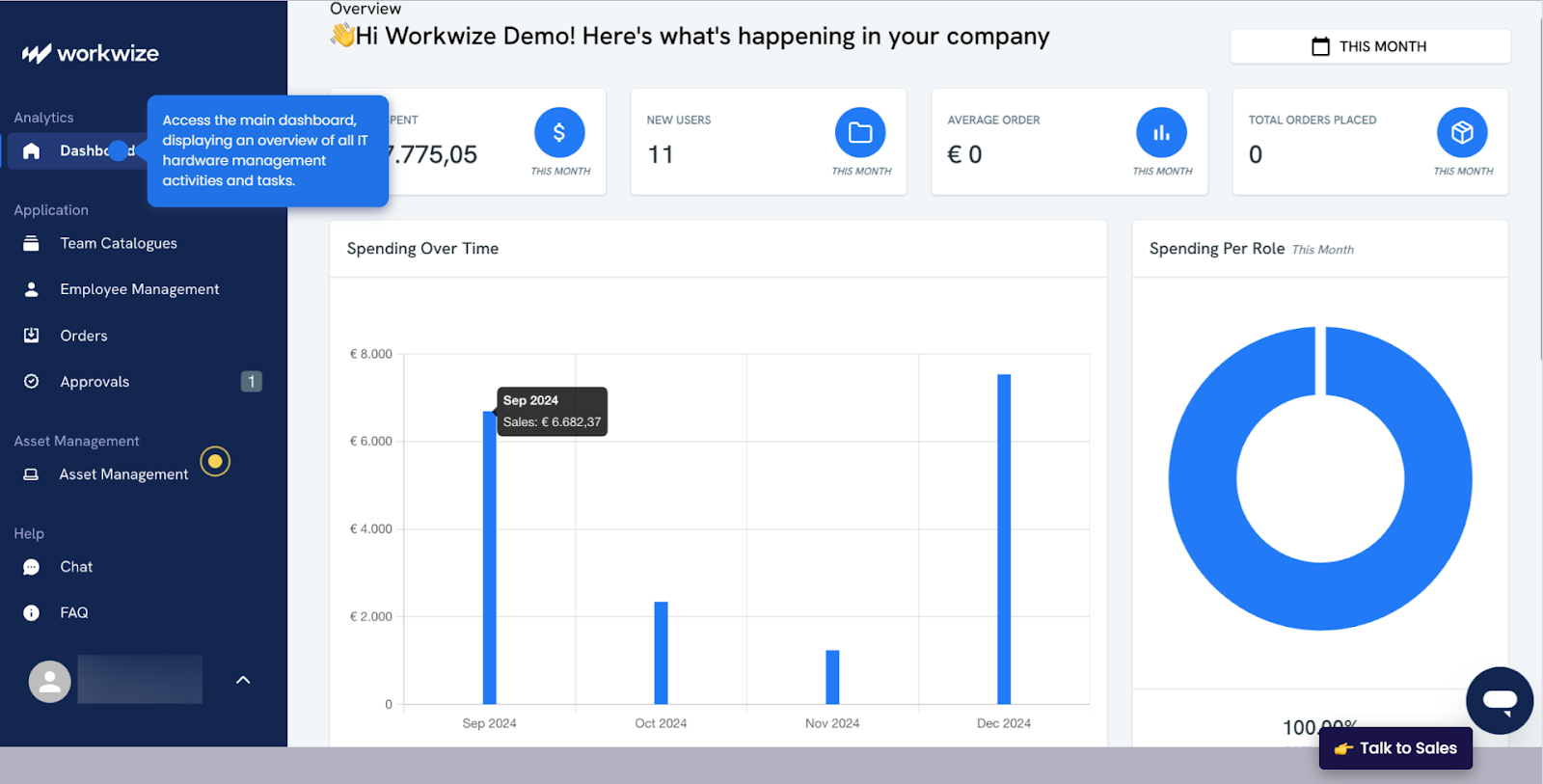
Workwize is an end-to-end IT asset management solution designed for today’s distributed workforce. It stands out by handling not just the digital tracking of assets, but also the physical logistics, from procurement and deployment.
Key Features
Here are the key features Workwize offers:
Global, Zero-Touch Deployment
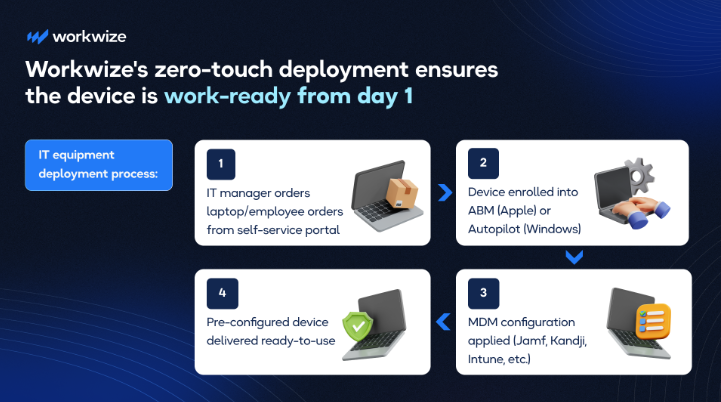
Workwize handles the complete asset lifecycle from procurement. You can buy or rent IT equipment, deployment, and management to retrieval and disposal, across 100+ countries.
That means your remote hires can hit the ground running on day one. This isn’t just convenience. It’s a 40%+ reduction in IT workload and faster, friction‑free onboarding.
Real-Time Tracking & Centralized Inventory
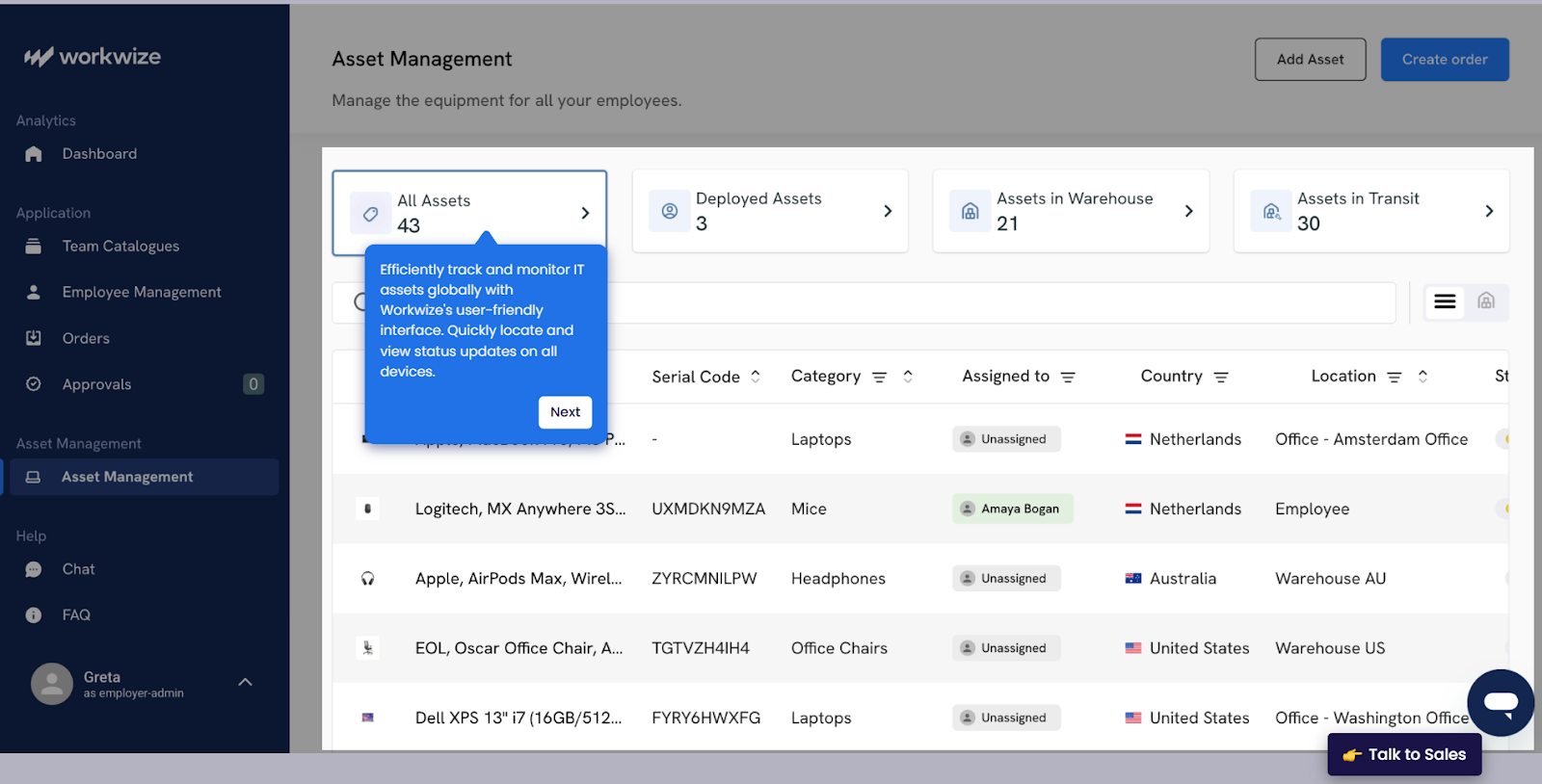
A unified dashboard enables you to track the location, status, warranty, and lifecycle stage of every asset in real-time. This level of visibility eliminates spreadsheet chaos and helps your team make smarter decisions about when to upgrade, repair, or retire devices.
Proactive Maintenance & Automated Reminders
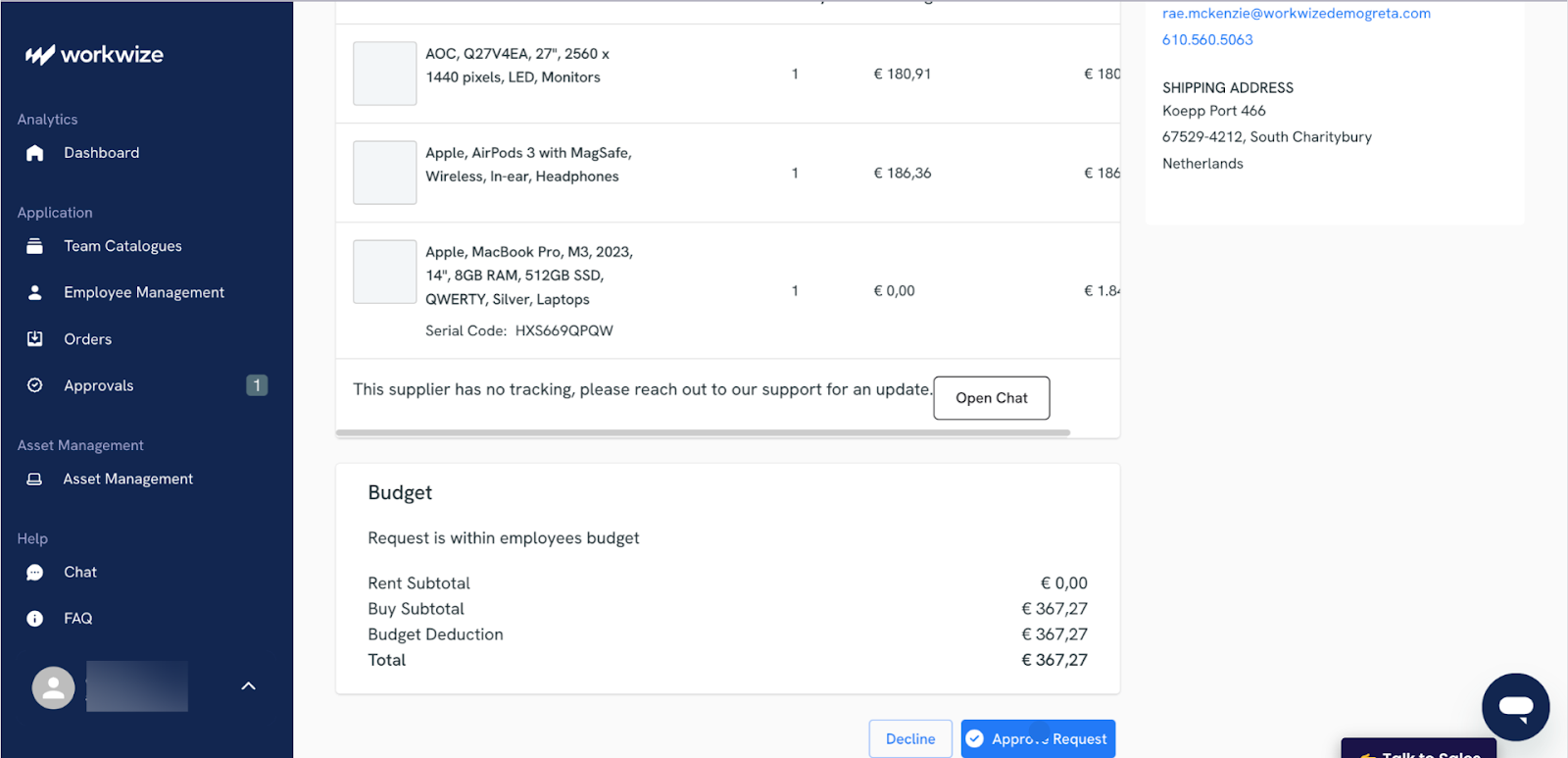
Workwize sends automated alerts for repairs, maintenance, or replacements, enabling you to stay productive, fix issues in a timely manner, and minimize downtime.
You even get reminders for software licenses that’re about to expire. This helps you stay compliant and ensure business continuity.
Zero-Touch Offboarding with Data Security Built-In
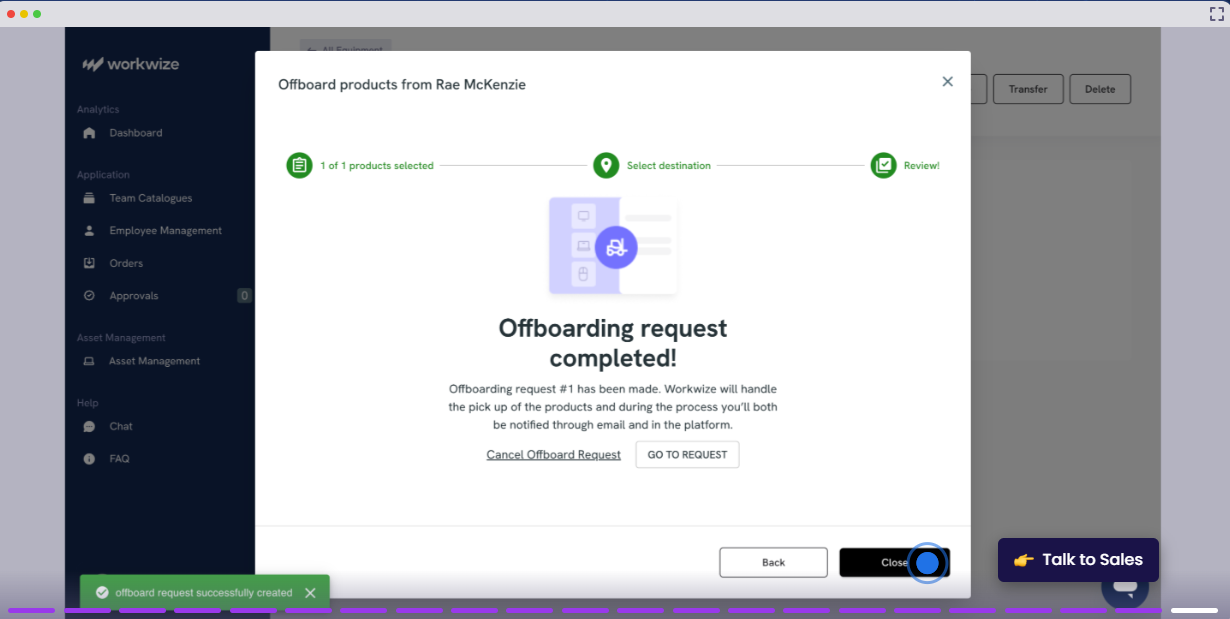
Workwize seamlessly integrates with HRIS platforms like BambooHR. Your HR team can automatically trigger the offboarding workflow when someone leaves. Next steps, like retrieval, certified data wiping, and even warehousing or recycling, happen automatically.
This helps you deliver a consistent and automated offboarding experience, secure your data, and save a massive amount of manual time & effort.
Self-Service Portal
Source: Workwize
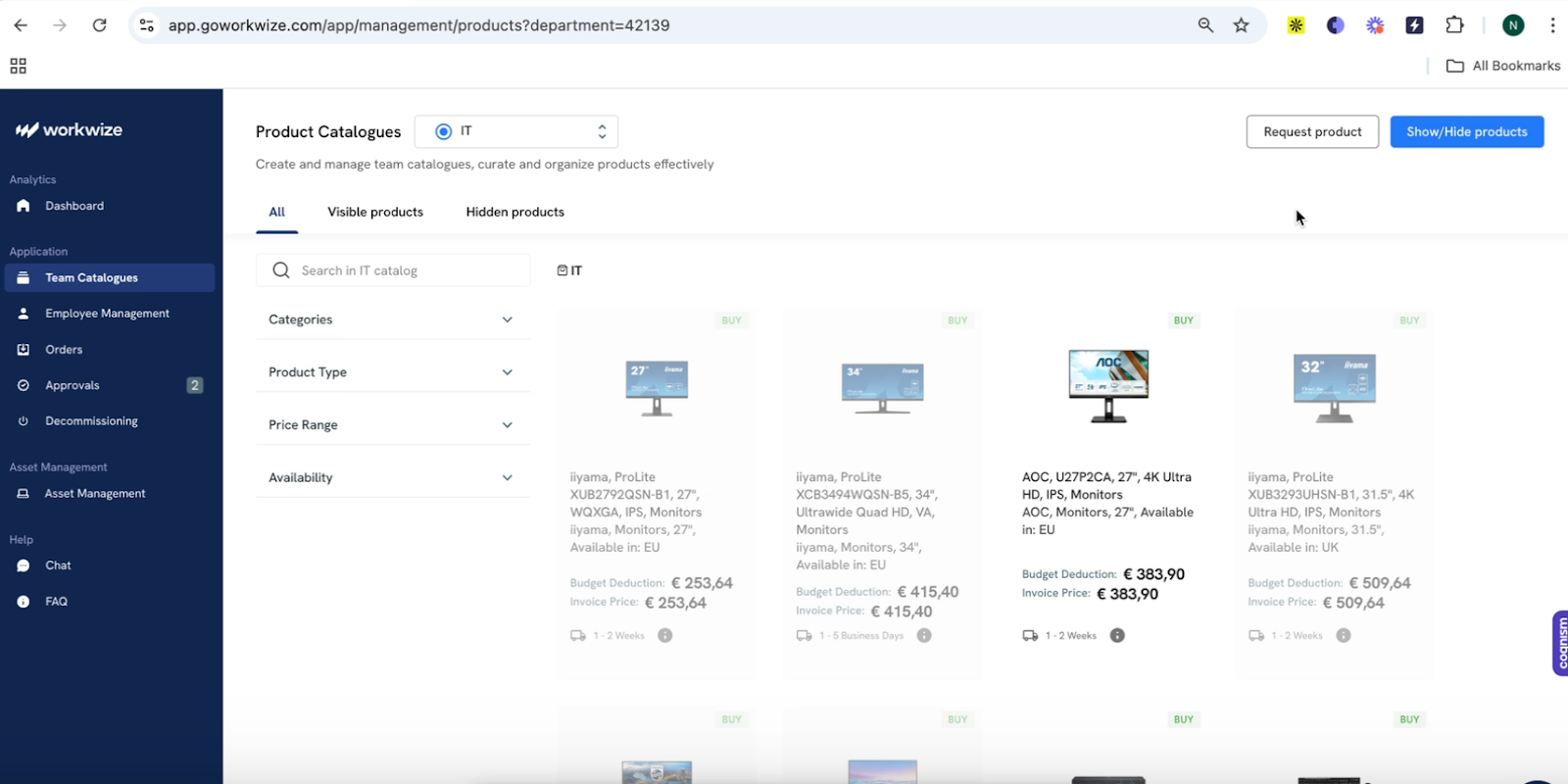
Workwize enables your employees to order IT equipment directly through the self-service portal, eliminating the need to involve the IT team. This approach reduces administrative load on IT teams and speeds up the onboarding process.
By automating both request and approval, Workwize helps you save time that you can invest in strategic tasks.
Pros
- Plenty of integrations and Easy-to-use
- Combines comprehensive asset management with logistics
- IT teams save more than 40% of time by automating manual tasks
- Helps optimize costs (HighLevel saves $1.4 million annually by streamlining and automating procurement, deployment, retrievals, and disposals)
Cons
- Not suitable for small businesses
- Some users request support for more geographies
User Reviews
Users appreciate how Workwize offers centralized tracking of all the assets and enables them to stay compliant:
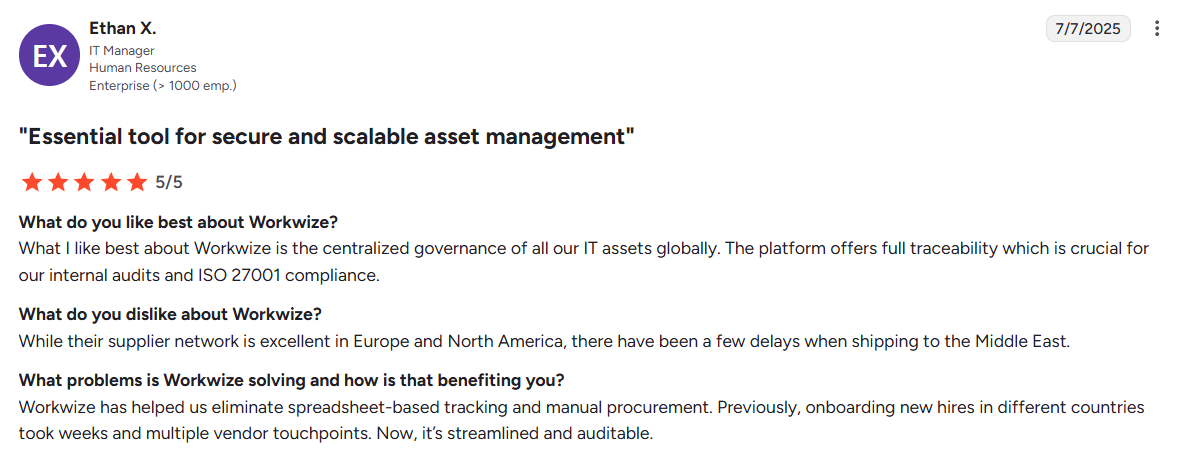
Source: Verified G2 Review
This user reports a positive experience, having onboarded two hires through Workwize and plans to expand. While the setup took a little time, Workwize’s account representative made the process easier:
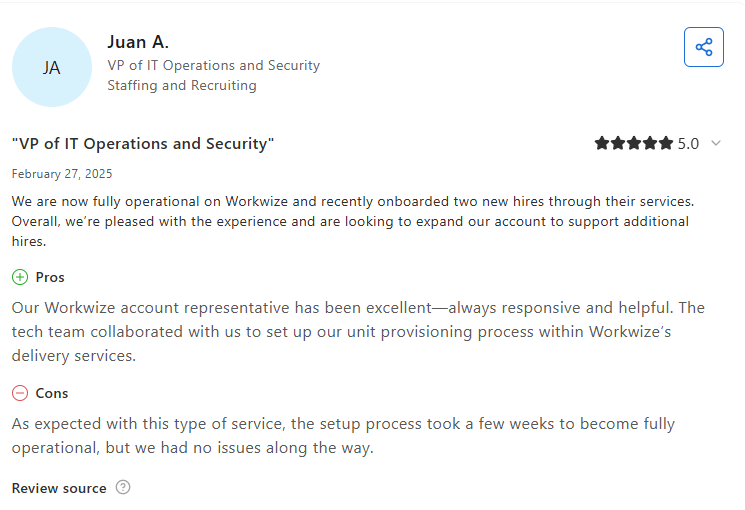
Source: Verified Capterra Review

2. ManageEngine AssetExplorer
Source: ManageEngine AssetExplorer
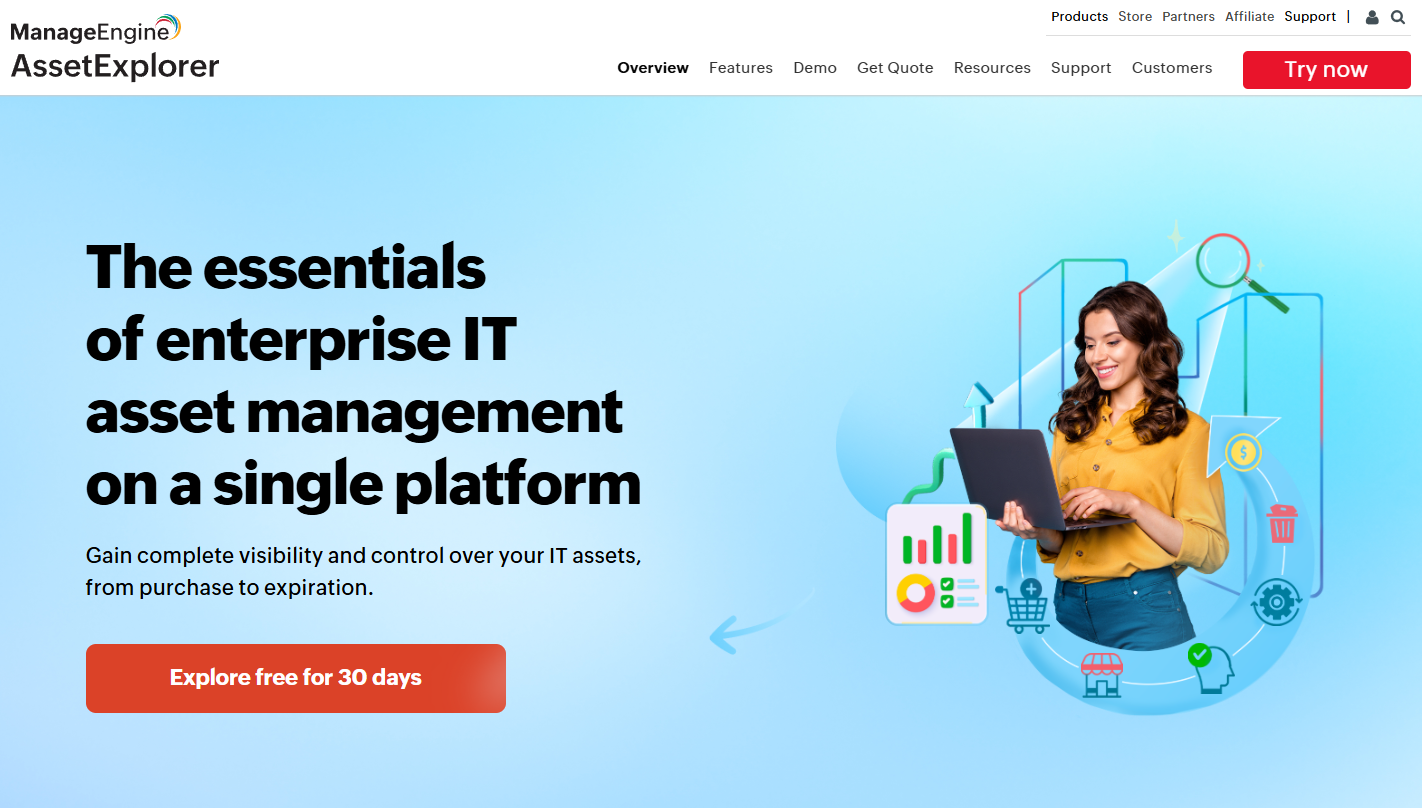
ManageEngine AssetExplorer is a comprehensive ITAM solution designed to offer quick deployment for IT managers.
Based on the demo, the tool’s interface is simple (a bit outdated, though), and everything, from asset details and reports to CMBD, software, and contracts, is available on the same dashboard.
While InvGate stands out for its ease of use despite being feature-heavy, I noticed a limitation. It doesn’t natively support remote control.
You have to separately buy an addon worth $315 annually just to control your devices or deploy software remotely. This, for me, is an unnecessary expense, since you get remote control natively with tools like Workwize.
After digging a little deeper, I found multiple users complaining about the subpar customer support. So, it’s advised that you pilot the tool before engaging in a long-term commitment.
Key Features:
- Automated Discovery & Inventory: AssetExplorer uses agent‑based and agentless scanning to create an asset inventory.
- Lifecycle & Workflow Automation: Lets you create custom workflows to manage assets from purchase and vendor management through to retirement.
- Comprehensive CMDB and Visual Mapping: The platform offers a configuration management database (CMDB) that links assets to services and dependencies.
- License & Contract Management: AssetExplorer tracks software licenses and vendor contracts, alerts for renewals and audits, and helps control costs and stay compliant.
- Flexible Deployment & Cost‑Effective. Available on-premise or in the cloud, it offers a relatively fast implementation for organizations that want to get started quickly. The pricing is also affordable for mid-size and enterprise teams, delivering strong value for money.
Pros
- Multiple users report that the tool is easy to use (effortless navigation and intuitive UI) (Source)
- Agentless asset discovery saves time (Source)
- Users like how Asset Explorer lets them track assets across the lifecycle and plan ahead(Source)
Cons
- Assets behind VPN may not be discovered using agentless discovery (Source)
- Controlling devices remotely works well on Mac and Windows only (Source)
Best For: Medium to large organizations that need a budget-friendly yet feature-rich ITAM solution.
If you’ve already used ManageEngine Asset Explorer and need even better options, you can check out this article: Top 5 ManageEngine Asset Explorer Alternatives for Better IT Asset Management.
3. InvGate Asset Management
Source: Gartner
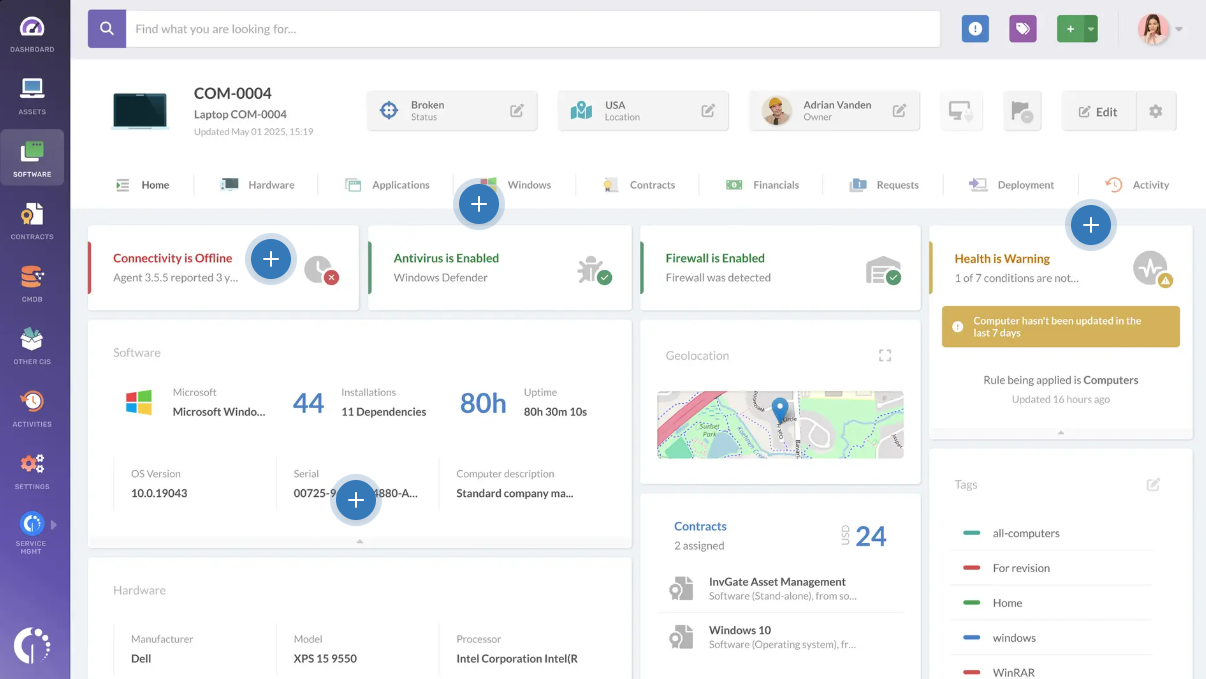
InvGate offers an IT asset management platform that helps you create and manage a unified inventory of all your network-connected IT assets, including physical, virtual, and cloud assets on the same platform.
This platform is known for its ease of use and prioritizing customer experience over flashy headlines.
Based on the demo, the InvGate is way modern than the ManageEngine Asset Explorer. You can easily add all types of assets (network, hardware, and software) and manage (asset lifecycle, financials, contracts, and more) them from the same dashboard.
However, too many options sometimes feel overwhelming, especially for first-time users.
Another thing that I find useful is InvGate’s native ability to automatically create tickets and link them to assets for better resolutions. To achieve the same with tools like ManageEngine, you need to integrate 3rd party tools, which is a more cumbersome process.
Key Features:
- Unified Inventory with Real‑Time Visibility: InvGate consolidates hardware and software assets into a central repository with up‑to‑date status tracking. This instantly tells IT teams what they own and where it is.
- Automated Compliance Alerts and License Tracking: Automated alerts notify you of upcoming expirations, potential non-compliance issues, and renewal dates. And proactive license tracking reduces audit risks and helps you stay compliant.
- Usage Analytics and Reporting: Usage analytics helps you understand how software and hardware assets are being used across the organization. This data is important for identifying underutilized assets and making better decisions.
- Integrations with ITSM and hardware management. InvGate integrates with IT service management platforms and other tools, linking asset data with tickets and procurement.
Pros
- Mixed reviews about the learning curve, but it’s generally easy to use (Source)
- Reliable customer support (Source)
- Ease of inventorying assets via agent-based and agentless discovery (Source)
Cons
- Users report limited customization in reports (Source)
- Lacks a remote software deployment tool, making it ineffective for remote teams (Source)
Best For: Mid-sized enterprises or large organizations that want an integrated ITAM+ITSM solution that is feature-rich but doesn’t require a huge implementation project.
Check out our detailed InvGate Asset Management Review to determine if it’s the right choice: InvGate Review: Is It The Best ITAM and ITSM Solution?
4. ServiceNow IT Asset Management
Source: ServiceNow
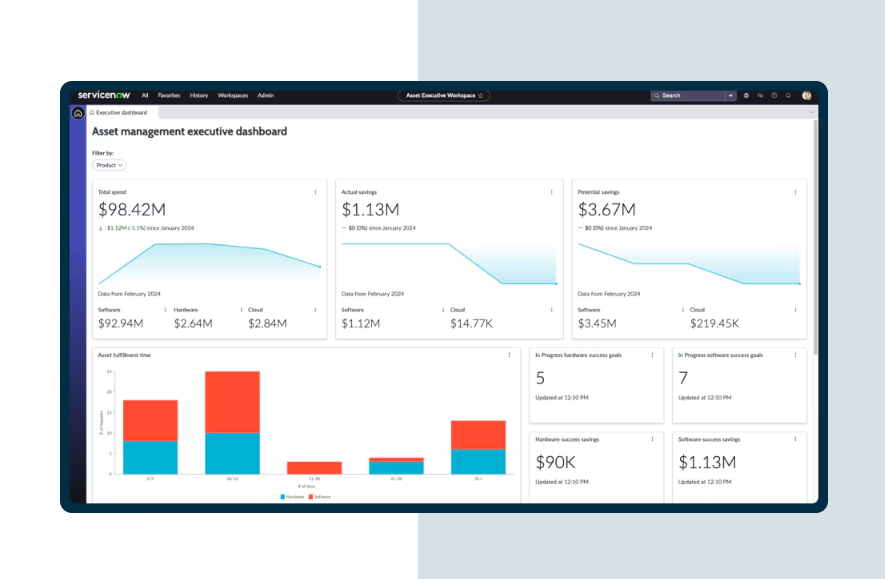
ServiceNow is a heavyweight in the IT management world, and its IT Asset Management (ITAM) suite is a comprehensive solution typically used by large enterprises.
Based on the demo, I feel ServiceNow ITAM is modern and intuitive. At the same time, there are too many things to focus on, making it hard to use without proper training.
The initial setup requires a lot of time, and you may have to hire a ServiceNow expert to guide you through the process, which adds to the overall cost. ServiceNow is the most premium tool on the list in terms of pricing. Unless you have thousands of employees and even more assets, it might be overkill.
Key Features
- Comprehensive Lifecycle Optimisation. ServiceNow’s hardware asset management solution tracks assets throughout their lifecycle, giving enterprises full visibility from purchase to retirement.
- Hardware Asset Success Portal. A dedicated portal to help you set goals, track ROI, and monitor programme success, turning asset data into actionable KPIs.
- Zero‑Touch Refresh & Provisioning. Automates device provisioning for remote employees and coordinates with hardware providers for seamless delivery. This reduces manual effort and speeds up the onboarding process.
- Enhanced Inventory & Distribution. Experience real‑time shipment tracking, improved stockroom record views, and indoor asset mapping. This helps large organisations manage warehouses and field assets more precisely.
- Integrated Automation Across ITSM: As part of the ServiceNow platform, asset data ties directly to incidents, changes, and other IT workflows. This ensures consistent data and powerful automation across the enterprise.
Pros
- Lets you manage all your assets in a single platform (Source)
- Complete visibility from procurement to retirement (Source)
- Offers multiple integrations for creating automated workflows (Source)
Cons
- A steep learning curve, making initial use challenging and less intuitive.
- Multiple users find ServiceNow ITAM to be expensive.
- Users experience slow performance, particularly when managing a large volume of assets.
Best For: Large enterprises or organizations with mature IT processes (and huge budgets) that need a single system of record for all IT operations, including asset management.
If your company is already invested in ServiceNow for ITSM, adding the ITAM capabilities is a natural choice.
5. Snipe-IT
Source: Snipe-IT
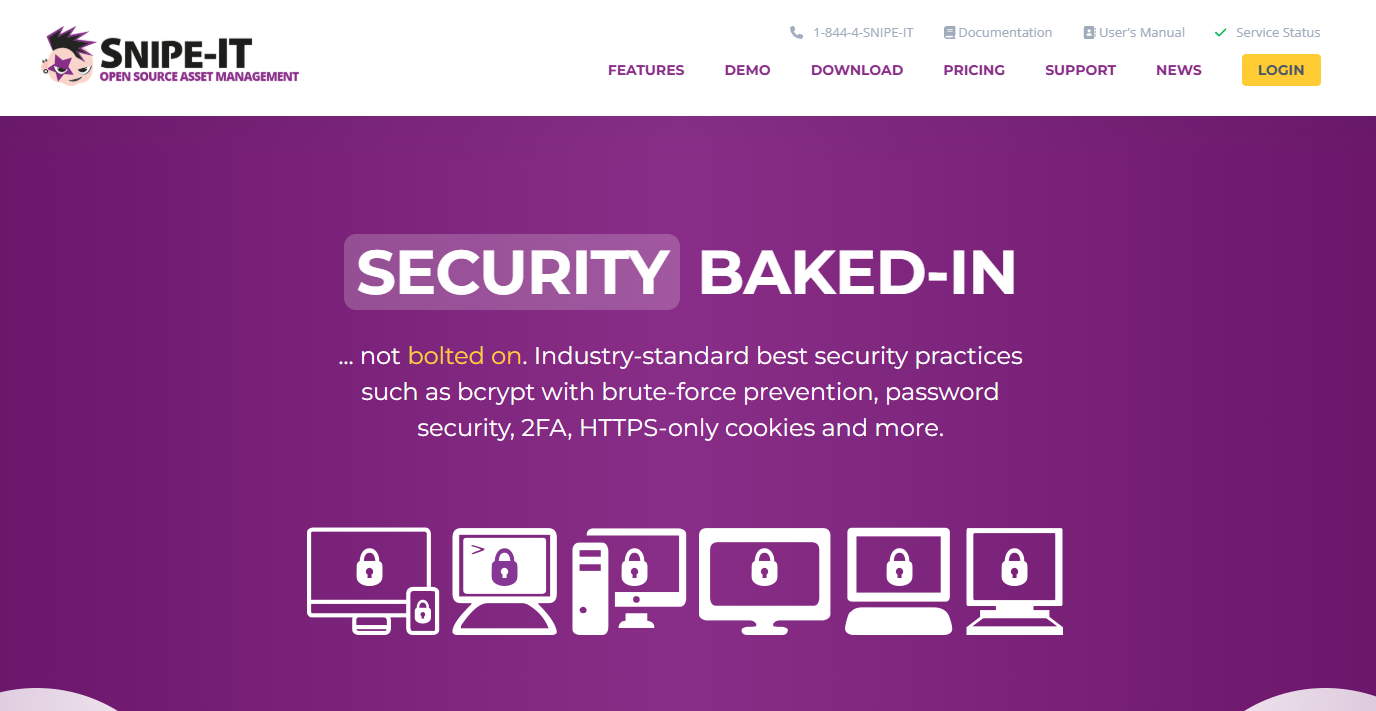
Snipe-IT is a popular open-source IT asset management system that offers a comprehensive set of features, all completely free (if self-hosted). It focuses on tracking hardware assets, their assignment to users, and maintaining records, including serial numbers, purchase dates, and warranties.
One thing about Snipe-IT that I find limiting is the lack of network discovery, which most tools on this list natively offer. As a result, you may have to manually import your asset data, which sounds time-consuming and counterintuitive to me. After all, an ITAM tool is supposed to save you time.
On the positive side, Snipe-IT is open-source and offers free asset management for unlimited assets and users. However, you need to self-host the tool to enjoy using it for free.
Key Features:
- Free, Self‑hosted, and Open‑Source. Snipe‑IT can be hosted on your own server with no licensing cost, giving you full control of data and budget.
- Asset Assignment & History. The system records asset assignments, maintains a full history of ownership, and supports custom status labels, ensuring accountability and visibility.
- Mobile‑Friendly Interface & Notifications. A web‑based interface works on mobile devices and integrates with Slack or email for check‑in/out notifications
- Granular Permissions & Security. Snipe-IT offers per-user language preferences, two-factor authentication, and encrypted fields to protect data.
Pros
- Suitable and hassle-free if you’re planning to shift from an Excel spreadsheet of assets to Snipe IT
- Users report that Snipe-IT is quick, free, and easy to set up
- Snipe-IT streamlines inventory management by integrating barcode scanning, enabling efficient audits and reducing hardware loss
Cons
- If you’re not using the cloud version, there could be a learning curve (Source)
- The email system sometimes fails to alert for certain types of assets (Source)
Best For: Organizations (including nonprofits, schools, and small businesses) that need a capable asset management tool but have little to no budget for it.
Does Snipe-IT sound like an ideal ITAM solution? Check out our detailed review to know for sure: Snipe-IT Reviews 2025: Features, Pricing, Support, and More.
6. Lansweeper
Source: Lansweeper
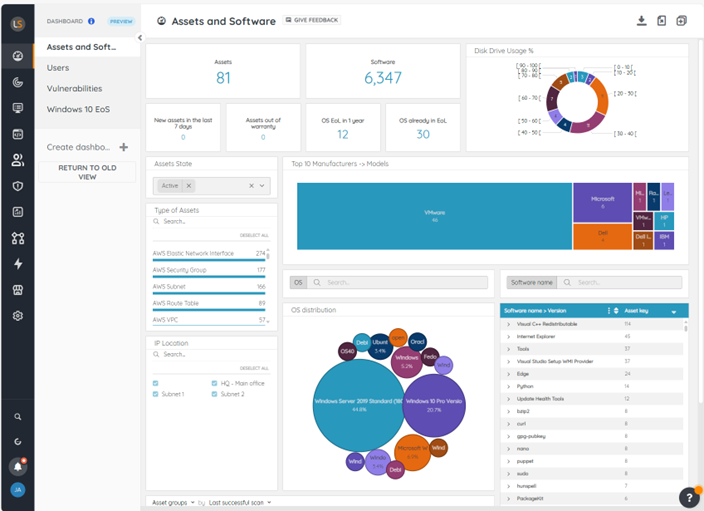
Lansweeper is a comprehensive IT asset management solution that unifies all IT, OT, and cloud assets in a single source of truth. This helps eliminate blind spots, lowering risk and spend, and guiding smarter decisions.
My initial impression of Lansweeper’s dashboard is that it has all the necessary asset data, The downside, however, is the clutter. Too many icons make the interface feel overwhelming at times.
That said, one area where Lansweeper shines is setup. Compared to tools like Snipe-IT or ServiceNow, getting Lansweeper up and running is far easier, which means your team can start seeing value much sooner.
Another major concern I’ve seen echoed by users, though, is pricing. Over the years, Lansweeper has rolled out steep price increases, and that’s pushed some customers to switch to other ITAM platforms. If long-term affordability is a priority for your organization, this could be a deal breaker.
Key Features:
- Automated, Agentless Asset Discovery: Instantly identifies devices (Windows, Linux, macOS) and network gear like printers, routers, and switches.
- Centralized Asset Inventory & Lifecycle Tracking: Consolidates asset data (software, hardware, configurations) into one dashboard, tracking asset status throughout procurement, usage, and retirement.
- Risk & Compliance Intelligence: Flags vulnerabilities, unauthorized devices, and unpatched software; supports compliance reporting with automated insights.
- Custom Reporting & Analytics: Create bespoke dashboards and reports (e.g., software usage, depreciation, patch status) for operational decision-making.
- Integrations & Workflow Orchestration: Easily connects with ITSM platforms (like ServiceNow), CMDBs, and SIEMs, and allows API-driven automation.
Pros
- Users appreciate Lansweeper’s agentless scanning capabilities (Source)
- While the UI feels a bit dated, Lansweeper is easy to use (Source)
- Users also like its reporting and data collection features (Source)
- Free for up to 100 assets (great for smaller businesses)
Cons
- Even normal features like reporting feel complex in the on-premise version (Source)
- Multiple users raise concerns about their below-average support, which can be a deal breaker (Source)
Best For: IT teams that need deep network discovery, unified asset intelligence, and agentless scanning across hybrid environments, without disrupting users.
Want to explore Lansweeper in detail? Give this article a read: Lansweeper Review: Ratings, Features 2025 and More
How to Choose the Right IT Asset Management Solution in 2025?
Where most articles focus on the features (features are all the same), pricing, and the company’s needs, we’ll focus more on:
Interoperability & Integration
Consider how the ITAM tool will integrate into your existing workflows and systems.
Do you need it to sync with your help desk or HR system? If you already have an ITSM platform (like ManageEngine or ServiceNow), a tool that integrates or is part of that ecosystem might serve you best.
Scalability (Future-Proofing)
When buying an ITAM solution, don’t just buy for today; consider your growth. Ask yourself,
If my asset count doubles in two years, will this tool be able to handle it without slowing or breaking down
- Will the pricing model scale fairly, or will costs spike with every new device or license?
- Can the system support different asset types (hardware, SaaS licenses, mobile devices, and IoT) without forcing us into multiple platforms?
It’s essential to recognize that scalability equates to flexibility. Therefore, look for a scalable solution that supports multiple asset types, scales as your business does, without issues.
Ease of Use and Adoption
Look for an interface and usability that will work seamlessly with your team’s skill level. If your IT team is lean, opt for a tool with a simpler UI over one that looks complex to use. After all, the core capabilities are almost the same, but user adoption is what sets these tools apart.
Monitor the learning curve closely as well. Some tools might require weeks of training or even hiring certified admins. For instance, if you want to start almost instantly or within a week, you may want to skip heavyweights like ServiceNow ITAM.
Effective Cost and ROI
The price tag is not the only determining factor of the total cost of a solution. A more affordable tool might require you to perform some tasks manually. And an expensive one might automate most of your tasks (like license optimization) and yield a more substantial ROI.
Try answering these questions. Will this system help you:
- Extend asset life by a year on average?
- Save time for strategic tasks?
- Reduce loss/theft by 50%?
- Avoid buying unnecessary licenses?
These benefits can justify the investment.
Factor the “hidden” costs too: implementation time, required infrastructure, or additional modules. The “cheapest” option can quickly become the most expensive if it lacks automation or scale.
Specific Needs & Differentiators
Identify any must-have scenario for your business that not all tools support.
For example, do you need asset discovery on your network (to automatically find devices)?
Not every tool does that. ServiceNow, ManageEngine, or InvGate have it, but others might not.
Do you need strong mobile/offline capability for, say, warehouse inventory? Asset Panda might edge out others there.
Or perhaps you need an end-to-end asset management solution that manages both asset tracking and logistics - that might narrow you to Workwize.
By pinpointing these unique requirements, you can eliminate options that don’t meet them and focus on those that do.
Pro Tip: Take a free trial (wherever possible) and have multiple stakeholders review the product internally.
Best IT Asset Management Tools in 2025: At a Glance
Here’s a visual comparison of the top IT asset management tools in 2025 for easier decision-making:
|
ITAM Tool |
Ease of Deployment |
Scalability |
Integration Strength |
Pricing & Value |
|
Workwize |
Guided onboarding, zero‑touch deployment |
Global coverage in 100+ countries |
Integrates with MDMs, HRIS, help desk |
Moderate cost, high ROI |
|
ManageEngine AssetExplorer |
Relatively quick setup |
Supports thousands of assets |
Links with ManageEngine suite, AD, SCCM |
Cost‑effective for mid‑market |
|
InvGate |
Easy to learn, no‑code workflows |
Scales well to large organisations |
Integrates ITAM & ITSM |
Transparent pay‑per‑node pricing |
|
ServiceNow ITAM |
Complex implementation |
Enterprise‑grade, Fortune‑500 ready |
Deep ITSM, ITOM, CSM integrations |
Expensive, enterprise only |
|
Snipe‑IT |
Easy on cloud, some setup self‑host |
Suits smaller deployments |
Limited integrations |
Free and open‑source |
|
Lansweeper |
Quick agentless discovery |
Covers IT, OT, and cloud assets |
API‑driven, CMDB & SIEM connectors |
Free tier up to 100 assets |
Case Studies Proving IT Asset Management (TIAM) Tools Work
Here are some real-world case studies to demonstrate the effectiveness of ITAM tools:
HighLevel + Workwize
Problem:
HighLevel, a fast-growing SaaS company, was struggling to onboard employees globally. Coordinating vendors across different time zones resulted in frequent delays. Equipment pricing and specifications varied by region, resulting in inconsistent employee experiences.
Their internal IT team was overwhelmed with manual procurement, tracking, and device retrievals—consuming valuable hours that should’ve gone toward scaling their infrastructure.
Solution:
HighLevel implemented Workwize to centralize IT procurement, automate onboarding workflows, and enable employees to order pre-approved devices via a self-service portal.
Devices were shipped and retrieved globally through Workwize’s logistics partners, with real-time tracking and lifecycle visibility. Result? 70% reduction in IT hardware workload, $1.4M saved annually, and a 24.5× ROI.
Here’s the full case study: How HighLevel Saves $1.4M per year in IT Hardware Management.
Carlsberg + Flexera
Problem:
Carlsberg faced growing complexity in managing software licenses and hardware assets across multiple geographies. Disconnected tools, lack of a unified asset view, and underused licenses were leading to compliance risks and overspending.
The lack of visibility made cost optimization nearly impossible, especially during software audits.
Solution:
Carlsberg deployed Flexera’s IT Asset Management suite to build a unified inventory of all hardware and software across its global footprint. It integrated seamlessly with ServiceNow for real-time data sync.
This visibility allowed the IT team to eliminate unused software, optimize contracts, and proactively prepare for audits. The result was $400,000+ in annual savings, improved license compliance, and streamlined global operations.
Wrapping Up
Getting IT asset management right means gaining visibility into your assets, controlling costs, securing hardware and software, and making your IT team’s life easier.
The tools above range from free, open-source options to enterprise giants; all will improve visibility and lifecycle control, but each has its own distinct strengths.
Workwize goes a step further by unifying both physical and digital ITAM and handling global logistics end-to-end, providing companies with a true “set it and forget it” experience.
If you don’t have time to test every tool, start with Workwize—it’s a proven, end-to-end ITAM platform that helps organizations automate, save money, and eliminate spreadsheet chaos.

Book a demo with Workwize now and say goodbye to spreadsheets forever.


Establish a single source of truth for every IT asset across the globe.
.png?width=258&height=318&name=g10%20(5).png)
More related resources to help you stop firefighting hardware operations.

Get monthly insights into how other IT leaders are improving their ops.



.png?width=2880&height=1232&name=Group%202147262874%20(1).png)
Stop coordinating
hardware like it's 2012.
.svg)
.png?width=172&height=68&name=apple%20business%20patner%20(1).png)
.svg)
.svg)
.svg)
.svg)