




.svg)
.svg)

.svg)


.svg)




.svg)
.png?width=500&height=424&name=Style-1---V1-(1).png)

.png?width=1230&height=692&name=Vector%20(13).png)
Best ITAM Software for Enterprises (Quick List)
- Workwize
- ServiceNow IT Asset Management
- Flexera One IT Asset Management
- ManageEngine AssetExplorer
- Ivanti Neurons for ITAM
- Lansweeper
- BMC Helix IT Asset Management
- Device42
- Freshservice ITAM
- OpenText Asset Management
- Matrix42
Top 9 ITAM Software for Enterprises
1. Workwize
Key Features:
- End-to-end asset lifecycle management (procurement, deployment, retrieval, refresh, disposal)
- Automated workflows for procurement and retrieval to minimize manual work
- Global logistics and vendor orchestration across countries
- Real-time asset visibility and compliance support
- Strong integration with HRIS, MDM, Identity, and Productivity tools
Workwize (that’s us!) is a global IT asset lifecycle management platform built for global and hybrid teams with distributed workforces who want to automate the entire asset lifecycle, from procurement to retirement.
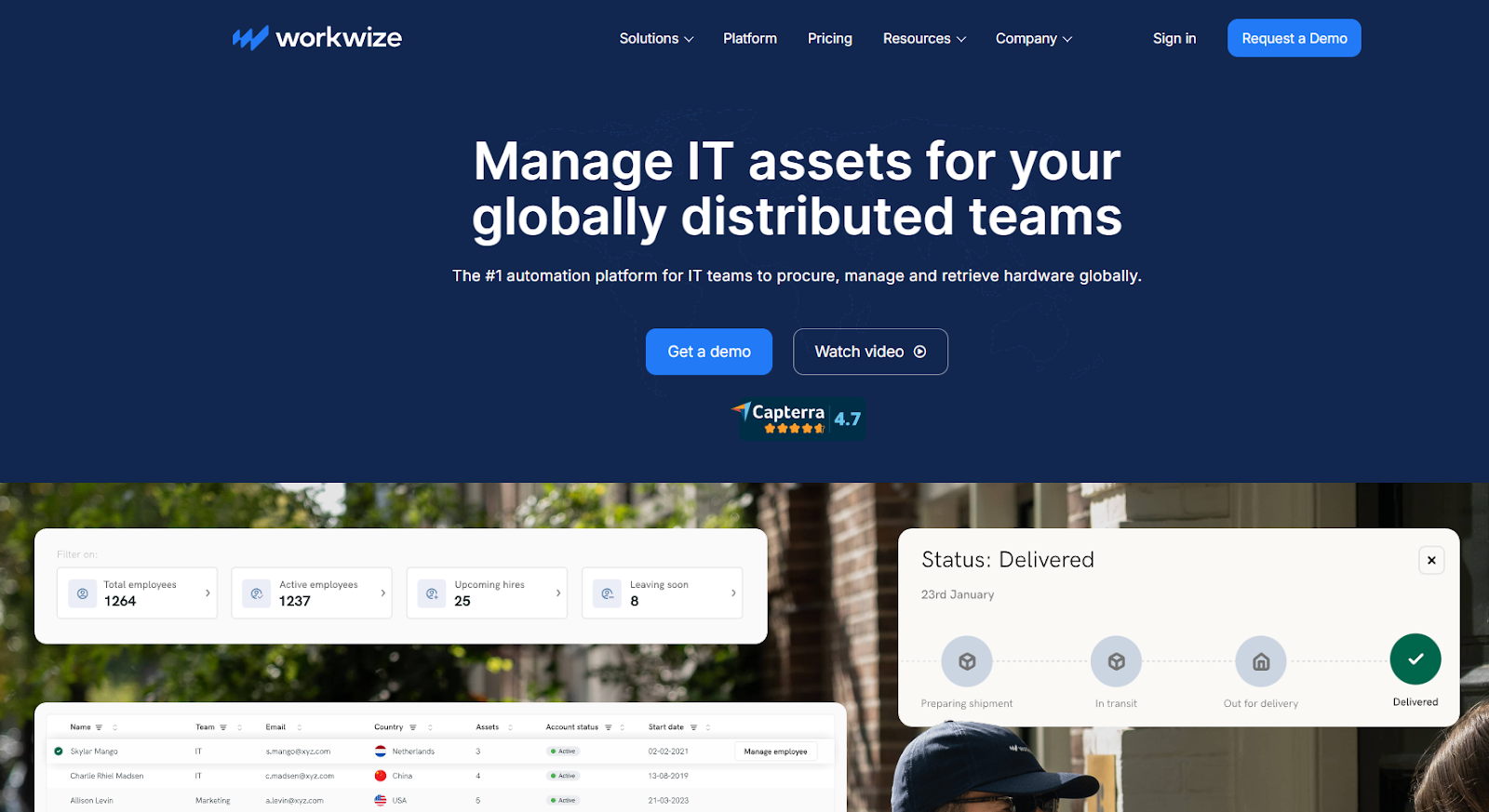
Workwize solves a typical enterprise problem.
Imagine an enterprise has an asset management solution that helps them track and manage assets from procurement until retirement.
Whenever a new employee is hired, it triggers the onboarding workflow, and when they leave, it triggers the offboarding workflow.
But the problem with most ITAM tools is that they handle the digital aspects and ignore the physical part, i.e., actually procuring assets (laptops, monitors, peripherals) from local or global vendors, negotiating the best deals, handling customs, shipping, retrievals, repairs, and more.
That’s where Workwize shines.
Connect it with your HRIS platform and trigger the onboarding workflow as a new record is updated. Workwize will automatically procure assets from a pre-vetted list of vendors and deploy them ready-to-use (100+ locations) to new hires on time.
Workwize also handles repairs and delivers loaner assets to minimize productivity loss. And when an employee leaves, it triggers the offboarding workflow, ensuring all assets are retrieved securely and are either reassigned, disposed of, or resold based on your preferences.
The best part? You can track all your assets in real-time throughout the lifecycle from a centralized dashboard.
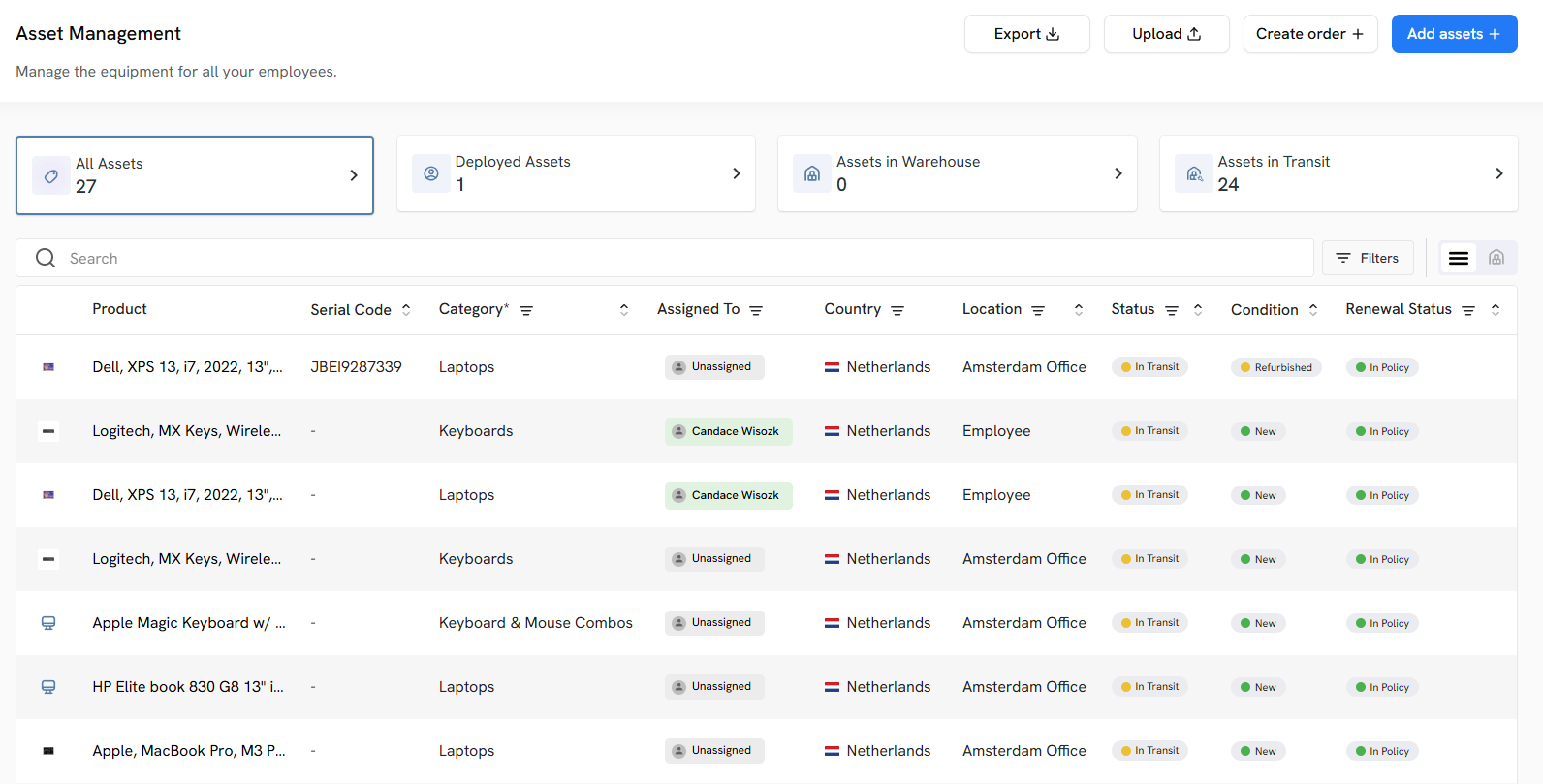
Whether you have a few hundred assets or hundreds of thousands of them, Workwize works the same way, making it a perfect fit for enterprises.
Standard Specifics:
- Deployment: Cloud (SaaS)
- Pricing: Custom enterprise pricing
- Free Trial: Demo available
- Recommended For: Enterprises managing distributed and international teams looking for an ITAM solution to automate asset lifecycle and handle the logistical aspect of asset management.
Pros
- Combines comprehensive asset management with logistics
- Plenty of integrations and Easy-to-use
- IT teams save more than 40% of their time by automating manual tasks
- Helps optimize costs (HighLevel saves $1.4 million annually by streamlining and automating procurement, deployment, retrievals, and disposals)
Cons
- Not suitable for small businesses
- Some users request support for more geographies
2. ServiceNow IT Asset Management
Key Features:
- End-to-End asset lifecycle automation
- Software Asset Management (SAM)
- Hardware Asset Management (HAM)
- Robust reporting
- Central dashboard & analytics
- CMDB Integration
- Contract & renewal management
ServiceNow is a behemoth that offers multiple enterprise-grade solutions, including ITOps, ITSM, Service Management, GRC, SecOps, IT Asset Management, and a lot more.
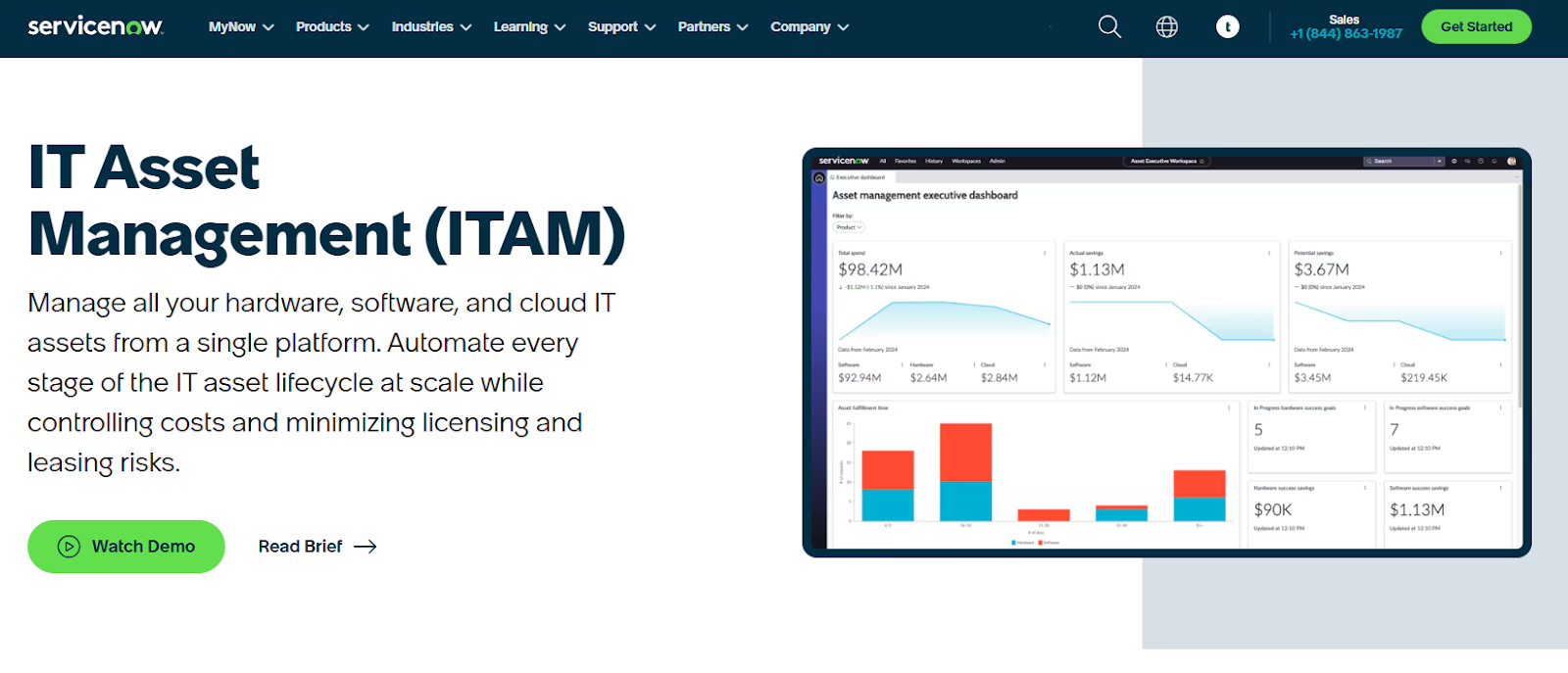
Source: ServiceNow
To understand SNOW’s ITAM features and to get a feel of the platform, I explored their interactive demos and video walkthroughs.
The platform lets you track and manage your software, hardware, and cloud assets using the same platform.
What this means is you get complete visibility and control of all your assets across the organization, remote or onsite, throughout the asset lifecycle (from procurement to retirement) in a single dashboard. No need to switch between different tools to get information.
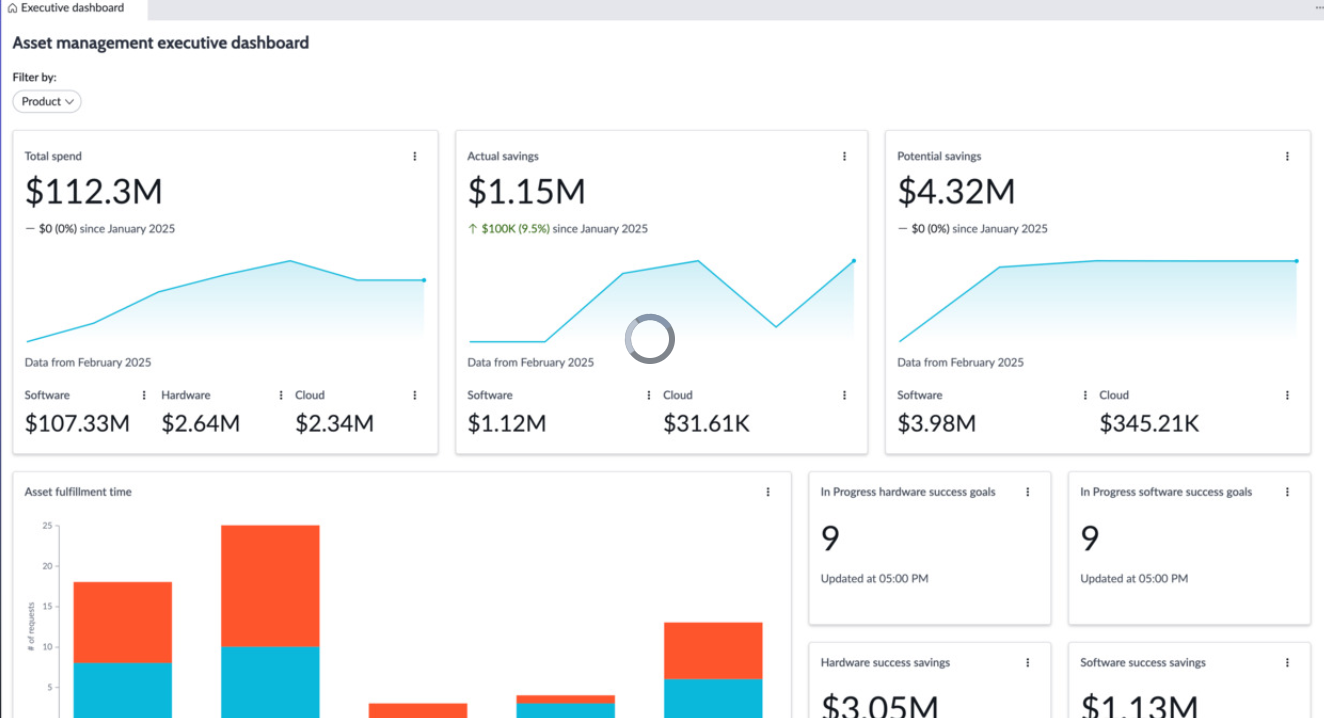
Source: ServiceNow Demo Video
With the in-depth software, hardware, and cloud asset data, you can easily identify duplication, underutilization, or overutilization and mitigate them to reduce waste and maximise ROI.
SNOW also lets you build automated onboarding and offboarding workflows, which substantially reduces the burden on your IT team.
Their reporting is pretty strong. With SNOW’s lifecycle management reporting, you can gain actionable insights and best practices to stay compliant and audit-ready from day 1.
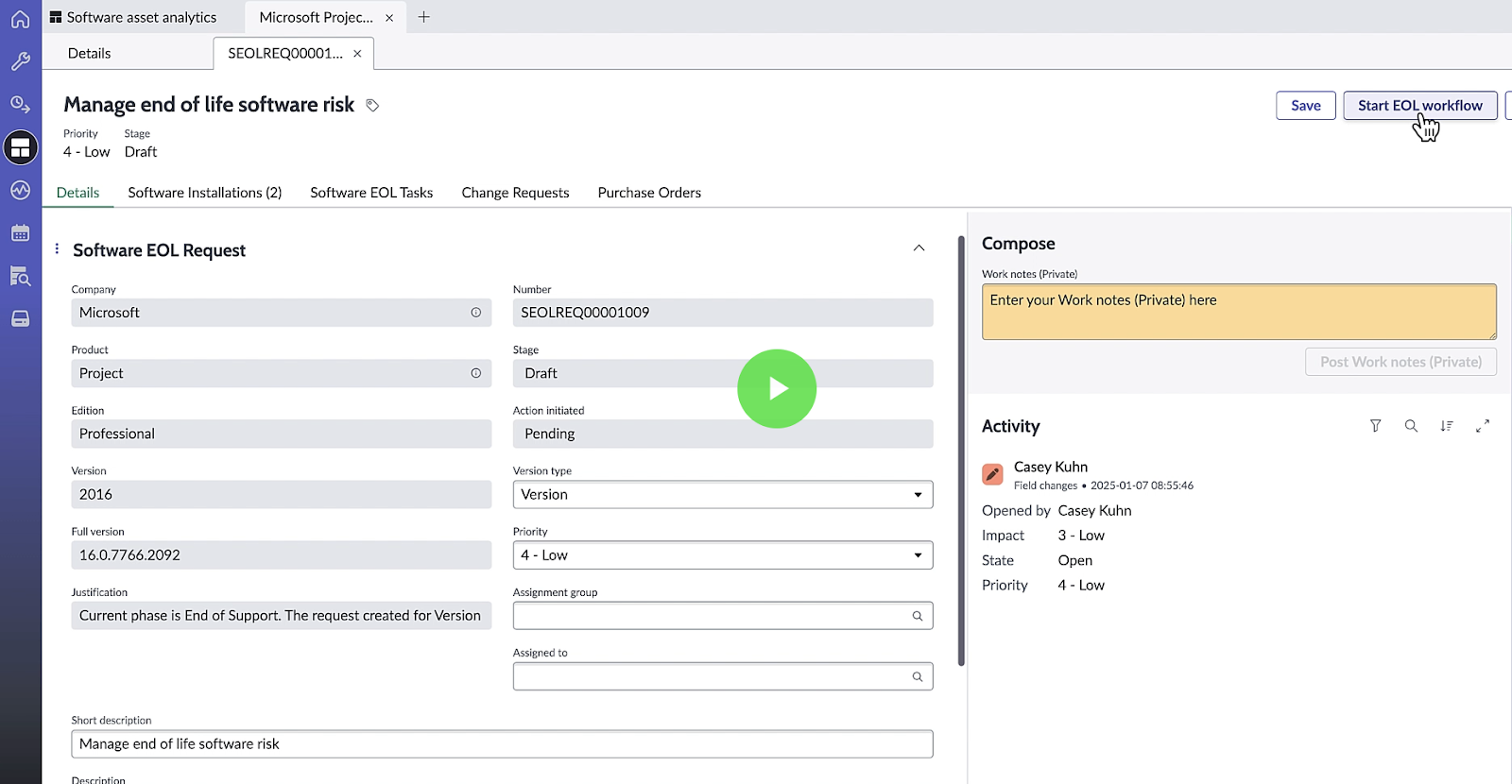
Source: ServiceNow Demo Video
Talking about SNOW ITAM’s potential, it’s immense, and labelling it as the most comprehensive ITAM solution won’t be wrong. And if you’re already using Service Now's ITSM, their ITAM solution is a great choice.
However, SNOW is built strictly for enterprises with thousands of employees and probably tens of thousands of assets. In fact, several users with 1000+ employees find it expensive.
Secondly, I found SNOW to be very hard to set up. You'd be gravely wrong if you think ServiceNow is a plug-and-play solution.
It would take a team of SNOW experts (external), hundreds of thousands of dollars, and several years to use the solution to its full potential.
This Reddit user also says it’d take at least half a million and 3 years to be able to customize and implement SNOW.

Note. ServiceNow ITAM isn’t a competitor of Workwize. In fact, SNOW needs Workwize for facilitating the logistics part of hardware asset management. Without Workwize, you cannot ship ready-to-use assets to your employees or retrieve them at scale globally.
Standard Specifics
- Deployment: Cloud
- Pricing: Custom enterprise pricing
- Free Trial: No (demo available)
- Recommended For: Large enterprises with mature ITSM environments, massive capital
Pros
- A comprehensive ITAM solution that integrates seamlessly with the SNOW ecosystem (Source)
- Provides full visibility and control across the asset lifecycle and optimizes software and hardware costs through real-time insights (Source)
- Functions as a single system of record for all types of assets: software, hardware, and cloud (Source)
Cons
- Comes with a learning curve and is expensive and time-intensive to set up (Source)
- Users experience performance lags in very large environments (Source)
- Multiple users find the UI to be non-intuitive (Source)

3. Flexera One IT Asset Management
Key Features:
- Intelligent license optimization suited for complex software from Microsoft, IBM, and Oracle
- Advanced visibility that lets you uncover unused, underused, and redundant technology in your environment to save money.
- Multi-source discovery lets you discover assets across environments, providing detailed insights into Windows, IBM, Oracle, SAP, macOS, iOS, Salesforce, ServiceNow, Adobe, and more.
- Industry-leading software asset management targeted to solve enterprise problems like increased audit exposure, uncontrolled software spend, and more.
- Smooth hardware asset management across multiple locations and types.
Flexera One ITAM unifies Software Asset Management, Hardware Asset Management, and SaaS management into a single platform.
You can manage asset lifecycles, maximize software license utilization, defend against audits, and strengthen your position in vendor negotiations.
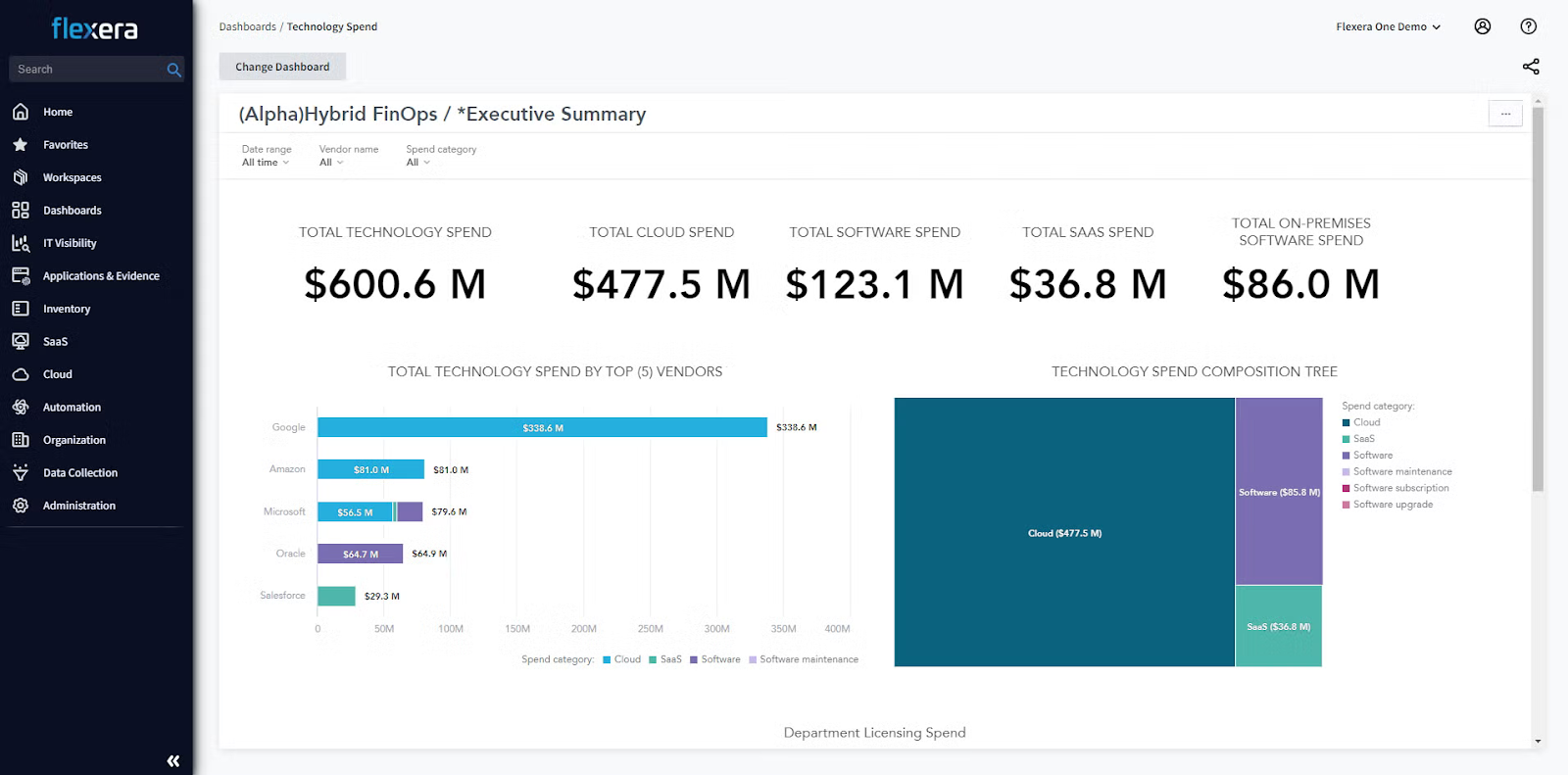
Source: Flexera ITAM
After watching its walkthrough videos, I found Flexera One ITAM to be very similar to ServiceNow ITAM in terms of the key offerings.
For starters, both offer deep visibility into assets and support software, hardware, and cloud-based asset management. Also, Flexera’s dashboards (similar to SNOW’s) offer in-depth hardware asset information, making data-driven decisions easier:
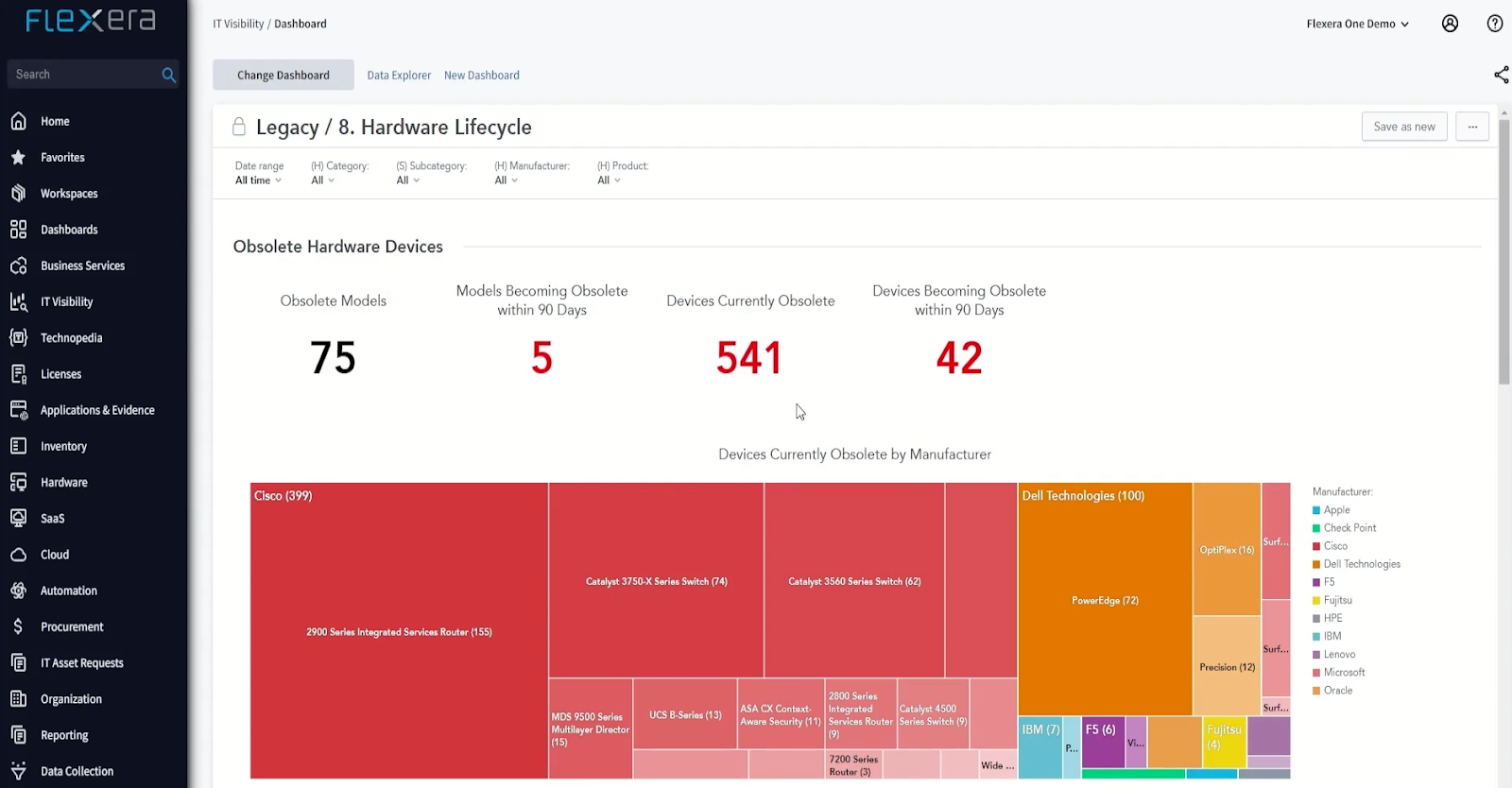
Source: Flexera Hardware Asset Management Walkthrough
However, one thing that Flexera does better is the software license intelligence & normalization. Flexera One is known for very deep software usage recognition, normalization, and entitlement calculation, especially for complex vendor licensing (e.g., IBM, Oracle).
Another key differentiator is the ease of setup/implementation and use. Flexera One is easier to use, simpler, and more affordable to implement than ServiceNow’s ITAM. In fact, Flexera One is rated higher on G2 for ease of setup and ease of use.
While both tools are intended for enterprise use, I firmly believe Flexera One is a great choice if you aren’t in the ServiceNow ecosystem. And if you are (i.e., using ServiceNow ITSM), you should definitely go for ServiceNow ITAM as it integrates like a breeze.
Standard Specifics
- Deployment: Cloud
- Pricing: Custom pricing
- Free Trial: Demo available
- Recommended For: Enterprises with complex software licensing needs looking for a dedicated ITAM solution that helps optimize hardware, SaaS, and cloud spend.
Pros
- Deep visibility allows users to identify unused licenses and rightsize cloud resources, driving cost savings (Source)
- Integrates smoothly with ITSM and other platforms, simplifying automation (Source)
- Multiple users find the customer support to be top-notch, which is impressive for a tool of this size (Source)
Cons
- Performance lag is a popular issue among Flexera ITAM’s users (Source)
- There is a learning curve, especially during implementation (Source)
- Users face issues while creating customized reports (Source)
4.ManageEngine AssetExplorer
Key Features:
- AssetExplorer uses agent‑based and agentless scanning to create an asset inventory.
- Lifecycle & workflow automation for creating automated asset management workflows
- Comprehensive CMDB that links assets to services and dependencies.
- License & contract management for tracking software licenses and vendor contracts.
- Available on-premise or in the cloud, offering relatively faster implementation for organizations that want to get started quickly.
ManageEngine is an ITOps, cybersecurity, and service management platform that also offers ITAM, ensuring quick deployment for IT managers to effortlessly gain control of IT assets spread across multiple sites.
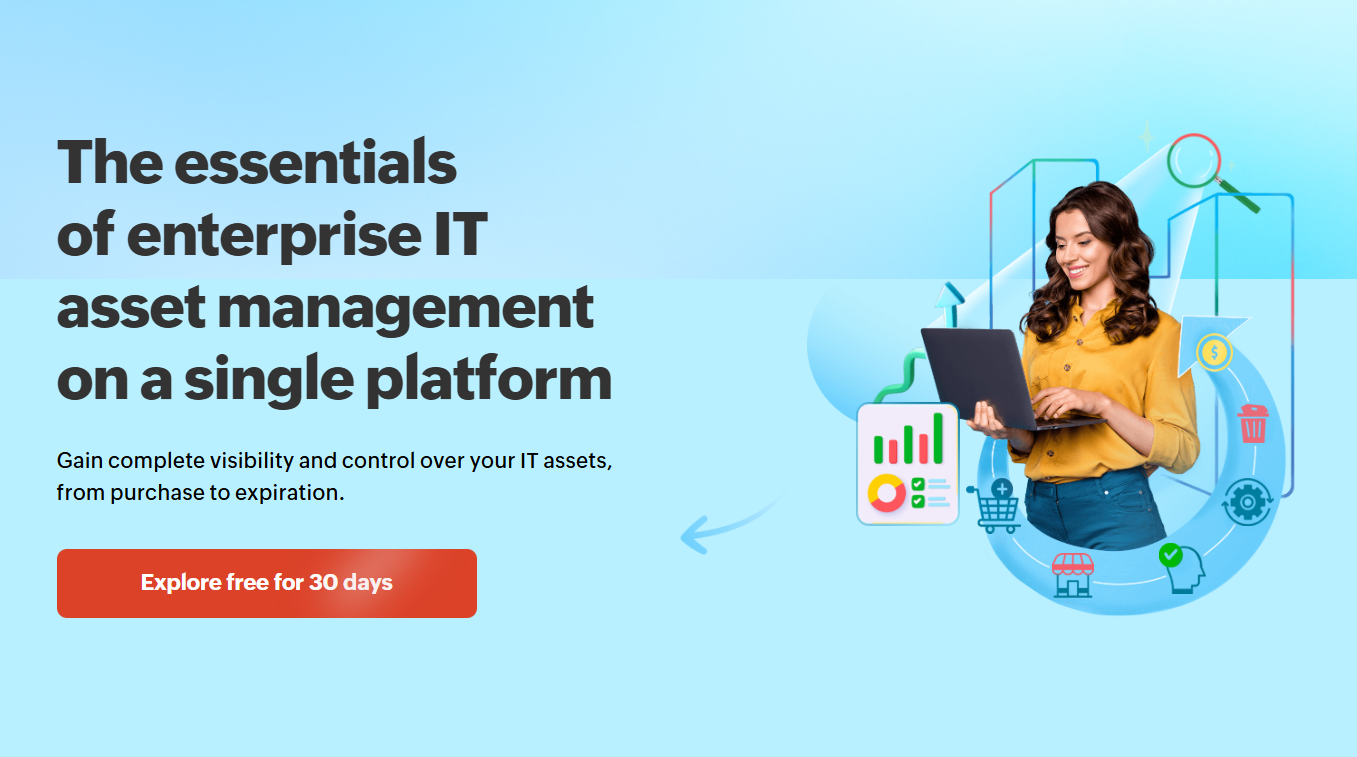
Out of the box, you can perform hardware and software asset discovery and inventory management, implement custom workflows to automate life cycles, manage purchases and vendors, and use a CMDB to visualize the digital infrastructure.
I signed up for ManageEngine AssetExplorer's free trial for a closer look. The UI looks a little dated when compared to ServiceNow and Flexera. However, it gets the job done.
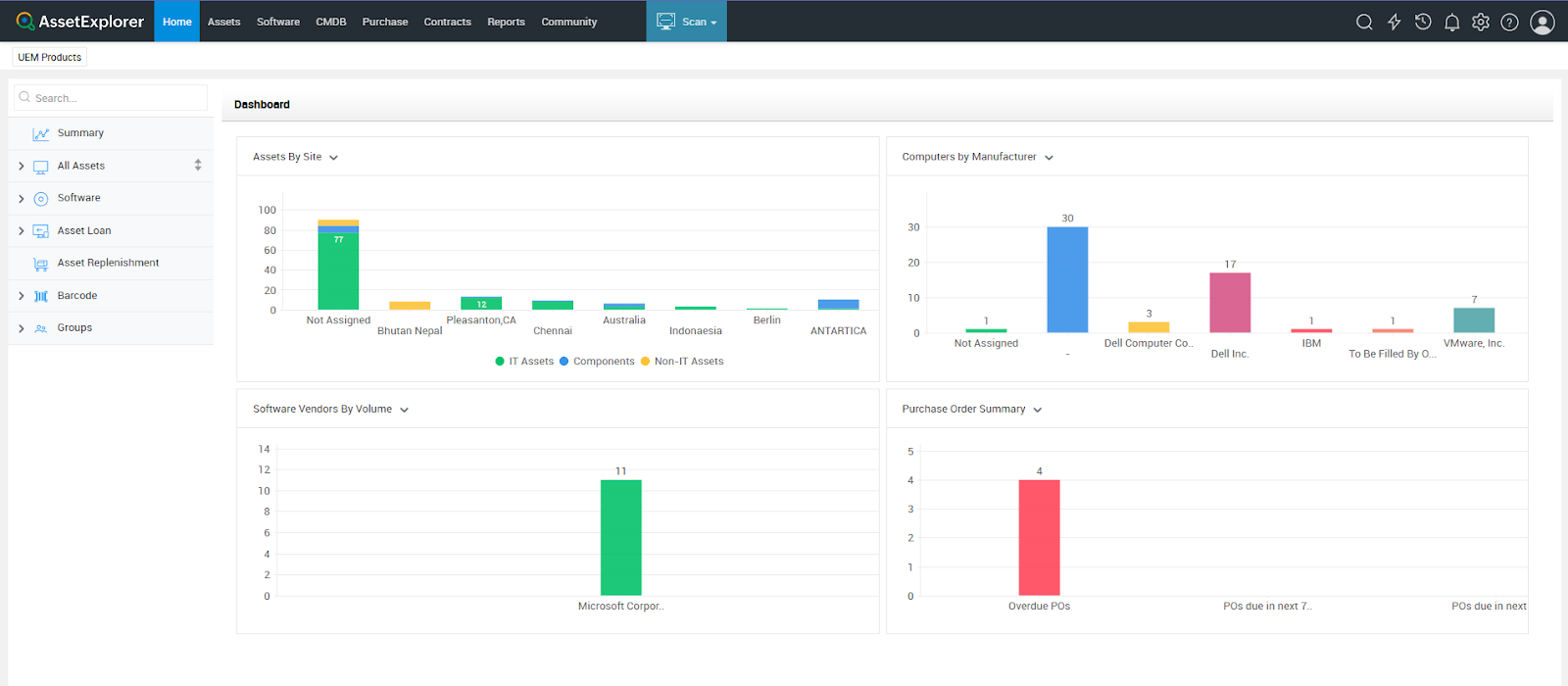
You can track and manage all your assets, software, hardware, and cloud from the same dashboard and create automated workflows to minimize manual work.
However, I found the software tracking features to be slightly less mature than those in Flexera. For instance, it does not provide enterprise-grade license normalization that interprets vendor licensing rules, entitlement rights, or complex metrics.
In simpler terms, Asset Explorer gives you this data:
- Installed software
- Allocated licenses
- Expiry dates
It can’t tell:
- Why are those installs compliant
- Which entitlements apply
- How metrics were calculated
And this might leave you non-defensive during audits, which an enterprise cannot afford.
On top of that, there are only about 10 reviews for AssetExplorer, which isn’t really enough to get a solid feel for what real users think.
So overall, I’d point ManageEngine AssetExplorer toward small- to mid-sized organizations. If you’re already using other ManageEngine products, it’s an easy yes. It’s a good fit if you want solid asset management features at a budget-friendly price point.
Standard Specifics
- Deployment: Cloud / On-prem
- Pricing: Tiered pricing
- Free Trial: Yes
- Recommended For: Mid-market to enterprise IT teams with budget constraints and the need for basic functionality
Pros:
- Multiple users find it affordable and easy to use (Source)
- Automated network discovery of tools saves time (Source)
- Integrates very well with the ManageEngine ecosystem (Source)
Cons:
- Might not be suited for compliance-focused enterprise requirements
- A limited number of user reviews indicates low popularity. And the last review is from 2024.
If you’re looking for alternatives to ManageEngine ITAM, don’t miss this: Top 5 ManageEngine Asset Explorer Alternatives.

5. Ivanti Neurons for ITAM (Bundled with ITSM)
Key Features:
- Real-time discovery, automated reconciliation, and normalization in minutes to pre-populate your asset repository.
- Integrates with your service management CMDB for up-to-date asset information, easy request management, and improved service delivery.
- Comprehensive visibility of hardware and software assets, enabling you to optimize costs and improve efficiencies across the full asset management lifecycle.
- Smooth integration with Ivanti ITSM and security tools for creating automated workflows.
Just to be clear, Ivanti Neurons for ITAM is a bundled offering that comes with its ITSM services. So, this enterprise ITAM makes sense if you’re already using, or plan to use, Ivanti as your IT service management platform.
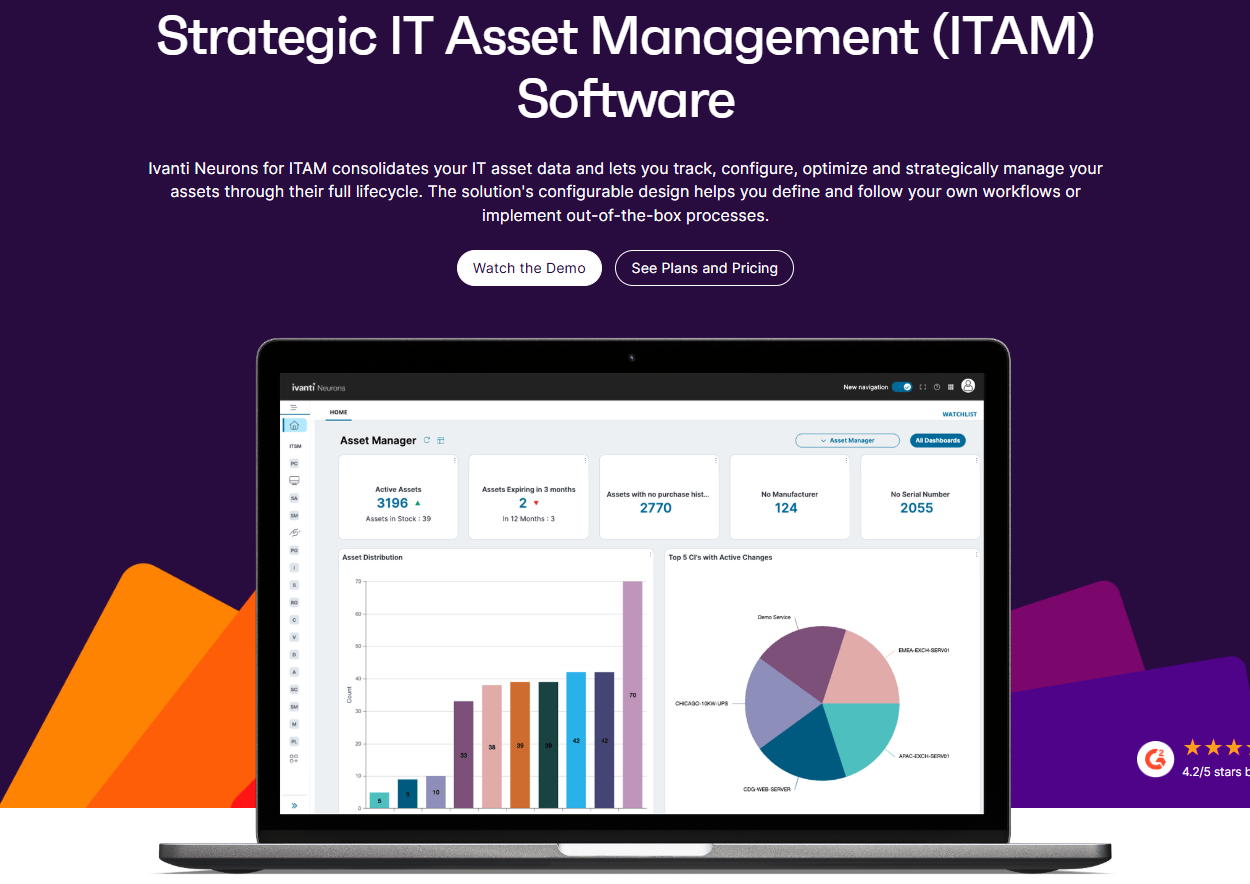
Since the personalized demo had to be scheduled, I reviewed the video walkthrough to understand the key features.
And based on the walkthrough, Ivanti Neurons for ITAM does everything an enterprise IT asset management does.
For instance, it provides deep visibility into all types of software and hardware assets (IT and non-IT), contracts, and vendors, enabling you to identify cost-optimization opportunities. You can identify unused software or reuse software without buying additional software.
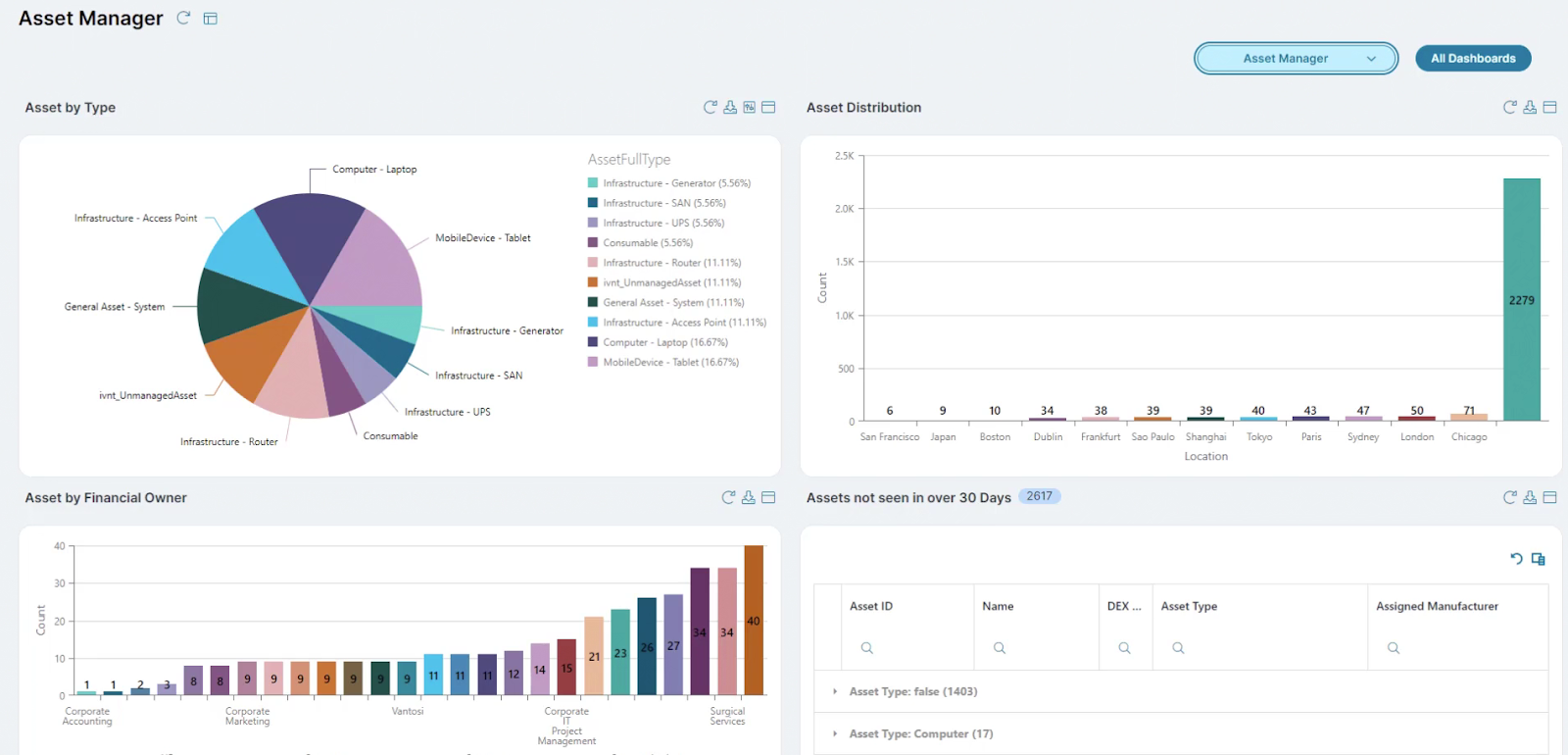
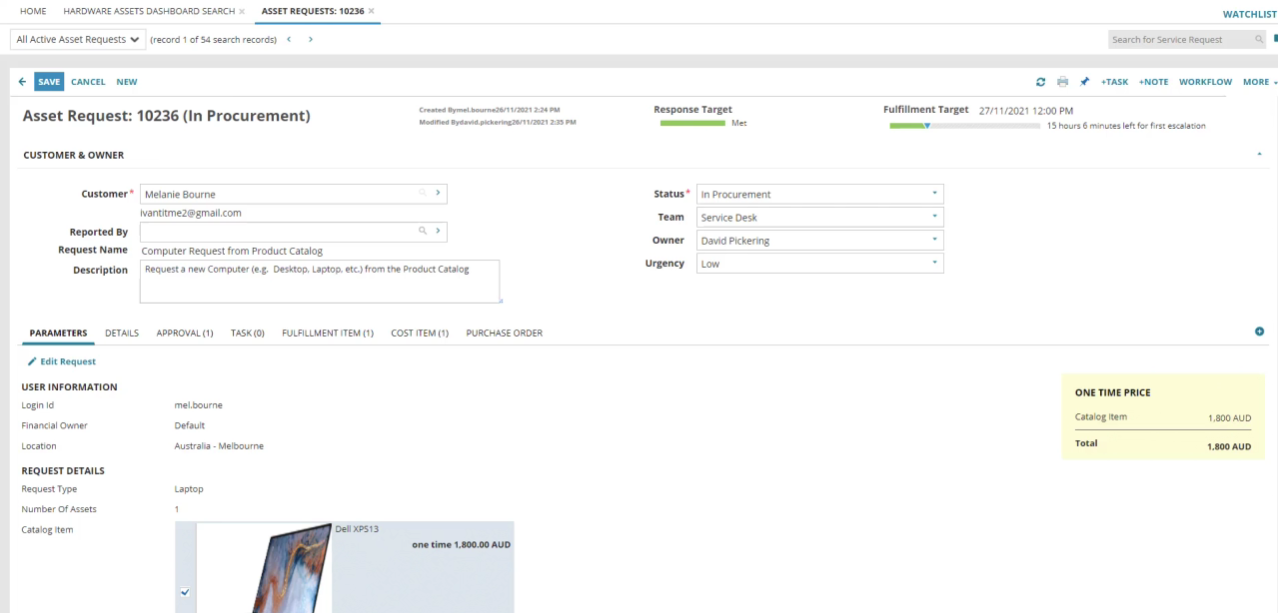
Another great feature was their self-service portal. It lets users easily order hardware, which the managers can further procure or assign from within the inventory.
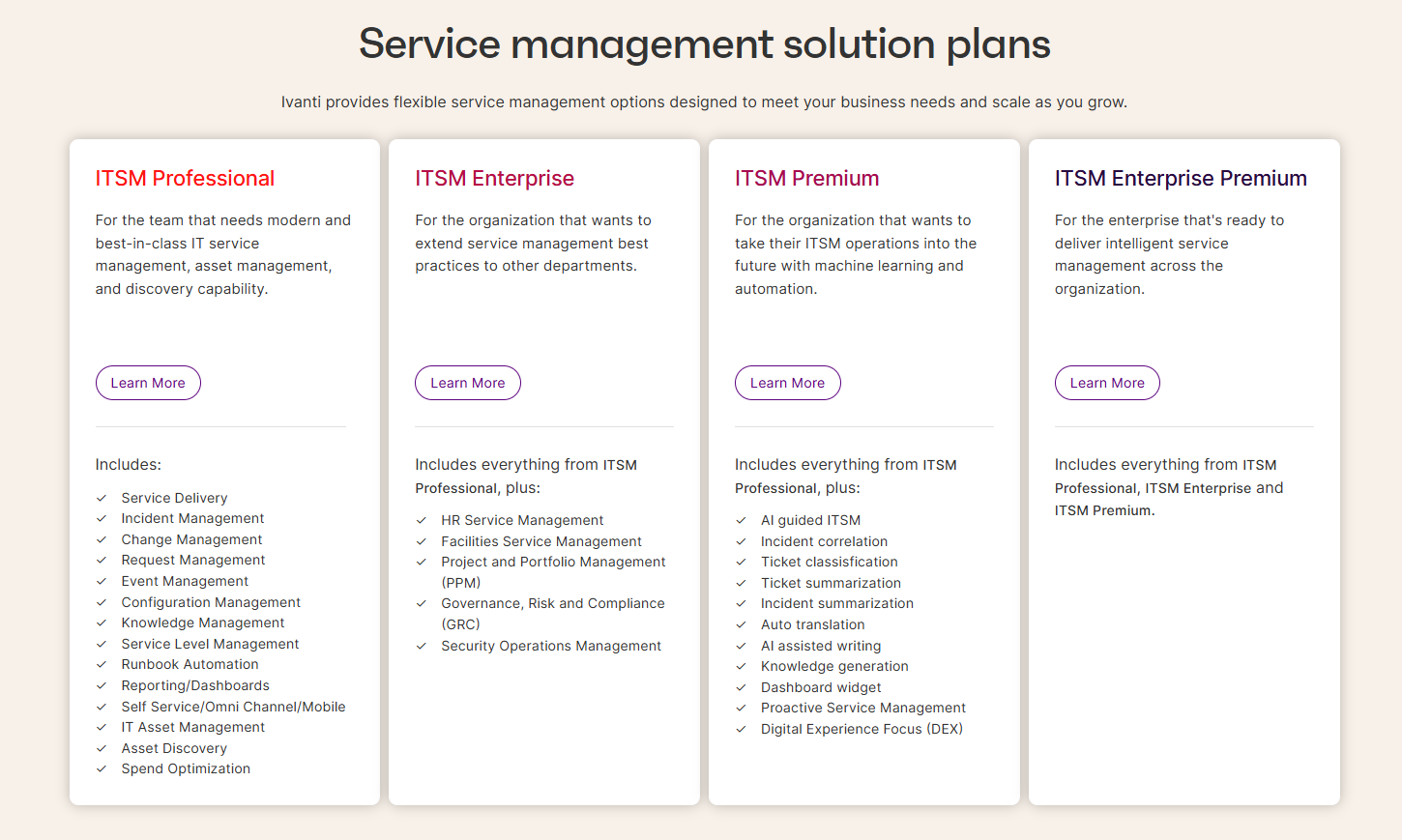
But again, the major drawback is that Ivanti Neurons ITAM is not modular. You’ve got to buy their service management plan to be able to use the ITAM module:
Standard Specifics
- Deployment: Cloud
- Pricing: Custom pricing
- Free Trial: Demo available
- Recommended For: Enterprises that are either already using Ivanti ITSM or planning to switch to Ivanti ITSM, as Ivanti Neurons for ITAM comes bundled with this module.
Pros
- Helps create automated onboarding and offboarding workflows to reduce manual work (Source)
- More affordable and easier to implement than ServiceNow
- Highly customizable solution with add-ons available to enhance your ITSM experience (Source)
Cons
- May not be suitable for enterprises looking for a dedicated ITAM solution only.
- Documentation could use some improvement (Source)
6. Lansweeper
Key Features
- Agentless network discovery that lets you find every connected device across your estate.
- Consolidates all inventory data into a single, always-accurate source of truth.
- Dashboards, vulnerability data, lifecycle insights, and benchmarking to spot risk, forecast spend, and surface optimization opportunities.
- Automated workflows that reclaim licences, power down idle servers, and enrich tickets automatically, giving your team hours back every week.
- Stream clean asset data to ITSM, CMDB, and security tools through native integrations and open APIs, so every workflow starts with trusted, up-to-date intelligence.
Lansweeper is primarily an asset discovery platform designed to give you comprehensive visibility and control over your organization’s entire tech infrastructure, including IT, OT, IoT, and more.
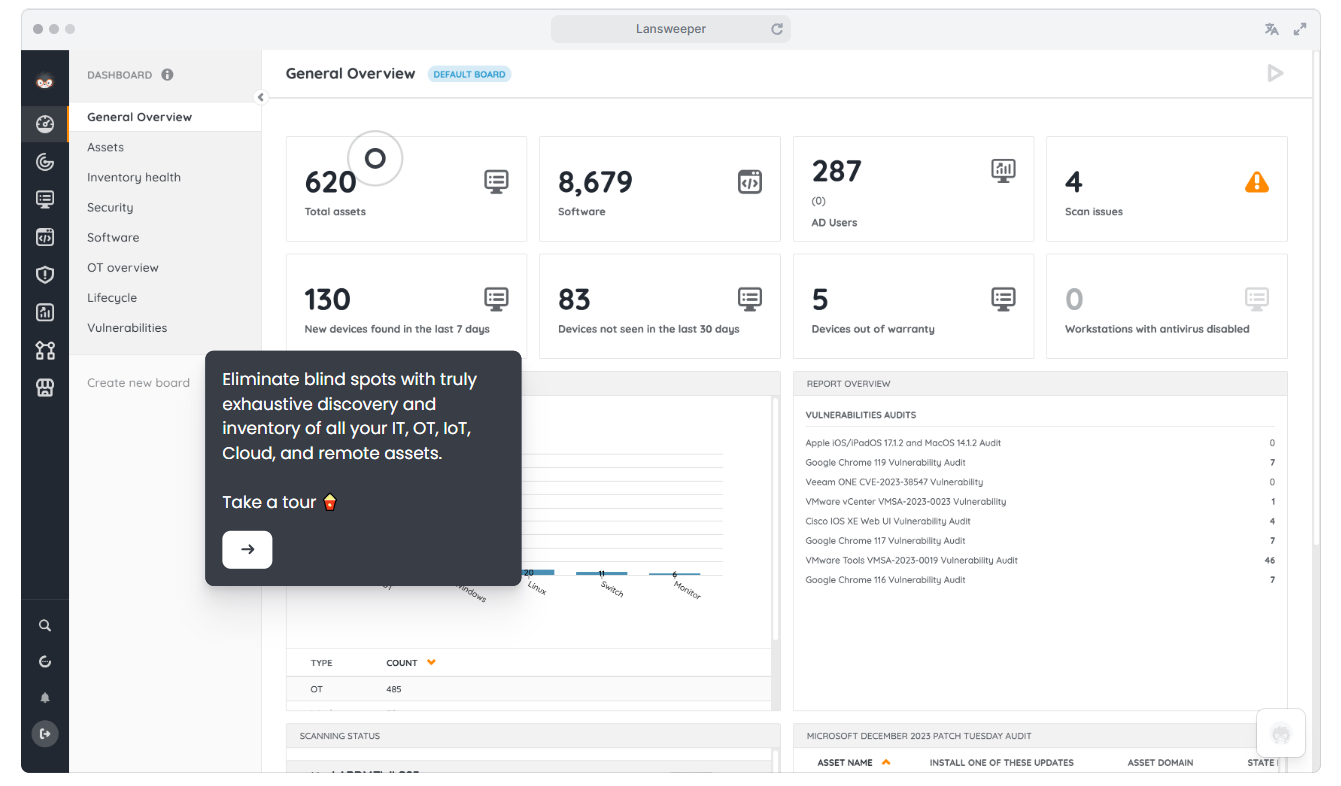
There were multiple options to experience Lansweeper, including the free trial, product tours, and self-guided tours. And I explored the self-guided tours and the product videos, since the free trial required offline installation of the client.
Based on the demo, Lansweeper looks easy to implement and use. And I have to say its network discovery features are strong.
Lansweeper uses multiple network scanning methods to identify connected devices across on-premises, cloud-based, and remote environments. It supports agentless discovery methods but also has agents for more complex configurations.
So, you can instantly inventory your IT, OT, IoT, cloud, and remote assets and identify blind spots, if any. It also highlights the vulnerabilities that might be impacting your devices
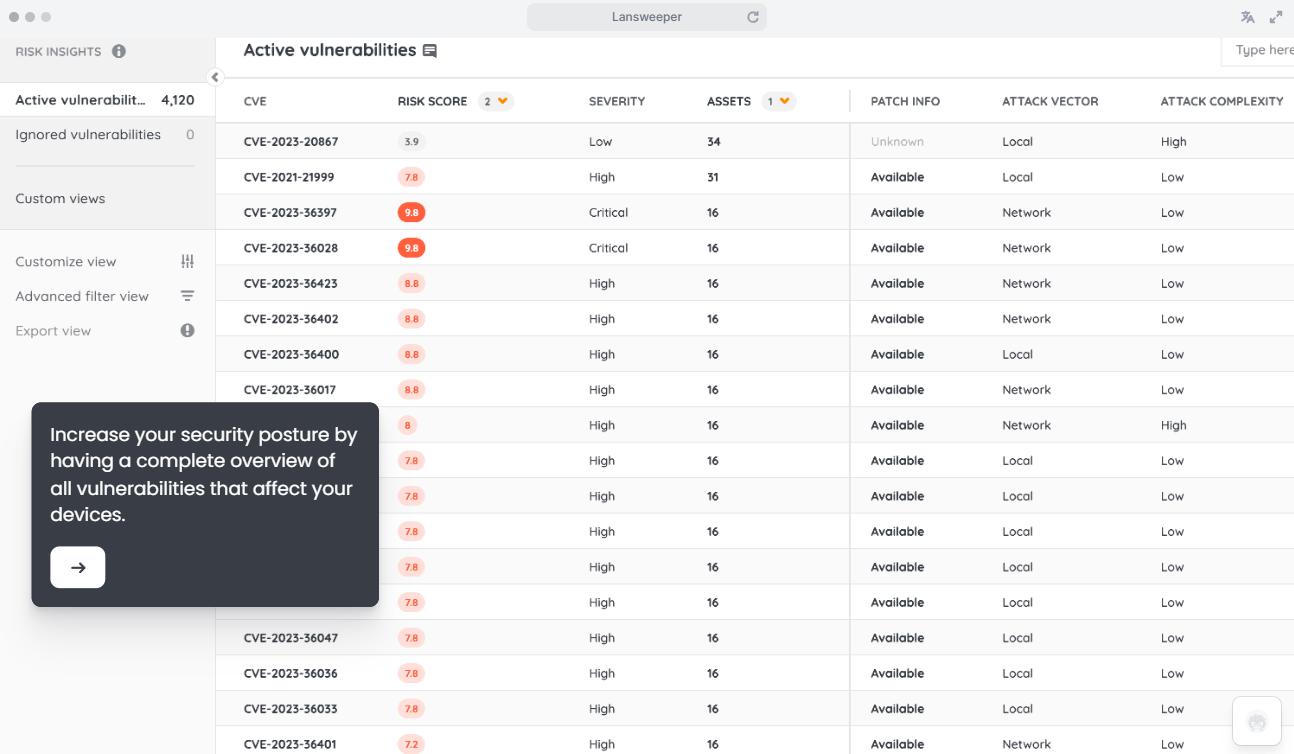
In a nutshell, Lansweeper helps you create up-to-date CMBD-level data of all the assets across your infrastructure. For asset management, you need to integrate it with tools like Asset Panda or StarHive.
However, I don’t think Lansweeper is an enterprise-grade solution. Why?
For one, Lansweeper clearly listed the price for each plan starting from a free trial:
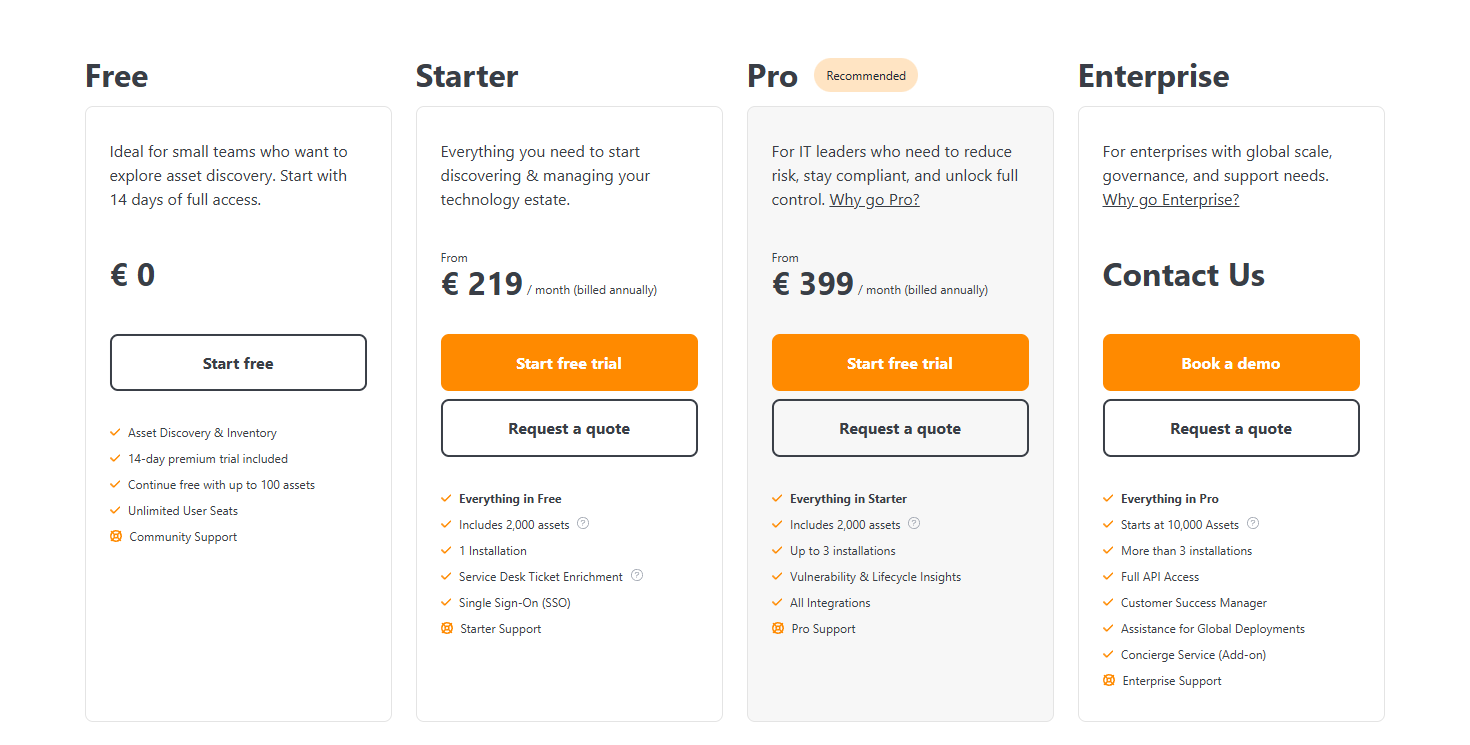
And based on my research exploring ITAMs, that’s not how enterprises position their pricing.
Plus, their Starter & Pro both cap at 2,000 assets, and the Enterprise plan starts at 10,000 assets, which makes me wonder if it’s actually that scalable.
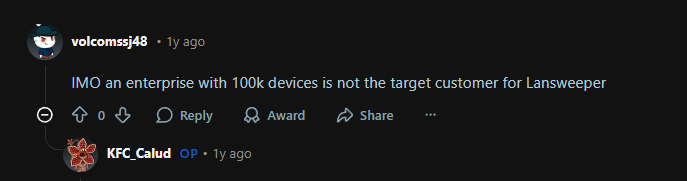
Upon further research, I found even users on Reddit don’t find Lansweeper the right tool if you are dealing with, say, hundreds of thousands of assets:
Source: Reddit
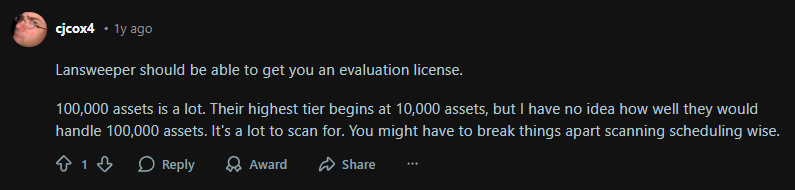
Here’s another user who questions Lansweeper’s ability to handle hundreds of thousands of assets:
Source: Reddit
Standard Specifics
- Deployment: Cloud / On-prem
- Pricing: Tiered pricing
- Free Trial: Yes
- Recommended For: IT teams (small to medium-sized businesses ) prioritizing asset discovery
Pros
- Agentless solution that is easy to use and configure (Source)
- Multiple users find it more affordable than similar solutions out there (Source)
- Automated network discovery saves time and captures crucial data (Source)
Cons
- May not be suited for enterprise requirements, based on the user reviews and how they position their pricing.
- Limited support, as reported by multiple users (Source)
For a detailed review of Lansweeper, check this out: Lansweeper Review: Ratings, Features, 2026 and More.

7. BMC Helix IT Asset Management
Key Features:
- Full asset lifecycle coverage (request → deploy → maintain → retire)
- Hardware + software asset management
- Strong governance, auditability, and compliance
- Deep CMDB and dependency mapping
- Integration with ITSM, change, incident, and discovery
BMC Helix is an AI-powered ITSM, ITOM, and AIOPs platform built for enterprises. Similar to Ivanti Neurons for ITAM, Helix’s asset management services are categorized under their ITSM offering.
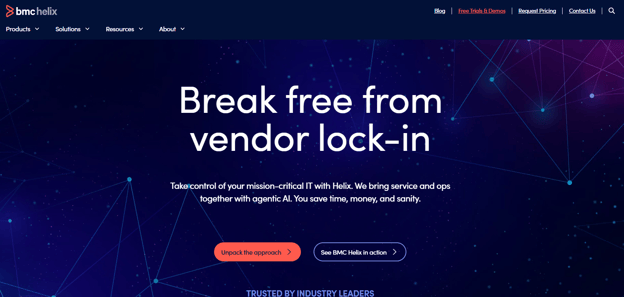
So, BMC Helix ITAM is ideal for enterprises already using their ITSM offering or exploring BMC Helix as an ITSM platform.
Coming to their asset management platform, BMC Helix offers you complete visibility into and control of your assets from procurement to retirement.
I analyzed their interactive demo to explore some of their key features, like Asset Discovery. It uses both angetless agent-based asset discovery to identify software, hardware, and cloud assets across your enterprise.
What I liked was that BMC not only shows the assets but also the linked dependencies, for better decision-making.
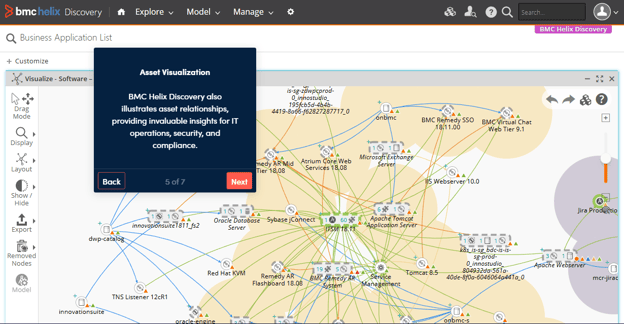
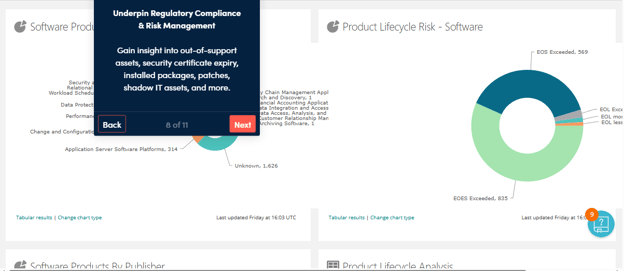
Also, it offers you the necessary asset data and insights on out-of-support assets, expired security certificates, and shadow IT assets, ensuring better compliance and risk management.
Standard Specifics
- Deployment: Cloud
- Pricing: Custom enterprise pricing
- Free Trial: Demo available
- Recommended For: Enterprises already using BMC ITSM
Pros
- Integrates well with BMC ITSM, making ticket resolution easy (Source)
- After-sales customer support is helpful (Source)
Cons
- Device42 comes with a learning curve, and the UI looks dated
- Limited ITAM-focused user reviews, which indicate a limited user base
8. Device42
Key Features:
- Comprehensive auto-discovery for an accurate inventory that is always audit-ready.
- Locates and updates physical, virtual, blade, clusters, switches, or any other device types.
- Discovers software deployed on Windows and Linux machines across the entire IT infrastructure, from the server to the desktop.
- Helps track and visualize dependencies between assets for better decision-making
- Integrates with JIRA, Zendesk, and ServiceNow, and enhances IT service and support.
- Fully Integrated CMDB that acts as the single source of truth within your organization.
While I could not access the free trial, I did manage to explore Device42’s demo videos.
And based on my research, Device42 is primarily an enterprise-grade infrastructure discovery platform, even though it markets itself as an asset management software.
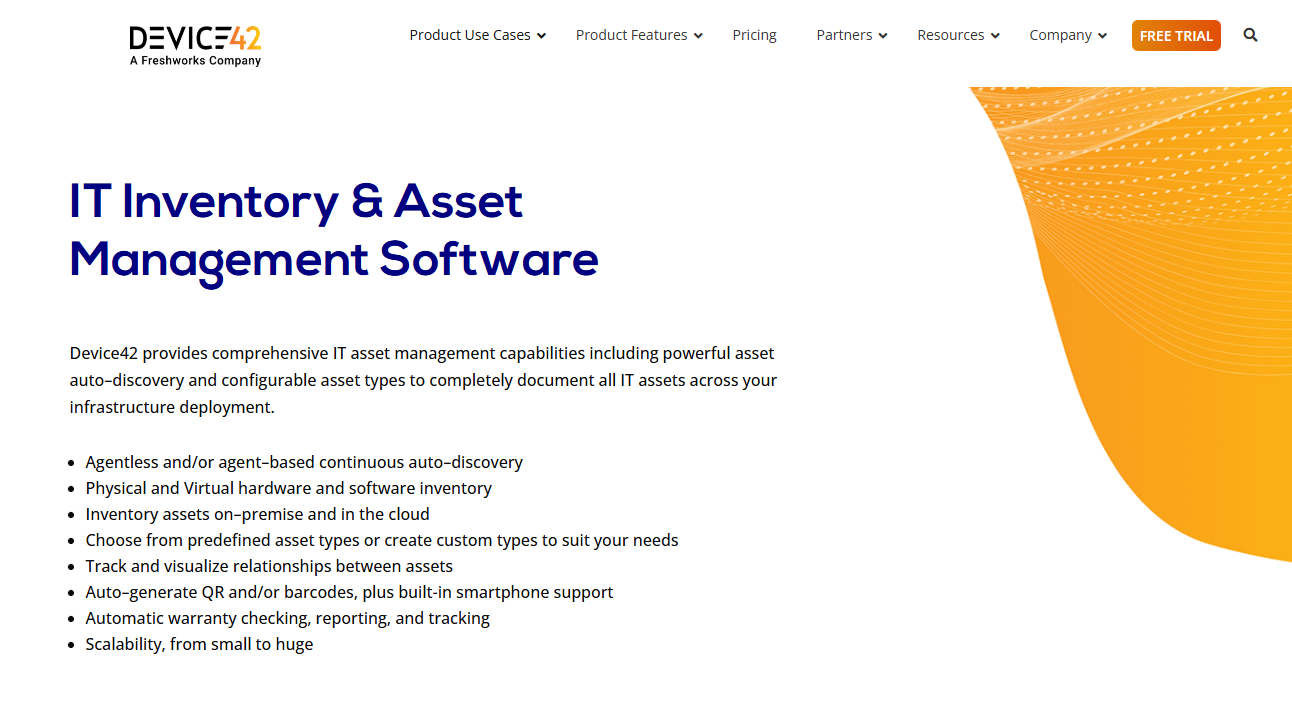
With its automated agentless asset discovery and dependency mapping, Device42 maintains accurate, real-time visibility into complex IT environments.
Based on the use cases and reviews, enterprises can use it to understand infrastructure relations, support accuracy, and assess change and incident management in complex environments.
Don’t confuse it for a platform that automates asset lifecycle workflows or manages procurement or offboarding. Device42 isn’t built for that.
Unlike most platforms that just stop at software, hardware, and cloud assets, Device42 supports virtualization platforms, blade chassis, load balancers, UCS, mid-range, mainframe, and more.
And because Device42 locates and updates your devices automatically, documenting physical, virtual, blade, clusters, switches, or any other device types becomes easy:
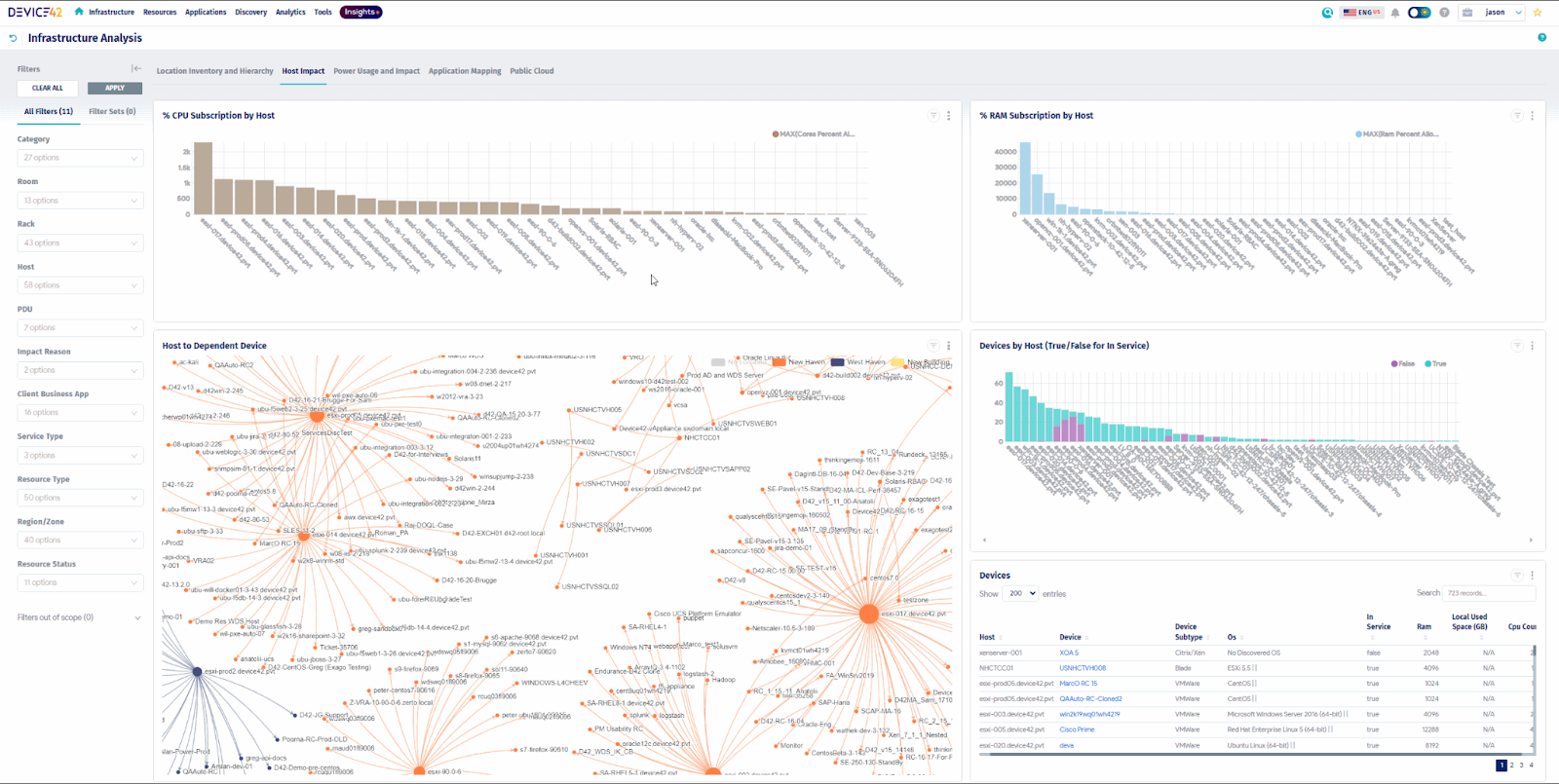
This visibility enables efficient IT operations, faster problem resolution, easier migrations, and compliance.
One thing that I think Device42 could use some improvement in their UI, as it seems pretty complex for new users. Plus, the agentless discovery is less granular than agent-based discovery, as reported by some users.
Standard Specifics
- Deployment: Cloud/On-prem
- Pricing: Custom pricing
- Free Trial: Yes
- Recommended For: Infrastructure-heavy enterprises looking for an all-in-one asset discovery platform and a single source of truth.
Also, companies that want to understand their infrastructure dependency and the impact of their changes.
Pros:
- Effective for application-level workload discovery and assessment (Source)
- Integrates with ITSM platforms for better service delivery.
- Auto-discovery capabilities allow users to schedule discovery jobs for continuous asset discovery and effortless network integration (Source)
Cons:
- Reporting features could use improvement, as mentioned by multiple users (Source)
- Agentless discovery offers less granular insights than agent-based discovery (Source)

9. Freshservice ITAM
Key Features:
- Strong software, hardware, and cloud asset discovery powered by Device42.
- Strong integration within the Freshervice ecosystem for better service delivery.
- Helps create automated workflows for asset lifecycle processes, reducing manual tasks.
- Offers dependency mapping to understand asset dependency and inform decisions.
- Comes with Freddy AI (AI agent) that groups previous incidents related to assets, enabling faster resolutions
Here are some facts from the start. Freshservice is Freshwork’s product primarily known for its ITSM platform. In 2024, they acquired Device42, yes, the same solution I listed above.
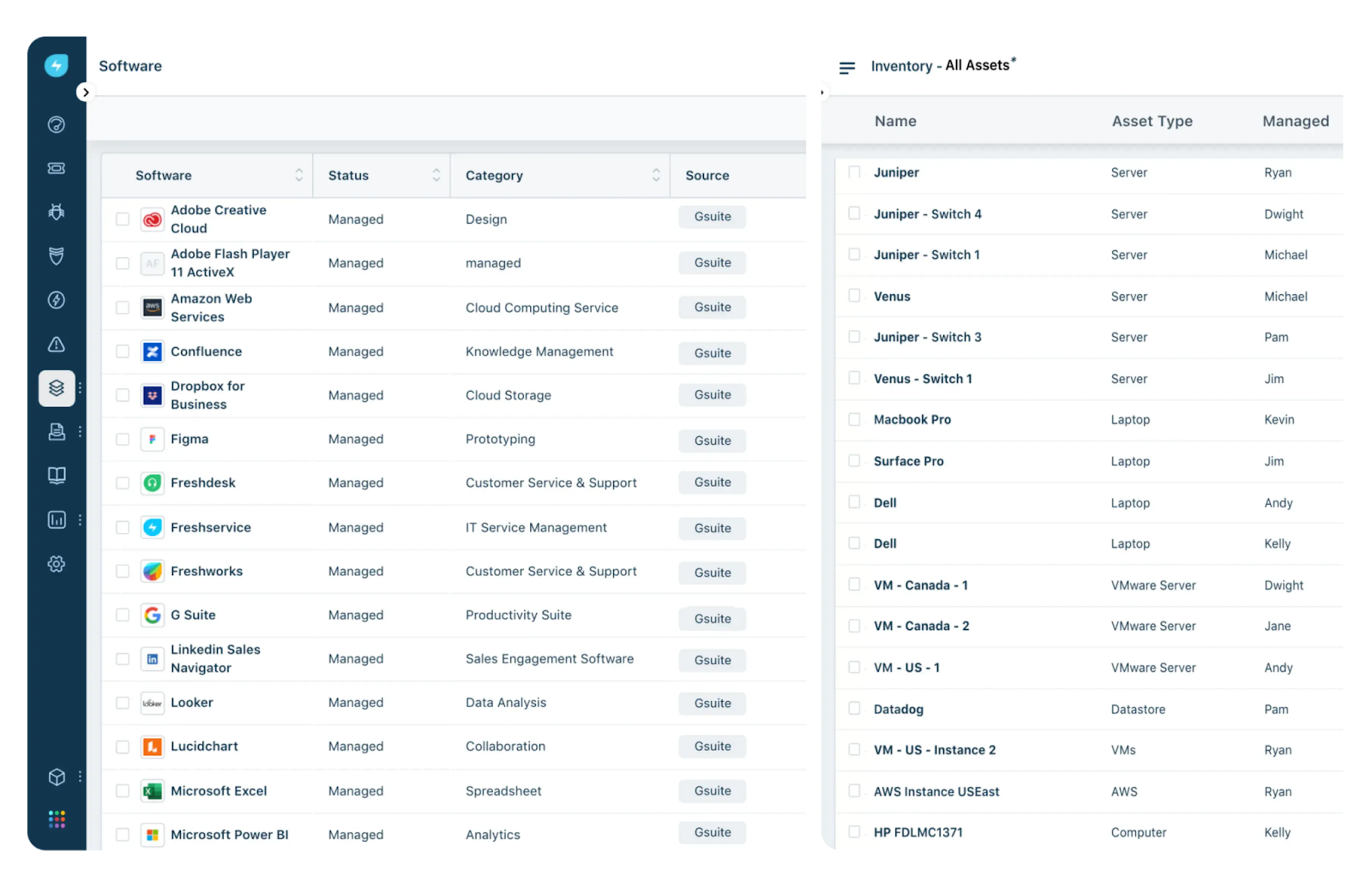
What Freshservice ITAM does differently is that they use Device42 for discovering assets (software, hardware, cloud, virtual mamachine sand more), which makes it powerful.
And it also does what Device42 isn’t made for: managing, tracking, and automating the entire asset lifecycle from procurement to retirement.
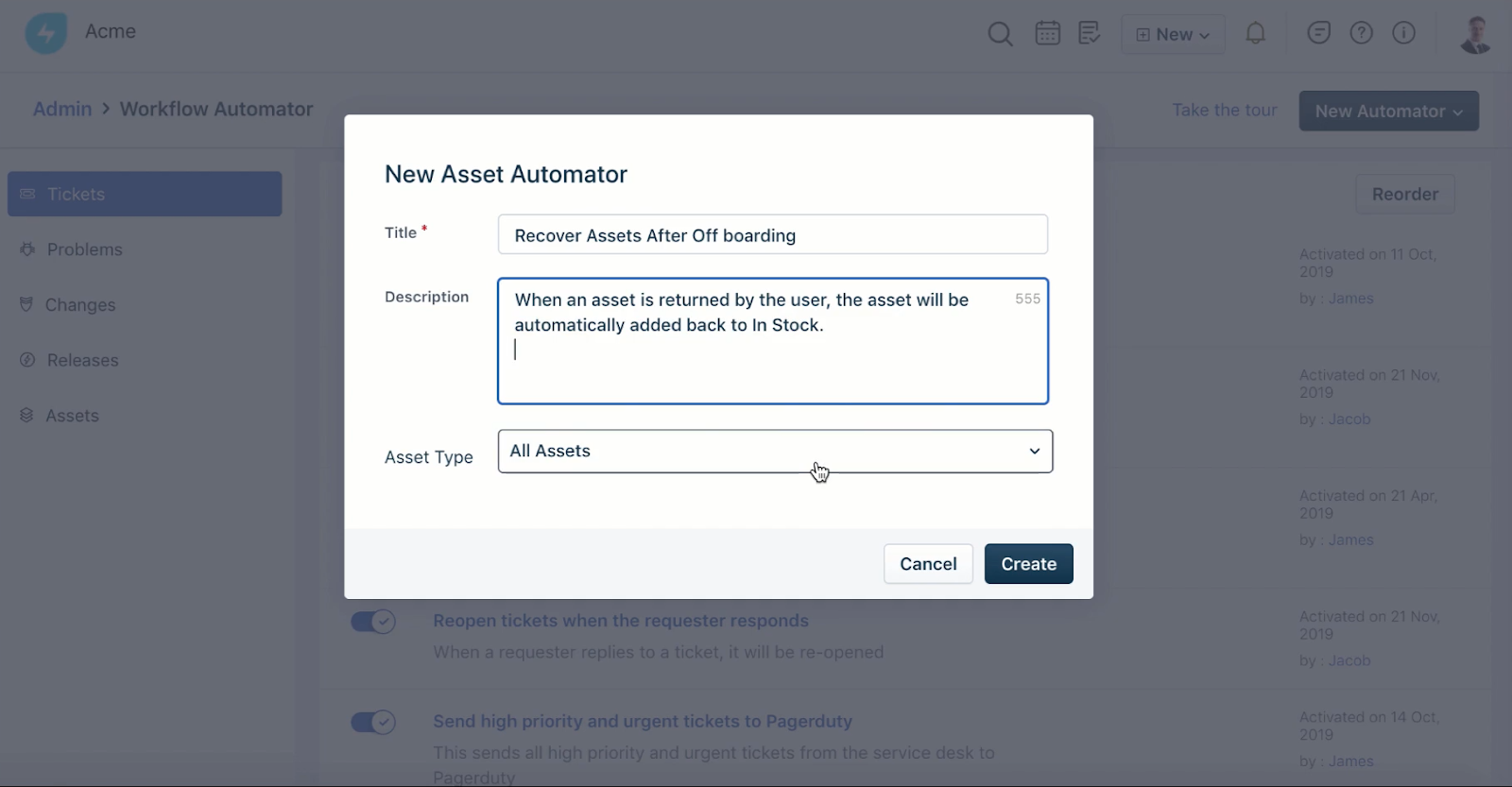
I tried out their workflow automator, using which you can easily create workflows. In this example, I created an offboarding workflow that triggers when an asset is marked as “not in use”.
However, their pricing is targeted towards all types of businesses, from small and medium to large enterprises. What I mean to say is that Freshservice ITAM is not an enterprise-first asset management solution.
I have encountered multiple Reddit users who mention Freshservice ITAM as an obvious choice for Freshservice ITSM users, but don’t recommend it as a dedicated enterprise-level ITAM solution like SNOW ITAM or Flexera One ITAM.
Standard Specifics
- Deployment: Cloud
- Pricing: Tiered subscription
- Free Trial: Yes
- Recommended For: Fast-growing and distributed companies already using Freshservice ITSM with around 2,000 assets.
Pros:
- Powered by Device42, making its set discovery features strong.
- Automated asset lifecycle processes, reducing manual tasks.
- Connects very well with Freshservice ITSM for smooth ticket management and resolution.
Cons:
- There’s no individual asset management module, which means you have to buy Freshservice ITSM, which does not make sense.
- Asset management-related pricing is very confusing and expensive, as reported by users on Reddit (Source)
10. OpenText Asset Management
Key Features:
- Unified IT asset management (ITAM), software asset management (SAM), and enterprise asset management (EAM), making it easier to control all types of assets.
- Service asset and configuration management (SACM) gives service teams ample asset related information for quicker incident resolution.
- Uses OpenText Universal Discovery and CMDB to collect the installed software both on premises and in the cloud, and capture the environment on which it is installed
- Track costs associated with every asset at every stage in its lifecycle, including expenses related to capital and operations.
- Track your vendors and associated contracts and get notified when contracts expire to return leased assets or renew contracts in a timely manner.
Source: OpenText
OpenText is an information management platform with a suite of products (DevOps, Experience, LegalTech, Cybersecurity, Content and more) designed for enterprises.
It also has an enterprise-grade ITAM solution designed to help you manage IT hardware, software, and SaaS assets to optimize IT spend and reduce regulatory compliance violations, licensing issues, and security risks.
While exploring the demo videos on YouTube, I discovered that OpenText did not inherently offer IT asset management services. Only after acquiring MicroFous in 2023 did OpenText start offering IT asset management services.
I’d recommend you not just evaluate features, but long-term roadmap alignment, ecosystem fit, and vendor consolidation strategy before making the decision.
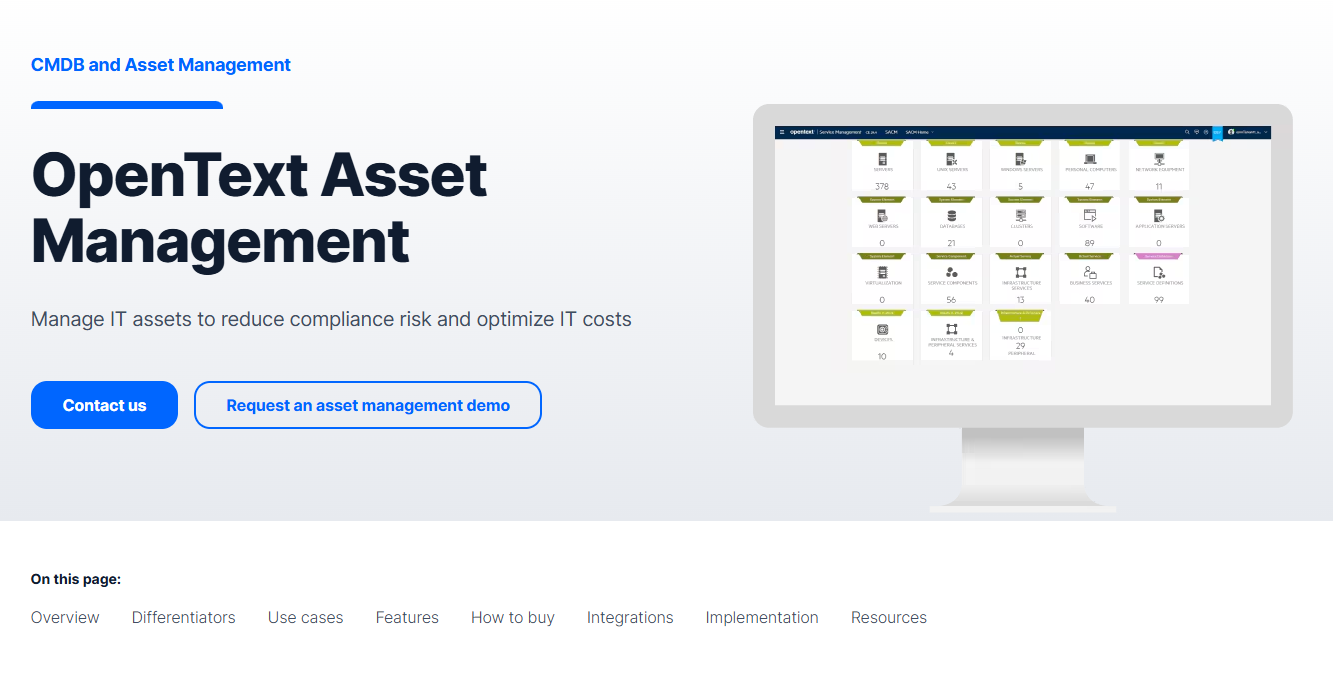
This is what the dashboard looks like. It’s clear but looks very outdated, compared to other enterprise solutions like ServiceNow and FlexeraOne.
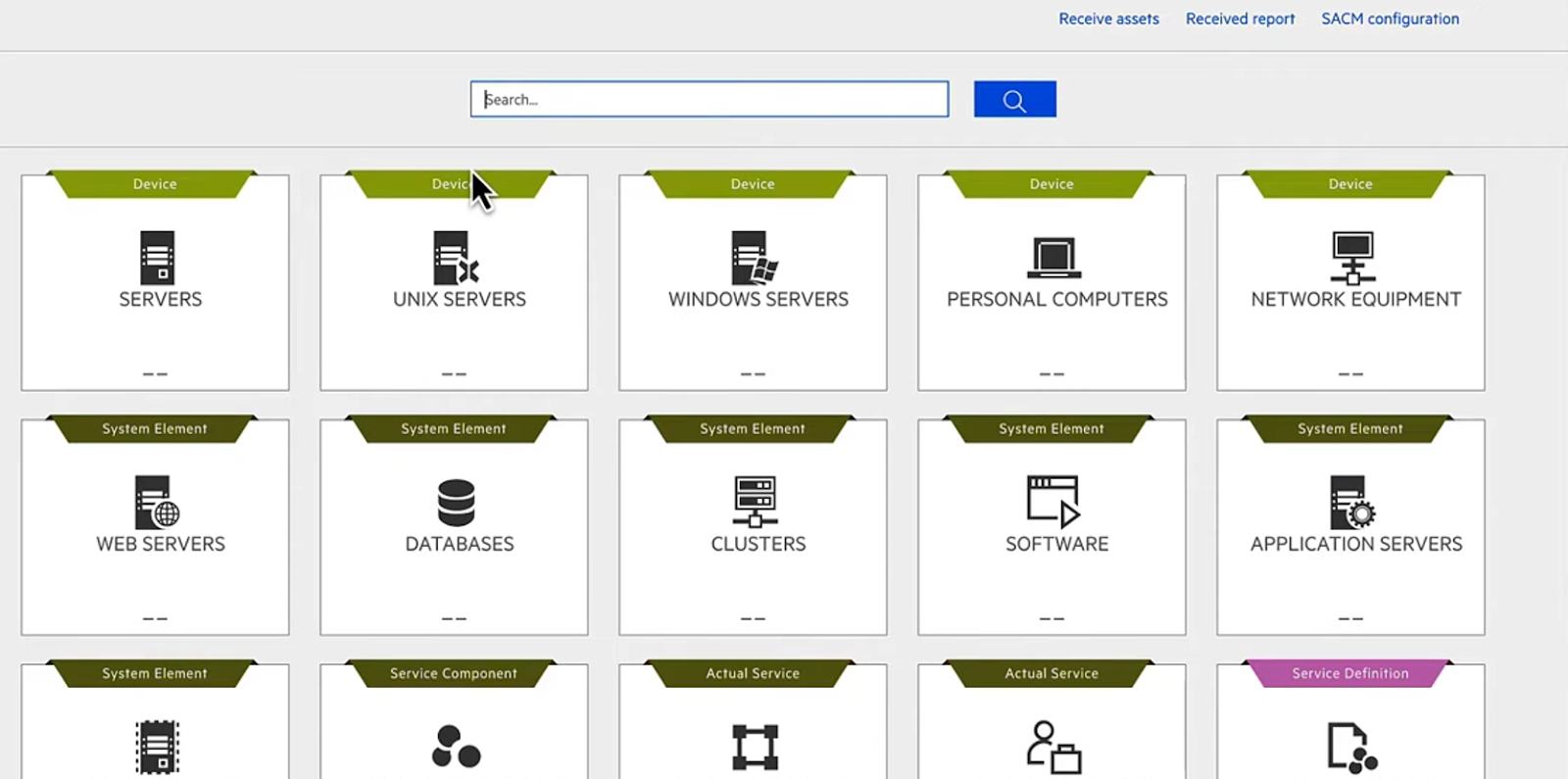
Source: YouTube Walkthrough
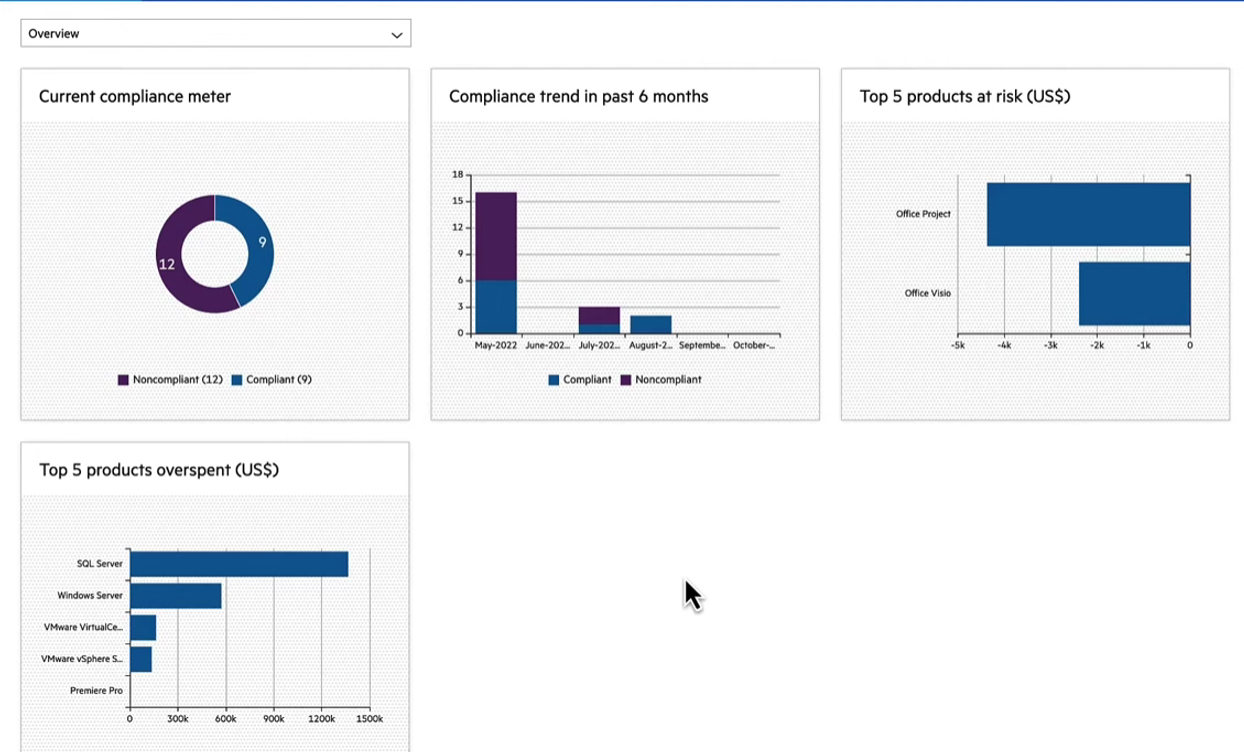
While reviewing OpenText ITAM, I particularly explored software asset management. It gives you an overview of software installed across your organization, their compliance status, and products you overspent on:
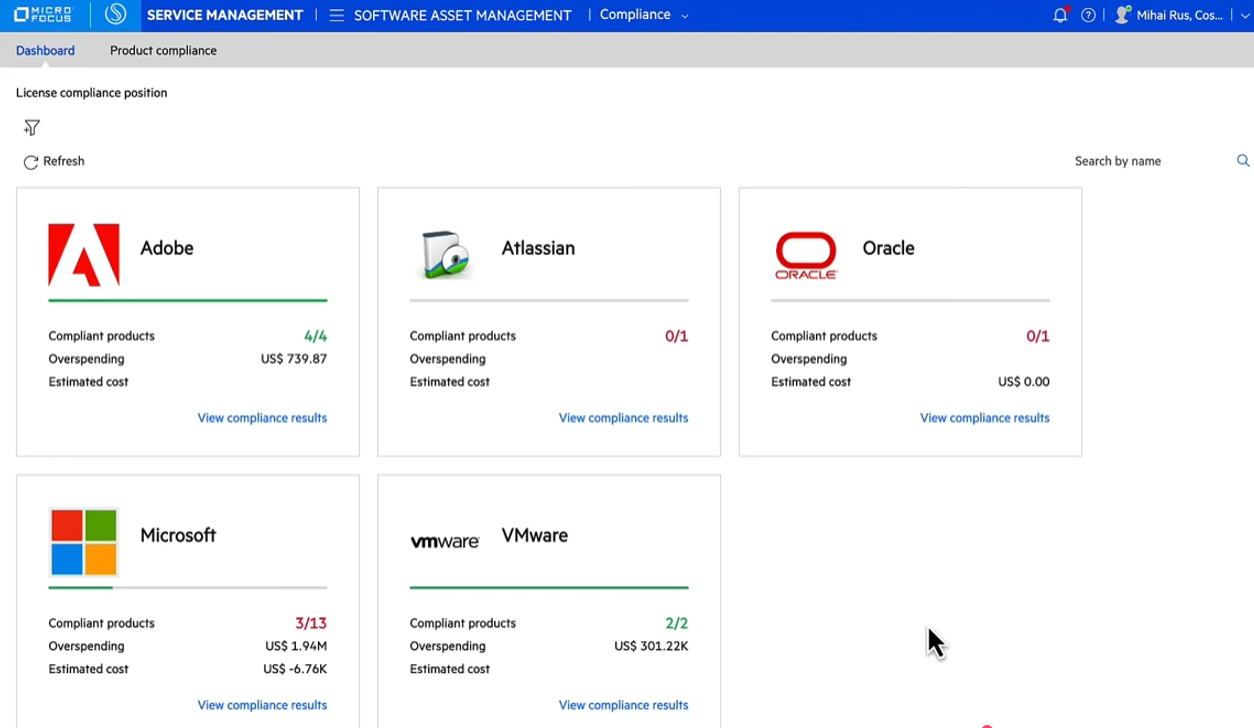
You can even view the vendors whose software are installed, their compliance status and overspending, if any. This dashboard gives you an overview of the compliance status within your organization and helps you prevent overspending.
Standard Specifics
- Deployment: Cloud (with hybrid support via connectors)
- Pricing: Tiered subscription model
- Free Trial: Yes (with evaluation/POC options)
- Recommended For: Large enterprises and complex IT environments already invested in enterprise systems (especially those using or planning broader OpenText solutions)
Pros:
- Becomes a complete solution for companies within the OpenText ecosystem.
- Unified asset management that involves software, hardware and enterprise asset management.
Cons:
- UI could use improvement
- May not be ideal for companies seeking a standalone ITAM solution
- OpenText has a vast range of tools, and ITAM is not a specialization.
11. Matrix42
Key Features:
- Gives you a clear view of all your IT assets across all of your different platforms. From hardware and software to virtual machines.
- Deploy, maintain, update or decommission IT assets whenever the time is right.
- Bring all your documents and data together in one place and get notified when renewals and deadlines are closing in on you.
- Automatically capture and map your IT landscape and detect devices that shouldn't be there – and take action when needed.
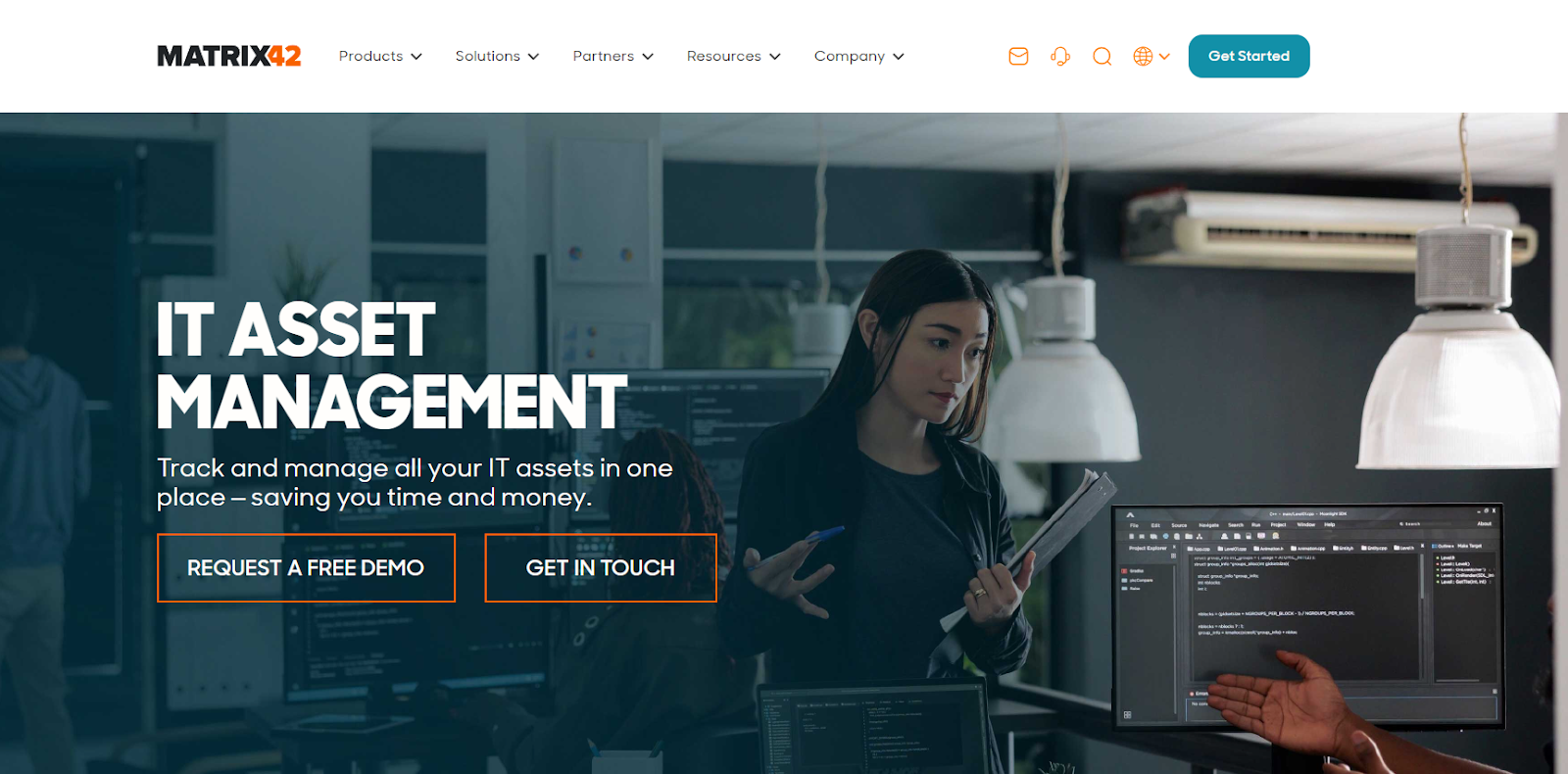
Source: Matrix 42
Matrix42 is a European service management platform designed for enterprises. I mentioned “European” as Matrix42 aggressively targets European buyers and markets itself as the “European Choice in Service Management.”
While I could not find product walkthroughs, there were some promotional videos, and detailed case studies that I analyzed. Based on my analysis, Matrix42 offers the core capabilities of an ITAM solution, including creating an inventory, managing contracts, track asset lifecycles, maintenance schedules, and more.
Matrix42 comes with a self-service portal that lets users order services, software, and hardware, saving manual effort.
However, it isn’t available as a standalone ITAM solution. Instead, it’s bundled with the service management module, which can be a bummer for enterprises looking for a standalone solution.
Plus, Matrix42 is known primarily for it’s ITSM and UEM module, and not IT asset management. Also, there weren’t enough user reviews around it’s ITAM offering. Both of which point towards lower adoption.
Standard Specifics
- Deployment: Cloud (also supports on-premises and hybrid environments)
- Pricing: Tiered subscription
- Free Trial: Yes
- Recommended For: Organizations that want asset management tightly integrated with ITSM, service desk, and automation
Pros:
- Ideal service management solution with bundled ITAM for Europe-based organizations.
- UI is not as modern as most solutions on this list.
Cons:
- Lack of demo videos, interactive tours and user reviews, signals lower adoption.
- Primarily known for it’s ITSM and UEM offerings and not ITAM
- Particularly popular in and targets companies in the European markets.

What to Consider Before Choosing an ITAM Software?
While researching, I talked to a few IT experts to understand what enterprises look for when comparing ITAM solutions. Here are those factors, plus a few more, to help you make the right choice:
- Scalability across thousands (or millions) of assets: The platform must remain efficient as asset counts grow into the tens of thousands or more, without degrading search, reporting, or reconciliation accuracy.
- Role-based access control (RBAC): Enterprises need granular control over who can view, edit, approve, or audit assets across teams, regions, and business units.
- Integration with CMDB / ITSM: ITAM cannot operate in isolation; it must integrate tightly with CMDBs, service catalogs, incidents, changes, and requests to support real operational workflows.
- Audit trails: Every asset change (status, ownership, and configuration) must be logged with timestamps and users to satisfy compliance, security, and financial audits.
- Software license optimization: The tool must reconcile entitlements against actual usage to reduce over-licensing risk and defend against vendor audits.
- Support for hybrid environments: Enterprises rarely operate in a single environment. ITAM must handle on-prem, cloud, virtual, and SaaS assets consistently.
- Comprehensive, searchable asset history: Enterprises value full historical context i.e., what changed, when, and why. This is because asset decisions are often based on past behavior, not just the current state.
- Flexible data model / configurable schema: Large enterprises won’t adapt their operating model to a tool; the tool must adapt to complex, custom asset types, relationships, and processes.
- In-built or tightly integrated CMDB / service registry: A mature ITAM solution must either include a strong CMDB or integrate deeply with one to model relationships, dependencies, and impact accurately.
- Ability to handle tens of millions of records: At true enterprise scale, the question isn’t features—it’s whether the platform’s architecture can handle extreme data volumes reliably.
- Wide range of imports and a strong API: Enterprises always have niche systems; robust APIs and flexible import mechanisms are essential to integrate with custom or legacy tooling.
- Enterprise-grade support: Large organizations expect predictable SLAs, knowledgeable support engineers, and the ability to escalate issues quickly.
- Backups and data resilience: Asset data is business-critical; enterprises expect reliable backups, recovery options, and safeguards against data loss.
- Market-proven platforms: Tools like ServiceNow are often evaluated first because they’ve proven they can scale, adapt, and survive enterprise complexity (with BMC also common in legacy-heavy environments).
Which ITAM Software is the Best for Enterprises?
There is no single “best” ITAM software for enterprises—because enterprises don’t operate with a single system. They operate with interconnected platforms, each serving a specific role.
In a typical enterprise tech stack, ITAM is distributed.
- One platform acts as the system of record and governance layer (for example, ServiceNow or Flexera).
- Another focuses on continuous discovery and dependency mapping (such as Device42).
- And execution (procurement, global deployment, retrieval, repair, and disposal) happens outside traditional ITAM tools with the help of solutions like Workwize.
This is why enterprises don’t replace tools; they combine them. A large, globally distributed organization might use Device42 for infrastructure visibility, ServiceNow for asset governance, and Workwize to operationalize asset lifecycle execution across regions.
The goal isn’t to find one tool that does everything—it’s to build an ITAM stack that works in unison.
So, select the right combination based on your enterprise’s needs.

Why is Workwize a No-Brainer Choice for your IT Enterprise Stack?
Whatever asset management tool you decide to move forward with, you’ll have to manage the logistics part on your own.
You can either coordinate with the vendors, courier partners, and handle procurement, deployment, and retrieval on your own, risking efficiency. Or you can partner with a credible hardware management platform like Workwize that does all the heavy lifting for you.
And believe me, the latter makes the most sense in an enterprise situation.
Just integrate Workwize with your favorite HRIS (like BambooHR) to trigger the onboarding workflow, and Workwize will take it from there. Choose the right vendors and assets, and Workwize will procure and deliver them ready-to-use to your employees across 100+ locations.
Because Workwize integrates with your MDM solution, you can remotely control and manage your devices.
When the employee leaves, you can trigger the offboarding workflow. And Workwize will pick the assets from your employees, securely retrieve them, and perform certified data erasure, so they can be reassigned, disposed or resold, based on your requirements.
You have real-time visibility of all your assets during the entire process, which ensures you don’t lose anything.
Automating the above process not only saves time but also optimizes costs. For instance, HighLevel, after using Workwize to automate procurement, deployment, retrieval, and disposal, saves $1.4 million annually.
Book a free demo with Workwize to see how smoothly it fits into your tech stack, improves efficiency, and maximizes your savings (24.5X ROI).


Establish a single source of truth for every IT asset across the globe.
.png?width=258&height=318&name=g10%20(5).png)
More related resources to help you stop firefighting hardware operations.

Get monthly insights into how other IT leaders are improving their ops.



.png?width=2880&height=1232&name=Group%202147262874%20(1).png)
Stop coordinating
hardware like it's 2012.
.svg)
.png?width=172&height=68&name=apple%20business%20patner%20(1).png)
.svg)
.svg)
.svg)
.svg)