




.svg)
.svg)

.svg)


.svg)




.svg)
.png?width=500&height=424&name=Style-1---V1-(1).png)

.png?width=1230&height=692&name=Vector%20(13).png)
IT budgets are getting harder to control.
SaaS prices keep climbing, security spend keeps rising, and one unexpected incident can blow up your forecast.
When budgets overrun, the real cost is delayed projects. Funding that was meant for upgrades or new initiatives gets pulled back to cover unplanned expenses. The team ends up stuck in maintenance mode.
Most teams are not overspending. They are planning with weak data. Budgets are copied from last year, and priorities do not match what the company actually needs. The result is a budget that looks good on a spreadsheet but falls apart in real life.
This guide shows you how to fix that.
You will learn how to build a data-driven IT budget that aligns with business goals, predicts spend accurately and earns fast approval from leadership. I’ll also walk you through the best practices and mistakes you should avoid.
TL;DR:
- Without a structured IT budget, companies face unexpected expenses, downtime risks, missed refresh cycles, and chaotic last-minute spending, all of which weaken IT credibility.
- Strategic IT budgeting helps you align tech investments with business goals, forecast needs accurately, control costs, and justify spending to finance and leadership.
- A solid budget is built by assessing current assets, using data to predict needs, categorizing spend (Run–Grow–Transform), and planning for security and contingencies.
- However, avoid major pitfalls like buying cheap hardware, letting SaaS creep drain money, missing hardware retrievals, or underestimating security.

What Is IT Budgeting?
IT budgeting is the process of planning, allocating, and managing the funds a company will spend on technology over a specific period (usually a year).
But for IT leaders, IT budgeting is not just about listing expenses. It’s how they prioritize growth, allocate scarce resources, assess risk, and demonstrate to the board that technology spending directly supports business performance.
Here’s an example:
Let’s take Simon, an IT manager at a growing hybrid company with 250 employees across India, the Netherlands, and the U.S.
Each year, Simon creates an IT budget that covers:
- Hardware: new laptops, monitors, and accessories for incoming hires.
- Software: renewals for Microsoft 365, Slack, and Zoom.
- Cloud infrastructure: AWS, backup storage, and monitoring tools.
- Security: endpoint protection, MFA licenses, and compliance audits.
- IT projects: automating laptop setup for remote onboarding.
- Contingencies: buffer for replacements or damaged equipment
When he builds this budget, Simon’s goal is simple: make sure every employee gets what they need without last-minute chaos or overspending.
How does this pan out in the real world?
A few months into the year, HR informs Simon that the company will hire 40 new employees in Q3.
Because he budgeted for growth, Simon already has funds designated for new-hire devices and has a preferred vendor ready.
He can order laptops early, ship them internationally, and make sure they’re pre-configured before start dates.
Now imagine the opposite.
If Simon hadn’t planned the IT budget, he’d be scrambling—trying to get last-minute approvals, paying premium prices for devices, and delaying onboarding. HR gets frustrated, new hires start late, and IT looks disorganized. That’s the overall role of IT budgeting.
Why Do You Need Strategic IT Budgeting?
Let’s now discuss what makes IT budgeting so crucial, in detail:
-
Ensure Business Continuity and Avoid Unplanned Disruptions
Unplanned IT outages or equipment failures can bring your operations to a standstill, resulting in a massive financial hit.
According to the Centurion University of Technology and Management, 59% of Fortune 500 companies experience at least 1.6 hours of downtime per week, which can cost up to $46 million per year. That means even an hour and a half of downtime each week could cost you millions.
But you can avoid that with IT budgeting.
This process ensures you have the resources to maintain and replace critical systems before they fail. This proactive approach prevents costly downtime.
And even during downtime, you’d have enough resources to get your systems back up and running, minimizing damage.

-
Control and Optimize Technology Costs
IT budgeting is a powerful tool for controlling costs and reducing waste.
Different departments might buy duplicate software, or you might forget to cancel unused subscriptions. And, frankly, it happens more often than you think.
According to Ivanti’s 2025 Technology at Work Report, IT professionals say that redundant applications (43%) and cloud overprovisioning (39%) are the two major drivers of wasted IT budgets.
A proper budgeting process forces you to take inventory of every expense and question what’s really needed. It uncovers those forgotten app subscriptions on auto-renew and rightsizes your cloud usage to match actual demand.
-
Align IT investments with Business Goals and Growth Plans
IT budgeting isn’t done in a vacuum. It’s most effective when tied to your business’s goals.
By aligning tech spend with business strategy, you ensure IT is funding the projects that truly drive growth or competitive advantage, rather than pet projects or inertia spending.
This alignment also helps earn executive trust. When your CFO and CEO see that every line item in the IT budget supports a business outcome, they’re more likely to approve and support those investments.
-
Plan Lifecycle Refreshes and Maintain Security Posture
All technology has a lifecycle: laptops get old and slow, software versions reach the end of life, and security certificates expire.
Without planning (and budgeting) for regular refresh cycles, you end up with aging equipment that hurts productivity or, worse, exposes you to security breaches.
IT budgeting lets you forecast these lifecycle events and spread out the costs in a manageable way. For example, many IT departments adopt a policy of replacing end-user devices every 3-5 years.
This helps you deliver a positive experience for employees and protects them from security threats that can arise when older devices don't receive critical OS updates.
-
Support Scaling Workforce and Hybrid/Global Operations
With hybrid work and distributed teams becoming more prevalent, IT needs can change rapidly.
Let’s say your company decides to onboard 50 remote employees across four different countries. In this situation, a static annual budget can fall short unless it's designed with flexibility and foresight.
Strategic IT budgeting, in addition to devices and licenses, also factors in shipping, customs/import fees, and regional support. These global operational costs can be significant, and planning for them avoids scrambling later.
Pro Tip: Partnering with global ITAM solutions like Workwize can help you save big on customs fees, shipping charges, and all those hassles. Place an order, and Workwize will procure and deliver IT assets through our local warehouses (in most cases) across 100+ countries, saving you time and money.

How to Create an IT Budgeting Strategy: Best Practices?
Below are the ten best practices or steps to help you create a practical IT budgeting strategy:
Step 1: Take Stock and Align with Business Objectives
Start with a thorough assessment of your current state and future needs. This involves:
- Taking stock of all existing IT assets, services, and costs (hardware inventory, software licenses, cloud contracts, support agreements, etc.)
- Understanding the broader business objectives for the budget period.
This audit reveals where money is currently going and helps identify any surprise spend (like shadow IT or departmental tech expenses hidden outside IT’s purview).
At the same time, meet with key stakeholders like executives and business unit leaders. This will help you understand their plans and priorities.
To run this audit properly:
- Start by exporting the last 12–24 months of IT-related spend from your finance system
- Group it into clear categories (hardware, software, contractors, support, training, etc.)
- And then reconcile it against your actual asset inventory and license counts.
Flag anything that looks duplicated, underused, or “orphaned” (no clear owner), and note which costs are non-negotiable versus discretionary. That’s the baseline you’ll use to shape a realistic, strategic IT budget.
Step 2: Define Budget Buckets: Run, Grow & Transform
Once you know what needs funding, it’s helpful to categorize your IT budget into buckets. A classic framework championed by Gartner divides IT spending into “Run, Grow, and Transform” segments. In simple terms:
- Run is the cost of keeping the lights on (everyday operations and maintenance).
- Grow is spending that improves or expands existing capabilities (enhancements, scaling up systems to support more users).
- Transform is an investment in entirely new initiatives that change how the business operates (innovation, R&D, pilot projects with emerging tech).
By labelling each budget line into one of these buckets, you can ensure you have the right balance.
Many organizations allocate the majority to Run (since you must maintain core services), but you also want a healthy portion in Grow and Transform to drive the business forward.
Here’s an example:
- Run (e.g., 60%): software renewals, support contracts, endpoint management tools.
- Grow (e.g., 25%): adding a CRM module, expanding cloud capacity, upgrading collaboration tools.
- Transform (e.g., 15%): a machine learning proof-of-concept, automation pilots, or new digital initiatives.
This categorization also makes it easier to communicate trade-offs to executives. It shows that you’re not just thinking of IT as one big cost center, but rather as a portfolio of investments with different purposes.
Step 3: Forecast Needs with Data
With categories in mind, project your IT needs into the future. How far into the future? For most items, a forecast for the next year; for major items, a 2-3-year outlook would help.
But how can you do that?
A simple yet reliable way to do this is to use a three-part forecasting process:
- Analyze historical spend: Look at the last 12–24 months of IT spending to understand your baseline. Ask:
- What did we spend, and on which categories?
- Where did we exceed or fall short of the budget?
- Which costs grew faster than expected (cloud usage, SaaS, support tickets)?
If, for example, your cloud costs increased 20% quarter-over-quarter, that trend should inform next year’s budget.
- Measure current usage and performance: Examine live usage and performance data from your IT systems, ITFM tools, MDMs, or even spreadsheets. Look at metrics such as:
- Peak vs. average server load
- Software license utilization
- Device age and lifecycle status
- VPN/remote access load
- Storage consumption
- Ticket volumes by category
These metrics tell you what will need expansion, upgrades, or replacement.
- Use Trends to Project Future Requirements: Once you know historical patterns and current utilization, project forward:
- What happens if hiring increases?
- What if cloud usage continues along the trendlines?
- What systems hit end-of-life in 12–24 months?
- What new initiatives (AI, automation, new markets) will add demand?
Step 4: Optimize Existing Spend: Cut Waste, Right‑Size & Embrace FinOps
Before you finalize where new money should go, take a hard look at your current spending for opportunities to save or reallocate.
Start by identifying any obvious waste or inefficiencies:
- Unused or Underused Software Licenses: According to the 2025 SaaS Management Index Report from Zylo, organizations lose $21 million in unused licenses annually.
To prevent this, audit login activity and license counts against actual users. If you’re paying for 200 SaaS seats and only 150 employees are using them, you’re burning money.
- Duplicate Tools: Sometimes, different departments buy similar software (e.g., two project management tools) that overlap in functionality. By standardizing on one and cutting the other, you save money and reduce complexity.
- Idle or Over-Provisioned Infrastructure: If you’re using cloud services, use cloud provider tools or third-party solutions to identify resources that are running but not doing much (servers at 5% CPU all day or storage volumes not accessed).
For on-prem infrastructure, some servers can be virtualized or decommissioned.
An example: you might find dozens of forgotten AWS instances or old development environments left running. Rightsizing or shutting these down can save thousands.
- Neglected Asset Recovery: Ensure you’re not letting old hardware sit in a closet, where it depreciates to zero. Reselling or repurposing retired devices can recoup money.
Refurbished laptops have a surprisingly strong secondary market. You can recover a decent chunk of cost if you have a process to refurbish and resell retired equipment.
For instance, Workwize helps you retrieve (securely, from departing employees) and resell assets (after certified data erasures) at fair prices to help you recover up to 45% of the cost.

Step 5: Budget for Security & Risk: Layered and Proportional
Cybersecurity and risk management aren't something you can ignore or assume last year’s spend would suffice.
Based on Workwize’s State of IT 2025: Budget & Technology Outlook report, 75% of organizations are increasing their cybersecurity spending. And that’s justified, because the global average cost of a data breach is around $4.4 million, according to IBM.
Here’s what you can do:
Proportional Budgeting
When crafting your budget, explicitly set aside some funds for security initiatives and ensure that the amount is proportional to your organization’s risk exposure.
For instance, a financial services company (high-risk target, heavy compliance requirements) might allocate well above the 12-15% average of IT spend to security. In contrast, a small non-profit might allocate a bit less.
Layered Budgeting
Consider a layered approach to what you fund in security. Map it out in categories:
- Perimeter defenses: firewalls, intrusion detection systems
- Endpoint protection: anti-malware, device encryption
- Identity and access: SSO, MFA solutions
- Application security: code scanning, app firewalls
- Data protection: backups, DLP systems
- Monitoring and response: SIEM software, incident response retainers
- Compliance: audits, certifications
Then, budget line items for each layer based on your needs.
Say you realize your network security is strong, but you need to invest more in monitoring and response. You’re going to just add a budget for a managed detection & response (MDR) service.
Or if you’ve moved to the cloud, you might allocate more to cloud security posture management tools.
Disaster Recovery and Business Continuity
If your company’s tolerance for downtime is low, ensure the budget includes resources for redundant systems or Disaster Recovery (DR) site costs.
Because an hour of downtime can cost companies between $9,000 and $540,000, according to Splunk, spending on failover capabilities or backups is usually worth it.
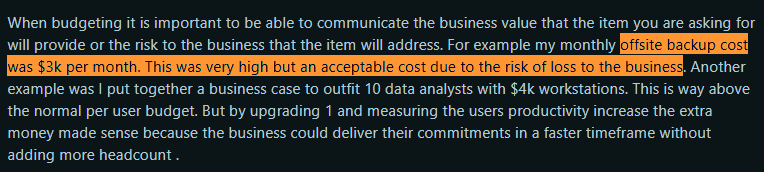
Here’s a Reddit user who agrees that the off-site backup costs are high but still includes them in their budget, since not investing would pose a greater risk to the business.
Source: Reddit
Step 6: Factor in People and Skills
Whether you want to factor in people (human resource costs) in your IT budget is up to you. Some argue that IT staff salaries are a crucial part of the IT budget.
And many, like this Reddit user, think salaries (of the IT staff) might fall under a larger “staff” budget. Putting it under the IT budget would only complicate things.

Source: Reddit
Nevertheless, if you decide to factor in people, start by budgeting for your IT team’s headcount:
- Existing staff
- Any planned hires (new roles you need as the company grows)
- Overtime or contractors for temporary projects, etc.
Work closely with HR or finance on salary benchmarks to ensure you allocate sufficient compensation to remain competitive. The last thing you want is to under-budget and then struggle with turnover because salaries were too low.
Another thing that isn't optional is skill development. Companies take skill development seriously, especially as technology evolves faster than ever. Here’s a Reddit user asking the community what they should do with their learning budget, underscoring the importance of skill development:

Source: Reddit
So, set aside funds for certification courses, sending team members to conferences or workshops, or providing an online learning stipend.
Investing in your team’s skills can save money in the long term by enabling in-house management of systems rather than outsourcing.
For instance, if you’re implementing a new cloud platform, budgeting a few thousand dollars for training might save you many more thousands in consulting fees.
Step 7: Address Sustainability & ESG
An emerging aspect of IT budgeting is considering sustainability and aligning with Environmental, Social, and Governance (ESG) goals.
More companies are looking at their IT practices through a sustainability lens. Not just for corporate responsibility, but also for cost efficiency and even brand reputation.
In practical terms, this means budgeting for initiatives that reduce e-waste, improve energy efficiency, or support “green IT” policies.
For example, you might allocate funds for an IT asset disposal/recycling program to ensure all retired electronics are disposed of in an eco-friendly way (and in compliance with regulations).
This can include costs for using certified e-waste recyclers or services that securely wipe and refurbish old equipment for secondary use.
Another area is sustainable procurement. Prioritize vendors with greener practices (e.g., procuring locally rather than internationally) or devices with eco-certifications.
Pro Tip: Workwize adequately addresses sustainability and ESG requirements for you. We can help you:
- Procure assets locally (reducing carbon footprint and delivery time)
- Retrieve assets from your employees
- Perform certified data erasures
- Prepare them for reassigment
- Or resell them at the best possible price (helping you recover your investment)
Step 8: Build Flexibility & Contingency Funds
. A strategic IT budgeting plan is data-driven, but things can go wrong. What if there’s another lockdown or a key system fails without warning?
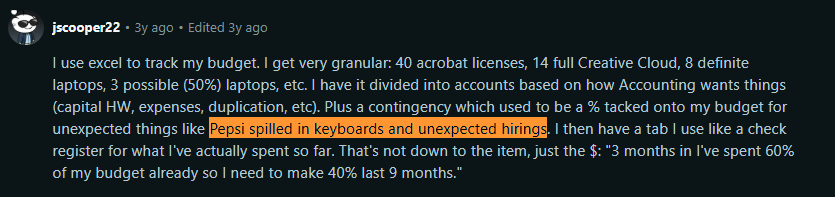
Here’s a Reddit user who also considers surprise situations like “Pepsi spilled in keyboard” when planning for contingency funds:
Source: Reddit
That’s why flexibility is important in IT budgeting.
Building flexibility means setting aside contingency funds to cover unplanned needs without derailing your overall plan. A common approach is to allocate a percentage of the overall IT budget as a buffer.
Many IT managers allocate roughly 5-10% of the budget as a contingency line. In a Reddit discussion, an IT guy mentioned he routinely adds a 10% buffer on top of his forecasted costs to handle vendor price increases or surprise expenses:

Source: Reddit
Pro Tip: Determine the contingency funds based on your business's nature. If you’re in a fast-moving industry or a high-growth startup, unexpected new initiatives might pop up mid-year (e.g., acquiring a company and needing to integrate its IT systems).
In that case, a larger contingency or the ability to re-prioritize funds is important.
Step 9: Communicate & Collaborate
A budget is only effective if it is understood and accepted by others.
Communication and collaboration are critical throughout the IT budgeting process. Here’s what you can do to ensure you send your point across:
- Speak in Plain Language and Business Terms: Avoid deep technical jargon in budget discussions with executives. Frame your requests as a story of investment and return.
For example, instead of “Upgrade WAN links to SD-WAN with XYZ tech,” you might say “Investing $50k in modernizing our network will improve remote office connectivity and cut downtime by an estimated 30%, directly boosting productivity.”
- Use Visual Aids and Summaries. Break down the budget by category, show pie charts of spend distribution (like Run/Grow/Transform percentages or Opex vs Capex), and highlight key changes from last year. This makes it easier for others to digest.
Pro Tip: If your finance team or CFO has a preferred format you should adopt it.
- Involve Stakeholders Early and Often: Rather than presenting a fully baked budget at the end for approval, involve department heads and finance partners throughout.
For instance, review the draft with the CFO or finance manager to sanity-check assumptions. Or collaborate with department heads on portions of the budget that impact them.
It’s much easier to get approval from someone who had a hand in shaping the plan than from someone who sees it cold at the end.
- Communicate Throughout the Year, not just at Budget Time: Share periodic updates on spending versus budget. This keeps everyone confident that the plan is on track (or allows discussion if adjustments are needed).
- Be Ready to Defend and Negotiate: When you present the budget, inevitably, there will be questions:
- Do we really need this much for XYZ?
- What happens if we cut 10%?
Be prepared with a justification for each major item (tie it back to business needs or to risk, if possible). If pressed to cut, have a prioritized list so you can suggest what could be reduced with the least impact.
Step 10: Monitor, Measure & Iterate
Continuous monitoring and iterative improvement are the final (and ongoing) steps.
Once the new fiscal year begins, IT must closely track spending against the budget. This means monitoring actual expenses monthly (or at least quarterly) and comparing them to the planned amounts.
Regularly report on these findings to stakeholders as appropriate (which connects back to the communication step).
By measuring throughout the year, you avoid surprises at year-end. It also builds credibility if you can proactively alert finance to any major deviation and propose a solution.
Common IT Budgeting Mistakes to Avoid
Here are some common mistakes in IT budgeting and how to avoid them:
Buying Cheap Devices to Save Money (and Paying More Later)
Many companies try to reduce upfront costs by choosing low-end laptops or budget hardware. But this decision almost always backfires.
A cheap device might save a few hundred dollars today, but it often performs poorly, slows employees down, and breaks far more often. And because lower-end machines have shorter lifespans, you may need to replace them in 1–2 years instead of the expected 4–5 years.
As a result, you end up purchasing a second device much sooner than you planned, while also bearing the costs of lost productivity and downtime.
How to Avoid
Here’s how you can avoid wasting money on the wrong devices:
- Consider business-grade hardware and evaluate vendors on reliability and support, not just price. Look at warranties and failure rates.
- Factor in soft costs: if a cheap device causes an employee to waste even 15 minutes a day, that’s productivity loss that can minimize the initial savings.
- Use reliable business-grade laptops over consumer ones: IT pros often recommend mid-tier business laptops over consumer models. You don’t need top-of-the-line for every user, but aim for value over rock-bottom price.
- Budget for spares or quick replacements for any lower-tier gear you buy, because you’ll likely need them.
Letting “SaaS Creep” and Auto-Renewals Drain Your Budget
With the rise of cloud software, another common mistake heads of IT make is losing track of subscriptions.
Teams purchase tools without IT oversight, licenses remain assigned to former employees, duplicate apps appear across departments, and many subscriptions quietly auto-renew without review.
This scenario is commonly known as “SaaS creep.”
Here’s a Reddit user confirming SaaS creep is a real issue and talks about exploring self-hosted options:
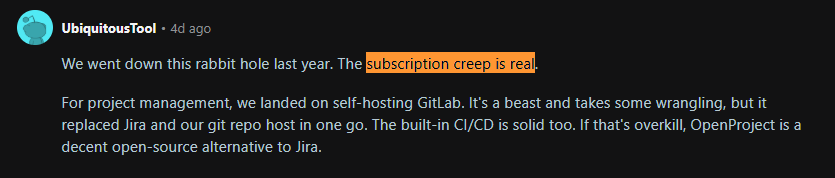
Source: Reddit
Over time, you end up with a bloated portfolio of software, some of which might be redundant or hardly used. This can silently drain thousands from your budget.
Other related issues include:
- Forgetting to adjust licenses when your user count drops.
- Not removing licenses for employees who left,
- Not scaling down an app after a project ends.
How to Avoid
Here’s how you can avoid SaaS creep:
- Maintain an inventory of all subscriptions (IT should ideally approve or at least record any software adopted by any department), set renewal reminders, and require active confirmation to renew.
- Negotiate renewal terms: you may be able to get a discount or drop to a lower tier if not all features are used.
- Periodically run reports from the admins of each SaaS (tool) on usage data. For example, if you see that only 50 of 80 purchased seats are active, you can downgrade your plan.
Failing to Track (and Retrieve) Devices from Remote Employees
As distributed workforces become more common, companies have cracked the code for delivering the right devices to their employees globally. But most companies still don’t have a set retrieval process in place.
This system admin on Reddit says they retrieve just 10-20% laptops from terminated users, which is a massive financial blow. That’s because you’d have to purchase new devices for new hires rather than reassigning the ones you've retrieved.
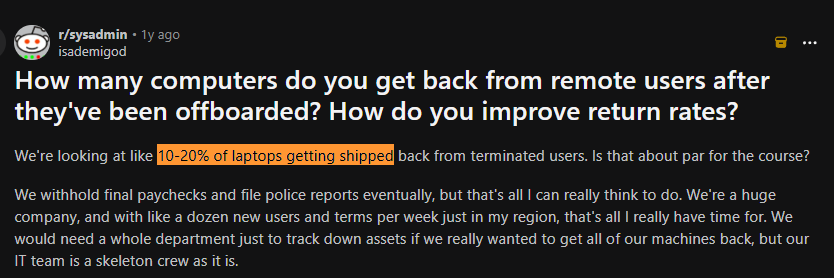
Source: Reddit
How to Avoid
Here’s how you can maximize retrievals:
Partner with Workwize. Being an end-to-end ITAM solution, Workwize automates procurement, deployment, management, retrieval, and even disposal.
Not only can you procure and deliver IT assets to your employees across 100+ locations, but you can also retrieve them safely. Just initiate return, and Workwize will do the heavy lifting.
From sending return packets and tracking the returns, to performing certified data erasures and preparing devices for reassignment. When you can retrieve your assets and reassign some of them, you won’t have to buy as many new devices, saving you money.
Underestimating Security Spend (or Treating It as Optional)
Another mistake organizations make is treating security as an afterthought rather than a priority.
Cyber threats are only going to increase. Ransomware attacks, for instance, are escalating so much that global ransomware damage costs are predicted to exceed $275 billion by 2031.
For perspective, a single serious data breach can cost an organization millions (once you factor in remediation, downtime, legal fees, and reputational damage).
Meanwhile, basic security measures (with the power to prevent a data breach) might cost you a few thousand dollars. It only makes sense to include security spend in your IT budget.
How to Avoid
Here’s how you can start treating security as a priority and not an afterthought:
- Perform a regular risk assessment. This will help you identify your biggest threats and the defenses needed. You can then cost them out and include them intentionally in your budget.
- Plan for security maintenance: Tasks such as renewing certificates, performing regular penetration tests, and updating software to address vulnerabilities often require funding. If you ignore those in the budget, they’ll either not happen or blow your budget unplanned.
- Another common underestimation is staffing for security: You may need a dedicated security engineer or a vCISO engagement. Not budgeting for that can leave your team overburdened and vital tasks undone.
Budgeting Without Real Usage Data (or Relying on Last Year’s Numbers Blindly)
Another pitfall is creating the new budget by simply taking last year’s budget and tweaking it (say, +5% across the board for inflation), without tying it to real usage or today’s operational needs.
This approach often misallocates resources because it doesn’t account for changes in the environment or inefficiencies in the previous budget.
Let’s say you budgeted $50k for a software that hardly anyone ended up using. If you don’t look at those usage metrics, you might end up budgeting it again and wasting money.
How to Avoid
Here’s how you can avoid guesswork:
- Do the homework we discussed in Step 3 of best practices: gather actual usage data.
- Check the trends: how fast is data storage growing (in TB)? What's the average monthly spend on each cloud service? How many tickets does the helpdesk handle (to judge if staffing is adequate)? The more specific, the better.
- Another good practice is scenario modeling. For example, “if we go fully back to office full-time instead of remaining hybrid, how do needs differ?” or “if we add 50 employees, what’s the incremental IT cost?”
That way, you aren’t guessing.
How Workwize Helps IT Teams Budget Better?
A huge portion of your IT budget goes into devices. This includes buying, maintaining, replacing, and recovering them when employees leave.
But without an IT Asset Management (ITAM) solution, you’re essentially budgeting in the dark.
It’s nearly impossible to know which devices are active, underused, due for refresh, or stuck in retrieval. And this lack of visibility often leads to unnecessary purchases, inflated replacement costs, and money wasted on assets you already have but can’t track.
This is where Workwize becomes a real budget-saving advantage.
Workwize is an end-to-end IT Asset Management (ITAM) solution that helps you manage your assets and automates the entire asset lifecycle, from procurement, deployment, and management to retrieval and disposal.
Here’s how Workwize can help:
- Gives Full Spend Visibility: Workwize centralizes all procurement and lifecycle data in one dashboard. This enables IT and finance teams to see how much is being spent, where, and why, eliminating guesswork and surprise costs.
- Helps with Procurement Efficiency: Workwize lets you procure and deliver assets globally from local warehouses. This saves you on international shipping, customs, and delivery delays, while also cutting carbon emissions and improving sustainability metrics.
- Supports Retrievals and Asset Recovery: You can automate laptop and equipment retrievals from offboarded or remote employees. Workwize handles return logistics, tracking, and certified data erasure, helping you recover assets that can be reassigned or resold instead of buying new ones.
- Promotes Sustainability and ESG Goals: Workwize offers secure refurbishment, resale (recover 45% of the value), or recycling options for retired hardware. This reduces e-waste, recovers investment value, and helps meet corporate sustainability targets.
In a nutshell, Workwize is a complete ITAM solution that streamlines your global logistics and also helps you save money at every stage of the asset lifecycle through visibility, reuse, and recovery.
To get an experience of how Workwize works, you can watch this demo video. Or if you want to see Workwize in action, book a demo now.


Establish a single source of truth for every IT asset across the globe.
.png?width=258&height=318&name=g10%20(5).png)
More related resources to help you stop firefighting hardware operations.


Get monthly insights into how other IT leaders are improving their ops.



.png?width=2880&height=1232&name=Group%202147262874%20(1).png)
Stop coordinating
hardware like it's 2012.
.svg)
.png?width=172&height=68&name=apple%20business%20patner%20(1).png)
.svg)
.svg)
.svg)
.svg)