




.svg)
.svg)

.svg)


.svg)




.svg)
.png?width=500&height=424&name=Style-1---V1-(1).png)

.png?width=1230&height=692&name=Vector%20(13).png)
How hard can it be to keep track of and manage your company’s devices?
Ask anyone from your IT team, and you’ll get an idea.
Spoiler alert: it’s a messy affair.
More often than not, your IT team is piecing together asset data from spreadsheets, email threads, and old tickets just to figure out who has what device, and where it is right now.
Behind the scenes, they're struggling to handle procurement orders, coordinate logistics across locations, chase down repair tickets while burning over five hours every single week on manual work that adds zero value.
According to industry reports, 58% of organizations still manage assets this way.
But the real cost goes deeper than wasted time.
Every untracked device is a security vulnerability waiting to happen, from retired hardware with unverified data wipes to missing audit trails that leave compliance gaps wide open.
It's the kind of silent chaos that slowly drains your budget, exposes sensitive data, and keeps your team stuck in constant reactive mode.
So, what’s the way out?
That’s what managed device lifecycle services, or MDLS, are for.
Managed Device Lifecycle Services give organizations an end-to-end, outsourced way to handle every stage of a device's journey, from procurement and configuration to deployment, support, and secure retirement.
It’s how forward-thinking companies are reclaiming their time, tightening security, and scaling IT operations without adding headcount.
In this article, I will break down what MDLS is, how it works and how you can benefit from partnering with an MDLS provider for your organization.
TL;DR:
- Managing the device lifecycle manually is a mess of spreadsheets and wasted time and it leads to security risks, bad employee experiences, and hidden costs.
- Managed device lifecycle services (MDLS) is an outsourced IT service model that manages the entire lifecycle of an organization's technology devices, from procurement and deployment through maintenance, repairs, and secure decommissioning.
- Look for a managed device lifecycle partner that uses modern, automated tools for zero-touch deployment and proactive device health monitoring, not just manual processes.
- A good MDLS provider will have a strong, certified process for retrieving, securely wiping, and either reselling, redeploying, or recycling old hardware to protect your data and recover value.
- The right service frees up your IT team from tedious tasks, lowers your total cost of ownership, strengthens security, and gives employees a better experience from day one.

Managed Device Lifecycle Services (MDLS) are comprehensive, end-to-end outsourcing programs that manage an organization’s IT devices from initial acquisition to end-of-life disposal.
This includes selecting and procuring hardware, configuring and deploying it to users, monitoring and supporting it in daily use, repairing or replacing it when needed, and securely wiping, reselling, or recycling it at end-of-life.
The “managed” in MLDS means there are defined processes, tools, and service levels around each device and this includes
- Standardized procurement and vendor coordination
- Imaging or zero-touch provisioning, with automatic enrollment into MDM
- Baseline configurations like identity, encryption, certificates, and required apps
- Ongoing patching, policy enforcement, and health monitoring
- IT Service desk, remote support, and on-site or depot repair with spares
- Asset records and chain-of-custody updates for every move, add, change, or retirement
- Secure data wipe, reuse, resale, or certified recycling at the end of life
Moreover, they fill the gap between IT asset ownership and day-to-day control, ensuring devices are deployed, maintained, and retrieved efficiently without burdening internal IT teams..
What Benefits Do Managed Lifecycle Services Bring?
Modern teams use more hardware than ever, across more places than ever.
Studies indicate that the typical worker juggles about 2.5 work-connected devices (laptop, phone, tablet). And that number multiplies quickly across departments and offices.
Naturally, keeping track of who has what (and whether it’s secure) gets messy fast.
Managed device lifecycle services exist because companies struggle to track, secure, and manage hundreds of employee devices, especially in remote or global teams. MDLS brings order to that chaos. They standardize how devices are bought, set up, supported, and retired.
Employees get the tools they need without delay, and IT teams reclaim valuable time to focus on high-impact projects.
In practice, these benefits play out in several key ways.
1. Reduced IT workload
MDLS automates repetitive tasks, such as model selection, ordering, zero-touch provisioning, and courier retrieval. That means your help desk isn’t stuck shipping boxes or chasing serial numbers.
In a world where unmanaged devices still slip onto networks, less manual effort also reduces blind spots for IT teams. Automating this process keeps device data current, accurate, and fully visible.
2. Better security and compliance
Over 90% of ransomware incidents have been linked to unmanaged devices, according to Microsoft. And if a breach does happen, the costs are steep: the average breach now costs about $4.4 million globally.
3. Cost control and predictability
MDLS provides you with clear visibility into the total cost of ownership (TCO) for every device, covering purchase price, deployment time, support tickets, parts, warranties, software licenses, downtime, energy usage, resale value, and end-of-life costs.
With this data, finance teams can forecast optimal refresh cycles by device group, optimize depreciation schedules, and set precise cost-per-device-per-month targets. This shifts spending from unpredictable capital expenses to planned operating expenses (through leases or PC as a Service), for cleaner accruals and accurate chargebacks to each cost center.
4. Seamless employee experience
Using MDLS, you can ship employee devices, fully ready and secured, on time, every time.
They also offer fast, predictable support when something breaks, swap stock, cut downtime, which matters even more for distributed teams.
5. Sustainability and responsible disposal
In 2022, the world generated 62 million tonnes of e-waste, yet only 22.3% was formally collected and recycled.
MDLS helps companies address this by managing end-of-life processes responsibly — including certified data wipes, refurbishment, resale, and recycling.
These sustainable practices reduce e-waste, lower environmental impact, and provide verifiable ESG reporting data, reinforcing your company’s commitment to responsible operations.
6. Scalable global operations
Finally, MDLS makes scaling effortless.
Standardized device images, catalogs, SLAs, and logistics partners work consistently across regions from Mumbai to Munich.
As your workforce expands or contracts, you simply adjust the service instead of rebuilding processes from scratch. This consistency reduces risk, accelerates onboarding in new markets, and assures leaders that devices and data are managed uniformly across every location.

How Managed Services Support Each Stage of the Device Life Cycle
Every device goes through a full journey—from purchase to setup, active use, and retirement. Managing that process manually creates gaps and lost visibility.
A Managed Device Lifecycle Management platform brings structure to every stage. It connects procurement, deployment, support, and offboarding in one place, giving you full control and accountability.
Here’s how it supports each stage of the device lifecycle.:
1. Procurement: Sourcing and provisioning the right hardware
Procurement involves sourcing, forecasting hardware needs, negotiating with vendors, and finally ordering hardware.
But in most organizations, it’s one of the most painful and time-consuming parts of the IT workflow.
For a typical IT team, procurement means juggling spreadsheets, vendors, and emails—a cumbersome process ridden with delays, inconsistencies, and hidden costs.
Sometimes, IT teams may order too much stock only to discover too late that the warranties or models had become outdated by the time the devices were actually deployed. Meanwhile, other employees waited days before they could get the equipment.
And even when orders go through, getting competitive pricing and predictable lead times can be an uphill battle.
A managed device lifecycle service solves many of these challenges.
Here’s how:
The perks are that they’re reliable, give you solid support, and direct warranty integration.
The downside is that they aren’t very flexible since these services are designed specifically for their own devices.
- Many mid-size companies rely on value-added resellers (VARs) or IT distributors that aggregate multiple brands. Partnering with these gives you access to bulk pricing, localized delivery, and limited configuration support.
- A newer model involves technology-agnostic lifecycle platforms, such as Workwize, which centralize procurement across multiple brands, vendors and regions.
The main advantage of using this option is the flexibility. You’re not tied to a manufacturer. So you can source devices from multiple brands. Moreover, you get a centralized portal to manage all devices from one place.
Regardless of the provider model, this industry integration translates to better pricing than you could likely achieve on your own and, more importantly, better access to inventory.
However, the value extends far beyond cost savings.
For instance, let’s suppose you tie up with Workwize as your managed device lifecycle partner.
Here’s how it sets you up for effortless procurement.
- Buy, lease, or rent hardware through the Workwize platform, with options from local vendors worldwide.
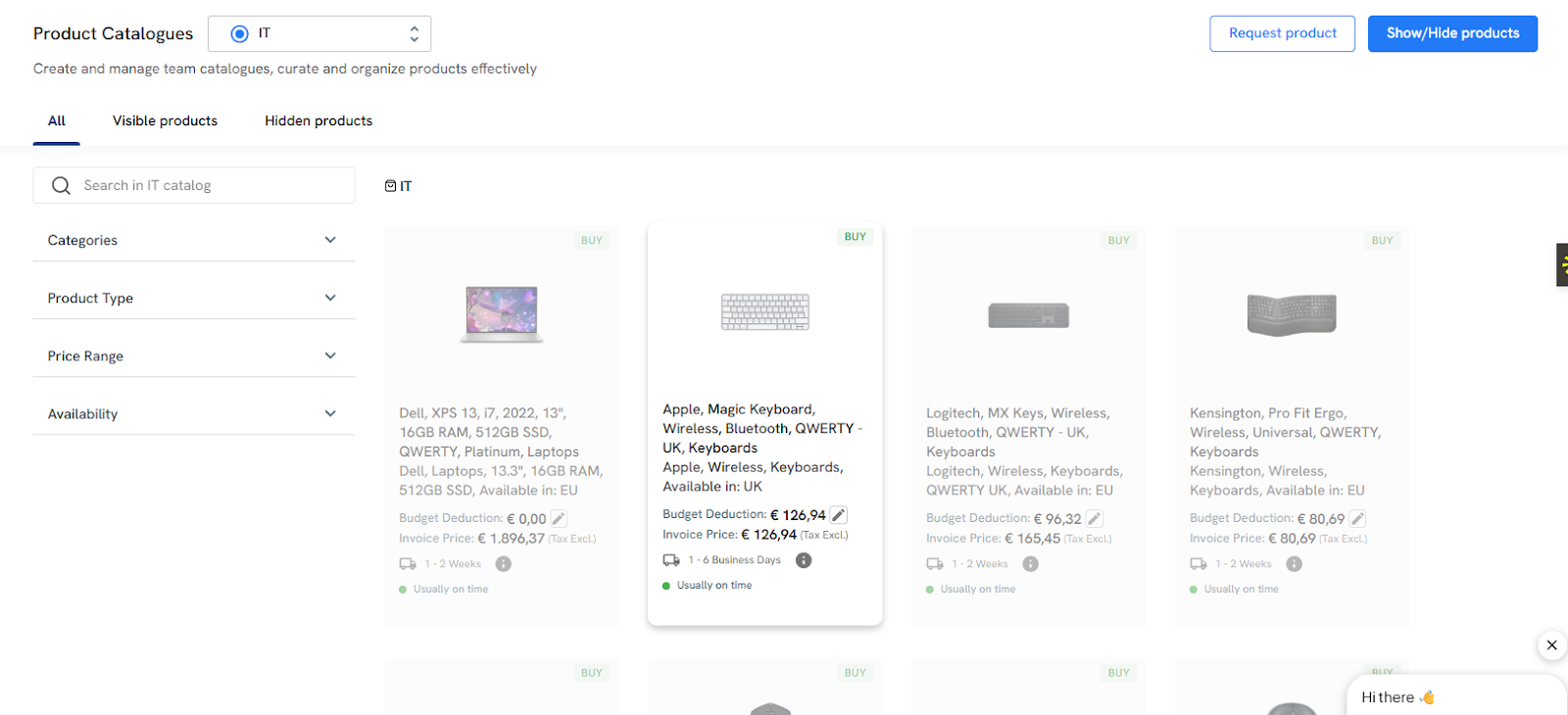
- Receive IT devices and peripherals anywhere globally, including remote employees, headquarters, regional offices, or Workwize warehouses, within 5 to 7 business days.
- Maintain complete visibility of all assets with real-time updates, track-and-trace links, and accurate location reporting.
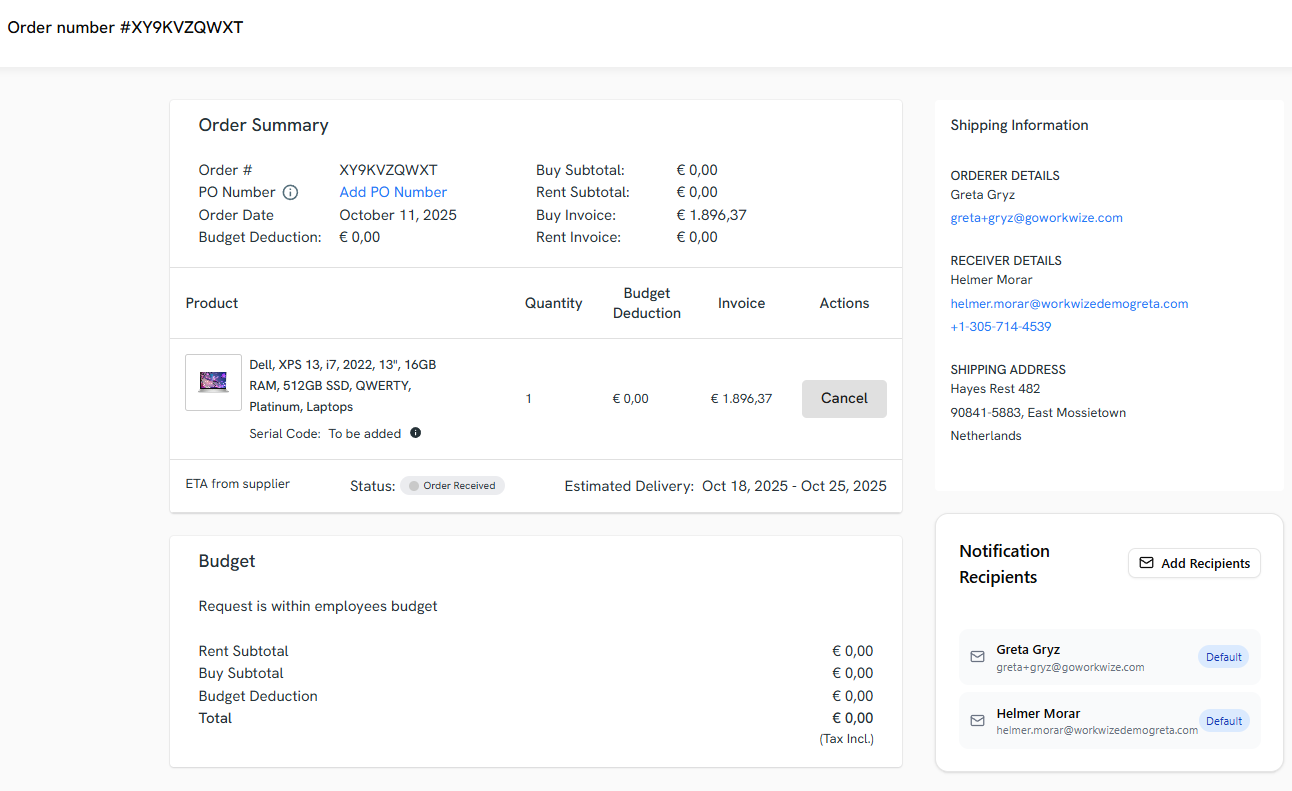
Note: Opt for regional order fulfillment where possible, as it massively cuts both customs delays and your overall carbon footprint.

2. Deployment: Ensuring a smooth onboarding experience for employees
Like procurement, the traditional deployment process is far from ideal.
It involves manually unboxing devices, spending hours imaging them, installing the right software, and then shipping them to the employee. This is slow, prone to errors, and doesn't scale, especially with a remote or hybrid workforce.
A managed device lifecycle service coupled with an MDM solution changes this process completely by using modern techniques like zero-touch provisioning. This means you can ship a perfectly configured laptop directly to your new hire in less time.
Once your employee powers on the device for the first time, it automatically connects to your organization’s MDM, installs the correct applications, security policies, and settings without requiring your IT intervention.
Suppose you’re using Workwize for deployment.
The platform lets you automate deployment by first setting up standardized deployment packages for different teams. For instance, you may decide that sales teams get devices shipped with sales software installed while IT teams get access to a different set of tools.
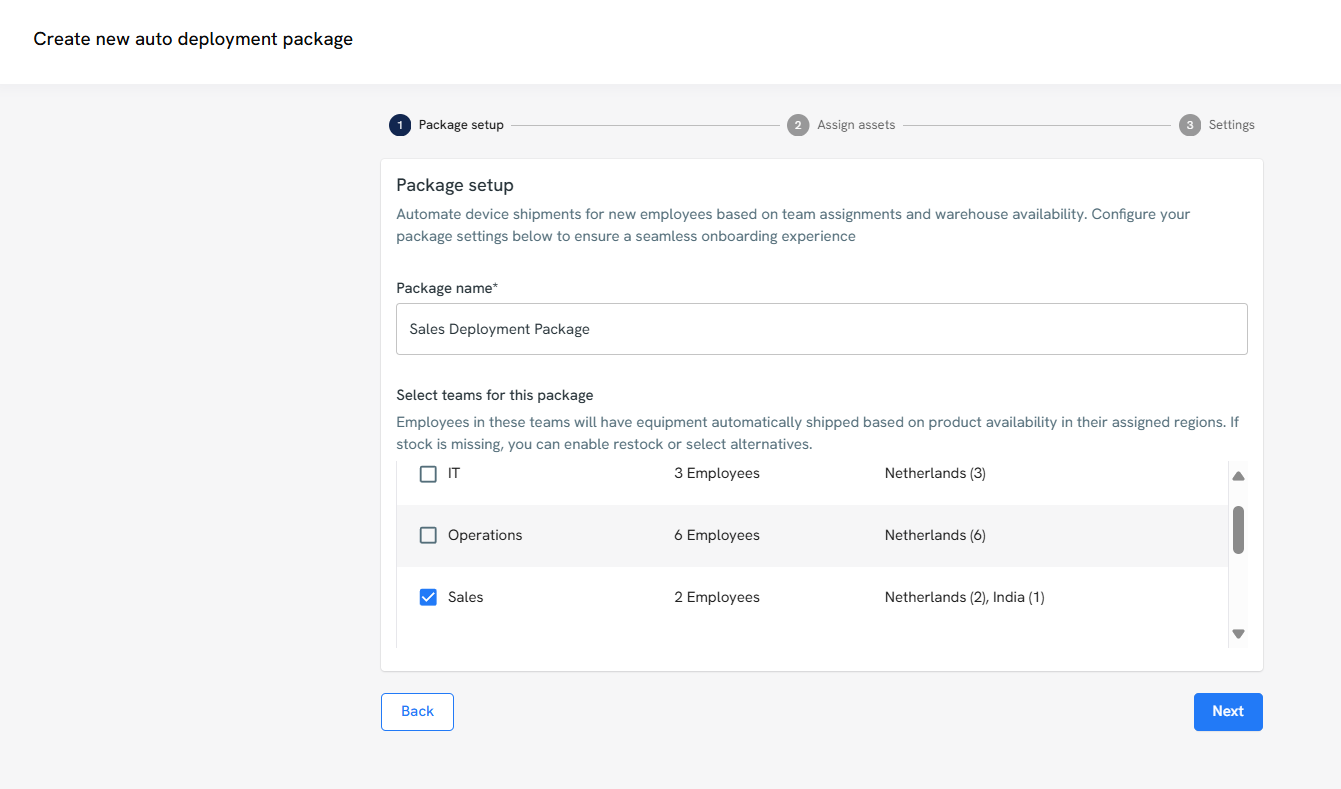
Once a new hire is added to your HR platform, Workwize can trigger an automated workflow to provide them with devices pre-configured according to their role’s requirements.
When they sign in to their new machine, the system automatically downloads the required software and permissions, allowing them to use their devices immediately.
You may alternatively partner with OEMs or VARs for shipping fully deployed devices, but Workwize has an edge over most of them.
While OEMs and VARs can handle procurement and deployment, Workwize combines the physical logistics of shipping and managing devices with a SaaS platform. It gives you control and visibility into all your hardware lifecycle processes.
This approach gives your IT team visibility and control across all devices, brands, and locations in a way that traditional vendor programs cannot.
|
Tip: The best deployment workflows don’t always need to rely on a single model; they may use a combination of manufacturer-led deployment, resellers, or lifecycle management platforms to achieve speed, control, and scalability. For instance, a company might use Dell’s factory deployment for North America, reselling partners in Asia for faster fulfillment, and zero-touch enrollment via Workwize for all remote hires. |
3. Management: Monitoring, support, and maintenance at scale
The management stage is the longest and most demanding part of the device lifecycle. It’s the daily grind of keeping your entire fleet of devices healthy, secure, and running smoothly.
Every month, new vulnerabilities are discovered, which means you have to test and deploy patches across thousands of machines. Additionally, devices often break down due to wear and tear.
Your employees' equipment requires regular servicing. And this reactive, firefighting mode can be exhausting.
Once again, a managed device lifecycle service changes this process from reactive to proactive.
With the right partner, you can spot issues like failing drives or low memory before they affect users. The system can even trigger automated fixes or replacements, keeping your workforce productive without waiting for manual intervention.
Some modern MDLS providers even bundle offerings like:
- AI-driven telemetry and predictive alerts that flag issues before users feel them (disk health, app crashes, battery wear)
- Automated self-healing and scripted remediation to push fixes, run scripts, and auto-open cases when triggers hit
- Remote monitoring and management (RMM) as a service to centrally manage devices with RMM tools, not just ad-hoc support
- Policy-driven BIOS, firmware and driver updates that standardize and automate patching beyond the OS layer
- Self-dispatch for parts (when you want speed without a phone queue): authorized admins can order warranty replacements directly through TechDirect.
Some even offer a dedicated help desk, which frees your internal team from the constant barrage of tier-1 support calls.
If you're looking for recommendations, we’ll again vouch for Workwize.
Workwize integrates with your MDM solution to perform many of the tasks listed above. For instance, in addition to supporting device repairs, it also offers employees a dedicated self-service portal for quick help with device issues.
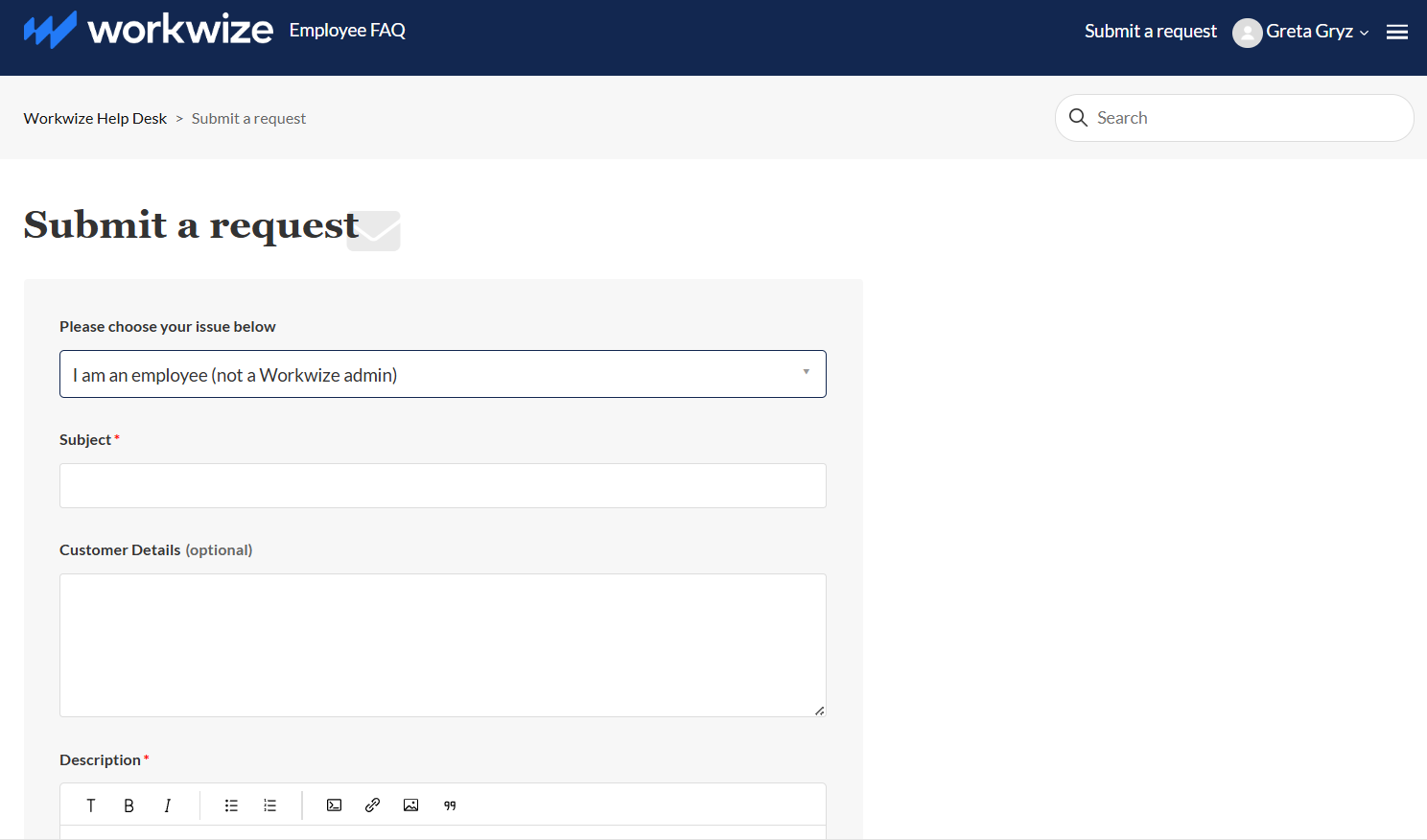
Using Workwize, you can also:
- Monitor device location, status, and ownership across all employees and locations to maintain full visibility.
- Have visibility into all your hardware, including brand, model, user assignment, and lifecycle stage.
- Apply and update security configurations, access controls, and compliance settings remotely on all devices via MDM integration.
- Gather performance and usage data to optimize hardware utilization, plan refresh cycles, and reduce downtime.
4. Upgrades and refresh cycles: Keeping devices secure and current
Even with the best management practices in place, every piece of hardware eventually reaches the finish line.
After approximately three to four years (or sometimes more, depending on the asset), performance begins to degrade, batteries lose their charge-holding capacity, and warranties expire.
More critically, older devices can become a security liability as they cannot support the latest operating systems or critical security features.
And when a device reaches the end of its life, you’re responsible for ensuring that all sensitive company data is securely wiped and the hardware is disposed of in an environmentally responsible manner.
A managed device lifecycle service proves invaluable, saving you time and effort finding ITAD vendors or recycling/refurbishment partners.
These services eliminate the burden of sourcing IT asset disposition (ITAD) vendors or managing recycling partners manually.
They help you build a proactive and predictable hardware refresh strategy based on device age, warranty status, and performance metrics. A full-service MDLS provider handles the entire end-to-end logistics, from ordering and provisioning the new device to an easy data migration for the employee.
Moreover, they manage reverse logistics, including the:
- Secure retrieval of old devices,
- Certified data erasure to protect your company from breaches, and
- Refurbishment, resale, or recycling of devices in line with environmental regulations.
Workwize delivers all of this with a single, unified platform. This means you don’t need to switch between different tools to handle this process.
Again, while OEMs and VARs can support basic refresh or disposal programs, their offerings are often limited to their own devices and regional logistics. They often lack unified visibility across multiple brands, integrated data for cost and lifecycle analysis, or full management of reverse logistics.
Workwize, by contrast, provides an end-to-end SaaS-powered solution, including:
- Automating secure data erasure and orchestrating refurbishment, resale, or recycling
- Redeploying used devices to newer employees after data wipes and refurbishment
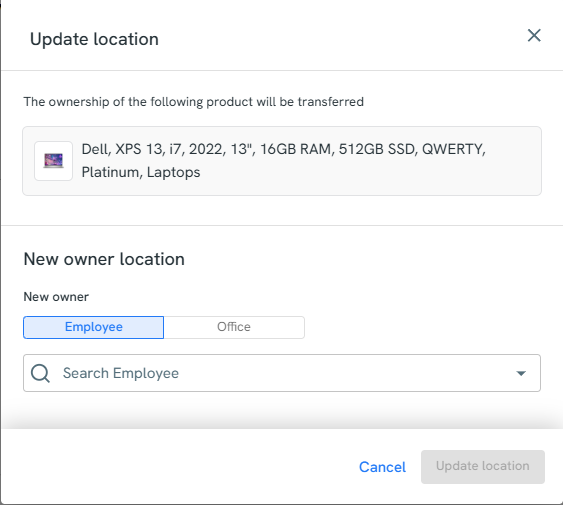
- Providing a single, unified interface with real-time visibility across all hardware
- Enabling proactive planning for refresh cycles, reducing surprises, and maintaining compliance
- Disposing of end of life equipment with certified ITAD partners, securely and sustainably
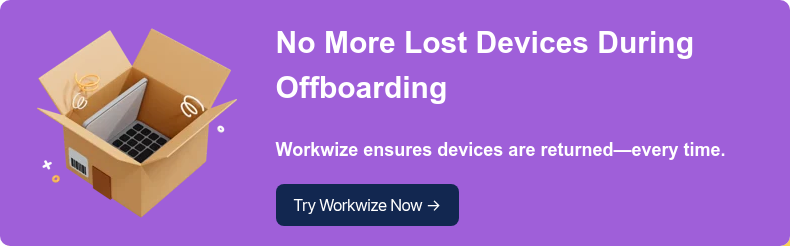
5. Retrieval: Reclaiming hardware from offboarded or remote employees
Imagine it’s an employee’s last day, and your IT team must retrieve their devices quickly. This is a task that’s far more complex in a remote or hybrid setup, where desks are replaced by shipping labels, tracking numbers, and silent inboxes.
According to Deloitte, nearly half (49%) of IT and HR teams struggle to retrieve equipment from remote workers. This struggle has a real financial impact.
Over a quarter of enterprises lose more than 10% of their technology assets during offboarding.
The result can be a massive and costly blind spot in your asset management process.
An MDLS provider makes the retrieval process simple and effective, no matter the reason. They ensure that retrievals — whether due to employee exits or hardware refreshes — happen securely, quickly, and with full visibility.
For example, Workwize offers a prepaid, custom-fitted return box sent directly to the employee with clear instructions. Workwize also handles employee communication, including calls and reminder emails.
The employee is only supposed to pack the device and drop it off. Workwize handles the tracking and follow-up.
Again, you can monitor this entire process from one central platform with constant updates.
Moreover, you can:
- Automate the entire offboarding workflow by integrating with your HR systems to initiate the retrieval process, assign tasks, and send notifications.
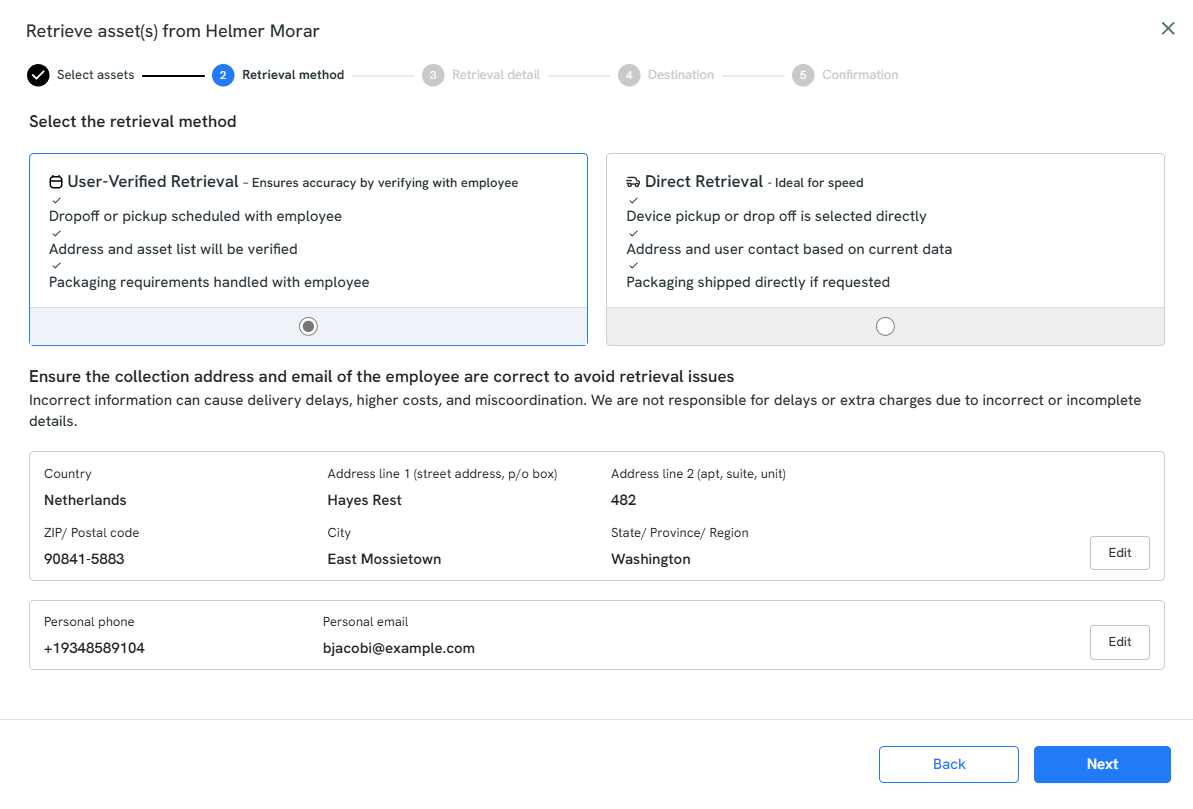
- Track the real-time status of every return, seeing whether the kit has been sent, if it's in transit, or when it has been received at the depot.
- Maintain a complete chain of custody for a clear, unbroken record of the device’s journey from the employee back to your inventory, which is needed for any security audit.
- Quickly flag any retrievals that are delayed or at risk, so your team can focus on the exceptions.
Instead of just hoping devices come back, you get a closed-loop process that protects your assets and your data from start to finish. You can learn more about Workwize’s asset retrieval service here.
6. Disposition: Certified reuse, recycling, or resale with full compliance
Finally, after you get a device back, what you do with it next is arguably more important.
Each one of those devices is a potential data breach, and the average cost of a breach is a staggering $4.45 million. A large number of these incidents stem from assets that were supposedly retired.
According to a Verizon report, over 10% of all data breaches are linked to lost or improperly disposed devices. Simply deleting files or performing a factory reset isn't enough.
One study of used drives bought online found that 75% of them still contained recoverable data. This is how sensitive information escapes into the wild. On top of the data risk, you also have to navigate strict environmental regulations for disposing of e-waste.
An MDLS provider takes this burden off by facilitating a secure, compliant, and value-driven end-of-life process.
If you’re using Workwize, here’s what typically happens behind the scenes:
First, every device undergoes certified data erasure using standards like NIST 800-88, making the data forensically unrecoverable. We also help with refurbishment, redeployment, and getting you quotes on the best resale value.
If the hardware is completely obsolete, it's responsibly disposed of in accordance with environmental laws. You can also request a certificate of data destruction,
Moreover, for every device that leaves your control, you have a clear audit trail. The platform provides you with complete visibility into your device’s whereabouts at each step of the process.
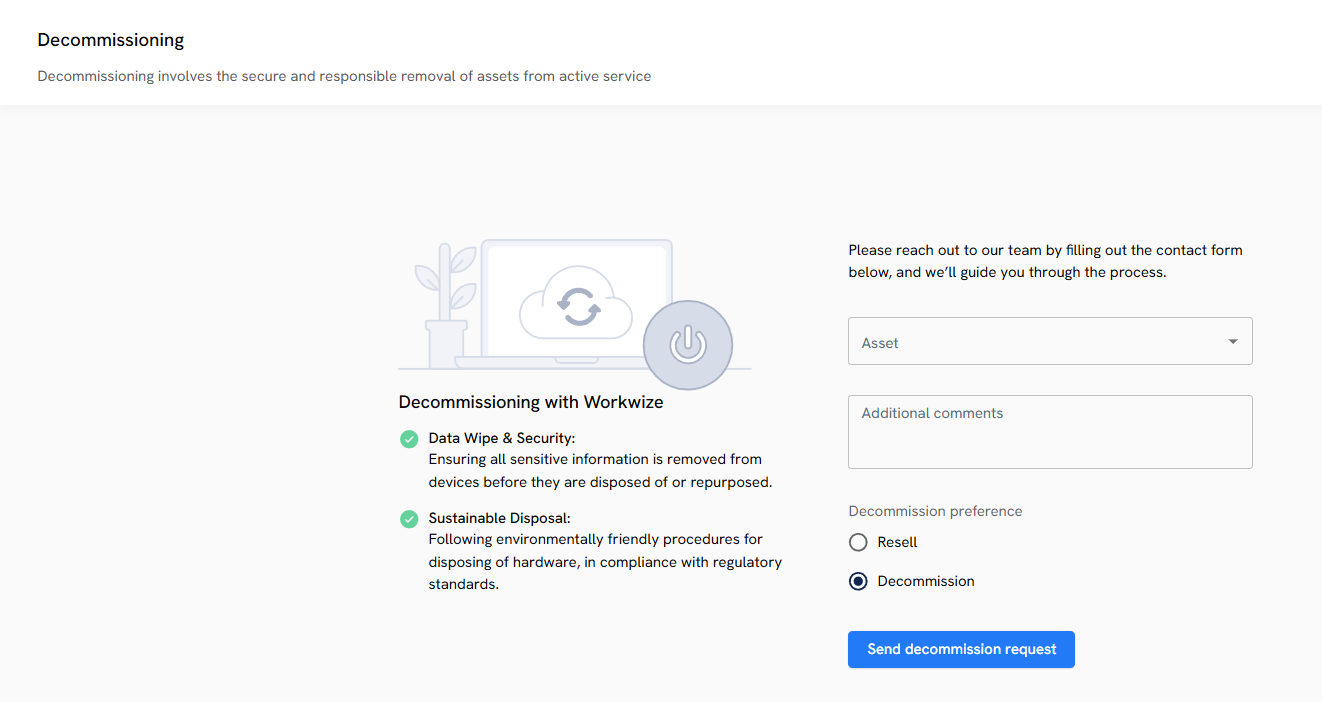
- You get a digital certificate for every single device that has been wiped or destroyed.
- You can track every step of the disposition process, from the moment a device is marked for retirement to its final sale or recycling.
- The platform shows you exactly how much value was recovered from resold assets.
What to Look for in a Managed Device Life Cycle Partner
Now that you’re clear about how MDLS helps your IT team at each step of the device lifecycle, it’s time to address another critical concern.
How do you choose the best managed device lifecycle service for your organization?
Choosing a partner to manage your entire device lifecycle is more than just comparing prices. That’s because device lifecycle management affects security, compliance, and employee experience, and not just your budget.
The market for Managed Device Life Cycle Services (MDLS) is diverse, with providers ranging from device manufacturers to value-added resellers and large-scale outsourcers. You have to know how to select the right one for your specific needs.
Define Your Scope
Before you even look at a vendor's brochure, the most important step is to define your own goals. Gartner’s recommendation is to "align goals with vendor offerings" by establishing a clear scope and expectations from the outset.
You must clearly delineate which activities you will retain in-house and which you plan to outsource. You need to buy only the services you actually need and avoid paying for bundled features that add cost but no value to your organization.
Look for Comprehensive, End-To-End Service
Once you know what you need, you can evaluate a partner's core competencies.
According to Gartner, any credible MDLS provider must deliver a set of mandatory features that cover the entire lifecycle. This includes configuration and deployment services, management and warranty fulfillment (covering repairs and accidental damage), and secure end-of-life services like certified data wiping and asset disposal.
A key advantage to look for is the ability to get both hardware and services under a single contract, which simplifies management and improves accountability.
Look for Modern, Automated Management
Beyond the fundamentals, the best partners differentiate themselves with modern, automated approaches. It is nice to partner with providers that provide services through Digital Employee Experience (DEX) and Unified Endpoint Management (UEM) tools rather than relying on outdated manual processes.
These advanced capabilities are key to proactively identifying issues, reducing IT overhead, and ultimately improving your employees' productivity and satisfaction. Look for offerings like persona analysis to align devices with workstyles and support for modern deployment methods like Autopilot pre-provisioning.
Prioritize Sustainability and Circularity
Finally, a forward-thinking partner must have a strong circularity and sustainability program. Circularity services have become a vital offering for top-tier MDLS vendors.
A mature partner should offer robust options for asset recovery, refurbishment, and redeployment to maximize the life and value of your hardware. Beyond environmental responsibility, it's a core part of cost optimization and ensuring compliance with evolving sustainability regulations.
Workwize: A Managed Device Lifecycle Management Service For Modern IT Teams
Managing devices across a hybrid or global workforce is tougher than ever.
You need to track every laptop, stay on top of security, handle repairs, and plan refreshes, without burning out your IT team.
That’s where a Managed Device Lifecycle Service (MDLS) helps. It streamlines the entire journey from purchase to retirement so you can move from constant troubleshooting to proactive management.
With the right MDLS, you can predict issues before they cause downtime, automate updates and patching, and stay compliant without the need for endless manual work.
Workwize is an ideal MDLS partner that combines global logistics with a SaaS platform that lets you buy, manage, repair, and retire devices across any brand or region—all from one dashboard.
You get total visibility, automation, and control, making Workwize the smarter, simpler way to run modern IT operations.
Schedule a demo with Workwize now.



Establish a single source of truth for every IT asset across the globe.
.png?width=258&height=318&name=g10%20(5).png)
More related resources to help you stop firefighting hardware operations.

Get monthly insights into how other IT leaders are improving their ops.



.png?width=2880&height=1232&name=Group%202147262874%20(1).png)
Stop coordinating
hardware like it's 2012.
.svg)
.png?width=172&height=68&name=apple%20business%20patner%20(1).png)
.svg)
.svg)
.svg)
.svg)