




.svg)
.svg)

.svg)


.svg)





.svg)
.png?width=500&height=424&name=Style-1---V1-(1).png)

.png?width=1230&height=692&name=Vector%20(13).png)
Employee offboarding is often a messy process. It demands a lot of coordination between different departments, including HR, IT, Finance and other teams.
A single offboarding can involve multiple moving parts:
- Cutting off employees' access to company accounts, apps, and data
- Coordinating equipment pickups and returns
- Handling exit interviews, last day activities, knowledge transfer, final payroll steps and much more
When any of these steps falls through the cracks, the risks escalate quickly.
This can include something minor, like a departing employee leaving with a poor impression of your organization. Or something far more severe, like data exposure, security breaches, compliance issues, or unreturned assets that cost real money.
Thankfully, there are several platforms to help you make the tough offboarding process smooth and foolproof.
In this article, I’ve hand-picked employee offboarding tools that help you with different aspects of managing employee exits.
Let's see what we've picked for you.
TL:DR
- Offboarding is a set of linked flows that start in HR, fan out across IT and security, and end with hardware actually back in your hands
- As you read on, you’ll see how different tools across different categories and use-cases cover different chunks of that process
- Okta acts as the main power switch for access, Stitchflow fills the long tail of non-SSO apps, and Trelica turns messy follow-ups like calendar handover or file ownership changes into repeatable workflows
- Deel IT and Hello Retriever show up on the physical side of offboarding. They handle global collections, storage, certified wiping and redeployment so you lose fewer laptops and get more value from the ones you already own
- The big takeaway is that good offboarding comes from a small stack of tools that share data, start from HR as the source of truth, and automate as much as they sensibly can while still keeping room for human judgment.

Asset and Equipment Retrieval Tools
Instead of the usual mess of courier pickups and email threads, asset retrieval tools give you an inventory of devices tied to people and locations.
That alone takes a lot of stress out of offboarding, because you start with clarity.
Asset retrieval tools will also send the first nudges and sort out labels, pickups, or couriers before anyone even packs a device. From there, they also handle the shipping, tracking, and status updates until the device is checked in, wiped, and ready for the next phase.
Let's see how the tools below make way for a much smoother handoff into your offboarding and redeployment process.
1. Workwize
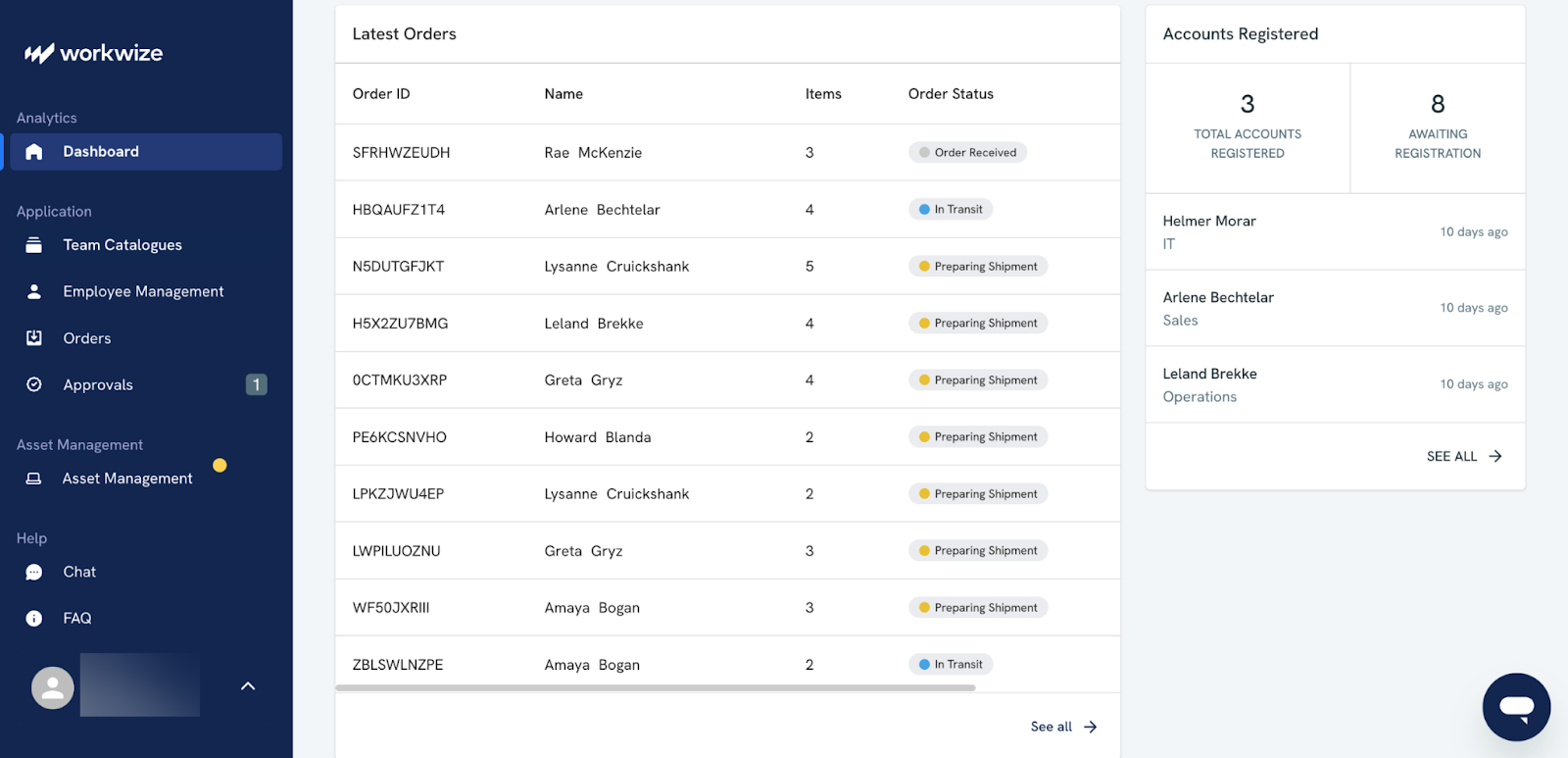
Workwize is an IT asset management tool that helps global teams manage IT equipment in over 130+ countries. It’s designed to support the full lifecycle of your hardware, from procurement all the way to disposal.
Since we’re talking about onboarding tools, I’ll show you exactly how Workwize helps with offboarding for employees anywhere across the globe.
Workwize offers two powerful capabilities to streamline offboarding:
- Retrieve their work laptops
- Wipe, redeploy, recycle, or securely destroy them if they’ve reached the end of life.
As someone’s who has spent more time with theWorkwize platform, let me show you how the, product supports offboarding:
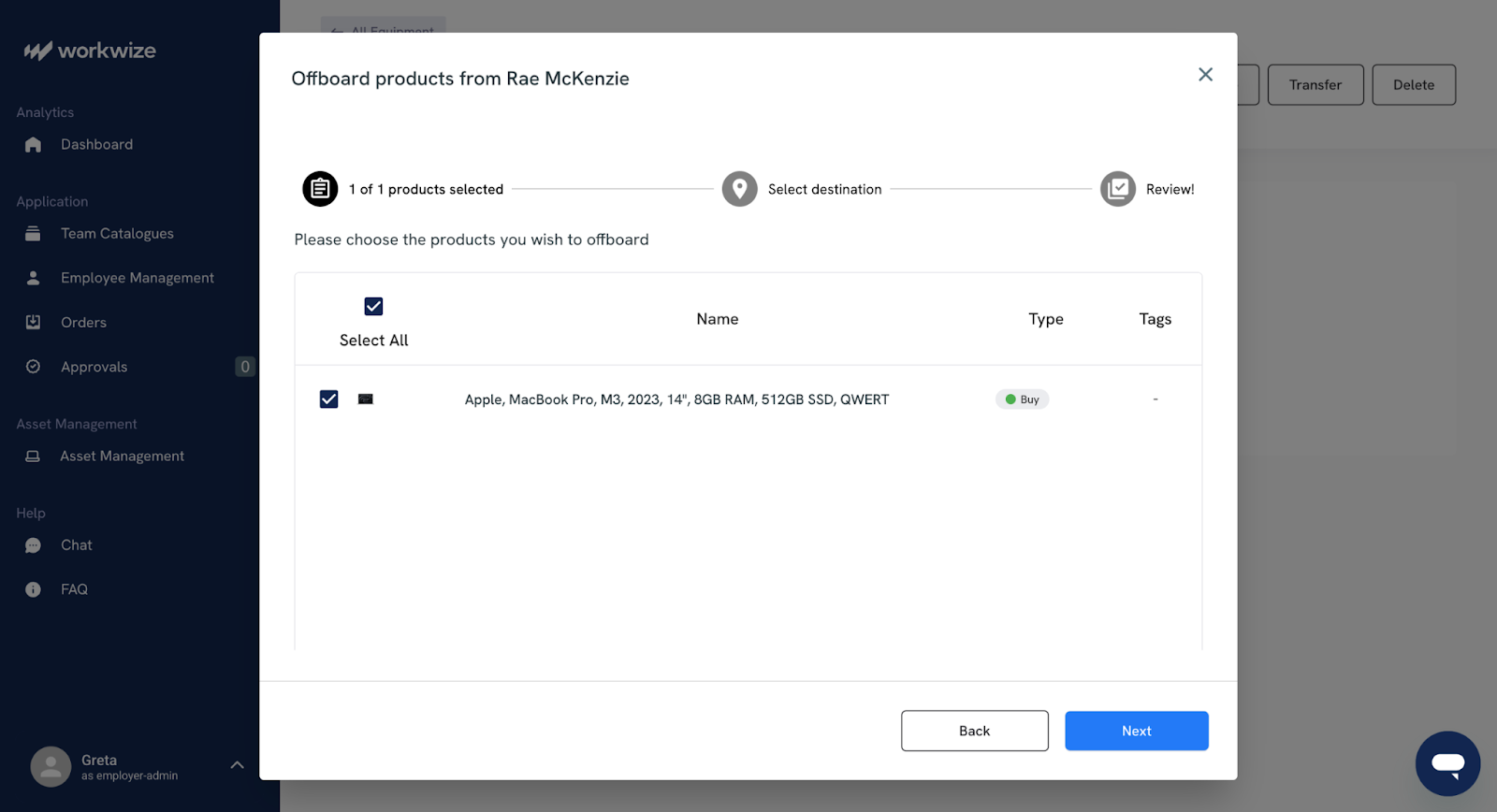
- HR triggers employee offboarding from HRIS or manually. Workwize integrates directly with it and can automatically generate a retrieval ticket for the equipment to be picked up on the employee’s last working day.
- Workwize chooses the most reliable local courier or your preferred logistics partner for that region.
- The departing employee receives email or SMS instructions with a pickup window and a one-click confirmation.
- Tracking updates flows back into Workwizes so you can always see the retrieval progress without sending reminders.
- You can have the device delivered to your office, stored in a Workwize warehouse, and have it reassigned to another employee.
Simple, isn’t it? What I really appreciate is how little I need to manage myself. Workwize handles courier selection, sends a simple pickup link to the employee, and keeps the entire return moving without any nudging. Moreover, it keeps everything visible through the same portal you use to manage your IT equipment.
What happens next is where most teams end up with gaps, but Workwize makes it just as structured as the retrieval. The platform applies the disposition rules you’ve set:
- Wipe and redeploy if the device is still in good shape,
- Route it to certified recycling if it’s too old, or
- Send it for documented destruction if required.
Workwize partners with sustainable ITAD vendors for IT asset disposition, with a proof of destruction available.
Compared to some other tools in this category, such as Deel IT, Workwize is designed mainly for mid-sized to enterprise teams.
ITALM is Workwize’s forte, and it’s perfect for you if you’ve a global team with several onboarding and offboarding activities every month.
I personally love Workwize’s UI. It’s clean, intuitive, and genuinely easy to navigate, even for someone without a technical background .Yet it offers everything an IT admin needs to retrieve and secure your organization’s expensive tech assets during offboarding.
2. Deel IT
Deel is a global HR and payroll platform that helps companies hire, pay, and manage employees and contractors globally.
Deel IT is their IT asset and access management solution built into the broader Deel platform. It lets you procure, deploy, track, and retrieve employee devices.
Because it syncs directly with the employee records already stored in Deel, that information is used to automate tasks such as laptop provisioning, access setup, and secure offboarding.
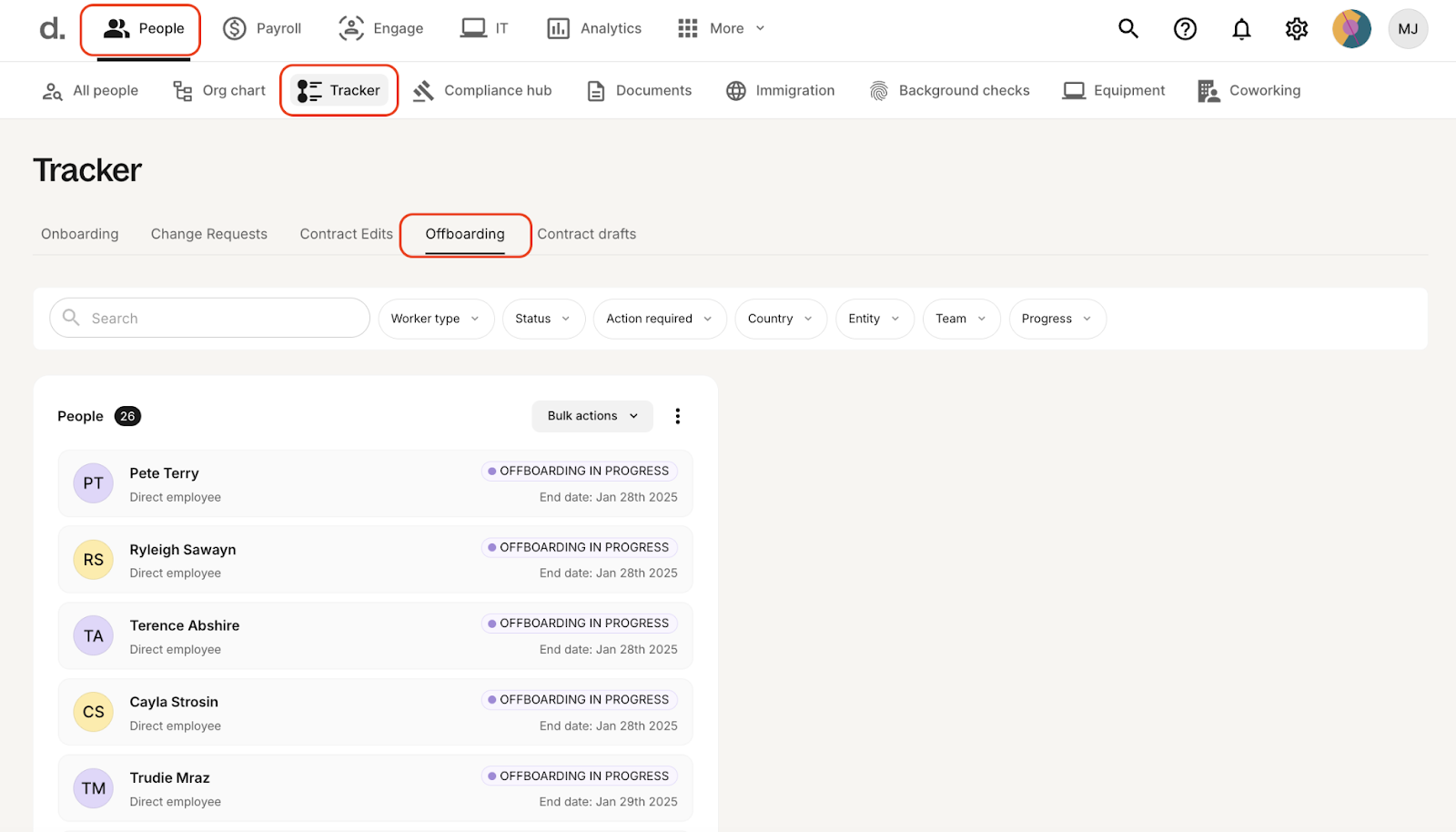
What makes Deel IT stand out is its merging of employee management and payroll functions (HR) with asset lifecycle management, something that only a few others do. This singular USP, in my opinion, makes Deel IT an attractive pick for companies working with global teams.
The best part is the interactive demo available on their website, which you can play around with to get a sense of their interface, which is easy to use and very logically set up.
When you offboard a worker, you can confirm the person’s non-work email, phone number and current address, and then decide when communications and collections should start.
Deel then reaches out directly to the employee with a short collection survey, confirms their location, checks whether they have packaging, and lets them choose a collection window that actually works for them.
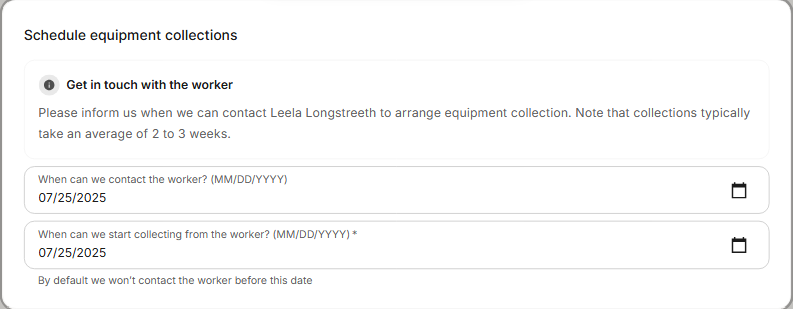
In my experience, this kind of upfront clarity makes the rest of the offboarding process much smoother.
Moreover, on the equipment side of things, you can make decisions about each asset instead of just marking it returned.
For example, there’s an option to sell it for cash, store it for reuse in a Deel warehouse, store it at your own location, reassign it to another worker, send it back to Deel if it’s a rental, or leave it with the worker in specific cases. 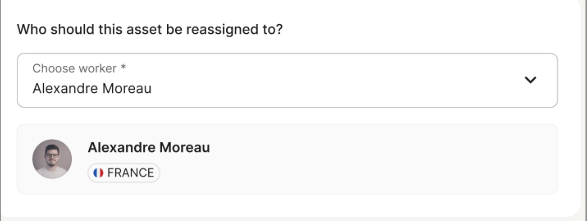
For a classic retrieval, employees get prepaid return labels and multiple return options:
- Courier pickup from the employee’s address
- Local drop-off points or designated return hubs that accept the prepaid box and label
Another thing that makes Deel IT a strong employee offboarding tool is its support for 130 countries. Deel handles customs paperwork and export controls that usually consume IT time and patience.
Deel IT also provides end-of-life services, such as device recycling, data wiping, and certified destruction.
However, there are also trade-offs I came across when talking to some Deel IT users and browsing through online reviews. One of them is high costs. An IT manager I spoke to said that Deel IT could prove expensive, and the pricing isn’t transparent.
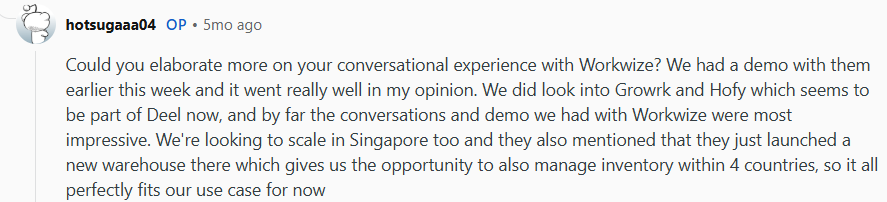
Overall, Deel IT makes sense for anyone looking for one platform to hire, pay, and equip global teams.
Unlike other platforms in the same space, offboarding in Deel is different because it lives inside Deel’s broader ecosystem, so the same place you run global payroll and HR onboarding is where you manage devices and offboarding, too. However, for very small or local needs, I would probably look at something lighter.
Deel best features
- Device lifecycle management: Deel IT manages the full device journey, so when someone leaves, you can mark them as a leaver, reclaim their device and know that storage, repairs or disposal are handled in one place
- Global retrieval and logistics baked in: Deel IT is built for distributed teams, so it handles shipping, customs and local logistics for equipment returns from almost any country
- Automated offboarding triggers from HR events: With the Automation Builder, you can link HR changes like termination dates directly to device actions
Ratings and reviews
3. Hello Retriever
Hello Retriever sits almost at the opposite end of the spectrum from Deel IT. Instead of a full-blown IT lifecycle management platform, it focuses only on getting laptops and monitors back from remote employees without constant nagging from your side.
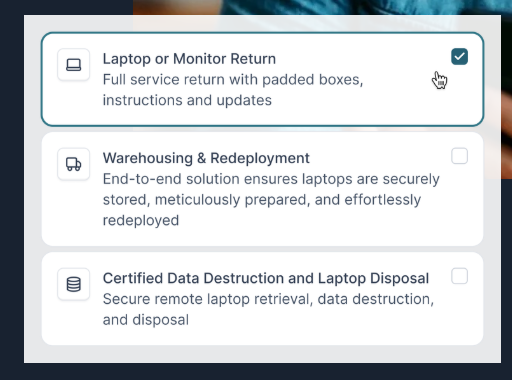
What makes it unique is how little you need to set up before it starts delivering value.
Here’s how retrievals happen here:
- You log into the Retriever portal, start a new return, and give them two addresses: where the employee is and where the device should end up.
- Retriever ships a padded return kit to the employee, usually within one business day. The kit includes a sturdy laptop-sized or monitor-sized box, all the packing materials and a prepaid return label.
- Once the kit is in motion, Retriever emails the person when the box ships, when it is out for delivery and when it arrives. If the device still does not move back, they send friendly reminders.
- The employee packs the device, seals the box with the tape from the kit and drops it at a nearby UPS, FedEx or USPS location, depending on the route.
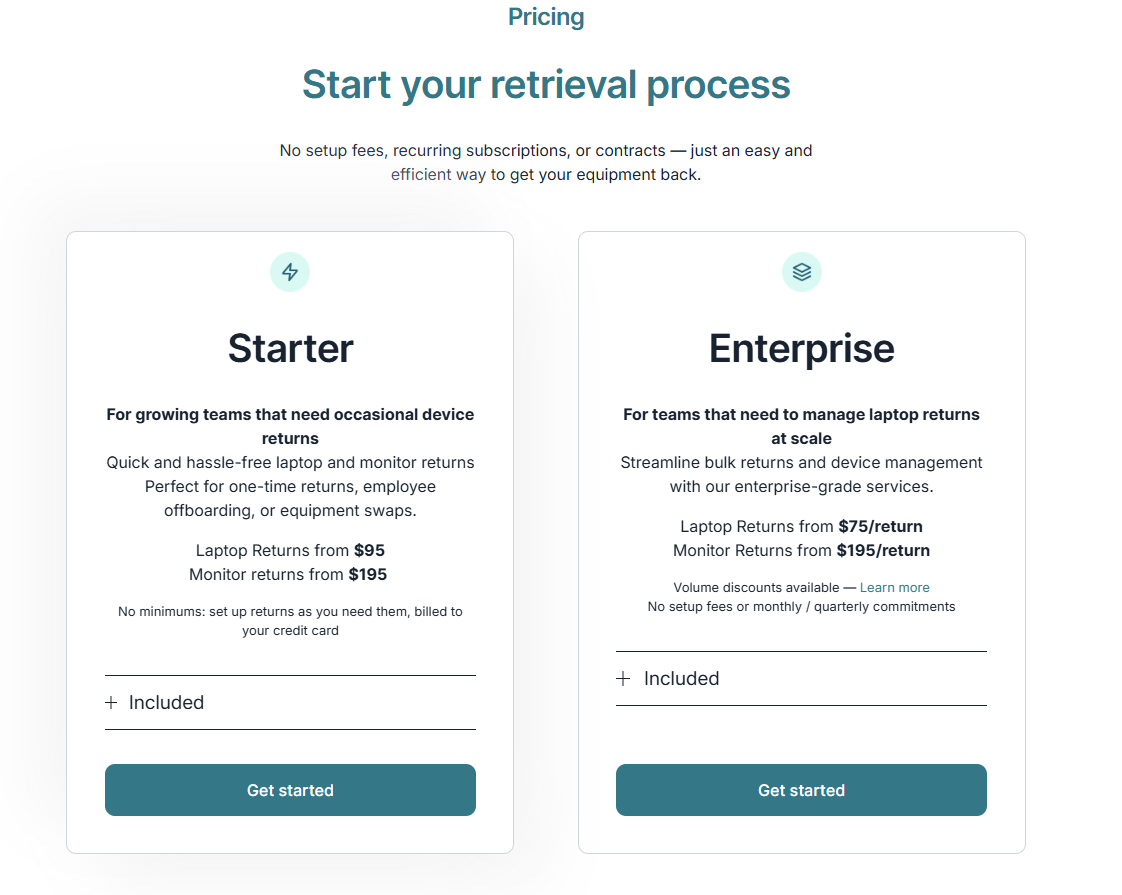
On your side, you can watch the journey end to end. If you are on the enterprise plan, you get a dashboard that shows when the box ships, when it reaches the employee, when the laptop starts its return trip and when it would land at your address. On simpler pay-as-you-go plans, you still get that visibility through tracking emails.
I’ve talked to some folks who used Hello Retriever, and all of them had nice things to say about the platform, particularly the remarkably responsive support team and the fact that it cuts down so much back-and-forth between employers and employees.
The few reviews I saw on G2 were also similar.

Under the hood, Hello Retriever has grown into more than a simple retrieval service.
Returned laptops can be routed straight to their facility. There the team runs secure, certified data destruction that follows standards like NIST 800-88 and DoD 5220.22 M. They also check the device, clean and repair it, if needed, and can reprovision the OS to your specs.
This gives you an advantage. Instead of shipping everything back to your office, you can park devices in their warehouse. When you are onboarding a new hire, you can trigger a redeployment so a ready-to-use laptop ships directly to that person.
This makes Hello Retriever a quiet onboarding helper as well as an offboarding tool.
One more thing I like about Hello Retriever is that it leans on transparent flat rates with no setup fees, contracts or recurring platform charges. You pay per laptop or monitor return, with entry-level pricing publicly listed and volume discounts for larger volumes.
That is one of the biggest reasons why smaller teams would prefer this over a solution like Allwhere or Deel.
Users I talked to seemed to love the fact that finance can see the unit cost clearly instead of decoding a platform invoice.
The downside? While Retriever does a great job with laptops and monitors, mostly across the US, Canada, the UK and a growing list of regions, it does not aim to become a universal IT asset manager.
If you want random peripherals or complex multi-device kits across many emerging markets, you will probably need complementary processes or a broader platform such as Workwize or another lifecycle partner. Reviews on G2 also echo this.

And because Retriever does not enforce hard time limits on returns, a stubborn or unresponsive employee can still slow down the process, even though the reminder workflows clearly try to reduce that risk.
If your priority is simple and predictable retrieval for remote laptops, without buying into a large IT stack, Hello Retriever is hard to beat.
Hello Retriever best features
- Hassle free laptop return kits: Retriever ships padded boxes, prepaid labels and simple instructions to departing employees to let employees return gear with minimal friction
- End-to-end tracking and reminders: The platform emails employees, sends reminders and gives you a dashboard for stage-by-stage tracking
- Secure wipe, storage and redeployment: Retriever is set up for secure data erasure, warehousing and redeploying or recycling devices
Ratings and reviews
- G2: 4.9/5 (4 reviews)
- Capterra: N/A
Identity and Access Management Platforms
Identity and Access Management (IAM) tools control user identities and permissions across all company systems. They help with offboarding by instantly revoking access to email, apps, VPNs, and sensitive data the moment an employee leaves.
This prevents lingering accounts, reduces security risk, and ensures every offboarding follows a consistent, auditable process.
Here are our picks for identity and access-management tools you should consider.
4. Okta
Okta is an IAM platform that lets you control who can sign in to your company’s apps, how they sign in, and what they can access.
Okta usually comes up first when people talk about automated offboarding. But I like to start by drawing a clear line around what Okta actually solves and what it does not touch.
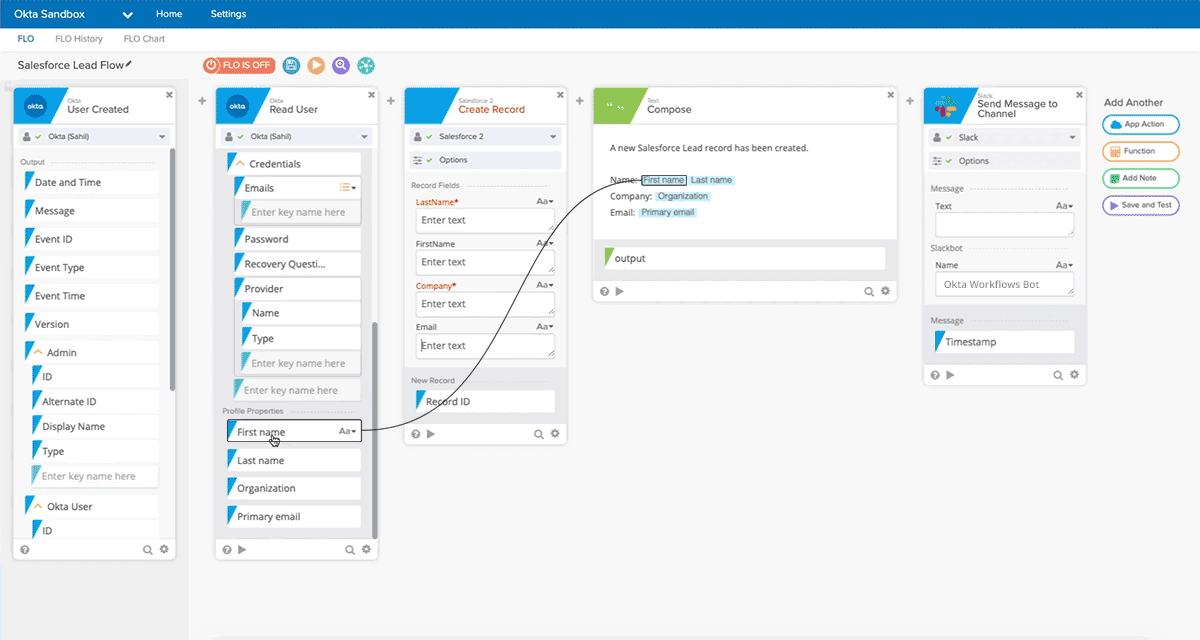
While testing the platform, I discovered that Okta excels at cutting off user access to various SaaS apps a departing employee uses.
When it is set up properly, offboarding becomes an automated chain of events that starts in your HR system and ends in every app the employee uses:
- The HR team marks someone as terminated in Workday or BambooHR
- That status change lands in Okta
- Okta immediately cuts access for that person across connected apps and services
You can think of Okta as the master power switch for identity across your stack. It is a bit like cutting power at the main breaker rather than walking around the building to flip every individual switch.
Okta cuts off SSO access across the stack in one go, including sessions that are still active.
I like tools that enforce one simple idea and Okta does just that when it comes to employee offboarding. The idea is that the (ex) employee’s identity no longer exists anywhere that is connected to Okta.
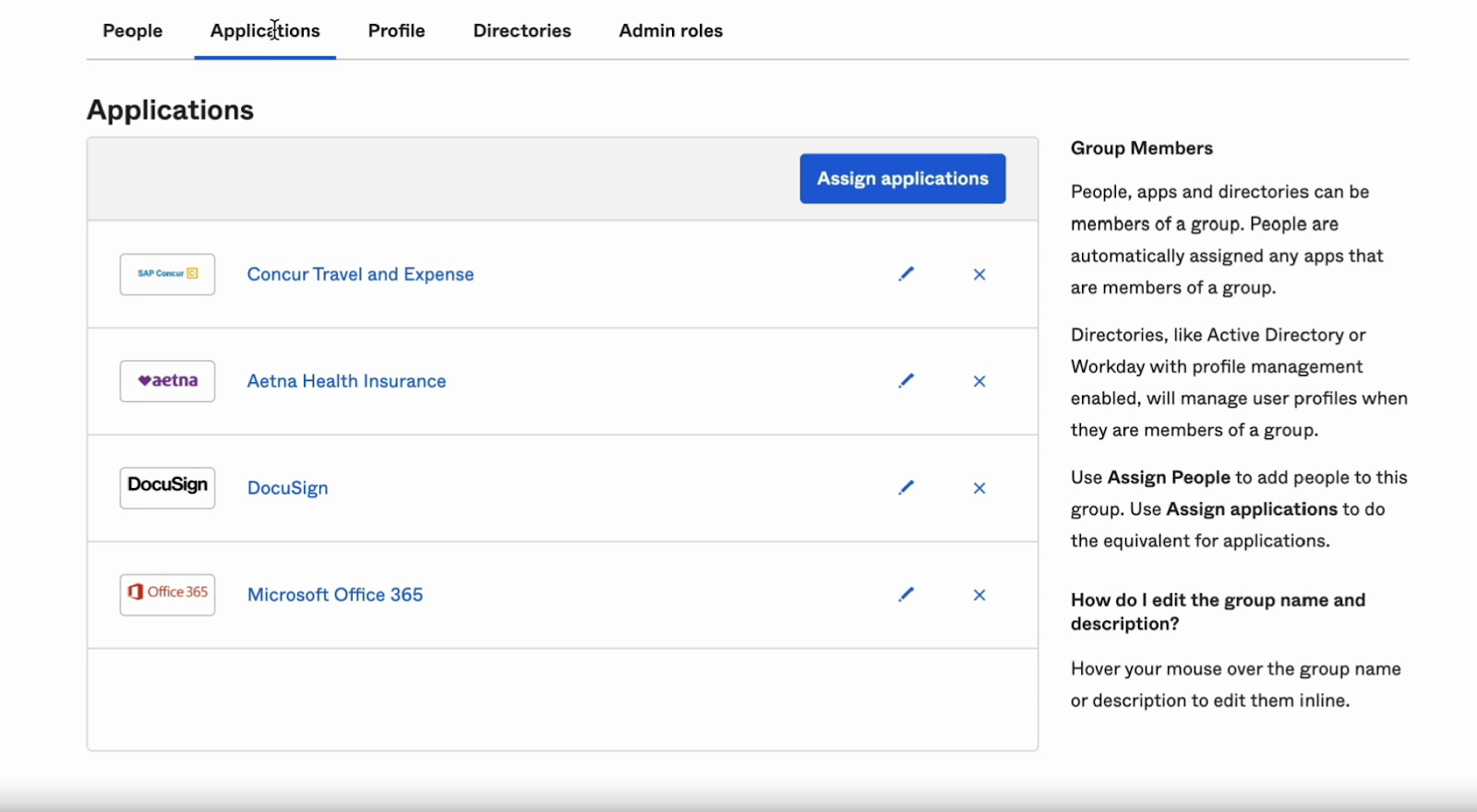
 Moreover, it offers more than 7,000 pre-built, fully tested integrations that handle everything from SSO to automated provisioning and deprovisioning. Most competitors only provide basic SSO connectors or expect admins to build their own integrations, which leads to inconsistent behavior and more manual work.
Okta’s integration network is broader, more stable, and far more automation-ready than anything else in the identity market.
But I also need to be honest about where Okta frustrates people. The initial setup, for instance, is quite daunting, and so is the price, as mentioned by reviewers on G2.

Moreover, many teams expect a full SaaS cleanup product and Okta simply does not play that role. It does not give license analytics (telling you the number of active licenses, those about to expire, and so on). Plus,it does not automatically discover every unmanaged app that someone signed up for with a work email.
For instance, when you stack Okta against SaaS management platforms like Torii or Spendflo, the distinction becomes clear. Okta excels at identity, access control, and automated user lifecycle workflows because it is an identity platform at its core.
However, these other tools are built for a different job, so they outperform Okta in areas like app discovery, usage tracking, cleanup, and license optimization.
For larger organizations that already rely on Workday or BambooHR and Active Directory, I find Okta’s approach really powerful. For smaller teams with a lighter stack, however, I see it as overkill.
Okta best features
- Policy-driven deprovisioning from one identity layer: Define offboarding policies once, then automatically revoke access across connected applications when a user leaves
- Contractor friendly lifecycle policies: Separate profiles and policies for contractors let you give time bound, scoped access that auto-expires or tightens on contract end, instead of treating them like permanent staff accounts
- Granular workflows for high-risk roles: Build if-this-then-that offboarding logic, such as extra steps for admins or finance roles, without writing code
Ratings and reviews
- G2: 4.5 stars out of 5 (1028 reviews)
- Capterra: 4.7 stars out of 5 (915 reviews)
5. Stitchflow
Essentially, Stitchflow is a SaaS management platform that will let you decide and control who has access to which cloud apps.
Stitchflow works next to tools like Okta, not as a replacement. It handles all the messy apps that Okta cannot reach, which makes offboarding smoother and more complete.
For instance, Okta is strongest where apps support SAML/SSO and SCIM, so deprovisioning flows cleanly from the identity layer. Stitchflow fixes the remaining gap by logging into web UIs with secure headless browsers, reading user and license data, and performing the same admin clicks a human would to deactivate accounts. It can also reclaim licenses, and verify that ex-employees and contractors no longer have access, even in non-SCIM, non-SSO tools.
I have used enough SaaS management tools to know that this is where most of them struggle.
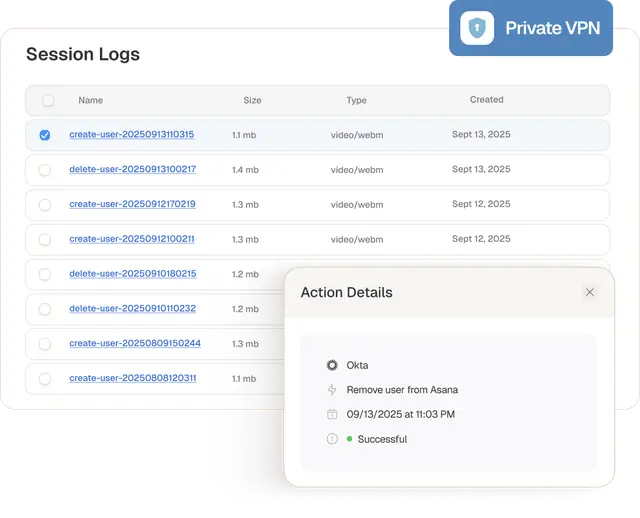
Just looking at their OffboardIT checklist tool (which is free and browser-based), you can see the philosophy. You pick a role, department, and company size, and it generates a personalized offboarding checklist.
I really like that the product starts from the assumption that your world does not look like a neat architecture diagram.
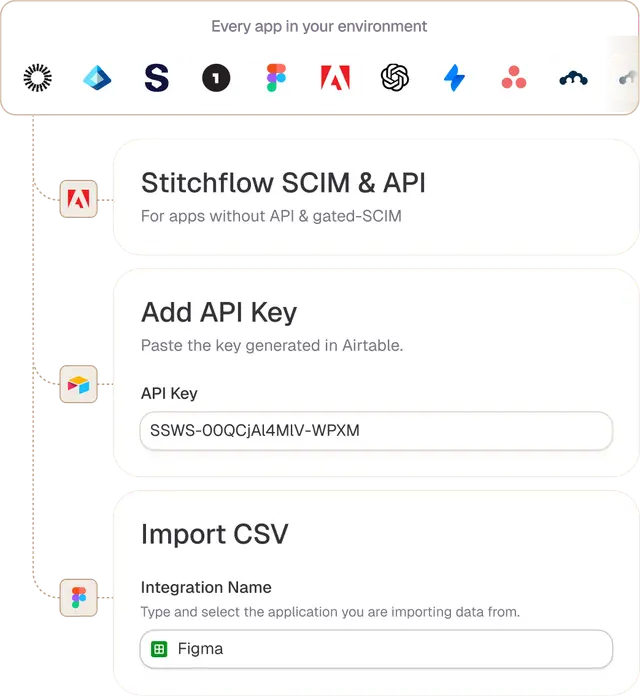
That same messy way of thinking shows up in the main platform too.
Instead of forcing everything through a single identity story, Stitchflow is happy to say: some apps will be part of your SCIM, some will be SSO-only, some will be totally outside your IDP.
It gives you a consolidated view and lets you automate what you can, then track and prove you did the rest.
From my experience, two areas stand out.
- Complex SaaS environments: If you run dozens or hundreds of apps and you keep discovering ex-employees still lurking in tools months after they leave, Stitch Flow is for you. One feature I love the most is the way it surfaces unmanaged and long tail access in one place, so you can actually close those loops.
- Compliance and renewals: The same engine also powers license management, access reviews, and renewal prep. I have been using this type of combined view a lot over the past few years, and I like Stitchflow’s take better than many older tools.
Stitchflow clearly feels like overkill if you run a small organization with five core apps and a clean Okta setup. In that kind of environment, you probably get more value from tightening your IDP and simple checklists.
However, if you’re already on an IDP like Okta or Azure AD, Stitchflow is the specialist that closes the gaps on unmanaged apps and gives you the receipts for security and audit.
Stitchflow best features
- Automation for the apps your IdP misses: Stitchflow uses secure browser automation to handle provisioning and deprovisioning in non-SCIM and non API apps.
- Continuous audit and cleanup of hidden access: The platform scans for orphaned, hidden and unused accounts, then automates deprovisioning for users and apps that traditional identity systems skip.
- Offboarding workflows and free utilities for IT: Stitchflow ships focused tools like OffboardIT and offboarding automation templates that let IT teams design custom offboarding flows, track progress and even trigger surveys or Slack updates.
Ratings and reviews
- G2: N/A
- Capterra: N/A
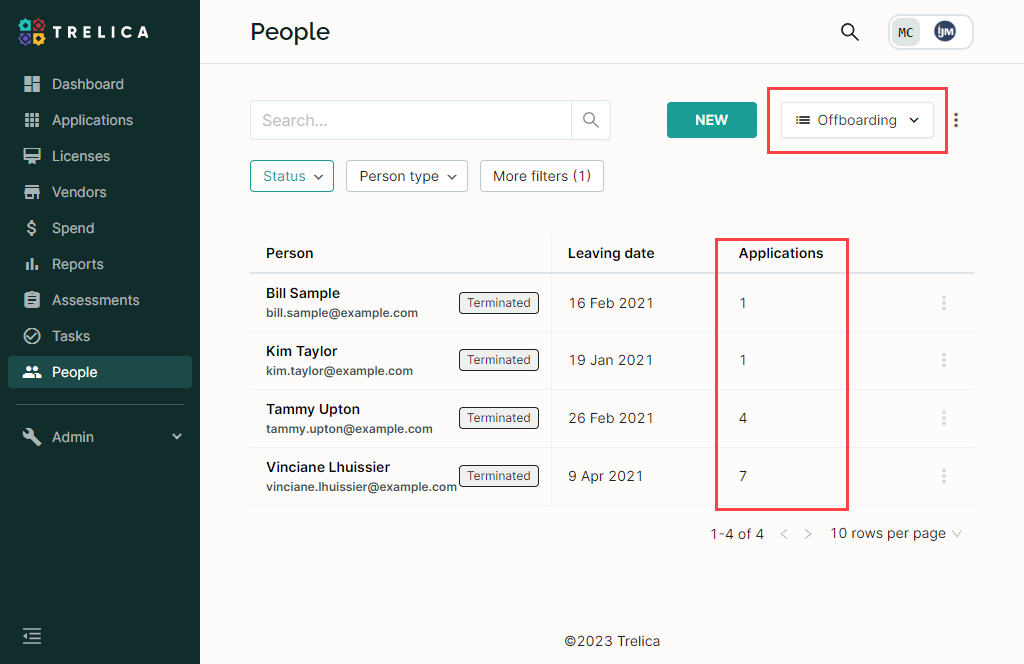
6. Trelica
For me, Trelica sits in the SaaS command center category. It is ideal if you have many SaaS licenses and want one place to handle everything that happens when someone leaves.
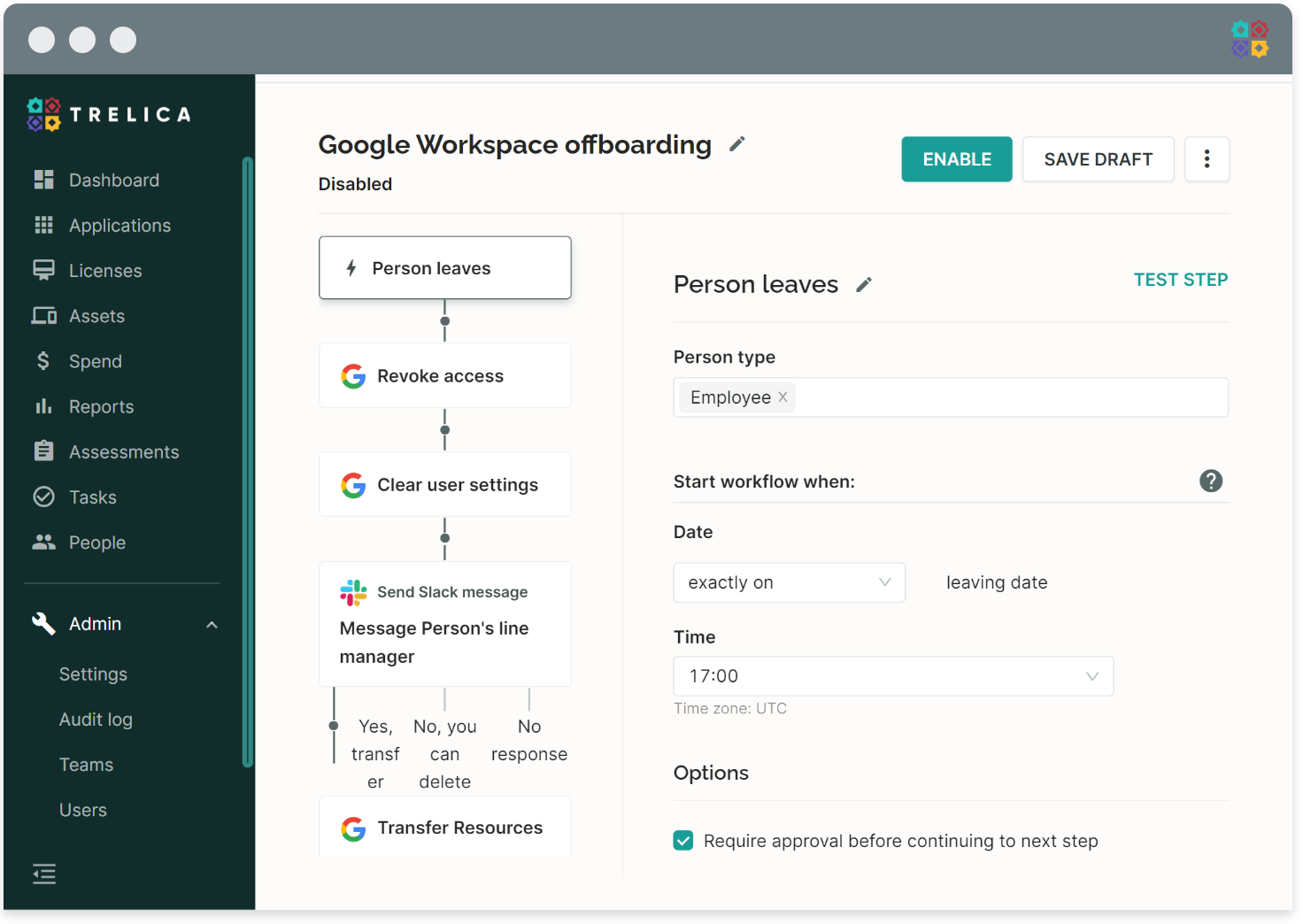
This is how an offboarding workflow works in Trelica: you connect Trelica to your HR system or identity provider and then set up a last working day or status change as the trigger.
For example, if HR marks someone as “terminated” in BambooHR or their status changes to “inactive” in Okta, Trelica can automatically remove the employee’s access to apps through integrations. It can also deactivate or reclaim SaaS licenses in tools like Slack, Zoom, or HubSpot.
For anything that still requires human action, such as collecting a laptop, Trelica assigns tasks to the right teams. It can also start the process from a ticket in Jira or through a webhook.
I honestly love this level of control.
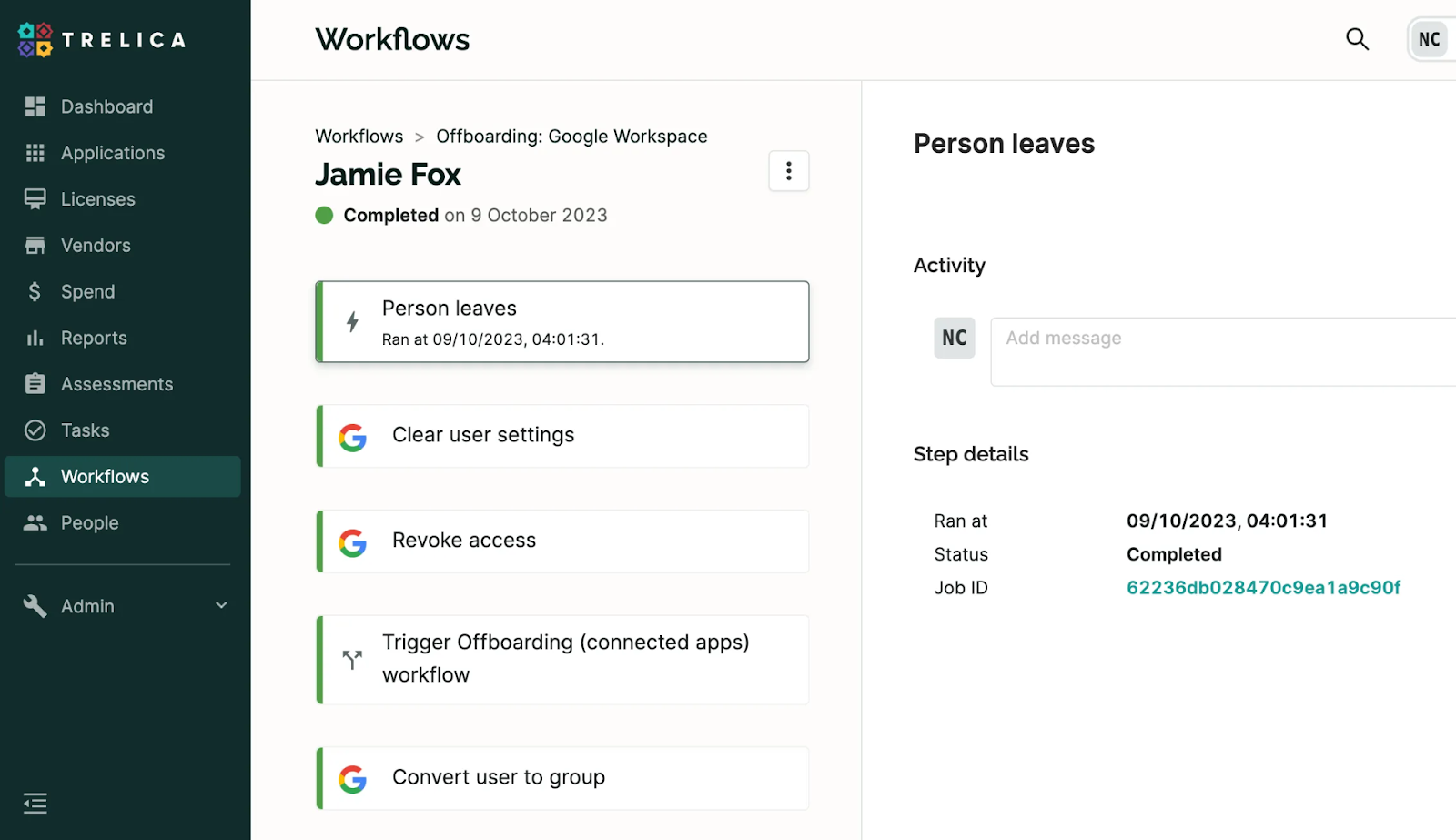
I also like the way Trelica pulls in the wider estate around offboarding. Because it is a proper SaaS management platform, it already knows what apps someone uses, how heavily they use them, and what licenses they sit on. That means when you are offboard, you are actually right sizing spend and cleaning up unused licenses.
There is a strong focus on visibility, usage and automation in general. And reviewers on G2 often call out how easy it is to use and how much the automation and customer support help them streamline workflows.

While identity tools like Okta are good at disabling logins, they usually do not handle the long tail of cleanup activities like reassigning calendars, moving documents, or tidying up accounts in apps that are not directly tied into SSO. Trelica is designed to sit alongside those providers and pick up both the automated app actions and the human tasks.
The sour things I experienced during my time reviewing the platform?
- Trelica is clearly built for IT teams who already think in terms of connectors and workflows. If you only have a handful of apps or very lightweight processes, it will feel like more machinery than you need.
- It also cannot magically automate every application in your stack, because some vendors still do not expose API endpoints for user management or hide them behind expensive tiers. In those cases, Trelica falls back to manual tasks rather than full automation, which is still better than nothing but not quite as satisfying as a clean, end-to-end flow.
- Some users also feel that Trelica is not quite as mature as others, like Okta, so some features still lack polish.

On the plus side, Trelica does offer a free trial, which is important in this category. You can connect a subset of your stack, run a couple of test workflows, and see how it behaves alongside your existing HR and identity tools before committing.
Trelica best features
- SaaS offboarding workflows: Turn a departure into an automated SaaS offboarding workflow that removes access and kicks off tasks across your app stack
- Full visibility and audit trail for leavers: Get a clear timeline and status view for each person, so you can see exactly which apps were cleaned up, which tasks are outstanding and have evidence for audits and certifications
- License cleanup built into offboarding: Because Trelica tracks SaaS usage and license allocation, offboarding becomes a cost-saving step as well
Ratings and reviews
- G2: 4.8 stars out of 5 (38 reviews)
- Capterra: N/A
HR Offboarding Tools
HR platforms sit at the start of almost every clean offboarding, because they hold the source of truth about who is leaving, when, and under what conditions.
When someone is marked as terminated or their contract end date is reached, it is usually the HR system that triggers alerts to IT and managers, updates to payroll and benefits, creation of checklists, and data needed for letters, experience documents, and exit interviews.
In that way, the HR platform becomes the hub that coordinates timelines, approvals, and communication and lays the foundation for a smooth offboarding.
7. BambooHR
BambooHR is interesting because it handles offboarding from a HR-first point of view.
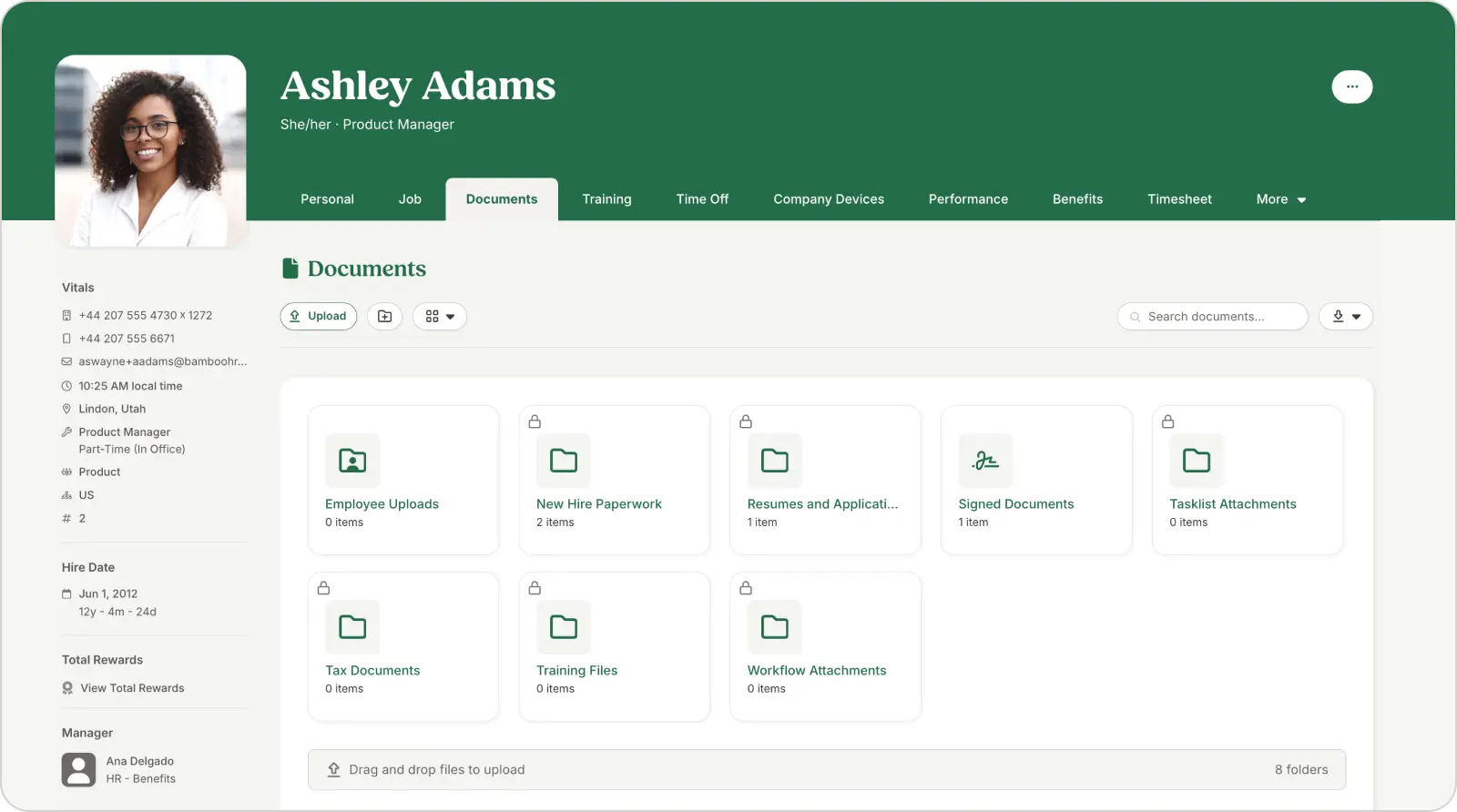
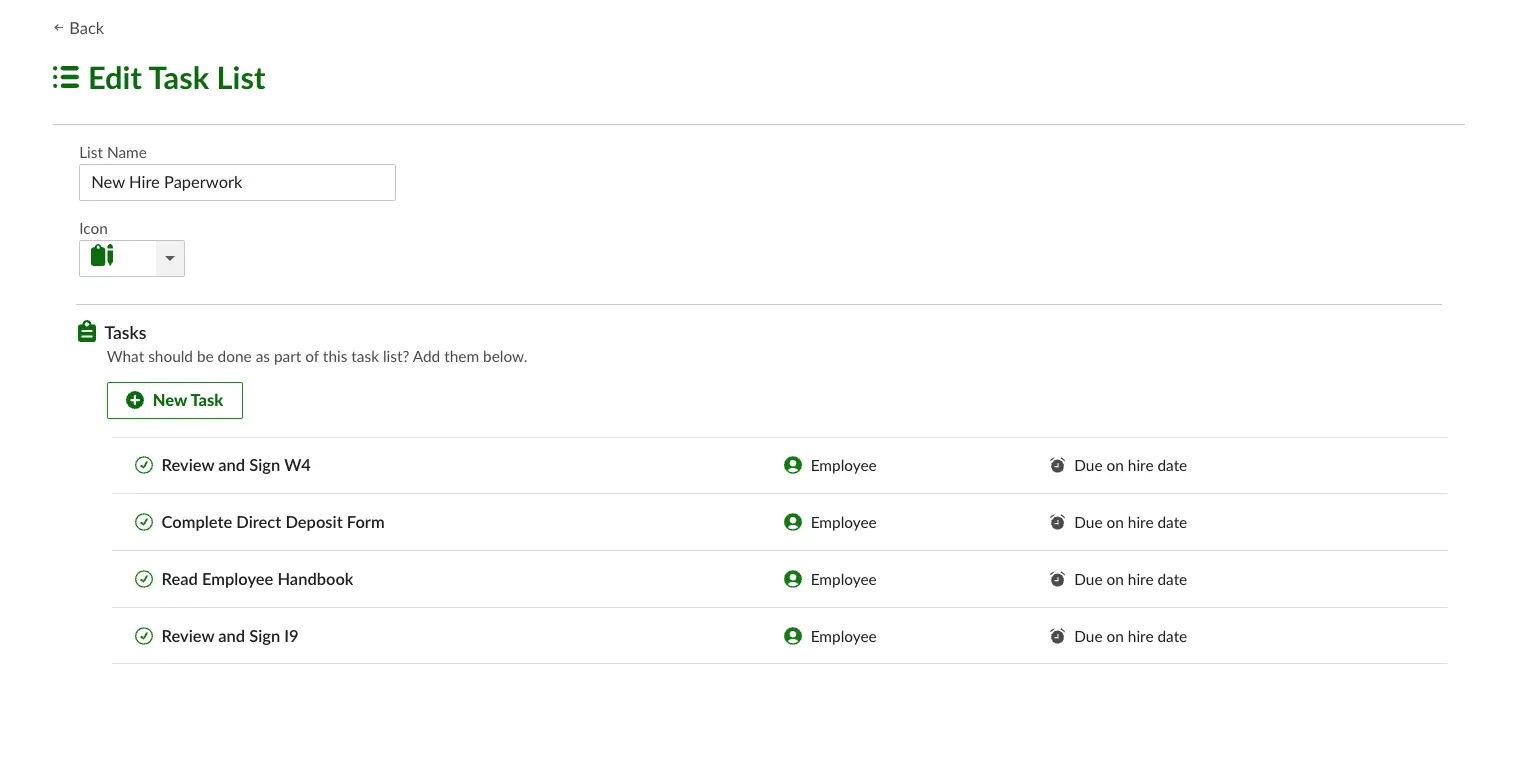
Inside BambooHR, offboarding is basically a structured, trackable project for each employee. You set up a task that pulls together everyone who needs to be involved, including HR, IT, the manager, sometimes payroll and facilities, and then BambooHR nudges them through the steps.
That system is actually surprisingly holistic.
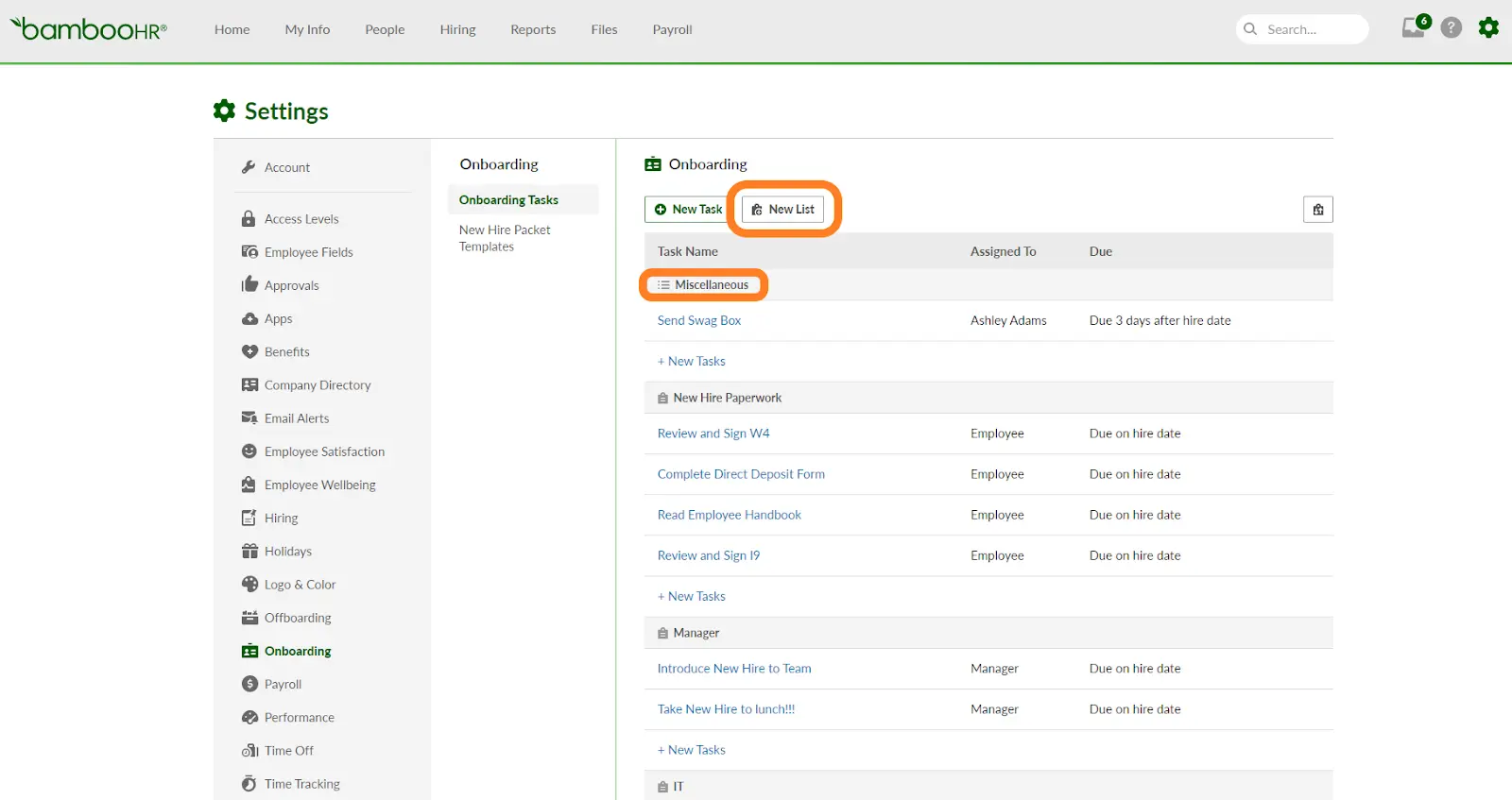
From a mechanics point of view, the offboarding flow starts when HR terminates the employee record.
In BambooHR, it’s the switch that turns off the person’s access to BambooHR itself and kicks off the checklist. At a top-level, the platform does this:
- Trigger and track offboarding checklists for HR, IT and managers
- Send and collect exit documents and e-signatures
- Schedule and record exit interviews and feedback
- Share final pay and benefits information with the employee
- Coordinate equipment return and access handoff instructions
Where this gets much more powerful is when you let BambooHR power automation. If you integrate it with downstream systems, either through direct integrations or via workflow tools into AD, Okta, or Google Workspace, a termination in BambooHR becomes the starting point for the technical side of offboarding as well.
At that point, you are not just coordinating people; you are also disabling accounts, updating groups, and tracking assets in a more reliable way. I have seen this work very well when HR owns the process, but IT plugs in their identity tools behind the scenes.
One feature I love the most is how clearly it sets expectations for the employee and the manager. Compared to unstructured exits, the whole thing feels calmer and more respectful.
That said, when I compare BambooHR to a dedicated offboarding or SaaS governance tool, I do feel the limits quite quickly.
Third-party reviews are pretty honest about this: BambooHR’s offboarding is strong on coordination and checklists, but it doesn’t go very deep on super-granular automation or complex, conditional task triggers the way specialist tools do.

So I tend to think of BambooHR as the place where the human side of offboarding works. If you struggle with complicated steps, maintaining proper communication and coordination, and handling documentation, BambooHR fixes that.
However, if you want to nuke 200 SaaS apps when a manager leaves, you’ll probably pair BambooHR with something more IT- or identity-focused (Okta, Stitchflow, Rippling, HR Cloud, etc.) rather than expecting it to do everything on its own.
BambooHR best features
- Centralized offboarding checklists: BambooHR pulls all the little exit tasks into one workspace, so HR, managers and payroll all work from the same checklist
- Built-in exit workflow and interviews: You can schedule exit interviews, track responses and use BambooHR's guidance and templates to turn exits into a structured feedback loop
- Compliance-ready paperwork and approvals: From final pay to record keeping and e-signature on exit documents, BambooHR helps you send, sign and file the right forms
Ratings and reviews
- G2: 4.4 stars out of 5 (2,797 reviews)
- Capterra: 4.6 stars out of 5 (3075 reviews)
8. Greyt HR
GreytHR lives in a very different context from BambooHR.
In my opinion, it feels like it was made for businesses that care first about payroll accuracy, statutory compliance, and full and final settlement, and only then about a pretty interface.
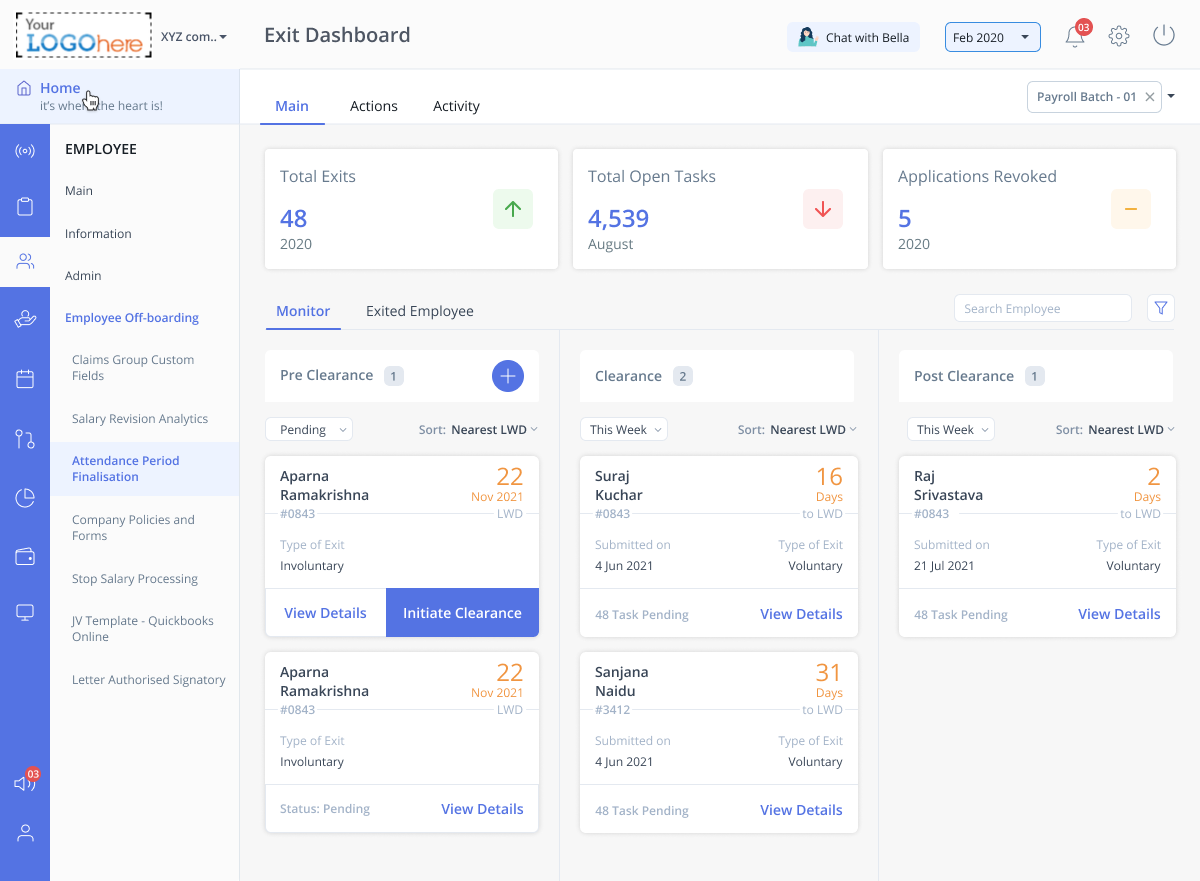
Offboarding in greytHR sits inside the Offboarding and Separation areas in the admin portal. The Offboarding page works like a central kanban board for exits, with cards for each employee moving through stages such as Clearance and Post Clearance.
I like this view because your HR team sees in one shot who has resigned, who sits mid-clearance, and who is in the final stretch.
When you click into a card, you land on a very operational view of that exit. You see open tasks, closed tasks, and who owes what to whom.
The Separation page tracks resignation status, reason, notice period, and exit interview dates, then ties all of that back to the real work that different departments need to finish.
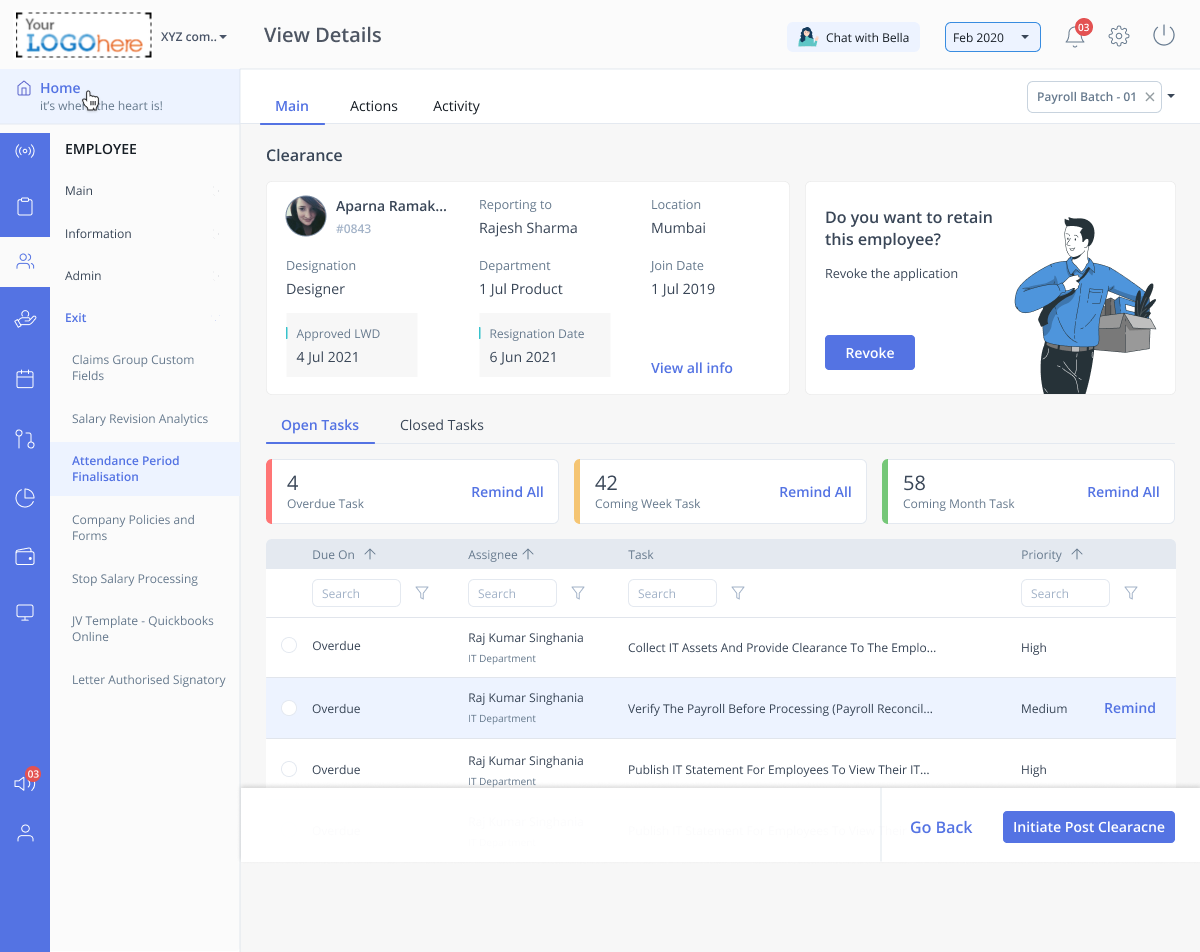
Where greytHR really helps is in the chasing and closing that HR teams spend half their life doing. You don’t manually ping every stakeholder. Instead, you use the Open Tasks view and send reminders to everyone who still has something pending.
This means it notifies your IT department for asset return, admin for ID cards, finance for reimbursements and the manager for handover confirmations.
Once everything in the clearance stage is done, you move the card into post-clearance and trigger the final leg of the process. This is where FnF and last-mile work happens, including final settlement, letters, last bits of documentation and post-exit access adjustments.
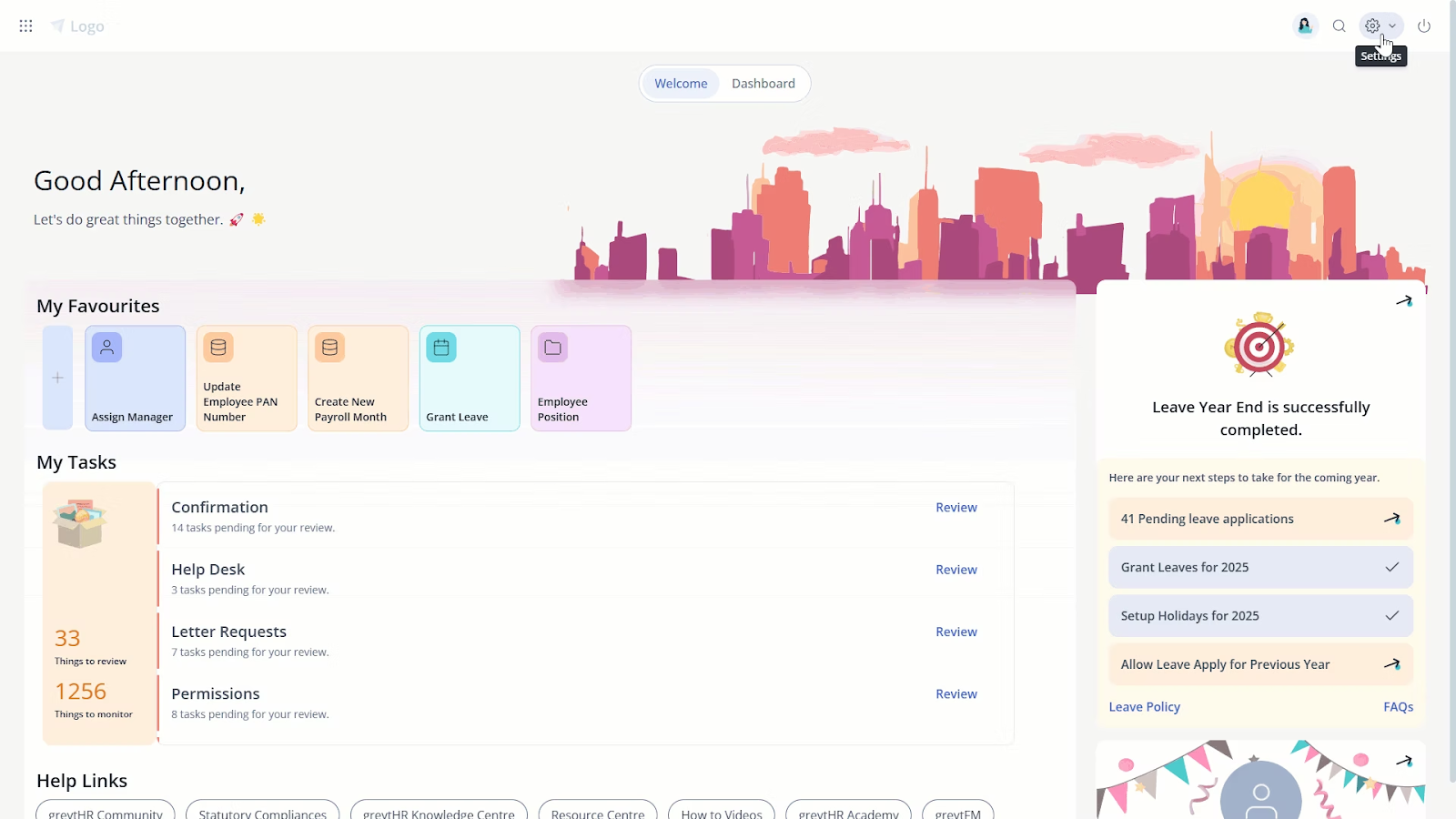
There is also a slightly underrated angle that I personally like a lot: alumni and data hygiene. The same offboarding hub gives you controls to tweak alumni portal access and clean up or remove separation details when needed.
Users I talked to seemed to love that they no longer scramble during tax season to respond to ex-employees because the structure for alumni access already exists.”
By “alumni access” I mean a mode or option in greytHR that lets former employees still access certain records or information even after they leave. This keeps communications and documentation organised and avoids scrambling when ex-employees request tax documents or other info
Day to day, this helps you in a few ways:
- Your HR teams manage everything from a single dashboard and can prove, step by step, what was done for whom and when
- IT, admin, and finance teams get concrete tasks, deadlines, and reminders
- You are much less likely to mess up FnF, forget an NOC, or miss an exit interview
The downside, and I feel this quite strongly, is that greytHR looks and behaves more like an operations console than an employee experience product.
Compared to newer platforms, the interface and flows feel utilitarian. If you come in expecting the visual polish and fluid experience of BambooHR or a modern global HRIS, greytHR will disappoint you.
If you care more about a modern, feel-good experience and have lighter payroll complexity, I tend to lean toward BambooHR
greyT HR best features
- Dedicated exit and offboarding module: greytHR has an Employee Exit and Offboarding area that acts as a control panel for resignations, so HR can initiate exits, see all active cases, and manage the process from one place
- Automatic exit checklists and clearances: When a resignation is accepted, greytHR can trigger a customizable exit checklist, route tasks to different stakeholders, track clearances and send reminders until all open items are closed
- Standardized templates for exits and F and F: greytHR provides exit checklists and separation policy templates, including fields for dues, last working dates, and sign-offs
Ratings and reviews
- G2: 4.⅘ (1,196 reviews)
- Capterra: 4.3 stars out of 5 (295 reviews)
Offboard Employees Seamlessly With Workwize
You now have a walkthrough of some important employee offboarding tools, each handling a different part of the process. Access removal, documentation, workflow automation, and compliance all matter, and together they close most of the gaps that appear when someone leaves a company.
But once the accounts are cut off and the formalities are done, the most significant remaining risk is the physical device. A lost or unreturned laptop can cost far more than a SaaS seat and leave sensitive data exposed even after access is revoked.
This is why Workwize becomes so important.
It helps you get company devices back from employees anywhere in the world, so you recover hardware rather than write it off as a loss. Workwize also supports redeployment, certified recycling and reselling, and even the destruction of very old or unusable equipment. The latter comes with documented proof for audits and sustainability reporting.
In short, after digital offboarding is complete, Workwize closes the final and most expensive gap by making hardware retrieval and end-of-life handling clean, trackable, and cost-efficient.
Schedule a Workwize demo now to see how we help with offboarding.

FAQs
1. What is the difference between an offboarding checklist and offboarding software?
An offboarding checklist is a manual list of tasks that HR, IT, and managers must remember to complete when an employee leaves. Offboarding software automates those tasks, triggers them at the right time, and tracks progress so nothing is forgotten or delayed.
2. Who should own the offboarding process in a company?
HR should own the offboarding process since they initiate departures and ensure compliance, but IT plays a major role in securing accounts and retrieving equipment. In most well-run companies, HR triggers offboarding and IT executes the technical and asset-related steps.
3. Can small companies benefit from offboarding tools or is this only for large enterprises?
Small companies can absolutely benefit from offboarding tools because they remove manual follow-ups and make sure nothing gets missed when someone leaves. These tools also help small teams stay compliant and protect data without needing a large IT staff.


Establish a single source of truth for every IT asset across the globe.
.png?width=258&height=318&name=g10%20(5).png)
More related resources to help you stop firefighting hardware operations.



Get monthly insights into how other IT leaders are improving their ops.



.png?width=2880&height=1232&name=Group%202147262874%20(1).png)
Stop coordinating
hardware like it's 2012.
.svg)
.png?width=172&height=68&name=apple%20business%20patner%20(1).png)
.svg)
.svg)
.svg)
.svg)