




.svg)
.svg)

.svg)


.svg)




.svg)
.png?width=500&height=424&name=Style-1---V1-(1).png)

.png?width=1230&height=692&name=Vector%20(13).png)
Rippling and Deel are two of the most popular platforms for running a global workforce. Both tools have incredible features.
But once you dig deeper, you’ll see big differences in how they handle payroll, onboarding, compliance, device management, automation, and day-to-day operations.
If you want a practical, side-by-side breakdown of how these platforms actually work as global workforce tools, you’re in the right place.
In this guide, I walk you through real workflows, dashboards, and IT/device management setups to help you decide which one actually works best for your team in 2026.
Note. This article is not about declaring a winner. It’s more about determining which solution best suits your needs.
TL;DR
- Deel wins on global hiring and compliance. It covers more EOR countries (150+), feels more “hands off” on payroll/tax, and keeps the UI and workflows simpler for globally distributed teams.
- Rippling wins on depth and automation. Native MDM, IAM, device security, headcount planning, ATS, and 650+ integrations make it closer to an all-in-one operating system for HR, IT, and Finance—but with more setup and ongoing admin.
- Deel is faster to implement and easier to learn, with clearer baseline pricing (e.g., EOR) and 24/7 support via chat, email, and phone. Rippling’s modular pricing is opaque, support is slower, and implementation is heavier but unlocks more cross-department automation.
- If your main goal is compliant global hiring and payroll with “good enough” HR/IT, Deel is safer. If you want one system to run people operations plus devices and security, Rippling is stronger.
- For deep, end-to-end IT asset lifecycle management (procurement → provisioning → global shipping → retrieval), a dedicated ITAM platform like Workwize still goes further than either Deel or Rippling.

Overview
Before we jump into the feature-by-feature comparison, let’s understand how Deel and Rippling position themselves, who uses them, and their primary strengths and limitations.
Deel
Deel markets itself as a global hiring and payroll platform that combines Employer of Record (EOR) services, contractor payments, and compliance into a single solution.

Companies use Deel to hire internationally or manage remote contractors without setting up foreign entities. In fact, Deel operates in 150+ countries as an EOR, handling local contracts, tax withholdings, and payroll so you don’t have to.
In my experience, Deel excels at simplifying the complexities of international HR. I was impressed by its always-on compliance engine and in-house legal experts that keep you updated on labour law changes worldwide.
One of the few limitations I encountered was the pricing transparency of add-ons. While you can find details of their major offerings, pricing for add-ons isn’t listed. And this can make it hard to calculate the solution's overall cost.
Plus, unlike Rippling (which has), Deel lacks its own ATS and MDM solution. You can integrate 3rd party MDMs or ATS tools, but it may not be as seamless as Rippling.
Another thing I noticed was the higher transfer fee. Multiple users mentioned that Deel could make its withdrawal fee more competitive.
Rippling
Rippling pitches itself as an all-in-one platform for HR, IT, and Finance. It’s like a unified HRIS with onboarding/offboarding workflows, global payroll, mobile device management (MDM), identity management, even expense tracking and corporate cards, all tightly integrated.
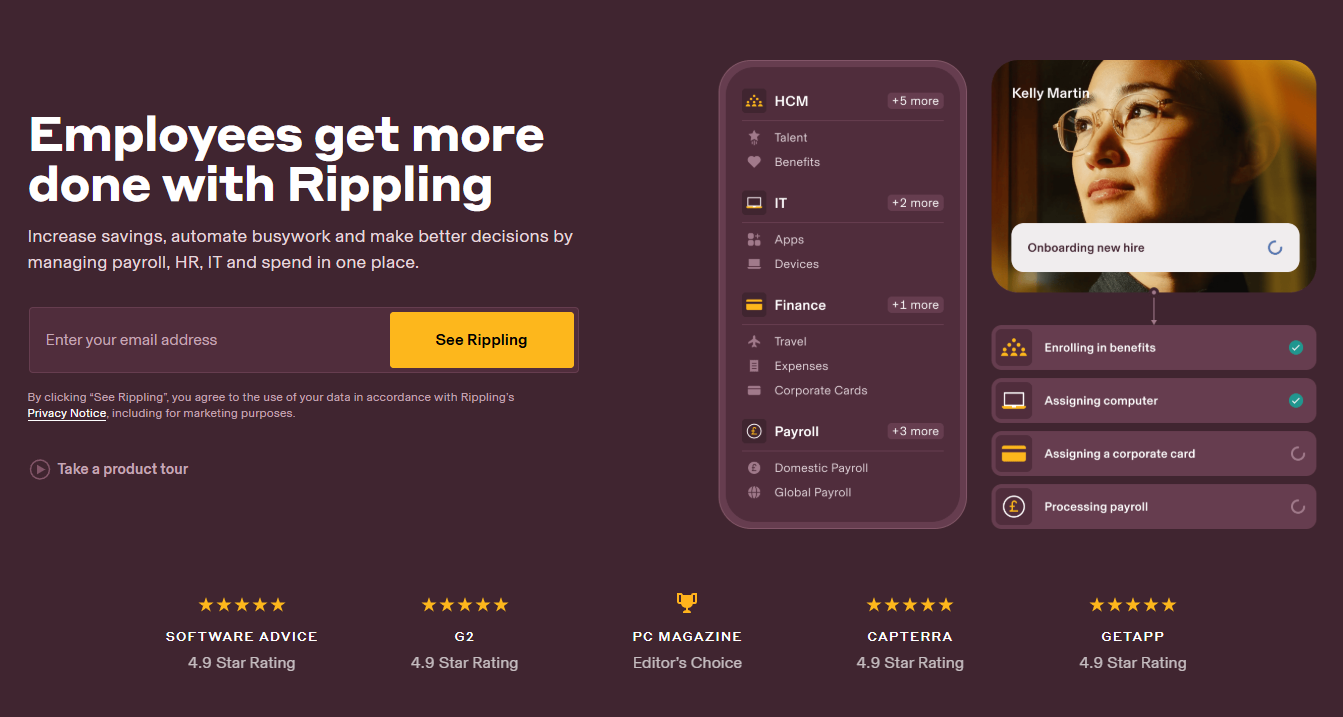
Companies use Rippling when they want a single system of record for employees that also automates many IT tasks (such as account provisioning or laptop deployment).
After hands-on testing, I can say Rippling’s biggest strength is its breadth of capabilities on a single platform.
When you onboard a new hire in Rippling, the same workflow could: add them to payroll, enroll them in health benefits, create their email account, ship them a pre-configured laptop, and grant access to apps like Slack–all automatically.
Surprisingly, Rippling’s biggest advantage (comprehensive nature) is also its limitation. The platform is so extensive that you cannot expect to implement and set it up without the assistance of an implementation expert.
Also, pricing details aren’t openly available on their website, unlike Deel. You need to choose a plan and request a free quote from Rippling to know the pricing. Moreover, customer support is only available via email and chat and is not responsive enough, according to user reviews.
Deel Vs Rippling: At a Glance
Before we jump into the detailed feature-by-feature comparison, let’s see what the key differentiators of these tools are:
|
Feature / Capability |
Deel |
Rippling |
|
Employer of Record (EOR) Coverage |
150+ countries |
~80 countries |
|
Global Contractor Management |
✔️ |
✔️ (185+ countries) |
|
US Payroll (Native) |
✔️ (newer) |
✔️ (mature) |
|
IT & Device Management (Native) |
❌ (via 3rd-party MDM add-on) |
✔️ Full native MDM |
|
Device Provisioning Workflows |
✔️ (simple, fast) |
✔️ (deeper, app-linked, role-based) |
|
Asset Tracking Depth |
Basic–moderate |
Advanced (agent health, lineage, encryption) |
|
Identity & Access Management |
Integrations (Okta, Entra, Google) |
Native IAM (granular RBAC, MFA rules) |
|
Automated App Provisioning |
Limited |
✔️ Native, dynamic, role-based |
|
ATS (Native) |
❌ |
✔️ |
|
Headcount Planning |
✔️ (scenario planning) |
✔️ (budget-aligned, alerting) |
|
Learning & Performance Tools |
Add-on (Deel Engage) |
✔️ (native LMS + performance) |
|
Integrations |
~140 |
650+ |
|
Support Availability |
24/7 chat, email, phone |
Chat + email only (slow responses) |
|
Pricing Transparency |
Clear baseline pricing |
Opaque (custom quotes only) |
|
Ease of Implementation |
Fastest (minimal setup) |
Longer (multi-module configuration) |
|
Best For |
Global hiring & compliance-heavy teams |
All-in-one HR + IT automation-focused teams |
Let’s now start our feature-by-feature comparison.
IT & Device Management Comparison
Just a heads up: Deel and Rippling are very similar tools in terms of the features they offer and things you can do.
However, IT & device management have been part of Rippling from the start, whereas Deel began offering it after acquiring Hofy.

1. Device Provisioning
Device provisioning is the process of getting hardware to new hires from procurement and shipping to zero-touch. Here’s how both platforms compare:
Deel
I took the interactive Deel IT demo (since there was no free trial) to see if the device provisioning process is as easy as it appears. And to my surprise, it was.
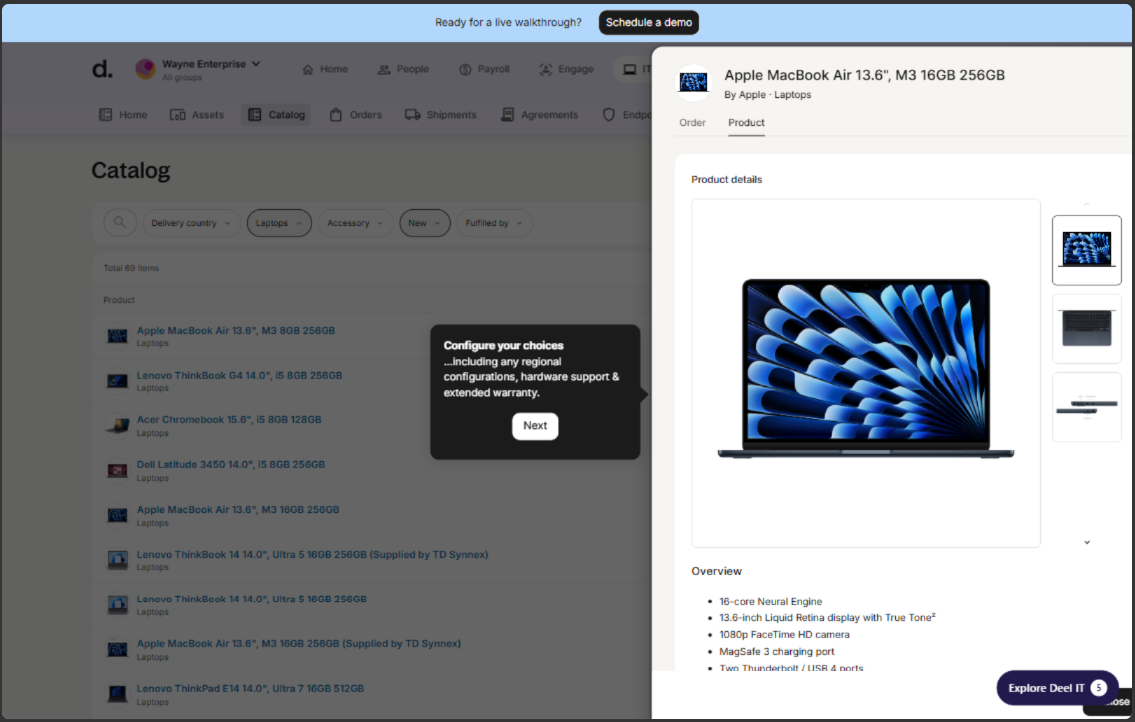
After I added a new worker to the platform and selected their employment type (contractor or employee), I was able to see multiple equipment to order (selected MacBook for this example):
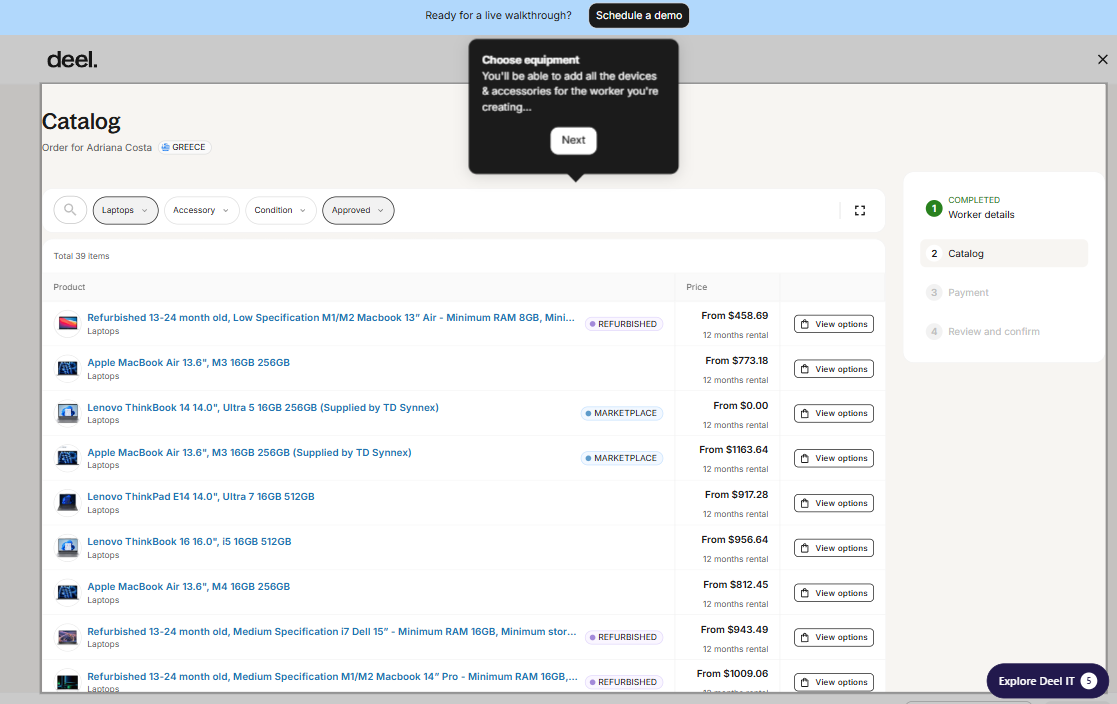
I liked how Deel let me customize the configurations based on the region, add hardware support, or warranty.
Then, you can just review the items you added to the cart, and finally, place the order:
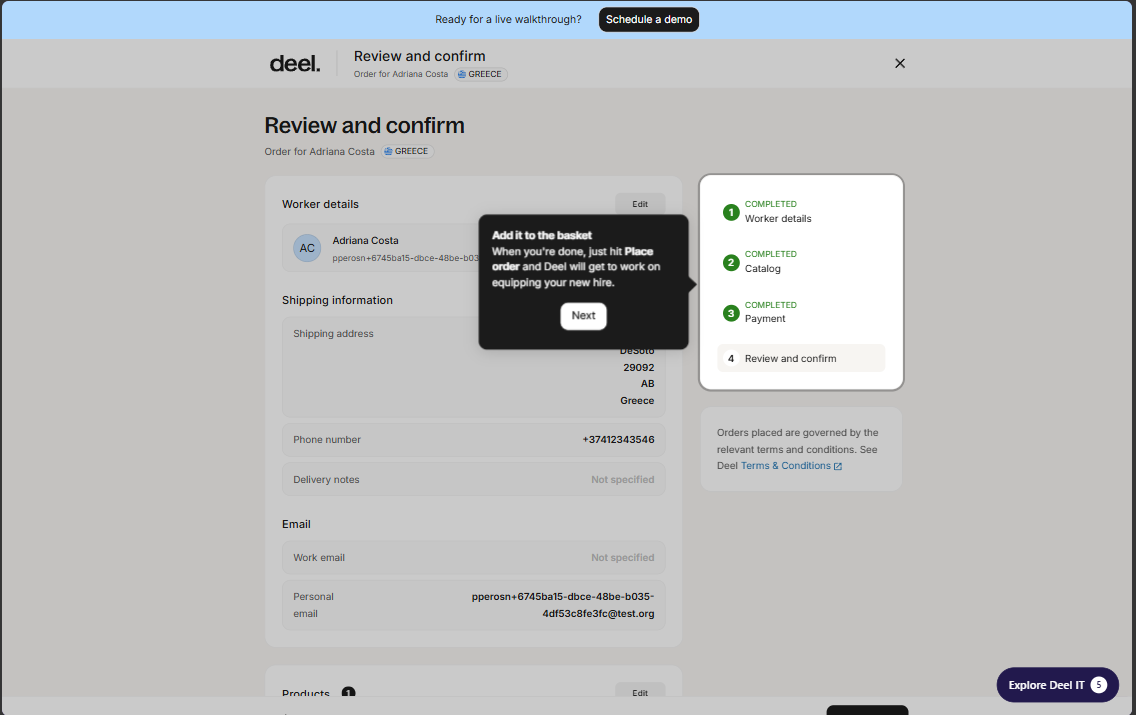
And once the order is placed, Deel IT will send pre-configured equipment to your employees in 130+ countries, without juggling vendors or dealing with the stress.
Also, Deel lets you store your devices in their warehouses and reassign them to your employees as and when required.
The entire experience of adding a new employee and delivering a pre-configured laptop was seamless and quick.
But I could not find a way to choose the apps I want to provision or which user groups I want to apply them to, as is available in most ITAM tools.
Rippling
Although I could not sign up for a free trial, there were plenty of demo videos that helped me dive deep into Rippling’s device provisioning capabilities.
When I started the demo, I found the device provisioning setup buried deep within the onboarding process.
There were too many steps before I could reach the provisioning part, including the employment type, work location, role start date, department, compensation, and more.
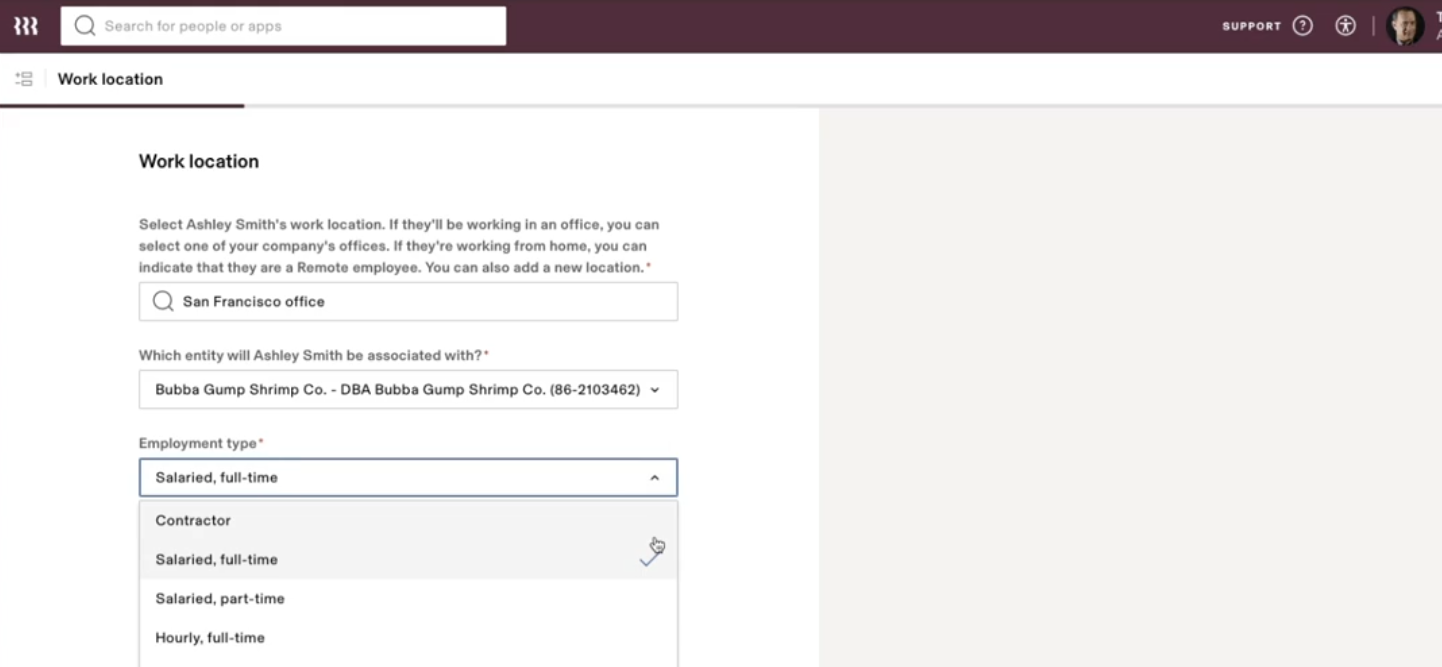
Source: Rippling
Once I went through the entire process, I finally saw the option to choose devices. When compared to Deel, this process was at least 3X longer. But that is not necessarily a disadvantage, since Rippling allowed me more control over provisioning.
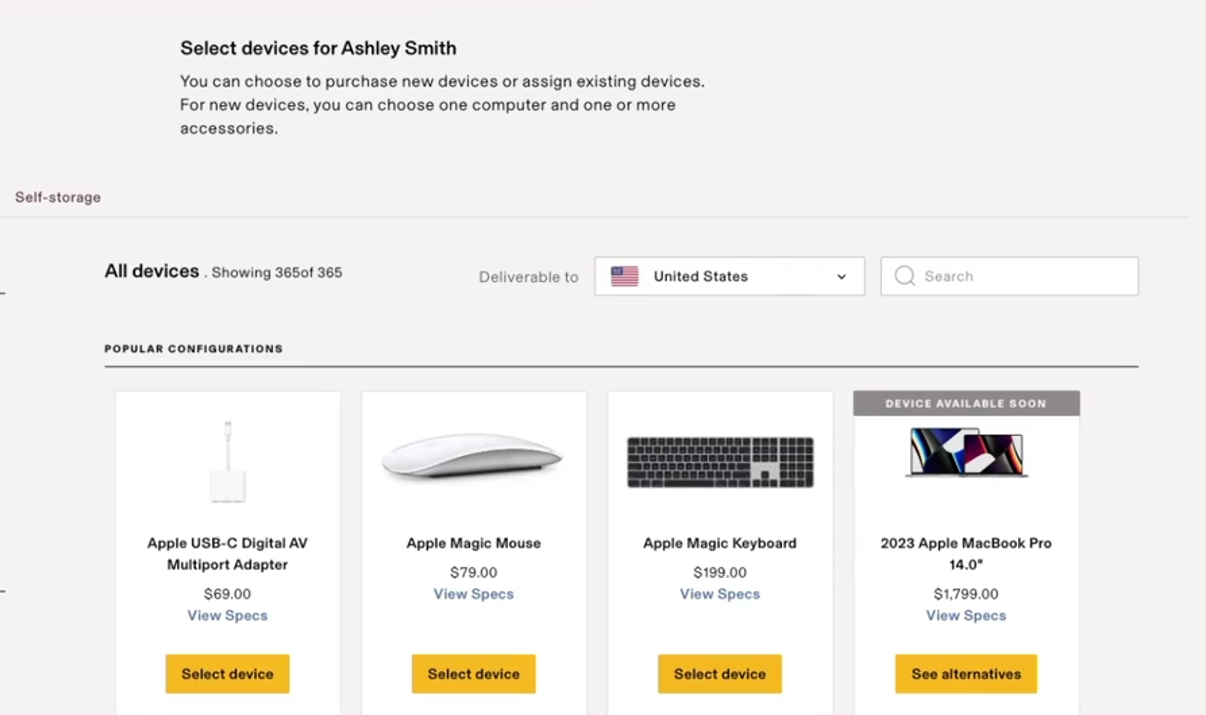
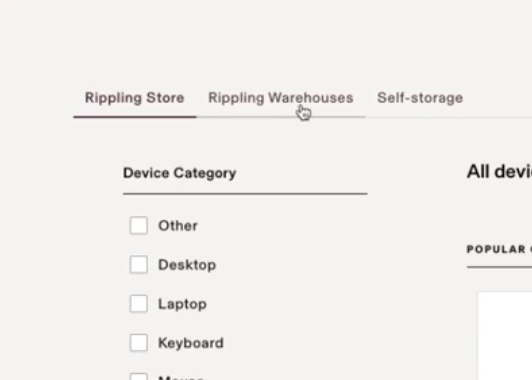
The interface looks clean, similar to Deel. For instance, Rippling also gives you 3 options when it comes to dealing with IT asset provisioning:
Source: Rippling
- Rippling Store: You order devices directly and have them shipped from Rippling’s store.
- Rippling Warehouse: You store your inventory in Rippling’s warehouses and get those devices shipped as you need.
- Self-storage: You tell Rippling where your assets are stored, assign them to employees, and Rippling will handle the rest.
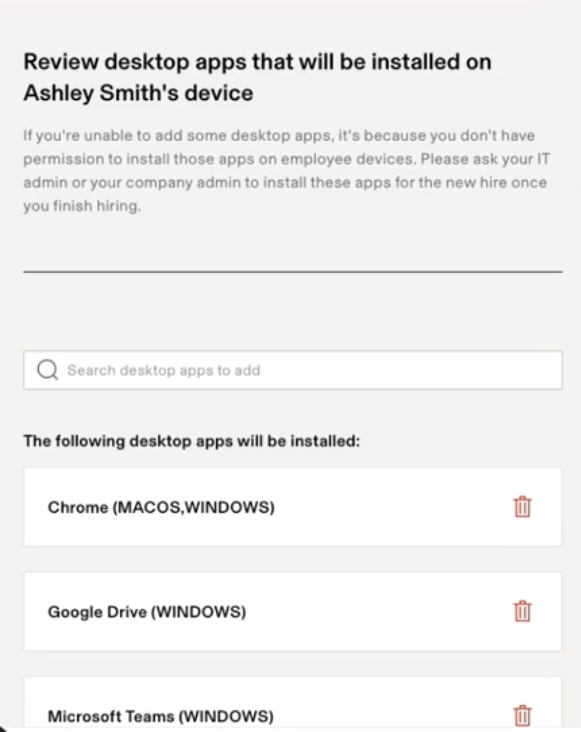
Remember, I talked about how Rippling had me go through multiple steps (departments, roles, etc)? Based on that, it now knows which apps are relevant for the new employee.
Source: Rippling
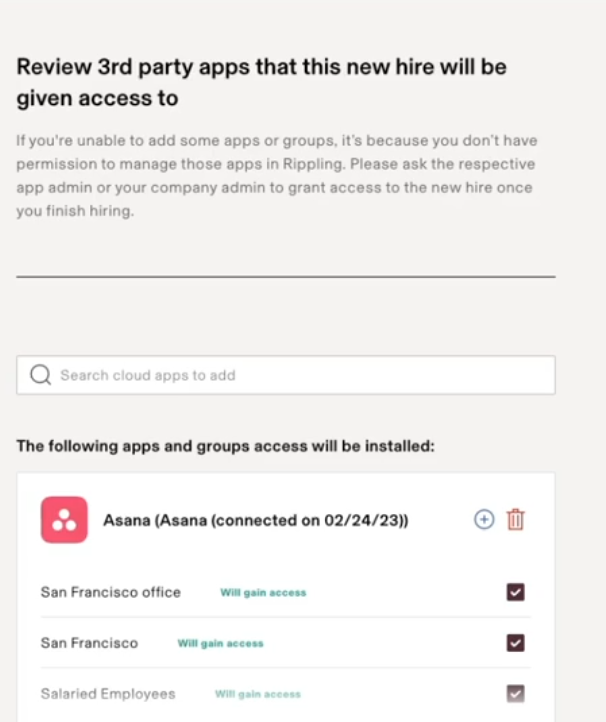
Furthermore, you can add any 3rd party apps or groups you want your new hire to join:
Source: Rippling
This entire workflow, although lengthy, does a lot of things in one go. And what I like most is that HR, while onboarding the employee, can also handle IT management without IT intervention. That’s a major win for me.
Verdict: Both Deel and Rippling make let easy to ship pre-configured devices globally. While Deel did not offer me enough flexibility (especially in choosing apps), it does get the job done, much like Rippling. So, I’d call this a tie.
2. Asset Tracking and Visibility
Let’s see how good Deel and Rippling are when it comes to tracking and managing assets:
Deel
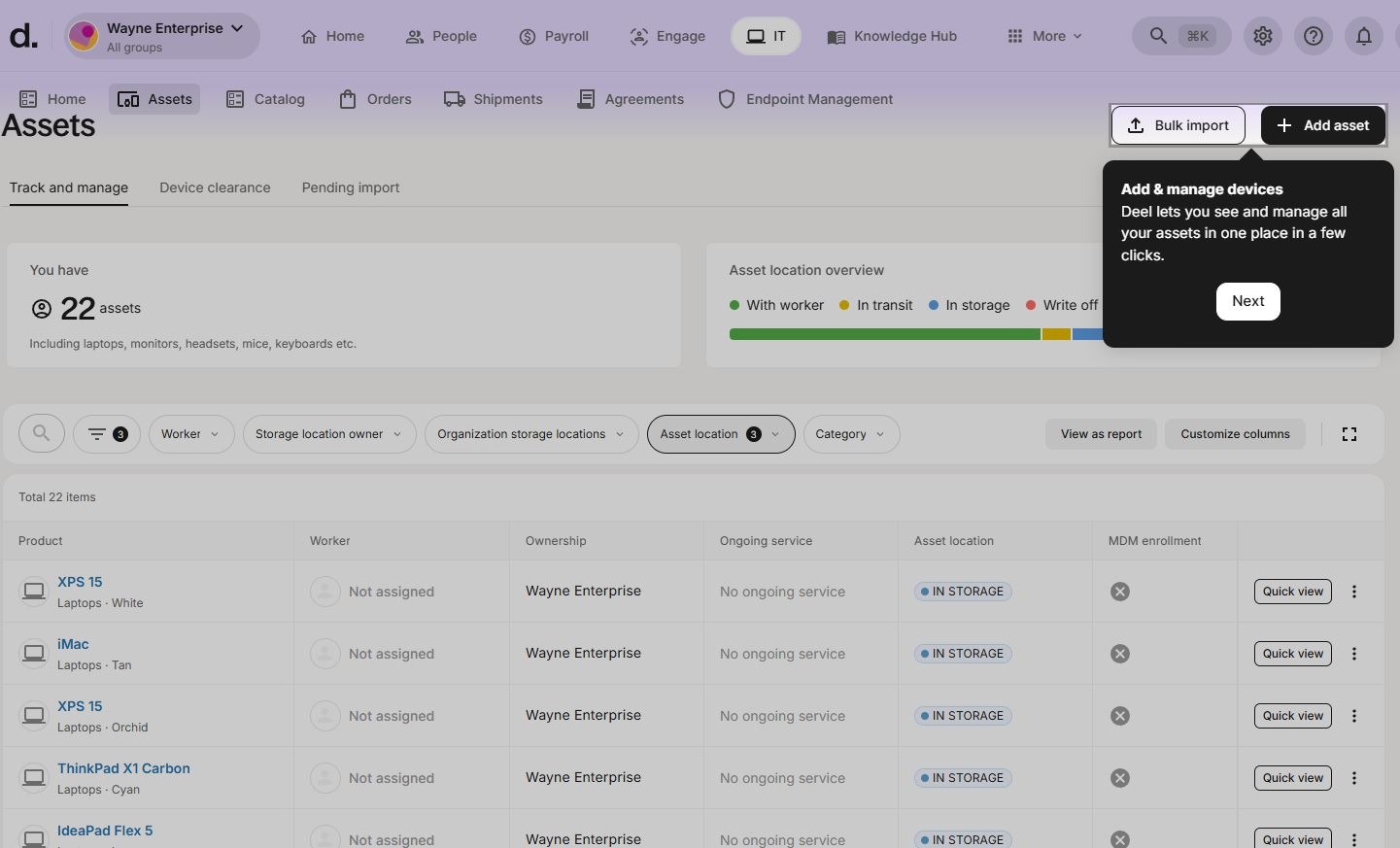
Deel IT’s dashboard gives you a straightforward view of all your assets. You can see the number of assets you currently have, where they are, who they’re assigned to, their MDM status, and Model, among other details.
Using the same dashboard, you can add new devices to your inventory:
Source: Deel
Simply click the device you want more information for, and Deel IT will take you there. As you can see in this screenshot, you can check the asset health, associated documents, service packages, and location.
From the same dashboard, you can request hardware support, reassign it to storage, or even sell it for its residual cash value:
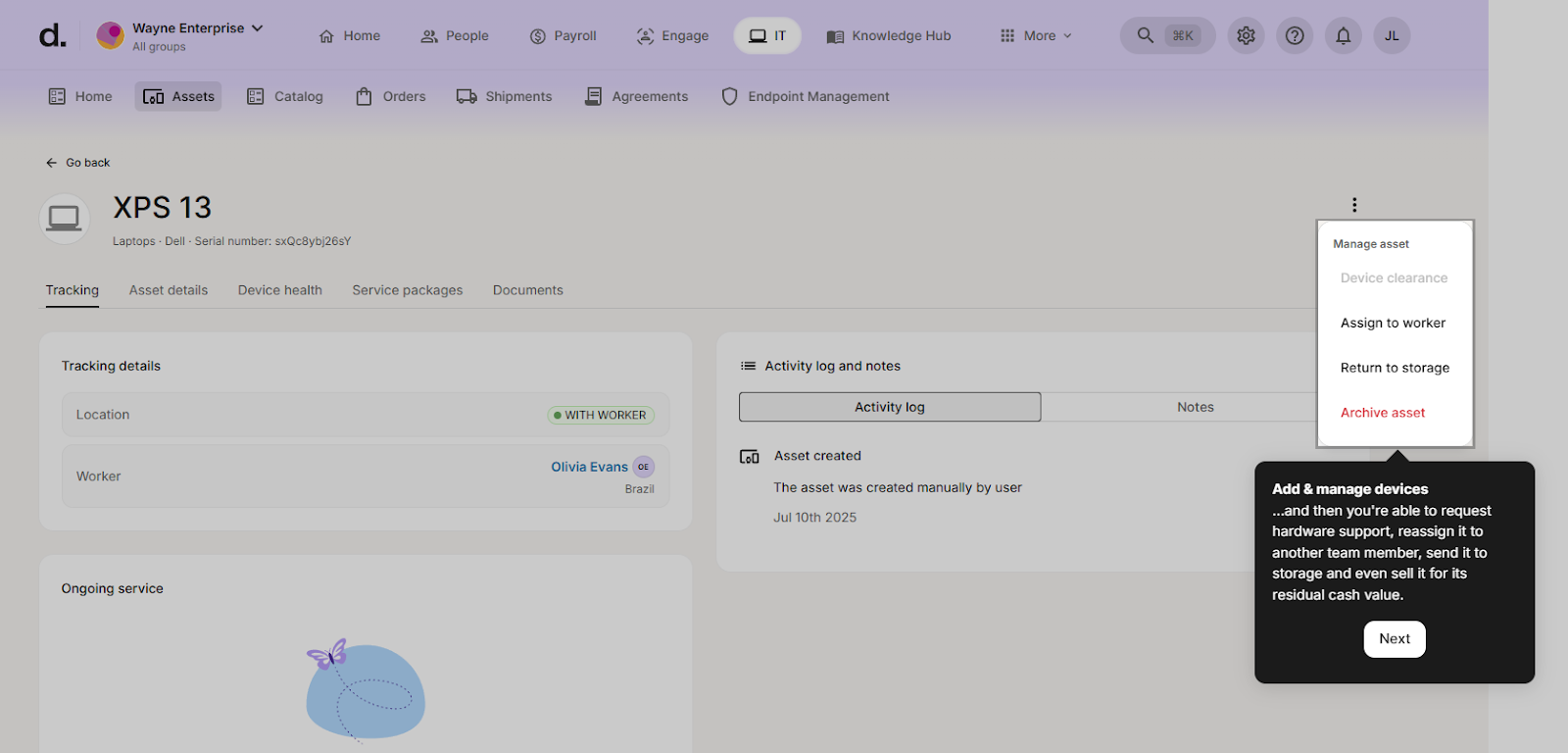
In a nutshell, Deel lets you track all your assets in a single dashboard and gives enough visibility into your infrastructure. For a solution that was not built around IT asset management, this functionality is appreciable.
Rippling
You probably saw this coming, but my experience of exploring Rippling's device management was truly amazing. If I were to explain all of that in one line, I’d say “Rippling has everything Deel has plus a lot more.”
Let me explain. When you open the devices section in Rippling’s dashboard, you see their assets overview, similar to Deel's but more detailed.
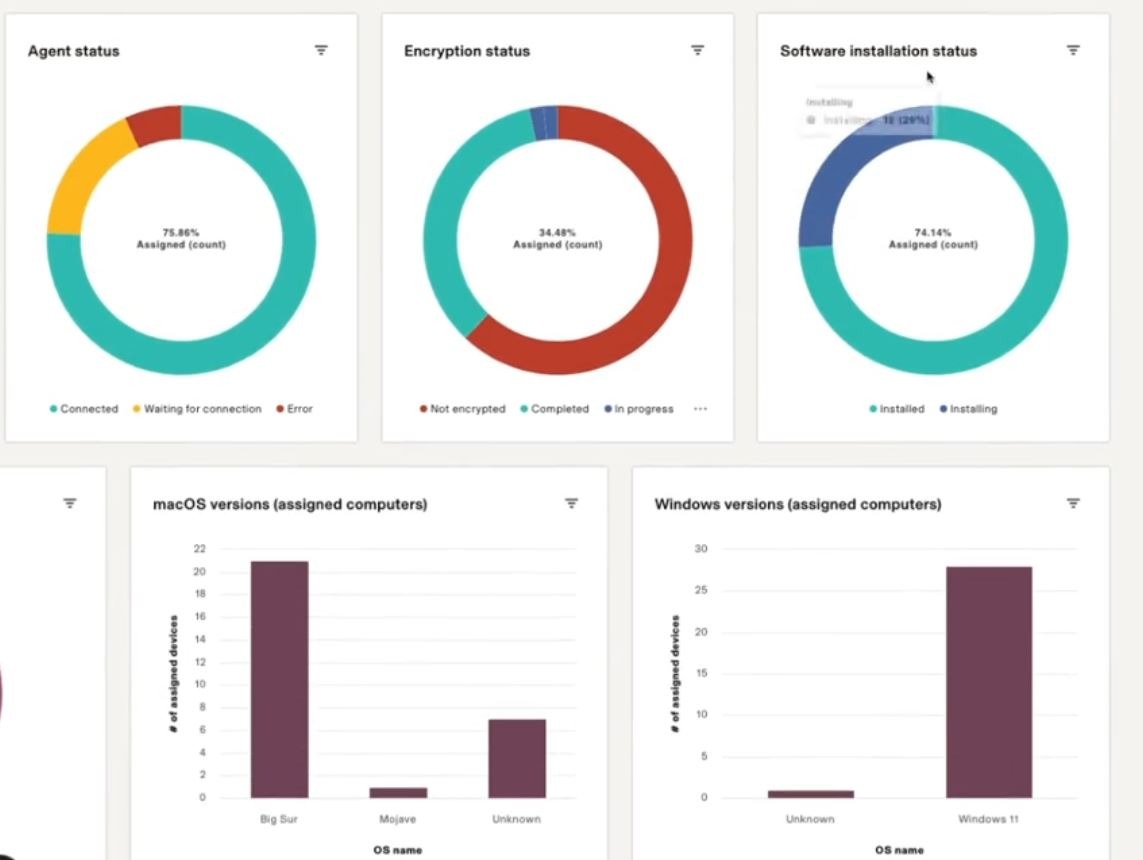
For instance, you see this visually impressive dashboard with details like the total number of devices, unassigned and assigned devices, MDM status, encryption status, and more.
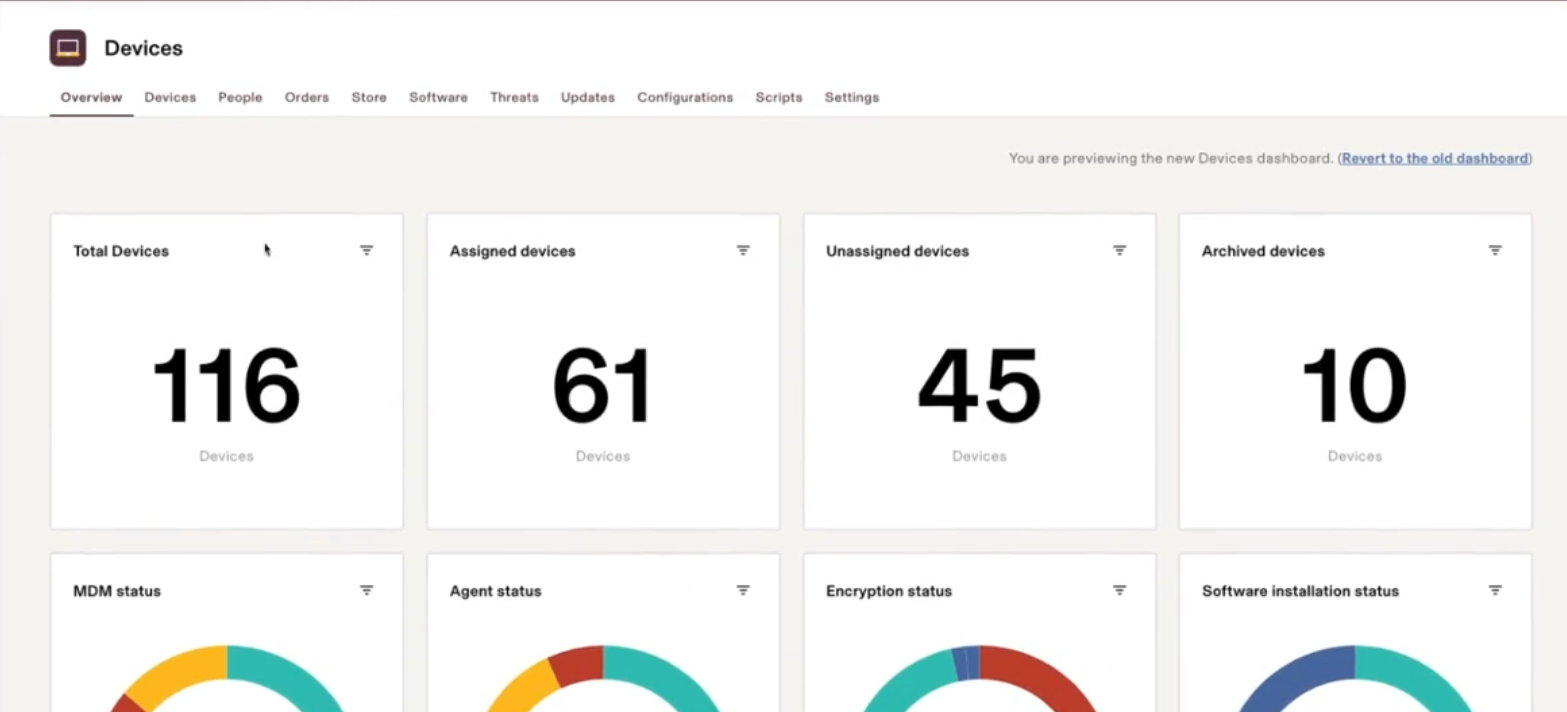
Now, this dashboard is completely customizable. You can choose what you want to see and what you don’t, based on your requirements.
And mind you, this is just the overview tab. Once I clicked the “Devices” tab, I could see much granular details like device name, who it’s assigned to, agent status, MDM status, antivirus, and tracking status:
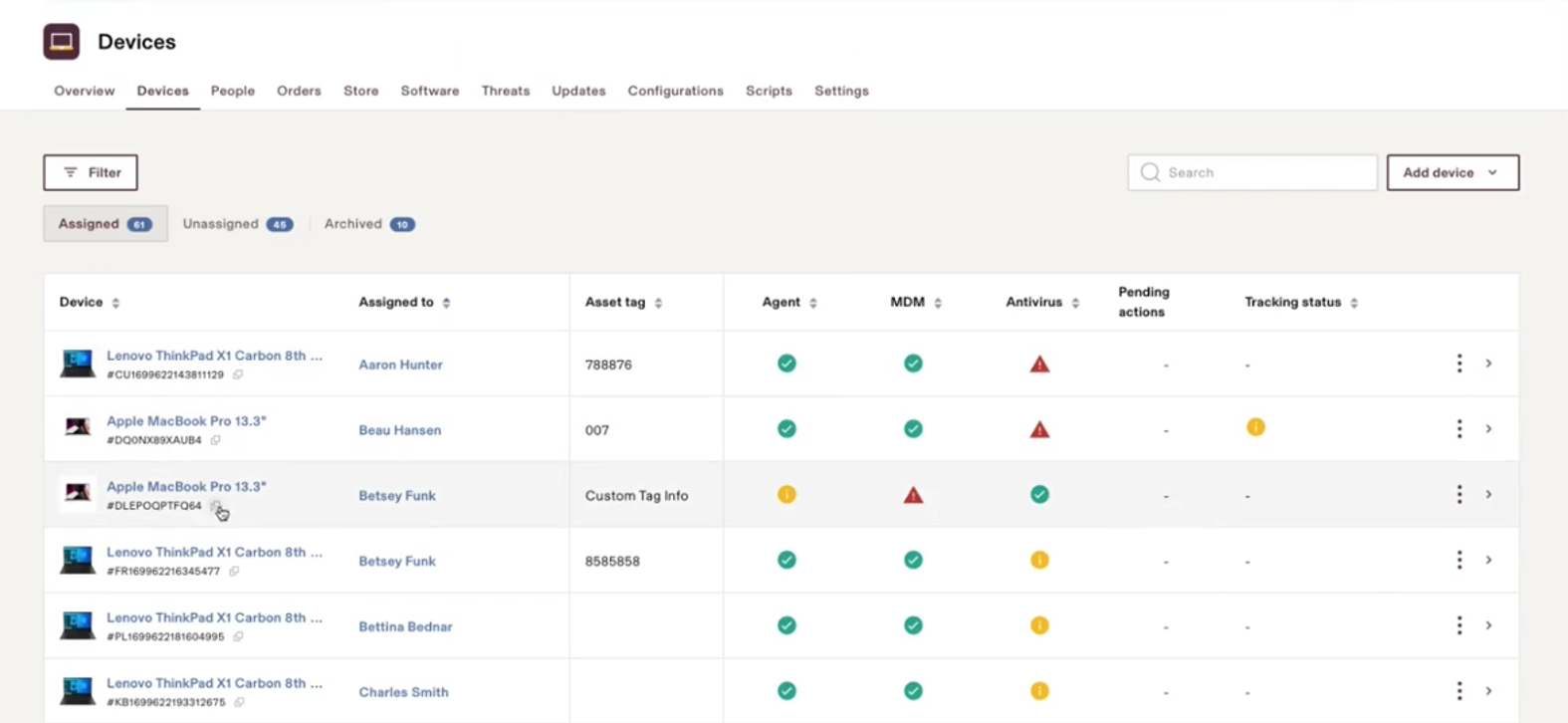
Once you click the Unassigned tab, you can see all available devices. And this tab shows you who these devices were previously assigned to and where they are right now:

The same dashboard also has a People view section. It basically connects devices to users. You can see which employees have which devices and whether their devices are managed.
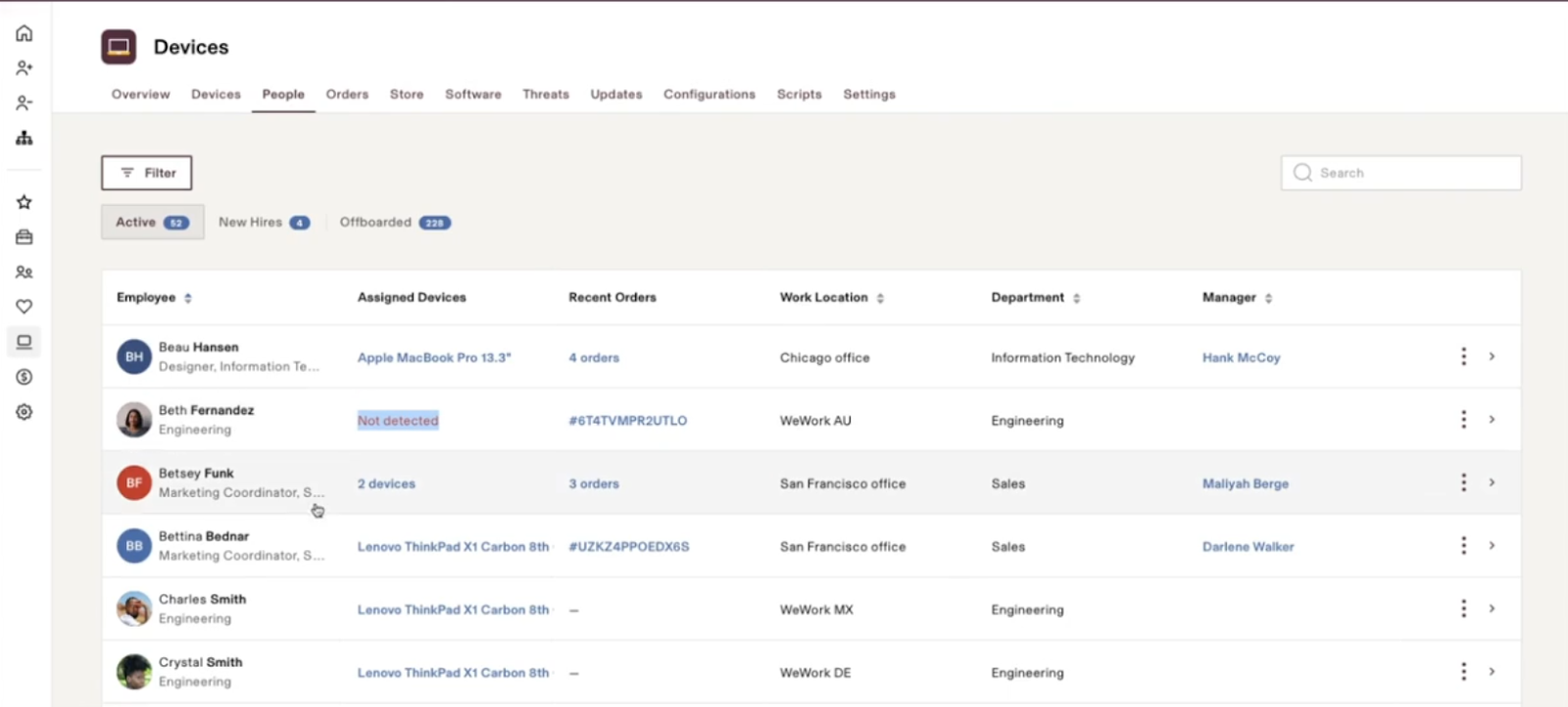
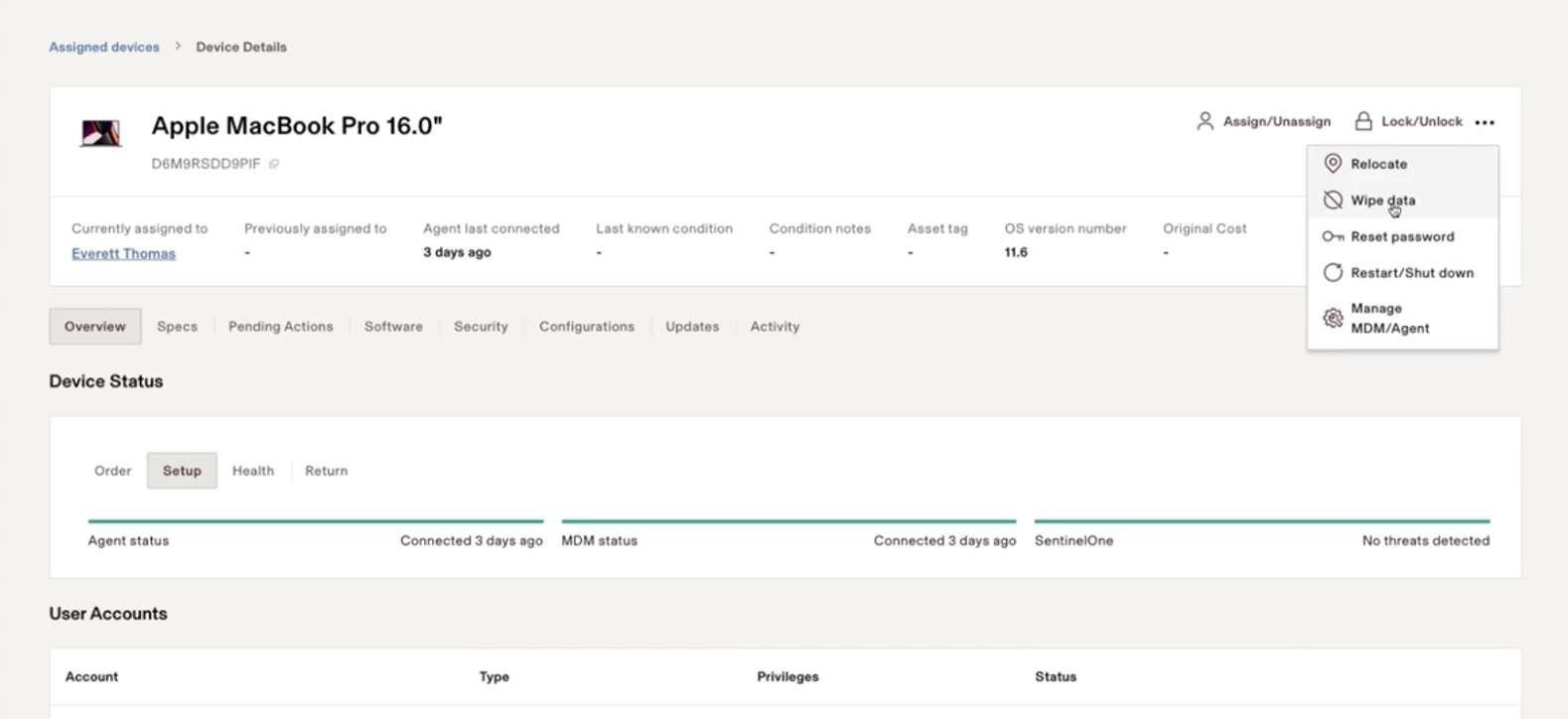
Let’s suppose one of your employees has multiple equipment (2 MacBooks, for example) and loses one.
As soon as you’re informed about the device, you can visit the employee’s profile, select the device, and perform functions such as locking or remotely wiping it. I like the level of visibility and control Rippling gives:
You can even set up device configurations, similar to Deel. For instance, you can choose a device (e.g., a MacBook) and add configuration details such as storage, screen size, and memory.
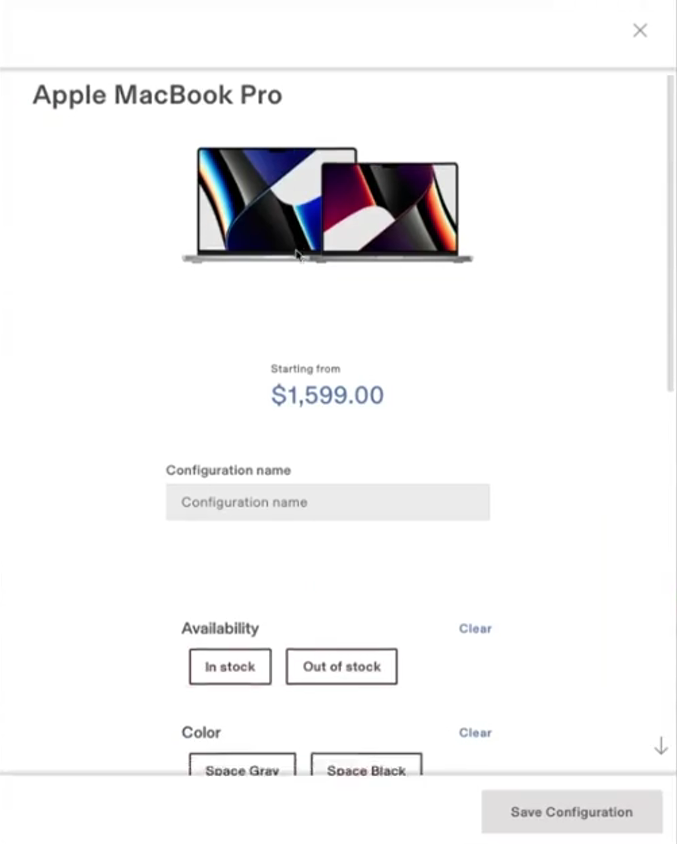
Why is this important? Well, when your hiring managers are ordering devices, they’ll see a preconfigured list to choose from. So, they won’t have to ask the IT team or the managers to choose the right device, saving a lot of time.
Verdict: Rippling wins clearly here.
While Deel gives a clean, functional dashboard, Rippling goes far deeper with encryption status, agent health, unassigned-device lineage, people-to-device mapping, remote actions, and preconfigured device templates.
3. MDM and Security
MDM, or Mobile Device Management, is about controlling and managing devices remotely. It’s an important feature for companies with teams distributed across countries.
Deel
Upon researching, I found out that Deel, unlike Rippling, doesn’t have its own MDM software. You can integrate 3rd party MDM solutions with Deel to control and manage devices remotely.
While this sounds inconvenient, I wouldn't call it a disadvantage, since many IT management tools follow the same model.
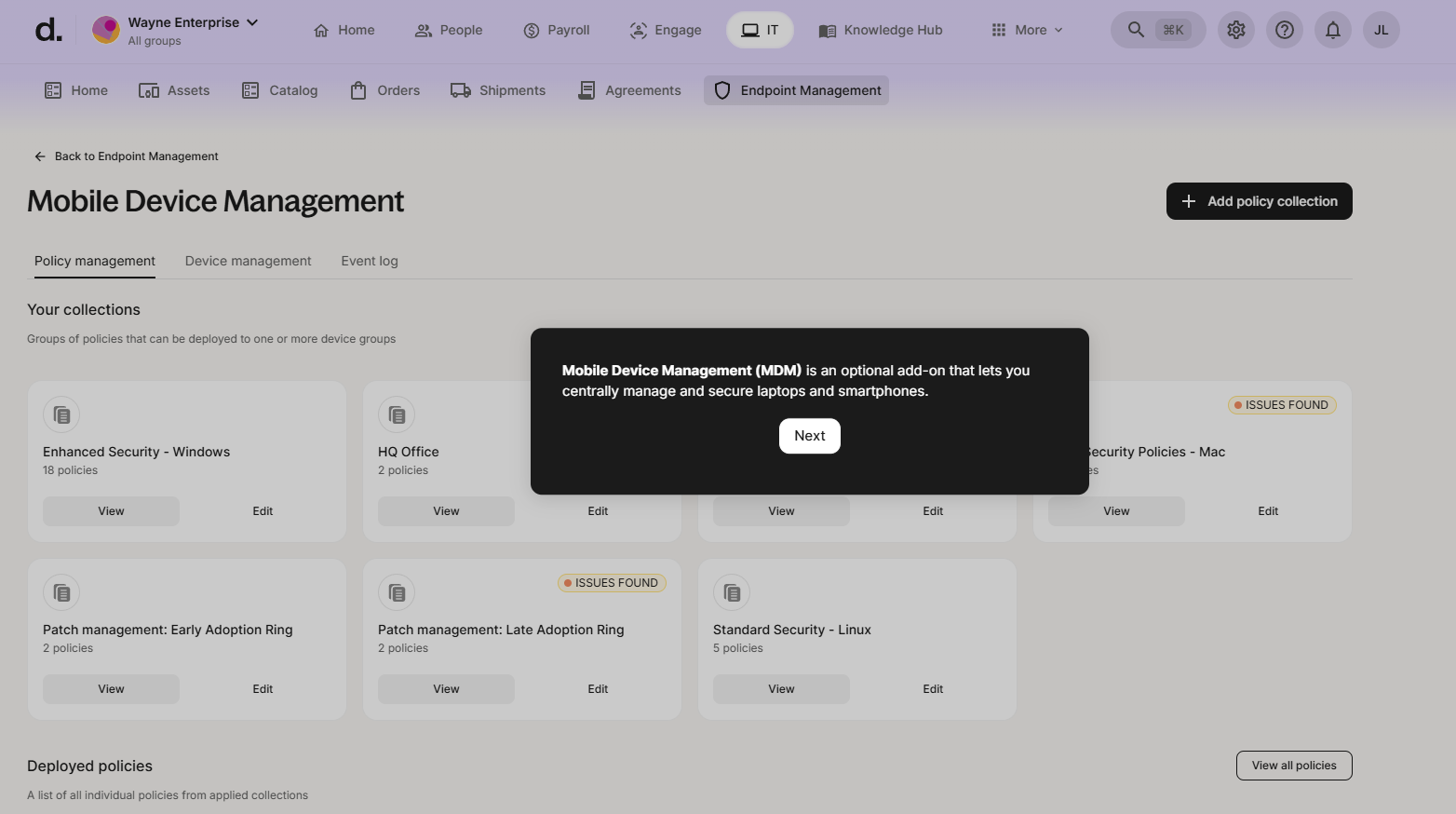
Once you add the MDM of your choice, Deel lets you apply security policies to enable biometrics, set built-in admin or guest status, enable BitLocker encryption, etc. These policies help you enforce security features across all devices in your infrastructure:
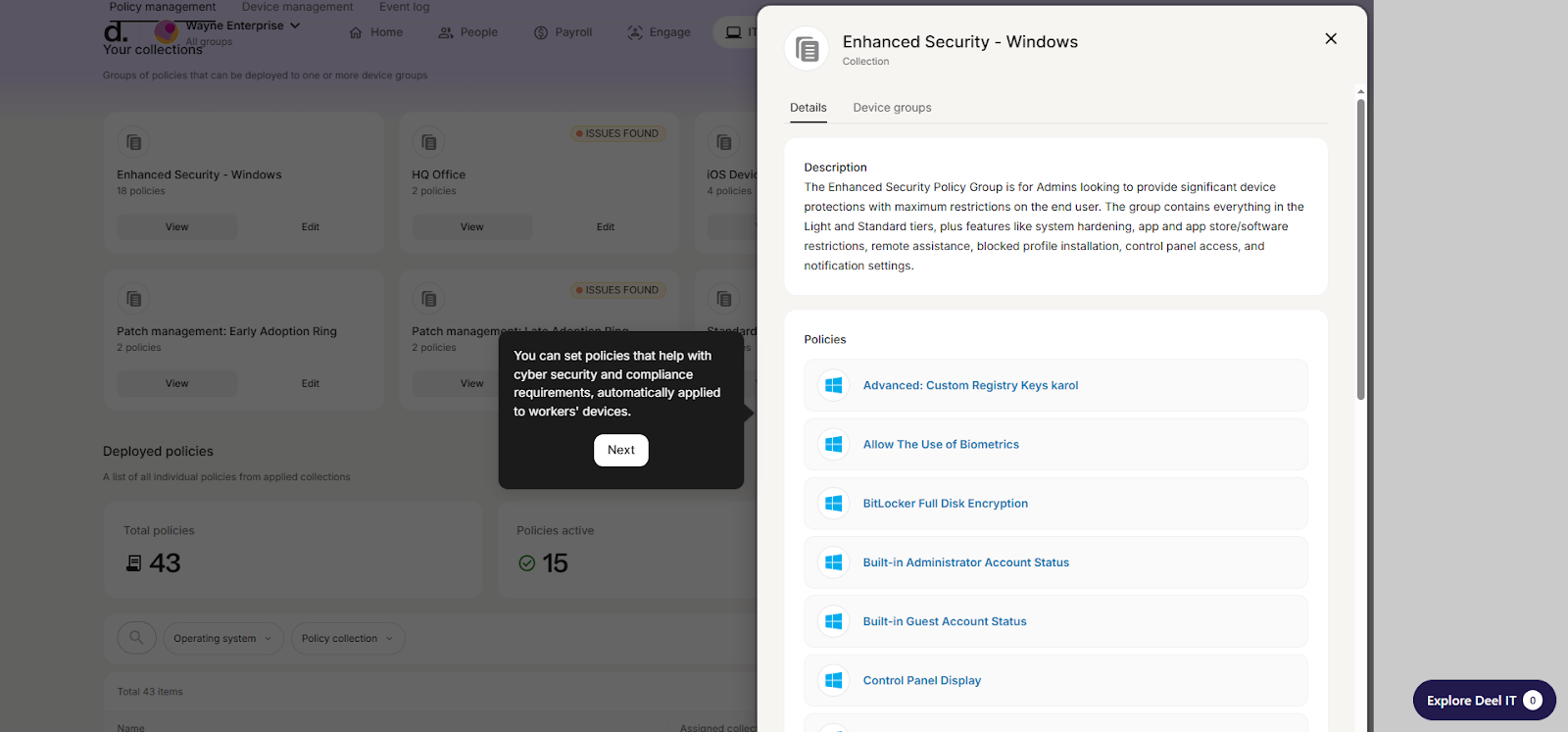
After setting up the policies, you can assign them to the device groups. For instance, you can implement FileVault installation on Mac devices. And this also means that all new Mac devices added to your inventory will have these policies implemented.
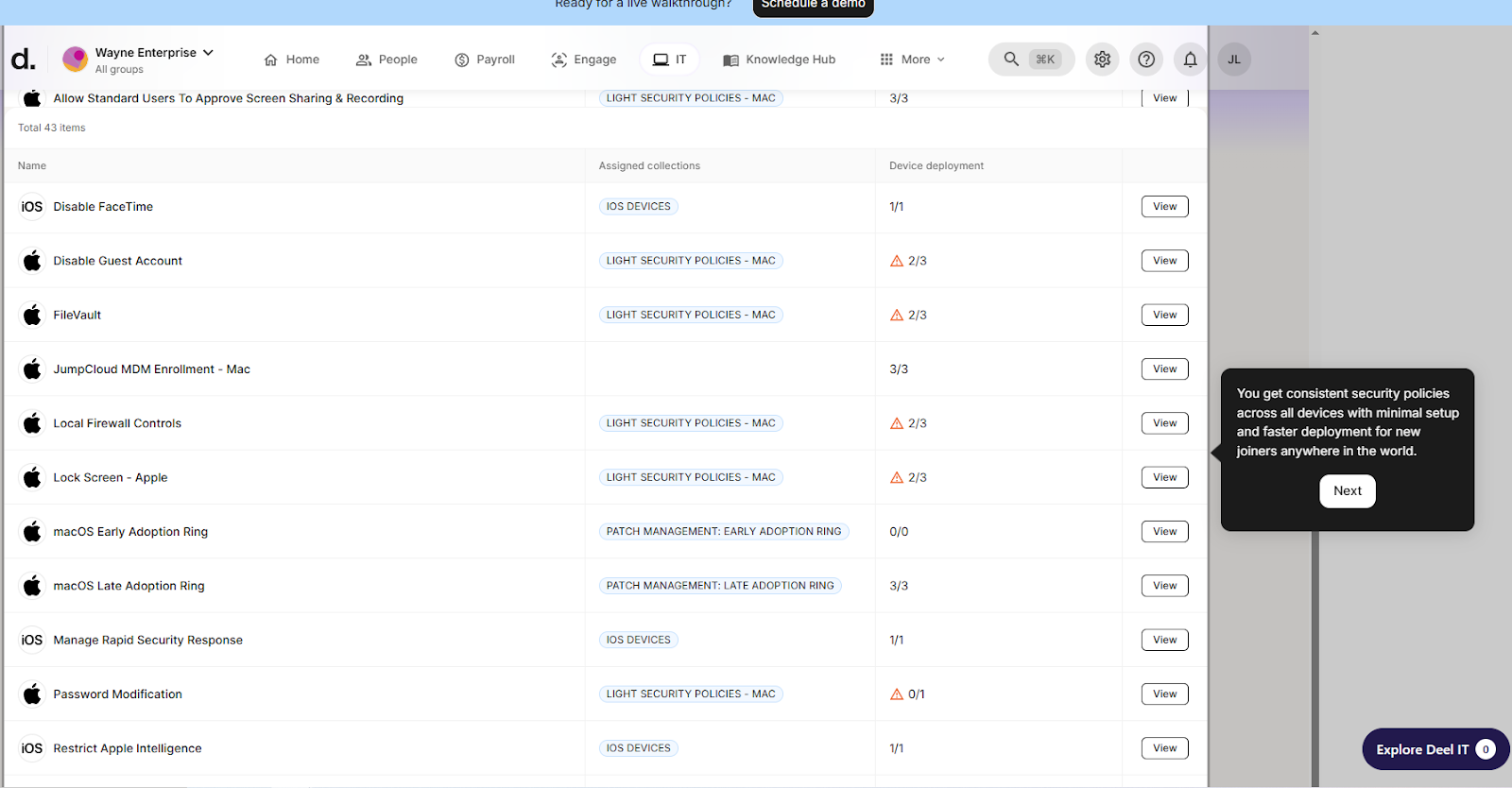
Coming to Identity and Access Management and security, Deel lets you integrate 3rd party IAM tools like Microsoft Entra, Google Workspace, Okta, and JumpCloud. And you can connect others using the Deel API.
Deel’s IAM dashboard lists multiple access groups that I created. Also, there’s a facility to create new access groups (static or dynamic) from the same dashboard.
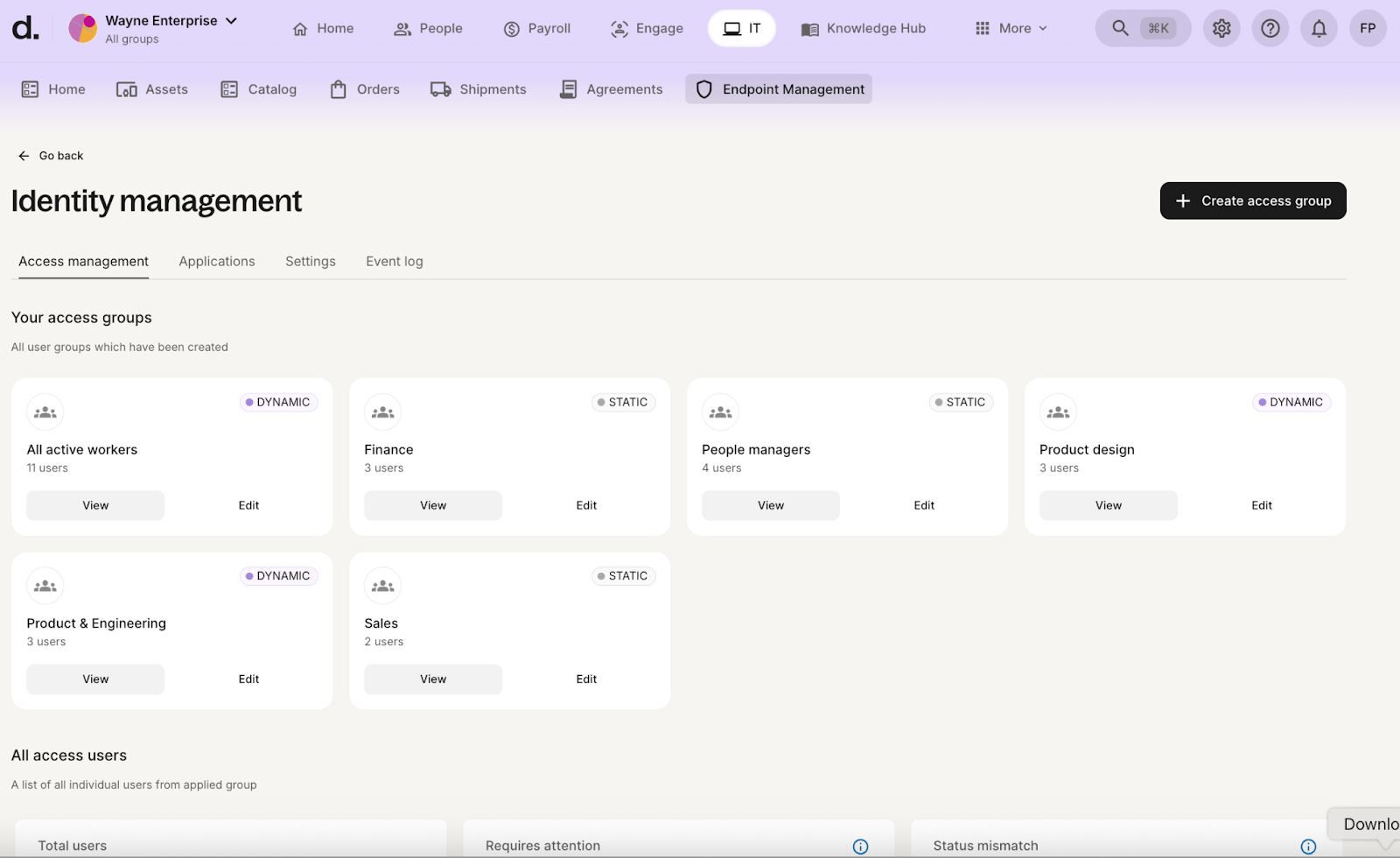
When you create an access group, you can define which apps you want installed and when you want provisioning to occur. For instance, you can define when the users should get access, like 2 days before the start date.
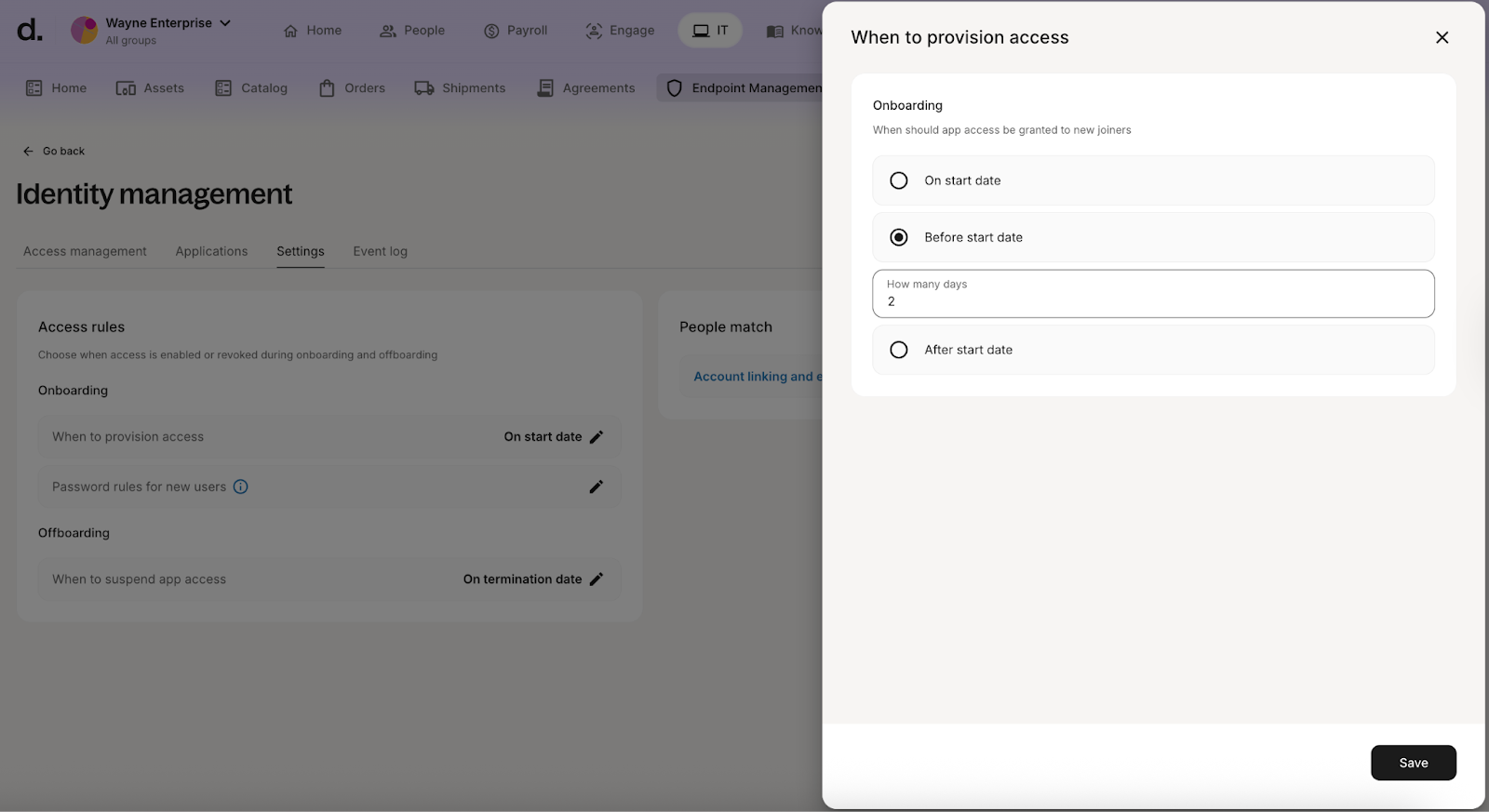
These rules ensure onboarding and offboarding happen automatically, without manual intervention:
- Onboarding: Automatically provides users with access to only the apps they need on time.
- Offboarding: Automatically revokes access when the users are terminated.
In addition to IAM, Deel also helps you deploy endpoint protection by installing lightweight sensors on each device. This enables you to monitor and manage your infrastructure from within the Deel dashboard.
Rippling
Rippling has its own MDM solution (like Kandji, Jamf, or Intune) that helps you remotely manage and control devices. You can:
- Deploy software on devices (either from Rippling’s catalog or by uploading packages)
- Reset password, restart/shutdown, wipe, or lock each device remotely
- View BitLocker and FireVault recovery keys.
- Modify the access levels of the users
- Set up and deploy configuration profiles
Coming to security, Rippling offers its home-grown Identity and Access Management platform:
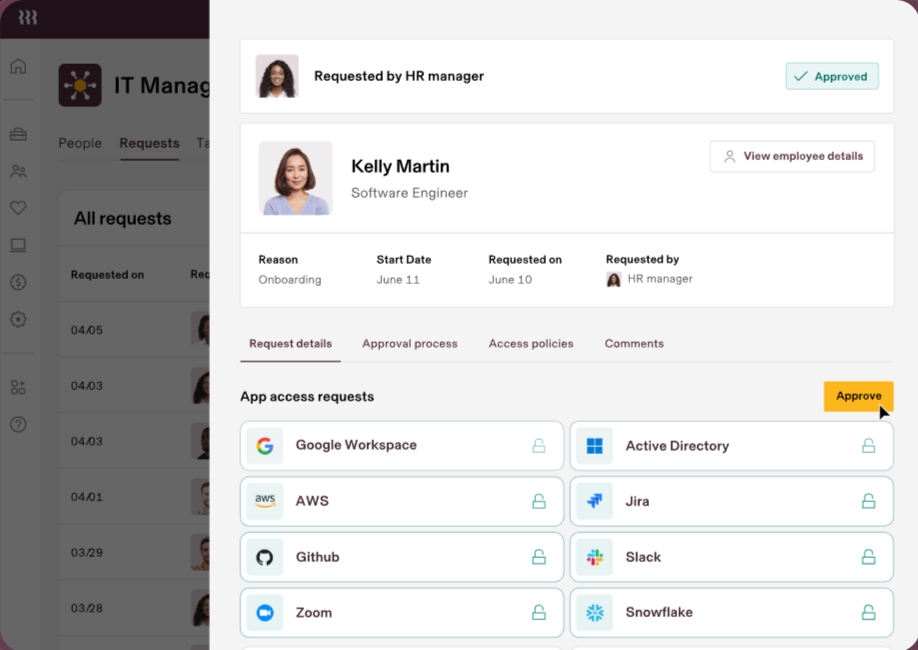
Rippling’s IAM platform offers granular access controls, enabling you to implement stronger security throughout the user lifecycle. Because of its centralized user identity, you get visibility and control over downstream changes at key moments, such as onboarding and transitions.
The dashboard shows all the apps you have access to (SSO):
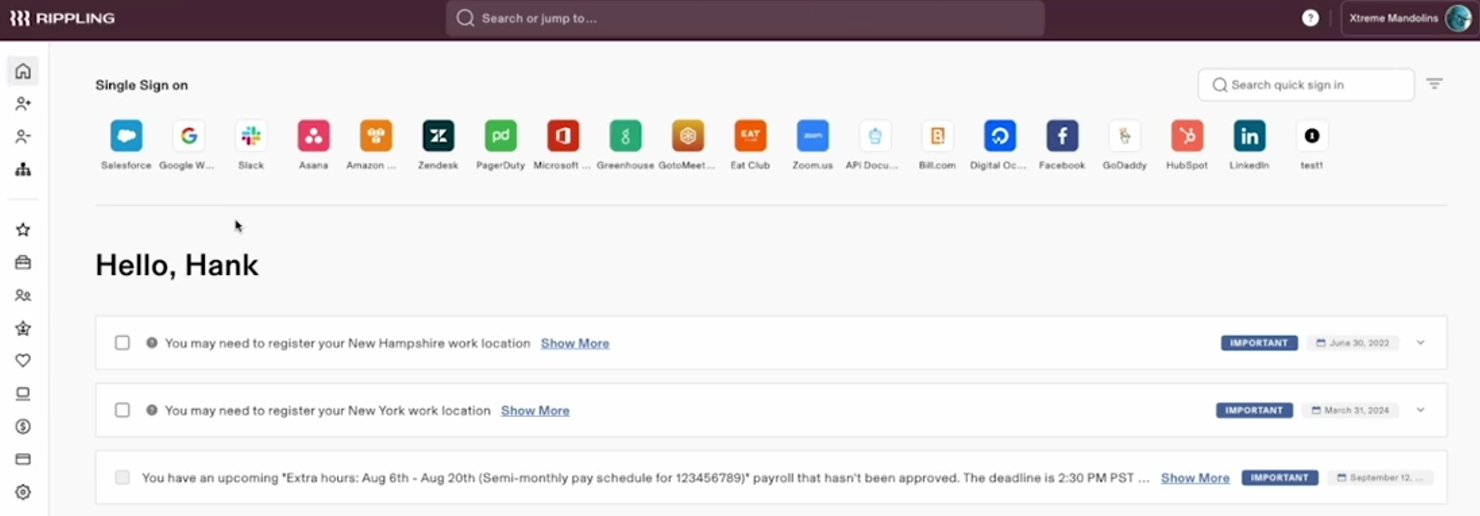
Click any app, and you'll get instant access. One impressive aspect of Rippling is the breadth and richness of its user data. It means you can capture detailed information and target access and device policies at a much more granular level than Deel.
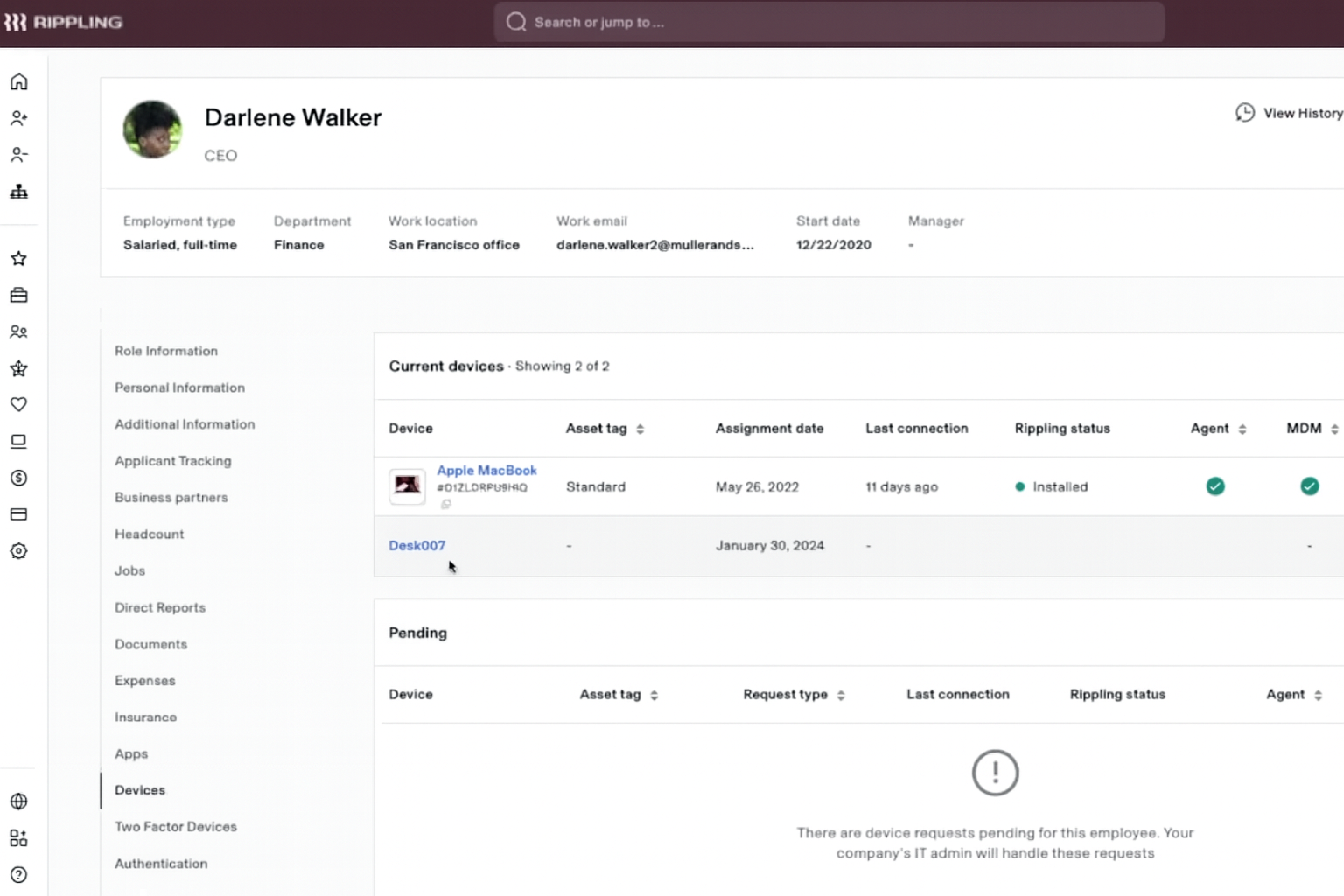
To explore this feature in depth, I tried managing access permissions in specific apps like Google Workspace. Upon selecting Google Workspace, I was asked who should have access to Google Workspace when they join the organization:
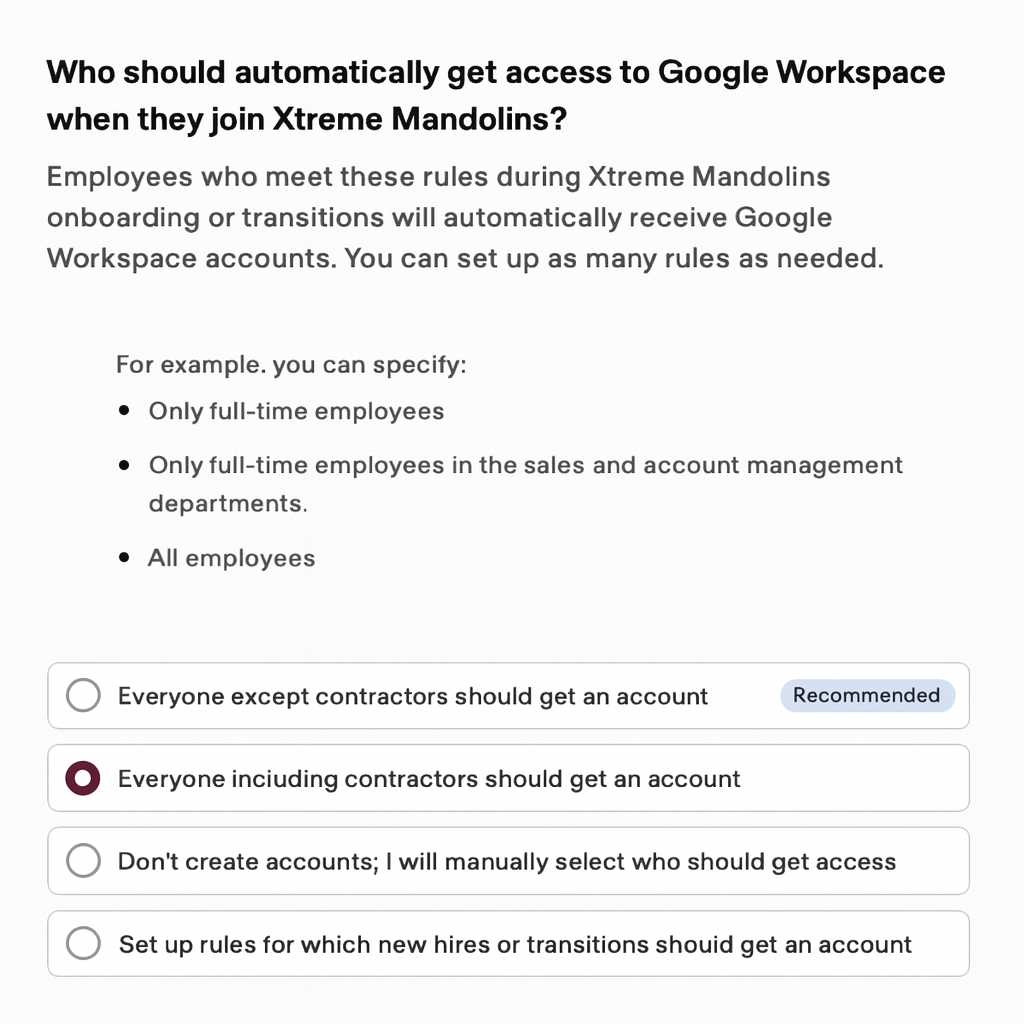
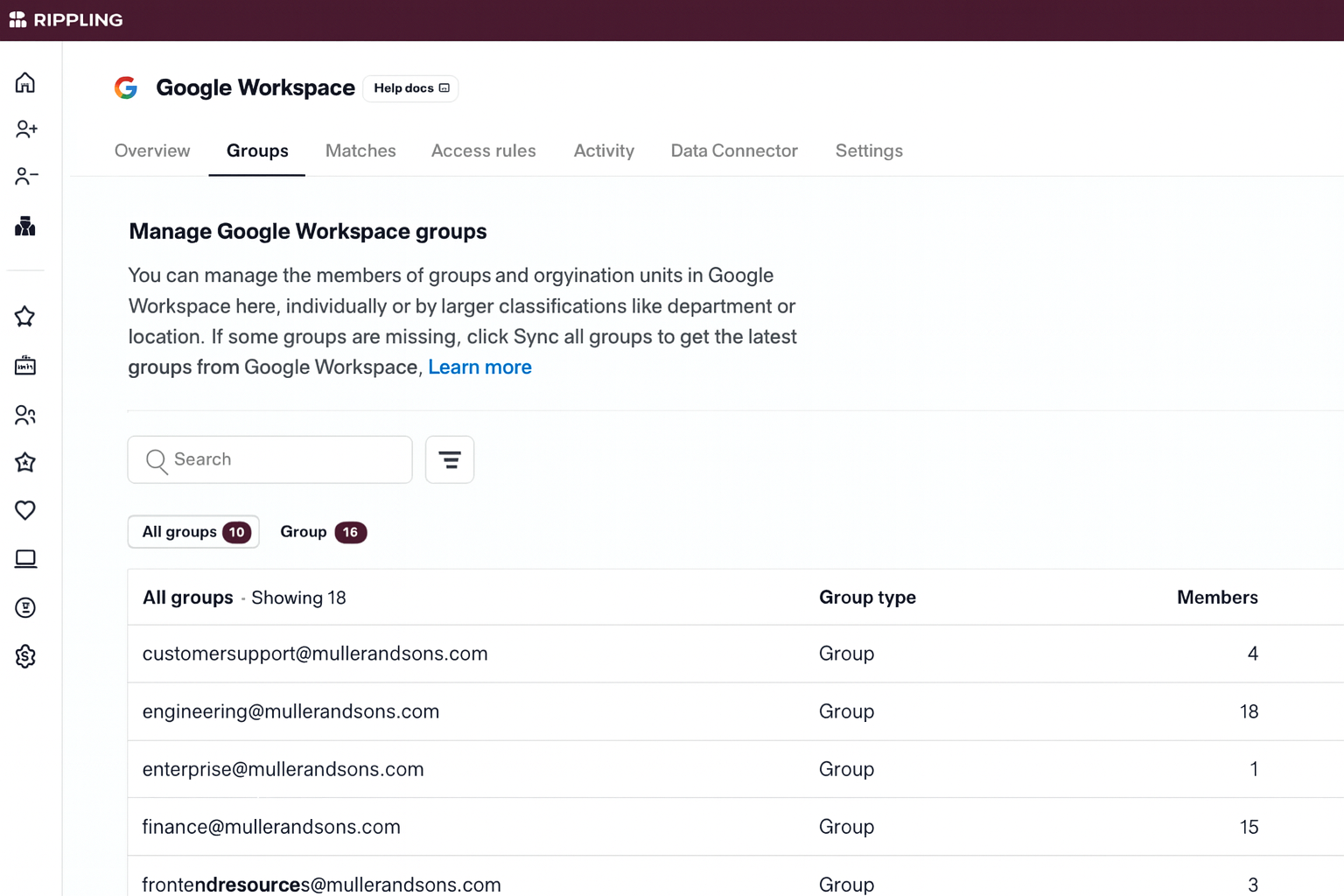
From the “Groups” menu, you can access all the permission groups you already have in Google Workspace. This allows you to automatically assign them to new hires based on role, team, and rules.
Then you can decide their membership via role-based access controls. Rippling allows you to define members based on their department, work location, role, and more.
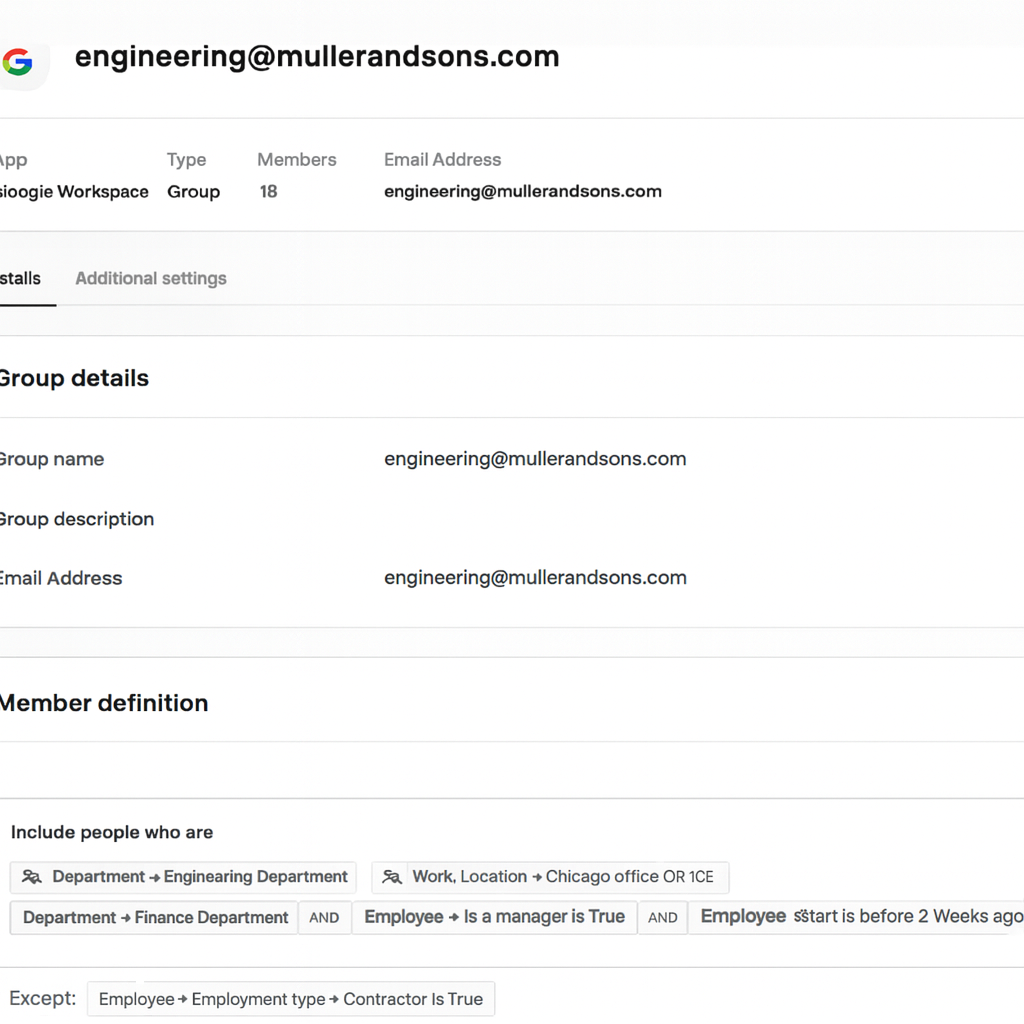
As your workforce evolves, group memberships will update automatically. This ensures access changes as employees onboard, transition (move to new teams or roles), or leave the organization.
Another great thing about Rippling is that you can use the data in their groups to tightly control security via things like custom MFA policies (that apply to specific user groups and not all) and behavioral detection rules.
Why is custom MFA a great feature? It lets you enable MFA for certain departments (e.g., all 3rd-party vendors and contractors) and disable it for others (e.g., sales). This ensures that not every employee has to enter the code, improving the overall end-user experience while maintaining security.
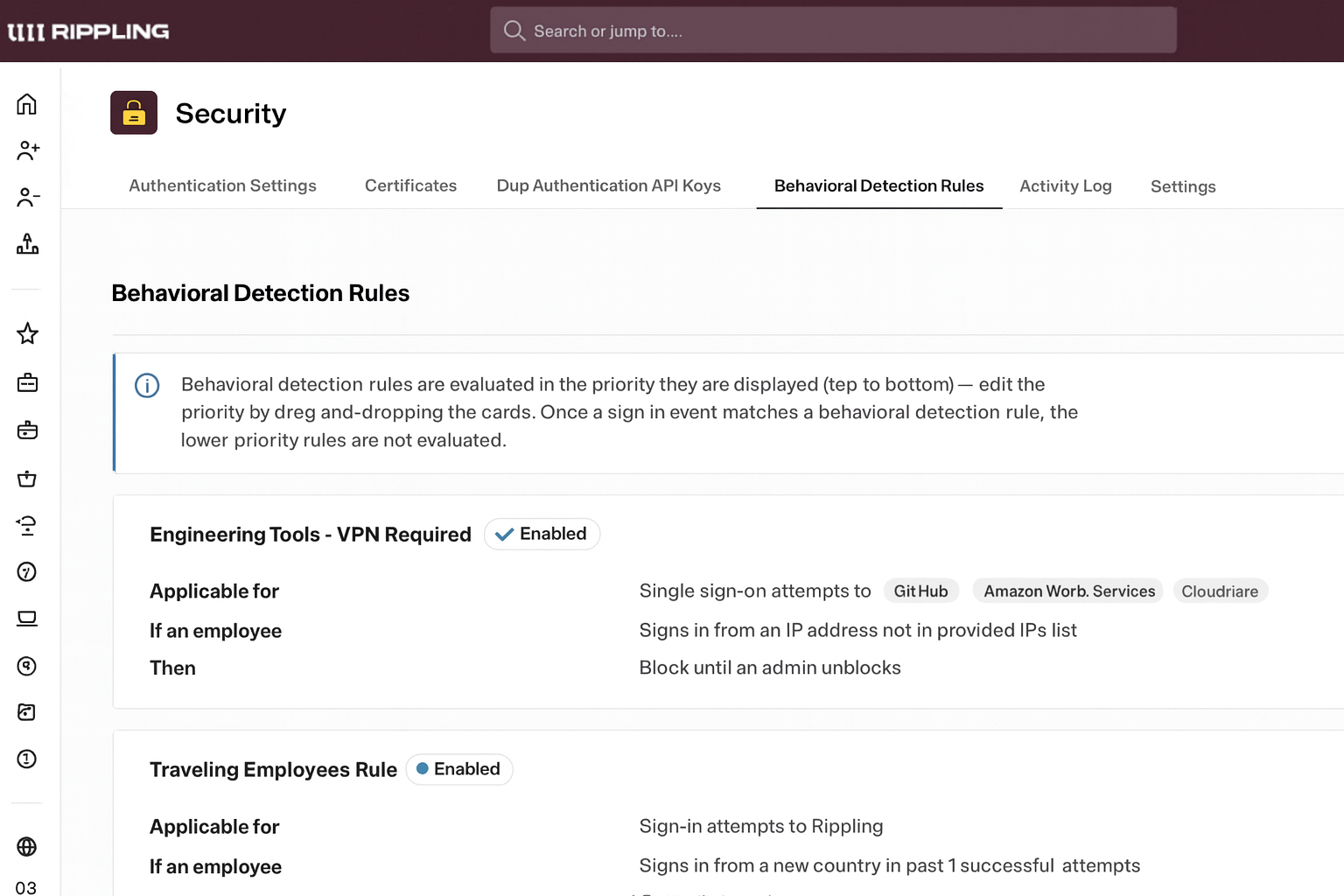
The same goes for behavioral triggers. You can add filters like location, department, velocity, etc, to trigger an action:
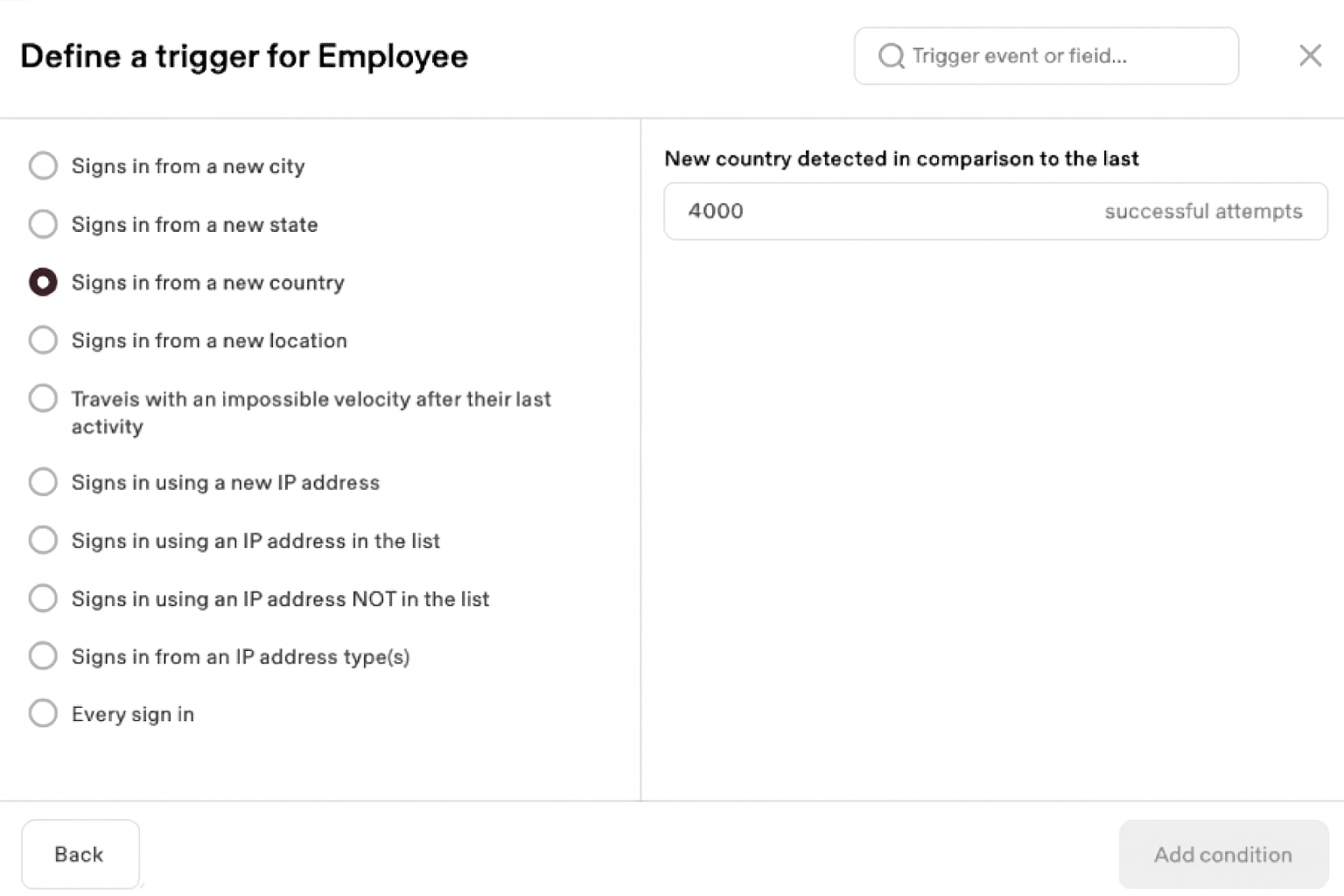
For instance, if someone logs in from a different country, you can trigger an action like “blocking the VPN access”.
Verdict (MDM & Security): Deel helps you effectively manage all your assets remotely using a 3rd party MDM solution. You can implement IAM features like SSO and MFA, and use groups for granular targeting.
However, Rippling offers a full-fledged, cross-OS MDM and device security suite natively. With Rippling, I could manage device security directly (lock, wipe, enforce encryption) without leaving the platform, which is invaluable for distributed IT management.
For a company with a lean IT team, Rippling covers a huge chunk of endpoint security with minimal effort, giving it a major edge. So, for me, Rippling is the winner here.
Now that we have covered the IT management capabilities of both tools, let’s see how Deel and Rippling compare in other categories:
4. Payroll and Global Hiring
Both Deel and Rippling were built for payroll and global hiring. Here’s how they compare:
Deel
Payroll and global hiring are Deel’s bread and butter. If you’re using Deel, it’s likely because you want to hire internationally without setting up local entities.
In fact, Workwize uses Deel to hire and manage contractors and employees worldwide. And I can say that Deel always processes payments (because I get paid on time) on time and in accordance with local and global regulations.
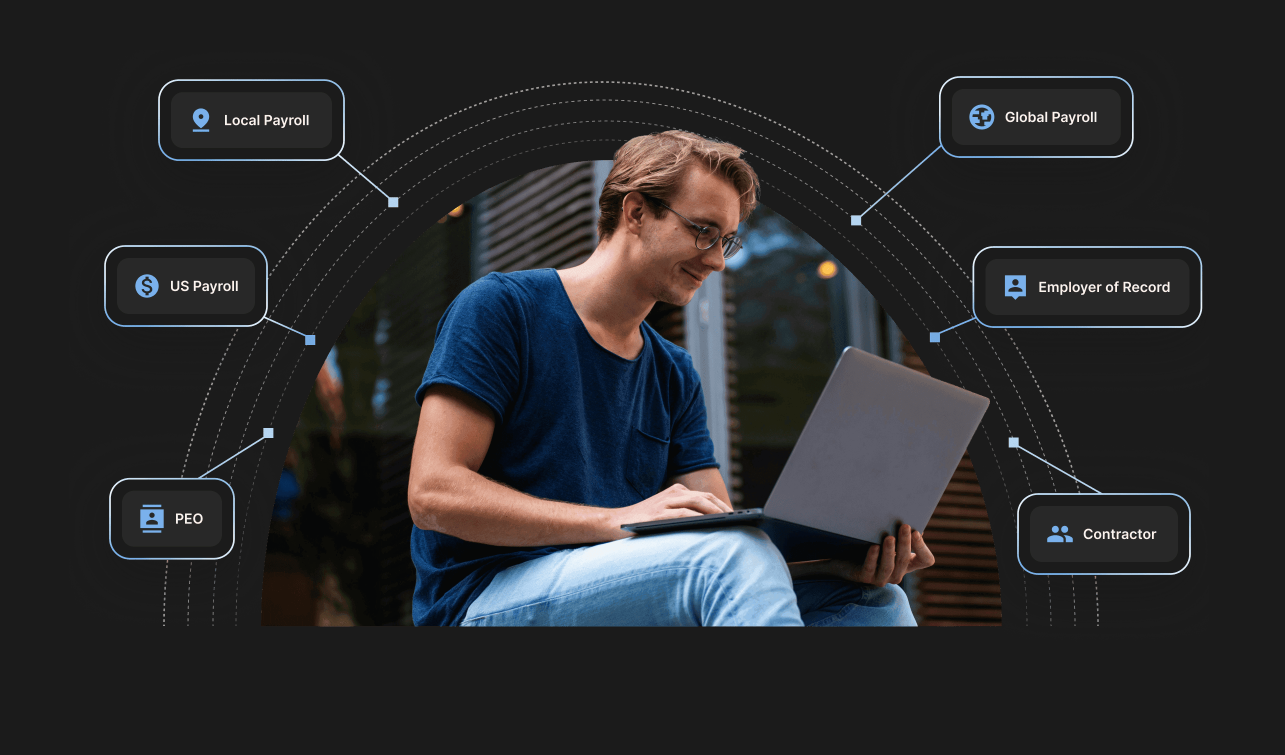
Deel’s payroll services include the following.
Employer of Record (EOR)
EOR is when you hire a 3rd party to hire and onboard employees on your behalf, and manage everything from payroll and taxes to compliance.
Deel lets you hire and onboard employees in 150+ countries without opening an entity, while ensuring compliance and minimizing tax, benefits, and labor-law risks.
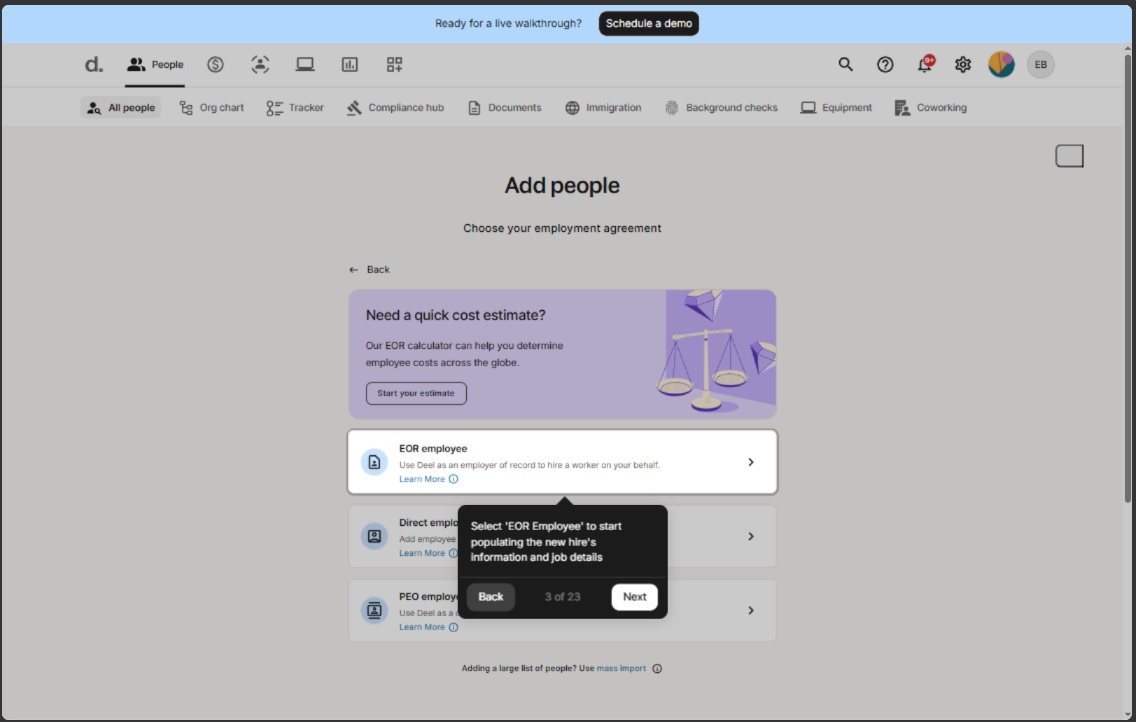
I accessed their interactive demo and found the UI intuitive and easy to use. You can simply add people (for example, an EOR employee), enter their compensation and the necessary details, and you’re good to go.
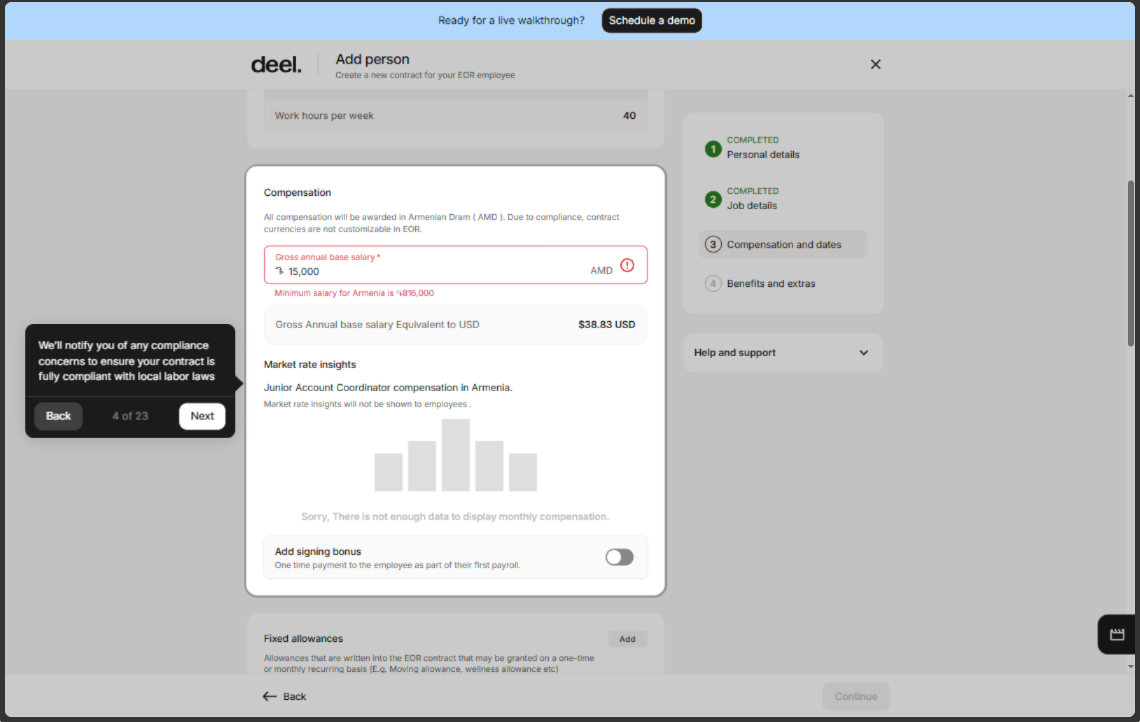
While researching Deel, I saw the word “compliance” everywhere. So, naturally, I was expecting to see compliance in their interactive demo video. And I did.
After selecting the region and compensation, I entered the gross salary, and Deel immediately indicated that it was below the minimum wage for that region. Had the warning not been there, I might have proceeded further, leading to non-compliance. But Deel saved me from doing that.
Plus, Deel’s compliance monitor helps you stay up to date on evolving regulations, ensuring that new changes are reflected in agreements, payroll, and employee practices.
Another feature I liked was the self-service facility that allows employees to submit their time off and expenses, view payslips, request documents, and access support. This saves HRs a lot of time.
Lastly, I explored Deel’s AI chatbot. You can ask any compliance-related query, and it’ll scan through 12,000 articles to provide a credible answer.
Contractor
Deel makes hiring and managing contractors/freelancers from 130+ countries an efficient and easy task.
You can just:
- Click “Add a contractor.”
- Select the contractor payment agreement
- Add role details
- Decide on the compensation and frequency (weekly or monthly)
- Choose addons like background checks or coworking passes
- Review, sign, and send the contract
And that’s how you onboard a new contractor via Deel. Once you’ve hired or onboarded a contractor, you can manage each one of them using the same centralized dashboard:
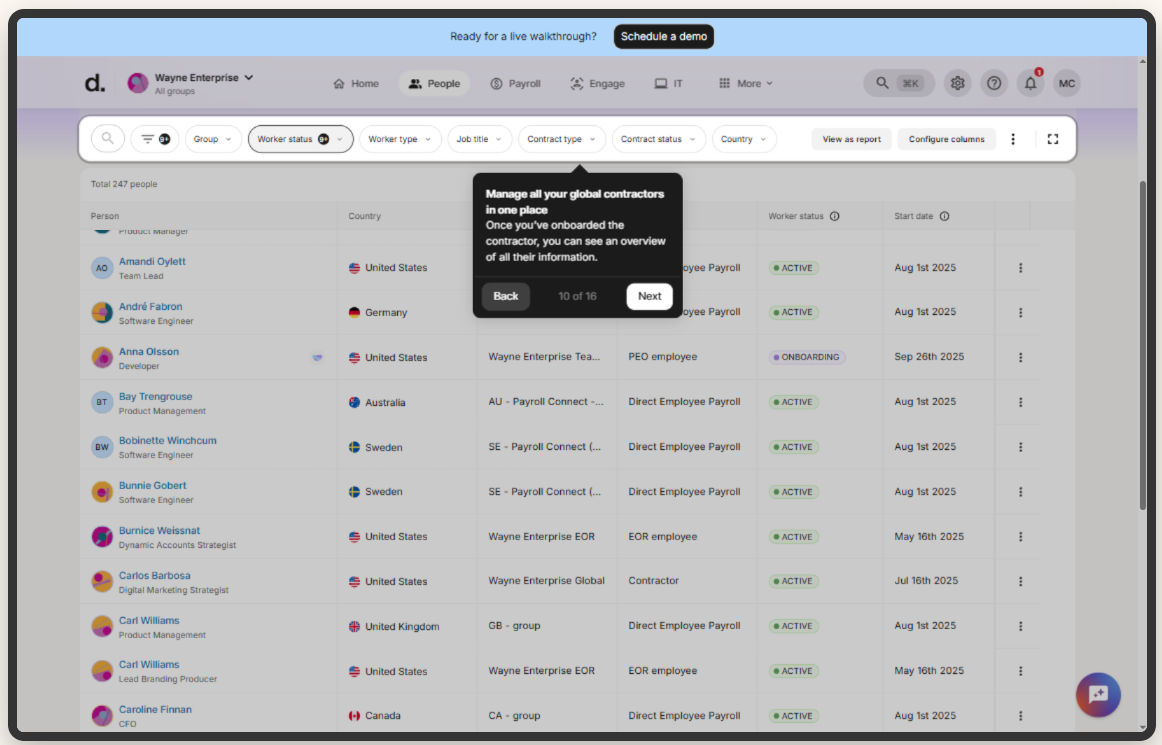
Another great thing is that you can instantly bulk pay all your contractors. Just select the contractors, review the invoices, choose your preferred payment method, and make the payment.
I find the entire interface and experience very seamless and user-friendly, with the potential to reduce HR and payroll admin time.
Global Payroll
Managing payroll globally is complex, as you need to stay up to date with changing regulations to remain compliant.
However, Deel claims to streamline international payroll, compliance, tax deductions, filings, and more in 130+ countries. They have a huge team of in-house payroll experts who work in the backend to ensure you stay compliant.
Also, Deel integrates with multiple HR ERP and HCM tools to enable secure, flexible, and complete data flow across HR and Payroll.
Here’s what the interface looks like. You can view all your global entities in one place, review, and submit payroll for approval.
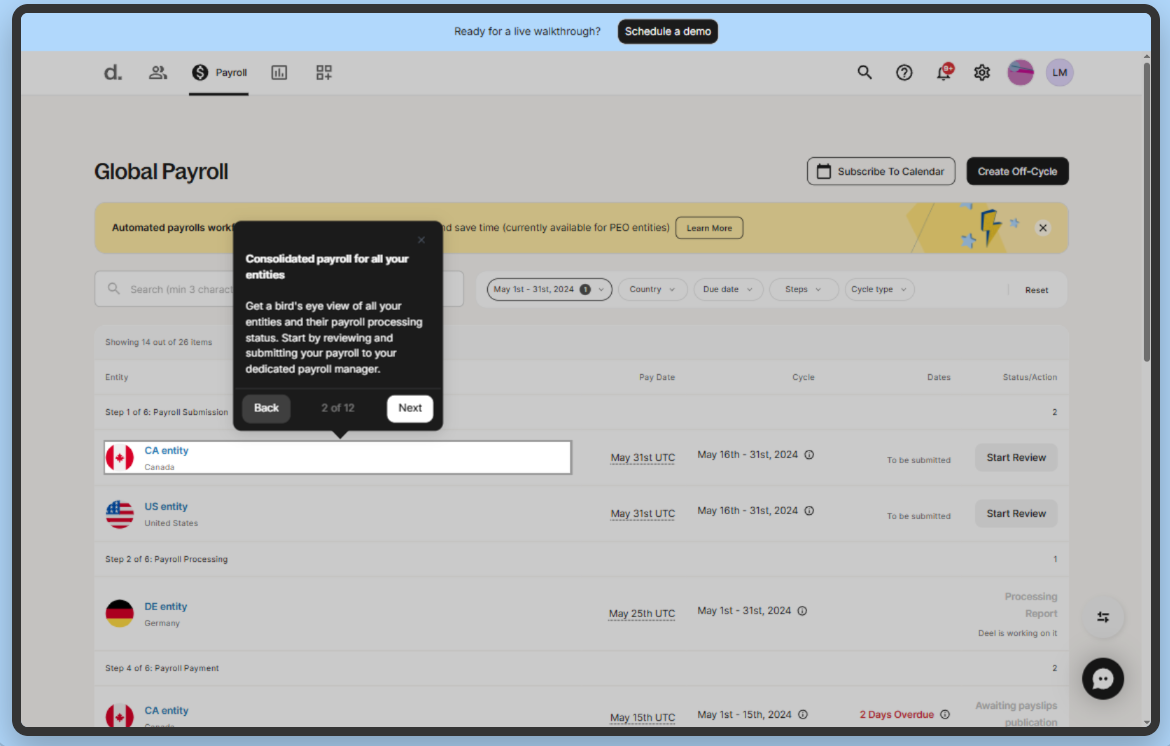
If you find something that needs to be changed, you can make the modifications directly in the report:
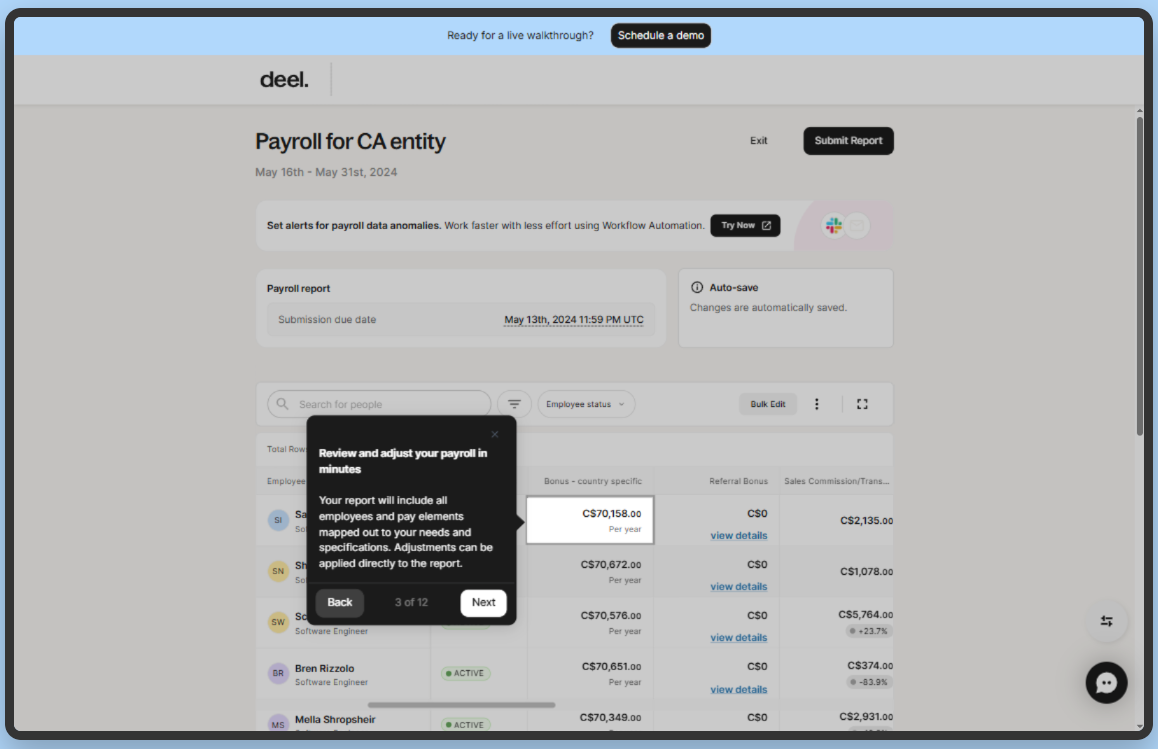
After approval, you can process the payment using your preferred payment method.
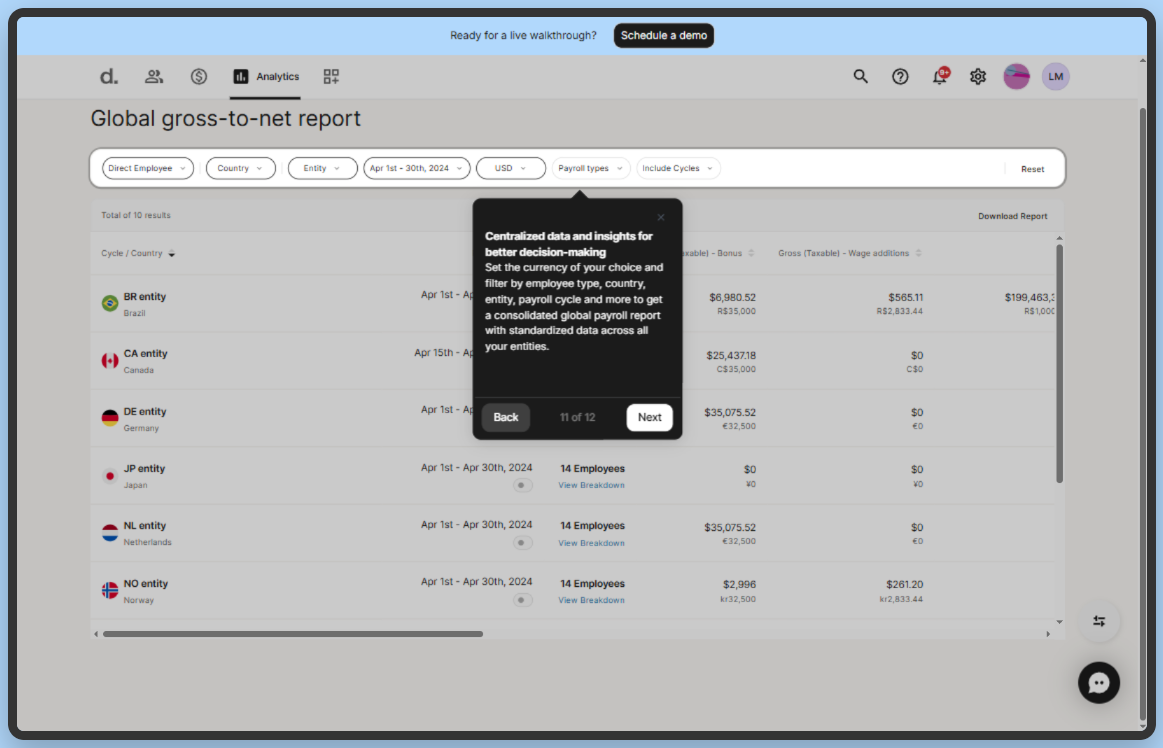
One thing that stood out was the reporting features. From the analytics section, you can access real-time, global reports on payments, employee contributions, deductions, payment history, and more.
For instance, the global gross-to-net report provides a view of your total payroll operations and can be customized to your reporting needs. With these centralized insights, you can make better and more informed decisions:
US Payroll
Deel has quite recently started offering US payroll services, with two modes:
- Self-Run: Choose this if you’re a US-based organization with established payroll expertise and need a fast and automated way to handle calculations, taxes, and filings yourself without adding complexity.
- Premium Support: Choose this if you’re a global team or a company that lacks US payroll expertise. You get premium support for hiring across multiple states, paying hourly workers, or managing more complex payroll inputs.
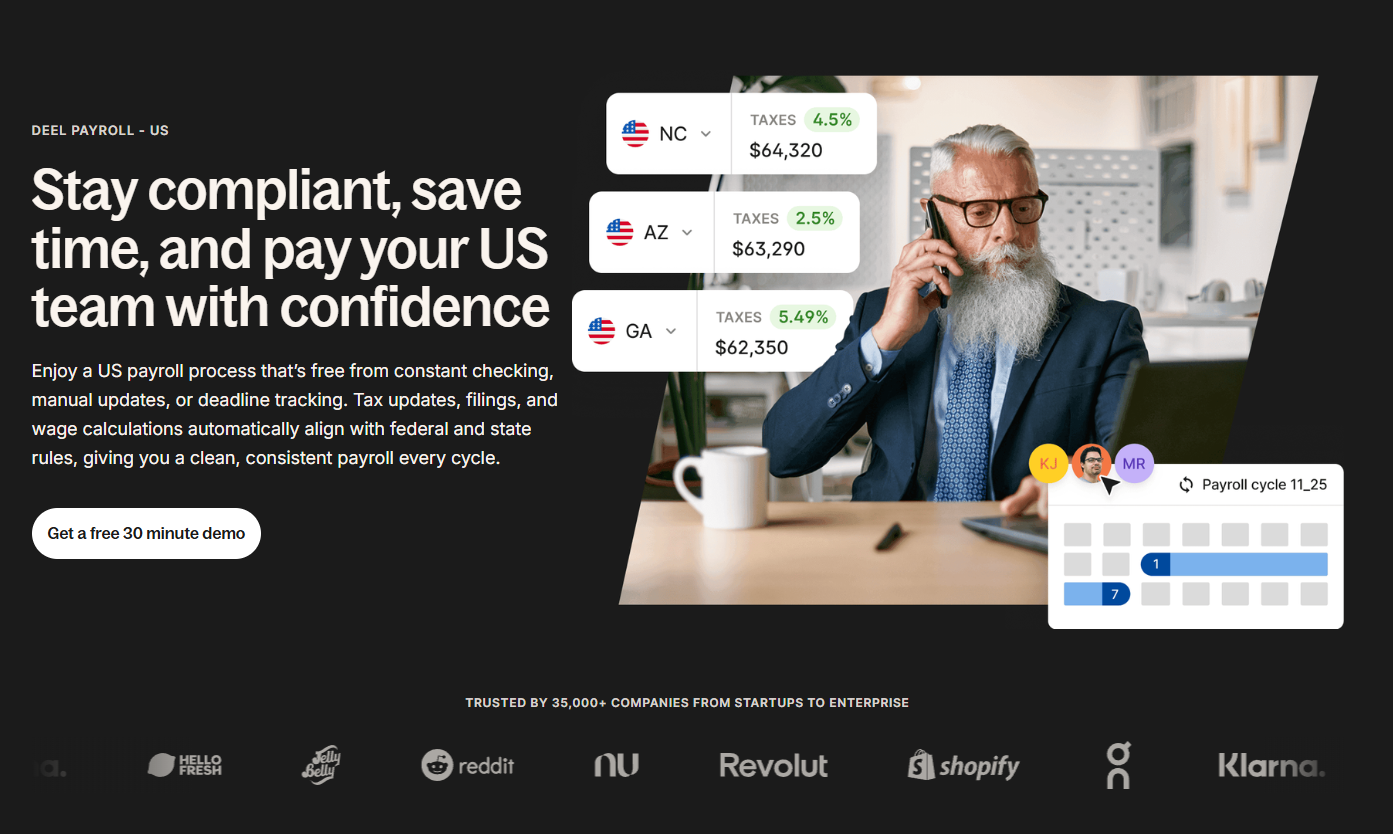
Here’s what Deel helps you with when it comes to US payroll:
- Collecting employee and tax setup information
- Calculating gross wages
- Deducting federal, state, and local taxes
- Withholding benefits and other deductions
- Paying employees
- Filing payroll taxes and submitting employer liabilities
- Producing reports and employee tax forms (e.g., W-2s)
Because every state and several cities have different tax rules, you need a credible and trusted payroll company to help you stay compliant. Deel automates calculations and tax filings and ensures secure payroll processing across all 50 states.
Rippling
Payroll is one of Rippling's core functionalities. So much so, Rippling has been (or should I say was, since Deel has the 1st spot now) ranked #1 Multi-Country Payroll software on G2, based on thousands of customer reviews.
Let’s explore the core payroll feature and compare it with Deel.
Employer of Record (EOR)/Global Payroll
Similar to Deel, Rippling also lets you hire and onboard employees globally without opening an entity, while handling compliance. But there’s a tradeoff—Rippling supports EOR in just 80 countries as compared to Deel’s 130+.
Adding employees is easy, and the interface is quite intuitive, similar to Deel. Remember, we discussed Deel’s alert when I added lower compensation? That’s also available in Rippling:
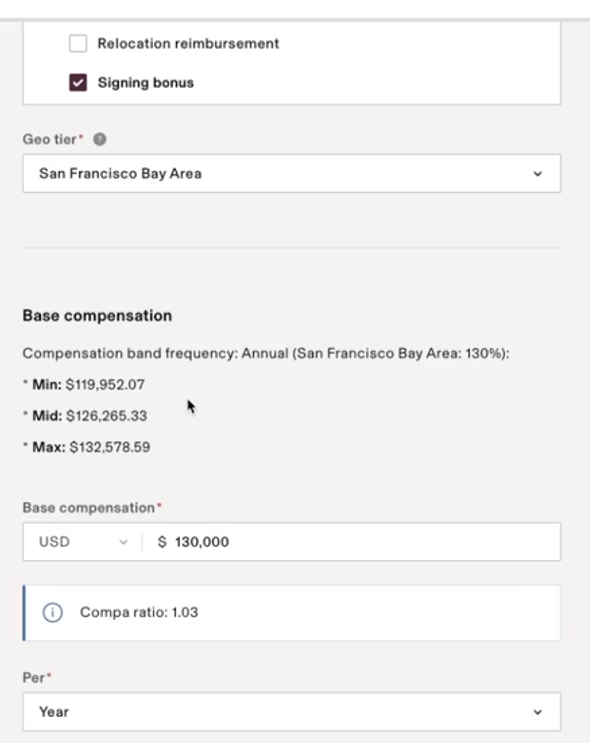
Rippling's EOR helps you stay compliant by simplifying employment agreements, collecting country-specific information during onboarding, and managing minimum wage laws, PTO accruals.
You can pay your international employees any way you want. Let’s say you want to pay by the hour. Employees can upload the invoices, and after your approval, everything will automatically sync with the payroll, saving you time.
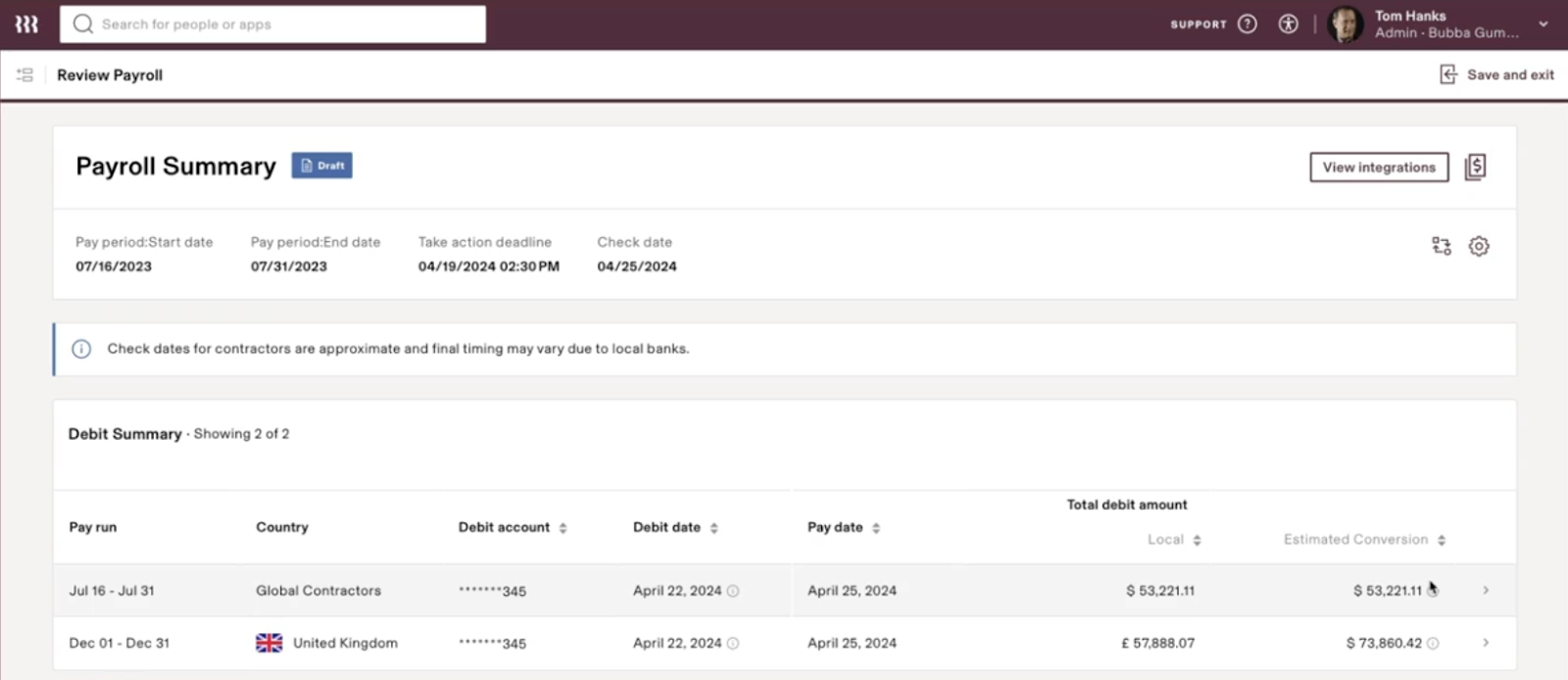
One of the major advantages of using Rippling is the short payroll lead times. It can reduce the time to payday from 3+ weeks to just 5-12 days, enabling you to pay your employees on time.
Once you approve the payment, Rippling will calculate the estimated conversion fee, and within days, the payment will be available to the contractors for withdrawal.
Global Contractor Management
Similar to Deel, Rippling also lets you hire and manage contractors from across the globe. However, it supports 185+ countries, more than Deel’s 150+. Additionally, Rippling supports 50+ local currencies, while Deel supports more than 200.
With Rippling, you can:
- Add a new contractor
- Send a localized agreement
- Run KYC check
- Add the contractor to the global payroll
- Grant access to the necessary apps
- And finally, pay them on time and every time.
All within a single workflow.
In addition, you can manage all your contractors’ workplace requirements, like annual leaves, license provisioning, and time tracking, within the same platform as your employees.
Verdict:
If you primarily need to hire internationally with full confidence and minimal effort, Deel is the safer bet for payroll. It covers more countries with in-house expertise, and I personally felt more “hands off” with Deel (in a good way) when it came to compliance.
Rippling is great if you want a single platform for domestic and global payroll, and especially if you already use it for HR–it’s extremely efficient to have it all in one place.
HR and People Operations
HR is another core offering of both Deel and Rippling:
Deel
Deel offers a comprehensive HR module that helps you with everything, from planning and hiring new employees to offboarding them with ease.

Here’s what Deel’s HR solution includes:
- HRIS: Deel HRIS is a suite of multiple tools in a single system that lets you manage your global teams efficiently, while ensuring compliance.
You can choose from multiple templates and create customizable automated workflows. For instance, you can trigger an automated welcome email or message via Slack 3 days after someone joins.
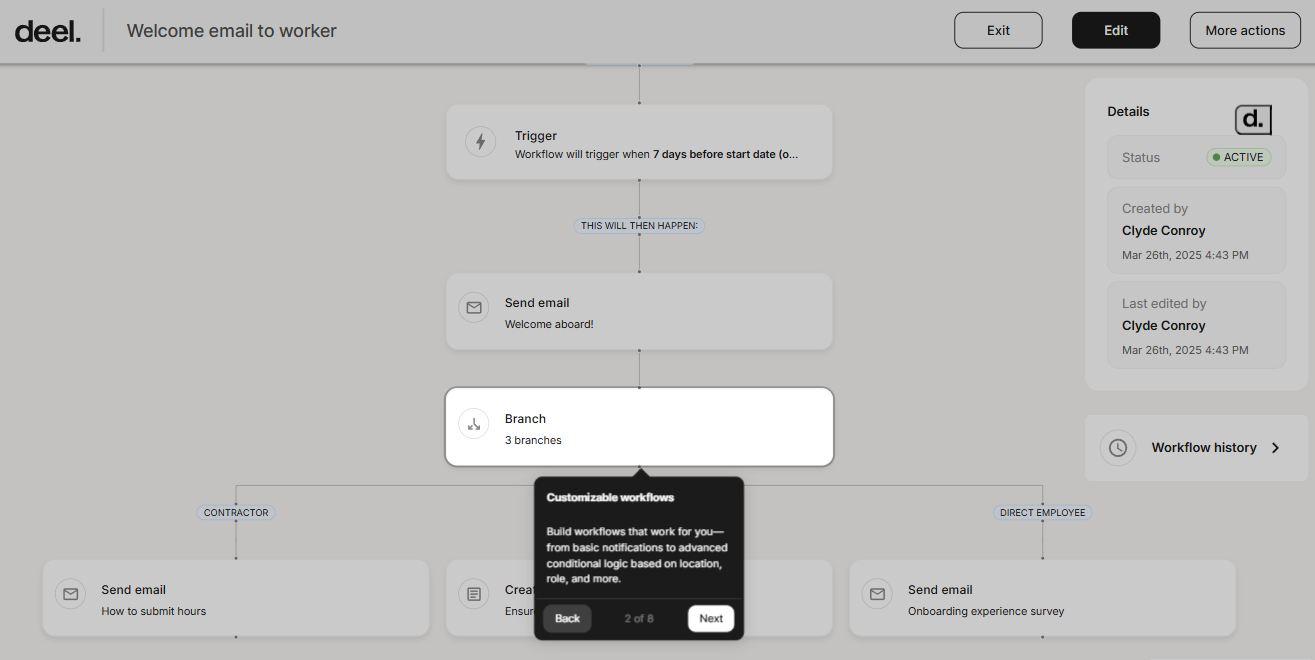
In addition, you can provision apps or even automate onboarding. Just set the country and worker type, and let Deel create a tailored onboarding flow with follow-up tasks:
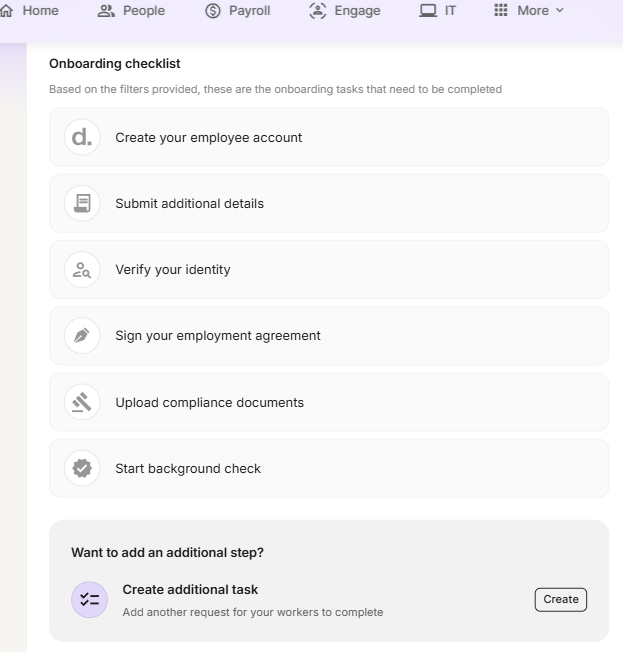
You can also manage people, documents, time off, and more from a single dashboard.
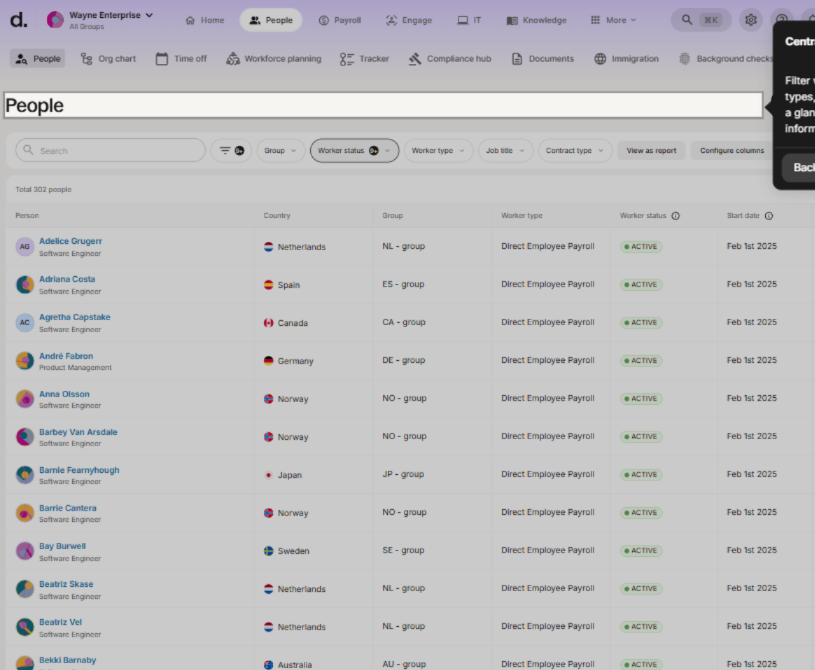
For each user, you can check in-granular details like documents, compensation, department information, and more. You can also check time-off details and use pre-built time-off policies for different regions and stay compliant.
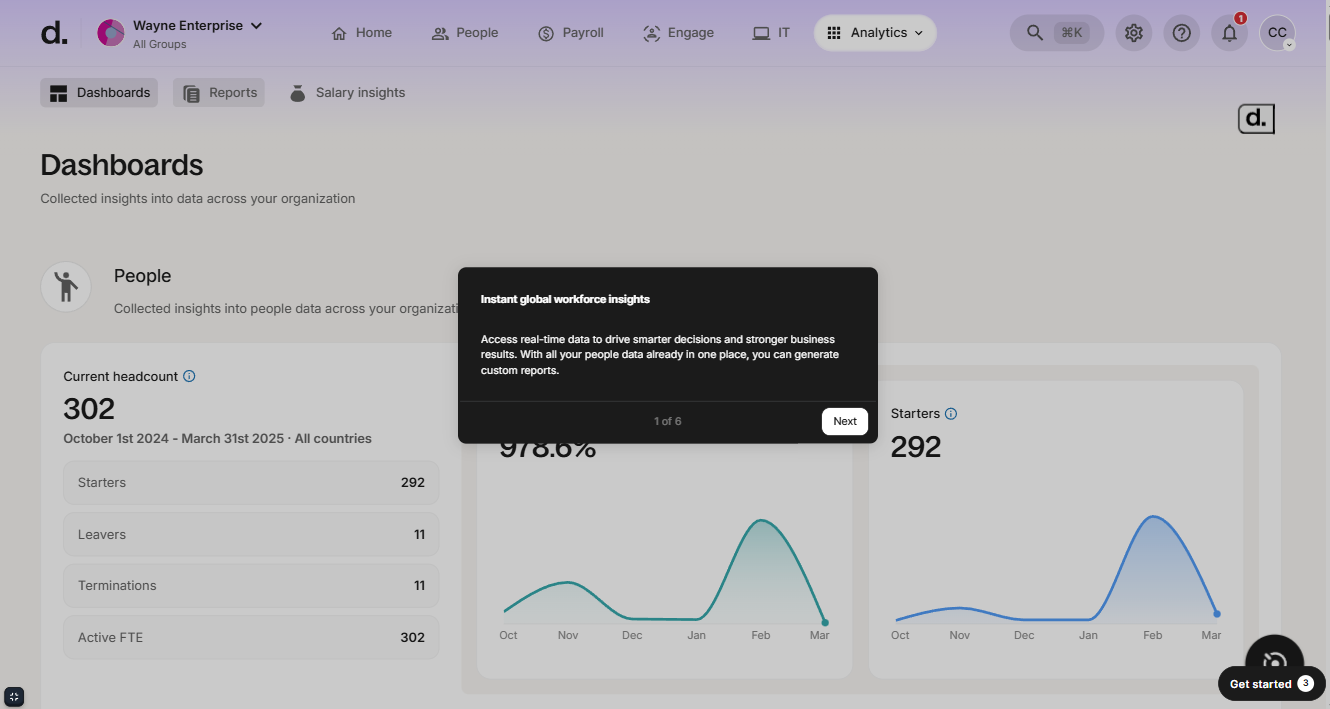
You can dive deeper with 35+ default reports and even create your own or customize the existing reports according to your needs.
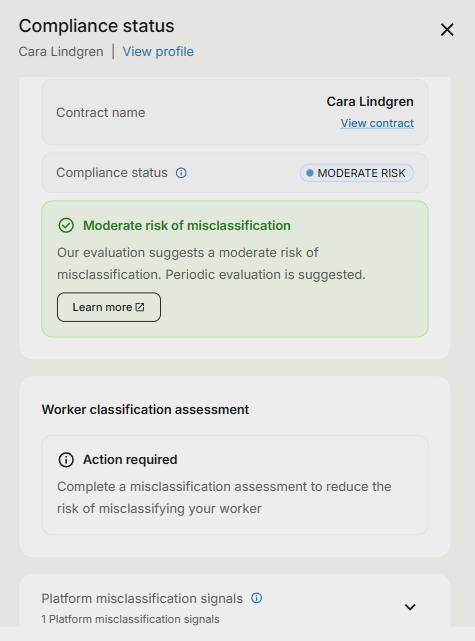
This is your go-to place for everything worker-related. View individual history, documents, compensation, and department info.
- Workforce Planning: This module lets you plan, align, and approve headcount efficiently in one collaborative workspace.
I personally liked Deel’s scenario-planning model, which lets teams assess the budget impact before hiring.
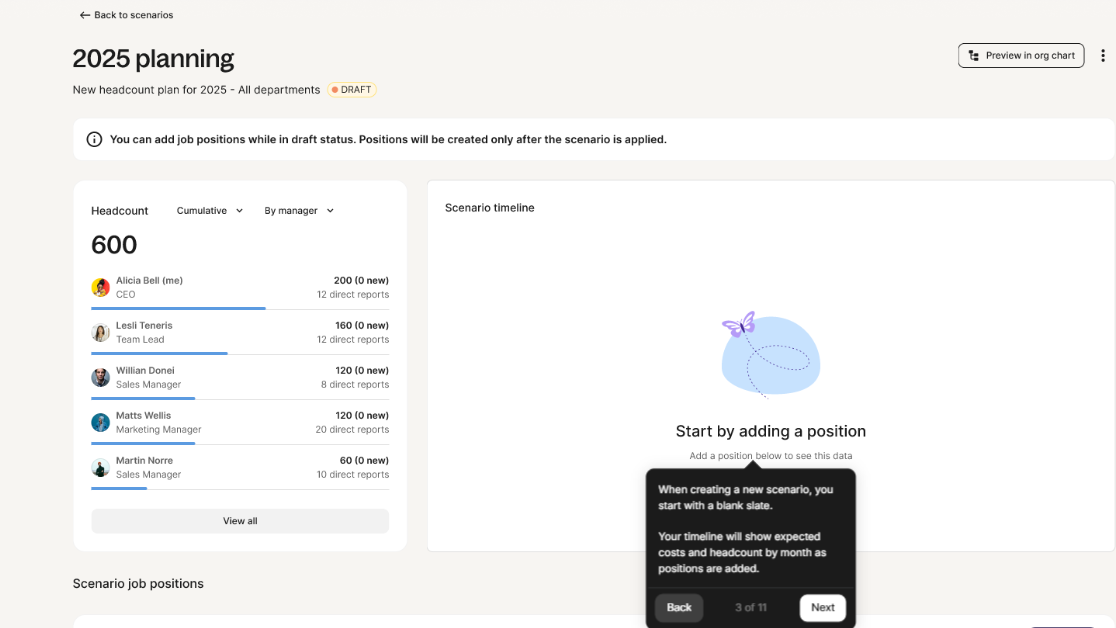
When you create a scenario and add the required job positions, you can see the cost timeline, view the vacant positions, and even connect it with your ATS. The ATS is updated in real-time when changes (positions are filled) are made.
And during all this, the timeline updates in real-time, helping you ensure that you stay on track:

- Deel Talent:
You can create job requests with AI, and Deel Talent will automatically recommend talent partners that meet your requirements. Confirm the fee, select the partner, and share briefing questions to help the talent partners find the right candidates.
You’ll then see a list of all the candidates the talent partners have submitted, which you can compare:
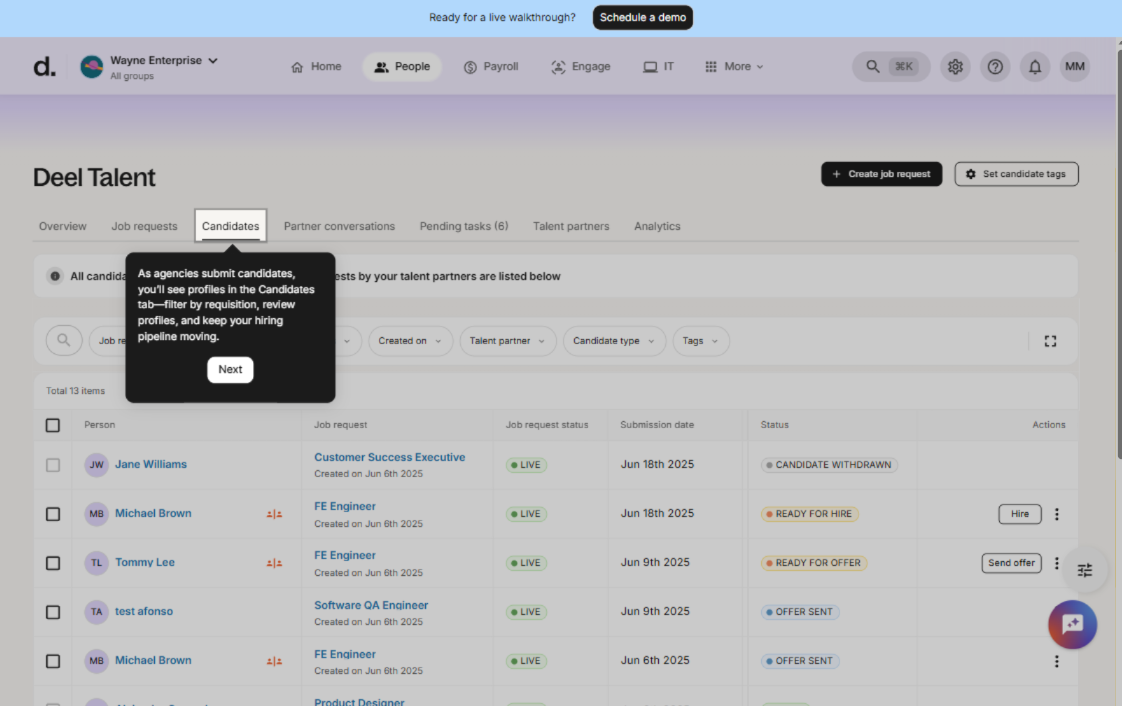
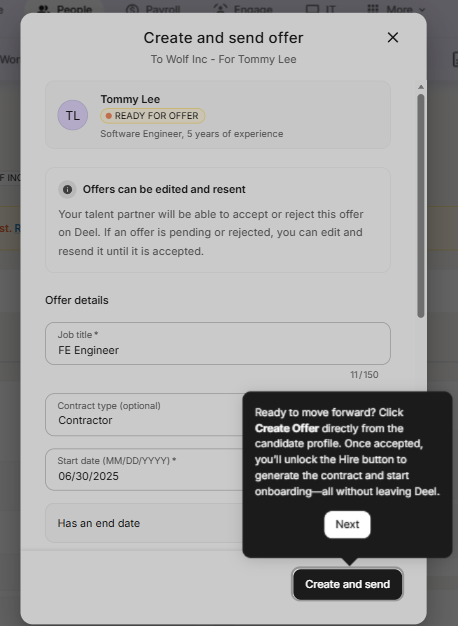
After you’ve selected the right candidate, you can create and send the offer letter, making recruitment a breeze:
- Employee Background Checks: Deel has this feature baked right into its onboarding workflow. It lets you perform background checks on your employees across 190+ countries and gives you results within 15 minutes.
- Deel Benefits: Using the Deel benefits Admin, you can offer medical, dental, vision, and other add-on benefits within the US. It lets you set up plans, run enrollment, automatically sync deductions, and see costs and adoption instantly.
Rippling
One of Rippling's greatest USPs is its all-encompassing approach that connects everything from HR and Talent to Benefits and Workforce Management. This helps information flow seamlessly between apps, reducing silos and administrative overhead.
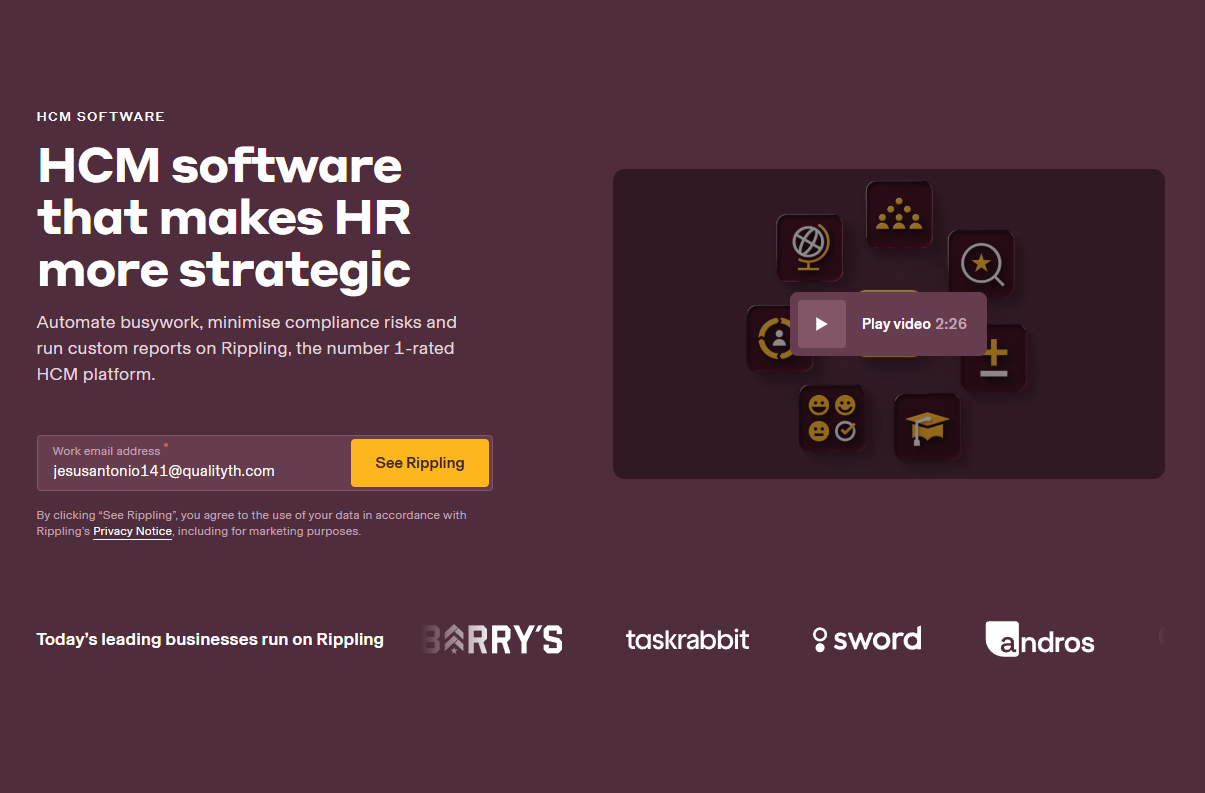
Here’s what Rippling’s Human Capital Management (HCM) solution includes:
- HRIS: Rippling’s HRIS also lets you create customized automated workflows that reduce manual effort and error margin. Take the onboarding workflow, for example.
When you onboard a new employee, add their basic details, Rippling automatically sends them the necessary documents (like agreements), collects the required information, and initiates processes like setting up their payroll, adding a signing bonus, etc:

- Recruiting: Rippling also does a great job at automating recruiting.
You can create a job posting and instantly post it to thousands of job boards and integrate natively with LinkedIn, Indeed, and more. After you've posted your requirement, you can automatically filter out our unqualified candidates using knockout questions.
- Headcount Planning: It helps you track, manage, and stick to your hiring plan. You can view your entire hiring plan for the year in one place and categorize users based on what stage they are in: in-seat headcount, offer accepted, offer stage, hiring stage, etc.
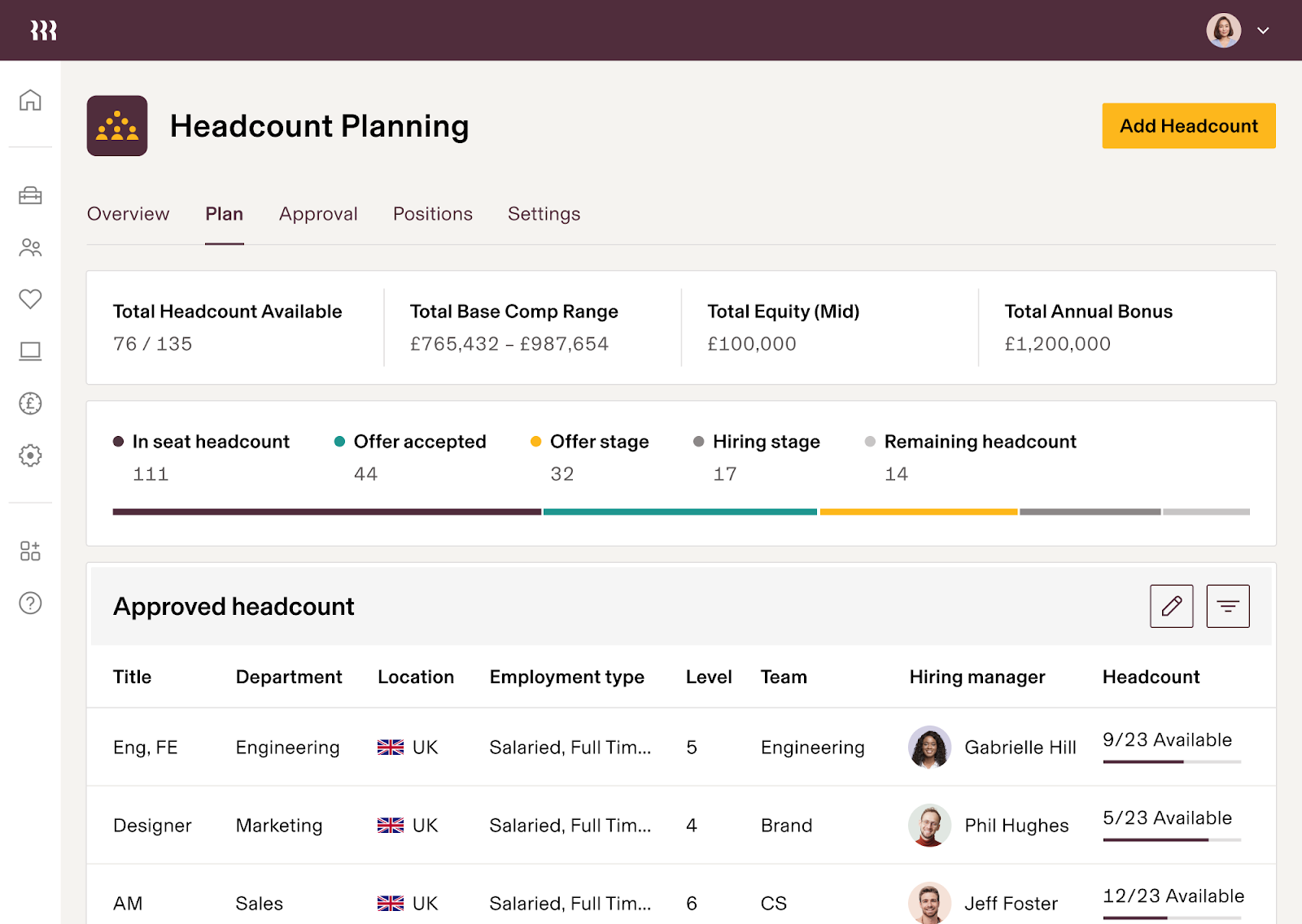
What I personally liked here is that you can see the approved range (hiring budget), the forecast range, and the difference between them. You can also set alerts to ensure departments are hiring within the approved budget.

- Performance Management and Surveys: Using the performance management dashboard, you can conduct different types of automated performance reviews.
For instance, if you choose the milestone review cycle, it will automatically trigger when a milestone is achieved (say, 30-60 days after the employee joins)
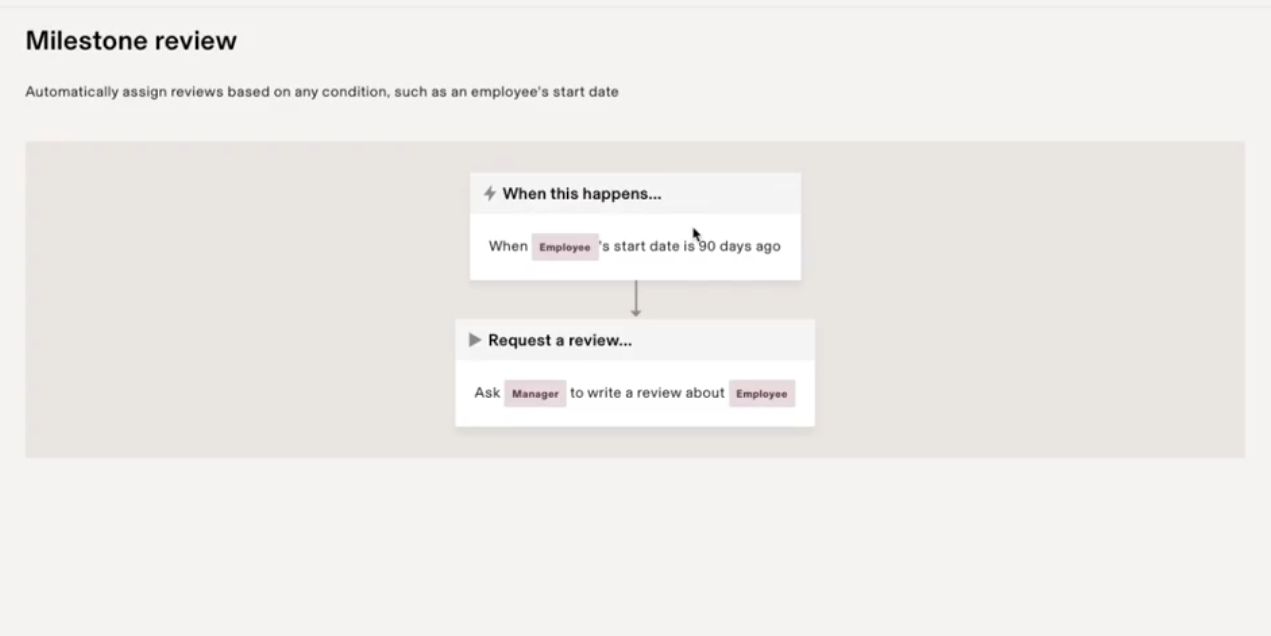
The same goes for surveys. You can initiate pulse surveys after 30 or 90 days after the employee joins to understand. Another thing you can do is chat with employees back and forth, even when the survey is anonymous. And that’s kind of a privacy invasion for me.
Rippling also has a robust learning management system that shows you all the courses you have right now, how many employees have completed them, and other insights.
- Benefits Administration: Using Rippling’s Benefits Administration dashboard, you can offer your employees multiple and easy-to-compare options. You can either choose Rippling as your PEO or select your own broker.
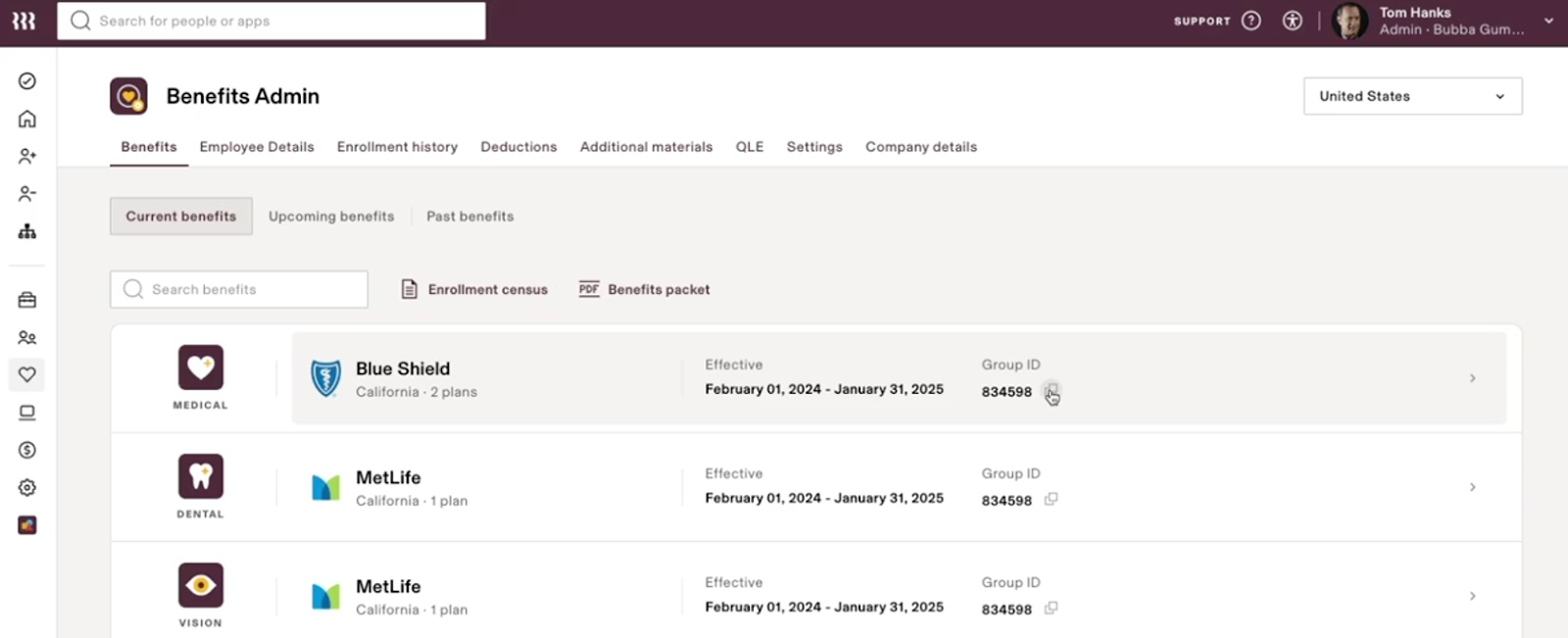
- Time & Attendance: The Time and Attendance module lets employees clock in using different methods and ensures they’re paid on time.
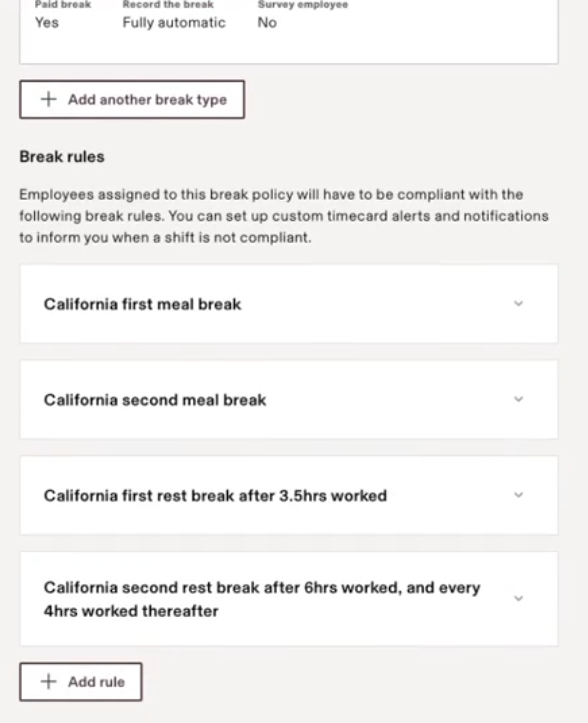
This module is governed by policies. You can create policies (which include the approvers, clocking methods, etc) and assign them to specific super groups.
Rippling handles compliance needs, especially when there’s something federally mandated, such as break or overtime policies. For instance, if an employee is onboarded in California, Rippling will automatically assign a meal break policy:
Verdict:
If you need a full-blown HRIS as your system of record, Rippling is the stronger choice. It’s more flexible for custom workflows, recruiting, performance, learning, and headcount planning, and it deeply integrates people data into the rest of the stack.
Deel works better as a global HR layer wrapped around payroll and compliance. It’s ideal if your priority is: “one place to manage a distributed workforce, stay compliant, and cover the basics of HR,” not to build your entire HR operating model on it.
Integrations
Let’s now explore how well each platform integrates with your favorite apps:
Deel
Based on the integrations mentioned on Deel’s website, it supports somewhere around 140 integrations, which is way lower than Rippling’s 650+:
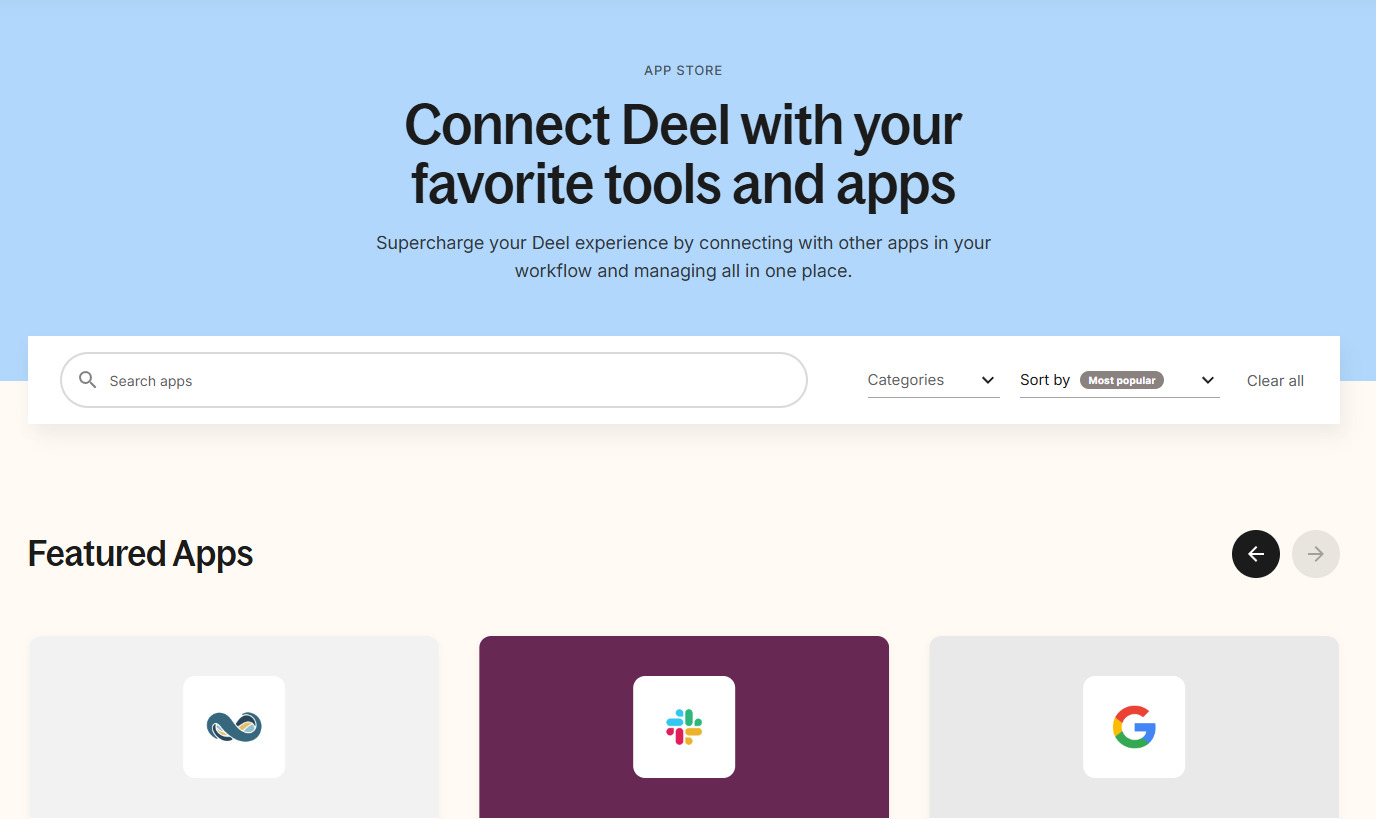
These include popular accounting software such as QuickBooks, Xero, NetSuite, and SAP, as well as HRIS/ATS such as BambooHR, Workday, Lever, Greenhouse, and more.
Also, Deel offers an API that lets you integrate Deel into your enterprise ecosystem. This enables you to use Deel’s features, such as payroll management and global hiring, within your workflows.
Rippling
Rippling is all about stitching together multiple services to create a unified workflow. No wonder it offers a whopping 650+ interactions across finance, legal, HR, IT, security, sales, marketing, and more.

I found integrations for Slack, Google Workspace, Office 365, GitHub, Jira, DocuSign, Zoom, Expensify, and many more. And many of these are deeply tied into Rippling’s Workflows.
Another highlight is Rippling’s open API and the App Studio it launched, which allows customers and third-party developers to build custom applications on top of Rippling. That’s next-level ecosystem thinking.
While I didn’t build a custom app, the mere presence of that option signals that Rippling wants to be a platform you extend and integrate freely.
Verdict
Rippling clearly wins. It offers 650+ integrations, compared with Deel’s ~140. So, if you care about connecting HR/payroll to the rest of your stack and automating across tools, Rippling is the stronger choice.
Pro Tip: Make sure you analyze the integrations Rippling and Deel offer. A higher number of integrations doesn’t necessarily mean a tool is better. What if you don’t even need those additional integrations, right?
Use Experience and Ease of Use
I also evaluated Deel and Rippling based on ease of use. Here’s how they compare:
Deel
Based on the multiple interactive demos that I viewed and analyzed, I found Deel’s interface to be very straightforward and uncluttered. I viewed numerous dashboards and even tried adding a contractor, and the entire process was seamless.
Also, they know how to use whitespace, making an extensive range of features easy to understand.
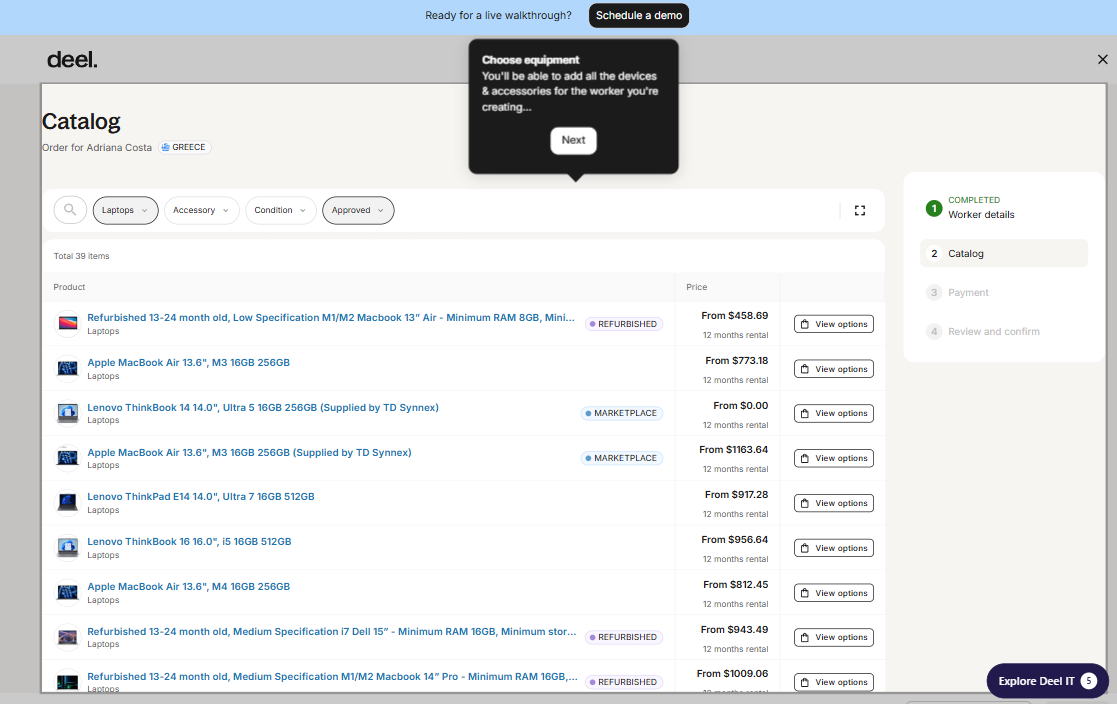
While I understand user experience is a very subjective thing, and there are mixed reviews on G2 (review 1, review 2), I personally liked how clean and minimalist its design is.
Rippling
Rippling’s user experience is also very strong, though in a different way. It’s often praised for being intuitive and slick, considering how much it packs in.
As an admin, when I log in to Rippling, I have a dashboard with widgets for tasks (approvals, to-dos), and I can configure what shows up (e.g., a widget for “New Hires this month” or “Tickets to resolve”).
The navigation has more modules (People, Payroll, Benefits, Devices, Apps, etc., depending on what you have).
However, Rippling’s UX can be dense. Because it unifies HR, IT, and more, some users (especially those focused on only one aspect) might find it “too many buttons”.
One drawback I've noticed is that when you're in the middle of a workflow and need to access a different HR process, the system keeps redirecting you back to the original workflow until it's completed. And this can be frustrating.
Verdict
I’d say both Deel and Rippling are user-friendly, and there’s no significant winner in basic ease of use.
If I gave both to a new HR hire to learn, they’d learn Deel in 1 day and Rippling in maybe 2 days. Neither is hard, but Rippling just has more to configure and explore initially.
Customer Support and Reliability
When you’re managing a global workforce, reliable customer support is crucial for keeping your operations running smoothly.
Deel
You can reach Deel's customer support 24/7 via live chat, email, and even phone, which is impressive. I analyzed 50+ user reviews on G2 around customer support, and they were all positive, appreciating how knowledgeable and responsive the support staff is.
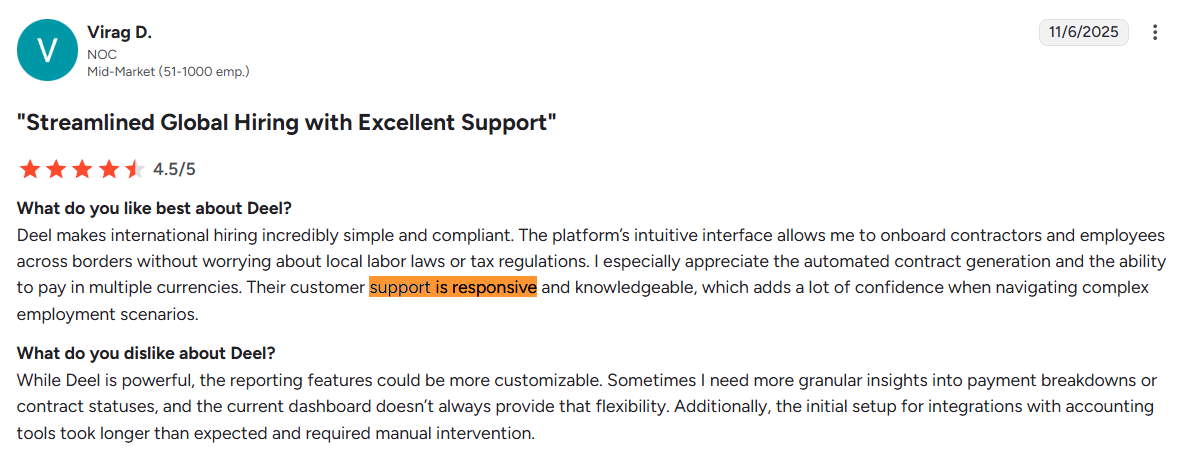
Source: G2
However, I noticed that most of Deel's reviews are left by individual contractors who use it to receive payments. So, I’d recommend that you test the customer support on your own for your specific use case and then decide.
Rippling
Some of the ways you can reach out to the Rippling support team are via Live Chat or Email, unlike Deel, which offers 24/7 live chat, email, and calls. However, after tweaking, I found that you can convert the live chat into a virtual call with Rippling.
While I found nothing but positive reviews about Rippling’s implementation and customer support team, the response times are pretty long. Some users had to wait for 2-3 weeks for a response, which can be frustrating if the issue is urgent.
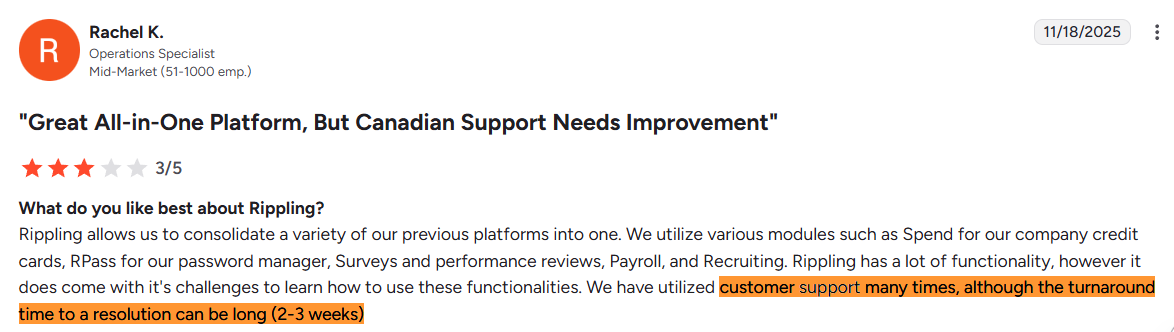
Source: G2
Verdict
Deel outshines Rippling in support availability and hand-holding, especially for a global context. If having 24/7 support and direct employee assistance is important to you, Deel is significantly better on that front.
Rippling’s support is knowledgeable and efficient for admins, but it’s not around the clock.
Pricing
Deel
First things first, Deel is relatively straightforward about pricing, at least for its core services. Their EOR service, a major selling point, is publicly stated to start at $599 per employee per month.
But you may not find the same transparency when it comes to EOR addons like MDM integration, etc.
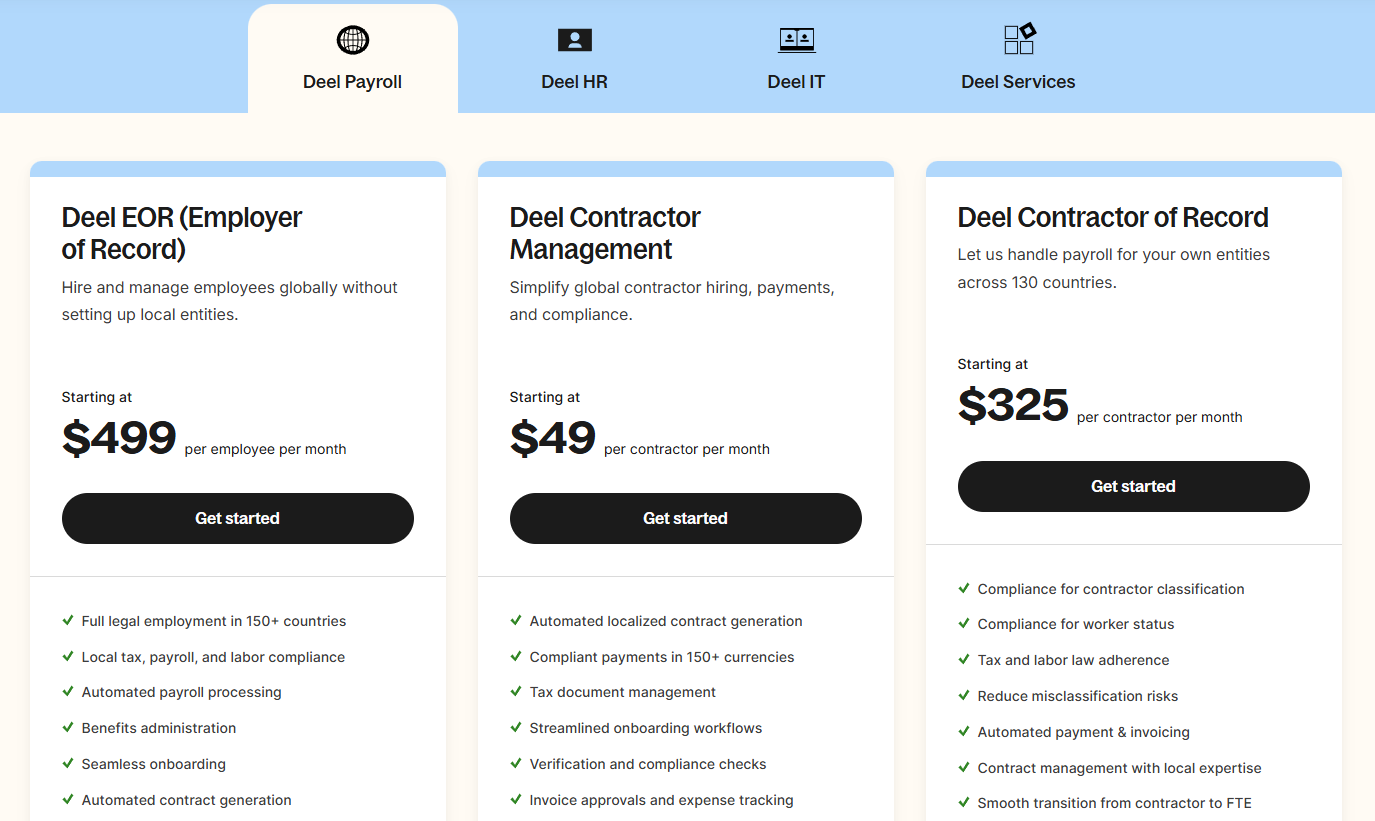
Based on several user reviews and my own research, Deel can be a little more expensive than its competitors.

Source: G2
Rippling
Rippling is known for a modular pricing model where you pay per employee per month (PEPM) for each module you use. However, their pricing isn’t openly available on their website, which makes instant price comparisons hard.
You must fill out a form to request a few quotes to know the pricing.
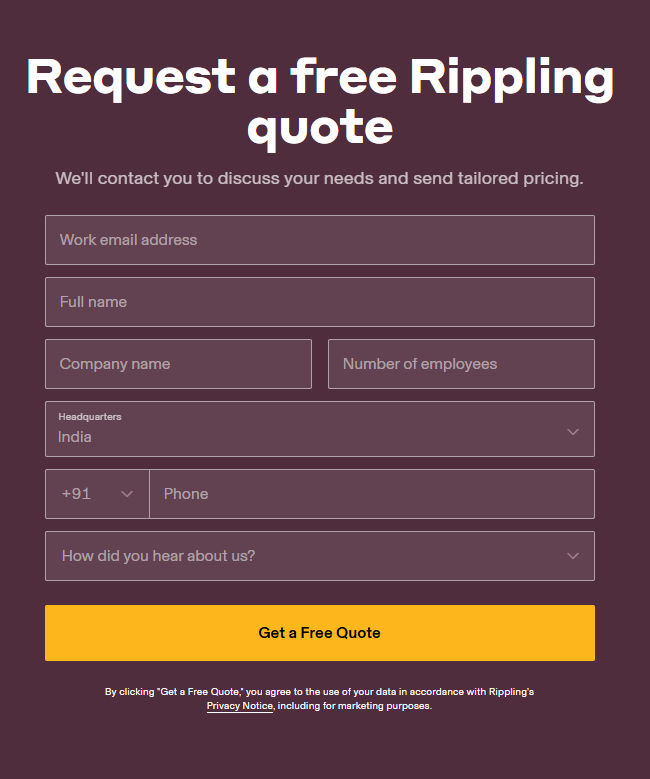
Multiple G2 users also complain about the pricing being non-transparent:

Source: G2
However, when I compared Rippling’s pricing for its HRIS plan (mentioned in one of their blogs), it was slightly higher than Deel.
- Rippling HRIS: $8/employee/month
- Deel HRIS: $5/employee/month
But this pricing comparison alone isn’t enough to conclude that Rippling is more expensive than Deel.
And while Rippling is the complete package (HR, IT, Finance, Payroll, and EOR), I cannot directly say it’s value for money, even though it appears to be, because of the lack of pricing transparency.
I’d recommend requesting detailed quotes from their sales team to decide whether Rippling fits the bill.
Which Platform Should You Choose?
From a distance, Deel and Rippling look very similar: both let you hire globally, run payroll, manage contractors, and give HR a single place to store people data.
In practice, their differences show up in where they go deep.
Choose Deel if your top priority is global hiring and payroll.
Deel is built for companies that want to hire internationally with zero compliance stress. It’s stronger when:
- You need the widest EOR coverage (150+ countries).
- You want payroll + compliance handled with minimal admin work.
- You prefer a simpler, cleaner UI with fast onboarding.
- You want 24/7 support and predictable pricing.
Best For: Distributed teams, startups with global contractors, companies expanding into new countries without opening entities.
Deel is Not Ideal If: You need advanced HR workflows, native ATS/MDM, deep automation, or a unified HR + IT system.
Choose Rippling if you want a single platform for HR, IT, and automation.
Rippling is built as an operating system that connects people, devices, apps, access, and payroll. It’s stronger when:
- You want native IT + device management in the same system as HR.
- You need powerful automation and 650+ integrations.
- You want one system of record across HR, payroll, IT, and Finance.
- You have complex onboarding/offboarding or multi-department workflows.
Best For: Scaling companies, hybrid/remote teams with real IT needs, companies replacing multiple tools.
Rippling is Not Ideal If:
You only need global hiring/payroll, or you want a lightweight HRIS with low setup and low admin overhead.
Workwize: A Reliable Alternative to Deel and Rippling
If your biggest operational challenge is managing IT hardware—not HR workflows—you need a platform built specifically for that.
Deel and Rippling both offer IT features, but they're fundamentally HR-first systems. IT asset management isn’t their core purpose. Workwize is built for that.
It’s designed from the ground up to automate the entire device lifecycle for distributed teams
And that means centralizing procurement, zero-touch provisioning, global shipping, storage, reassignment, and laptop retrieval at scale, in one platform.
Workwize focuses on one problem only: end-to-end IT hardware management for distributed teams, and goes deeper than what all-in-one platforms typically provide.
Ready to streamline your global device logistics? Request a Workwize demo and see how effortless IT asset management can be.


Establish a single source of truth for every IT asset across the globe.
.png?width=258&height=318&name=g10%20(5).png)
More related resources to help you stop firefighting hardware operations.
![Atomicwork Review: Features, Review and More [2026]](https://www.goworkwize.com/hs-fs/hubfs/Atomicwork.png?width=360&height=200&name=Atomicwork.png)

Get monthly insights into how other IT leaders are improving their ops.



.png?width=2880&height=1232&name=Group%202147262874%20(1).png)
Stop coordinating
hardware like it's 2012.
.svg)
.png?width=172&height=68&name=apple%20business%20patner%20(1).png)
.svg)
.svg)
.svg)
.svg)