




.svg)
.svg)

.svg)


.svg)




.svg)
.png?width=500&height=424&name=Style-1---V1-(1).png)

.png?width=1230&height=692&name=Vector%20(13).png)
Hybrid work has quickly become the new normal.
More than 70% of US companies have adopted some form of hybrid model.
And nine out of ten employees love the flexibility of remote and hybrid work.
But beneath all that flexibility lies friction. Most organizations are still struggling to make it work. Many organizations still don’t have a clear system for who comes in when, how to manage distributed equipment, or how to keep remote teams aligned.
These issues have resulted in a maze of logistical headaches, blurred boundaries, and security gaps. These are just a few of the challenges that come with hybrid work.
In this article, I’ll dissect the most pressing challenges and find out how to solve them.
TL;DR
- Tracking equipment across homes and offices is complex. Thankfully, ITALM platforms provide centralized visibility and automated workflows.
- Remote devices expand your attack surface dramatically, but you can close the gap with Zero Trust architecture and automated patch management.
- Use outcome-based performance management and deliberate inclusion practices to level the playing field when culture takes a hit.
- Unused licenses and unauthorized apps can waste millions. Visibility tools, like ITALM platforms, help you plug the drain and strengthen security at the same time.

Common Hybrid Work Challenges and Their Solutions
In the transition to hybrid work, you are now forced to step into new operational and security hurdles.
What once worked seamlessly in a shared office now breaks down when spread across homes, hubs, and time zones. The cracks usually start small, but they compound fast
Let's dive straight into these problems and how to address them.
Challenge 1: Managing hybrid assets across locations remains a major operational hurdle
The simple task of keeping track of everyone’s equipment has become incredibly complicated in a hybrid model.
When employees split their time between home and the office, the company's physical assets —laptops, monitors, and other equipment— are scattered across multiple locations.
This creates a logistical challenge that many companies are struggling to solve.
If we have to be specific, the biggest issues come from
- Difficulty tracking devices and office equipment: With assets no longer centralized in a single office building, manual tracking methods, such as spreadsheets or pen and paper, are obsolete. This lack of visibility makes it challenging to know what assets you own, where they are, and who is using them.
- Inefficiencies in shipping, replacing, or retrieving IT assets: When a remote employee's laptop needs repairs or a new hire needs a complete workstation setup at home, the processes for shipping, replacing, and retrieving equipment are often slow, cumbersome, and costly.
- Lack of centralized visibility into asset ownership and lifecycle costs: Without a clear and real-time view of all IT assets, it's nearly impossible to manage their lifecycle effectively. It is this lack of oversight that ultimately leads to unnecessary spending and inefficient resource use.
Without an effective hardware asset management system, these gaps can prove expensive. The average cost of a single lost laptop, including breach, forensics, and replacement, was close to $50,000 back in 2010. Now, a handful of untracked devices can wipe out a quarter’s revenue.
That’s why many teams are moving to a modern IT Asset Lifecycle Management platform like Workwize.
Using a platform like Workwize, you can:
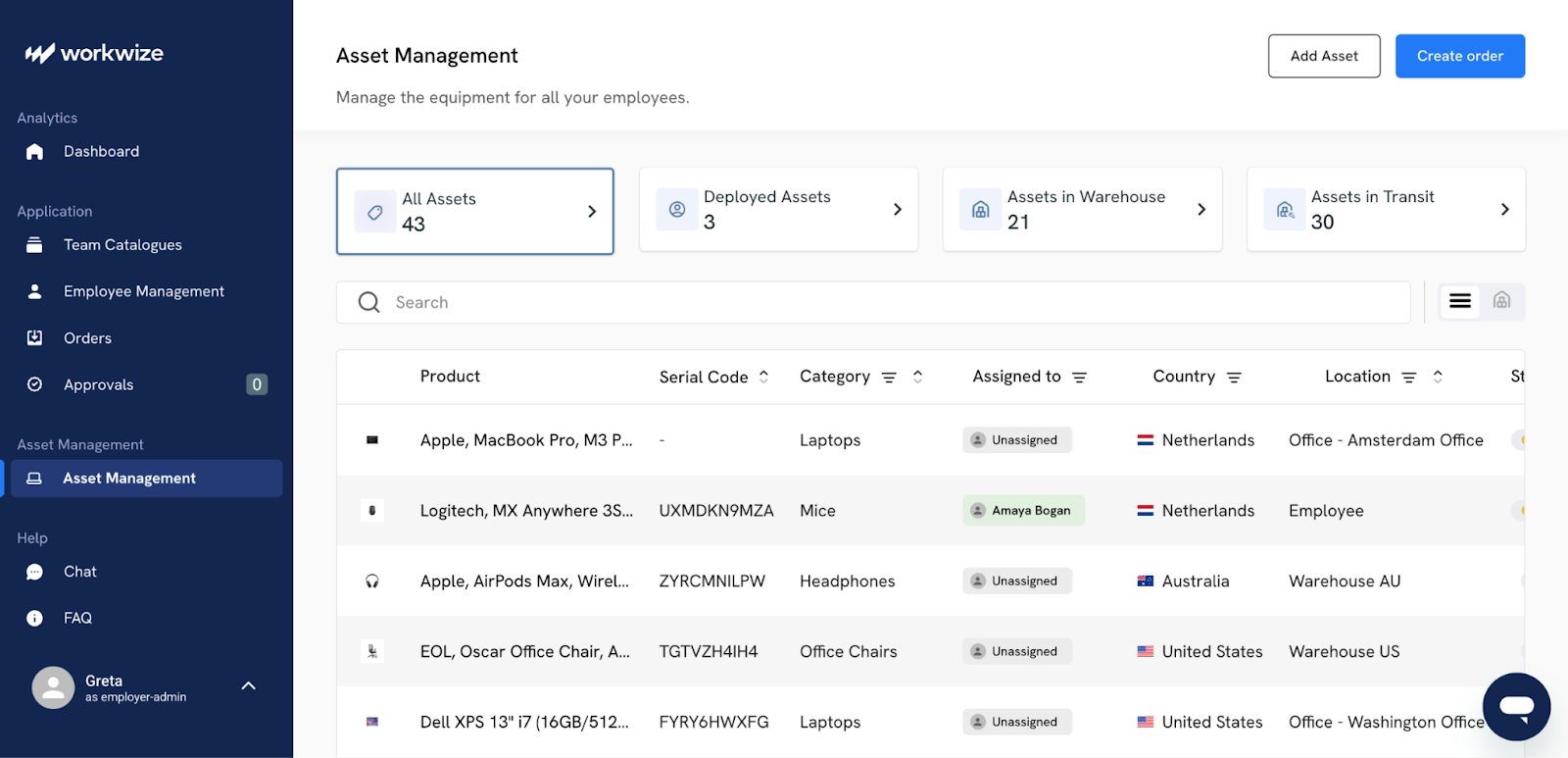
- Get visibility into real-time data on the location, user, and health of every device, so that you can make more informed decisions about asset utilization and resource allocation.
- Automate workflows for the entire asset lifecycle. This includes provisioning for new employees, managing repairs and replacements, and handling asset retrieval when an employee leaves.
- Accurately track the total cost of ownership, depreciation, and warranty information.

Challenge 2: Endpoint security and patch management are harder to enforce outside the office network
The transition to hybrid work has also dissolved the traditional network perimeter and expanded the attack surface for cyber threats. For instance, employees connecting from less secure home networks expose the organization to significant risks.
This new reality has made companies more vulnerable, and cyberattacks, too,
A 2022 Forrester study found that 41% breaches are enabled by lost and stolen assets. In the same study, 51% of IT leaders admitted that hardware-level security is too complex.
Furthermore, the global shift to remote work has created what some experts call a "$1 trillion cybersecurity vulnerability."
These are the most pressing security concerns:
- Inconsistent patching creates vulnerabilities: 60% of data breaches involved a vulnerability for which a patch was available but not applied. When devices are off the corporate network, they often miss these updates and are exposed to known exploits.
- Home networks increase risk exposure: Home Wi-Fi networks typically lack the robust security controls of a corporate environment, making any device connected to them an easier target. Attackers can exploit these weaker defenses to gain an initial foothold before attempting to move laterally into corporate systems.
- Delayed detection of compromised devices: Without the constant monitoring provided by a corporate network, it's harder for IT teams to quickly detect when a remote endpoint has been compromised. This delay gives attackers time to access and exfiltrate sensitive company data.
To fortify defenses in this new hybrid world, organizations are adopting a Zero Trust security model.
Gartner defines zero-trust as “a security paradigm that replaces access based on implicit trust with access based on continuously updated identity and context.”
Basically, it operates on the principle of never trust, always verify, and shifts the focus from protecting a network perimeter to securing individual users and assets.
Again, Workwize proves its value as a foundational security tool.
It gives you a comprehensive and accurate inventory of all hardware so that your IT and security teams can work together more effectively.
Moreover, Workwize strengthens endpoint security and patch management by tracking every device from provisioning to retrieval. When a new device is issued, it’s automatically assigned to a verified user and configured according to IT policies, including required updates and security settings.
The platform monitors devices in real time, flagging missing, lost, or compromised hardware so IT can act quickly.
It also integrates with your MDM to enforce patching schedules, repairs, and compliance checks automatically. Workwize thus supports a zero-trust model and reduces the risks of remote endpoints and home networks, by coupling hardware visibility and control with digital security.
Here’s what else you can do:
- Implement a zero-trust architecture: This approach requires continuous verification for every user and device trying to access corporate resources, regardless of location. But it reduces the risk from decentralized data a lot.
- Automate patch management: Identify which devices are running outdated software or are missing critical patches. This information can be fed into automated patching tools to ensure all endpoints, no matter where they are, are consistently updated.
- Utilize modern endpoint security tools: Deploy Endpoint Detection and Response (EDR) solutions to monitor, detect, and automatically respond to threats on remote devices. These tools give you the necessary visibility to spot and contain breaches quickly.
Challenge 3: Employee well-being and work-life boundaries suffer when hybrid work lacks structure and support
While many employees appreciate the flexibility of hybrid work, it often blurs the boundaries between professional and personal life.. The lack of clear separation between home and office leads to an always-on culture, where the workday bleeds into personal time. In fact, 55% of remote workers reported working more hours than they did in the office.
And when your living space doubles as your workspace, it's easy to fall into the trap of checking emails late into the evening or starting work earlier than usual. Without the natural start-and-stop rhythm of a commute, work can quietly expand to fill every available hour.
Moreover, the spontaneous watercooler conversations and casual team lunches that build friendship in an office are absent in a remote setting. As a result, feelings of loneliness and disconnection emerge. And for managers, no in-person interaction makes it much harder to notice the subtle signs of burnout or distress in their team members.
To make matters even worse, 70% of professionals believe their employers are not doing enough to prevent or alleviate burnout.
To counter these challenges, you must be proactive in building a supportive and structured hybrid model. This involves creating new norms that support flexibility and connection.
Here are steps you can take:
- Establish clear right-to-disconnect policies: Leaders should set explicit expectations about working hours and response times. No-meeting days or email-free weekends can help employees fully unplug and recharge.
- Train managers in empathetic leadership: Managers need new skills to lead hybrid teams effectively. Training should focus on how to foster psychological safety, check in on well-being without micromanaging, and create an inclusive environment for all team members, regardless of location.
- Invest in accessible mental health resources: Ensure that mental health support is not only available but also easy to access for all employees. Invest in virtual therapy options, wellness apps, and establish clear communication about the resources available.
Read More: Top 10 Countries for Remote Work
Challenge 4: Measuring productivity and performance fairly across workers is difficult without the right signals
One of the most persistent anxieties for leaders in a hybrid model is whether their employees are actually working.
This has given rise to what Microsoft's CEO Satya Nadella called productivity paranoia–a growing fear among managers that productivity is declining, even as employees report working longer hours than ever.
This mindsets breeds a culture of mistrust and often leads to flawed performance management.
The core of the problem is that many companies are trying to apply old office-centric metrics to a new way of working.
- Over-reliance on activity metrics: Tracking keyboard strokes, mouse movements, or hours logged online is a poor measure of contribution. These surveillance-style tactics can only fuel presenteeism (being online without being truly engaged). A Gartner research found that employees subject to monitoring are twice as likely to pretend they are working.
- Ambiguous performance reviews: Without clear, outcome-based goals, performance evaluations become subjective and prone to bias. Proximity bias —the tendency for managers to favor employees they see more often in the office —is a significant risk that can limit career opportunities for remote-first workers.
- Lack of visibility into blockers: In a distributed environment, it's harder for managers to see the day-to-day obstacles that might be hindering an employee's progress. These invisible walls lead to frustration for both the employee and the manager.
The solution is to move away from measuring activity and toward measuring impact. Even McKinsey backs that performance management must evolve to focus on how well people deliver outcomes.
- The best way to measure performance is to set measurable and results-oriented goals, such as Objectives and Key Results (OKRs). When everyone understands what they need to achieve, where or when work happens becomes less important. Employees also feel empowered when you give them autonomy over their work.
- Managers need to be coached on how to manage by outcomes, provide regular and constructive feedback, and eliminate proximity bias from their evaluations.
- Consistent one-on-one meetings are necessary for staying aligned on goals, discussing progress, and identifying any roadblocks. These conversations should be forward-looking and focus on problem-solving, not just status updates.
Challenge 5: Remote-first support expectations put pressure on IT teams and degrade SLAs
In the past, when an employee's device failed, an IT technician could simply walk over to their desk to diagnose the problem.
In a hybrid world, that doesn’t work. IT teams are now faced with the challenge of troubleshooting complex issues from a distance, a task that is inherently more difficult and time-consuming. This friction is a big issue, with research showing that during the shift to remote work, some organizations saw up to 35% more incident tickets per day.
This increase in resolution time directly impacts productivity and strains IT resources, which are often already stretched thin. The core issues stem from a support model that hasn't caught up with the new reality of work.
- Helpdesk tickets take longer when physical access is impossible: Remote troubleshooting is a slow process of elimination and relies on the employee to act as the IT technician's hands and eyes.
- IT must coordinate complex logistics: When a device needs to be replaced, usually your IT team is responsible for shipping a new one to the employee's home and arranging the return of the old or broken equipment. This process is inefficient, prone to delays, and adds an operational burden.
- Lack of remote-friendly support tooling increases friction: Many organizations are still using support tools built for an in-office environment. Without modern, remote-first solutions, IT lacks the visibility and control needed to manage distributed devices effectively.
The key to solving these challenges is to equip IT teams with tools designed specifically for the hybrid era. Remote employee device management platforms like Workwize simplify the process end-to-end.
Workwize doesn’t just help you ship work-ready devices to employees globally. It also helps remove the hassle of managing multiple vendors and tracking different shipments from different shipping partners.
You can easily check the movement of all equipment and expected delivery dates. Then, once devices reach employees, you have visibility into ownership status, warranties, and uptime, all from one dashboard.
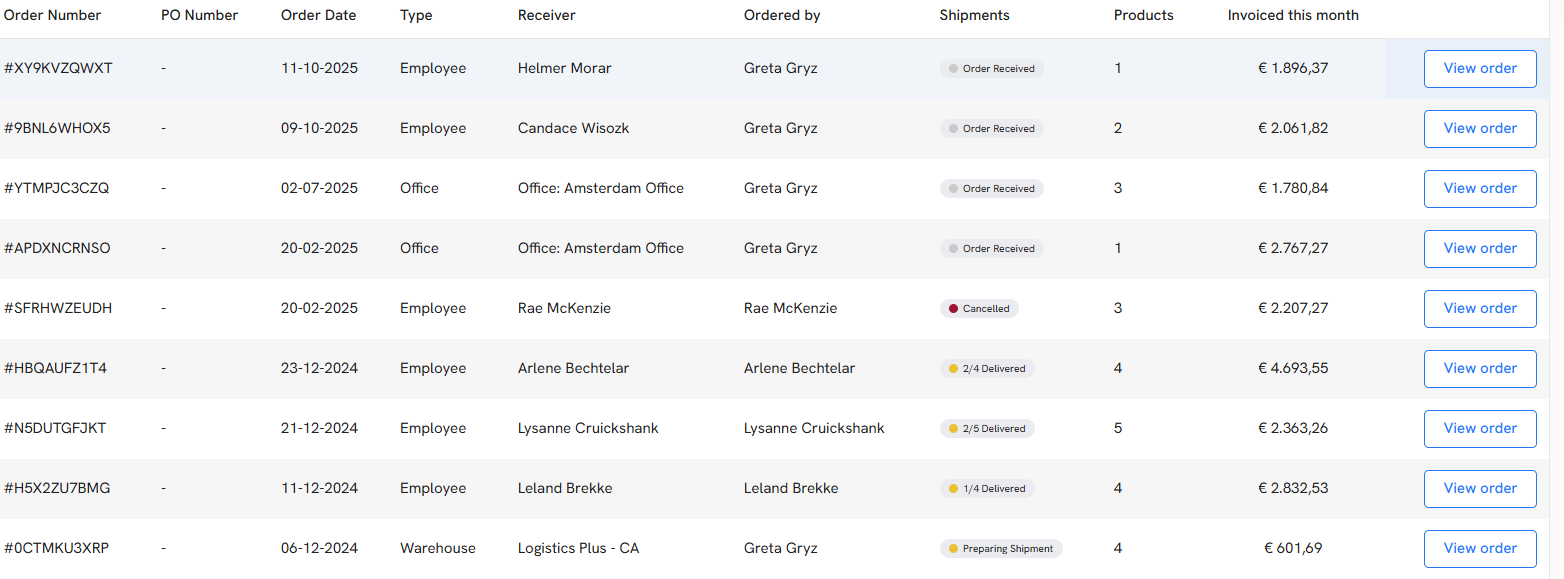
- When an employee’s device unexpectedly breaks down, Workwize automates the entire replacement process. When a replacement is needed, IT can trigger a workflow that automatically ships a new, fully configured device to the employee while simultaneously sending a return box for the old one.
- Employees can also request support through a self-service portal, where they can request repairs, open support tickets, and even request replacements and upgrades. This solution removes the hassle of sourcing the right equipment impromptu and then rushing to arrange a courier.
Read More: Top 6 Reasons Why Remote Working Will Benefit Your Company
Challenge 6: Onboarding and offboarding employees remain a process with rough edges
In a hybrid model, a new hire's first day is rarely remarkable. To put this in perspective, only 15% of employees have all the resources they need on day one. The process of provisioning and retrieving IT equipment for a distributed workforce has become a major logistical issue.
Manually coordinating the setup and shipping of a new employee's work equipment is slow and prone to error. Delays leave new hires unable to work, feeling disconnected and unproductive.
Similarly, when an employee leaves the company, ensuring the secure return of all company assets is often a chaotic process. In fact, 27% of enterprises report losses of over 10% of technology assets, and 42% saw more than 5% unauthorized SaaS and cloud access from incomplete deprovisioning. A poorly managed offboarding can result in lost assets and potential data breaches.
While a poorly managed offboarding can result in lost assets and potential data breaches.
This is where Workwize transforms the process.
Instead of IT juggling vendors, couriers, and last-minute setup requests, Workwize automates the entire device journey and keeps every stakeholder aligned.
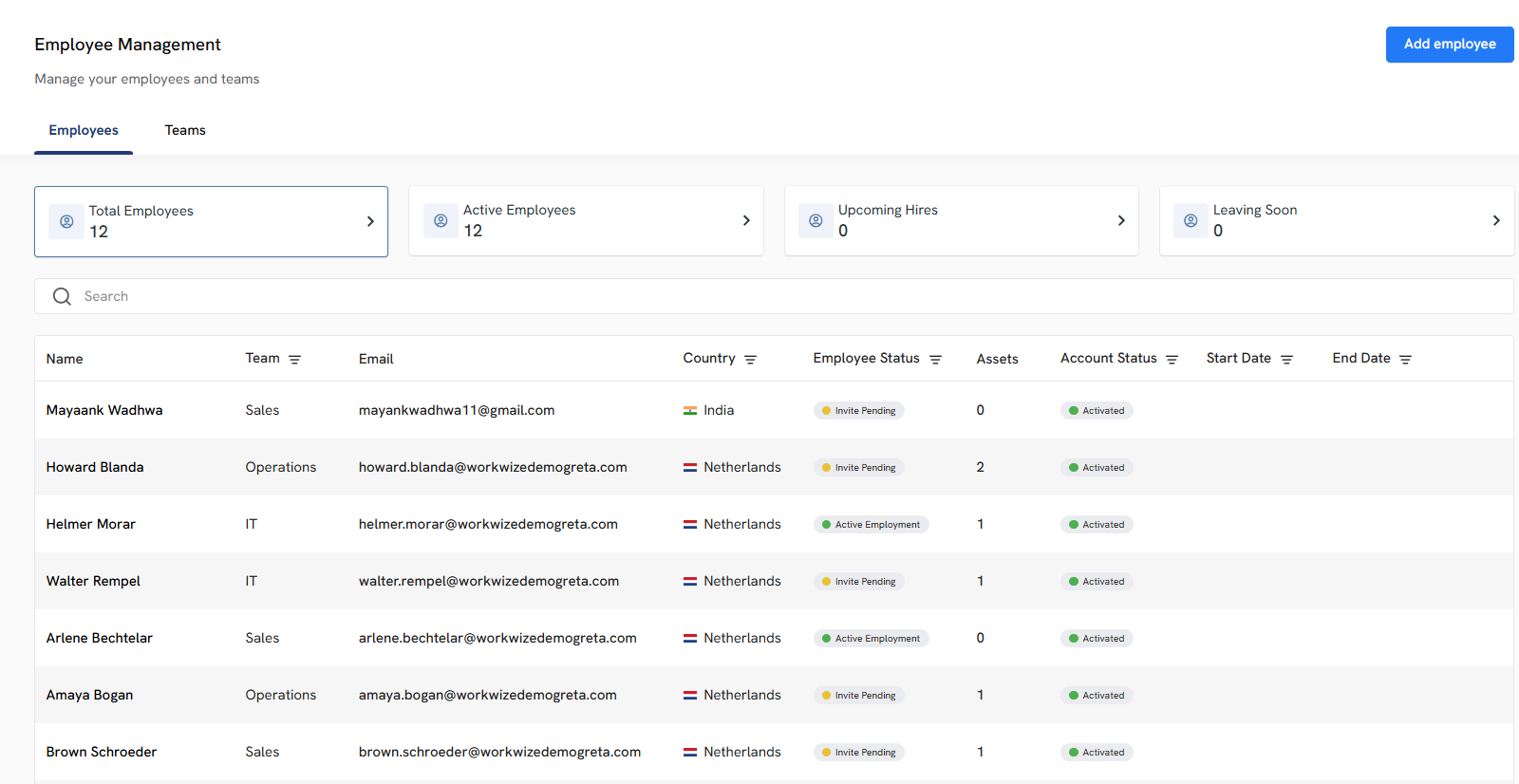
- Pre-configured devices delivered before day one: Using Workwize, your product manager in Pune can receive a ready-to-work laptop + monitor setup two days before joining, with role-based tools already provisioned.
- Unified vendor and inventory control: You can manage all devices, accessories, and budgets in one place, not across spreadsheets, emails, and lost courier slips.
- Global retrievals and asset reassignments: A departing engineer in Amsterdam can return equipment through a scheduled pickup, and Workwize routes the recovered MacBook to the next hire in Dublin, leading to faster turnaround, lower hardware spend, and real asset visibility.
- Automated offboarding with accountability: When an employee resigns, Workwize triggers return kits, schedules pickup, tracks shipment, and updates asset logs, so you don't chase addresses and courier tracking links. It also helps remotely wipe and lock the device to protect sensitive data.
By streamlining onboarding and offboarding, Workwize helps organizations deliver a seamless hybrid experience that’s faster, safer, and far more efficient—for both employees and IT teams.
Challenge 7: Maintaining a cohesive and equitable company culture is harder
There is always a possibility of a cultural divide when some employees are in the office and others are remote. The result is often a two-tiered system where in-office employees have greater visibility and access to opportunities, while remote workers feel disconnected and overlooked. This phenomenon, known as proximity bias, is one of the biggest threats to a healthy hybrid culture.
This is so widespread that 41% of executives say that inequities between remote and in-office employees are their top worry about flexible work.
A strong, unified culture requires deliberate effort from leadership. If you leave it unaddressed, feelings of inequity can lead to lower morale, decreased engagement, and higher employee turnover.
- Managers may unconsciously favor employees they physically see more often, leading to better projects and faster promotions for in-office staff. This would create resentment and disadvantage for talented remote employees.
- The spontaneous collaboration and knowledge-sharing that happens organically in an office is difficult to replicate. Remote employees can easily be left out of the loop on important decisions or informal brainstorming sessions.
- Building strong working relationships and a sense of belonging is much harder when teams are physically separated. A lack of connection can make collaboration less effective and work less enjoyable.
Unlike logistical challenges, technology alone can't solve this problem. It demands a conscious effort from leaders to create a level playing field for everyone. Here’s what you can do:
- Adopt practices that ensure everyone has the same experience, regardless of location. This includes rules such as requiring all participants to join meetings from their own devices (even if they are in the same room) so that remote attendees aren't at a disadvantage.
- Shift performance management to focus on results and impact, not on physical presence or hours worked. This helps reduce proximity bias and creates a fairer evaluation system.
- Leaders should actively create opportunities for social interaction that include everyone, such as structured virtual coffee chats, hybrid team-building events, and dedicated in-person gatherings.
Challenge 8: Managing software licenses and shadow IT is out of control
In a hybrid environment, controlling the software installed on company devices has become nearly impossible. Without visibility, you are bleeding money on unused software licenses.
At the same time, employees, frustrated with official tools or processes, often download and use unapproved applications to do their jobs. And that’s how shadow IT accumulates.
The threat from this is twofold.
First, wasted software can run into the tens or even hundreds of thousands of dollars. A recent study found that companies use only around 49% of provisioned SaaS licenses and spend an average of $18 million a year in wasted spend.
Second, shadow IT introduces significant security and compliance risks. When employees use unauthorized applications, they may inadvertently expose company data to security vulnerabilities, as these tools haven't been vetted by IT.
Shadow IT can also lead to serious compliance violations, especially if your employees are storing sensitive company or customer data in applications that don't meet regulatory standards like GDPR or CCPA.
Make Hybrid Work Easier With Workwize
Hybrid work has unlocked flexibility, talent access, and real productivity gains. But it has also stretched IT teams, complicated security, and widened cultural gaps. Scattered devices, delayed patching, longer support cycles, proximity bias, and runaway SaaS costs are not signs of failure. They show that hybrid work needs better infrastructure.
The real takeaway is simple. Hybrid does not break organizations. Fragmented systems do. Success comes when you treat devices, people, and workflows as one connected ecosystem instead of separate challenges.
Workwize is designed to do away with many of these remote work challenges.
It centralizes asset visibility, automates provisioning and retrievals worldwide, streamlines swaps and repairs, and plugs into HR and security workflows.
For instance, Workwize integrates with your HR platform to ship devices automatically as soon as a new employee gets added there. It does this based on standard device configuration packages for each department or role.
Once these rules are in place, Workwize can select the right laptop or accessories (all properly pre-configured) for the new hire and ship them to their location without any extra steps. This keeps onboarding consistent, no matter where the new employee joins from.
Once the employee begins work, IT can track the device through a single dashboard. They can schedule repairs, approve upgrades and monitor inventory in one place.
When they’re about to leave, Workwize can schedule pickups, retrieve devices and then update inventory when the devices make it back to you. Each step flows cleanly into the next, so teams no longer chase vendors or maintain scattered spreadsheets.
On top of that, Workwize’s global coverage means you can source, ship, and retrieve a wide range of devices wherever your employees are. You can manage replacements, handle regional device needs and take care of returns through one platform instead of working with multiple vendors.
Hybrid work is here to stay. With the right platform, control, security, and culture stay too. Work smarter, not scattered. Workwize makes hybrid work truly work.


Establish a single source of truth for every IT asset across the globe.
.png?width=258&height=318&name=g10%20(5).png)
More related resources to help you stop firefighting hardware operations.




Get monthly insights into how other IT leaders are improving their ops.



.png?width=2880&height=1232&name=Group%202147262874%20(1).png)
Stop coordinating
hardware like it's 2012.
.svg)
.png?width=172&height=68&name=apple%20business%20patner%20(1).png)
.svg)
.svg)
.svg)
.svg)