




.svg)
.svg)

.svg)


.svg)




.svg)
.png?width=500&height=424&name=Style-1---V1-(1).png)


.png?width=1230&height=692&name=Vector%20(13).png)
Keeping Apple devices secure and useful has never been more complicated.
Macs, iPhones, and iPads are scattered across homes, coworking spaces, and airport lounges, while security expectations keep getting higher.
For many organizations, platforms like Jamf and Kandji are the workhorses on which their entire Apple fleet management depends.
These two are often the default contenders when a company commits to Apple and needs strong mobile device management. Both promise strong control over fleets of Macs and mobile devices, with tools for deployment, compliance, and day-to-day administration.
But device management no longer lives in a vacuum.
Modern security programs require tight alignment among devices, identities, and access. Access decisions should change in real time based on a user’s identity and whether their device meets security requirements.
Read on as I compare Jamf and Kandji through that lens. I will highlight where they excel, their limitations, and how they stack up against each other.
TL;DR
- Jamf is Apple-only and built for granular control over macOS and iOS, especially in security-heavy or regulated environments.
- Kandji, now rebranded as Iru, has turned into a multi-platform endpoint platform for Apple, Windows, and Android with a strong focus on automation.
- Jamf wins on flexibility with smart groups, scripts, and detailed policies, giving power users room for niche workflows.
- Kandji relies on Blueprints, Auto Apps, Managed OS, Prism, and Kai to simplify onboarding, patching, reporting, and day-to-day operations.

MDM is essential—but it's only one piece of the puzzle
Jamf and Kandji are both excellent at what they do: managing device policies, enforcing compliance, and controlling what runs on employee machines. But here's what gets overlooked in most MDM comparisons: neither solves the hardware lifecycle. MDM handles the software side—policies, apps, security patches—but it doesn't touch procurement, inventory, device retrieval, or disposition. If your IT team is manually tracking which devices shipped to which employees, manually collecting devices when people leave, or manually coordinating device refreshes across regions, you're managing half of the problem. Jamf and Kandji will make the managed devices better, but they won't reduce the manual coordination overhead. That's why teams with distributed workforces often run MDM alongside IT asset management software—one to control the device, one to track and manage the full lifecycle. Before you pick between Jamf and Kandji based solely on MDM features, ask: Who's managing the hardware side of the equation? Because if that's still a spreadsheet, upgrading your MDM won't solve the real bottleneck.
What is Jamf?
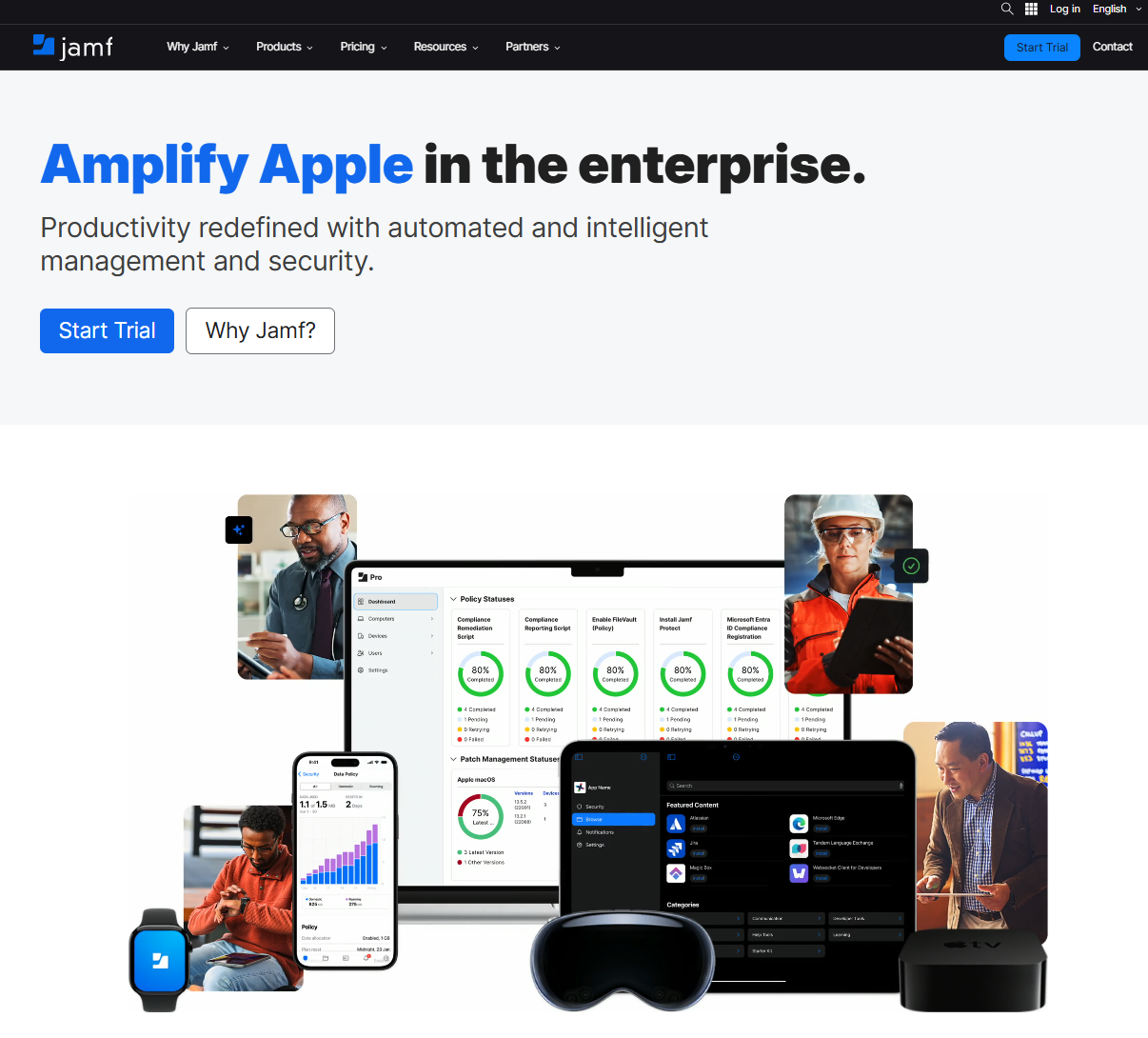
Jamf is an Apple-focused MDM and security platform.
Jamf works with Apple’s native frameworks, provides same-day support for new OS releases, and offers deep integrations into the broader Apple ecosystem.
Over time, Jamf has added features for device management, security, and identity, but the main goal remains helping companies manage and protect Apple devices at scale.
What is Kandji?
Kandji started life as a modern Apple MDM platform, known for its Blueprint-based approach, strong automation, and an extensive library of prebuilt security and configuration controls for Mac and iOS.
In October 2025, the company rebranded as Iru and pivoted to a wider IT and security platform.
Under the Iru brand, Kandji’s Apple capabilities are part of Iru Endpoint, which now manages and secures Apple, Windows, and Android devices with a single lightweight agent.
On top of device management, Iru also includes endpoint management and response, vulnerability management, identity and access tools, and built-in compliance features.
For familiarity’s sake, we will still call it Kandji throughout the article :)
Jamf vs Kandji: Core Feature Comparison
Jamf and Kandji (Iru) are usually the first two names on the list when a company gets serious about managing Macs and iPhones, so comparing them directly makes sense.
Today, let’s dig into the age-old question: which one is better?
1. Device provisioning and enrollment
For device provisioning and enrollment, I care about how fast you can go from a Mac in a box to a Mac that your employee can work on.
Jamf and Kandji both use Apple’s Automated Device Enrollment through Apple Business Manager for rollout.
The differences between the two show up in the level of control you get and the effort it takes to set things up.
Zero-touch setup: Jamf
In Jamf, you set up something called a PreStage Enrollment.
It’s like a setup template. You choose which Apple setup screens to skip, whether to create a local admin account, which profiles and apps should install, and how hands-on or hands-off the user’s first-time setup should be.
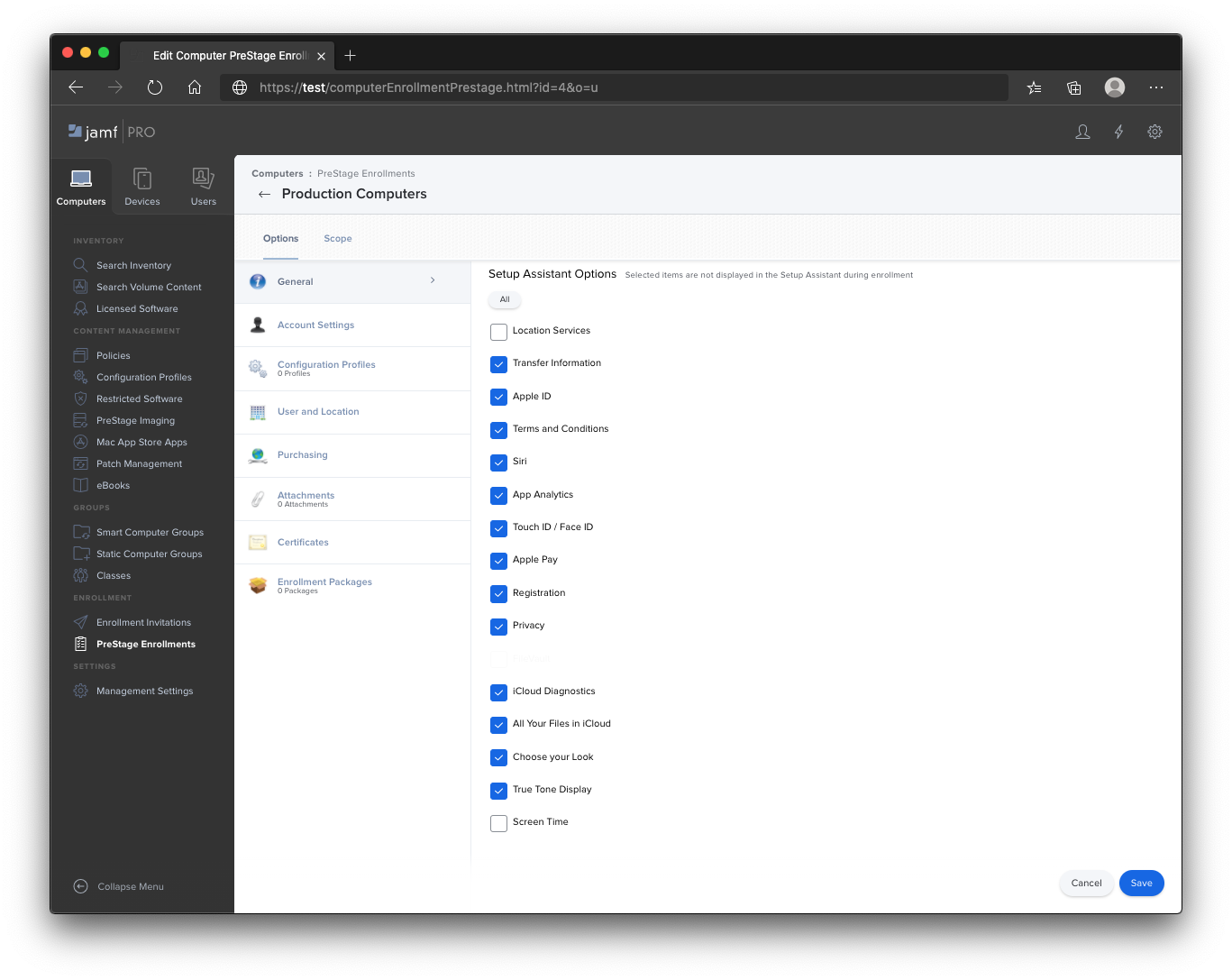
In a PreStage, Jamf lets you:
- Hide or auto-skip specific Setup Assistant screens so setup feels fully hands-off
- Create a managed local admin account before the user ever gets to the desktop
- Attach profiles and app packages so core apps, security settings, and tools like Jamf Connect are ready at first login
On top of that, you can use Enrollment Customization to dress up the setup flow.
That means you can add your own branded screens, require users to sign in with SSO or LDAP during setup, and ask for extra info (like department, location, or asset tags) right inside Apple’s Setup Assistant.
Zero-touch setup: Kandji
Kandji uses the same Apple enrollment system, but the setup looks different.
Instead of PreStages, you create an Automated Device Enrollment Library Item and attach it to a Blueprint, which controls how those devices are set up.
Blueprints are basically device templates or profiles for groups of users. A Blueprint lets you bundle together everything a certain group of devices should get, for example:
- Which apps to install
- Which security settings to enforce
- Which configurations to apply
You then assign devices or users to that Blueprint, and Kandji keeps those devices in line with the Blueprint's settings.
The Library Item we talked about controls
- Whether users must authenticate through your IdP during enrollment
- Whether the MDM profile can be removed
- Minimum OS version enforced during Setup Assistant
- Which Setup Assistant screens Kandji skips or auto-advances for each platform
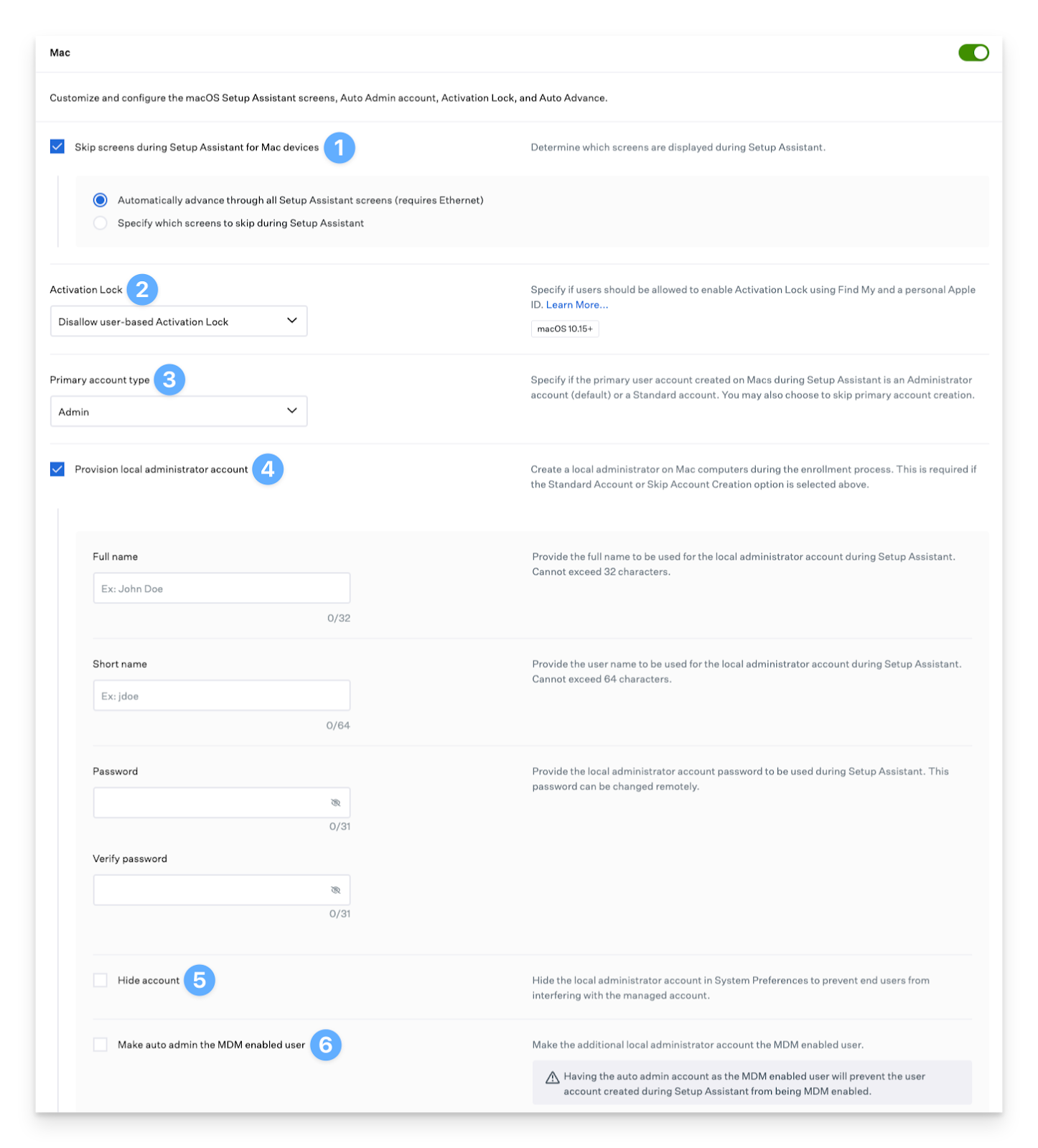
Kandji also tracks ADE profile status (Pending, Assigned, Pushed, Failed) so you can see at a glance whether Apple Business Manager has linked a device correctly and is ready to hand it to Kandji.
In practice, they feel pretty different.
- Jamf gives you a lot more controls. You can fine-tune almost every step of the setup if you care about the details.
- Kandji has fewer controls, but the defaults are smart, and Blueprints make it simple to keep things consistent for each group of users. Rollouts are usually faster than Jamf.
First-boot experience and automation: Jamf
Once the device enrolls, the user sees the “first day at work” experience.
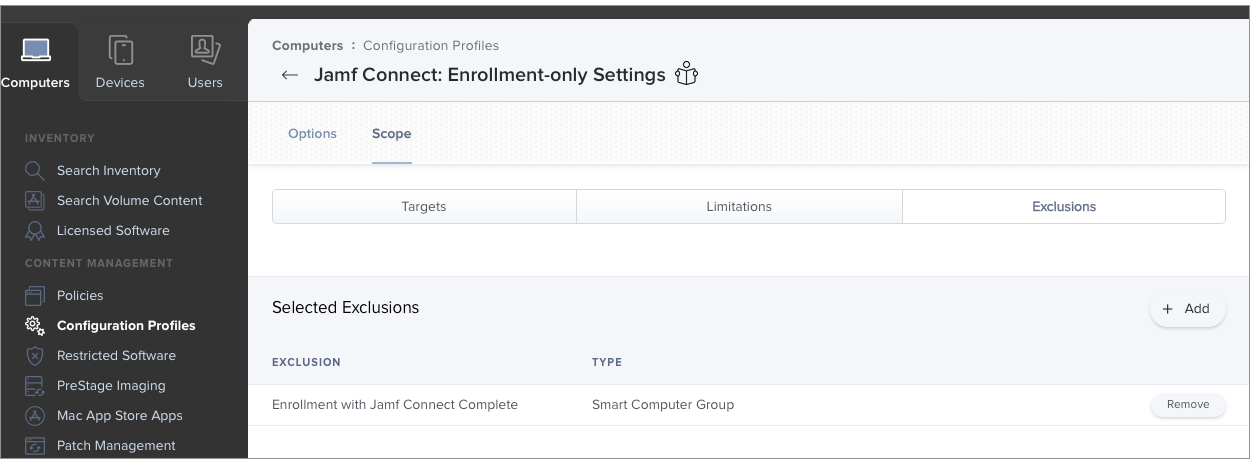
Jamf lets you script and package a lot here. You can
- Install apps in a specific order
- Create accounts in advance
- Add Jamf Connect so users sign in with their identity provider on the login screen
For visual feedback, Jamf now has Setup Manager, an app you deploy alongside your PreStage that shows enrollment progress and which tasks are running, similar in spirit to Kandji’s approach.
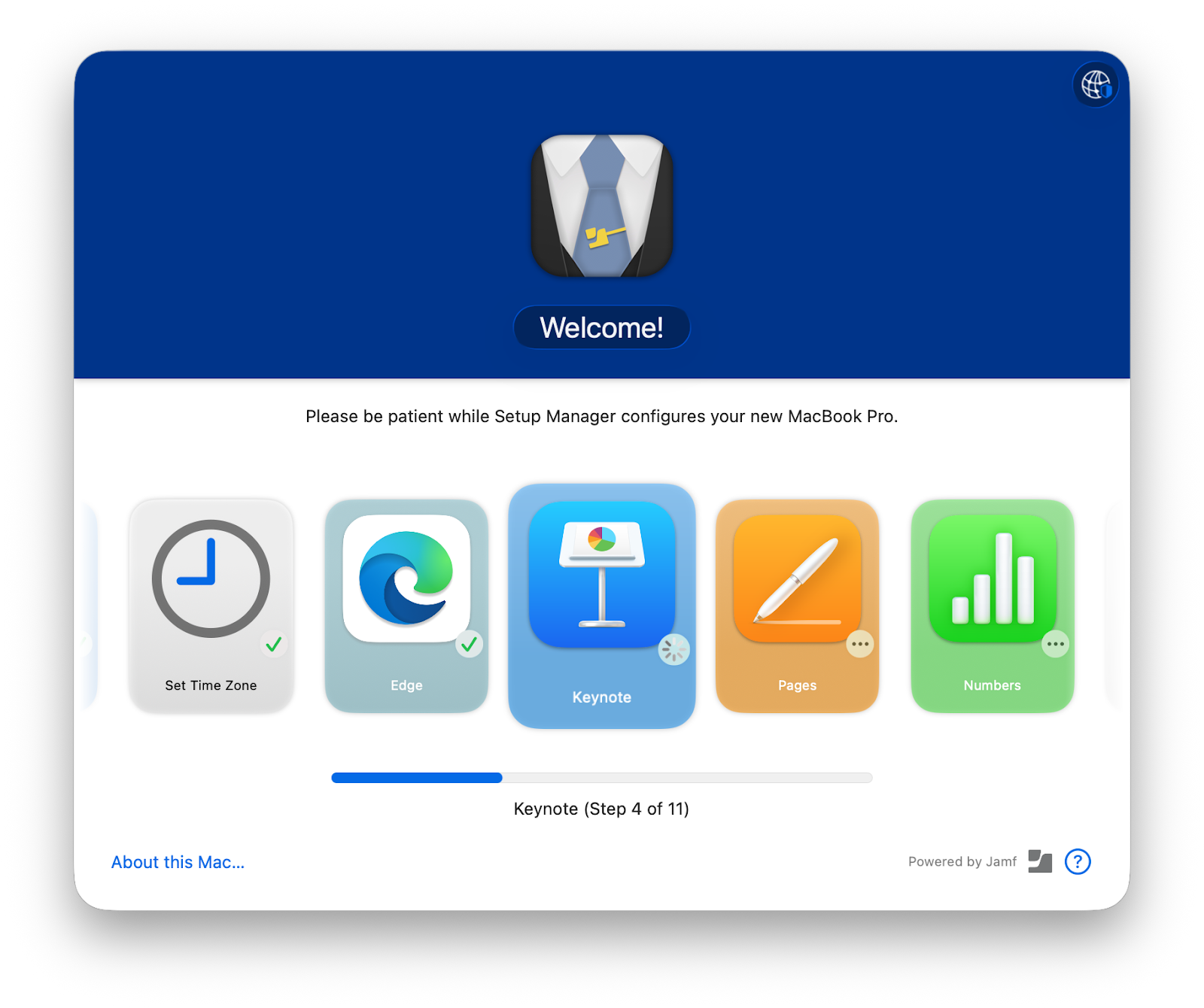
What’s nice is that you can shape this flow almost any way you want, especially if you have a Mac admin who enjoys scripting.
First-boot experience and automation: Kandji
Kandji leans heavily into this area with Liftoff. Liftoff is a dedicated Mac feature that turns a freshly enrolled machine into an enterprise-ready device before the user starts working.
It offers a straightforward progress UI, lists which apps and settings are being applied, and lets you customize branding and completion content.
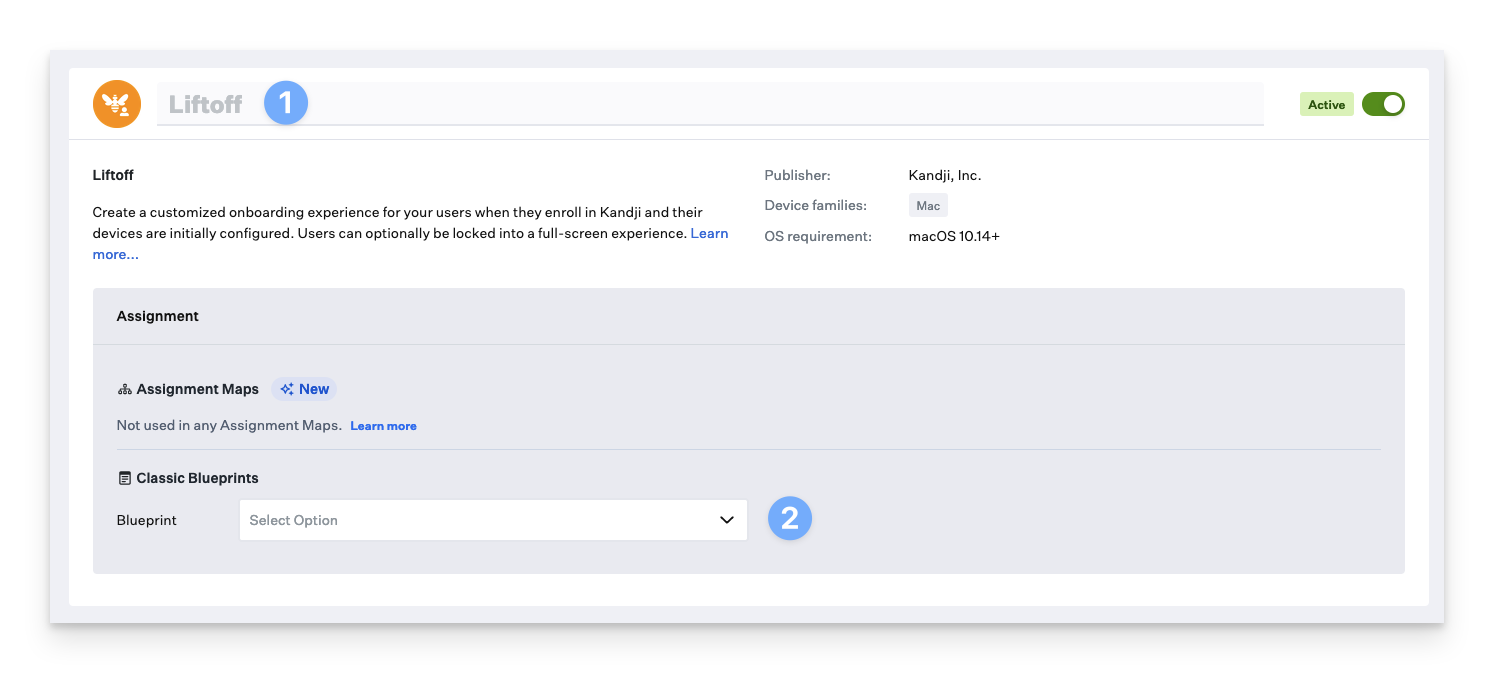
Kandji’s Mac setup with Liftoff looks polished with almost no effort. You can change headings, text, and a few links or cards on the Install and Complete screens. However, you can’t really change the overall flow, add extra custom steps, or redesign the UI the way you can by chaining tools and scripts in Jamf.
On Windows, Iru takes a similar approach: one agent, clear policies and apps, but a more guided, less heavily customizable setup experience.
Manual enrollment and BYOD: Jamf
Not every device is solely enrolled through Apple Business Manager.
Here, Jamf and Kandji behave differently.
Jamf supports user-initiated enrollment for both company-owned and personally owned devices.
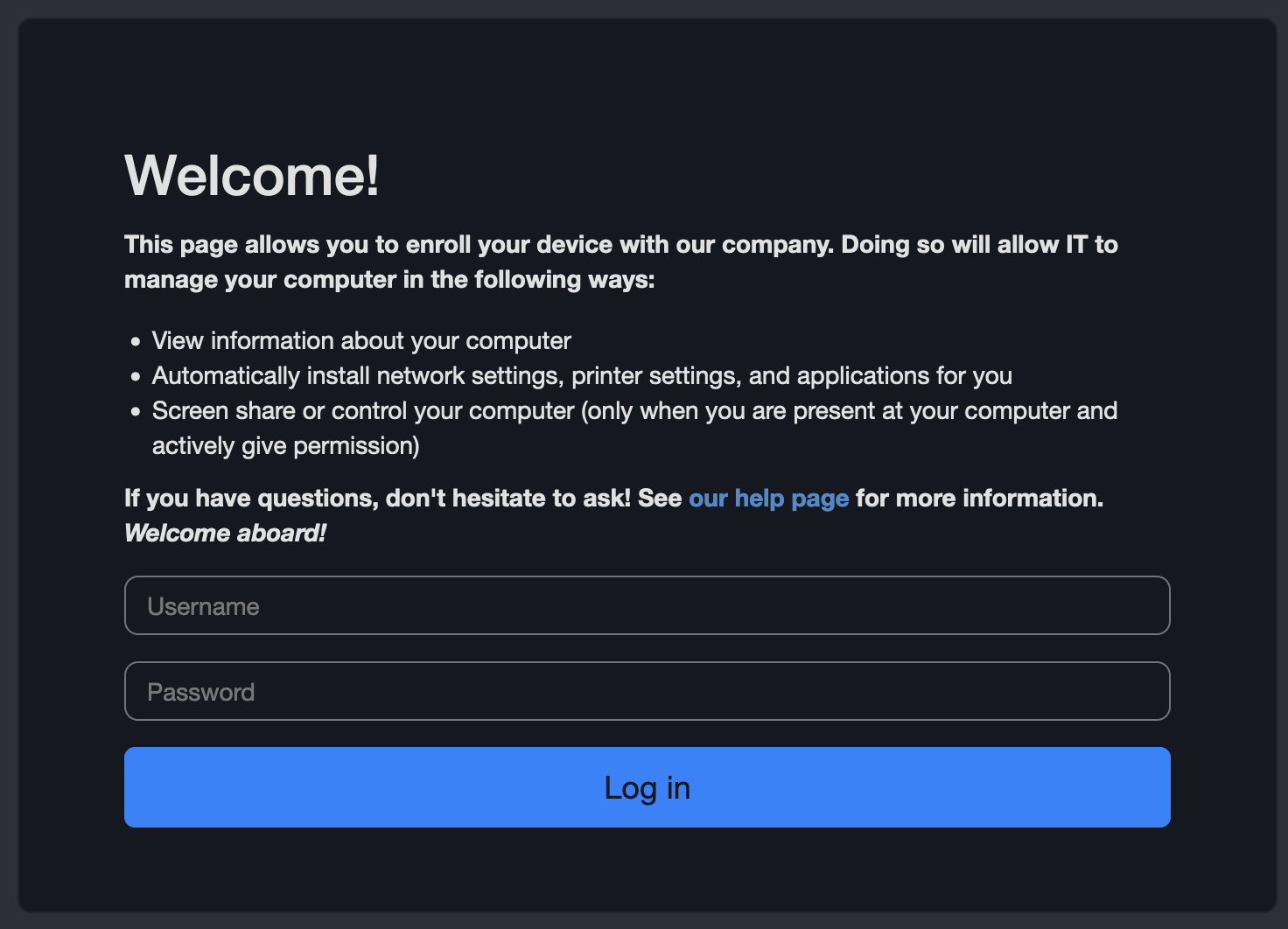
On iOS, Jamf implements Apple’s User Enrollment model for BYOD. In practice, that means
- Work apps and data live in a separate, managed space on the device
- IT can enforce policies, push apps, and wipe only the work data
- Personal apps, photos, and messages remain outside IT’s control
For a business, this solves two big problems:
- Employees know you cannot see or erase their personal content, which makes them far more willing to enroll their own devices.
- You still get management, encryption, and selective wipe for corporate data without overreaching into the personal side.
Manual enrollment and BYOD: Kandji
Kandji offers manual enrollment through an enrollment portal. You share an enrollment link and code tied to a Blueprint, and the user enrolls from a browser.
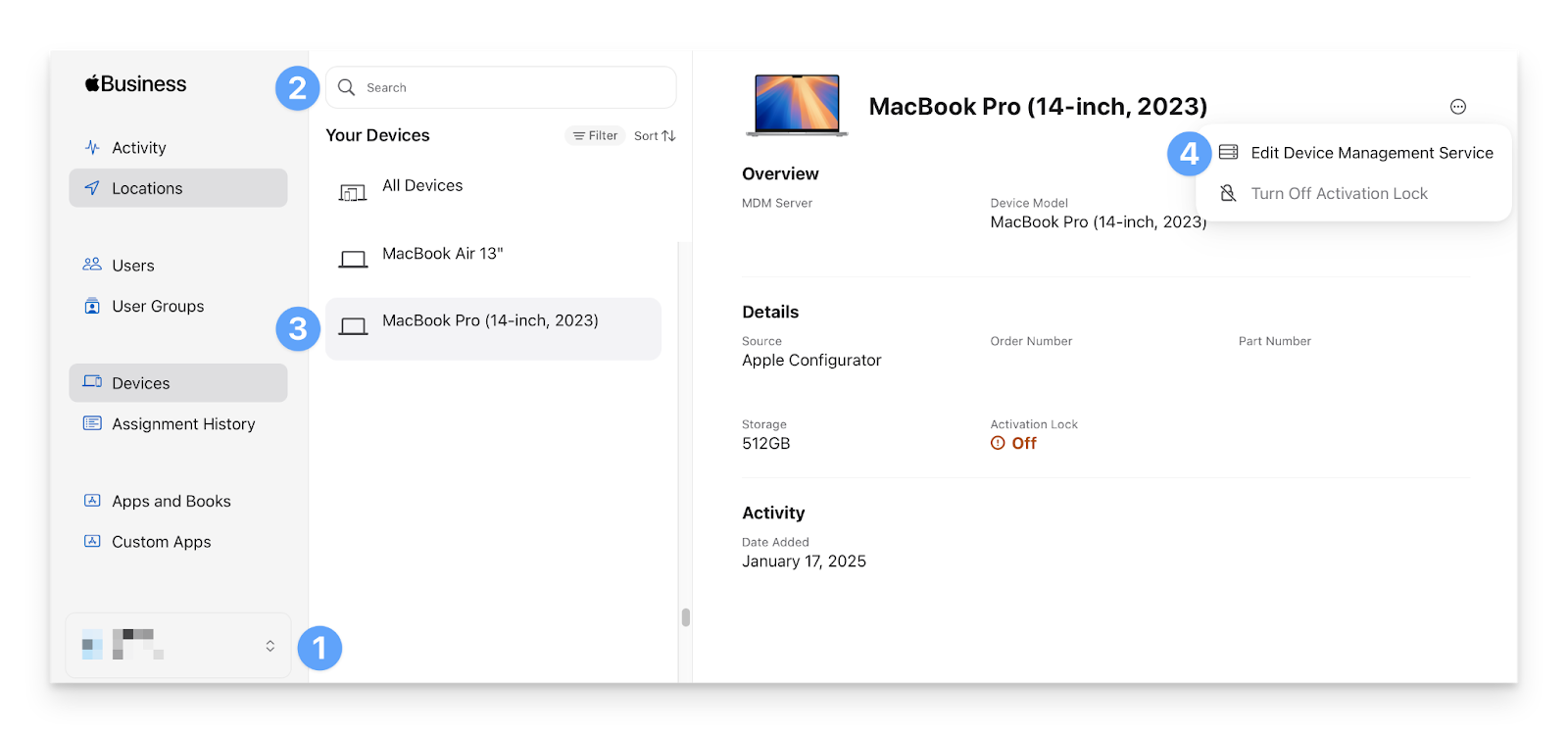
For BYOD, Kandji suggests making separate Blueprints with lighter policies and letting users enroll into those via the enrollment portal. It also clearly states that iOS devices enrolled this way are not supervised.
So here's the deal:
For BYOD and more sensitive manual scenarios, Jamf has a stronger, more up-to-date approach. Kandji is okay for simple manual enrollments, but it does not give you the same privacy-aware, clearly separated work vs. personal setup.
Recent Kandji reviews on G2 point out that while its Blueprints and enrollment workflows automate a lot, power users sometimes bump into limits and applaud Jamf Pro’s more mature scripting and automation ecosystem as the better fit for highly customized setups.

Via G2
Verdict for provisioning and enrollment
For device provisioning and enrollment alone, I would have to call it a tie. Kandji delivers a more guided, polished, zero-touch deployment, and first-boot experience out of the box.
However, if you need deep BYOD support with Apple’s User Enrollment and highly customized onboarding flows, Jamf Pro is a stronger option.

2. Usability and admin experience
For day-to-day admin work, four things matter the most:
- How fast can you onboard new admins?
- How easy it is to build and reuse policies,
- How predictable the UI is under scale, and
- How much time do you spend troubleshooting vs doing valuable work.
Here’s how Kandji and Jamf compare on those axes.
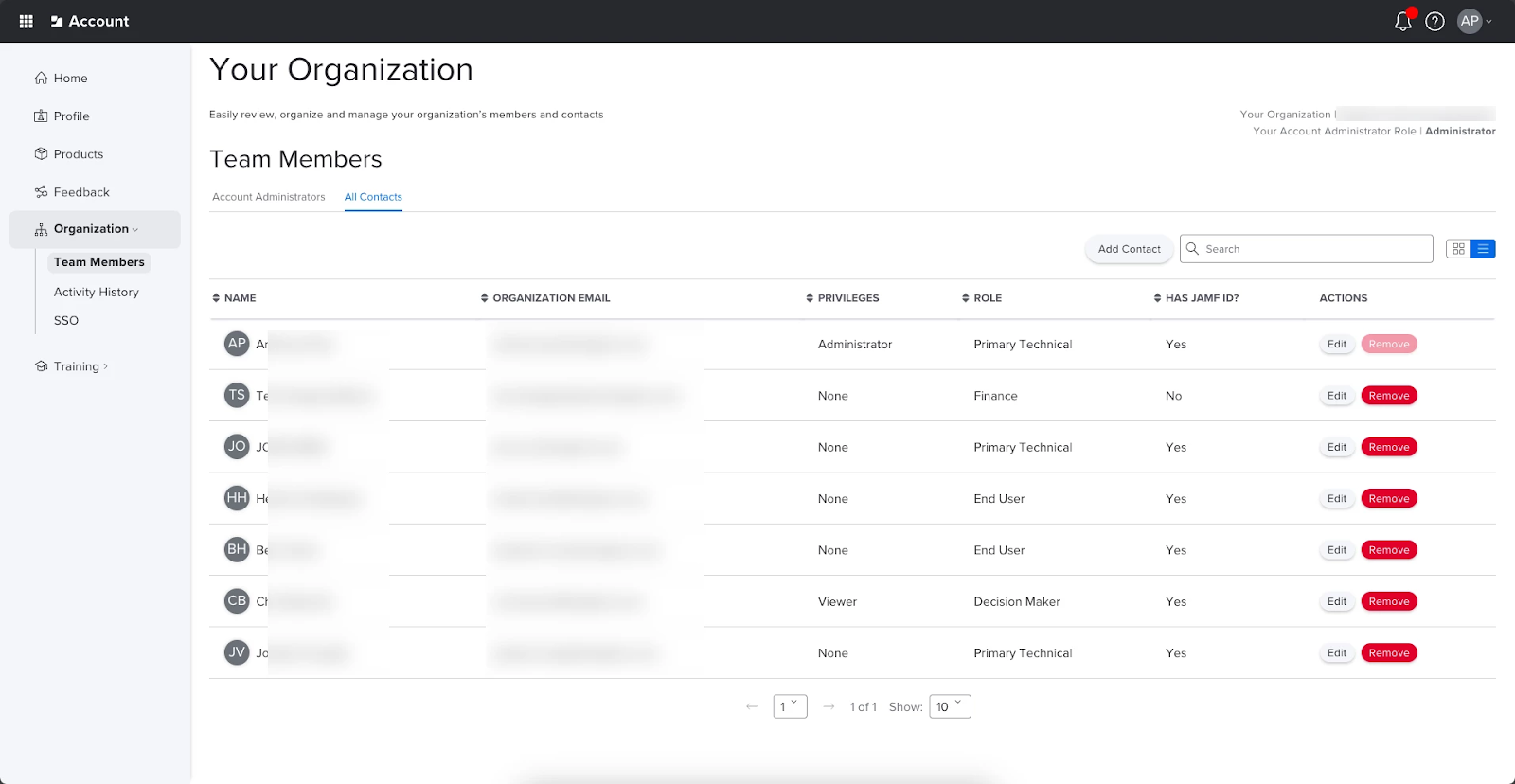
Jamf
In the Jamf Pro console, there is a tool for setting almost everything, but you need to know where to look.
It's laid out around clear sections for computers, mobile devices, configuration profiles, policies, scripts, and smart groups.
Admins also get a large online admin guide and structured training courses.
What I liked (positives):
- Granular control and PreStage power. Jamf’s PreStage templates and deployment tools give fine control during initial provisioning. You can inject packages, run scripts, and do region-specific provisioning with reliability.
- Huge ecosystem and community (Jamf Nation). When I needed community scripts, deep troubleshooting guides, or certified training, Jamf’s ecosystem is massive. That speeds up solving any issues that might pop up.
- Enterprise-grade tooling and extensibility. The admin APIs, webhooks, and integrations let me bake Jamf into CI/CD, ticketing, and asset systems.
The drawbacks are obviously a steeper learning curve and heavier admin overhead. There's also more UI clutter when you are not using advanced features.
Kandji
Kandji feels different. The whole experience revolves around Blueprints and the Library.
You pick or search for a Library Item, add it to a Blueprint, and the UI walks you through a small number of choices.
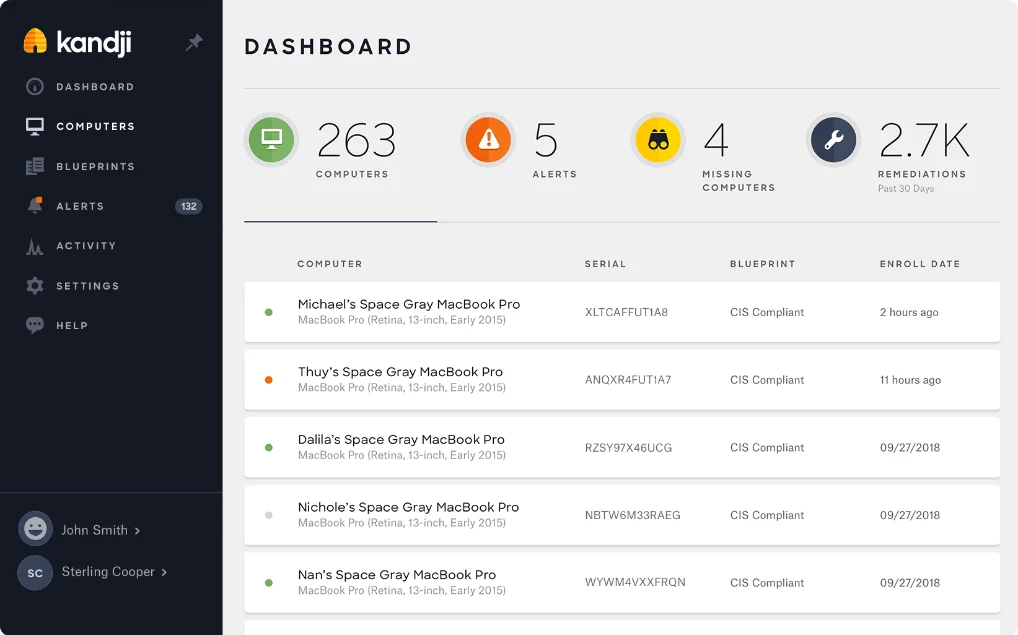
However, Kandji can simplify things so much that when you eventually need a more advanced option, you suddenly run into limits.
What I liked:
- I can teach a new admin to create a Blueprint, attach library items, and enroll a device in a few hours.
- For non-ABM devices I can enable an Enrollment Portal and hand out codes. It is usable by non-technical employees.
- Kandji’s admin UI is less intimidating than Jamf’s. That reduces onboarding time for small IT teams.
However, the downside is that Kandji trades depth for speed. If you want to run very custom scripts during provisioning, or build intricate PreStage-like flows, you can do less without creative workarounds.
Moreover, Kandji has good docs, but it does not yet match Jamf’s huge ecosystem and community resources.
Verdict on usability
For everyday admin experience, I give this round to Kandji. Jamf feels better suited to admins who are ready for a steeper learning curve in exchange for more controls.
3. Policy and configuration management
For any tool I assess on policy and configuration management, scope is my first priority. Here, Jamf is still Apple only.
Kandji has shifted into its Iru model, so it now covers Apple, Windows, Android, and even visionOS. That difference dictates how policy creation, delivery, and ongoing enforcement feel on both platforms.
And this is also where the personalities of the two products really show.
How Jamf handles policies
Jamf is built around Apple’s native concepts.
Configuration profiles define settings and restrictions, smart groups decide which devices should get them, and policies plus scripts handle ongoing actions like installs, maintenance tasks, and fixes.
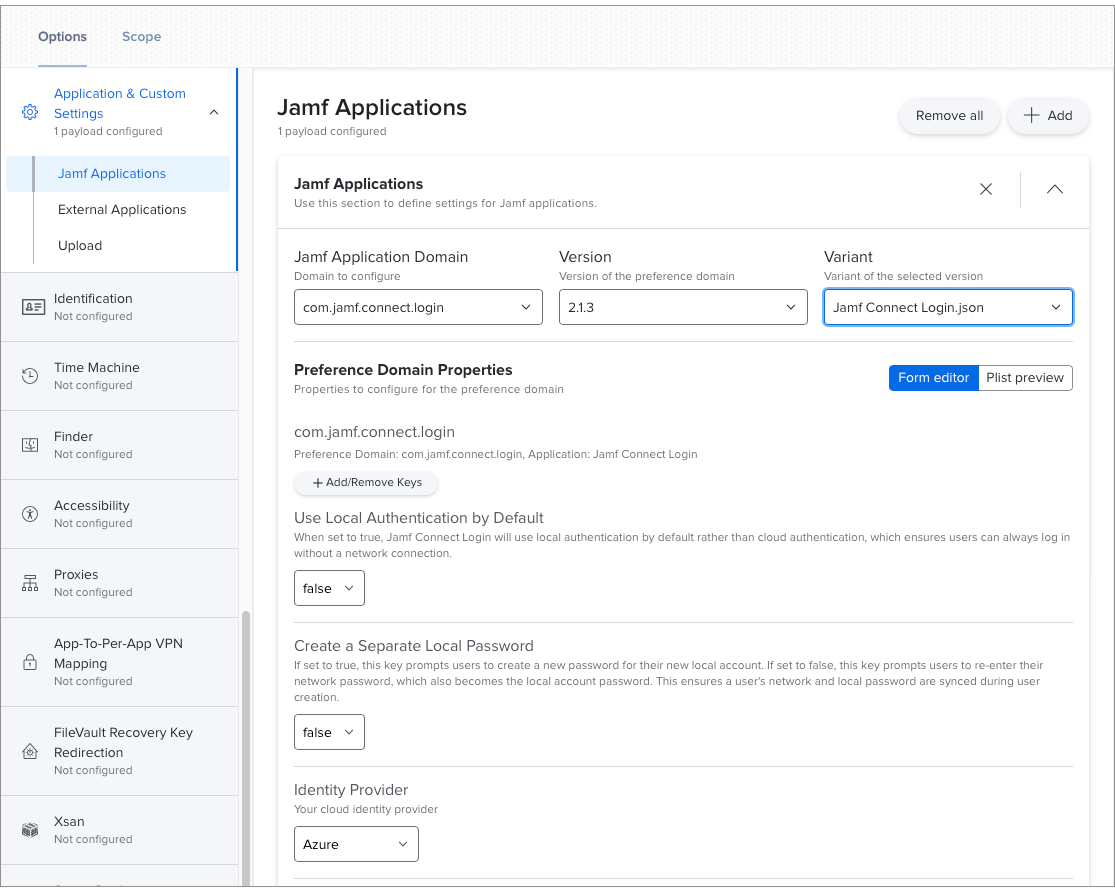
In Jamf, I can make the experience razor-sharp. For example, I can write a policy that checks battery cycles, sends a notification to the user, and then logs data to a reporting system. I can also build layered configurations that target small subsets of devices when I need a particular enforcement pattern.
How Kandji handles policies
Kandji can help you create desired outcomes, but Jamf lets you engineer the exact steps.
The catch is that many tasks require scripting or detailed profile work.
Kandji takes a more opinionated route. Instead of exposing raw profiles everywhere, it packages things into Library Items and Parameters.
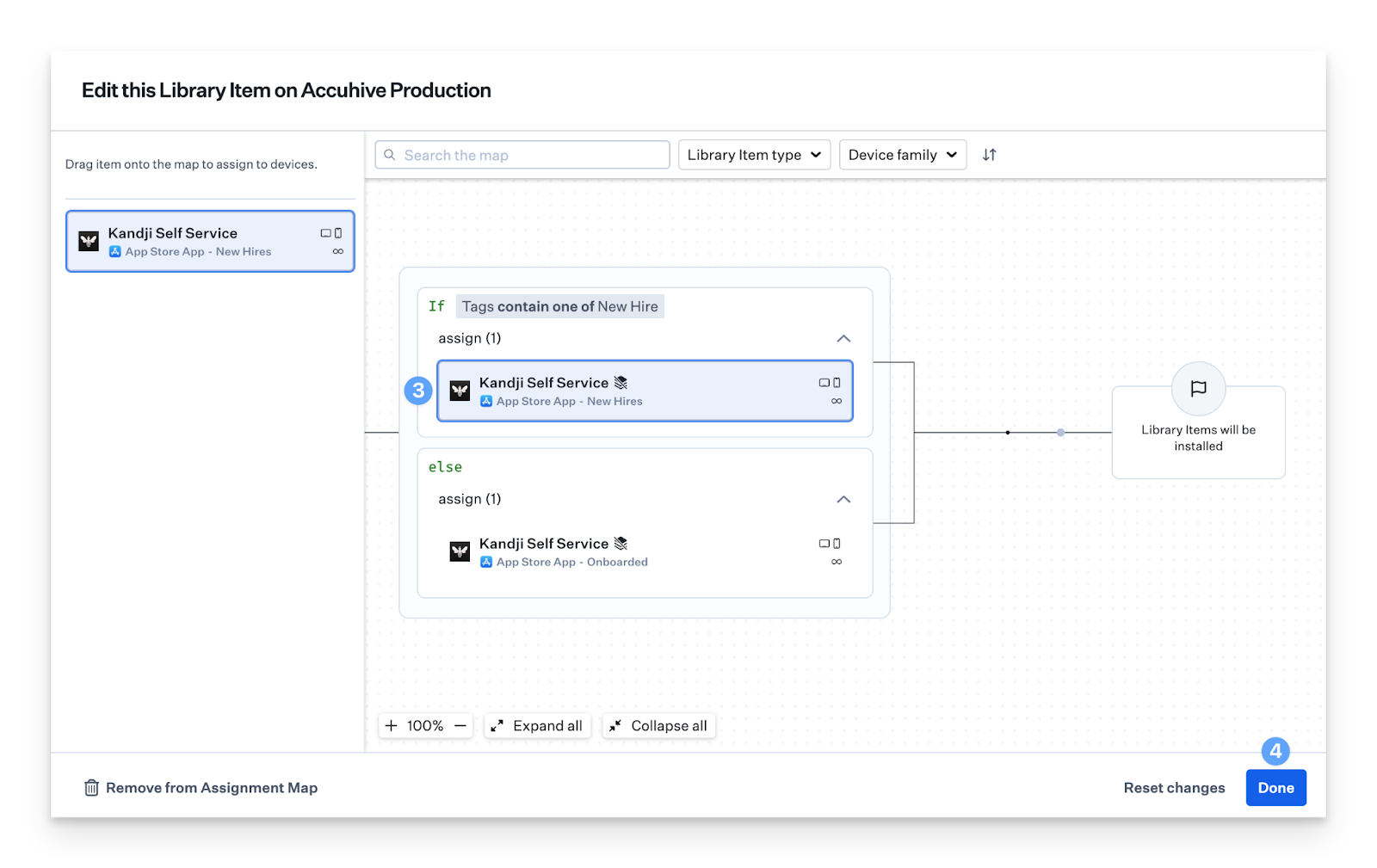
- Library Items include things like FileVault, Gatekeeper, Wi-Fi, VPN, Auto Apps, login and background items, and Managed OS. You attach these to Blueprints.
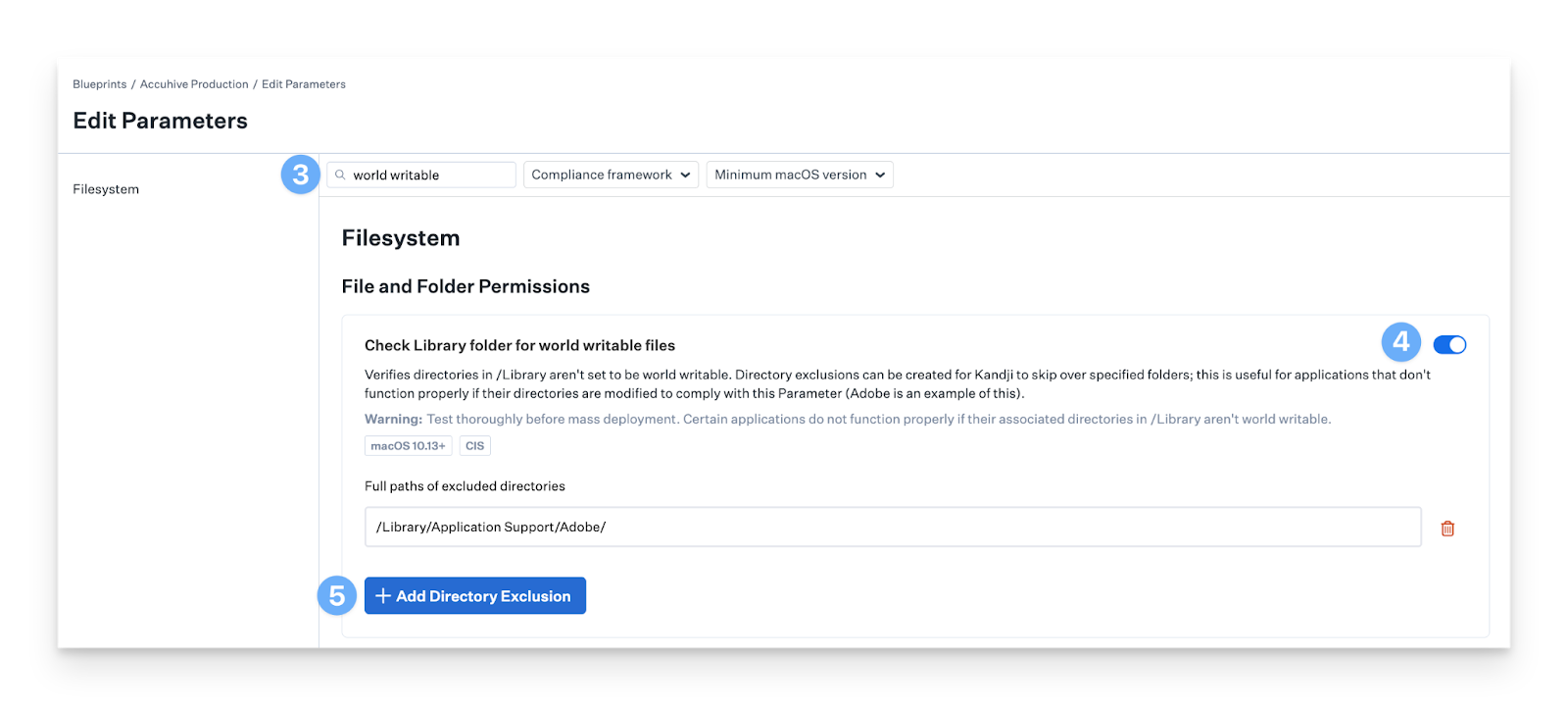
- Parameters cover additional settings that are not part of Apple’s standard MDM payloads, such as turning off the Guest user or blocking specific apps.
You can open a Blueprint and apply a full stack of security controls without thinking about scripts or configuration profiles. The platform hands you prebuilt, Apple-aligned controls that already follow benchmarks like CIS, NIST or STIG. All you need to do is just toggle the ones you want.
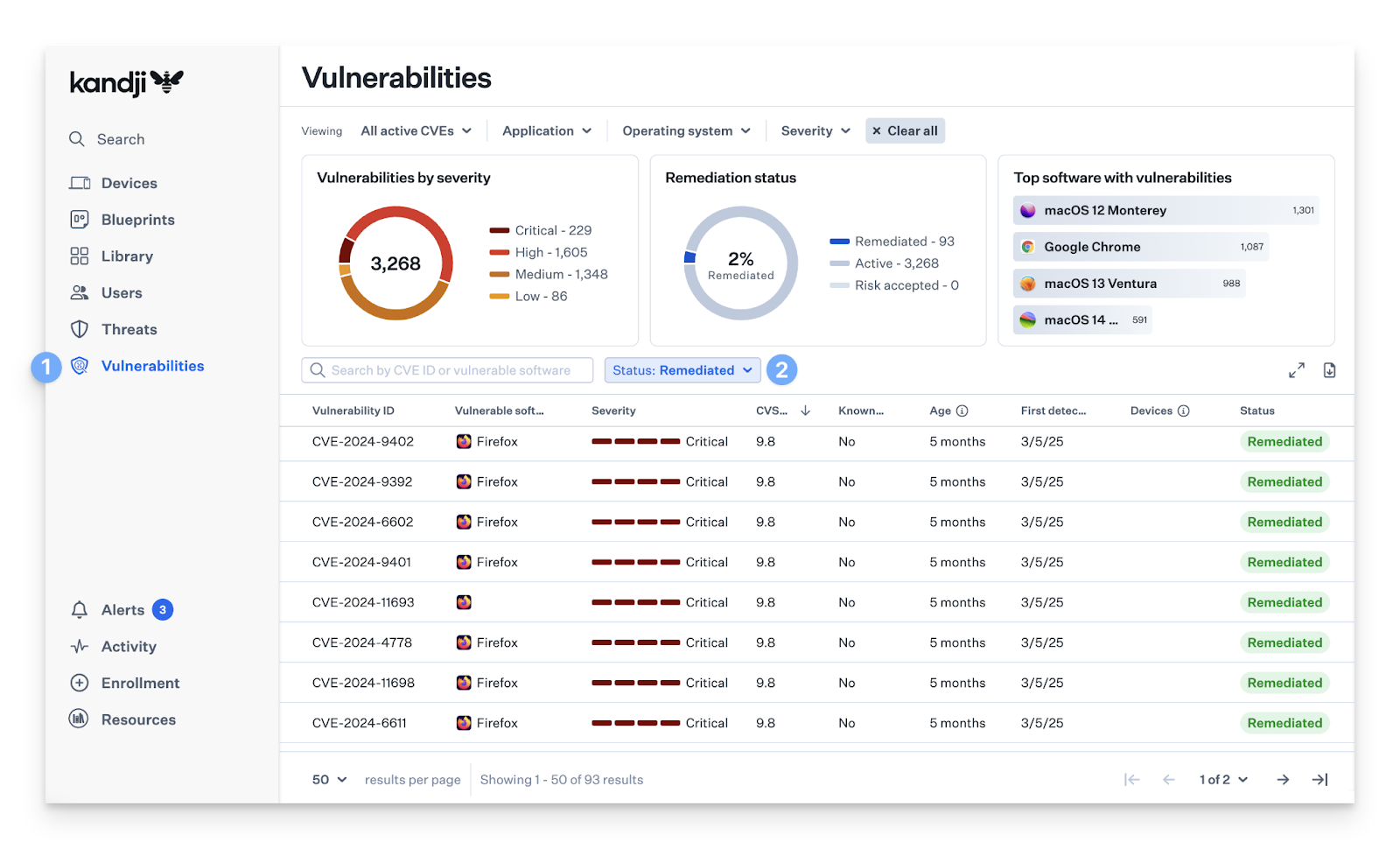
Perhaps ongoing enforcement is the most impressive part. Kandji’s Auto-Remediation checks devices and fixes drift on its own. If a user disables FileVault or changes a firewall setting, Kandji puts it back. I also use Auto Apps when I want apps kept up to date without building update workflows.
In my time with Kandji, the platform reduced the number of decisions I needed to make. For instance, I could apply a CIS level 1 baseline to macOS in a minute.
However, if you want to recreate a highly customized policy you used to run with Jamf scripts and smart groups, Kandji may not offer the same level of flexibility.
Let me walk through a simple example of turning on FileVault and keeping macOS up to date.
In Jamf, I’d usually:
- Create a configuration profile for FileVault
- Scope it with smart groups, like “all Macs” or “only laptops.”
- Add extra logic if I wanted, for example, “only encrypt if the Mac is on power” or “only for this user group.”
After that, I would use policies and scripts to push macOS updates and use Jamf’s patch tools and Self Service to keep apps updated.
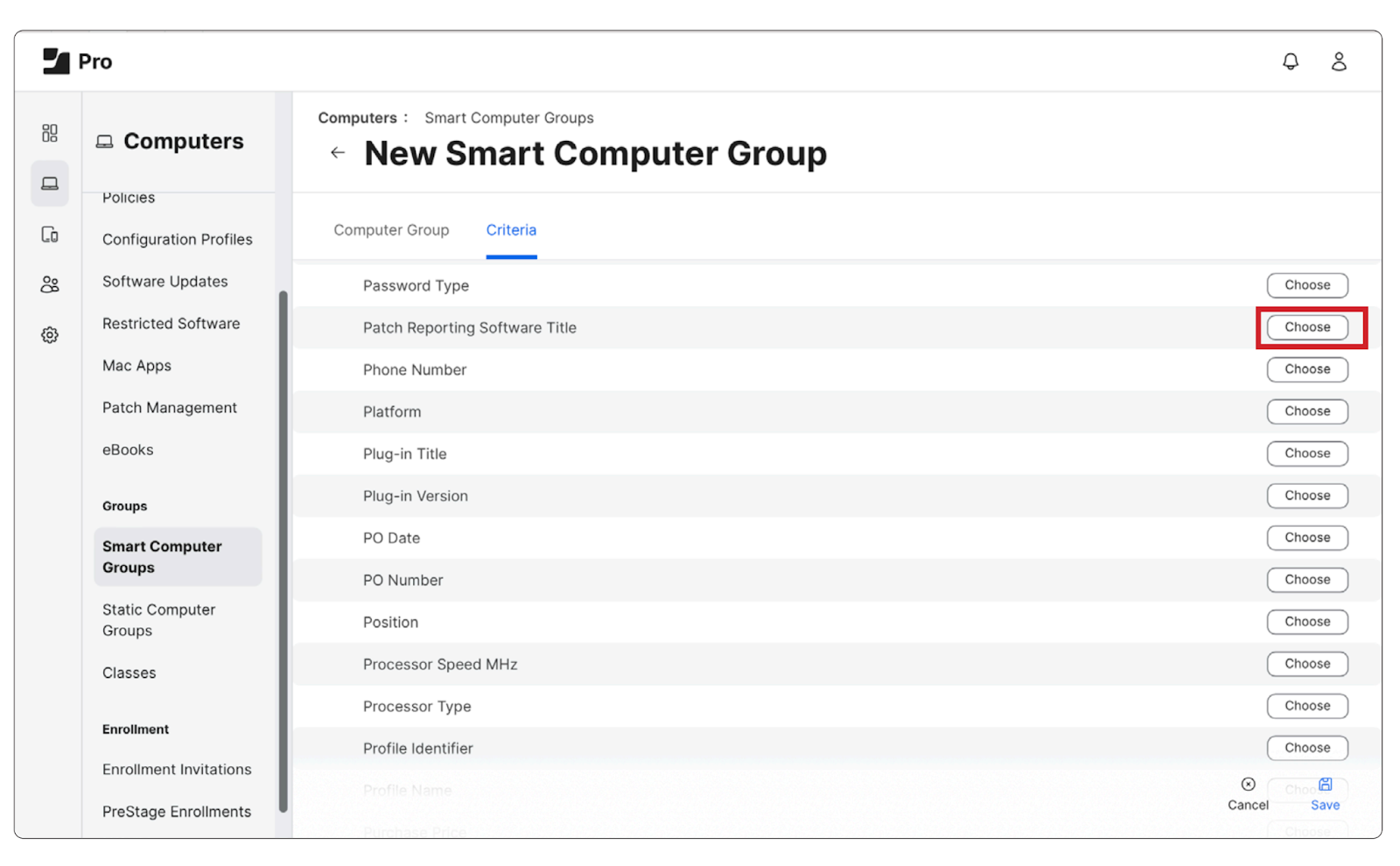
I liked how specific I could be in Jamf.
To do the same in Kandji, I’d take a more “turn it on and let it run” approach:
- Add the FileVault Library Item to a Blueprint and enable it
- Add a Managed OS Library Item to set the minimum macOS version and a deadline
From there, Kandji and Apple’s Declarative Device Management take over. The OS gets the rules and handles most of the update behavior itself.
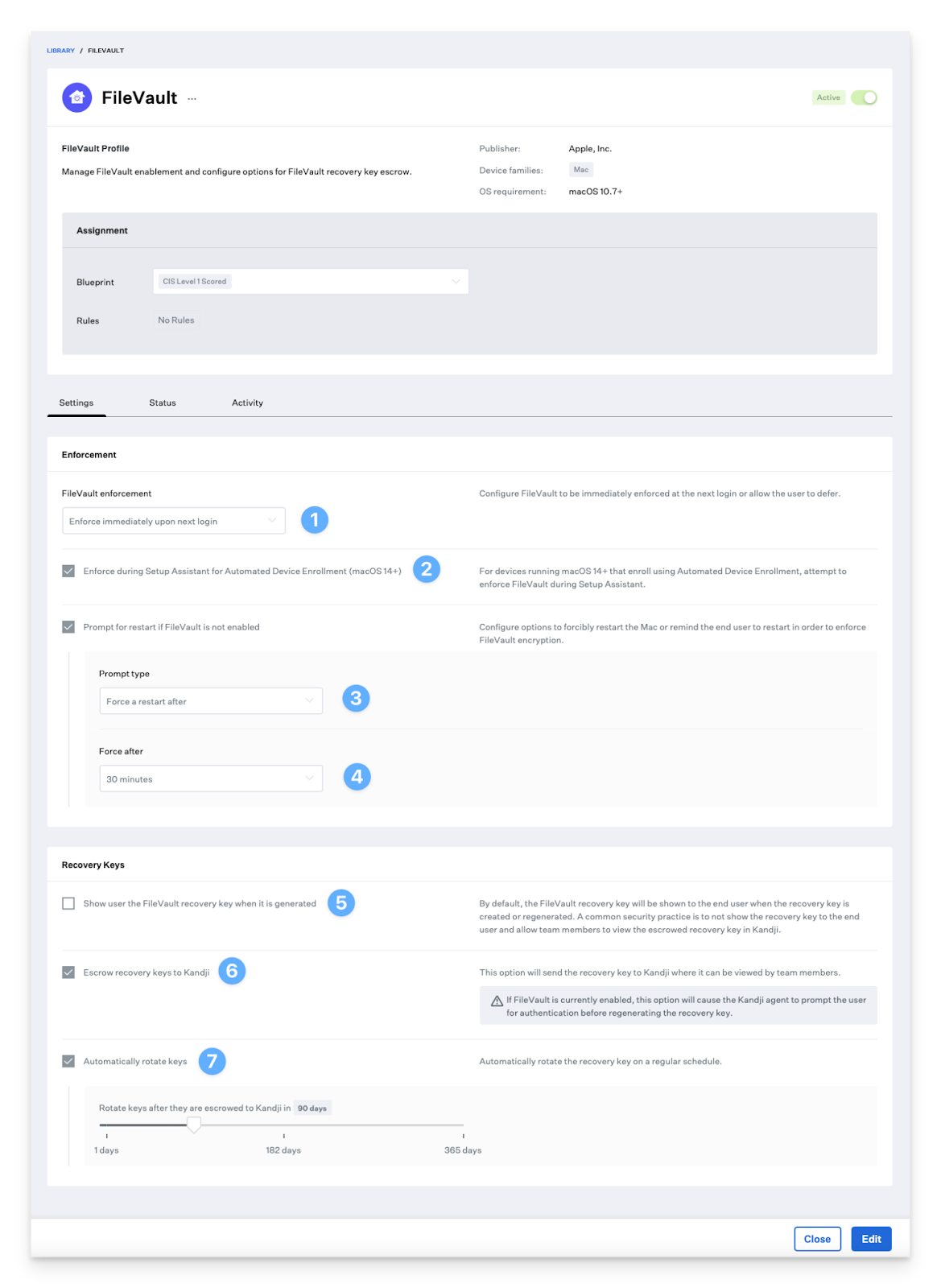
To me, this makes the update process feel simpler and less fragile.
But flexibility takes a hit. When you want very detailed rollout stages or multi-step remediation for stragglers, you'll still find Jamf stronger.
Verdict on policy and configuration
For policy and configuration, Kandji still wins. It’s quicker and friendlier for everyday security and config work. And because it’s multi-platform, it’s an easier choice if your fleet isn’t Apple-only.
That said, in complex, tightly regulated environments, Jamf’s deeper scoping, scripting, and policy engine gives you more room to handle edge cases and strict compliance
4. App lifecycle and software distribution
Both Jamf and Kandji can push App Store apps, deploy custom packages, and give users a self-service catalog. The difference is in how much work you do to get there and how far each platform goes beyond Apple.
How Jamf handles apps
Jamf Pro is more of a build-anything-you-want system for Apple apps.
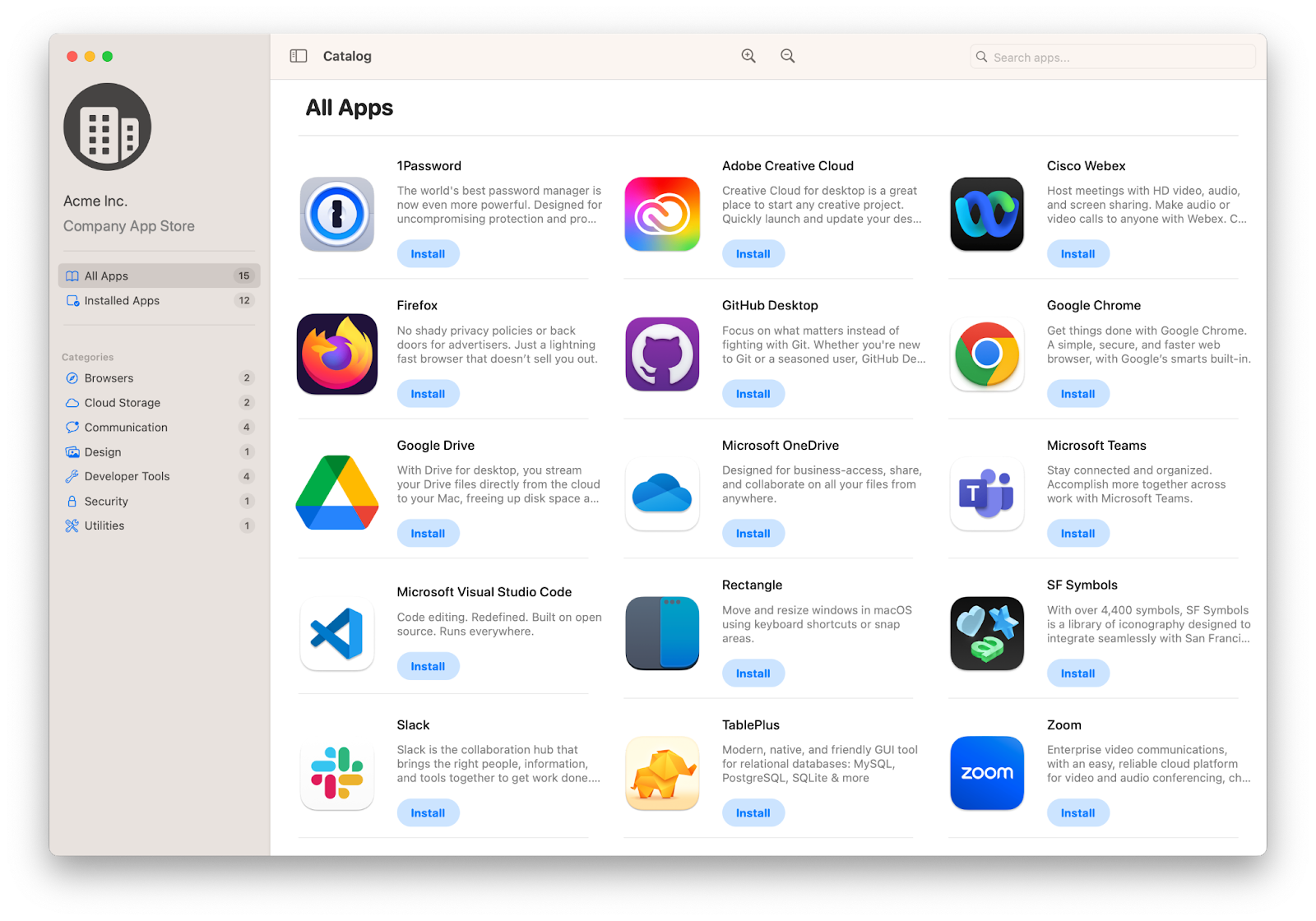
On the Apple side, Jamf gives you
- App Catalog + App Installers for macOS which automatically packages, deploys, and updates a large catalog of third-party apps. Jamf’s App Catalog now has over 1,000 patch titles and hundreds of App Installers, providing broad coverage of common Mac software.
- Patch workflows for supported titles plus classic packages and policies for anything custom.
- Self Service or Self Service+, which is basically an internal App Store. Users can install approved apps, trigger patch policies, and run scripts on demand.
For macOS updates, Jamf Pro’s classic patch management does not update the OS itself. You either use Apple’s Managed Software Updates features or layer in policies and scripts for more control.
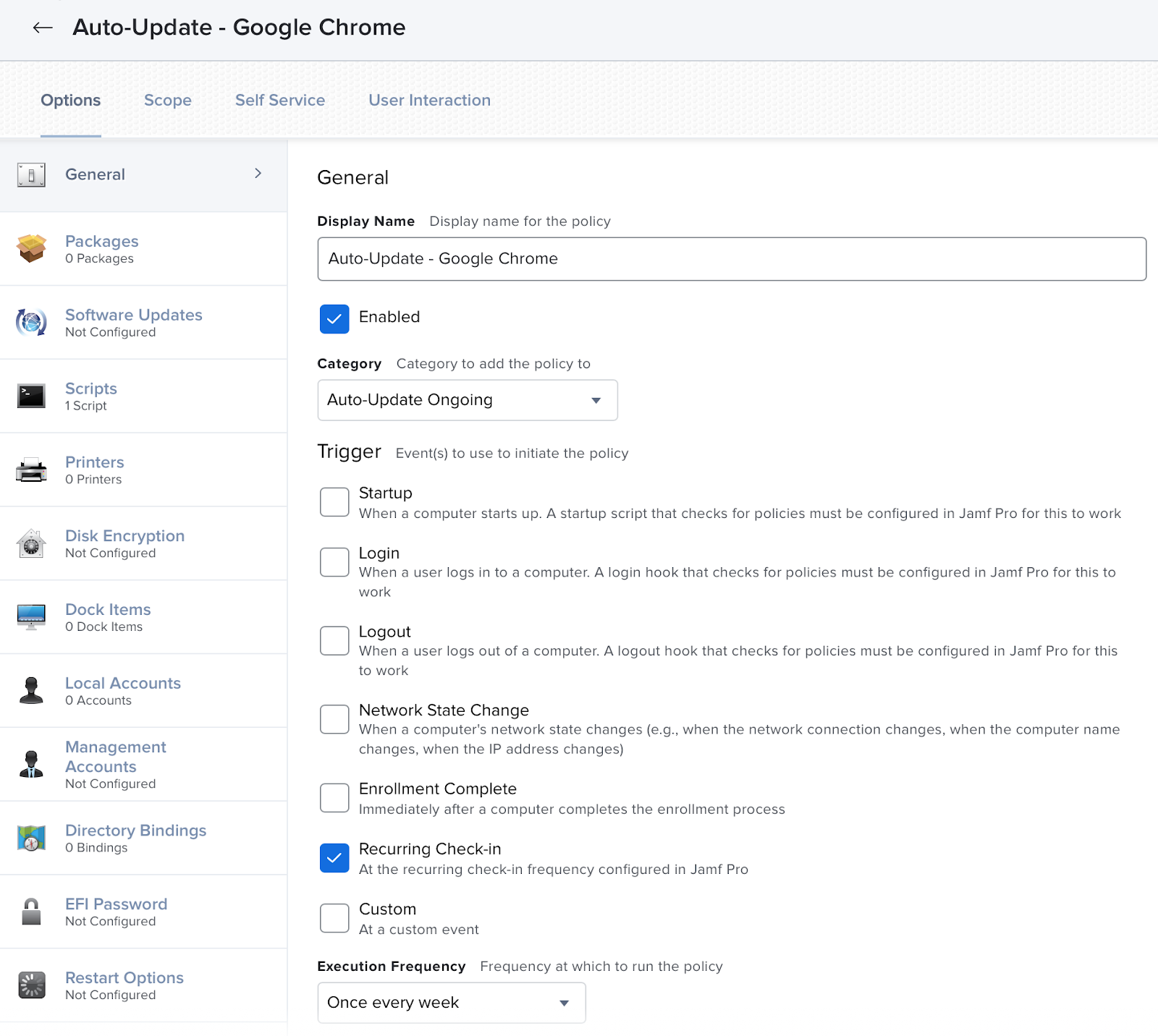
I love that Jamf gives you this level of control. If you want to roll out three different versions of the same app to different smart groups, you can.
But this freedom comes with complexity. You often end up with many interlocking policies and smart groups.
How Kandji handles apps
Kandji’s device-management product is now part of Iru Endpoint, which manages Apple, Windows, and Android devices from one agent.
I noticed that the Apple side still feels like “classic Kandji” and is quite mature, while the Windows and Android parts are newer but already wired into the same workflows.
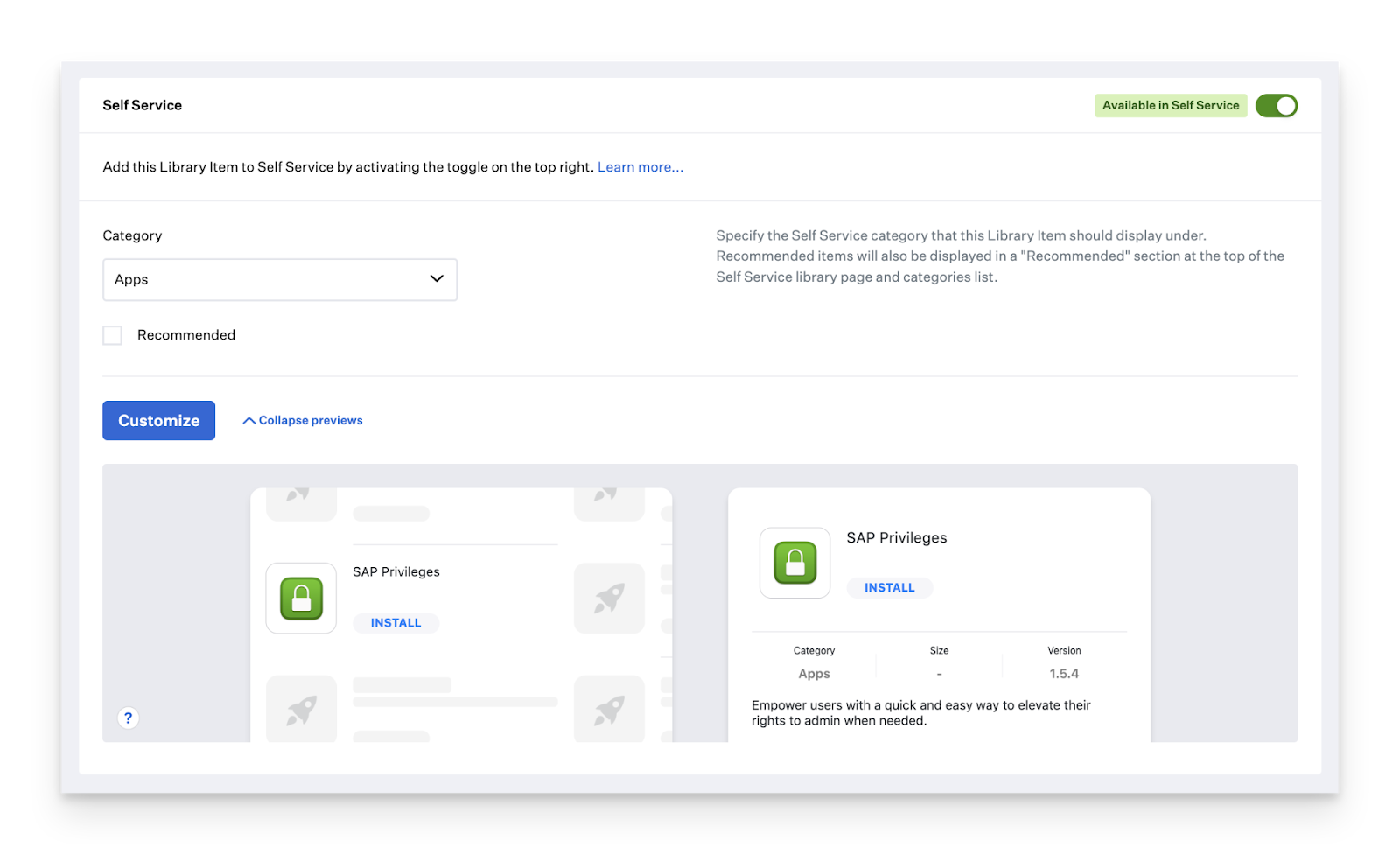
On the app side, Kandji provides:
- Auto Apps: A curated library where Kandji packages, hosts and auto-patches common apps. Today, that covers 200+ Mac and Windows titles, and you can choose whether an app is auto-installed, available in Self Service, or only updated if the user already has it.
- App deployment across platforms: You can deploy via Auto Apps, in-house packages, Custom Apps, Apple App Store, and Google Play, all tied to the same blueprint or assignment model.
- Self-service on macOS and mobile, where users see a curated catalog of apps and tools.
In Kandji, a typical pattern is to choose different Auto Apps, add them to a blueprint, set install vs. Self Service vs. update-only, then move on to the next task.
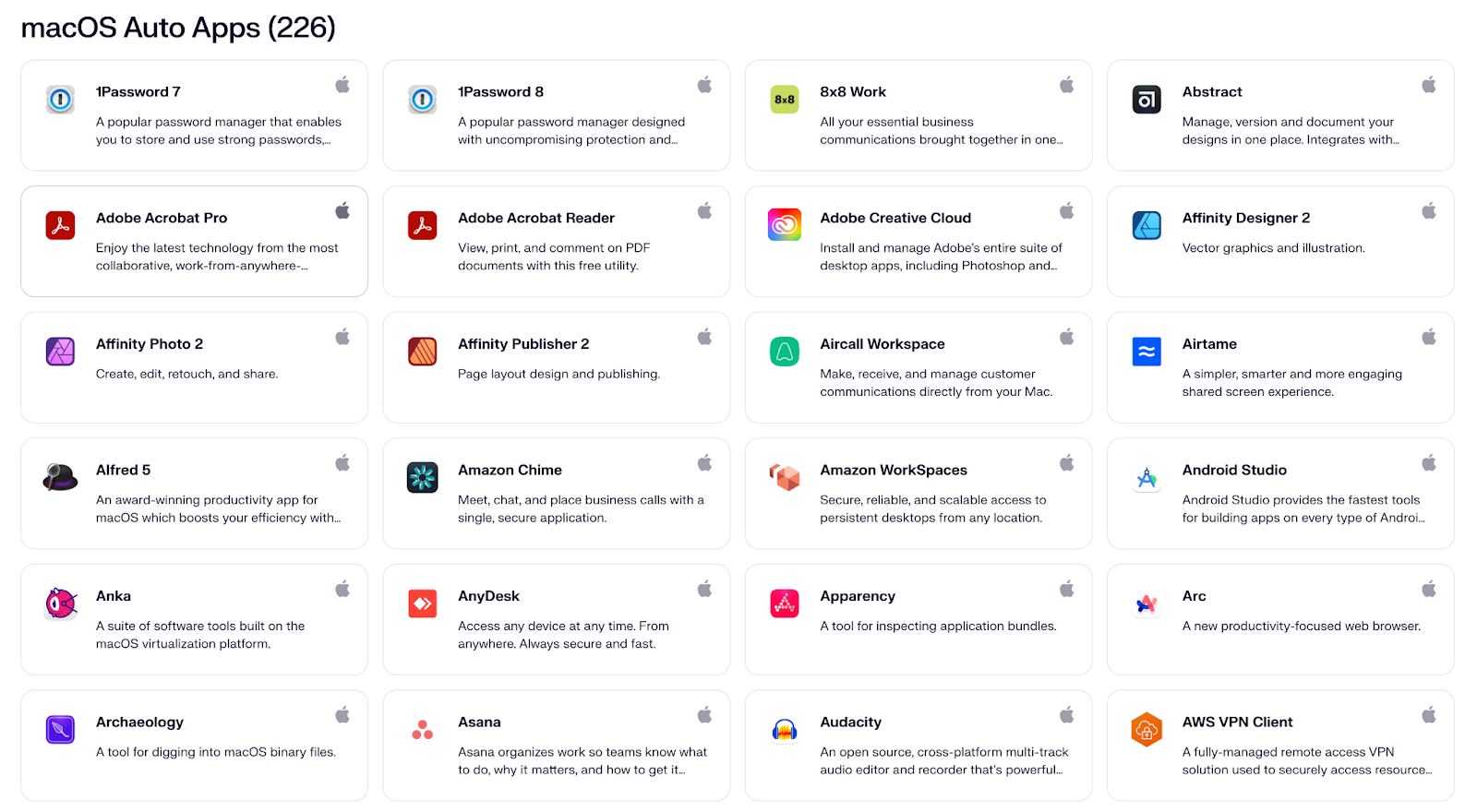
I also noticed that Auto Apps now updates apps on both Mac and Windows. This lets security teams focus on keeping an app at the right version across the company, instead of managing separate tools for each operating system.
It’s disappointing that the Auto Apps catalog is still smaller than Jamf’s macOS App Catalog, and some niche Mac tools you might get for free in Jamf still require packaging or custom handling in Kandji.
For example, a niche utility like AppCleaner shows up in Jamf’s App Installer release list, but it doesn’t appear in Kandji’s Auto Apps library, so you’d need to package or script it yourself if you want it managed.
Verdict for app and software distribution
Kandji gives you a more opinionated, automated experience that now stretches across Apple, Windows and Android from a single agent.
Jamf is still the better choice if you are all-in on Apple and want absolute maximum control over Mac apps and security tuning. But for a modern, mixed fleet where time and headcount are limited, I would personally sign the Kandji order first in these two areas.
5. Security and compliance
For security, Jamf and Kandji head in the same direction but take different roads. Both can lock down your fleet and keep devices compliant, but the experience is different.
Jamf prioritizes precision and control, while Kandji emphasizes automation and simplicity.
How Jamf feels for security
In Jamf, I can define profiles for things like FileVault, firewall, password rules, and system settings, then use smart groups to scope them. It is very Apple-native, and I liked that it aligns closely with how Apple thinks about security on macOS and iOS.
Jamf’s newer Compliance Benchmarks are a good example.
Instead of writing and maintaining your own CIS-style scripts, you can apply Jamf’s built-in benchmark templates (for example, based on CIS for macOS).
Jamf then scans your Macs against those rules, shows which pass or fail, and can trigger remediation to bring non-compliant devices back into compliance.
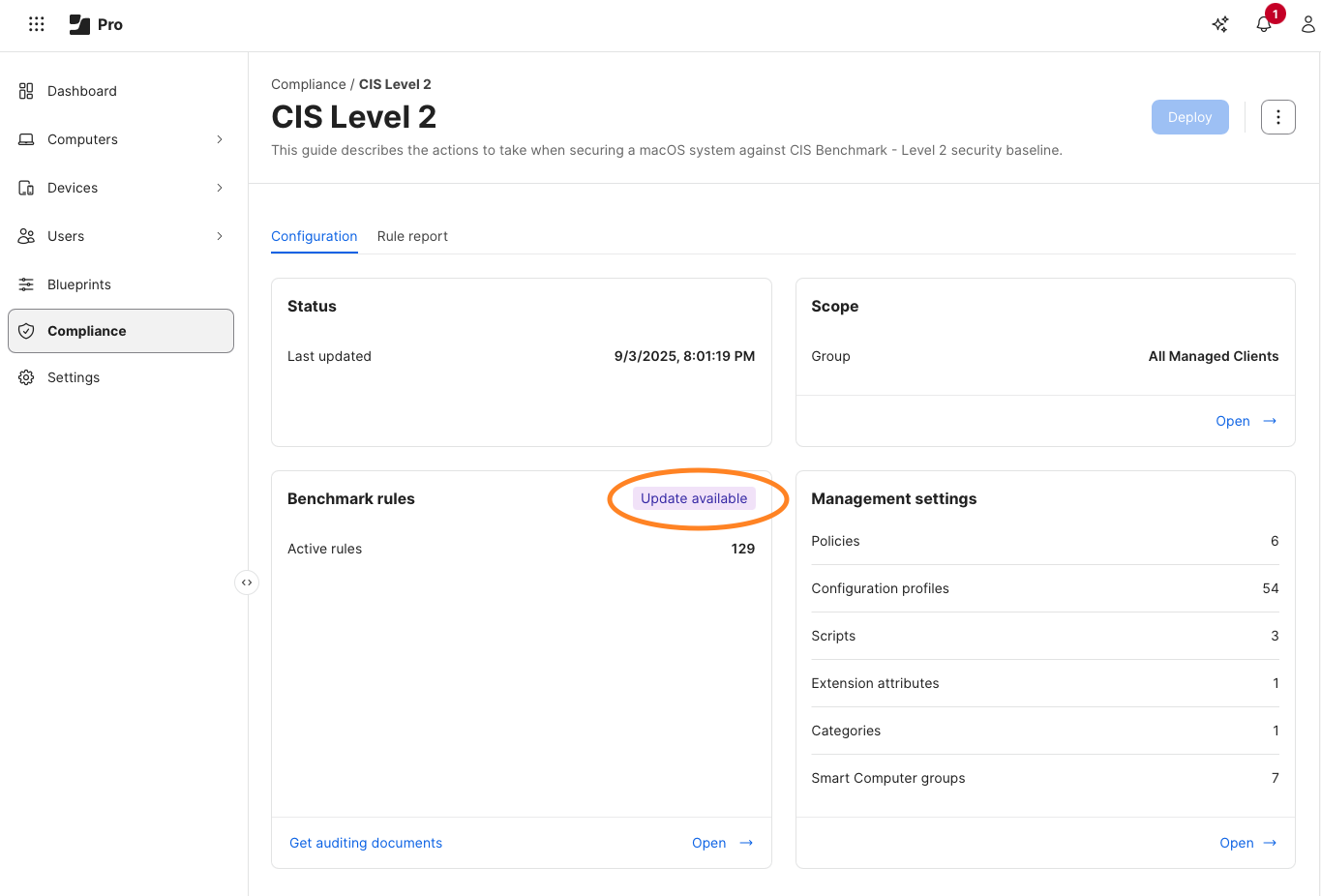
That feels like Jamf turning what used to be a homegrown project into a feature, which I really appreciate.
On the identity side, Jamf connects directly with Microsoft Entra.
Jamf Pro tells Intune which Macs are compliant, and Entra uses that to decide who can open Microsoft 365 and other apps. If a Mac isn’t marked compliant in Jamf, it can be blocked from signing in.
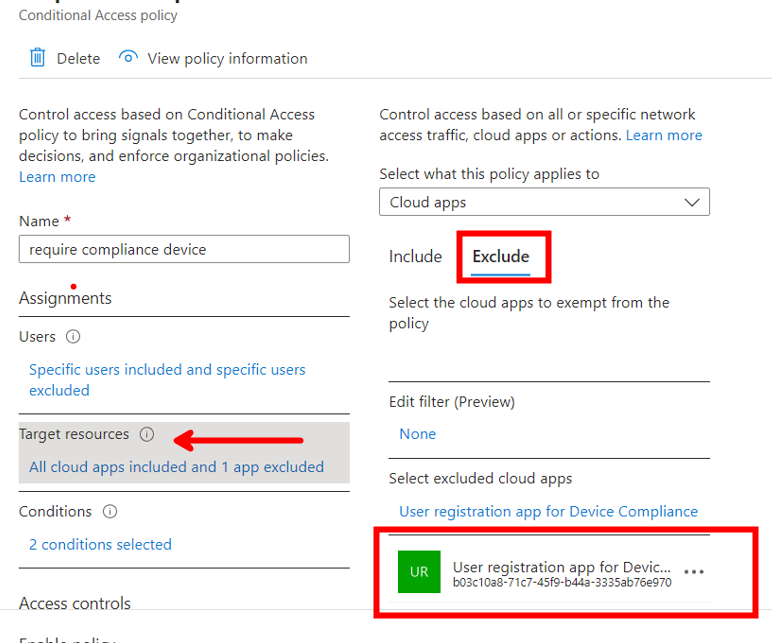
Lastly, there’s also Jamf Protect, which adds
- Endpoint detection and prevention tuned for Apple platforms
- Deep macOS telemetry that can be pumped into SIEM tools like Elastic, Splunk, and others for threat hunting and audit trails
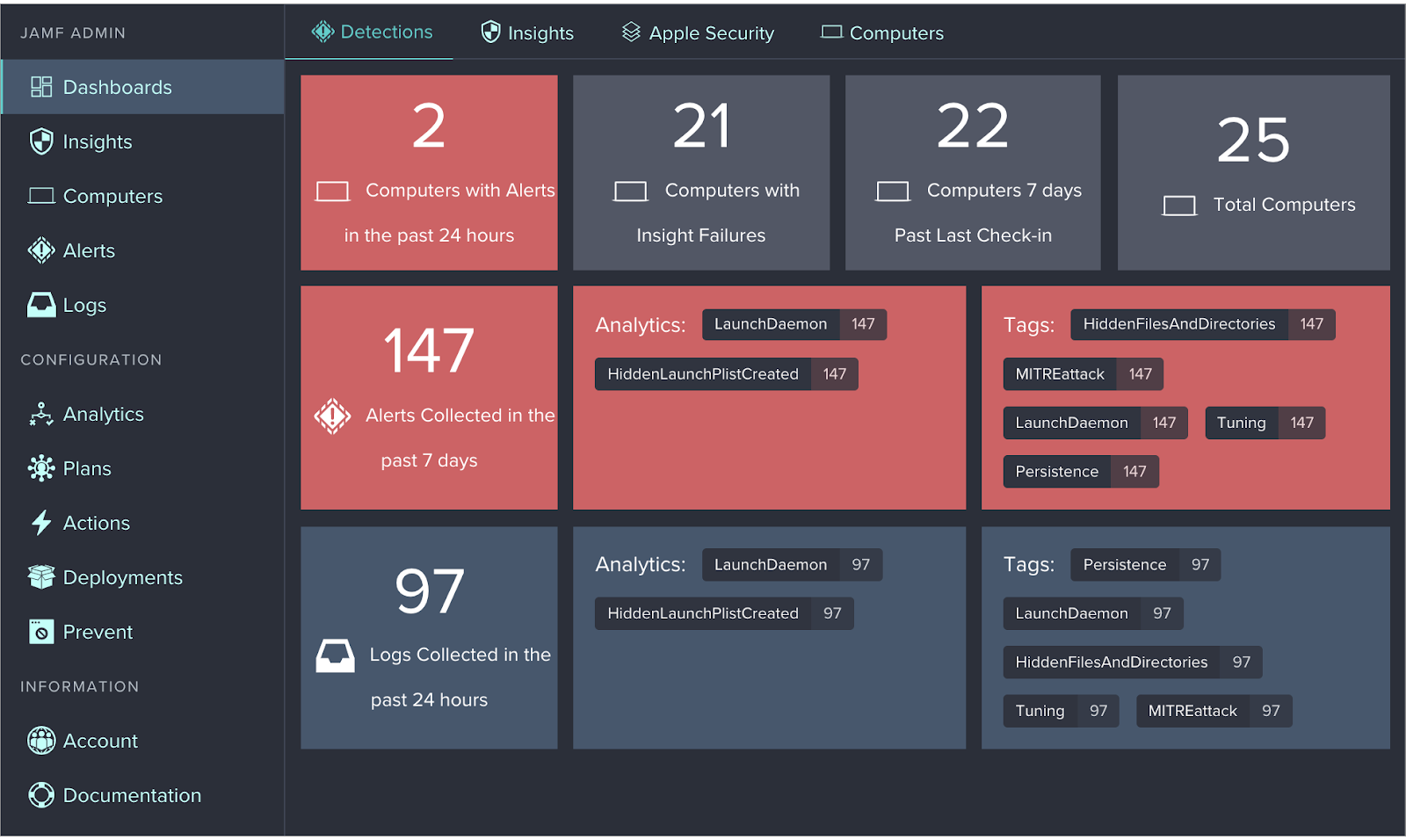
The way Jamf’s approach matches how big security teams already work impressed me. If you already have Microsoft Entra Conditional Access and a SIEM, Jamf slots into that beautifully.
Moreover, Jamf is also backed by certifications like ISO 27001, SOC 2 Type II, and ISO 27701. More recently, Jamf has also started pursuing FedRAMP (via a partnership with UberEther)
The drawback is that Jamf is still very Apple-focused. If you care about Windows or Android, you must bring in other tools to keep multiple agents and policies aligned. I also do not love that a lot of the power in Jamf security still depends on how much time I am willing to spend tuning smart groups, building custom workflows, and wiring everything into my SIEM. It works, but not easily
How Kandji feels for security
Kandji’s big differentiator has always been its approach to turning compliance into product features.
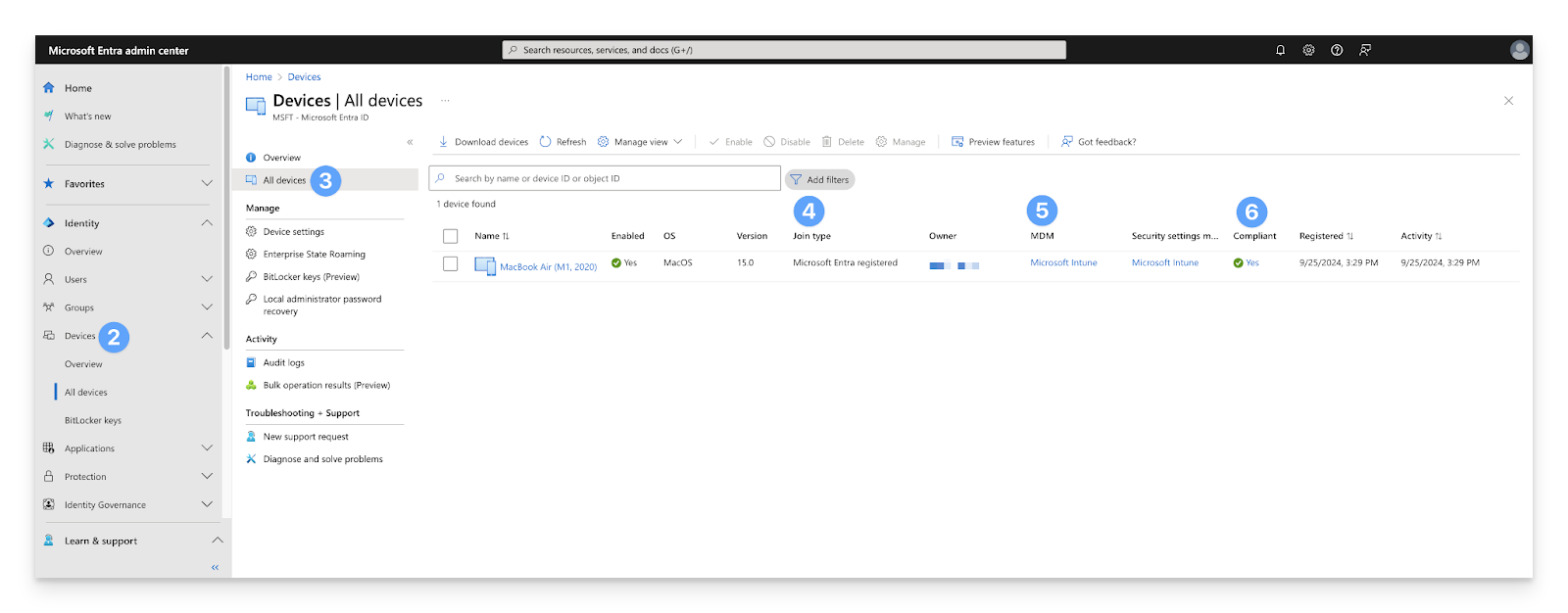
On the platform side,
- Kandji has its own ISO 27001:2022 certification and SOC 2 Type 2 attestation, which is nice from a vendor due diligence angle
- There is a library of 150+ pre-built security controls and templates that map to frameworks like CIS, SOC 2, HIPAA, NIST, and ISO 27001, plus CIS Benchmarks for macOS
- Their compliance automation is wired into modern GRC tools and partners, so you can export evidence and reports directly into audits
On the security side, you get
- Endpoint Detection and Response (EDR) monitors for malware and suspicious behavior on Apple devices, allowing you to quarantine threats, log activity, and drive automated security actions.
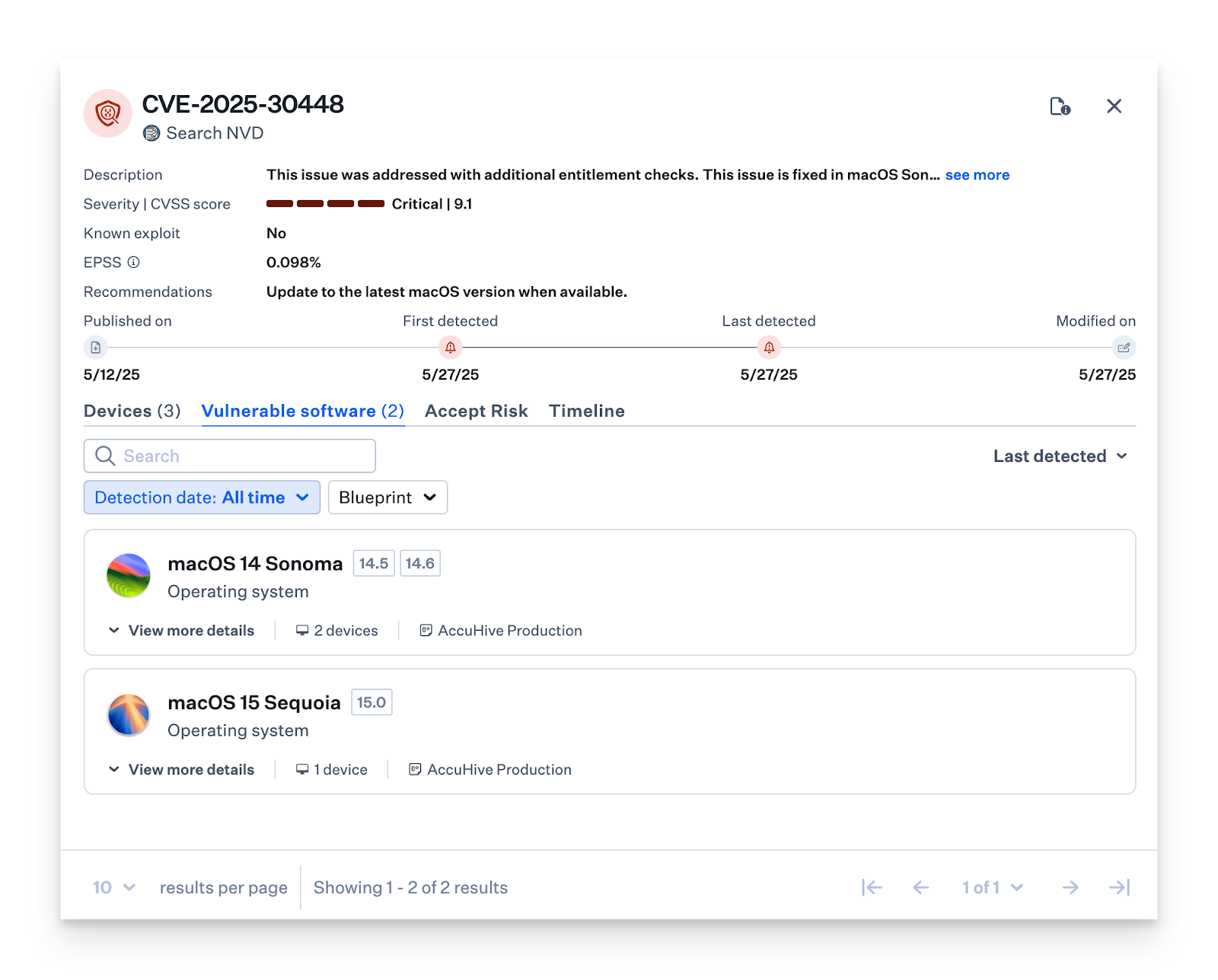
- Vulnerability Management connects CVEs discovered on Mac endpoints to actual remediation. Auto Apps are updated automatically based on severity, and you can choose how urgently each severity should be patched.
- Microsoft Device Compliance integration lets Kandji feed macOS and iOS device posture into Microsoft Conditional Access, much like Jamf’s approach.
The new part, post-rebrand, is that Iru Endpoint applies this model across Apple, Windows, and Android with a single agent. You get app deployment, policy enforcement, EDR, and vulnerability management from one place, which I found very appealing for smaller teams that cannot maintain three separate security stacks.
Keep in mind that the cross-platform side is so new that some documentation, terminology, and third-party write-ups still refer to Kandji as Apple-only. You can feel the rebrand in progress.
Security verdict
You have mostly Macs and iPhones, and you already work inside Entra, I would recommend Jamf for security.
If you have a mixed fleet and want one agent and one console for device security and compliance, I would suggest Kandji.
For a modern mixed environment with a small team, I would pick Kandji (Iru).
6. Inventory and reporting
In this area, ideally, you want
- Complete and trustworthy device data
- Quickly turn that data into answers
Jamf and Kandji both get you there, but they act differently, especially now that Iru is multi-platform while Jamf stays Apple-only.
Jamf
Jamf Pro collects a long list of attributes for Macs and mobile devices, including hardware, OS, network, installed profiles, certificates, applications, user and location data, purchasing info and more. All of those fields can be used as criteria in smart groups and advanced searches. \
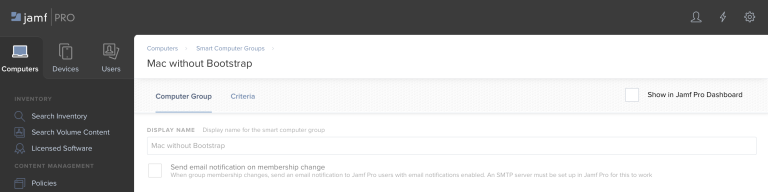
Almost anything you see on a computer inventory record can also be searched and reported on later. If the built-in fields are not enough, Jamf also lets you add extension attributes.
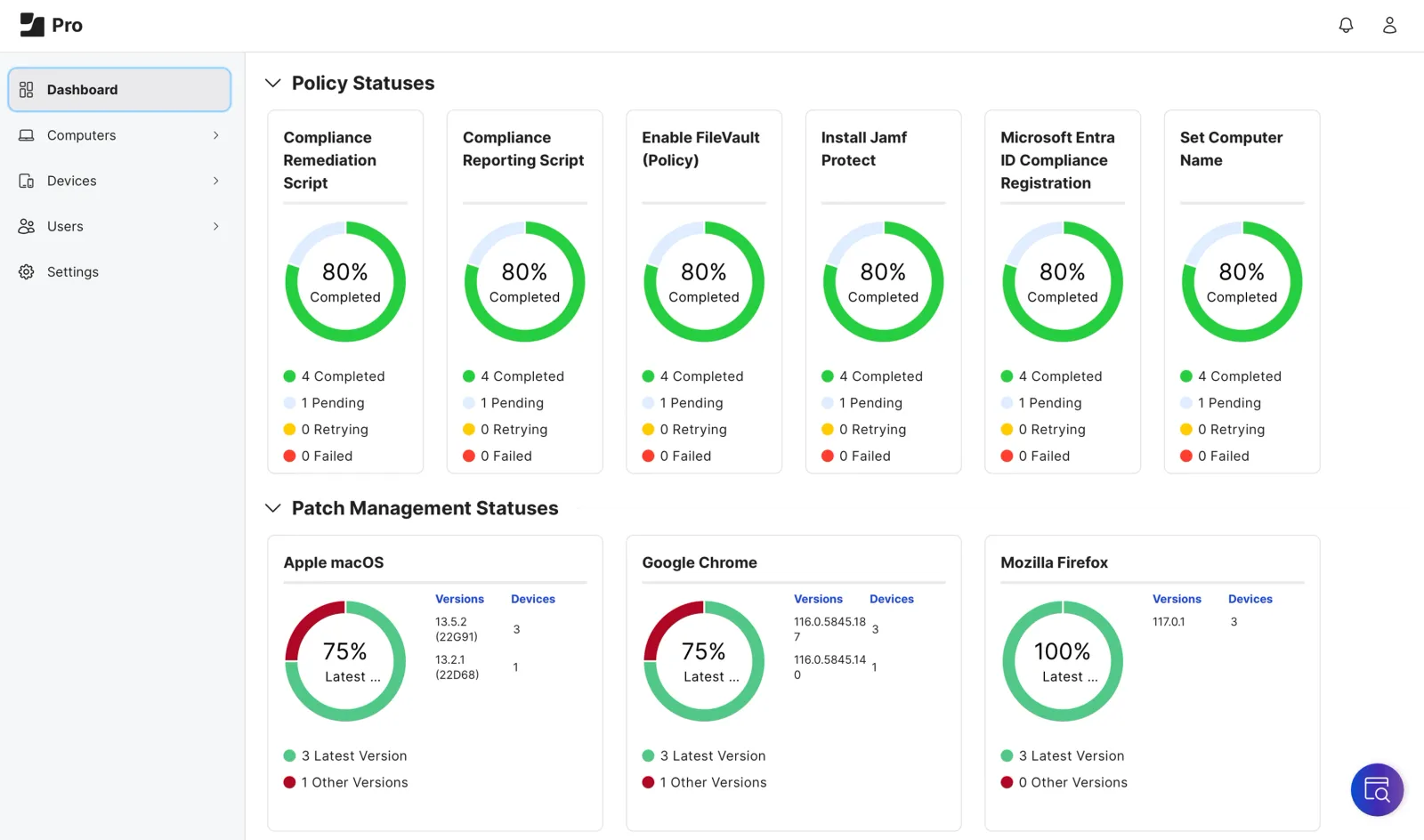
In Jamf, you can slice your Apple fleet almost any way you want and then reuse those searches as reports or as live smart groups. Jamf also provides a built-in dashboard and a modern API so you can push inventory into BI tools like Power BI or Splunk for deeper visuals.
Kandji
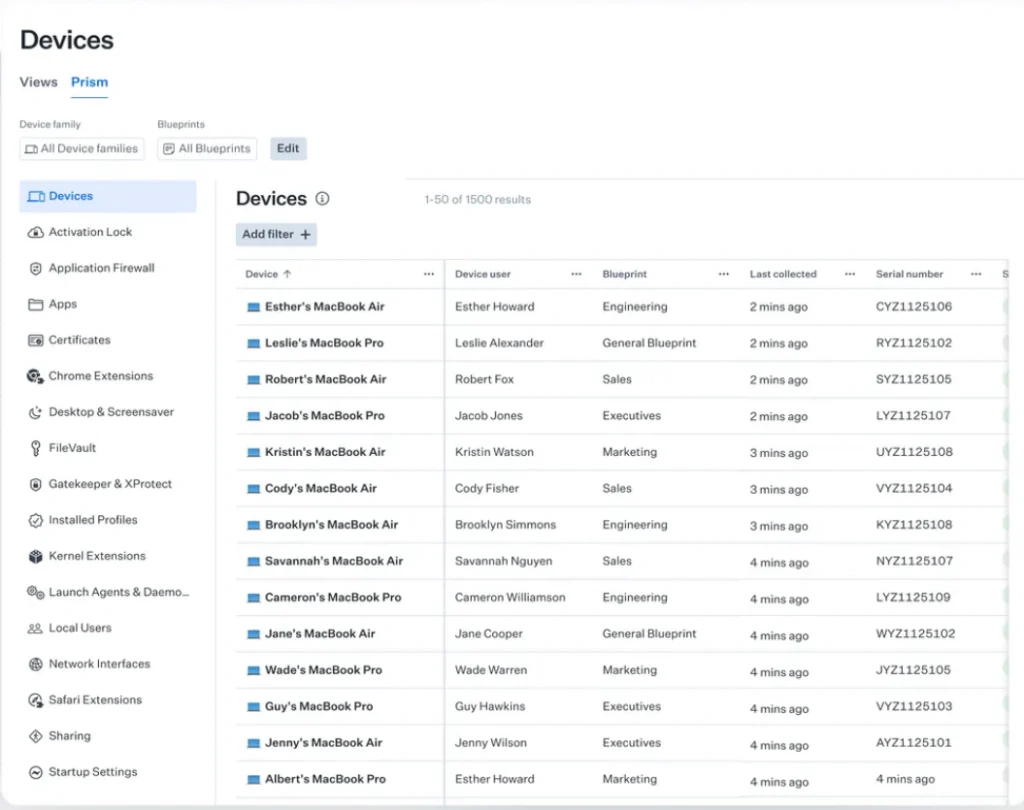
On the Kandji side, now branded as Iru, the core inventory lives in the Devices area and is shaped by Blueprints plus Library Items. You still see all the usual device properties, but the console also exposes which Library Items and Parameters are assigned and whether they are passing or failing.
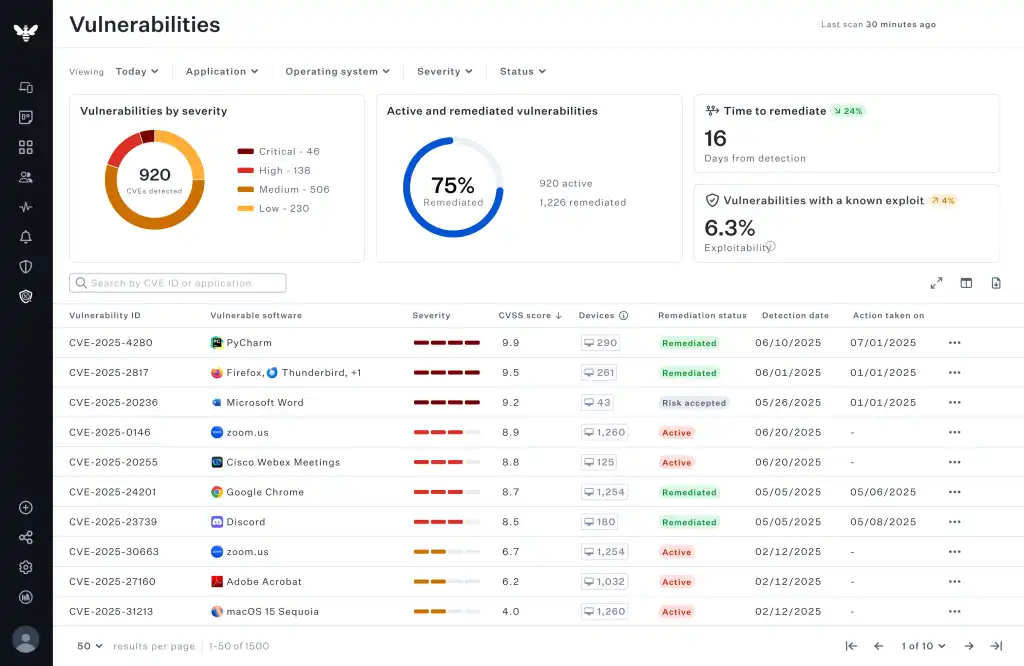
The big difference is scope. Jamf’s inventory is incredibly rich, but it applies only to Apple devices. Iru extends the same model to Apple, Windows, and Android, so the device list becomes a single source for most of your fleet.
I like that a lot in real life, because most companies do not live in an Apple bubble.
Then there’s Prism and Kai.
Prism is the fleet-wide reporting layer that sits on top of device data. It automatically collects things like device info, app inventory, FileVault status, firewall status, and more, and exposes them through a single UI and API for reporting across the systems you manage.
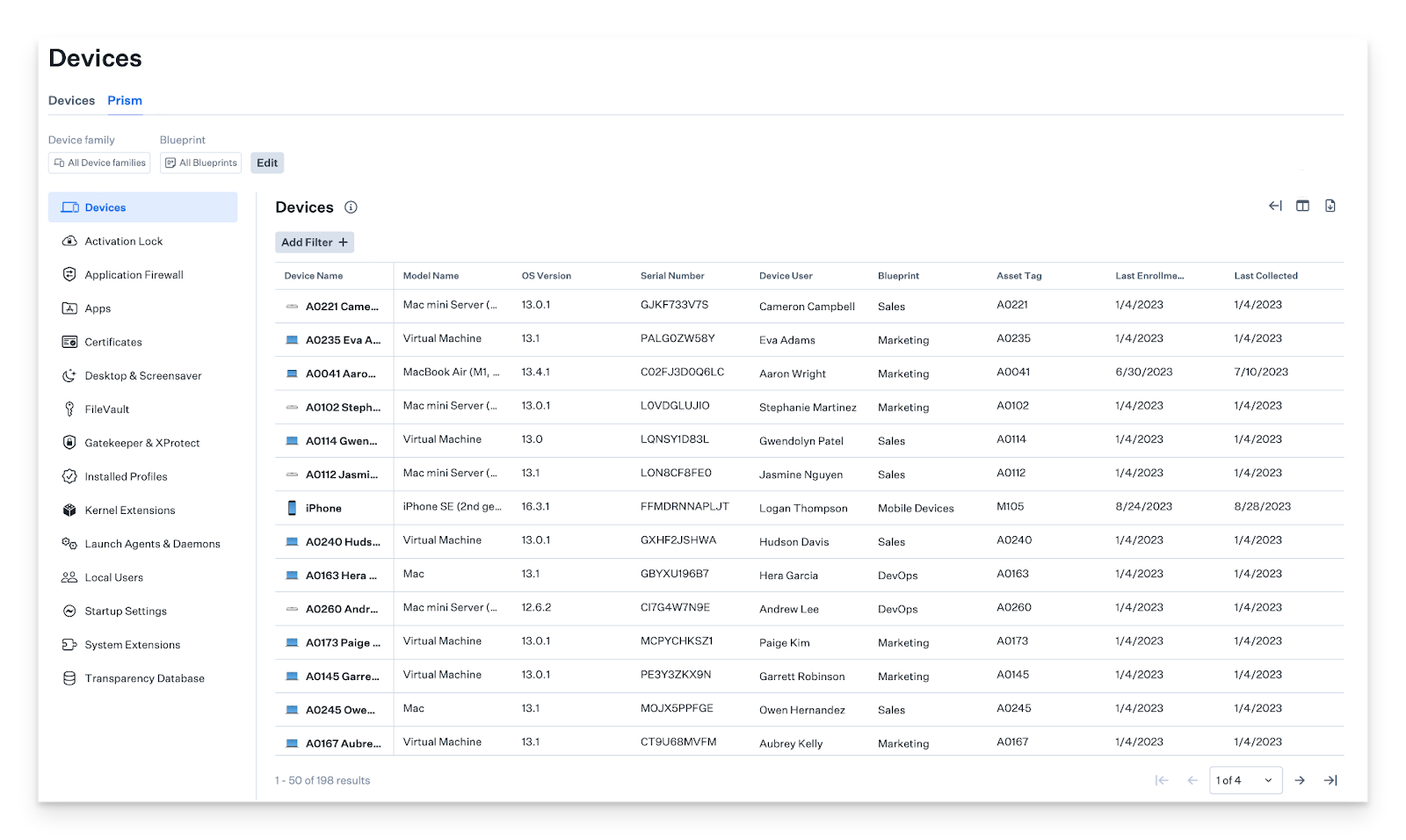
I appreciate that it is built to answer compliance and incident questions directly, instead of feeling like a raw query builder.
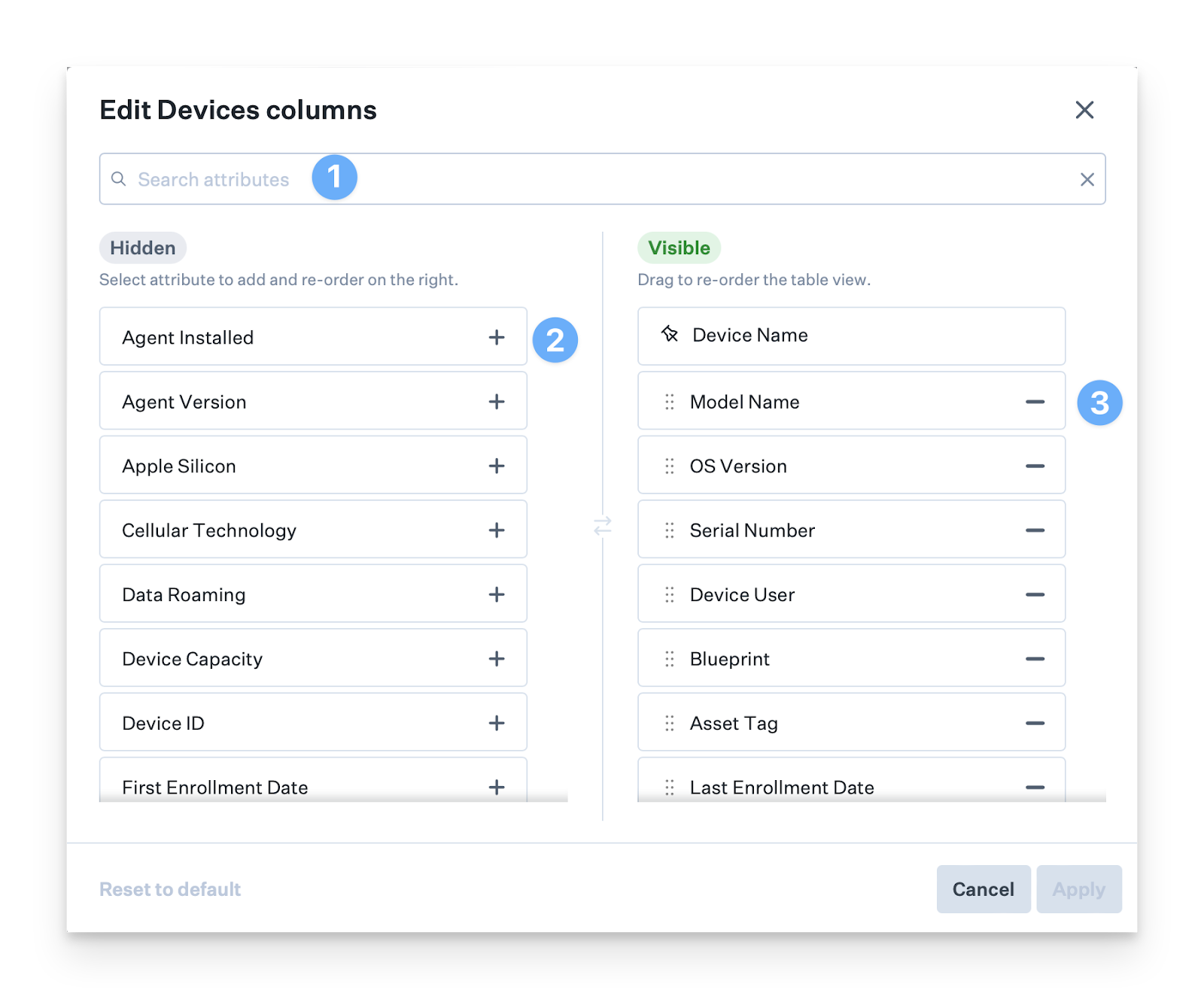
Kai sits on top of Prism as an AI helper. Instead of building filters, you type plain questions like “Which devices have FileVault turned off” or “What OS versions are installed,” and Kai turns that into a Prism report, with a quick summary and a link to the full dataset.
Verdict on inventory and reporting
If you enjoy building precise searches and feeding data into external BI tools, Jamf still gives you the deepest control.
For most teams, especially with mixed platforms, Kandji’s combo of Prism plus Kai is more practical.
So, on inventory and reporting overall, I give the edge to Kandji (Iru).
Jamf vs Kandji: Pricing Comparison
Pricing for both tools moves around a lot with volume and bundling, so I’m using current public numbers plus third-party benchmarks as reference points
Jamf pricing snapshot
|
Plan |
Indicative price |
What that includes |
|
Jamf for Mac |
$10/macOS device per month, billed annually, 25-device minimum |
Mac management, identity, and endpoint security |
|
Jamf for Mobile |
$5.75/mobile device per month, billed annually, 25-device minimum |
iOS, iPadOS, tvOS, visionOS, watchOS |
|
Jamf for Small Business |
Simpler cloud bundle for macOS and iOS/iPadOS/tvOS |
|
|
Real deals (Vendr) |
One Vendr insight notes a customer going from $144 to $156 per device per year (about $12–13 / month) before discounting |
Matches the all-in bundle ballpark |
Kandji / Iru pricing snapshot
|
Plan / Source |
Indicative price |
What that includes |
|
Kandji |
Spendflo puts typical MDM pricing starting around $6/device per month |
Apple-focused MDM; Iru now extends that stack to Apple, Windows, Android (quote-based only) |
|
Vendr benchmark |
For 100 Macs, 1-year contract at $102.72device per year (~$8.56 / month); 3-year at $76.16 / device/year (~$6.35 / month) |
Shows where real-world Kandji deals often land for Mac fleets |
|
AWS Marketplace reference |
Flat $25,000/year each for Kandji MDM, EDR, Vulnerability Management |
At mid and high device counts, effective per-device cost drops quickly, especially if you bundle modules |
So we are left with a few observations:
- Once you combine Jamf Pro + Connect + Protect, you’re typically in the low-teens per Apple device per month, unless you negotiate hard or only buy Pro
- Kandji pricing is more opaque, yet Vendr’s example and Spendflo’s guidance put real-world Mac deals more often in the $6 to $9 per device per month range, with similar security coverage.
Taking all that together, my call is that Kandji is generally more cost-efficient, especially for mixed fleets, where one Iru stack can replace several separate tools.
Jamf can absolutely be cheaper for Apple-only environments if you buy just Pro or secure strong discounts.
Now, for the final call…
Final Verdict: Jamf vs Kandji
Jamf and Kandji (now Iru) are solving the same problem from different angles, and which one wins really depends on the kind of organization you run.
Jamf tends to be the better fit if
- You’re an Apple-first organization and expect to stay that way
- You have (or plan to have) a dedicated Apple admin team
- Fine-grained control over macOS and iOS policies, scripts, and edge cases really matters
- You’re tightly plugged into Microsoft Entra or Intune and want deep Apple-specific integrations
- Compliance teams are asking for CIS-style hardening and detailed, Apple-native reporting
Kandji tends to be the better fit if
- Your fleet is mixed (Apple, Windows, Android), and you want fewer tools and fewer agents
- You prefer clean, guided workflows over building everything from scratch
- Auto-patching and managed OS appeals more than scripting
- You need good security and compliance outcomes without a large engineering-heavy IT team
- Leadership wants fast time-to-value and simpler reporting through tools like Prism and Kai
If I were advising a Mac-only, security-heavy enterprise, I would steer them toward Jamf. For a modern mixed fleet that wants an opinionated, unified stack, Kandji would be the first conversation.
How Workwize Complements MDM for Full Device Management
MDM gets you very far, but it only really controls the software side of a device. You can push policies, lock or wipe a device, and prove it is encrypted and compliant.
What you cannot do with MDM alone is manage the physical journey of that machine from warehouse to employee to return, resale, or recycling.
That gap is where IT Asset Lifecycle Management (ITALM) platform like Workwize proves its worth.
Your MDM and Workwize work hand in hand.
MDM controls what happens on the device, and ITALM controls what happens to the physical device.
Together, they offer you full IT control—you don’t just deploy or update devices automatically; you can also have them shipped to your employees without contacting multiple vendors. Then, you don’t just wipe or lock devices remotely; you can also get it back or redeploy to another employee.

In practice, here’s what Workwize helps you with:
- Purchase or rent a wide range of IT gear through Workwize, including options from local and international vendors.
- Get global delivery within 5–7 business days to any location—remote employees’ homes, headquarters, satellite offices, or Workwize warehouses.
- Track all assets in real time with full visibility and traceable updates via a track-and-trace link.
- Receive pre-configured, MDM-enrolled devices ready for immediate use, no matter which MDM you go with.
- Customize equipment with the right software, permissions, and security settings.
- Automate updates and shipments through zero-touch deployment.
- Manage all devices throughout their lifecycle with Workwize.
- Gain full insight into your assets, including users, value (current and depreciated), and condition (new or second-hand).
- Offer a self-service portal for employees to request items, repairs, or maintenance, supported by a chatbot for instant assistance.
- Simplify employee transitions with HR and directory system integration—automatically secure accounts, manage device retrieval, and ensure proper data wiping.
Zero-Touch IT Equipment Retrieval
- Streamline asset retrieval from your global workforce without logistical headaches. Workwize handles all employee communication, packaging, and shipping.
- Initiate retrievals with a single click when employees depart or devices reach end-of-life.
- Dispose of or donate end-of-life assets in an eco-friendly way, compliant with local regulations, and receive a certificate of data destruction.
- Integrate seamlessly with HRIS systems and communication tools like Slack.
All of this matters because device loss is a major concern. Studies estimate hundreds of thousands of laptops are stolen each year in the US, with an average loss per stolen corporate device in the tens of thousands of dollars, and the vast majority are never recovered.
If you are still relying on couriers, spreadsheets, and email to track shipments, you are not truly zero touch. You can send a Mac directly from a vendor and lock it through MDM, but you still do not know if a lost device will ever be returned, was wiped correctly, or can be safely resold or recycled.
MDM gives you remote control, while Workwize adds custody, logistics, and end-of-life control. Together, they hand you the keys to real, end-to-end device management.
Schedule a demo with Workwize now to streamline your IT asset management process.


Establish a single source of truth for every IT asset across the globe.
.png?width=258&height=318&name=g10%20(5).png)
More related resources to help you stop firefighting hardware operations.


Get monthly insights into how other IT leaders are improving their ops.



.png?width=2880&height=1232&name=Group%202147262874%20(1).png)
Stop coordinating
hardware like it's 2012.
.svg)
.png?width=172&height=68&name=apple%20business%20patner%20(1).png)
.svg)
.svg)
.svg)
.svg)