




.svg)
.svg)

.svg)


.svg)




.svg)
.png?width=500&height=424&name=Style-1---V1-(1).png)

.png?width=1230&height=692&name=Vector%20(13).png)
What is Workwize?
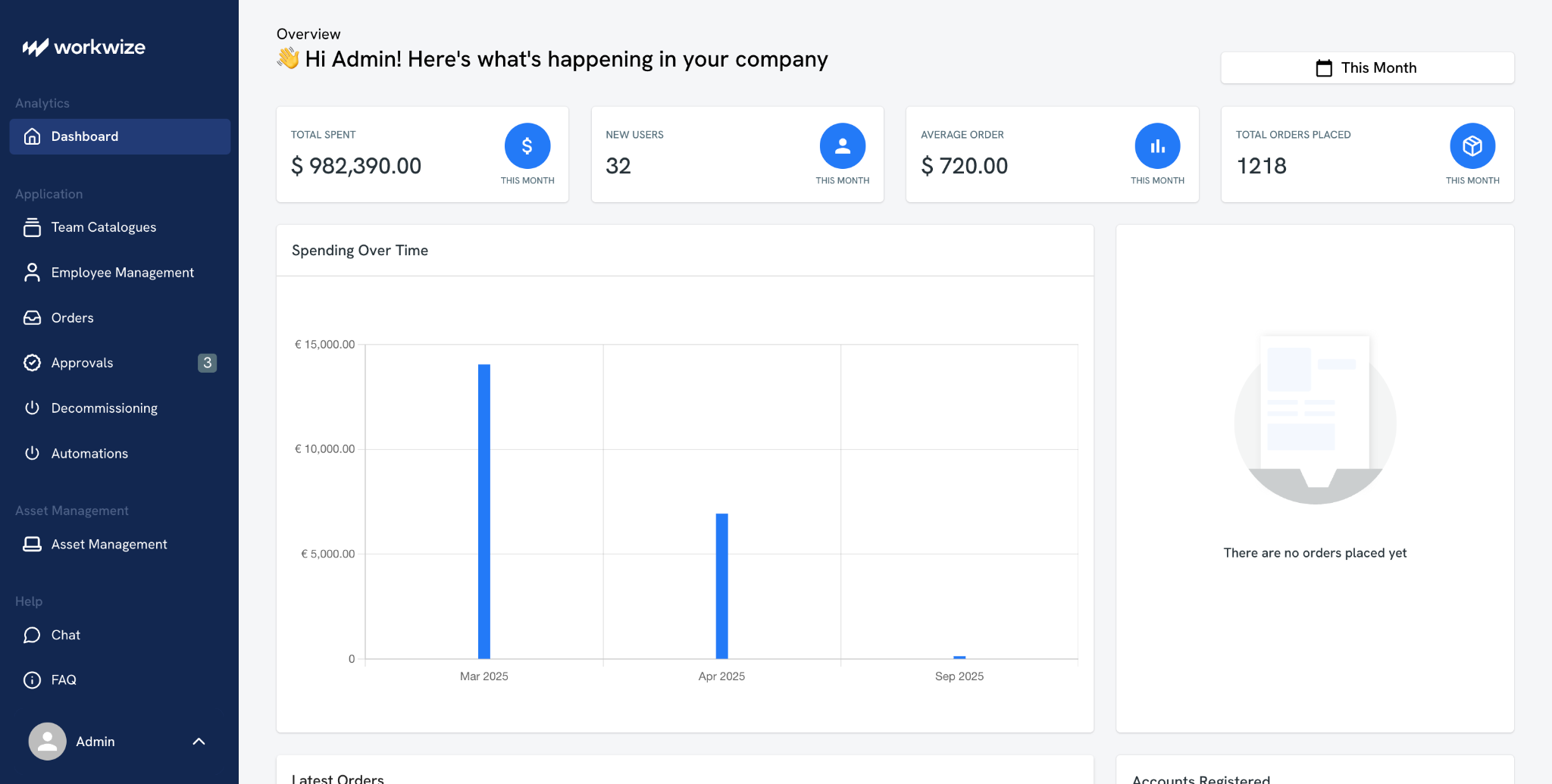
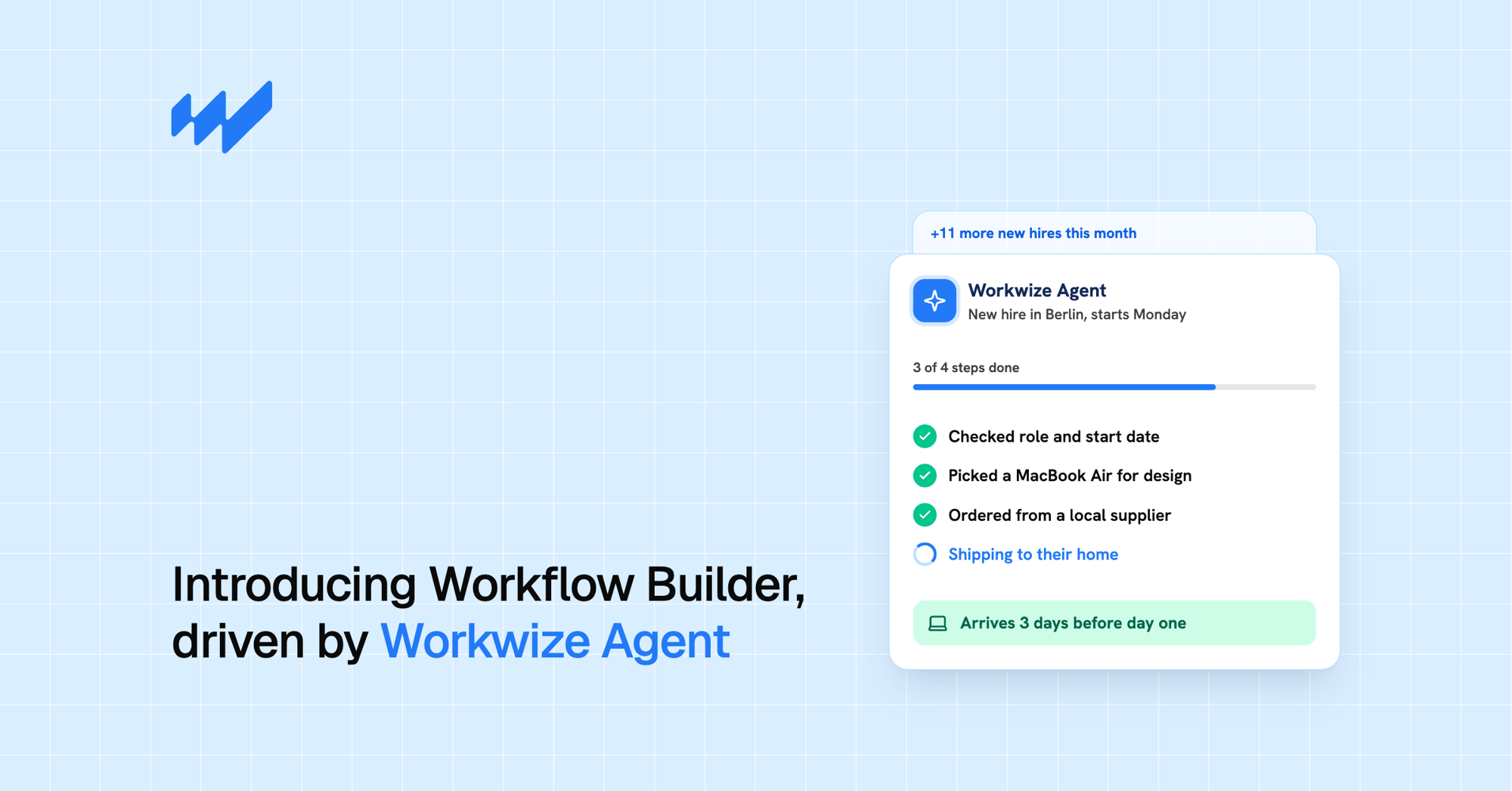
Workwize is an IT hardware lifecycle platform for distributed teams that automates procurement, deployment, tracking, repairs, retrieval, and disposal from one dashboard across 100+ countries.
The platform is designed to remove the manual coordination that IT teams face when supporting global workforces. In January 2025, it raised $13 million in Series A funding led by Klass Capital. It now manages big brands such as Truecaller, Ingenico, HelloFresh, and Prezi.
Workwize does not bundle payroll or contractor management; it focuses solely on getting the right device to the right employee on time, then getting it back safely when they leave.
Best for
Mid-sized and enterprise IT teams with distributed employees that need hardware lifecycle automation without adopting a full HR platform.
Key features
- End-to-end lifecycle automation from procurement to certified disposal
- Local warehouses in 14 strategic locations across the globe
- HRIS integrations with BambooHR, HiBob, Workday, and others
- MDM integrations with Jamf, Intune, Apple Business Manager, and Windows Autopilot
- Self-service ordering within IT-defined budgets
- Certified data erasure, refurbishment, and resale that can recover up to 45% of original value
Ratings and reviews
What is Deel IT?
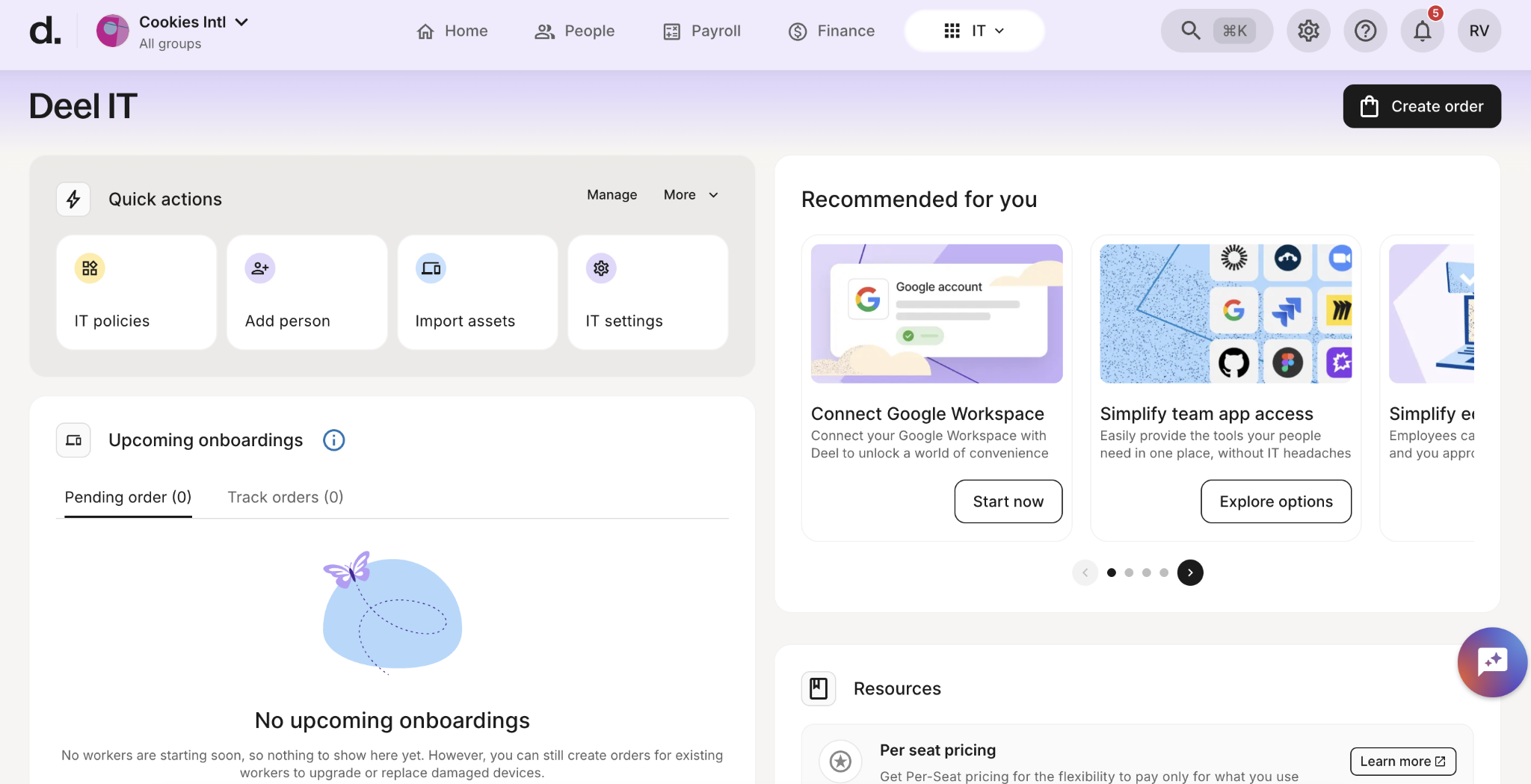
Deel IT is Deel’s hardware management module, built into its HR and payroll platform. It handles device procurement, deployment, management, and retrieval across over 130 countries.
Deel launched it in 2024 after acquiring Hofy, a UK-based device lifecycle company. Hofy’s logistics network and 24/7 support were combined into the Deel app alongside payroll, EOR, and onboarding tools.
Deel IT's major highlight is consolidation. Companies already using Deel for payroll or HR can manage devices in the same system, under the same login and vendor relationship. Since launch, Deel IT has added on-platform MDM through JumpCloud, managed endpoint protection through CrowdStrike Falcon, and identity and access management.
Best for
Companies already using Deel for payroll, EOR, or HR teams that want device management in the same platform.
Key features
- Device procurement and zero-touch deployment across 130+ countries
- On-platform MDM powered by JumpCloud with automated policy enforcement
- Managed endpoint protection via CrowdStrike Falcon on Pro and Enterprise tiers
- Application provisioning and license tracking synced to HRIS
- Device Lifecycle Management (DLM) subscription plus DLM Plus for advanced repairs and loaner devices
Ratings and reviews
If you notice, Deel IT’s Trustpilot ratings differ significantly from its high rating on G2. This shows inconsistent user experiences.
Note: This reflects Deel's overall platform rating. Deel IT-specific reviews are limited and harder to isolate.
Feature-by-feature comparison
In what follows, we break down both platforms on a handful of comparison categories. These are categories that accurately assess how well a platform would hold up at scale and in real-world use.
Let’s go.

Procurement and global hardware delivery
Workwize
Workwize provides coverage in 100+ countries with a network of local warehouses in 14 regions—the European Union, the United Kingdom, the United States, Canada, Mexico, India, Australia, South Africa, Brazil, Singapore, Costa Rica, the Philippines, Japan, and the UAE.
These warehouses stock inventory that has already cleared local customs. As a result, delivery typically takes 5–7 business days for most orders. This model also minimizes import duties, taxes, and customs delays, which can derail onboarding.
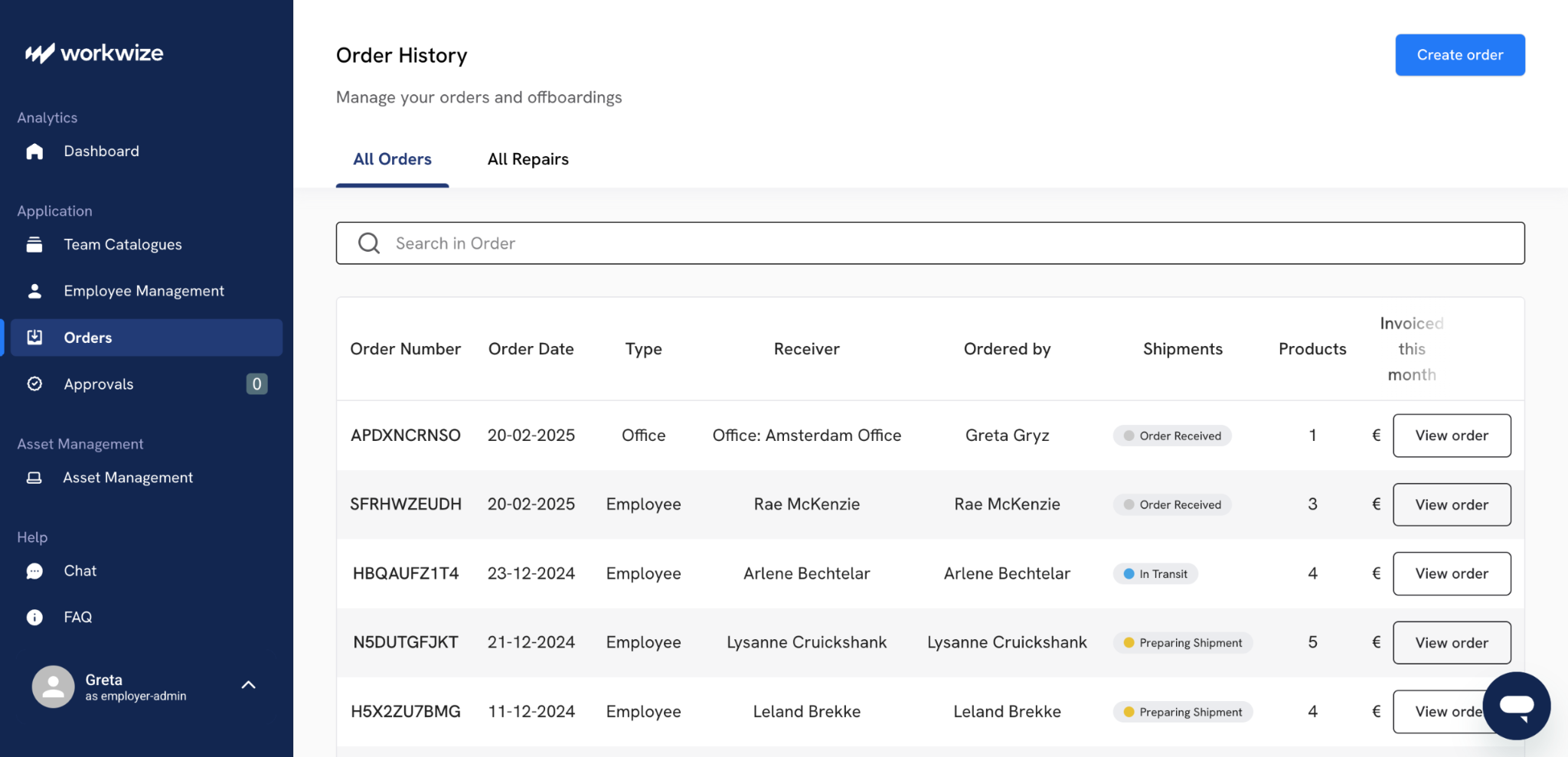
Workwize sources through an extensive global supplier network (72+ vendors, as referenced in the high-level case study). Employees can select and customize devices, including RAM, storage, local keyboard layouts, and CTO options, through a branded self-service portal with department-level budget controls and role-based catalogs.
Both purchase and leasing options are available, and pre-configuration (including MDM enrollment) is also supported before shipment. Workwize handles customs, compliance, and last-mile logistics end-to-end in supported regions.
Deel IT
Deel IT supports equipment procurement, shipping, and lifecycle management in 130+ countries. Fulfillment relies on three centralized hubs (London for the UK, Amsterdam for the EU, and Houston for the US) plus local in-country partners and third-party providers in additional markets.
Storage and redeployment options are available at the main hubs or through approved local partners in select countries (e.g., India, Brazil, the Philippines, Canada, Mexico, Australia). Devices are frequently delivered locally to reduce cross-border friction.
The catalog includes 240+ pre-approved equipment options (laptops, monitors, accessories, and peripherals). Customers can buy or lease, and spec customization (RAM, storage, OS) is also available.
Deel officially states that equipment ships globally in under 10 days with a 99.5% on-time or success rate. Deel’s infrastructure combines in-house capabilities (inherited and integrated from the Hofy acquisition) with local partners where Deel does not maintain its own footprint.
Winner: Tie
Deel IT’s footprint is broader on paper, covering more remote or emerging markets. However, actual delivery times vary a lot by destination. Historical medians range from 2 to 4 days in core Western markets to 10 to 16 days in some farther-flung locations.
Workwize’s local-warehouse model delivers more consistent 5-7 day performance in the countries where most global hiring typically occurs, i.e., Europe, North America and major APAC and LATAM hubs.
Device lifecycle management
Workwize
Workwize was built from the ground up as a dedicated IT asset lifecycle platform rather than an add-on module. As a result, the unified dashboard can track every asset from the moment of order through repairs, redeployments and final disposition.
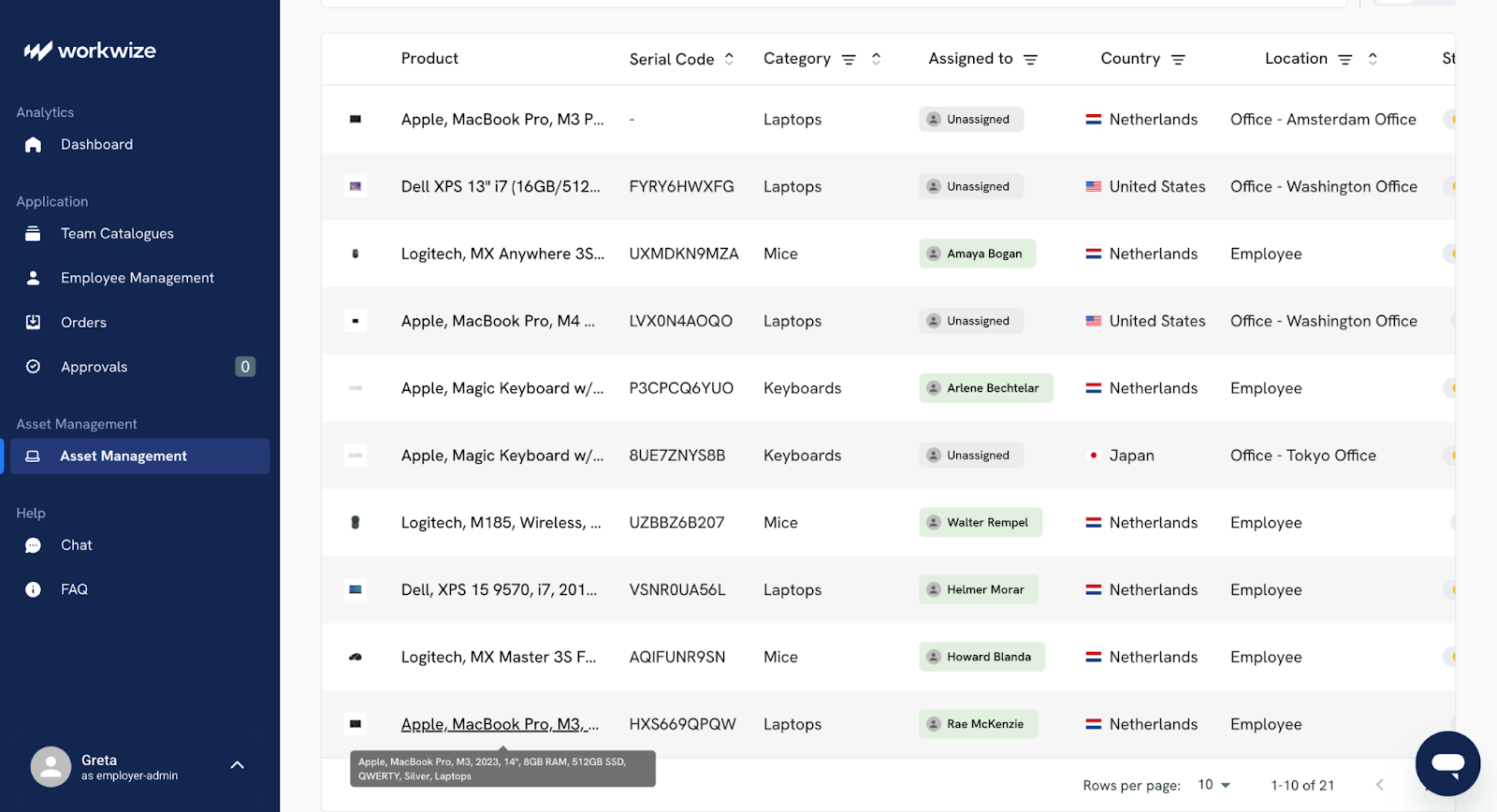
Some of its notable features are:
- Comprehensive asset register: Gets you real-time visibility into current and depreciated value, device condition, user assignment, location, and lifecycle status.
- Automated retrieval: Zero-touch offboarding is available with courier pickups or pre-labeled self-return kits; Workwize has a 100% hardware retrieval rate across all customers to date.
- End-of-life handling: You get certified data erasure (NIST 800-88 compliant), responsible recycling through certified ITAD partners, or refurbishment and resale. The platform publishes recovery performance and enables customers to resell retired assets and recover up to 45% of original value, with proceeds and certificates tracked directly in the system.
- Redeployment and repair tracking: Usable devices are cleaned and tested, and then sent back to inventory for rapid reassignment.
Deel IT
Deel IT also manages the end-to-end lifecycle on its unified platform. The platform pays particular attention to the active-live device phase to minimize employee downtime.
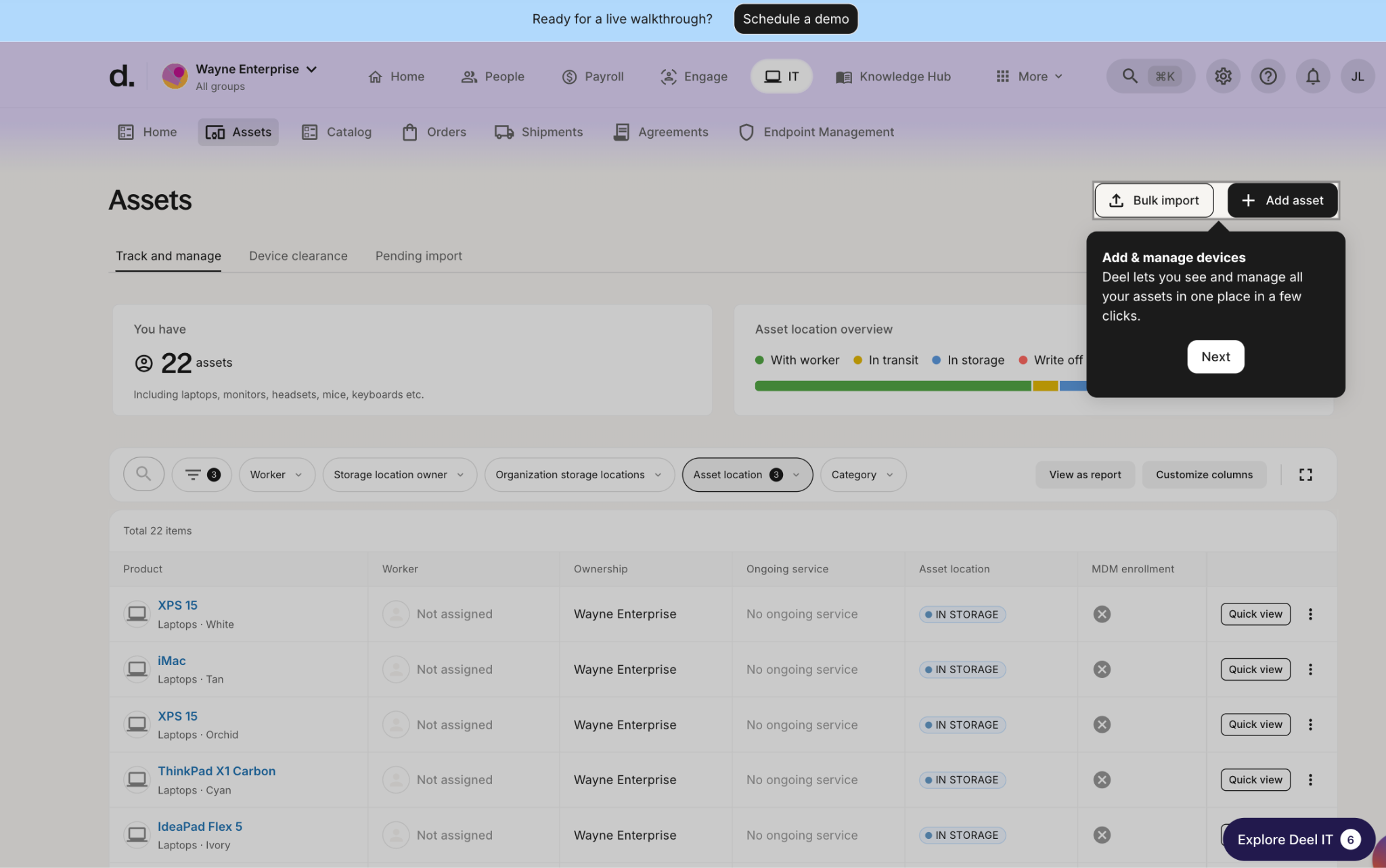
Deel IT’s best features in this department are:
- Tiered Device Lifecycle Management (DLM): Base DLM covers 24x7 hardware support, managed repairs, pre-configuration, BYOD enrollment, device collection, and clearance. The premium DLM Plus tier adds global loaner devices, out-of-warranty repairs, and even replacement for irreparable units.
- Recovery and reuse: Official 96% global recovery rate for managed collections during offboarding. Devices undergo a secure wipe and are stored (locally or hub-based) before redeployment.
- Disposal and clearance: Secure data erasure and a buyback/clearance program (via partner Foxway) converts retired assets into capital with transparent quotes and certificates.
Winner: Tie
Workwize gives you better financial visibility and higher reported retrieval numbers, plus clear value recovery when you resell old gear. That is great if your finance or sustainability team cares about those details.
Deel IT feels more focused on day-to-day operations, with easier loan support and tighter integration if you already work in the Deel ecosystem. In the end, it’s a tie: pick Workwize when tracking asset value and circularity matter most or go with Deel IT when minimizing downtime and staying within one HR platform is the higher priority.

Automation and HRIS integration
Workwize
Workwize integrates with 72 HRIS platforms, including BambooHR, HiBob, Workday, and Justworks, as well as identity providers like Okta and Azure Active Directory.
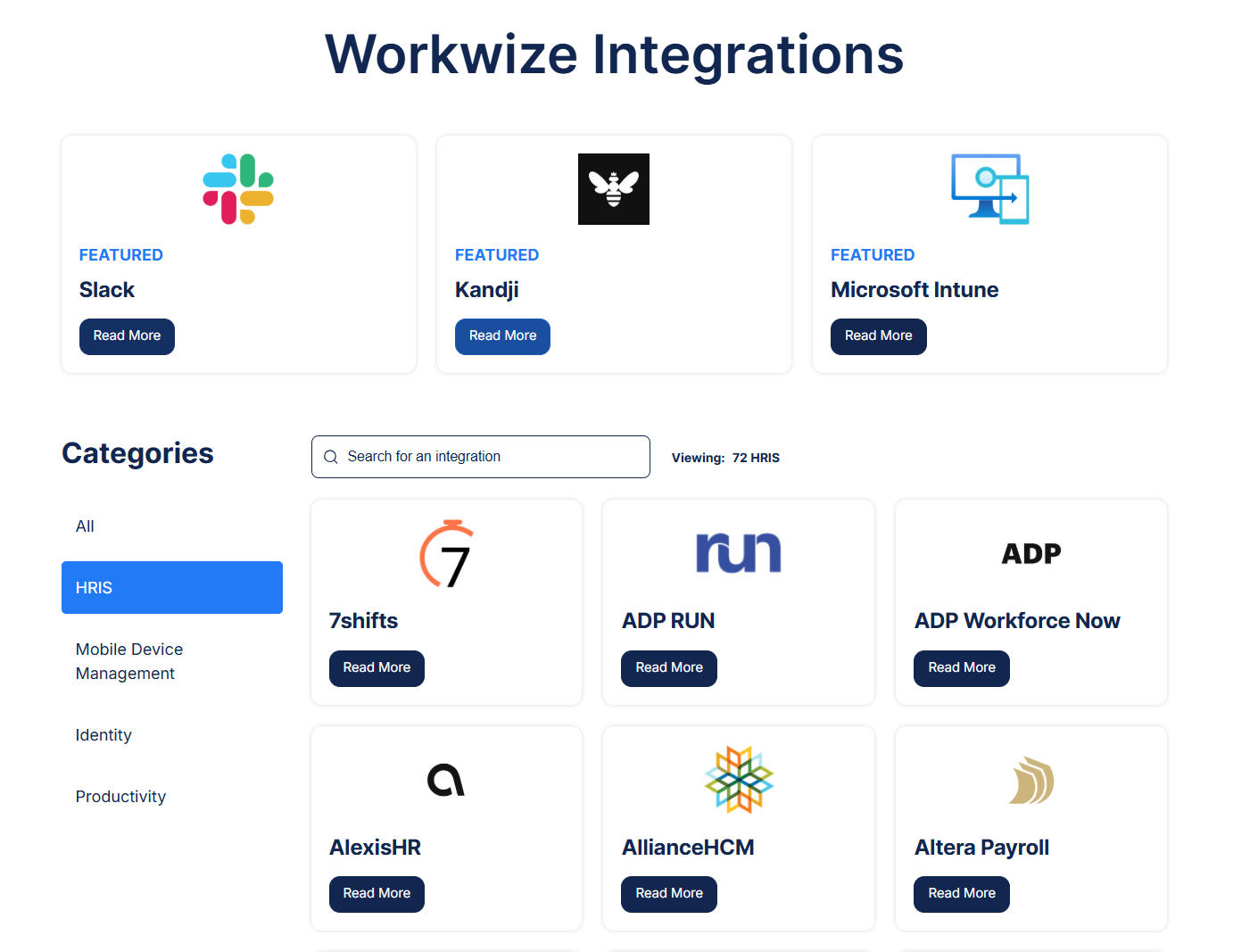
The process is clean and reliable. When a new hire appears in your HRIS, it automatically triggers device ordering and MDM enrollment, and the device is shipped to the employee. Offboarding runs the same automated loop in reverse.
For teams that work heavily in AI tools or want to build custom automation, Workwize also offers an MCP (Model Context Protocol) integration. It connects its platform to AI tools like Claude and automation platforms such as Zapier.
This means teams can trigger actions using simple prompts. For example, ordering a laptop for a new hire or checking a delivery status directly from tools like Slack or Claude.
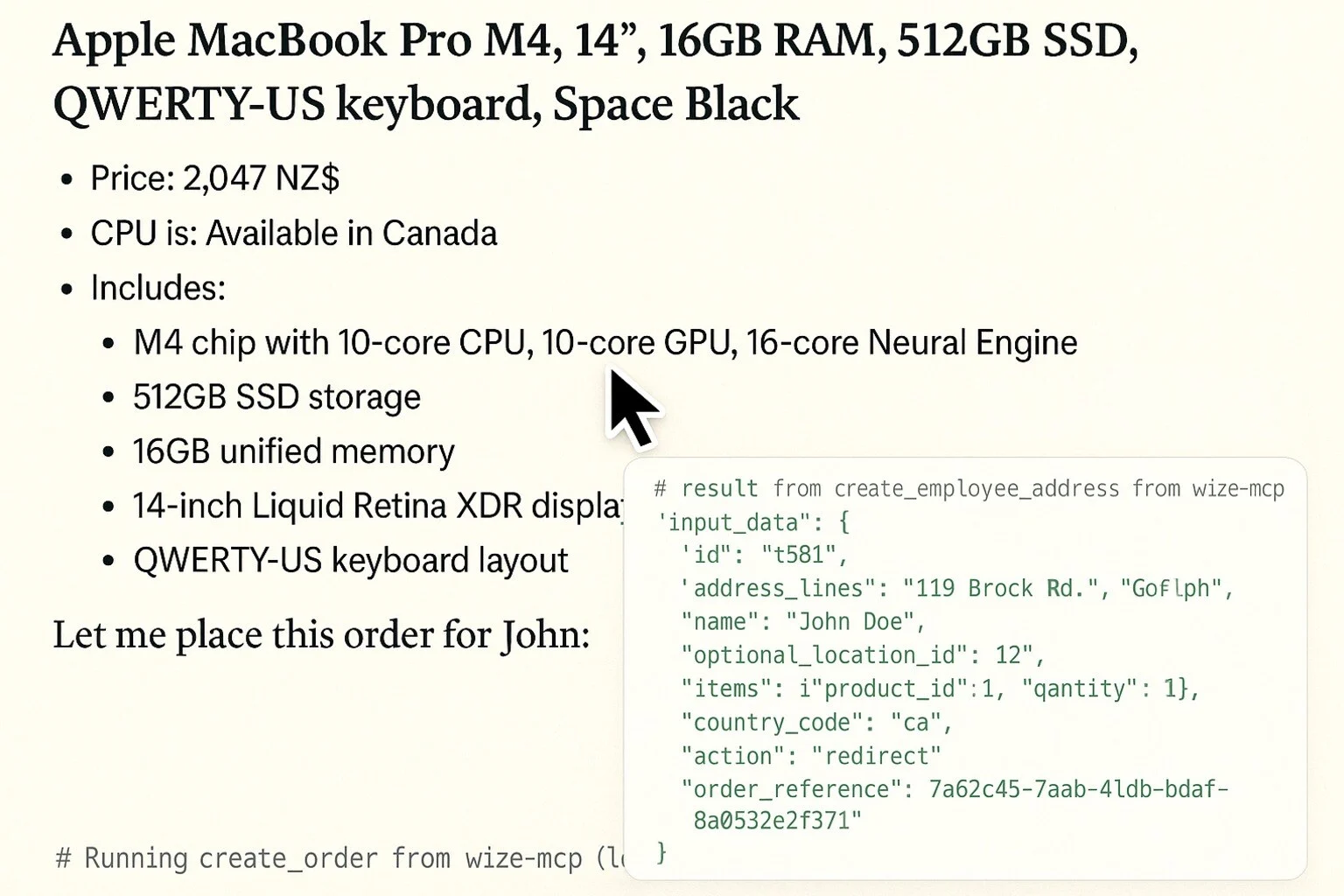
It also provides a public GitHub repository for the MCP server, so teams can customize and extend these workflows.
Deel IT doesn’t offer a comparable AI-driven interface or MCP-style integration today. Its automation is built more around its existing HR and IT workflows within the platform than on external, prompt-based control.
The real strength here is flexibility, as it integrates smoothly with whatever HR system you already use, whether that’s Deel, Rippling, ADP, or something custom. This brings Workwize a lot of praise from verified independent reviewers:
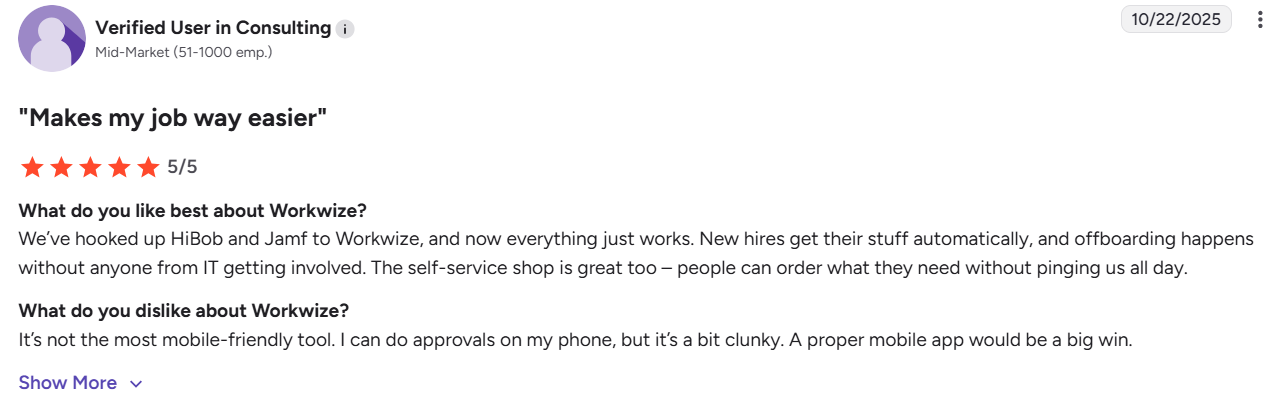
Via G2
Deel IT
Deel IT’s automation works best when you’re already using Deel HR.
Hiring someone on the Deel platform streamlines everything into a single, smooth flow. Laptop ordering, access provisioning, MDM enrollment, and security policies all happen automatically with no extra tools or middleware. It feels natural and effortless.
If you’re using a different HRIS, the integration is still reliable, but it loses that special hands-free feeling. You’ll get solid automation, just not quite the same level of magic.
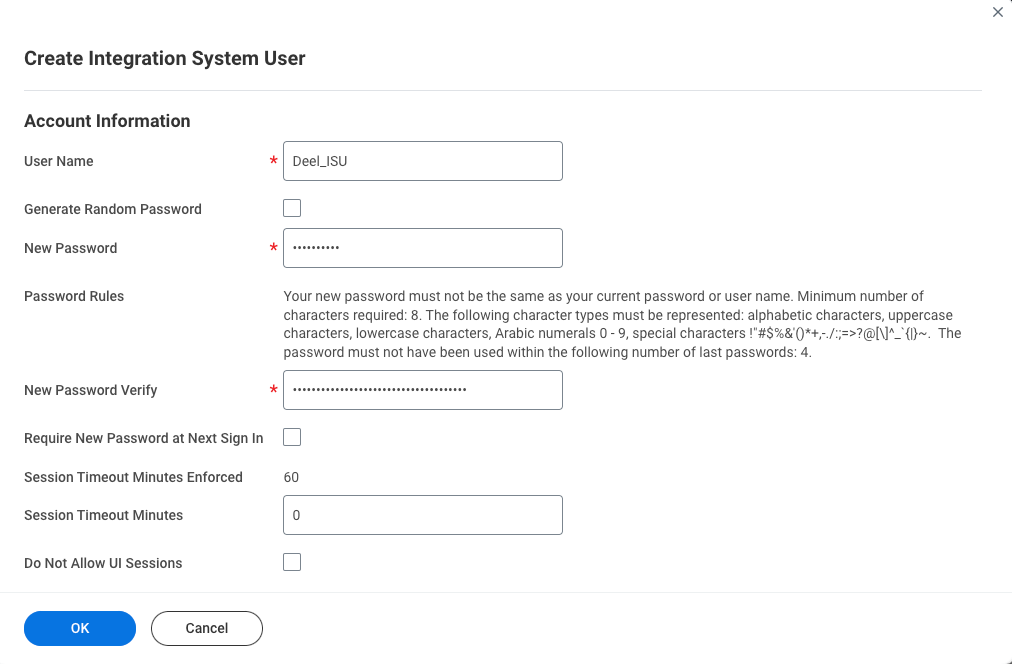
Connecting to an external HRIS like BambooHR or Workday is a one-way sync that requires you to
- Create an Integration System User (ISU) first
- Be an Org Admin, IT Developer Admin, or Integrations Admin-People
- Have the necessary rights to create integration system users and manage security groups
Even though Deel has the better HR-to-IT automation, there are some complaints with updates and bugs.
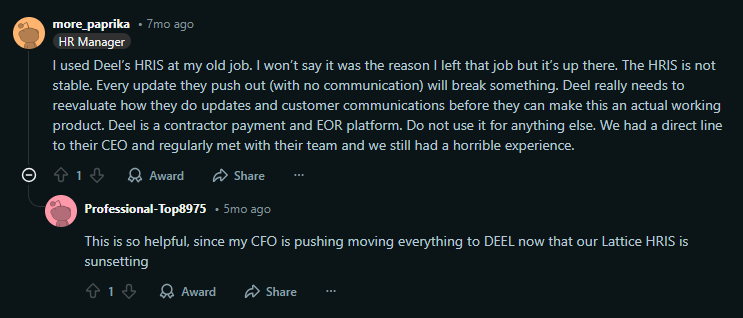
Via Reddit
Winner: Workwize
Workwize gives you consistent, flexible automation across 72 HRIS platforms and works well no matter which system you use today or might switch to later. Deel IT delivers a noticeably smoother experience, but only if you’re committed to Deel HR in the long term.
If you’re already all-in on Deel, Deel IT feels better. If you use (or might use) anything else, Workwize is the more practical and future-proof choice.
Asset visibility and tracking
Workwize
Workwize gives you real-time visibility into your entire hardware fleet across all supported regions.
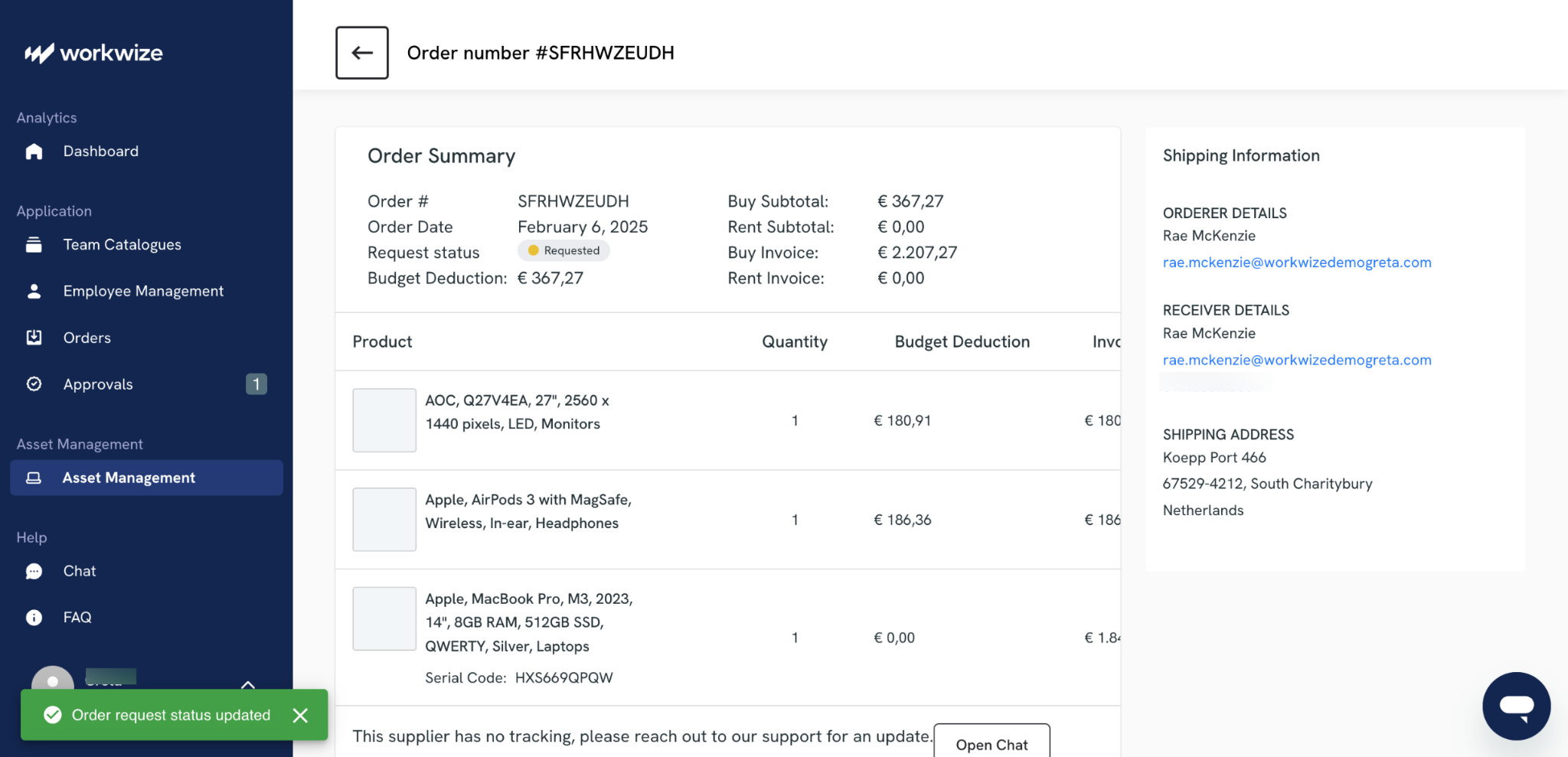
From the dashboard, you can browse available devices, add them to your internal catalog, and assign them to teams. Once deployed, you can track inventory and usage without switching systems.
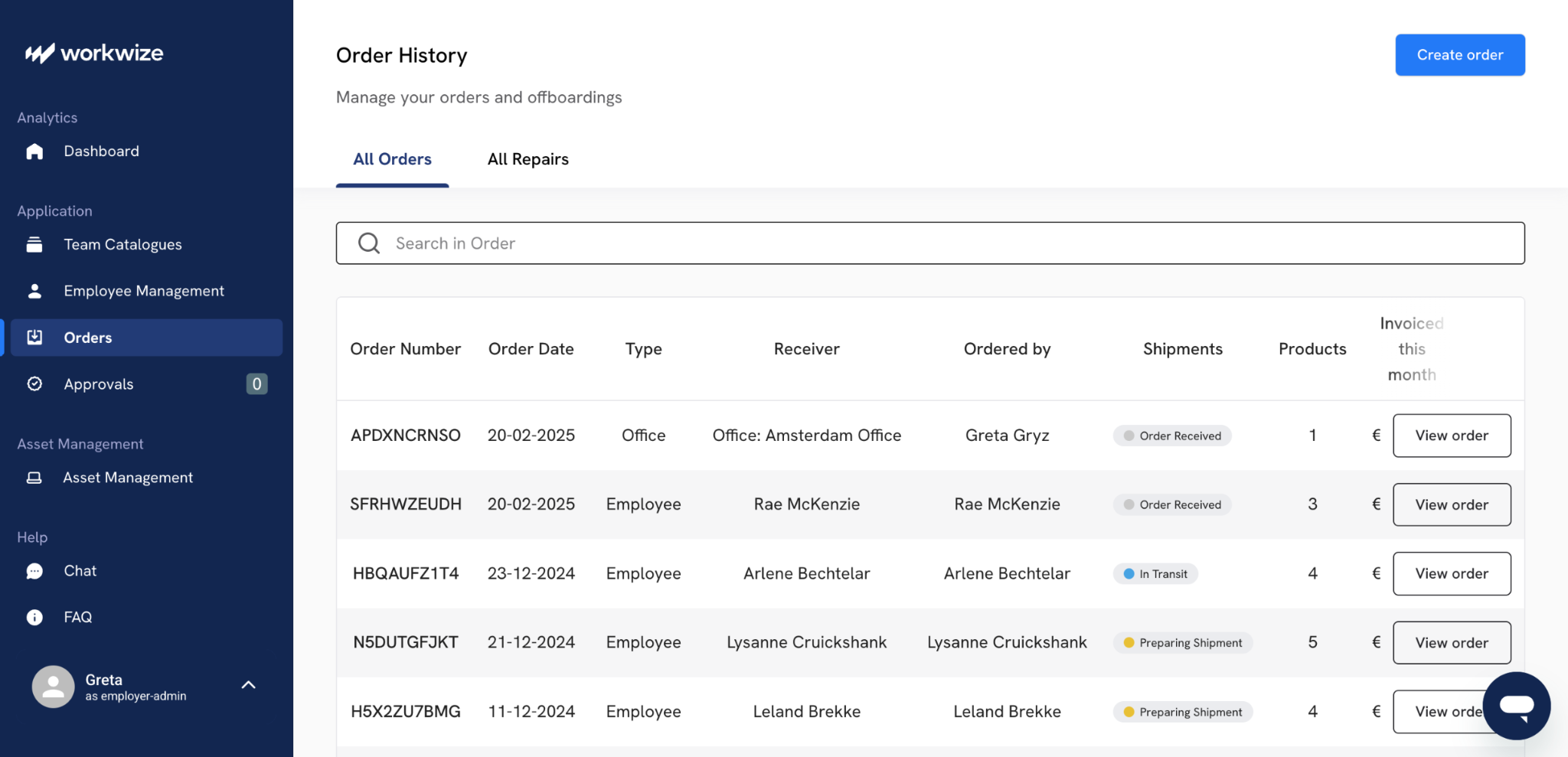
Assets are tracked in a few key ways:
- A centralized record of every device, including who it’s assigned to, issue date, and expected return date
- Live status updates as devices move through procurement, deployment, repair, retrieval, and disposal
- Real-time inventory tracking by team, location, and availability
- Automated reminders for returns, renewals, warranty expirations, and replacement cycles
- Built-in audit trails that log every action taken on a device
- Compliance tracking to ensure devices follow company policies and regulatory requirements
- A global repair dashboard that shows repair status and history across the fleet
In practice, everything feeds into one system that stays up to date without manual input.
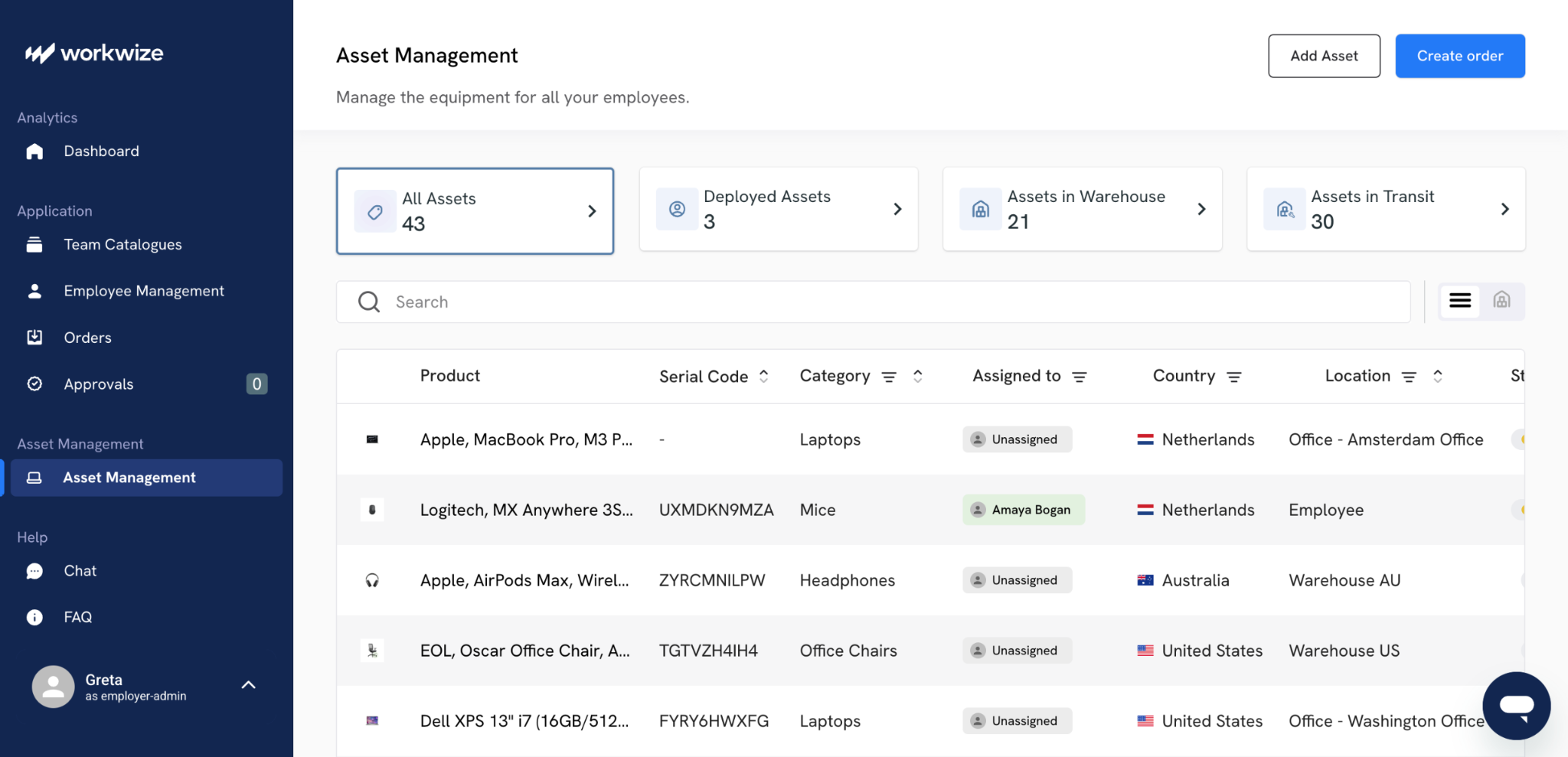
Workwize effectively acts as a single source of truth for your IT assets. One G2 reviewer specifically highlighted how smooth and reliable the tracking feels in day-to-day use.

Via G2
Deel IT
Deel IT shows device location, status, and lifecycle stage inside the main Deel app. Its biggest advantage is that it also shows which apps and licenses each employee has access to, all in one place.
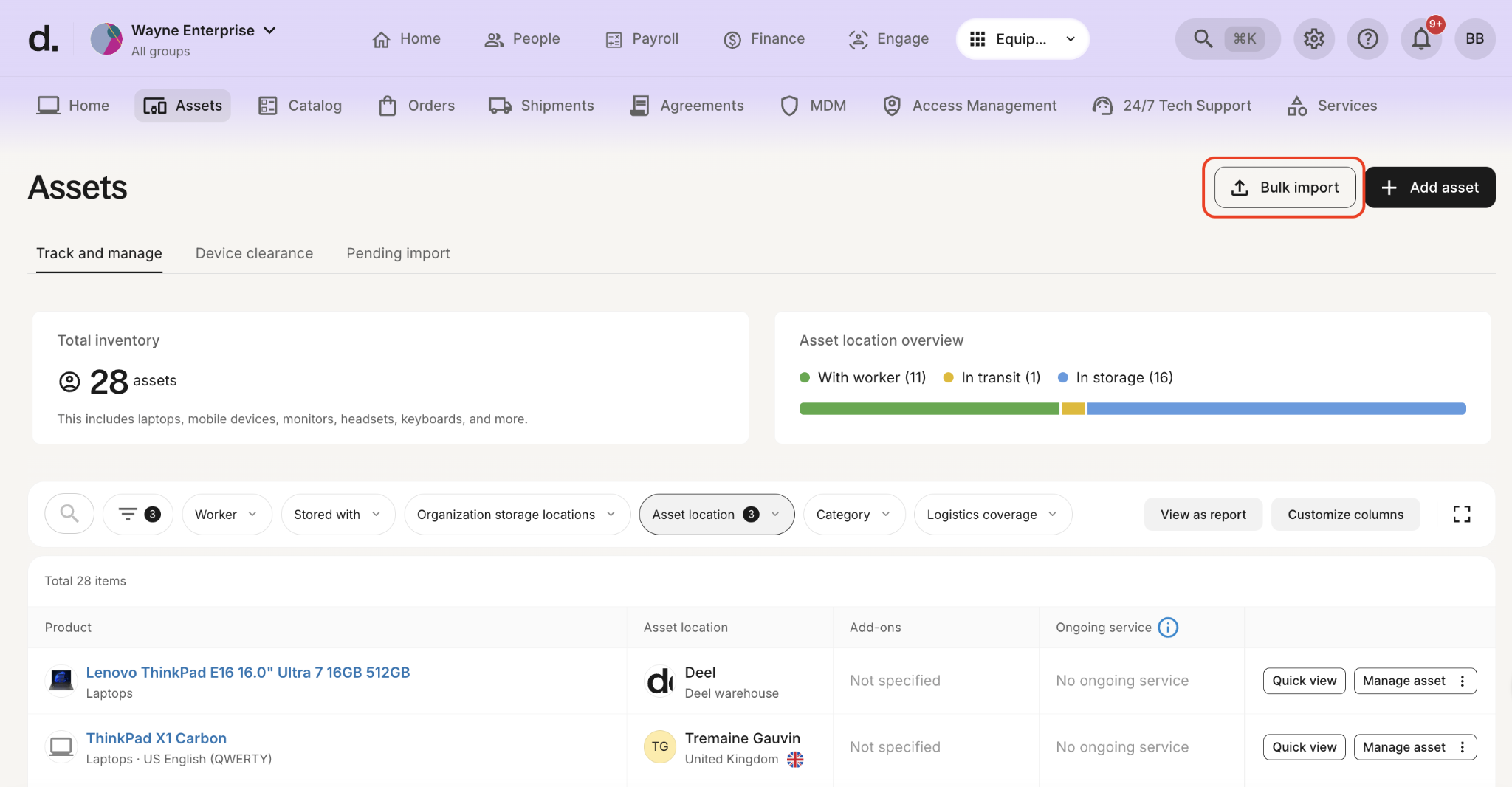
So instead of just seeing that someone has a laptop, you can also see which software tools that person is entitled to. That makes Deel IT a stronger choice if you want device tracking and access management in one view.
Winner: Workwize
This one is close. Workwize is the better choice if you want a hardware-first dashboard with strong tracking and inventory alerts. Deel IT might be more useful if you want to see devices and software access together. The right fit depends on whether you care more about hardware visibility or a broader view of employee access.

Offboarding and reverse logistics
Workwize
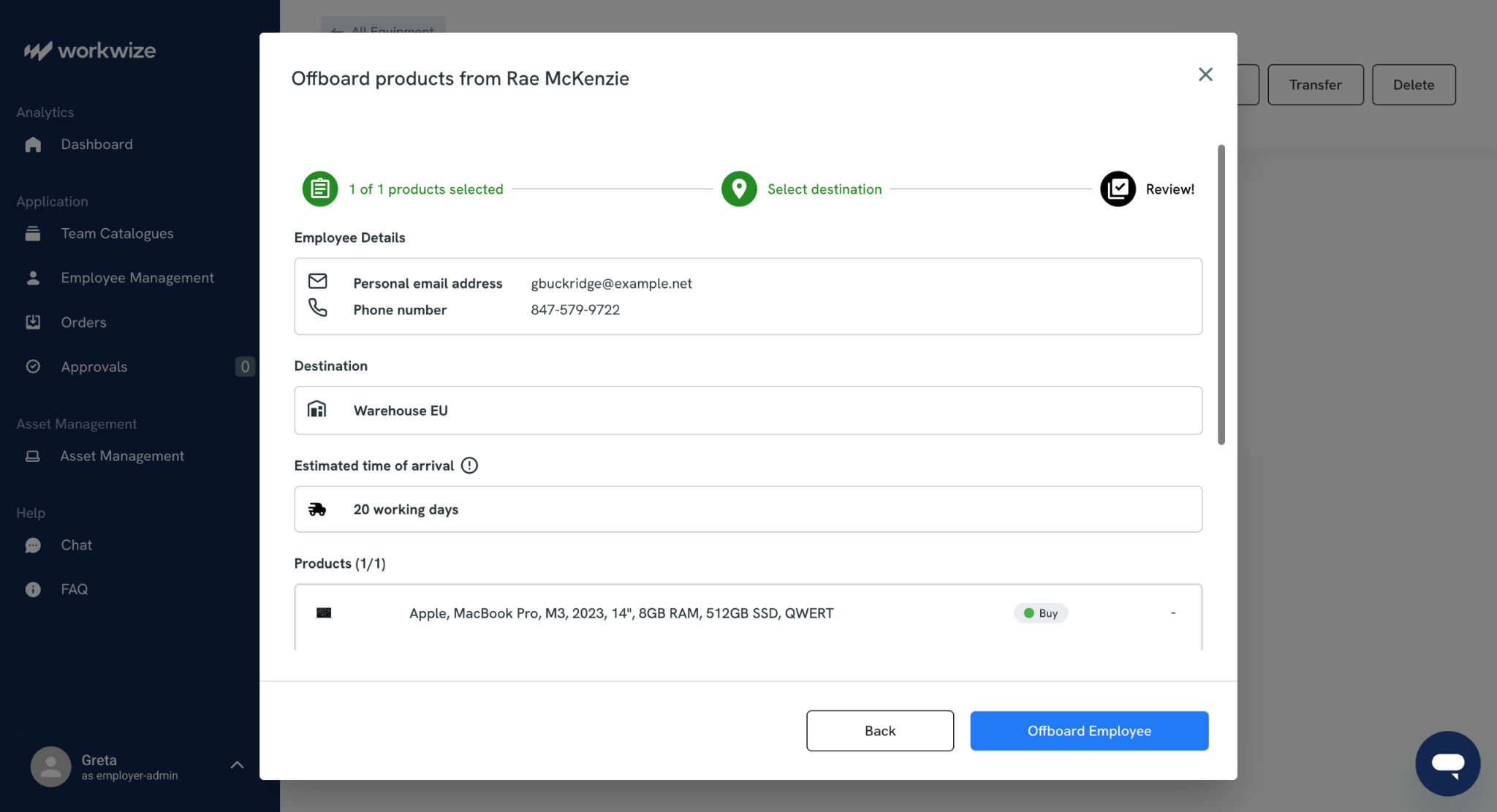
Workwize handles offboarding as a fully automated flow. Once HR marks an employee as leaving, the system kicks off the return process by either scheduling a courier pickup or sending a self-return kit.
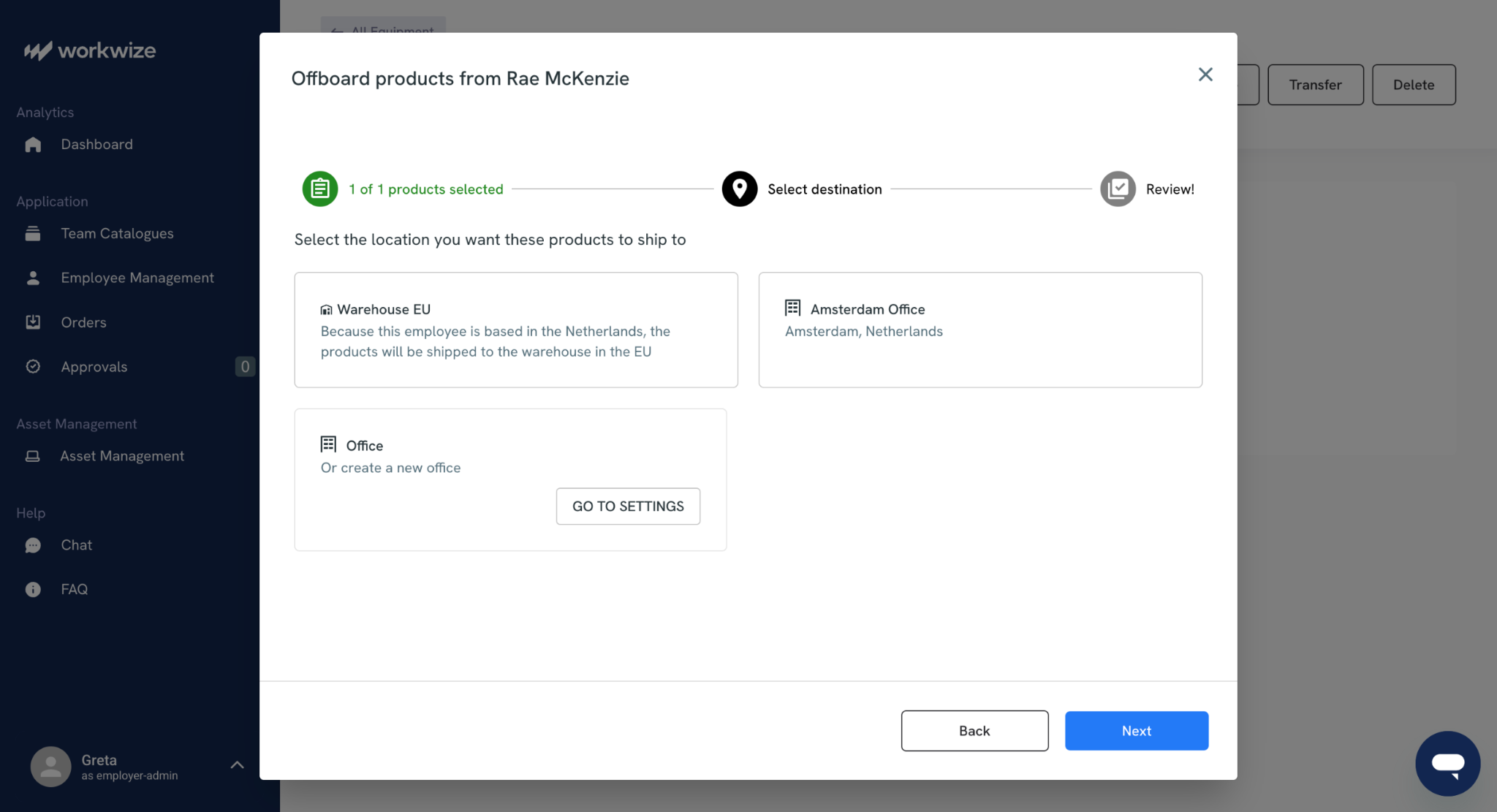
The device is routed to the nearest Workwize warehouse, where it undergoes certified data erasure and is then refurbished, recycled, or resold.
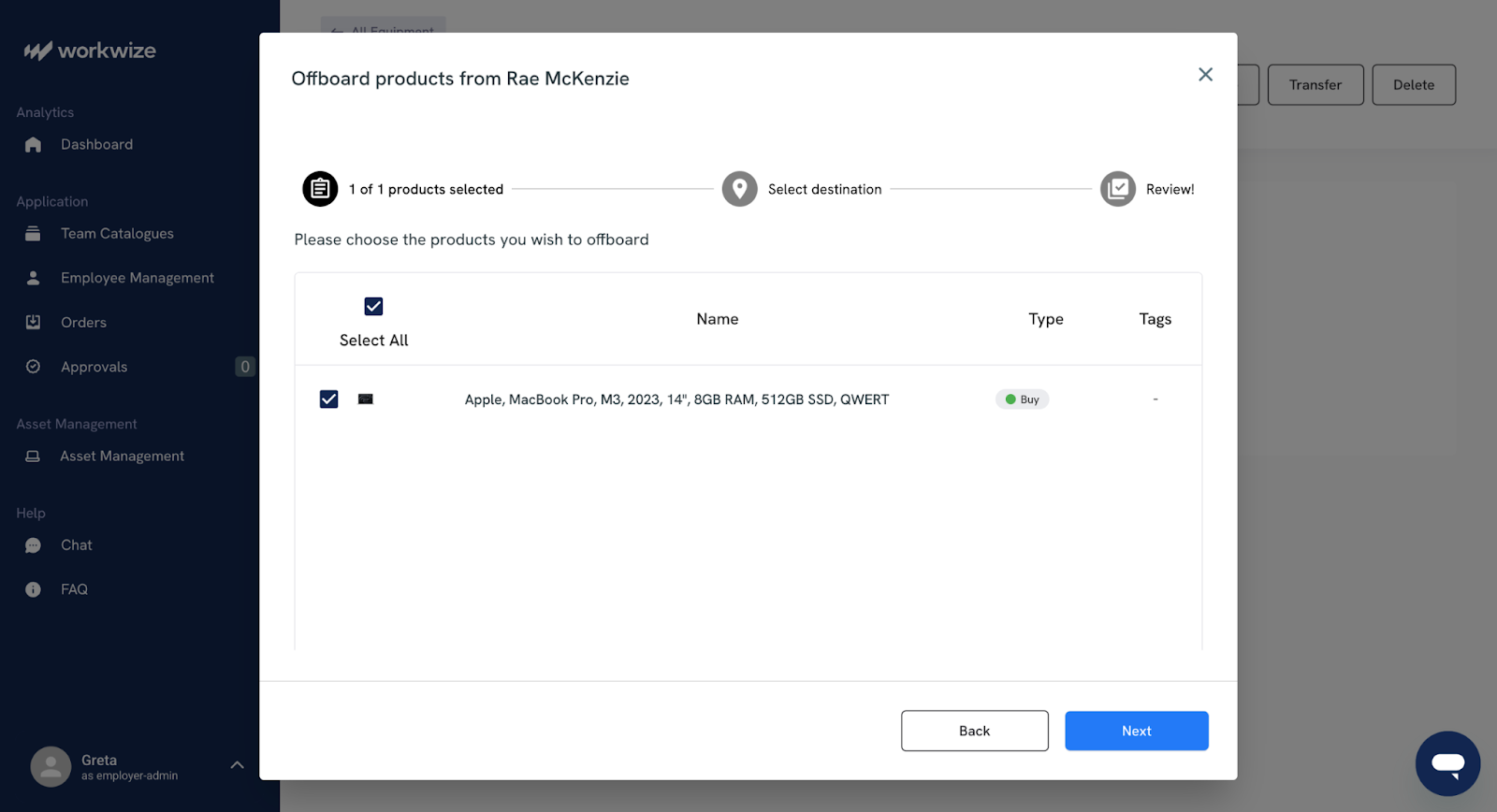
The company reports a 100% hardware retrieval rate across its customers.
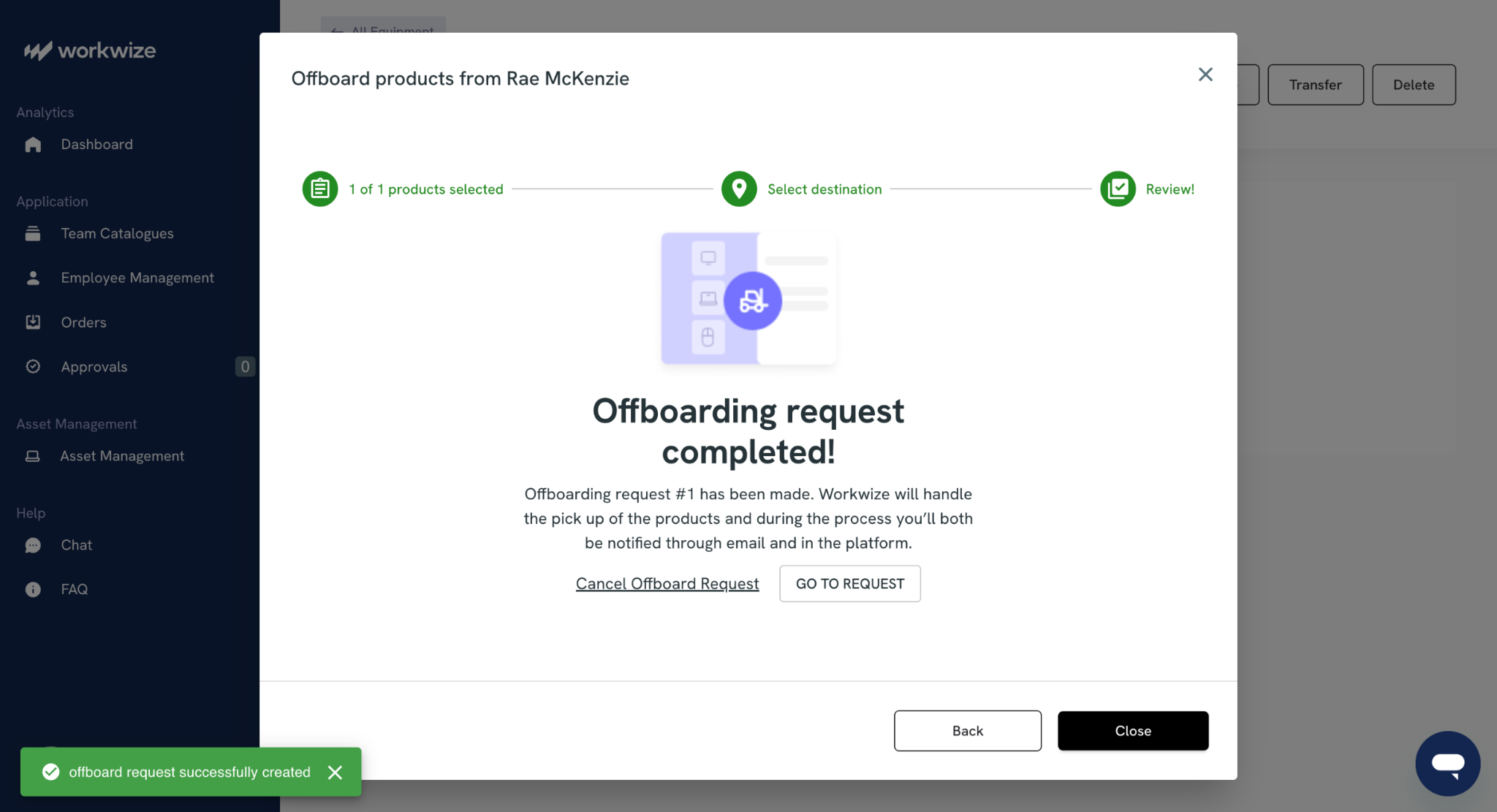
More importantly, the process itself is consistent and predictable, which is what most IT teams actually need when dealing with offboarding at scale.
Deel IT
Deel IT also covers the full return process, with a reported 96% global recovery rate. It supports device returns through its main hubs in the UK, EU, and the US, along with local partners in other regions. Devices can then be stored or reassigned as needed.
The loaner device program is a good idea. If a repair or return will take time, employees can get a temporary replacement, which helps avoid downtime and keeps work moving.
Winner: Workwize
Workwize has a slight edge here. Its higher reported retrieval rate and more standardized process make it feel more reliable end-to-end. Deel IT’s loaner devices are useful, especially for teams that want to minimize disruption, but overall, Workwize’s system is tighter and more consistent.
IT asset disposal
Workwize
Workwize treats disposal as part of a structured lifecycle. Devices undergo certified data erasure with proper documentation, then move into refurbishment or recycling. Sometimes, companies can recover up to 45% of the original device value by reselling hardware.
 It also pinpoints sustainability data directly in the platform; the platform shows things like refurbished units and carbon savings so teams can use it for ESG reporting without extra work.
Deel IT
Deel IT covers the basics: secure data wiping, responsible recycling, and a buyback or clearance option through its DLM service.
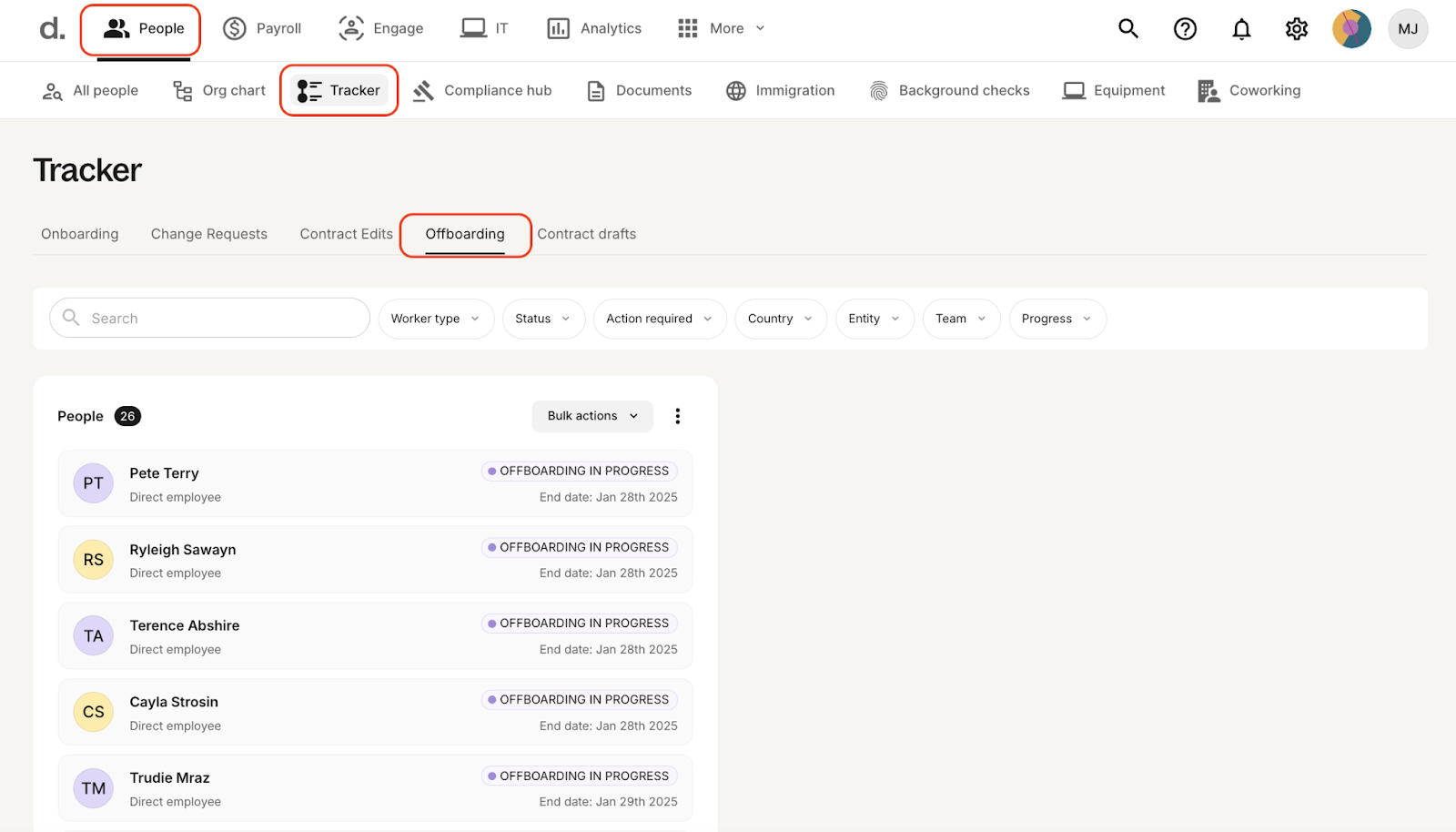
Devices can be resold, but the process is less standardized and usually handled through partners on a case-by-case basis.
Winner: Workwize
Workwize is the stronger option here. It offers a more structured approach, clearer reporting, and better support for recovering value from retired devices. Deel IT gets the job done, but it’s less consistent and less built-out when disposal and sustainability tracking are a priority.
Reporting and analytics
Workwize
Workwize’s reporting is more IT-focused. It provides clear visibility into factors like asset age, warranty coverage, repair history, and what you’ll get back from resale.
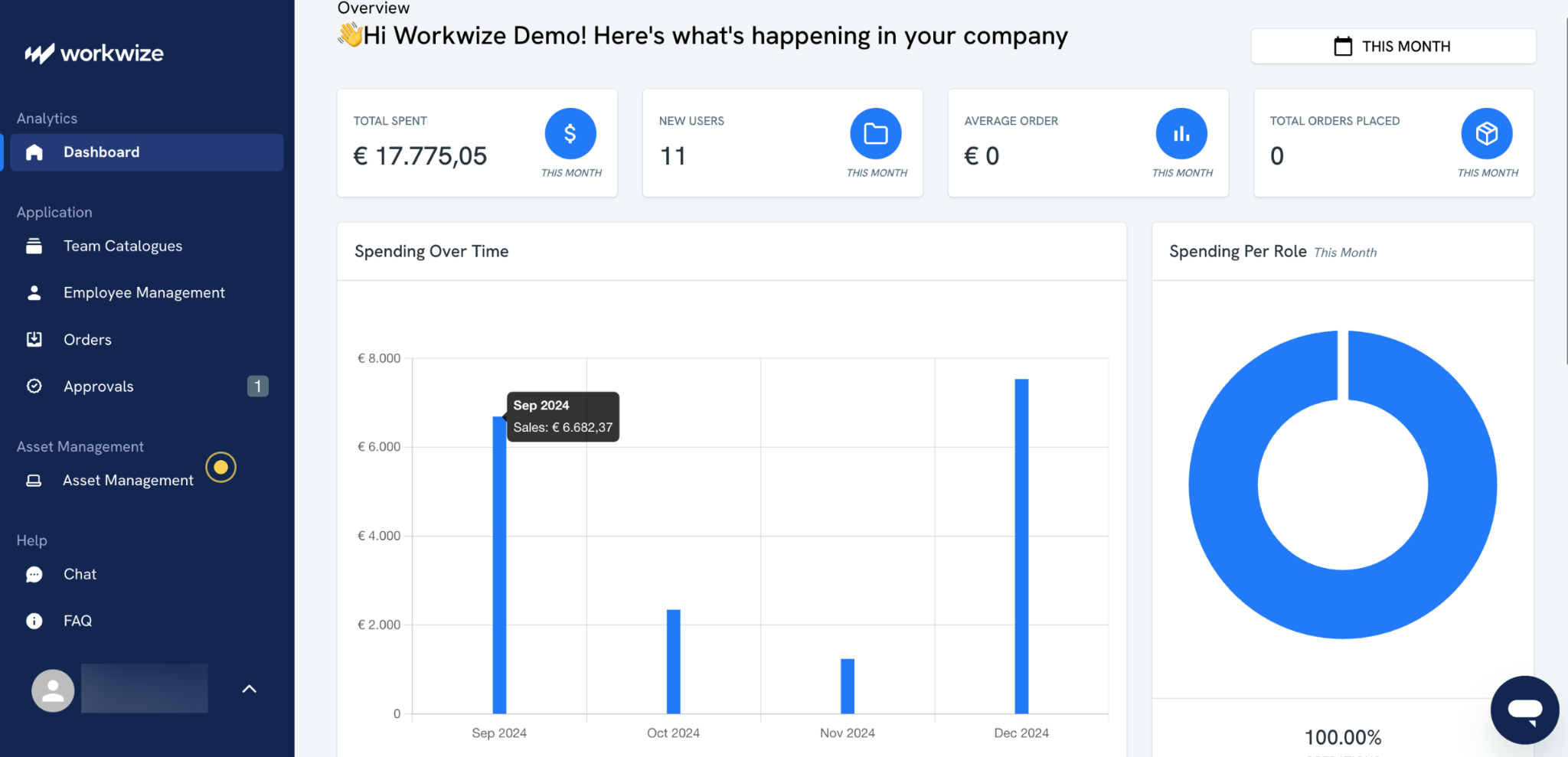
It also tracks sustainability metrics such as refurbishment impact. Overall, it’s geared toward understanding how your hardware fleet is performing and where money is being spent or recovered.
Deel IT
Deel IT leans more toward people and operations. Because it operates within an HR platform, device data is closely tied to employee records and offboarding status.
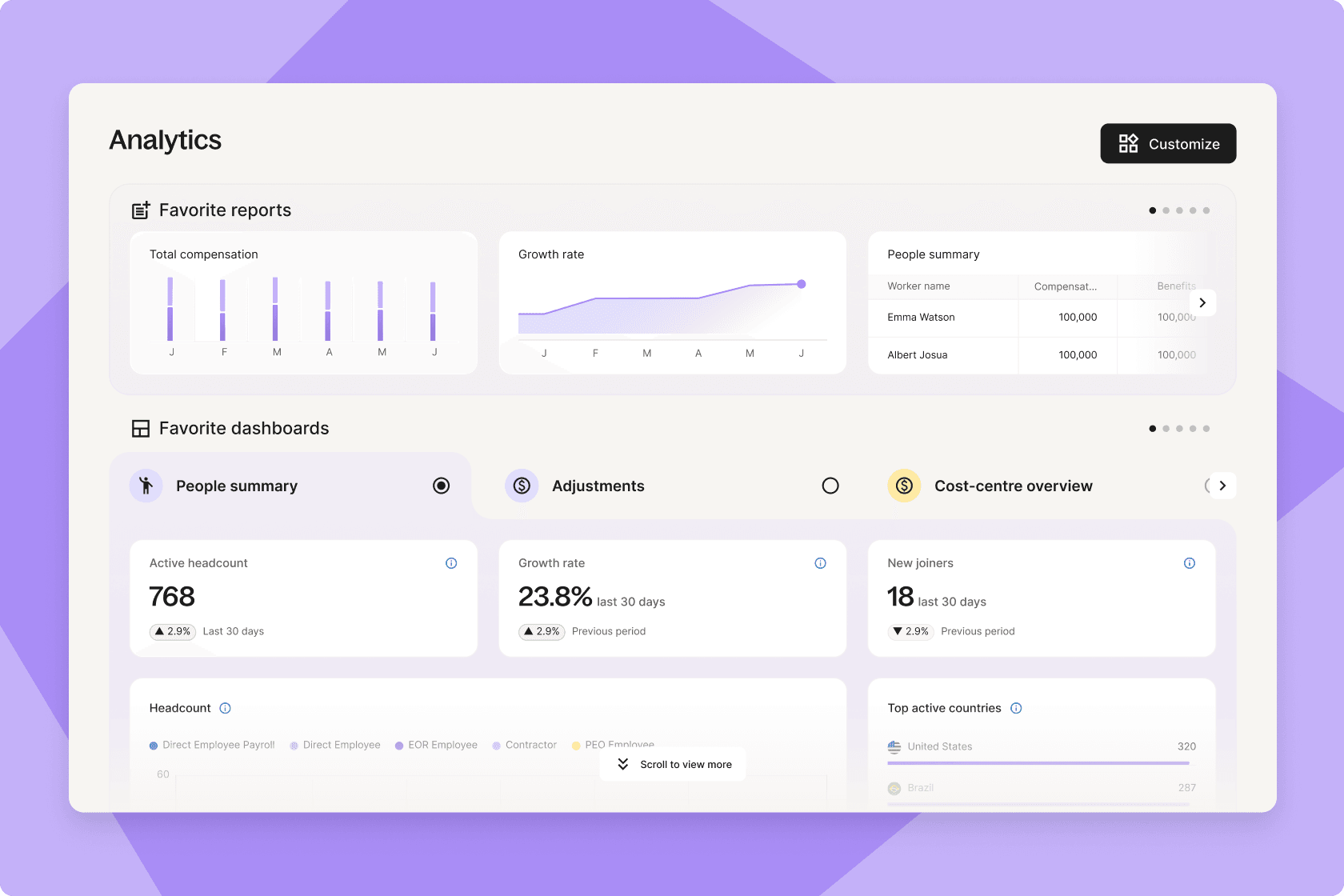
That makes it easier to answer questions that combine HR and IT data; for example, comparing hardware costs across teams or regions over time.
Winner: Tie
It depends on what you need. Neither platform is trying to be a full BI tool, but both cover the core reporting that most IT teams expect.
Workwize is stronger for day-to-day IT operations and hardware performance tracking. Deel IT is more useful for connecting device data to HR insights. Neither clearly outpaces the other; they just approach reporting from different angles.

Security, compliance, and data protection
Workwize
Instead of bundling security tools, Workwize integrates with the ones you already use, whether that’s Microsoft Intune, Jamf or a separate endpoint protection solution like Microsoft Defender or SentinelOne. This gives more flexibility, especially for companies with established security standards.
Deel IT
Deel IT goes the opposite way by bundling security features directly into the platform. It includes endpoint protection through CrowdStrike, along with identity and access controls like SSO and MFA via JumpCloud or Google Workspace.
It also supports automated policy enforcement through its MDM layer. For teams without a dedicated security stack, this can reduce the need to source and manage separate tools.
Winner: Tie
Both Workwize and Deel cover the essentials, such as SOC 2 and ISO 27001 certifications and GDPR-aligned handling. They both also support encrypted data and secure device wiping.
Deel IT makes more sense for smaller teams that want security built in with minimal setup. Workwize fits better if you already have a defined security stack and want your device management platform to plug into it rather than replace it.
Pricing, scalability and support
Deel IT and Workwize take very different approaches to pricing transparency. Deel publishes per-user rates openly on its pricing page; Workwize keeps pricing custom-quoted based on team size, regions, and services needed.
Workwize is designed for companies with 150+ employees, and third-party data from Vendr suggests an average annual contract of around $30,000 with a ceiling near $75,000.
|
Deel IT |
Workwize |
|
|
Pricing model |
Per user/month, bundled or modular |
Per seat/month (custom quote) |
|
Published pricing |
Yes |
No |
|
Entry price |
$10/user/month (Platform only); $45/user/month bundled |
Quote-based |
|
MDM and EPP |
Bundled in Starter+ ($45/user/month) |
Integrates with your existing MDM |
|
24x7 IT support |
$99/seat/month or bundled in Growth+ |
Dedicated account management |
|
Minimum team size |
None published |
150+ employees recommended |
|
Certifications |
SOC 2 Type 2, ISO 27001 |
SOC 2, ISO 27001 |
Deel IT wins on pricing transparency and offers a clear modular path for smaller teams. You might think that Workwize's quote-based model adds friction upfront, but it actually bundles more lifecycle services into a single seat price.
Pros and cons from real user reviews
Workwize
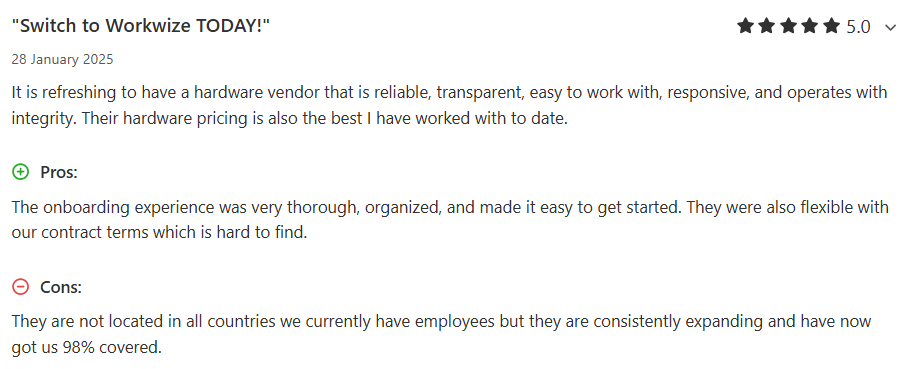
Users on G2, Capterra and Trustpilot consistently praise the platform's ease of use, the quality of the HRIS and MDM integrations, and the centralized asset governance.
Workwize users often praise the platform's centralized governance and how well it slots into existing stacks.
Via Capterra
One verified G2 reviewer highlights how the HiBob and Jamf integrations created seamless workflows:

Via G2
Another reviewer points to the smooth Workday and Okta connection that eliminates manual drudgery:

Via G2
Audit-ready traceability and ISO 27001 compliance also earn repeated mentions, particularly from teams where IT asset management best practices connect directly into board-level reporting.
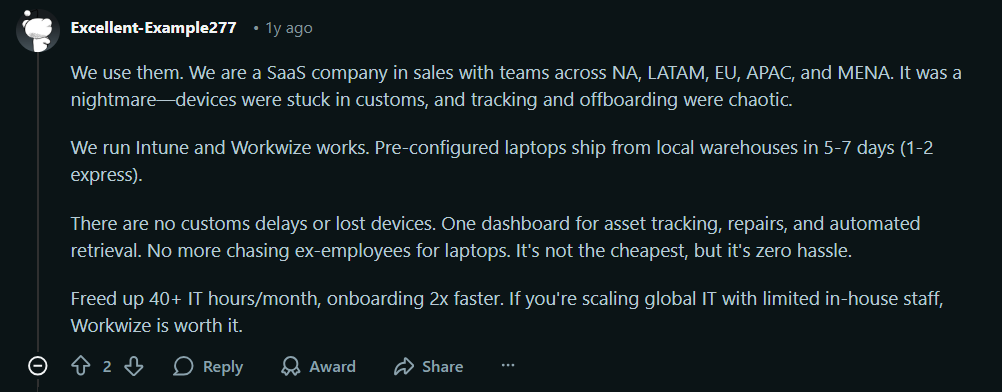
Even on Reddit, Workwize manages to collect positive sentiments:
Via Reddit
Deel IT
Most Deel reviews on G2 and Capterra are about Deel's broader HR, payroll, and EOR services, which makes isolating Deel IT feedback harder.

Via G2

Via G2
As these reviews show, Deel's centralization of payroll and HR makes its processes much faster, since much of device management depends directly on employee management. However, the complexity itself can limit how fast your team can get the best out of the platform.

Via Capterra
Some isolated reports of slow performance that impact productivity also deserve your attention. One reviewer wrote, “What I liked least about my experience with Deel was the performance, particularly during periods of high traffic or when attempting to perform more complex actions. I often experienced unacceptably slow loading times when switching between tabs or processing large volumes of data.”
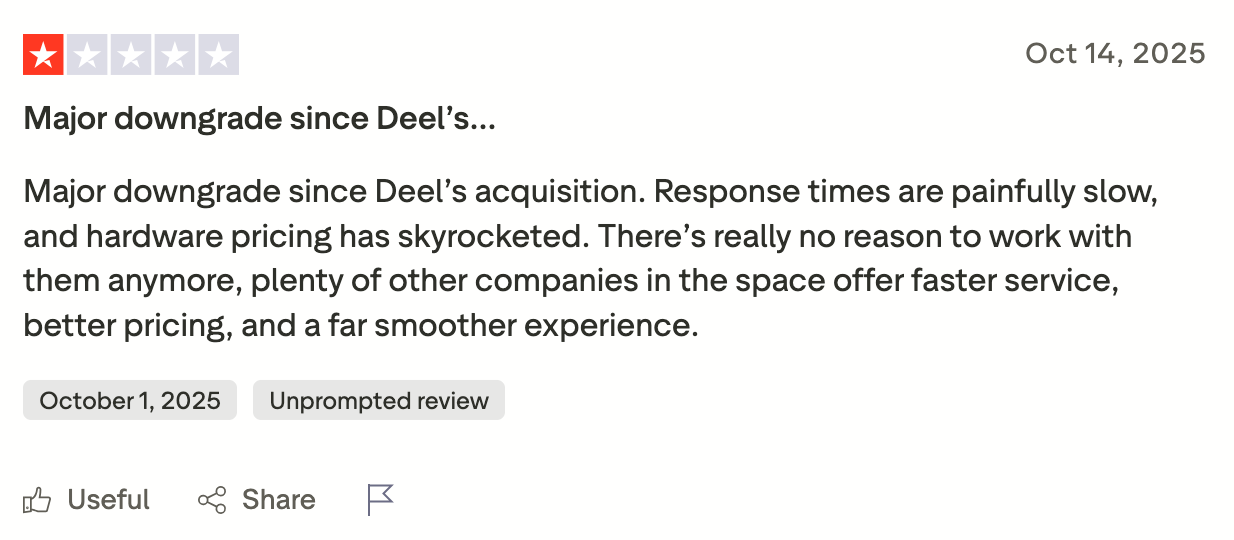
The critical feedback also concentrates on pricing. Hofy customers writing on Trustpilot after the Deel acquisition described hardware pricing as having "skyrocketed" and response times as "painfully slow."
Via Trustpilot
Which platform should you choose?
The honest answer depends on where you're starting from.
Choose Workwize if:
- Your primary pain is IT hardware lifecycle management, not HR or payroll
- You already run Intune or another MDM and don't want Deel to replace it
- You're on a different HRIS and aren't planning to migrate to Deel HR
- Your ESG or finance team cares about circularity, resale value recovery and sustainability reporting
- You want a vendor whose entire roadmap is hardware, not one where hardware is one of twelve priorities
Choose Deel IT if:
- You already use Deel for HR or payroll and value having device management in the same invoice
- You don't have MDM, endpoint protection or identity management tools in place and want them bundled
- Your IT team is lean enough that a 24x7 outsourced helpdesk for employees is a relief
- You value pricing transparency and want to see exact costs before committing to a platform
- Single-vendor consolidation matters more to your procurement team than best-of-breed depth
Why Workwize Leads for End-to-End IT Hardware Management
This comparison clarifies that Deel IT is one module within a larger HR platform and functions as such. However, Workwize is built for hardware and that is the entire focus. They solve the same problem, but Workwize puts all of its product effort into devices, while Deel has to balance hardware against payroll and HR priorities.
That matters. Workwize has greater depth in areas such as disposal, resale, and hardware-specific automation. Deel IT is a better fit when you already use Deel and want device management in the same system. For everything else, a purpose-built hardware platform is usually the stronger option.
Request a demo and see how Workwize fits your setup.


Establish a single source of truth for every IT asset across the globe.
.png?width=258&height=318&name=g10%20(5).png)
More related resources to help you stop firefighting hardware operations.

Get monthly insights into how other IT leaders are improving their ops.



.png?width=2880&height=1232&name=Group%202147262874%20(1).png)
Stop coordinating
hardware like it's 2012.
.svg)
.png?width=172&height=68&name=apple%20business%20patner%20(1).png)
.svg)
.svg)
.svg)
.svg)