




.svg)
.svg)

.svg)


.svg)





.svg)
.png?width=500&height=424&name=Style-1---V1-(1).png)

.png?width=1230&height=692&name=Vector%20(13).png)
IT asset disposal creates one of the biggest blind spots in enterprise security.
A recent survey by ESET of used devices sold on the secondary market mentioned that over half of the recycled network gear still contained sensitive corporate data.
This highlights a widespread gap in how organizations handle technology at the end of its life cycle.
The problems stack up quickly. Storage rooms are piled high with forgotten hardware, recycling is often delayed or done improperly, and valuable equipment that could be resold or repurposed ends up being wasted.
Meanwhile, each untracked device poses a double risk. Your organization becomes vulnerable to costly data breaches, and the growing e-waste undermines your sustainability goals.
That’s why you must treat the end of the IT lifecycle with the same seriousness as the beginning.
A foolproof IT asset disposal policy helps you securely retire old equipment, protect sensitive data, recover residual value, and stay compliant with environmental and data protection regulations.
That’s what I will help you with in this guide.
I’ll provide a detailed, clear framework to build a secure, compliant, and responsible process for disposing of technology assets.
Let’s get started.

What is IT Asset Disposal?
IT Asset Disposal, or ITAD, is the final stage of the IT asset lifecycle, after planning, purchase, deployment, and maintenance, where organizations securely and responsibly retire technology.
It closes the loop on a device by ensuring that old equipment leaves your environment without leaving risk behind or wasting value.
ITAD applies to every device or asset that stores or processes data, including:
- Drives and storage media: HDDs, SSDs, NVMe devices, and backup tapes
- Computers and mobile devices: Desktops, laptops, tablets, and smartphones that hold credentials and business data
- Printers and MFPs: Often overlooked, yet many keep images of scanned, copied, or printed documents
- Network and security gear: routers, switches, and firewalls that retain configurations and other sensitive information
Its key components include secure data destruction, refurbishment, resale, recycling, or complete destruction.
Proper IT asset disposal protects sensitive data, satisfies regulatory obligations, supports sustainability goals, and preserves brand trust.
Read More: 20 Best IT Asset Disposal Companies for Global Teams
Benefits Of Proper IT Asset Disposal
A well-structured disposal program delivers tangible benefits across security, finance, and operations.
Lou DiFruscio, CEO of Blancco, one of the top data erasure platforms, stresses the importance of this process:
“Improper data disposal is a hidden risk, and it’s not talked about enough. Every business IT leader needs to understand its responsibilities, seek out the best practices that maintain compliance with data privacy regulations, and secure data at the finish line.”
Let’s see how:
1. Reduces breach risk and other security incidents
The most significant benefit of efficient IT asset disposal is a dramatic reduction in your organization's risk of a data breach. Prevention through proper disposal is a huge financial safeguard, considering the average cost of a data breach has climbed to nearly $4.4 million.
Leaving retired server, laptop, and mobile phones to pile up in a storage closet creates forgotten disk incidents, where sensitive data resides on unaccounted-for assets. A systematic ITAD process ensures that every device is tracked and sanitized, thereby neutralizing the threat.
2. Prepares you for audits and helps with regulations
A formal ITAD program, built on standards like NIST 800-88, provides a clear, defensible process for how your organization handles data at the end of an asset's life.
This creates an auditable trail of documentation and proves due diligence. As a result, compliance audits become much simpler.
3. Lets you redeploy, resell, and avoid unnecessary buys
The global market for refurbished computers and laptops was valued at $5.4 billion in 2024, This data signals there’s enormous demand for pre-owned equipment.
Instead of letting valuable hardware or other IT assets depreciate in a back room, you can identify assets that can be redeployed to other departments, refurbished, or sold on the secondary market.
Your old hardware can also generate revenue to offset the cost of new technology and reduce unnecessary purchases.
4. Maintains a cleaner, more efficient IT environment
A consistent disposal process leads to better overall IT asset management (ITAM). When assets are retired correctly, they are removed from management systems like your CMDB.
It prevents the accumulation of zombie assets, i.e., devices that still appear active in your inventory but are physically offline.
5. Boosts your environmental sustainability scorecard
Globally, only 22.3% of the 62 million tonnes of e-waste generated in 2022 was collected correctly and recycled. That means nearly four out of five devices ended up unmanaged, contributing to environmental harm and wasted resources.
Responsible ITAD closes this gap. When you prioritize reuse and refurbishment, you extend the lifecycle of devices, which is the most effective way to reduce their environmental impact.
For devices that can’t be reused, certified recycling ensures that hazardous materials are handled safely and valuable resources are recovered.
Even this alone diverts tons of e-waste from landfills and directly supports your organization’s sustainability goals.

Core Standards for ITAD Compliance
Sticking to recognized data-security standards proves you take data protection seriously and helps you avoid legal or financial trouble later.
These are the big ones to know:
- NIST 800-88 (Media Sanitization): A widely used guide from NIST that defines three ways to wipe data: Clear, Purge, and Destroy. Pick the method that matches how sensitive the data is.
- IEEE 2883 (2022): A newer IEEE standard that builds on NIST 800-88 with deeper, tech-level guidance for today’s storage, including SSDs.
- ISO 27001: A global standard for information security management. Annex A control 7.14 requires you to irreversibly remove sensitive data and software before any device leaves your organization.
- CIS Controls: A prioritized set of cybersecurity best practices. Under Control 3 (Data Protection), safeguard 3.5 calls for secure data disposal using a method appropriate to the data’s sensitivity.
How To Carry Out Proper IT Asset Disposal For Your Devices
A successful IT asset disposal program is a repeatable process that protects your data, recovers value, and ensures environmental responsibility.
However, running an efficient IT asset disposal program can be challenging. For instance, manual coordination with multiple ITAD vendors eats up IT’s time, asset retrievals often slip through the cracks, and data destruction is inconsistent without certified processes.
This is where an IT hardware lifecycle management platform like Workwize helps.
Instead of juggling multiple vendors and processes, Workwize centralizes IT asset disposal into one streamlined workflow. It helps you automate IT asset disposal of all your assets, taking care of retrievals, data destruction, and certification, without coordinating with multiple vendors or services.
Whether you use a platform like Workwize or manage disposal through internal policies, the process should follow a clear, standardized structure.
Here’s a step-by-step guide to carrying out proper IT asset disposal for your devices.
Step 1: Identify devices and assemble a comprehensive inventory
A clean disposal begins with a clear picture of what you own.
From day one, enroll every corporate device, especially those for remote employees, into your IT Asset Management (ITAM) and Mobile Device Management (MDM) platforms.
This is particularly important as losing track of devices is a recipe for data risk, compliance failures, and unnecessary cost.
Now, when a device reaches its end-of-life, initiate a formal identification, recovery, or assembly process. Pair this with a physical sweep of offices to find “shadow IT”. These are devices like forgotten laptops, old routers, or even USB drives that may not appear in official records but still hold company data.
For every recovered asset:
- Apply a tag and assign a data-risk level (Low, Medium, High) to determine its required disposal path.
- Document every movement and handler from the moment of retrieval to its final disposition. This documentation should capture and freeze essential records for each device, including all asset IDs, serial numbers, assigned users, disk counts, and the amount of installed storage.
However, doing this manually is time-consuming and error-prone. Workwize automatically enrolls all your devices in an MDM platform, even before being assigned to users. This way, you can control devices through their lifecycle via Workwize’s intuitive interface.
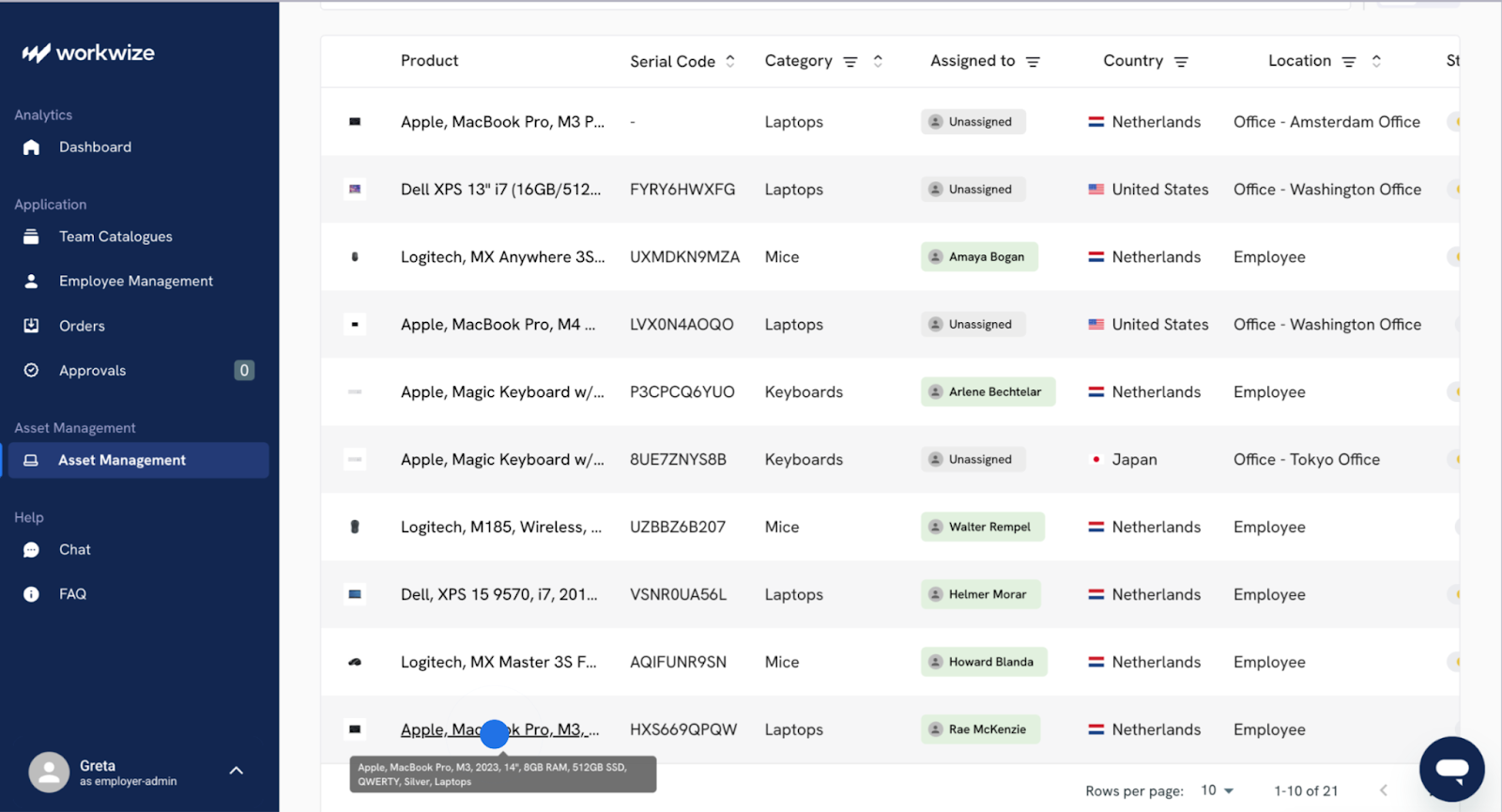
Using a centralized dashboard makes it easy for your team to quickly find or retrieve assets when it’s time for disposal, no matter whether it’s in your office or employee’s home.
You can locate devices at the click of a button, initiate retrievals, and track them through the retrieval process.
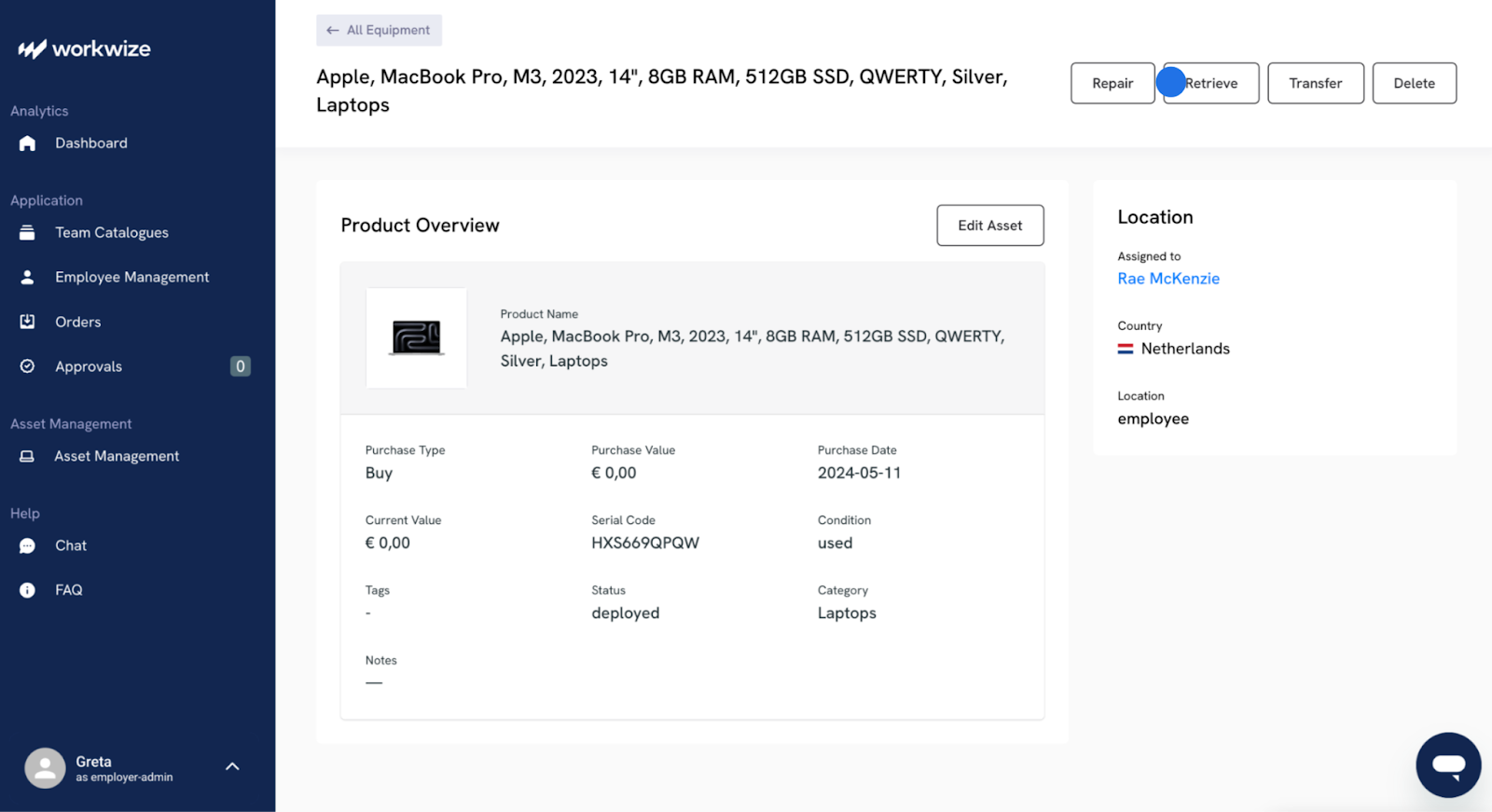
Pro Tip: During sweeps, pay special attention to off-network or 'shadow IT'.
Read More: Device Refresh Program for Organizations: Guide
Step 2: Determine a disposition path for each asset type
With an inventory in hand, you can now decide the fate of each device. The goal is to maximize value and security while minimizing waste.
Your decision for each asset will lead down one of five paths:
- Redeploy: Redeploying assets internally avoids the cost of buying new hardware and extends the life of your initial investment.
- Refurbish: Device refurbishment prepares the device for either internal redeployment or for fetching a higher price on the resale market.
- Resell: If the equipment is still in good condition and has market value, reselling it through a certified ITAD partner is an excellent way to recover costs.
- Recycle: For assets that are too old, broken, or have no market value, responsible recycling is the answer. A certified recycler will dismantle the device and recycle the parts in an environmentally responsible manner.
- Destroy: Complete physical obliteration of the storage media is the path for devices that are non-functional or contain such highly sensitive data that no risk of recovery is acceptable.
Create device-specific workflows for various types of assets, including laptops, servers, mobile phones, and removable media. For instance, servers or storage arrays may require stricter chain-of-custody and extra verification steps compared to laptops or smartphones.
But the real challenge isn’t choosing the right path for each asset, it’s execution. And that’s where Workwize comes in handy.
By connecting with a global network of certified ITAD vendors. Workwize streamlines every disposition path. Whether you’re reselling, recycling, or disposing of a device, you get instant estimates, secure handling, and full compliance without the hassle of sourcing and managing vendors yourself.
To help you determine the best path for your IT assets, this table outlines each disposition path, including when to use it, associated risk level, and potential value recovery.
|
Disposition Path |
When to Use It |
Asset Examples |
Risk Level |
Value Recovery Potential |
|
Redeploy |
The device is still functional and meets current employee needs without upgrades. |
Recently purchased laptops, monitors, peripherals. |
Low |
Medium (saves on replacement costs) |
|
Refurbish |
Device needs repair/upgrade before reuse or resale. |
Laptops needing SSD upgrade, servers with part replacements, smartphones with worn batteries. |
Medium |
High (higher resale/redeploy value after refurbishing) |
|
Resell |
The asset is in good condition, has demand, but no longer needed internally. |
Mid-cycle laptops, networking gear, tablets, storage drives. |
Medium |
High (direct cost recovery from resale) |
|
Recycle |
The asset is obsolete, broken, or has no resale value. |
Old desktops, broken printers, outdated routers. |
Low to Medium |
Low (value from raw material recovery only) |
|
Destroy |
The asset is non-functional or contains highly sensitive/regulated data. |
HDDs/SSDs with classified data, retired servers storing financial or healthcare data. |
High |
None (security is priority, not recovery) |
Step 3: Perform certified data sanitization
For assets you plan to redeploy, refurbish, or resell, you need a guaranteed method of rendering the data irrecoverable.
Simply deleting files or formatting a drive isn’t enough. Data can be recovered with basic tools. For these cases, you have to rely on professional data sanitization.
Unlike deletion, sanitization overwrites every sector of the drive and makes the original data forensically unrecoverable. At the same time, it preserves the device for safe reuse or resale.
The main sanitization techniques are:
- Overwrite: In this method, a software writes a pattern of meaningless data (like ones and zeros) across the entire drive, one or more times. The number of passes depends on the standard you follow.
- Cryptographic Erase (CE): This is a much faster process for drives that use encryption by default (like all modern SSDs and smartphones). Instead of overwriting terabytes of data, CE simply destroys the encryption key. Without the key, the data on the drive is rendered permanently inaccessible.
- ATA and NVMe Sanitize Commands: Modern drives (both SSDs and HDDs) have built-in sanitization commands at the firmware level. Triggering these commands instructs the drive's controller to perform a manufacturer-designed data wipe.
Verification is critical. Every sanitization must produce a certificate or audit log to prove compliance and satisfy auditors. Without proof, you carry regulatory and legal risks.
Doing this manually means relying on vendors like Dell, Iron Mountain, DataIt, and HP, comparing standards, and storing the wipe certificates yourself.
And that’s the beauty of using Workwize. Whether you choose overwrite, cryptographic erase, or firmware-level commands, you get verifiable proof of wipe and save the time of managing different vendors yourself.
Moreover, you can redeploy erased devices to new employees without meddling with logistical hurdles.
Step 4: Automate data erasure and sanitization at scale
Data Wiping one laptop is easy. Wiping a thousand is a lot harder unless you have the right tools. To handle disposal at scale, you need automation.
For servers and laptops, you can boot multiple devices simultaneously over the network (PXE) or from a USB stick into a dedicated erasure environment. This allows a single technician to manage the sanitization of dozens of machines simultaneously.
Using API integrations is another effective method. Some ITAD software can integrate with your existing ITAM or ticketing systems via APIs.
For mobile devices, you can use your Mobile Device Management platform (like Microsoft Intune or Jamf). These tools can remotely issue wipe commands that perform a factory reset, which on modern devices triggers a cryptographic erase.
Automation is equally important for tracking and verification. At scale, you need system-generated certificates or logs (e.g., NIST 800-88 proof-of-wipe) to demonstrate compliance with frameworks like GDPR or HIPAA.
You should also prepare for exceptions: if a device is offline, the wipe command must queue until it reconnects, and failed wipes should trigger alerts.
Workwize lets you automate disposal for your entire fleet of devices. It allows you remotely lock, retrieve, and dispose of any number of devices, automating the data erasure process to save time and effort. Moreover, you can have all your disposal certificates in one place. This means you can wipe out and safely dispose of all your devices without manual effort.

Step 5: Verify and document data erasure
A successful data sanitization process isn't complete until you can prove it. You’ll ultimately need verifiable proof that every single sector of a drive was successfully sanitized.
You must verify that the process was completed without errors. And this verification process has two parts:
- Validation of the process: Every drive must check for errors. If a drive has bad sectors that cannot be overwritten, the erasure should fail, and the device should be flagged for physical destruction.
- Documentation of results. For every sanitized asset, you must receive a tamper-proof certificate of erasure. This report should be digitally signed and contain:
- Asset serial number, make, and model
- Storage capacity and media type
- Sanitization method used (overwrite, cryptographic erase, sanitize command)
- Standard followed (e.g., NIST 800-88)
- Date, time, technician/system ID
- Outcome (pass/fail) and verification logs
Keep it handy, as it serves as your legal evidence of due diligence. Ensure that you store them securely in your ITAM or compliance system for easy retrieval during audits.
Workwize, again, offers you a certificate of complete data erasure and environmental compliance for every device decommissioned through the platform.
Step 6: Perform physical destruction that stands up to scrutiny
When software-based erasure isn't an option, you turn to physical destruction.
But not all destruction methods have the same outcome. And not all pass compliance audits.
Some popular ones include:
- Degaussing: This applies to magnetic media like HDDs and backup tapes. A powerful degausser uses a strong magnetic field to completely neutralize the magnetic orientation of the storage platters, instantly destroying the data.
- Shredding and disintegration: As you guessed, industrial shredders cut drives into small pieces. The required shred size depends on the sensitivity of your data. For routine data, a particle size of 2 mm may be sufficient. For top-secret government data, the NSA requires disintegration into particles so small they can pass through a fine mesh screen.
To know more about the most secure methods, check out the NSA's Evaluated Products List (EPL) for approved destruction devices.
Remember that physical destruction must also include a secure chain of custody.
Maintain a log of devices from pickup to destruction, including records of who handled them and when. Without this, even the best shredder won’t protect you from compliance risks if a drive goes missing.
Moreover, every destruction event should produce a certificate of destruction (and sometimes photos or videos) detailing the device serial number, method used, date, and confirmation of completion.
With Workwize, you can opt for complete physical destruction for end-of-life assets with certified ITAD partners, who provide a certificate of destruction and all required proof of destruction on a custom basis.
You can rest assured that your assets are destroyed to industry standards, with full chain-of-custody tracking and tamper-proof certificates of destruction automatically stored in your dashboard.
Step 7: Ensure responsible and sustainable recycling
If an asset is heading for recycling, your responsibility doesn't end when it leaves your loading dock.
It’s up to you to confirm that your partner handles e-waste in an ethical and legal manner.
Always partner with certified recyclers. Look for partners certified to either the R2v3 (Responsible Recycling) or e-Stewards standard. These certifications provide assurance that the vendor adheres to strict environmental protection, data security protocols, and worker safety standards.
They also prohibit the illegal export of hazardous e-waste to developing nations, which is a major risk with uncertified recyclers.
A certified recycler is also expected to track all materials downstream to final disposition.
Don’t hesitate to ask for and review their list of downstream vendors. You have a right to know where the shredded plastic, circuit boards, and metals from your assets are going.
Finally, insist on a Certificate of Recycling to document compliance. This record confirms that your assets were processed in an ethical manner, meeting both legal requirements (such as the WEEE Directive in Europe or state e-waste laws in the U.S.) and sustainability commitments.

Step 8: Compile documentation and audit-ready paperwork
Finally, for every asset you dispose of, you must assemble a complete documentation bundle. This is your defense in the event of an audit or legal challenge. This bundle should include:
- Chain-of-custody forms: A log tracking the asset from the moment it leaves your control to its final disposition
- Certificates of data destruction: The digitally signed reports for every sanitized or destroyed drive.
- Photos or videos: Visual evidence of physical destruction can be invaluable
- Recycling manifests: A detailed list of assets sent to your recycling partner
- Certificate of responsible recycling: A final document from your partner confirming that the assets were processed according to certified standards
- Erasure logs or hash reports: Verification data showing successful sanitization.
Finally, close the loop by attaching the certificates of destruction to the asset's record in your CMDB and ITAM systems. This keeps your inventory accurate and provides the necessary documentation for a finance write-off. Use this data to update your process metrics.
Workwize automates this final step. Instead of juggling PDFs and spreadsheets, all your certificates of destruction, sanitization, and recycling are compiled in one dashboard, automatically linked to the correct asset. When auditors come calling, you can pull up proof in seconds.
Common IT Disposal Mistakes (And How to Dodge Them)
You’ve designed a solid ITAD process on paper, but the real world is messy. Even the most well-intentioned IT teams can stumble into traps that compromise data security or negate compliance efforts.
Being aware of these common pitfalls is the best way to dodge them.
Mistaking factory reset for sanitization
Factory reset on a smartphone or a format on a laptop feels final, but it often isn't. On many devices, especially older ones, this merely deletes the pointers to the data and leaves the actual files intact and easily recoverable with basic software.
Always use a dedicated, professional data sanitization tool that verifies the erasure and provides a certificate.
Never assume a consumer-grade reset is sufficient for corporate data.
Ignoring the quirks of SSDs and NVME drives
Solid-state drives (SSDs) are not just faster hard drives; they work differently. Technologies like wear-leveling and over-provisioning ensure the drive's controller constantly redistributes data to prevent premature wear on the flash memory cells.
This creates "hidden" areas on the drive where old data can hide, invisible to the operating system. A standard overwrite command might miss these remapped blocks entirely.
That’s why you should use an erasure tool specifically designed for SSDs, which can trigger the drive's built-in secure erase commands (such as ATA Sanitize or NVMe Format).
Wiping the host but forgetting snapshots, backups, and cloud or object copies
You’ve sanitized a server's drives before sending it to the recycler. Great! But what about the full backup you have on a tape in off-site storage? Or the virtual machine backups stored in your SAN? Data spreads. Focusing only on the primary device is a classic mistake.
Your data classification step should include tracing the location of that data throughout its entire lifecycle. Before retiring an asset, ensure you have a plan to find and securely delete all its associated backups and replicated copies.
Overlooking printers, switches, and embedded storage
Your ITAD plan is great for laptops, servers, and phones. But you can’t ignore the office printer storing images of every document it ever scanned, or the network switch that holds sensitive configuration data.
You must expand your definition of an IT asset. Your inventory process must include every device with a chip and storage. That would be printers, firewalls, routers, VoIP phones, and even smart conference room equipment.
Activation locks and eSIMs left in place block resale and returns
Activation locks (like Apple's iCloud Lock or Google's FRP) render a device a paperweight if not properly disabled.
Similarly, forgetting to deactivate embedded SIMs (eSIMs) can create billing headaches and prevent the device from being used by a new owner.
Build a de-provisioning checklist for every employee who leaves. This must include steps to remove all activation locks, sign out of all accounts, and deactivate any eSIMs before the device is turned in for disposal.
Make IT Asset Disposal Stress-Free With Workwize
When devices reach the end of their lifecycle, it becomes essential to protect sensitive data, recover some of your investment, and reduce environmental impact.
Every asset requires a considered path—redeployment, resale, recycling, or destruction—and certified data sanitization ensures those decisions are carried out securely. The real challenge lies in juggling trusted vendors, compliance, and logistics across different regions.
Workwize makes that part easier by connecting you to a vetted global network of ITAD partners, offering instant resale estimates, and providing the proof you need for compliance—while leaving the final decisions firmly in your hands.
Schedule a demo with Workwize now.
IT Asset Disposal Quick Checklist
 Confirm exit details (last day, address, contact info, time zone)
- Send return kits/labels and set checkpoints (Day 0 lockout, Day 3 ship, Day 14 intake, Day 30 wipe)
- Capture knowledge transfer (credentials, SOPs, project docs) before retrieval
- Identify all end-of-life assets in ITAM/MDM and locate remote devices
- Securely recover hardware; log pickup in chain-of-custody
- Apply unique ID tags and assign data-risk levels (low/medium/high)
- Choose disposal path: Redeploy, Refurbish, Resell, Recycle, Destroy
- Perform certified software wipe (overwrite/CE/sanitize command)
- Verify wipe success and issue tamper-proof certificates; escalate failed wipes to destruction
- Physically destroy failed-wipe or high-risk media (shredding/degaussing)
- Send assets to R2v3 or e-Stewards certified recycler; review downstream vendor list
- Obtain certificates of destruction, erasure, and recycling
- Attach certificates to ITAM/CMDB asset record for audit & finance write-off
- Retain documentation for 3–7 years as per regulatory requirements
- Track ESG metrics (reuse %, recycle %, landfill diversion) for sustainability reporting



Establish a single source of truth for every IT asset across the globe.
.png?width=258&height=318&name=g10%20(5).png)
More related resources to help you stop firefighting hardware operations.
![Cybersecurity Audit Checklist for Remote Work [2026 Updated]](https://www.goworkwize.com/hs-fs/hubfs/Cybersecurity%20Audit%20Checklist%20.png?width=360&height=200&name=Cybersecurity%20Audit%20Checklist%20.png)

Get monthly insights into how other IT leaders are improving their ops.



.png?width=2880&height=1232&name=Group%202147262874%20(1).png)
Stop coordinating
hardware like it's 2012.
.svg)
.png?width=172&height=68&name=apple%20business%20patner%20(1).png)
.svg)
.svg)
.svg)
.svg)