




.svg)
.svg)

.svg)


.svg)




.svg)
.png?width=500&height=424&name=Style-1---V1-(1).png)

.png?width=1230&height=692&name=Vector%20(13).png)
IT compliance has become a top-tier challenge for global organizations. The reason isn’t far-fetched.
Teams are now spread across continents, working from homes, co-working spaces, and hybrid offices. Each location is governed by its own set of rules for data security, hardware handling, and audit readiness.
That global spread sounds flexible. But it has also multiplied compliance risk.
A lost laptop, an unverified data wipe, or a missing audit log can quickly escalate into a serious compliance issue. In 2024 alone, European regulators handed out $1.26 billion in GDPR fines—proof that non-compliance is costly.
The reality is that IT teams must be able to prove that every device is accounted for, every dataset is secure, and every compliance record can be traced on demand.
For distributed teams working across multiple time zones and frameworks like GDPR, CCPA, and LGPD, maintaining that proof is harder than ever.
This growing complexity demands a new approach. Staying audit-ready in 2025 means building systems that provide traceable, verifiable control and end-to-end visibility across your global asset base.
In this guide, I’ll break down what modern IT compliance really means and the biggest challenges teams face in 2026. I’ll also walk you through how to build workflows that keep your hardware secure, your data protected, and your company audit-ready anywhere in the world.
TL;DR:
- IT compliance in 2025 is harder than ever due to a mess of conflicting local laws, the risks of remote work, and the sheer volume of devices and apps.
- To rectify this situation and achieve global compliance, begin by establishing a unified, global compliance framework that establishes your core security and data handling guidelines consistently across all locations.
- After that, create one consistent, auditable process for every device and asset, from purchase and setup to retrieval and certified disposal. Don't let different offices operate independently.
- Use an IT Asset Lifecycle Management (ITALM) platform to automate workflows, track chain-of-custody, and create a perfect audit trail.

What is IT Compliance?
IT compliance is the practice of meeting the regulatory, security, and operational standards that govern how your company manages its technology assets and the data stored on them.
In other words, it is about demonstrating and documenting that your policies are consistently enforced across all company assets, regardless of their location.
IT compliance encompasses various aspects, including governance and policy management, hardware and asset tracking, identity and access controls, data protection and privacy, risk monitoring, vendor oversight, and audit readiness.
It is critical because it helps you protect sensitive data, keep your systems resilient against threats, and show that you’re meeting regulatory expectations.
More than reducing risk, it proves to your customers, partners, and regulators that you take security seriously and can be trusted to operate responsibly.
Why IT compliance has become non-negotiable in 2025
A few major shifts have made IT compliance significantly more challenging and critical than it was just a few years ago.
1. Your workforce isn't contained anymore
Remote and hybrid work have changed where and how employees use company devices. A company based in a single state may find itself suddenly subject to employment laws across multiple jurisdictions as employees relocate or work remotely from different locations.
The laptop issued to your San Francisco employee may now be operating in Texas, Germany, or Singapore, and each location has its own data privacy laws, security requirements, and compliance obligations.

2. Regulators are enforcing rules more aggressively
Since 2018, GDPR fines have exceeded €5.8 billion.
In the U.S., California saw its first CPPA enforcement action in 2025. Around the same time, Brazil’s data protection authority began imposing significant fines under the LGPD, which allows penalties up to 2% of a company’s revenue.
Regulators are no longer satisfied with policy documents that describe what you're supposed to do. They now demand time-stamped proof that you actually did it. Companies that fail to produce this evidence face consequences, even if they believe they followed proper procedures.
3. Your IT environment has exploded in complexity
The average company now uses around 275 applications, with large enterprises managing over 660. This sprawl of apps creates more identities, access tokens, logs, and duplicate data that need to be secured.
On the hardware side, edge devices and VPN concentrators continue to be frequent targets for attackers. With threat actors increasingly exploiting known vulnerabilities, the window of opportunity for a breach remains wide open.
More devices, more applications, and more data flows mean more opportunities for compliance failures, and more areas regulators will examine when they audit you.
4. The clash of global and local regulations
Operating globally now requires following local rules.
As privacy and security laws become more widespread and stringent, your company policies must adapt to local requirements nearly everywhere. Approximately 79% of countries have data protection laws, so an all-encompassing approach is no longer viable.
For example, the PCI DSS 4.0 payment standard, which took effect on March 31, 2025, made dozens of best practices mandatory, instantly rendering older control sets obsolete for any company handling cardholder data.
IT compliance has always been challenging, but this difficulty is unlikely to subside due to the persistence of fragmented global regulations, the continued prevalence of remote work, and an expanding technology footprint.
The solution is to adopt a mindset of "prove everything." Let’s see how that works out with some essential best practices.
Read More: IT Policies & Procedures: Types, Importance & Best Practices
Best Practices for Staying Compliant in 2025
Compliance is hard. Just when you’ve mastered one set of regulations, another emerges, demanding a completely different approach.
However, compliance concerns will subside once you have a resilient, adaptable system that protects your data, your customers, and your bottom line.
Here are some essential best practices for impactful IT compliance
1. Define a global compliance framework
The root of effective IT compliance is in consistency.
Instead of handling each regulation or audit requirement in isolation, you ideally need a master framework that outlines how your organization approaches compliance across regions, systems, and business units.
A global compliance framework is a centralized set of rules, standards, and processes that govern your organization’s IT practices. It sets standards for data handling, access controls, security monitoring, and documentation, while leaving room for regional variations like GDPR in Europe or CCPA in California.
This prevents duplication of effort, reduces the risk of conflicting practices, and makes audits far easier to manage.
Here’s how to build such a framework:
- Establish your core principles: First, define the non-negotiables that apply everywhere. This includes your standards for data encryption, access controls, acceptable device usage, and the mandatory steps for employee offboarding. You need to build this baseline from a well-respected, overarching framework, like ISO 27001 or the NIST Cybersecurity Framework.
- Add local requirements: Once your baseline is set, add the specific rules for each region. Your framework should explicitly outline how your company will comply with the GDPR in Europe, the CCPA in California, the LGPD in Brazil, and other relevant regulations.
- Establish governance and accountability: Assign clear ownership of compliance across all levels, from executives to operational teams. Set up committees or oversight boards to monitor adherence, resolve conflicts, and ensure accountability is applied consistently across regions and business units.
- Enforce audit and reporting processes: Create structured procedures for internal audits, external regulatory reporting, and continuous monitoring. Specify what evidence must be collected, how often audits occur, and how findings are tracked and remediated to maintain transparency.
- Integrate risk management: Conduct continuous risk assessments across systems, applications, and vendors. Identify, evaluate, and prioritize threats, and implement mitigation strategies and incident response plans to proactively address risks.
- Foster training and a compliance culture: Provide role-specific training, updates on regulatory changes, and clear communication about responsibilities. Encourage employees to take ownership of compliance in daily operations, embedding secure and accountable practices into the organizational culture.
To see how this works, take the process for handling a departing employee's laptop.
Your core principle is that all returned devices must be forensically wiped and a digital certificate of destruction generated within 48 hours. This rule applies globally.
However, for an employee in Germany, the framework would automatically add a local requirement: the data erasure must meet a specific standard required by GDPR, and the record of that action must be retained for an extended period.
However, a strong compliance framework only sets direction; technology ensures consistency.
We recommend starting with an ITALM platform like Workwize, where organizations can seamlessly transition from policy design to real-world enforcement, automatically, globally, and with complete transparency.
Workwize acts as your operational partner for IT compliance across regions, letting you enforce the same standards for every device, no matter its location. Here’s how it streamlines your operational workflow:
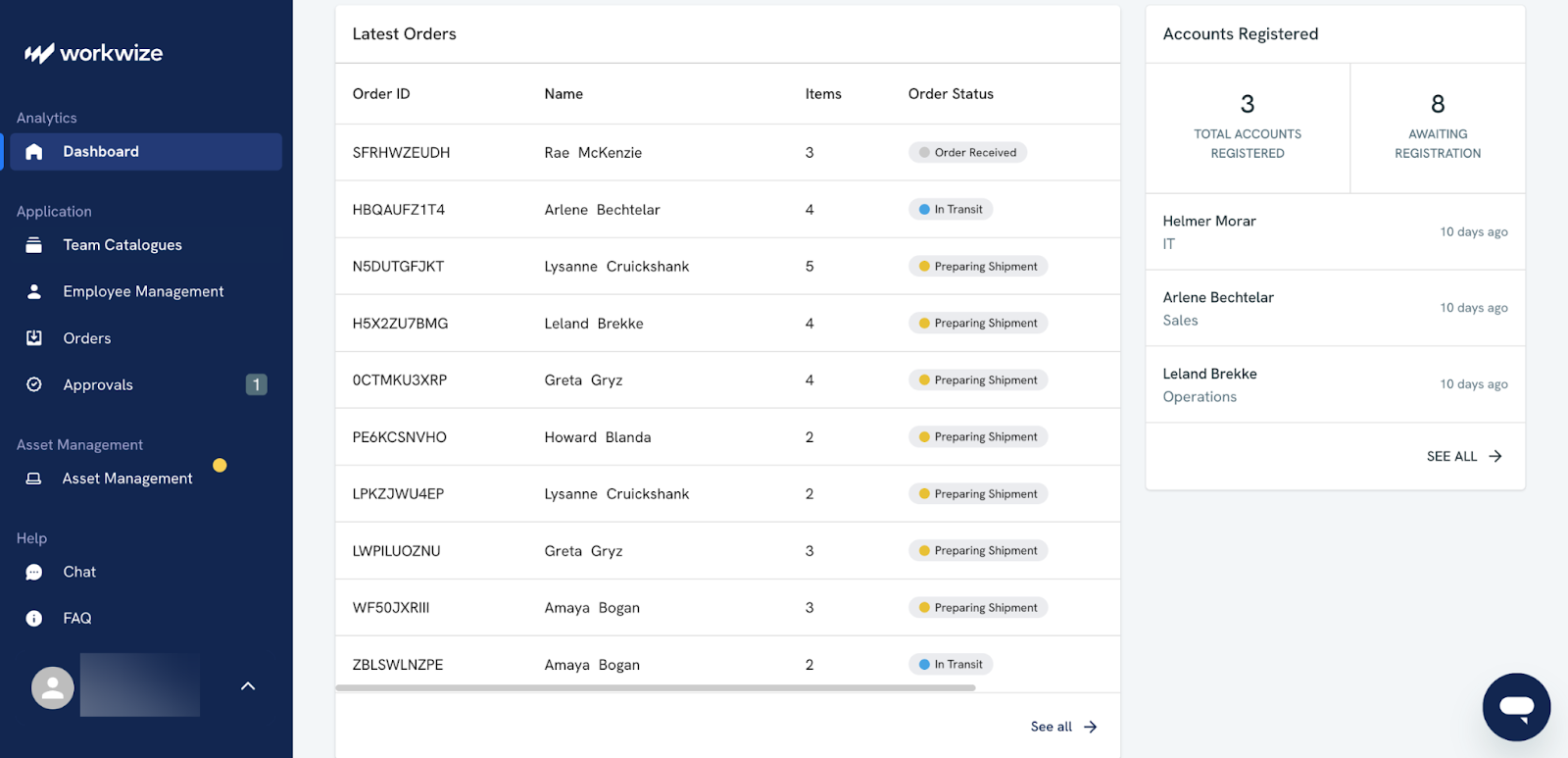
- Monitors devices: Monitors all devices at all times and ensures laptops, servers, and endpoints meet your security standards automatically.
- Protects data: Applies encryption, access controls, and safe disposal consistently across all assets.
- Simplifies audits: Maintains verifiable records to show regulators exactly what was done and when.
2. Standardize the IT asset lifecycle
Your company's laptops, phones, and servers contain sensitive data. Every step in their lifecycle is a potential compliance risk.
When every department or region manages its own device procurement and returns, dangerous inconsistencies are inevitable.
For instance, HR might collect a laptop from a departing employee without notifying IT to perform a secure data wipe. Or a remote manager may store a retired device without proper precautions.
These operational issues break your chain of custody. In a decentralized system, you lose the ability to track exactly who had a device, where it was, and the status of its data at every moment.
That’s a direct failure under regulations like GDPR, CCPA, and HIPAA, all of which demand that you maintain and prove control over data-bearing assets throughout their entire existence. If you can’t verify ownership, location, and data protection measures, you’ve already failed an audit.
Remember the 2019 incident where Morgan Stanley faced a $60 million penalty? The company hired a moving company with no data security experience to decommission two data centers. Unwiped hard drives containing the personal information of millions of customers ended up for sale online.
This was a catastrophic failure of basic hardware lifecycle management. A standardized process would have ensured that a certified IT Asset Disposition (ITAD) partner was used and that every single drive's destruction was verified and documented.
Standardizing the hardware lifecycle involves creating a single, approved, and repeatable workflow for every device across your organization.
But what’s the best way to carry out standardized hardware lifecycle management? It is by partnering with a platform like Workwize.
Workwize lets you:
- Streamline procurement: Centralize global hardware procurement and delivery on a single platform. Order or rent devices and ship them to employees in 100+ countries, while tracking vendors, costs, and warranties in real time.
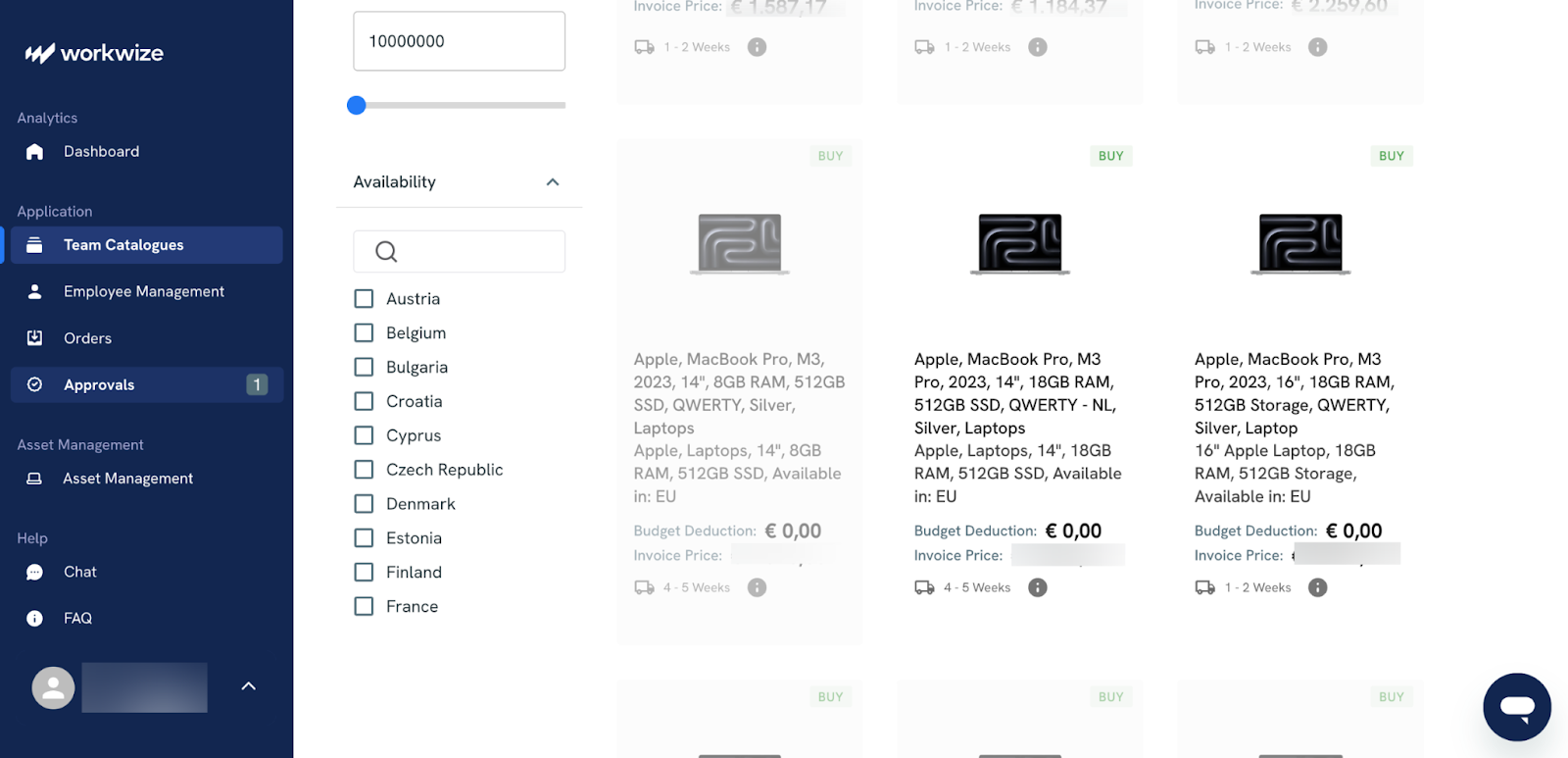
- Simplify deployment: Integrate with your MDM so devices arrive pre-configured and ready for enrollment. The moment a device connects, it applies baseline security settings automatically without any manual setup.
- Monitor usage and compliance: Maintain complete visibility into every device—who’s using it, where it is, and whether it meets your compliance standards. Eliminate the guesswork that comes with scattered tools and spreadsheets.
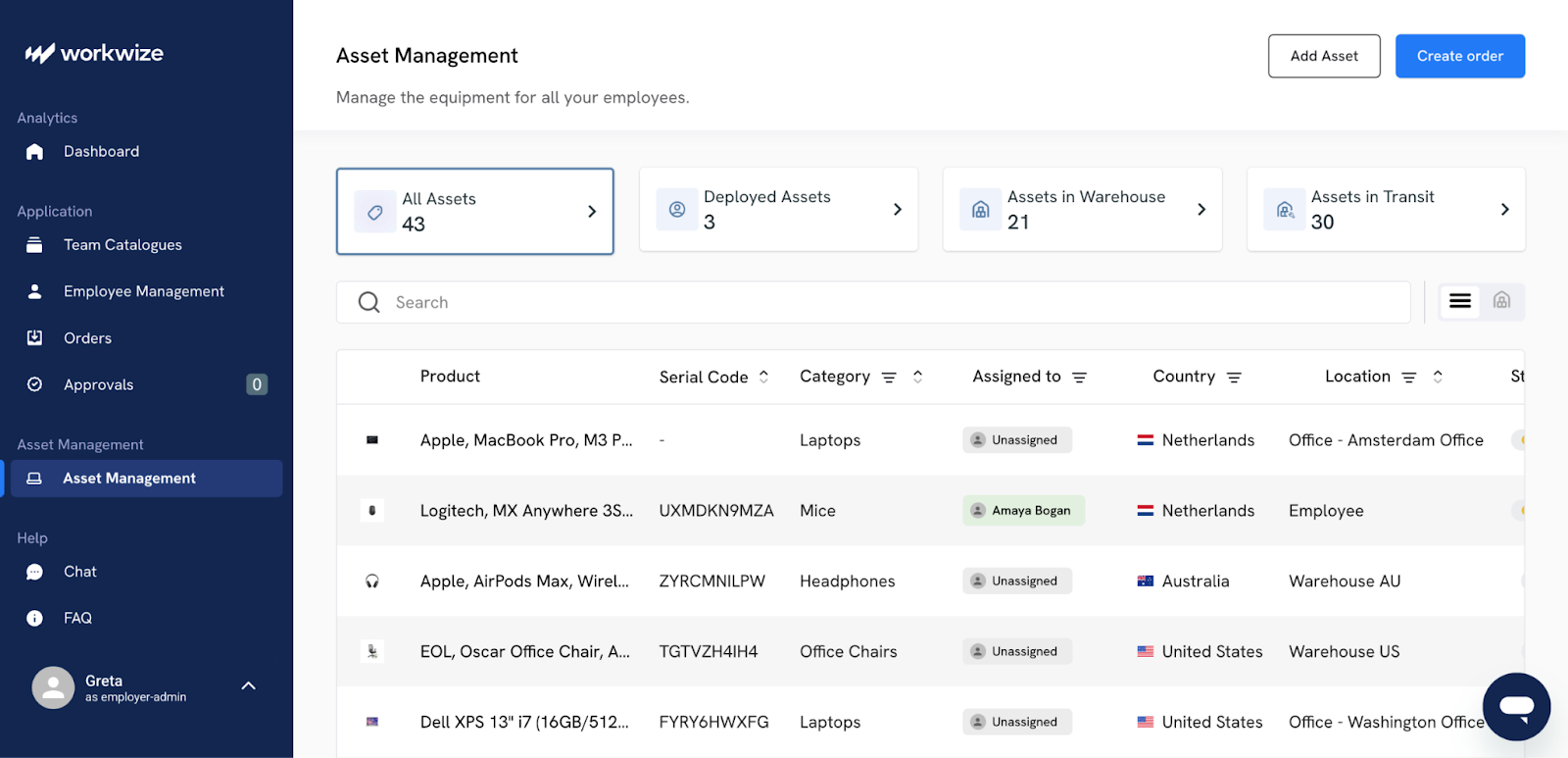
- Stay proactive on maintenance: Track warranties, repairs, and refresh cycles from one place. Get notified when devices need service or replacement, so you can fix issues before they become compliance risks.
- Automate asset retrieval: Handle offboarding and returns seamlessly across regions. Coordinate shipping, verify data wipes, and maintain a clear audit trail for every retrieved device.
- Retire devices securely: Partner with certified ITAD vendors to manage end-of-life disposal. Utilize verified data destruction methods and store certificates automatically, ensuring that every device is handled safely and in compliance.
3. Enforce security from day one
Many IT teams operate in a reactive mode, applying security controls only after a device has been deployed and is already in an employee's possession.
This creates a dangerous window of vulnerability between the moment a laptop is unboxed and the moment it is fully secured and compliant. A single unencrypted device connected to a home network or a laptop that misses its first critical patch can become the entry point for a company-wide breach.
Failing to take security seriously has led to catastrophic and entirely preventable incidents.
Remember the 2019 incident where Morgan Stanley faced a $60 million penalty? The company hired a moving company with no data security experience to decommission two data centers. Unwiped hard drives containing the personal information of millions of customers ended up for sale online.
This was a catastrophic failure of basic hardware lifecycle management. A standardized process would have ensured that a certified IT Asset Disposition (ITAD) partner was used and that every single drive's destruction was verified and documented.
Ideally, no device should ever touch your network or data unless it meets your baseline security standards. You can do this by shifting from manual configuration to automated, policy-driven enforcement.
- Implement zero-touch deployment: In this approach, devices are shipped directly from the manufacturer to the employee. The first time the employee turns on the device and connects to the internet, it automatically enrolls in your endpoint management system. This process pushes down all your required security configurations and applications before the user can even log in and eliminates the initial vulnerability gap.
- Establish a mandatory security baseline: Your endpoint management tool should be configured to enforce a compulsory set of security policies on every device, without exception. This baseline should include:
- Full-disk encryption: Tools like BitLocker and FileVault should be enabled and enforced automatically, so that if a device is lost or stolen, the data on it remains inaccessible.
- Endpoint protection: Every device must have approved anti-malware and endpoint detection and response (EDR) software installed and running.
- Automated patch management: Enforce a policy that automatically applies critical security patches for the operating system and applications. This closes the vulnerabilities that attackers most commonly exploit.
- Strong access controls: Require strong passwords or biometrics and mandate the use of MFA to protect against credential theft.
Remember that your endpoint management tools should continuously monitor every device for compliance with your policies. If a device falls out of compliance (for example, if a user disables the antivirus software or misses a critical update), it should be automatically flagged, and access to corporate resources can be restricted until the issue is remediated.
However, these security alerts are only part of the story.
By partnering with an ITALM solution like Workwize, these real-time compliance events become a permanent part of the device's lifecycle history.
Here’s how:
- Enables zero-touch deployment: Workwize enables zero-touch deployment. This means devices ship directly to employees and automatically enroll in your MDM. Security configurations and required applications are applied before the user logs in, eliminating the initial vulnerability gap.
- Maintains full device visibility: Once a device is active, you can track it in real time, including its location, warranty status, and lifecycle stage, so you can act quickly if issues arise.

- Enhances MDM effectiveness: Workwize integrates with your MDM to verify deployment, compliance, and patch status across all devices. It ensures policies are applied consistently and flags devices that fall out of compliance before they access corporate resources.
- Centralizes audit and compliance reporting: Since all device information and actions are recorded in one dashboard, it makes it easier to gather verifiable proof of compliance across teams and regions.
- Reduces operational risk: By linking hardware lifecycle management to endpoint enforcement, Workwize closes gaps that an MDM alone cannot track, such as lost or delayed shipments, misconfigured devices, or warranty lapses.
4. Manage software licenses, warranties, and contracts
A common mistake in IT compliance is focusing so intently on the physical device that you lose sight of software licenses, service warranties, and maintenance contracts.
On the software side, the surprise audit from a major vendor is a classic IT nightmare. Without a clear, centralized record of what you own versus what you've deployed, you can be hit with six or seven-figure fees for non-compliance.
Managing software compliance begins with establishing complete visibility across the environment.
This means treating software like any other tracked asset, one that needs a clear record of ownership, usage, and lifecycle events.
Here’s how to operationalize it:
- Discover all deployed software using integrations with MDMs, SCCM, and cloud connectors. Automatically scan endpoints, servers, and SaaS environments to identify every installed or active application.
- Match this against procurement data, purchase orders, contracts, SKUs, and invoices—to confirm entitlements. Use automated reconciliation to flag discrepancies where licenses were purchased but never deployed, or vice versa.
- Map licenses to users and devices by linking your procurement and HR systems with endpoint data. Ensure every assigned license has a corresponding, active user and device record.
- Centralize documentation by storing invoices, warranty data, license keys, and maintenance contracts in a searchable repository. This gives you an instant audit trail when needed.
- Automate policy enforcement so only pre-approved software can be installed, and alerts are triggered for unauthorized deployments.
- Set up renewal alerts and reclaim workflows tied to your contract calendar and offboarding process to recover unused seats before renewals hit.
- Continuously monitor utilization with telemetry from endpoints and SaaS usage logs to right-size subscriptions based on real activity.
Workwize helps you streamline this process end-to-end:
You can set up approved device and software catalogs, so when someone joins, you assign both in one go.
Moreover, procurement, deployment, and license tracking all occur within the same workflow. And when employees leave, the system can handle retrieval, data wipes, and account closures automatically.
This connected process helps you avoid the usual mess and puts you in control of hardware and software compliance. That means you don’t have to scramble during audits. You can trust that your data is complete, accurate, and handy.
5. Train employees on responsibility.
Human error remains one of the leading causes of security breaches—(68% of incidents to be precise).
Auditors are aware of this, which is why they don't simply request to see your policies. They ask for records proving your employees have been trained on them.
In fact, the training element is mandatory in several compliance standards like PCI DSS v4.0 (Req. 12.6), HIPAA (45 CFR §164.308(a)(5)), and NIST CSF (PR.AT).
Security training shouldn't be a one-time event. It must begin the moment an employee is onboarded.
This initial session should cover the core principles of your global compliance framework, including acceptable device use, data handling policies, and the specific responsibilities of each within the hardware lifecycle.
Follow this with mandatory refresher courses at least annually (or quarterly, if your risk profile requires it) to keep security at the forefront of your mind.
Here are some tips on providing quality security training to employees:
- Use real-world phishing simulations to teach them how to spot malicious emails.
- Provide clear, simple instructions for critical tasks, such as how to report a lost or stolen device immediately.
- Stress the importance of not storing sensitive company data on personal cloud services, and why they should never bypass the security measures enforced from day one.
- Explain why they need to use a VPN, why data must be encrypted, and so on. Employees are more likely to follow the rules when they understand the reasons behind them.
To see what can go wrong without proper accountability, consider this real-world case:
In April 2021, HealthReach Community Health Centers, a Maine-based nonprofit, suffered a major HIPAA breach when a worker at a third-party data storage facility improperly disposed of hard drives containing electronic protected health information (ePHI) without verifying data erasure.
The incident exposed sensitive data for 116,898 individuals, including names, addresses, dates of birth, Social Security numbers, medical record numbers, lab results, treatment histories, health insurance details, and financial account information (varying by record).
This is a perfect example of the risks associated with relying on unvetted third parties without verifiable wipe processes.
6. Centralize documentation and audit trails
Your compliance efforts are only as strong as the evidence you can produce to back them up. If your proof of compliance is scattered across dozens of spreadsheets, email threads, shipping provider websites, and local file servers, you don't have an audit trail.
When an auditor requests the complete history of a device, they expect a clear, coherent record, not a collection of fragmented files.
Your inability to produce this documentation quickly is, in itself, a compliance failure.
The solution? Workwize. It is purpose-built to solve this exact problem by linking every piece of compliance evidence directly to the asset to which it belongs. The platform consolidates all your records, from asset details to security logs, in a single connected system.
Every procurement record, maintenance update, or end-of-life certificate is stored in context, providing a transparent and auditable history of every device.
Here’s how Workwize enables you to maintain complete, verifiable compliance:
- Create a single source of truth: Workwize serves as the central location where all compliance documentation is stored and directly linked to its corresponding asset. This includes:
- Procurement records
- Chain-of-custody logs
- Maintenance history
- Offboarding documentation
- End-of-life certificates
- Tie proof to the asset: Instead of managing a scattered folder of PDFs, you have a complete story for every device. You can click on a serial number in Workwize and instantly view its entire lifecycle, including who used it, when they had it, and whether it was securely wiped, along with the proof to confirm it.
- Enable on-demand reporting: Responding to an audit request becomes a straightforward reporting task when all your data is stored in one place. You can filter for the requested assets and export their full, timestamped histories in minutes. This level of maturity and transparency immediately builds trust with auditors and demonstrates proactive compliance management.
7. Conduct regular internal audits
Do not wait for an external regulator to be the first one to test your compliance program. An official audit is a final exam where failure comes with grave financial and reputational costs.
Regular internal audits, on the other hand, are your practice runs. They are your chance to find and fix the gaps in your processes in a low-stakes environment.
For example, the post-mortem of the 2019 Capital One breach revealed that internal audits had flagged some security misconfigurations. However, those issues weren’t fixed in due time, which contributed to the breach's severity.
The lesson here is that it's not enough to find the problems; a structured process is needed to address them. Regular internal audits provide the framework for both discovery and remediation.
Here’s how you set up and conduct internal audits:
- Don't try to audit everything at once. Focus each internal audit on a specific, high-risk process. For instance, you could run a quarterly audit on employee offboarding. To do this, use your ITALM platform to pull a random sample of 50 employees who left the company in the last quarter. Then, for each one, verify:
- Was a retrieval workflow triggered on their last day?
- Can you produce the return shipment tracking number and proof of delivery?
- Is there a certificate of data destruction on file for their device?
- Test your data and documentation. Compare the list of active devices in your ITALM platform against your endpoint management tool used for security enforcement. Do the device counts match? Are there any ghost assets in one system that aren't in the other? Reconcile these issues as they emerge.
- Use the findings to get better. The goal of an internal audit is to strengthen your program. Document every gap you find and create a formal plan to address it. You may discover a specific regional office is consistently failing to retrieve hardware. This means you’ll target retraining and adjust the workflow for that team.
8. Continuously improve your compliance program.
Finally, you have to understand that IT compliance is a continuous and cyclical process.
The laws, technologies, and risks that shape your compliance obligations are constantly changing. A compliance program that is perfect today could be obsolete in eighteen months if it is not actively maintained, reviewed, and improved.
Here are just some of the ways you can make your compliance process continuously better:
- Use audits as a catalyst for change: Use the findings from your internal audits to find weaknesses in your program and drive targeted improvements. If an audit reveals a gap, update your employee training, tweak your automated workflows, and amend your central framework.
- Stay up to date: Designate a team member to stay informed about new regulations and emerging risks. When a new data privacy law is passed, analyze its impact on your operations and begin adapting your policies before it becomes a pressing issue.
- Review, refine, repeat: Build a recurring review cycle(quarterly or biannually) to assess what’s working, what’s not, and where processes need to evolve.
Making Compliance Work Smarter With Workwize
Global IT compliance has become a moving target.
Regulations are constantly changing, and distributed teams make it more challenging to maintain consistency. But companies that treat compliance as part of everyday IT operations, not an afterthought, are the ones that stay ahead.
It starts with a clear framework that defines how devices and data are managed everywhere. From there, the real progress comes through automation and visibility. That’s what turns compliance from a reactive checklist into a confident, proactive system.
Workwize helps companies do exactly that. By bringing every stage of the device lifecycle into one connected platform, it ensures policies are applied, tracked, and verified without extra effort. Compliance stops being a burden and becomes part of how you run IT.
Book a Workwize demo now to learn more.


Establish a single source of truth for every IT asset across the globe.
.png?width=258&height=318&name=g10%20(5).png)
More related resources to help you stop firefighting hardware operations.


Get monthly insights into how other IT leaders are improving their ops.



.png?width=2880&height=1232&name=Group%202147262874%20(1).png)
Stop coordinating
hardware like it's 2012.
.svg)
.png?width=172&height=68&name=apple%20business%20patner%20(1).png)
.svg)
.svg)
.svg)
.svg)