






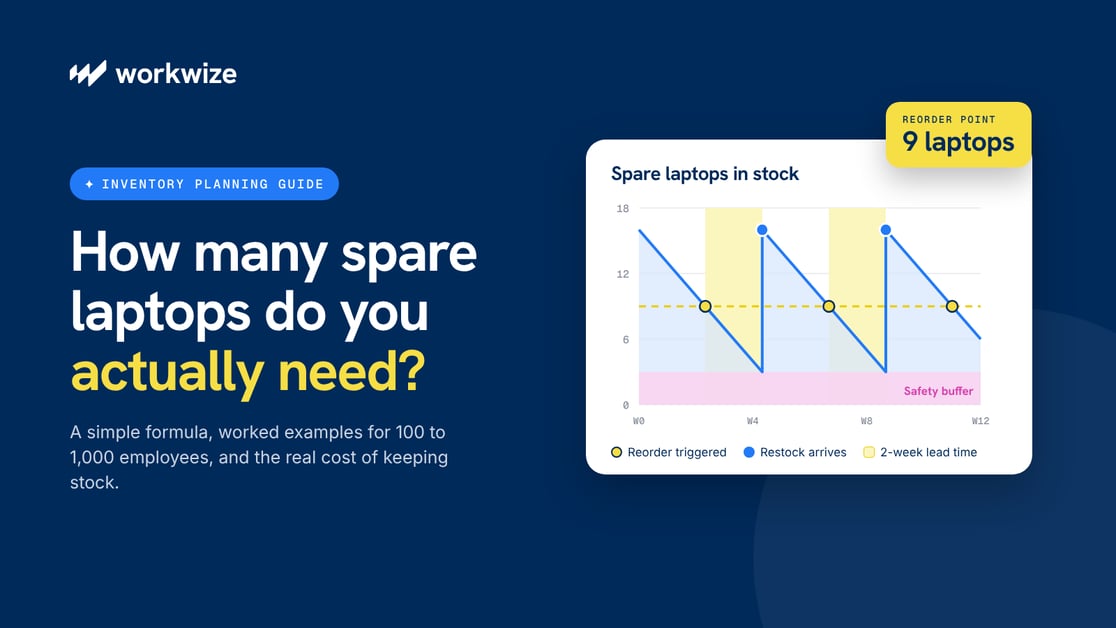

Picture a 500-person company entering a busy hiring quarter. New hires need laptops, existing devices are failing, and some employees are waiting days for replacements.
These are the situations IT teams need to prepare for. According to HappySignals' 2026 Global IT Benchmark, employees lose an estimated five working hours a month to computer issues.
Having replacement laptops ready can reduce downtime when devices fail or need repairs.
But there’s a financial trade-off.
Stock too few, and employees may spend days waiting for replacements. Stock too many, and you're tying up money in hardware that sits unused and loses value over time.
At an assumed $1,200 per laptop, 20 unnecessary spares represent $24,000 in hardware purchases.
So, how many spare laptops should your company actually keep?
In this guide, we'll explain how to estimate your spare laptop needs, calculate when to replenish stock, and avoid spending more than necessary. We'll also show how to use IT asset management tools to control costs without compromising employee productivity.
Keeping everyone equipped takes accurate forecasts and coordinated purchasing that gets devices where they’re needed, on time.
But IT must cover unpredictable demand without tying up thousands of dollars in spare laptops. Too little stock means delayed starts, longer downtime, and expensive rush orders. Too much means paying to store hardware that loses value while employees use other devices. At an assumed $1,200 per laptop, just 20 unnecessary spares tie up $24,000.
When workers lose an estimated five working hours a month to computer issues, as reported to HappySignals, it has a ripple effect across your organization, from poor product quality to lost client contracts and consumers.
Keeping enough spares without overspending means accounting for hiring plans, failure rates, supplier lead times, and employee locations. This article explains how to calculate the right stock level, with a simple formula and worked examples. We'll also show how smart IT asset management practices can help keep costs to the minimum.
How Many Spare Laptops Should an IT Team Keep?
No single spare laptop ratio works for every company, and any vendor quoting a flat percentage is guessing on your behalf.
The best number for your company depends on how fast your laptop procurement framework replaces issued spare stock, how many devices employees may need before you take delivery, and how many devices you currently manage.
A company purchasing IT from a local supplier with two-day delivery has less ground to cover than one waiting for shipments to clear customs across six countries. Hiring patterns also matter, as steady recruitment makes it easier to adjust your replacement request expectations on a rolling schedule.
It helps to separate your spare stock from assigned inventory, such as equipment earmarked for confirmed new hires with designated start dates. That way, you are not making a new hire's laptop an unforeseen problem.
The following planning principles provide a snapshot of the best inventory approach to follow depending on the operating environment.
| Operating environment | Inventory approach | Why it works |
|---|---|---|
| Predictable hiring, short delivery lead times | Smaller buffer | You can replenish replacement stock quickly |
| Rapid hiring or frequent replacements | Larger buffer | You may need more devices before the next restock lands |
| Distributed workforce across several countries | Regional buffers | Stock has to sit where the demand actually happens |
| Specialized devices or long procurement lead times | Model-specific reserve | Suitable replacements take longer to source |
What Determines How Many Spare Laptops You Need?
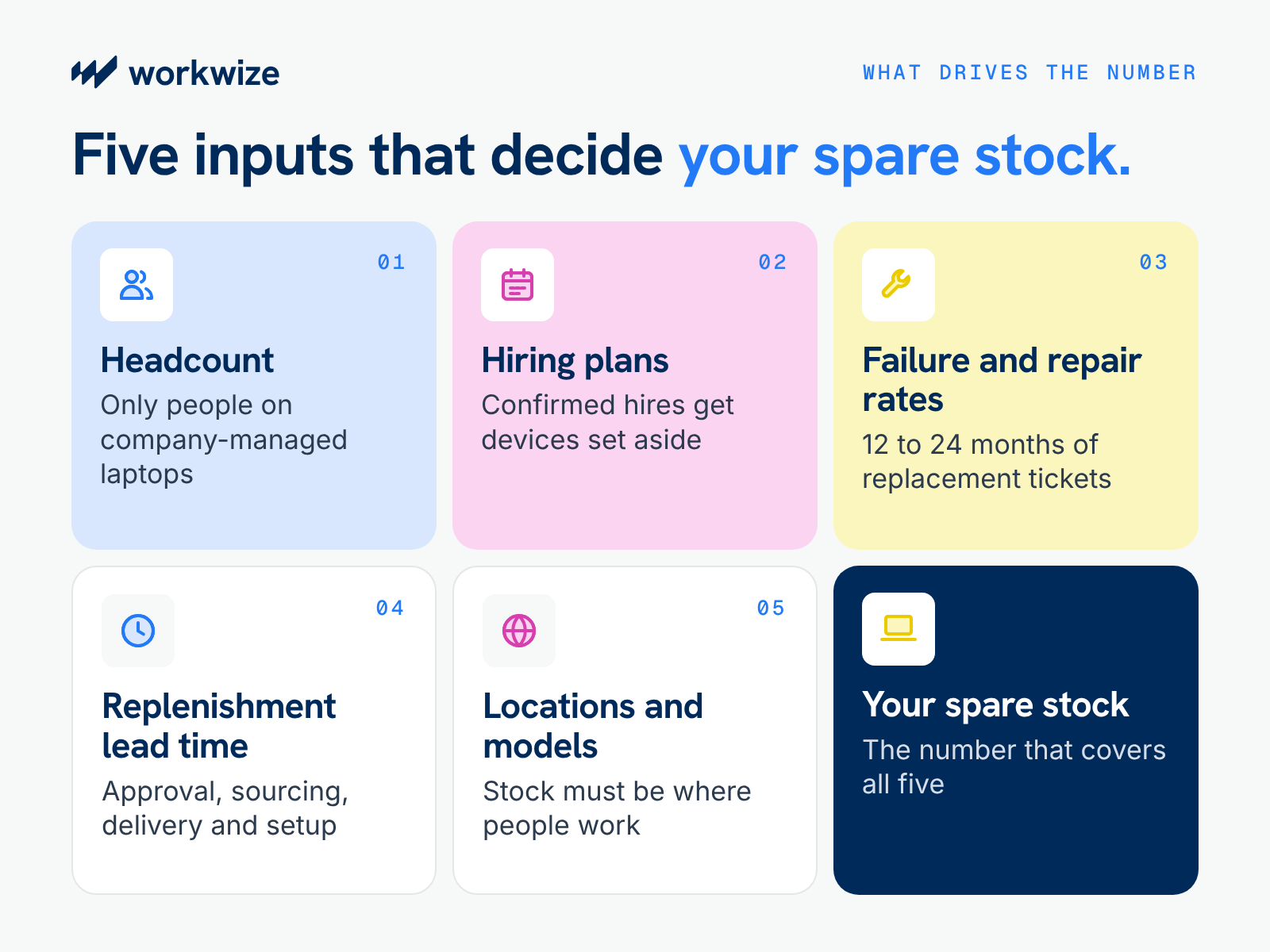
The right spare stock level depends on how many replacement or loaner laptops employees request on average, how quickly one can reach them, and how soon you can replenish used stock.
You can rely on your fleet data (such as device health and repair histories), past replacement demands, specific assignee usage patterns, and delivery arrangements to determine how many devices to keep as reserves.
Let's cover the factors you should ideally consider when deciding how many spares to keep.
Employee Headcount and Expected Laptop Demand
Start with the number of employees who use company-managed laptops, not your total headcount.
For example, contractors who use their own devices or warehouse employees who share computers shouldn't automatically count toward your spare laptop requirements.
Scheduled refreshes should also not make it to this bucket, since you plan purchase orders for those operations separately.
You can also draw expected demand from your fleet's health. Consider that users of older devices, or hardware with a history of faults, are more likely to request loaners or replacements.
Hiring Forecasts and Onboarding Schedules
Knowing how many people are likely to join helps IT estimate how many laptops to set aside, while start dates tell the team when those devices need to be ready.
For example, if 30 employees are starting next month, IT should arrange their devices in advance rather than rely on laptops reserved for unexpected failures.
Once devices are allocated to confirmed hires, subtract them from your available inventory. This shows how many laptops remain for emergencies and whether additional purchases are necessary.
You can understandably dip your hand into your reserves during sudden onboarding that HR and IT barely had time to plan for. But it shouldn’t become the default source of equipment for planned hires.
Device Failure, Loss, and Repair Rates
Review service tickets from the past 12 to 24 months to see how often employees requested replacements for failed, damaged, missing, or stolen laptops. That makes it easier to estimate how many spares the team typically issues in a week or month.
Those records can also show whether employees kept their replacements or used them as loaners during repairs and how long, on average, loaners stayed with them. Tracking these types of requests helps IT understand how many laptops it needs to support ongoing demand.
Procurement and Replenishment Lead Times
Once IT completes a laptop deployment from your spare stock, the remaining inventory has to cover any new requests until a replacement is ready to ship.
That wait includes getting the purchase approved, sourcing the right model, and preparing it for use after delivery. If any of those steps regularly take longer, IT may need a few more spares to cover the gap.
Lead times can vary enough by country and model that a company-wide average hides the difference. A local supplier might deliver a standard laptop in two days, while an imported model could take five weeks to arrive if customs paperwork is missing.
Even if both locations see the same number of replacement requests each week, the one waiting longer needs more stock on hand. Factor these differences into your laptop deployment and inventory planning rather than relying on a single company-wide lead time.
Employee Locations and Hardware Requirements
Having spare laptops somewhere in your inventory doesn't necessarily mean they're available when employees need them.
For example, ten laptops stored in New Jersey won't help an engineer in Bangalore who needs a replacement tomorrow if international shipping and customs clearance take several weeks.
Device specifications is also critical. A standard office laptop may not support the software or processing requirements of an engineer, designer, or developer.
Plan spare inventory around where employees work and the types of devices they need. For distributed teams, this may mean keeping compatible stock in regional warehouses or arranging local procurement to avoid lengthy cross-border shipments.
How to Calculate Your Spare Laptop Inventory
The calculation involves estimating how many laptops your employees loan or request on average, how long it takes to replace whatever you give out, and sudden spikes in requests. We'll walk you through how to determine each number and apply it to the final equation.
Step 1. Estimate your average laptop demand
Suppose your service tickets show that IT issued 78 laptops for unexpected replacements and temporary loans over 26 weeks. Divide the number of issued laptops by the number of weeks to get a weekly average.
78 laptops ÷ 26 weeks = 3 laptops per week
This count includes loaners given to employees while their laptops are being repaired, but you should exclude laptops reserved for confirmed new hires when counting available spares.
Step 2. Calculate demand during replenishment lead time
Replenishment lead time runs from the day IT allocates a spare until another laptop is ready to issue. It includes purchase approval, sourcing, delivery, and setup. Using weeks for both inputs keeps the calculation simple.
Expected demand during lead time = average weekly demand × replenishment lead time in weeks
So if it takes two weeks to get a purchase approved, receive the laptops, and prepare them for use, the stock on hand needs to cover two weeks of requests.
3 laptops per week × 2 weeks = 6 laptops
Step 3. Add safety stock for unexpected demand
A safety buffer is the number of devices you keep for sudden spikes in replacement requests, such as when 9 instead of 6 requests arrive in two weeks.
You can estimate this buffer by comparing the number of laptops issued in an average week with the number issued in a busy week. For example, if your historical data shows IT usually needed nine during a busy fortnight when it usually issued 6 on average every two weeks, the number works out to 3 (9 - 6).
However, with enough records, you can use a statistical method to find this number based on how your weekly spikes vary. It involves choosing a service level, a number that represents how often you want stock to cover all requests until replenishment, and using its matching statistical factor (a 95% service level has a multiplier of 1.65, for example).
You can then multiply that factor by your standard weekly variation and the square root of your replenishment lead time in weeks:
Safety stock = multiplier × weekly variation × √(lead time in weeks)
Step 4. Calculate your total and check available stock
Add the demand during replenishment from Step 2 to the safety buffer from Step 3.
Spare stock required = (weekly demand × lead time in weeks) + safety buffer
Using our statistical example:
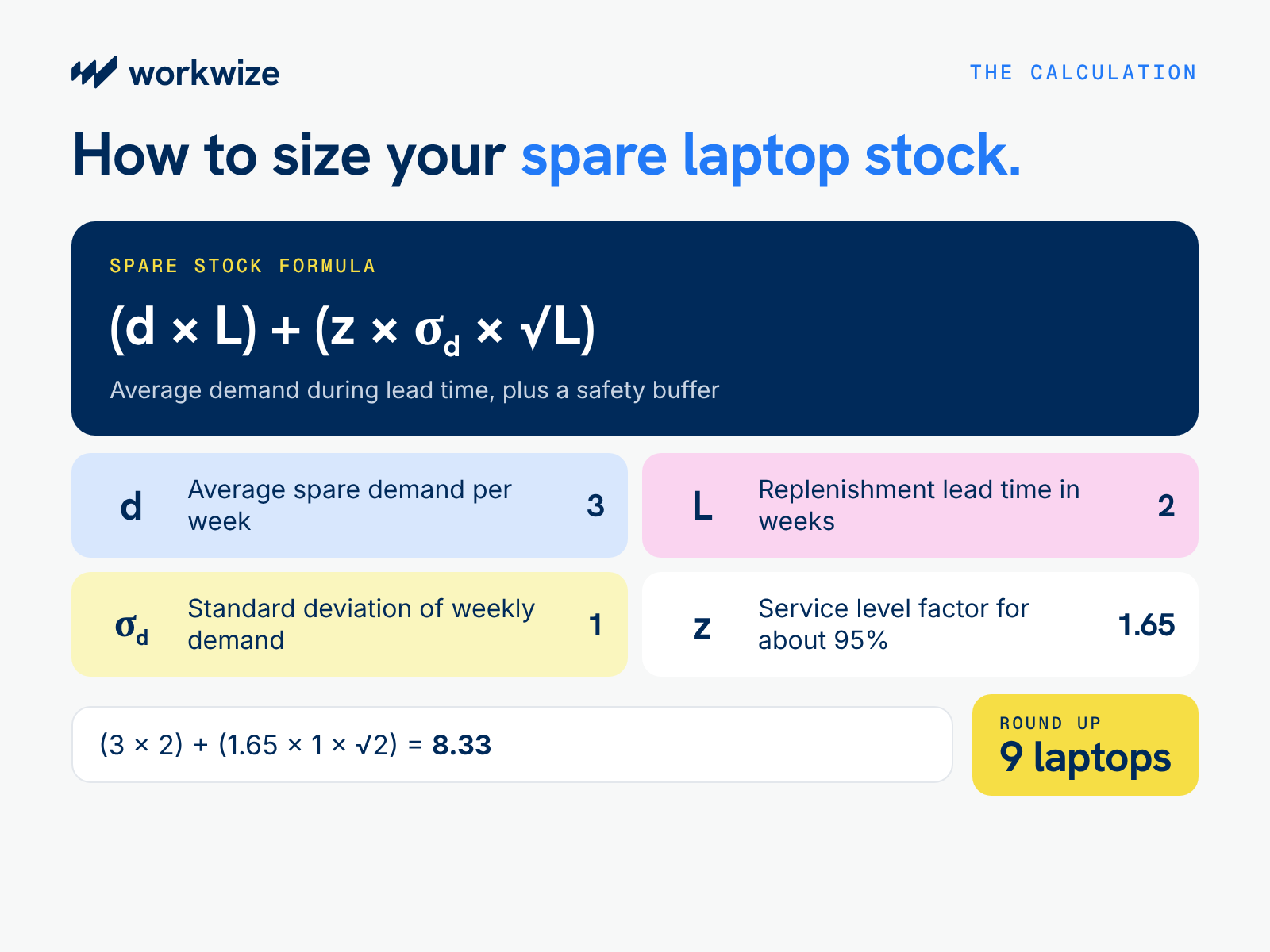
Spare stock = (d × L) + (z × σd × √L)
Note:
- d is average demand for spare laptops per week:
- L is replenishment lead time in weeks
- σd is the standard deviation of weekly demand
- z is the service-level factor, such as 1.65 for an approximate 95% one-sided service level
Using our example:
- Average demand: 3 laptops per week
- Replenishment lead time: 2 weeks
- Weekly demand standard deviation: 1 laptop
- Service-level factor: 1.65
Spare stock = (3 × 2) + (1.65 × 1 × √2)
Spare stock = 6 + 2.33 = 8.33 laptops
Rounding up gives 9 spare laptops
This means IT should initiate replenishment when inventory position reaches about nine laptops. Inventory position includes usable stock on hand and outstanding replenishment orders, minus back orders
The reorder point isn't necessarily the number of laptops you should keep in storage at all times. Your actual on-hand reserve also depends on how frequently you replenish inventory, how many devices employees may need simultaneously, and how quickly loaners return.
Check available, unallocated stock separately from incoming shipments, reserved devices, and laptops undergoing repair. Use this information to decide how much to order and when.
Spare Laptop Sizing Examples for 100, 500, and 1,000 Employees
For companies where each employee uses a company-managed laptop, the examples below show how fleet size affects the calculation.
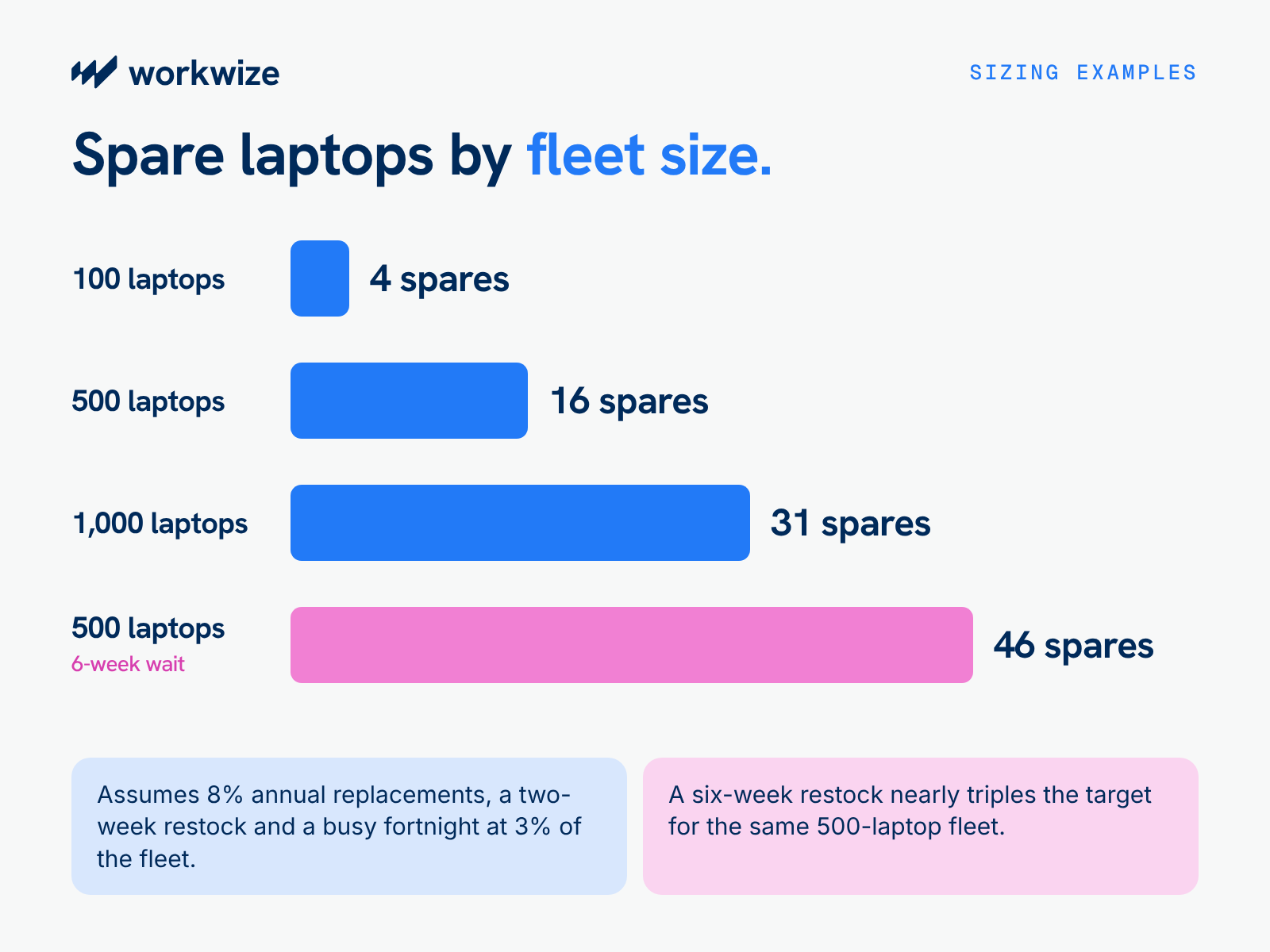
We'll use a hypothetical annual replacement rate of 8%, a two-week replenishment time, and a busy demand of an extra 3% of fleet size in just a fortnight.
Calculating these numbers, as we've explained earlier, is as follows:
Safety buffer = busy demand over two weeks − average demand over two weeks
Spare stock = average demand over two weeks + safety buffer
Here's how it works out for different company sizes, with safety buffers and total spares rounded up:
| Managed laptops | Annual replacements at 8% | Average demand over 2 weeks | Assumed requests in a busy fortnight | Safety buffer | Rounded-up spares |
|---|---|---|---|---|---|
| 100 | 8 | 0.31 | 3 | 2.69 (3) | 4 |
| 500 | 40 | 1.54 | 15 | 13.46 (14) | 16 |
| 1,000 | 80 | 3.08 | 30 | 26.92 (27) | 31 |
For the 500-laptop company, the calculation works as follows:
Average two-week demand = 500 × 8% ÷ 52 × 2 = 1.54 laptops
Safety buffer = 15 − 1.54 = 13.46, rounded up to 14 laptops
Total spares = 1.54 + 14 = 15.54, rounded up to 16 laptops
These targets describe stock to keep available while replenishment is underway. Actual requirements may be higher if requests exceed the assumed busy-period count or employees need different models in separate locations.
What happens when replenishment takes longer?
If replenishment takes six weeks, the 500-laptop company must cover a longer stretch of requests. For this comparison, assume its busy-fortnight pace continues throughout that wait, producing 45 requests over six weeks.
Average six-week demand = 500 × 8% ÷ 52 × 6 = 4.62 laptops
Safety buffer = 45 − 4.62 = 40.38, rounded up to 41 laptops
Total spares = 4.62 + 41 = 45.62, rounded up to 46 laptops
The target rises from 16 to 46 spares under this sustained-demand assumption. In practice, six-week replacement records would help establish whether that pace is plausible or whether busy fortnights are usually followed by quieter weeks.
How Much Does It Cost to Keep Spare Laptops in Stock?
The sticker price of each spare laptop, plus the logistics, customs, and setup costs to get it to your storage facility and ready to ship, is already an upfront cost. But you still need to account for storage, handling, insurance, and declining hardware value.
Whether that investment makes sense depends on the shortages those laptops would prevent and the disruption those shortages cause.
What Costs More: Spare Inventory or Emergency Replacements?
Suppose a company had to buy 11 laptops unexpectedly last year to replace failed or damaged employee computers. With no spares available, each incident meant an urgent purchase and a wait for the affected employee.
Let's cover how those numbers compare against a scenario where the company keeps at least 4 spares and replaces any device after issuance.
| Cost over one year | No spare laptops | Maintain four spares |
|---|---|---|
| Initial reserve: 4 × $1,200 | $0 | $4,800 |
| 11 replacement purchases at $1,200 each | $13,200 | $13,200 |
| Emergency purchase premiums: $150 per replacement | $1,650 | $0 |
| Expedited shipping: $75 per urgent replacement | $825 | $0 |
| Standard delivery: $40 × 11 replacements | $440 | $440 |
| Initial setup: $100 per laptop purchased | $1,100 | $1,500 |
| Reserve storage and insurance: $5 per laptop per month | $0 | $240 |
| Reserve handling: $20 per laptop per year | $0 | $80 |
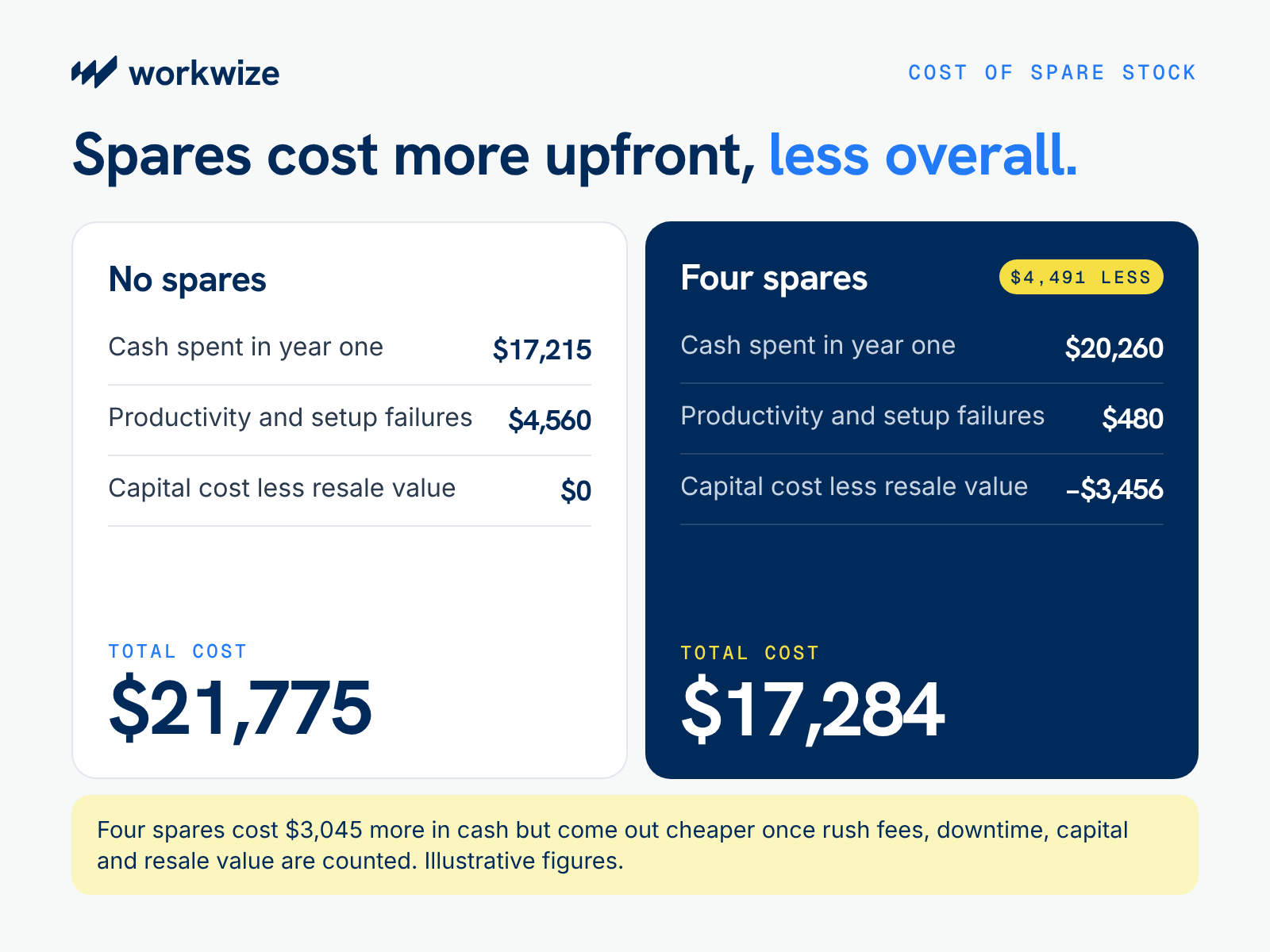
| Total cash spending | $17,215 | $20,260 |
| Estimated productivity and business impact | $4,200 | $300 |
| Returns due to setup failures: $180 per incident | $360 for two returns | $180 for one return |
| Cost of capital committed to the reserve: 8% of $4,800 | $0 | $384 |
| Subtract year-end reserve value, assuming a 20% decline | $0 | −$3,840 |
| Total cost | $21,775 | $17,284 |
All figures are illustrative assumptions. Supplier delivery to the stocking or setup location is assumed to be included in the laptop price. Standard delivery covers shipment to employees.
Maintaining four spares requires $3,045 more cash in the first year, including setup for the four devices remaining in reserve. After accounting for their remaining hardware value, committed capital, and estimated productivity impact, the spare-stock approach costs $4,491 less in this example.
Should You Keep Spare Laptops Centrally or Across Multiple Locations?
Where you hold stock matters almost as much as how much you hold, especially once your workforce crosses a border or two.
Centralized inventory
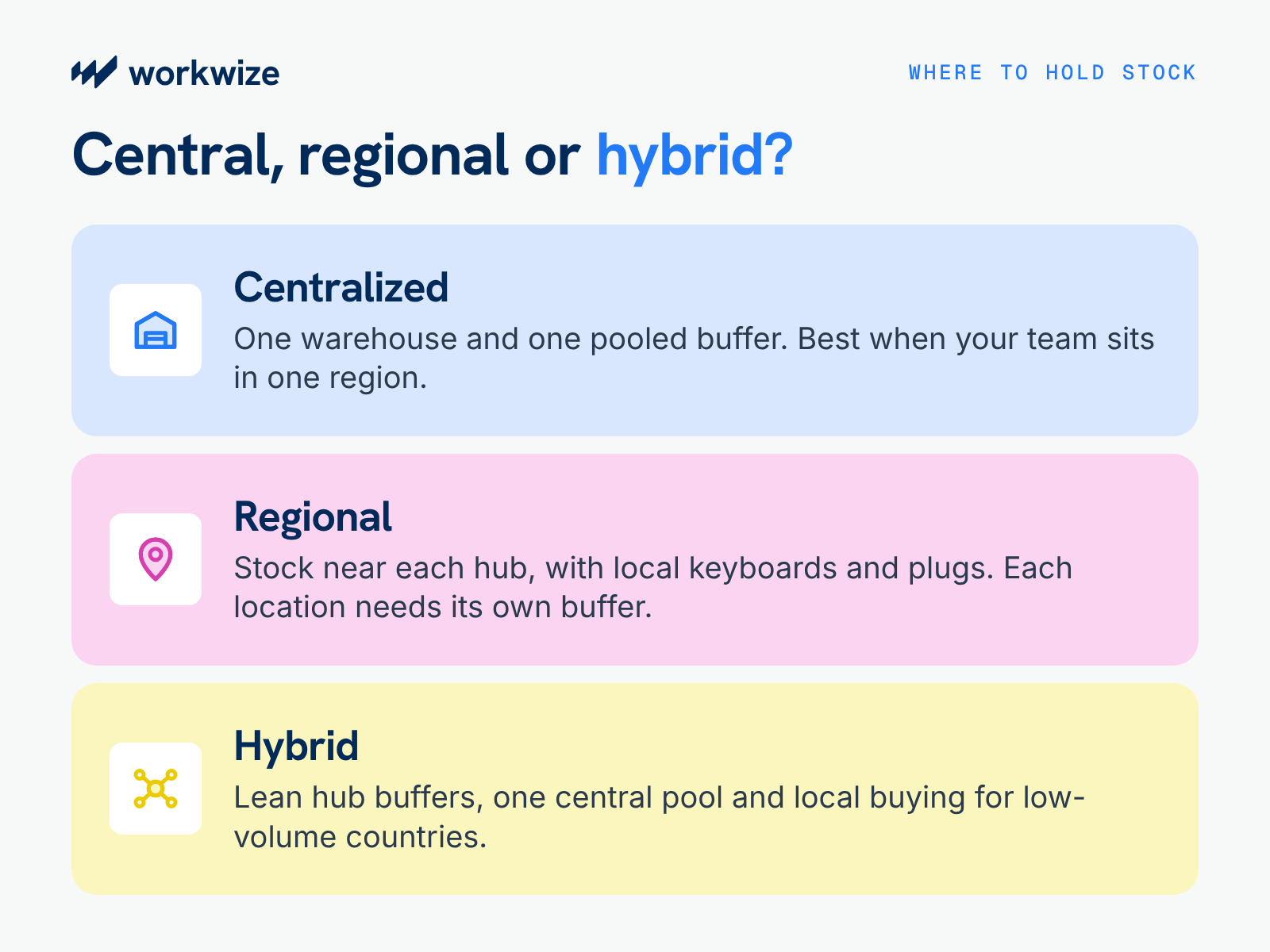
Keeping your spares in one warehouse simplifies provisioning and inventory control because it's easier to track and manage stock from one place. A smaller total buffer can also provide better coverage, since a spike in one team can draw on stock that would otherwise sit elsewhere.
However, this model is best for workforces located within the same regions. If a spare has to travel internationally, clear customs, and accrue import VAT, those advantages almost disappear.
That's because, on top of the logistics and duty-related expenses, your lead times can stretch from days to weeks, keeping your downtime impact high and increasing the amount of buffer you need to maintain at any given time.
Regional Inventory
Keeping stock in-region cuts last-mile delivery times and sidesteps repeat customs entries. It also lets you hold the right keyboard layouts, power plugs, and locally supported models.
Every location needs its own minimum buffer because five small spares in the right location is better than one pooled buffer across boundaries. That fragmentation is the price you pay for speed. To judge whether a country earns dedicated stock, compare its hiring volume and incident rate with how long a centrally shipped device takes to land there.
A Hybrid Inventory Strategy
Many distributed companies settle on a mix of lean buffers in their largest hubs, a deeper pool in one central warehouse, and on-demand local procurement for low-volume countries. The right split depends on hiring volume, incident rates, local delivery times, and the cost of carrying inventory in each market. Review it whenever your headcount map changes.
How to Reduce Spare Laptop Inventory Without Increasing Employee Downtime
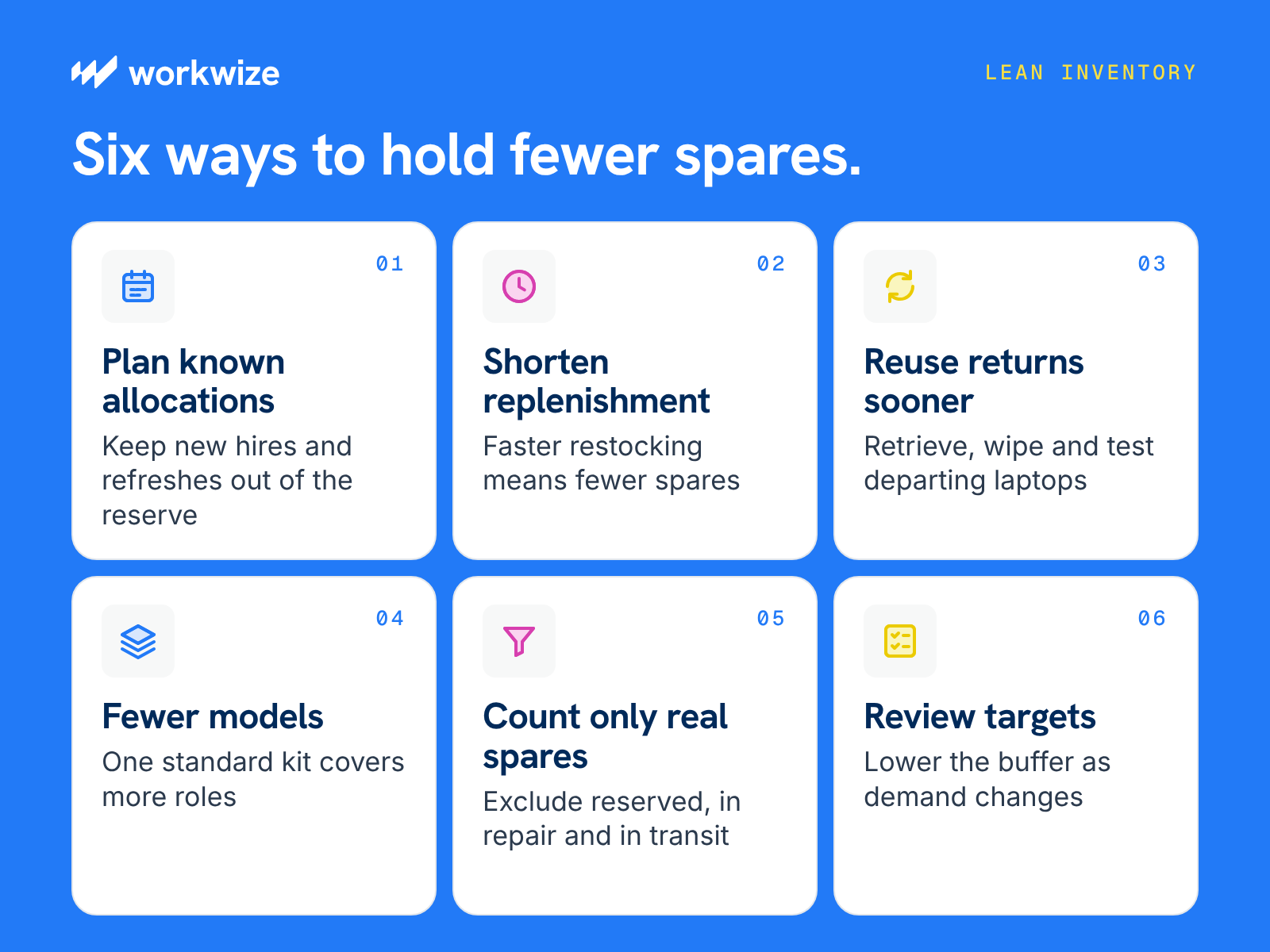
You can hold fewer spare laptops when replacements arrive faster, returned devices become usable sooner, and upcoming demand is easier to predict. Before reducing your reserve, consider where these changes could give you more reliable coverage.
- Plan known allocations ahead
When HR confirms a start date, or IT schedules a refresh, arrange the equipment separately so those requests do not unexpectedly consume your emergency reserve. Compare upcoming allocations with available stock and scheduled deliveries to identify what you actually need to buy. - Shorten the wait for replenishment
If replacing a spare takes six weeks, you need enough laptops to cover requests throughout that wait. Faster restocking lets you keep fewer devices on hand. Check what slows the process, whether it’s purchase approvals, supplier availability, shipping, or setup.
Automated workflows are a quick way to slash your lead time and even save work hours.
For example, Workwize’s Workflow Builder can help automate parts of the replenishment process. You can describe the process you want to automate in plain language, such as triggering a replacement order when an employee requests a laptop, routing it through the appropriate approval channels, and updating connected systems.
These automated workflows work alongside Workwize's local sourcing and fulfillment services to help employees receive replacement devices faster.
- Get suitable returns back into use
Before ordering another laptop, check whether an employee departure or completed repair will release a suitable device. Prompt collection, inspection, sanitization, and testing can turn those returns into replacement stock sooner.
You can create an automated workflow in Workwize Workflow Builder to connect an employee’s departure to device retrieval, an MDM wipe, and routing back to storage or the next hire. Automating that coordination helps returned equipment move toward reuse without repeated manual follow-ups. Count it as available only after the required checks are complete.
- Choose models that cover more roles
Supporting a different laptop configuration for every department can leave you holding several small reserves that cannot cover one another’s shortages. Where workloads allow, use a smaller selection of approved models. - Make availability clear before buying
An inventory total can include laptops already promised to new hires, awaiting repair, purchased as part of a refresh campaign, or still in transit. Ensure spare stock is defined correctly to exclude whatever you have reserved for new hires or upcoming refreshes. This helps prevent duplicate purchases without creating false confidence about what is available. - Adjust targets as demand changes
Once deliveries become reliably faster or replacement requests decline, revisit the buffer calculation to avoid carrying the old reserve indefinitely. Check shortages, fulfillment times, and device suitability alongside stock levels. Reduce purchases gradually, allowing normal demand to bring inventory down while you confirm that employees still receive replacements on time.
How Workwize Helps You Manage Spare Laptop Inventory
Keeping spare laptops available across multiple countries can get expensive, especially when IT has limited visibility into which devices are ready for use, reserved for employees, or awaiting retrieval.
Workwize brings procurement, warehousing, setup, delivery, retrieval, and redeployment into one platform, helping IT teams manage equipment across 130+ countries.
For globally distributed workforces, Workwize stores spares closer to employees and sources laptops locally to shorten replenishment times. You can track available, assigned, and returning devices centrally, while Workwize prepares and ships equipment where it’s needed.
Workwize Workflow Builder also lets you automate replenishment using plain-language prompts. Workwize Agent turns your instructions into workflows that can retrieve laptops from departing employees and route suitable devices back into spare stock after inspection, wiping, and setup. When a purchase is needed, a workflow can initiate an order, route required approvals, and coordinate delivery into storage.
Book a demo to see how Workwize can support your spare laptop strategy.

Establish a single source of truth for every IT asset across the globe.


Get monthly insights into how other IT leaders are improving their ops.




Stop coordinating
hardware like it's 2012.


