




.svg)
.svg)

.svg)


.svg)





.svg)
.png?width=500&height=424&name=Style-1---V1-(1).png)

.png?width=1230&height=692&name=Vector%20(13).png)
What is IT Asset Recovery?
IT asset recovery is the process of retrieving IT equipment that is no longer in active use and recovering value from it via refurbishment, redeployment, resale or disposal.
And the assets (laptops, computers, workstations, servers, tablets, smartphones and more) can be recovered from multiple sources during the asset lifecycle:
- Departing employees
- Device refresh programs
- Office closures
- Unused inventory
- End-of-life decommissioning
Note: IT Asset recovery is not interchangeable with IT asset disposal (ITAD) or recycling or IT asset retrieval. It’s a broader concept that encompasses processes such as retrieval, reselling, disposal, recycling or refurbishment.
And the primary goal of IT asset recovery is to ensure:
- The data on the devices isn’t exploited
- The maximum monetary value is extracted from the devices
- And whatever happens with the devices happens in an eco-friendly way.
Let’s now explore the significance of IT asset recovery in more detail.
Why is IT Asset Recovery Important?
Here’s why every company (big or small) must invest in IT asset recovery:
- Reduces security and data breach risks: According to the HP Wolf Security study, 12% of WFA (work from anywhere) workers have left a job without returning their device right away and almost half of these say they never did.
IT assets like laptops and workstations usually contain sensitive corporate information. Therefore, if these devices remain with your employees longer than required or are lost, this creates a risk of security breaches.
And with the average cost of a data breach being around $4.4 million, that’s something you’d want to avoid.
However, an established IT asset recovery process can ensure the assets are securely recovered and handled, reducing the likelihood of breaches.
- Prevents hardware loss and replacement costs: Every year, lost and stolen devices cost organizations an estimated $8.6 billion. This cost usually involves the cost of purchasing new devices and breaches that might occur.
With IT asset recovery, you can retrieve all your devices, inspect them and have the ones in good condition reassigned to new employees. And the end-of-life devices can be recycled or disposed of. This lowers your replacement costs and saves your company from data breaches.
- Minimizes e-waste and promotes sustainability: According to the same study (HP Wolf Security), around 60% of ITSDMs (IT and security decision makers) admit that their failure to recycle and reuse perfectly usable laptops is contributing to an e-waste epidemic.
Having a well-laid-out plan for IT asset recovery can help you maximize value from your devices and fully reuse them. And this can further help minimize e-waste being dumped into landfills.
The IT Asset Recovery Process (Step-by-Step)
While the actual process may vary from company to company, here’s how a typical IT asset recovery process works:
1. Audit (1-3 days)
This may sound obvious, but auditing and identifying what devices you have, where they are and in what condition guides your next steps.
Let’s say there are 7 laptops with remote employees who’re leaving the organization on one side. On the other hand, you have 54 laptops sitting in your New York office.
When you know this, you’ll focus on recovering laptops from remote employees first, since the devices are highly valuable in both data and monetary terms.
Once you have those devices back from your employees, you can proceed with the ones in your office.
To know what devices you have, you can use your asset tracking tool. If you don’t have one, check out our handpicked list of the best asset tracking tools: 12 Best IT Asset Tracking Software in 2026
2. Retrieve (1-2 weeks)
Once you have the basic details, you need to retrieve those devices from your employees, warehouses or offices for further processing.
Now, there are a few scenarios here. Asset retrievals mostly make sense when you’re recovering laptops or workstations from employees leaving your organization.
For other sources, such as offices in different countries or cities, you can simply ask your IT asset recovery service provider to securely store them in a storage facility. Because bringing all the devices to your location could be impractical, especially if your primary office is in a different country.
So, focus on retrieving your assets from your employees and get them to your local warehouse or to the asset retrieval service provider’s storage facility.
3. Assess (1-2 days)
Companies have a variety of options when it comes to deciding what to do with old IT equipment. In addition to refurbishing them, some donate them, some resell them and some scrap them, as stated by this Reddit user:

Source: Reddit
But, to come to a conclusion, you must perform a thorough assessment. For instance,
- If the device is 3-4 years old (due for a device refresh), but is still working, you can either donate it or resell it.
- If the device is a little less used (say, 1-2 years old), you can examine its condition, make the necessary repairs/upgrades and reassign it to new hires. This will save you from paying a high upfront cost for a new device.
- If the device isn’t working at all but the parts can still be used, you can recycle it. This will reduce the amount of e-waste being dumped into landfills.
- And lastly, if the device is damaged or is of no use to anyone, you can perform IT asset disposal (ITAD)
4. Wipe Data (24 hours)
But whatever you do, make sure the data is wiped clean using certified data erasure methods. Because that’s how you ensure the data on the devices will not be exploited.
For instance, Workwize, a global IT hardware solution, performs data erasure in accordance with the industry-best data erasure standards and provides you with a data erasure certificate. This gives you the confidence to make the most of the devices you have without risking security.
5. Redeploy or Dispose (1-2 weeks)
Once devices are wiped and categorized, you can:
- Redeploy working devices to new hires or other teams
- Resell equipment with residual value
- Donate functional devices to non-profits
- Recycle or dispose of hardware that can no longer be used
And the best part is that Workwize can help you with everything. Whether you want to retrieve assets globally, redeploy them, resell them to recover residual value, donate, recycle or dispose of them securely.
This ensures you don’t have to hire different vendors for each task, saving time and improving security.
When to Dispose, Recycle, Refurbish or Resell IT Assets?
To understand the criteria, I created a Reddit post asking IT experts how they decide whether to dispose of, recycle, refurbish or resell assets. And as expected, there is no set criterion.
For instance, this Reddit user says it depends on management, specs, and hardware, among other factors.

Source: Reddit
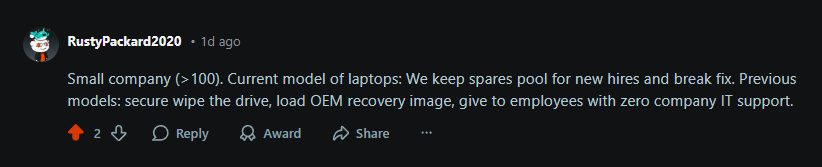
Another user mentions they keep current models (probably 1-2 years old) for new hires or as loaners for laptops that require repairs. And older ones are given to employees, after they’re wiped clean:
Source: Reddit
While there may not be any set criteria, here are some general guidelines to help you decide:
1. Reassign or Refurbish
Companies usually reassign retrieved assets (say, laptops) internally when they:
- Are still functional
- Can run the required software
- Are not a security liability
- Need only low-cost fixes such as battery replacement, RAM/SSD upgrades or minor repairs.
For instance, this Reddit user says they don’t update/replace monitors until they’re in working condition and serve the purpose:

Source: Reddit
2. Resell
When an asset (laptop, workstation, server, etc.) may not be suitable for internal operations, but is still in working condition and has some residual value, reselling it makes sense.
However, be cautious when reselling devices, since they might contain sensitive corporate data that can be exploited. And you already know how expensive data breaches can be.
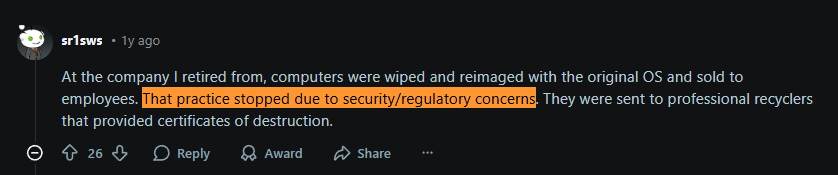
This Reddit user’s company used to sell old computers to their employees but later stopped due to security concerns:
Source: Reddit
But, just like they moved to professional recyclers, you can partner with Workwize to handle reselling on your behalf. Workwize offers certified data erasure and ensures secure resale, recovering up to 45% of the original equipment value. Now, that’s real recovery.
Pro Tip: If you’re in a highly regulated industry, try removing or destroying the storage before reselling. No hard drive equals zero chances of the data being exploited.
3. Donate
Donation makes most sense when hardware is still usable but not worth the effort or margin of resale. Numerous companies donate to charities, schools or nonprofits. In addition to minimizing e-waste and feeling good, donation gives you a tax write-off, lowering your company’s tax bill.
However, while you can get a tax write-off, make sure you’re not operating in a heavily regulated industry. Because that would make the process extremely complex, as this Reddit user confirms:

Source: Reddit
4. Recycle
If your assets are damaged beyond economical repairs or no longer meet requirements and have poor resale value, recycle them. Just partner with ethical IT equipment-recycling partners like Workwize, which adhere to sustainability guidelines for device recycling.
Plus, you get a data destruction certificate so you know the data will not be exploited.
5. IT Asset Disposal (ITAD)
ITAD makes sense if your devices are marked:
- Unsafe
- Unsalvageable
- Non-compliant
- Impossible to sanitize to the required standard.
Workwize also helps you dispose of your devices safely while complying with industry-leading standards.
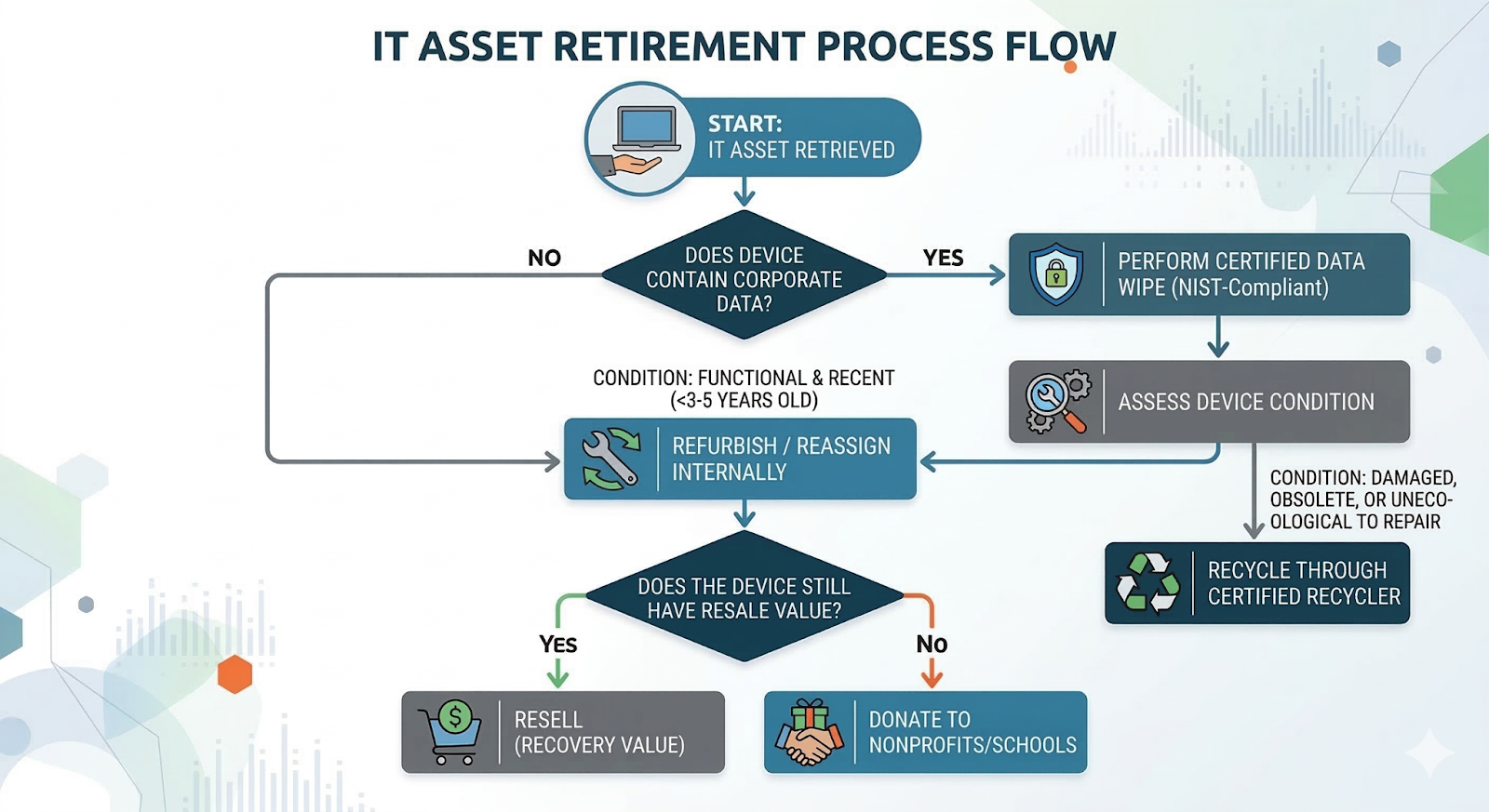
Here’s a decision tree to help you instantly make the right IT asset recovery decisions:
How to Calculate IT Asset Recovery Cost and ROI?
Before deciding whether to refurbish, resell or recycle a device, you might ask:
Is recovering this device cheaper than buying a new one?
You can answer that with a basic ROI calculation for recovery.
IT Asset Recovery ROI Formula
Recovery ROI = New Device Cost − (Retrieval + Repair + Data Wipe + Logistics)
If the result is positive, recovering the device makes financial sense.
Typical IT Asset Recovery Costs (Industry Benchmarks)
Based on pricing from IT asset recovery providers and logistics services, the typical costs per device look like this:
|
Recovery Step |
Typical Cost |
|
Device retrieval (domestic) |
$70–$120 |
|
International retrieval |
$120–$250 |
|
Certified data wipe (NIST compliant) |
$20–$40 |
|
Minor repairs (battery, RAM, SSD) |
$50–$150 |
|
Inspection & testing |
$10–$30 |
|
Recycling/disposal |
$20–$50 |
So recovering a device usually costs $100–$300 total, depending on logistics and repairs.
Example Recovery ROI Calculation
Let’s say a company retrieves a 2-year-old MacBook Pro.
|
Cost Component |
Cost |
|
Retrieval |
$90 |
|
Data wipe |
$30 |
|
Battery replacement |
$120 |
|
Inspection |
$20 |
Total recovery cost = $260
A new replacement device costs about $2,000–$2,500.
ROI
$2,200 − $260 = $1,940 saved
That’s why many IT teams prioritize refurbishing devices that are 3 years old or less instead of buying new hardware.
Let’s now calculate the IT asset retrieval rate.
IT asset retrieval rate (%) = (Devices Successfully Returned ÷ Devices Expected to Be Returned) × 100
If you were expecting 50 devices but you got only 42, the asset retrieval rate would be:
Retrieval rate = (42 ÷ 50) × 100 = 84%
What Do You Gain From Proper IT Asset Recovery?
Here’s how IT asset recovery benefits you:
Reduce e-waste production, which is expected to reach 82 million tonnes by 2030
According to the United Nations Institute for Training and Research, the amount of e-waste being dumped is increasing and is expected to reach 82 million tonnes by 2030.
This means billions of dollars' worth of strategically valuable resources are dumped in landfills.
But with IT asset recovery, you can implement circular-economy and business-model approaches. Instead of dumping IT assets right away, you can retrieve, repair, refurbish, resell or recycle them. And this substantially reduces the overall annual e-waste production.
And I am not even kidding. According to an article from EY, implementing a circular economy business model (reusing devices or extending their lifecycles) can lower environmental impact and help address critical e-waste challenges.
Avoid the massive costs of data breaches of up to $4.4 million
Every device has sensitive company information worth millions. Handling them carelessly, i.e., losing track of devices, dumping them irresponsibly, can increase the risk of that data being exploited. And companies lose over $4.4 million on average to data breaches, says IBM.
By hiring a credible IT asset recovery service provider, you can track all your assets and ensure they’re not processed further without certified data erasure.
Cut upfront costs (by tens of thousands of dollars) by redeploying recovered assets
A new Corporate mid-range enterprise laptop costs around ~$2500. And buying 10 such devices along with their accessories, extended warranties and antivirus takes the cost well above $30,000.
Now, imagine you have functional 1-2-year-old devices sitting in warehouses or with employees who’re about to leave your organization. You spend some money on repairs (only if it’s way cheaper than buying a new device, $200-$400) and reassign them to at least 5 of the new hires.
In this case, 5 new devices cost you $12,500 + $1,000-$2000 for the warranties and stuff and repairs cost you around $1500 for 5 devices, bringing your total to ~15,000.
See? You ended up saving around $15,000 just by repairing and reassigning older devices. That’s how powerful IT asset recovery actually is.
Things to Keep in Mind During IT Asset Recovery
To experience the benefits mentioned above and to make the most of IT asset recovery, you must be cautious about a few things:
Data Security
As mentioned earlier, every device contains corporate data. And you never know who might be lurking around those landfills looking for hard drives to scavenge data from.
So, regardless of what you choose to do, after retrieving the device, perform certified data erasure. Your asset recovery partner would help you with that.
For instance, Workwize uses Blancco (an enterprise-grade data erasure software) to wipe the drives clean and offers a certificate of destruction.
Even on Reddit, multiple IT experts stress one point and that is wiping the storage clean before donating or reselling the devices:

Source: Reddit
If you’re still not convinced, the same HP Wolf Security Study I quoted earlier says IT and security decision-makers hoard end-of-life devices because they lack assurance that all sensitive company or personal data has been fully wiped.
The security concern is genuine. But you can minimize it by choosing the right recovery partner.
Environmental Responsibility
When recovering IT assets, it may seem easier to simply discard older devices once they reach end-of-life. But improper disposal of electronics is one of the fastest-growing environmental problems.
In 2022 alone, the world generated 62 million tonnes of e-waste, yet only about 22% was formally collected and recycled. The rest often ends up in landfills or informal recycling streams where toxic materials can contaminate soil and groundwater.
Beyond environmental damage, irresponsible disposal can also create compliance and reputational risks. Many states within the USA (Iowa, California and the like) now enforce strict e-waste regulations. And improper handling might result in regulatory penalties or legal liability.
Solution? Partner with an IT asset recovery service provider who implements sustainable methods for IT asset disposal and recycling.
For instance, Workwize follows all local environment guidelines for disposing of or recycling assets, ensuring compliance and the least possible environmental impact.
Traceability
It’s highly likely that you will lose your assets in transit during the entire asset recovery process. This becomes even more common if you’re moving devices between countries. However, this is not only a monetary loss but also a security incident, since devices contain sensitive data.
But there’s a quick fix. IT asset recovery partners like Workwize offer real-time visibility into your assets. You can, in real-time, see where your assets are at any point. In fact, Workwize notifies you of any delay, so you can act accordingly and minimize the risk of losing assets.
Choosing an IT Asset Recovery Partner (Checklist)
An IT asset recovery partner is essentially a company that helps you retrieve, inspect, repair, reassign, store, redeploy, resell, recycle or dispose of your IT assets.
However, there are multiple options out there, including Workwize, Allwhere, Reready, Retriever, Growrk and more. But not every provider is suited for your needs, right? That’s why we have created a small but practical checklist to help you make the right choice:
-
Global coverage: If you have employees spread across multiple countries, look out for providers that support retrievals and recovery in those regions.
-
Certified data destruction: Find out if they follow data erasure standards like NIST SP 800-88 Rev. 1, DoD 5220.22-M/ECE, and IEEE 2883 (2022)? Also, ask if they offer a certificate of erasure? If not, look for a vendor who does.
-
Transparent pricing: Find out how transparent their pricing is. Can you find the charges for recycling, retrieval or wiping before booking that service, or does it come as a shocker afterwards?
- Audit trail: Is your provider maintaining a chain-of-custody i.e., documenting every hand-off of your assets for audit purposes? This is non-negotiable, since a lack of chain of custody means non-compliance.
- Sustainability: Your IT asset recovery partner needs to comply with international and local (state-wide) environmental regulations.
- Real-time visibility: Your recovery partner must offer real-time visibility of all your assets. This ensures you don’t lose any assets during transit. And even if you do, you know what steps to take.
Red flags to avoid
Avoid IT asset recovery providers who:
⚠️ Can’t provide certificates of data destruction after wiping or shredding drives.
⚠️ Outsource recycling or disposal to third parties that they don’t vet.
⚠️ Have no clear process for cross-border retrievals (customs, duties, import rules).
⚠️ Don’t provide chain-of-custody records from employee pickup to final processing.
⚠️ Offer no shipment tracking or status visibility once the device leaves the employee.
⚠️ Rely heavily on manual coordination instead of a structured platform.
⚠️ Don’t verify device condition at pickup, leading to disputes.
⚠️ Lack secure packaging or logistics protocols.
⚠️ Provide vague timelines for retrieval, especially for international pickups.
⚠️ Have no clear process for non-responsive employees or failed pickup attempts.
⚠️ Don’t support data-bearing assets beyond laptops (phones, tablets, external drives).
⚠️ Provide no reporting or audit logs, making compliance audits harder.
Simplify IT Asset Recovery with Workwize
IT asset recovery is a complex process, especially when you’re managing a distributed workforce across multiple countries.
Just to get your assets back, you have to send multiple manual reminders, book a shipping provider and manually track devices. And even after doing this, there’s no guarantee you’ll get your assets back.
What’s even more challenging is finding different vendors for repairing, redeploying, reselling, recycling or disposing of end-of-life assets.
Multiple vendors and manual processes are a recipe for disaster.
But Workwize can help. Workwize is an IT hardware management platform that automates the entire asset lifecycle from procurement to disposal.
Using the same platform:
- You can order and deploy equipment for your employees.
- Retrieve IT assets across 100+ countries to central facilities.
- Securely wipe devices and get a data destruction certificate
- Inspect, make the necessary repairs and ready devices for redeployment.
- Resell devices to recover the residual value of up to 45%
- Donate the devices to charities and non-profits.
- Ethically recycle or dispose of end-of-lifecycle devices.
- Track all your devices across their lifecycle in real-time
In a nutshell, Workwize acts as a single solution for all your IT asset recovery needs, local or global.
Want to see how Workwize recovers IT assets for your global team? Book a free demo now!



Establish a single source of truth for every IT asset across the globe.
.png?width=258&height=318&name=g10%20(5).png)
More related resources to help you stop firefighting hardware operations.


Get monthly insights into how other IT leaders are improving their ops.



.png?width=2880&height=1232&name=Group%202147262874%20(1).png)
Stop coordinating
hardware like it's 2012.
.svg)
.png?width=172&height=68&name=apple%20business%20patner%20(1).png)
.svg)
.svg)
.svg)
.svg)