




.svg)
.svg)

.svg)


.svg)





.svg)
.png?width=500&height=424&name=Style-1---V1-(1).png)

.png?width=1230&height=692&name=Vector%20(13).png)
IT Compliance Audit Checklist: The Complete Guide for IT Managers (2026)
Do you know what the success rate is for IT compliance audits?
Abysmal.
A recent survey found that only 29% of organizations consistently meet their compliance standards. Another study reported that nearly half of organizations have failed multiple audits within three years.
Why?
Because compliance is often ignored until security policies fall apart little by little, with a missing log here and vague ownership there. What should be a straightforward review turns into chaos because compliance has been deprioritized until the deadline forces action.
One of the more persistent blind spots in all of this is hardware. The hardware layer is often overlooked, as most audit guidance focuses heavily on policies and software environments.
However, hardware is also where you lose compliance, especially if you have a distributed organization where asset tracking and lifecycle management are harder to keep consistent.
To help you, we have prepared an all-encompassing guide to IT compliance audits that covers relevant audit types, key frameworks, and a checklist focused on building a repeatable process.
What is an IT Compliance Audit?
An IT compliance audit is a structured review of your systems, policies, and controls against a defined set of regulatory, contractual, or internal requirements.
In an audit, auditors look for evidence in documented policies, configuration records, access logs, encryption settings, asset inventories, disposal certificates, and incident reports.
Basically, they want to see that your controls are actually operating consistently over time. If the evidence is missing, the control effectively doesn't exist in their view.
To stay ahead of this, most organizations run two types of audits in parallel:
- Your own team or a consultant runs internal audits. They're faster, cheaper, and built to find gaps early to give you an unfiltered picture of where things stand before anyone else looks. They are low-stakes, diagnostic, and focused on improvement rather than judgment.
- Independent third parties carry out external audits. They are usually tied to a formal outcome like a regulatory finding, a certification like SOC 2 or ISO 27001, or a customer's vendor risk requirement. The stakes are higher because the result is shared with regulators, buyers and partners.
Both matter. The strongest compliance programs don't wait for a contract or regulator to force an audit. They use internal audits to prepare and improve, and external audits to validate and demonstrate trust.
For a deeper look at the regulatory side, our IT compliance guide covers the foundations.

Why IT Compliance Audits Matter in 2026
In 2026, you cannot treat compliance as a second priority. As your tech stack has grown, the regulatory landscape has also changed. That means auditors are asking sharper questions and they need more evidence.
To actually build a program that protects your business, you must understand why audits matter now, more than ever.
Audits find small failures before they become public ones
Every compliance failure that ends up in a regulator's enforcement file started small. It can be a misconfigured firewall or an unencrypted laptop.
A working audit cycle finds those issues while you still have time to fix them, before they turn into incident reports or fines.
Regulators have moved from policy review to evidence verification
Documented policies no longer satisfy auditors on their own. They want timestamped, system-generated proof. They need to know when a patch was applied or where the device went after decommissioning.
Based on a survey of 160 chief audit executives, Gartner found that 97% of internal audit teams have regulatory compliance on their 2026 plans, with 96% covering cybersecurity vulnerabilities and 94% covering data governance.
When auditors are concentrating that heavily on these areas, it's a reliable signal of where regulatory attention is heading.
The scope of IT has outgrown most audit programs
Today, you're no longer auditing a server room and a CRM. Most organizations have to audit remote-employee laptops across multiple countries, a SaaS stack with hundreds of applications, cloud workloads spread across providers, and AI tools that didn't exist months ago.
Naturally, most organizations haven't caught up.
According to PwC's 2025 Global Digital Trust Insights report, only 2% of companies have implemented cyber resilience across their organization, even though 96% of executives say cybersecurity regulations have driven increased investment
Highlighting the importance of strict IT compliance, Sean Joyce, Global Cyber and Privacy Leader, PwC US, said:
“Cyber resilience is everyone’s responsibility, from the boardroom to the employee. We must hold each other accountable and ensure we address emerging risks by leveraging new technology, practicing foundational cybersecurity principles, and investing in resources that will secure the future of the organisation.”
Overlapping regulations and the endpoint risks beneath them
A typical mid-sized company now operates under several overlapping regimes. There’s GDPR for European employees, HIPAA if any healthcare data is involved, and SOC 2 for enterprise customers, plus state-level laws like the CCPA.
No single control set satisfies all of them, which means your audit program has to connect controls to multiple frameworks at once.
Beneath that regulatory layer sits a more practical problem that consistently shows up in audit findings: maintaining visibility and control over the devices employees use to access company data
Untracked endpoints and devices without verified encryption are among the most common failures flagged in distributed teams.
If you want a closer look at the cross-border side of this, our global IT compliance article covers the geographic complexity in more depth.

IT Compliance Frameworks: What Applies to You
|
Framework |
Who it applies to |
IT requirements |
Penalty for non-compliance |
|
GDPR |
Any company processing EU resident data, regardless of where the company is based |
Data encryption 72-hour breach notification Lawful basis for processing Chain-of-custody for data-bearing devices |
Up to €20M or 4% of global annual turnover, whichever is higher |
|
HIPAA |
US healthcare providers and their business associates |
Encrypted ePHI Role-based access controls Audit logs Secure device disposal Risk analysis |
Up to $2,190,294 per violation category per year (2026 inflation-adjusted) |
|
PCI DSS |
Any organization that stores, processes, or transmits cardholder data |
Network segmentation Encryption Access controls Continuous vulnerability scanning |
Fines from card brands Loss of card processing rights |
|
SOC 2 |
SaaS companies Cloud service providers Any vendor handling customer data |
Security Availability Processing integrity, Confidentiality Privacy controls (Trust Services Criteria) |
Loss of customer trust Contract termination Failed enterprise deals |
|
ISO 27001 |
Any organization seeking a recognized information security certification |
Risk management Asset management Access control Cryptography Incident response |
Loss of certification Failed customer due diligence |
|
NIST CSF |
US federal contractors and agencies |
Govern Identify Protect Detect Respond Recover functions |
Mandatory for many federal contracts Loss of contract eligibility |
|
SOX |
US publicly traded companies and their auditors |
Financial data integrity Access controls IT general controls Audit trails |
Criminal charges for executives SEC penalties Delisting risk |
|
CCPA |
Companies handling California resident data above the defined thresholds |
Disclosure of data collected Opt-out rights Secure deletion Contracts with service providers |
Up to $7,500 per intentional violation Statutory damages from private right of action |
Use this table as a starting point.
For example, if you employ remote staff in the US and EU, handle any healthcare data, and accept payments, you are simultaneously subject to GDPR, HIPAA, PCI DSS, and CCPA.
That is the baseline for any modern distributed company. The job of an audit program is to connect a single set of controls to as many of these frameworks as possible, so you are not running four parallel evidence collections.
7 Types of IT Compliance Audits
Each audit type has its own scope, its own evidence requirements, and its own framework lineage, which means the controls that pass one audit won't necessarily satisfy another.
The seven below cover the categories most organizations come across, whether you're preparing for your first SOC 2 or managing a broader program across multiple regulations.
IT General Controls (ITGC) audits
ITGC audits look at the foundation of your environment. They focus on access management, change management, computer operations, and program development. They're required under SOX for public companies and are necessary for nearly every financial audit.
If your ITGCs are weak, every dependent application audit fails by extension, which is why this is usually the first place auditors look.
Cybersecurity audits
These focus on your defenses against external and internal threats. Components include firewall rules, endpoint protection, network monitoring, vulnerability management, and incident response.
They typically connect to NIST CSF or ISO 27001 controls and have become the fastest-growing audit category as breach disclosure laws expand across jurisdictions.
Regulatory compliance audits
These check your alignment with specific external laws like GDPR, HIPAA, PCI DSS, CCPA, and similar.
They tend to be the most prescriptive because the regulator has already detailed what evidence they want to see. SOC 2 audits sit in this category for SaaS companies, even though they're technically attestations rather than regulatory examinations.
IT governance audits
Governance audits examine how IT decisions actually get made. They check whether IT strategy aligns with business goals, whether spending is justified, and whether risk is owned at the right level. COBIT is the most common framework. Boards increasingly request these in response to investor pressure on technology risk.
 Third-party and vendor compliance audits
These take stock of the security posture of every supplier that handles your data. That includes SaaS providers, contractors, MSPs, payroll processors and even relocation vendors handling employee equipment.
Almost every framework now requires this, and the gap between visibility and reporting is wider than most teams realize. A Gartner survey of approximately 900 third-party relationship owners found that 95% had spotted a third-party red flag in the past 12 months, but only around half escalated it to compliance teams.
Chris Audet, VP of Gartner Assurance Practice, observes:
“Organizations tend to be working with a lot more third parties as they are key to accelerating business growth after the various disruptions of recent years. In light of rising sustainability standards that pertain to the use of third parties, this is an area that has the attention of compliance teams.”
Disaster recovery and business continuity audits
These audits test whether your organization can actually recover from serious incidents such as ransomware, cloud outages and regional disasters within your stated recovery time and recovery point objectives (RTO and RPO).
ISO 22301 is the formal standard, though most frameworks now include continuity controls. A backup that has never been restored doesn't qualify as a backup.
Access control and change management audits
These drill into the area most often exploited in modern breaches. They tell you who has access to what, how that access is granted and revoked, and how changes to production systems are reviewed and approved.
Privileged access is audited separately because it carries disproportionate risk. Almost every major framework, including SOC 2, ISO 27001, HIPAA, and PCI DSS, has dedicated requirements in this area.
Understanding which audit types apply to you sets the scope. The checklist below gives you the preparation sequence to cover all of them.
The IT Compliance Audit Checklist
Run this checklist in sequence the first time, then quarterly as a maintenance cycle.
Phase 1 sets the scope that every later phase depends on, so don’t skip ahead. Assign each item a single named owner and a status of in-progress, blocked, or complete.
Phase 1: Define scope and regulatory requirements
- List every framework that applies based on industry, geography and the specific data types you handle
- Find the official requirements document for each framework and map every requirement to the specific business processes and data flows where it lives
- Name a single accountable owner for each compliance area
- Have legal counsel confirm regional applicability for distributed and international teams
- Build a control-to-framework connection system. Most operational controls, like logs and MFA, satisfy four or more frameworks simultaneously
Pro tip: Map controls once and reuse the mapping across every audit. Companies that re-collect evidence per framework spend three to four times more on audit prep than those maintaining a unified control catalogue.
Phase 2: Conduct a risk assessment and gap analysis
- Compare current controls against the requirements identified in Phase 1 and document every gap in writing, including the specific framework requirement it fails
- Score each gap on likelihood and impact using a simple high/medium/low scale. Resist quantitative risk modelling on the first pass
- Build a remediation plan with a target date and success criteria for each gap
- Extend the assessment to every endpoint, cloud workload, and SaaS application, including ones IT did not provision
- Pull your hardware inventory into the same risk register
Note: Auditors nowadays ask to see your previous gap analysis alongside the current one. They want to know which gaps recurred since recurrence signals that the remediation process does not actually work.
 Phase 3: Strengthen access controls
- Apply least privilege across every system. Audit current permissions against current job descriptions, not against permissions employees inherited months ago
- Enforce MFA on every system that handles sensitive data, including SSO portals and cloud admin panels. Use phishing-resistant methods like FIDO2 or hardware keys for privileged accounts
- Run a quarterly user access review. Reconcile your active directory against the HR roster and dormant-account reports
- Audit privileged accounts on a separate, more frequent cycle than standard users. Document who has admin access, why, and when that access was last reviewed.
- Connect joiner/mover/leaver workflows to your HRIS, so access changes happen automatically when employee records change
Phase 4: Verify data security and encryption
- Generate a device-level encryption report from MDM showing the status for every endpoint, including remote employee laptops
- Verify data in transit uses TLS 1.2 or higher across every internal and external connection. Older TLS versions on internal traffic are a common oversight
- Confirm data at rest uses AES-256 or equivalent across databases, backups, file shares, and cloud buckets. Pay particular attention to backups and archives, as they age out of encryption upgrades
- Run penetration tests at least annually with a scope that includes the systems handling regulated data
- Confirm critical patches are applied within the timelines your policy specifies. Unpatched known vulnerabilities are one of the most cited audit failures and one of the few an auditor can verify in minutes
Note: Encryption key management is audited as a separate control under SOC 2, ISO 27001, and PCI DSS. Document who has access to keys, how keys rotate, and how access to the key management system itself is logged.
Phase 5: Audit IT asset inventory and hardware compliance
- Reconcile your IT asset inventory against MDM enrollment records, your employee directory, and procurement records. Every device should match across all four sources
- Confirm every company-owned device is enrolled in MDM with active security policies and remote-wipe capability tested in the last six months.
- Maintain chain-of-custody documentation for every reassignment, repair, return, and disposal in the audit period
- Verify certified data erasure records exist for every retired, redeployed, or disposed device
- Audit your hardware shipping and logistics process. Devices in courier custody between procurement, employee homes, and disposal facilities are still your responsibility under most frameworks
Pro tip: A hardware lifecycle platform like Workwize keeps the asset inventory accurate automatically, maintains chain-of-custody records, and generates certified disposal documentation at end-of-life. Our IT asset tracking guide walks through what to evaluate in this category.
Phase 6: Review third-party and vendor compliance
- Tier vendors by data access and risk before reviewing
- Collect current evidence from every Tier 1 and Tier 2 vendor. Ask for SOC 2 Type 2 reports, ISO 27001 certificates and recent penetration test summaries
- Review data processing agreements with EU-relevant vendors against GDPR Article 28. Standard contractual clauses for international data transfers should reflect the 2021 EU updates
- Document the offboarding plan for each critical vendor. State how data will be returned or destroyed when the contract ends, with timelines and verification steps
 Phase 7: Test incident response readiness
- Confirm your incident response plan is documented and reviewed within the last twelve months
- Verify breach notification procedures match the strictest applicable timeline. GDPR, for instance, requires supervisory authority notification within 72 hours of awareness
- Run a tabletop exercise at least annually using a realistic scenario. Document how long each step took and what broke down
- Maintain a current contact list for legal counsel and regulators, and key vendors
Phase 8: Prepare audit documentation
- Centralize every piece of evidence in a single audit repository. Collect all your policies, risk assessments, access reviews, asset inventory, incident logs, vendor reviews, and disposal certificates
- Build an evidence index that connects each control requirement to its supporting evidence, with the evidence date, owner, and review status
- Confirm every piece of evidence carries a system-generated timestamp and links to the specific asset, system, or process it relates to
- Run a full internal pre-audit against this checklist at least four weeks before the external audit
You can download our complete IT asset lifecycle compliance checklist if you want a print-ready version of this and the related lifecycle checks in one place.
How to Conduct an Internal IT Compliance Audit
An internal audit is more important than you realize.
Because if you cannot pass your own audit, you have no business sitting through someone else's.
Here is how the strongest IT teams run internal audits.
Step 1: Define your compliance landscape
Before setting up an audit, pause to clarify what compliance actually means for your organization. Different frameworks, like ISO 27001, HIPAA, PCI DSS, and GDPR, have their own distinct requirements, and the ones that matter will depend on your industry and how you operate.
After identifying the applicable standards (which is often more than one), connect each of them to your existing policies and procedures to see where you stand.
Step 2: Assemble the team and assign ownership
Compliance isn’t confined to IT. It spans across multiple functions, including information security, legal, HR, and finance.
To understand how each area contributes, and who should be involved, consider the following:
- Who is responsible for overseeing user access?
- Who handles risk assessments?
- Who maintains audit documentation?
Clarifying ownership early on creates accountability and helps avoid last-minute hassles for critical information.
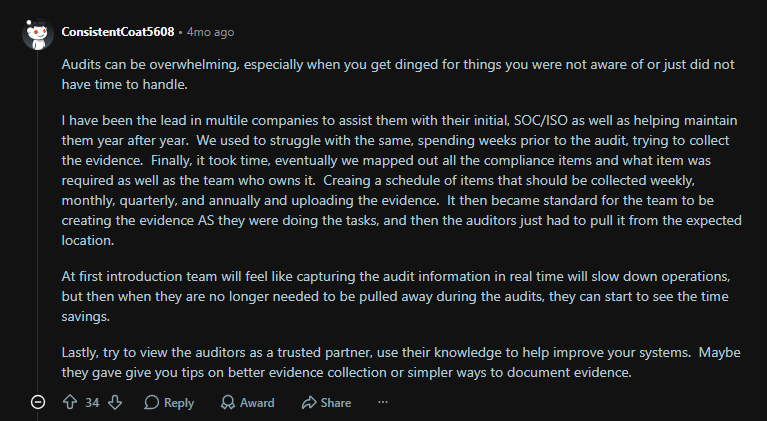
Via Reddit
And as u/ConsistentCoat5608 advises, make it a habit to collect evidence as tasks and processes are carried out regularly. There might be friction in the beginning, but it speeds up considerably once evidence collection and documentation processes are set up.
Pro-tip: If your organization relies on third-party vendors, factor them into the audit scope as well. You may need to coordinate directly with their compliance teams to obtain essential documentation for your internal review.

Step 3: Evaluate existing security controls and processes
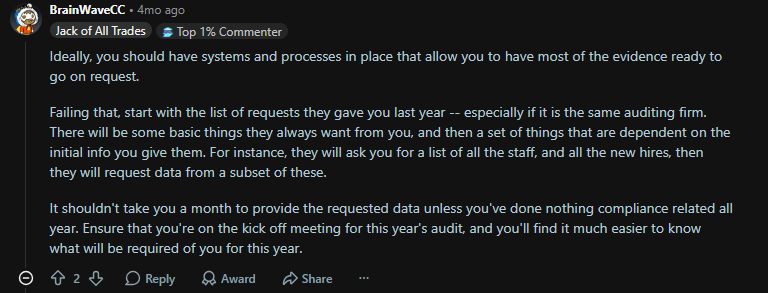
Walk through every control your frameworks require and ask one question: Can I produce evidence that this control operated continuously throughout the audit period?
If you did an audit previously, you’re in a better position, as you know in which areas you need to delegate your focus.
Via Reddit
Step 4: Run a risk assessment that includes hardware
Actually, this is the step internal audits most often skip. Pull your asset inventory and reconcile it against MDM enrollment records, your employee directory, and physical custody records. Flag every device you cannot account for.
According to IBM's 2025 Cost of a Data Breach Report, the global average breach lifecycle has dropped to 241 days, which is the lowest in nine years, but breaches involving data spread across multiple environments still average 276 days and $5.05 million. Untracked endpoints contribute directly to that lifecycle.
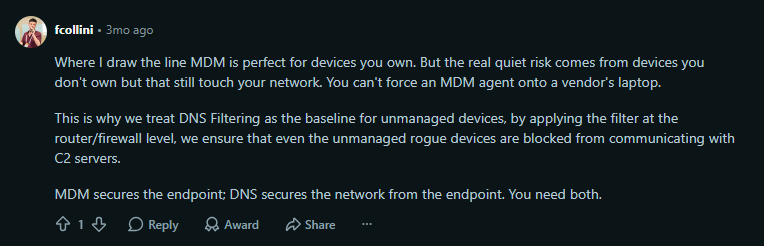
Pro Tip: You might want to run DNS filtering in addition to MDM enrollment. A kind Redditor explains why.
Via Reddit
Step 5: Conduct a mock audit to assess readiness
A mock audit is one of the most effective ways to prepare for an external IT compliance review. It’s an opportunity to evaluate your organization’s readiness without the stakes of formal scrutiny.
It should mirror a real audit as closely as possible and assess how well your documentation and security controls align with regulatory expectations.
Beyond identifying risks early, a mock audit also ensures your teams are comfortable responding to auditor questions. It helps reduce pressure and uncertainty when the actual audit begins.
Step 6: Strengthen compliance with automation
Manual compliance tracking takes time and leaves room for human error, even when spreadsheets are used to stay organized. A better approach is to use dedicated IT compliance audit software that helps automate routine work and keeps everything in one place.
Look for tools that can support
- Automating asset management
- Monitoring policy adherence
- Flagging security misconfigurations
- Centralizing compliance status and audit reporting
- Running automated workflows in the background
Good compliance platforms give you a single dashboard to track status, generate reports, and align security controls with current regulatory requirements. Automation is especially valuable because it frees IT teams from repetitive manual work and lets them focus on higher-impact priorities.
Organizations could save 4.5+ hours per week by automating compliance monitoring and the collection of audit evidence. For hardware management, that can mean automatic asset discovery, MDM enrollment verification, and disposal certificate generation instead of relying on spreadsheets and long email threads.
Step 7: Keep thorough, organized documentation
Regulatory audits depend on clear, verifiable evidence. If your compliance records are scattered or incomplete, even a routine audit can quickly become difficult.
Make sure all key materials like policies, risk assessments, security configurations, incident response plans, and change logs are consistently updated and easy to access.
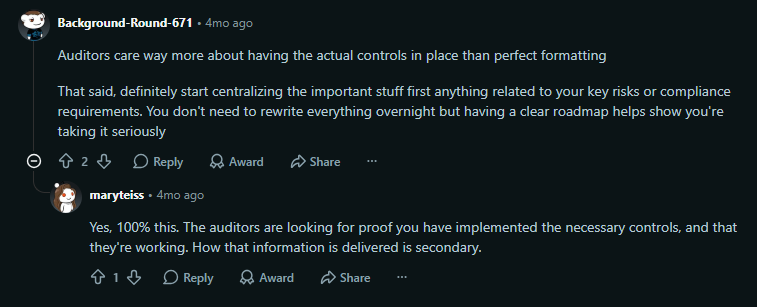
Maintaining a strong audit trail also helps your team track progress over time and demonstrate how your security posture is improving. That said, documentation is always secondary to working processes.
Via Reddit
Step 8: Monitor continuously and refine your approach
Compliance requires ongoing attention and adjustment. Falling behind, even briefly, can increase your exposure to security risks.
Put systems in place for continuous oversight, whether through automated monitoring tools or regular internal audits. You must stay aligned with changing requirements and be prepared to respond as new threats emerge.
Note: Internal reviews often focus on software and access logs but ignore physical devices. Hardware happens to be one of the most common gaps, especially for distributed teams. Make sure every laptop, phone, and peripheral is accounted for and matches your asset inventory. Flag any missing or untracked devices early, before an external auditor does.
4 Real-World Examples of IT Compliance Failures
These four cases show exactly what compliance failures look like in practice and what they cost:
Morgan Stanley was fined over $155 million for improper device disposal
Morgan Stanley paid a massive price because they hired a standard moving company to decommission two data centers. Thousands of hard drives containing the data of 15 million customers were sold to a third party and auctioned online, with the data still intact.
Between the OCC, the SEC, and a class-action lawsuit, the penalties topped $155 million. A standardized hardware disposal process with certified data erasure and verified chain-of-custody tracking would have saved them every dollar.
British Airways received a £20 million GDPR fine for inadequate security monitoring
British Airways was slapped with a massive ICO fine after attackers compromised a contractor account that lacked multi-factor authentication.
Hackers injected skimming code into BA's payment page and exposed 430,000 customers. Worse, BA didn't even detect the breach; a third party tipped them off two months later.
The takeaway is that relying entirely on perimeter security without internal monitoring to catch what slips through is a shortcut to disaster.
Zoom’s FTC settlement over false encryption claims
Zoom faced an FTC settlement for falsely marketing "end-to-end, 256-bit encryption." In reality, they were delivering weaker protection and leaving some recorded meetings unencrypted in the cloud for up to 60 days.
The settlement forced Zoom to overhaul its security program and undergo regular third-party audits. The real lesson here is that your marketing claims, privacy notices and actual technical controls must perfectly align. Routine internal audits catch those mismatches before regulators do.
Capital One paid an $80 million fine for cloud misconfigurations
Capital One incurred a massive OCC penalty after a former AWS engineer exploited a misconfigured firewall to access 106 million customer records.
Interestingly, internal reviews had already flagged the security gaps before the breach, but the company simply failed to fix them in time. This proves that identifying vulnerabilities isn't the finish line. Closing those gaps on a strict schedule, with explicitly named owners, is the actual goal.
Common IT Compliance Audit Challenges
IT compliance is complicated and is riddled with challenges. However, if you know what you’re doing, it’s easy to avoid these common causes of frustration and trouble:
Incomplete or outdated documentation
This is the single most common audit finding across every framework. Auditors will quickly find out if your policies have not been reviewed in three years or if your runbooks reference systems that no longer exist.
The fix is not more documentation; it is fewer, better, version-controlled documents tied to a review schedule.
Weak access controls and excessive privileges
Privilege accumulation is not a flashy problem. Employees move between teams, take on temporary projects, and inherit access from colleagues, but rarely give it back.
Naturally, the average user holds far more access than their current role requires after a few years. Quarterly access reviews and joiner/mover/leaver workflows are the only durable fix.
Inadequate encryption practices despite regulatory requirements
Most companies encrypt data at rest in their primary database and assume the job is done.
They miss laptops in the field that were enrolled before encryption policies tightened or the backup tapes in off-site storage. Auditors find those irregularities fast.
Untracked hardware and third-party risks in distributed environments
When devices are scattered across employees' homes in multiple countries, maintaining chain of custody is almost impossible to do manually. Auditors always ask for proof of device enrollment, encryption status, and disposal certification on a per-device basis.
Companies that manage this with spreadsheets have gaps they cannot explain. If devices are listed as "in use" with no current owner or if devices marked "disposed" have no certificate, you’ll never achieve compliance. Moving to a reliable asset tracking solution that maintains end-to-end records automatically is the only viable option.
SaaS sprawl and shadow AI
Employees often use unsanctioned tools that never appear in the audit. The risk used to be limited to file-sharing services; in 2026, it is generative AI.
Shadow AI was a factor in 20% of breaches studied. It added an average of $670,000 to breach costs. A whopping 97% of AI-related breaches occurred in organizations that lacked proper AI access controls. That means if your audit scope does not include shadow tools, you are auditing only the part of the business you can see.
How Workwize Keeps IT Teams Audit-Ready
Most compliance gaps in distributed teams are small operational ones. Trouble comes from a laptop that shipped before MDM enrollment finished or a returned device that nobody logged.
Workwize is built to close those gaps by handling the hardware lifecycle end-to-end, across 100+ countries, so the evidence auditors ask for already exists by the time they ask for it.
In practice, you get features like:
- Real-time asset inventory: Continuous sync across the platform tracks every device by serial number, department, or employee
- Zero-touch MDM enrollment: Native integrations with Apple Business Manager, Microsoft Intune, and Jamf enroll devices in your MDM before employees even touch them
- Automated chain-of-custody: Every procurement, reassignment, repair, and decommission event is logged with a timestamp and owner for a tamper-free audit trail
- Certified data erasure at end-of-life: NIST 800-88-aligned erasure with auto-generated certificates that satisfy GDPR, HIPAA, and CCPA disposal requirements
- HRIS-triggered workflows: Integrations with BambooHR, Workday, and similar systems mean new hires trigger provisioning and departures trigger automated retrieval and erasure
For a deeper look, see Workwize for ITAM or our IT asset tracking solution.

Shashank Mishra

Establish a single source of truth for every IT asset across the globe.
.png?width=258&height=318&name=g10%20(5).png)
More related resources to help you stop firefighting hardware operations.
![Cybersecurity Audit Checklist for Remote Work [2026 Updated]](https://www.goworkwize.com/hs-fs/hubfs/Cybersecurity%20Audit%20Checklist%20.png?width=360&height=200&name=Cybersecurity%20Audit%20Checklist%20.png)

Get monthly insights into how other IT leaders are improving their ops.



.png?width=2880&height=1232&name=Group%202147262874%20(1).png)
Stop coordinating
hardware like it's 2012.
.svg)
.svg)
.svg)
.svg)
.svg)