




.svg)
.svg)

.svg)


.svg)




.svg)
.png?width=500&height=424&name=Style-1---V1-(1).png)

.png?width=1230&height=692&name=Vector%20(13).png)
Managing IT logistics sounds simple; ship devices in, ship them out.
But for global IT teams, it’s rarely easy.
Behind every shipment is a logistical maze of customs delays, missing tracking data, and unresponsive vendors that make the process harder...
Those delays cause a ripple effect across your business. New hires wait longer for their laptops, teams lose valuable time, and compliance gaps start to appear.
According to recent research, 43% of new hires wait more than a week to receive their workstation, which leads to delayed onboarding and poor productivity.
The good news is, these problems are fixable. With the right systems and partners in place, IT teams can streamline logistics, deliver devices on time, and maintain full visibility from warehouse to workspace.
This article breaks down the biggest IT logistics challenges IT managers experience and shares practical ways to solve them.
TL;DR
- IT logistics isn’t just shipping: It’s about managing procurement, deployment, retrieval, and disposal of devices across global teams securely and on time.
- The biggest pain points include customs delays, limited visibility, low retrieval rates, fragmented vendor coordination, and compliance gaps.
- Automation is the solution. Platforms like Workwize centralize logistics, connect HR, IT & vendors, and automate workflows from procurement to ITAD.
- Companies using Workwize save millions annually by eliminating vendor silos, retrieval losses, and manual tracking inefficiencies.

What is IT Logistics?
IT logistics is the process of managing and tracking the movement of IT assets across the asset lifecycle, from procurement and deployment to retrieval and disposal.
An effective IT logistics strategy helps IT managers ensure every device reaches the right person on time and returns securely when no longer in use.
For businesses, strong IT logistics management improves efficiency, visibility, and security across their IT infrastructure. It helps reduce downtime, control costs, and create a seamless experience for both employees and customers.
IT logistics covers both:
- Forward logistics: The process of shipping and delivering new or replacement devices to employees across different locations
- Reverse logistics: The process of retrieving, wiping, refurbishing, or disposing of end-of-cycle devices in a secure and compliant way
Together, these processes keep your organization’s hardware moving efficiently, staying secure, and remaining cost-effective, no matter where your teams work.
What are the Steps Involved in IT Logistics?
While every company handles logistics differently, the core stages(from procurement to retrieval) stay the same.
Here’s what a typical IT logistics process looks like:
1. Procurement & Order Coordination
Say a new employee is set to join your company. The IT or procurement team will raise a purchase request based on their role and region-specific requirements.
This can happen manually or automatically. For instance, Workwize, an ITAM solution, integrates directly with your HRIS platform (say BambooHR). Whenever a new employee is added to the HRIS, the onboarding workflow is triggered, which initiates procurement.
Depending on whether you’re using an ITAM tool or managing vendors manually, you’ll have to
- Choose the warehouse that ships the device
- Confirm the stock, pricing, and shipping timelines
- Find the Courier that delivers it on time
With automation in place, procurement becomes faster, more consistent, and less prone to the delays that often slow down employee onboarding.
2. Configuration & Kitting (Pre-Deployment Prep)
After the device arrives at the configuration centre (vendor warehouse or your office), it’s prepared for deployment. This usually involves imaging devices with the company OS, enrolling them in MDM (Jamf, Microsoft Intune, etc.), and testing for quality.
The process typically includes:
- Imaging devices with the company’s operating system and required software
- Enrolling them in your MDM solution, such as Jamf, Microsoft Intune, or similar tools
- Applying security policies like encryption, firewalls, and password standards
- Testing for quality and performance to make sure each device meets company requirements
When done well, configuration and kitting set the foundation for a seamless onboarding experience so employees receive devices that work perfectly right out of the box.
3. Forward Logistics (Shipping & Delivery)
During this step, the logistics teams pack the boxes, attach labels, and ship them off to employees, offices, or data centres, and sometimes across borders. Your courier partners handle customs, duties, and last-mile delivery.
For global teams, this stage can involve multiple carriers, regional hubs, and international compliance checks.
A well-structured shipping process helps minimize delays, prevent lost packages, and ensure that new hires receive their devices exactly when they need them—fully configured and ready to go.

4. Support and Replacements
Once devices are in use, logistics continues behind the scenes to keep everything running smoothly. This step covers the logistical processes involved when the asset is in use. Say, an employee breaks a device or needs an upgrade, the support and replacement process kicks in.
This stage involves managing repairs, replacements, or loaner dispatches to minimize downtime and keep employees productive.
Depending on your setup, the logistics team coordinates with service vendors, courier partners, or in-house technicians to handle device swaps and repairs quickly. With the right system in place, these workflows can be automated and tracked through your ITAM or MDLS platform.
That way, every device issue—from broken screens to hardware refreshes—is handled efficiently with complete visibility across all locations.
- Reverse Logistics (Retrieval & Return)
When an employee leaves, the HR admin can initiate an offboarding workflow, which triggers IT asset retrieval.
At this stage, the IT or logistics team handles the practical details:
- Sending prepaid return labels or custom return kits to the employee
- Scheduling courier pickups and monitoring shipments
- Tracking each return from initiation to confirmation of receipt
For remote and global teams, this step can get complex. That’s why many companies use platforms like Workwize to automate retrieval workflows, send reminders, and provide real-time status updates.
A well-managed reverse logistics process helps you maintain visibility over company assets, prevent losses, and ensure secure returns, all while giving departing employees a smooth, hassle-free experience.
5. Redeployment, Repair, or ITAD (End-of-Life)
Once returned, the devices move into end-of-life. They are inspected, wiped, and evaluated. And based on your preferences:
- Reusable devices are refurbished and re-imaged for the next hire.
- Devices with minor issues are sent for component repair or parts replacement, extending their useful life and maintaining hardware consistency across teams.
- Non-functional ones are securely destroyed through an IT Asset Disposition (ITAD) process, with compliance certificates issued.
Managing this stage through an ITAM or MDLS platform like Workwize gives you full visibility into each asset’s lifecycle. You can see which devices were redeployed, repaired, or retired, along with compliance reports and audit trails.
6. Reporting & Continuous Optimization
The final step in IT logistics usually involves analyzing KPIs for continuous improvement. Once devices have been shipped, managed, retrieved, or retired, logistics teams need to review how well each process worked and where it can be improved.
Using insights from your ITAM or MDLS platform, you can track key metrics such as:
- Delivery cycle time: How long it takes for devices to reach employees
- First-attempt delivery success: How often shipments arrive without delays or re-deliveries
- Retrieval success rate: The percentage of devices successfully returned during offboarding
- Asset loss percentage: How many devices go missing or remain unaccounted for
- Redeploy vs. recycle ratio: How many devices are reused versus permanently retired
These data points reveal patterns that help IT leaders make smarter decisions — whether it’s switching courier partners, adjusting warehouse locations, or refining refresh schedules.
Example: You realize that the delivery cycle time improved by 50% after switching the courier partner. These insights can help you refine your courier selection process going forward. And over time, these incremental optimizations lead to major savings, stronger compliance, and a more reliable logistics network.

What IT Logistics Challenges Do IT Managers Face?
Based on how I explained the IT logistics process, you might think it’s easy. But in reality, handling logistics presents several challenges for IT managers.
Let’s discuss those challenges:
Global Complexity (customs, taxes, courier reliability)
According to a ManpowerGroup survey that involved 40,413 employers in 42 countries, over 70% employers in the United States struggle to find skilled talent. And this forces employers to hire internationally.
But hiring global talent is more complex than you think.
Let’s say your company in the United States hires a software developer in India. You’d have to ship a laptop, keyboard, and furniture (if it’s a home-office setup). If you don’t have the assets available in India, you’ll have to ship them internationally.
That’s when things get interesting. You'll have to source the assets, compare courier providers, deal with customs paperwork, duties and regional tax laws, all of which differ by country.
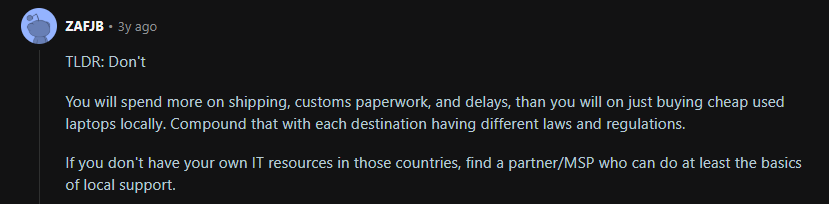
Here’s a Reddit user who mentions the challenges of shipping assets internationally (high costs of customs paperwork, delays, laws varying with locations):
Source: Reddit
Increased spending on international logistics and customs raises your hiring costs, while potential supply chain delays can impact your new hires' onboarding experience and productivity.
Lack of Visibility and Tracking
Most businesses shipping internationally don’t have access to real-time tracking data about their assets. As a result, devices often get delayed, damaged, or lost without anyone noticing until it’s too late.
In fact, according to Tive’s 2025 State of Visibility Survey report, 60% businesses learn about shipment damages only after delivery or never at all. For IT managers, this creates major logistical blind spots—they can't confirm deliveries, trigger replacements, or maintain accurate asset records.
This leads to wasted time, lost assets, and poor employee onboarding experiences.
Vendor Silos Across Procurement, Couriers, and ITAD.
In IT logistics, processes are often fragmented, and departments don’t collaborate, especially when you’re not using the right centralized tool. This makes IT the middleman, constantly chasing updates and firefighting issues, which leads to inefficient processes and errors.
According to this report from Celonis, 30% of supply chain leaders believe teams not sharing information, departments working in silos, and systems not playing well together are the top reasons hindering process efficiency.
Here’s an example:
Let’s assume a company offboards 10 remote employees across the US, UK, and India.
- Procurement marks the assets as “ready for retrieval” in their ERP.
- The courier partner uses a separate portal for pickups and tracking, but the IT team doesn’t have access.
- The ITAD provider requires serial numbers to schedule disposal, but never receives them because procurement’s export file failed to sync.
Two weeks later, three laptops are still unaccounted for:
- The courier says the request was never received.
- Procurement insists the pickup request was sent.
- ITAD shows no record of receipt.
Meanwhile, IT can’t confirm whether those devices were retrieved, are still in transit, or are sitting unsecured at former employees’ homes, which poses a data security and compliance risk. As IT spends hours manually emailing vendors to track shipments, productivity suffers.
Poor Device Retrieval Rates
An employee is leaving your organization, and it’s your job to retrieve the assets for reassignment. You send the necessary details and ask the employee to mail them to you, only to find out that the employee has ghosted you.
The problem is more common than you think.
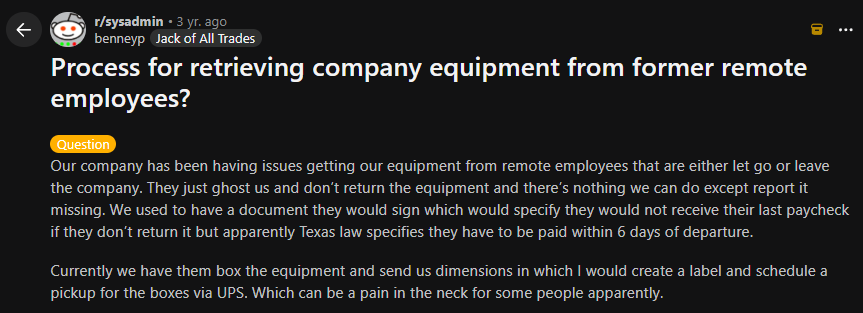
Here’s a Reddit user sharing their frustration with former remote employees not returning the equipment and ghosting them, and there’s nothing much they can do:
Source Reddit
If they refuse to return the equipment, withholding an employee’s salary might sound like leverage. But that could land you in legal trouble because different states have different laws that you must adhere to.
Problems like these break the reverse logistics chain, which costs companies time and money.
Security Risks
Imagine you’re supposed to retrieve 120 laptops from across the globe and only 101 make it back. The remaining 19 are unaccounted for.
Without a centralized or automated solution, you cannot track the status of each device in real-time.
This creates a major compliance gap as the laptops could be anywhere—employees’ residences, lost somewhere in the middle, or stolen. And the worst part is that they all might have sensitive corporate information, which exposes your company to data breaches.
Chain of Custody Risks and Compliance Gaps
If the procurement, HR, IT, courier, and ITAD teams fail to coordinate, which is highly likely without a centralized system, the chain-of-custody data trail will remain incomplete.
Chain of custody means being able to trace every handoff of a device—from purchase, configuration, and shipping to retrieval, wiping, and disposal. This is something you need to maintain during audits.
Here’s a Data Erasure expert on Reddit mentioning that the auditors demand chain of custody, which underscores the importance of maintaining this data:

Source: Reddit
However, without a centralized system that tracks the device in real-time, IT cannot maintain a chain of custody, leading to non-compliance.
- Sustainability and E-Waste Management
As more organizations commit to ESG (Environmental, Social, and Governance) goals, IT logistics has become a key area of focus — and often, a weak spot. The constant cycle of shipping, replacing, and retiring devices creates a massive environmental impact if not handled responsibly.
Common challenges include:
- Tracking and reporting on e-waste disposal across multiple vendors and regions
- Verifying that ITAD partners follow certified recycling and refurbishment standards
- Managing carbon emissions tied to global shipping and reverse logistics
Companies that neglect this area not only waste valuable materials but also risk failing sustainability audits or falling short of corporate ESG commitments.
A modern MDLS or ITAM solution can make this process easier by centralizing ITAD reporting, tracking carbon footprint data, and automating certificate management — helping IT teams stay compliant while minimizing environmental impact.
Solution: Orchestrate IT Logistics and Digital Asset Management with Workwize!
You’ve seen the challenges, now let’s talk about how to fix them.
Workwize was built to simplify every part of IT logistics, turning what used to be a maze of vendors, shipping delays, and manual spreadsheets into one seamless, automated workflow.
As a global IT hardware management solution, it automates your entire asset lifecycle from procurement to deployment, to retrieval and disposal. Beyond managing the digital side of asset management, Workwize also helps you tackle the physical aspect of IT asset logistics challenges like a pro.
Here’s how Workwize helps you deal with the above challenges:
Centralizes and Simplifies Global IT Asset Management
With Workwize, you can manage the entire asset management lifecycle, from procurement and deployment to management, retrieval, and disposal, all using the same platform.
Because Workwize integrates with HRIS platforms like BambooHR, collaboration between IT and HR becomes easy.
For instance, when a new employee joins, HR can create a new record in the HRIS platform. The IT department gets alerted and takes over the process by initiating procurement and placing an order.
The first step is choosing the employee:
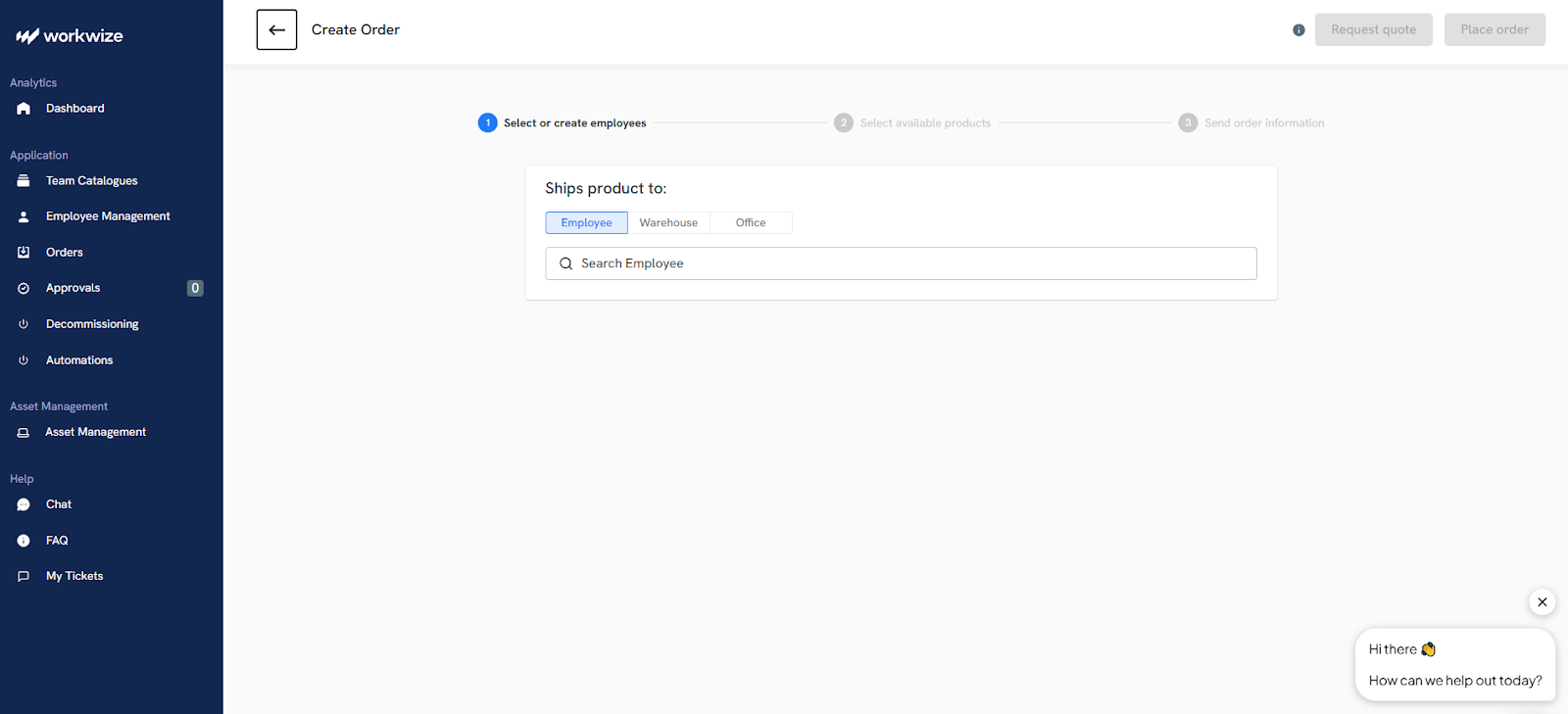
After that, the IT manager can select the products from the approved catalogue or the warehouse:
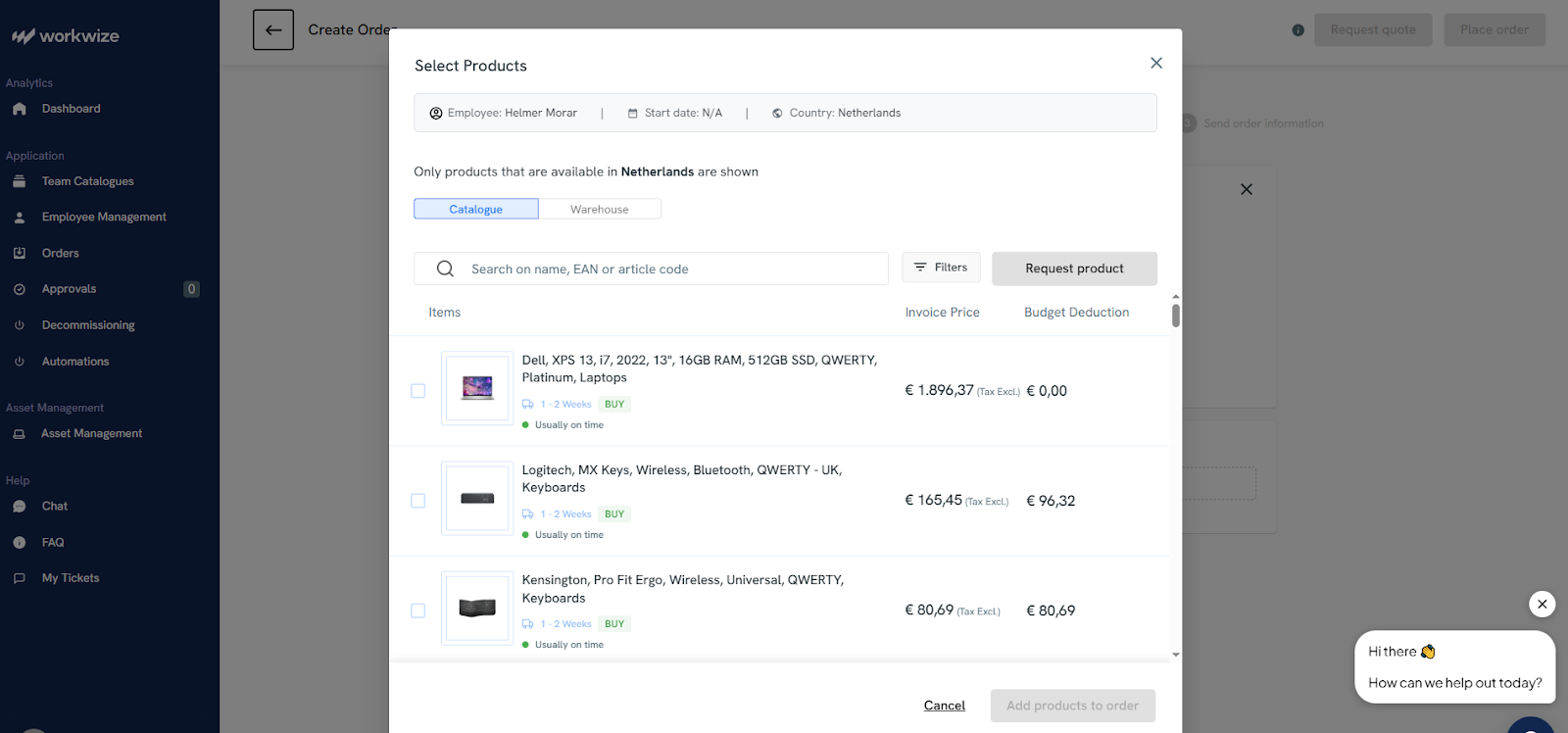
Finally, the IT manager places the order and is greeted with the following confirmation message:
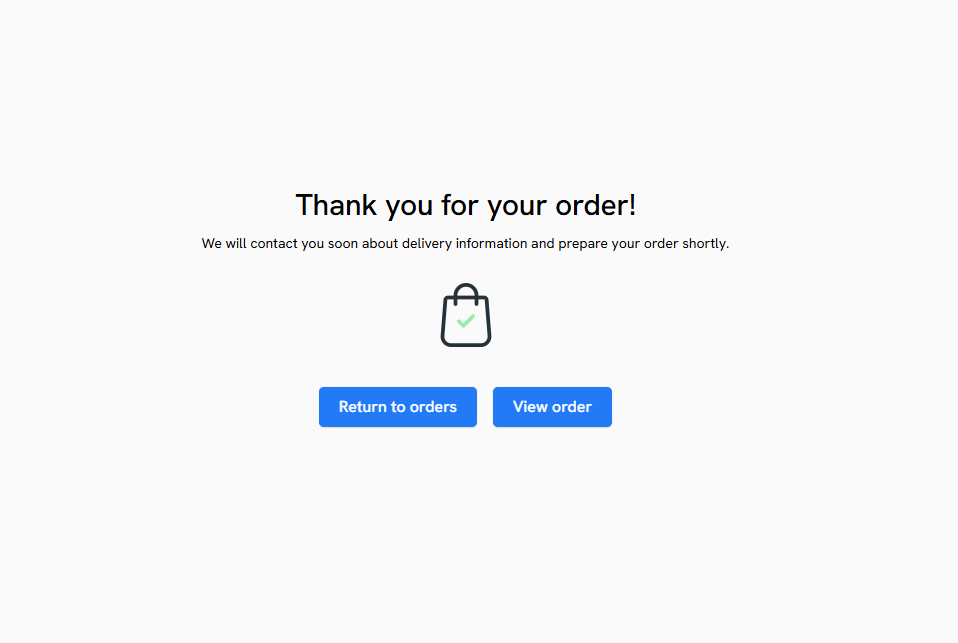
In the same way, HR can initiate the offboarding workflow, and IT can ensure assets are retrieved securely.
Did you see how easy it was? No need to negotiate with different vendors, courier partners, or deal with customs hassles as Workwize handles it for you.
With 72+ suppliers and warehouses across the globe, Workwize ensures on-time, affordable deliveries in 100+ countries. So the chances are we already have a local partner in your region, which means we can save you time and money on international shipping.
Complete Visibility and Real-time Tracking
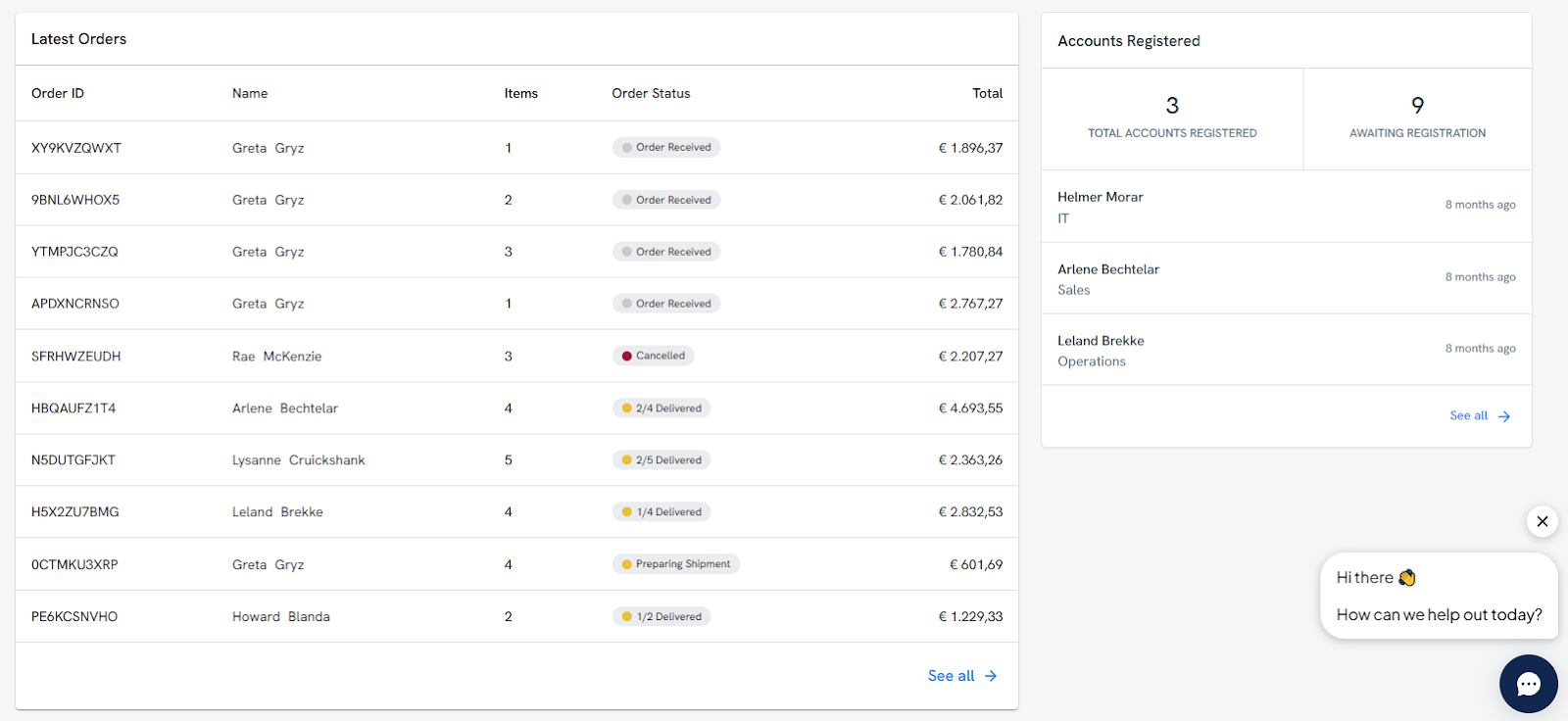
Workwize offers a centralized view of all your assets during each process, from procurement to disposal. Take the dashboard below, for example. It shows you the number of new users, new orders placed, and money spent this month:
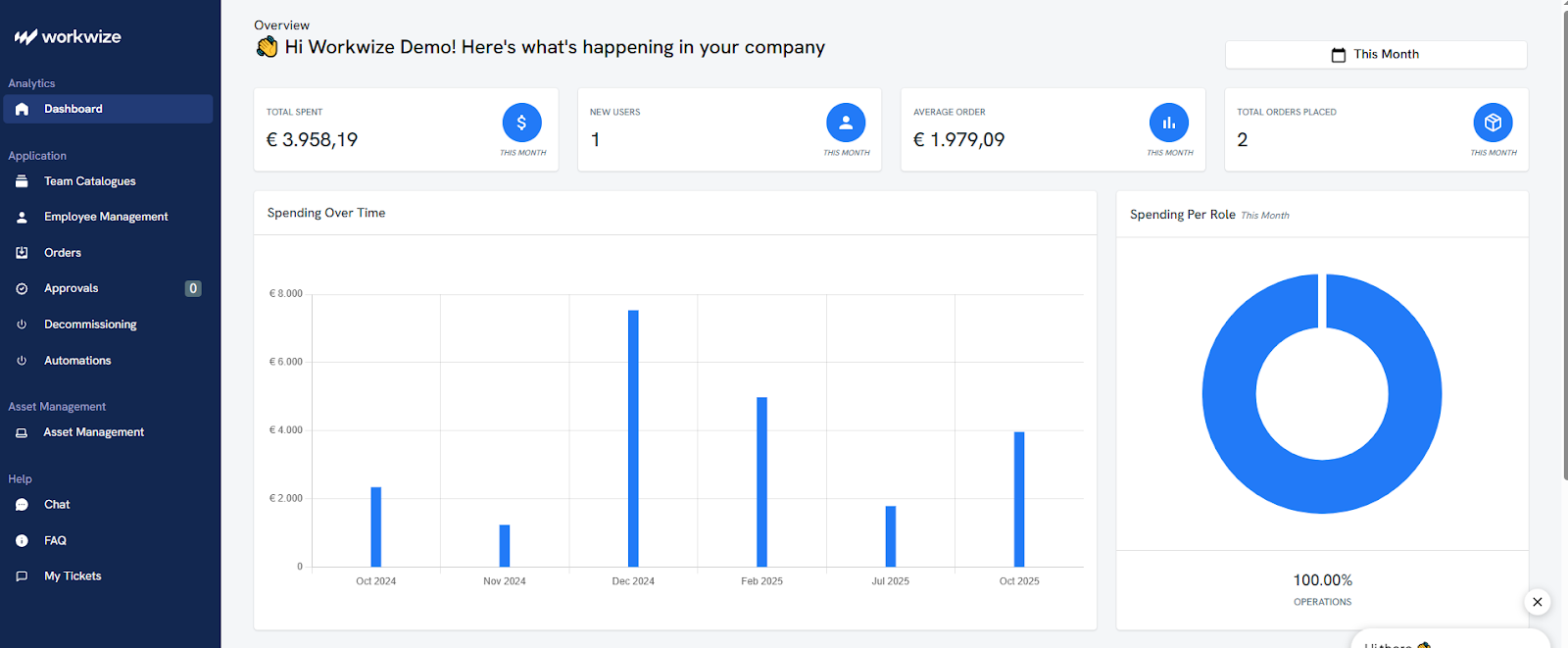
Here’s another screenshot of the same dashboard scrolled down. You can see who placed the order, how many items were ordered, the order or offboarding status, and more.
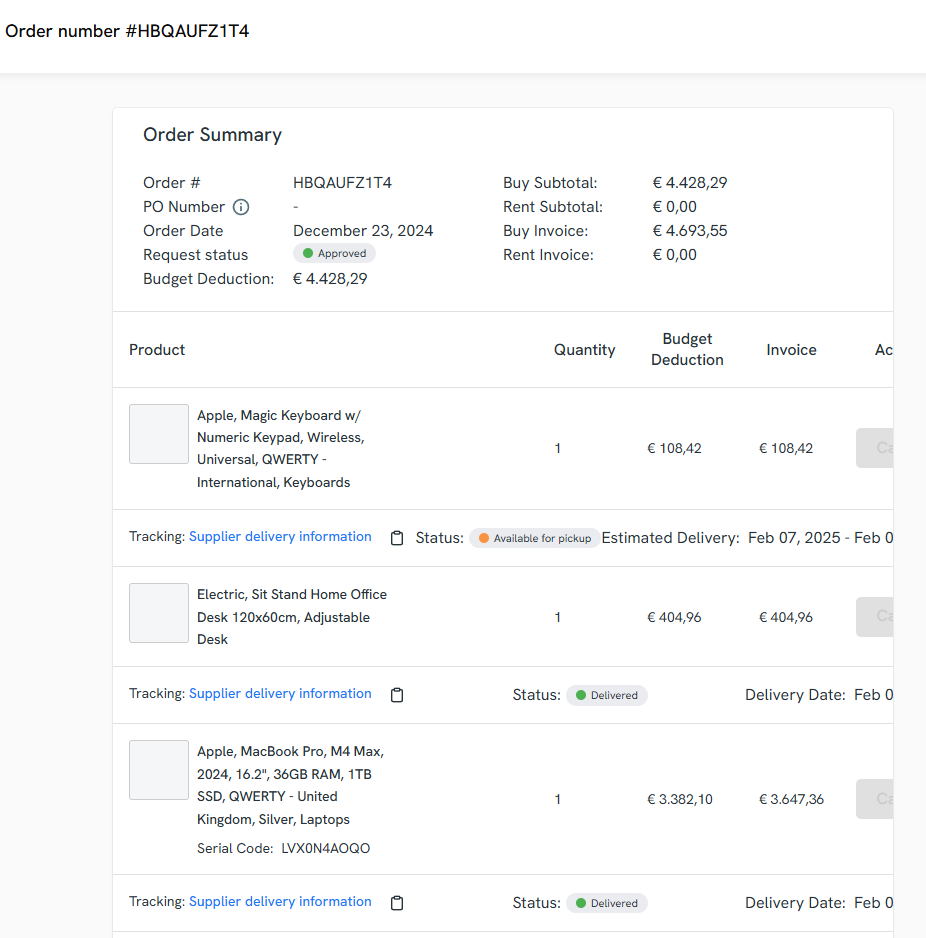
Once you click the orders section, you can view granular details for every order, which include shipment status, estimated delivery time, and user address, among other things:
This asset management dashboard gives you an overview of all the assets across your organization:
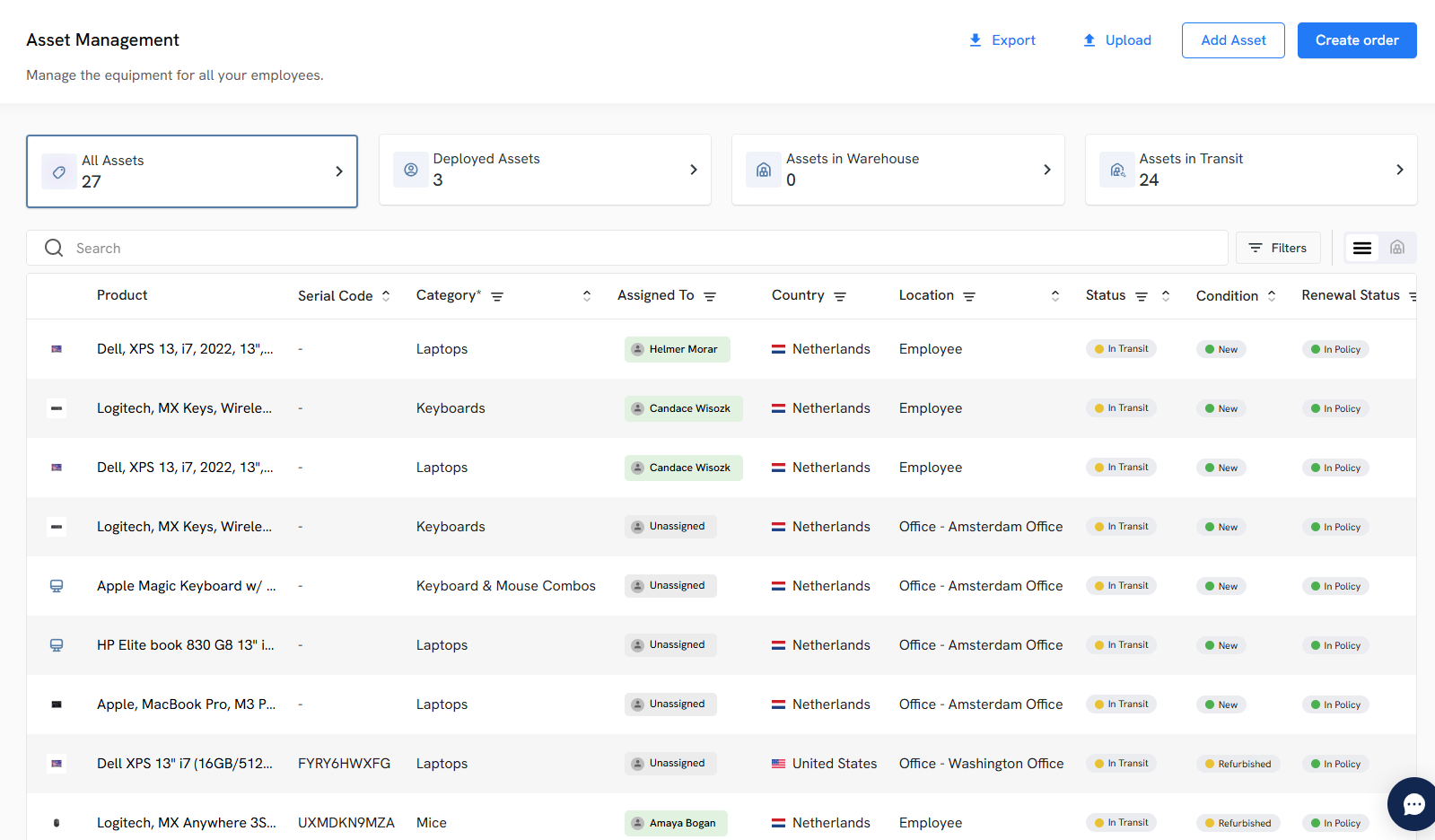
All this information about your asset’s location, status, and condition across all asset lifecycle steps helps you keep track of all your assets in real-time. Also, you can make better decisions and ensure you’re neither understocked nor overstocked.
And if anything exceptional happens, like a delay, Workwize will alert you instantly, allowing you to address the issue before real damage occurs.
Maintains Chain of Custody and Strengthens Security Compliance
Because every step from placing the order to getting it back to your office or warehouse safely is automated and tracked, you can maintain a clean chain of custody. This complete chain of custody helps you stay compliant during audits.
Additionally, when you raise retrieval requests, Workwize performs certified data erasure (data wiping) and prepares the device for reassignment or disposes of it safely, based on your preference. This not only minimizes the risk of lost or unaccounted assets but also protects sensitive company data and prevents potential breaches.
Seamless Retrieval Process
Once you initiate the retrieval process, Workwize dispatches prepaid return kits with detailed instructions and coordinates with the employee to determine the best retrieval method. This helps minimize resistance and increases the number of retrieved assets.
Workwize will update you along the process and send timely alerts.
You can also track the offboarding in the orders section in Workwize’s dashboard.
Here’s what offboarding details for an order look like:
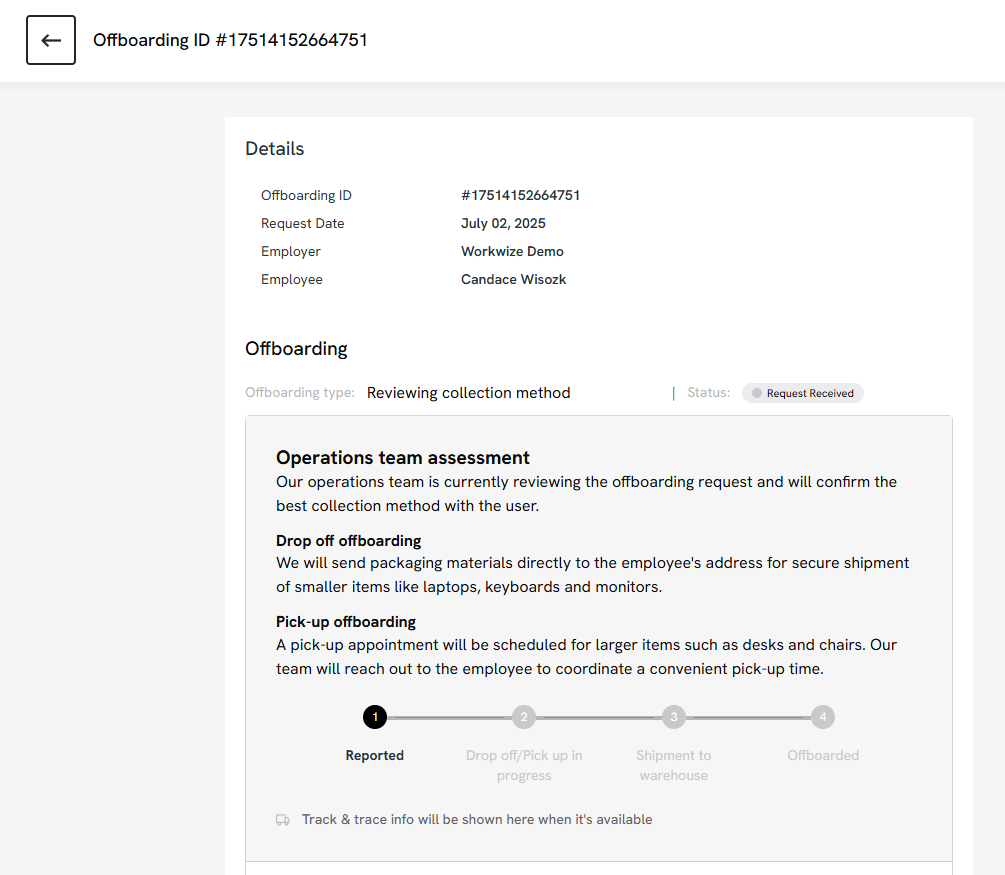
An automated retrieval process and real-time insights ensure you get all assets back securely, without having to go back and forth with vendors or employees.
- Delivers Proven ROI and Efficiency Gains
Workwize doesn’t just streamline logistics; it delivers measurable impact.
Take HighLevel, for example. The company struggled with multiple issues, including time zone differences, inconsistent product availability across vendors, increased IT burden from managing multiple vendors, and more.

However, after streamlining and automating procurement, deployment, retrieval, and disposal with Workwize, HighLevel saved $1.4 million annually. That’s the power of an integrated IT logistics and asset management system: faster workflows, better visibility, and significant cost savings.
Book a free demo to see how Workwize can help your organization save time, reduce costs, and scale effortlessly.


Establish a single source of truth for every IT asset across the globe.
.png?width=258&height=318&name=g10%20(5).png)
More related resources to help you stop firefighting hardware operations.



Get monthly insights into how other IT leaders are improving their ops.



.png?width=2880&height=1232&name=Group%202147262874%20(1).png)
Stop coordinating
hardware like it's 2012.
.svg)
.png?width=172&height=68&name=apple%20business%20patner%20(1).png)
.svg)
.svg)
.svg)
.svg)