




.svg)
.svg)

.svg)


.svg)





.svg)
.png?width=500&height=424&name=Style-1---V1-(1).png)

.png?width=1230&height=692&name=Vector%20(13).png)
Every laptop has a 1-in-10 chance of being stolen within a year. Most are never recovered.
Getting a replacement laptop costs a few hundred to a few thousand dollars.
But the real cost isn’t about losing the hardware. It goes much deeper, and it’s far worse.
About 46% of organizations have experienced data breaches or loss of sensitive data directly linked to these lost devices.
So when a laptop disappears from a coffee shop table or a hotel room, you're potentially exposing customer records, financial data, intellectual property, and login credentials. What follows can include regulatory fines, legal liability, damaged reputation, and weeks of crisis management.
And yet, in most cases, it’s not elite hackers or complex cyberattacks behind these incidents. It’s simple human carelessness that can be prevented.
The fact is that laptop security doesn't require expensive tools or complicated protocols. What it demands is understanding the real and implementing a few smart, layered protections that work in daily life.
Let's walk through exactly how to keep your laptop secure and what to do if the worst happens.
TL;DR
- Physical security is your first line of defense. Cable locks, device awareness, and proper storage prevent almost all opportunistic laptop theft.
- Full-disk encryption turns stolen laptops into useless e-waste and protects your data even when physical security fails.
- IT asset lifecycle management platforms provide the visibility enterprises need and offer real-time device tracking, compliance monitoring, remote management capabilities, and incident documentation.
- Automated compliance checks and technical controls handle the baseline, but sustainable security requires training, accountability, and making security everyone's responsibility.

How Prevalent Is Laptop Theft?
Laptop theft is more common than most people think, and its reach stretches from the coffee shop table to corporate facilities.
Gartner estimates that roughly 30% of enterprise IT hardware may be lost, missing, or “ghosted” at some stage of its lifecycle, meaning those devices aren’t in the asset records and are effectively unaccounted for.
And that figure is just one part of the story.
Many organizations lose hundreds of laptops each year.
In an Intel study, U.S. organizations reported losing tens of thousands of laptops in a single year; on average, an organization lost about 263 laptops per year, yet only about 12 were recovered.
Moreover, an earlier Ponemon study estimated that up to 12,000 laptops are lost each week in U.S. airports. If the weekly estimate is extrapolated, that translates to as many as 600,000 laptops lost annually in airports.
As you’d expect, a large share of device losses happens offsite: in hotels, airports, and transit, rather than in secure office spaces. That explains why mobility, travel policies, and encryption are repeatedly recommended controls for preventing laptop theft.
How Bad is a Lost Laptop for You?
When a laptop disappears, the device itself is often the least of the problems.
A stolen laptop might cost a few hundred or a few thousand dollars to replace — but the ripple effects can be catastrophic.
In fact, the average cost of laptop theft reaches $49,246, with 80% of that cost attributed to data breach.
Let's break down why a missing laptop can become an existential threat to your business.
- Data breach risk: A single lost laptop can open the door to a data breach that costs your organization millions. In 2025, the average cost of a data breach hit $4.4 million, with stolen credentials being among the hardest to contain, taking up to 292 days to resolve. Since 46% of breaches expose customer PII and 40% expose employee PII, one unsecured device can quickly spiral into identity theft, financial fraud, and reputational fallout.
- Security vulnerability: Lost laptops often lead to unauthorized system access, especially when they’re not encrypted or remotely managed. Attackers can roam undetected for an average of 206 days before being caught, and nearly half of organizations have reported data loss directly tied to unsecured devices. Each day of exposure increases the risk of deeper infiltration, ransomware, or stolen IP.
- Financial loss: The financial ripple effect of a lost laptop goes far beyond replacing the hardware. A breach linked to that device can trigger $1.47 million in lost business alone, plus investigation costs, credit monitoring, and legal settlements that drag on for years.
- Operational disruption: When a company laptop goes missing, the immediate response often includes system lockdowns, emergency credential resets, and forensic investigations, all of which halt productivity.
- Regulatory and reputational damage: Data protection laws like HIPAA, GDPR, and CCPA impose eye-watering fines — up to €20 million or 4% of annual revenue under GDPR, and $1.5 million per year under HIPAA. But the real damage runs deeper: lengthy investigations, strained customer relationships, and public scrutiny. Every headline about a stolen device erodes trust from your organization, something money can’t easily buy back.
Steps You Can Take To Prevent Laptop Theft as an Organization
It would be nice to start with the obvious stuff that everyone ignores.
Physical security is your best defense. Once you take care of physical security, the chances of your laptop getting stolen drop drastically.
1. Always Use an ITALM Solution and MDM for all Devices
If you want to prevent laptop theft, you need more than physical locks and tracking stickers. You need full visibility into where every device is, who’s using it, and how quickly you can secure it if something goes wrong.
That’s why we suggest beginning with an ITALM platform like Workwize.
Workwize integrates with your MDM solution to manage the entire lifecycle of your IT assets from one place. It offers you complete digital and physical control over your devices, so you’re never out of touch with the location, usage history, and ownership of your asset.
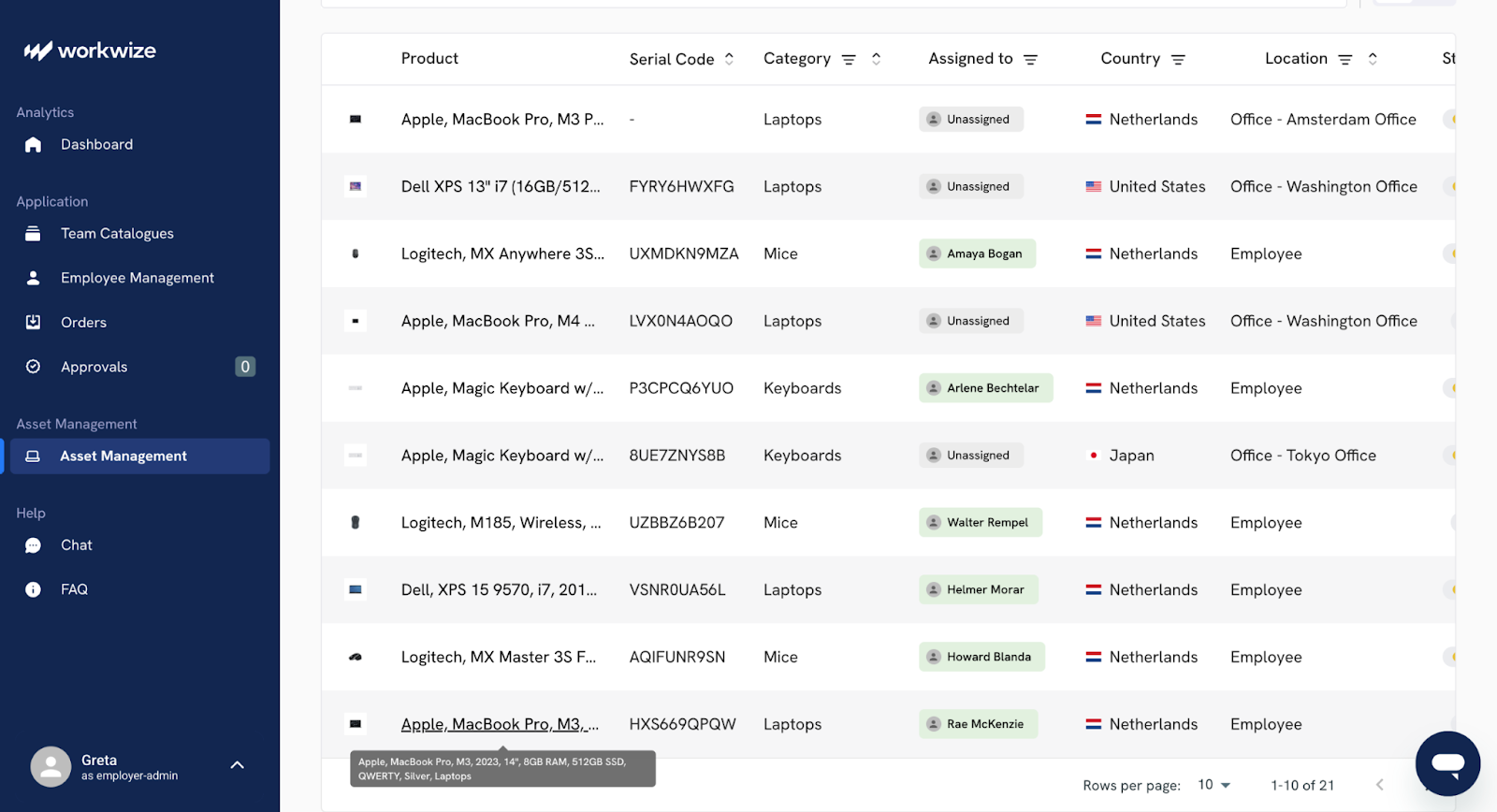
Should a laptop go missing or be disconnected from your organization's network, you can easily receive an alert on the Workwize portal.
Moreover, when someone leaves or changes roles, Workwize helps you retrieve their equipment quickly by automating pickups, return tracking, and reassignment. This reduces the risk of devices going missing, especially in hybrid or remote teams where assets are scattered across different locations.
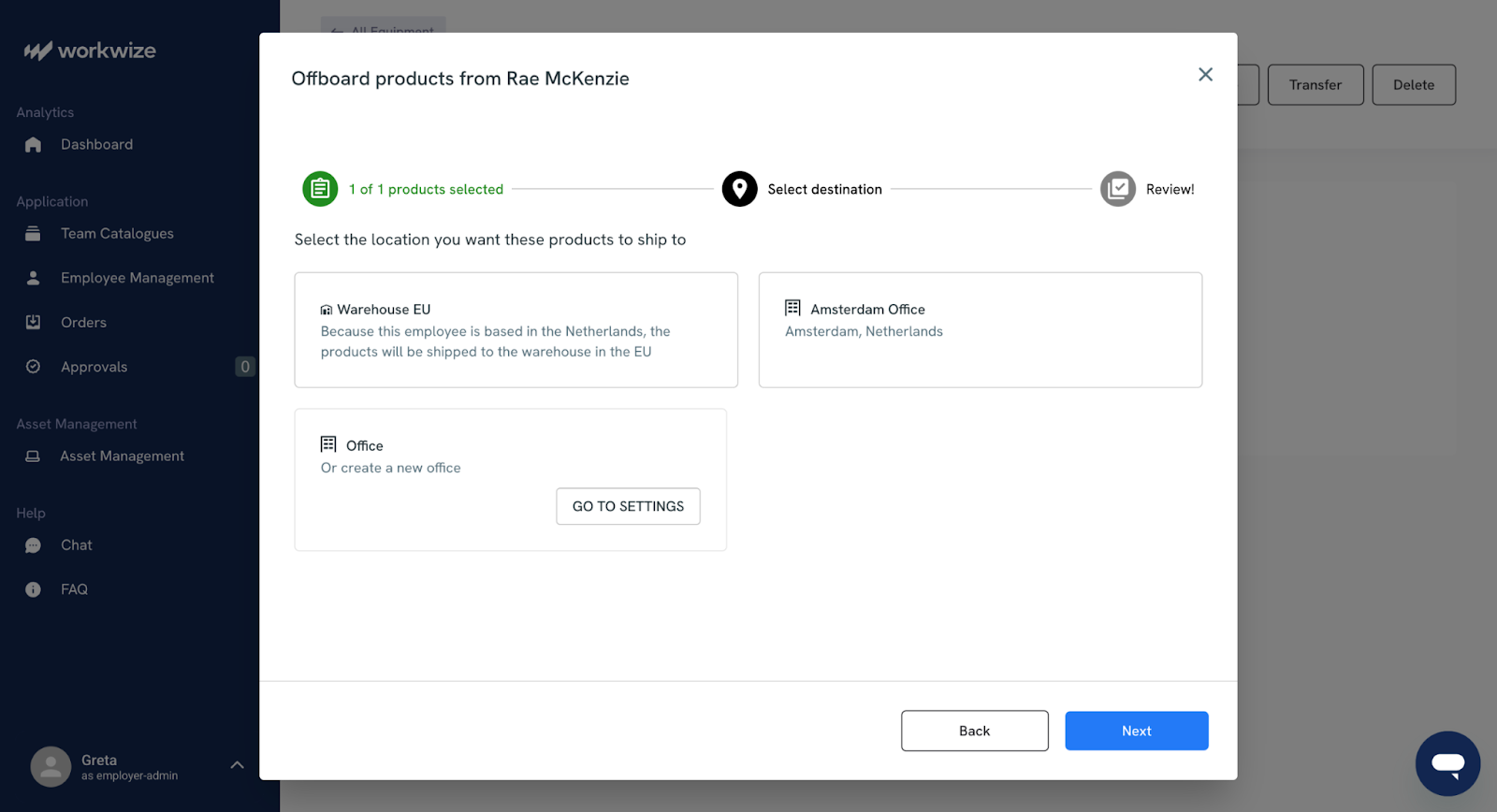
Moreover, Workwize, paired with your Mobile Device Management (MDM) tool, gives you even stronger protection. While Workwize keeps track of who has what, an MDM solution helps you control what happens to those devices.
If a laptop is stolen or misplaced, your IT team can:
- Immediately lock or wipe the device remotely to protect sensitive data
- Try to locate the laptop using its last known network or GPS signal
- Enforce encryption and password requirements automatically
- Revoke access to company systems through integrations like SSO
Moreover, if a device isn’t returned in time, your MDM tool can step in to lock or erase it, keeping your data secure.
Using both tools together gives you a complete safety net. Workwize ensures every laptop is accounted for, while your MDM solution protects it. This combination lets you prevent losses, recover assets faster, and maintain control over your company’s devices no matter where your employees work.
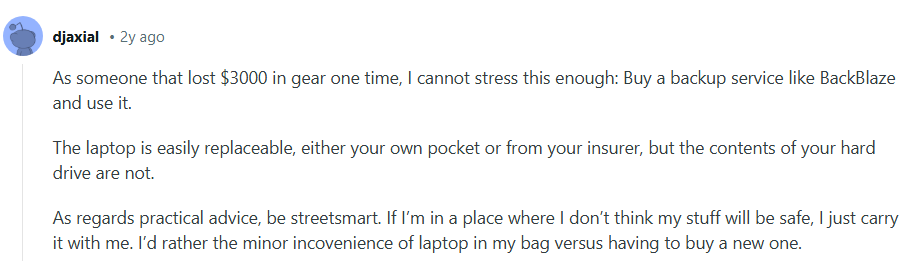
As this Redditor points out, a laptop is replaceable, but its contents are not. That’s why you must follow security practices, such as full-disk encryption, zero-touch deployment, and the use of SSO tools.
2. Use Automated Provisioning Instead of Manual Setup
Manual laptop setup leaves too much room for mistakes. A device might go out without full encryption, miss a critical patch, or lack required security tools. These minor oversights make a lost or stolen laptop far riskier than it needs to be.
Automated or zero-touch provisioning solves this by applying your approved configuration the moment a laptop is powered on. It creates a consistent, secure baseline for every device, no matter where the employee is located.
With automated provisioning, each laptop is:
- enrolled in your MDM automatically
- encrypted before anyone signs in
- patched with the latest OS and firmware updates
- loaded with approved apps and security tools
- checked against your compliance requirements
If you partner with Workwize for IT equipment procurement, every laptop comes with zero-touch deployment, allowing you to wipe or lock the device the moment an issue arises.
This removes the guesswork from setup and prevents devices from drifting into insecure states. For example, a remote hire can open their laptop and start working without needing a manual walkthrough. The device configures itself, applies security controls, and becomes compliant before the user even logs in.
3. Implement Strong Access Controls and Authentication
Another crucial tip to prevent laptop theft is to make stolen hardware useless by enforcing strict access controls and authentication across every device and account.
To begin with, require Multi-Factor Authentication for all users. It stops attackers from logging in with a stolen password alone.
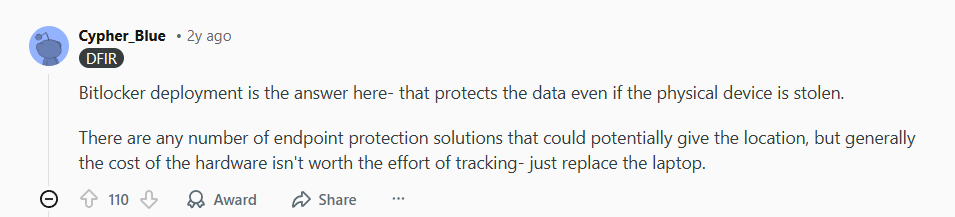
Moreover, go for full disk encryption on every laptop so files remain unreadable even if a thief removes the drive.
This Redditor emphasizes its importance:
It’s also a good idea to set up short automatic screen locks on every laptop and require strong, unique passwords that are rotated or managed with a company password manager.
Another tip is to use endpoint protection that detects suspicious behavior and can flag unusual activity on a laptop, such as repeated failed logins or access attempts from unexpected locations. CrowdStrike Falcon, Microsoft Defender for Endpoint, and SentinelOne are some tools to look at.
Lastly, integrate your MDM with SSO providers such as Okta or Azure AD. This is because centralized identity enables immediate disabling of a user across all systems when a device is compromised.
4. Limit Physical Access and Secure Workspaces
One of the simplest ways to prevent laptop theft is to make it harder for anyone to walk away with a device unnoticed. Even in hybrid or remote setups, strong physical security measures can make a big difference.
Start by assessing where your laptops are most vulnerable.
In offices, theft often happens in open areas like meeting rooms or shared desks. Encourage employees to store laptops in locked drawers or cabinets when not in use. You can also install security cables or docking stations with locks for high-value devices, especially in hot-desking environments.
For remote employees, provide clear guidelines on securing company laptops at home. Recommend using safes, lockable storage, or at least keeping devices out of sight when not in use.
Encourage team members to avoid leaving laptops unattended in public places like cafes or airports, even for a few minutes.
If your company uses shared workspaces or co-working offices, consider:
- Restricted access badges or passcodes to limit entry to authorized personnel only
- CCTV surveillance near high-traffic or storage areas
- Laptop sign-in and sign-out processes for shared or temporary devices
Moreover, employees who travel or work from public places are your highest-risk group.
It’s a good idea to equip them with:
- Privacy screens
- Laptop cable locks
- RFID-blocking sleeves
- Premium laptop bags that don’t scream “expensive tech inside”
5. Train Employees to Master the Physical Protection of Their Devices
Even the most advanced systems can’t prevent theft if employees aren’t aware of how their actions impact device security. Your people are the first line of defense, and regular education goes a long way in reducing risk.
Start by creating simple, easy-to-follow policies around laptop care and security.
Make sure every employee knows what’s expected when it comes to handling company equipment. It should include everything from keeping devices with them while traveling to reporting lost or stolen items immediately.
Another way is to use onboarding and quarterly refreshers to cover key topics such as:
- Safe handling practices: How to secure laptops in public spaces, during commutes, and at home.
- Incident reporting: Clear steps for what to do if a device is lost, stolen, or compromised.
- Data protection basics: Why password strength, multi-factor authentication, and encryption matter.
- Travel guidelines: How to keep laptops safe through airports, hotels, and client sites.
You can also run simulated exercises or short training videos that reinforce real-life scenarios, such as what to do if a device goes missing during a business trip.
Platforms like Workwize make this process easier by linking each employee to the assets they’re responsible for. When staff can see exactly what equipment is assigned to them, it reinforces accountability and transparency.
6. Regularly Audit and Update Your Asset Records
Outdated spreadsheets with manual records and scattered data across departments often create blind spots that thieves and inefficiencies can easily exploit.
That’s why it’s important to schedule regular, automated asset audits to help you close those gaps. It ensures every laptop is accounted for, properly assigned, and securely managed throughout its lifecycle.
But what tools to use for this process? Give Workwize a try.
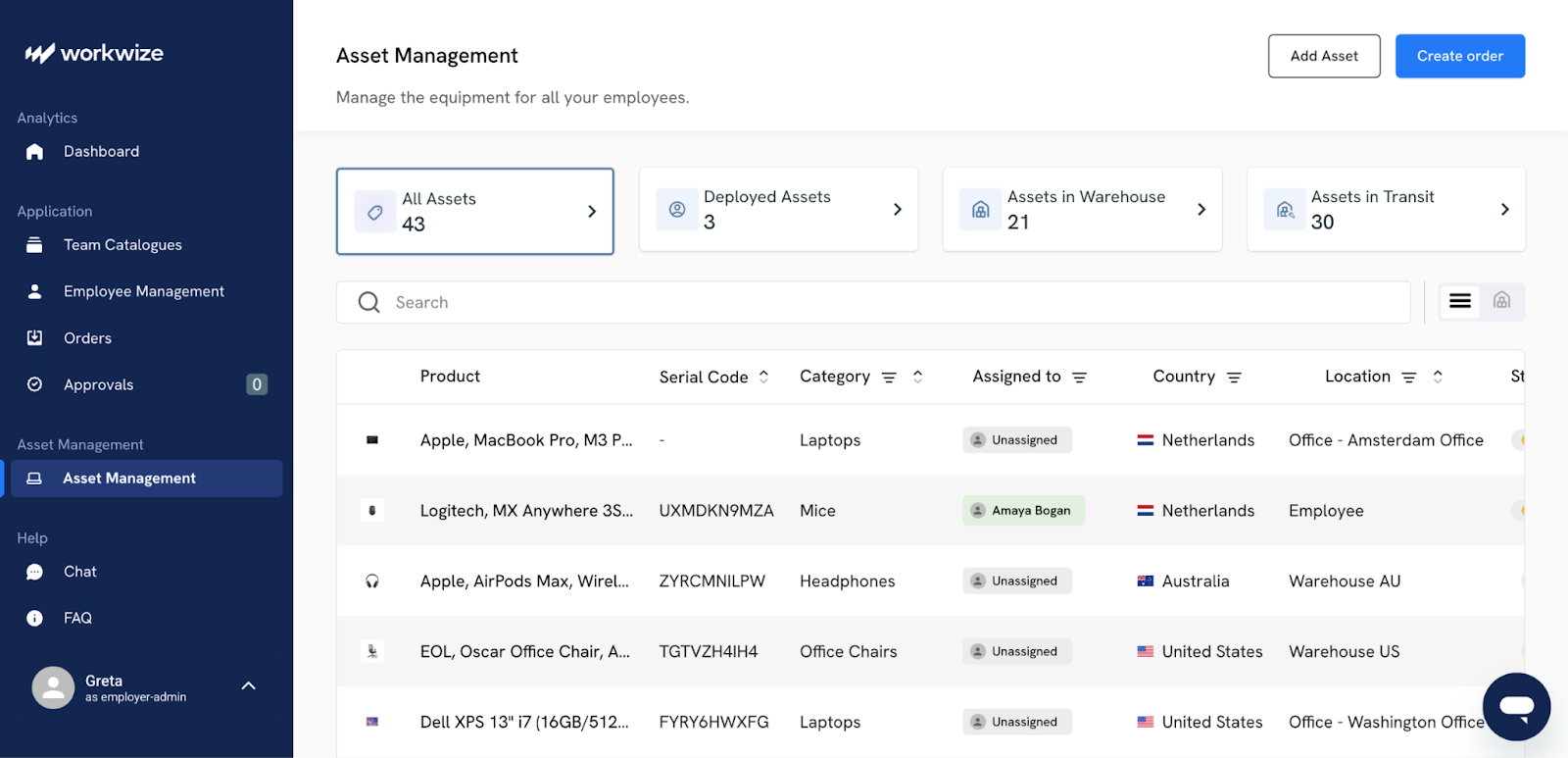
Instead of relying on static asset lists or manual check-ins, Workwize keeps your IT hardware inventory alive and continuously updated as assets move around your organization. Compared to manual spreadsheets, you don’t need a human employee to update records or track long mail threads.
Every time a laptop is issued, retrieved, repaired, or reassigned, Workwize records the event automatically. It does this by syncing with HR, procurement, and IT systems, so device ownership updates instantly when employees join, move teams, or leave the company.
This helps you:
- Automate audit schedules: Set periodic asset checks that remind employees to confirm they still hold assigned equipment.
- Generate instant reports: Filter assets by location, department, or status to identify missing, inactive, or duplicate entries.
- Track asset condition and usage: Log repairs, replacements, and device age to plan timely refreshes.
- Integrate with MDM tools: Pull in real-time data on device activity, compliance, and last seen location for deeper visibility.
- Trigger follow-ups automatically: If a laptop hasn’t checked in for weeks or an employee hasn’t confirmed possession, you can immediately flag it for investigation.
Regular auditing also strengthens your security posture and insurance coverage. Many insurance providers now require documented asset management practices as proof of due diligence. Workwize’s visibility into your assets can help you set up detailed audit trails and timestamped records to demonstrate compliance during audits or claims.
To make these audits truly effective:
- Schedule them at least quarterly, or more frequently for high-turnover or high-value roles.
- Encourage department leads to review and verify asset lists with their teams.
- Use Workwize dashboards to visualize trends, such as devices nearing end-of-life or recurring loss hotspots.
- Align audit results with procurement planning so replacements are ordered proactively, not reactively.
In short, asset auditing shouldn’t be an afterthought. When your records are clean and connected across systems, you not only prevent theft but also build a culture of transparency and control that protects every device and every dollar invested in it.
7. Maintain a Clear Device Recovery and Incident Response Plan
Finally, no matter how well prepared you are, you can never be completely immune to laptop theft.
In case a laptop does go missing, you need an effective response plan to mitigate the impacts of the lost device. A clear, well-rehearsed recovery and incident response plan can turn a potential crisis into a controlled situation.
Start by creating a standard reporting process. Every employee should know:
- exactly what to do the moment a device is lost or stolen,
- who to contact,
- what details to provide,
- and what immediate steps to take.
This reporting flow should be easy, accessible, and well-communicated across your organization. Make it part of IT onboarding, and send regular reminders in security awareness training.
Once a report is made, your IT team should have a clear playbook to follow. This typically includes:
- Verifying the incident: Confirm whether the device is truly missing or just misplaced.
- Using Workwize records: Identify the laptop’s serial number, assigned user, and last known location.
- Triggering MDM actions: Lock or wipe the device remotely using your MDM tool to prevent any unauthorized access to company data.
- Disabling credentials: Immediately revoke or suspend the user’s access across all connected systems through your SSO provider.
- Filing insurance and legal reports: Use up-to-date device data from your ITAM system to speed up claims or police documentation.
It’s also important to test your recovery plan regularly. Just as you’d run a fire drill, simulate a laptop theft scenario once or twice a year.
This helps ensure your team knows their roles and your tools work as intended. These dry runs can also help uncover hidden dependencies, such as outdated contact lists or gaps between IT and HR coordination.
Pro Tip: In case incidents do happen, treat them as a learning opportunity. Review what went well and where delays occurred. Did employees report quickly? Were MDM actions executed in time? Was communication between departments seamless? Continuous improvement keeps your response plan sharp and relevant as your organization grows.

What Can You Do To Prevent Laptop Theft as an Employee
While organizations play a major role in securing company devices, employees are the first line of defense against laptop theft.
How you handle, store, and travel with your device can make all the difference. The good news is that a few consistent habits can drastically lower the risk of loss or theft and protect both your data and your company’s reputation.
Begin With The Basics
- Use cable locks religiously. Kensington locks are cheap (under $30), take five seconds to use, and make your laptop significantly less attractive to grab-and-run thieves. Attach your laptop to a desk, table leg, or fixed furniture whenever you're in a shared workspace, hotel room, or airport lounge.
Sure, a determined thief with tools can defeat them, but most thieves want devices they can pocket in three seconds, not ones that require a toolbox.
- Follow the three-foot rule. Keep your laptop within arm's reach at all times in public. If you can't touch it, you shouldn't trust it. That means taking it with you to the bathroom, keeping it at your feet on trains (never in overhead storage), and never asking strangers to watch your stuff while you take a call.
Human nature says they'll say yes, but their attention span says they'll be scrolling on their phones when your laptop walks away.
- Disguise your laptop bag. Those branded laptop bags might as well have "Expensive Device Inside" printed on them. Use a nondescript backpack or messenger bag instead.
Better yet, use an anti-theft bag with hidden zippers, slash-proof materials, and RFID blocking. For enterprise deployments, consider issuing these as standard equipment; they're a fraction of the cost of a single data breach.
- Use a tracking device. Keep an AirTag or similar tracker in your laptop bag at all times. That way, you always know where your bag is.
Some enterprise ITALM solutions can even integrate with these consumer tracking devices to create alerts when assets move outside designated areas.
- Store your laptop out of view in the car: Car break-ins are extremely common, and laptops left on seats are prime targets. If you must leave your laptop in the car, lock it in the trunk before you arrive at your destination.

Never place it there in public view. Moreover, always avoid leaving it in the car overnight. The X post above shows how this is such a common occurrence.
Take Steps to Reduce Visibility and Target Value
The less attention your laptop attracts, the safer it is. Thieves assess potential targets in seconds, looking for high-value devices and easy opportunities.
- Use screen privacy filters. These prevent shoulder surfing (people reading your screen), but they also make your device less noticeable in public spaces. When thieves can't see what you're working on, your laptop becomes less identifiable as a high-value target.
- Apply visible deterrents. Place warning labels that indicate the device is tracked and encrypted. Many companies use tamper-evident asset tags that leave a "void" pattern if removed. This doesn't prevent theft, but it does deter casual thieves and aids recovery.

Never Leave Laptops Unattended In Workspaces
Whether you're hot-desking, working in a coworking space, or sitting in a corporate office, never leave your laptop unattended, even if you've locked the screen.
Locked screens don't stop someone from unplugging the device and walking out. If you must leave temporarily, use a cable lock or put the laptop in a locking drawer.
For enterprises, this should be a mandatory policy, and your IT asset management platform can help enforce it by tracking device sign-out and return patterns.
Consider implementing clear desk policies that require all devices to be secured at the end of the day, with regular audits to ensure compliance.
Secure Your Home Office Properly
Just because you're working from home doesn't mean your laptop is safe. Home theft of corporate devices is more common than most enterprises realize, and your asset management platform should track device locations to flag unusual patterns.
Treat your home office with the same security mindset you'd use in a corporate environment
- Lock doors and windows when you're away, especially on ground floors. Never leave corporate devices visible through ground-floor windows.
- If you have service people, contractors, or maintenance workers coming to your home, secure devices out of sight before they arrive.
- Set up a dedicated workspace where you can lock your laptop away when not in use. For remote workers in high-risk areas, you might provide lockable home safes for employees to secure laptops and other devices overnight.
The convenience of working from home shouldn't come at the expense of basic security practices.
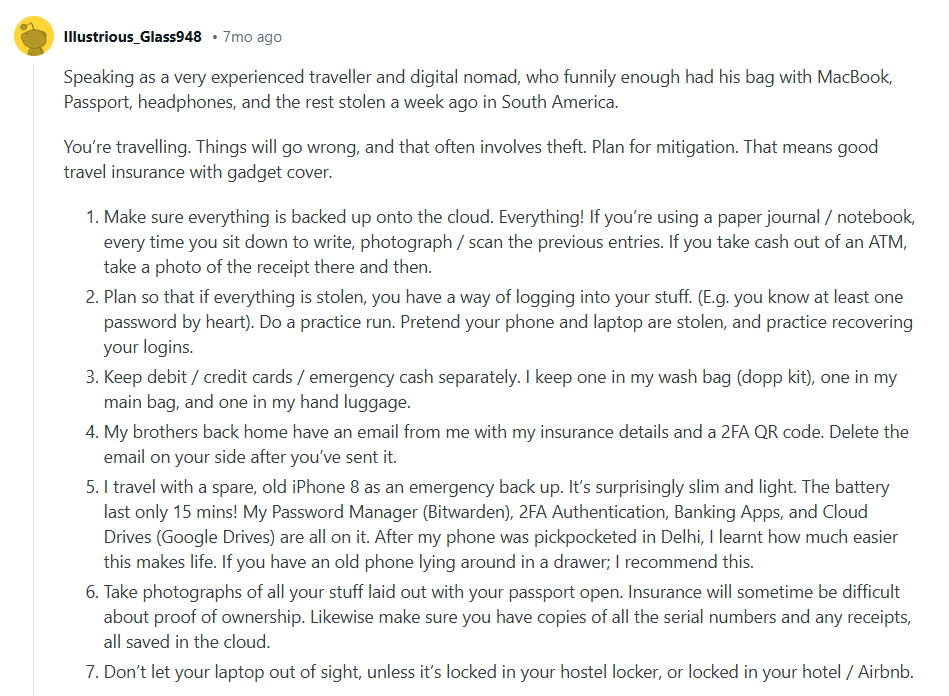
Here’s another bunch of tips from an experienced digital nomad on Reddit:
When the Worst Happens: Immediate Steps After Laptop Loss
Okay, your laptop is gone. Maybe it was stolen, maybe you left it in an Uber, maybe it vanished from your hotel room.
Whatever happened, here's what you need to do, in order.
Step 1: Don't Panic, But Act Fast
The first 24 hours are important. The longer you wait, the more time someone has to access your data or sell the device. Take a breath, then start executing your response plan.
Step 2: Report it Immediately to IT (or Trigger Your Own Protocols)
If you're in an enterprise environment, contact your IT department or security team right now. Don't worry about looking careless. Every minute you delay is a minute your data is at risk.
If you have an ITALM platform, the process becomes much easier.
The moment you report the loss, IT can pull up the exact device record with its serial number, specifications, what data was on it, encryption status, and last known network connection.
Step 3: Trigger Remote Lock or Wipe
If your device is enrolled in an MDM solution (and it should be), your IT team can remotely lock or wipe it as soon as it connects to the internet.
Through an ITALM platform, administrators can see the real-time status of all connected devices and push commands instantly. They can see if the laptop is online, whether the wipe command was successful, and document the entire response for compliance purposes.
For personal devices without MDM, services like Find My Device (Windows), Find My (Apple), or third-party tracking software can help. Log into these platforms immediately and trigger a lock or wipe if the device is online.
Step 4: Change Your Passwords
Even if your laptop was encrypted and locked, change passwords for any accounts you access regularly. Start with email, cloud storage, banking, and work systems. Yes, this is tedious. Yes, it's necessary.
If you use a password manager (which you should), change that master password first, then systematically update your critical accounts.
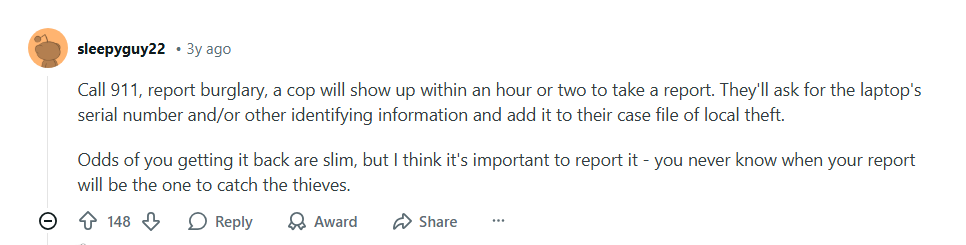
Step 5: File a Police Report
Get a police report number as soon as possible. You'll need this for insurance claims, and in enterprise environments, it's often required for compliance documentation.
Provide the serial number, make, model, and any identifying features. An ITALM system would already have all this information, so you can copy-paste it readily into the report.
Step 6: Notify Stakeholders
If the laptop contained customer data, health information, financial records, or other sensitive information, you may have legal obligations to notify affected parties.
Check your compliance requirements and your organization's data breach response plan.
Your workplace likely has a documented process for lost or stolen devices.
This may include:
- Completing a formal incident report
- Confirming what data was on the device
- Signing a loss declaration
- Reviewing next steps with IT or compliance teams
This also determines whether you're dealing with a reportable breach or just a stolen piece of hardware.
Workwize Makes Laptop Theft Far Less Likely
Even the most organized companies can struggle to keep track of every laptop once it’s in circulation.
Devices move between employees, travel across offices, and sometimes never make it back after someone leaves.
That’s where Workwize helps.
It keeps every stage of the device lifecycle visible and connected, from issuance to retrieval when employees are offboarded. Every laptop is assigned, logged, and easy to trace.
Take a remote employee who suddenly leaves your company.
Instead of chasing details through spreadsheets and emails, Workwize automatically starts the retrieval workflow. The laptop is flagged for return, reminders go out, and logistics partners are notified to arrange pickup. If the device isn’t recovered in time, IT can step in to disable access or repurpose it for someone else.
Moreover, if one goes missing, IT can instantly see who last used it, where it was shipped, and remotely lock or wipe it.
By removing the guesswork from asset tracking and connecting HR and IT systems, Workwize helps you stay one step ahead. It makes it easier to recover laptops, protect company data, and prevent theft before it escalates.
Schedule a Workwize demo now to see how we can help.



Establish a single source of truth for every IT asset across the globe.
.png?width=258&height=318&name=g10%20(5).png)
More related resources to help you stop firefighting hardware operations.

Get monthly insights into how other IT leaders are improving their ops.



.png?width=2880&height=1232&name=Group%202147262874%20(1).png)
Stop coordinating
hardware like it's 2012.
.svg)
.png?width=172&height=68&name=apple%20business%20patner%20(1).png)
.svg)
.svg)
.svg)
.svg)