




.svg)
.svg)

.svg)


.svg)




.svg)
.png?width=500&height=424&name=Style-1---V1-(1).png)

.png?width=1230&height=692&name=Vector%20(13).png)
If you’re managing a remote or hybrid workforce, you’d know how hard it is to retrieve laptops from departing employees.
And even after continuous emails and trying to coordinate with the employee, there’s no guarantee you’ll get the devices back.
Based on Capterra's survey of 300 HR workers, 71% reported they’ve seen at least one exiting employee fail to return company equipment. The average value of those unreturned assets sits at around $2,000 per person, and that’s only the hardware cost.
Then there’s the productivity loss that comes from replacing the device, reconfiguring access, and delaying the next hire’s onboarding. And if that missing laptop ends up in the wrong hands and exposes sensitive data,you’d be looking at millions of dollars lost.
That’s why it’s important to have a strategic process for retrieving devices and other IT assets.
That means building a clear workflow for automated offboarding, communication, packaging, courier scheduling, tracking, data security, and post-return handling.
In this article, I’ll cover why laptops actually go missing and what poor retrieval really costs. I'll also share a playbook for building an automated laptop-return strategy for remote and hybrid teams.
TL;DR:
- Laptops go missing due to weak offboarding workflows, poor IT–HR ownership, complexity of remote logistics, and a lack of real-time asset visibility.
- Lost or unretrieved devices lead to direct hardware losses, compliance exposure, data-breach risk, delayed payroll, and massive operational drag.
- Treating retrieval as a structured, automated process (policy > triggers > logistics > tracking > data security) closes these gaps fast.
- Workwize automates offboarding, standardizes global retrieval logistics, provides real-time asset tracking, and handles secure erasure, refurbishment, and redeployment, ensuring every device comes back.

Why Do Laptops Go Missing?
Laptops don’t just vanish by accident. There are patterns, weak points, and gaps in the offboarding process that make it easy for devices to slip away.
Here are the top reasons behind disappearing devices.
Weak or Missing Offboarding Workflows
One of the primary reasons laptops go missing is a weak offboarding process. If there’s no clear checklist or procedure for asset return, things are bound to fall through the cracks.
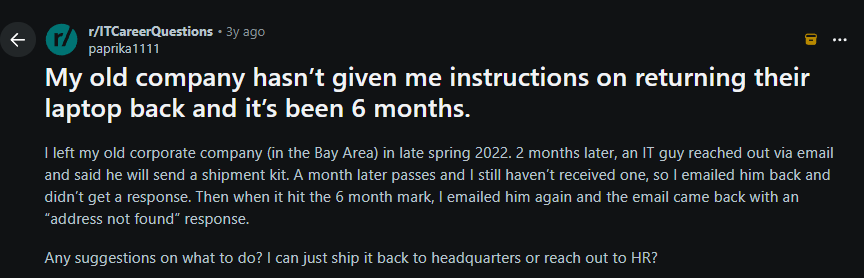
For instance, companies sometimes fail to communicate well with departing employees about how and when to return their devices. This Reddit user shared that the only communication he received was from the IT department that he'll get a shipment kit, and then everything went silent. Six months later, he still had the laptop at home.
Source: Reddit
Sometimes lack of ownership between the IT and HR can also cause confusion. For instance, HR might assume it’s the IT department's job since they handle the assets. But in reality, the IT department sees things differently.
In a Reddit thread asking what actually works for getting laptops back, a system administrator responded bluntly that it’s an HR responsibility and another user immediately agreed.

Source: Reddit
However, this confusion results in devices getting lost. Of course, no one is actively tracking or driving the return process.
I believe it’s a joint responsibility. The HR must initiate offboarding well in advance so thatr the IT team has enough time to manage returns. When both teams collaborate rather than point fingers, retrievals can improve.
If you want to learn how the HR and the IT department can collaborate better to deliver a better first day for employees, check this out: How HR and IT Can Sync to Create a Better First Day for New Employees.
Remote & Distributed Teams
In a remote/hybrid workforce, logistics are a huge challenge. Employees might be spread across cities or even continents, far from any corporate office. Shipping laptops for distributed teams is often expensive and complicated, especially across borders.
For instance, sending a laptop from one country to another might incur hefty shipping fees and import taxes. According to Hofy's blog, shipping to Brazil can incur 38% of the laptop’s value in taxes and 60% in duties, nearly the cost of a new device.
Even if shipping costs aren't high in all cases, you’d still end up overspending without a global retrieval process. And in most cases, you might find that retrieving isn’t a financially sound decision.
This is where solutions like Workwize come in handy. Workwize provides an end-to-end asset management platform that supports asset deployment and retrieval across 100+ locations.
Instead of navigating couriers, customs, and transport on your own, you can tap into Workwize’s global network to recover devices at a fraction of typical shipping and import costs.
Plus, Workwize has local warehouses where we can grade and store your laptops for reassignment. This helps you avoid customs duty and international shipping charges entirely.

No Centralized Asset Visibility
If you’re still relying on spreadsheets rather than an IT asset management (ITAM) platform you won’t have real-time visibility into your assets. It becomes difficult to know
where all your laptops are, who they are assigned to, or what condition they're in.
In a spreadsheet-based setup, a departing employee’s laptop might remain listed under their name for weeks before anyone notices it was never returned.
There’s no automated trigger, no status change, and no alert—just manual checks and guesswork. By the time someone realizes the device is missing, it’s already too late to recover it efficiently.
The fix is simple: Use an ITAM platform like Workwize for centralized asset management. As soon as you log in, you can view all your assets in one dashboard:
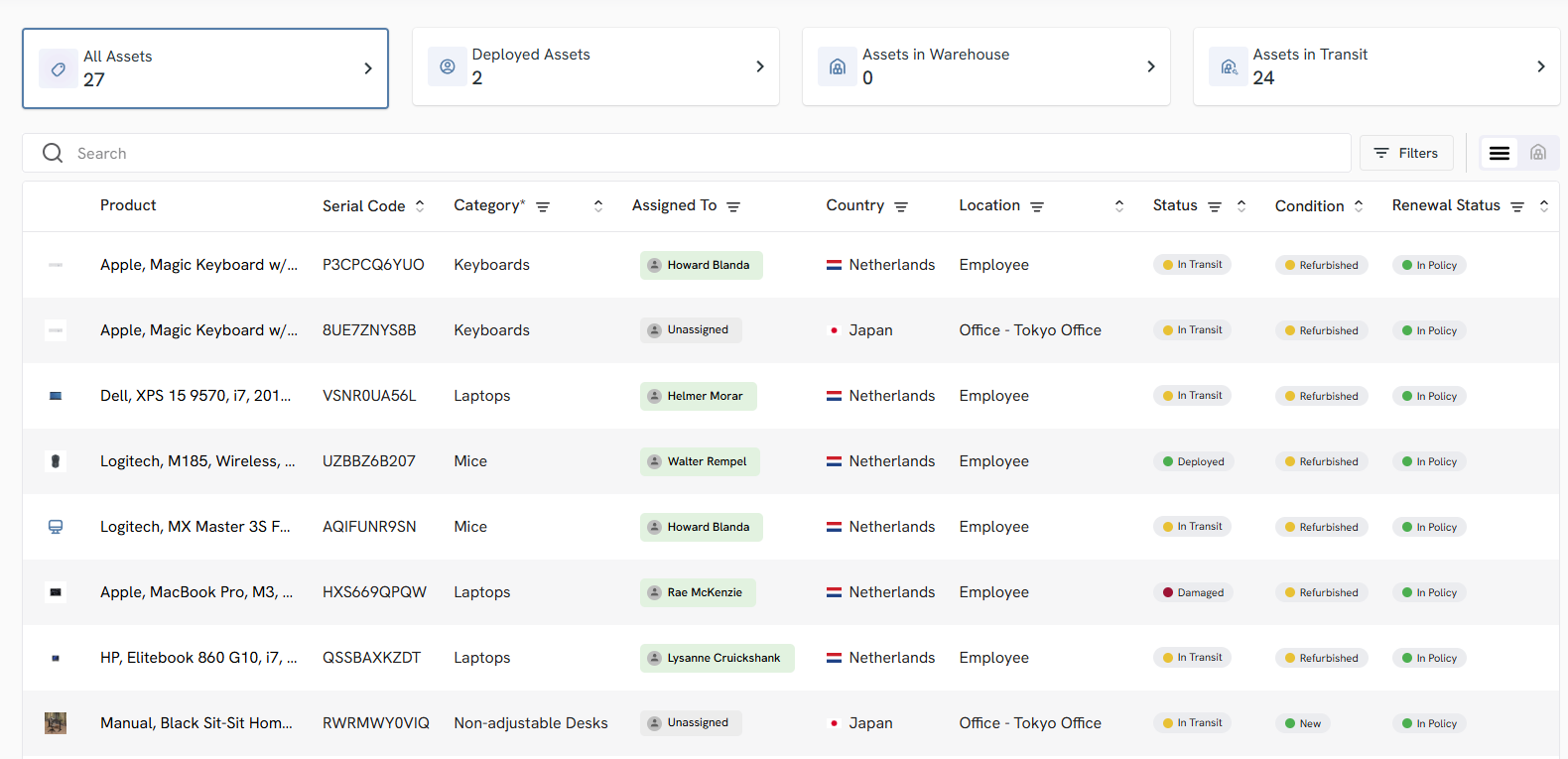
And you can see the product name, serial code, who it’s assigned to, its location, status, condition, and renewal status—all in real-time.
This gives you complete visibility into your assets and lets you track them from procurement to retrieval. That way, your organization switches from being reactive to proactive.
Employee Negligence or Miscommunication
Let’s face it: departing employees have other priorities.
In cases where someone is leaving on bad terms (e.g., an involuntary termination), there’s even less motivation to promptly pack up and ship back their laptop.
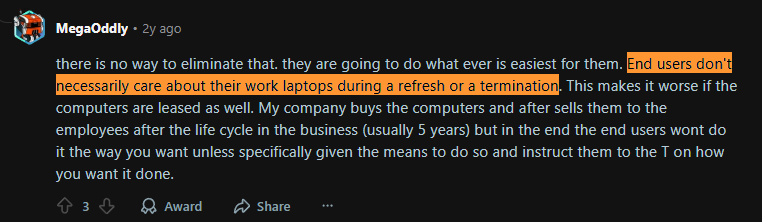
One Reddit user summed it up bluntly: end users don’t necessarily care about their work laptops during refresh or termination:
Source: Reddit
And this behavior seems to be more common among remote/hybrid workers.
Data shows that Hybrid/remote employees were 17% more likely not to return company-owned equipment than on-site employees.
Miscommunication also contributes to this.
If the HR fails to explicitly ask for the laptop back, the employee might misinterpret silence as permission to keep it.
In another Reddit example, a departing employee wasn’t sure whether he should remind the manager about returning the company’s laptop or keep it (or even sell it), because of miscommunication:

Source: Reddit
Ideally, companies should set expectations early by explaining the laptop return policy at onboarding and reinforcing it during offboarding. This avoids miscommunication and ensures devices actually come back.

What are the Consequences of a Flawed Laptop Retrieval Process?
If your organization doesn’t have a laptop or asset retrieval strategy, missing laptops would just be the start of your problems. There’s a lot more at stake, including:
Financial Losses
It’s a no-brainer that every unreturned laptop is lost capital. You either have to pay for a replacement or operate with one less asset.
For instance, the direct cost of replacing a laptop can range from $900 to $2000 (depending on the model). According to Capterra's findings, each employee who walks away with company equipment costs the company around $1,963 in hardware alone.
These costs can quickly add up—multiply a couple of missing laptops by a dozen exits, and you’re looking at tens of thousands in new purchases.
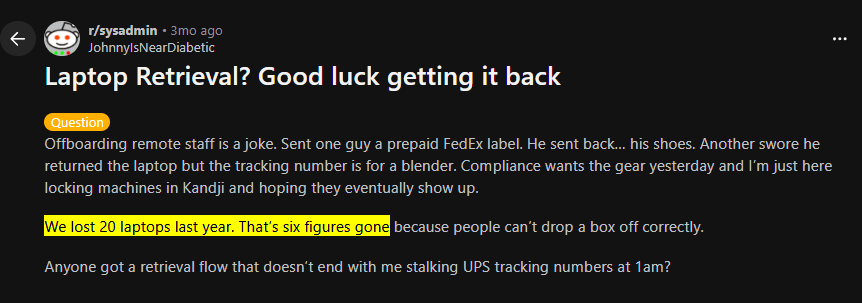
One Reddit user claimed that they lost 20 laptops due to employee negligence and ended up losing hundreds of thousands of dollars. The point is, companies take a massive financial hit from lost devices.
Source: Reddit
Additionally, lost laptops translate to lost resale or redeployment value. Companies usually refresh devices every 3-5 years.
A returned laptop could be refurbished or resold for around $200-$800 (depending on the model and condition). But if it never comes back, you completely lose the residual value, while the cost of buying a replacement still hits the budget.
And the financial loss doesn’t stop there!
Imagine the lost device has crucial data and is exploited by someone with malicious intent. This could result in a data breach, which would be another massive financial blow, According to IBM, the global average cost of a data breach in 2025 is around $4.44 million in 2025, according to IBM. That would turn what started as a lost laptop into a full-scale financial crisis.
The bottom line is that poor laptop retrieval isn’t a minor budget line. It's a serious drain on capital, asset value, and organizational risk.
Data Breach and Compliance Risks
One of the major consequences of missing or lost laptops is the risk to data security. Every corporate laptop is a gold mine of sensitive data, including:
- Customer info
- Emails
- Source code
- Confidential docs
- Saved passwords
And not every company can remotely wipe a device—especially when the laptop is offline, unresponsive, or not enrolled in an MDM.
For instance, according to Capterra’s 2024 U.S. Tech Trends report, among the 59% of HRs who say stolen equipment contains sensitive data, only 55% were able to completely lock employees out of the devices.
So, if you fail to remotely wipe the data, lost devices can expose your company to breaches, compliance violations and fines.
In addition to the financial impact, data breaches also taint your company’s reputation among stakeholders and clients.
And if the laptop remains unreturned, how would you prove that the device was remotely wiped, which might violate regulations like HIPAA or GDPR?
Operational Inefficiency
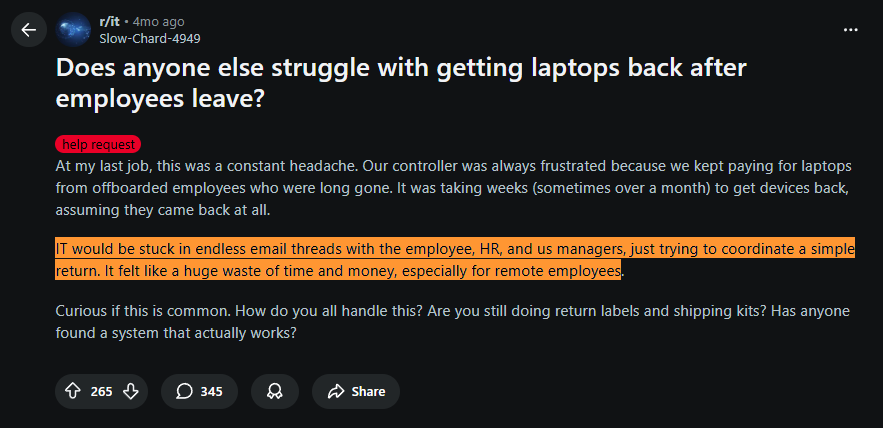
Without an automated asset management solution, your IT team would end up spending hours chasing returns, emailing employees, sharing updates and whatnot. This user on Reddit shared how their IT team used to get stuck in endless email threads for tracking returns, resulting in wasted time and money:
Source: Reddit
All that effort comes at a cost. Instead of focusing on security, device lifecycle planning, onboarding readiness, or strategic IT initiatives, teams are stuck doing administrative work that should have been automated.
Retrieval delays also create friction for HR. For instance, if the departing employee’s equipment is not accounted for, HR may not be able to process their final paycheck. And this can impact offboarding or compliance
This also has a downstream impact, even on new hires. When the IT team expects to redeploy that laptop (which is unaccounted for), the new employee might be stuck waiting days or weeks for the equipment. Worse off, the IT team might have to quickly procure a new one.
Brand & Employee Experience Damage
Lacking a smooth offboarding or retrieval process can result in a bad parting experience for your departing employees, which is not good for your brand’s image. Departing employees remember how they were treated, and they talk about it publicly. A clumsy retrieval process can come across as careless, unprofessional, or even disrespectful.
Imagine you ask the departing employee to pack and pay the shipping fee out of their pocket and say you’ll reimburse them later. While this may look harmless, it sounds quite unprofessional.
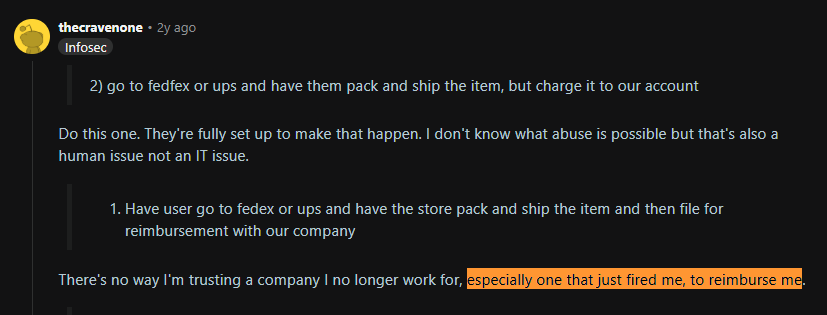
One Reddit user puts it bluntly, “there’s no way I am trusting a company I no longer work with to reimburse me”, which is quite justified, especially if the employee is fired:
Source: Reddit
How to Create a Bullet-Proof Laptop Retrieval Strategy?
Here’s a step-by-step strategy to ensure every device is accounted for, secured, and put back to use. These steps incorporate global best practices and real-world lessons from IT and HR teams.
By implementing these, you can dramatically reduce lost hardware, protect data, and save everyone a lot of headaches. (Bonus: We’ve included Pro Tips under each step to highlight extra insights or quick wins.)
1. Start with a Robust Laptop Return Policy
Get your basics right. A clear, well-written laptop (and equipment) retrieval policy sets expectations from day 1 of employment.
Here’s what a laptop return policy typically includes:
- Define how and when the equipment must be returned when someone leaves. For instance, your policy can require that all company devices be returned within 7 days of termination or on the final day for an in-office exit.
You must also mention in the procedure that employees can use a prepaid return label or company-paid shipping, so they aren’t dissuaded by cost or effort.
- Mention the consequences of non-compliance. If the employee fails to return the laptop, clearly state that the company may deduct the cost of replacement from their final paycheck. But there’s a caveat (check the below Pro Tip)
- Communicate the policy during offboarding: Ideally, it should be part of your employee handbook. However, employees often ignore this or may forget about it a few days after joining.
So, communicate the policy clearly during offboarding. Also, offer a simple checklist of items your employees must return.
Here’s a quick laptop return policy checklist that you can download and use to ensure you don’t forget the fundamentals:
|
Policy Element |
Check |
|
Clearly defined list of covered equipment (laptops, docks, monitors, peripherals) |
|
|
Return timeframe (e.g., last working day or within 7 days of termination) |
|
|
Approved return methods (prepaid label, courier pickup, office drop-off) |
|
|
Confirmation that shipping is company-paid (no out-of-pocket cost for employee) |
|
|
Clear instructions on how the device should be packed and shipped |
|
|
Reference to local labour laws for any cost-recovery or payroll deduction clauses |
|
|
Employee acknowledgement at onboarding (asset agreement/handbook sign-off) |
|
|
Offboarding reminder that lists exact items to be returned |
|
|
Link to or mention of the internal process IT/HR uses to track returns (ITAM / ticketing) |
|

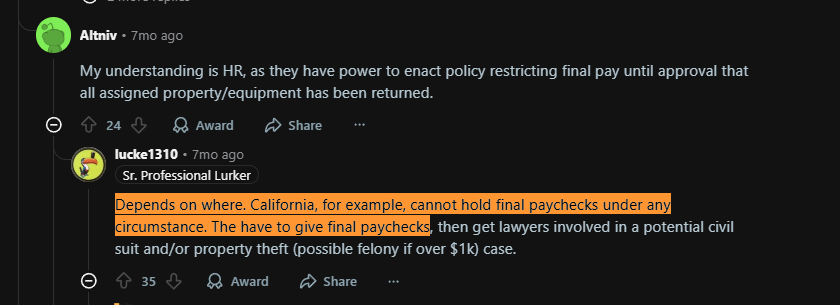
Pro Tip: Be very careful when deciding the consequences of non-compliance, because it may be illegal in some places to hold an employee’s paycheck.
For instance, this Reddit user says it’s illegal to hold final paychecks in California under any circumstances. If an employee fails to return the device, you’ll have to release the payment, but you can involve your attorney if the value of the laptop is over $1,000:
Source: Reddit
To the contrary, it’s legal in the UK, as long as the employee has signed an agreement.

Source: Reddit
So, make sure you consider the local laws before implementing the consequences of non-compliance.
2. Automate Offboarding and Retrieval Triggers
What if you have a well-defined retrieval policy, but you forget to manually initiate it? The entire effort goes down the drain.
To avoid such scenarios, automate the entire retrieval process. For instance, the moment an employee is marked as leaving, an automated offboarding workflow should trigger the device return process.
Workwize does this beautifully.
- Once you integrate Workwize with your HRIS platform (BambooHR) and the HR team updates the employee's termination date, the offboarding workflow is automatically triggered.
- The operations team reviews the offboarding request and confirms the best collection method with the user.
- We then send packaging materials directly to the employee's address for the secure shipment of smaller items such as laptops, keyboards, and monitors.
- A pick-up appointment is scheduled for larger items such as desks and chairs. Our team reaches out to the employee to coordinate a convenient pick-up time.
During this process, Workwize sends you real-time alerts so you can track the status until the devices reach you safely. No need to manually follow up, which saves significant time for IT and HR departments.
Pro Tip: Always trigger retrieval before the employee’s last working day. Set the workflow to fire 5–7 days in advance so packaging, courier scheduling, and reminders all happen while the employee is still responsive. Retrieval success drops sharply once access is cut.

3. Standardize Return Logistics
Logistics can make or break your laptop retrieval success, so it’s critical to standardize the process of retrieving devices from anywhere.
For instance, you can provide prepaid, pre-addressed shipping materials to your departing employees. This usually includes a cushioned laptop shipping box with foam inserts, tape strips, and a prepaid return shipping label with the company’s address.
They can either drop it at a local drop-off point or have it picked up from their location. This eliminates friction and makes the return process much easier for the employees.
If you operate globally, IT asset management (ITAM) solutions like Workwize can help. In addition to handling the procurement and deployment of IT assets across 100+ locations globally, Workwize also facilitates end-to-end logistics for retrieval.
Once you partner with Workwize and initiate a retrieval:
- Our team coordinates with the departing employee to determine the best retrieval method for them (courier or self-ship laptop kit). Let’s assume the end-user selects the self-ship option.
- We then ship a prepaid laptop return kit, along with the necessary instructions(to drop the laptop at the nearest drop-off point), via email.
- Workwize sends reminder emails multiple times: immediately upon scheduling, and again 7, 3, and 1 day(s) before the termination date.
- On the designated date, Workwize uses it’s vast network of courier partners to pick up the assets and have them wiped with certified data erasure methods.
- Then, based on your preference, the asset (laptop, for example) is either resold or recycled with a certificate and CO2 reporting or sent for refurbishment (grade, repair, and restock for reuse)
- Lastly, the refurbished device is stored at Workwize’s regional warehouses (saving you on shipping time and costs) and is ready for deployment to your new hires.
In a nutshell, Workwize automates your asset retrieval process and handles logistics, helping you standardize and streamline retrieval.
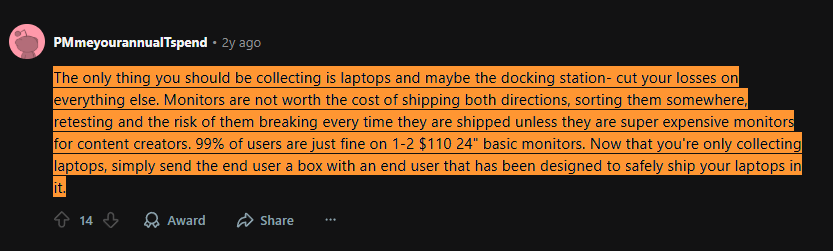
Pro Tip: Not everything is worth retrieving. Decide what’s truly worth the cost to ship back versus what you’ll let the employee keep or dispose of.
For instance, this Reddit user recommends collecting laptops and maybe the docking station, and ignoring monitors (unless they’re super expensive) and peripherals. Since most users are fine with basic monitors, shipping them back might lead to a negative ROI, considering the cost of shipping and the risk of breaking the monitor midway:
Source: Reddit
4. Centralize Asset Visibility & Tracking
Retrieving 1-2 laptops a month or two sounds pretty manageable. But as you scale, you need centralized visibility into your assets to ensure seamless, error-free offboarding. And an IT asset management tool is all you need.
Workwize, for example, helps you track your assets from issuance to return in a single digital dashboard.
As mentioned in the centralized visibility section in the “Why Do Laptops Go Missing” section, you can see all the devices in one place, their status, who they’re assigned to, location, serial number, and renewal status.
Once you trigger offboarding, Workwize will automatically mark the device for retrieval, track it, and update its status until it’s securely retrieved. And you can see all the offboarding activities in one place:
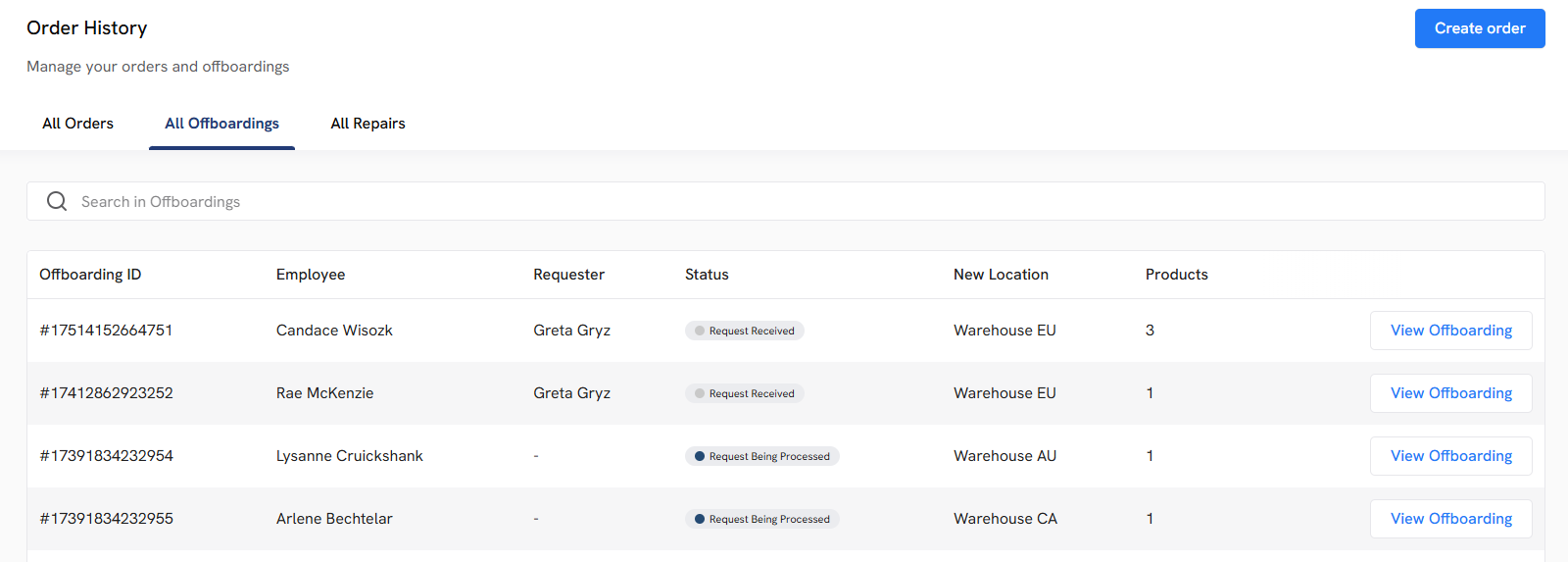
Because every step the asset takes (from issuance to retrieval) is tracked and recorded, Workwize also helps you create a digital audit trail or chain of custody. This is essential for internal management and during compliance audits.
Also, if your industry requires proof of data erasure or disposal, Workwize performs certified data erasure and disposal in compliance with the regional and global laws. So, don’t have to worry about non-compliance.
Pro Tip: Make sure you go for an ITAM solution only when you have scaled enough. Otherwise, it can put a significant financial strain on your business, resulting in negative ROI.
5. Secure Data Before Transit
Getting your assets back from departing employees is important to prevent direct financial losses. But what’s even more important is protecting the data on those devices.
When there’s shipping involved, there’s an inherent gap between an employee’s departure and the device’s return. And it should be the IT’s first priority to secure data ASAP during this window.
Here’s what IT can do:
- IT can start by revoking employees' access to the company’s systems immediately upon termination. This includes accounts, VPN credentials, email, cloud apps, basically anything that a person can access from that laptop.
- Next, IT must ensure the laptop’s disk is encrypted (as a standard policy for all company laptops). Full-disk encryption (e.g. BitLocker on Windows, FileVault on Mac) means that even if the laptop falls into the wrong hands during transit, the data remains unreadable.
However, encryption only works if the device is powered off and credentials are revoked. As part of offboarding, you should remotely lock the device or instruct the user to shut it down and not power it back on.
- IT can even execute remote wipe or remote lock commands through an MDM solution. If the device comes online, it will execute the lock/wipe, rendering the laptop unusable (or wiping the data) even before it’s physically retrieved.
Pro Tip: Incorporate a data security checklist into the offboarding process, like the one mentioned below:
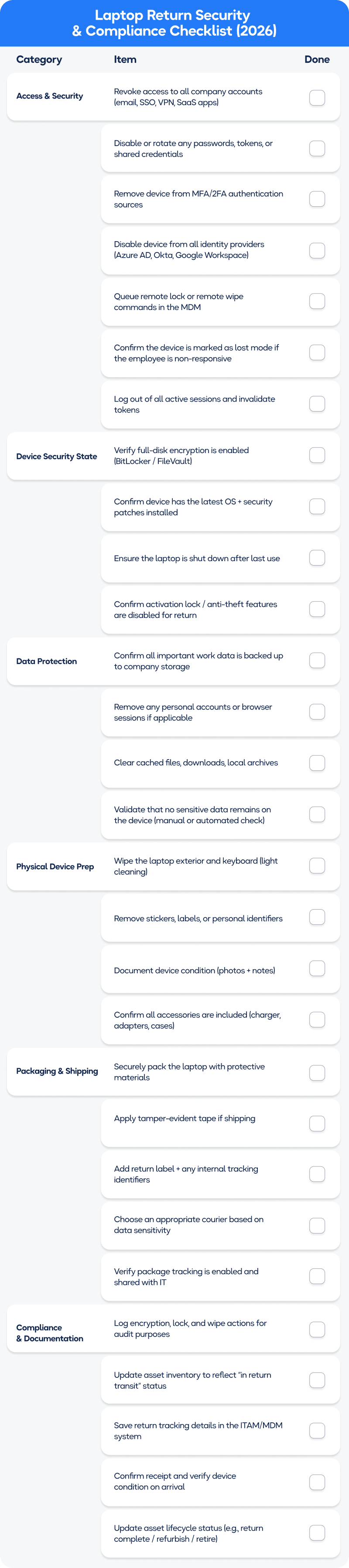
This checklist standardizes the security steps IT must complete before a device leaves the employee’s hands, reducing the risk of data exposure during transit.
6. Make Retrieval Part of a Circular IT Strategy
Once you get your laptop back at your HQ, the next step should be to include those devices in the continuous IT asset lifecycle. This means when a laptop returns, you must have a plan ready: will it be reassigned, refurbished, resold or recycled?
Including returned laptops as part of a circular strategy ensures you can extract the maximum value from the assets and minimize waste. However, this can be a time-consuming process, especially if you don’t have the right tools.
But Workwize can help you with this. After we retrieve the assets, we’ll
- Perform a certified data erasure.
- Grade, repair, and restock devices for reuse.
- Perform certified asset disposal (recycling with CO2 reporting)
- Resale it to recover the maximum possible cost.
Pro Tip: I recommend creating criteria for each post-return path.
For example, if the laptop is:
- Under 3 years old, Core i5 or higher, and in good condition, reassign it to the next hire.
- 3-5 years old, evaluate for resale or internal redeployment for less intensive use.
- Over 5 years old or in poor condition, recycle it.
By having these rules, you can quickly determine an asset’s fate and incorporate those steps into your offboarding workflow.
7. Continuously Measure & Improve
Finally, treat your laptop return process as an ongoing program, not a set-and-forget project. You’ll want to continuously monitor key metrics and look for ways to improve efficiency and compliance.
Some metrics to track include:
- Retrieval rate: the percentage of departing employees who return all their equipment. Partner with ITAM platforms like Workwize, which can deliver a 100% retrieval rate.
- Average time to retrieve: how many days from employee exit to laptop in hand.
- Exceptions rate: how often you had to invoke escalations or incur a loss.
- Cost per retrieval: including shipping, labour, and any recovery fees. This can help identify outliers (e.g., international returns may be costing way more, and you need a different solution there).
Pro Tip: Celebrate and communicate your improvements. If you started with a 70% return rate and, after implementing these steps, you’re at 95%+, let the IT and HR team know. This highlights the value of this initiative (often in every tangible dollar saved).
Wrapping Up
Laptop retrieval might not be the flashiest part of IT or HR.
But as we’ve seen, it’s specifically important in a world of remote work and high employee mobility.
Poor processes lead to significant financial losses, security incidents, and operational drag, making returns a costly blind spot.
But establishing clear policies, automating offboarding workflows, standardizing your return logistics, and leveraging ITAM tools helps solve the above issues. And you can finally maximize returns and minimize the risks associated with unreturned laptops.
If you’re looking for an end-to-end asset management solution, Workwize makes it seamless.
Workwize automates the full device lifecycle, including:
- Procurement: As soon as the employee record is updated, the onboarding workflow initiates the procurement process.
- Deployment: Workwize handles shipping to 100+ countries and tracks and updates the status until the device is delivered to your employee in a ready-to-use condition.
- Repairs and Replacement: Workwize also handles repairs and automatically sends a replacement laptop to minimize downtime.
- Retrieval and Disposal: After HR updates the employees’ last day, the offboarding workflow begins. Employees receive the necessary instructions, and you receive real-time updates on the return's status until it safely reaches your desired location.
Workwize also performs certified data erasure and, based on your preference, refurbishes, recycles, or resells the devices.
In a nutshell, Workwize handles it all.
Ready to see it in action? Book a free demo to see how Workwize streamlines the entire asset lifecycle.


Establish a single source of truth for every IT asset across the globe.
.png?width=258&height=318&name=g10%20(5).png)
More related resources to help you stop firefighting hardware operations.




Get monthly insights into how other IT leaders are improving their ops.



.png?width=2880&height=1232&name=Group%202147262874%20(1).png)
Stop coordinating
hardware like it's 2012.
.svg)
.png?width=172&height=68&name=apple%20business%20patner%20(1).png)
.svg)
.svg)
.svg)
.svg)