




.png?width=1230&height=692&name=Vector%20(13).png)
What is IT asset lifecycle management?
IT asset lifecycle management is the process of tracking and managing your organization's technology equipment and software from the moment you acquire it until you retire or dispose of it.
ITALM and ITAM are often confused but they’re not the same. Gartner defines ITAM as what gives you an “accurate account of technology asset lifecycle costs and risks to maximize the business value of technology strategy, architecture, funding, contractual and sourcing decisions.”
So how does the lifecycle part make a difference?
The IT asset lifecycle defines the set of stages that manage an asset throughout its useful life. Its purpose is to ensure that you use each asset to its best potential for maximum return on investment.
ITALM, then, represents a set of workflows, controls and data handoffs that move every asset from procurement through retirement while keeping ownership and cost signals usable at every step.
People use ITALM and ITAM interchangeably, understandably but there's a useful distinction:
- ITAM is program-focused. It can include governance, financial accountability, contracts, compliance and risk decisions
- ITALM is workflow-focused. It involves provisioning, moves, repairs, redeployments and retirement execution
Most organizations break the IT asset lifecycle into a handful of stages. Let’s take a closer look at these stages.
The Need and Importance of ITALM
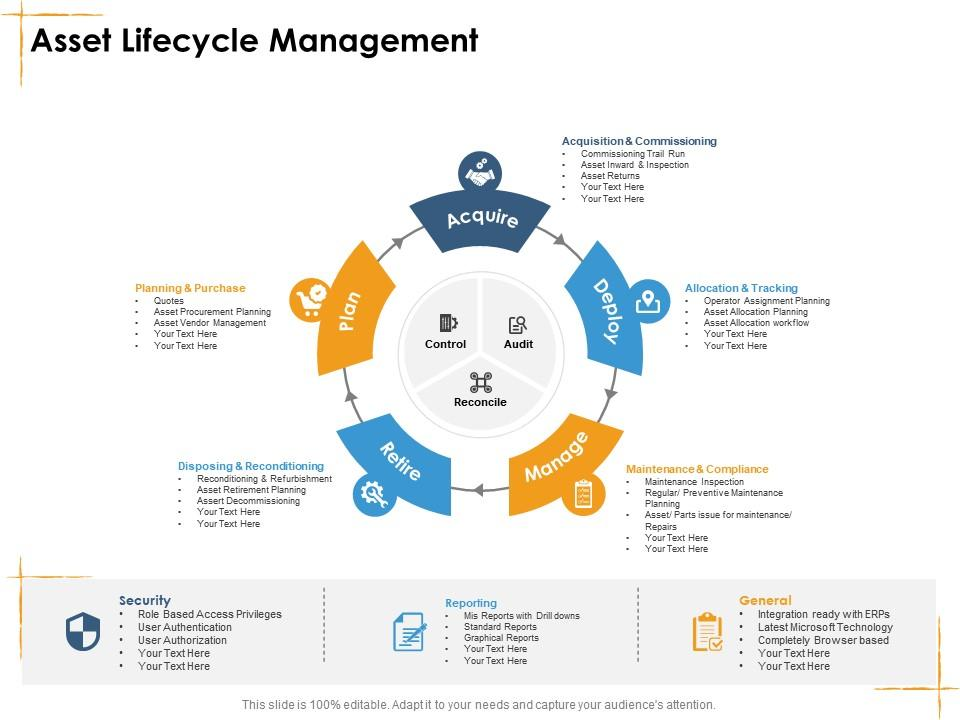
Asset lifecycle management visualized (source)
Asset lifecycle management can completely change your operational process when adequately carried out.
You’ll reap the benefits of increased efficiency, low maintenance costs, and the extended lifespan of your machinery. Other benefits include:
Improves Asset Visibility
According to a 2025 WanAware survey, up to 25% of IT spending is wasted on ghost assets, which proves it is critical for organizations to maintain asset visibility at all times.
ITAM solutions give you a single, continuously updated record for every device or software asset, from the moment it is procured to the moment it is retired.
Instead of tracking assets across purchase orders and email threads, you get real-time visibility into who has what, where it is, and what state it is in.
This centralized view is what makes it possible to catch ghost assets or SaaS sprawl. Further, it becomes easier to flag upcoming warranty or contract expirations before they become emergencies or confirm that offboarded devices have actually been retrieved and wiped.
Without such a system, you may end up making procurement and security decisions based on incomplete data. This could result in overspending and compound compliance gaps.
Reduces Cost and Workload
Most of the cost and workload savings from ITALM come from the same place — replacing manual, scattered tracking with automation.
In other words, with ITALM, lifecycle tasks like asset discovery and license renewals can all run on their own. That means your IT team can stop burning hours on spreadsheet reconciliation and get that time back for work that actually moves the needle.
Moreover, accurate data on what you own and what is actually being used means you stop paying for hardware nobody touches. You can reclaim unused software seats before renewal and extend device lifecycles based on real health data rather than arbitrary replacement schedules. You can also avoid the panic purchases that happen because an expired warranty caught someone off guard.
Yassine Zaied, Chief Strategy and Marketing Officer at Nexthink, makes this point well:
"Only when IT has access to all the information about who is using what, what is not used, what is still performing and what needs to be repaired or replaced, can it see and take advantage of greater efficiencies in a sustainable and recurring manner."
Ensures Better Compliance With Security Standards
An ITALM framework essentially facilitates compliance with ISO 27001 as well as a suite of other regulatory standards. It is the backbone of your Information Security Management System (ISMS), the bedrock of most compliance frameworks.
It's your answer to constantly evolving security threats: confidentiality, integrity, and availability.
ITALM ensures your data is safe and accurate—and always there when you need it. It does this by implementing these crucial measures:
- Keeping your data encrypted
- Setting up firewalls around your devices with passcodes and regular updates
- Retiring old, vulnerable equipment
- Protecting your network from hackers and malware
- Restricting access to sensitive apps
- Planning system downtime strategically instead of blindsiding your team
- Helps optimize asset usage
Maximizes Asset Performance and Life
The benefits of ITALM don’t stop at security. It’s also a surefire way to maximize the value of your assets. When you have information on the real-world usage of your software and hardware, you can extract every bit of potential from them. In the process, you also save resources, boost sustainability, and strike a balance between the two.
ITALM automates many of the tedious parts of asset management. This means your IT team has more time to focus on strategic work. For instance, your new devices get ready to roll out without the usual manual headaches.
With ITALM, you can also identify underutilized software licenses and eliminate unnecessary expenses. You can even track device-level metrics, such as energy consumption, to pinpoint power-hungry assets.
Optimizes Business Planning and Control
ITALM's real-time insight into your hardware and software holdings takes the guesswork out of your business planning. Companies with ITALM strategies see ROI improvements of up to 40%, driven by cost savings, improved efficiency, and better asset utilization.
Need to scale your workforce? With ITALM, you know exactly what you have and what you need. New hires no longer have to struggle to find devices, and you can easily equip your team without straining your existing assets.
It also predicts what your assets will look like in the future.
Knowing when equipment is nearing the end of its useful life lets you plan replacements and avoid costly surprises.
Plus, with a single source of truth for all IT assets, you'll eliminate duplicate purchases, reduce risks, and ensure every dollar is spent wisely.

What Are The Stages of The IT Asset Lifecycle?
Different organizations can divide the IT asset lifecycle into distinct stages.
However, for clarity, we’ll discuss seven major stages and provide practical insights into managing your assets during each phase.
Planning and Budgeting
Successful ITALM begins with a thorough plan for asset procurement, depending on your organization’s needs and budget. In this stage, you consider an asset’s potential contribution to your organization and its likely costs and risks.
You would want to determine the number of required assets and the costs for their maintenance and create detailed plans for what exactly to buy. Other factors to consider include the proposed lifespan of each asset and how it will depreciate over time.
This stage is also critical for evaluating risks such as technological obsolescence. The idea is to prevent you from making incorrect asset procurement decisions that add to costs and impact all the other stages of the asset lifecycle, as equipment, once procured, cannot be quickly returned or replaced.
Some organizations even use digital twins for particular use cases to determine whether a particular asset can meet their needs and test them under different conditions.
Pro Tip: Always involve multiple stakeholders (managers, employees, IT admins) to understand your asset needs better.
Procurement/Acquisition
Once you’ve prepared a thorough plan for which assets to acquire, you enter the procurement phase. Here, you place orders for all the equipment according to your plan.
Begin by conducting solid market research to identify the best vendors and suppliers to deliver assets while meeting your budget and quality assurance criteria.
You would want to check if your chosen asset vendors deliver assets right where you need them: your office or remote employees’ homes.
Here are a few tips to shortlist suitable vendors for asset procurement:
- Evaluate vendors thoroughly: Evaluate vendors based on criteria such as reputation, product quality, price, service level agreements (SLAs), and support capabilities.
- Check their customer base: See their past and existing customers and read their testimonials and reviews.
- Consider a Request For Proposal(RFP): Depending on how many assets you wish to order, you can seek an RFP or RFQ from shortlisted vendors to determine which offers the best balance between cost, service, and quality.
- Negotiate: It’s always a good idea to negotiate pricing, delivery schedules, warranty terms, and SLAs during the procurement stage. This will prepare you better for the upcoming asset lifecycle phases and help you save costs.
Once you’ve picked the right vendor, you will want to sign a contract with the vendor and decide on delivery terms. You will also choose whether to buy or lease your IT equipment. If you’re a business with global or remote teams, look for a vendor that supplies assets to your employees’ locations and provides consistent and timely repairs/service.
Ensure each procured asset is duly recorded in your IT inventory management software to ensure complete visibility as assets reach your employees.
Deployment and Discovery
The deployment phase involves installing the right software or licenses and configuring the procured assets for specific user needs. Asset deployment is necessary to ensure users have the correct permissions and access to complete all work seamlessly.
Installation can be physical (such as servers, workstations, and networking equipment in the appropriate physical locations) or remote (installing software programs via zero-touch deployment).
Asset discovery involves identifying, cataloging, and tracking all IT assets as they prepare to reach end users. The goal is to track their location, health, and working conditions throughout their lifecycle. There are many IT asset discovery tools available to help you track your IT assets. You may also resort to manual audits and inspections to complement automated discovery, particularly for assets that may not be easily detectable through network scans.
Proper deployment ensures that assets deliver value from day 1, while discovery provides visibility and control over the organization's IT environment.
Utilization and optimization
Now comes the longest part of the IT asset lifecycle: the utilization and optimization phase. The asset continues to provide value, generate revenue, and get work done. It also undergoes timely maintenance, such as patch fixes, software updates, repairs, or upgrades.
Hank Marquis, Research Director, Gartner, writes about software asset management,
"The variety of license entitlements makes it tough for IT leaders to spot savings, especially in environments with many software publishers and titles. But it's worth pursuing, as spending reductions contribute directly to the bottom line as gross profit."
Indeed, this is what the goal of this phase is: ensuring that hardware, software, and other resources are being used to their full potential to meet organizational needs while avoiding waste.
Other critical aspects of this phase include:
- Tracking asset usage: To ensure efficient allocation of assets and prevent underutilization
- Asset performance monitoring: To identify any issues with asset performance and take remedial steps to optimize operations
- Software license management: Ensuring compliance with software licenses and avoiding over- or under-licensing.
- User support: Providing training and support to users for effective use of IT assets.
Maintenance and support
Proper maintenance is the only guaranteed way to extend your device's lifecycle and keep it running smoothly for years.
Preventive maintenance begins with scheduled, periodic maintenance. Set a schedule for routine inspections, cleaning, and calibrations. This will help you identify potential issues before they become major asset failures. Maintenance also reduces unexpected downtime.
You can use IoT sensors to monitor the performance and condition of IT assets consistently.
As for support, establish a dedicated technical support team to handle user inquiries, troubleshoot issues, and provide timely resolutions.
Keep track of warranty periods and coordinate with vendors for repairs and replacements under warranty. This helps reduce costs and ensures assets are back in service promptly.
Decommissioning
This penultimate phase involves removing obsolete and end-of-life assets from service. Seemingly simple, the decommissioning stage should not be taken lightly. Regulations like GDPR, HIPAA, and PCI DSS mandate specific procedures to handle data and hardware at the end of their lifecycle.
Decommissioned assets, particularly storage devices, can pose a significant security risk if mishandled. Sensitive data might get exposed, and hardware could fall into the wrong hands.
Evaluate the physical and functional condition of other decommissioned assets to determine if they can be reused within the organization, sold, or need to be disposed of. Your decision should maximize the residual value of investments.
Disposal
IT asset disposal/disposition is the final stage of the IT asset lifecycle. It involves the termination of decommissioned IT assets.
Carlos Casanova, an analyst at Forrester research writes,
Sadly, there are many organizations that have hundreds of corporate devices that are unaccounted for. ITAM is charged with ensuring that data on the device is wiped before disposal and, if necessary, shredded. These are all core to the process and corporate risk mitigation strategy."
That’s why a proper ITALM disposal strategy must look like this:
- Categorize assets based on their value, sensitivity, and disposal requirements to determine the appropriate disposal method
- In some cases, valuable components (e.g., hard drives, memory, processors) are recovered for reuse or refurbishment
- Remove any hazardous materials (e.g., batteries, mercury-containing displays) for safe disposal
- Prioritize recycling of electronic waste to minimize environmental impact
- Consider donating reusable hardware to charitable organizations or educational institutions
You cannot dispose of hardware assets without proper documentation. Record the disposal of assets in the asset register and maintain comprehensive inventory records. Document the financial outcomes of asset disposal, including any revenue from sales and costs associated with destruction or recycling.
It is also good practice to report on the impacts of sustainability, such as reductions in e-waste and contributions to environmental goals.
IT Asset Lifecycle Management Best Practices That Make a Difference
If you already run ITALM day to day, you know the basics rarely cause any trouble. The problems show up in the handoffs and the edge cases.
Deloitte’s own ITAM survey made that pretty clear; apparently, 84% of organizations said they lack a truly effective ITAM initiative.
Here are six practices that actually make a positive difference, especially in regulated and asset-heavy environments.
1. Treat lifecycle states like control points instead of labels
Most teams track their assets with basic labels like ‘in stock’, ‘in use’ or ‘retired’ and assume that’s enough. The problem with labels is that they only tell you where an asset is, not whether the right steps were actually taken.
A better approach is to treat each state as a control point (or a gate that the asset must pass through) that requires proof.
An asset can't move to the next stage until you verify that specific requirements are met. This creates built-in accountability and prevents gaps that lead to security risks, compliance failures, or lost assets.
In practice, a control-point approach looks like this:
- Procurement: Attach the Purchase Order, contract, warranty, and approved catalog item to the asset record from day one
- Deployment: Before marking an asset ‘in service,’ confirm MDM or EDR enrollment, baseline configuration, and an assigned owner for the asset
- Operation: Track patching and encryption compliance by asset type
- Retirement: Before closing the record, collect a data destruction certificate and chain-of-custody proof
Finance and healthcare teams see the biggest impact. When auditors ask for proof, you have it organized by stage, so audits go by much faster.
The challenge is that most teams lack the infrastructure to consistently enforce these control points. Spreadsheets can't block transitions, and manual processes rely on someone remembering to collect proof at each stage.
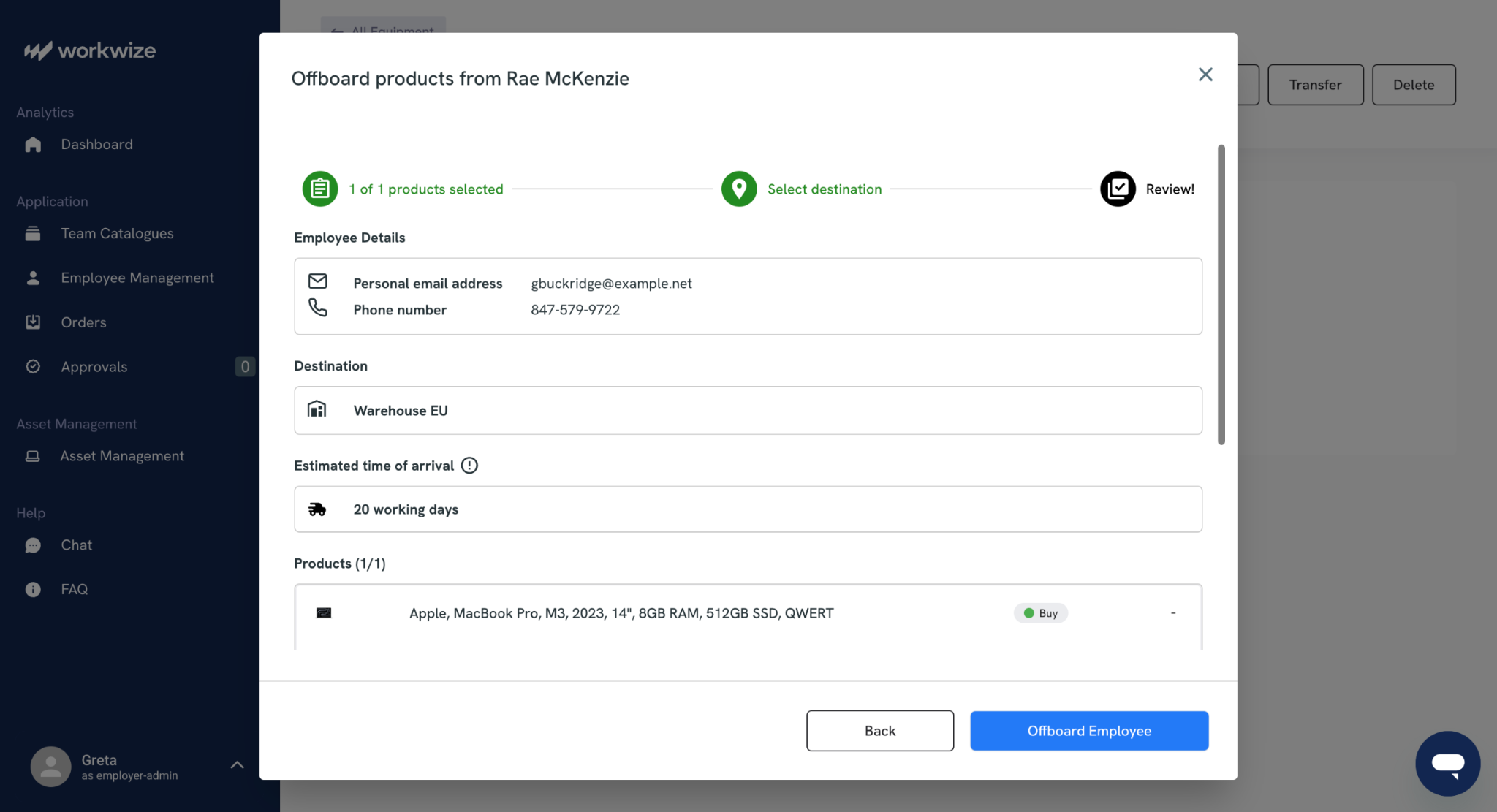
This is where Workwize becomes valuable. Workwize is an ITALM platform that builds these gates directly into your ITALM workflow. With Workwize, purchase orders, warranties, and vendor details are automatically recorded for each asset during procurement.
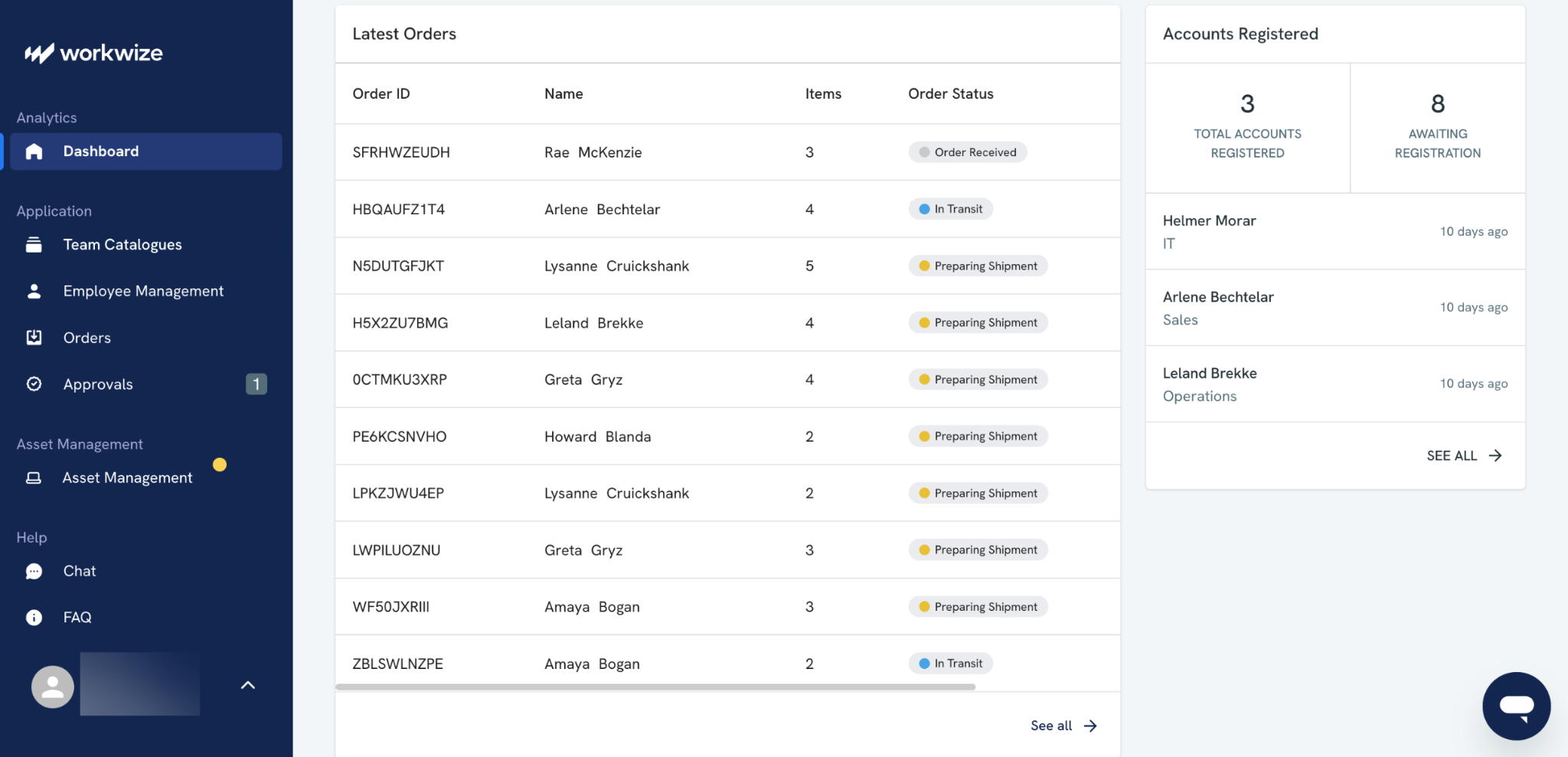
Further, no devices would move to 'a delivered' status until MDM enrollment is confirmed and the employee assignment is verified in your HRIS.
Even at retirement, the asset record stays open until you've gotten the asset back, collected data destruction certificates, and documented the full chain of custody.
2. Use contracts to decide lifecycle actions, especially for leased and regulated assets
Some devices, especially leased ones, come with rules and contracts attached to them. You do not fully own them, and there are dos and don'ts of handling them.
The contract tells you what needs to happen and when. It specifies when a device must be returned, extra fee regulations, and end-of-support timelines. Not keeping track of these dates could cost your organization extra money and penalties.
A good ITALM process turns those rules into automatic reminders and actions.
You can set up automated triggers from contract and vendor data.
- Leased devices: Track return dates and buyout options so the company does not pay late fees or keep devices longer than allowed.
- Warranties: Keep track of when a warranty expires to replace devices that are more likely to break.
- Old and unsupported devices: When vendors announce that a device will no longer be supported, planning for replacement starts early
- Devices subject to legal rules: Payment machines and medical devices often need regular checks and updates. The system should make sure those happen on time
This cuts down on avoidable purchases, emergency shipping, and downtime, and makes spending easier to predict. Contract-driven triggers also help ITAM become self-funded by avoiding the costs of excess inventory and contract penalties.
But what if you could set up an automated process to consolidate all these asset details in one place? Well, Workwize makes it possible.
Workwize records all key asset data (warranties, lease end dates, etc.) for your leased assets in a single unified interface.
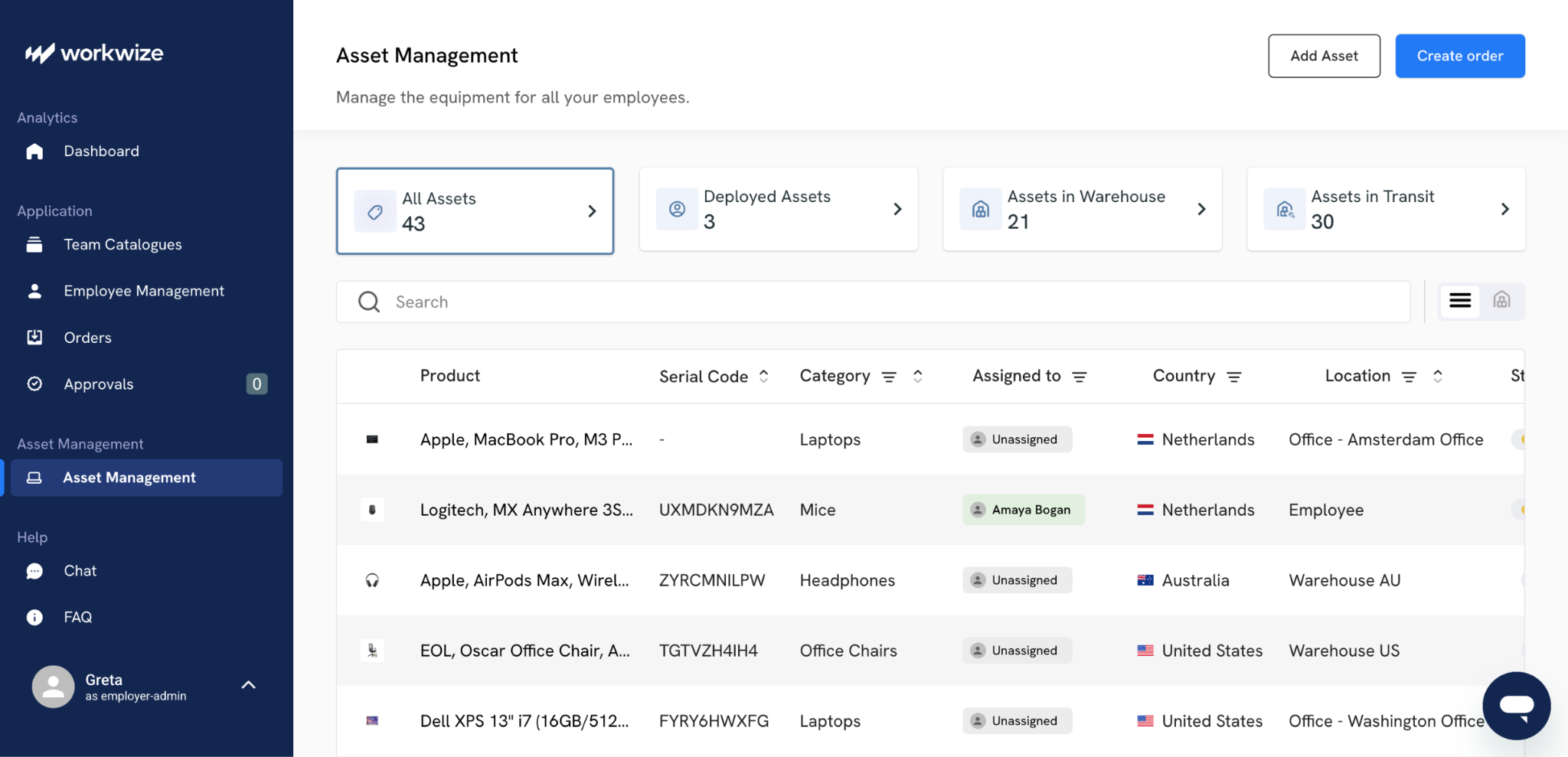
Since Workwize replaces the need for multiple vendors to ship assets globally, you no longer need to deal with multiple mail threads or complex vendor contracts to figure out and document asset return dates, lease terms, or other contract rules.
This kind of automation saves precious time and prevents monetary loss.
3. Ensure seamless collaboration between HR and IT teams
Managing IT assets is a team activity, yet the biggest failures happen in the zone between HR (who manage people) and IT (who manage machines).
If these teams don't collaborate well, you can end up with several loose ends. Suppose an employee is fired, but HR forgets to email IT in a timely manner, leaving an ex-staff member with full access to delete files for weeks. Horrific, right?
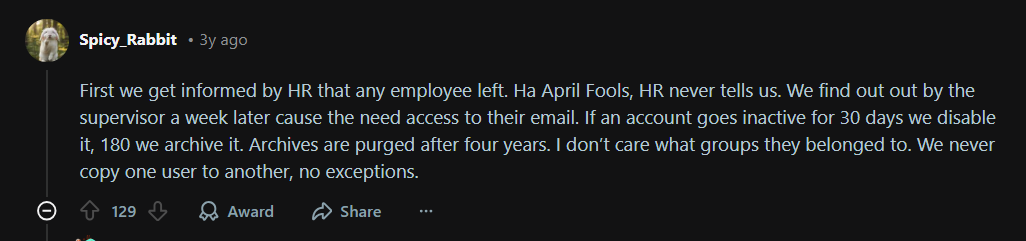
Via Reddit
To fix this disconnect, you can adopt a collaborative system that looks like this:
- HR acts as the master trigger. When a status changes in HR (hired/fired), it must automatically generate a ticket for IT
- Create pre-set profiles (For example, Developer gets a high-power Mac; Sales gets a tablet). When HR selects the role, IT should know exactly what to provision
- Never hand over a device without a digital sign-off. Assign the device serial number to the employee ID immediately, so you know who is holding which asset
- The moment HR terminates an employee, IT must be alerted to close access to all sensitive company data. This prevents data theft during the time between the termination meeting and the employee's leaving the building
Finally, every three months, you can compare the active payroll list against active IT accounts. This catches the people who have left the payroll but still hold valid logins or expensive hardware.
However, no matter how seamless a process you set up, there are times when IT and HR may not sync well.
Workwize’s integrations with HRIS systems like BambooHR and HiBob are designed to prevent just that. Workwize automates the entire handoff between IT and HR by treating employee lifecycle events as direct triggers for IT actions. For example, when HR adds a new hire with a specific role, Workwize:
- Automatically initiates procurement for the correct device profile,
- Schedule asset delivery and deployment based on the start date,
- and automatically ship the asset to the employee without any manual input.
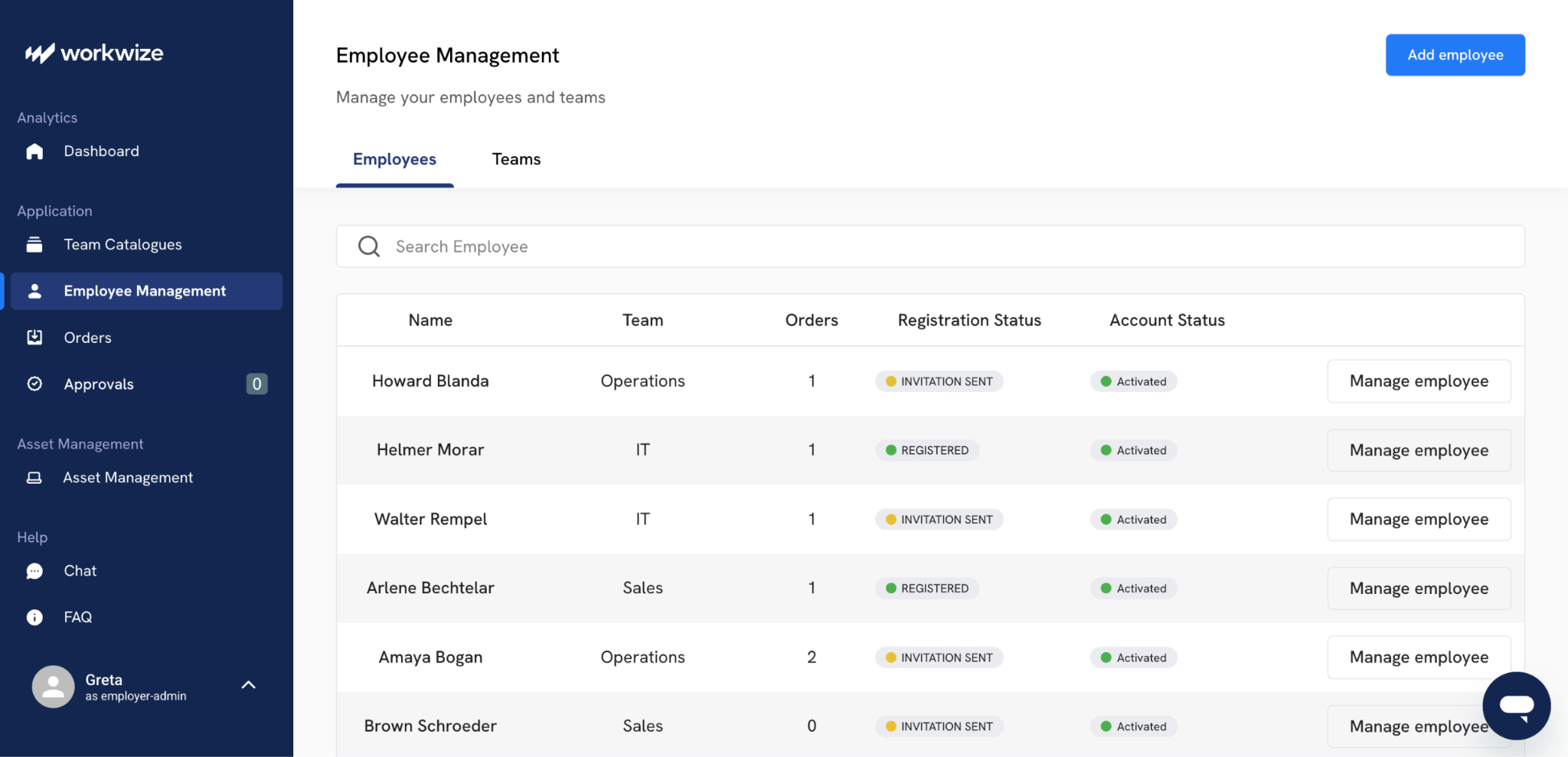
Similarly, when an employee's status changes to terminated in the HRIS, Workwize:
- Immediately flags all assets assigned to that person for retrieval,
- Triggers the offboarding workflow with prepaid shipping labels,
- and maintains the connection between employee records and device assignments throughout the entire lifecycle.
This eliminates the gap where people leave, but equipment and access don't, because the HRIS becomes the single source of truth that both HR and IT workflows operate from automatically.
4. Prepare an action plan to handle lost and disconnected assets
About 30% of IT hardware assets are lost or unaccounted for. This happens for a number of reasons.
Sometimes employees leave without returning devices. At other times, remote workers stop checking in. Without a clear response plan, these assets can become security risks.
And beyond lost assets, over a quarter of purchased assets are never entered into the system of record.
The same goes for software assets. Organizations waste 30% of their software spending on unmanaged software licenses. Lost and disconnected assets amplify that waste and create compliance gaps, which is why an action plan is needed to address these assets on the loose.
Your action plan should define clear triggers and responses. Start by setting thresholds:
- Flag an asset if it hasn't connected to your network in 30 days
- At 60 days, escalate to the manager
- At 90 days, initiate recovery or remote wipe procedures.
It is important to document who owns each step; IT can't manage assets alone. HR needs to enforce return policies during offboarding, and procurement teams need visibility into what's actually missing before ordering replacements.
Build this into your ITAM workflows so it runs automatically. You can create a monthly reconciliation process where you compare Active Directory logs against your asset register. When discrepancies appear, route them to the right team with a predefined action.
Workwize makes implementing such an asset loss strategy stupidly easy. First, it prevents most disconnection scenarios before they happen through continuous asset tracking and automated offboarding.
Then, since devices procured via Workwize come enrolled with MDM from day one, the system can alert immediately when a device stops checking in or when an employee's status changes.
If someone is terminated, Workwize triggers automated retrieval workflows with shipping labels, manager notifications, and clear deadlines, preventing devices from disappearing.
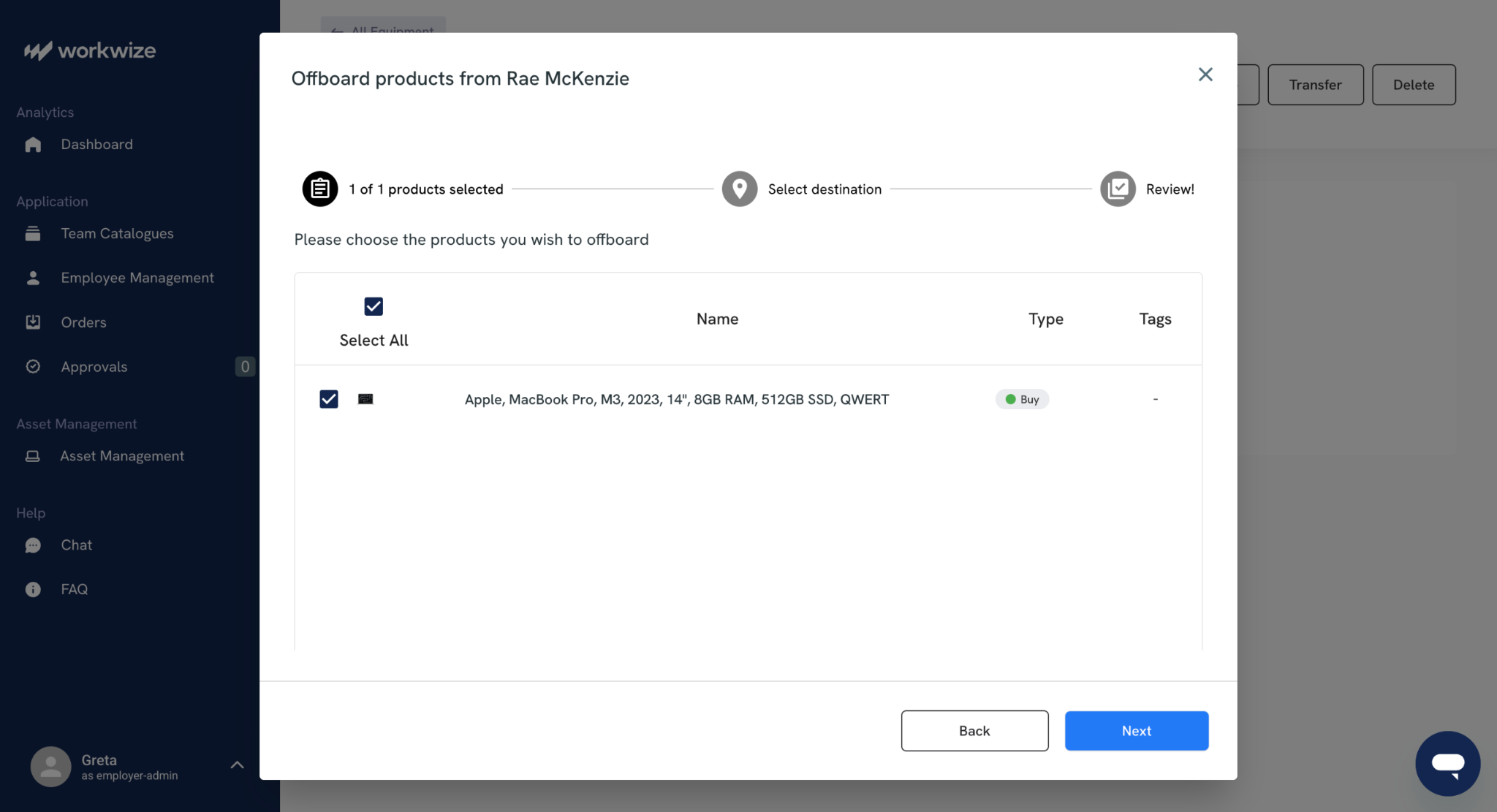
For assets that still do go missing, Workwize maintains complete chain-of-custody records from procurement through last known location, giving you the documentation you need for cost recovery or insurance claims.

5. Make physical identification easy, or inventory will never be accurate
If a technician can't identify a piece of equipment in under 5 seconds, your records need some work. That’s the reason why the best IT teams obsess over label durability, barcode quality, and tag placement where humans naturally look first.
Machine-readable tags like barcodes or QR codes eliminate transcription errors, but label size matters more than people think. A barcode smaller than 1" x 0.5" becomes hard to scan from any distance, and QR codes under 1" x 1" fail when printed on low-quality materials or scanned with older phones. Your technicians have to manually type asset tags anyway, which defeats the whole point.
Beyond the physical tag itself, the system behind it (your database design, location schema, and audit workflow) determines whether the whole program succeeds or fails. One experienced IT asset manager on Reddit laid out a comprehensive approach to getting these foundational decisions right from the start:
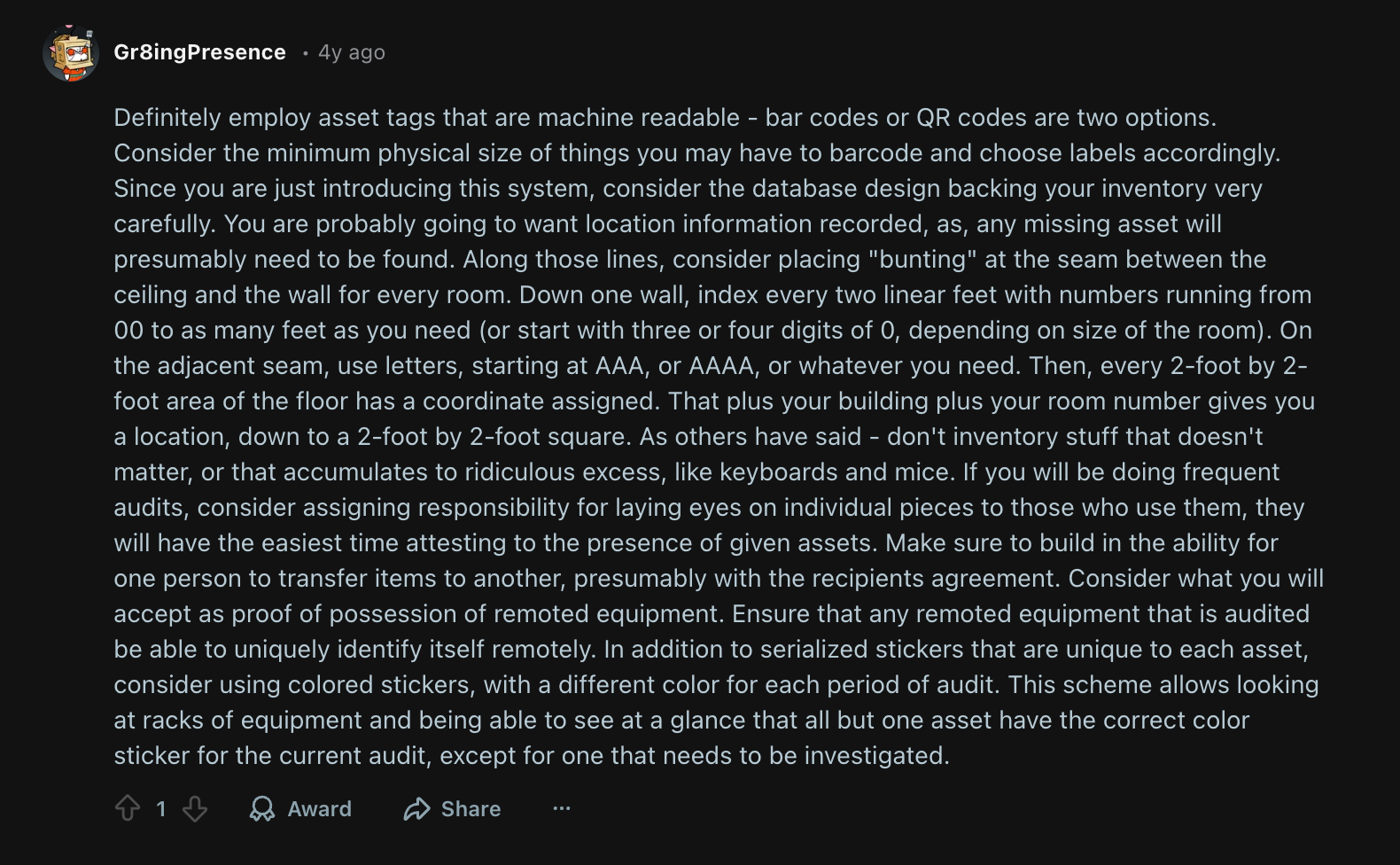
Via Reddit
Some teams standardize on specific thermal printers and polyester labels because ink fades and paper peels. They put identical labels in 2-3 spots:
- Top surface where you see it first
- Underside where it survives longer, and
- On accessories like power bricks that get separated.
On-demand printing gives you the flexibility that pre-printed label sheets can't match. You print exactly what you need, when you need it, and can run duplicates for gear that lives in multiple places or takes heavy abuse.
One IT team on Reddit described how this approach shaped their entire labeling strategy:
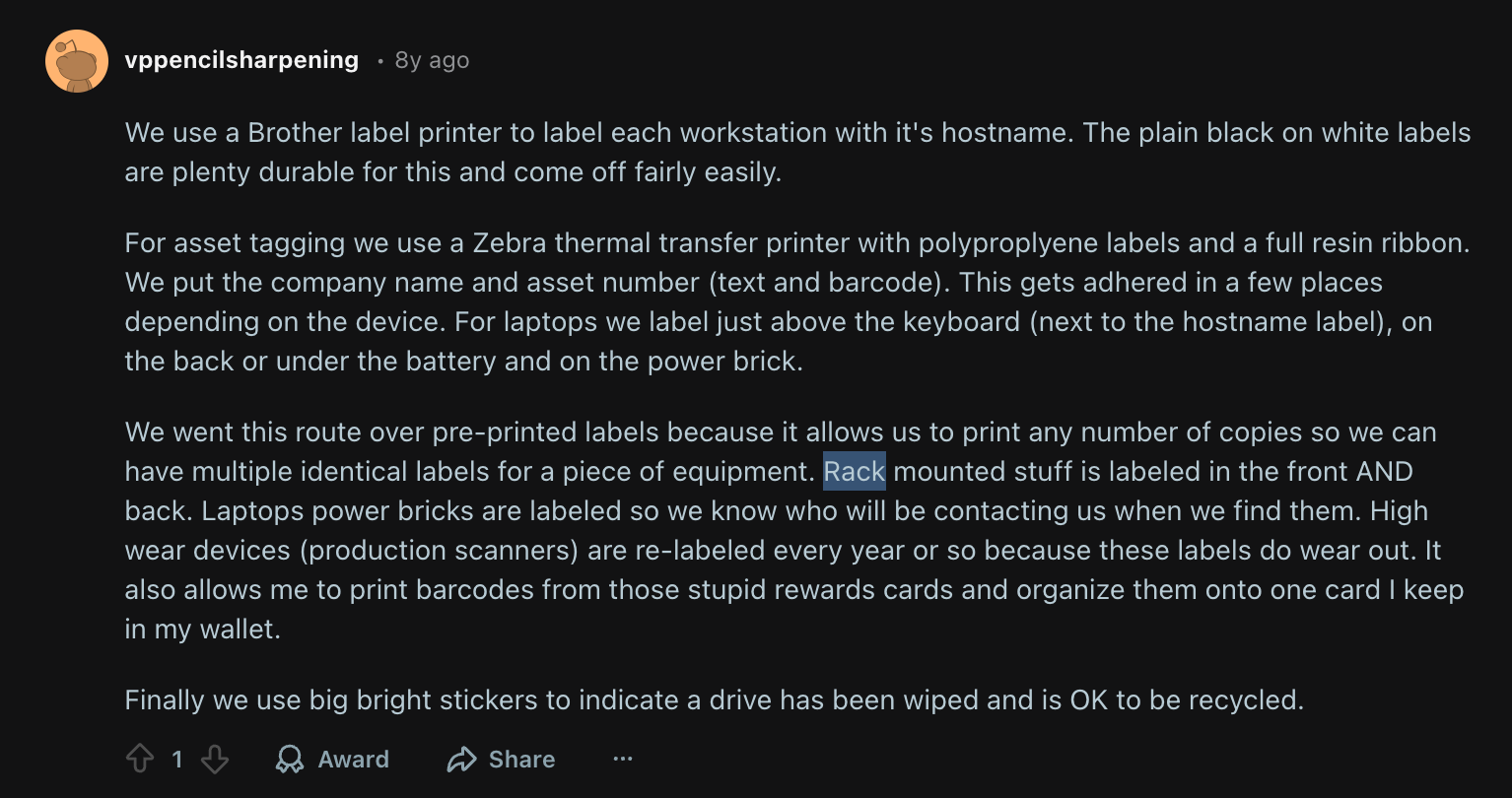
Via Reddit
For QR codes, you can encode direct URLs to the asset's inventory page. During physical audits or walk-up support, a technician scans once and lands on the specs, warranty status, ticket history, and assigned user. This cuts 30 to 60 seconds per lookup.
To make this work, here’s what you need to do:
- Document label placement standards for each asset category (laptops vs. desktops vs. network equipment need different approaches.
- Apply 2 to 3 identical labels to anything portable or frequently handled
- Build scan-first workflows into your processes so updates happen at the moment of interaction
- Store location data in your system, not on the label itself, so you can move equipment without relabeling
When you nail the boring physical aspect of your assets, everything else becomes easier, including audits, RMAs, swaps, and even incident response.
6. Migrate from spreadsheets and notepads to dedicated ITALM tools
Spreadsheets and notepads break down the moment your asset environment gets complex. They can't pull live data, and they need someone to manually reconcile every change.
In an NIST study conducted on financial organizations, researchers Michael Stone, Chinedum Irrechu, et al, say,
"The security engineers we consulted in the financial services sector told us they are challenged by identifying assets across the enterprise and keeping track of their status and configurations, including hardware and software. This comprises two large technical issues: tracking a diverse set of hardware and software [and] lack of total control by the host organization. Financial services sector organizations can include subsidiaries, branches, third-party partners, contractors, temporary workers, and guests. It is impossible to regulate and mandate a single hardware and software baseline against such a diverse group."
This is because when a device gets reassigned, repaired, or wiped, that information sits in someone's email or ticket until they remember to log it. By then, your record is already outdated.
An ITALM tool, such as Workwize, fixes all such issues. To begin with, Workwize keeps an accurate asset record while the asset moves through the stages of procurement, deployment, support, repair, and retirement. It streamlines the asset lifecycle with less manual work and greater coordination between teams.
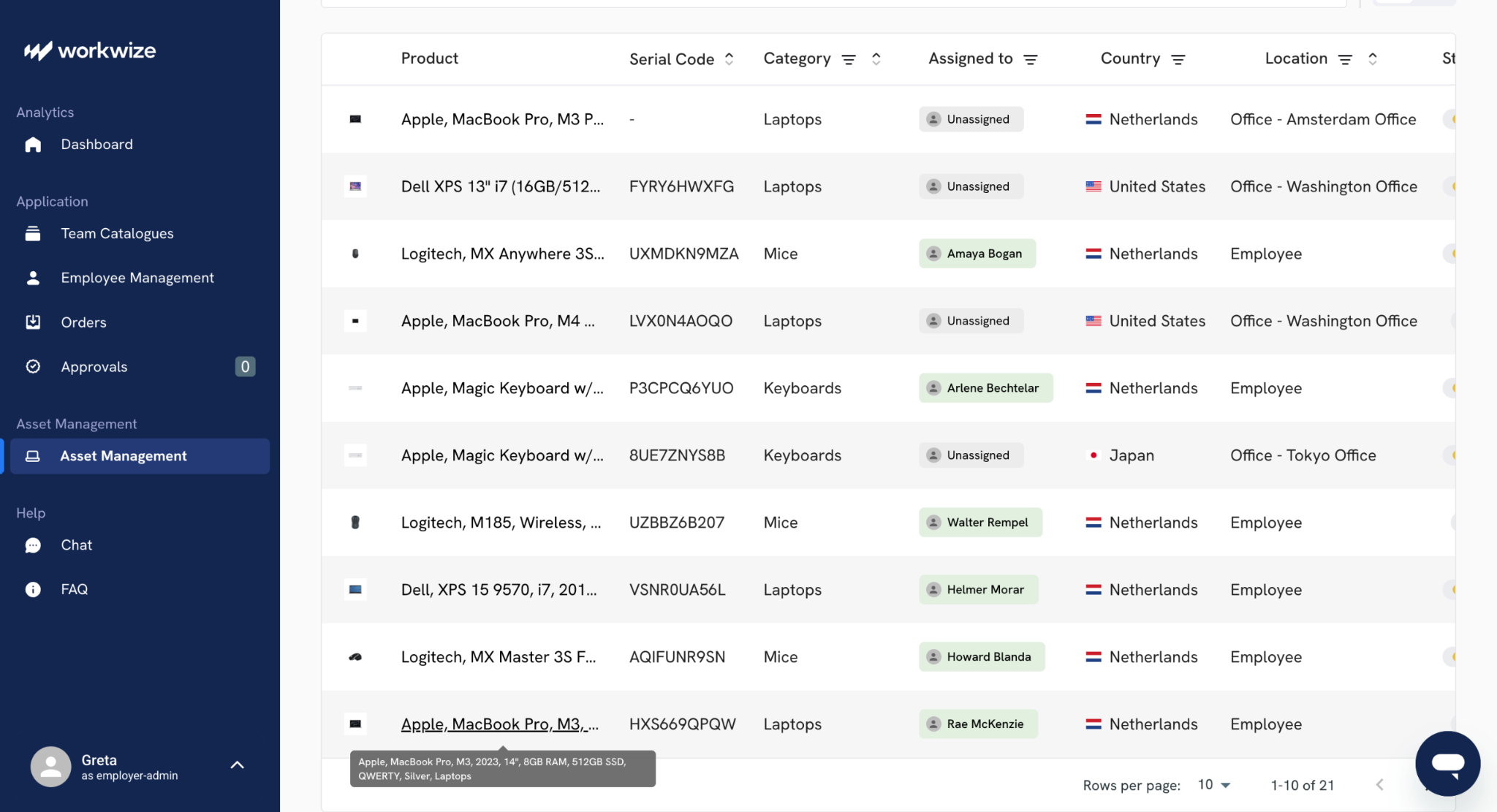
This kind of oversight is a must in hybrid environments, where devices, users, and services change constantly.
Fewer than 40% of organizations have fully adapted ITAM processes to support the current hybrid environment, and disconnected tools are a common reason the process breaks down.
This is what your setup looks like with Workwize in day-to-day usage:
- Order devices directly through the platform - Select from preferred vendor catalogs, track global shipping to 100+ countries, and create asset records automatically at purchase
- Deploy pre-configured equipment to new hires - Trigger procurement when HR adds employees, ship devices pre-enrolled in your MDM, and confirm delivery and assignment in real time
- Track devices throughout their operational lifecycle - Monitor location, assignment changes, repair status, and compliance from a centralized dashboard with automatic updates
- Retrieve equipment from departing employees globally - Send automated return instructions with prepaid shipping, track device collection, and attach certified data wipe documentation to asset records
- Retire or redeploy assets with full chain-of-custody - Choose refurbishment for reassignment, eco-friendly recycling for end-of-life devices, or local warehouse storage for future use
Best IT asset lifecycle management tools at a glance
The platform you pick shapes the rest of your process.
Some platforms shine on procurement and contract depth, others go all in on discovery and service desk tie-ins. Every platform has its own strengths and weaknesses, so you have to pick according to your needs (more on that in a bit).
Also, budgets matter. Lightweight options like Snipe-IT can help you get your process in order if you are rebuilding from zero and want a clean baseline before you spend a big amount
Here’s a quick look at some widely used options.
| Tool | Key Features | Best For | Pricing | Ratings |
| Workwize |
|
Distributed teams with remote or hybrid staff, typically 300 to 5,000 FTEs | Custom pricing |
Capterra: 4.5/5 (17 reviews) G2: 4.6/5 (22 reviews) |
| ServiceNow IT Asset Management |
|
Large enterprises already using ServiceNow | Custom pricing | |
| ManageEngine AssetExplorer |
|
Mid-market teams that want straightforward ITAM | From $115/month for 250 assets | G2: 4.3/5 (12) Gartner: N/A · Capterra: 4.6/5 (13) |
| SolarWinds Service Desk |
|
Teams that want ITSM and ITAM together | From $39 per technician per month | G2: 4.3/5 (763) · Capterra: 4.6/5 (577) |
| Snipe-IT |
|
Small to mid-size teams replacing spreadsheets | Free self-hosted, cloud from $39.99/month | G2: 4.6/5 (24) Capterra: 4.4/5 (22) |
| Lansweeper |
|
IT teams that need deep visibility first | Free up to 100 assets, paid from $239/month | G2: 4.4/5 (55) Capterra: 4.5/5 (65) |
| InvGate Asset Management |
|
Mid-market teams focused on usability and scale | From $0.21 per node per month | G2: 4.7/5 · Capterra: 4.4/5 |
| NinjaOne IT Asset Management |
|
MSPs and IT teams needing RMM plus ITAM | Per-device pricing, quote on request | G2: 4.7/5 · Capterra: 4.7/5 |

How To Select the Best IT Asset Lifecycle Management Platform in 2026
When I compare ITALM tools seriously, I look for a few things that don't appear in most feature lists. These are things that you would have to figure out with your own research.
Here are 6 key considerations for selecting the best IT Asset Lifecycle Management (ITALM) platform in 2026:
- Define Your Full Lifecycle Scope: Ensure the platform covers every phase from procurement and deployment to maintenance, refresh, and disposal. Many tools excel at tracking but fall short on end-of-life management, e-waste compliance, or data sanitization workflows.
- Prioritize AI-Driven Automation: In 2026, leading platforms use AI for predictive maintenance, anomaly detection, and automated lifecycle triggers. Look for tools that can proactively flag aging assets, forecast replacement costs, and reduce manual intervention across your IT team.
- Demand Deep Integration Capabilities: Your ITALM platform must integrate seamlessly with your ITSM (e.g., ServiceNow, Jira), CMDB, procurement systems, MDM tools, and cloud asset inventories. Poor integrations create data silos and defeat the purpose of centralized lifecycle visibility.
- Evaluate Multi-Environment and Hybrid Cloud Support: With most organizations operating across on-prem, multi-cloud, and remote/hybrid environments, the platform must provide unified visibility across physical hardware, virtual machines, SaaS licenses, and cloud instances — not just traditional endpoints.
- Assess Compliance and Security Alignment: Ensure the platform supports regulatory frameworks relevant to your industry (ISO 27001, SOC 2, GDPR, HIPAA) and provides audit trails, license compliance tracking, and secure decommissioning records to reduce risk exposure.
- Scrutinize TCO and Vendor Viability: Beyond licensing costs, factor in implementation, training, and ongoing support. Choose a vendor with a strong 2026 roadmap, healthy market position, and a pricing model that scales with your asset volume without punishing growth.
Checklist for ITALM Vendor Selection
Use this Google Doc File: ITALM Vendor Selection Checklist

Supercharge Your IT Asset Lifecycle Management with Workwize
Effective ITALM helps your organization cut costs, optimize asset utilization, and comply with mandatory regulations. It improves the overall reliability and performance of your IT infrastructure.
With complete IT hardware management solutions like Workwize, you can ensure complete visibility into your assets across all stages of their lifecycle.
With Workwize, you can deliver fully-configured IT assets to your global workforce, manage them throughout their life, then get them back or dispose of them, all from one easy-to-use platform.
Book a Workwize Demo Now to see how Workwize can help at each stage of the IT asset lifecycle.
FAQs
What is an IT asset management life cycle?
It’s the sequence an IT asset follows from request and procurement through deployment, support, optimization, and retirement. In ITALM work, the life cycle also includes the decision points, including when you repair, when you redeploy, when you reclaim licenses and when you dispose.
What is lifecycle asset management?
Lifecycle asset management is the discipline of managing value and risk across an asset’s entire life, not just tracking where it sits today.
In IT, that means you manage cost, security posture, compliance exposure and operational impact as the asset moves through hands and environments.
How is ITALM different from ITAM?
ITAM is often used as the umbrella term for asset management. ITALM is more specific. It focuses on the lifecycle steps and the workflows that follow an asset from one stage to the next with clear checks and evidence.
What counts as an IT asset?
Laptops, desktops, monitors, phones, servers, network gear, printers, POS terminals, IoT devices, OT equipment, and sometimes software and cloud resources are all examples of IT assets. The definition varies depending on how your team defines scope
What is the best platform for IT asset lifecycle management?
There is no single best for every organization, because the right platform depends on scale, process maturity and how much you want to build inside the platform.
Tools like ServiceNow tend to suit large environments that want very deep governance. Others, like ManageEngine, fit teams that want asset-first control with simpler rollout.
What are the challenges of IT Asset Lifecycle Management?
Here are common IT Asset Lifecycle Management challenges, even for mature teams
- IT asset discovery tools, the CMDB, and day-to-day changes are not kept in sync, so records drift from reality
- Renewals, lease terms, and warranty deadlines get missed, which leads to surprise costs and coverage gaps
- Reclaiming unused licenses is not built into the normal workflow, so spend keeps growing
- Proof of data destruction, chain of custody, and disposal certificates do not stay linked to the asset record
- Reports look good, but when auditors ask for evidence of what happened, the trail is incomplete

Establish a single source of truth for every IT asset across the globe.
.png?width=258&height=318&name=g10%20(5).png)
More related resources to help you stop firefighting hardware operations.

Get monthly insights into how other IT leaders are improving their ops.




.svg)
.svg)
.svg)
.svg)