




.svg)
.svg)

.svg)


.svg)




.svg)
.png?width=500&height=424&name=Style-1---V1-(1).png)

.png?width=1230&height=692&name=Vector%20(13).png)
What Is Automated Asset Tracking?
Automated asset tracking is the process of using hardware (RFID, QR codes, and barcodes) and software (digital asset tracking platforms) to track, monitor, and manage IT assets with minimal manual intervention.
It usually involves:
- Adding IT assets to a centralized inventory
- Tracking who owns them and where they are
- Monitoring their status across the lifecycle
- Automatically updating asset records as devices are procured, shipped, assigned, repaired, retrieved, or retired.
As all of this happens automatically and asset records are updated in real-time, the error margin significantly drops, unlike spreadsheets that become obsolete moments after they’re created.
Let’s now understand why automated asset tracking is crucial for IT teams managing remotely distributed teams.

Why Automated Asset Tracking Matters for Distributed IT Teams
While automated asset tracking is useful in every work environment (in-house or hybrid), it becomes significantly more valuable when you’re managing a remote team distributed across several countries globally.
Here’s why:
Reduces waste and optimizes costs
Without automated IT asset tracking, IT only has a vague idea of what assets they have, where they are, or whether they are in use.
While in an in-office setup, you could physically check the devices, but verifying them for remote teams isn’t simply feasible.
Imagine 5 new developers joining your organization in the next week. HR asks you to arrange 5 devices. You check the spreadsheets to see if assets are available.
The spreadsheet shows all of them are assigned or active, while in reality, several assets are sitting unused in the warehouse, and some are still with employees who left your organization months ago. And since you don’t know that, you end up ordering 5 high-end laptops.
You just spent upwards of $15,000 on new devices, which could have been avoided with a self-updating, end-to-end automated asset tracking system.
Improves security posture
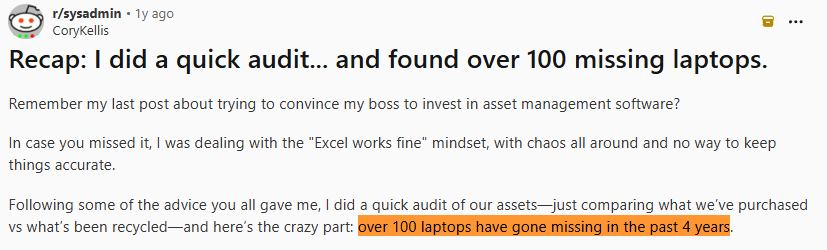
Losing devices is a common consequence of using manual IT asset tracking. For instance, this System Admin on Reddit, whose company was using spreadsheets to track assets, found that they had lost 100 assets over the last 4 years upon doing a simple audit:
Source: Reddit
Now those 100 laptops may still be with past employees, lying around in the warehouses or being sold for the sensitive data they hold, posing a serious security threat. And if you’re wondering, data breaches cost $4.4 million on average, according to IBM. So, it’s a serious security and financial threat.
With asset tracking automation software, you can keep an eye on every asset from procurement to disposal. This ensures that no asset is left unaccounted for and that all assets are returned to you safely, without fail.
Compliance requirements (chain of custody records)
Maintaining a chain of custody is the process of documenting every device handoff (user name, role, assignment timestamp, etc.) throughout the asset lifecycle. This proves that the asset has been handled securely throughout the asset lifecycle and can’t be compromised.
Not being able to maintain an accurate and auditable chain of custody record could lead to non-compliance with regulatory frameworks such as GDPR and HIPAA, along with audit frameworks like SOC 2 or ISO standards.
While you can manually maintain chain-of-custody records, it is difficult to trust at scale because handoffs, shipment updates, repairs, retrievals, and disposal records depend on people updating spreadsheets correctly. One incorrect or outdated entry could lead to non-compliance.
Automated asset tracking tools like Workwize create a more reliable audit trail by recording who has had the asset, where it moved, what action was taken, and when. This helps IT teams prove control during audits, investigations, offboarding, and secure disposal.
For broader governance guidance, see our article on IT Asset Management Best Practices.
 How Does Automated Asset Tracking Work for Remote Teams?
Here’s what a typical workflow looks like:
1. Capturing the data and creating asset records: The process starts with creating a new asset record when a device is purchased, imported from an existing spreadsheet, scanned into inventory, shipped from a warehouse, or enrolled into an MDM tool.For remote teams, this record should exist before the laptop reaches the employee, not after IT manually updates a spreadsheet.
2. Linking the device to an employee: After the device is assigned, the asset record is connected to the employee's HRIS profile, including their name, department, role, country, and start date.The HRIS does not usually store the asset itself; it helps trigger and update the assignment when an employee joins, changes roles, or leaves.
3. Updating the asset status across the lifecycle: As the device moves through the lifecycle, the system updates its status from ordered to shipped, delivered, assigned, active, under repair, retrieved, stored, redeployed, or disposed.This gives IT visibility into devices that may be sitting with employees, couriers, repair partners, warehouses, or disposal vendors.
4. Validating device activity through MDM tools: MDM tools like Jamf or Intune help confirm whether the device is enrolled, encrypted, online, patched, and compliant.This does not replace asset tracking, but it adds a live security and activity signal to the asset record.

What Data Points do Automated Asset Tracking Systems Capture?
Here are some crucial data points that most asset tracking systems capture:
|
Data category |
What gets tracked |
|
Device identity |
Serial number, asset ID, make, model, OS, purchase date |
|
Employee assignment |
Assigned employee, department, role, manager, HRIS profile |
|
Location |
Country, city, home office, warehouse, last known location |
|
Lifecycle status |
Ordered, shipped, delivered, active, in repair, retrieved, stored, redeployed, disposed |
|
Security status |
MDM enrollment, encryption, patch status, EDR status, lock/wipe readiness |
|
Financial data |
Purchase cost, warranty, depreciation, refresh date |
|
Chain of custody |
Who had the device, when it changed hands, courier handoffs, retrieval proof |
|
Disposal records |
Data erasure certificate, recycling record, ITAD confirmation |
Note: What your asset tracking tool captures could be slightly different from the above pointers, but you can always add or remove fields based on your needs.
How to Implement Automated Asset Tracking for a Remote Workforce?
The exact process can vary from company to company, but implementing an automated asset tracking system for a remote team typically includes these steps:
1.Audit existing assets and clean the starting data
This is usually the most manual step.
Gather all the asset data for your existing assets from invoices, spreadsheets, procurement records, MDM tools, warehouse records, and more. This will tell you what you have, where it is, who it is assigned to, the condition, status, etc.
You may also have to clean up and verify the data so it can be uploaded to an asset tracking system.
2. Choose a central asset tracking system
Select a platform where the asset data will live. It could be an IT asset management or hardware lifecycle platform like Workwize or an IT asset tracking tool.
Make sure the tool you choose stores the data (check the “data points section” above) that's important to you and connects seamlessly with your MDM, HRIS, or ITSM platforms, so the data is fed automatically.
3. Importing the data to your asset tracking software
Several tools offer automated or network discovery. But that makes more sense in an in-office work environment.
If you manage a remote team, you might need to add all asset data to a CSV and upload all your assets in one go.

4. Connect HRIS and onboarding workflows
Connect the asset tracking system with your HRIS so employee events can trigger asset actions. This is particularly important for the new employees that your organization hires.
For instance, when a new employee is added in BambooHR or another HRIS, the system can trigger an asset request based on role, location, department, and start date.
The HRIS usually does not store the asset itself. It provides the employee data needed to assign, ship, update, and retrieve the device at the right time.
5. Connect mobile device management (MDM) or endpoint management tools
Integrate MDM or endpoint management tools such as Jamf, Intune, Iru, or similar platforms. These tools give you control over your devices and help validate whether the device is enrolled, encrypted, compliant, patched, and active.
An asset platform tells IT who owns the device and where it is in the lifecycle. And the MDM confirms whether the device is actually active and secure.
6. Connect procurement and shipping workflows
For remote teams, where the IT assets are shipped across countries, the tracking should start way before the device reaches the employee.
You must connect your procurement and shipping workflows to your asset tracking tool to ensure that asset records automatically reflect changes when the device is ordered, shipped, delayed, delivered, or returned.
 7. Create standardized lifecycle statuses
Create statuses for each lifecycle stage, such as ordered, in transit, delivered, assigned, active, inactive, under repair, retrieval requested, retrieved, stored, redeployed, and disposed.
The goal is to ensure that whenever someone looks at the dashboard, they know where the device is and what stage it is in.
Note: Make sure HRIS events, MDM signals, shipping updates, warehouse scans, repair workflows, and disposal records update the statuses in real-time. After all, an asset tracking tool is as good as the data it holds.
8. Automate offboarding and retrieval
Just as HRIS events trigger onboarding in step 4, the same logic applies to offboarding. Upon updating the termination date in the HRIS, the system should trigger offboarding and retrieval.
For remote teams, this is one of the most important parts of automated asset tracking. A device is not fully tracked until IT can prove whether it was retrieved, erased, stored, redeployed, or disposed of.
9. Create reporting
Set up reports for:
- Missing devices
- Inactive devices
- Devices with ex-employees
- Non-compliant devices
- Assets pending retrieval
- Assets awaiting disposal
These reports help IT move from reactive tracking to proactive asset control. Instead of discovering problems during an annual audit, IT can identify exceptions as they happen.
How Workwize Automates Asset Tracking for Distributed Teams?
Let’s explore how Workwize automates asset tracking for distributed teams through our complete workflow:
1. Updating asset records
When you sign up with Workwize, you can bulk upload your existing assets into the platform:
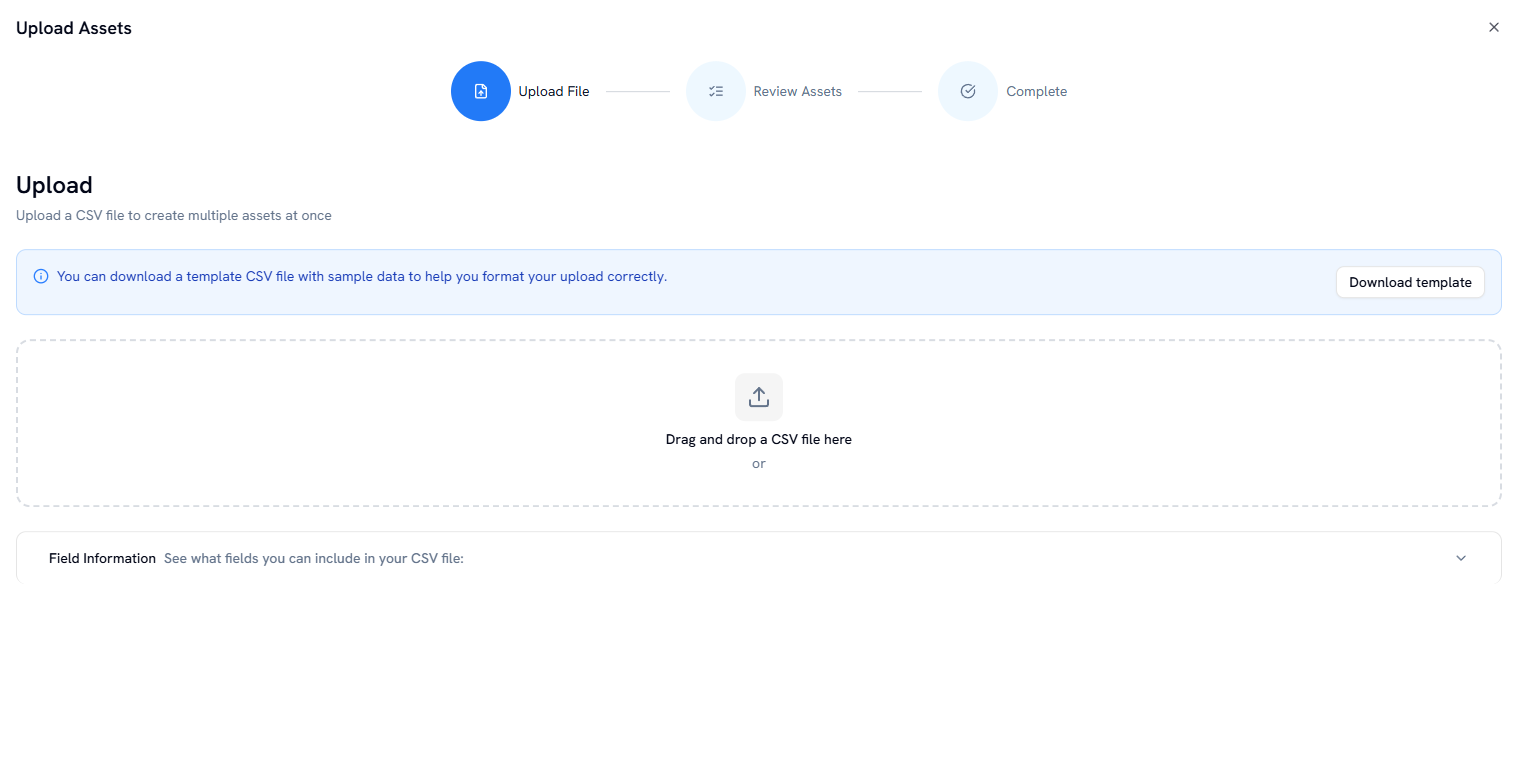
To ease the process, Workwize has a downloadable template that includes fields like name, category, serial code, brand, model, color, processor, condition, and everything you need:

Once you’ve uploaded the data, you can see all your assets on the Workwize dashboard:
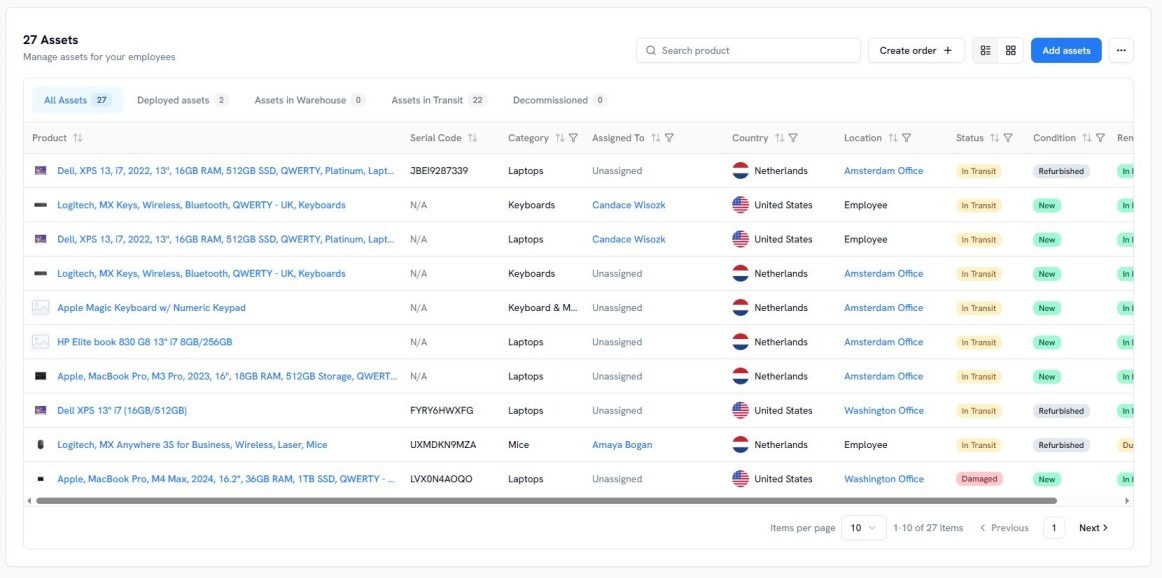
That’s for the devices you have. Any change in the status, stage or condition is reflected in this dashboard, provided it’s integrated with your HRIS and MDM tool.
2. Tracking starts right when the order is placed
Workwize is a global IT hardware lifecycle management platform that lets you automate the entire asset lifecycle from procurement (buy, rent, or lease assets) and deployment to repairs, retrievals, and disposal across 100+ countries.
When you integrate Workwize with your HRIS platform and the HR team creates a new employee record, you can automatically trigger the onboarding workflow. The IT team will be notified and can create a device order from an approved budget and a list of devices.
After the order is placed, you can track the status in the orders section. And once it’s delivered, you can track it across the entire operational lifecycle in real-time from the asset dashboard until the device is retrieved, across 100+ countries.
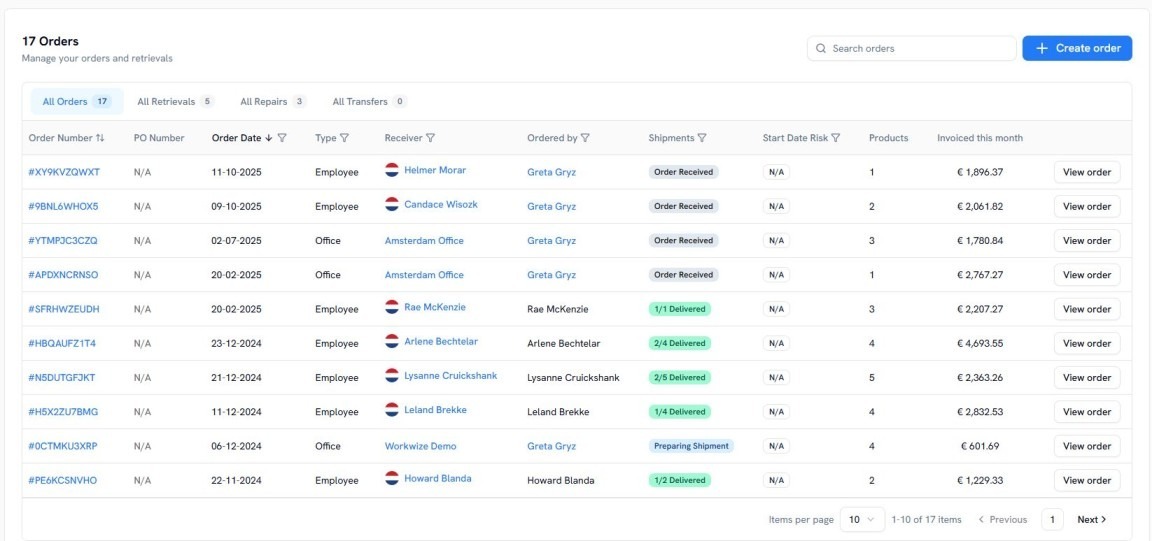
When the device is in transit and after it’s delivered, all the details are updated automatically, without the HR or IT team having to manually input information.

3. Enable auto-deployment with deployment packages
If you noticed, after being notified, the IT team still has to manually place the order from Workwize’s platform.
To make the process even more hands-off, Workwize lets you create deployment packages where you can add assets according to the team and role and set trigger conditions.
When the set conditions are met, the order is automatically initiated after the HR makes a new entry into the HRIS. No need for the IT team to place an order manually.
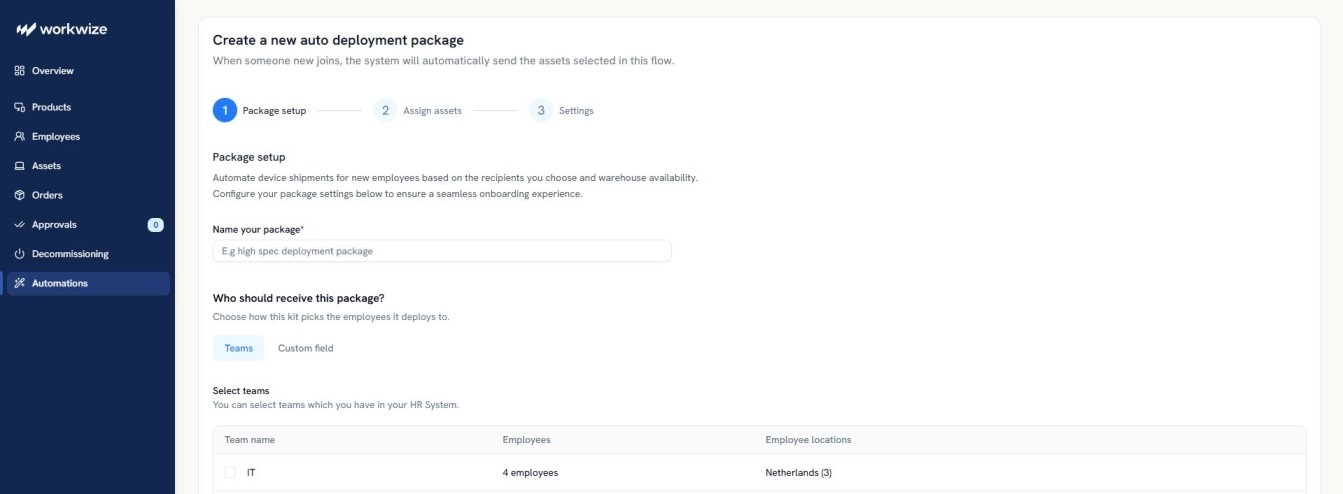
In addition, Workwize helps you build automations for auto-restocking. When stock levels fall below a predefined threshold, assets are reordered without any human intervention.
4. Workwize MCP
Workwize’s Model Context Protocol (MCP) helps you integrate with AI agents and automation tools like Claude, Slack, Jira, Zapier, and more to build automated workflows.
For instance, Workwize MCP lets you ask Claude to take action inside your Workwize account. You can say things like the following:
- Order a high-spec laptop for our new dev in Amsterdam.
- What’s the delivery status for Alex’s device?
- Offboard the employee who left last Friday.
Here’s an example of creating an order for John:
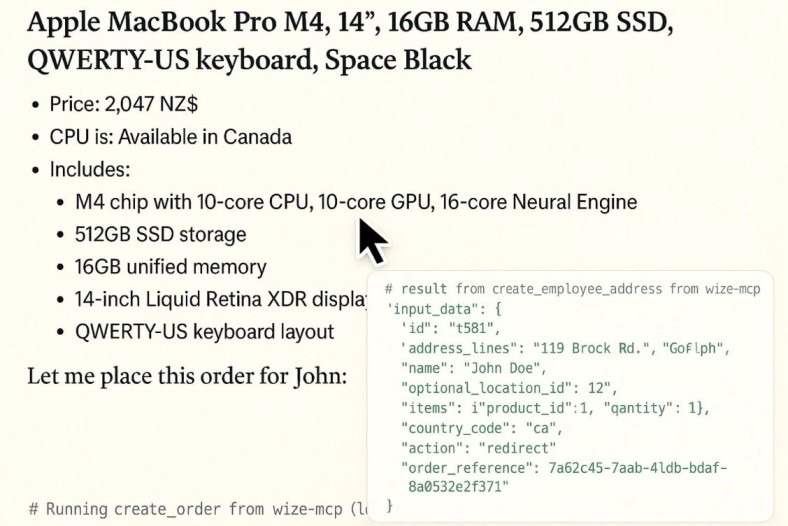
With just a prompt, you can order IT equipment for your employees and track the updates in real-time:
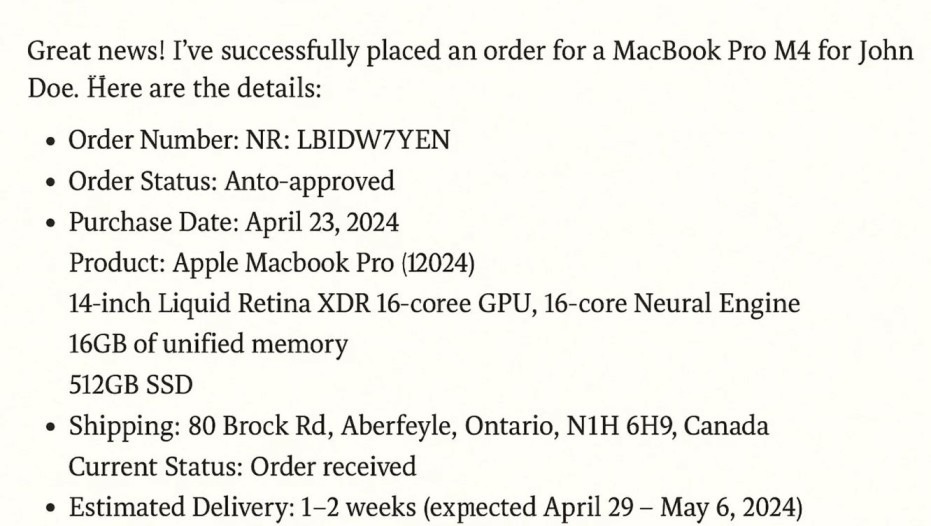
IT teams can prompt AI agents to initiate onboarding and even retrievals, making the process more hands-off than ever.
To see how Workwize helps with automated IT asset tracking in even more detail, book a free demo.


Establish a single source of truth for every IT asset across the globe.
.png?width=258&height=318&name=g10%20(5).png)
More related resources to help you stop firefighting hardware operations.



Get monthly insights into how other IT leaders are improving their ops.



.png?width=2880&height=1232&name=Group%202147262874%20(1).png)
Stop coordinating
hardware like it's 2012.
.svg)
.png?width=172&height=68&name=apple%20business%20patner%20(1).png)
.svg)
.svg)
.svg)
.svg)