




.svg)
.svg)

.svg)


.svg)




.svg)
.png?width=500&height=424&name=Style-1---V1-(1).png)

.png?width=1230&height=692&name=Vector%20(13).png)
Manual asset management might seem manageable at first: just a few spreadsheets, shared emails, and checklists. But as your workforce scales, those same methods quickly become bottlenecks.
You end up over- or understocking assets. Exits go untracked. And laptops arrive late, leaving new hires clueless on day 1.
A survey from HRZone, which included 4,000 employees from the UK, USA, Australia, and New Zealand, revealed that over 42% employees didn’t have a computer or laptop ready for them when they started.
That’s nothing but a poor onboarding experience and an unproductive day for your new hires. And it’s a known fact that a poor onboarding experience leads to higher employee turnover, according to an article from Business News Daily.
And all this happens because of manual asset management. But there’s a solution: IT Workflow Automation for Asset Management.
Automated workflows replace manual coordination between HR and IT with system-triggered actions that automate asset provisioning, tracking, and recovery. This ensures nothing slips through the cracks and helps you deliver positive onboarding experiences.
In this article, we’ll define what IT workflow automation means for IT asset management, explain why workflow automation is crucial, and how you can automate ITAM workflows.

What Is IT Workflow Automation in Asset Management?
IT workflow automation in asset management is the process of using technology to execute repetitive, rule-based tasks across the asset lifecycle, without manual intervention.
In the asset management context, these tasks include procurement, deployment, retrieval, and disposal.
But how is IT workflow automation different from IT process automation?
So, here’s the deal.
A process (in automation) explains what you need to do. For instance, you may want to automate employee onboarding. This is a broader goal that tells you what needs to be done.
But how do you achieve the above? Here are the possible steps involved in automating employee onboarding:
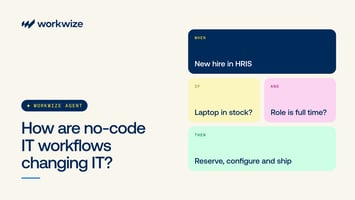
- A new hire is added to your HRIS (like BambooHR).
- That action automatically triggers an asset request in your ITAM platform.
- The procurement workflow selects the right laptop based on role and location, and sends a purchase order to a pre-approved vendor.
- Once shipped, tracking details sync automatically into your inventory dashboard.
- The device is pre-configured via your MDM (like Jamf or Intune) and assigned to the employee.
When you stitch all these steps together and they execute after a specific action with minimal or zero manual intervention, it becomes an automated workflow—essentially a form of IT process orchestration that connects multiple systems to act in sync.
But the larger goal of both automated workflows and processes is the same: automating redundant tasks and reducing manual intervention.
Here are some common applications of workflow automation in IT asset management:
- Device provisioning & onboarding: Automatically purchase, assign, and configure laptops or accessories for new hires by syncing HRIS, procurement, and MDM tools.
- Offboarding & asset retrieval: Trigger device collection, remote wipe, and license revocation the moment an employee’s termination is recorded in the HR system.
- Procurement approvals & restocking: Auto-generate purchase orders or restock requests when inventory falls below set thresholds, ensuring uninterrupted supply.
- Asset tracking & compliance: Maintain real-time visibility into asset status, ownership, and chain of custody for audits and certifications like SOC 2 or ISO 27001.
- Lifecycle management & disposal: Schedule refresh or ITAD workflows automatically when devices reach end-of-life or warranty expiry.
Why do you Need Automated Workflows for IT Asset Management?
Broadly speaking, automation reduces manual work, minimizes errors, and improves efficiency.
In IT Asset Management, it does much more by eliminating asset blind spots, improving accountability, and keeping every asset tracked from purchase to disposal.
Let me show you how:
Reduce Manual Effort and Save IT Time
Let’s take the example of a zero-touch deployment workflow.
When HR adds a new hire in the HRIS (say, BambooHR), an automated workflow instantly:
- Creates the user account in Okta or Microsoft Entra ID,
- Enrolls a pre-assigned laptop in Jamf Pro or Intune, and
- Pushes baseline apps and security policies through Apple ADE or Windows Autopilot.
In this setup,
- HR doesn't have to notify IT manually,
- And IT doesn't have to key in new-hire details into multiple systems. Everything syncs automatically.
This not only saves hours of repetitive work but also eliminates the risk of human error, like HR forgetting to flag a new joinee or IT mistyping credentials.
And since 58% of organizations believe their IT teams spend more time on repetitive requests, automated workflows can free up more time for strategic tasks.
Avoid Unnecessary Asset Spend
In a manual setup, asset tracking is messy. HR might forget to inform IT about exits, spreadsheets can go stale, and devices can end up lost or unreturned.
Meanwhile, procurement keeps ordering new laptops because nobody knows which ones are available. Multiply this across departments, and you’ve got thousands in wasted spend every quarter.
Believe it or not, procurement or other departments ordering equipment without IT's knowledge is pretty common. Here’s a Reddit user expressing their frustration with how companies spend thousands on hardware without involving IT:

Source: Reddit
But automated procurement workflows can help you avoid unnecessary asset spend. Here’s an example of an automated procurement workflow:
- Let’s say an employee resigns
- HR triggers off-boarding in HRIS: automated workflow kicks off.
- The system identifies all hardware/software assigned to the employee and triggers recovery tasks: asset retrieval, remote wipe, and asset status set to “available”.
- The inventory system auto-marks those assets as “available stock,” and they reappear in the pool.
When the next hiring cycle comes up, the workflow checks available stock and assigns one of the retrieved devices to New-Hire B: no purchase required.
Result: You avoided buying a new laptop and a new software licence and reused existing assets, reclaimed value, and prevented unnecessary spending.
Faster Onboarding and Offboarding
In a manual setup, onboarding and offboarding often rely on back-and-forth emails between HR and IT. HR hires someone, sends the details to IT, and IT manually orders, configures, and ships the device.
There's a silos between the HR and the IT department, which results in new-hires waiting for laptops on day 1.
Here’s a Reddit user jokingly mentioning how common it is for companies not to have stuff (assets) ready for new hires on day 1. While this may be common, it leads to poor onboarding experiences, which in turn lead to attrition.

Source: Reddit
However, replacing all of the manual steps with an automated workflow changes everything.
When HR adds a new hire to your HRIS (say, BambooHR):
- A workflow instantly creates the user in Okta or Microsoft Entra ID
- Enrolls a pre-assigned laptop in Jamf Pro or Intune
- Applies baseline apps and security policies, and triggers shipment
The result? Your new hire starts day one with a ready-to-use laptop and all required access, resulting in a positive onboarding experience.
Offboarding becomes equally seamless. When someone exits, the workflow:
- Automatically revokes access and SaaS licenses
- Flags assigned devices for retrieval
- Notifies your logistics partner for pickup
No missed assets, no exposed accounts, and no manual coordination required. Just clean, fast, and secure employee transitions.
Don’t miss this if you want zero silos and seamless collaboration and communication between the IT and the HR department: How HR and IT Can Sync to Create a Better First Day for New Employees.
Improves Visibility and Compliance
Manual tracking is fine when you have a handful of assets. However, when the number of assets expands, manual tracking becomes unmanageable.
Spreadsheets don't give you the visibility you need. You cannot know for sure (and in real time) where your assets are, what condition they're in, or who they’re assigned to.
This lack of visibility causes departments (IT and HR) to work in silos, resulting in poor decision-making, such as:
- Ordering assets (overstocking) when they were not required
- Or failing to order (understocking) them on time
- Or even losing assets during retrieval.
As one IT professional noted on Reddit, manual tracking and HR & IT working in silos can lead to assets falling through the cracks:

Source: Reddit
Beyond inefficiency, poor visibility into your IT infrastructure further leads to compliance issues.
For instance, you cannot maintain a complete chain of custody when tracking assets manually. And that’s a serious problem—auditors increasingly demand proof of asset handling from procurement to disposal.
Here’s a Data Erasure expert on Reddit mentioning that the auditors demand chain of custody, which underscores the importance of maintaining this data:

Source: Reddit
ITAM solutions like Workwize provide a centralized view of all your assets throughout the asset lifecycle.
You can know where your assets are, who they’re assigned to, what their state is, and more in real-time. This enables more accurate decision-making.
Here’s how Workwize helps:
- Workwize automatically logs every asset action (procurement, assignment, return, and IT asset disposal) as an auditable event.
- This creates an up-to-date chain of custody: who received, shipped, or disposed of each asset, with timestamps and proof of delivery.
- Because Workwize integrates with your MDM, it ensures every device meets encryption and security policies before being marked “compliant.”
- Additionally, Workwize performs certified IT asset disposal (ITAD) and preserves documents for audit readiness.
Together, these capabilities create a tamper-proof audit trail that supports compliance with SOC 2, ISO 27001, and GDPR standards. It turns what used to be a manual, error-prone process into an automated system of record.
Now that you understand how automation enhances visibility and compliance, let’s explore how to build these workflows inside your organization.
Examples of Workflow Automation in IT Asset Management
Here are some real-world examples of workflow automation in IT asset management:
Example 1: Automating Onboarding & Procurement
Company: NimbusSoft, a 500-employee SaaS company expanding across India, Poland, and the UK.
Pain Point: New hires weren’t receiving laptops on time. HR emailed IT manually, devices were ordered late, and over 40% of new hires started Day 1 without equipment.
Before automation:
- HR entered new hires in BambooHR
- HR emailed IT with device requirements
- IT manually created users in Okta
- Procurement checked spreadsheets to estimate available inventory
- Hardware was ordered late due to missed communication
- Devices arrived after the employee joined, causing onboarding delays
After creating an automated workflow:
When a new hire is added to BambooHR:
- A provisioning workflow triggers automatically
- The system checks the available stock
- If inventory is low, it auto-creates a purchase order to the pre-approved vendor
- Once shipped, tracking auto-syncs into the inventory dashboard
- The device is configured through Jamf or Intune
- Shipment is auto-scheduled, so the laptop arrives before the start date
Impact of this workflow automation:
NimbusSoft went from slow, inconsistent onboarding to a predictable, zero-touch experience across locations.
- Almost every employee received laptop before Day 1
- HR-to-IT coordination time reduced from hours to minutes
- No more missed device orders or last-minute escalations
- IT reclaimed several hours a month previously lost to manual provisioning
Example 2: Automating Offboarding & Restocking
Company: Volti, a 320-person ecommerce retailer with a hybrid workforce.
Pain Point: Employees were leaving, but their devices weren’t always returned. The inventory spreadsheets were outdated, and procurement kept ordering new laptops because nobody knew what was in stock.
Before automation:
- HR updated an exit in the HRIS, but forgot to notify IT
- No automated device recovery
- Returned devices were never entered back into inventory
- Procurement bought new equipment unnecessarily
- Several laptops went missing in the last year
The automated workflow:
When HR enters a termination date:
- Offboarding workflow triggers automatically
- The system lists all assigned assets
- Pickup requests are sent automatically to logistics partners
- IT credentials + SaaS licenses are revoked instantly
- Returned laptop is auto-marked as available stock
- Workflow assigns this recovered laptop to the next new hire
Impact after automation:
- Volti saved hundreds of thousands of dollars by reusing recovered hardware
- Device recovery rate went from 60% to 96%
- IT never had to manually chase HR for exit updates
- Procurement ordered fewer new devices because the inventory was always up-to-date
Instead of losing devices and overspending, Volti created a closed-loop lifecycle that tracked every asset from assignment to retrieval.
How Can Workwize Help You Automate IT Asset Management Workflows?
Workwize is a global, end-to-end IT hardware management platform that automates multiple ITAM workflows for deployment (onboarding), offboarding, and restocking.
With automation built into every stage, Workwize helps IT teams save time, reduce manual errors, and maintain full visibility over distributed assets.
Here’s how it works:
1. Auto-Deployment Workflow
Auto-Deploy is a powerful automation feature that lets you automatically ship predefined equipment to employees based on team, role, and custom rules.
This ensures they receive everything they need before their start date, without having to place manual orders.
Pro Tip: You need to integrate Workwize with your HRIS platform (BambooHR), for example, to trigger the auto deployment workflow.
Once you log in to the Workwize dashboard, you’ll find three options:
- Auto-Deploy
- Auto-Restock
- Auto-Offboard
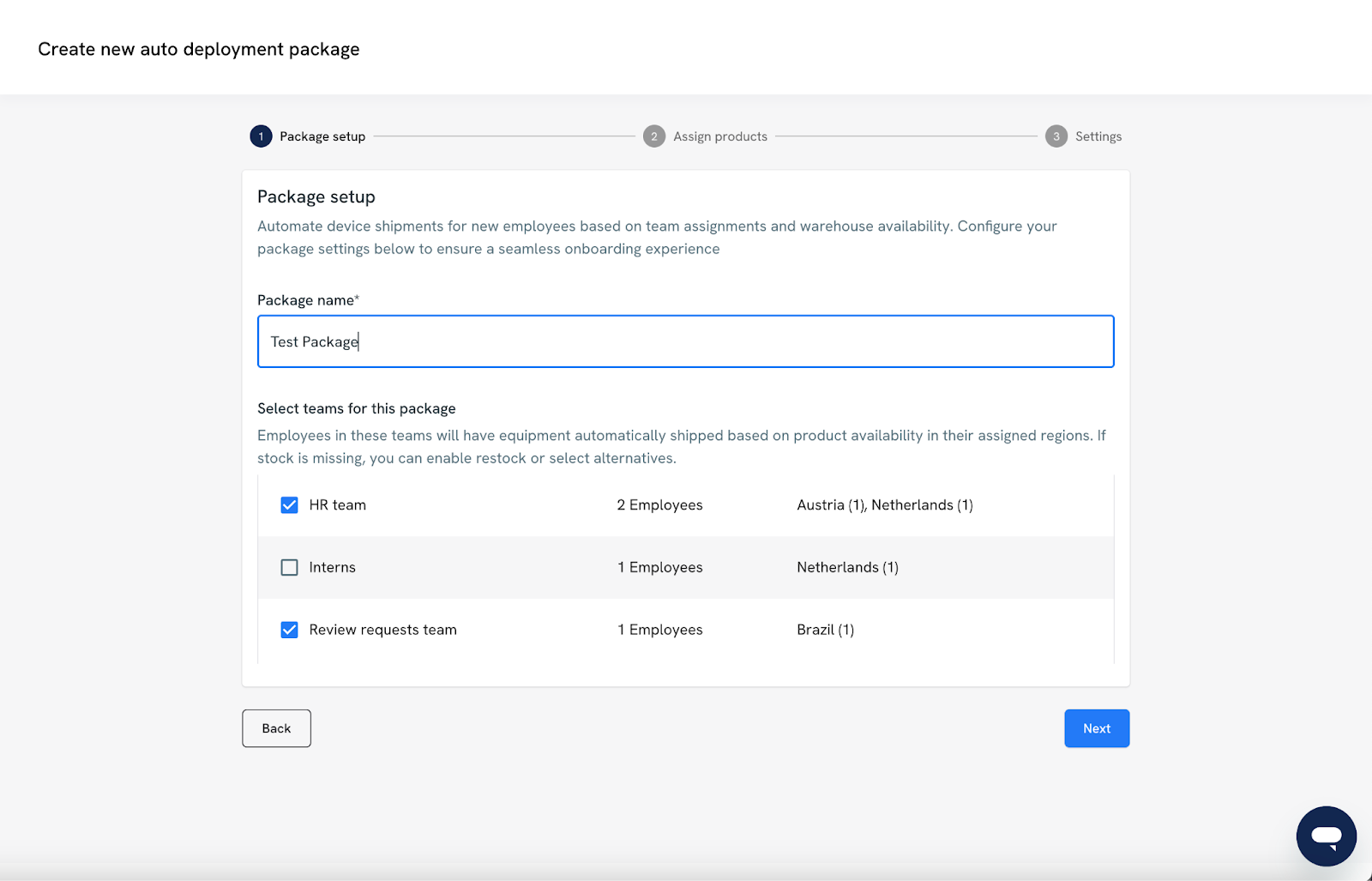
Step 1: Create a Deployment Package
You’ll first need to define the deployment package, which is a reusable configuration for provisioning equipment to specific Teams.
- Name your package: Give it a clear, descriptive name.
- Assign teams: Choose which teams will receive this deployment kit.
Only teams that don’t already have a deployment kit assigned can be selected.

Step 2: Select Products to Deploy
You can build the product list for your deployment package across different product categories in one of two ways:
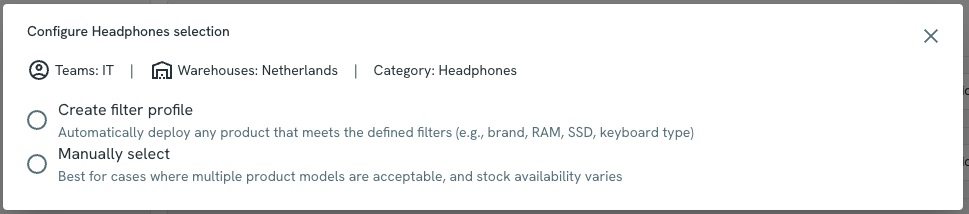
Option A: Manual Selection
You hand-pick specific SKUs for each product category.
For example:
- 1 Laptop: MacBook Pro 14”
- 1 Monitor: Dell 27” UHD
- 1 Keyboard: Logitech MX Keys
Option B: Filter Profile (Smart Selection)
Use attribute-based filters to let the system automatically choose matching products.
Examples:
- Brand = Apple
- RAM ≥ 16GB
- Screen Size = 13–15”
The system will pick one product per category that fits the criteria.
Important Note:
- Only one item per category is shipped.
- All selected or matched products must be in stock and available in all target countries for the assigned teams.
What advanced configuration options are available?
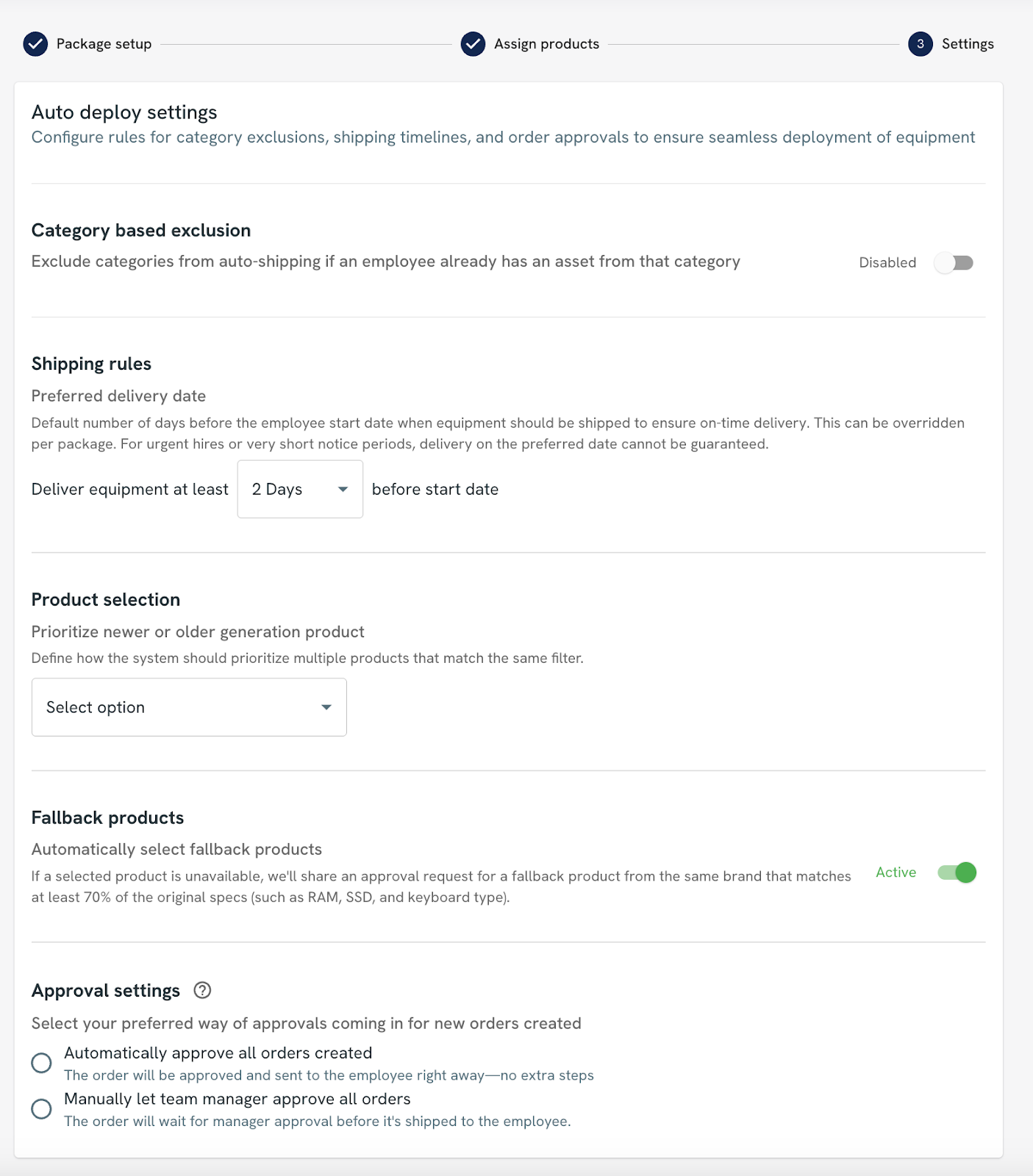
- Category-Based Exclusion: When enabled, Auto-Deploy checks the employee’s existing assets. If they already have an item in a certain category (e.g., monitor), that category is excluded from the deployment to avoid sending duplicates.
- Shipping Rules: It lets you set how early the equipment should arrive before the employee's start date.
Here’s how it works:
- The system finds the product with the longest shipping lead time.
- It then subtracts that time plus your buffer days from the employee’s start date.
This ensures the equipment arrives on time. - Product Selection Logic: When multiple products match your filter or selection criteria, the system uses AI logic to pick the newest, most appropriate product based on technical specs and suitability.
- Fallback Product Handling: By default, if there is no stock for a category selection when the time comes, that product will not be sent to the employee.
If this option is selected, the system uses AI to determine a suitable alternative that matches at least 70% of the attributes of the original selection. Please note that this option might ship a different brand to the employee.
- Approval Settings: Before orders are finalized, you can control how they are approved:
- Auto-Approve: Orders are placed immediately without manual intervention.
- Review-Requests: Orders require the team manager's sign-off before processing.
2. Auto-Offboarding Workflow
Auto-Offboarding is a smart automation feature that schedules offboarding requests based on an employee's termination date. Once set up, it ensures asset return processes are triggered automatically, helping you save time and reduce manual work.
To enable Auto-Offboarding, follow these steps:
1. Go to Employee Management > Teams: As a platform admin, navigate to the Employee Management tab and select Teams. Here, you’ll see all the teams you've created and those that are available.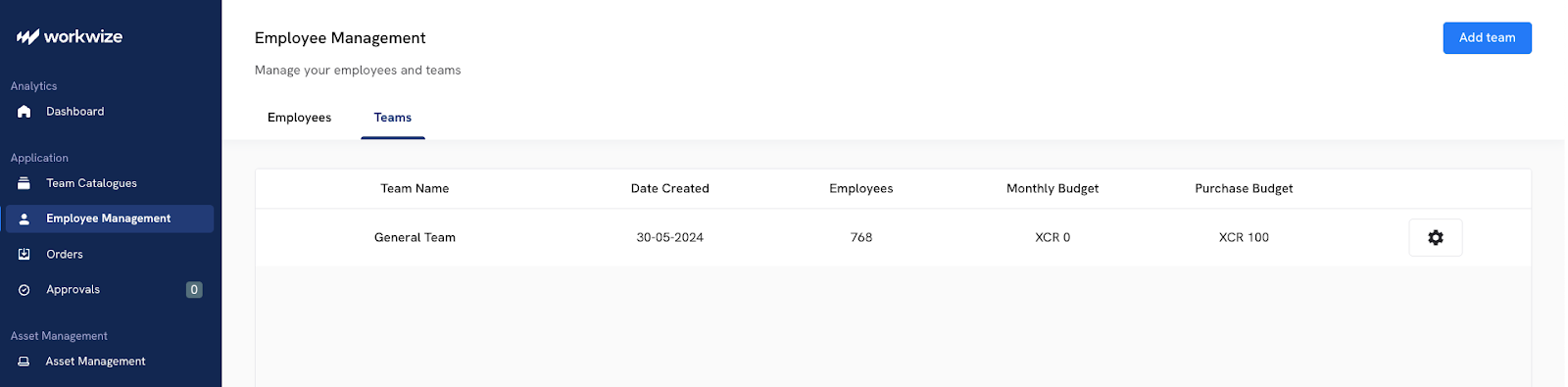
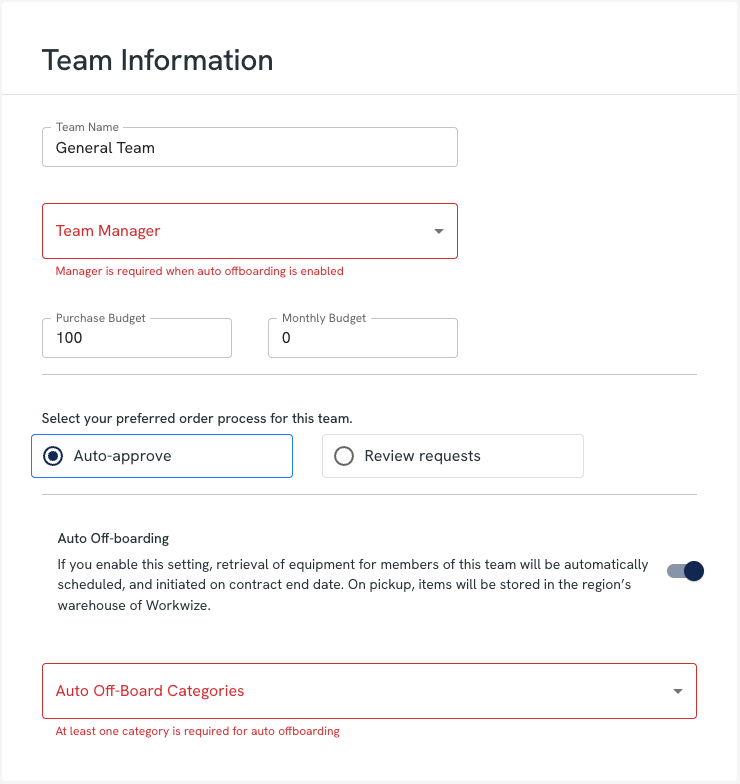
3. Assign a Team Manager: Make sure a Team Manager is assigned. This person will receive all relevant notifications regarding offboarding activities for that team.
4. Select Asset Categories: Choose which asset categories (e.g., laptops, monitors) should be automatically offboarded when a termination date is detected.
How does it work?
HRSync detects the termination date.When a termination date becomes available (typically synced through your HR integration), the platform automatically creates a scheduled offboarding for all assets that fall under the categories defined in the team’s settings.
On the termination dateThe scheduled offboarding is moved to the “requestreceived” status. From this point, our Operations team will handle it like any standard manual offboarding request.
If the termination date is removedIf the termination date is deleted while there's a pending scheduled offboarding, the system automatically cancels the request.
Missing employee information?If the employee’s personal email, phone number, or country of residence is missing:
- They’ll receive an email with a secure link to provide the required details.
- Reminder emails will be sent: immediately upon scheduling, and again 7, 3, and 1 day(s) before the termination date.
- If no action is taken, the offboarding is automatically cancelled on the termination date.
- The Team Manager is notified and receives a link to manually complete the offboarding request.
If the employee is located in a country without warehouse coverage:
- The offboarding is either cancelled or rejected.
- The Team Manager is notified via email with further instructions.

3. Auto-Restock Workflow
Auto-restock is a valuable tool for maintaining a steady supply of essential products in your warehouse. This ensures you never run out of stock and avoids disruptions in your operations.
By setting up stock rules, you can automate the replenishment process, saving time and reducing manual tracking efforts.
Here’s how you can set up an auto-restock workflow with Workwize:
Note: This functionality is available in specific Workwize packages. If you’d like to enable this feature on your platform, or if it’s not currently included in your package, please reach out to your Customer Success Manager (CSM), who will be happy to assist you.
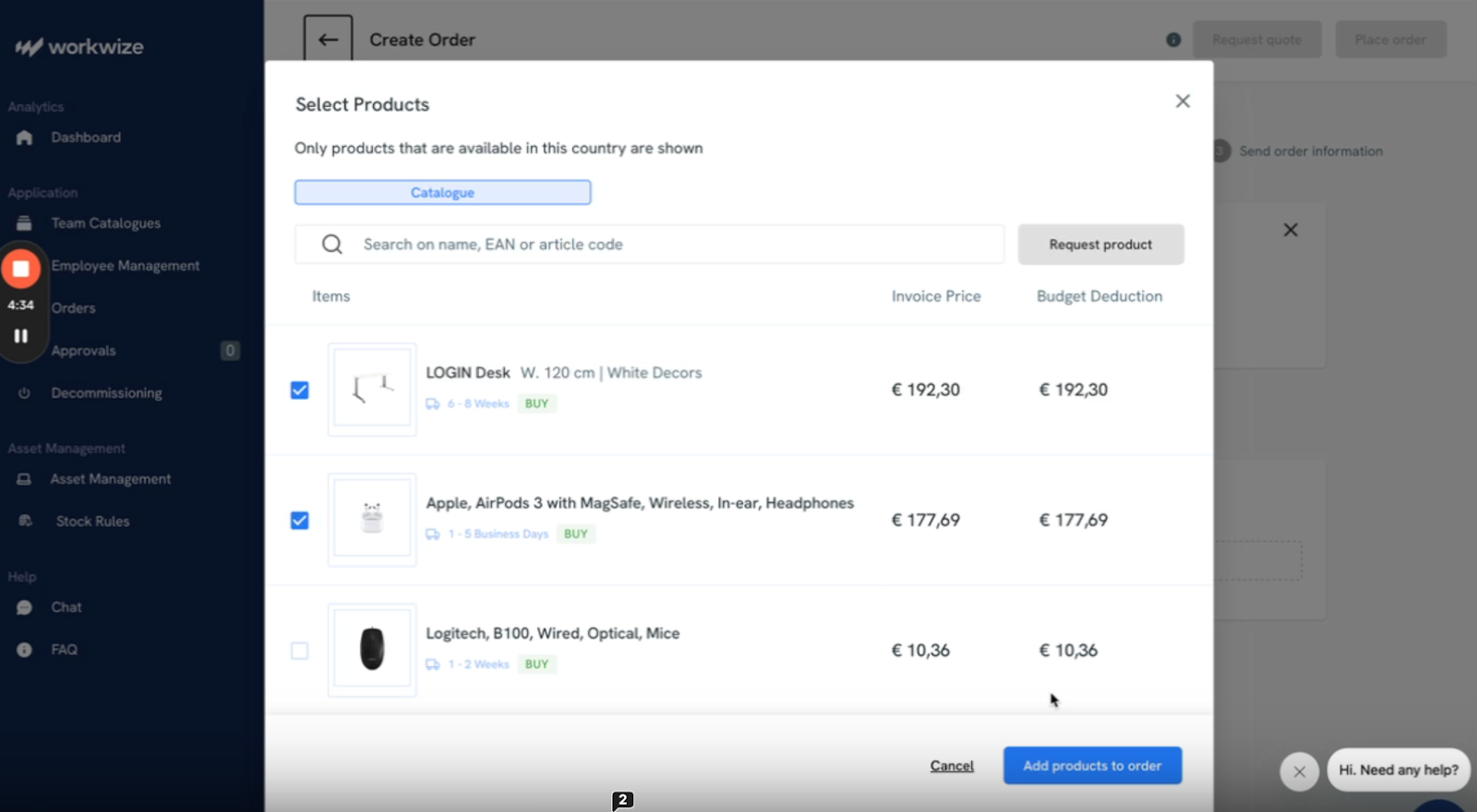
1. Create an Order for Your Warehouse: Once the auto-restock functionality is enabled, you need to try to place an order like normal for your warehouse facility: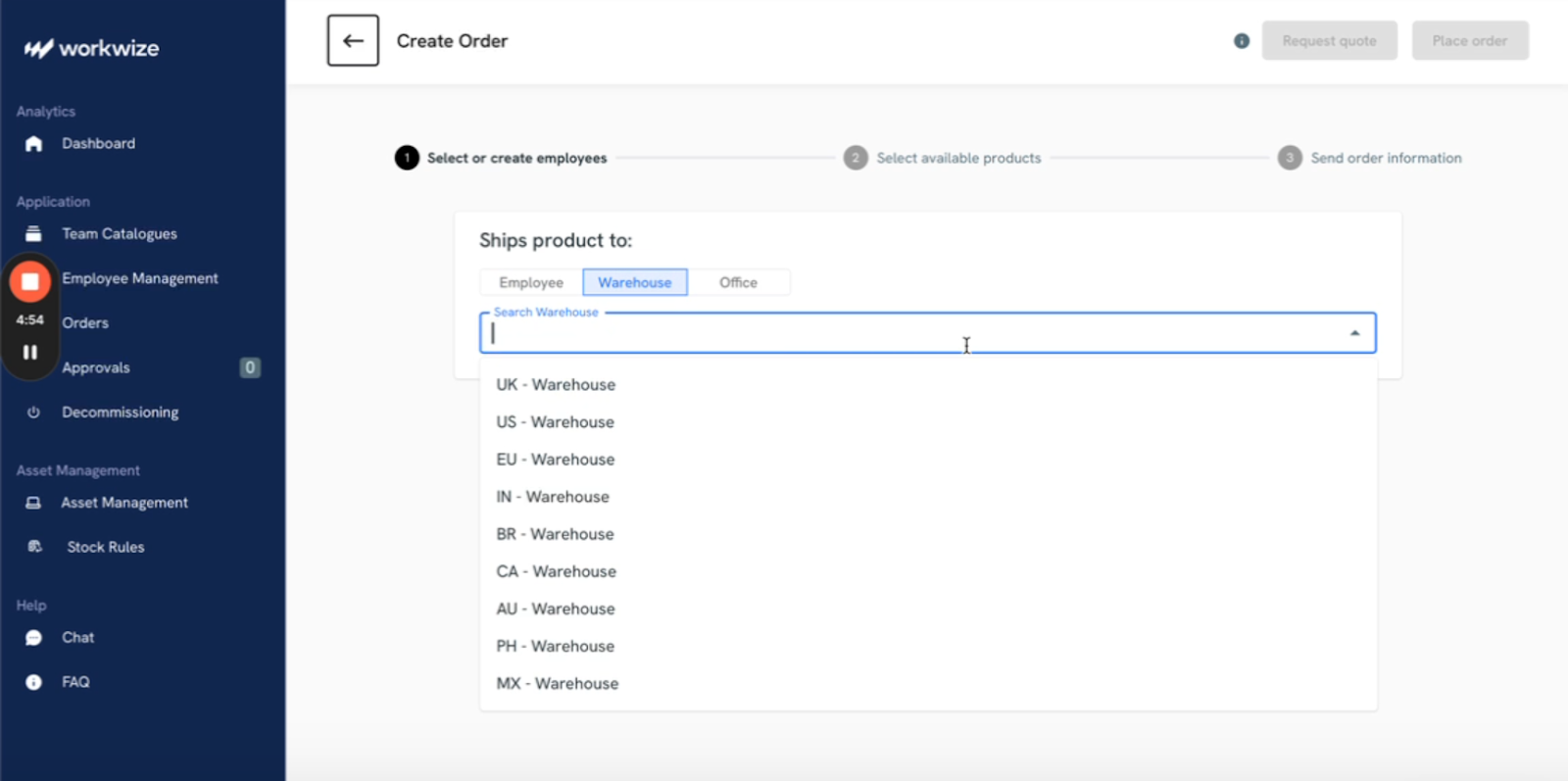
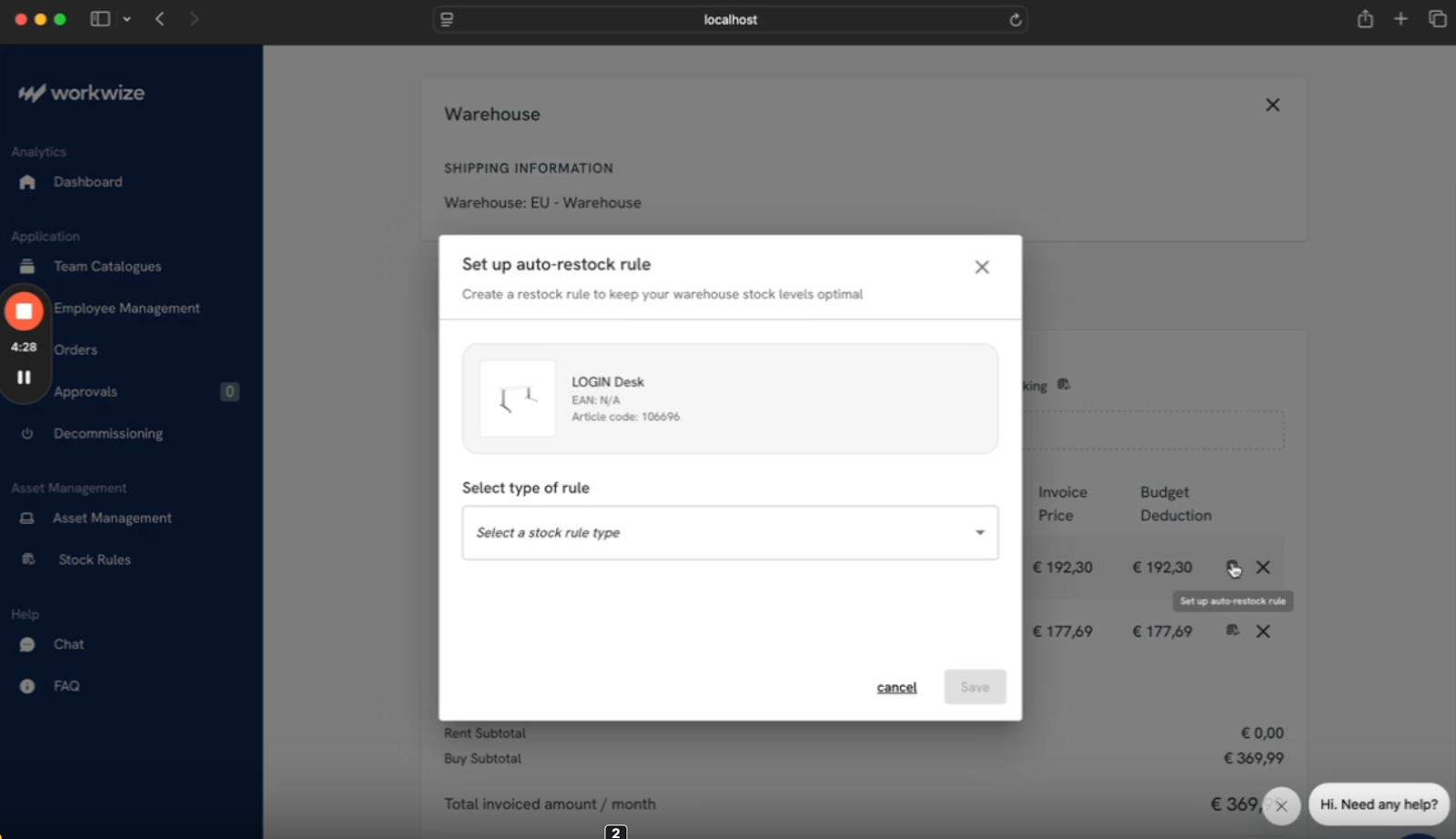
4. Select the Rule: You’ll get three options: Auto Restock, Auto Restock with Approval, and Notification.
For this example, we are choosing Auto Restock. When you select this rule, you can set the threshold (if the quantity falls below this number, the restock will trigger) and the number of units to restock once the threshold is reached.
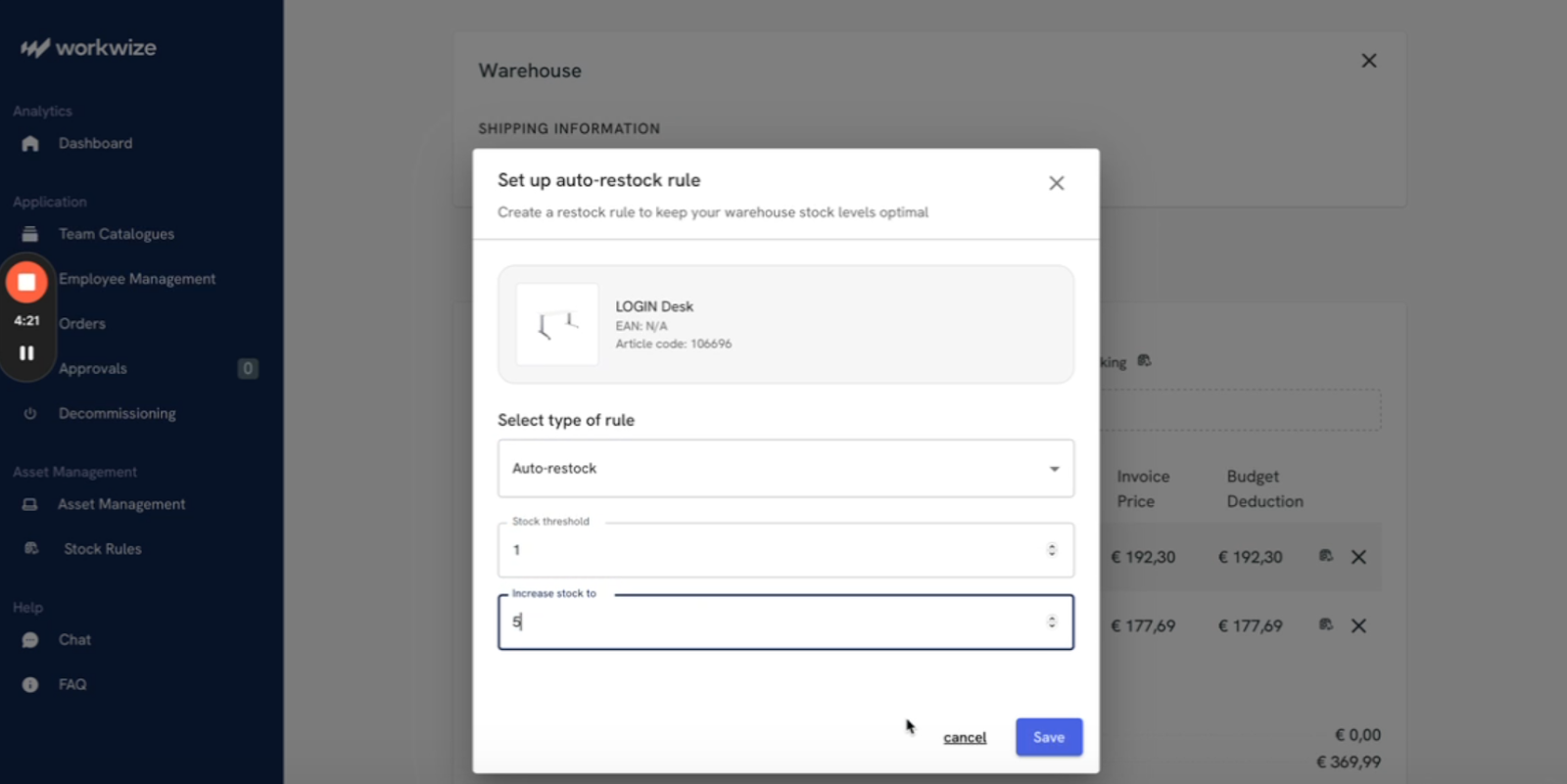
Once you confirm, your auto-restock workflow will be completed.
Workwize is a complete lifecycle automation platform that automates every process from procurement and deployment to retrieval and disposal.

Wrapping Up
IT workflow automation for asset management does more than save time. It improves asset visibility, helps you stay compliant with continuous chain-of-custody records, reduces spend by reusing recovered devices, and ensures every employee starts day one fully equipped.
By connecting your HRIS, procurement, and MDM tools, automated workflows replace fragmented manual steps with seamless, end-to-end execution, resulting in streamlined IT operations.
However, to create and execute automated workflows, you need the right lifecycle automation platform. Workwize simplifies and orchestrates your ITAM workflows, automating procurement, deployment, retrieval, and ITAD. So your team can focus less on admin and more on impact.
To see how Workwize can transform asset management and help you create results-driven automated workflows, book a free demo now.


Establish a single source of truth for every IT asset across the globe.
.png?width=258&height=318&name=g10%20(5).png)
More related resources to help you stop firefighting hardware operations.

Get monthly insights into how other IT leaders are improving their ops.



.png?width=2880&height=1232&name=Group%202147262874%20(1).png)
Stop coordinating
hardware like it's 2012.
.svg)
.png?width=172&height=68&name=apple%20business%20patner%20(1).png)
.svg)
.svg)
.svg)
.svg)