




.svg)
.svg)

.svg)


.svg)




.svg)
.png?width=500&height=424&name=Style-1---V1-(1).png)

.png?width=1230&height=692&name=Vector%20(13).png)
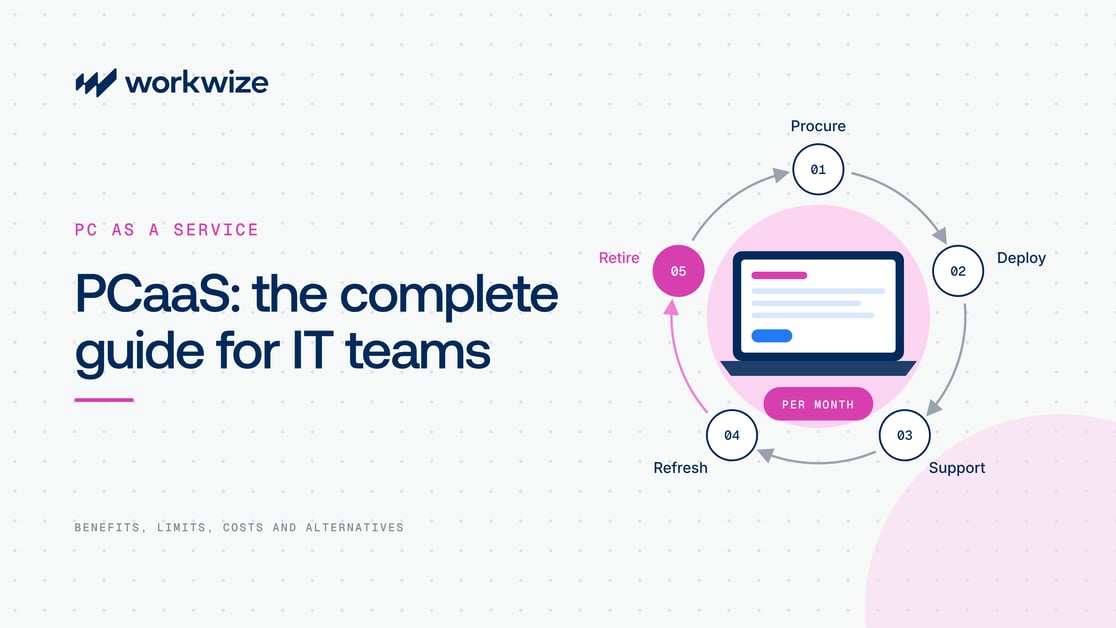
Most companies buy laptops outright, then run everything that follows themselves: sourcing, setup, repairs, refreshes, and disposal. PC as a Service, or PCaaS, packages some or all of that IT asset lifecycle management into a recurring service, usually billed monthly.
The appeal is obvious. Finance trades a big hardware purchase for a monthly bill it can plan around. IT spends less time on purchase orders and vendors, and the refresh project stuck at the bottom of the backlog finally gets a date.
Whether that holds up depends almost entirely on the contract. A good PCaaS contract gives you a credible answer for delivery, support, recovery, reuse, and disposal. A poor one can make you pay for hardware you never own, limit you to a narrow device catalog, and force a second procurement process when the provider lacks coverage.
This guide covers how PCaaS works, what it simplifies, where the trade-offs appear, and how to tell whether it suits your organization.
What is PC as a Service?
PC as a Service is a device lifecycle model in which a company pays a recurring fee for PCs and related services instead of buying and managing every device itself. A contract may include laptops, desktops, or workstations, plus procurement, configuration, deployment, support, repairs, refreshes, recovery, data erasure, and disposal.
The provider usually owns the equipment during the term, though ownership structures vary. At the end, the customer may return the devices, replace them under a new term, extend the agreement, or buy them if the contract includes that option.
The financial appeal is that PCaaS turns a large capital expense into a predictable operating expense and hands selected lifecycle work to the provider.
|
Note: PCaaS contracts vary widely by provider. Always check device ownership, included services, refresh terms, and end-of-term options against the specific agreement. |
The difference between PCaaS and DaaS
PC as a Service and Device as a Service are related, and vendors sometimes use the terms interchangeably. In this article, DaaS means Device as a Service, not Desktop as a Service, which delivers a virtual desktop through cloud infrastructure.
PCaaS covers personal computers. Device as a Service can cover a wider endpoint estate, including phones, tablets, rugged devices, and other equipment. PCaaS can therefore sit inside a broader DaaS program.
|
PC as a Service |
Device as a Service |
|
|
Typical scope |
Laptops, desktops, and workstations |
PCs plus phones, tablets, and other endpoint types |
|
Primary goal |
Simplify the PC lifecycle |
Manage a mixed device estate through one service |
|
Configuration |
Often built around PC images, security baselines, applications, and MDM enrollment |
Varies by device category and provider |
|
Contract design |
Usually a recurring fee per device or per user |
Recurring fee, often with more service tiers and device categories |
|
Best fit |
Companies with standardized PC needs |
Companies seeking one service across a varied device estate |
The distinction matters during procurement, because service breadth affects pricing, support responsibility, and contract complexity. A provider that handles laptops well may not offer the same depth for phones or specialist equipment.
How PCaaS works across the PC lifecycle
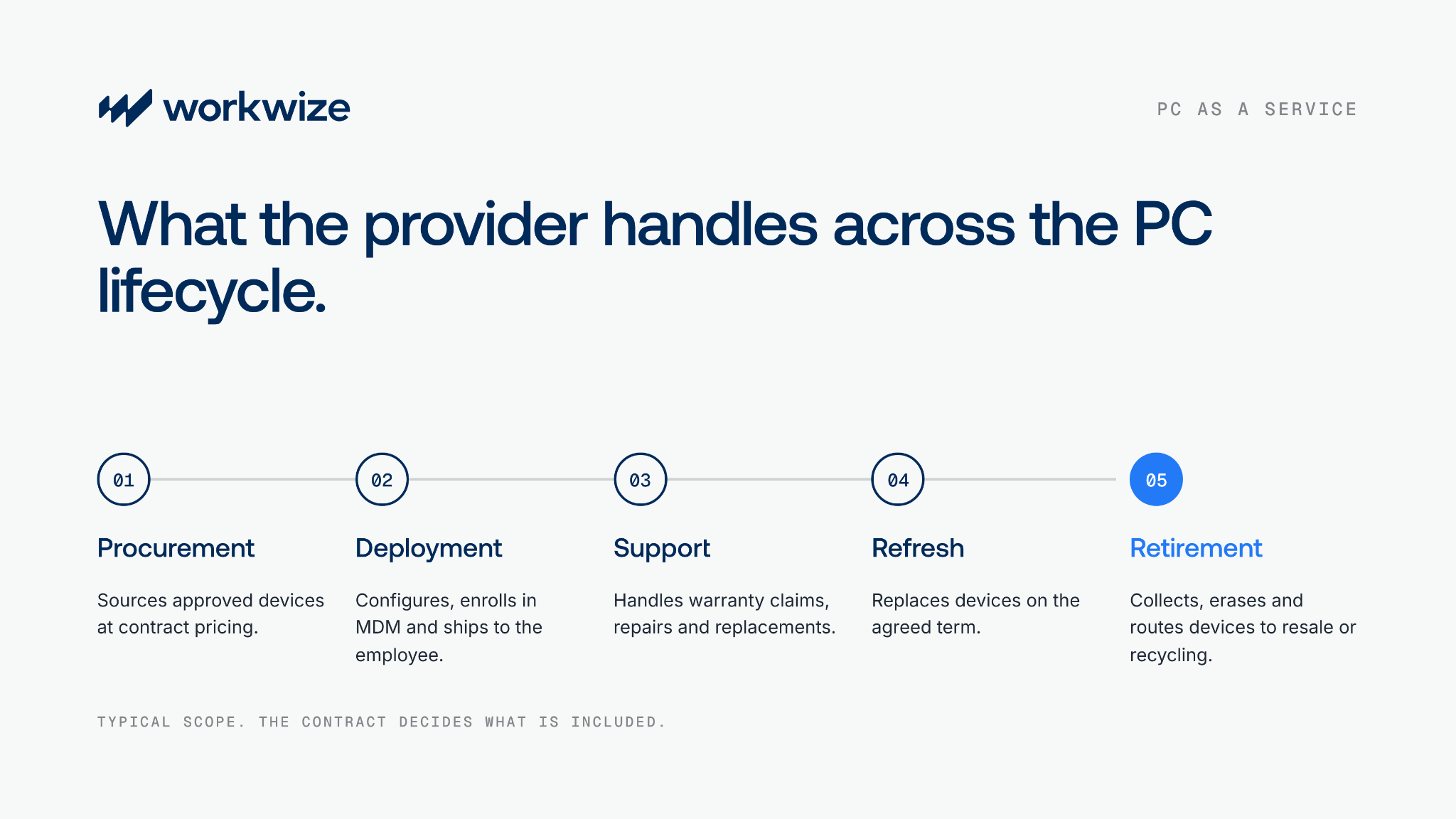
PCaaS bundles several jobs that IT teams would otherwise coordinate across resellers, logistics partners, support providers, and IT asset disposal vendors.
|
Lifecycle stage |
What the provider typically handles |
|
Procurement |
Sources approved devices, applies contract pricing, and processes orders without a separate vendor negotiation for each request |
|
Configuration and deployment |
Applies the required setup, enrolls devices in MDM, installs approved software, and ships to the employee or office |
|
Support and maintenance |
Coordinates warranty claims, repairs, replacement units, parts, and any contracted help desk services |
|
Refresh |
Replaces devices according to the agreed term or refresh policy, often without a separate capital request |
|
Recovery and retirement |
Collects devices, erases data, records chain of custody, and routes equipment to refurbishment, resale, recycling, or disposal |
The exact split of responsibility varies by service tier and contract. On paper, the flow is clean. In practice, the contract decides how clean it stays. Before you compare it with running IT hardware procurement yourself, confirm which activities are included, which cost extra, who owns each escalation, and what happens when a device or employee falls outside the standard process.
Benefits of PC as a Service
For the right organization, PCaaS pays off in five ways.
Predictable spending
PCaaS replaces a large upfront hardware purchase with a recurring fee. That can simplify budgeting, especially when finance teams favor operating expenditure or can't release a large capital budget at the start of a refresh cycle.
Less hands-on hardware administration
A well-scoped service moves sourcing, configuration, warranty coordination, repairs, replacement logistics, refresh planning, and retirement out of your internal IT queue. Your team still owns policy, security, vendor governance, and exceptions, but it spends less time moving boxes and chasing serial numbers through IT asset tracking spreadsheets.
That matters most when IT headcount is small or employees are spread across many locations. Handing lifecycle tasks to the provider is one of the central operational arguments for PCaaS.
Easier fleet standardization
PCaaS programs usually start with approved device tiers by role. A finance employee may get one standard laptop, while an engineer gets a higher-spec model. Standardization simplifies support, security testing, IT inventory management, and software compatibility.
Planned refresh cycles
The agreement usually sets refresh timing, so aging devices don't stay in service just because a replacement budget was delayed. For example, the Commonwealth of Massachusetts runs its PCaaS program on a four-year device refresh cycle.
Regular refreshes can improve supportability and security, but they only create value when the schedule matches actual performance, warranty coverage, and role requirements.
Better end-of-life handling
Providers may include collection, certified data erasure, documentation, refurbishment, resale, and IT equipment recycling. That gives IT a defined route for retired hardware and gives security teams evidence that devices didn't disappear.
The contract should specify the erasure standard, certificate format, chain-of-custody records, downstream partners, and treatment of failed drives.
Limitations and trade-offs of PCaaS
PCaaS can simplify hardware management, but the convenience comes with trade-offs in cost, flexibility, ownership, and provider coverage. How much they matter depends on your existing IT operations and the contract terms.
The full-term cost can exceed an outright purchase
PCaaS combines financing and services, so comparing its monthly fee with a retail laptop price is an incomplete comparison. Still, the contract can cost more than owning the hardware, especially when the organization already runs capable IT operations.
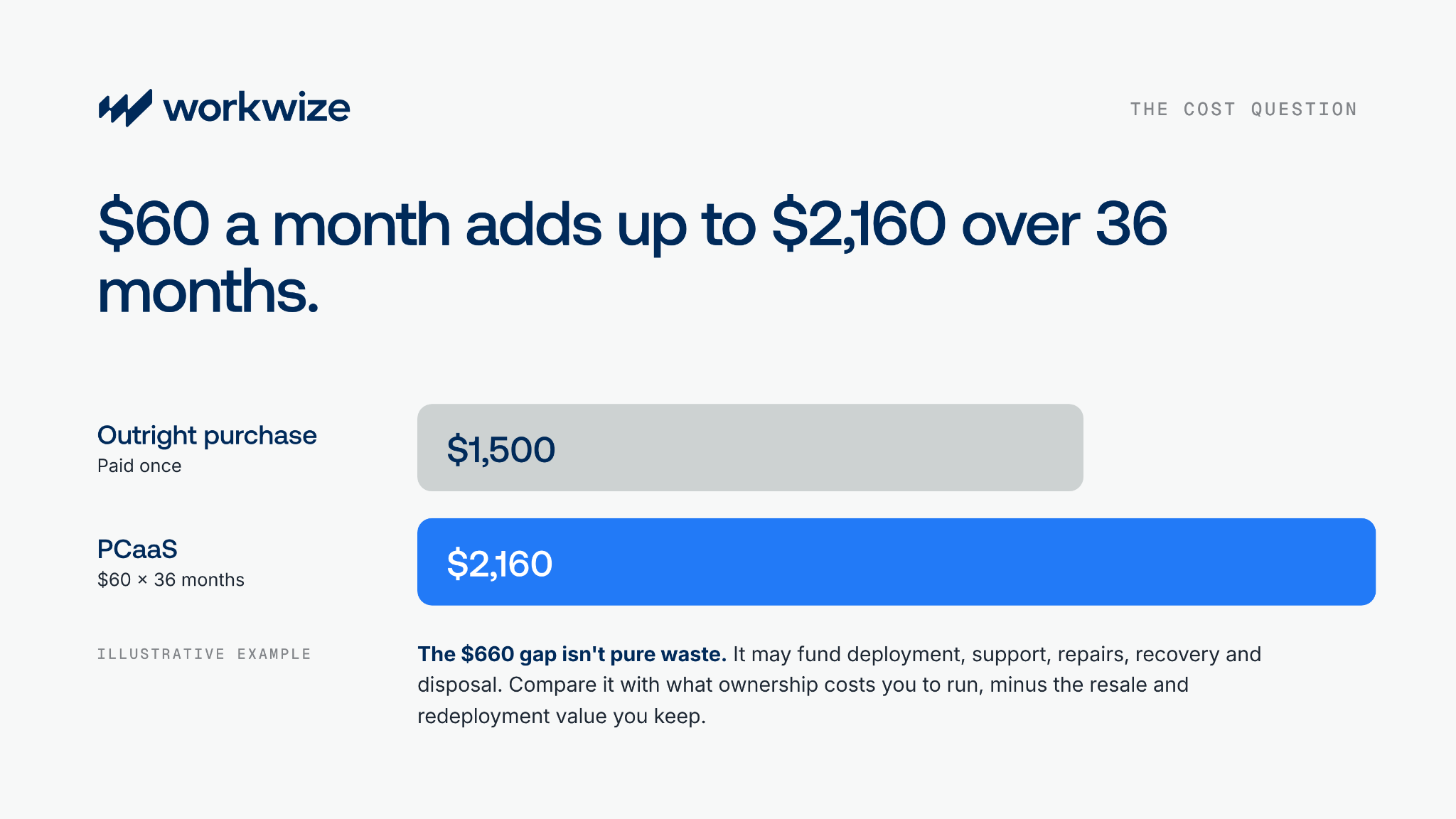
Take a simple example, using illustrative numbers:
- Outright purchase price: $1,500
- PCaaS quote: $60 per month for 36 months
- Subscription cost: $2,160
- Difference: $660 before adding ownership-side service costs
Redeployment can change the result, but only when your IT asset retrieval, wiping, grading, storage, and reassignment process actually works.
Run this calculation with your own quote and operating data. Include configuration labor, support tickets, repairs, warehousing, retrieval, erasure, disposal, financing, tax treatment, and expected resale value. PCaaS may still win, but it should win the full calculation, not the monthly-fee contest.
Long contracts reduce room to change direction
A low monthly figure looks friendly until you multiply it by every device and every remaining month. Check minimum quantities, early termination charges, device reduction rules, refresh dates, lost-device fees, and buyout terms.
Inspect the catalog too. Your standard tiers may fit today and feel restrictive after a new role, an acquisition, or an application change shifts the hardware requirement. Contract flexibility matters as much as model choice.
Many PCaaS agreements use a fixed subscription term, and your ability to add, remove, replace, or keep devices depends on that agreement.
Geographic coverage may not match hiring coverage
A service can perform well in the provider's core countries but slow down, cost more, or disappear elsewhere. International hiring then creates two processes: PCaaS in covered markets and local procurement everywhere else.
Ask for a country-by-country service map covering sourcing, stock location, delivery time, repairs, replacements, retrieval, data erasure, and disposal.
Don't settle for a list of countries the provider can technically ship a laptop to. Confirm it can source locally, configure the device, replace it, collect it from a departing employee, erase it, and provide the required records in each location. That's the bar for global IT procurement.
You may lose redeployment and residual value
When the provider owns the device, you generally can't resell it, keep it after the term, or redeploy it freely unless the agreement allows it. Any remaining value goes back with the hardware.
That matters for companies with strong automated offboarding and refurbishment operations. A returned laptop with good battery health and adequate specs may be worth more as the next hire's device than as a box shipped back at contract end.
End-of-term treatment also differs by provider. Some agreements require return, while others offer renewal or purchase options.
Service quality becomes part of employee productivity
PCaaS transfers work, but it also creates dependency. A missed delivery or a vague support handoff lands back with internal IT, often after the employee has already raised the issue.
Evaluate actual service levels by country, escalation routes, spare-device coverage, repair turnaround, replacement policy, reporting, and service credits. The provider's dashboard matters. The person who answers when the dashboard turns red matters more.
Who PCaaS works for, and who it doesn't
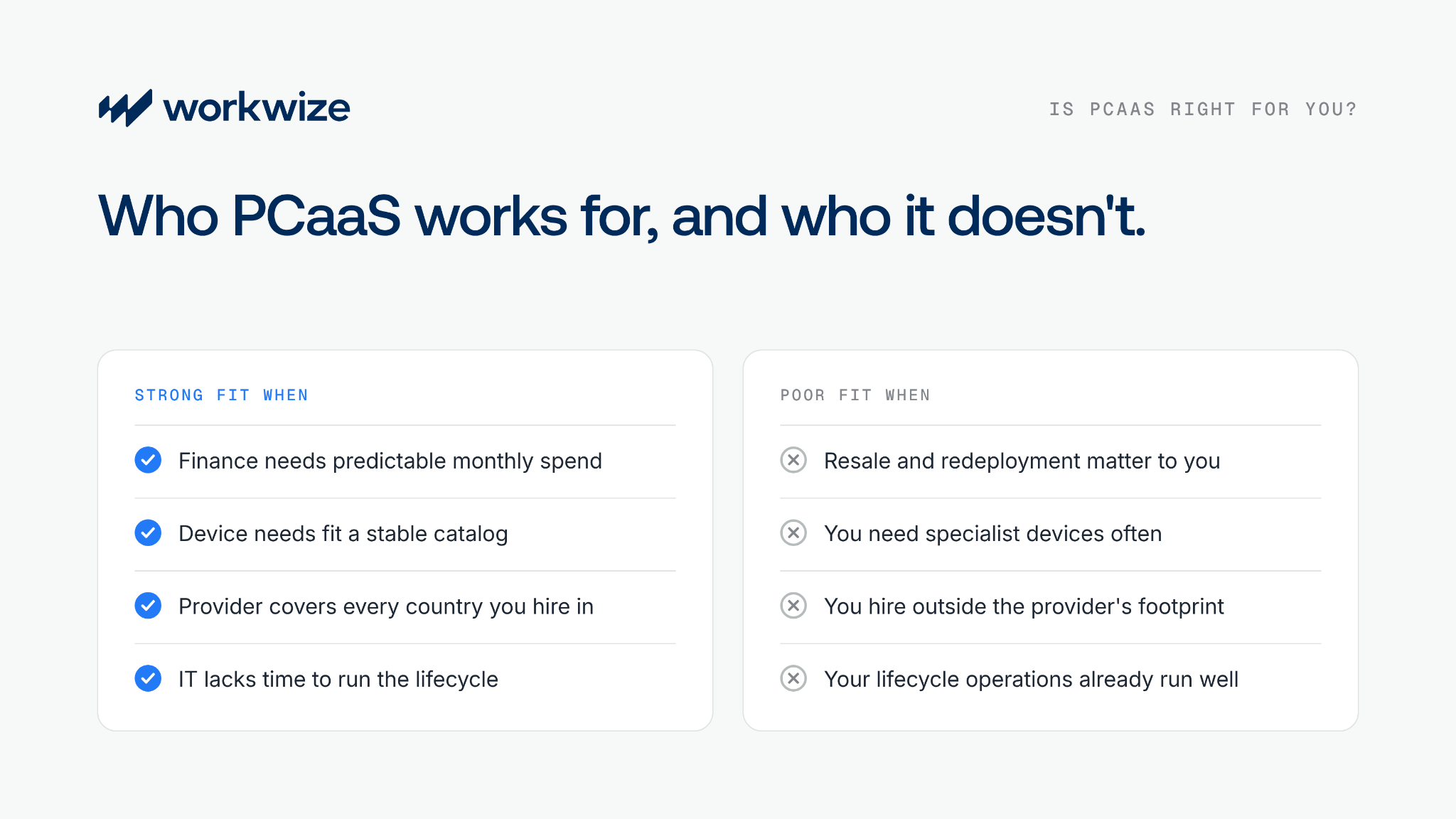
PCaaS is a strong fit when:
- Your finance team needs operating expenditure and predictable monthly charges more than the lowest lifetime hardware cost.
- Your device requirements fit a stable catalog with few exceptions.
- The provider has reliable lifecycle coverage in every country where you hire.
- Internal IT lacks the time or staff to run procurement, device repairs, refreshes, recovery, and retirement.
- Regular refreshes and a single accountable provider are worth the contract premium.
PCaaS may be a poor fit when:
- Ownership, resale, and redeployment are central to your hardware strategy.
- Your workforce needs specialist devices or frequent configuration exceptions.
- You hire in countries outside the provider's service footprint.
- Your IT team already runs efficient lifecycle operations and buys hardware at good rates.
- Headcount changes sharply, and the contract offers little room to reduce device commitments.
Many companies land in between. A company might use PCaaS for standard laptops in two large markets, buy engineering workstations outright, and rent short-term devices for contractors. A hybrid approach often reflects reality better than one company-wide rule.
PCaaS vs outright procurement with lifecycle management
The real alternative to PCaaS isn't a return to manual procurement. It's outright ownership, supported by a hardware lifecycle management platform that handles sourcing, deployment, retrieval, and redeployment. Here's how the two models compare on the factors that usually decide the choice:
|
PCaaS |
Outright procurement with lifecycle management |
|
|
Ownership |
Provider owns the device for the term, so you generally can't resell, keep, or freely reassign it |
You own the device and decide how it's used, reassigned, resold, or retired |
|
Cash flow |
Recurring operating expense, billed per device or per user, that's easy to forecast |
Larger upfront purchase from the capital budget, with lower hardware spend once devices are paid for |
|
Lifetime cost |
Includes financing and bundled services, so the full-term total can exceed the purchase price |
Often lower when operations and redeployment run well, since you pay once and keep the value |
|
Catalog |
Set by the provider and contract, which can feel restrictive when new roles need different hardware |
Set by you, so device standards can change as roles, teams, and requirements change |
|
Geographic reach |
Limited by provider coverage, so hiring outside its footprint often means a second procurement process |
Can use local sourcing and logistics partners by country, so coverage follows where you hire |
|
Configuration |
Provider process, with agreed options for images, applications, and MDM enrollment |
IT keeps direct control over images, security baselines, and MDM |
|
Redeployment |
Depends on the contract; devices often go back to the provider at term end rather than to the next hire |
You can wipe and refurbish devices, keep them in IT device storage, and reissue them to new hires instead of buying replacements |
|
Residual value |
Usually kept by the provider, since remaining value goes back with the hardware |
Kept through resale or continued use, which offsets part of the purchase cost |
|
Internal workload |
Lower when the service performs well, though IT still owns policy, security, governance, and exceptions |
Reduced through automation, but sourcing, refresh decisions, and governance stay internal |
The best choice depends on financing, device diversity, hiring locations, internal capacity, and how mature your offboarding process is. PCaaS favors predictable spending and outsourced execution. Ownership favors control, reuse, and the freedom to change vendors or device standards without waiting for a contract to end.
How to evaluate a PCaaS provider
Start with the service schedule. Ask the provider to document:
- Every included and chargeable service across procurement, deployment, support, refresh, recovery, and disposal
- Contract length, minimum device volume, reduction rights, early termination fees, buyout options, and end-of-term obligations
- Supported countries and location-specific SLAs for delivery, repair, replacement, and retrieval
- Device catalog rules, exception handling, supply substitutions, and refresh eligibility
- MDM ownership, enrollment workflow, security responsibilities, and support for the existing HRIS and MDM integrations
- Data erasure standards, certificates, chain of custody, recycling partners, and residual-value treatment
Run a limited pilot before you sign. Include at least one standard hire, one specialist device, one repair, one offboarding, and one difficult delivery location. The happy path is easy to demo. Exceptions show you the service you're actually buying.
Where Workwize fits into a PCaaS decision
Workwize sits on the ownership side of this decision. It's a global IT hardware management platform for companies that want to own their devices without running every lifecycle step by hand. Procurement, deployment, tracking, repairs, retrieval, wiping, and disposal run from one place, without locking you into a fixed subscription catalog.
If the trade-offs above point you toward ownership, these are the pieces that make it workable for distributed teams:
- Local sourcing in 130+ countries, with partner-operated warehouses in 14 countries for stock, storage, and returns. You define the approved catalog and workflows instead of accepting one provider's.
- Automated onboarding that starts from your HRIS. Devices can be pre-provisioned through Apple Business Manager or Windows Autopilot, so your MDM applies policies on first boot.
- Retrieval from an offboarding event. A leaver's end date in your HRIS triggers pickup; the platform tracks the return, and the device goes to a warehouse, an office, or disposal.
- Wiping and redeployment. Devices are securely wiped in Workwize warehouses, with erasure reports available on request, then inspected and returned to your inventory for the next hire.
- One record for every device. IT asset management keeps procurement, assignment, lifecycle status, and retirement in one system.
The result is most of the operational relief PCaaS promises, while you keep ownership, residual value, and the freedom to redeploy. Routine steps like restocks and retrievals can run on rules in the IT workflow builder, so your team handles exceptions instead of tickets.
FAQs
What is PC as a Service?
PC as a Service is a subscription model that bundles PCs with selected lifecycle services, such as procurement, configuration, support, refresh, recovery, and disposal. The provider usually owns the hardware during the term, while the customer pays a recurring operating expense.
What is the difference between PCaaS and DaaS?
PCaaS focuses on personal computers such as laptops, desktops, and workstations. Device as a Service can cover a wider endpoint estate, including phones, tablets, and specialist devices, so PCaaS may form one part of a broader DaaS program.
Is PCaaS cheaper than buying PCs?
PCaaS can reduce upfront spending, but it isn't automatically cheaper across the full lifecycle. Compare the total subscription cost with the hardware purchase, internal labor, support, repairs, logistics, disposal, residual value, and savings from redeployment.
What are the main disadvantages of PCaaS?
The biggest drawbacks are higher full-term costs in some cases, contract lock-in, limited device choice, uneven geographic coverage, less control over configuration, and lost residual value. How much each matters depends on the contract and how mature your existing IT operations are.
Which organizations should avoid PCaaS?
PCaaS is a weaker fit for companies that need specialist hardware, extensive configuration control, or flexibility outside a provider's standard catalog, and for those that hire beyond the provider's coverage.
What is the alternative to PC as a Service?
The main alternative is outright procurement supported by a lifecycle management platform. You own your devices while software and service partners automate sourcing, deployment, tracking, repairs, retrieval, wiping, redeployment, and disposal.
How does PCaaS support remote and international employees?
The provider can configure devices and ship them directly to employees, then coordinate remote support, replacement, and recovery. Coverage differs by country, so verify location-specific SLAs rather than assuming a global contract delivers identical service everywhere.
What happens to PCs at the end of a PCaaS contract?
Devices are usually returned, refreshed under a new term, or bought if the agreement offers a buyout. The provider may erase, refurbish, resell, or recycle returned equipment, and you should receive chain-of-custody and data erasure documentation.
Comparing PCaaS with owning your fleet? Book a 30-min demo to see how Workwize runs procurement, deployment, retrieval, and disposal for the devices you own, in 130+ countries.


Establish a single source of truth for every IT asset across the globe.
.png?width=258&height=318&name=g10%20(5).png)
More related resources to help you stop firefighting hardware operations.

Get monthly insights into how other IT leaders are improving their ops.



.png?width=2880&height=1232&name=Group%202147262874%20(1).png)
Stop coordinating
hardware like it's 2012.
.svg)
.png?width=172&height=68&name=apple%20business%20patner%20(1).png)
.svg)
.svg)
.svg)
.svg)