




.svg)
.svg)

.svg)


.svg)




.svg)
.png?width=500&height=424&name=Style-1---V1-(1).png)
.png?width=30&height=30&name=image%20(57).png)
.png?width=1230&height=692&name=Vector%20(13).png)
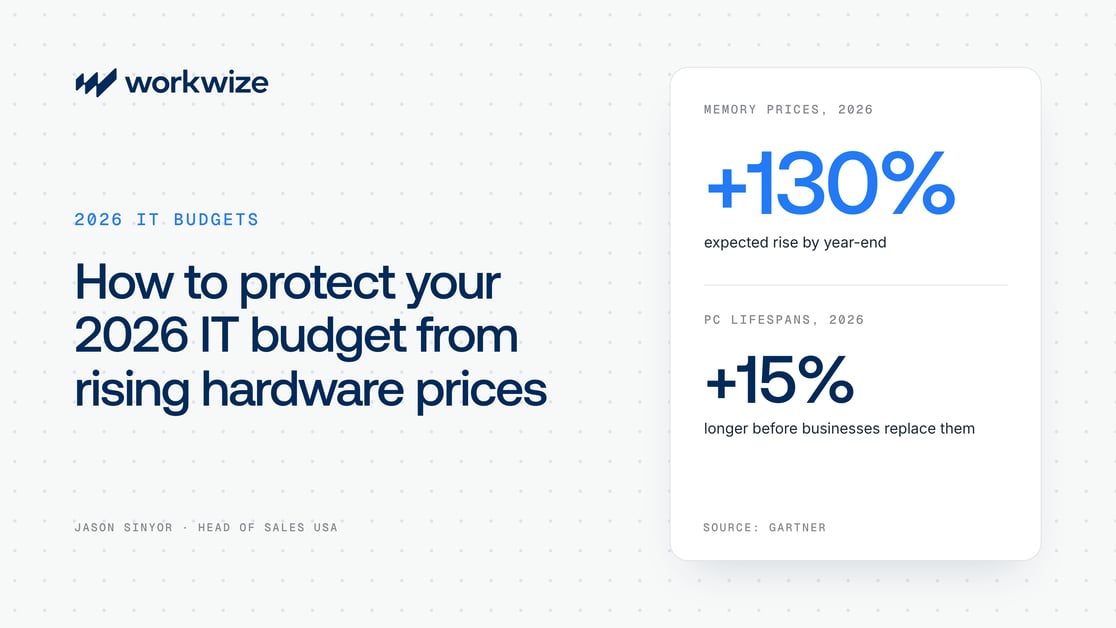
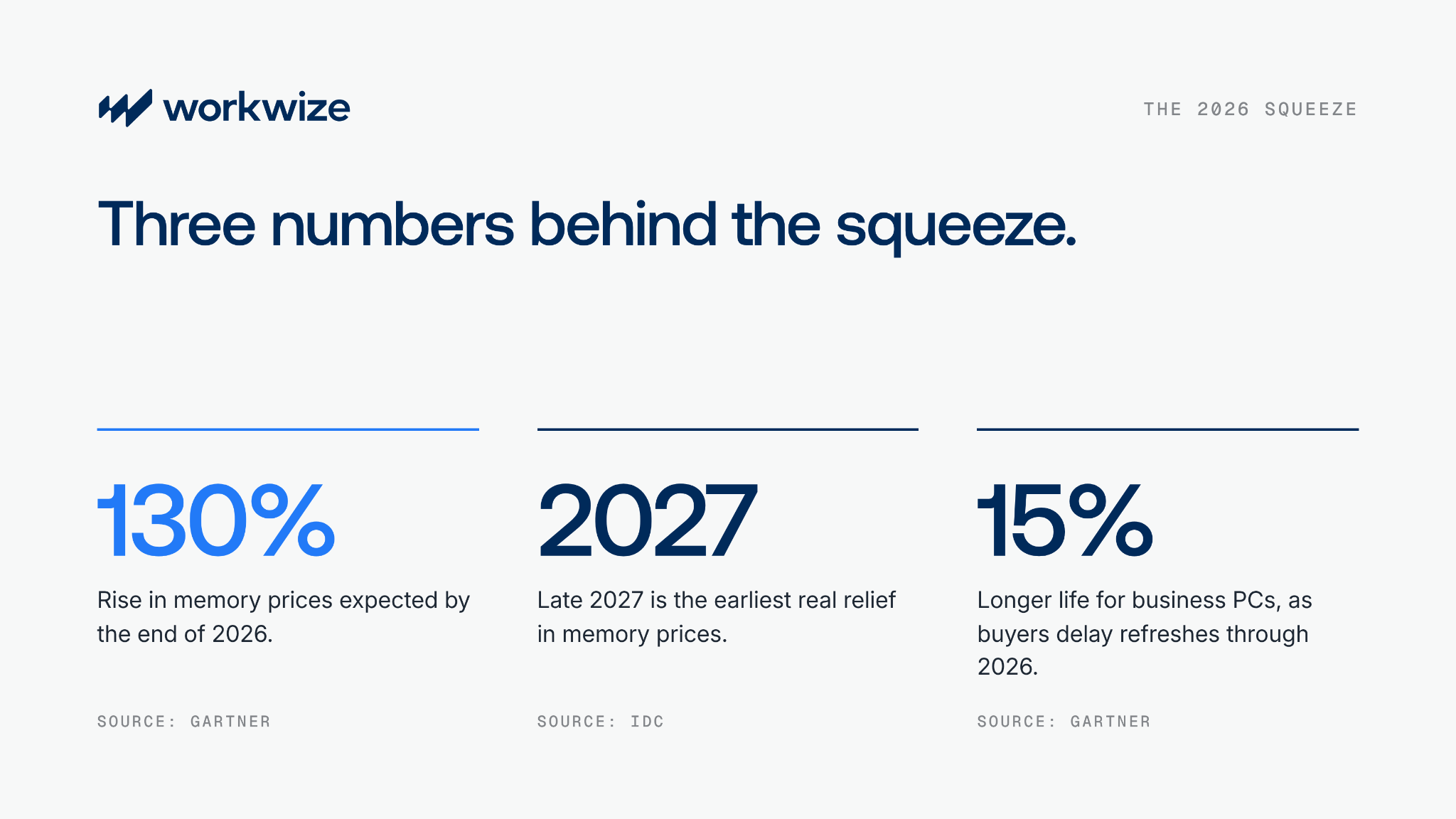
That habit used to be cheap. Not in 2026. Gartner expects memory prices to rise 130% by the end of the year, and IDC sees no real relief before late 2027. Meanwhile, many hardware budgets are shrinking.
Before you push suppliers or delay refreshes, ask a simpler question: how many laptops have you already paid for?
I talked this through with David Foxen, founder of SAM Beast Consulting, on the SAM Beast YouTube channel. We see the budget problem from opposite ends. David works inside asset records, where hardware goes missing. I sit on the buying side, where prices and lead times hit. The seven practices below come from that conversation.
Why asking for more budget won't work
People in the industry call the memory price surge “Ramageddon,” and it isn’t a blip.
So why not just ask Finance for more? Three reasons:
- Budgets don't reopen mid-year. This year's numbers were set months ago, and every other department is facing higher costs too.
- It makes IT look like it has one lever. Each request for more money makes the next one harder to win.
- Extra money gets wasted without visibility. If you don't know what you own, you'll waste money buying hardware you don't actually need.
Waiting it out isn't a plan either. Gartner expects business buyers to keep PCs 15% longer by the end of 2026.
Here's what I tell teams: it's okay that your budget's going down. The cut is survivable as long as you can reuse laptops still in their life cycle.
Start with two questions about your fleet
Companies bring me the same problem: "I'm getting squeezed to buy and hit the demand of hiring… but I don't have the money for it." I answer with two questions:
- How long are the devices in your storage closets depreciating?
- How many refreshes are you doing each year?
Most teams don't know the first answer and are behind on the second.
Answer both for your own fleet before your next budget meeting. If you can't say where every device is and how far it has depreciated, your fleet holds value you can't count. If next year's refreshes cluster in a few months, you'll face one large bill instead of steady, forecastable spend.
To put a number on what that costs you, use our guide to calculating IT hardware TCO.
7 ways to stretch your 2026 hardware budget
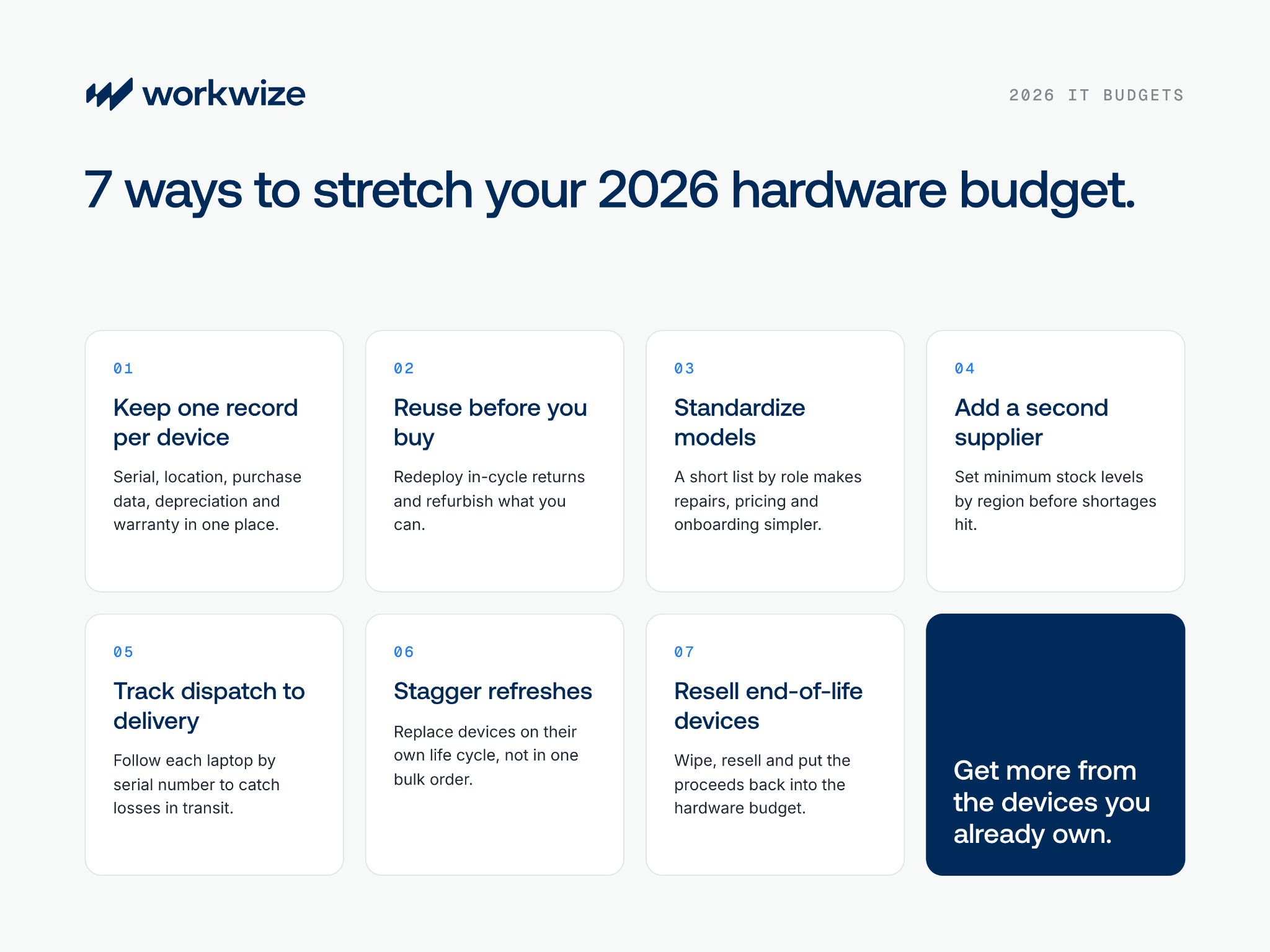
1. Keep one record for every device, from purchase to retirement
Every saving in this guide depends on knowing what you own and where it is right now. I call this your central source of truth.
A storage closet can't give you that. Neither can your MDM. It tracks a laptop while it's online, but once that laptop closes and lands in an office, someone has to update the record by hand. Until they do, your record is behind reality.
Purchase data is usually the weaker half. ITAM teams guard software records because an audit will ask for them. Hardware rarely gets that care. When David asks clients for a list of the serial numbers they've bought, many can't produce one, and neither can their resellers. As he points out, no company would accept that for software, yet it's normal for hardware worth millions.
At minimum, each IT asset tracking record should hold:
- Serial number, make and model
- Current location and assigned user
- Purchase date and price
- Depreciation period and life cycle length
- Retirement date and warranty expiry
To fill in the purchase side, ask your resellers for advance shipment notices that list every serial number, then check each delivery against the list.
2. Reuse in-cycle laptops before buying new ones
My answer to a shrinking budget is simple: know where every laptop is, and keep each one working for as much of its life cycle as you can.
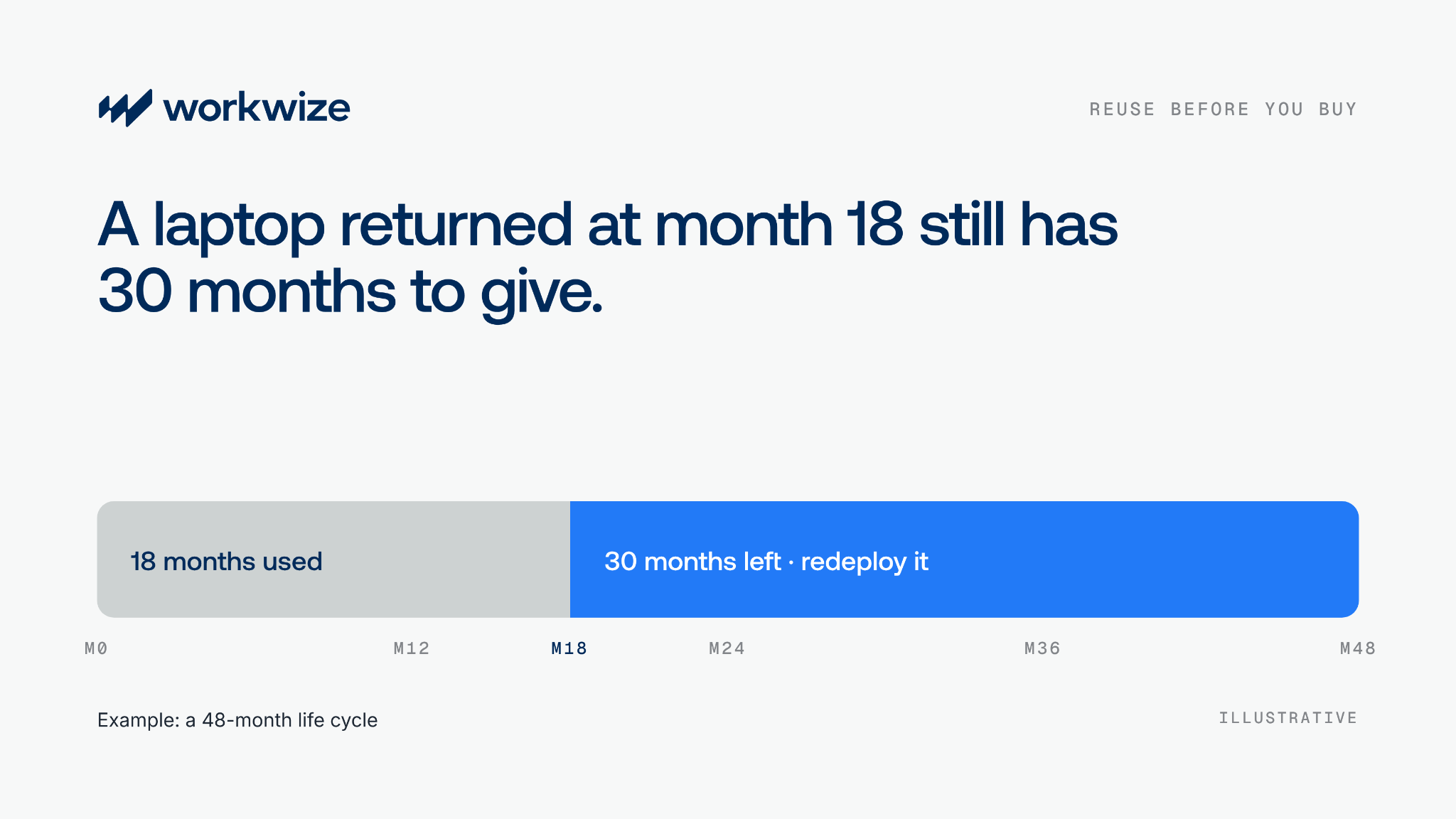
Companies commonly set life cycles of 36 or 48 months, and some run devices for 68. A laptop returned at month 18 of a 48-month cycle can go straight to the next hire. That's one purchase gone from this quarter.
- Redeploy returns first. Before you approve any order, check returned stock for devices with life left. Wipe and test each one before it ships.
- Build "Frankenstein machines." This one is David's: combine parts from damaged units, like a healthy battery from one laptop and a working screen from another. Teams did this often during COVID-era shortages.
- Fill gaps with refurbished hardware. Check stock from IT asset disposition (ITAD) providers or repair and refurbish your own. As David puts it, "It may be end of life for someone else, but it probably still has a lifespan for you."
So don't complain about your hardware budget going down. Automate and centralize everything, and reuse what you have.
3. Standardize your laptop models
Some companies let employees choose from four laptop models, which means buying and storing extra units of each. My view: if you have a few dollars you feel like burning for the employee experience, go ahead. Most companies I work with now assign a fixed kit by role, and it pays off in four places:
- Faster repairs: spare parts fit more devices.
- Better pricing: vendors give better terms for steady volume.
- Shorter lead times: you can hold a small buffer in each region you hire in.
- Simpler onboarding: your HR system can trigger the same kit for every hire in a role through automated onboarding.
Pro tip: keep your kit unbranded. David and I both advise against engraved logos. They lower resale value and tell anyone nearby whose laptop it is. I'd skip branded asset tags too. To me, they're almost advertising the device: pick me up and see what you can get out of it. Identify devices by serial number instead, with remote wipe as the backstop. If you want finders to return lost laptops, a plain QR code is a good middle ground.
4. Add a second supplier before you need one
One reseller per region feels like enough until supply tightens. Then stock dries up, and a few months later the same suppliers are quoting six-week lead times. That’s long enough for a new hire to start before their laptop arrives.
Here’s how we set customers up at Workwize:
- A catalog that draws on many suppliers. Our global IT procurement catalog pulls from multiple suppliers and routes each order by region, so one reseller’s lead time doesn’t stall your hiring.
- Alternatives ready when stock runs out. If your standard model goes out of stock or end of life, we source similar-spec alternatives and propose them for your approval. I call this “air coverage” for your standard device.
- Minimum stock levels by warehouse. Set the threshold you need on hand, and auto-restock rules reorder when stock falls below it.
5. Track every laptop from dispatch to delivery
Higher memory prices have made laptops a target in transit. One of David's clients recently received a sealed Lenovo box filled with bricks. With RAM now "like gold," as David says, thieves have every reason to go after shipments.
Most asset databases record a dispatch and then a delivery. If three serial numbers vanish in between, IT chases the reseller, the reseller chases the courier, and new hires wait.
Close that gap by logging every device by serial number at each handoff: when it leaves the supplier, when it's delivered, and when it comes back. A missing laptop then shows up as a gap in the record, not a surprise on a new hire's first day.
6. Stagger refreshes instead of buying in bulk
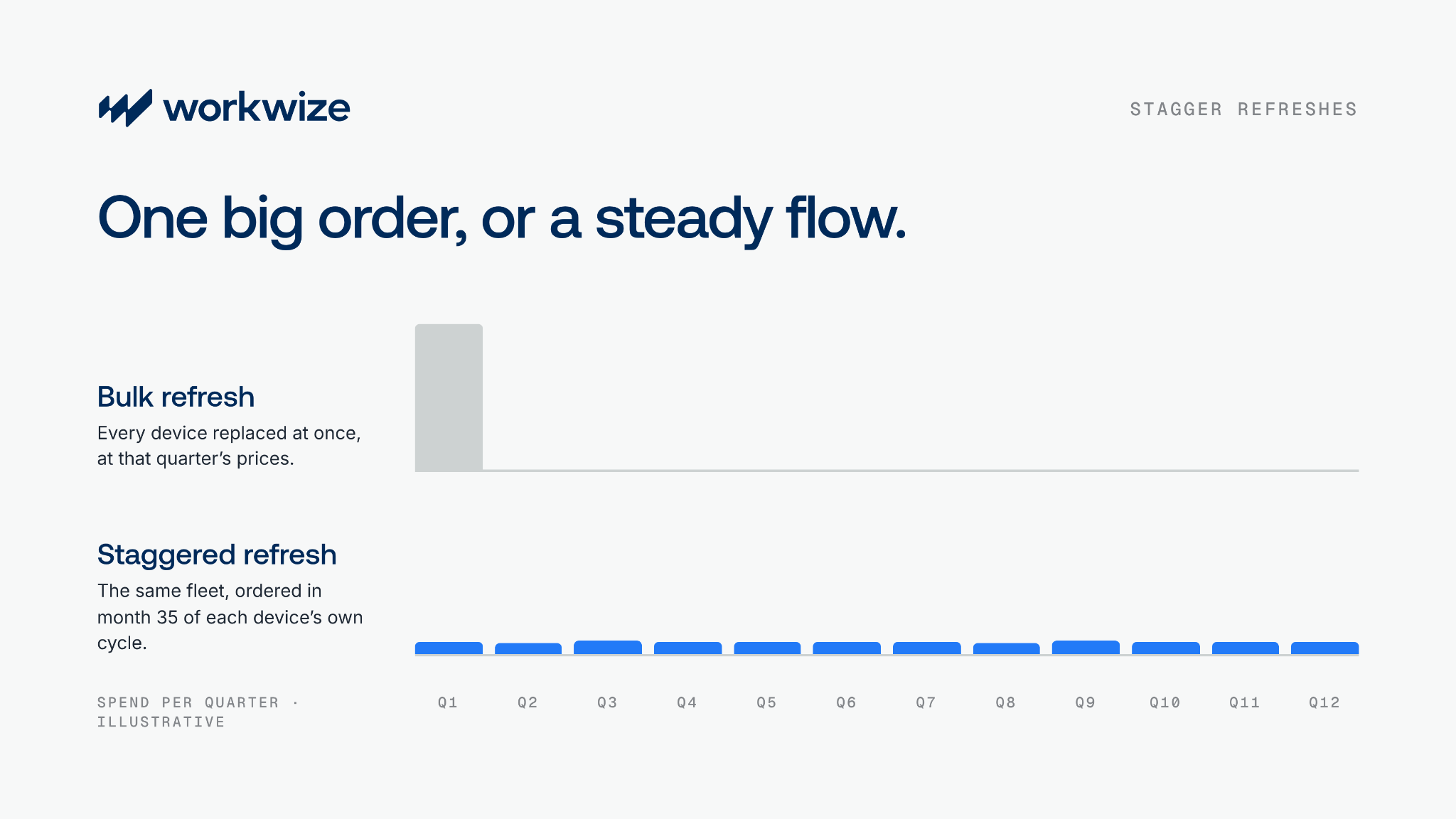
Bulk refreshes usually follow years of reactive replacement. Laptops stay in use until someone complains, then an audit shows a large share of the fleet is past its life cycle. The catch-up refresh then creates the same problem: hundreds of laptops due on the same date, a "knock-on effect in four years' time," as David puts it.
Refresh by each device's own life cycle instead. Here's how that works for a laptop on a 36-month cycle:
- In month 35, the system orders the replacement.
- The new laptop ships to the employee.
- The employee returns the old one through IT asset retrieval.
- IT wipes and checks the returned laptop.
- IT redeploys, resells, or retires it based on its condition.
Costs spread across the year, spending gets easier to forecast, and refreshes stop arriving as budget shocks.
7. Resell end-of-life devices
Redeployment delays new purchases. Resale recovers value from the devices you no longer need. David calls ITAD resale one of the easiest wins with a new client, yet many companies still treat retired laptops as waste.
I see a bigger risk. Old laptops sit on shelves for months, and some employees hand them off without wiping them. I've seen it happen at companies you would know.
- Wipe every device before it leaves your control, and keep the data destruction certificate.
- Sell usable hardware through IT asset disposal instead of scrapping it.
- Put the proceeds back into the hardware budget.
Where AI fits
Once the record is in place, automation can take over the routine work. I expect AI to handle restocking by region, trigger the right kit from a hire's start date, schedule retrievals when a device is due, and push records into the other tools you run.
In Workwize, our workflow builder lets you describe those tasks in plain language instead of asking an admin to update a record or pull a report. It's going to change the game. It's not a question of whether it's coming. It's here, and it's here to stay.
David adds a warning I agree with: "So many people are trying to run with AI before they can walk." A workflow can't decide anything when a device record has no retirement date, depreciation rule, or warranty expiry. That's why practice 1 comes first.
How to take this to your CFO
Don't lead with efficiency. Finance wants a number. Work out what it costs to manage a laptop today across the three pillars of IT hardware TCO, then show what changes after you centralize, automate, and reuse:
- Operational cost: less manual work and fewer fragmented vendors.
- Net hardware cost: fewer new devices, plus value recovered through resale.
- Day-one cost: new hires get a configured laptop on time and start working.
The third is the easiest to underestimate. A late laptop leaves a new hire idle or forces them to buy their own device on day one. As mentioned before, to put a number on what that costs you, use our guide to calculating IT hardware TCO.
Raid the closet before you raid the budget
Laptop prices won't return to 2025 levels soon, and Finance won't reopen your budget mid-year. You control how much value you get from the devices you've already paid for.
So start with my two questions and build the record. Every other practice here gets easier from there.
If your answers point to devices you can't find or a refresh backlog you can't staff, book a 30-min demo to see how much value Workwize can recover from your current fleet.
.png?width=50&name=image%20(57).png)

Establish a single source of truth for every IT asset across the globe.
.png?width=258&height=318&name=g10%20(5).png)
More related resources to help you stop firefighting hardware operations.




Get monthly insights into how other IT leaders are improving their ops.



.png?width=2880&height=1232&name=Group%202147262874%20(1).png)
Stop coordinating
hardware like it's 2012.
.svg)
.png?width=172&height=68&name=apple%20business%20patner%20(1).png)
.svg)
.svg)
.svg)
.svg)