







Every aging or defective device raises a tricky financial decision for most IT teams.
When you replace healthy hardware too soon, you're wasting capital that continued use could preserve. With Forrester reporting laptop price increases of 10%–15% or more, that decision now carries more financial weight than it used to.
On the flip side, repairing failure-prone hardware can prolong downtime and inflate support costs that replacement could reduce. You could also lose an opportunity to recover capital by disposing of devices that still command fair resale values.
So how do you make the right decision? By comparing what each option costs against the value it delivers.
This guide shows how to compare those costs, choose the best path for each device, and apply the same criteria consistently across a global fleet.
TL;DR
- End-of-life laptops are devices that no longer meet business needs securely, reliably, or at a reasonable cost
- Condition, security, performance, repair history, and value should determine how they are treated next.
- Compare the full cost of repairs against replacement costs, including downtime, shipping, setup, and potential resale proceeds.
- A laptop that no longer suits its current employee may still be suitable for redeployment or resale.
- Establish review triggers, approval limits, security requirements, and disposition procedures so IT teams can make consistent decisions.
- For global fleets, device retrieval, inspection, data sanitization, and asset tracking should be part of the same lifecycle process.
- Workwize helps companies manage hardware procurement, retrieval, redeployment, and end-of-life processing across multiple countries
When Is a Corporate Laptop Considered End-of-Life?
A corporate laptop reaches end-of-life when it can no longer meet the business's requirements safely, reliably, or cost-effectively. Several conditions can bring it to that point.
Failing batteries, damaged components, or persistent performance problems are common markers of hardware degradation.
Software and security support matter just as much as physical condition. A laptop may still perform everyday tasks without difficulty, but if its operating system or essential applications no longer receive security updates, keeping it in service could expose the business to unnecessary risk.
"...while the security posture of operating systems, including Windows 10, has improved significantly over the years, there are plenty of vulnerabilities still being uncovered, so a future of unpatchable systems is best avoided." - James Maude, Field CTO at BeyondTrust
Age is another useful indicator. A five- or six-year-old laptop may be more likely to need repairs or lose support for newer software. But usage, maintenance, and build quality all influence how long a device remains useful.
It also helps to distinguish the end of an assignment from the end of useful service. A device that no longer suits its current user may still have a productive future elsewhere in the business.
Repair, Replace, or Decommission: How to Make the Right Decision
Before approving another repair or replacement, consider whether the laptop meets the employee’s needs, still receives OS and software support, and has enough reliable service left to justify keeping it. A worn battery may warrant a repair shop fix, while recurring faults or unsupported software could tip the balance toward replacing a device.
When it comes to usability, a device that struggles with design software could still serve someone whose work runs mainly in a browser, as long as it remains secure and supported. That means even when a device is replaced, reintegration into the inventory or resale are still valid options before you consider a complete write-off.
Here's a quick look at when specific decisions make sense:
| Decision | When it makes sense | What to evaluate |
|---|---|---|
| Repair | Resolving the fault is likely to restore dependable service for long enough to justify the expense. | Repair cost, warranty coverage, turnaround time, and expected remaining life. |
| Replace | Recurring failures, inadequate performance, or security limitations make continued use impractical. | Employee disruption, replacement costs, and suitable devices already in inventory. |
| Refurbish and redeploy | Some preparation could make the laptop useful to another employee | Condition, preparation costs, support coverage, and demand within the business |
| Resell | The business no longer needs the laptop, but another buyer could use it | Market value after erasure, shipping, refurbishment, and selling fees |
| Decommission | The device cannot be safely or economically reused or sold | Data sanitization, recycling arrangements, and supporting documentation |
Establish Whether the Device Can Remain in Service
Start with security and compatibility. Check whether the laptop still receives operating system and firmware updates, supports the applications employees need, and can be managed through your company's security tools.
Then assess its physical condition. Cosmetic wear may not affect usability, but battery swelling, overheating, intermittent charging, or recurring shutdowns deserve closer attention. Devices that present a safety risk should be removed from service until they're assessed.
A laptop that passes these checks may still be worth keeping, even if it's approaching the company's usual replacement age.
Compare the Available Paths
A battery replacement may restore reliable service at a modest cost. On the other hand, repeated motherboard faults, uncertain parts availability, or lengthy repairs can make the option too expensive.
When reintegrating a repairable laptop into your inventory, first determine whether someone within your workforce can use it before sending it to storage. Keeping equipment indefinitely for a hypothetical hire ties up space and allows resale value to decline.
If you decide to replace the device, check whether a suitable piece of hardware, refurbished or new, is already available in your buffer stock to avoid buying what you already have.
For devices with no internal demand, compare the expected resale proceeds against inspection, erasure, refurbishment, shipping, and selling costs. A laptop with a reasonable resale price may deliver little value once you deduct those expenses.
And if repair, redeployment, and resale are no longer practical, proceed with secure decommissioning and recycling.
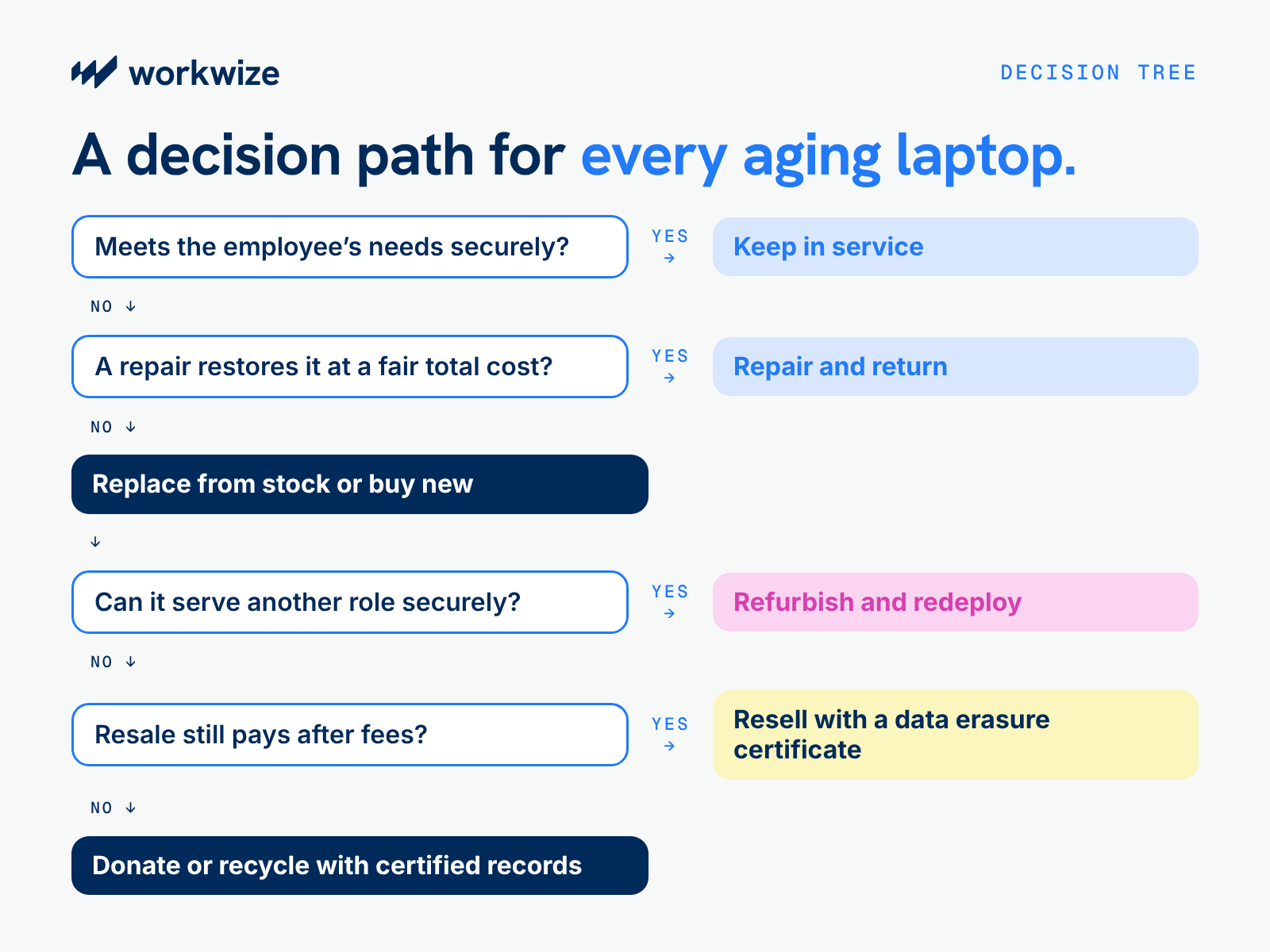
Follow a Consistent Decision Sequence
The tree below provides a starting point for assessment. Repair and refurbishment can also precede resale where the additional proceeds justify the work.
How to Calculate the Cost of Repairing vs. Replacing a Laptop
Don't judge repair and replacement costs by parts plus labor fees and sticker prices alone. You need to consider the following when calculating the real cost impact of each decision.
Assess whether another repair makes sense
Weigh a repair quote against the laptop’s history, the fault, the reliable service it could restore, and associated costs, such as shipping loaner laptops. A first battery replacement on a healthy device makes a stronger case than another repair for recurring shutdowns.
The assessment should also identify hidden damage and likely future repairs. For example, technicians can confirm whether damage is isolated and check component health, such as SSD wear, to anticipate further replacement costs.
Calculating the Full Cost of Each Option
Here's how to calculate the true cost of either a repair and replacement:
- Repair cost = parts and labor + shipping + IT preparation + loaner delivery and return + anticipated follow-up repairs
- Replacement cost = purchase price + delivery and setup + retirement costs − net resale proceeds from the existing laptop
Calculate downtime separately as the number of unproductive hours × the employee’s loaded hourly rate.
For a fair comparison, use the same cost assumptions for both options. If you include anticipated repairs for the existing laptop, account for any material maintenance or support costs expected for the replacement, too.
Let's consider a four-year-old business laptop that needs a $250 replacement 16GB DDR5 RAM module. Diagnosis, installation, and testing cost an extra $100. The laptop has already undergone battery and charging-port repairs.
Technicians also recommend budgeting $250 for an SSD replacement within nine months, based on the drive's condition and usage. The keyboard is worn but functional, and the employee's workload may outgrow the laptop's memory and processor within two years.
A suitable replacement with 32GB RAM and a more capable processor costs $1,600 and is expected to remain in service for four years. The company could also recover an estimated $400 by selling the existing laptop now, after deducting selling fees.
Here's the cost comparison (the following figures are illustrative):
| Cost Element | Repair Existing Laptop | Buy Replacement |
|---|---|---|
| Replacement RAM module diagnosis and labor | $350 | $0 |
| New business laptop | $0 | $1,600 |
| Total shipping cost | $200 (including loaner delivery and return) | $30 |
| IT preparation and setup | $30 | $90 |
| Immediate spending | $580 | $1,720 |
| Anticipated SSD replacement, including installation and handling | $250 | $0 |
| Net proceeds from selling the existing laptop now | $0 | −$400 |
| Total modeled cost before downtime | $830 | $1,320 |
The repair option requires $580 upfront, with another $250 budgeted for the SSD replacement. Buying a new laptop requires $1,720 upfront, although selling the existing device could recover $400 and bring the modeled net cost down to $1,320.
These figures exclude downtime and assume no additional repair costs during the new laptop's four-year service life. The $400 recovery value is also an estimate, not a guaranteed resale amount.
Compare Cost per Year of Useful Life
Annualized cost = total modeled cost ÷ expected years of useful service
Here's how it works out with our illustration:
| Calculation | Repair Existing Laptop | Buy Replacement |
|---|---|---|
| Expected service for this employee | Two additional years | Four years |
| Total modeled cost ÷ expected service | $830 ÷ 2 | $1,320 ÷ 4 |
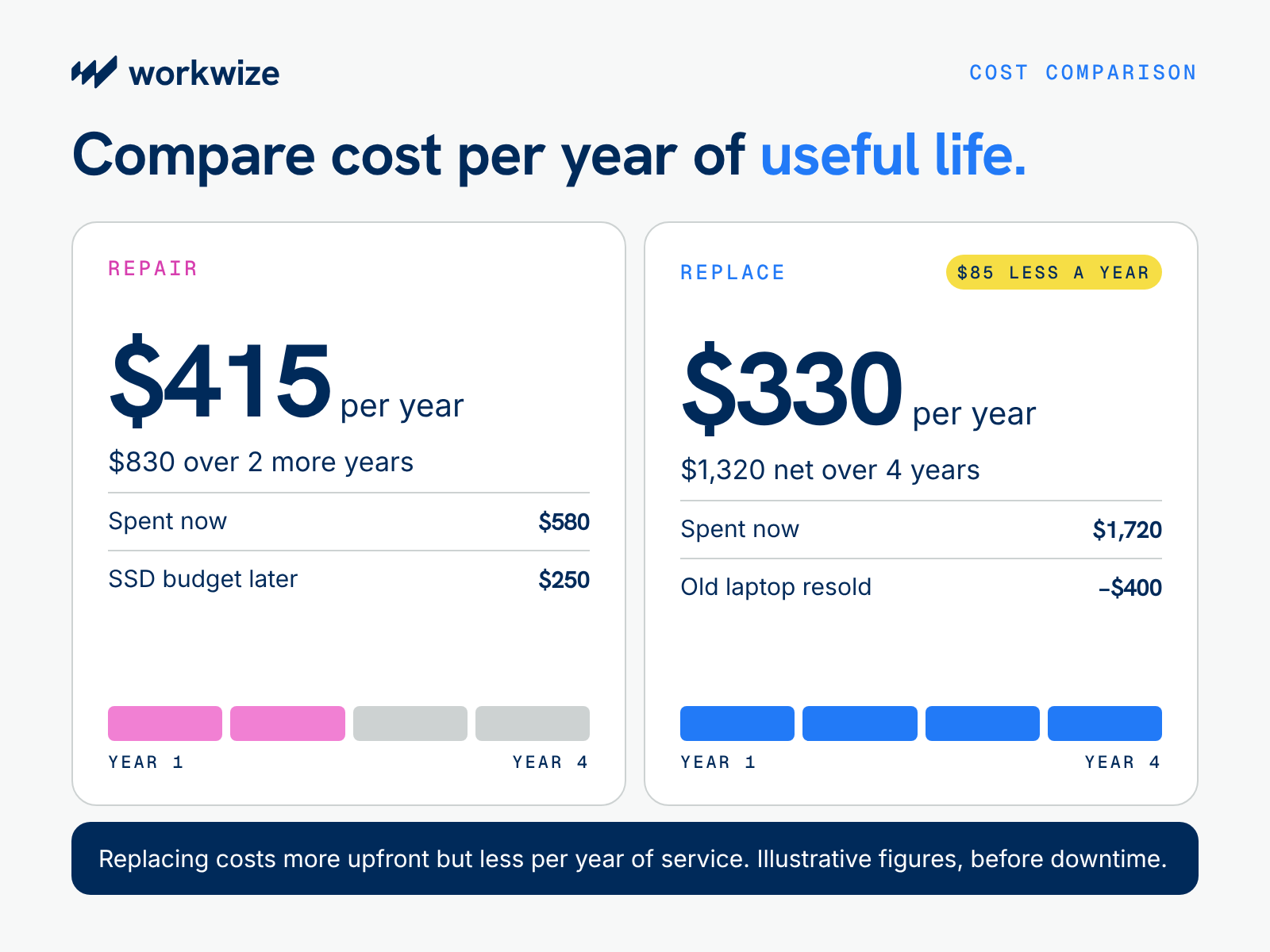
| Cost per year of expected service | $415 | $330 |
In this example, replacement costs $330 per year of expected service, compared with $415 for repairing the existing laptop. That's an $85 difference per year, even though the new laptop requires a higher upfront investment.
Under these assumptions, replacement looks like the better long-term option. But the decision still depends on whether the company can recover the estimated resale value, how much downtime another repair might cause, and whether the existing laptop can reliably serve the employee for another two years.
Note: Annualized cost is useful for comparing devices with different expected service lives, but it doesn't capture every future expense.
For a full budget comparison, model both options over the same period, including any replacement purchase needed after the repaired laptop reaches the end of its useful life.
How to Build a Corporate Laptop End-of-Life Policy
A corporate laptop end-of-life policy gives teams a consistent benchmark for assessing each device and approving its next step, based on condition, support, repair economics, and business needs.
Age should be one of several review triggers and assessment metrics, not the sole reason for replacement.
Define Lifecycle Stages and Review Triggers
Record whether a laptop is assigned, awaiting assessment, under repair, available for redeployment, or approved for retirement. Reviews should follow age milestones, recurring faults, support deadlines, and changing workloads.
The illustrative matrix below separates those factors and assigns decision authority. Its age ranges are review points, which you can edit to fit your company's preferred review periods.
| Age | Condition | Repair Economics | OS and Software Support | Proposed Action | Decision Owner |
|---|---|---|---|---|---|
| Any age | Reliable and suitable | No repair needed | Supports required applications and receives updates | Retain; schedule review | IT asset manager |
| Two to four years | Isolated, repairable fault | Within approval limit; worthwhile life extension | Supported through expected additional service | Repair and validate | IT manager within spending authority |
| Four years or older | Recurring failures | Full repair cost approaches replacement cost | Limited remaining support | Assess replacement | IT recommends; budget owner approves; security reviews concerns |
| Any age | Functional but unsuitable for current user | Economical to prepare | Supports receiving employee’s applications | Refurbish and redeploy | IT asset manager |
| Any age | Functional; no internal demand | Positive net recovery value | Suitable for intended recipient | Resell or donate | Authorized asset owner, with security clearance |
| Any age | Unsafe or uneconomical to restore | No viable recovery case | Unsupported or unsuitable for reuse | Retire and recycle | IT and security authorize; finance approves write-off |
Set Approval Limits and Redeployment Standards
Set repair approval limits based on the full expected cost, not just the technician's quote. Include shipping, loaner devices, employee downtime, and likely follow-up repairs. Define which repairs IT can approve independently and which require budget-owner approval.
You can also set a threshold that triggers a replacement review when repair costs approach a defined percentage of the cost of a comparable laptop. That threshold should prompt an assessment, not an automatic replacement.
For redeployment, consistent standards for functionality, battery health, configuration, and remaining software support help establish whether a laptop is ready for another assignment. Refurbishment is easier to justify when there is a clear need for the finished device.
Define Security and Disposition Controls
Every device should meet the company’s security policy before reassignment, resale, or donation.
Before reassignment, resale, or donation, sanitize the device using a method appropriate for its storage media and the sensitivity of the data. Record the outcome, including the device identifier, sanitization method, verification result, and responsible party. If you cannot verify successful sanitization, follow the company's approved process for destroying the storage media.
Resale terms should clarify fees and expected proceeds, while donation criteria define eligible recipients and acceptable device standards. Use approved providers for recycling and disposal, with records confirming each device’s final treatment.
Assign Ownership and Maintain Audit Records
Clear ownership keeps the process moving: IT handles technical assessments, finance oversees expenditure and recovered value, and procurement manages provider relationships.
Each device’s record should bring together its condition, support status, costs, approvals, custody history, and final outcome. Where circumstances justify an exception, a named approver, recorded rationale, and review date preserve accountability without making the policy unnecessarily rigid.
How to Manage End-of-Life Laptops Across a Global Workforce
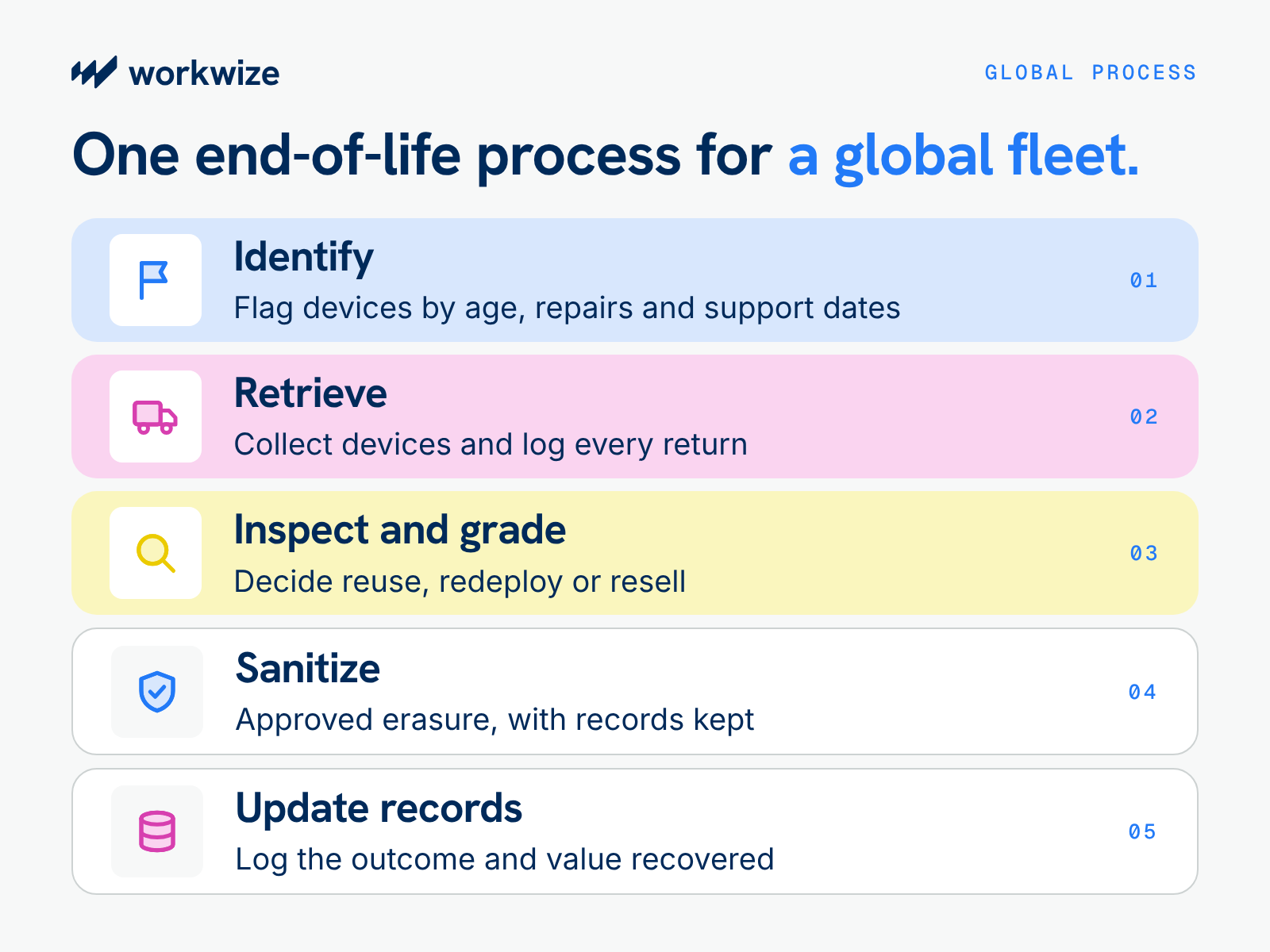
Geography complicates end-of-life device management, whether you choose to repair, replace, or decommission a device. However, you can mitigate the impact with a repeatable, connected process. Here's how to make it happen:
- Identify devices that need assessment. Your global asset record can help you automatically flag devices when predefined triggers, such as age and repair requests, are activated. If you don't have an up-to-date asset register, you can create one with a hardware lifecycle management platform that updates in real time across global fleets.
- Arrange retrieval and track device return. Ensure you have a consistent asset retrieval playbook that logs every return with the same register that can flag devices. Using local partners can help you avoid shipping costs and increase your chances of successful retrievals, since foreign entities may not understand local terrain.
- Inspect and grade returned laptops. Once devices return to your custody or are routed to the repair technician, grade them by current condition to determine whether they can be reused, redeployed, or resold.
- Sanitize company data. When redeploying, reselling, or disposing of hardware, apply approved and recognized erasure or destruction methods, such as the most recent NIST SP 800-88 Revision appropriate to the storage media and risk. Your process should also account for applicable local regulations, contractual obligations, and company security requirements. Keep records of completed sanitization or destruction.
- Update inventory and financial records. Record final disposition, recovered value, and relevant documentation. These updates help you track each device's economic value throughout its lifespan, making the next repair episode and end-of-life decision easier to evaluate and execute.
For global teams, the process should also account for devices that cannot be collected, shipments delayed by customs, and locations where repair or resale services aren't available. These exceptions need owners and follow-up procedures so devices don't disappear from the asset register.
What to Look for in an IT Hardware Lifecycle Management Partner
A hardware lifecycle management partner should provide real-time data that helps you make the best repair, replacement, and resale decisions.
Start with asset visibility. Can the platform show device age, location, condition, repair history, assignment status, and previous lifecycle costs? Can IT see when a laptop is awaiting collection, undergoing repair, or available for redeployment?
Then look at the services behind the platform. A provider may offer global coverage, but that doesn't necessarily mean repairs, loaners, resale, and recycling are available in every supported country. Ask which services are handled locally, what turnaround times apply, and where additional fees or restrictions apply.
Automation is another consideration. Ideally, IT should be able to flag devices for review based on age, repair history, or support deadlines, then route approved decisions to the appropriate service provider.
Use these questions to compare potential partners:
| Evaluation Criteria | Questions to ask |
|---|---|
| Repair coverage | Which countries, models and warranty arrangements are supported? |
| Global retrieval | Can the provider collect devices from remote employees? |
| Asset visibility | Can IT track status, location, condition and disposition? |
| Security | What sanitization methods and evidence are provided? |
| Refurbishment and reuse | Can repaired devices return to available inventory? |
| Resale | How is residual value assessed, and what fees apply? |
| Disposal | Are recycling partners certified, and what documentation is issued? |
| Financial reporting | Can leadership track repair spend, avoided purchases and recovery value? |
| Commercial model | What are the charges for collection, inspection, storage, repair and disposal? |
How Workwize Helps IT Teams Get More Value From Aging Hardware
Deciding whether to repair, replace, or retire a laptop is easier when IT can see what equipment the company owns, where it's located, and what happens to it after collection.
Workwize brings hardware procurement, deployment, retrieval, and lifecycle management into one platform, helping IT teams manage devices across 130+ countries without coordinating separate providers for every location.
When a laptop needs replacing, Workwize can help arrange a new device and coordinate retrieval of the old one. Returned equipment can then be assessed for repair, redeployment, resale, or disposal, depending on its condition and the services available in that location.
Workwize Workflow Builder also lets teams create automated workflows with natural-language instructions. IT teams can use it to build processes around lifecycle events, approvals, and follow-up actions, reducing the manual coordination involved in managing employee hardware.
Book a Workwize demo to see how the platform can help your team manage laptop replacements, recover usable devices, and handle end-of-life hardware across your global workforce.

Establish a single source of truth for every IT asset across the globe.


Get monthly insights into how other IT leaders are improving their ops.




Stop coordinating
hardware like it's 2012.


