




.svg)
.svg)

.svg)


.svg)




.svg)


.png?width=1230&height=692&name=Vector%20(13).png)
Hardware as a Service (HaaS) can take some of the work of procuring, deploying, maintaining, and refreshing devices off your IT team's plate.
Instead of buying hardware upfront and managing the lifecycle yourself, you pay a recurring fee for the devices and services included in your agreement.
Operational efficiency is one reason companies consider this model. In Insight's Path to Digital Transformation survey, 40% of respondents using Device as a Service (DaaS), a form of HaaS focused on end-user devices, cited improved operational efficiency as a benefit. Better workforce productivity (34%) and improved cost per device (24%) followed.
Those benefits come with trade-offs. Device ownership, long-term costs, service coverage, refresh options, and end-of-contract terms vary considerably by provider and agreement.
So the question isn't simply whether HaaS beats buying hardware outright. It's whether the model fits how your organization wants to pay for, manage, and eventually retire its devices.
This guide covers how HaaS works, its benefits and limitations, how it compares with outright procurement, and what to check before choosing a provider.
What is Hardware as a Service (HaaS)?
Hardware as a Service (HaaS) is a device model in which you rent or lease hardware, such as laptops, desktops, servers, routers, and printers, from a provider on a subscription basis. Providers include managed service providers (MSPs), manufacturers, and IT services firms. It replaces part or all of traditional IT hardware procurement with a recurring contract.
Depending on the agreement, the provider handles procurement, configuration, maintenance, repairs, and end-of-life disposal. This can reduce internal IT workload and avoid a large capital purchase.
Because the model replaces an upfront purchase with recurring payments, it appeals to companies that want more predictable hardware spending or prefer an operating expense (OpEx) model.
HaaS vs. related models (DaaS, PCaaS, leasing, IaaS, PaaS)
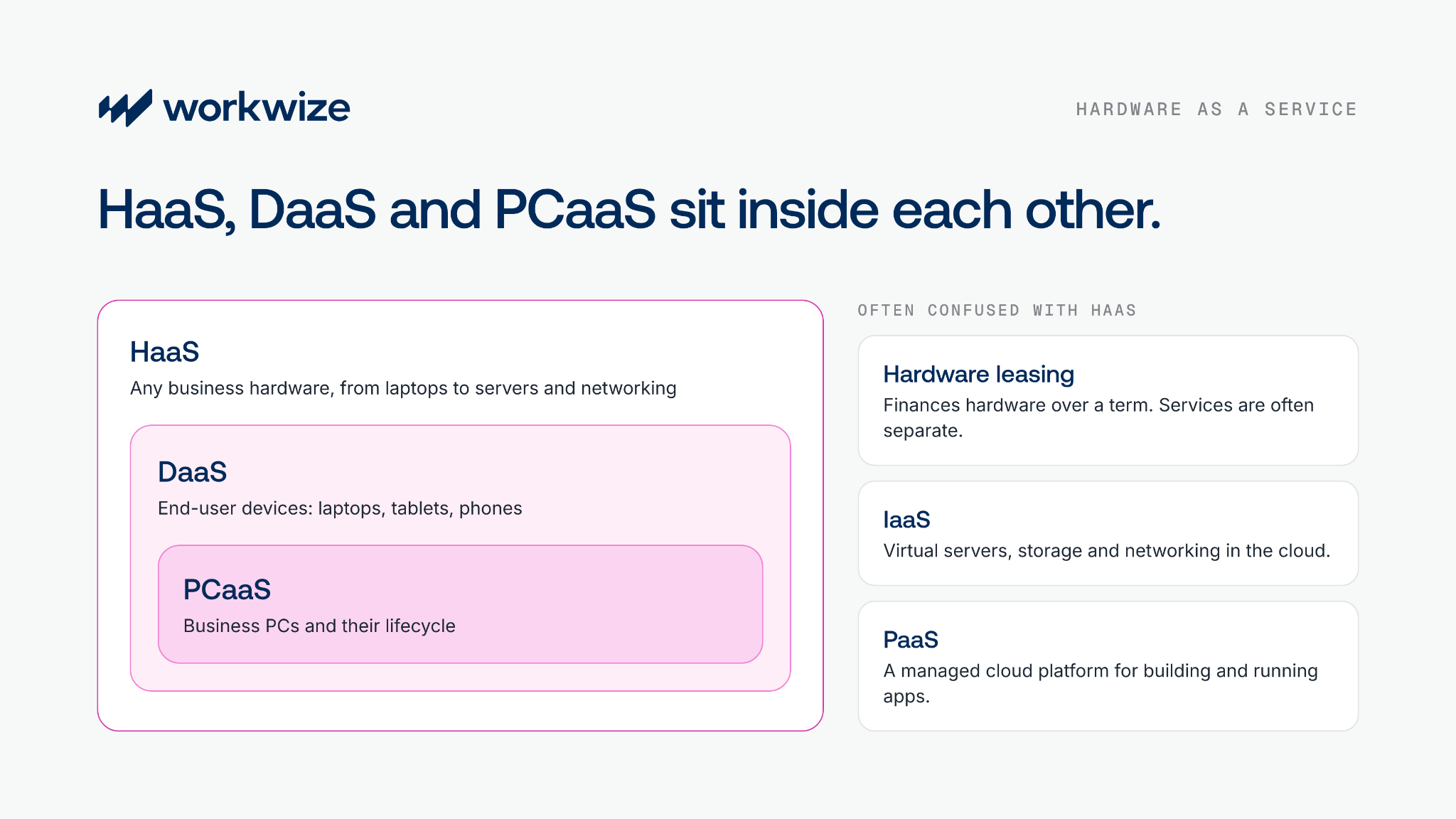
HaaS is often compared with leasing, IaaS, and PaaS, but these models solve different problems.
Leasing helps businesses avoid upfront hardware purchases, while IaaS and PaaS replace physical infrastructure with cloud services. HaaS sits closest to leasing, but usually adds lifecycle support around the hardware itself.
|
Model |
Core idea |
Key distinction vs. HaaS |
|
Hardware as a Service (HaaS) |
A subscription model where a business pays a recurring fee to access physical hardware, often including deployment, maintenance, upgrades, support, and recovery. |
The baseline model. The provider doesn't just finance hardware. It usually manages part or all of the hardware lifecycle. |
|
Device as a Service (DaaS) |
A type of HaaS focused on end-user devices such as laptops, desktops, tablets, smartphones, monitors, and sometimes accessories. |
HaaS can include servers, networking, and office hardware. DaaS usually focuses on employee devices and endpoint lifecycle management. |
|
PC as a Service (PCaaS) |
A type of DaaS focused on business PCs, including laptops, desktops, workstations, and peripherals, with deployment, support, refresh, and retirement for a monthly or per-user fee. |
Narrower than DaaS. It centers on PCs and user computing. Read our PC as a Service guide for more. |
|
Hardware leasing |
A financing model where a business rents hardware for a fixed term instead of buying it upfront. |
Mainly spreads hardware payments over a term. It may or may not include lifecycle services. |
|
Infrastructure as a Service (IaaS) |
Cloud-based infrastructure such as virtual machines, storage, networking, and servers on a pay-as-you-go basis. |
Provides virtual infrastructure. HaaS provides physical hardware such as laptops, servers, or networking equipment. |
|
Platform as a Service (PaaS) |
A managed cloud platform to build, test, deploy, and run applications without managing the underlying infrastructure. |
Built for software development. HaaS is built for accessing and managing physical business hardware. |
How does HaaS work?
The model is simpler than it looks. Here's an example:
- A company signs an agreement with a HaaS provider for 10 laptops.
- The provider charges a subscription fee for the hardware and lifecycle services.
- The company pays the monthly fee and uses the hardware without an upfront investment.
Note: Leading HaaS and DaaS providers usually bundle hardware, device deployment, management, support, refresh, and end-of-life services into a recurring subscription.
The exact scope varies by provider and contract. Some offers are closer to hardware leasing with support. More mature DaaS models include configuration, endpoint management, security, monitoring, software services, asset recovery, and sustainable disposal.
|
Lifecycle stage |
What HaaS typically covers |
|
Device selection |
Helps choose laptops, desktops, monitors, accessories, or mobile devices based on employee roles, budgets, and performance needs. |
|
Procurement |
Removes the upfront purchase. The company pays a recurring fee instead of large device costs. |
|
Configuration |
Devices can arrive preconfigured with the required operating system, security settings, applications, MDM enrollment, and user access. |
|
Deployment |
The provider ships devices directly to employees, offices, or remote locations. |
|
Support and maintenance |
Handles repairs, warranty claims, replacements, and hardware issues during the subscription. |
|
Upgrades and refreshes |
Replaces old or underperforming devices with newer models at agreed intervals. |
|
Asset tracking |
May provide IT asset tracking that shows who has which device, where it is, and its lifecycle stage. |
|
Retrieval and offboarding |
Depending on the agreement, handles IT asset retrieval, updates records, and prepares devices for redeployment, resale, recycling, or disposal. |
|
Data wipe and disposal |
Supports secure data erasure, responsible recycling, or certified IT asset disposition at end of life. |
What are the benefits of HaaS?
CapEx to OpEx conversion
HaaS replaces a large upfront hardware purchase with recurring payments. This spreads device costs over the contract term and keeps cash flow predictable, which finance teams often care about most.
Dell notes in its whitepaper that the model's cost certainty helps with budgeting and cash flow management.
Reduced IT management burden
HaaS lets you outsource some or all of IT asset lifecycle management, including procurement, deployment, tracking, retrievals, repairs, warranty, refreshes, and disposal.
That reduces IT overhead because internal IT doesn't have to buy devices, coordinate vendors, or manually manage repairs and warranties.
Efficiency gains can also save money. A Forrester study cited in the same Dell whitepaper found PCaaS, a form of HaaS, delivered a 12% ROI over three years.
Predictable hardware refreshes
Replacing older laptops means planning the rollout and coordinating deliveries and returns.
A HaaS provider schedules and manages replacements after an agreed number of years. That gives IT a clearer timeline, simplifies inventory management, and avoids running each refresh as a separate project.
Terms vary by contract. Before signing, confirm the replacement timeline, any additional costs, and which devices qualify for a refresh.
Compliance and security support
According to Fortinet's Global Threat Landscape report, attackers often target years-old, unpatched vulnerabilities. Without proactive security measures and regular patching, your devices are exposed.
When you onboard devices through a HaaS provider, they can handle security maintenance and patching, provided the agreement clearly defines those measures.
For instance, Dell's device-as-a-service offer covers maintaining and updating security policies, reviewing and acting on relevant alerts, and encrypting storage, among other tasks:
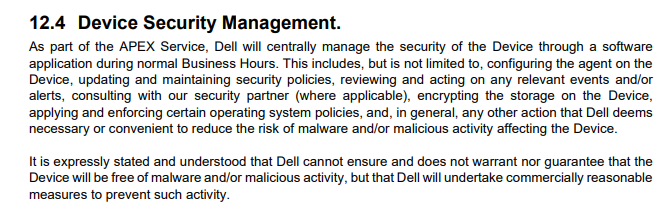
Source: Dell
Note: Hiring a HaaS provider doesn't automatically shift security to them. They handle some tasks, but you need to lead the rest and clearly define your security requirements to stay compliant.
HaaS limitations and trade-offs
Keep these considerations in mind when evaluating HaaS.
1. HaaS may not save you money
HaaS reduces upfront spending, but that doesn't make it cheaper overall.
For instance, this IT manager evaluated the DaaS model three times in four years. Each time, buying outright was more affordable and less problematic.
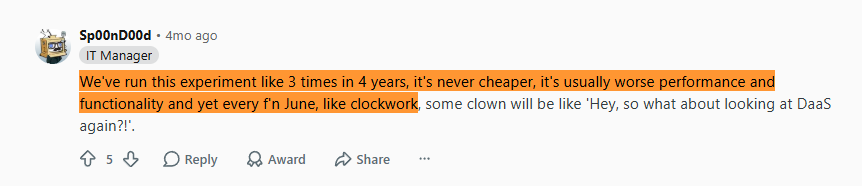
Source: Reddit
Compare both models over the same period, with comparable services. Our guide to the true cost of managing IT hardware walks through the full calculation.
- HaaS: Total subscription payments, plus any additional service, device-change, early-exit, or other fees.
- Ownership: Purchase price, plus configuration, deployment, support, repairs, logistics, storage, retrieval, and disposal costs, minus resale proceeds.
The better-value option depends on your contract terms, internal operating costs, device lifespan, and how well you recover value from owned hardware. In most cases, ownership comes out ahead. If employees stay around two years and a business laptop lasts about four, one device can serve two people. You also avoid paying a premium to buy out a lease or high interest on short lease terms.
2. Vendor lock-in
HaaS contracts often require a long-term commitment, making it difficult to switch providers if your needs change or the service disappoints.
We reviewed the published contract terms of four HaaS providers. Dell offers 24 to 60 months, IDATAM 12 to 60 months, and F8 Tech and Enabla Technology 36 to 60 months each.
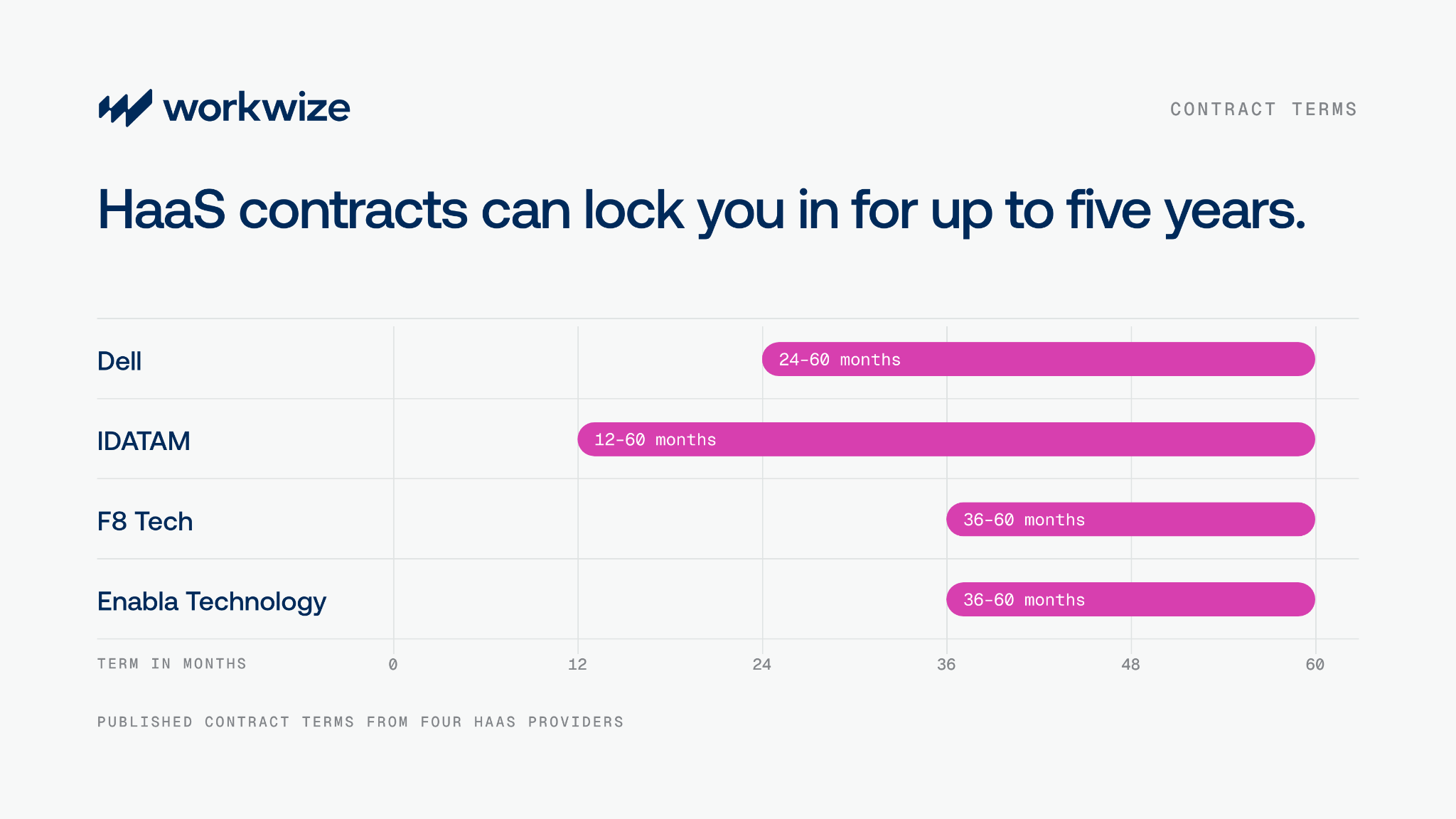
That's potentially five years with the same provider. If service quality drops, your headcount changes, or you find a better deal, leaving early could mean paying termination fees.
Long-term contracts aren't necessarily bad. But you need to know how much flexibility you're getting before you sign. Pay particular attention to:
- Minimum device commitments: Are you paying for a fixed number of devices even if your workforce shrinks?
- Contract length and termination fees: How long are you committed, and what would it cost to leave early?
- Device flexibility: Can you reduce quantities, change models, or request replacements as needs change?
- Refresh and buyout terms: When can you upgrade, and can you buy the devices at the end of the agreement?
- End-of-term obligations: What happens when the contract expires, and who handles returns and data erasure?
- Security requirements: Which security controls and responsibilities does the agreement cover?
These answers help you choose a provider with enough flexibility during the term.
3. Data privacy and security dependency
Providers often say they handle hardware securely. But in regulated industries like legal, healthcare, or defense, a single mistake can lead to heavy fines, and you can't assume the provider will handle everything.
In one case, Affinity Health Plan paid over $1.2 million to settle potential HIPAA violations after it returned leased photocopiers without erasing protected health information from their hard drives. The breach potentially affected 344,579 individuals.
That case involved photocopiers, but it raises a question every HaaS buyer should ask: who makes sure sensitive data is removed before hardware leaves your control, and who handles IT asset disposal?
Before signing, check who handles:
- Device configuration
- Patching
- Endpoint management
- Data erasure
- Chain-of-custody documentation
Note: In regulated industries, verify the provider's erasure standards and the evidence you receive, such as device-specific erasure certificates and chain-of-custody records.
4. Geographic restrictions
Global reach varies widely between HaaS providers.
For instance, DeviceNow says its DaaS model supports companies in 190+ countries and covers procurement, deployment, support, replacement, and offboarding. Other providers may be limited to Europe or North America, or cover only procurement or deployment rather than the full lifecycle.
Beyond the country count, check whether the provider can handle global IT procurement in practice:
- Source and configure devices locally
- Meet delivery timelines
- Handle repairs and replacements
- Retrieve devices through automated offboarding
- Securely wipe devices
- Arrange redeployment or disposal
Confirming this means you won't need a second provider just because the first doesn't cover the lifecycle services you need in key locations.
5. Limited device ownership and redeployment flexibility
With outright procurement, you own devices from day one. If an employee leaves after two years, you can reassign the laptop instead of buying a new one, or hold it in IT device storage until the next hire. As you scale, those savings add up.
For instance, HubSpot estimates that redeploying about 525 devices in 2025 avoided roughly $985K in procurement costs.
If you can't redeploy devices after repairs or refurbishment, you can resell them to recover residual value. That's less than avoiding a purchase, but it still offsets new hardware spend.
Who HaaS works for, and who it doesn't
HaaS isn't for everyone. Here's who should consider it and who should look elsewhere.
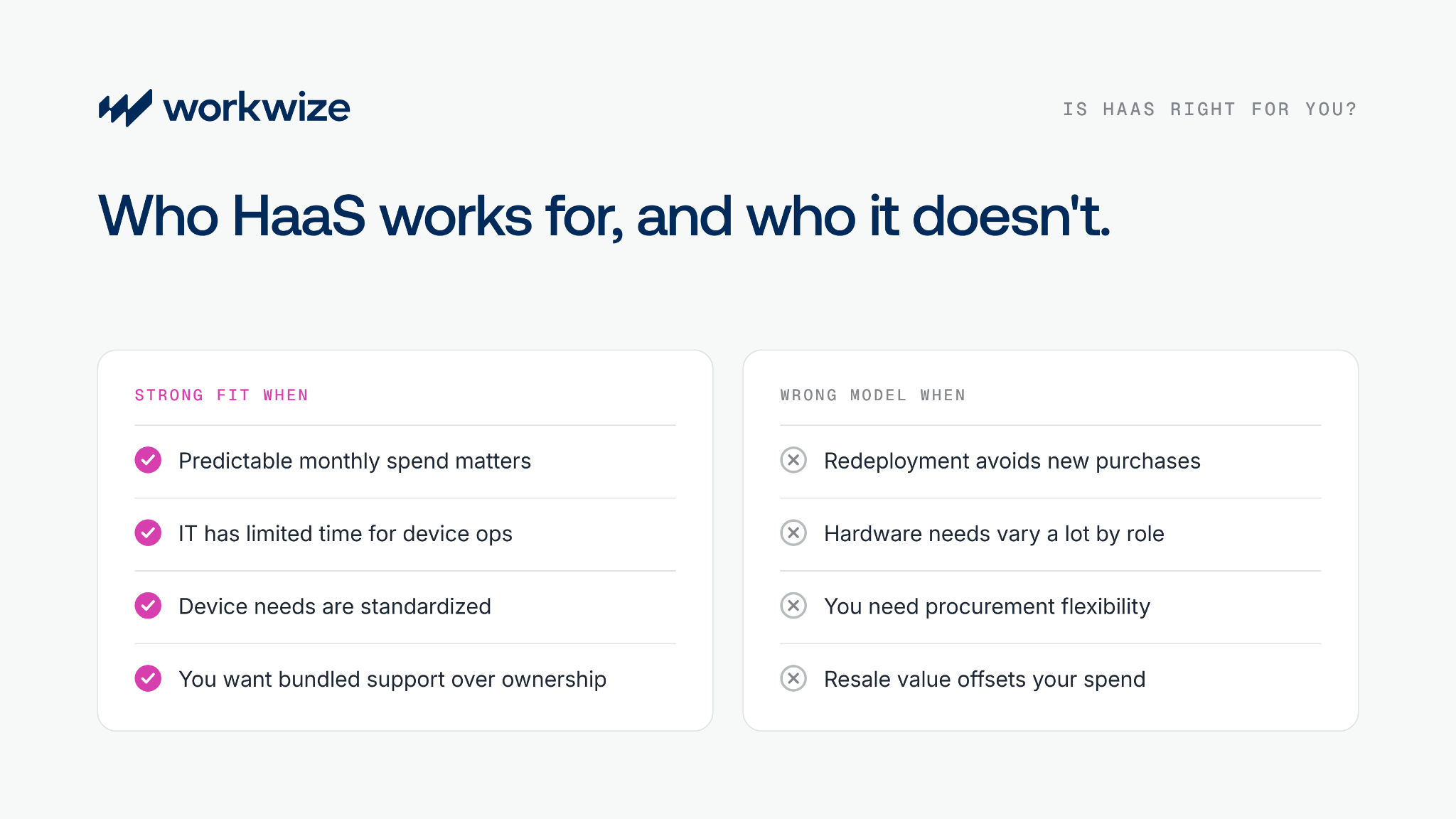
HaaS is a strong fit when:
- Predictable recurring spend matters. You want to spread hardware and service costs across agreed monthly payments and preserve cash for other priorities.
After trying different models, this Reddit user concluded that renting or leasing works best for fast-changing businesses and SMBs that struggle to plan financially, since upfront investments hurt cash flow.

Source: Reddit
- Your IT team has limited capacity. Device setup, maintenance, and repair coordination take time from other priorities. Outsourcing them frees time for security and improvement work. CHG-MERIDIAN's DaaS page makes the same point: let IT focus on innovation.
- Your device requirements are standardized. Providers can supply approved models with agreed configurations, which cuts sourcing and setup work for each new hire.
- You want new hardware on a predictable cycle. Providers often handle refreshes end to end, so your team has less to plan.
- You value bundled support over ownership. Some companies prefer bundled procurement, automated onboarding, repairs, refreshes, and retrievals over owning devices and running everything in-house.
HaaS is likely the wrong model when:
- Redeployment helps you avoid new purchases. Restrictions on reassigning devices or keeping them past the term may limit reuse savings.
- Your hardware requirements vary a lot. The provider's catalog may not cover specialist roles or frequently changing needs.
- You need procurement flexibility. Fixed commitments and upgrade terms can make it harder to switch suppliers, change models, or reduce quantities.
- You already run the device lifecycle efficiently. Bundled services may duplicate work your team and partners already handle well.
- Resale value matters to you. If the provider keeps ownership and resale proceeds, you can't use that value to offset hardware spend.
- Provider coverage doesn't match your workforce. Gaps in local deployment, support, or retrieval force IT to coordinate extra vendors alongside the HaaS agreement.
HaaS vs. outright procurement with lifecycle management
HaaS can simplify hardware access, but it comes with trade-offs around cost, ownership, control, and flexibility.
For teams that want to own their devices while still reducing lifecycle work, outright procurement with a hardware lifecycle management platform is the main alternative. Here's how the two compare:
|
Factor |
Hardware as a Service (HaaS) |
Outright procurement + lifecycle management |
|
Ownership |
The provider typically owns the devices during the term, subject to the agreement. |
The company owns the devices from purchase. |
|
Payment structure |
Recurring payments spread hardware and included services across the term. |
Hardware is usually bought upfront, with separate costs for lifecycle services where applicable. |
|
Total cost |
Depends on subscription pricing, contract length, included services, and additional fees. |
Depends on purchase price, lifecycle operating costs, device lifespan, and value recovered through reuse or resale. |
|
Lifecycle management |
The provider may bundle procurement, deployment, support, refresh, and end-of-life services. |
The company keeps ownership and manages the lifecycle internally or through a lifecycle management provider. |
|
Device choice |
Devices and configurations may be limited by the provider's catalog and contract. |
More freedom to choose vendors, models, and configurations. |
|
Configuration and MDM |
Configuration, MDM enrollment, and security responsibilities depend on the provider and agreement. |
The company sets its configuration, MDM, and security requirements and manages them internally or through a provider. |
|
Refreshes |
The contract can define refresh intervals and eligibility. |
The company decides when to refresh based on age, condition, performance, or policy. |
|
Geographic coverage |
Depends on the provider's ability to source, deliver, support, retrieve, and retire devices in each country. |
Depends on internal capabilities and the reach of procurement and lifecycle partners. |
|
Redeployment |
Whether the contract and ownership model allow returned devices to be reassigned. |
Owned devices can be retrieved, refurbished, and reassigned where they still meet requirements. |
|
Residual value |
Resale rights depend on the contract and who owns the device at the end of the term. |
The company keeps the value of owned devices and can recover it through reuse, refurbishment, or resale. |
|
Contract dependency |
Device access, pricing, refreshes, and services are governed by the HaaS agreement for the term. |
Ownership isn't tied to a subscription, although lifecycle service agreements may still apply. |
|
Best suited to |
Organizations that value predictable recurring costs and bundled services over device ownership. |
Organizations that value ownership, procurement flexibility, and control over reuse and end-of-life decisions. |
HaaS offers predictable spending and bundled lifecycle support when the provider's service model matches your needs. Ownership gives you more control over the asset and more chances to redeploy devices and recover residual value.
The better option depends on cost, internal capacity, device requirements, geographic coverage, and how well your organization manages the hardware lifecycle.
How Workwize helps IT teams manage hardware at scale
Choosing between HaaS and ownership doesn't mean choosing one model for every employee, device, or country.
As an IT asset management platform, Workwize manages procurement, deployment, retrieval, and disposal of your owned devices across 130+ countries through a network of local suppliers and partner-operated warehouses.
With HRIS and MDM integrations, devices are provisioned when employees join and retrieved when they leave. The IT workflow builder lets you set those rules once and routes retired devices to data wiping, IT equipment recycling, or resale.
That way, your procurement model can follow what makes sense for each team, device, or location without a separate lifecycle process for each one. Considering a HaaS or DaaS model instead? Talk to our team about what you need, and we'll walk you through your options.
Weighing HaaS against owning your fleet? Book a 30-min demo to see how Workwize runs procurement, deployment, retrieval, and disposal for the devices you own, in 130+ countries.
Frequently asked questions
What is Hardware as a Service (HaaS)?
Hardware as a Service is a model in which a business rents or leases hardware from a provider on a subscription basis rather than buying it upfront. The provider usually owns the hardware and manages procurement, maintenance, replacement, and end-of-life disposal.
What is the difference between HaaS and DaaS?
HaaS is the broader model and can include laptops, desktops, servers, networking equipment, peripherals, and other physical hardware. DaaS, or Device as a Service, is a subset of HaaS focused on end-user devices such as laptops, tablets, and phones, plus related lifecycle services.
What is the difference between HaaS and leasing?
Leasing gives a business access to hardware for a fixed term, with maintenance, support, configuration, and lifecycle management often handled separately. HaaS bundles the hardware with a managed service layer, so the provider usually handles support, repairs, refresh, and disposal under the subscription.
What are the main disadvantages of Hardware as a Service?
The main disadvantages are vendor lock-in, a potentially higher total cost over the full term, and limited flexibility around ownership and redeployment. For international teams, coverage becomes a problem if the provider can't reliably procure, ship, repair, retrieve, and wipe devices in every country.
Is HaaS cheaper than buying hardware outright?
Often not, over a full three-year or five-year term. Its value lies in predictable cash flow and reduced internal IT workload, not necessarily lower total spend. Compare both models over the same period with comparable services.
Which companies should consider Hardware as a Service?
HaaS suits SMBs and scaling companies with limited capital budgets, small IT teams, standardized device needs, and a workforce in markets the provider supports well.
What is the alternative to Hardware as a Service?
The main alternative is outright procurement with a lifecycle management platform. The organization owns the devices, while a platform such as Workwize handles procurement, deployment, tracking, retrieval, data wiping, refurbishment, and disposal.
How does HaaS work for remote or international teams?
For remote teams, HaaS providers can ship devices to employees, manage repairs, replace faulty hardware, and collect devices at the end of the contract.
For international teams, the challenge is coverage depth. A provider may support some regions well but lack reliable local sourcing, repair, retrieval, or certified wiping in others, which forces IT to run separate processes outside the provider's footprint.


Establish a single source of truth for every IT asset across the globe.
.png?width=258&height=318&name=g10%20(5).png)
More related resources to help you stop firefighting hardware operations.

Get monthly insights into how other IT leaders are improving their ops.



.png?width=2880&height=1232&name=Group%202147262874%20(1).png)
Stop coordinating
hardware like it's 2012.
.svg)
.png?width=172&height=68&name=apple%20business%20patner%20(1).png)
.svg)
.svg)
.svg)
.svg)