




Your IT team is stretched thin. Support requests are piling up, and the business is expanding into new markets. You need more capacity, but should you hire additional employees or outsource some of the work?
For finance leaders, the decision isn't as simple as comparing an employee's salary with a provider's monthly fee. Hiring comes with recruitment costs, benefits, training, and ongoing management expenses. Outsourcing introduces contractual commitments, service fees, and potential charges for work outside the agreed scope. You also need to account for these additional expenses and understand what each option actually delivers.
This article breaks down the full costs of in-house IT and outsourcing. We also explore a hybrid approach that combines internal expertise with automation and outsourced operations without sacrificing control.
IT outsourcing vs in-house IT: what's the difference?
Here's a brief overview of both models.
What is IT outsourcing?
IT outsourcing is when you hire an external provider to handle some or all of your company's IT work under a contract. For example, a business with employees across multiple countries might outsource laptop procurement, deployment, tracking, retrieval, and disposal rather than manage these operations internally.
Outsourcing gives you access to specialist skills and additional capacity without recruiting for every role. This model can make more financial sense than maintaining those capabilities internally, especially when you don't need each specialist full-time.
However, service quality and flexibility depend on the provider's capabilities and contract terms. Your business also needs internal resources to oversee performance, manage risks, and approve decisions that remain its responsibility.
What is in-house IT?
In-house IT means employing your own staff to manage and support your company's technology requirements. This model gives you direct control over the team's responsibilities and workflow.
An internal team can develop deep knowledge of your systems, business processes, and priorities. They can work closely with other departments and respond to changing requirements without renegotiating a service contract. In-house teams make strong financial sense when you have enough ongoing work to justify their roles.
The trade-off is that you have to fund the ongoing cost of recruitment, compensation, training, and tools. Your team's skills and availability determine what it can handle, and expanding service coverage or adding specialist capabilities may require additional hires.
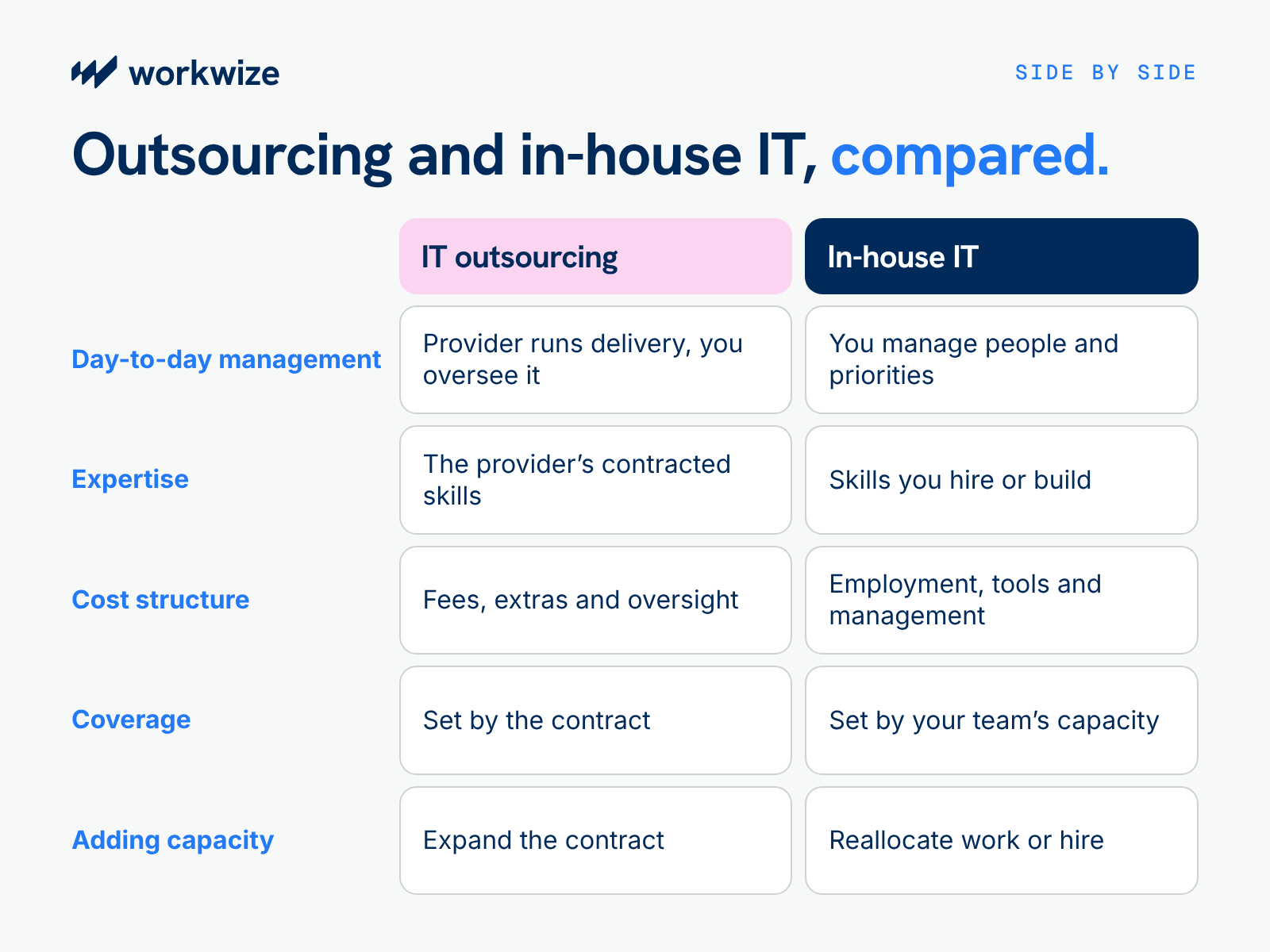
Here's a side-by-side comparison of IT outsourcing and in-house IT:
The choice doesn't have to be all or nothing. A hybrid model lets your company keep responsibilities that benefit from internal ownership while outsourcing work that requires extra capacity or specialist resources. For example, your team can retain IT planning and employee access approvals while external providers handle system monitoring, software updates, or device preparation and shipping.
What is the full cost of in-house IT vs outsourcing?
To understand the financial implications, account for the full cost of each model, the capacity it provides, and the work your business will still need to manage.
The true cost of hiring an internal IT employee
Your hiring budget needs to cover these elements:
| Base salary | Start with pay appropriate to the role and location. Add any agreed bonuses or applicable overtime separately. |
| Employer payroll taxes | Calculate the employer's Social Security and Medicare contributions. Include unemployment taxes and other employer payroll charges. |
| Benefits and employer contributions | Your share of health insurance, retirement contributions, and other benefits, plus workers' compensation insurance. |
| Recruitment and onboarding | Advertising, agency fees, background checks, and staff time spent interviewing and introducing the employee to your systems. |
| Equipment, licenses, and operational tools | The employee's laptop and software, plus any additional ticketing, monitoring, remote support, or device management capacity needed. |
| Training | Courses and certifications. Training time also reduces the hours available for operational work. |
| Management and coverage | Supervision time and any additional staffing or contractor costs needed during absences or outside normal working hours. |
For example, say you hire a full-time systems administrator in California to maintain your servers and manage system access.
California's Employment Development Department reports a mean hourly wage of $56.94 for network and computer systems administrators in Q1 2026. Annualized over 2,080 hours, that gives you a salary benchmark of approximately $118,435.
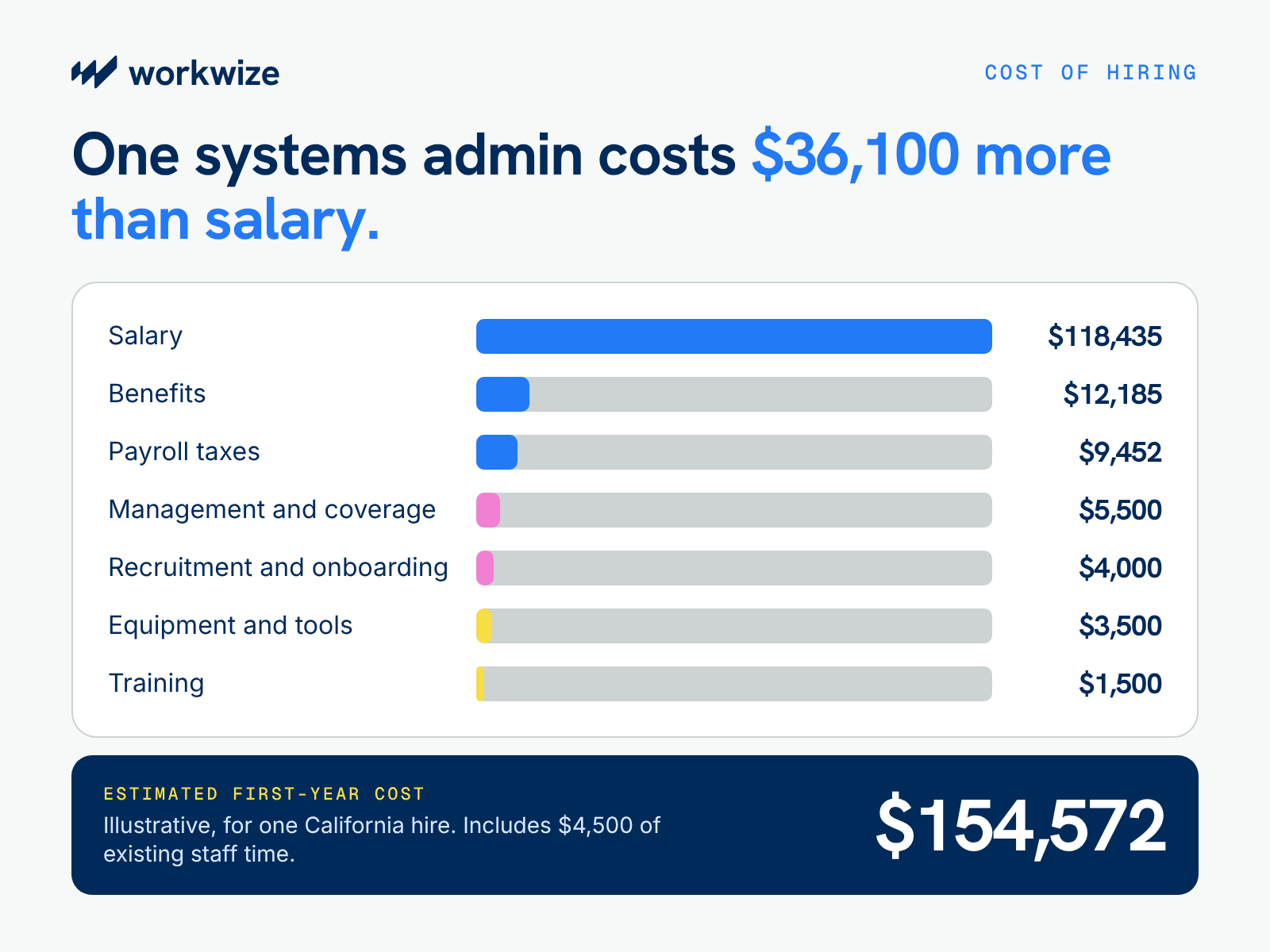
Here's what a first-year budget could look like. The salary and health insurance figures use published benchmarks, and company-specific expenses are explicitly assumed.
| Cost | First-year amount | Basis |
|---|---|---|
| Salary | $118,435 | California's mean hourly wage × 2,080 hours. |
| Employer payroll taxes | $9,452 | $9,060 for Social Security and Medicare, plus $392 in state payroll charges and projected federal unemployment tax. |
| Benefits and employer contributions | $12,185 | $8,132 for single health coverage. Assumes a 3% retirement contribution of $3,553 and $500 for workers' compensation. |
| Recruitment and onboarding | $4,000 | Assumes $2,500 in external hiring expenses, plus 25 hours of existing staff time valued at $60 an hour. |
| Equipment, licenses, and operational tools | $3,500 | Assumes $2,000 for the workstation and $1,500 for additional software and tool access. |
| Training | $1,500 | Assumed annual budget for courses or certifications. |
| Management and coverage | $5,500 | Assumes 40 hours of supervision valued at $75 an hour, plus 20 hours of contractor coverage at $125 an hour. |
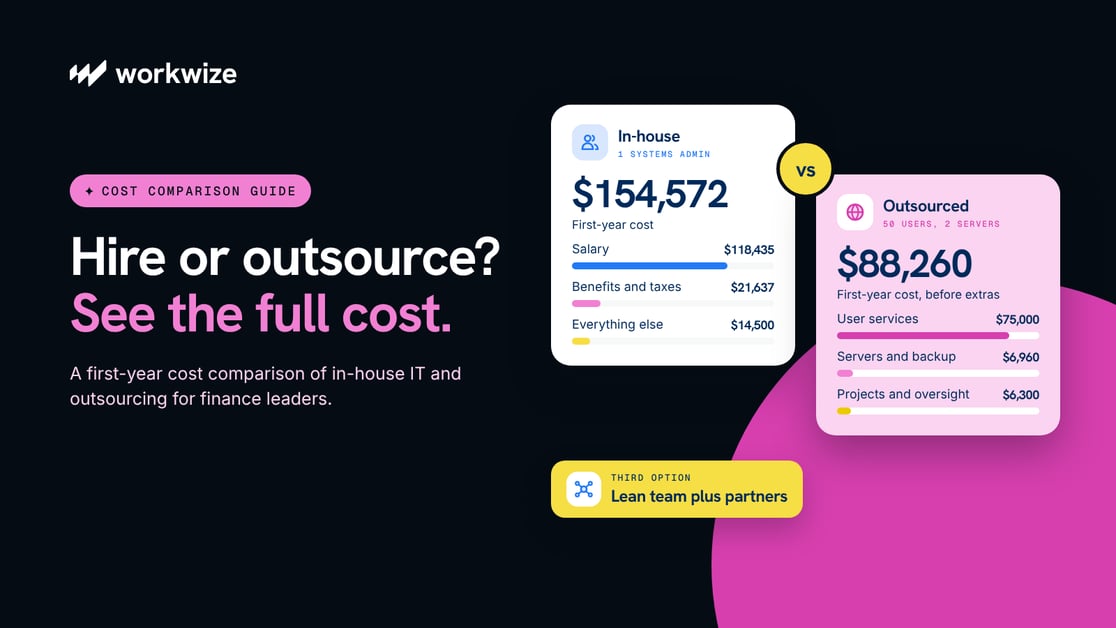
| Estimated first-year cost | $154,572 | Includes $4,500 of allocated existing staff time. |
Under these assumptions, the first-year cost reaches approximately $154,600, around $36,100 above salary. Of that total, approximately $150,100 represents additional cash spending, and the rest reflects existing employees' time spent on recruitment, onboarding, and supervision.
Note: This is an illustrative budget, not a universal employment cost. It combines published wage and health insurance benchmarks with assumed company expenses and a projected federal unemployment tax rate. Your actual cost will vary with your company's compensation, benefits, and operating needs.
The true cost of outsourced IT services
Outsourcing changes how you pay for IT capacity, but it doesn't eliminate the costs of managing that capacity.
Your budget starts with the service fee. You'll also need to account for implementation, excluded services, additional projects, internal oversight, and contractual commitments. The final cost depends on what the agreement includes and which responsibilities your team keeps. Providers may charge per user or per device, with additional work billed separately.
| Cost | What to include |
|---|---|
| Recurring service fees | Apply the agreed rate to the number of users or devices covered. |
| Setup and transition | Include onboarding charges and any overlap with your existing support arrangement. |
| Additional infrastructure | Check whether server management or extra locations carry separate charges. |
| Software and backup | Add required subscriptions or backup services excluded from the package. |
| Out-of-scope work | Budget for projects and changes that fall outside routine support. |
| Extended coverage | Check premiums for after-hours work or on-site visits. |
| Internal oversight | Account for staff time spent coordinating requests and reviewing provider performance. |
| Equipment and logistics | Include hardware purchases and separately billed shipping or storage. |
| Contract commitments | Check minimum spending requirements and the financial consequences of leaving early. |
| Applicable taxes | Add any taxes excluded from the quoted prices. |
For example, assume your California business has 50 users, each with one computer, and two existing on-site servers. You want an external provider to maintain the systems and administer user access.
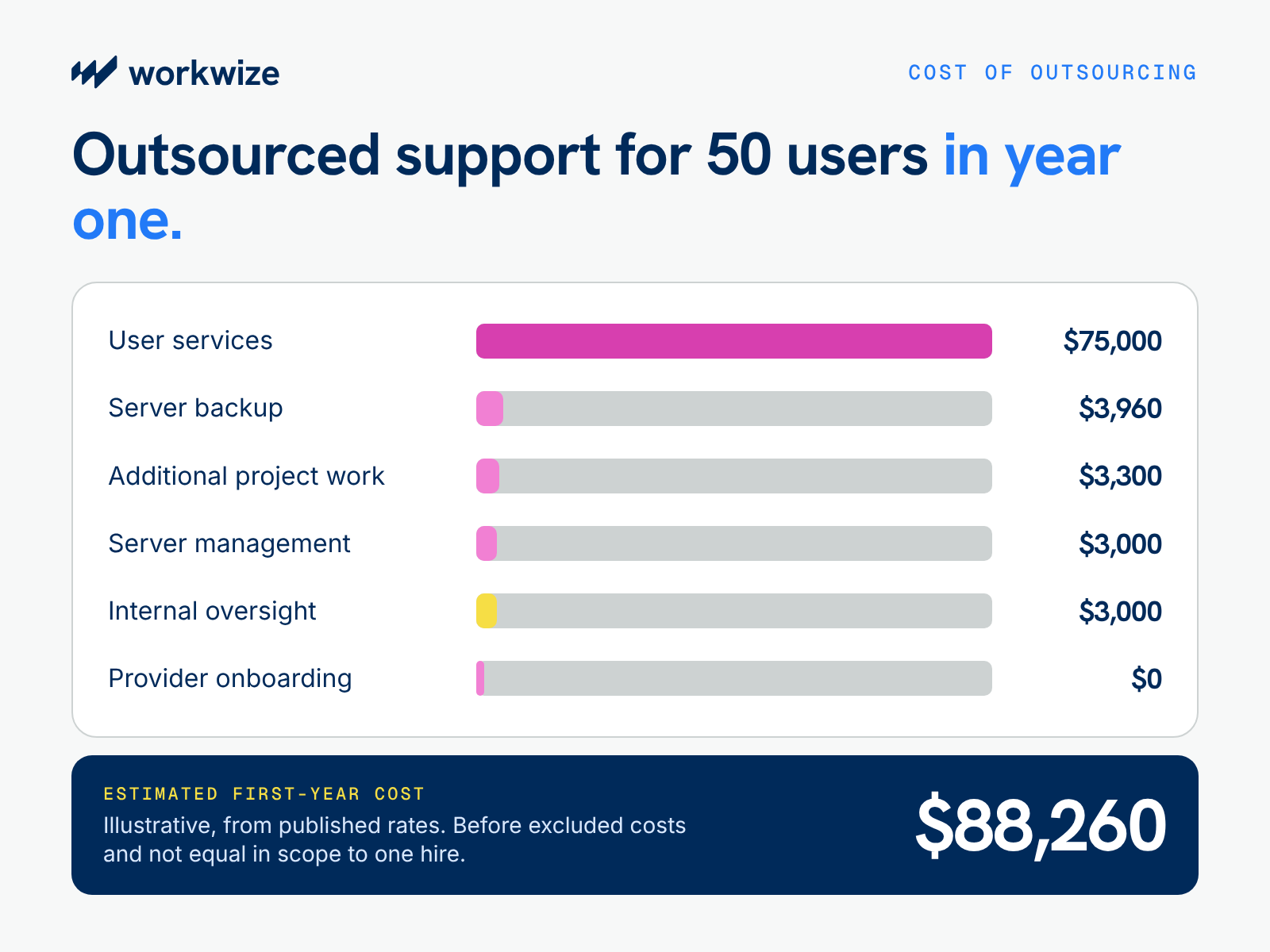
CRC Cloud's Core IT service includes identity management, system maintenance, and helpdesk support. The example below assumes an Orange County business without additional regulated-industry requirements. Using its published rates, a first-year budget could look like this:
| Cost | First-year amount | Basis |
|---|---|---|
| User services | $75,000 | 50 users × $125 a month × 12. |
| Server management | $3,000 | Two servers × $125 a month × 12. |
| Server backup | $3,960 | Two servers × $165 a month × 12, with up to 1 TB each and one-year retention. |
| Provider onboarding | $0 | No onboarding fee, assuming no optional paid discovery. |
| Additional project work | $3,300 | Assumes 20 hours of project work at the published $165 hourly rate. |
| Internal oversight | $3,000 | Assumes 40 hours of existing staff time valued at $75 an hour. |
| Estimated first-year subtotal | $88,260 | Includes $3,000 of allocated internal time. |
Under these assumptions, provider charges total $85,260. Including $3,000 in internal oversight brings the estimated first-year subtotal to $88,260, before excluded costs.
Note: Although this subtotal is lower than the internal hiring estimate, the two examples do not cover equivalent services.
A dedicated employee's responsibilities may extend beyond the provider's contracted scope, while the provider may offer support capabilities that one employee cannot deliver alone.
Use these figures to understand each cost structure. To determine which option offers better value for your business, compare the cost of covering your specific workload, including the responsibilities your internal team would retain.
For companies managing IT equipment across multiple locations, this means considering more than technical support. Hardware procurement, storage, deployment, repairs, retrieval, and disposal can add costs, especially when your internal team must coordinate separate suppliers and logistics providers.
The stronger financial case is the option that delivers the required service levels and operational capacity at an acceptable total cost, including the risks and responsibilities your organization retains.
In-house vs outsourcing IT: what makes sense when?
Here are the scenarios where in-house IT is the stronger option and where outsourcing makes more sense.
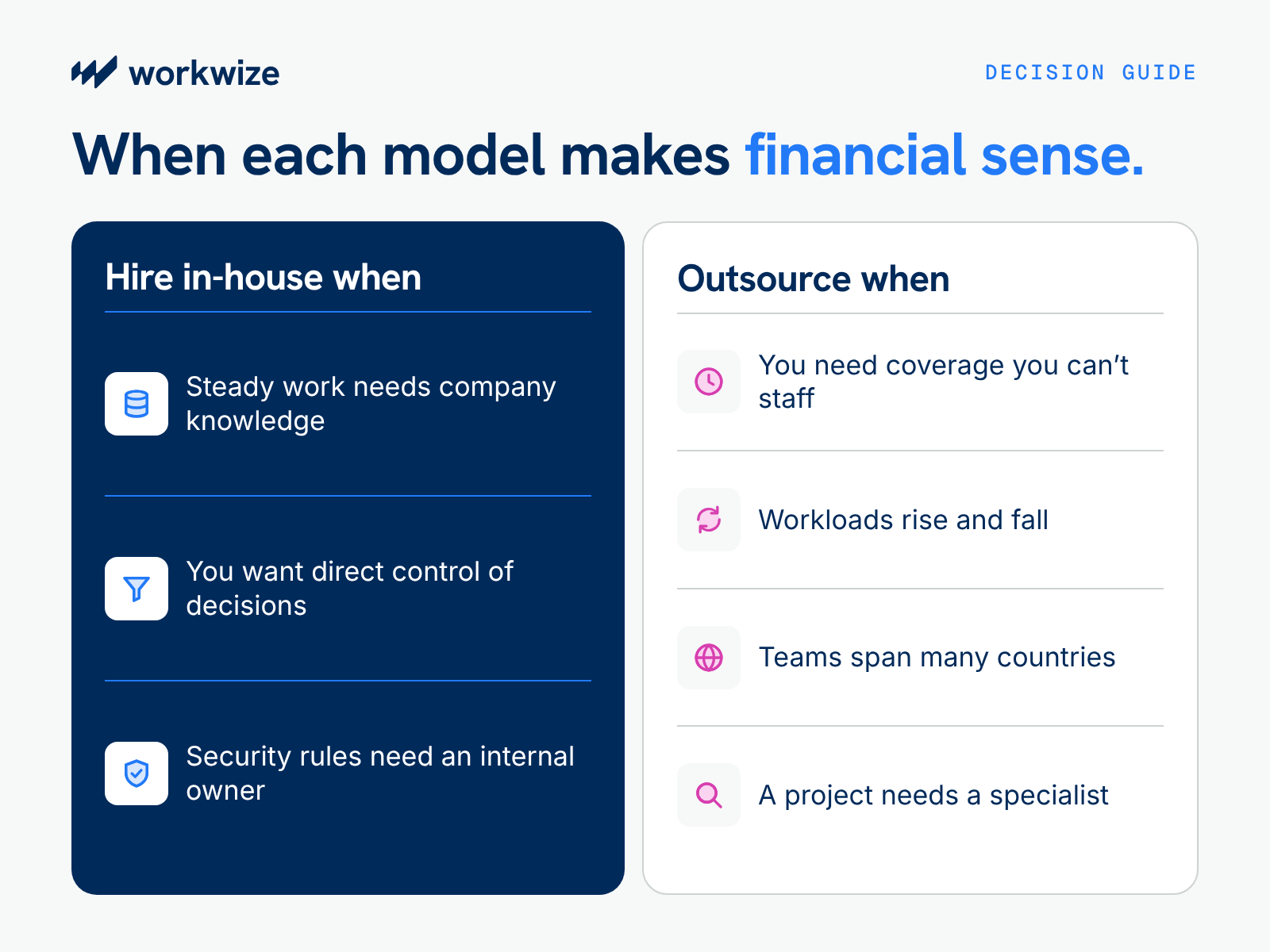
When in-house IT is the stronger option
Hiring makes sense in these situations:
- Recurring work justifies the full cost of a dedicated employee. This is especially true when daily operations depend on company-specific knowledge. For instance, troubleshooting orders that fail to reach the warehouse requires understanding your company's order workflow and system integrations. If supporting and adapting these systems creates enough ongoing work, a dedicated employee can justify their cost while building that business knowledge.
- Direct control supports the financial case. An internal employee understands your company's processes, priorities, and technology requirements. For instance, internal staff may be better suited to decide which laptop configurations different departments need, set hardware budgets, and approve exceptions, while a provider handles procurement and delivery.
- Security rules require an internal specialist. Some obligations require specific responsibilities to remain with an employee. For example, U.S. defense contractors processing classified information on their on-site computer systems must appoint an employee to oversee those systems' security. Even when external providers perform operational work, your organization must retain appropriate security governance and oversight.
When outsourcing makes more sense
Here are some scenarios where outsourcing makes sense:
- You need coverage that would be difficult to staff internally. Say employees need help outside your IT team's working hours. A provider offering contracted 24/7 support can cover that gap without you building a full shift team.
- Workloads fluctuate or don't justify permanent headcount. Equipment deployment, retrieval, and replacement volumes may change with hiring cycles. Instead of maintaining additional staff for peak demand, you can use a provider to handle the workload as it arises, subject to the agreement's pricing and capacity limits.
- Your operations span multiple countries. Equipping employees in markets where you have no office can require local suppliers, warehousing, shipping coordination, and device retrieval services. A provider with established regional operations can handle these activities without your company building that infrastructure in every location.
- You need specialist expertise for a defined task. Your team handles everyday support but needs an experienced specialist for a cloud migration, infrastructure upgrade, or other specialized project. Contracting those services can be more economical than hiring a permanent specialist.
The decision should also account for service quality, business continuity, and the cost of managing each arrangement. A lower quoted price doesn't necessarily represent better value if it leaves important responsibilities uncovered.
The third option: a lean IT team supported by automation and outsourced operations
If you can't decide between hiring an in-house IT team and outsourcing your operations, a third option is a hybrid approach.
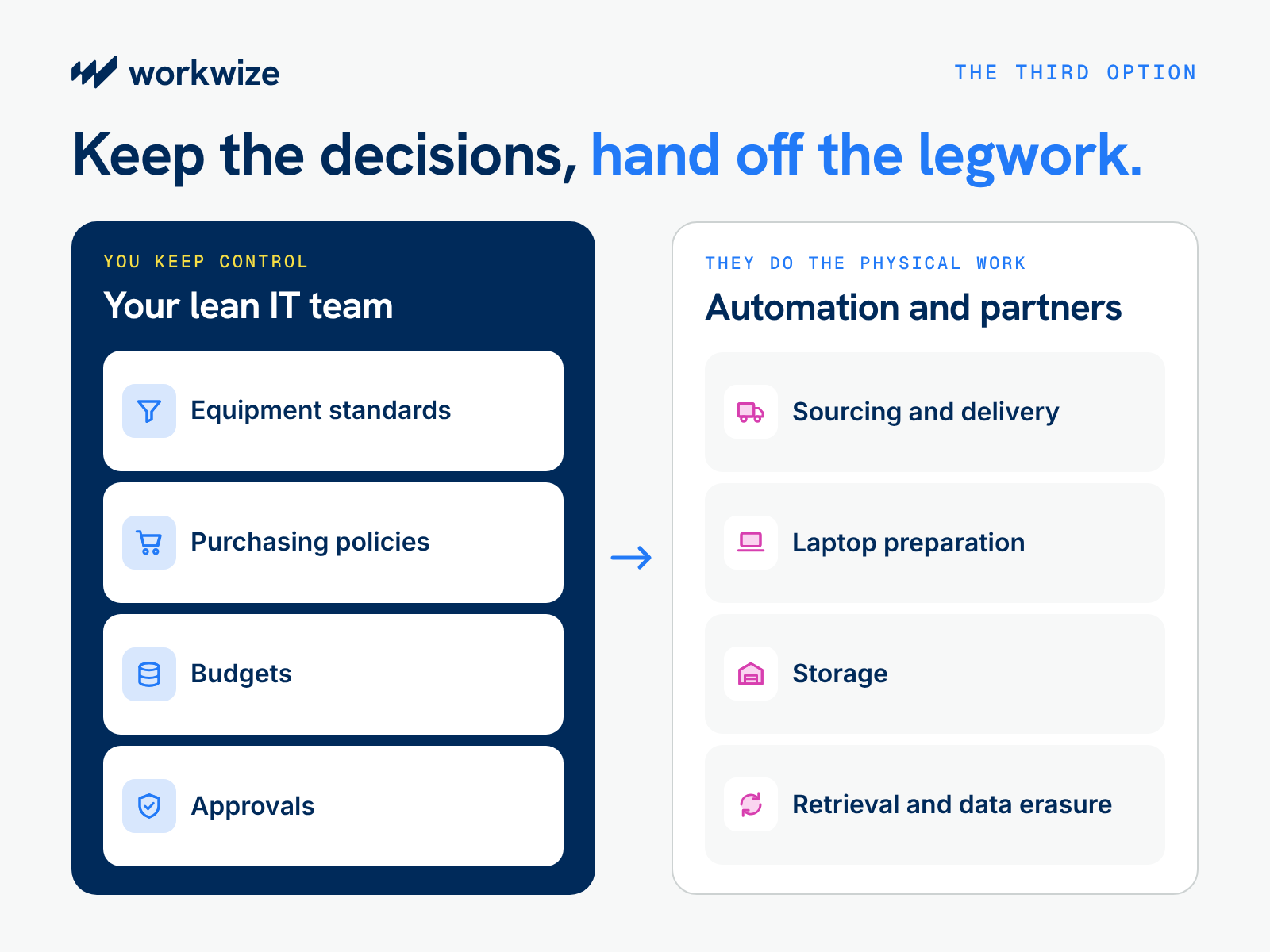
A hybrid approach lets you keep a small internal team while using automation and external providers for selected tasks. This can reduce your team's workload while preserving control over key decisions. Your internal team retains control over budgets, policies, and strategic decisions, while external partners handle work that benefits from established infrastructure and repeatable processes.
Let's look at an example in one core IT area: IT asset management (ITAM), where procurement, deployment, tracking, and device retrieval can become increasingly difficult to coordinate as a company expands.
HighLevel, a SaaS company, used separate managed service providers in the US, India, and the Philippines to procure and distribute employee equipment. Coordinating those providers created communication delays of up to 18 hours and made equipment standardization difficult.
With Workwize, a global ITAM platform, HighLevel brought these operations onto one platform. Automated workflows coordinated equipment requests and approvals, while Workwize's supplier and warehouse network across 130+ countries supported sourcing and delivery.
HighLevel still maintained control over equipment standards through a pre-approved device catalog. Employees could choose from approved options, while the internal IT team retained visibility into its assets across locations. This helped the team plan purchases without manually coordinating every order.
According to Workwize's published case study, HighLevel achieved 70% time savings on IT equipment operations and saved $1.4 million in IT hardware management. This example shows how an internal team can consolidate fragmented supplier relationships, improve oversight of hardware spending, and support international operations without building equivalent internal logistics capabilities.
These results are specific to HighLevel, but they illustrate the potential value of combining internal IT oversight with automation and outsourced hardware operations.
How Workwize helps IT teams scale without expanding headcount
Expanding into 12 countries doesn't necessarily mean you need an IT team in every location. But someone still has to source equipment, prepare laptops, coordinate deliveries, track assets, and recover devices when employees leave.
Workwize helps companies manage these operations across 130+ countries through one IT hardware lifecycle platform. Your internal team retains control over equipment standards, purchasing policies, budgets, and approvals, while Workwize provides the infrastructure and operational capacity to handle the physical work.
Here's how that translates into business value:
- Procurement: Order approved equipment through Workwize's supplier network, with local sourcing where available. With Workwize's integrations and workflow builder, you can set up workflows that order and ship equipment whenever a new employee record is created in your HRIS platform.
- Deployment: Pre-configure and deploy laptops directly to employees across different locations without maintaining your own warehouses or fulfillment teams in every market.
- Management: Keep purchase records and warranty information linked to each device. Manage repair requests and plan replacements throughout each device's lifecycle.
- Tracking: Track every device across its lifecycle so you can make better-informed decisions.
- Retrieval and redeployment: Recover equipment from departing employees, inspect returned devices, and prepare suitable laptops for reassignment. Reusing existing assets can help reduce unnecessary hardware purchases.
- Resale or disposal: Route retired devices through approved resale, recycling, or disposal processes, with a data erasure certificate for every device and opportunities to recover residual value.
- Custom automations: Connect equipment operations with existing business systems to reduce manual requests, approvals, and supplier follow-ups.
With Workwize's workflow builder, you can create customized automations by typing instructions in plain English. For example, you could give the Workwize Agent this instruction:
"When HR adds a new employee, check warehouse stock for a laptop approved for their role and location. Request the required approval, then allocate an available device or order one if needed. Coordinate preparation and delivery before their start date, and update the asset record with their assignment and delivery status."
The workflow can coordinate the required approvals, device preparation, delivery, and asset record updates through supported integrations and Workwize's fulfillment operations. Your team retains control through approval rules, access permissions, and workflow reviews.
Book a demo to see how Workwize can help your existing IT team support a distributed workforce.


Establish a single source of truth for every IT asset across the globe.

More related resources to help you stop firefighting hardware operations.

Get monthly insights into how other IT leaders are improving their ops.



Stop coordinating
hardware like it's 2012.