




.svg)
.svg)

.svg)


.svg)




.svg)
.png?width=500&height=424&name=Style-1---V1-(1).png)

.png?width=1230&height=692&name=Vector%20(13).png)
What is Enterprise IT Asset Management?
Enterprise IT asset management is a structured approach to managing an enterprise organization’s IT assets across their full lifecycle, at scale. It covers everything from planning and procurement to deployment, usage, offboarding, redeployment, and retirement.
The goal is to have a standardized system that maintains visibility, controls costs, reduces risk, and keeps IT operations predictable as the organization grows.
A good ITAM strategy gives organizations complete control over what IT assets they own and how much they spend. It prevents companies from buying duplicate licenses and ensures each asset is documented and monitored at all times. Most importantly, it turns IT spending from a black box into something you can actually manage and optimize.
Scope of ITAM in enterprises
Modern ITAM in enterprises is made up of three distinct but interconnected domains:
- Hardware assets: Hardware asset management includes laptops, servers, mobile devices, networking equipment, peripherals…basically anything with a serial number and a physical form
- Software assets: Licensed applications, SaaS subscriptions, on-premise software and custom-built solutions. This includes their entitlements, usage rights and compliance obligations
- Cloud resources: Virtual machines, storage buckets, serverless functions and the ever-expanding universe of cloud-native services. This is also where FinOps and ITAM overlap
The ISO 19770 standard (which we'll discuss later) officially recognized this expanded scope in 2017 and broadened the definition from pure Software Asset Management to encompass all IT assets.

Why Must Enterprises Take ITAM Seriously
Enterprises must take IT asset management seriously because, at scale, small gaps can turn into systemic risk.
For instance, lost devices, delayed offboardings, and poor visibility, when left unaddressed can quietly compound into financial waste or security exposure. Half of organizations report losing at least 5% of IT assets during employee offboarding, reports Ponemon Institute, while organizations with poor asset visibility experience 3.3 times more security incidents.
ITAM gives enterprises a way to stay in control as headcount, geography, and complexity increase.
Here are more benefits of a strong ITAM strategy in enterprises.
Shadow IT Can Quickly Drain Resources and Finances
Shadow IT accounts for 30 to 40% of IT spending in large enterprises.
The Everest Group suggests it can reach 50% in some organizations. We're talking about billions of dollars spent on technology that IT departments can't see, secure, and optimize.
And it gets worse. According to Gartner, IT departments now manage only 28% of SaaS spend and just 17% of applications. That’s a decline from previous years.
Through automated asset discovery and continuous monitoring, ITAM tools can identify every application in use across the organization, regardless of how it was purchased.
This means you can consolidate redundant tools and redirect wasted spend toward better initiatives.
Asset Sprawl Negatively Impacts Budgets and Security Stance
Gartner's recent research revealed that up to 30% of IT assets are lost or unaccounted for in typical enterprises. This creates a huge financial impact for enterprises. Moreover, a laptop is stolen every 53 seconds in the United States alone. The Ponemon Institute calculates that each lost laptop costs an organization approximately $49,246 – and that's primarily due to the value of data, not hardware replacement.
So how does Enterprise ITAM help? By maintaining a single source of truth for every asset in your organization, from procurement to retirement, Enterprise ITAM can theoretically put an end to all cases of lost assets.
Modern, enterprise-grade ITAM solutions such as Workwize come with real-time tracking so you always know where your hardware is located, who's using it, and when it's due for return or replacement. This helps solve the issue of asset sprawl, as you’re alerted should any device go offline for long periods of time.
SaaS Sprawl Introduces Risks of Data Breaches and Cyber Attacks
Organizations without centrally managed SaaS lifecycles will be five times more susceptible to data loss or cyber incidents by 2027. The reason is fragmented visibility. When you don't know what software is running in your environment, you can't secure, patch or configure it properly.
Most SaaS applications in use are unsanctioned; they’re never approved by IT. And one-third of successful cyberattacks now target data stored in shadow IT infrastructure. It's not a matter of if you'll be breached; it's when.
However, with ITAM, you can gain a centralized oversight of your entire SaaS ecosystem. In other words, each application is cataloged, assessed for risk, and monitored for compliance. When vulnerabilities do emerge or vendors fall out of compliance, you know immediately and can act before attackers exploit the weakness.
License Non-Compliance Exposes Enterprises to Costly Audits and Penalties
Software vendors are becoming aggressive with license audits. The financial consequences of non-compliance are severe. IBM, Oracle, Microsoft, and SAP have dedicated audit teams whose only purpose is to identify licensing gaps and recover revenue.
To add to the woe, the complexity of modern licensing models makes compliance nearly impossible to manage manually. This is because perpetual licenses, subscription models, named users, concurrent users, processor-based metrics, and cloud consumption billing all coexist within a single enterprise environment.
In the absence of a proper asset tracking system, your organization is bound to over-purchase licenses you don't need while simultaneously under-licensing software you use heavily.
With a properly implemented ITAM program, however, you can opt for automated license reconciliation to compare what you own against what you're consuming. Such systems flag compliance gaps before auditors find them.
Moreover, if vendors do come knocking, ITAM can provide the documentation needed to negotiate from a position of strength.
Poor lifecycle management leads to operational inefficiencies and unplanned costs
Without systematic lifecycle tracking, enterprises find themselves trapped in a cycle of emergency replacements and unplanned expenditures. In such cases, hardware failures can catch teams off guard, and software reaches end-of-life without migration plans.
This lack of lifecycle visibility also hurts planning.
Finance teams can't accurately forecast IT capital expenditure because they don't clearly know what needs replacing.
At the same time, procurement teams are in no position to negotiate volume discounts when they receive random purchase orders.
Not to forget how IT operations can't maintain consistent service levels when they're always reacting to preventable failures.
A well-implemented enterprise ITAM setup can solve such issues. For instance, you receive automatic alerts when warranties are close to expiring. Plus, you never need to scratch your head around when devices are reaching the end of their usable life and when software is about to lose vendor support. This visibility allows you to plan upgrades early rather than respond to urgent issues.
Over time, you can also reduce total ownership costs while maintaining an IT environment that supports the business rather than disrupting it.
Some Important Enterprise ITAM Standards and Frameworks
Enterprise ITAM frameworks provide simple rules for planning, using, and retiring assets. They help you make consistent decisions and assign clear ownership.
For enterprises, this consistency keeps IT operations stable as the organization grows and prevents small process gaps from becoming larger problems.
Let’s take a look at a few frameworks enterprise IT teams should know about.
ISO/IEC 19770
ISO/IEC 19770 is the international benchmark for ITAM excellence in enterprises. It was originally published in 2006 as a Software Asset Management standard. Later, it changed significantly with the 2017 update to cover all IT assets, not just software.
The standard comprises several parts, but the ones you'll encounter most are:
|
Standard |
What it covers |
|
19770-1 |
27 process areas defining how to establish, implement and maintain an ITAM management system. |
|
19770-2 |
Software identification (SWID) tags; authoritative identification data for installed software. |
|
19770-3 |
Software entitlement schema (ENT) that standardizes license data, including usage rights and metrics. |
In practice, ISO 19770-1 is your process bible. When a software vendor comes knocking for an audit (and they will), having ISO-aligned processes means you can show proof of compliance rather than run to reconstruct your license position from invoices and guesswork.
ITIL 4: Service management mixed with asset management
ITIL 4, the latest iteration of the IT Infrastructure Library, finally gave ITAM the recognition it deserves by including it as one of its 34 management practices.
This was a huge moment–ITAM is no longer a back-office afterthought but a core component of service value delivery.
The relationship between ITIL and ISO 19770 is complementary. ITIL provides the overarching service management framework, including the governance structure and guiding principles. ISO 19770 provides the detailed, prescriptive requirements for what your ITAM processes must achieve.
Read More: ITIL Framework
CIS security controls
The Center for Internet Security (CIS) Critical Security Controls place ITAM at the very foundation of cybersecurity. The first three CIS Controls are:
- Inventory and Control of Hardware Assets
- Inventory and Control of Software Assets
- Continuous Vulnerability Management
The logic is that you can't protect what you can't see. Every firewall, endpoint protection platform, and security information system depends on knowing what assets exist in your environment. That makes ITAM the bedrock of your security posture.
Pro tip: When building your ITAM business case, prioritize security. Executives who yawn at cost savings suddenly pay attention when you frame ITAM as a critical security control. The CIS framework gives you the ammunition.

The Enterprise ITAM Asset Lifecycle
The enterprise asset lifecycle has five distinct phases and each one has its own challenges and opportunities.
Let's dig into each one.
Phase 1: Planning
Planning is where enterprise IT asset management either succeeds or fails. You can have top-tier laptops, premium software, and enterprise-grade servers, but they won’t deliver value if teams don’t have what they need when they need it.
The first step here is understanding actual usage across the organization. In a global enterprise, this means talking to IT, finance, procurement, business unit leaders, and local site managers.
For example, a sales team in Europe might rely heavily on mobile devices and cloud collaboration tools, while an engineering team in India needs high-performance workstations and licensed development software.
Gathering this input helps you distinguish critical tools from optional ones and prevents overbuying or under-provisioning.
Once you know what’s needed, plan out standardized procurement processes.
Budgeting in enterprises can’t be an afterthought. Figure out total cost of ownership which includes not just purchase prices, but maintenance, licenses, support contracts, and planned refresh cycles. Without such planning, you risk huge budget overruns or emergency approvals.
Finally, build approval workflows that sync smoothly across IT, finance, procurement, and business leadership without slowing operations. Enterprises often work with multiple suppliers, so defining preferred vendors, contract terms, and renewal timelines keeps operations smooth and avoids being locked into expensive or rigid agreements.
It’s also important to:
- Engage the right stakeholders: Map out who needs to be involved in every region and team, from IT and finance to local managers who understand day-to-day workflows.
- Build a real inventory baseline: Document existing devices, software usage, and upcoming refreshes. A sales team in one office might have twice the number of laptops it actually needs, while a remote engineering hub lacks critical development licenses.
- Prioritize based on impact: Identify high-value assets that directly affect productivity or revenue. Optional resources can be scheduled later.
- Plan refresh cycles early: Decide when desktops, laptops, or licenses need replacing. This prevents teams from running on outdated technology and reduces emergency procurement.
Workwize, an IT hardware lifecycle management platform, can make the planning phase much easier for enterprises.
Instead of juggling fragmented databases or siloed vendor contracts, Workwize provides you with a single view of all IT assets across locations and teams.
You can see:
- Where every device is,
- Who a device is assigned to,
- and where devices need to be sent/retrieved from.
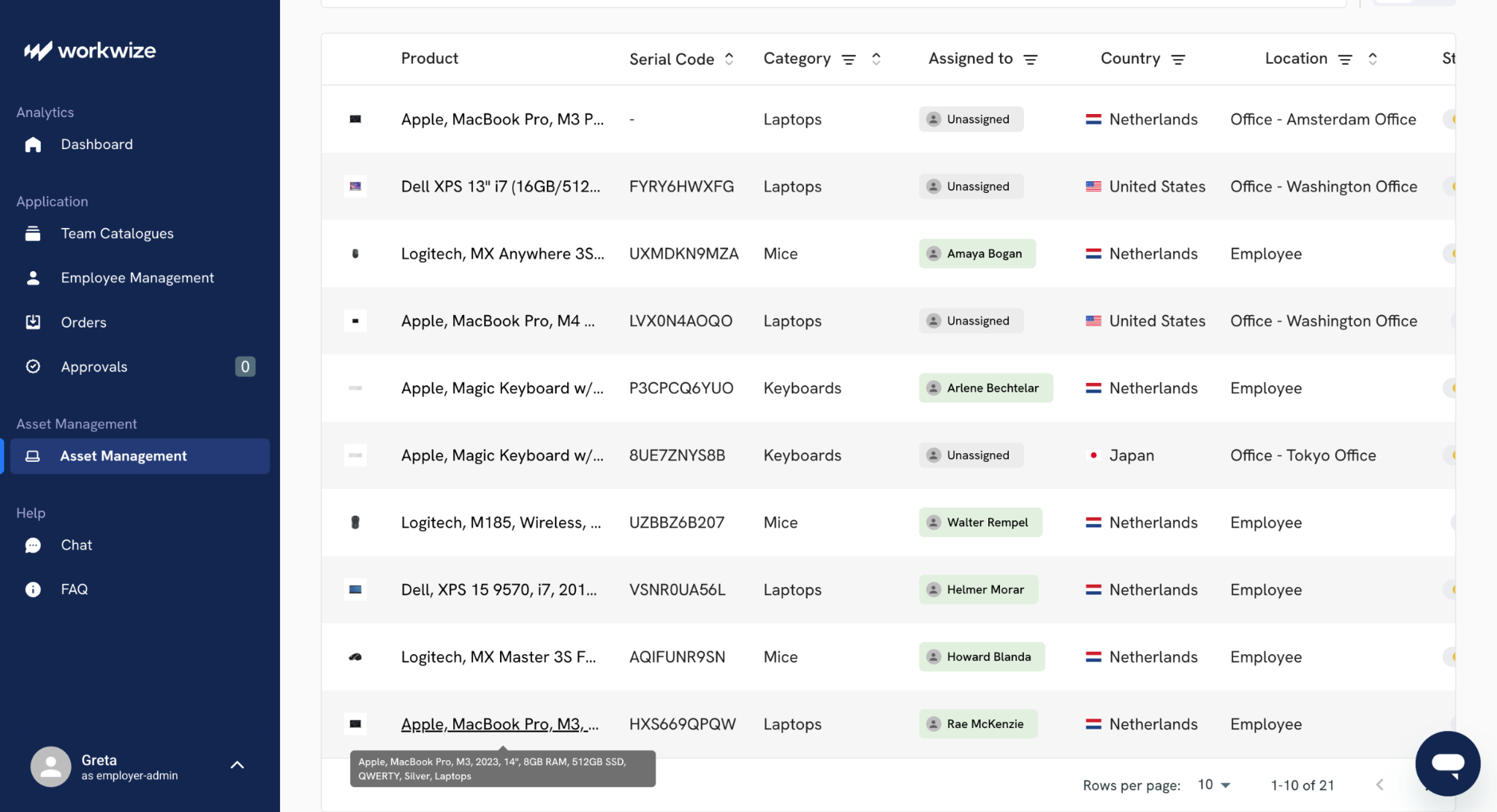
This makes planning new asset purchases more predictable and helps prevent overbuying.
Phase 2: Procurement
Procurement is the process of acquiring the assets and services that your enterprise needs to operate.
In a large organization, procurement can quickly become complex. This is because you are dealing with thousands of devices, multiple software licenses, and vendors across regions. Mistakes here can create ripple effects that slow teams down and increase costs.
To begin with, seek clarity on whether you want to work with a Managed Service Provider (MSP) or handle procurement internally?
MSPs offer economies of scale, vendor relationships and operational expertise.
They're amazing for organizations without dedicated procurement teams or those with distributed operations. But they offer less control over what you can get and potentially higher per-unit costs. That’s why most enterprises have in-house procurement teams: their hardware and software needs are highly specific.
Once this is clear, the first step in a typical procurement cycle is translating your plan into precise orders. To begin, use the standardized models and license counts defined during planning.
Vendor management is another area to focus on. Since enterprises rarely rely on a single supplier, you must negotiate contracts, SLAs, and delivery timelines with them all to ensure consistency across regions.
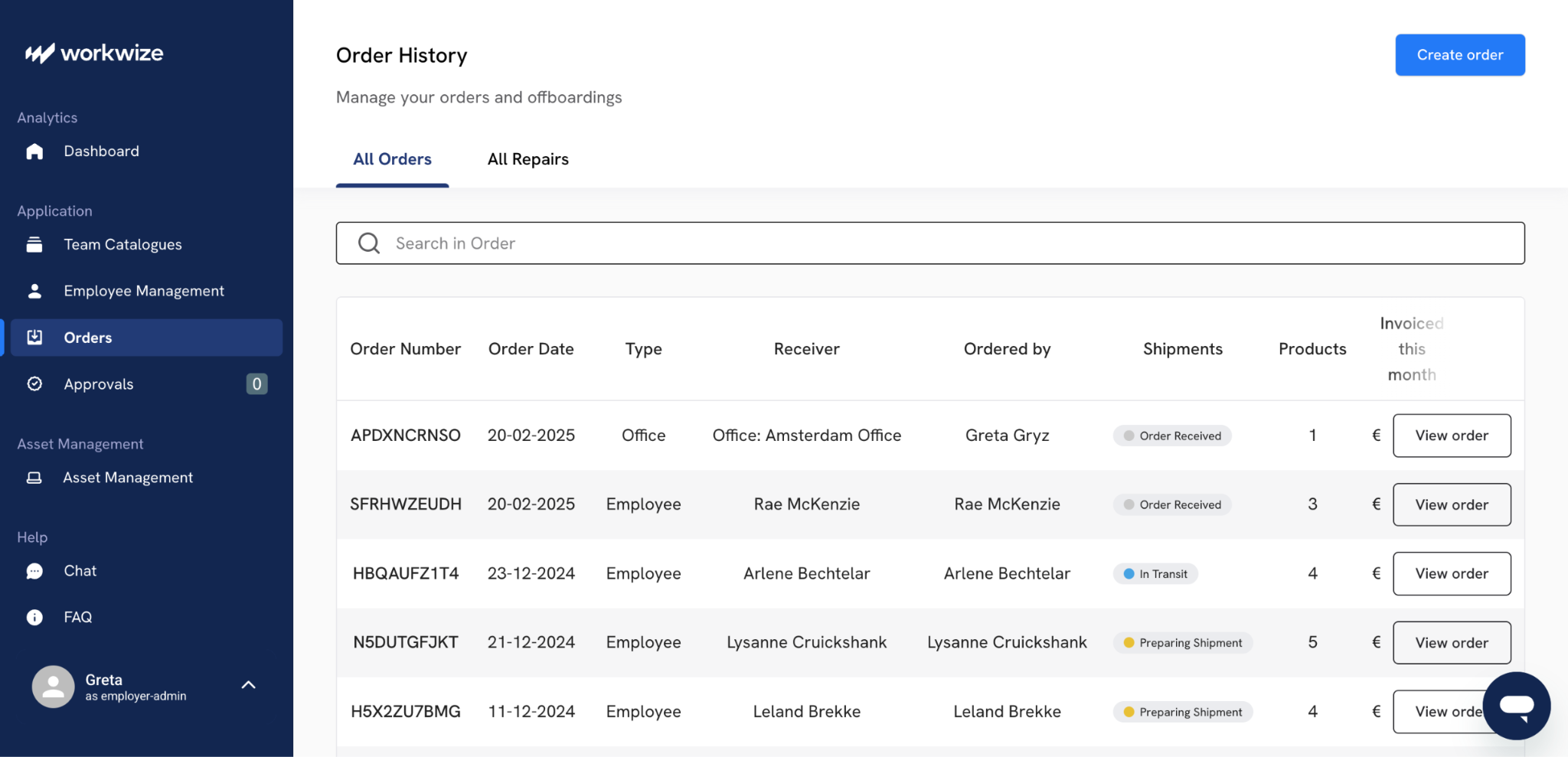
Workwize gives you the advantage of procuring all kinds of hardware with pre-installed MDM across all regions your organization works. This means you no longer need to deal with multiple suppliers while enjoying uniform costs and delivery timelines (5-7 working days) globally.
Fun fact: Gartner estimates that over 25% of software licenses go unused. That's actually a negotiating opportunity. When renewal time comes, you can right-size their contracts and redirect savings to strategic investments (provided you have solid investment data).
Phase 3: Deployment
An asset sitting in a warehouse isn't delivering value. Getting devices into users' hands – configured correctly, securely, and quickly is where asset deployment matters. Here, we must discuss a few important concepts.
Zero-touch provisioning
This is the gold standard for modern device deployment in large enterprise environments.
With zero-touch provisioning, devices ship directly from the vendor to end users and they automatically enroll in your Mobile Device Management (MDM) solution and configure themselves based on predefined policies. The user opens the box, powers on the device and starts working.
Apple Business Manager, Windows Autopilot and Android Zero-Touch Enrollment are the big three platforms enabling this capability. If your organization is still imaging laptops in a back room somewhere, it's time for an upgrade.
Workwize uses zero-touch provisioning. This means all your employees receive work-ready devices with everything they need to work as soon as they unpack them.
Mobile Device Management
MDM platforms (Microsoft Intune, Jamf, VMware Workspace ONE and others) are the control rooms for device lifecycle management. They push configurations, deploy applications, enforce security policies and provide the visibility ITAM requires. An MDM without ITAM integration is a missed opportunity.
Workwize integrates with every MDM solution for problem-free, zero-touch deployment.
Software deployment automation
Beyond device configuration, you need automated software deployment. Package managers, software distribution tools and app stores (yes, enterprise app stores are a thing) ensure users get the applications they need without IT manually installing software on every machine.
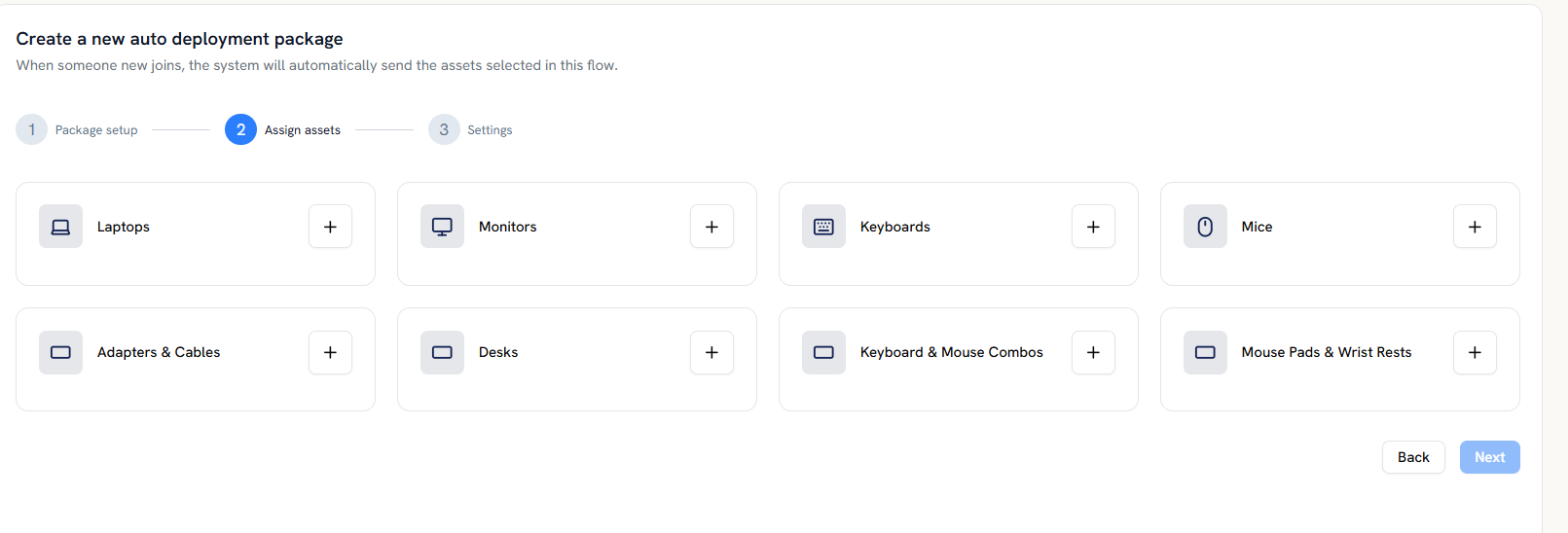
Workwize lets you ship equipment with custom software automation and user profiles based on roles. This means you can create a customized set of hardware and software packages for every employee, depending on role, locations, or other parameters. When they receive the package, they’ll find just what you want them to.
Phase 4: Maintenance
This is the longest phase (often three to five years for most hardware) and it's where ITAM delivers ongoing value. Maintenance, which involves keeping your assets running at peak performance throughout their usable life, mostly involves three big things:
- Patch management
- License monitoring
- Performance optimization
Patch management is the first step of management, obviously. Effective ITAM tracks which devices have which versions and ensures patches are deployed systematically.
This intersects directly with vulnerability management (remember those CIS Controls we discussed).
Enterprises must also know which assets are actively used, which ones sit idle, and which are nearing renewal or failure. Without that context, teams either fix everything or delay action until users complain.
Repairs and replacements are a good example. A laptop breaks. Is it under warranty? Has it already been repaired twice? Is it close to its refresh cycle? Without answers, you often default to the slowest or most expensive option.
Workwize keeps service history, warranty details, and asset age connected, so IT can make practical decisions instead of chasing information across systems.
Next, you have to deal with license compliance monitoring. Since software usage changes constantly as employees join, leave, and change roles, apps too get installed and abandoned. Continuous monitoring ensures you're neither under-licensed (compliance risk) nor over-licensed (wasted money).
Workwize syncs with your ITAM to keep all your devices up-to-date while always providing information about device usage and locations. If a device goes offline for long periods of time or works abnormally, you will know.
When maintenance and management are done well, they don’t draw attention. Devices stay reliable, software stays compliant, and costs remain predictable. Instead of constant firefighting, IT operates with confidence and control.
With Workwize, enterprises can turn maintenance into a steady, ongoing process that keeps the entire asset lifecycle running smoothly.
Fun fact: McKinsey research suggests that AI-powered predictive maintenance can reduce equipment breakdowns by up to 50% and extend asset life by 20 to 40%.
Phase 5: Offboarding and disposal
Every asset eventually reaches end-of-life. How you handle that transition determines whether you recover value, maintain security and meet environmental obligations, or create liabilities that haunt you for years.
This final phase itself has many stages, including:
- Device retrieval from remote employees
Remote and hybrid work has made this a lot more complicated, especially now that everyone needs remote asset management. When an employee leaves, how do you get that laptop back from their home office in another city, or another country?
- Data sanitization
Data must be securely wiped before any device leaves your control. Usually, it's cryptographic erasure that meets standards like NIST 800-88. For highly sensitive environments, physical destruction may be required. Document everything; you'll need proof if questions arise later.
- Environmental compliance
E-waste regulations are quite strict nowadays. WEEE in Europe, state-level regulations in the US and similar requirements globally mandate proper handling of electronic waste. Certified IT Asset Disposition (ITAD) vendors handle this complexity; they offer certificates of destruction and recycling that satisfy auditors and regulators.
- Value recovery
Don’t assume that everything needs to be destroyed. Assets with remaining useful life can be refurbished and resold, donated to nonprofits or redeployed internally. Good ITAM programs recover surprisingly meaningful value from end-of-life assets.
If you use Workwize as your enterprise ITAM tool, you get access to environmentally-compliant ITAD at all of the stages we discussed above.
It gives you access to:
- Coordinated asset retrievals: Workwize automates retrieval workflows when employees exit, relocate, or switch roles, ensuring devices are collected on time across regions without manual follow-ups or missed handoffs.
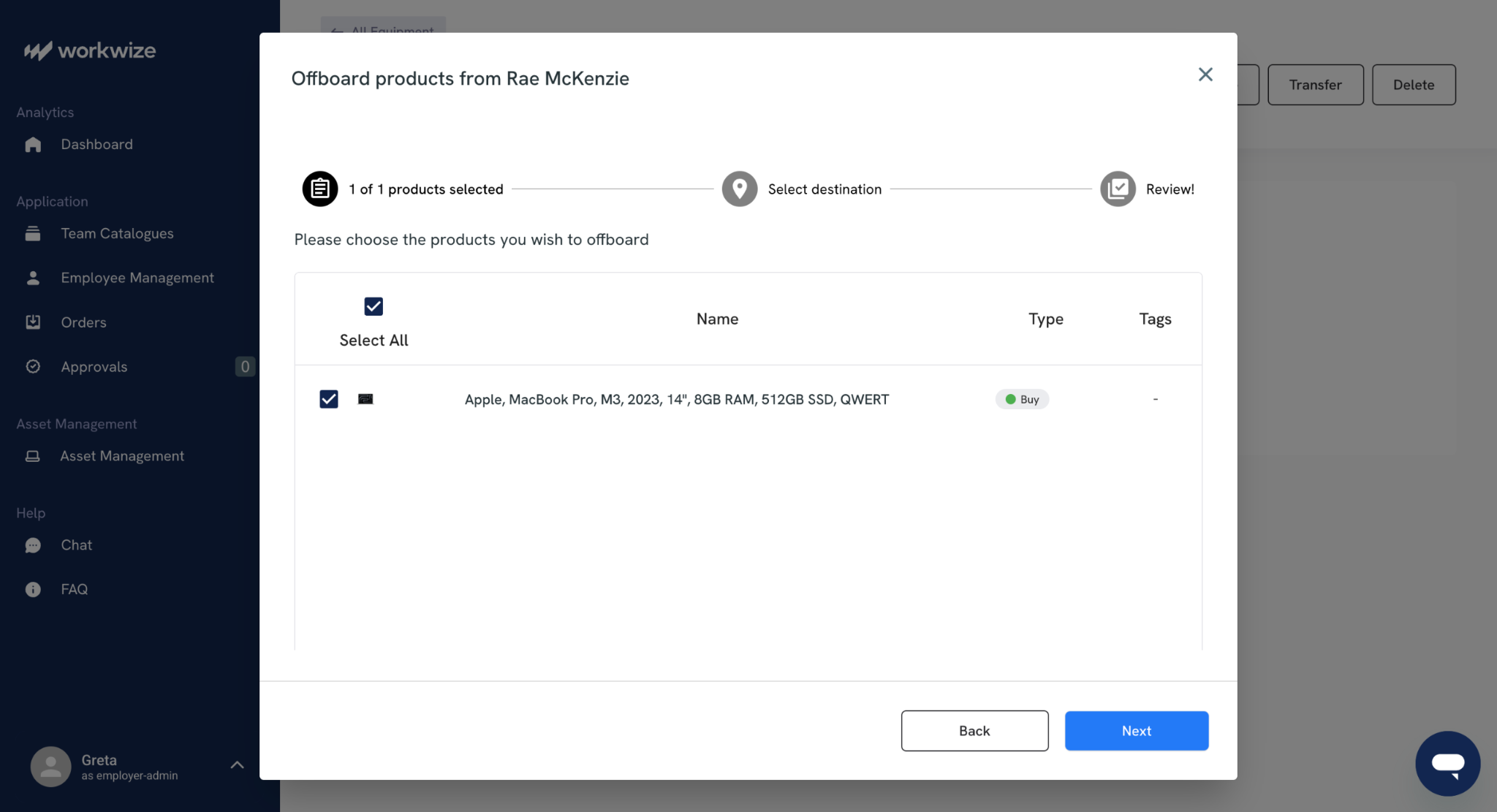
- Clear chain of custody: Every retrieval is tracked end to end, from pickup to return, giving IT full visibility into where an asset is, who handled it, and when it was recovered.
- Secure data handling: Workwize supports secure data wiping and access revocation before reuse or disposal, reducing the risk of data leaks and compliance violations.
- Smart reuse or disposal decisions: Retrieved assets are assessed against lifecycle data, warranty status, and condition, helping teams decide whether to redeploy, refresh, or retire them.
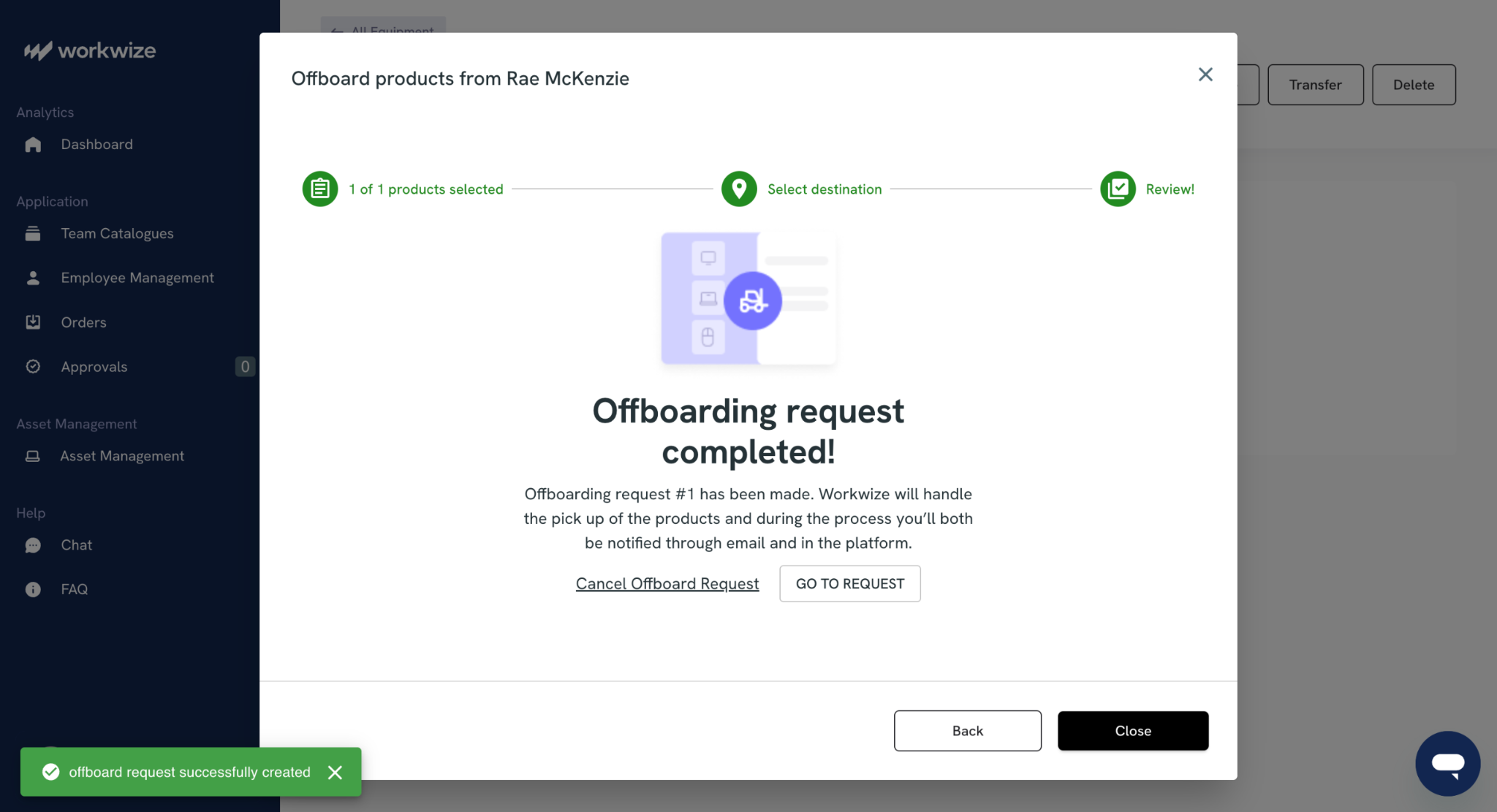
- Compliant and sustainable disposal: For end-of-life assets, Workwize coordinates certified disposal and recycling, ensuring environmental and regulatory compliance while documenting the entire process.
An enterprise ITAM cycle concludes at retrieval and disposal. When retrieval and disposal work properly, your organization moves forward without cleanup work or any hidden losses. It is also what gives you clarity about what new assets to buy and how many.

How to Choose an ITAM Solution for Enterprise Needs
If you've read this far, you're probably thinking about implementing or upgrading your ITAM capabilities.
That’s good thinking, but the market is flooded with options, from basic spreadsheet templates to enterprise platforms costing millions. Here's how you navigate it.
Core evaluation criteria
1. Discovery capabilities.
Can the solution automatically discover assets across your enterprise environment?
This includes agent-based discovery (software installed on devices), agentless discovery (network scanning and integrations), and cloud connectors.
The best solutions use multiple methods because no single approach catches everything. Pay particular attention to SaaS discovery. Identifying cloud applications through SSO logs, OAuth connections, and financial data is important for battling shadow IT.
2. Integration ecosystem
ITAM doesn't exist in isolation. Your solution needs to integrate with procurement systems, financial platforms, HR databases (for employee lifecycle), MDM solutions, ITSM ticketing systems, and security tools.
Native integrations are preferable to custom development. Ask vendors specifically about their integration with your existing stack.
3. License management depth
If software asset management is a priority (and it should be), scrutinize how the solution handles licensing complexity.
- Does it understand different licensing models, like named user, concurrent, device and processor-based?
- Can it calculate effective license positions for major vendors like Microsoft, Oracle and SAP?
- Does it maintain current product use rights libraries?
This is where many tools fall short.
4. Reporting and analytics
Data without insights is just noise. Look for solutions offering customizable dashboards, scheduled reports, anomaly detection and (in 2026) AI-powered recommendations.
Can you easily answer questions like "Which departments have unused licenses?" or "Which devices are approaching end-of-life?" Ideally, you should be able to.
5. Workflow automation
Manual processes don't scale. Evaluate automation capabilities for common workflows, like new employee provisioning, software request approval, license reclamation, and compliance alerting.
The more you can automate, the more your ITAM team can focus on valuable work.
Questions to ask vendors
Beyond feature checklists, dig into these areas
- What's your customer retention rate, and can I speak with customers who left? (This reveals hidden issues)
- How do you handle product use rights updates when vendors change licensing terms?
- What does implementation actually look like – timeline, resources required, common challenges?
- How does pricing scale as our asset count grows?
- What's your roadmap for AI and automation capabilities?
Build vs. buy considerations
Some organizations, particularly those with unique requirements or strong internal development capabilities, consider building custom ITAM solutions. My advice…don't, unless you have very specific needs that no commercial solution addresses.
Commercial ITAM vendors spend millions maintaining product use rights libraries, building vendor integrations and staying current with licensing changes. Replicating that internally is a full-time job for a team, not a side project.
Instead, buy the platform and then build custom integrations and extensions on top of it if needed.
As Andrew Sharp, research director at Info-Tech Research Group, says,
"Choosing the right ITAM software is critical for organizations looking to gain visibility and control over their assets…ITAM is not just about tracking hardware and software; it's about managing the entire lifecycle of assets, ensuring compliance, reducing risk, and making smarter decisions. The right tools should help organizations improve efficiency, cut costs, and better align their IT assets with overall business objectives."

An Overview of Top ITAM Tools in the Market
Here’s an overview of the top ITAM tools you can choose from to help you make the best pick for your organization.
For a more in-depth comparison, check out our post on the best ITAM solutions.
| Tool | Best For | Core Strength | Key Differentiator | Pricing Model |
| Workwize | Hardware Asset Management & Global IT Logistics | End-to-end hardware lifecycle: procurement, deployment, tracking, retrieval, and disposal across 100+ countries | Only platform combining physical hardware logistics (warehousing, shipping, retrieval) with lifecycle management and MDM integration. Zero-touch provisioning with global delivery in 5–7 days | Subscription-based; custom quotes |
| ServiceNow ITAM | Unified ITSM + ITAM for Large Enterprises | Platform-native integration with CMDB, ITSM, and change management on a single data model | Deepest workflow orchestration when you already run ServiceNow for service management | Enterprise pricing; quote-based |
| Flexera One | Software License Optimization & Compliance | Industry-leading license reconciliation with 98% data normalization via Technopedia catalog | Approved for Oracle and IBM audits; strongest effective license position (ELP) calculations for complex vendor portfolios | Enterprise pricing; six figures+ for large estates |
| Snow Software | Hybrid Cloud & SaaS Visibility | Technology intelligence across on-prem, cloud, and SaaS with strong normalization | Broad visibility across hybrid estates; good FinOps integration for cloud cost management | Custom enterprise pricing |
| Lansweeper | Agentless IT Discovery & Inventory | Scans IT, OT, and IoT environments without agents to build a complete technology estate inventory | Broadest discovery across device types including OT and IoT; feeds clean data into CMDB, SIEM, and ITSM platforms | Free tier available; paid plans from ~$1/asset/month |
| Ivanti Neurons for ITAM | Endpoint-Centric Lifecycle Management | Unified endpoint management with real-time discovery, CMDB sync, and automated remediation | Combines ITAM with endpoint security and patch management in one platform | Subscription-based; custom quotes |
| ManageEngine AssetExplorer | Mid-Market ITAM on a Budget | Agent-based and agentless discovery with CMDB, software license tracking, and contract management | Strong feature set at accessible pricing; free edition available for up to 25 assets | Starts at ~$955/year for 250 nodes |
Manage Enterprise IT Hardware With Workwize
Workwize removes the everyday friction that slows enterprise IT teams down.
First, it gives you a single, reliable view of assets across the entire employee lifecycle. You can see what is deployed, where it is, who owns it, and what it costs. That clarity matters at enterprise scale, where lost devices, duplicate purchases, and shadow inventory quietly drain budgets.
Second, it handles global logistics without turning IT into a shipping desk. Workwize manages procurement, storage, delivery, retrieval, and redeployment across countries. This is especially useful for distributed teams, where laptop handovers and offboarding often fall apart.
Third, it brings strong control and accountability. You get standardized asset-allocation policies, clear audit trails, and integrations with tools such as HRIS and MDM. That makes compliance, audits, and security reviews far easier to manage.
Finally, it scales without adding complexity. Whether you are onboarding ten people or a thousand, the process stays consistent and automated. IT teams spend less time chasing assets and more time on work that actually moves the business forward.
Schedule a Workwize demo now to see how exactly Workwize can support your organization.


Establish a single source of truth for every IT asset across the globe.
.png?width=258&height=318&name=g10%20(5).png)
More related resources to help you stop firefighting hardware operations.

Get monthly insights into how other IT leaders are improving their ops.



.png?width=2880&height=1232&name=Group%202147262874%20(1).png)
Stop coordinating
hardware like it's 2012.
.svg)
.png?width=172&height=68&name=apple%20business%20patner%20(1).png)
.svg)
.svg)
.svg)
.svg)