




.svg)
.svg)

.svg)


.svg)




.svg)
.png?width=500&height=424&name=Style-1---V1-(1).png)

.png?width=1230&height=692&name=Vector%20(13).png)
Why Global Laptop Tracking Breaks Down at Scale
At a global scale, laptop tracking doesn’t fail because companies don’t have the tools. It fails because asset data, ownership, and lifecycle workflows are fragmented across systems and teams.
Let’s see why global tracking breaks down in practice and how it impacts organizations:
1. Ownership data goes stale
In most organizations, asset data is fragmented across HRIS, mobile device management (MDM), spreadsheets, help desk tools, and vendor systems. Because these systems don’t sync clearly, an update in one place doesn’t reflect at other places.
At a small scale, IT can manually reconcile this. But when you go global, deal with hundreds of employee changes, device swaps, and region transfers, devices get lost!
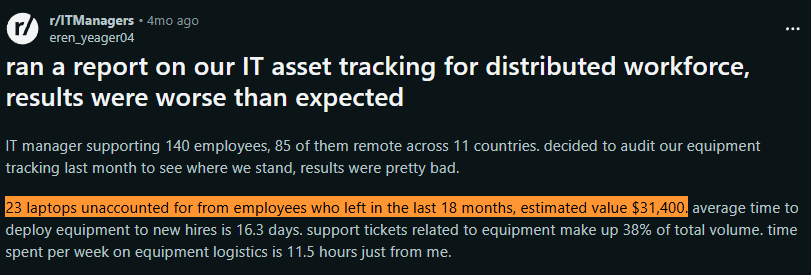
For instance, look at this IT manager’s post on Reddit who manages 140 employees, of whom 85 are distributed across 11 countries. When he ran a report, he found 23 laptops from former employees were unaccounted for in the last 18 months:
Source: Reddit
It would have been caught in a normal scenario. But in a global setting where there’s no single source of truth, recovering devices becomes an issue. And if the employee is already in a different country, there’s hardly anything you can do.
2. Devices are only “visible” when online
Most tracking systems rely on devices checking in via MDM, VPN, or endpoint management tools. That means the laptop's location and compliance or encryption status are based on when it was last online.
When a device stops checking in, it doesn’t vanish from your inventory. It just stops updating. From that point on, everything you see reflects its last known state, not its actual condition.
You can confirm the status in a single-office company by physically locating the device. But this does not pan out the same in a global setting.
A laptop that hasn’t checked in for 30 days could be in storage, stuck in transit, wiped and reimaged, or still with a former employee. And there’s no easy way to confirm which.
3. Offboarding breaks the chain of custody
Offboarding requires multiple teams to work in sync: HR, IT, and logistics. You can manage offboarding well within the same city or country.
But when the scale is global, multiple things can go wrong.
What if the HR marks the employee terminated but fails to inform IT? Here’s a Reddt user who discovered their company lost a laptop and an iPhone that were marked as returned by HR, and the worst part was that nobody knew where they were:

Source: Reddit
4. Cross-border logistics create blind spots
At the global level, international shipping is involved. So, it’s not just IT's job to get devices back. Logistics and compliance teams also come into play.
Customs delays, failed deliveries, import restrictions, and inconsistent courier updates lead to extended periods when the device is neither operational nor clearly tracked.
What if the device shipped from Mexico is stuck at customs clearance in Berlin?
When you check the tracking details, it shows “in transit.” You have no way to know where the device is in real-time until it reaches you, if it reaches you.
And what if the shipping company fails to send the correct packaging material or fails to deliver on time? You’d end up losing the device entirely.
5. Vendors and processes vary by region
Multiple locations mean multiple vendors and processes. One region might use a value-added reseller (VAR), another a courier, another a local reseller. Each has different standards for asset tagging, proof of delivery, repair logs, and documentation.
What if one vendor considers a signature proof of delivery, while another requires only a photo with the neighbor? If a device goes missing, you have no way to locate it. Also, you might not be able to defend yourself during audits without clear chain-of-custody records.
6. Spreadsheets persist longer than they should
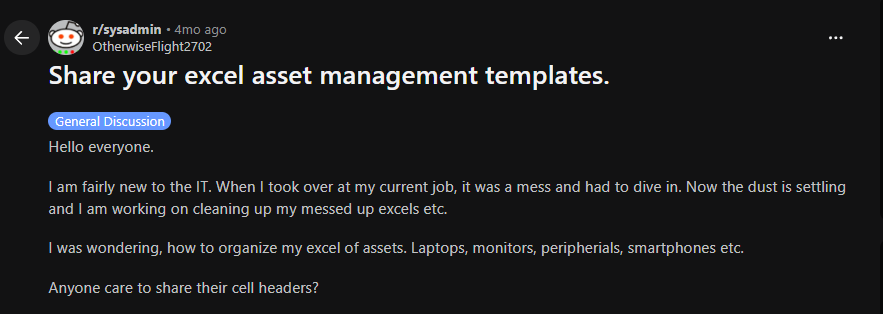
If you’re wondering who uses spreadsheets today, here’s a Reddit post from just 4 months ago where the user is asking for asset management templates for Excel:
Source: Reddit
It makes sense when the budget is low, assets are limited, and the team is small and local.
But when the scale is global, and you have hundreds or thousands of assets, things start to fall apart.
Multiple regions might create their own versions. A device marked as assigned on one sheet might be marked lost/stolen on another. And there’s no way to reconcile that at scale.
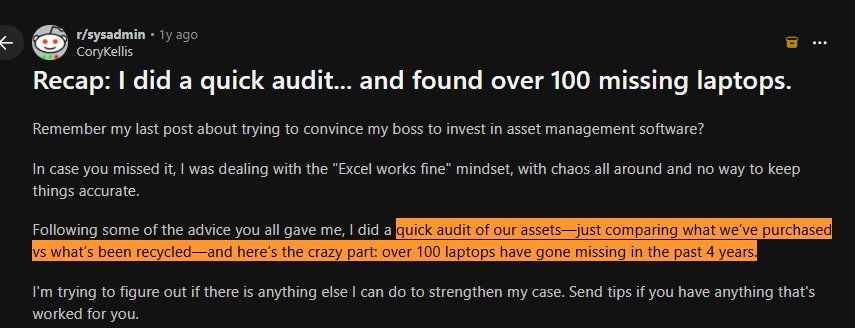
The result is laptops being lost or stolen, and money wasted on buying laptops that could have been simply reassigned. This Reddit user (whose company used Excel for asset tracking) discovered that they were missing 100 laptops after a quick audit.
And 100 new laptops would easily cost $250,000. Not considering the security threat they might be posing.
Source: Reddit
7. Lifecycle stages aren’t connected
Global laptop tracking isn’t just about onboarding or offboarding. It’s also about everything in between, from asset procurement and deployment to repairs, retrievals, reselling, recycling, and disposals.
However, teams use different lifecycle management tools and processes for each asset lifecycle stage.
As a result, procurement may know when it was purchased and for how much, and your IT team may know where it was deployed. But no one may know what happened to it after repair or retrieval.
Check this blog out to understand what other challenges you might come across when trying to manage assets globally: 10 IT Asset Management Challenges [2026 Updated].
What Global Laptop Tracking Actually Covers
A well-laid-out global laptop tracking system covers the following:
1. Real-time asset tracking with location data
With real-time asset tracking data, you know where your device is at any point.
You should be able to see whether a laptop is in transit, delivered, in use, or awaiting return. This isn’t about GPS-level precision. It’s about having a reliable, up-to-date status across shipping, deployment, and retrieval.
If you can’t locate a device without asking someone manually, your tracking system isn’t working.
2. Assigned user records with lifecycle status
Every laptop should be tied to a specific user and a clear status: assigned, in transit, in repair, in storage, or retired. This prevents confusion during reassignments, role changes, or audits.
Ownership without status is incomplete.
Say you know a laptop belongs to Priya in Sales. Without the status, you’d never know whether it’s currently in repair, awaiting redeployment, or still in transit, making it hard for IT to take the next step.
3. MDM enrollment and security policy verification
A global laptop tracking system should confirm whether a device is enrolled in MDM (like Microsoft Intune or Jamf), encrypted, and following required policies. This needs to be verified at setup and continuously monitored.
Location and lifecycle status don’t make your device secure.
Without MDM enrollment status/policy verification, IT may assume a laptop is secure when it is actually unmanaged, unencrypted, or missing security policies.
4. Automated offboarding and retrieval triggers
When someone exits, the system should automatically trigger access revocation, device lock, and retrieval workflows. This removes reliance on manual coordination between HR and IT.
If retrieval depends on someone remembering to act, devices will go missing.
5. Warranty tracking with refresh cycle alerts
Tracking should include warranty status, purchase date, and expected lifecycle so IT teams can plan replacements instead of reacting to failures.
Most hardware issues aren’t sudden; they’re predictable. If you’re surprised by failures, you’re not tracking the lifecycle properly.
6. Depreciation tracking linked to procurement data
By linking asset value to procurement data, teams can decide whether to redeploy, resell, or dispose of devices at the right time. This adds a financial layer to tracking, not just operational visibility.
Without depreciation tracking, you’re managing devices, but not the cost or value tied to them.

Laptop Provisioning Models and How They Affect Tracking?
Before you create your laptop tracking system, you need to understand how devices are provisioned.
The ownership model you choose directly affects how much visibility and control IT actually has.
- COBO (Corporate-Owned, Business Only): Company owns and fully controls the device, with no personal use allowed.
In this model devices are standardized, fully enrolled in MDM, and follow consistent policies across their lifecycle. There are minimal gaps in visibility or control, making it the easiest model to track.
- COPE (Corporate-Owned, Personally Enabled): Company owns the device, but employees can use it for limited personal activities like browsing.
IT maintains control, but you need to create policies that balance security with user privacy, especially across regions with stricter regulations. This makes it manageable but introduces some level of complexity.
- BYOD (Bring Your Own Device): Employees use their personal devices for work.
IT has limited visibility into the device itself, and control depends largely on MDM enrollment and user compliance. Hardware-level tracking is often incomplete or unavailable, making it the hardest model to track.
Here’s a side-to-side comparison of the above laptop provisioning models, to help you make the right choice:
|
Model |
Description |
Tracking Complexity (Why) |
Best For |
COBO |
Company-owned, strictly for business use |
Low: full ownership and standardized setup ensure devices are consistently enrolled, tracked, and controlled |
Security-focused teams, regulated industries |
COPE |
Company-owned, allows limited personal use |
Medium: devices are controlled, but privacy boundaries limit how aggressively they can be monitored or enforced |
Most distributed teams balancing control and flexibility |
BYOD |
Employee-owned devices used for work |
High: no hardware ownership means tracking depends on user enrollment, with limited visibility and inconsistent control |
Contractors, startups, or cost-sensitive environments |
How to Create a Global Laptop Tracking Framework?
1. Procurement
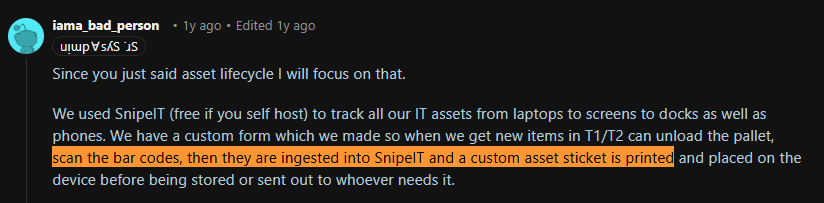
Start by recording every device at the point of purchase. Capture details such as serial number, model, cost, vendor, and region, assign a unique ID, and link it to the new user.
This Reddit user also talks about capturing crucial information as soon as they receive new devices:
Source: Reddit
The process can look time-consuming and complex, but it's easier than you think.
For instance, if you procure devices through Workwize, we automatically capture all these details and add them to the asset management dashboard. You can see the serial number, category, device owner, location, status, condition, and other details:
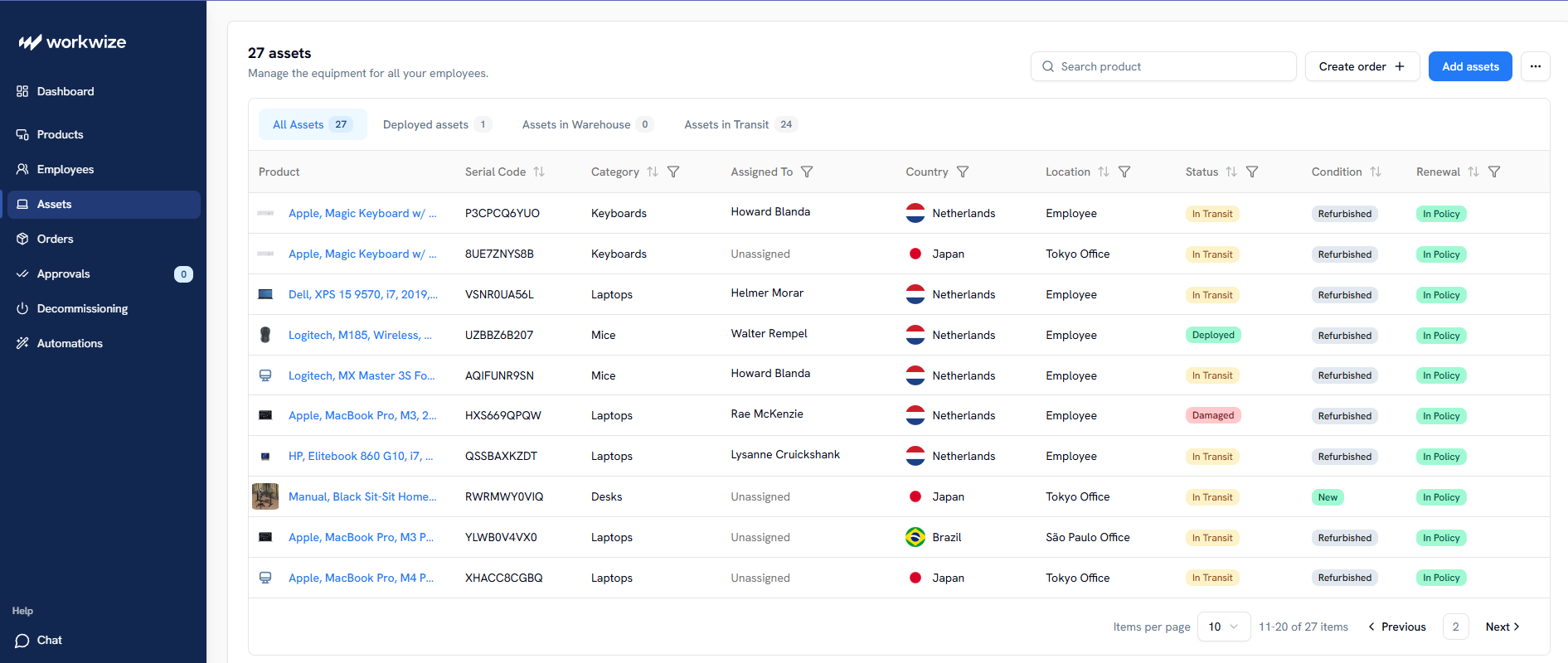
Starting this early in the asset lifecycle ensures your laptop is tracked from day 1. More importantly, it creates a single record that follows the device through shipping, assignment, and eventual return.
2. Enrollment
After the devices enter your system, the next step should be enrolling them into your MDM as early as possible. This helps report status to your IT Asset Management (ITAM) tool and receive security configurations automatically.
After you procure the device with Workwize, it is enrolled in the MDM of your choice, such as Microsoft Intune, Jamf, Iru (formerly Kandji), and more.
This step gives you control over the devices. For instance, you can enforce encryption, patches, baseline policies, and install the required apps without manual intervention.
3. Deployment
After the device is enrolled, the next step is deployment. Workwize helps you deploy pre-configured devices across 100+ countries.
What it means is that each employee gets devices pre-configured based on their role requirements. For instance, if you’re deploying a device for a developer, it will have the necessary tools like Visual Studio and access to collaboration tools and other apps.
The goal here is to update the assignment status in real-time as the device is deployed. Otherwise, ownership records quickly become inaccurate and create confusion around who has the device.
4. In-use Management
Once the device is in use, you must continuously monitor the device data in real time. Things to track include patch status, encryption, last check-in, and any lifecycle changes like transfers, repairs, or reassignments.
Without these updates, asset records become stale and unreliable, reflecting only the last-known information rather than the current reality.
Pro Tip: You can set rules for devices that don’t report for a certain period. For example, trigger an email if a device is offline for 10 days and then call the employee.
5. Reassignment
Roles change, teams transfer, or get replaced.
So, it’s important that the devices are reassigned (and details such as the new owner and location are updated) within the ITAM dashboard before a new user starts using them.
And not just that, you must ensure the device is re-enrolled or re-validated against current security baselines.
Without this step, devices continue to carry outdated ownership and configuration data. This creates confusion during support and weakens security controls.
6. Offboarding
When an employee exits, device tracking should transition immediately from active use to recovery.
But if this is manual, and the HR fails to inform IT on time, things could go wrong.
When you use Workwize for automating your IT asset lifecycle, you can trigger offboarding as soon as HR updates the same on the HRIS. IT will get notified instantly, and Workwize will initiate the retrieval process, i.e., sending prepaid kits and recovering the device.
The best part is that Workwize lets you track your assets in real-time during the offboarding process. So, you’ll always know where your asset is.
7. Disposal
Once you have the devices back, you need to decide what to do with them.
For instance, when you retrieve assets through Workwize, we perform a certified data erasure to ensure security is never compromised. And based on your preference, we can help you deploy, resell, recycle, or dispose of the asset and update the same in the IT asset management dashboard.
To decide what to do with your assets (whether to resell, recycle, dispose of, or redeploy them), check out this guide: IT Asset Recovery: Complete 2026 Guide for IT Managers
How to Track Laptops Across Borders Without Losing Visibility
Even with a well-defined lifecycle and tracking system in place, visibility breaks down the moment a device leaves your controlled environment.
This is because traditional tracking tools are designed for systems, not for physical movement across countries, vendors, and logistics networks.
Here are the common issues you might experience when devices are actually on the move:
Customs delays
One of the most common issues companies run into when shipping laptops internationally is customs delays. And the worst part is that you don’t know what’s happening during the entire time.
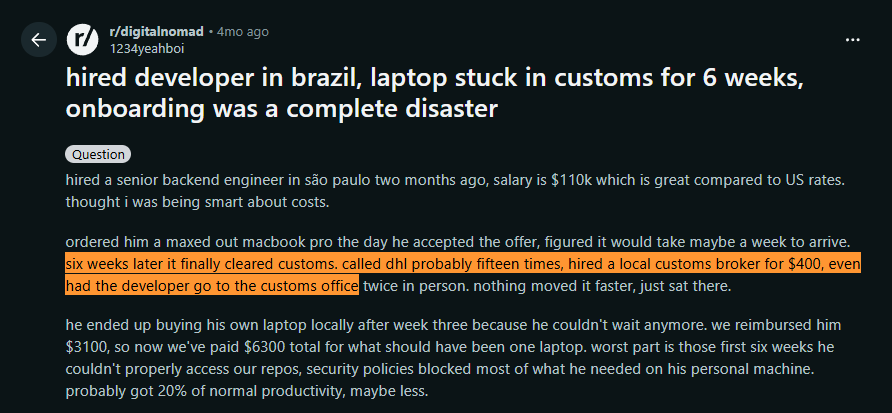
This Reddit user shares a similar incident when they hired a developer in Brazil and ordered a MacBook for them, which was stuck in customs for 6 weeks. They had to hire a customs broker to get their laptop.
Eventually, they ended up paying $6,200 for a laptop that was half the value, since the developer had to buy the device locally:
Source: Reddit
A better tracking system won’t help you here, but a reliable logistics layer would. And Workwize is a combination of both.
Workwize handles procurement across 100+ countries and takes care of the customs clearance. Whatever happens, you get real-time updates from Workwize, so you know where your device is at all times.
And because we have a refined process, we source laptops locally, i.e. the country you’re hiring the employee from. This minimizes the delivery time, shipping fee, and reduces the likelihood of customs issues.
Multi-country compliance
You can track company devices, as long as you’re transparent with employees about how and why that tracking happens. But that’s only one piece of the puzzle, and it mostly reflects EU-specific regulations.
Once you start operating across APAC or Latin America, the compliance landscape becomes far more complex. Data privacy laws, employment protections, and device handling requirements vary widely, and it’s easy to fall out of compliance without realizing it.
That’s where a global hardware procurement platform like Workwize comes in. Because the platform is built to operate across multiple regions, it handles the complexities of international shipping, local regulations, and end-of-life processes on your behalf. This includes certified data erasure and responsible disposal or recycling of devices in line with both local and global standards. On top of that, you get full visibility into every step of the process.
Local warehousing vs. central shipping
Workwize has a vast global network of warehouses and vendors. As mentioned earlier, we usually procure and deliver assets within the country where you’re hiring the employee.
When the device is sourced locally, no international shipping is required. This means no customs clearance hassle, tracking gaps, unnecessary delays, crazy shipping fees, or import duties.
You get laptops on time, every time, and track them in real time.
Last-mile visibility
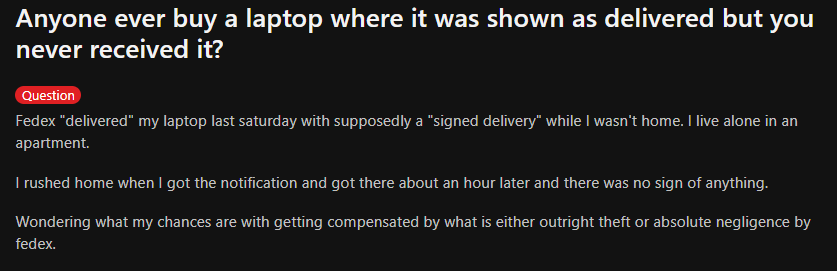
Last-mile delivery is one of the least visible stages in global laptop tracking. Your employee could be waiting for the laptop on their day 1, while it’s marked as “delivered” by the courier partner a week ago.
This Reddit user confirms the pain point. According to them, FedEx marked their laptop as “delivered” and it was a signed delivery, while the receiver wasn’t at home:
Source: Reddit
But when you ship devices through a trusted platform like Workwize, we ensure they reach the right person and capture strong proof of acceptance, such as a photo or signature. And whatever’s happening is updated in our system in real-time, available for you to track.
Embedding Security and Compliance Into Laptop Tracking
Security and compliance should be embedded into your tracking framework, and not treated like an afterthought.
Here’s a security and compliance checklist that covers what to include in your global laptop tracking program:
|
Compliance Requirement |
What It Means in Practice |
Check |
|
Full-disk encryption enforcement |
Verify encryption is enabled at enrollment and continuously monitored across all devices |
 |
|
MDM enrollment verification |
Ensure every device is enrolled in MDM before first use—no exceptions |
|
|
Remote lock and wipe capability |
Test and document remote lock/wipe workflows; trigger automatically during offboarding |
|
|
Chain-of-custody records |
Maintain a complete audit trail of ownership, transfers, and status changes from procurement to disposal |
|
|
Data erasure certification |
Perform secure wipe and generate a certificate before redeployment or disposal |
|
|
Employee privacy disclosures |
Clearly communicate what is monitored, how data is used, and obtain acknowledgment during onboarding |
|
|
Regional regulatory compliance |
Align tracking practices with country-specific laws (GDPR, APAC regulations, local labor laws) |
|
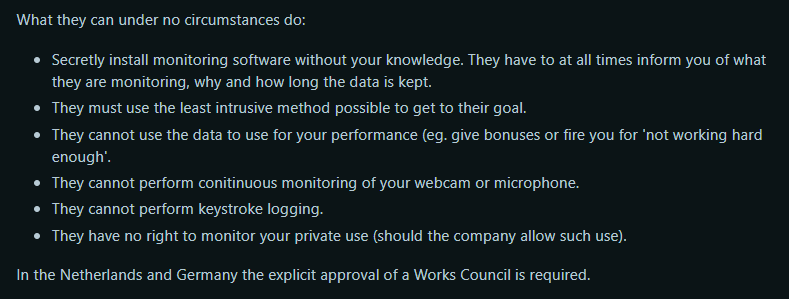
Pro Tip: Employee privacy disclosure is extremely important, especially in EU regions. While companies are generally permitted to track/monitor employee devices (eg., as long as they can prove that their security reasons outweigh the employee’s right to privacy), it should be clearly communicated.
As this privacy officer in the Netherlands says, under no circumstances can a company secretly install monitoring software without the employee’s knowledge:
Source: Reddit
Privacy disclosure not only protects you from legal ramifications but also helps build trust among employees.
If you’re tracking laptops, you’ll eventually manage them across their lifecycle. So, here’s a list of IT Asset Management (ITAM) best practices from real IT managers and system admins to ensure you get it right the first time: IT Asset Management Best Practices: A Complete Guide

Implementation Roadmap: From Audit to Scale
Once you have built the framework, you must implement it across systems, teams, and regions without compromising visibility — that's how you confirm it works.
Here’s a step-by-step roadmap to help you move from fragmented tracking to a scalable, reliable system.
1. Audit your current inventory
Start by consolidating asset data across HR, IT, procurement, and any spreadsheets into a single inventory software. Make sure you verify (not assume) key details like ownership, device status, location, and MDM enrollment for each device.
This step is where most gaps surface: devices assigned to former employees, missing records, or assets that were never enrolled in the first place. Fixing these early prevents bad data from flowing into your new system.
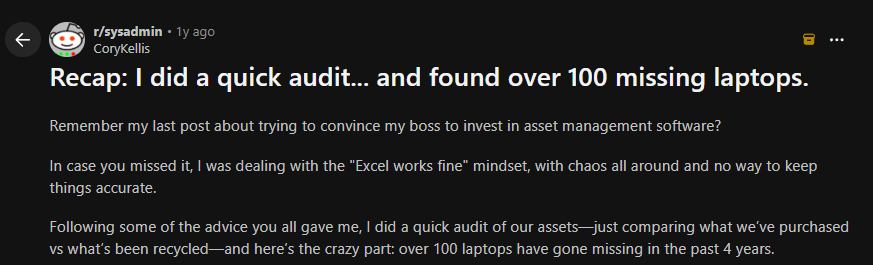
Common Mistake: Assuming your current inventory is accurate without validating it is a common mistake due to which “ghost assets” go unnoticed. Here’s an example of a system admin on Reddit who found they had lost 100 laptops over 4 years after performing a simple audit:
Source: Reddit
2. Validate endpoint controls
Before scaling anything, confirm that your core controls actually work across all device types. Test encryption enforcement, patching, remote lock/wipe, and MDM enrollment on Windows, macOS, and mobile devices.
Also, verify recovery key storage and access permissions, especially important for remote scenarios where physical access isn’t possible.
Common mistake: Testing only one environment (usually Windows) and overlooking gaps in Mac or remote devices.
3. Formalize device policies
Define clear policies for device usage, monitoring, and ownership. For instance, you need to define BYOD rules, data retention, and what exactly is being tracked.
Work with legal to ensure policies are compliant across regions and easy to understand.
Otherwise, you might find employees getting confused, like this Reddit user who defines their company’s policies as vague:
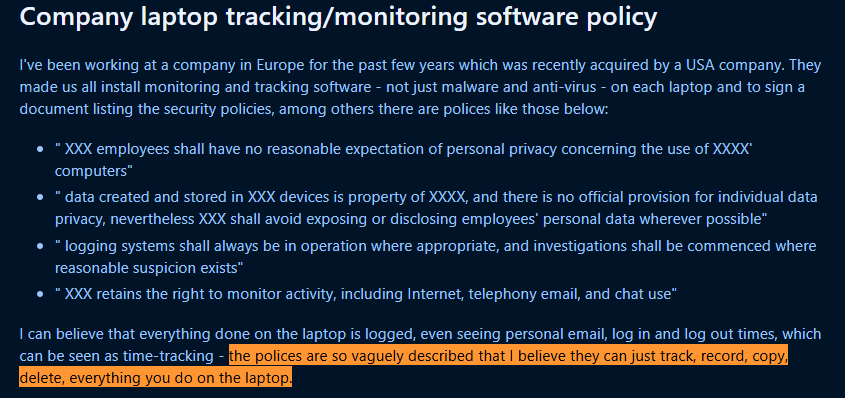
Source: Reddit
For global laptop tracking, this is especially important in GDPR regions where monitoring must be transparent and justified.
Common mistake: Rolling out tracking or monitoring without clearly communicating it to employees. This creates legal risk and trust issues.
4. Pilot before full rollout
Run controlled onboarding and offboarding scenarios across different roles and regions. Test everything end-to-end:
- Device provisioning
- MDM enrollment
- Assignment updates
- Retrieval workflows
- Audit logs
This is where you catch real-world issues like failed deliveries, missing updates, or broken automation.
Common mistake: Piloting in one country and assuming it will work globally. You should know that cross-border logistics and compliance behave very differently.
5. Integrate and automate workflows
Connect your core systems: HRIS, MDM, procurement, ITSM, and asset tracking.
Use lifecycle events (like hiring or offboarding) to trigger actions automatically instead of relying on emails or manual updates.
For example:
- HR updates the New hire’s record → device procurement + assignment
- HR updates the Employee’s exit → lock + retrieval + status update
Common mistake: Automating workflows without testing the trigger logic, especially HRIS events, which are critical to keeping tracking aligned.
Another mistake is to rely on manual elements instead of creating automations. This usually leads to inefficiencies and errors.
6. Roll out regionally
Deploy your system in phases by geography. Align logistics, privacy requirements, and internal training for each region before expanding further.
This helps you handle:
- local shipping challenges
- compliance differences
- vendor inconsistencies
A phased rollout ensures you don’t lose control when scaling globally.
Common mistake: Launching globally at once and getting overwhelmed by edge cases, delays, and regional differences.
But if you rely on an established global hardware management platform like Workwize, you can go live in one go, since we handle the nuances for you.
7. Monitor and refine continuously
Once live, keep monitoring key metrics like:
- Encryption compliance
- Device check-in rates
- Retrieval timelines
- Lost or unaccounted assets
Review these regularly across IT, HR, and security teams, and adjust workflows as needed.
Common mistake: Building dashboards but never reviewing them. Visibility without action doesn’t improve tracking.
Conclusion: Global Laptop Tracking With Workwize
As you’d have already understood by now, global laptop tracking doesn’t break because of missing tools. It breaks when HR, IT, procurement, and logistics operate in silos. Each team owns part of the lifecycle, but no one owns the full picture. That’s where you lose visibility.
The only way to fix this is to connect every stage of the laptop lifecycle into a single system: from procurement to disposal.
This is exactly where Workwize fits. Being a global IT hardware management platform, Workwize brings together procurement, deployment, tracking, retrieval, and disposal into one unified workflow.
You can trigger automated onboarding workflows from your HRIS platform and ensure devices are logged at the point of purchase, delivered pre-configured across 100+ countries, tracked in real time, and automatically retrieved and wiped during offboarding. All this, without manual coordination.
The best part? Unlike broader platforms, Workwize is built specifically for managing the physical device lifecycle at scale. It doesn’t just help you track laptops globally; it ensures every device stays visible, controlled, and accounted for at every stage.
To see how Workwize helps you track laptops globally and automate the asset lifecycle, book a free demo now.



Establish a single source of truth for every IT asset across the globe.
.png?width=258&height=318&name=g10%20(5).png)
More related resources to help you stop firefighting hardware operations.



Get monthly insights into how other IT leaders are improving their ops.



.png?width=2880&height=1232&name=Group%202147262874%20(1).png)
Stop coordinating
hardware like it's 2012.
.svg)
.png?width=172&height=68&name=apple%20business%20patner%20(1).png)
.svg)
.svg)
.svg)
.svg)