




.svg)
.svg)

.svg)


.svg)





.svg)
.png?width=500&height=424&name=Style-1---V1-(1).png)

.png?width=1230&height=692&name=Vector%20(13).png)
The Problems With Traditional Laptop Return Solutions
Traditional methods for returning laptops, such as using FedEx or UPS, are a game of chance. Sure, they’ll get the job done, but not without a few headaches along the way.
You raise a laptop retrieval request via FedEx. Weeks later, you find out that the laptop is still at the ex-employee’s house because the shipping partner failed to reach them on time.
In online discussions among IT admins, this user reports that laptops are sitting with former employees for months because pickup requests keep failing.

Source: Reddit
Sadly, the problems don’t end here.
The same user also reported that traditional laptop retrieval solutions often lack a proper chain of custody. While this may not look that serious, without a proper chain of custody record, you’ll be left defenceless during audits, leading to non-compliance.
What if the device was marked “delivered” in the system, but no one signed for it? You’d never know where the laptop actually went.
And losing laptops in transit is more common than you think.
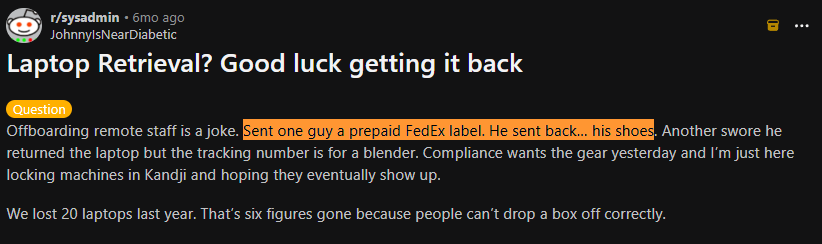
This Reddit user (who lost 20 laptops in one year) shared a funny incident where he sent a former employee a prepaid FedEx label and the employee sent back his shoes. Another guy sent back a blender. Funny, right?
But it’s equally scary because the company lost two devices that threat actors could exploit.
Source: Reddit
Another major problem is the manual nature of traditional platforms.
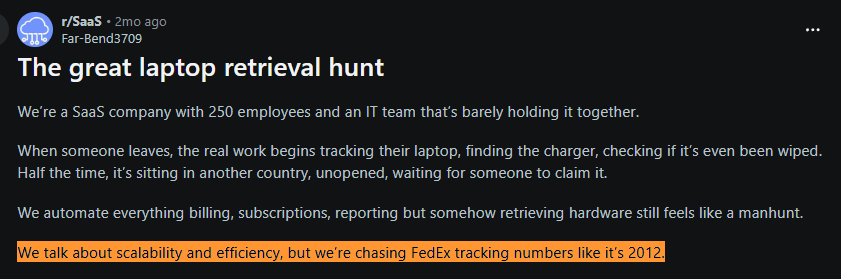
One IT admin described the irony perfectly: their company automated billing, subscriptions and reporting. Yet retrieving laptops still meant manually checking FedEx tracking numbers.
Source: Reddit
All of these instances show that traditional laptop retrieval platforms and processes are not scalable.
And, what if you want to dispose of, redeploy or resell the devices? You’ll have to find another vendor, which quickly becomes a hassle as you scale.
That’s when dedicated laptop return service providers shine. They provide custom-padded laptop boxes for safe transit, streamline the process with clear tracking and transparent updates and often even handle employee communication, so no one’s left guessing.
You’re entrusting the process to a system built to protect your investment and make the whole experience smoother.
How Laptop Retrieval Services Work?
Here’s how a dedicated laptop retrieval service works.
Step 1: Triggering the Retrieval Work Service providers like Workwize handle the recovery process at a high level:
Flow: Workwize integrates with the HRIS platform (say, BambooHR) that you’re using. When HR updates the employee's status to "Leaving" in BambooHR, it triggers the retrieval workflow in Workwize.
Step 2: Shipping a Dedicated Box: Workwize then sends a secure, padded box or boxes (depending on the items to be retrieved) to pack the items, along with a set of instructions.
Step 3: Pickup: Based on your preference, the former employee either drops it off at a courier point or has a courier come to their home to pick up the package.
Step 4: Shipping the Laptop: The package is either sent to the office or the warehouse, depending on the location and your preferences.
Step 5: Reassignment/Disposal/Resale: Once the device reaches the designated location, it’s wiped of sensitive data (you get a data erasure certificate) and prepared for recycling, reuse or resale—based on your preferences.
This process is automated, transparent, secure and cost-effective.
Let’s now learn how you can choose the right laptop retrieval service.
What Actually Matters When Choosing a Retrieval Service?
Even a dedicated laptop retrieval service won’t do any good if you don’t consider these factors when comparing your options:
Ease of use
Returning a laptop shouldn’t feel like jumping through hoops.
You want a solution that's easy for the company and the employees.
Look for services that offer straightforward instructions, pre-labeled shipping kits and multiple return options, such as courier pickup or drop-off at a designated location.
Reality check: If the process feels complicated, employees might delay it or ignore it altogether.
A Reddit user describes the frustration of a former employee refusing in-person return or courier pickup and insisting on a prepaid shipping label instead.

Source: Reddit
The right laptop retrieval service offers multiple convenient options for returning the assets to your former employees. And the easier it is for them, the higher the chances of you getting your assets back.
Data security
Laptops often hold sensitive data, so you need a laptop retrieval service that offers certified data erasure or encrypted storage until the device reaches IT. Some companies, like Workwize, also offer certified asset disposal for end-of-life assets.
Reality check: If a device is lost in transit and still contains company data, you’ve just created a security incident. And I don’t need to remind you that the global average cost of a data breach is $4.4 million.
Tracking and accountability
You need to know exactly where the device is and who handled it. Real-time updates, delivery confirmations and clear chain of custody records make a big difference when devices are moving across cities or countries.
Reality check: If a laptop goes missing and you can’t show who last handled it, the investigation stops with you.
Plus, the lack of a chain of custody records leaves you indefensible during compliance audits. And this is especially true for regulated industries such as healthcare, finance, etc.
This Reddit user recommends users check if their asset disposal tool offers chain of custody records, among other data, as regulators ask for it during audits:

Source: Reddit
Timelessness and flexibility in volume
Whether you’re retrieving one laptop or 50 after layoffs, the process shouldn’t be chaotic for IT or HR. A good service handles volume spikes and still moves quickly.
Reality check: The longer the retrieval takes, the longer that device stays unusable, untracked and out of circulation.
Cost
Retrieval costs add up quickly at scale. Look for providers with a decent shipping network, predictable pricing and no surprise logistics fees.
For instance, Workwize has local warehouses across multiple locations around the globe. This means you can securely store your devices at one of our facilities and save big on shipping costs.
Reality check: Hidden fees don’t show up in the quote; they show up after your first batch of returns.
Environmental Responsibility
Companies are increasingly expected to handle hardware responsibly. Retrieval services that support refurbishment, resale or certified recycling help reduce waste and recover value.
Reality check: Without a plan, most returned laptops end up forgotten in storage or thrown away.
But, Workwize:
- Uses eco-friendly methods for disposing of end-of-life assets, reducing environmental impact while safeguarding data.
- Supports refurbishment of assets for reuse, extending the asset lifecycle.
- Helps you resell your assets to recover up to 45% of the residual value.
- Reduces carbon footprint by storing your devices at our local warehouses.
Global coverage
If you’re working with a distributed team, make sure your retrieval partner is global. Otherwise, you’ll have to deal with local vendors on your own.
Even if you’re a smaller operation, make sure the retrieval service you choose supports the countries where your employees are located.
Reality check: The process that works in one country often breaks the moment a device needs to cross a border.
However, Workwize supports asset deployment and retrieval across 100+ locations. So, you don’t have to coordinate with vendors or switch multiple retrieval services just to get your assets back from two different countries.
|
Service |
Starting Price |
Geo Coverage |
What They Retrieve |
Lifecycle Services |
Best For |
HRIS |
Speed |
Ratings |
|
Workwize |
Custom pricing |
100+ countries |
Laptops, monitors, peripherals, full IT equipment |
Procurement, deployment, retrieval, storage, refurbishment, resale, disposal |
Global companies managing remote teams |
Yes |
Typically ~5–7 days initiation globally |
G2 ~4.7 |
|
ReReady |
$85 (US domestic) |
Limited international (US, UK, CA, etc.) |
Laptops, desktops, iPads, monitors |
Returns + deployment only |
Small teams needing simple returns |
No native HRIS |
~1–2 weeks |
Limited reviews |
|
Allwhere |
~$99 per retrieval |
55+ countries |
Laptops only |
Storage, resale, disposal |
Mid-size remote companies |
Yes |
~1–2 weeks |
G2 ~4.6 |
|
Retriever |
$95 US domestic |
US, UK, Canada + limited EU |
Laptops, monitors |
Storage, refurbishment, redeployment, disposal |
North America / UK companies |
No |
~1–2 weeks |
Trustpilot ~4.6 |
|
GroWrk |
Pay-per-use / custom |
150+ countries |
Full IT equipment |
Procurement, deployment, retrieval, storage, wipe, redeployment |
Large distributed teams |
Yes |
~1 week typical |
G2 ~4.6 |
|
Device Rescue |
$89 |
US & Canada |
Laptops, tablets, phones |
Storage, redeployment |
Small North American companies |
No |
~1–2 weeks |
Limited reviews |
|
Revivn |
Custom |
Global pickups |
Full IT equipment |
Recycling, resale, refurbishment, compliance reporting |
Companies focused on sustainability / ITAD |
No |
Pickup scheduling dependent |
Limited reviews |
|
Remote Retrieval |
$77 |
US, Canada, Mexico, UK, Puerto Rico |
Laptops, monitors, tablets, PCs |
Data wipe, recycling |
Budget-friendly North American teams |
No |
~1–2 weeks |
Limited reviews |
|
Quipteams |
Pay-as-you-go |
130+ countries |
Laptops and IT equipment |
Procurement, retrieval, storage, redeployment, buyback |
Fast-growing remote companies |
Yes |
~4–7 days typical |
G2 ~4.8 |
|
Firstbase |
Custom / quote-based |
150+ |
Laptops + general IT equipment/peripherals |
Procurement, deployment, asset management, retrieval/asset recovery, ITAD, refurbishment/redeployment/resale |
Remote-first teams that want one platform for onboarding + offboarding logistics |
Yes |
2-5 days |
G2 ~ 4.8/5 |

Best Laptop Retrieval Platforms for Remote Teams
Here’s our list of handpicked laptop retrieval platforms for remote teams.
Full Disclosure: For each tool, I’ve either signed up for the trial, analyzed demo videos, taken self-guided tours or scrolled through hundreds of user reviews to understand how the platform works and how well users like it.
And I can say that the information I’ve shared in this article is enough to help you make an informed decision.
1. Workwize
Key Features:
- Covers the entire hardware lifecycle in one system: procurement, global deployment, asset management, retrieval, refurbishment/redeployment and disposal/resale
- Has local warehouses for locally storing the retrieved assets, speeding up the retrieval, saving you big on shipping and reducing carbon footprint
- Automates the entire process of shipping pre-configured devices, enrolling them into MDM automatically and triggering retrieval when employees leave
- Collects devices from employees, wipes them securely, refurbishes them, stores them and even ships them to the next hire
- Helps you recover the residual value by up to 45% by reselling them
- Supports IT hardware management across 100+ countries and is designed for distributed or remote-first companies.
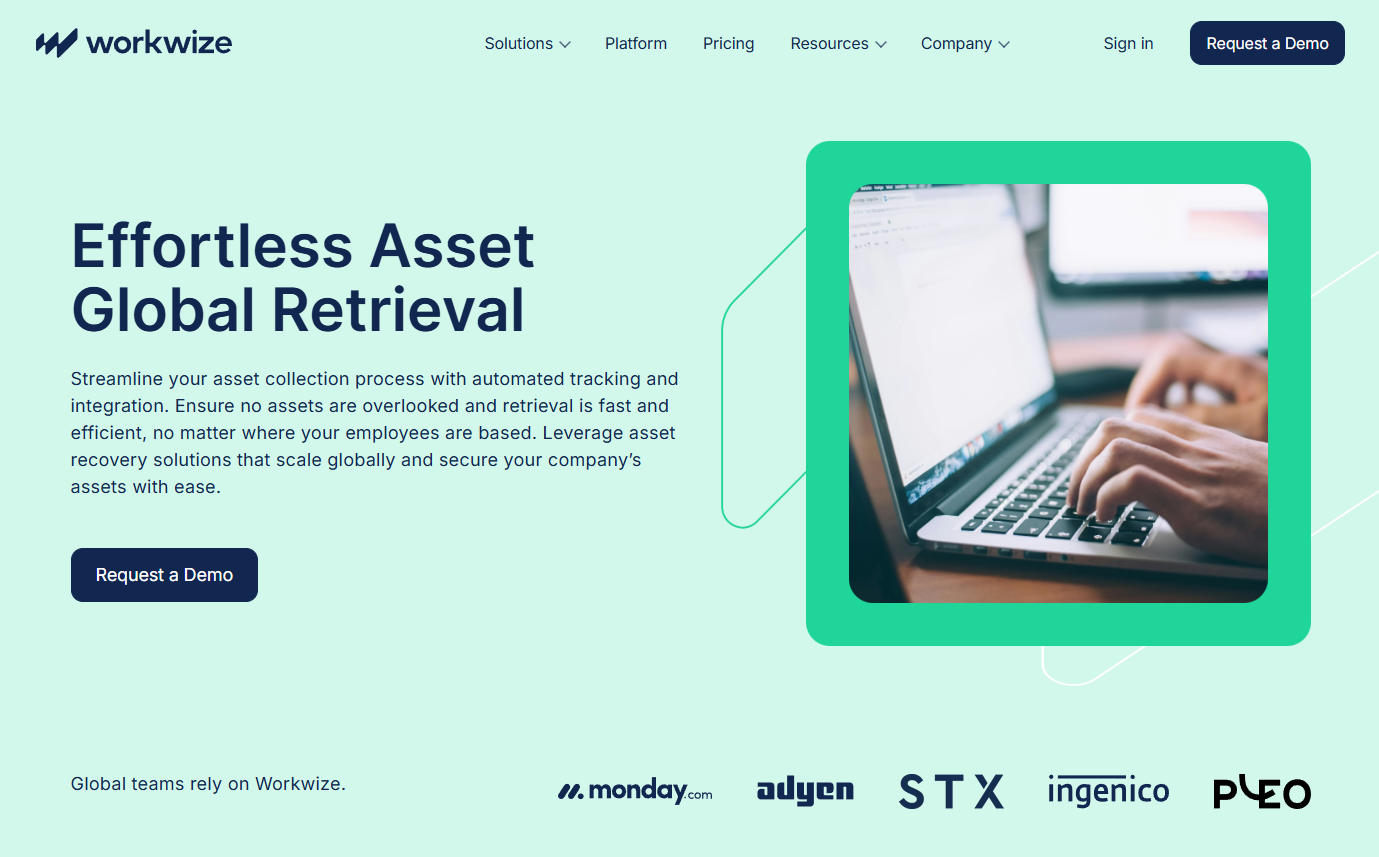
Workwize is a global IT hardware management platform that automates your entire asset lifecycle, from procurement and deployment to repairs, retrievals and certified disposals.
Source: Workwize
You must be thinking, “of course, they’ll put their tool first.” I get it. But rest assured, I’ll prove why Workwize is one of the best choices in a few minutes.
Workwize lets you order, ship and deploy (pre-configured) assets across 100+ locations, handle repairs and even retrieve assets from your remote employees with a few clicks.
And once the devices are retrieved, you can securely dispose of, resell, donate, recycle or prepare the assets for redeployment. Yes, all that through the same platform.
Workwize integrates with your HRIS platform and retrieval is initiated as soon as the employee’s termination is updated. Add a few details and your retrieval is now booked.
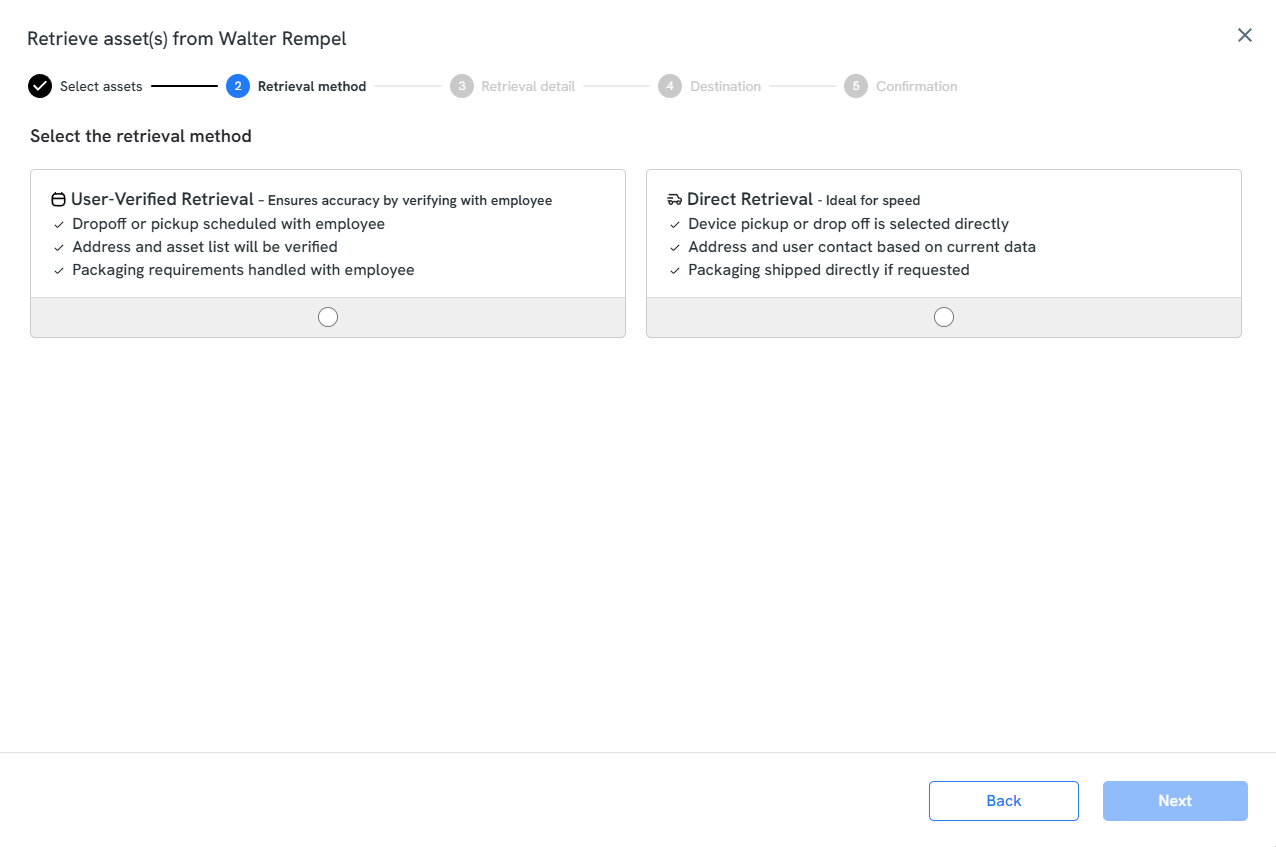
Workwize sends your employees a secure package with instructions and offers to pick up the devices or have them drop them off at the nearest courier point. This makes it convenient for the employees and increases the chances of return.
And during the entire process, you get real-time updates and alerts, which reduces the risk of losing the device in transit.
In addition to supporting 100+ countries and offering end-to-end IT asset management services, Workwize boasts a 100% hardware retrieval rate, which is unmatched among platforms on the list.
Pros:
- Automates the entire asset lifecycle from procurement to retrieval.
- Supports retrievals across 100+ locations.
- Users appreciated automated offboarding and onboarding, as it saves IT teams a lot of time (Source
Cons:
- May not be ideal for smaller organizations with an in-office workforce.
- Some users request support for more locations, but Workwize is actively working towards expanding the network (Source)
Pricing: Workwize offers 3 primary plans:
- Basic
- Professional
- Enterprise
We understand that different businesses might have unique needs, which is why we offer customized pricing. Just book a free demo to get customized quotes for your organization.
2. ReReady
Key Features:
- Ships prepaid return kits to employees
- Sends automated reminders to chase employees.
- Offers multi-stage shipment tracking notifications
- Supports optional pickup scheduling and signature requirements
- ReReady offsets shipping emissions so all returns are 100% carbon neutral
ReReady’s platform does just 2 things: returns and deployment. And for this article, we’re going to talk about its laptop retrieval service.
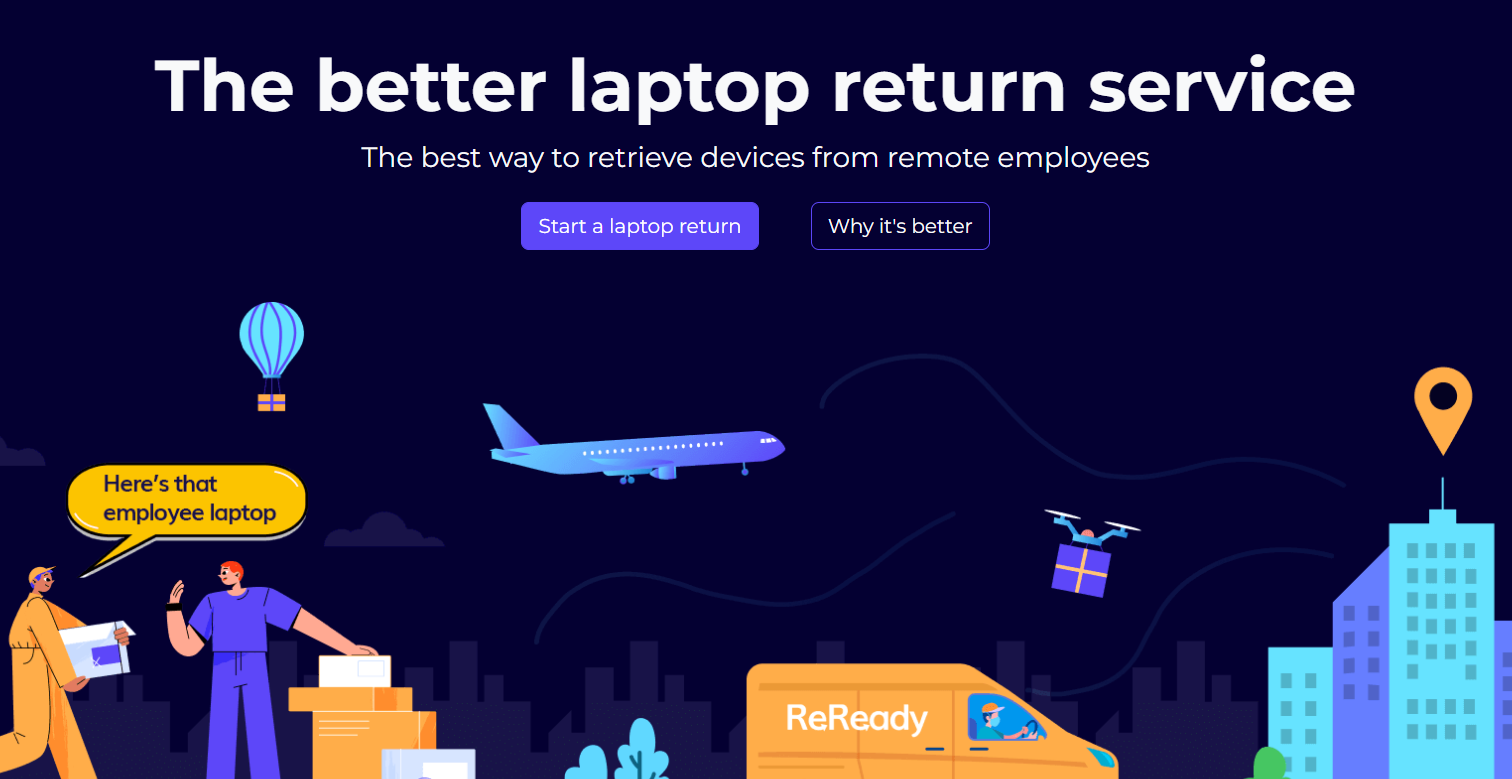
Source: ReReady
Because ReReady lets you try the platform for free, I created an account and started exploring the platform. Honestly, I loved how simple it is to book a return. All I had to do was follow some basic steps.
This is where the return process starts. You can choose the device type (laptop, MacBook, desktop, iPad, etc.) and decline the box or prepaid label if the employee already has one.
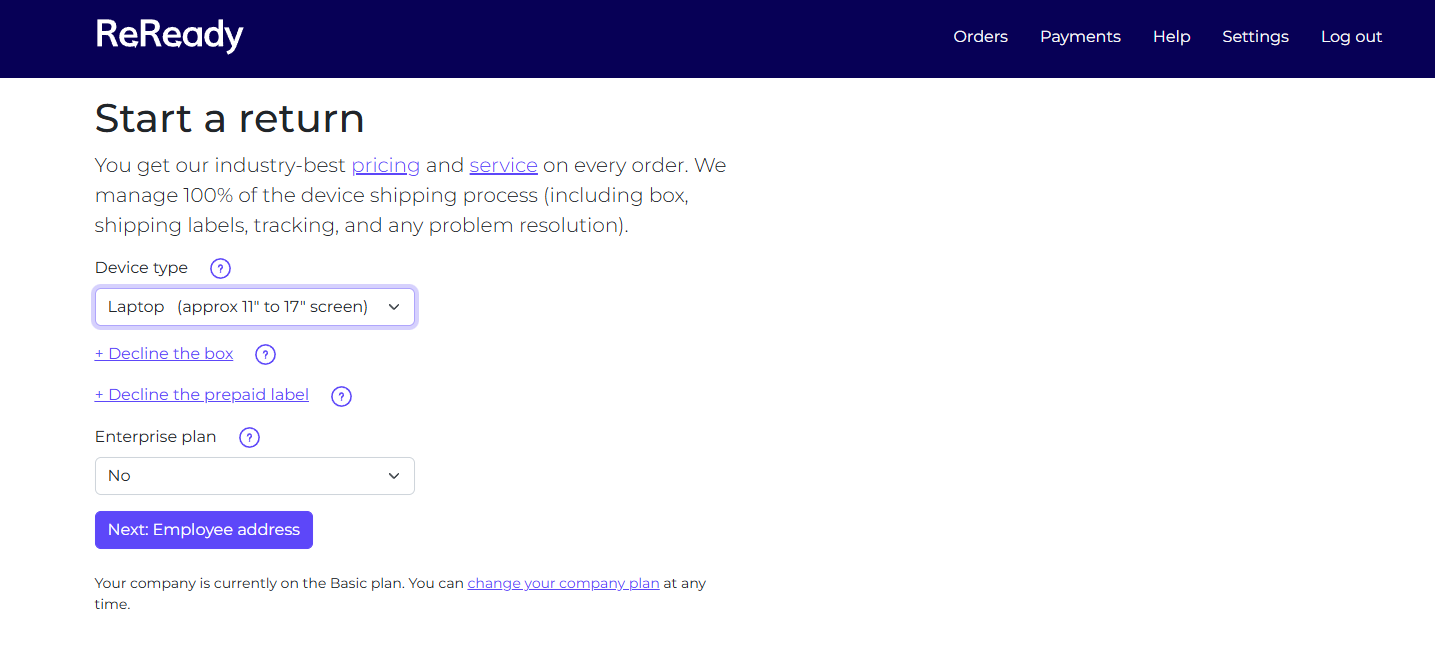
Source: ReReady
Keep following the instructions, make the payment and your return is scheduled. But there are some caveats.
While entering the address, I discovered ReReady supports international returns between these countries only:
- Australia
- Canada
- UK
- Ireland
- Mexico
- Peru
- Sweden
- USA
For companies operating outside these countries, that’s a bummer. You’d want to explore Workwize or other options on the list.
One thing I liked was that ReReady lets you enable signatures at delivery on both sides (during return from the employee and during delivery of the returned item) for $10 each for accountability and proof of custody.
You can add insurance for your products. For 10$, you get coverage of $1000 and the upper limit is $5000, for $50. ReReady lets you select specific carriers like UPS or FedEx based on your preference.
Sadly, ReReady does not support data erasure or asset disposal. While they will help you ship your assets to the disposal service of your choice, there is no in-house ITAD.
Pros:
- Dedicated laptop return and deployment service provider.
- Easy to use and a low learning curve.
- Affordable and supports bulk laptop returns as well.
Cons:
- Very limited number of user reviews (just 1 on Trustpilot)
- Does not support asset disposal or data erasure
Pricing: Domestic shipping within the United States starts at $85. Check out their pricing page for complete international pricing.
3. Allwhere
Key Features:
- Sends a dedicated retrieval kit to the employee that includes a padded box, packing materials, instructions and a prepaid return label
- Contacts the employee directly, sends reminders and manages communication until the device is returned
- Offers real-time tracking across the entire retrieval lifecycle
- Supports retrievals worldwide and reports around a 91% on-time retrieval success rate, significantly higher than typical industry performance.
- Handles sensitive data on the devices securely to prevent breaches
- Offers post-return options like storage, redeployment or disposal
Allwhere is a more comprehensive Global IT procurement, equipment and asset management solution that also offers laptop retrieval.
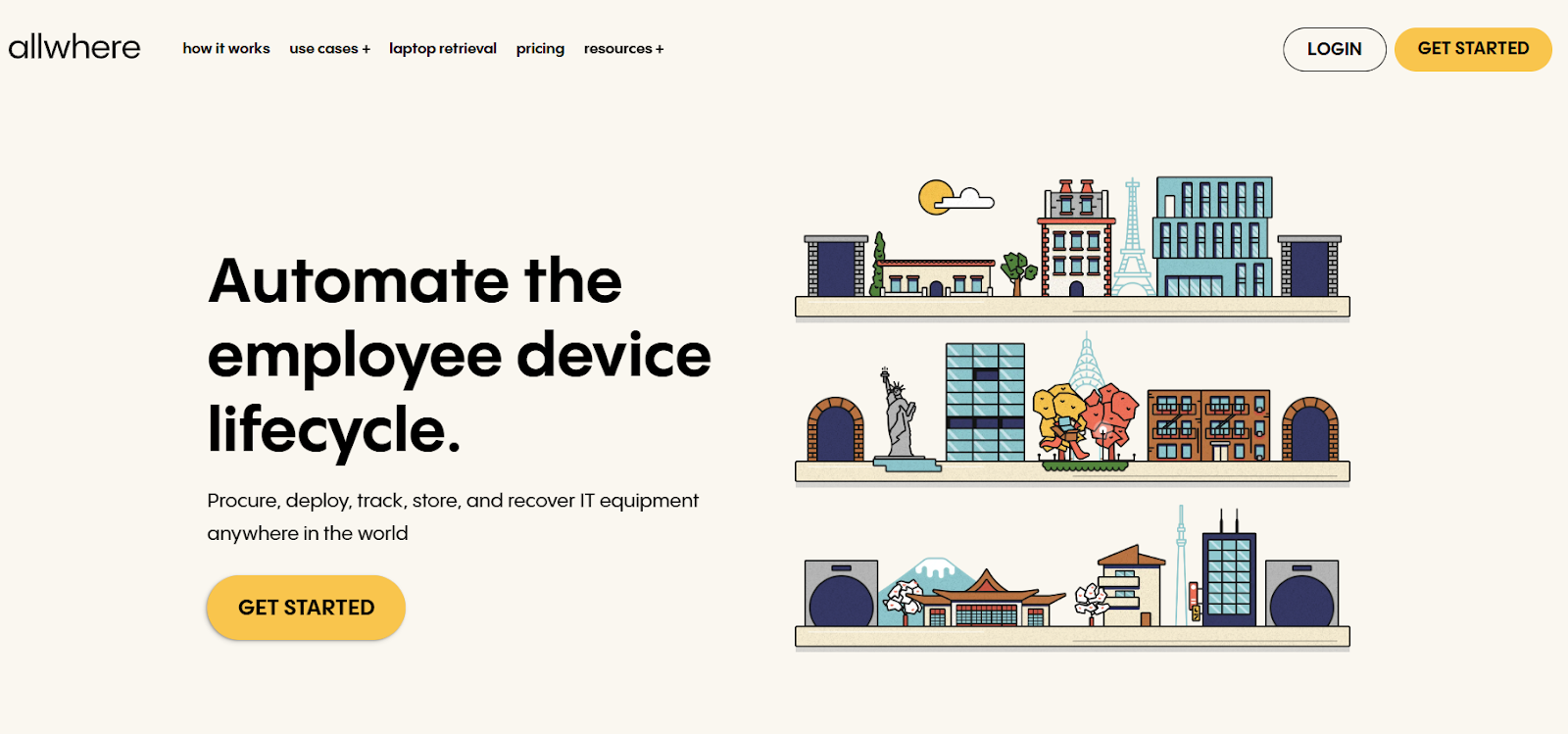
Source: Allwhere
I could not access their demo videos, video walkthroughs or sign up on their portal, since you have to book a meeting first. But I did go through the help docs and user reviews to understand what Allwhere offers.
Based on my research, Allwhere operates pretty much like ReReady. You share your info, your employee’s info, tell them about the device and make the payment. Allwhere will send a padded box with packing materials, instructions and a prepaid return label.
However, unlike Reready, which supports the retrieval of desktops, monitors and iPads, Allwhere is limited to just laptops.
What sets Allwhere apart is that it also offers in-house asset disposal. You can recycle, resale or donate the device, based on your preference. If you decide to dispose of it, Allwhere will provide you with a certification of destruction upon request.
Plus, Allwhere supports retrievals in 55+ countries, which is way higher than Reready. Another great thing is that it deploys security measures to protect sensitive data on devices, preventing unauthorized access and data breaches.
Due to limited third-party reviews, I also reviewed Reddit communities and found nothing but positive feedback about Allwhere. For instance, this user reports they’ve shipped/retrieved 160 assets and never faced a problem:

Source: Reddit
Pros:
- Makes returns convenient both for the company and for employees
- Supports disposal, resale and even storage, making it a complete solution
- Available in 55+ countries
Cons:
- Limited number of user reviews
- Slightly expensive compared to Reready, which starts at $85
- Does not support returns of anything except laptops
Pricing: Pricing details are opaque, but one of their pages states that retrievals start at $99 apiece.
4. Retriever
Key Features:
- Automatically ships padded return kits with prepaid labels, tape and instructions
- Sends automated reminders and updates to keep the process moving
- provides real-time shipment tracking, status updates and visibility through a dashboard,
- Enables storage, refurbishment, redeployment or secure destruction with compliance certificates of returned devices.
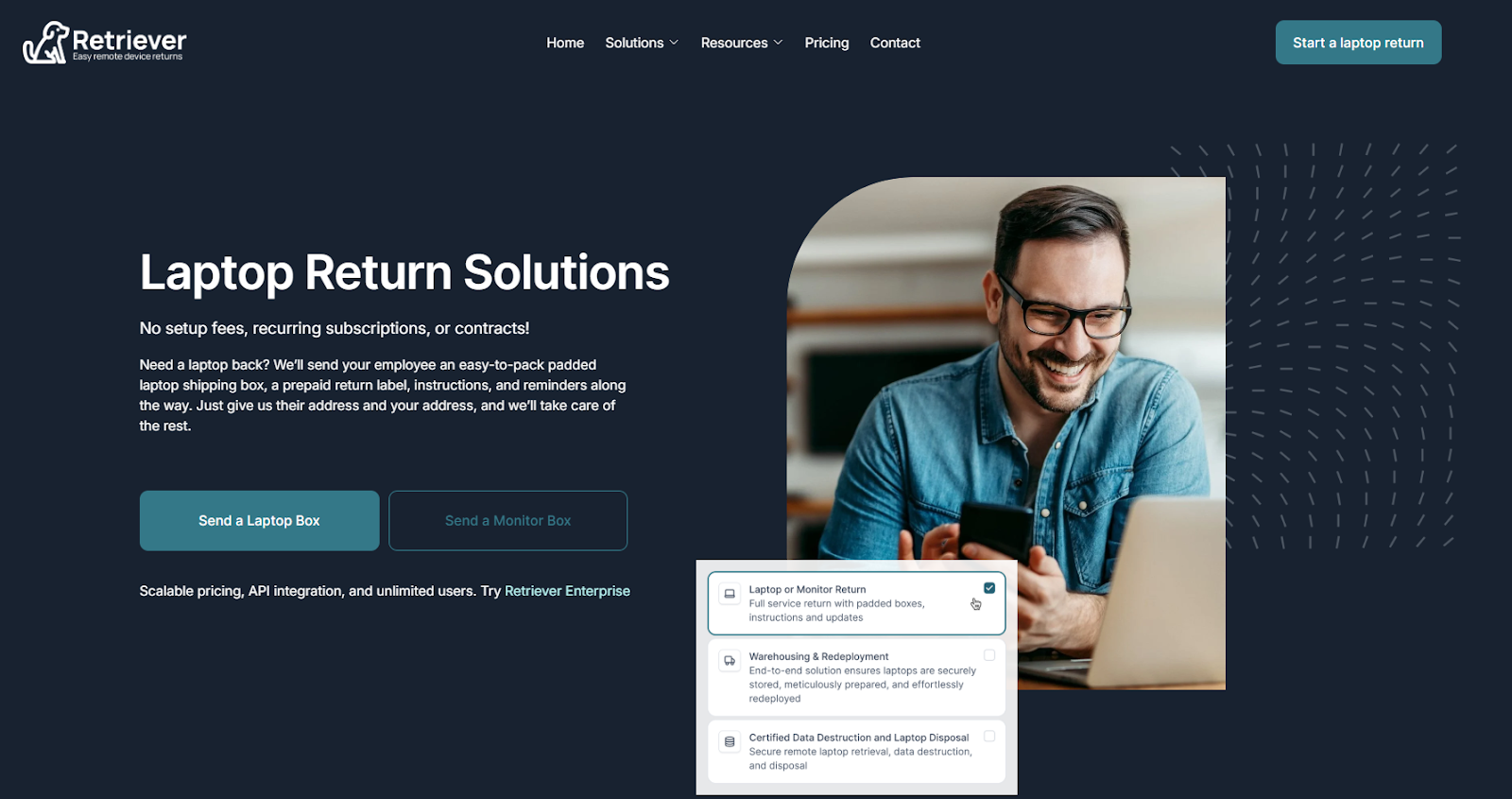
Retriever is designed to simplify laptop returns for remote employees and organizations. Whether you want to retrieve a single laptop or thousands at the same time, Retriever can handle it all.
Source: HelloRetriever
Retriever also operates just like any other platform on this list. You share the addresses and they send a secure shipping box, a prepaid label, step-by-step instructions and friendly reminders to ensure your device is returned without delays or hassle.
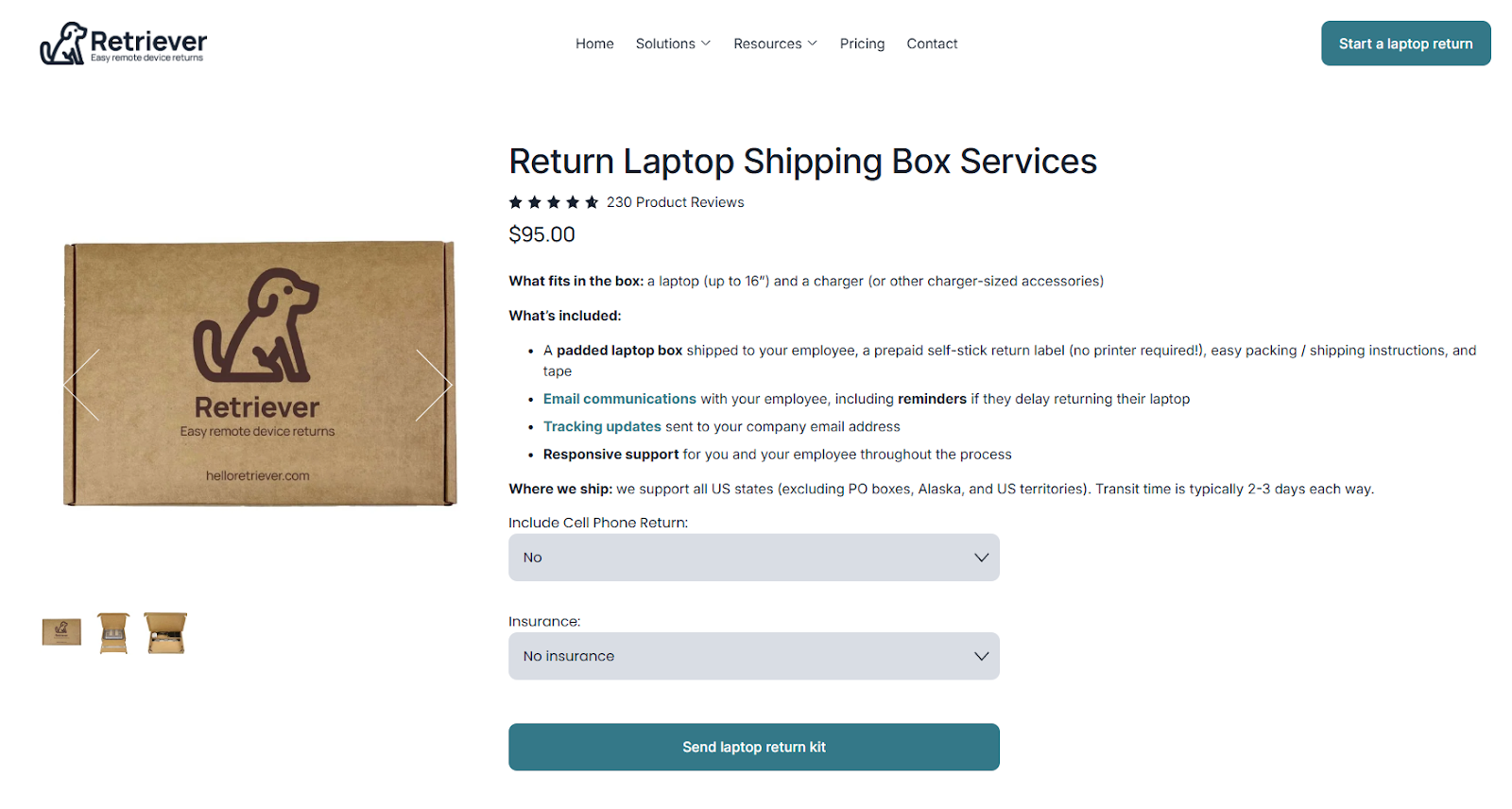
To try out the platform, I simply initiated a retrieval (as a guest without signing up) within the United States. As mentioned earlier, the process was similar. You select a few preferences, add the address of the employee and the recipient, make the payment and Retriever gets it done.
Source: Retriever
Just to let you know, domestic returns within the United States start at $95. But as I needed to find out how it works internationally, I initiated a retrieval from Canada to the United States. The process was the same, but the cost was $145.
One major limitation of HelloRetriever is that it supports shipping in a limited number of countries, including the US, the UK and Canada.

You can request international retrievals, but even that is limited to Ireland, Scotland, Germany, Spain, the Netherlands and Mexico. And you have to submit a different form and wait for their approval.
So, Retriever is ideal for companies that majorly operate in the United States, Canada and the United Kingdom.
But unlike ReReady, Retriever supports secure asset disposal with a data destruction certificate that you can download from their portal. Plus, you earn cash or account credits for data destruction and disposal, which you can easily redeem.
Moreover, you can store your laptops at Retriever’s facility and remotely initiate redeployment when required. They check the condition, provision the OS and even perform servicing to ensure your laptop is ready for redeployment in a click.
Pros:
- Very easy to set up and use (Source)
- End-to-end service that involves deployment, storage, retrieval and disposal
- Extremely good customer support that goes above and beyond to help you (Source)
Cons:
- Very limited support for international retrievals.
- You have to buy credits to be able to use the service, which can be bothersome for some users (Source)
Pricing: Pricing within the United States starts from $95 for laptops and $195 for monitors. You can check out the complete pricing details here.
5. GroWrk
Key Features:
- Supports retrieval, refurbishment and redeployment in one workflow
- Handles device collection across more than 150 countries through its logistics network and platform.
- Stores returned devices in GroWrk facilities until needed again, enabling reuse or later redeployment.
- Offers secure disk wiping, maintenance checks and privacy protection procedures before reuse or disposal.
- Provides a specialized logistics team handling retrieval operations worldwide, including last-minute shipping or storage changes
Source: GroWrk
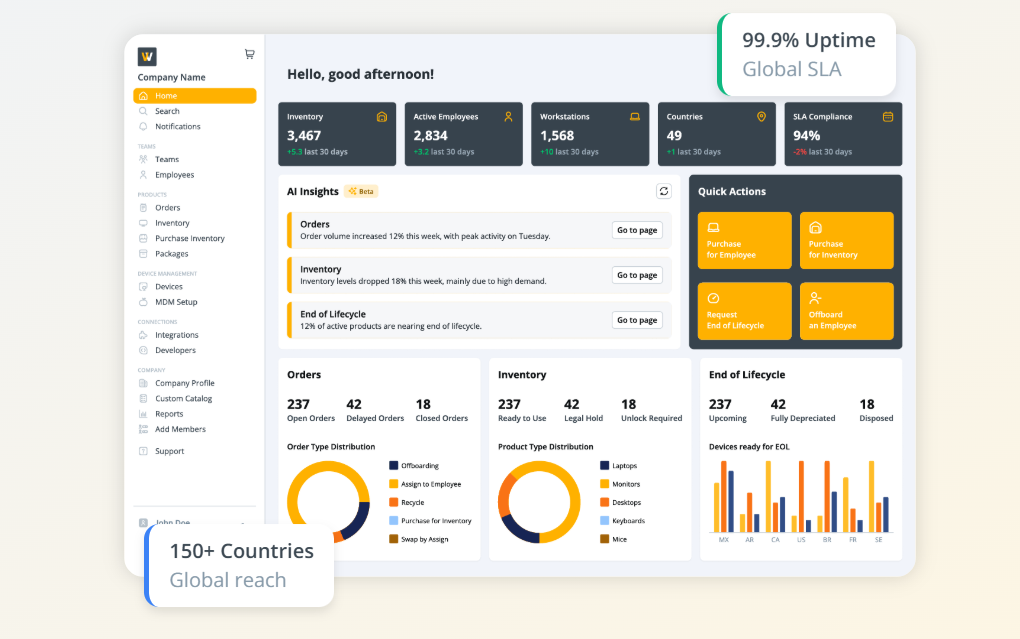
GroWrk is an end-to-end IT lifecycle asset management software built for remote teams. It helps you procure, configure and deploy your IT devices and even store, reuse and recycle your inventory, while saving on costs.
There were two options to try the tool: Product tour and a free signup for the A La Carte plan. And I explored both to understand GroWrk’s laptop retrieval capabilities.
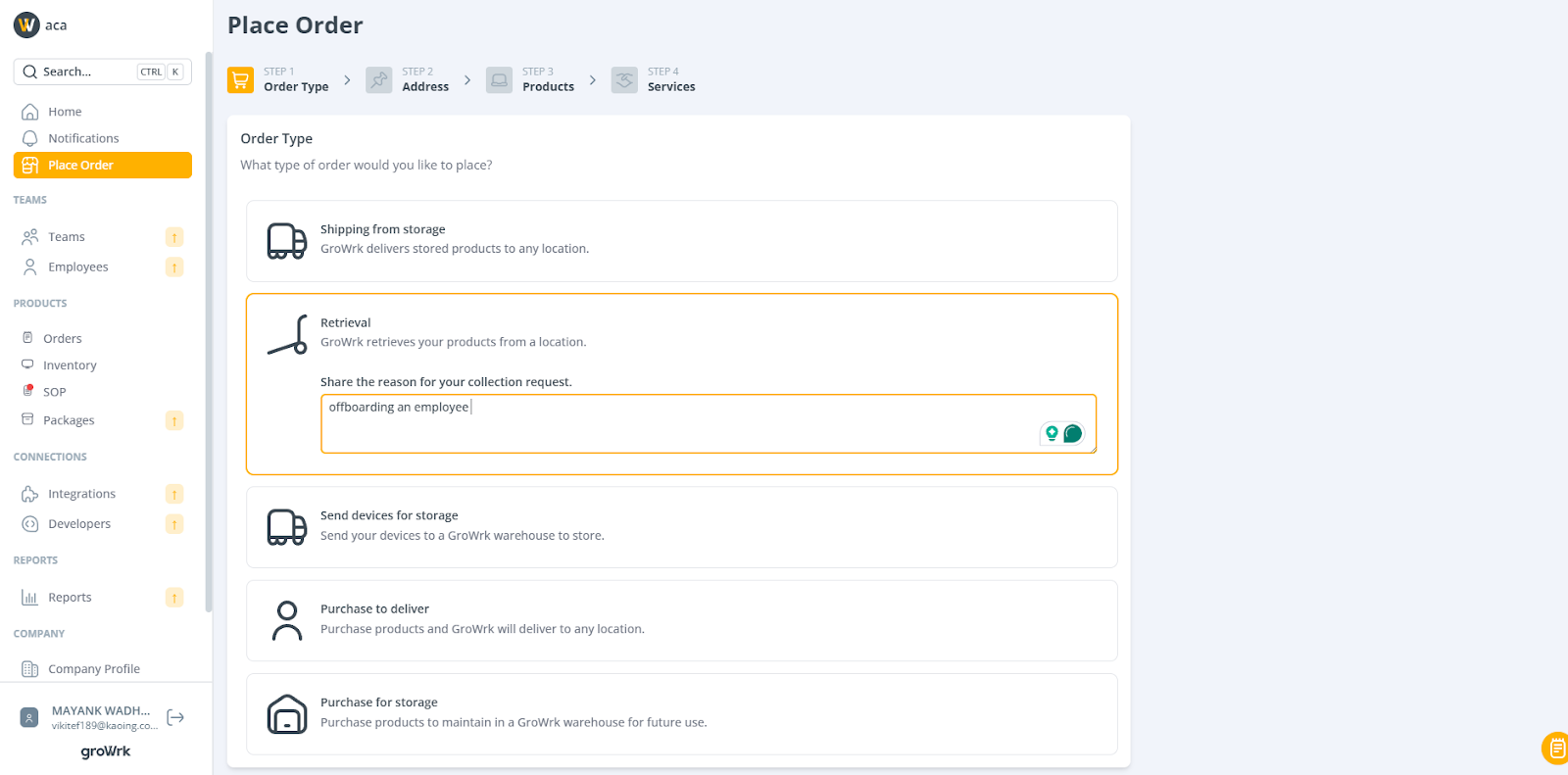
So, this is how the dashboard looks. You just need to click Place Order, then select the order type. Because we’re exploring the retrieval part, I selected that:
Source: Original Image
The dashboard looks pretty clean and easy to use. I had to abandon the process and switch to the product tour because it requires an SOP, which in turn requires approval.
Just enter the employee details, product details and make the payment. What I found impressive was that you could add additional services like these before making the final payment:
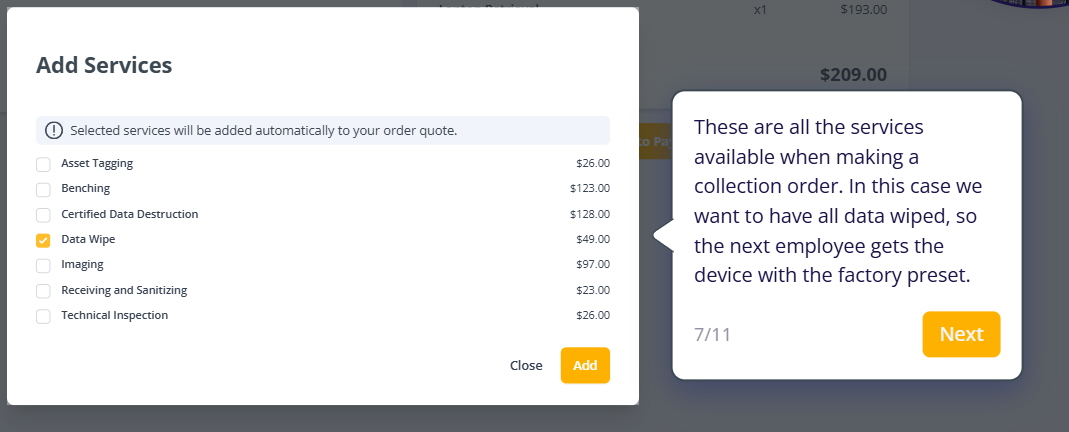
For this example, we’re adding data wipe to ensure the next employee gets a device with a factory reset. Then you can easily track the returns and get regular updates from Growrk:
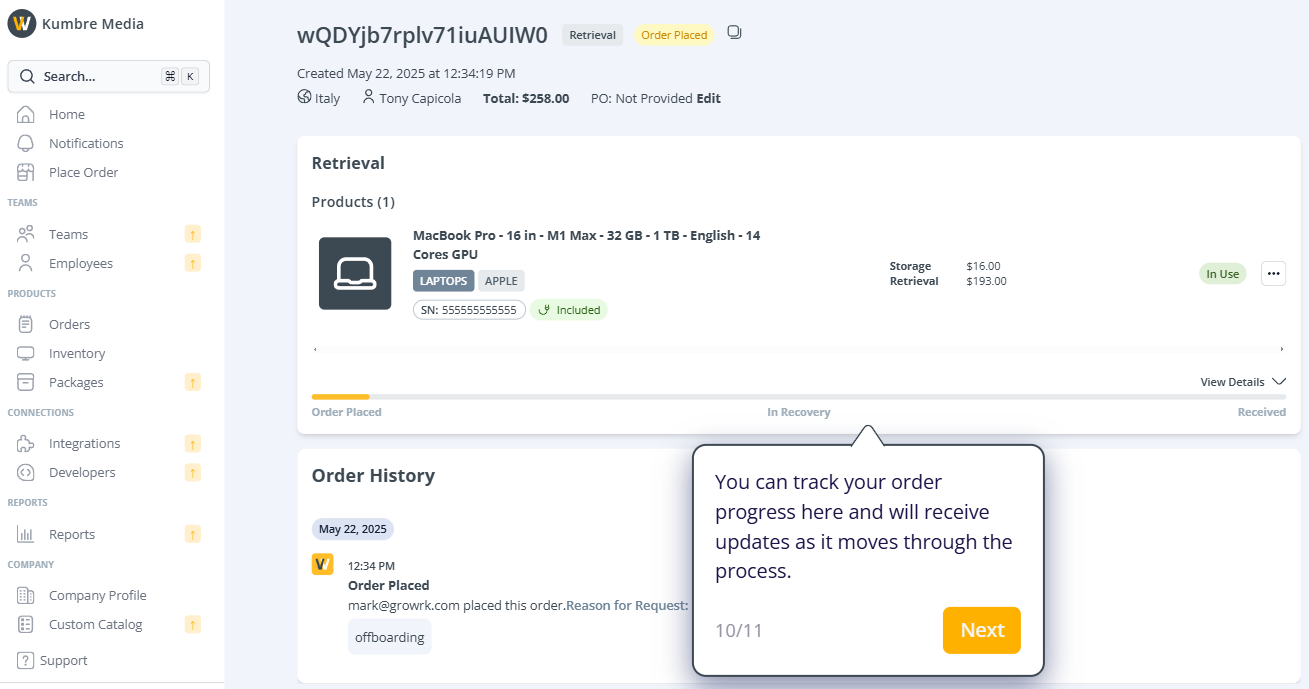
One thing that sets GroWrk apart is that it supports deployment and disposal in 150+ countries, which is the highest on our list.
Since it’s an end-to-end IT asset management platform, I was confused whether it offers retrievals as a single module.
To my surprise, GroWrk has a à la carte plan that lets you pay only for the service you use. You can sign up for free, book retrievals and pay only for the services you use.
If you use GroWrk for managing assets and trigger the retrieval process, you get to enjoy this unique feature, by the name “legal hold.” You can request a legal hold, which ensures the data isn’t wiped until the hold ends, preserving any relevant information on the device.
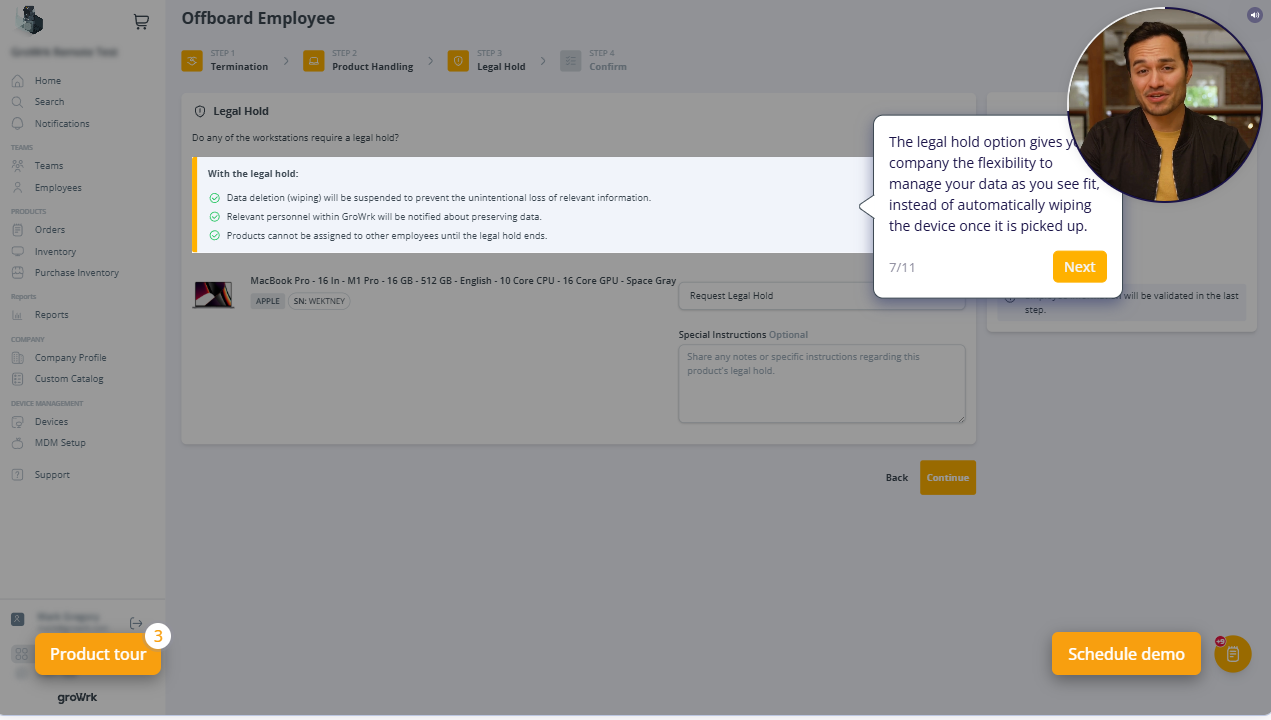
Pros:
- Supports 150+ countries, which ensures you don’t have to switch vendors when retrieving equipment, even in challenging locations (Source)
- Very easy to set up and use (Source)
- Whether it’s 10 devices or hundreds of them, GroWrk scales as you do (Source)
Cons:
- Users complain of shipments getting delayed, which is a major disadvantage (Source)
- Tracking the device during retrieval can use some improvement, according to multiple users (Source)
Pricing: The à la carte plan is free to use. And the Flex and All-in plans come with a subscription fee you can only learn about after talking to their sales team.
6. Device Rescue
Key Features:
- Sends pre-built retrieval kits with prepaid labels and packaging, simplifying the return process.
- Contacts employees, sends reminders and manages follow-ups if returns are delayed.
- Let your store return or unused equipment to its warehouse and redeploy it later when needed.
- Inspects and documents, giving IT teams a clear report on its state before redeployment.
- tracks devices from assignment to return, including a history of retrievals and employee assignments.
Device Rescue, as the name suggests, is known for one thing: retrieving assets, i.e. laptops, tablets and cellphones. But it offers complete corporate device management.
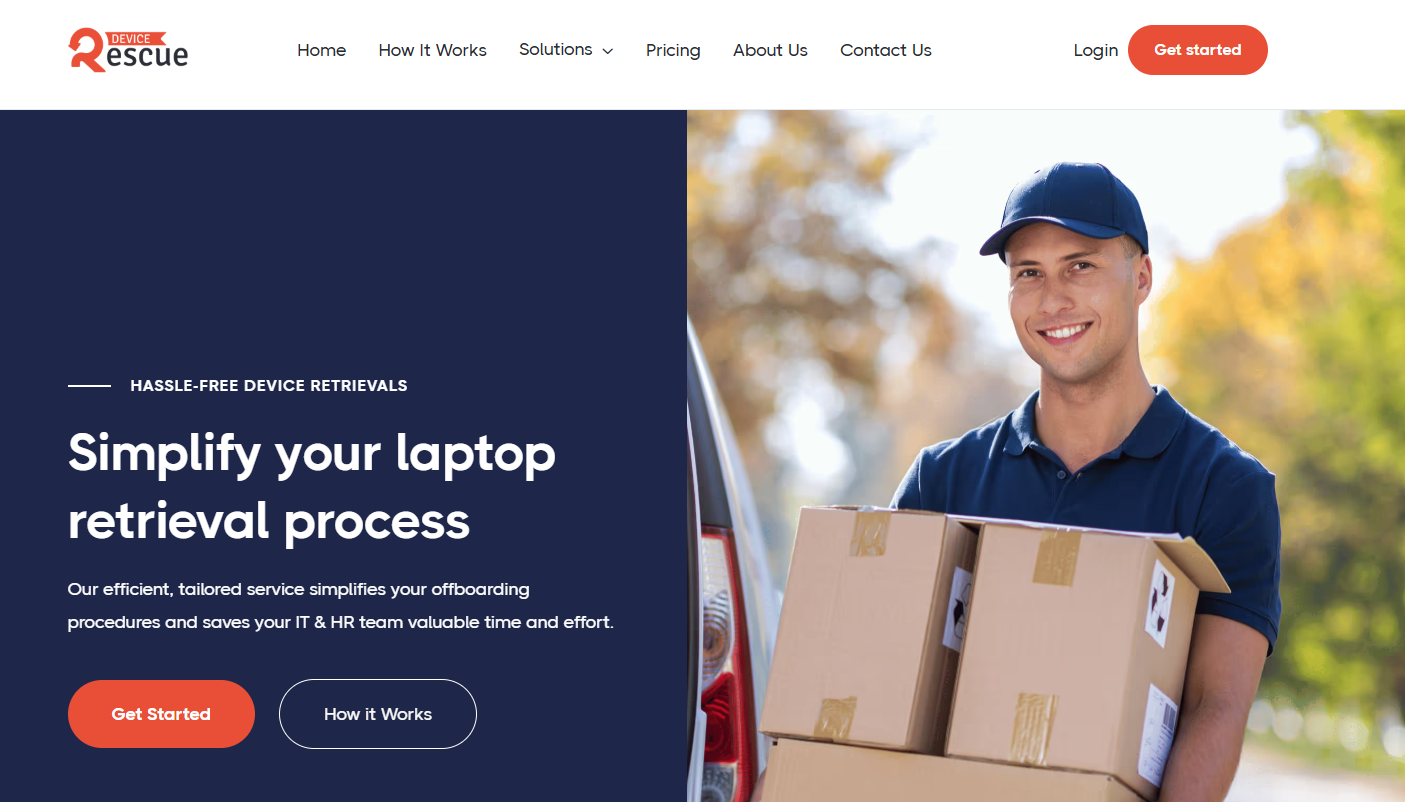
Source: Device Rescue
I was able to initiate a retrieval without signing up, which was very convenient. And the process was easy as well. Just enter the employee’s address, the delivery address and make the payment. Here’s what the form looks like:
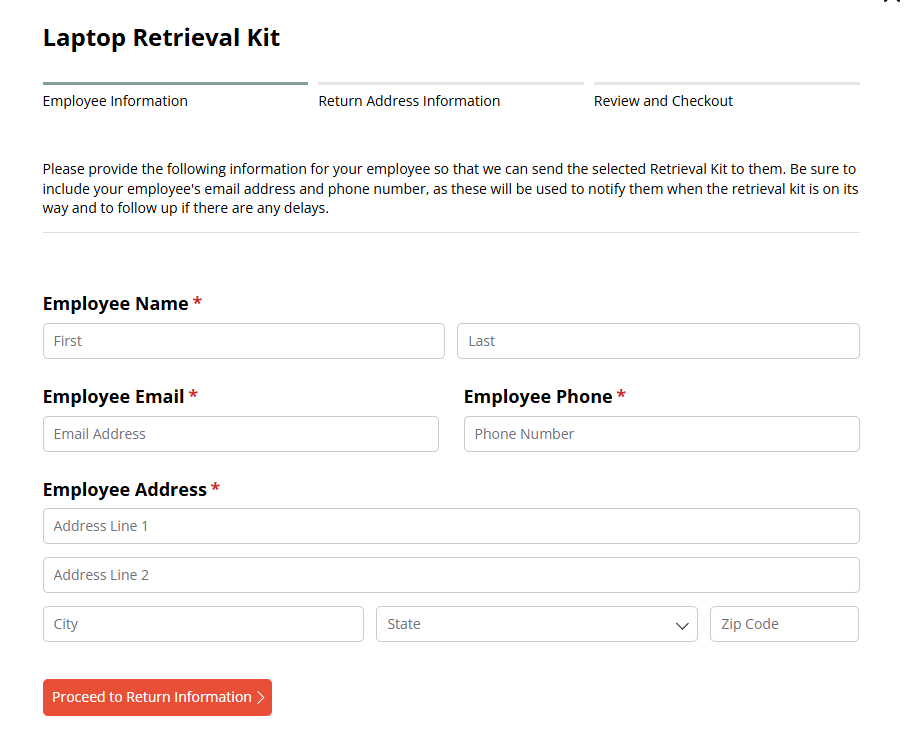
Source: Device Rescue
However, it did not ask for any device information from me. Also, DeviceRescue mentioned that their laptop return box fits most laptops up to 16 inches and the accessories. So, you must think twice if you want to ship a bigger laptop, a workstation or a monitor (which they don’t support.)
Right off the bat, I learned Device Rescue supports retrievals/shipping to and from the United States and Canada. That’s it. So, you’d want to explore Device Rescue only if you’re a small or medium-sized company operating within these two countries.
Otherwise, you can move on.
Pros:
- Affordable for small companies operating within the US and Canada
- Easy to use and set up
- Offers retrieval for specialized equipment on request
Cons:
- Limited global support, which may not be enough for medium or large enterprises
- No support for laptops larger than 16 inches
- Almost no 3rd party user reviews, which indicates limited adoption
Pricing: Laptop returns start at $89 per retrieval. Tablets and Cell phones cost $69 and $49 per retrieval, respectively.
7. Revivn
Key Features:
- Handles packing and collection themselves, meaning companies don’t need to prepare boxes or logistics before pickup.
- Offers certificates of destruction, asset lists, compliance reports and tracking records for every pickup.
- Allows you to get money back for the hardware or donate the value to nonprofit initiatives directly through the platform
- Let's IT team schedule pickups, track assets, access reports and manage the entire disposal workflow from one place.
- Provides environmental impact reports showing reused devices and e-waste prevented, along with donation outcomes
Revivin is a hardware lifecycle solution that helps you make the most of your old hardware by recycling, repurposing or disposing of the assets. And it also offers asset retrieval as a service.
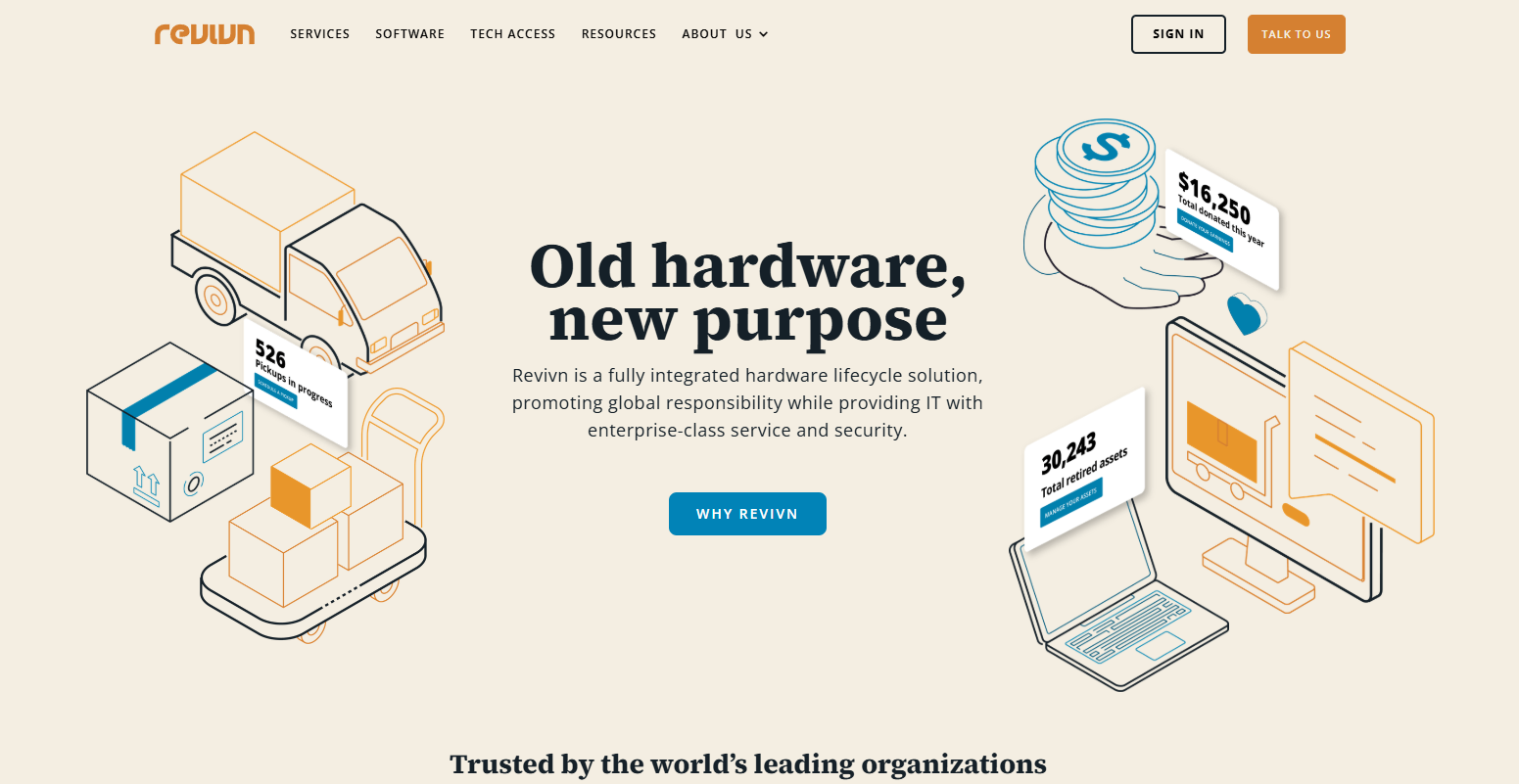
Source: Revivin
While I could not access the platform or find any self-guided tours, I went through multiple case studies. And they were largely about companies seeking a solution for the disposal or recycling of IT equipment.
But that does not mean Revivn does not support retrievals. In fact, because of their massive network, Revivn lets you retrieve assets from anywhere around the world.
What stands out to me is their unique recovery method. Instead of shipping packaging material and asking the employee to pack the laptop (or any other type of asset), Revivn sends a team of designated experts who securely pack and pick up the devices.
Now that is very convenient and I believe this will automatically increase the rate of retrievals.
For each retrieval, they provide a certificate of destruction (COD). This proves that all data has been completely destroyed in accordance with NIST 800-88 or Department of Defense standards.
Another thing I liked about Revivn was that they use skilled technicians to restore electronics to a usable condition, making them ready for redistribution. You can even sell your hardware to Revivn or get it recycled and claim the best possible residual value.
With Revivn, you benefit from having a single point of contact for all your global pickups, simplifying communication and coordination.
Pros:
- Can retrieve multiple types of IT assets from across the world.
- Highly focused on sustainable and environmentally friendly methods.
- Follows high security standards.
Cons:
- Asset retrieval is not their primary offering.
- There are a few user reviews, and most case studies are about recycling old hardware.
Pricing: Pricing information is not available
8. Remote Retrieval
Key Features:
- Sends pre-assembled return kits with inflatable protective bags, not just basic boxes
- Reminds employees to ship the device back once they receive the return kit.
- Let's you track devices from shipment to final return with alerts and status updates.
- Bulk return coordination and pricing programs for companies retrieving multiple devices.
Remote Retrieval is yet another solution designed to help companies recover laptops from remote employees.
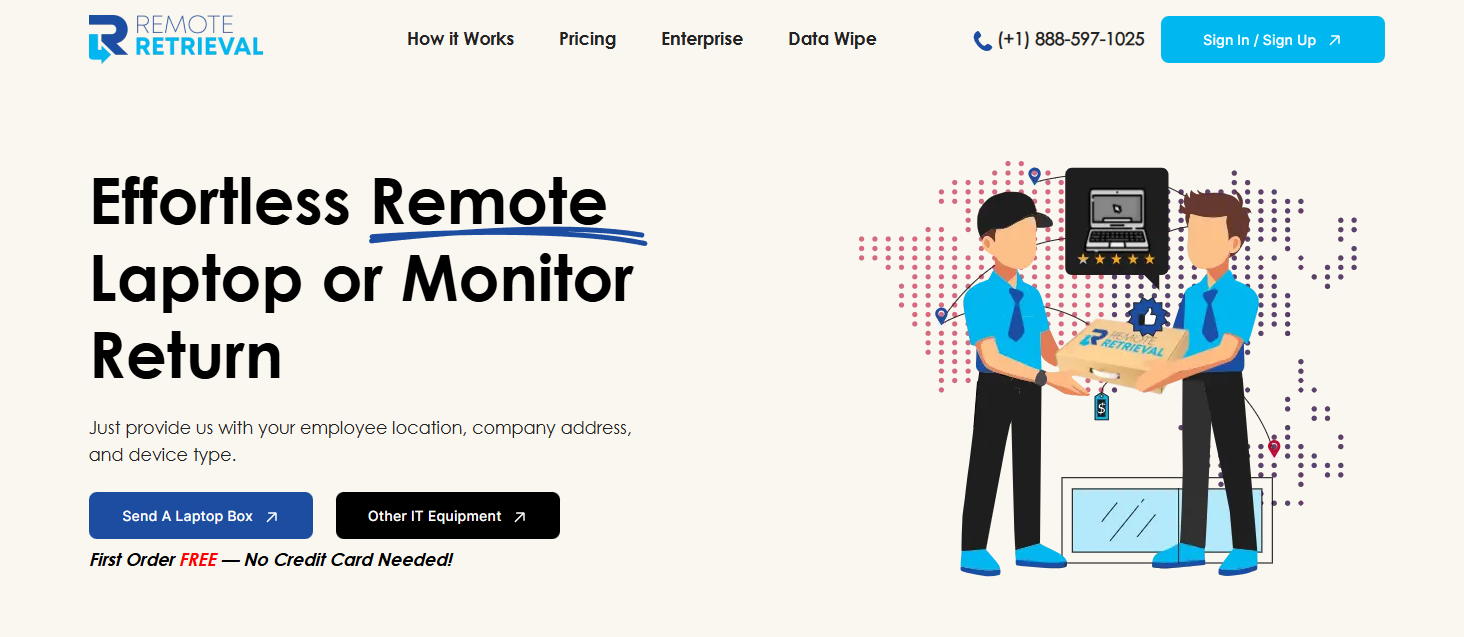
Source: Remote Retrieval
In addition to returning the devices, Remote Retrieval also facilitates onboarding (shipping assets to new employees) and recycling with data wipe. It supports devices such as laptops, tablets, cellphones, monitors and desktop PCs, with varying prices.
To understand how it works, I tried placing a retrieval request with Remote Retrieval:
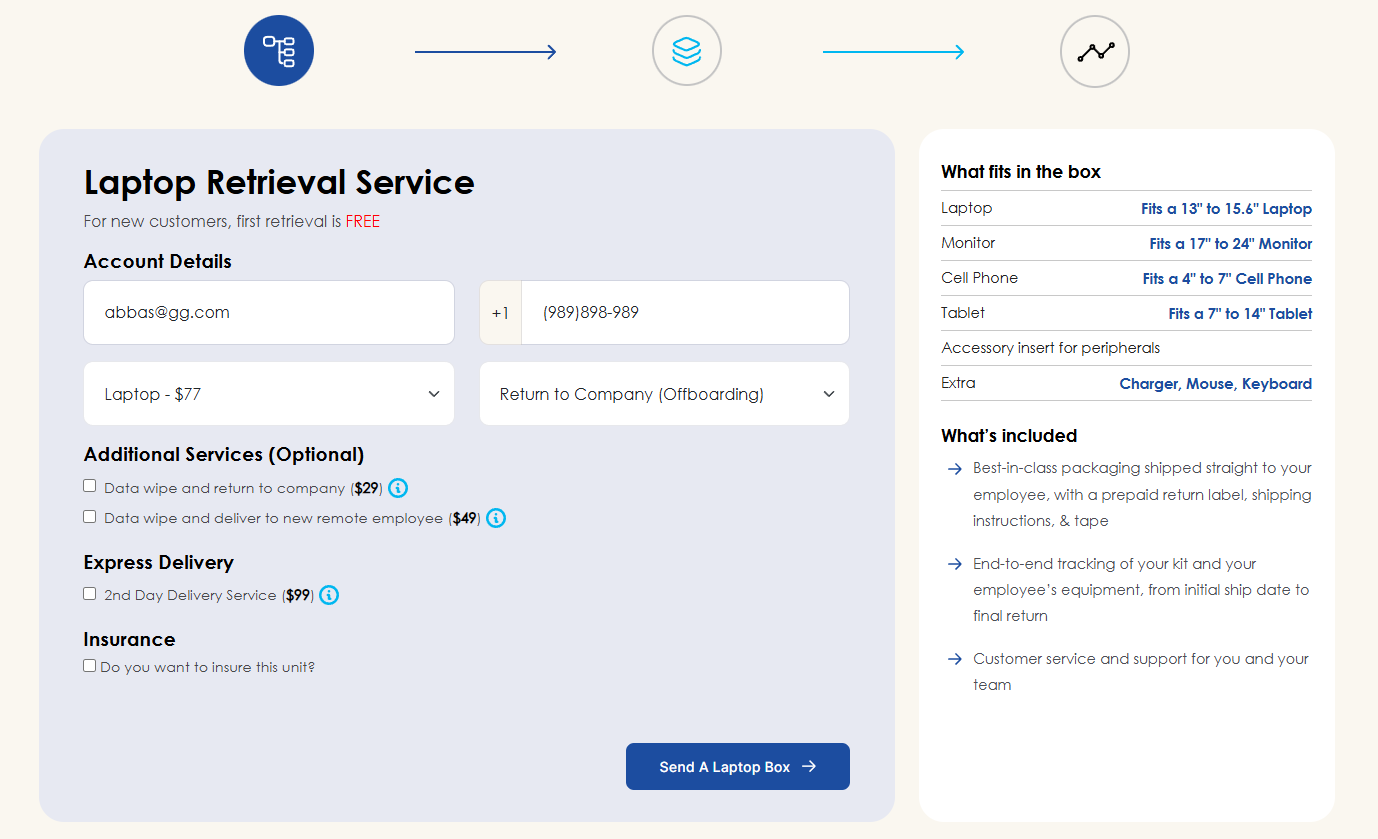
You can opt for additional services, including express delivery (at $99), if you want the assets shipped as soon as possible.
What makes Remote Retrieval unique is that it offers free shipping for US-to-US retrieval on your first order. This means you can actually try out the solution without losing anything. I tried applying the coupon and it checked out. I got a service worth $77 for free!
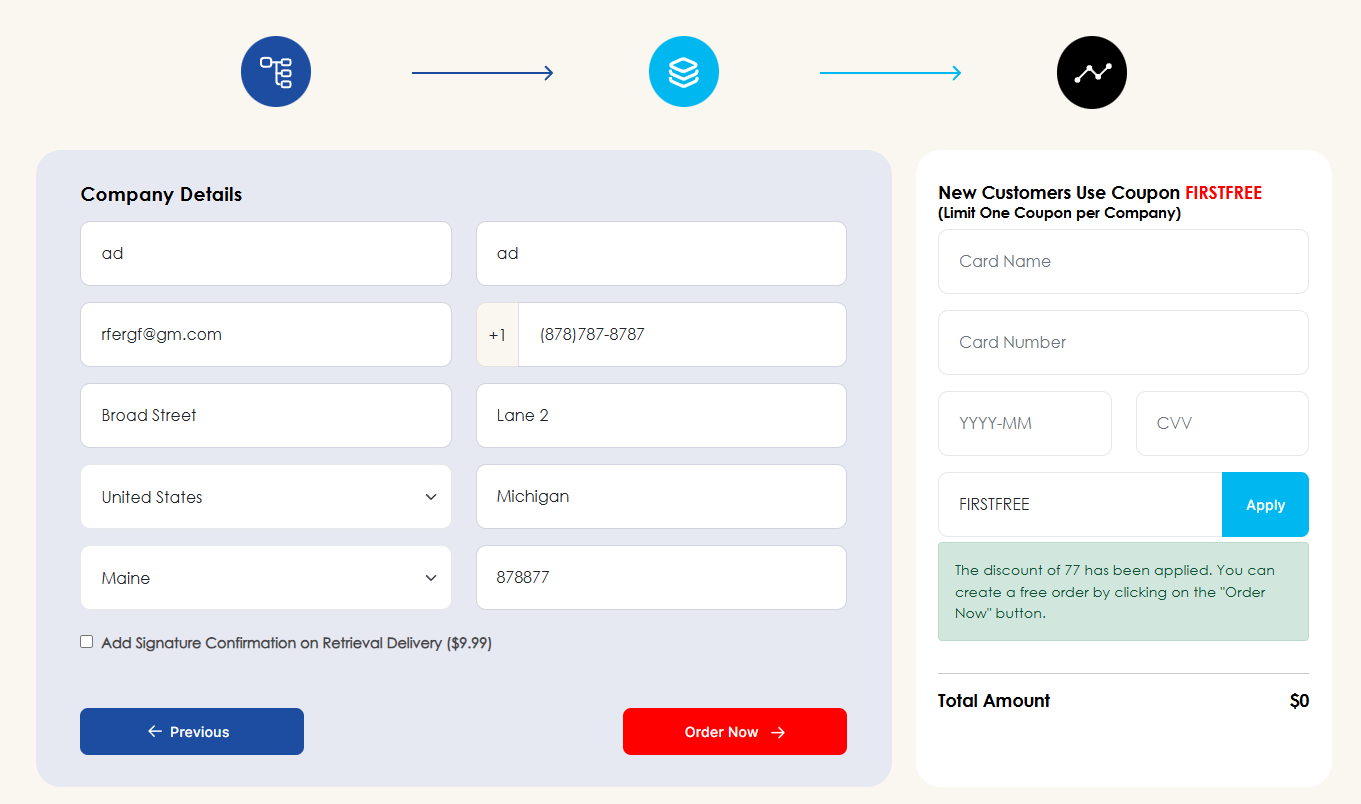
Source: Remote Retrieval
Unfortunately, Remote Retrieval is available in just the United States, Canada, Mexico, the UK and Puerto Rico. So, it’s only ideal if your remote employees are from any of these countries.
Another disadvantage is that Remote Retrieval asks employees to drop off the package at a nearby UPS/FedEx store. Yes, they don’t have the facility to pick up the package from your employees, which is inconvenient and can impact retrieval rates.
And while it offers data erasure and recycling, Remote Retrieval does not support device storage.
Pros:
- Very easy to use and offers free shipping for the first order, which is amazing
- Domestic shipping prices start at just $77, within the US, which is affordable
- Supports multiple devices and also offers express delivery
Cons:
- Very limited global reach, which makes it unsuitable for large organizations.
- No facility to pick up assets from employees.
- No 3rd party user reviews, indicating a lower adoption rate.
Pricing:
- Laptops start at $77
- Monitors start at $129
- Cell Phone & Tablet start at $59
- PC start at $129
For more details, visit the pricing page.
9. Quipteams
Key Features:
- Runs on a true usage-based model, i.e., companies only pay when something actually happens
- Supports 130+ countries, making it a truly global retrieval platform
- Retrieves devices and then stores them in regional facilities so they can be reassigned to the next employee
- Operates through a network of 400+ local partners globally
- Helps automate offboarding/onboarding by integrating with HRIS platforms
- Supports resale through global resale channels, recovering part of the hardware cost.
Quipteams is a complete IT asset management platform designed for distributed teams. Its primary offerings include procurement, retrieval, storage and buyback.
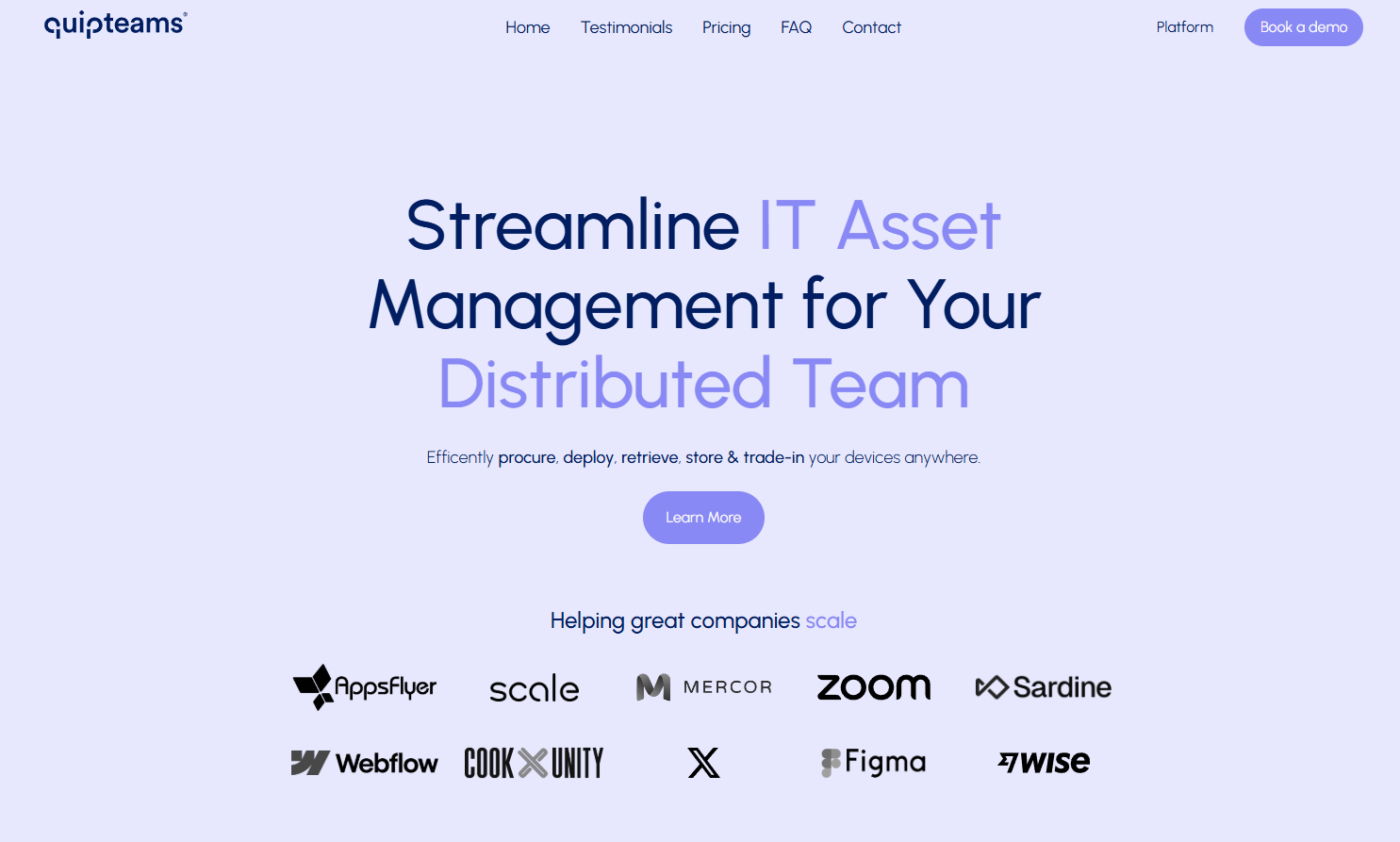
Source: Quipteams
I signed up on their platform as a guest to explore the asset retrieval features. This is how the dashboard looks:
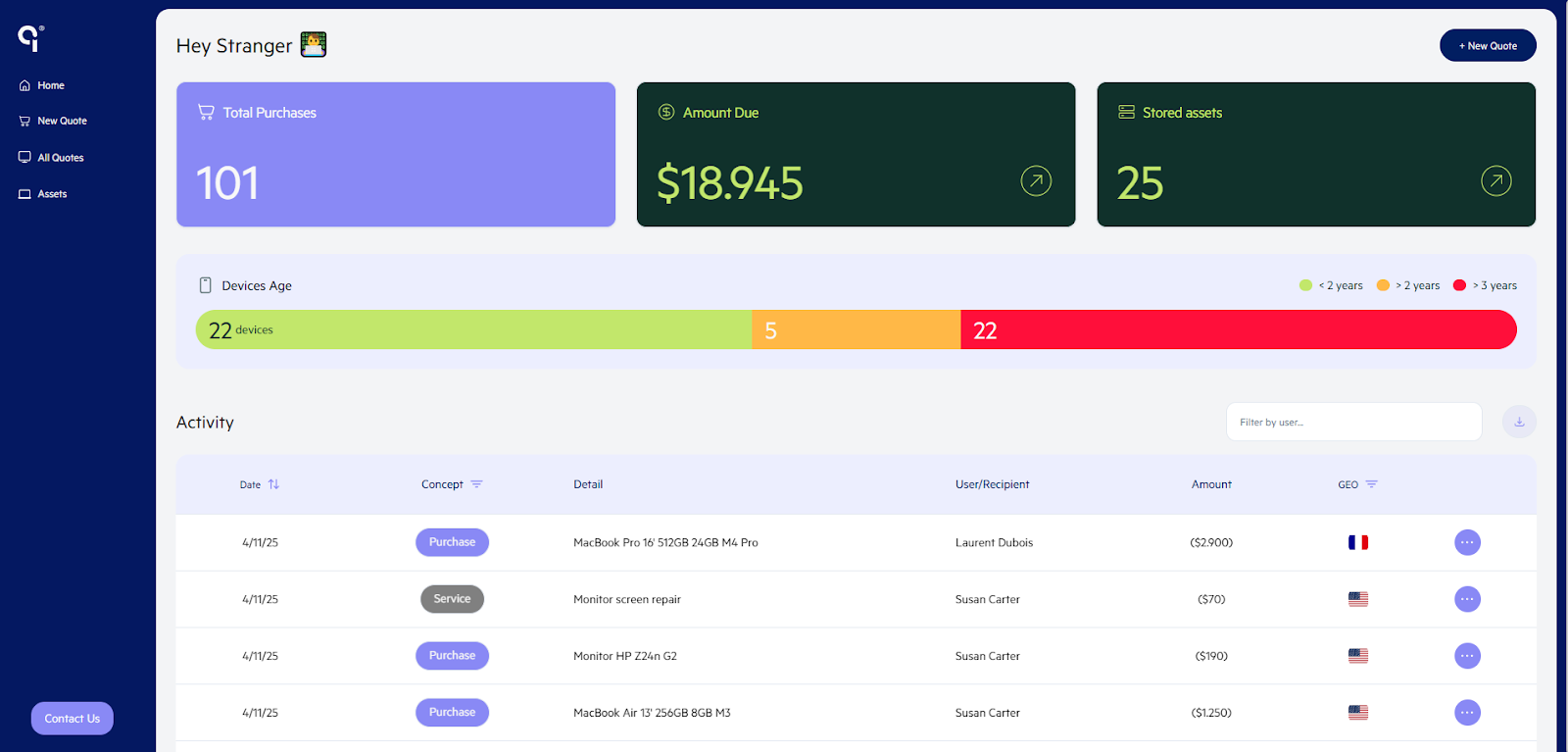
Source: Quipteams
To initiate retrieval, just click the device in use, select actions and choose what you want to do, i.e. store, reassign or sell.
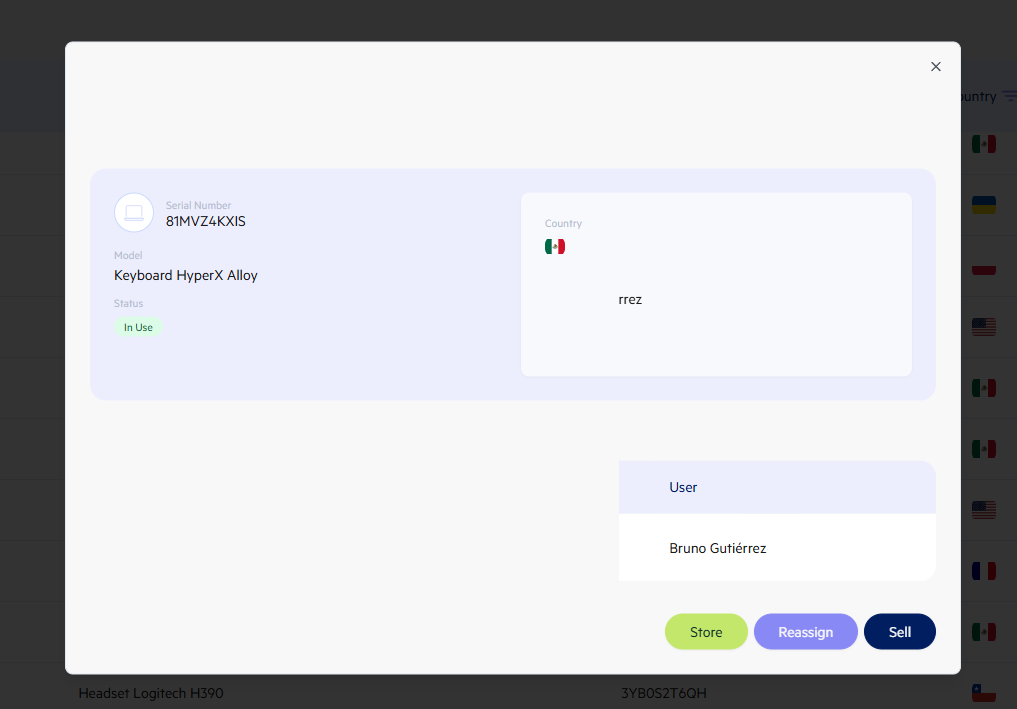
But if you integrate Quipteams with your HRIS platform, it’ll automatically trigger a retrieval when the HRIS system shows someone as offboarding. They automatically pick up the device, wipe the data clean and prepare it for the next hire without manual effort.
After retrieval, Quipteams store devices in their local storage for redeployment, through certified asset disposal and data erasure or into buyback programs, based on your preferences.
Quipteams supports procurement and retrieval in 130+ countries, which is the 2nd highest on our list, making it an ideal retrieval solution for remote teams.
Another good thing is that Quipteams comes with pay-as-you-go pricing. This means that, while it’s a complete asset management solution, you could, if you’d like, use and pay only for their retrieval services.
Pros:
- Multiple users appreciate Quipteams’ delivery speed and affordable nature (Source)
- Reliable customer service, global reach across 130+ countries and easy-to-deploy (Source)
- Automates offboarding and onboarding, massively reducing manual effort (Source)
Cons:
- Couldn’t find an option to ship devices back to the company. It’s either to another employee or storage.
10. Firstbase
Key Features:
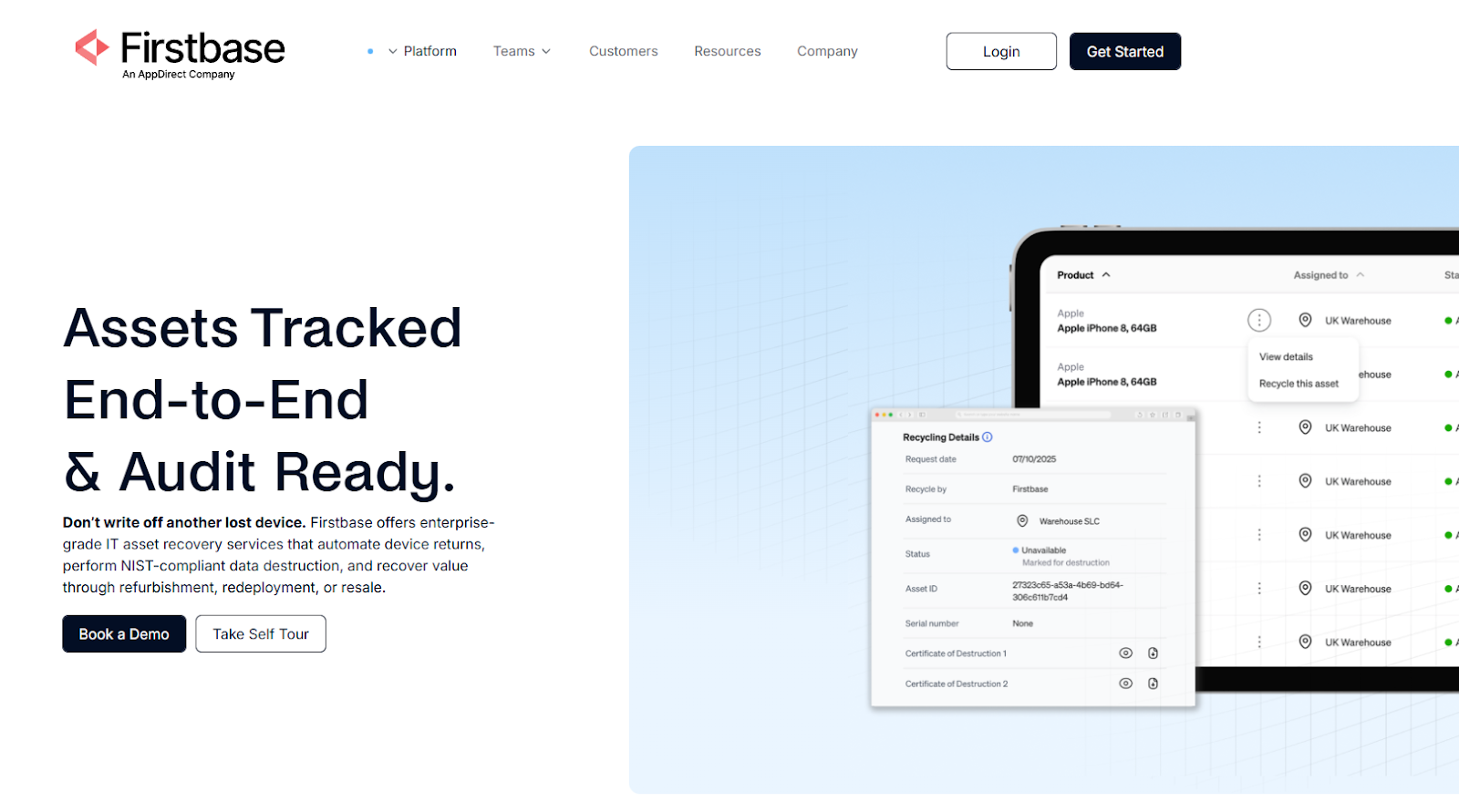
Firstbase is an asset management solution with strong asset retrieval capabilities.
Source: Firstbase
One of the primary features of Firstbase that’s striking is its support for 150+ countries, making it a truly global asset retrieval solution.
To understand more, I signed up for a self-guided tour of the platform. Since it’s not just a retrieval platform, you need to update the end date on the platform to trigger the retrieval workflow:
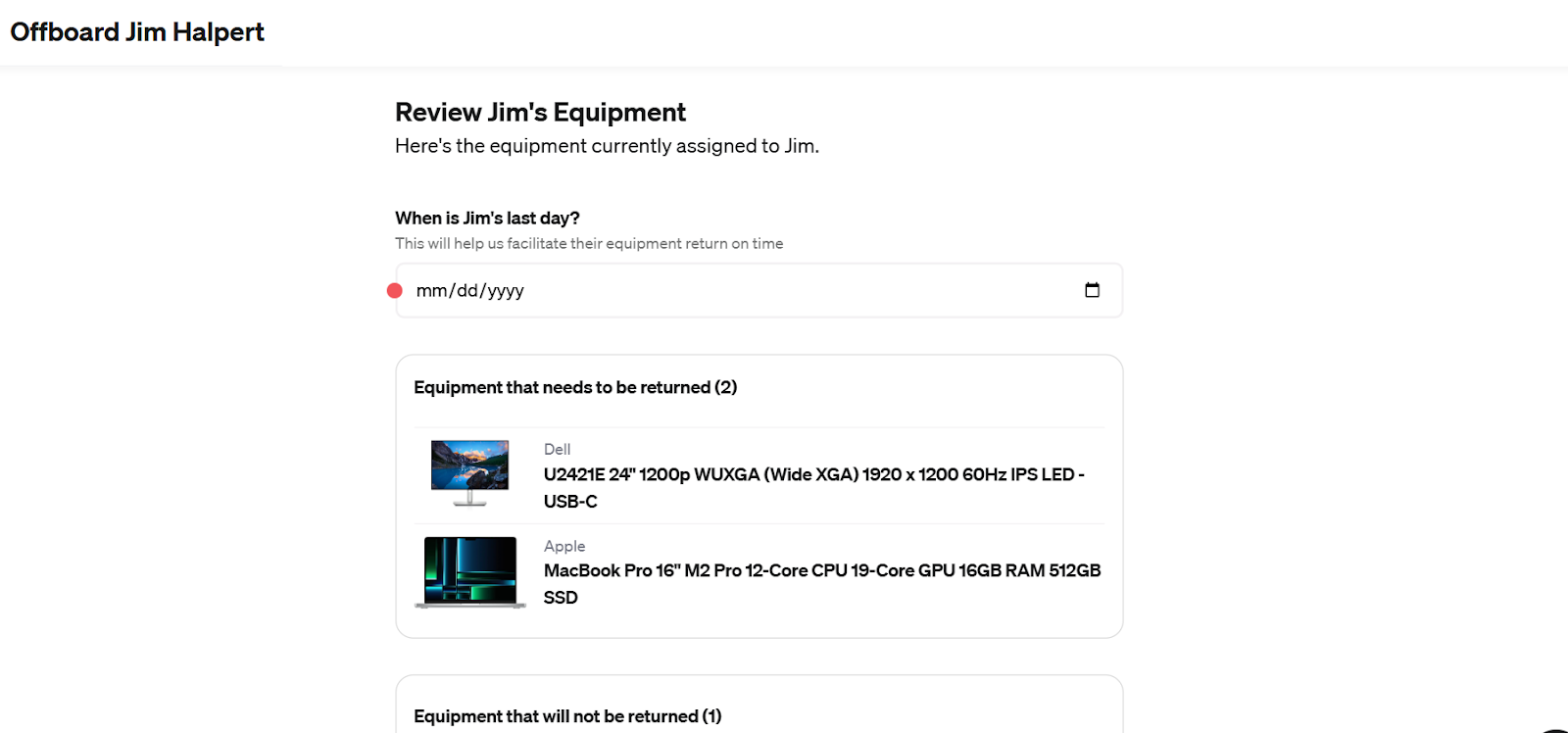
Enter the employee’s last date, select the equipment, enter the contact details and Firstbase will confirm the address and their preference (pickup or drop off) for returning the asset.
Firstbase’s team will then send a retrieval kit that makes it easy for your employee to place their equipment and return it. And because real-time tracking is available, you never lose sight of a return.
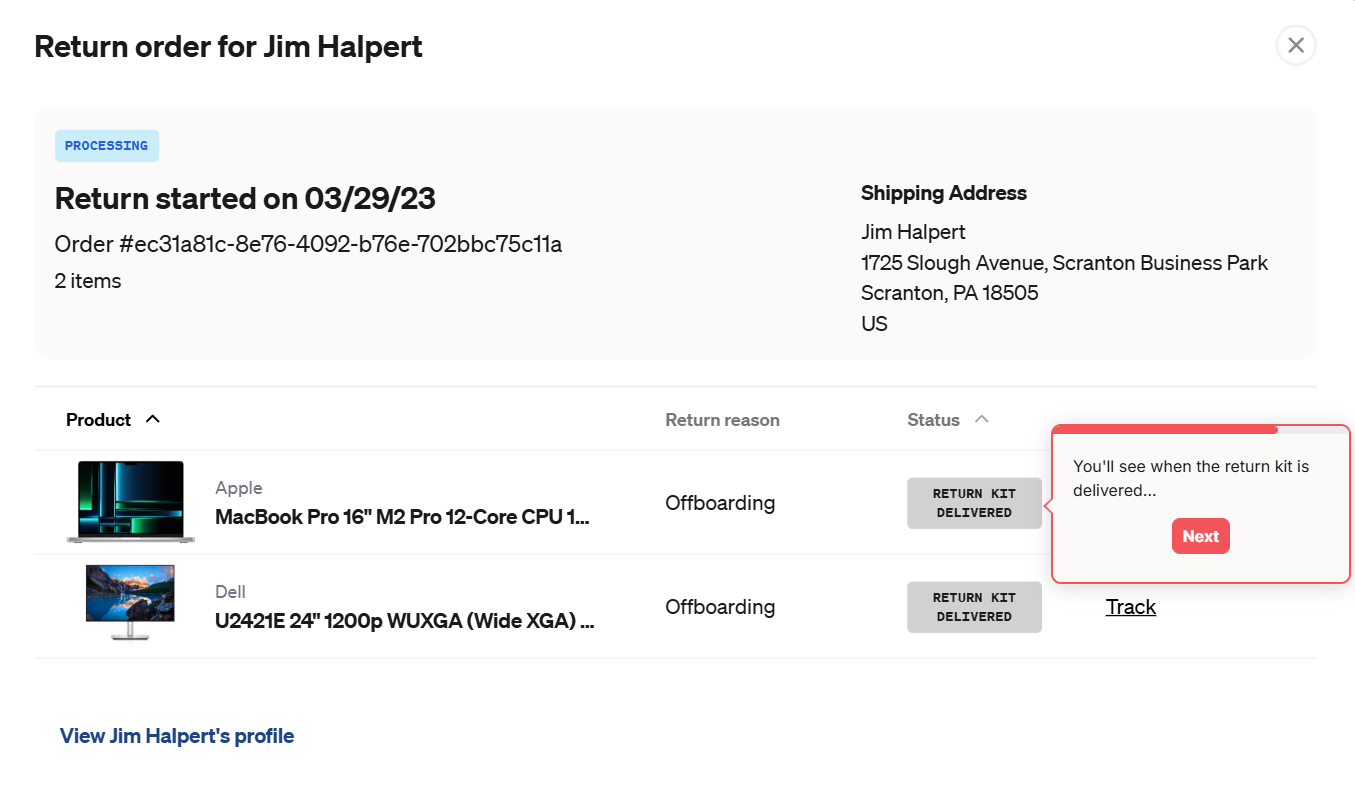
Once the return is received in the warehouse, Firstbase’s team will test, grade, repair and re-inventory your equipment so it's ready for reuse.
Firstbase also boasts a retrieval success rate of 95%, which is impressive, considering they support 150+ countries.
One thing that I didn’t like about Firstbase is that its retrieval services are bundled with the asset management services. So, unless you’re looking for a complete IT asset management solution, Firstbase likely isn’t the right fit.
Pros:
- Simplifies and automates retrieval, which saves a lot of manual effort (Source)
- Performs certified data erasure and maintains chain of custody records.
- Reliable customer support that is always adding more features (Source)
Cons:
- Based on user reviews, they don’t support enough countries for retrievals. The 150+ country-support claim can be for procurement. (Source)
- Sometimes deliveries in tricky regions take longer than expected (Source)
Pricing: Pricing information is available on request.
Wrapping Up
Laptop retrieval tools can solve the immediate problem of getting devices back. But for most remote teams, that’s only one part of the workflow.
Once a laptop is returned, you still need to decide what happens next: store it, wipe it, repair it, redeploy it, resell it or dispose of it securely.
And if your provider only handles the retrieval, your team is stuck managing the rest through separate vendors and disconnected processes.
That’s why it makes sense to think beyond retrieval alone. Ideally, you should look for a comprehensive solution to manage the entire asset lifecycle.
And Workwize fits right in. It combines retrievals with procurement, deployment, storage, refurbishment, resale and disposal. So your IT team can manage the entire asset lifecycle from procurement through disposal in one place, rather than stitching the process together manually.
Book a free demo now and see how Workwize handles procurement, deployment, repairs, retrievals, reselling, recycling and disposals seamlessly.



Establish a single source of truth for every IT asset across the globe.
.png?width=258&height=318&name=g10%20(5).png)
More related resources to help you stop firefighting hardware operations.
%20(1).png?width=360&height=200&name=Genuity-Alternatives%20(1)%20(1).png)

.png?width=360&height=200&name=solarwindscover%20(2).png)

Get monthly insights into how other IT leaders are improving their ops.



.png?width=2880&height=1232&name=Group%202147262874%20(1).png)
Stop coordinating
hardware like it's 2012.
.svg)
.png?width=172&height=68&name=apple%20business%20patner%20(1).png)
.svg)
.svg)
.svg)
.svg)