




Your internal IT team doesn't need to handle every task on its own, but deciding what to hand to an external provider isn't always simple.
Some responsibilities, like setting security policies and approving technology investments, need to stay close to the business. Others, such as buying laptops, delivering equipment to remote employees, or getting devices back during offboarding, take up a lot of time without needing your team's direct involvement.
The problem gets bigger when you support employees across several countries. In a Workwize survey, 60% of IT managers said logistics costs were prohibitive, and 52% reported delays in recovering equipment.
Co-managed IT lets your team share that load without giving up the decisions that matter. This article helps you decide which responsibilities to keep in-house, which to hand to an IT asset management partner, which to automate, and how to make the split work.
TL;DR
- Co-managed IT means your internal IT team shares defined parts of IT operations with an external provider, and the split looks different at every company.
- Keep the decisions in-house: IT strategy, security governance, purchase approvals, refresh and retirement policies, and vendor oversight.
- Partners are best placed to handle repeatable, resource-heavy work such as routine support, device procurement, deployment, and retrieval, while software automates the requests, approvals, and status updates in between.
- The arrangement works when you define who does what, set approval and escalation rules, agree on service levels that reflect employee needs, and review results against the original business case.
- Workwize handles procurement, warehousing, deployment, retrieval, and redeployment across 130+ countries, and Workwize Agent automates the coordination, while your team keeps control of standards and approvals.
What is co-managed IT?
Co-managed IT is an arrangement where your internal IT team works alongside an external provider to manage specific IT responsibilities. Instead of outsourcing your entire IT function, you decide which tasks to keep in-house and which ones a partner should handle.
The split varies from company to company. It depends on the size of your team, where your employees are, your budget, and your policies.
For example, your team might set device standards, budgets, security requirements, refresh cycles, and retirement rules. A hardware lifecycle management partner then handles the physical side of each device's life, from sourcing and storage to setup, delivery, retrieval, and disposal, following those policies. If you want the full picture of what such a partner covers, see our guide to managed device lifecycle services.
Companies typically manage IT in one of three ways:
| Model | In-house team | Fully managed IT | Co-managed IT |
|---|---|---|---|
| How it works | Your own employees run IT operations end to end | An external provider handles all your IT processes and operations | Internal staff and an external partner divide defined responsibilities |
| Who makes IT decisions? | Internal IT leadership | Company leadership, often guided by the provider's recommendations | Internal IT leadership, with input from the partner |
| Who handles daily operations? | Your in-house IT team | The provider | Split by agreement, with repeatable, high-volume work going to the partner |
| Who provides technical support? | Your internal help desk | The provider's help desk | The partner handles defined routine requests, and your team takes escalations and sensitive issues |
| Who manages IT hardware? | Your internal team | The provider, within the contract's scope | Your team sets standards and approvals, and the partner does the physical work |
| When does it make sense? | You operate in one region, demand is steady, and headcount growth won't overwhelm your IT team | You have little or no internal IT capacity and are willing to rely on one provider | You have a capable internal team that is stretched by growth, new countries, or specialized work |
Co-managed IT doesn't mean a 50/50 split. One company might outsource only laptop retrieval for remote employees. Another might keep its help desk in-house and use a provider for security monitoring and infrastructure maintenance.
What matters is that both sides understand their responsibilities, including who approves decisions, who does the work, and who steps in when something goes wrong.
What IT responsibilities should you keep in-house?
No single split suits every company, but decisions that depend on business priorities, employee needs, and acceptable risk generally belong with your own team. These responsibilities benefit most from your team's knowledge and authority:
- IT strategy and technology decisions: Your team understands where the business is heading and which investments support that direction.
- Security governance and access policies: Access decisions and risk exceptions can expose sensitive business information, so internal leaders should set the rules and approve any exceptions.
- Support priorities and escalations: Knowing how employees work helps internal staff recognize which disruptions threaten critical operations, and that context points providers toward the right priorities.
- Purchasing and hardware approvals: Keeping approval authority in-house ties spending and device choices to budgets and to what employees actually need.
- Refresh and retirement policies: A partner can assess equipment and recommend its next use, but your team knows the demands each device has to meet, which decides when repair, reassignment, replacement, or retirement makes sense.
- Vendor management and performance oversight: Someone internal needs to own each provider relationship, which includes reviewing service performance, monitoring costs, dealing with recurring problems, and deciding whether the arrangement still meets business needs.
Which IT operations can you hand off to a partner?
Trying to cover every location and every request yourself spreads your team thin, especially when the work needs resources you don't have locally. These are the areas where a partner can take pressure off without taking decisions out of your hands.
IT support and routine administration
When employees need help across several time zones, covering every shift internally can mean hiring more people than the workload justifies. A support provider spreads that staffing cost across clients and gives you access to specialists you may only need occasionally.
That makes routine troubleshooting, monitoring, and maintenance good candidates for delegation. Employees still get help, and your own specialists get time to investigate recurring problems instead of answering the same requests. Clear service expectations and escalation routes decide whether employees actually notice the difference.
Device procurement, deployment, retrieval, and disposal
Your team knows which devices your employees need, but buying them at the right price, getting them to people on time and in good condition, and getting them back later are separate jobs. A dedicated equipment partner covers that work in several ways:
- No supplier search in every country: Finding reliable vendors takes time, particularly in an unfamiliar market. A partner brings established supplier relationships and regional catalogs, so your team picks from approved equipment without starting from scratch.
- Shipments that stay in-country: If a laptop can be bought and delivered within the employee's country, there's no reason to send it through customs from headquarters. Local fulfillment removes that border crossing and can lower freight costs.
- Someone on the ground: Regional warehouses give you a place to keep spare devices and people who can prepare them before delivery, without renting storage or hiring staff wherever your employees live.
- Reliable asset retrieval: Getting a laptop back involves more than asking a departing employee to post it. A partner coordinates the pickup, tracks the return, and arranges inspection and wiping, so suitable devices can go to another employee.
- Value recovery or secure disposal: Some retired devices still have resale value, while others need secure destruction. A partner with resale channels and certified disposal providers can arrange either route and supply the records your team needs, including a data erasure certificate for every device that leaves your hands.
Repeatable IT workflows
If every equipment request sends someone back to the same spreadsheet or approval email, that process is worth automating. A partner with existing integrations saves your team from building each connection from scratch.
With Workwize's Workflow Builder, IT managers describe a workflow in plain English, and one event triggers the next. For example, an approved onboarding can lead to a stock check, a purchase request when nothing suitable is in stock, and a device deployment.
Software can start the sequence and pass instructions along, but someone still has to prepare the laptop and hand it to a courier. A partner like Workwize that provides both the automation and the fulfillment cuts out the chasing between those steps.
How to decide what to keep in-house, outsource, or automate
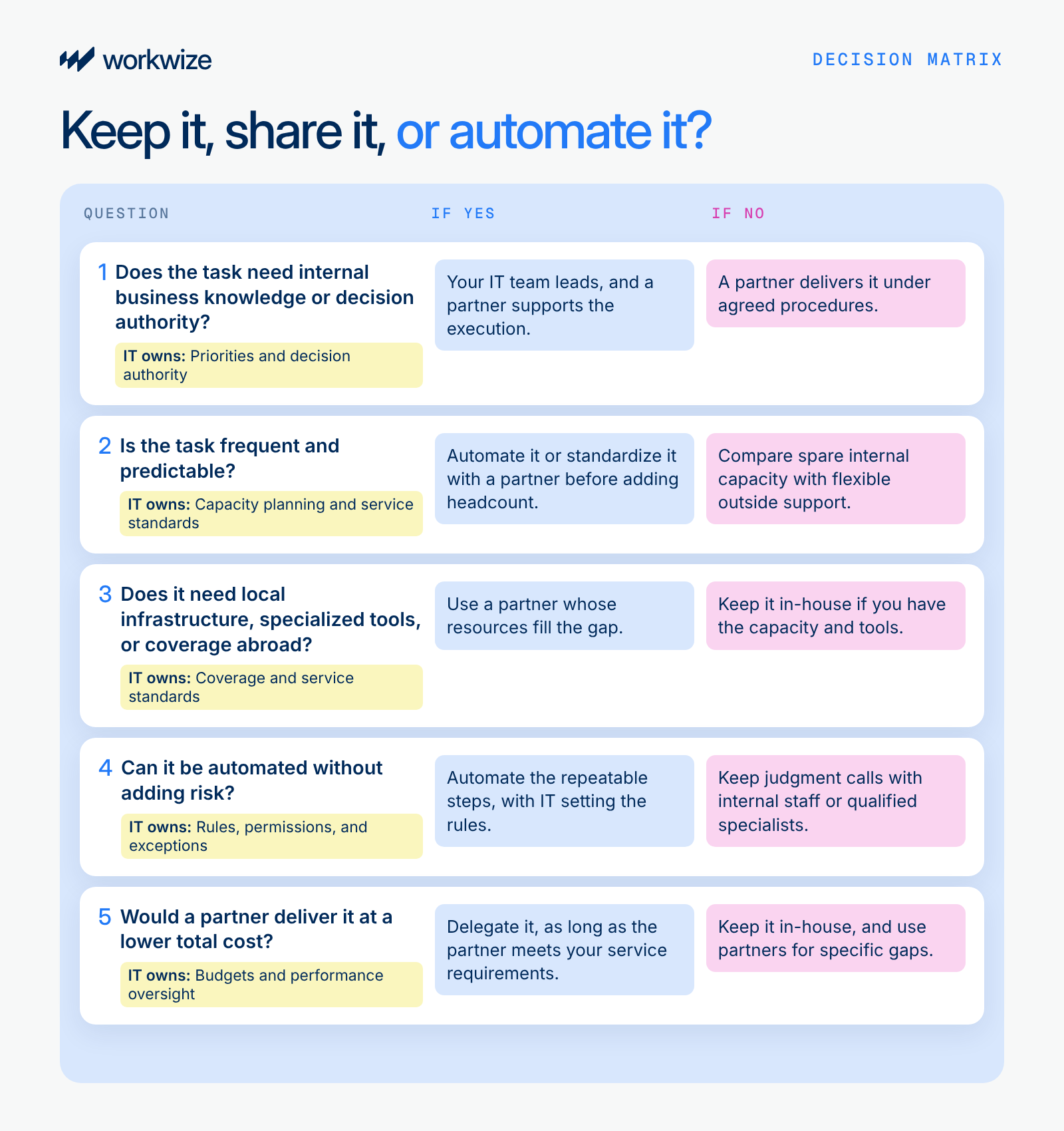
These five questions help you work out where internal involvement matters most, where a partner can take on more, and where automation can reduce the workload for both.
Does the task require internal business knowledge or decision-making authority?
Some decisions depend on information an external provider doesn't have. A partner can recommend a laptop, but whether an employee needs a more expensive model may depend on upcoming projects the partner knows nothing about. Internal IT is better placed to make that call, and a partner can then source and deliver the approved device.
Keep decisions that depend heavily on business priorities, budgets, or acceptable risk under internal control. You can still delegate the work needed to carry them out.
How often does the task occur, and how predictable is the workload?
Frequent tasks with predictable steps, such as onboarding, device requests, and scheduled maintenance, are strong candidates for automation, and often for outsourcing at the same time.
That combination is still co-managed IT. Your team writes the rules, and the partner's platform and logistics network carry them out. With Workwize, for example, an IT manager describes the onboarding process in plain English, including where approval is required. Workwize Agent turns that description into a workflow, and Workwize's warehouses and suppliers handle the physical work. Your team owns the policy, the partner runs it, and the software connects the two.
Also consider whether the work depends on one or two people. If a critical process stops whenever a particular administrator is away, a partner can provide backup coverage, as long as the provider has the documentation, access, and authority to step in.
Does the work require local infrastructure, specialized tools, or coverage in other countries?
Your team may have the expertise for a task but not the resources to do it in a particular location. An administrator in Austin can configure a laptop remotely but still needs someone in São Paulo to store, deliver, or retrieve it. A partner with local capabilities can fill gaps that another hire would leave open. Where the resources already exist internally, keeping the work in-house may make more sense.
Can the process be standardized or automated without adding risk?
Not every repetitive task should run without a person involved, so separate the steps that follow fixed rules from the ones that need judgment.
For example, an onboarding workflow can check inventory, pick an approved laptop configuration, and start a deployment request on its own, while a purchase above the employee's approved budget still waits for sign-off.
Security-sensitive activities need extra safeguards. Decide who can approve access, which systems a workflow can use, and what happens when a request doesn't meet the agreed conditions. Automation should remove unnecessary manual work without bypassing important controls. Our guide to building secure IT workflows covers how to set those guardrails.
Would it cost more to deliver the service internally than through a partner?
Hiring another employee won't reduce customs fees or international shipping costs, recover missing equipment, or put forgotten laptops back to use. A partner's local sourcing, asset tracking, and collection network, on the other hand, can lower the total cost of each device enough to make outsourcing worthwhile.
That depends on the full bill, including storage, retrieval, and disposal fees, and efficient internal operations can still offer better value where the infrastructure already exists. For a worked example, see our full-cost comparison of in-house IT and outsourcing.
Don't forget the work your team will still do. If every request needs someone internal to investigate the issue, explain it to the provider, and follow up until it's fixed, the arrangement frees up less capacity than expected, so include that coordination time when you compare costs.
This decision matrix brings the five questions together:
How to make a co-managed IT arrangement work
Once responsibilities are shared, success depends on how smoothly work moves between your team and the partner. Clear ownership, sensible controls, and regular reviews stop the coordination itself from becoming another full-time job.
Define responsibilities before work starts
An agreement to "handle offboarding" can leave both sides assuming the other will chase a missing laptop. The arrangement works better when everyone knows who does each step, who owns the outcome, and who gets involved when something goes wrong.
A RACI matrix puts those responsibilities into one table. Each task gets four roles:
- Responsible: Does the work.
- Accountable: Owns the outcome and has final authority, with one accountable owner per task.
- Consulted: Provides information or advice needed to complete the work.
- Informed: Receives updates on progress or results without taking part.
For an automated offboarding process, the split might look like this:
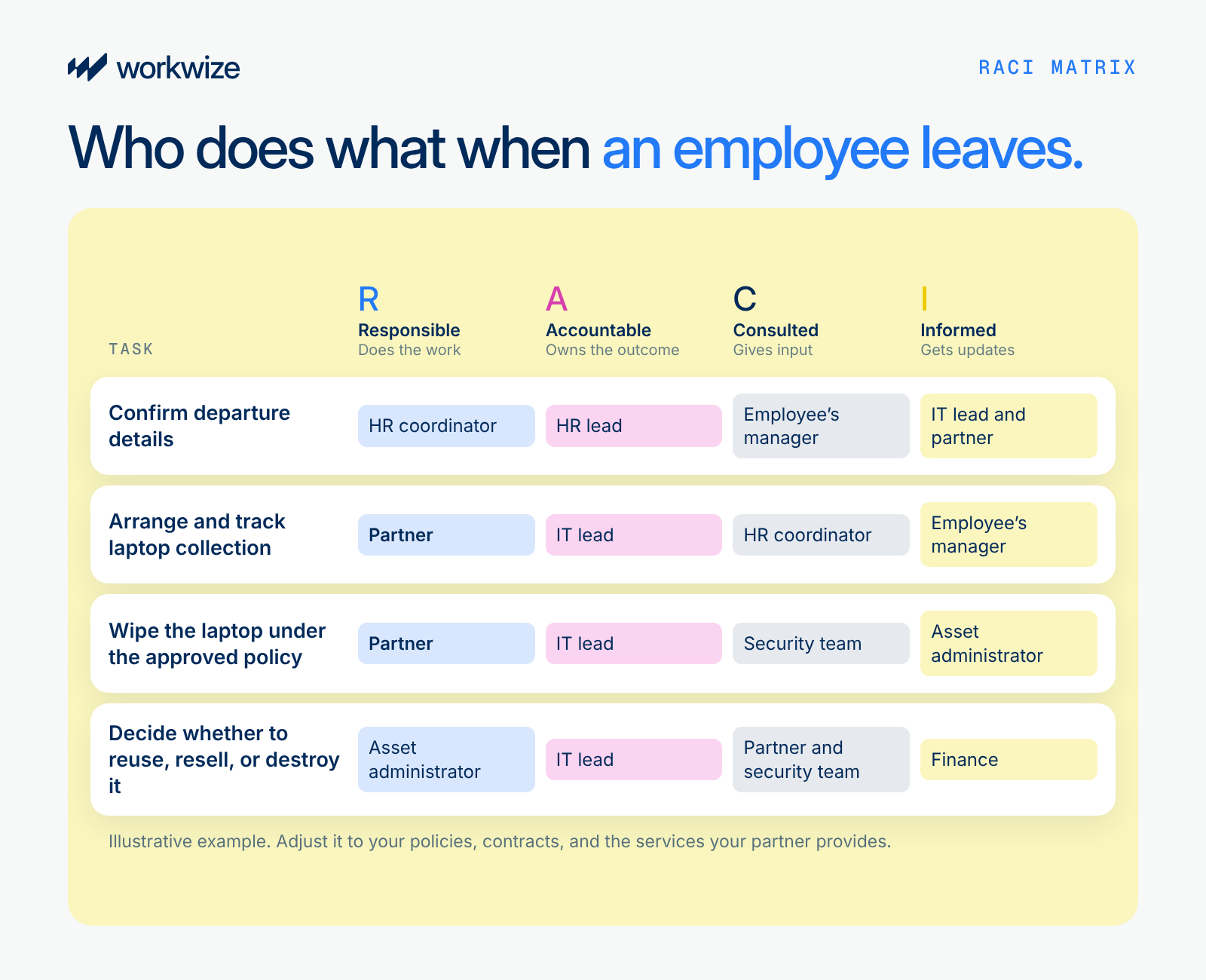
This is an illustrative example. The actual split depends on your company's policies, contracts, and the services your partner provides. Reflect the matrix in your service agreement too, so internal ownership doesn't leave the provider's contractual responsibilities unclear.
Give partners clear approval and escalation rules
Requiring permission for every routine action creates bottlenecks. A partner could arrange retrievals under an approved policy, for example, while purchases above a spending threshold need authorization. Decide which decisions the provider can make on its own, which need approval, and who can authorize exceptions.
Escalation rules matter just as much. If an employee refuses to return a laptop, a delivery is delayed, or a security incident occurs, both teams should know who takes ownership and when the issue gets escalated. For critical situations, the agreement should also say who can authorize immediate action and how the business will be told.
Automate the handoffs that keep work moving
Outsourcing delivers far less value if your team still spends hours copying requests between systems, checking order statuses, and chasing updates. Connect your internal systems to the partner's platform so approved requests trigger fulfillment and status updates flow back on their own.
For example, an employee's departure in your HR system can trigger a retrieval request, and collection updates can flow back into your asset records:
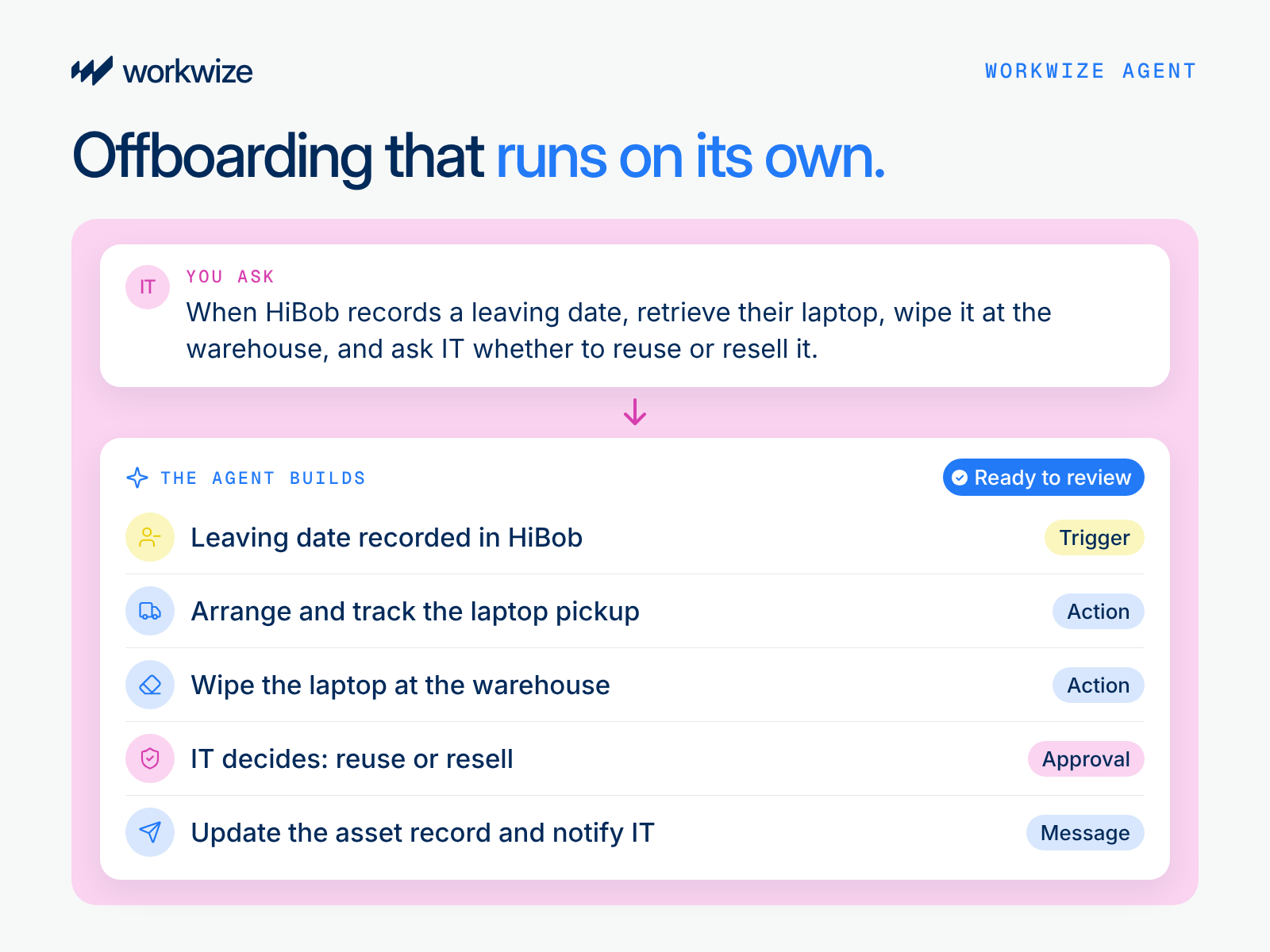
Automation can also route exceptions to the right person, so oversight goes to the work that needs attention. Before rolling these workflows out across the business, test them with a small group to confirm that approvals, notifications, and exception handling behave as expected. For more ideas, see these IT workflow examples you can automate today.
Agree on service levels that reflect employee needs
Service-level agreements (SLAs) should measure the results your business needs, not just how quickly a provider acknowledges a request. A fast response to an onboarding request means little if the employee's laptop arrives several days after their start date.
Depending on what you've outsourced, useful measures include:
- Device deployment: The percentage of employees who receive approved equipment by their start date.
- Asset retrieval: The percentage of devices recovered within the agreed collection period.
- Inventory accuracy: The percentage of equipment records that match the verified status and location of each asset.
- Equipment reuse: The percentage of eligible returned devices that are redeployed.
- Support performance: Resolution times and service availability for agreed categories of incidents.
Set targets based on the services provided and the locations covered. The agreement should define how each metric is calculated, when measurement starts, and what happens when performance falls short.
Review results against the original business case
Regular reviews should show whether service has improved, whether costs are still justified, and whether internal workloads have actually fallen. Employee feedback can reveal friction that a provider's dashboard misses.
For hardware operations, that means comparing the cost of delivering equipment across countries, tracking device recovery rates, and measuring how much value the company gets back through redeployment. Reviews should also cover unexpected charges, changes in demand, recurring issues, and whether the provider still covers the countries you need.
When results fall short, the fix might be a better workflow, different service coverage, or clearer internal approvals. Keeping the arrangement effective takes adjustments from both sides.
How Workwize helps internal IT teams scale their operations
Supporting employees across several countries shouldn't require building a separate procurement and logistics operation in every market.
Workwize combines an IT equipment lifecycle platform with physical operations across 130+ countries, covering procurement, warehousing, device preparation, deployment, retrieval, and redeployment. Your team keeps device standards, security requirements, purchasing policies, and approvals, and Workwize handles the agreed hardware operations, so you get local fulfillment without setting it up yourself.
For the people who own the budget, that means:
- Lower cost and complexity for global hardware operations: Equipment is sourced and delivered locally where available, which reduces reliance on international shipments and on separate suppliers in every region.
- More value from the laptops you already own: Laptops are retrieved from departing employees, checked, and redeployed where suitable instead of being replaced by default.
- One view across locations: Every device is tracked from purchase and assignment to retrieval and retirement.
- Growth without matching IT headcount: New countries and changes in demand are covered by an existing hardware operations network.
Workwize also connects hardware operations to the systems your team already uses. Workwize Agent connects natively with HR systems such as BambooHR and HiBob, device management platforms such as Microsoft Intune, Jamf Pro, Iru (formerly Kandji), and JumpCloud, identity providers such as Okta and Microsoft Entra ID, service desks such as ServiceNow, Jira Service Management, and Freshservice, and messaging tools such as Slack and Microsoft Teams. See the full list of Workwize integrations.
An administrator describes a process in plain English, and Workwize Agent builds a workflow that coordinates onboarding, inventory checks, purchase approvals, and device deployment. When HR confirms a new employee, for example, the workflow can check available stock and start an approved deployment or purchase request, and Workwize's logistics network handles the physical fulfillment.
Your team reviews and tests each workflow before it goes live. Orders, retrievals, and repairs the Agent creates wait for approval by default, and every change is saved in the workflow's version history. Workwize Agent and Workflow Builder are currently in early access, so confirm availability and supported integrations before you plan a rollout.
The result is a co-managed approach to hardware operations in which your IT team keeps strategic control, and Workwize provides the infrastructure and execution capacity to support a distributed workforce.
Book a Workwize demo to see how the platform can simplify global hardware management, improve asset recovery, and reduce the operational work on your internal IT team.


Establish a single source of truth for every IT asset across the globe.

More related resources to help you stop firefighting hardware operations.



Get monthly insights into how other IT leaders are improving their ops.




Stop coordinating
hardware like it's 2012.