




.svg)
.svg)

.svg)


.svg)




.svg)
.png?width=500&height=424&name=Style-1---V1-(1).png)

.png?width=1230&height=692&name=Vector%20(13).png)
Why Hidden IT Costs Are So Hard to Spot?
The hidden costs of poor IT management are obviously hard to spot. Otherwise, why would they be termed “hidden”?
One of the reasons why this happens is that these costs don’t bump instantly. They accumulate over time and are distributed across procurement records, finance ledgers, warranty renewals, SaaS subscriptions, insurance, and support tickets.
Another reason is that many organizations still rely on manual processes for IT asset management. If you’re wondering, many companies still handle asset inventories manually.
Here’s a Reddit post from just 4 months ago where the user is frustrated because of manually managing their assets.
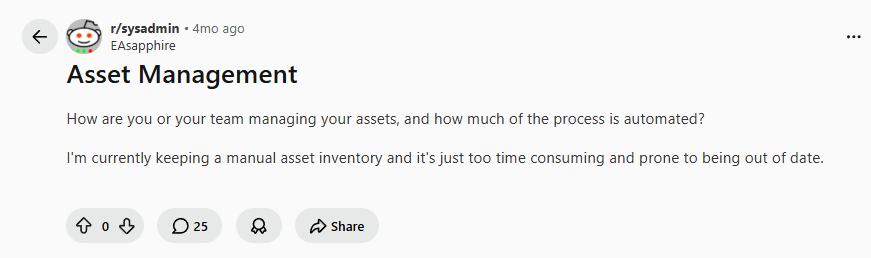
Source: Reddit
The problem is that manual asset records are obsolete the moment you complete them.
Sometimes laptops, monitors, servers, or networking devices are lost, retired, damaged, replaced, or not returned after offboarding. But they’re still active in the company’s fixed asset ledger.
This isn't a rare occurrence. EY-Parthenon estimates that 15%–30% of fixed-asset ledger data may be incorrect, often because asset retirements were never recorded.
As a result, finance and IT teams may continue paying for insurance, warranties, storage, audits, taxes, and replacement planning based on assets that no longer exist or are no longer usable.
Unless the costs become significant enough to trigger an investigation—or an audit uncovers the issue—they often remain invisible.
And inaccurate asset records are only one example. Organizations also face challenges related to software sprawl, shadow IT, compliance, procurement inefficiencies, and device lifecycle management.
If you'd like a deeper look at these issues, check out our guide on the most common IT asset management challenges.

The 7 Hidden Costs of Poor IT Asset Management
Here are some hard-to-spot hidden costs that arise because of not following IT asset management best practices:
1. Untracked and Lost Devices
It all starts with untracked and lost devices due to manual IT asset management. Manual methods are both time-consuming and get outdated almost instantly.
A spare monitor may stay with an employee after they leave, or an old desktop may be moved during a department reshuffle, without anyone updating the asset register.
On paper, those devices still look active. In reality, IT may have no idea where they are, who has them, or whether they should be retrieved, replaced, wiped, or written off.
And unless you implement continuous asset discovery in your organization, even automated inventory tools won’t work.
Here’s a Reddit user trying to convince their boss to invest in asset management software because they’re currently using manual methods. And upon auditing, they found they had lost 100 laptops over the past 4 years.
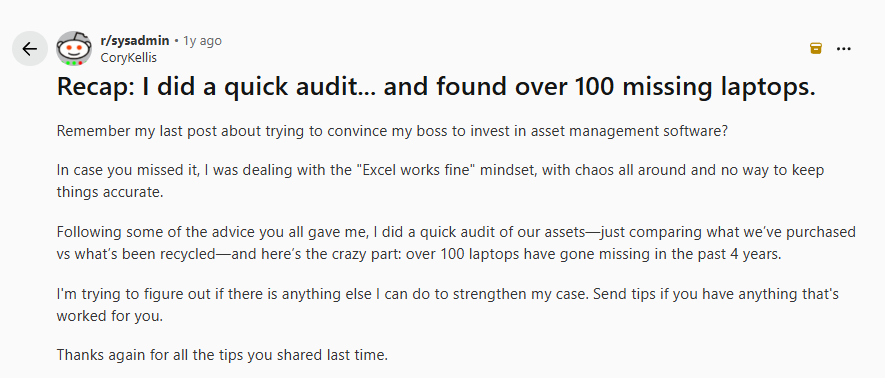
Source: Reddit
Here’s a list of handpicked IT asset tracking software in 2026 to help you ensure every asset (new or old) is tracked in real-time: 12 Best IT Asset Tracking Software in 2026.
2. Overbuying and Redundant Spending
Manually tracking assets is tough and error-prone.
Say you have 10 MacBooks assigned to 10 users. 5 out of the 10 have left the organization, but the assets are still assigned. Now, because of the lack of visibility, IT will be forced to order new equipment; a classic case of overbuying.
And you might still be paying for assets that are already in your storage or stolen by employees, because their status wasn’t updated.
A Wasp Barcode Technologies whitepaper notes that without accurate asset records, organizations routinely duplicate purchases. And if you can't find an asset, you can't redeploy it, recover its value, or make informed purchasing decisions.
Poor visibility also makes planning harder. If your inventory data isn't accurate, forecasting future hardware needs becomes guesswork. That can lead to unnecessary purchases, underutilized equipment, and money tied up in devices you didn't actually need.
Check out our list of the best IT inventory tracking software so you can avoid overbuying and redundant spending: Top IT Asset Inventory Software in 2026.
3. Reactive Maintenance and Emergency Repairs
Reactive maintenance and emergency repairs are two of the biggest productivity killers for IT teams.
Imagine a senior developer is scheduled to deploy a critical feature to production, but their laptop suddenly fails because it's well past its recommended refresh cycle. IT spends the next four hours troubleshooting the issue, sourcing a replacement device, restoring files, and getting the employee back up and running.
The immediate impact is obvious: lost productivity, delayed projects, frustrated employees, and IT resources diverted away from more strategic work.
Now imagine the same lack of proactive maintenance affecting a business-critical server, networking device, or production system.
According to ITIC's 2024 Hourly Cost of Downtime Survey, more than 90% of mid-size and large enterprises report that a single hour of downtime costs over $300,000. While a failed employee laptop won't create losses on that scale, the statistic highlights how expensive unexpected asset failures can become when they affect critical infrastructure.
The common thread is that both situations are preventable.
Organizations that wait for devices to fail often spend more on emergency repairs, unplanned replacements, and operational disruptions than they would have spent maintaining or replacing assets proactively.
Platforms like Workwize help reduce these risks by tracking the full asset lifecycle, including asset health, warranty coverage, maintenance history, and refresh schedules.
When a device is approaching the end of its useful life, nearing warranty expiration, or due for maintenance, the relevant teams can be notified in advance. This allows organizations to plan repairs, replacements, and renewals proactively rather than react to unexpected failures that disrupt business operations.

4. Software Licensing Penalties and Compliance Failures
Okta’s Businesses at Work report found that the average organization used 101 applications in 2024.
With so many tools at play, how would you track licenses for each across all the devices you own, especially without an automated solution? Employees could be buying software under IT’s nose, or a subscription meant for 20 users could be used by 40 users.
And the inability to track licenses would mean non-compliance, which is surprisingly common and financially stressful.
According to Flexera’s 2025 State of ITAM Report, nearly half (45%) of organizations paid more than $1 million in audit fines over the past three years.
5. Security Vulnerabilities and Data Breach Exposure
Untracked or unmanaged devices often have obsolete operating systems and outdated security patches. And to make things even worse, employees might be using pirated applications (ransomware in disguise) without the IT even knowing.
All this leads to costly security breaches that cost you around $4.4 million, according to IBM. And you’d be surprised to know that exploiting vulnerabilities is one of the top initial attack vectors attackers use, according to Verizon.
What’s even more concerning is that 92% of successful ransom attacks used an unmanaged device in the network, according to Microsoft’s Digital Defense Report 2024.
In a nutshell, unmanaged devices create vulnerabilities that attackers can exploit, resulting in breaches that cost you millions!
6. Manual Processes and Wasted IT Time
Manual IT asset management requires manual intervention for tasks that could be easily automated.
Take onboarding, for example. An IT manager has to manually find, compare, and manage vendors, create purchase orders, get them approved, place orders, manage documentation, deal with customs, and track devices until the device reaches the employee.
And if the inventory is manual, too, they might have to update assets every few minutes.
This right here is a perfect example of a high-value resource wasting his time doing tasks that could have been automated.
This IT manager, handling a distributed workforce, mentioned he was individually spending 11.5 hours each week just on equipment logistics:

Source: Reddit
If an IT manager earning $106,000 (average salary) a year spends 11.5 hours a week on repeatable asset-management tasks, the company is effectively spending about $30,475 per year on work that could potentially be automated.
This number can easily compound, based on the number of IT managers you have within your organization.
In addition to being time-consuming, manual processes are error-prone. One incorrect serial number or address entry could result in a new hire receiving the wrong laptop or no laptop at all.
No wonder, according to the IT manager who shared their views on Reddit, equipment-related support tickets make 38% of the total volume:

Source: Reddit
And this again has cost implications.
7. Lost Residual Value from Poor Redeployment and Disposal
Lack of visibility across your asset lifecycle bites you at every point.
Imagine 10 unaccounted-for laptops, just 2.5 years old, sitting in a storage closet. Three more years pass. Now, you can neither redeploy them because they're obsolete nor recover much of their value because they've aged out of the secondary market.
As a result, you're forced to purchase replacement devices at $2,500 each, bringing your total spend to $25,000.
With better asset visibility, you can identify underutilized devices early, redeploy them where needed, or recover value before depreciation erodes their worth. Platforms like Workwize help prevent this scenario by giving IT teams complete visibility into their asset lifecycle. Instead of discovering unused devices years later, you can redeploy them to employees who need them or resell them while they still retain their market value. That way, you’re able to recover up to 45% of the original purchase price and lower overall hardware spend.
How to Eliminate These Hidden Costs?
Here are some practical recommendations to help you identify and eliminate these hidden costs:
1. Centralize and automate asset inventory
The first fundamental step towards eliminating hidden costs is centralizing all the asset data in one place and automating the process, so it happens on its own.
In practical terms, this means using an IT inventory or an IT Asset Management (ITAM) platform where you can upload asset details to a single dashboard. And moving forward, it should automatically scan the network (continuously) to identify and add assets without manual effort.
The details you need to capture include device serial number, location, lifecycle status, maintenance history, condition, warranty details, MDM enrollment status, etc. Ideally, the platform must track the device and the associated details from procurement through disposal.
How does it help?
A centralized record ensures there’s a single source of truth, so IT, HR, admin, and other teams stay on the same page.
As assets are tracked/managed right from the moment they enter your system, the chances of them becoming ghost assets drop significantly. No ghost assets means you can avoid unnecessary replacements, and a clean record helps with audits.
2. Encourage collaboration between HR and IT
No department should work in silos, especially IT and HR.
Say an employee is set to join the organization 3 weeks from now. And the HR adds the employee details in HRIS. But forgets to inform the IT team until the very last week.
This makes it tough for the IT to deliver pre-configured devices to new hires on time, resulting in a poor onboarding experience. And the HR is blaming IT and vice versa.
What you should do is connect HR and IT workflows.
If the HRIS platform (like BambooHR) integrates with your ITAM platform (like Workwize), events like “adding an employee to the HRIS” would instantly notify the IT team. No manual intervention required.
The same goes for offboarding. An HR event like “updating the employee’s last date” triggers an offboarding workflow, which ensures that access is revoked and assets are retrieved from employees without fail.
How does it help?
When workflows are connected, IT and HR remain on the same page. And as there’s minimal manual dependence, the assets reach employees on time and are retrieved successfully. This further lets you decide what you can do with them: redeploy, resale, dispose of, or recycle.
To learn more about how collaboration between the HR and IT departments helps, check this out: How HR and IT Can Collaborate to Create a Better First Day for New Employees.
3. Automate procurement, vendor coordination, and shipping
Some of the most time-consuming aspects of the IT department revolve around comparing vendors, raising purchase orders, chasing approvals, tracking courier updates, and updating employees.
So, use ITAM platforms like Workwize to automate procurement, vendor coordination, and shipping. With these platforms, you can procure assets from verified vendors across 100+ countries and ship them to employees, preconfigured with the required tools and software.
How does this help?
This ensures IT is not wasting time on redundant tasks and has enough time to improve security and prepare for audits. For instance, Workwize helps save over 40% of manual time by automating lifecycle processes.
Plus, automated procurement means zero manual errors, timely asset deliveries, and better onboarding experiences.
4. Move from reactive repairs to proactive maintenance
Reactive maintenance is when IT takes charge after the damage is already done. This is expensive and leads to downtime, which further adds to the costs.
Make sure your ITAM platform tracks device health, warranty status, repair history, and performance issues and notifies IT well in advance.
If there’s a device that’s associated with multiple tickets or is nearing its replacement date, IT would know what to do before any damage is done.
How does this help?
Proactive maintenance gives IT teams enough time to predict issues and keep replacement devices in advance. This ensures teams can work without hiccups and prevents downtime, directly reducing the associated costs.
5. Standardize and automate retrieval, wiping, and audit documentation
Similar to standardizing onboarding (by automating procurement, shipping and vendor management), you must standardize offboarding. And you can do so by automating end-of-life processes, including asset retrieval, wiping, and audit documentation.
Create offboarding workflows using your HRIS and ITAM tools, triggered automatically when an employee is marked to leave.
The workflows should include sending prepaid labels and return kits, revoking access, tracking shipment, confirmations, wiping devices clean, facilitating a data erasure certificate, and storing proof of return.
How does this help?
With an automated and standardized process in place, you can reduce the chances of losing any laptops or risking a breach to almost zero. This significantly reduces the costs.
Plus, you can redeploy the devices that help you avoid buying new devices, saving you money directly.
6. Use Lifecycle Data to Reduce Unnecessary Purchases and Recover Value
Analyze the lifecycle data your ITAM platform records to make informed decisions.
For instance, your tool tracks the device’s age, condition, warranty status, repair history, assigned user, current lifecycle stage, and resale or redeployment potential.
Before buying new hardware, you can check whether existing devices can be wiped, repaired, reassigned, or moved from storage to active use.
You must also identify devices that are nearing the end-of-life early enough. This will help you recover value through resale, donation, buyback, or certified recycling.
How does it help
Because IT can reuse available devices before ordering new ones, this method reduces unnecessary purchases. It also prevents assets from sitting in storage until they lose all resale value.
How Does Workwize Eliminate Hidden IT Asset Costs?
Workwize is a global ITAM platform that automates your entire asset lifecycle from procurement and deployment to retrieval, repairs, and disposals across 100+ countries. Here’s how Workwize helps you eliminate IT asset costs:
With Workwize, you can track all your laptops, servers, computers, and other assets across 100+ countries in real-time, from a centralized dashboard. When you know where your assets are, who has them, and what their status is, you can prevent shadow assets and overbuying.
Workwize integrates with your favorite HRIS platform (HiBob, BambooHR, Deel, and more.) and helps you create automated workflows triggered by your HRIS for onboarding and offboarding. This takes a huge manual burden off IT’s shoulders and saves time by up to 40%.
Automated workflows translate to higher efficiency and zero errors. Each asset reaches your employee on time, and no asset is lost during retrievals, which directly helps prevent hidden costs.
Being an end-to-end lifecycle platform, Workwize also handles resale, recycling, disposal, or redeployment after the assets are retrieved. You can redeploy relevant assets, resell them to recover up to 45% of the original value, recycle them to gain points, or dispose of them, as you like.
Because Workwize tracks all your assets (in real-time) throughout their lifecycle, there’s always a record of how each asset was handled. This chain of records helps you defend yourself during audits and prevent hefty fines
If you want to see how Workwize helps you tangibly save money, book a free demo now.


Establish a single source of truth for every IT asset across the globe.
.png?width=258&height=318&name=g10%20(5).png)
More related resources to help you stop firefighting hardware operations.

Get monthly insights into how other IT leaders are improving their ops.



.png?width=2880&height=1232&name=Group%202147262874%20(1).png)
Stop coordinating
hardware like it's 2012.
.svg)
.png?width=172&height=68&name=apple%20business%20patner%20(1).png)
.svg)
.svg)
.svg)
.svg)